1. Choking hazard -Small parts. Children should
use the device under adult supervision.
2. Built-in non-removable battery,any improper
usage may cause battery safety hazards and
lead to safety problems.
3. For better protect battery, we recommend
not use the pencil when charging.
4. We recommend using replacement tips
officially manufactured by metapen.
5.Please use the device within 0'C~35°c, and
store it within -20°C~45°c. Too high or low
temperature may cause malfunction.
6. Please charge within 0°C~40'C to avoid
battery performance degradation and standby
time reduction.
7. Do not use the device in wet places or near
strong magnetic fields.
Metapen Pencil Crown
User Manual
Packing List
Compatible devices
Quick Guide
1. Power on
2. Power o
3. Charging
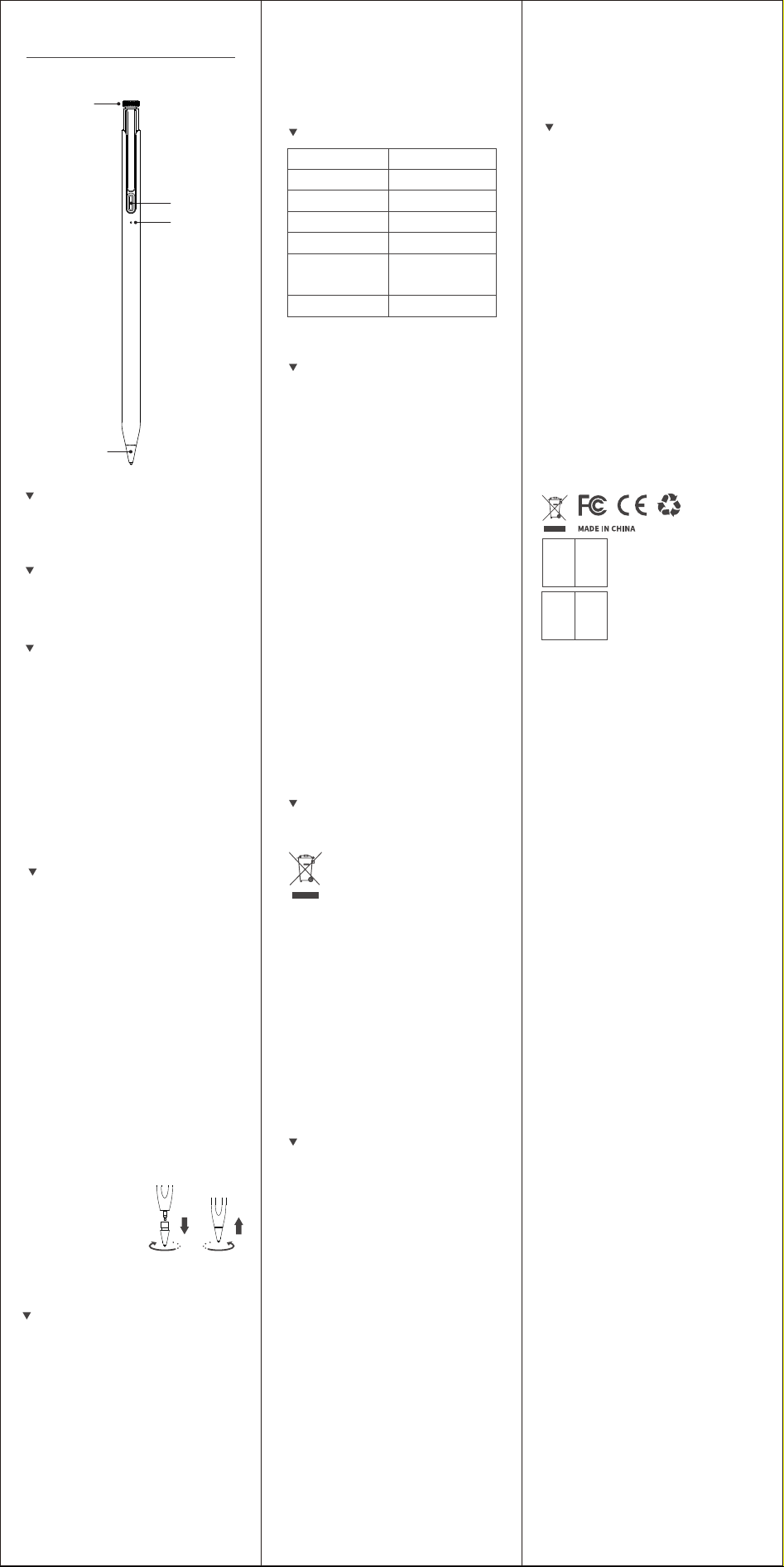
Rotary button
Type-C
Charging Port
LED Indicator
Replaceable Tip
Metapen Pencil Crown User Manual
Pen Tips Type-C Cable
Customer Service
Website:
www.metapen.com
Email:
iPad Pro 13-inch (M4, M5 and later)
iPad Pro 12.9-inch (3rd, 4th, 5th, 6th)
iPad Pro 11-inch (1st, 2nd, 3rd, 4th, M4, M5 and
later)
iPad Air (3rd, 4th, 5th, M2, M3, M4 and later)
iPad (6th, 7th, 8th, 9th, 10th, A16 and later)
iPad Mini (5th, 6th and A17 Pro and later)
No need to pair with an APP or Bluetooth, ready
to use when it's on. Click once the button to
turn on the Pencil Crown. The indicator light will
show the power level.
Battery Power Percentage:
White: ≥60%
Blue: 20%~60%
Red: ≤20%
Warning
Please use our included Type-C cable and
make sure the charger is connected properly.
When charging: Red breathing light
Fully charged: White breathing light
4. Replace the pen tip
If you need to replace the
pen tip, unscrew the old
tip counterclockwise and
then screw in the new tip
clockwise.
Press and hold the button for 2 seconds or
leave it inactive for 5 minutes. The Pencil Crown
will automatically shut down and the indicator
light will go out after the pencil is turned off.
*How to find your iPad Model:Settings
→
General
→
About
→
Model Name
*Please ensure your iPad is running iOS 12.2 or
later.
* If your iPad was paired with an Apple pencil
before, please unpair it before using the pen.
Specification
FAQ
Correct Disposal of This
Product
FCC Statement
Q1: Why my pencil can't work with my
iPad?
1) Make sure that Pencil Crown turns on.
2) The pencil Pencil Crown supports iPad
series 2018 and later models. Not work for iPad
before 2018, iPhone, Android, Microsoft
devices.
*Identify your iPad model: Tap Settings → Tap
General → Tap About → Find Model Name →
Check the "Compatible devices" part at the
beginning.
3) All iPad models must be updated to iOS 12.2
or above. Use the official notes downloaded in
the App store.
4) If iPad was paired with an Apple pencil
before, unpair it before using the Pencil Crown.
Q2: Why my pencil does not turn on or
has baery problems?
1) Please make sure your pencil is fully
charged (led will turn White)
2) Click once the button to turn it on, long
press for 2 seconds to turn it off.
3) When charging, use our included Type-C
cable and make sure the charger is
connected properly. If the tips above do not
solve your problem, please don't worry and
feel free to contact us at support@metap-
en.com (24 Hours Fast Response & 12 Months
Warranty)
To prevent possible harm to the environment
on human health from uncontrolled waste
disposal, please separate this from other types
of wastes and recycle it responsibly to promote
the sustainable reuse of material resources.
Household user should contact either the
retailer where they purchased this product or
their local government office, for details of
where and hew they can take this item for
environmentally safe recycling.
Business users should contact their supplier
and check the terms and conditions of the
purchase contact This product should not be
mixed with other commercial wastes for
disposal.
Any Changes or modifications not expressly
approved by the party responsible for
compliance could void the user's authority to
operate the equipment.
This device complies with part 15 of the FCC
Rules. Operation is subject to the following two
conditions: (1) This device may not cause
harmful interference, and (2) this device must
accept any interference received, including
interference that may cause undesired
operation.
ISED statement
This device complies with Industry Canada
licence-exempt RSS standard(s).
Operation is subject to the following two
conditions: (1) this device may not cause
interference, and (2) this device must accept
any interference, including interference that
may cause undesired operation of the device.
Le présent appareil est conforme aux CNR
d'Industrie Canada applicables aux appareils
radio exempts de licence. L'exploitation est
autorisée aux deux conditions suivantes : (1)
l'appareil ne doit pas produire de brouillage, et
(2) l'utilisateur de l'appareil doit accepter tout
brouillage radioélectrique subi, même si le
brouillage est susceptible d'en compromettre
le fonctionnement.
RF Radiation Exposure
(Waste Electrical & Electronic
Equipment)
This Marking shown on the product or
its literature, indicate that it should
not be disposed with other household
wastes at the end of its working life.
8. Keep the device dry and do not use harsh
chemicals, strong cleaning to clean the device.
Wipe the device with a clean, dry soft cloth.
9. lf any part of the device is cracked or
broken,please stop using it immediately and
contact us:
Item name
Model Number
Battery Type
Charging Method
Charging Time
Using Time
Standby Time
Metapen Pencil Crown
ME-APP812
125mAh lithium battery
Type-C
30 minutes
15 hours when full
charged
365 days
*Wireless charging is not supported.
CAN ICES(B)/NMB(B)
Name: Sea&Mew Accounting Ltd
Address: Electric Avenue Vision 25,
London, Enfield EN3 7GD
Contact Person: Billy Han
E-mail: [email protected]
Name: Sea&Mew Consulting GmbH
Address: Mittenhuber Straße
4,92318 Neumarkt
Contact Person: Yuan Li
E-mail: [email protected]
UK
EU
REP
REP
Note: This equipment has been tested and found to
comply with the limits for a Class B digital device,
pursuant to part 15 of the FCC Rules. These limits
are designed to provide reasonable protection against
harmful interference in a residential installation.
This equipment generates, uses and can radiate radio
frequency energy and, if not installed and used in
accordance with the instructions, may cause harmful
interference to radio communications. However, there
is no guarantee that interference will not occur in a
particular installation. If this equipment does cause
harmful interference to radio or television reception,
which can be determined by turning the equipment off
and on, the user is encouraged to try to correct the
interference by one or more of the following measures:
—Reorient or relocate the receiving antenna.
—Increase the separation between the equipment and
receiver.
—Connect the equipment into an outlet on a circuit
different
from that to which the receiver is connected.
—Consult the dealer or an experienced radio/TV
technician for help.
This equipment complies with FCC/ISED radiation
exposure limits set forth for an uncontrolled
environment.
L'appareil est conforme aux limites d'exposition
aux rayonnements spécifiées par la FCC/ISED pour
les environnements non controlés.