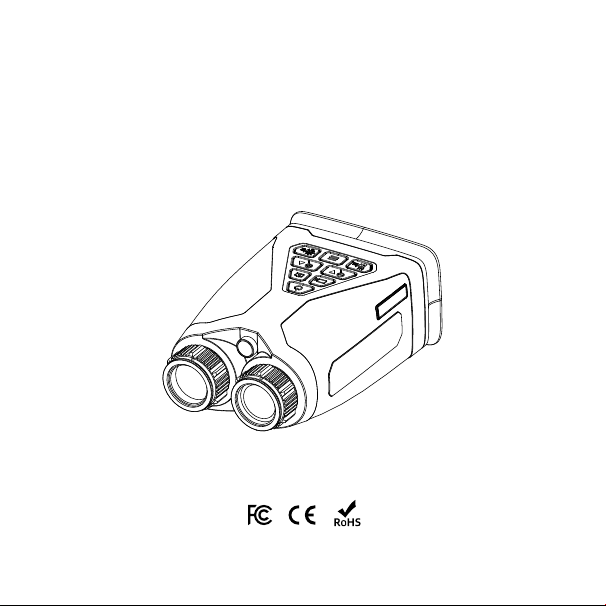
Product Model: C4
AI Full Color Binoculars
User Guide

Product Introduction ........................................................
Product Appearance and Interfaces .....................................
Product Features ............................................................
Specifications ................................................................
Package List ..................................................................
Safety Instructions ..........................................................
Warranty Terms ..............................................................
Disclaimer ....................................................................
Company ......................................................................
2
2
5
6
7
8
9
10
10
Contents
1
Product Introduction
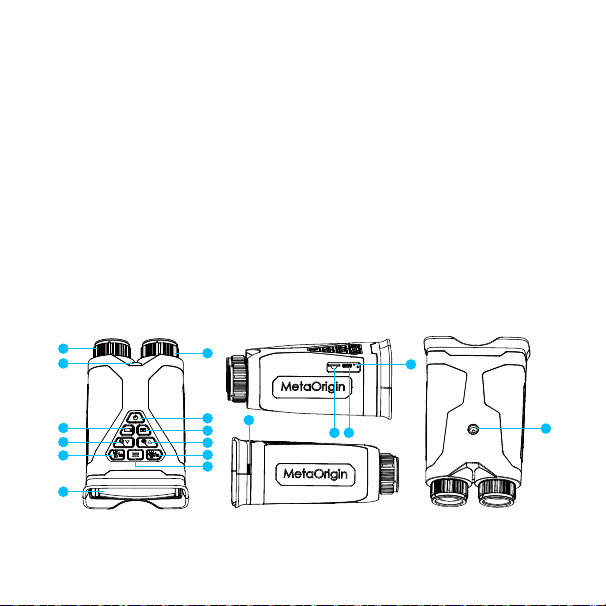
Product Appearance and Interfaces
For detailed illustrations,
please refer to the next page
1
3
5
7
9
10
2
4
6
12
8
11
13
14
15
17
16
2
The AI Full-Color Binoculars are equipped with a new-generation,inde-
pendently developed AI full-color night vision algorithm, pioneering a new
category of “zero-light full-color” imaging. This breakthrough greatly
enhances adaptability across diverse application scenarios. Whether for
wildlife observation, outdoor exploration and camping, marine navigation,
professional security patrols, nighttime equipment inspections, or search
and rescue missions — it delivers exceptional performance, allowing you to
see a vivid, full-color world even in complete darkness.

No. FunctionModule Description
1
FocusKnob
Rotateleftorrighttoadjustimageclarity.
2
InfraredLamp
Providesinfraredillumination.
3
TacticalLight
Providesvisiblelightillumination.
4
PowerButton
Pressandholdfor3secondstopoweronoroff.
5 RecordButton
1. In HomeMode:pressoncetostartrecording,
pressagaintostop.
2. InMenu/ImagePreview/VideoPreviewMode:
pressoncetoreturntoHomeMode.
6 PhotoButton
1. InHomeMode:pressoncetotakeaphoto.
2. InMenu/ImagePreview/VideoPreviewMode:
pressoncetoreturntoHomeMode.
7
ZoomOut/Down
Button
1. InHome/RecordingMode:zoomout.
2. InMenu/ImagePreview/VideoPreviewMode
:
presstomovedown.
8
ZoomIn/Up
Button
1. InHome/RecordingMode:zoomin.
2. InMenu/ImagePreview/VideoPreviewMode:
presstomoveup.
9
TacticalLight/
DeleteButton
1. InHome/RecordingMode/Power-off state:
pressoncetoturnthetacticallighton/off;
double-clickquicklytoactivatestrobemode;
pressonceagaintoturnoff.
2. InImage/VideoPreviewMode:presstoenterthe
deleteinterfac
eandpressOKtoconfirmdeletion.
3

10
InfraredLight/OK
Button
1. InHome/RecordingMode:pressoncetoturnthe
infraredlighton/off.
2. InMenuMode:actsasaconfirmbuttonfor
parametersettings.
3. InVideoPreviewMode:actsasaconfirmbutton
toplayselectedvideo.
11 MenuButton
1stpress:enterMenuMode;
2ndpress:enterImagePreviewMode;
3rdpress:enterVideoPreviewMode;
4thpress:returntoH
omeMode.
12 DisplayScreen Dis
playwindowforbinocularimagery.
13 MemoryCardSlot Slotforinserting/removingmemorycard.
14 ChargingPort
1. 5V/3Achargingport;
2. ConnecttoacomputerviaUSBfordirectfile
accessandtransferofphotos/videos.
15
ChargingIndicator
L
ight
Redlightonduringcharging;greenlightonwhen
f
ullycharged.
16 WristStrapMount
Passthewriststrapthroughthemountforeasy
carrying.
17
Universal1/4”
S
crewMount
Tripodmountinginterface.
4
Product Features
AI Full Color Binoculars - See in the dark, in full color. Your reliable partner
for any tough environment, combining smart tech with rugged design.
• AI Full-Color Technology
See clear color images in near-total darkness - no extra light needed. Perfect
for night patrols, equipment checks, and outdoor adventures.
• IP65 Industrial-Grade Dust and Water Resistance
IP65 rating keeps out dust and water. Works reliably in tough conditions.
• 10000mAh huge Battery
10000mAh battery lasts over 10 hours on a single charge - no power worries
during long tasks.
• Please charge before use to avoid low-battery issues.
• For full functionality, insert an SD card first.
• Always close the port cover after use to maintain water and dust resistance.
• Keep in a cool, dry place. Sudden temperature or humidity changes can cause
lens fogging and condensation.
!
Note
5
• WiF Mode: When connecting to IOS/Android APP, Please go into menu mode
and open WiFi function,Then follow connecting instructions on Home page.
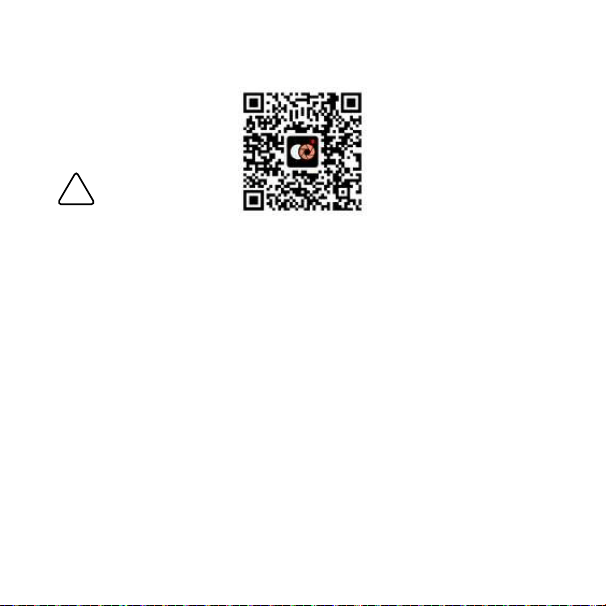
• APP download QR code:

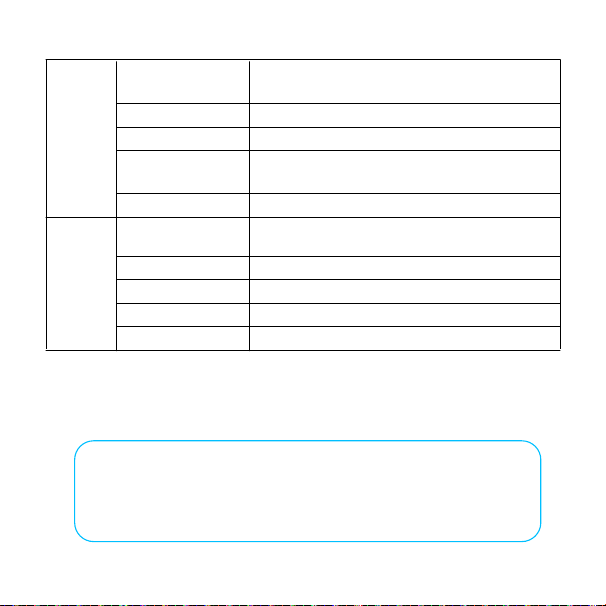
Specifications
6
Core
Params
MiniIlluminance Full-colornightvision,minimum0.001Lux
MaxResolution 2688*1520
VideoFrameRate 30fps,Dynamicadjustment
AIISP Full-colornightvisionAIalgorithm
ElectronicAnti-
shake(optional)
Supported
FocusingMethod ManualFocusing
DigitalZoom 8x
ViewingDistance
1KMduringtheday;nightvision500min1x10⁻³
luxwithoutanyadditionallightsource
Lens
Aperture F1.0
FocalLength Fixed25mm
FieldAngle DFOV:21°,HFOV:17°,VFOV:10°
Day/NightMode Color/B&Wmode,manualswitching
Screen
ScreenSize 3.5Inches
Screenresolution 1920*1080
Functions
Photo/Video Supported
PhotoResolution 2688*1520,1920*1080
VideoResolution 2688*1520,1920*1080
WiFi
Wi-Fi hotspot Wi-Fi 2.4 GHz hotspot for APP connnection
Package List
1 × AI Full Color
Binoculars
1 × 32GB SD Card
1 × Power Cable
1 × Shoulder Carry Bag
1 × Bag Shoulder Strap
1 × Wrist Strap
1 × Lens Cleaning Cloth
1 × User Guide
1 × Desiccant Pack
1 × Packaging Box
7
Functions
Album/Video
Playback
Supported
MemoryCapacity TFcard,supportupto512GB
DataTransmission USBOTG(dataandfiletransfer)
TacticalLight
Whitelightlamp,supportsflashlight/burstflash
mode
InfraredLamp
General
Batterytype
10000mAh,maximumbatterylifeexceeds10
hours
Charging USBType-C,MAX5V3A
ChargingProtection Overchargeandshortcircuitprotection
Operatingtemp
urerange
NetWeight Approx.650g
.
Supports 850nm infrared fill light
-10℃ ~ +55℃

!
Danger
Safety Instructions
• This device contains a rechargeable lithium battery. Do not disassemble or
expose to strong impact. Stop use immediately and contact the manufacturer
if the battery shows any abnormality.
• Only use the included charging cable or certified power adapters. Do not
charge near heat sources or in humid conditions to prevent electric shock, fire,
or explosion.
• Charge between 0°C and 40°C. Extreme temperatures may prevent charging,
damage the battery, or shorten its lifespan.
• Store the device between -10°C and 45°C. If unused for extended periods
(e.g., one month), recharge regularly to prevent battery damage from
over-discharge. Note: Low battery level, cold, or hot conditions can accelerate
this damage.
• Do not shine the infrared or tactical light directly into eyes, as this may cause
permanent vision damage or photosensitivity Diseases.
• Avoid pointing the device at the sun or intense light sources to prevent eye
injury or damage to the product.
8

Warranty Terms
Thank you for choosing our product!
We are dedicated to delivering reliable quality and service. Please review the
warranty terms below.
Warranty Coverage
Free repair or replacement service is provided for eligible products and
components within the warranty period (0–12 months, depending on product
type). For details, contact your reseller or our official support team. Local
regulations may affect specific terms.
Warranty Claim Requirements
To request service, please provide:
• This warranty certificate
• The original purchase invoice, order record, or valid proof of purchase
(clearly indicating the purchase date)
Claims without valid proof may not be accepted.
The following cases are not eligible for free warranty service
• Damage caused by misuse, accidents, or operation outside the User Guide
instructions
• Unauthorized disassembly, modification, or repair
• Damage from natural disasters or other force majeure events
9

• Normal wear and tear, surface scratches, or color fading
• Invalid, altered, or mismatched warranty documents
• Any failure not related to product design or manufacturing quality
Disclaimer
• The warranty terms in this guide are your exclusive legal rights and replace
all other warranties. Our maximum responsibility is limited to repairing or
replacing the product. We are not liable for any indirect losses resulting from
product use, including data loss or profit loss.
• Due to product improvements, supply chain changes, and testing variations,
the actual product's appearance, software, features, and specifications may
differ from this guide. Please refer to the physical product. For the latest
information, contact your point of purchase.
10
Brand:Heisendall International Ltd.
Address:18 Kin Hong Street, Kwai Chung, Kwai Tsing District, New Territories
MADE IN CHINA
Manufacturer: Shenzhen MetaOrigin Intelligent Systems Co., Ltd.
Address:2202, Tower 2, Joy City, Shenzhen, China
Company
FCC Requirement
changes or modifications not expressly approved by the party responsible for
compliance could void the user’s authority to operate the equipment.
This device complies with part 15 of the FCC Rules. operation is subject to the
following two conditions:
(1) this device may not cause harmful interference, and
(2) this device must accept any interference received, including interference that
may cause undesired operation.
Note: This equipment has been tested and found to comply with the limits for a
Class B digital device, pursuant to part 15 of the FCC Rules. These limits are
designed to provide reasonable protection against harmful interference in a
residential installation. This equipment generates, uses, and can radiate radio
frequency energy, and if not installed and used in accordance with the instructions,
may cause harmful interference to radio communications. However, there is no
guarantee that interference will not occur in a particular installation. lf this
equipment does cause harmful interference to radio or television reception, which
can be determined by turning the equipment off and on, the user is encouraged to
try to correct the interference by one or more of the following measures:
_ Reorient or relocate the receiving antenna.
_ lncrease the separation between the equipment and receiver.
_ Connect the equipment into an outlet on a circuit different from that to which the receiver
is connected.
_ Consult the dealer or an experienced radio/TV technician for help.