
ADS-SP-060
Outdoor Mobile Speaker
User Manual
I. Features
1. Ultra-large magnetic circuit high-sensitivity speaker with high penetrating power,low-frequency
shock and perfect medium-/high-frequency representation.
2. The latest decoding chips supporting stably playback of MP3 in up to 32GB USB/TF card.
3. FM radio reception - high-quality digital radio with automatic channel search and storage of up
to 30 channels.
4. 3.5mm AUX audio input for each connection to a wide range of sound sources.
5. Built-in high-capacity battery for consecutive playback of up to 2 hours.
6. Battery with built-in recharging protection to present a long and stable service life.
7. Built-in low battery and full recharging indication. Human-oriented use.
8. With handle design for best choice of mobile speaker.
9. Support Bluetooth function.
II. The bluetooth pairing operation and related parameters:
1.Power: Switch on power to enter the mode of Bluetooth.
2.Switch on the Bluetooth function of Mobile phone and searching , while the Mobile phone shows
“ART.30-85”, click the connect directly . mobile phone connection do not need password , if need
password , please input “0000” to go on pairing . After success pairing , the speaker will send out a
voice of prompt . it is success pairing between mobile phone and Bluetooth speaker.
3.Play the music of your mobile bphone directly and will give out beautiful voice from speaker.
III. Functional Operations and Features
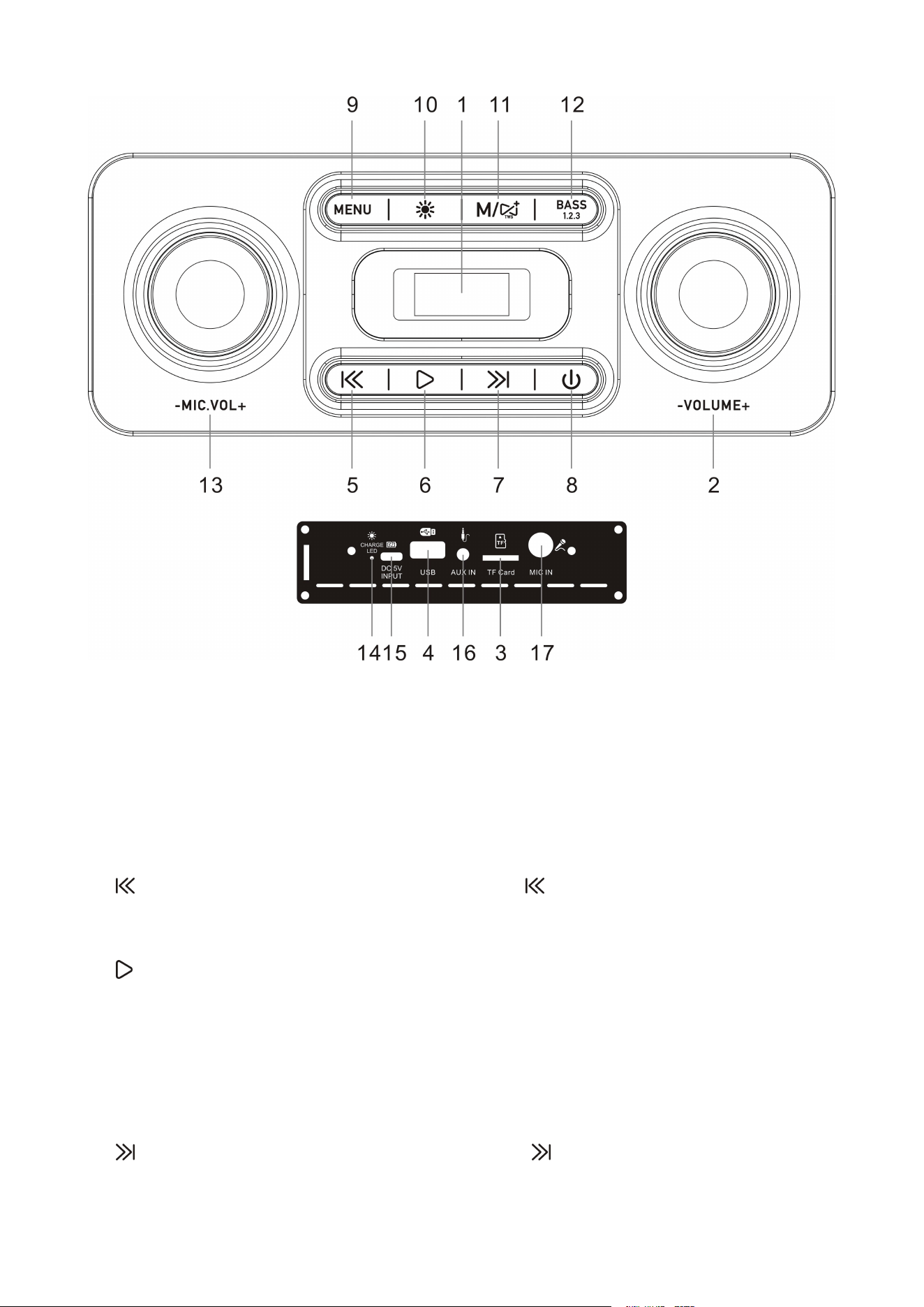
1. LED Screen.
2. Master Volume: In USB/TF/AUX/Bluetooth/FM mode, use it to regulate volume output from
the speaker.
3. TF Port: Read audio files in MP3 format in TF card in capacity up to 32G (FAT32).
4. USB Port: Read audio files in MP3 format in USB storage device in capacity up to 32G
(FAT32).
5. : In ECHO/BASS/TREBLE mode, Long press the“ ”key to reduce the volume. In the play
status of USB/TF Card/Bluetooth, Short press it to select the previous song. In FM receiving status,
Short press it to select the previous channel after a full station search has been executed.
6. /SCAN: In USB/TF card/Bluetooth reading status, short press it to play/pause, In USB/TF
card reading status, long press it to select one of four playback sequencing modes (All - play all
tracks in sequence; RAND - play in random; ONE - repeat one track; FOL - repeat all tracks in a
folder). In FM receiving status, long press it to execute a full search (it is recommended to execute
at least one full search before using radio receiving function. All founded stations will be saved
even in power-off). In AUX input / FM radio status, short press it to toggle between mute and
normal volume.
7. : In ECHO/BASS/TREBLE mode, Long press the “ ”key to increase volume. In USB/TF
card/Bluetooth reading status, Short press it to go to the next song. In FM receiving status, Short
press it to select the next channel after a full station search has been executed.

8. POWER: Long press to switch ON/OFF.
9. MENU: In the "MENU" mode, short press once times for bass adjustment mode, short press
twice times for treble adjustment mode, short press three times for microphone reverb adjustment
mode, in each mode, adjust the“ ”or“ ”keys to control the volume output.
10. : Short press it is LED light mode button.
11. BASS1.2.3: Short press to switch between indoor and bass boost and outdoor modes.
12. Recharging indicator light: When recharger is connected, the red light turns on. When the device
is fully recharged, the light turns off.
13. DC 5V recharging: DC 5V recharging port.
14. AUX IN: External sound source input port (plug-and-play).
CAUTION:
Please Be sure to charge while music distorted.
FCC Warning Statement
Changes or modifications not expressly approved by the party responsible for compliance could
void the user’s authority to operate the equipment. This equipment has been tested and found to
comply with the limits for a Class B digital device, pursuant to Part 15 of the FCC Rules. These
limits are designed to provide reasonable protection against harmful interference in a residential
installation. This equipment generates uses and can radiate radio frequency energy and, if not
installed and used in accordance with the instructions, may cause harmful interference to radio
communications. However, there is no guarantee that interference will not occur in a particular
installation. If this equipment does cause harmful interference to radio or television reception,
which can be determined by turning the equipment off and on, the user is encouraged to try to
correct the interference by one or more of the following measures:
‐‐ Reorient or relocate the receiving antenna.
‐‐ Increase the separation between the equipment and receiver.
‐‐ Connect the equipment into an outlet on a circuit different from that to which the receiver is
connected.
‐‐ Consult the dealer or an experienced radio/TV technician for help.

FCC Radiation Exposure Statement
The antennas used for this transmitter must be installed to provide a separation distance of at least
20 cm from all persons and must not be co‐located for operating in conjunction with any other
antenna or transmitter.
This device complies with Part 15 of the FCC Rules. Operation is subject to the following two
conditions:
(1)This device may not cause harmful interference.
(2)This device must accept any interference received, including interference that may cause
undesired operation.