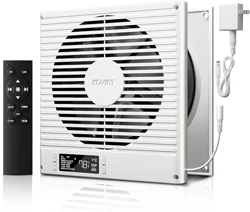
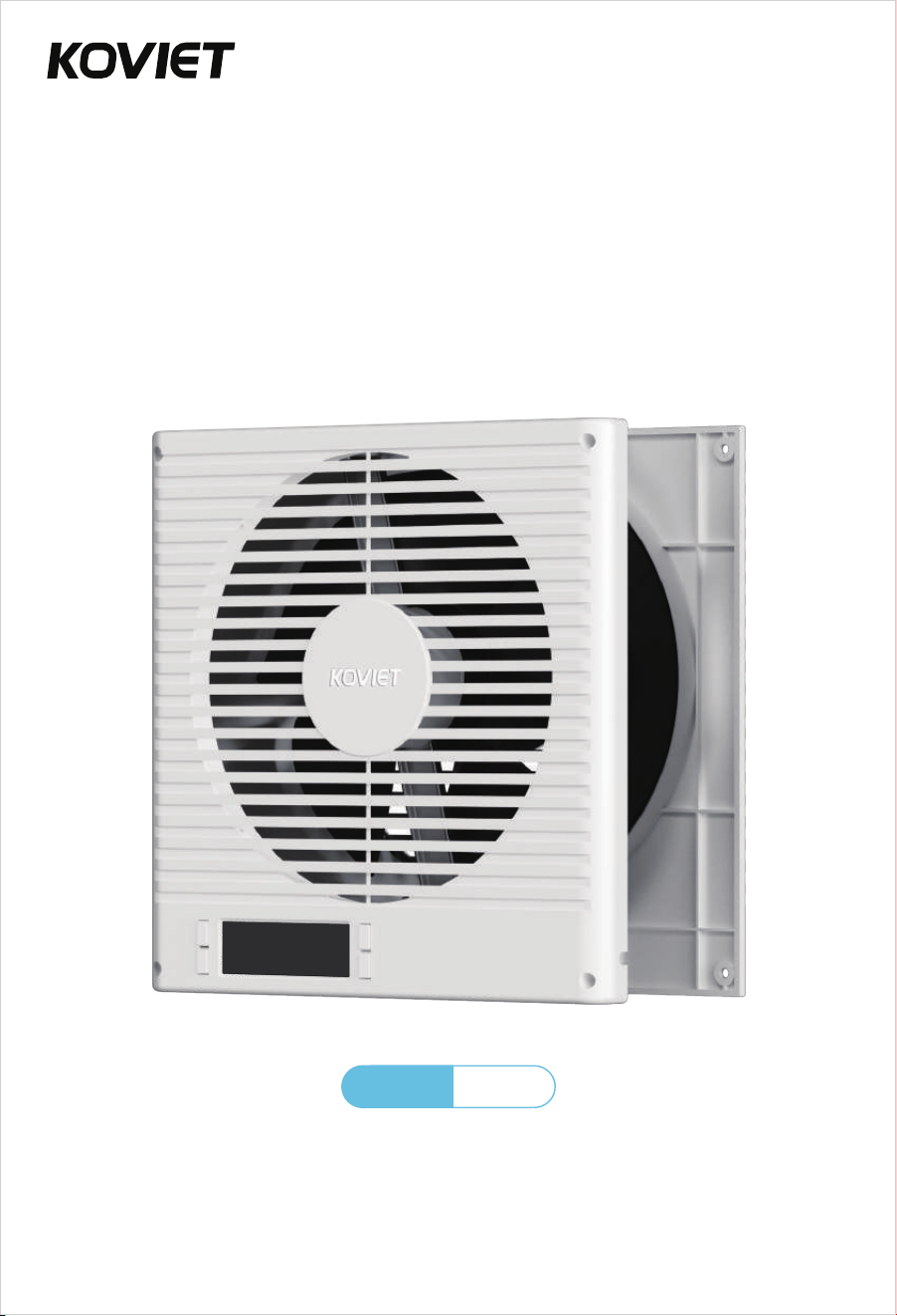
The user manual contains important safety information.
Please read and keep it for future reference.
User Manual
RVF8
Model
Room to Room Ventilation Fan

Welcome to
Family!
We're excited to have you with us. Your
satisfaction is our top priority, and we're
here for you every step of the way!
EXTEND YOUR WARRANTY FOR FREE
+1 (855) 358-5888
ikoviet.com
(Monday-Friday 9:00 am-5:00 pm PST)
We’ve got you covered! Register now and enjoy a free warranty extension.
Simply scan the QR code or visit ikoviet.com/pages/warranty
— it only takes a minute!
CONFORMS
TO UL STD 507
FCC ID: 2BCGA-BT-RTRO8-LCD

CONTENTS
1. Important Safeguards
2. Specifications
3. Parts List
4. Product Overview
5. Installation Guide
6. Controller Operation
· 6.1 Smart Controller
· 6.2 Mode Programming
7. Remote Control
8. FAQ
9. Warranty
................................................................................... 1
..................................................................................................... 3
................................................................................................................. 3
............................................................................................. 4
............................................................................................. 5
.................................................................................................. 9
.......................................................................................... 10
................................................................................................ 14
............................................................................................................................ 16
................................................................................................................. 17
IMPORTANT SAFEGUARDS
This symbol indicates important safety information. The accompanying
illustration shows a warning: "Be careful of electric shock."
Always unplug the fan before moving it to a different location.
Do not use the fan in or near a window. Exposure to rain may cause electrical
hazards.
Do not damage, modify, excessively bend, pull, bind or place heavy objects on
the power cord. Doing so may cause electric leakage, fire, or electric shock.
If the fan will not be used for an extended period, unplug it from the power
outlet.
If the power cord is damaged, do not attempt to repair it yourself.
Contact your local service center or a qualified electrician for replacement
to avoid risk of injury or damage.
Never insert fingers, pencils, or any other objects through the safety guard
while the fan is operating.
Do not attempt to disassemble, repair, or modify the unit while it is in
operation. This can lead to electric shock, fire, or personal injury.
Failure to follow these instructions may result in electric shock, fire,
personal injury, or damage to the unit.
When unplugging the fan, always hold the plug—do not pull the cord.
Pulling the cord may damage it and cause electric shock or fire.
Always disconnect the power before cleaning the fan.
CAUTION
WARNING
Use only with a power supply that matches the rated voltage. Using
an incompatible power source may cause fire or electric shock.
Stop using the fan immediately if you notice smoke, unusual odors, abnormal
motor sounds, or any other malfunction. Continued use may result in fire or
electric shock.
01

FCC Warning Statement:
Changes or modifications not expressly approved by the party responsible for
compliance could void the user's authority to operate the equipment. This
equipment has been tested and found to comply with the limits for a Class B
digital device, pursuant to Part 15 of the FCC Rules. These limits are designed
to provide reasonable protection against harmful interference in a residential
installation. This equipment generates, uses, and can radiate radio frequency
energy and, if not installed and used in accordance with the instructions, may
cause harmful interference to radio communications. However, there is no
guarantee that interference will not occur in a particular installation. If this
equipment does cause harmful interference to radio or television reception,
which can be determined by turning the equipment off and on, the user is
encouraged to try to correct the interference by one or more of the following
measures:
- Reorient or relocate the receiving antenna.
- Increase the separation between the equipment and receiver.
- Connect the equipment into an outlet on a circuit different from that to
which the receiver is connected.
- Consult the dealer or an experienced radio/TV technician for help.
This device complies with part 15 of the FCC Rules. Operation is subject to
the following two conditions:
(1) This device may not cause harmful interference, and
(2) this device must accept any interference received, including interference
that may cause undesired operation.
02
SPECIFICATIONS
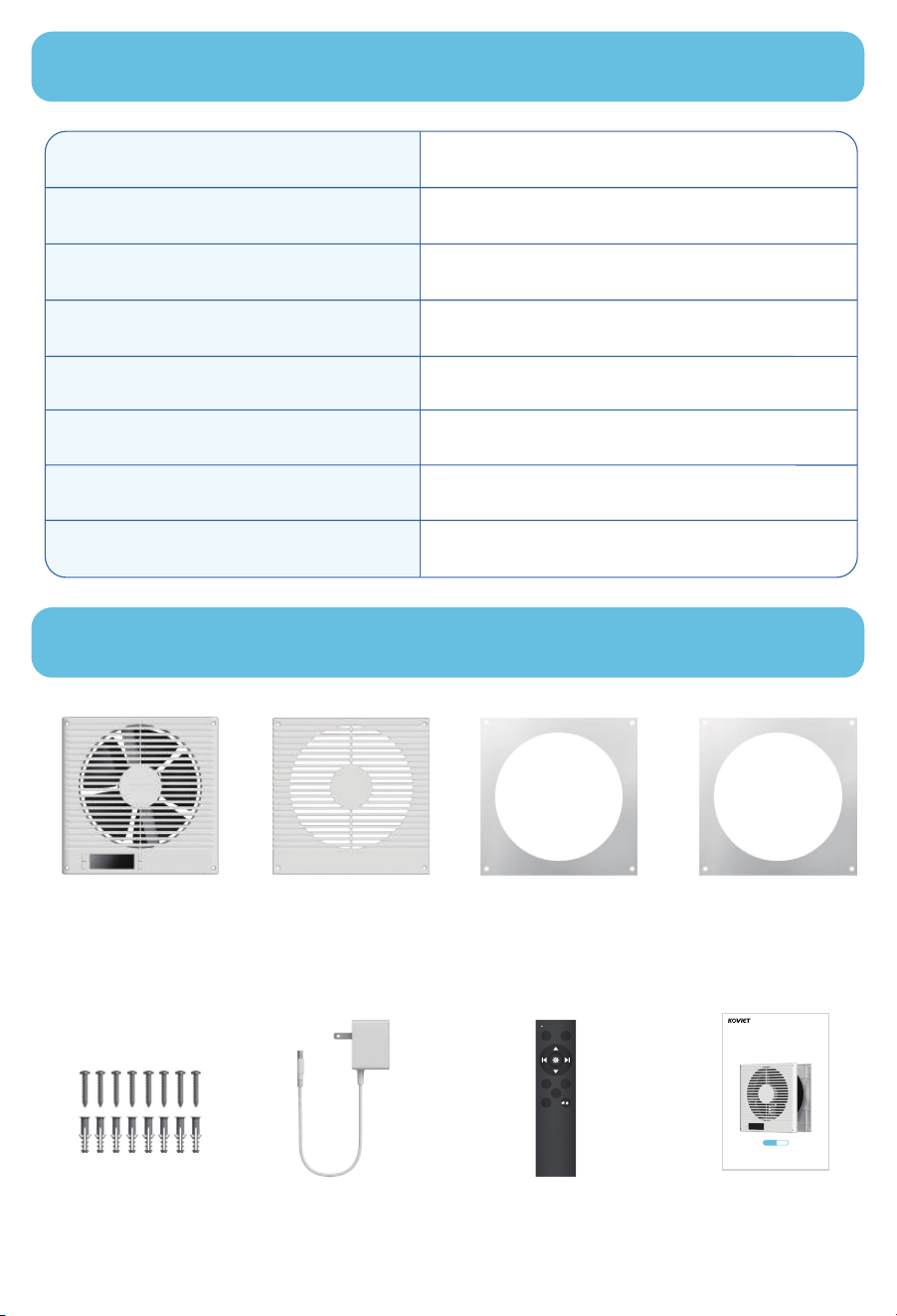
PARTS LIST
35%-85% RH
RVF8
3.5 to 6.2 inches
14℉-120℉
320 CFM
Operating Humidity
Model No.
Compatible Wall Thickness
Operating Temperature
Product Dimensions 10.12 x 10.12 x 4.5 inches
10WPower
120V~ 60HzPower Supply
Maximum Airflow
Front Faceplate x1
Rear Faceplate x1 Front Faceplate
Stencil x1
Rear Faceplate
Stencil x1
Screws and
Anchors x8
Adapter x1 Remote Control x1
(Batteries not included)
User Manual x1
ON OFF
AUTO TIMER
F
/
R
CYCLE
The user manual contains important safety information.
Please read and keep it for future reference.
User Manual
RVF8
Model
Room to Room Ventilation Fan
03
PRODUCT OVERVIEW
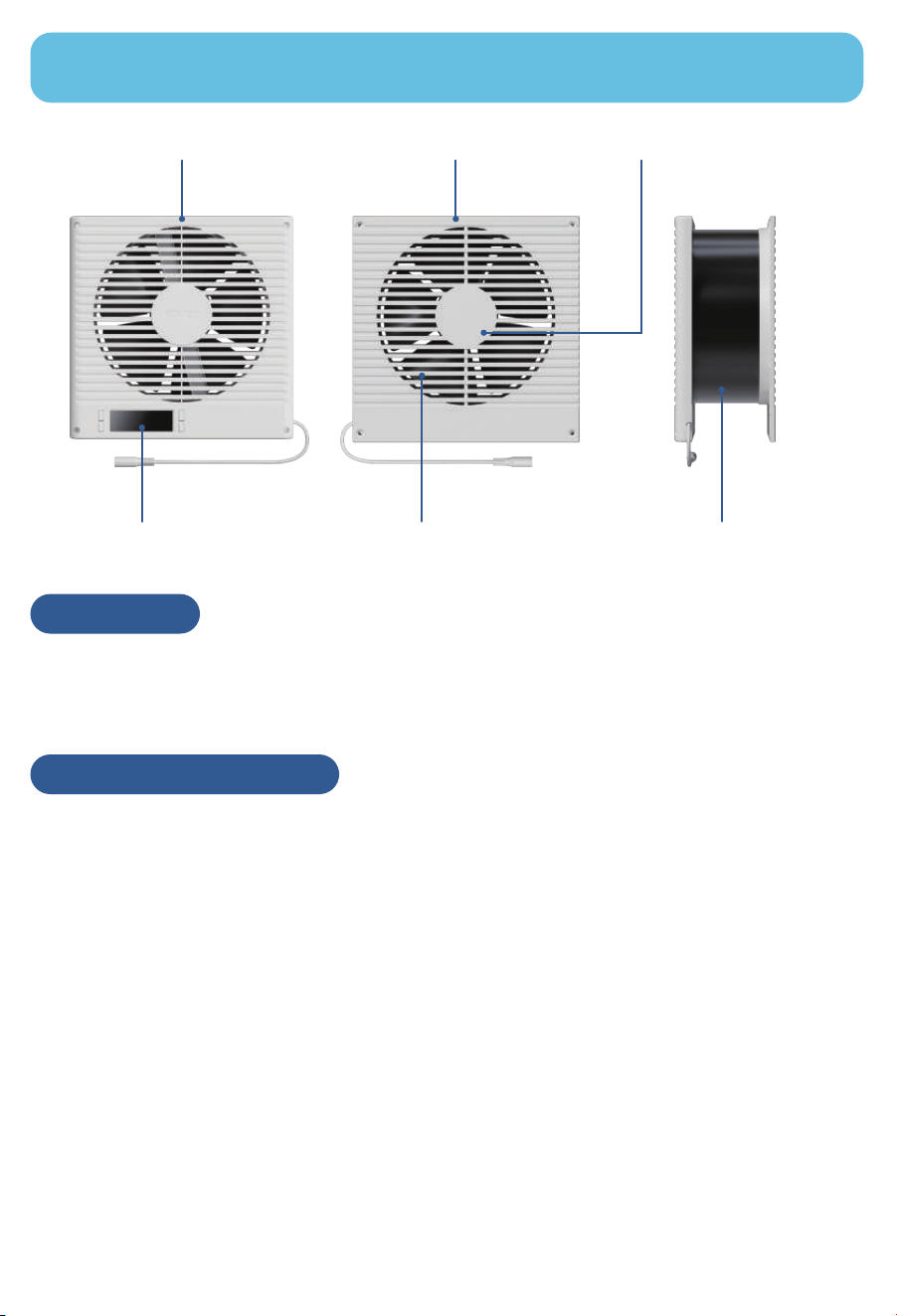
Heavy-Duty Build Next-Gen DC Motor Dual-Ball Bearings
Telescopic Wall-Fit Design
Two-Way Airflow
Smart Controller
This model improves ventilation between rooms through wall fans, making it
ideal for offices, workshops, recreation rooms, laundry rooms, bedrooms, guest
rooms, and other areas that might not otherwise have access to proper airflow.
Application
The system utilizes high-performance DC motors controlled by PWM (Pulse
Width Modulation). This technology allows the dual fans to operate smoothly at
extremely low RPM speeds without generating motor or electromagnetic noise.
Additionally, the fans feature blades designed with a high static pressure rating,
making them perfect for applications where airflow is restricted, such as
through ductwork. The motor housing allows the fan system to be mounted
either horizontally or vertically.
PWM CONTROL FANS
04
INSTALLATION GUIDE
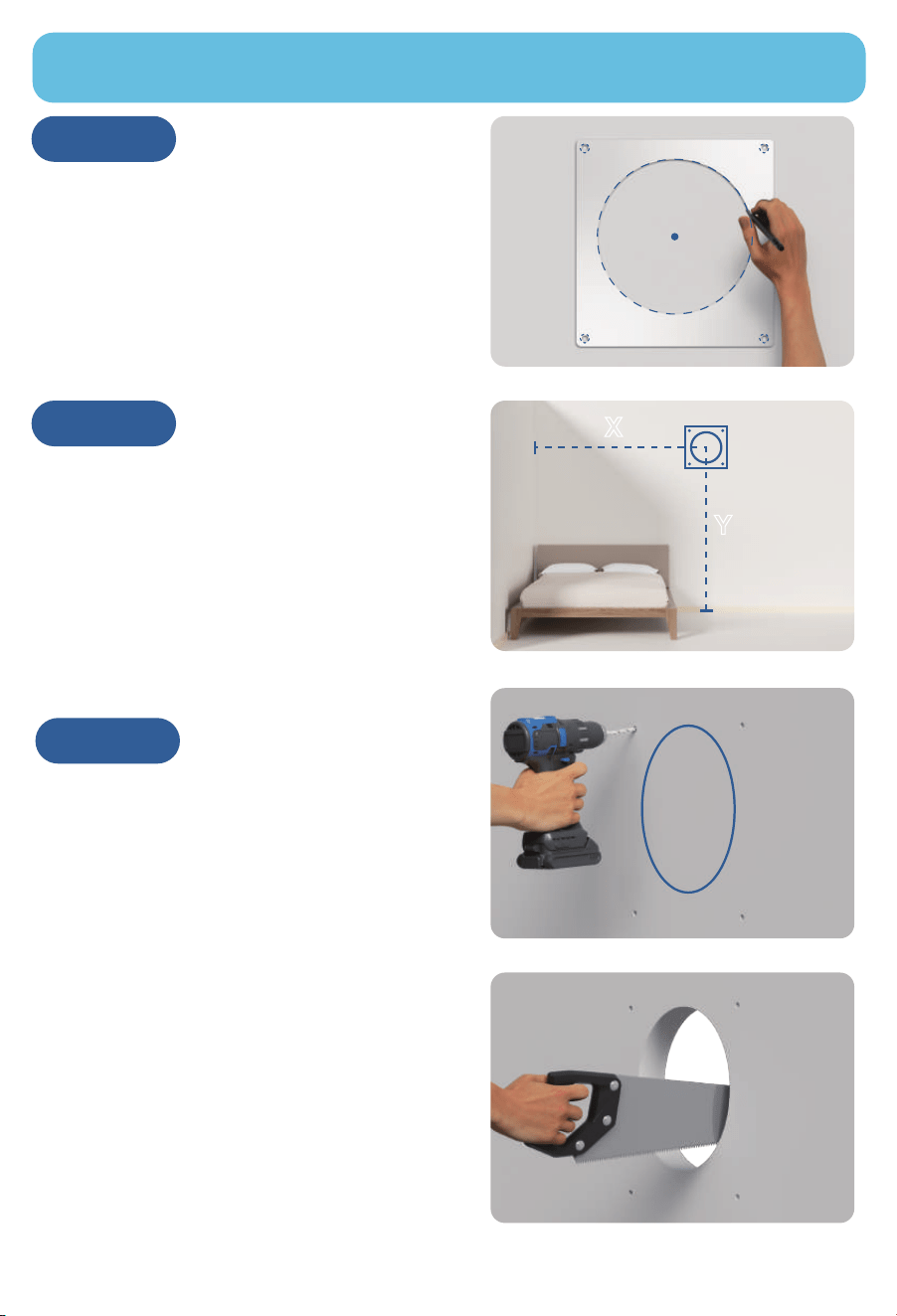
From the center point, measure the
distance to the end of the wall (X) and
the height to the floor (Y).
Keep these measurements for Step 7.
STEP 2
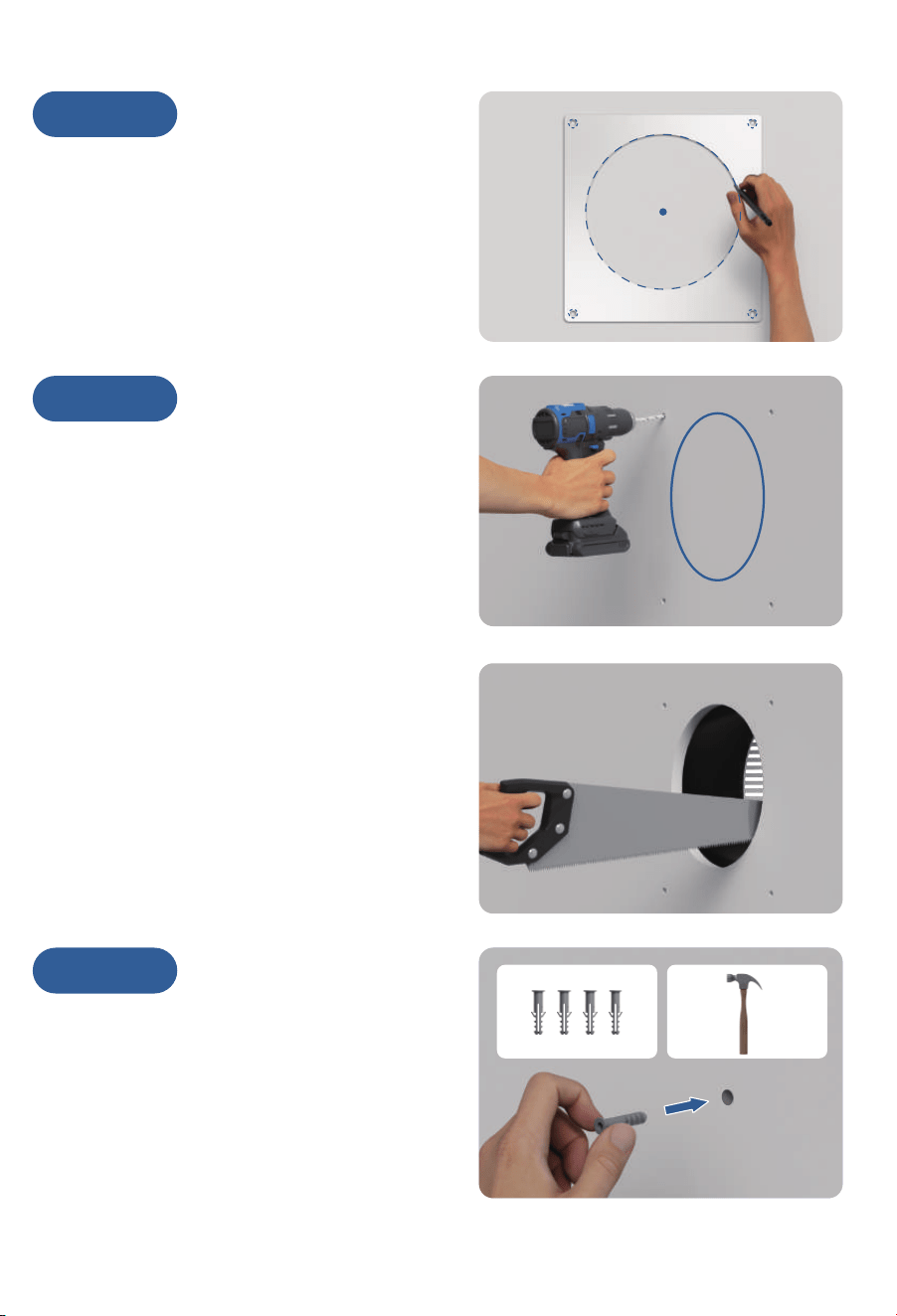
Drill the mounting holes into the wall.
Cut the circular outline to create the
opening using a saw for best results.
STEP 3
STEP 1
Choose a mounting location free of
obstructions (e.g., studs, waterlines,
electrical cords, etc.). Ensure the wall
is 3.5 to 6.2 inches thick.
Use the rear faceplate stencil to mark
the center point, mounting points, and
the circular outline.
05
X
Y
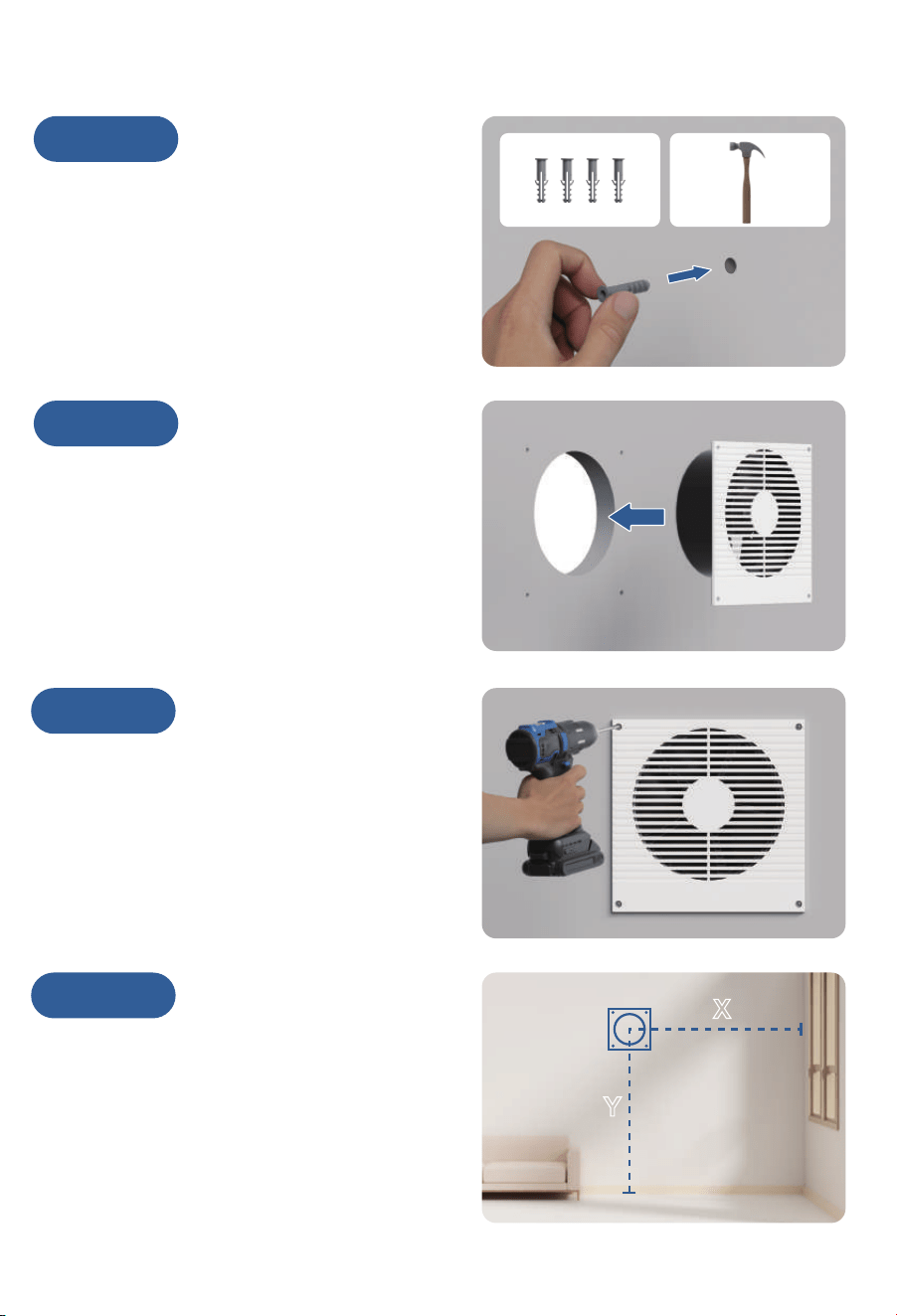
STEP 4
Insert the included anchors into the
mounting holes.
STEP 5
Position the rear faceplate into the
circular cutout, ensuring the mounting
holes align.
STEP 6
Secure the rear faceplate by drilling
the screws into the anchors.
STEP 7
On the opposite side of the wall, mark
the center point using the length (X)
and height (Y) from Step 2.
06
X
Y
STEP 8
Place the front faceplate stencil over
the center point, then mark the mounting
points and circular outline.
STEP 9
Drill the mounting holes into the wall.
Cut the circular outline to create the
opening. Again, using a saw is
recommended.
STEP 10
Insert the included anchors into the
mounting holes.
07
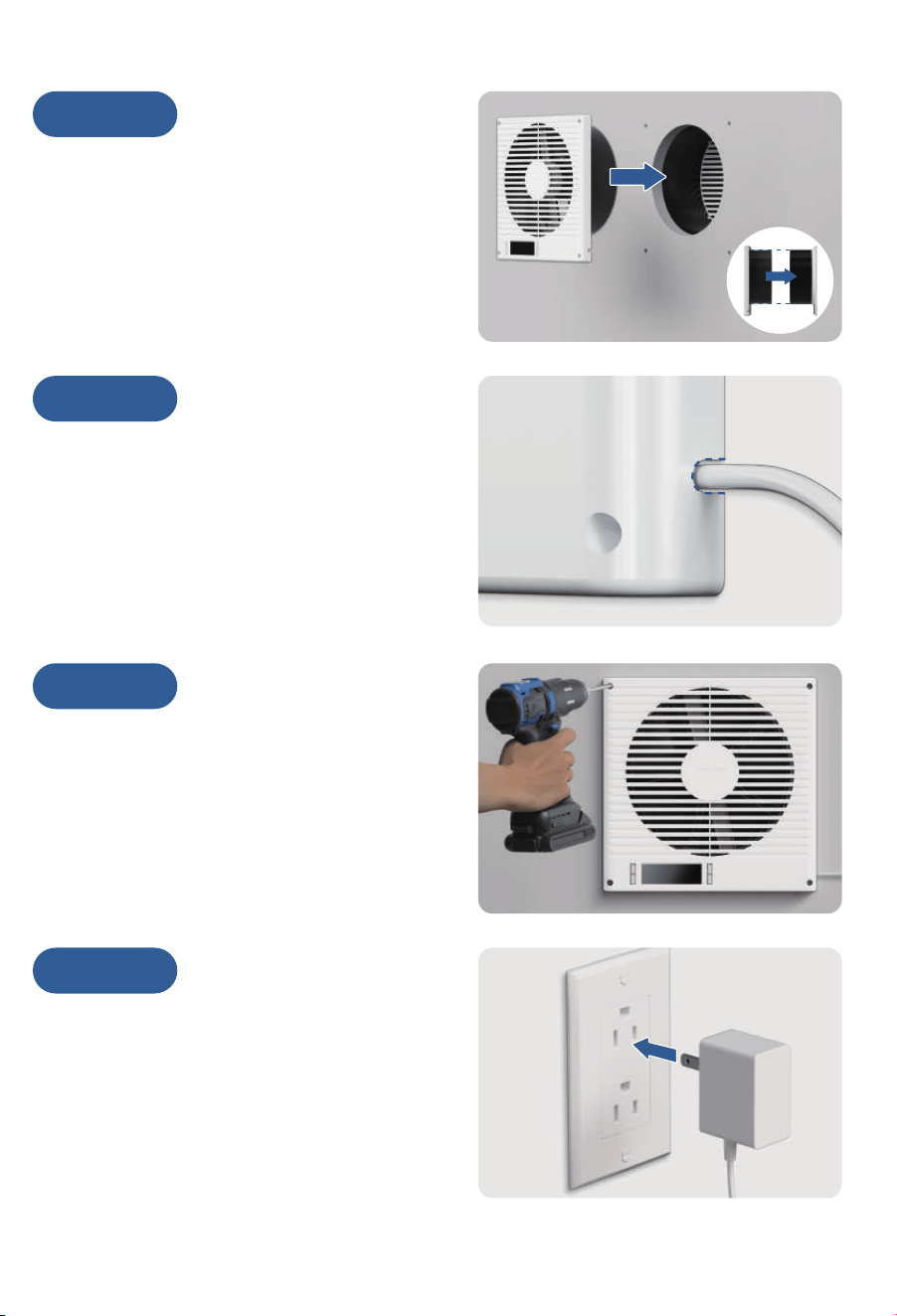
STEP 11
Insert the front faceplate into the
circular cutout, ensuring the mounting
holes align.
The cylinder should easily slide into
the rear faceplate's cylinder.
STEP 12
Route the power cord through the
opening at the lower right corner to
ensure the front faceplate is flush
against the wall.
STEP 13
Secure the front faceplate by drilling
the screws into the anchors.
STEP 14
Insert the power adapter cable into the
unit's power socket. Then, plug the AC
power cord into a wall outlet to power
the fan.
08
CONTROLLER OPERATION
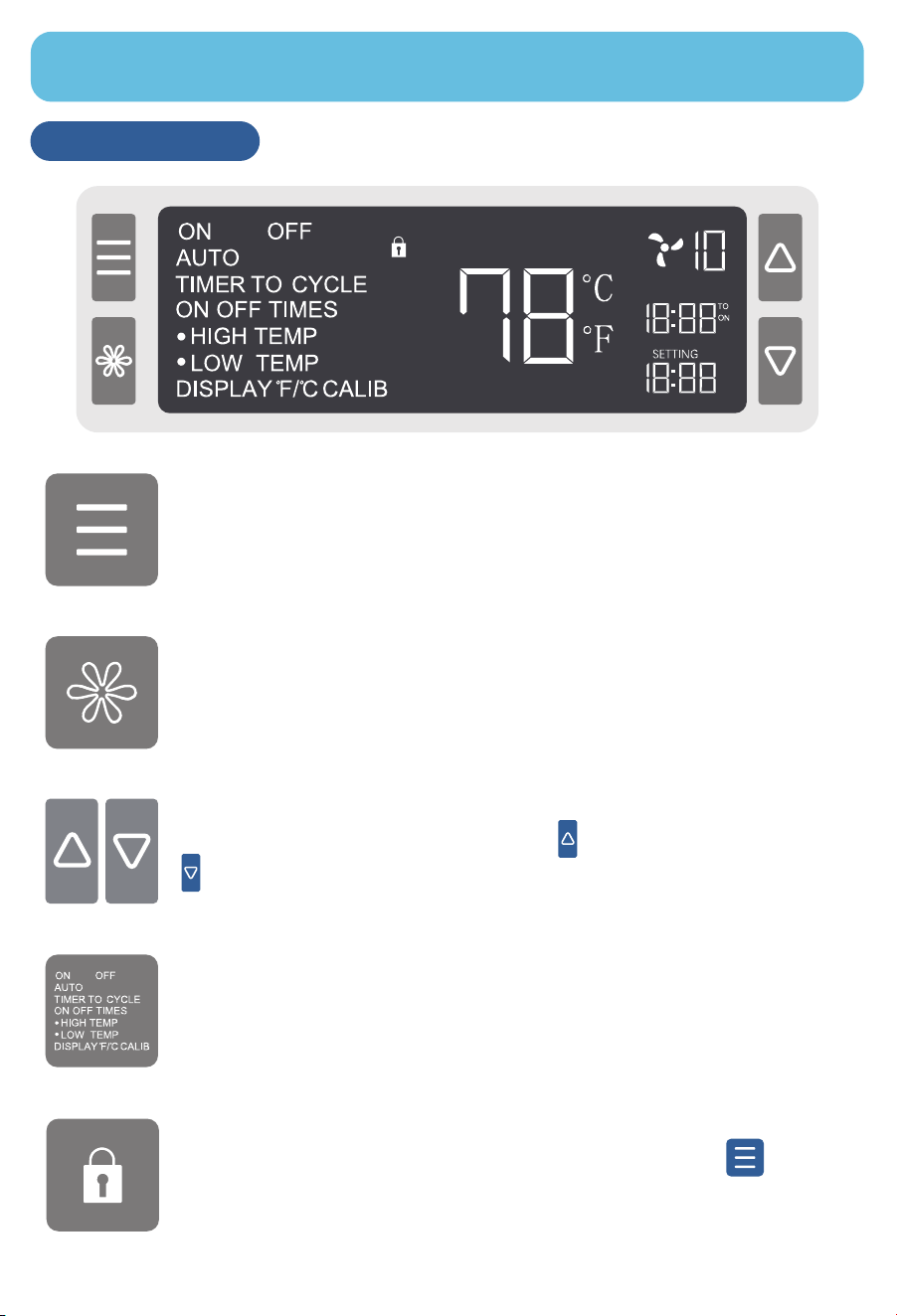
Smart Controller
MODE Button
Cycles through the controller’s modes: ON, OFF, AUTO (HIGH /
LOW TEMP), TIMER (TIMER TO ON / OFF), and CYCLE (ON /
OFF / CYCLE TIMES).
SETTING Button
Cycles through the controller’s settings: DISPLAY, ℉/℃, CALIB,
and F/R (airflow direction).
UP / DOWN Buttons
Adjusts values in the selected mode. increases the value,
decreases it.
Controller Mode / Setting
Displays the current operating mode or setting.
Child Lock
Indicates when Child Lock is enabled. Press and hold for
3 seconds to toggle.
09
Mode Programming
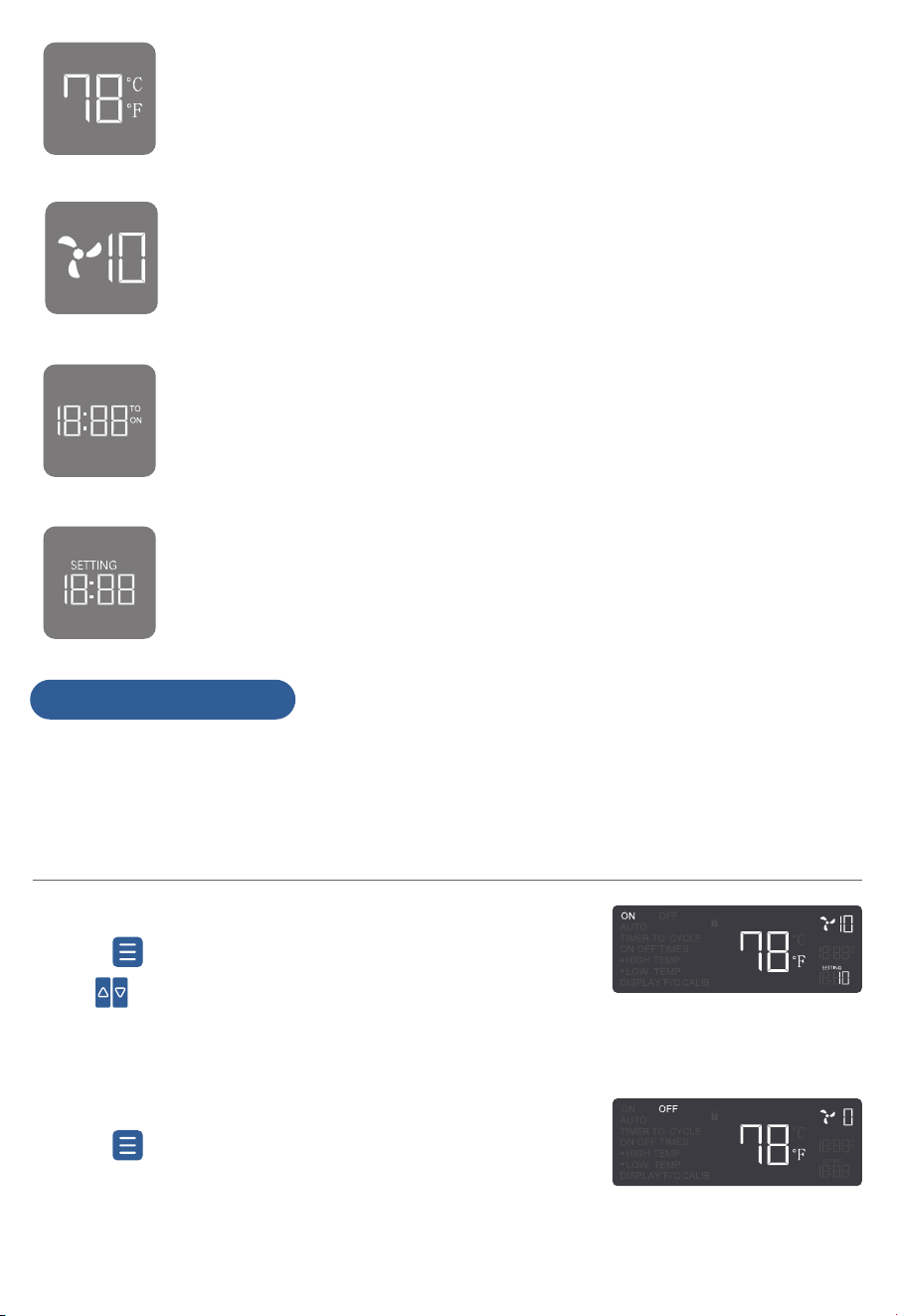
Sensor Temperature
Displays the current room temperature.
Fan Speed Level
Displays the current fan speed level.
Countdown
Shows remaining time in TIMER mode (TIMER TO ON / OFF) or
remaining cycles in CYCLE TIMES mode.
User Settings
Displays the current value for the selected mode.
NOTE 1: Each mode functions independently. Only one mode can be active at a
time.
NOTE 2: Mode settings are automatically saved, so there is no need to
reconfigure after restarting the device.
ON Mode
Press to select ON mode.
Use ( to adjust the fan speed level (0-10).
The speed set in this mode also applies to other modes.
·
·
·
OFF Mode
·
·
Press to select OFF mode.
The fan will stop, and the speed will display as “0”.
10
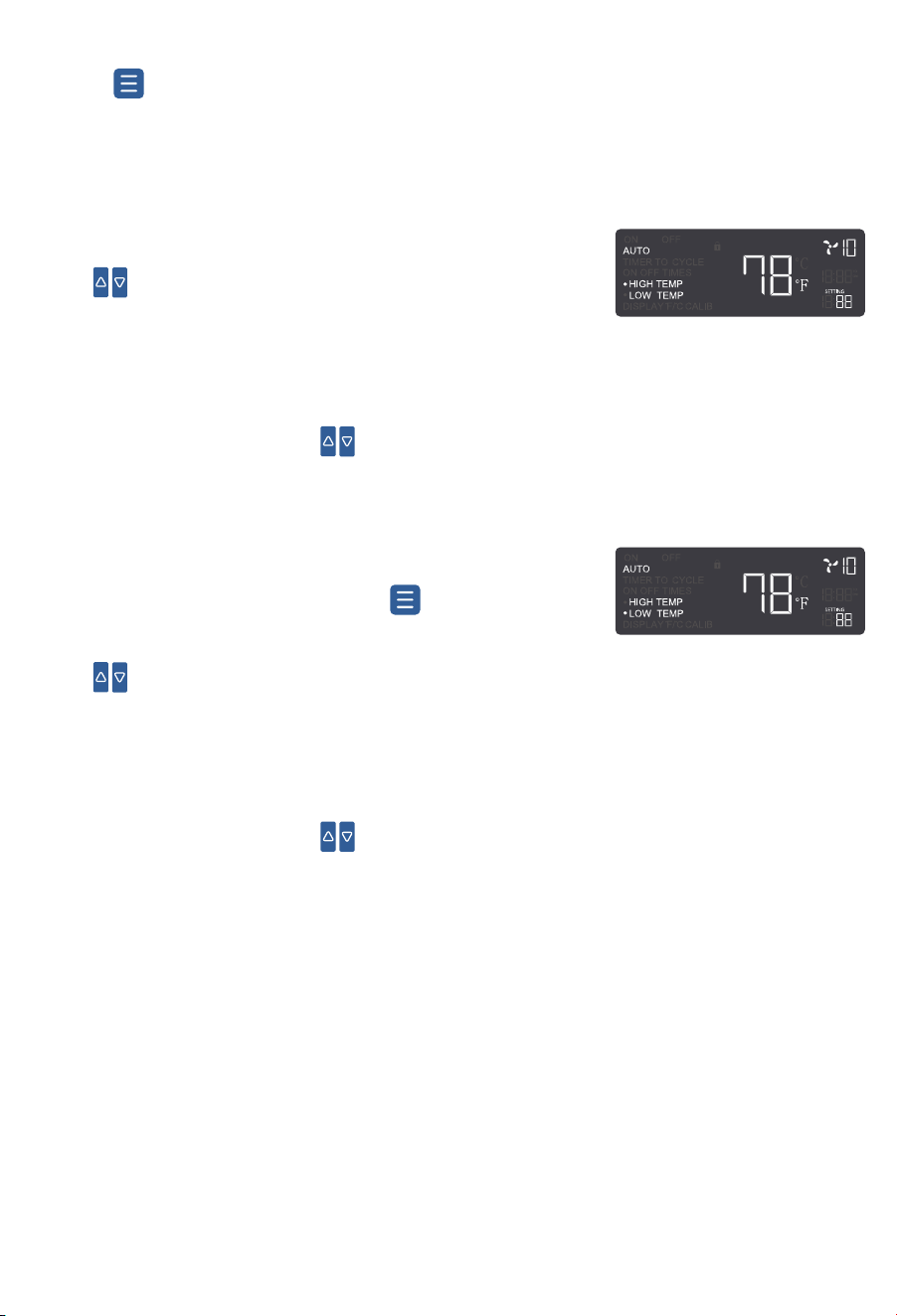
While in HIGH TEMP mode, press again to enter
LOW TEMP.
Use to set the LOW TEMP trigger.
The fan will activate when the room temperature falls
below the set value and gradually increase to the
speed set in ON mode.
To disable, press and hold simultaneously for 3
seconds.
Auto Range Setting
To operate the fan within a specific temperature range, set the HIGH TEMP
trigger lower than the LOW TEMP trigger. The fan will only work if the sensor
temperature stays within this range.
NOTE: Both HIGH TEMP and LOW TEMP must be enabled for this function.
·
AUTO Mode
·
·
Press to enter AUTO mode.
When either HIGH TEMP or LOW TEMP is enabled,
the corresponding indicator will flash.
AUTO HIGH TEMP
Use to set the HIGH TEMP trigger.
The fan will activate when the room temperature rises
above the set value and gradually increase to the speed
set in ON mode.
To disable, press and hold simultaneously for 3
seconds.
·
·
·
AUTO LOW TEMP
·
·
·
·
11
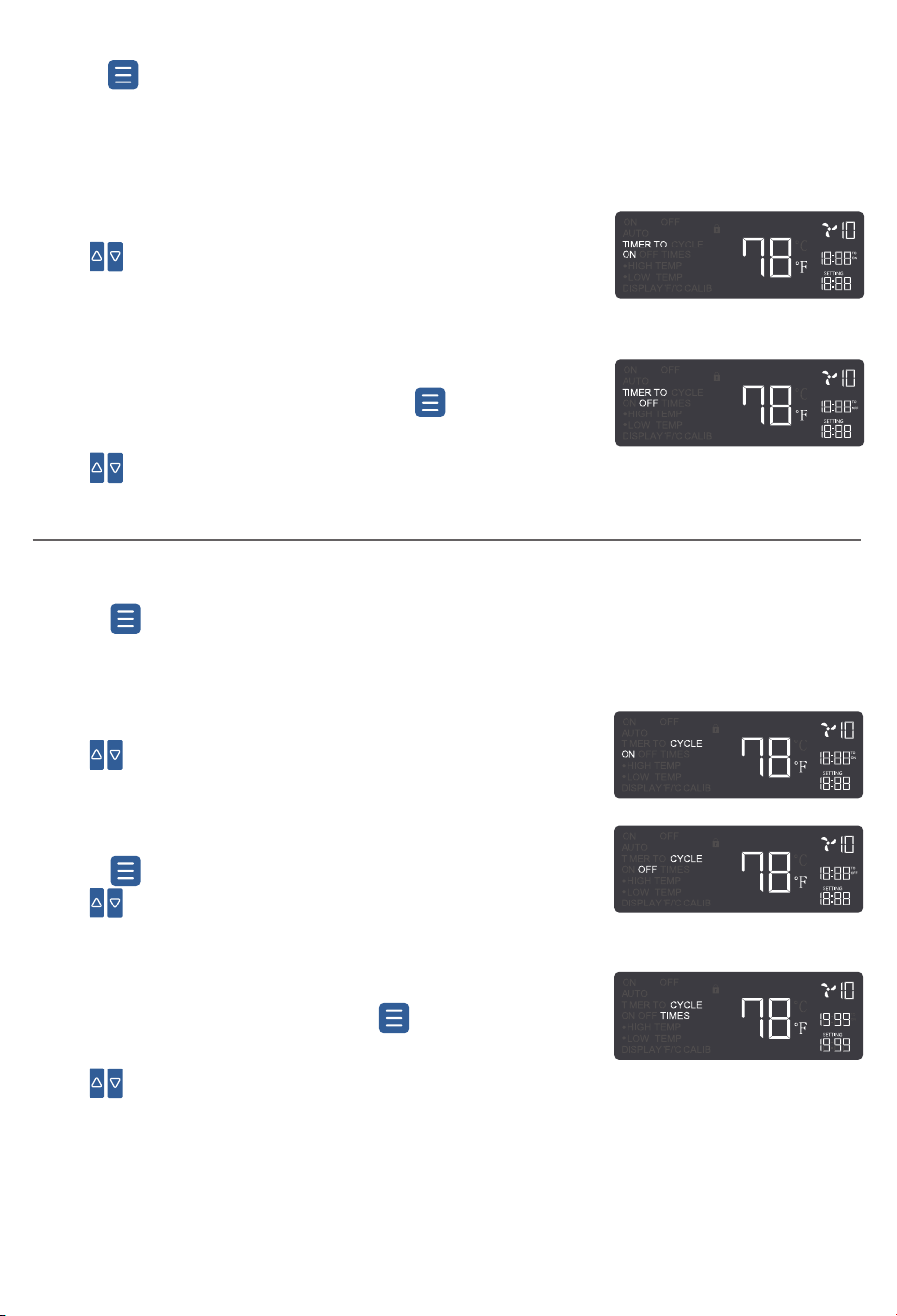
TIMER Mode
Press ( to enter TIMER mode.
This is a standalone mode used to set fan turn-on or turn-off timers. It cannot
be used together with other modes.
·
·
TIMER TO ON
Use to set a startup countdown (max: 19h59min).
After the countdown, the fan runs at the ON mode speed.
·
·
While in TIMER TO ON mode, press again to enter
TIMER TO OFF.
Use to set a shutdown countdown (max: 19h59min).
The fan stops when the countdown ends.
TIMER TO OFF
·
·
·
·
Step 1 CYCLE ON
Use to set the ON duration (max: 19h59min).
CYCLE Mode
Press to enter CYCLE mode. Set alternating ON and OFF durations for
automatic cycling.
·
Step 3 CYCLE TIMES
After setting CYCLE OFF, press again to enter
CYCLE TIMES.
Use to adjust the number of cycles (max: 1999).
The setting will confirm automatically after 3 seconds
of inactivity.
The fan will stop when the countdown reaches “0”.
“---” means unlimited continuous cycling based on
ON/OFF durations.
·
·
·
·
·
12
Step 2 CYCLE OFF
Press again to enter CYCLE OFF.
Use to set the OFF duration (max: 19h59min).
·
·
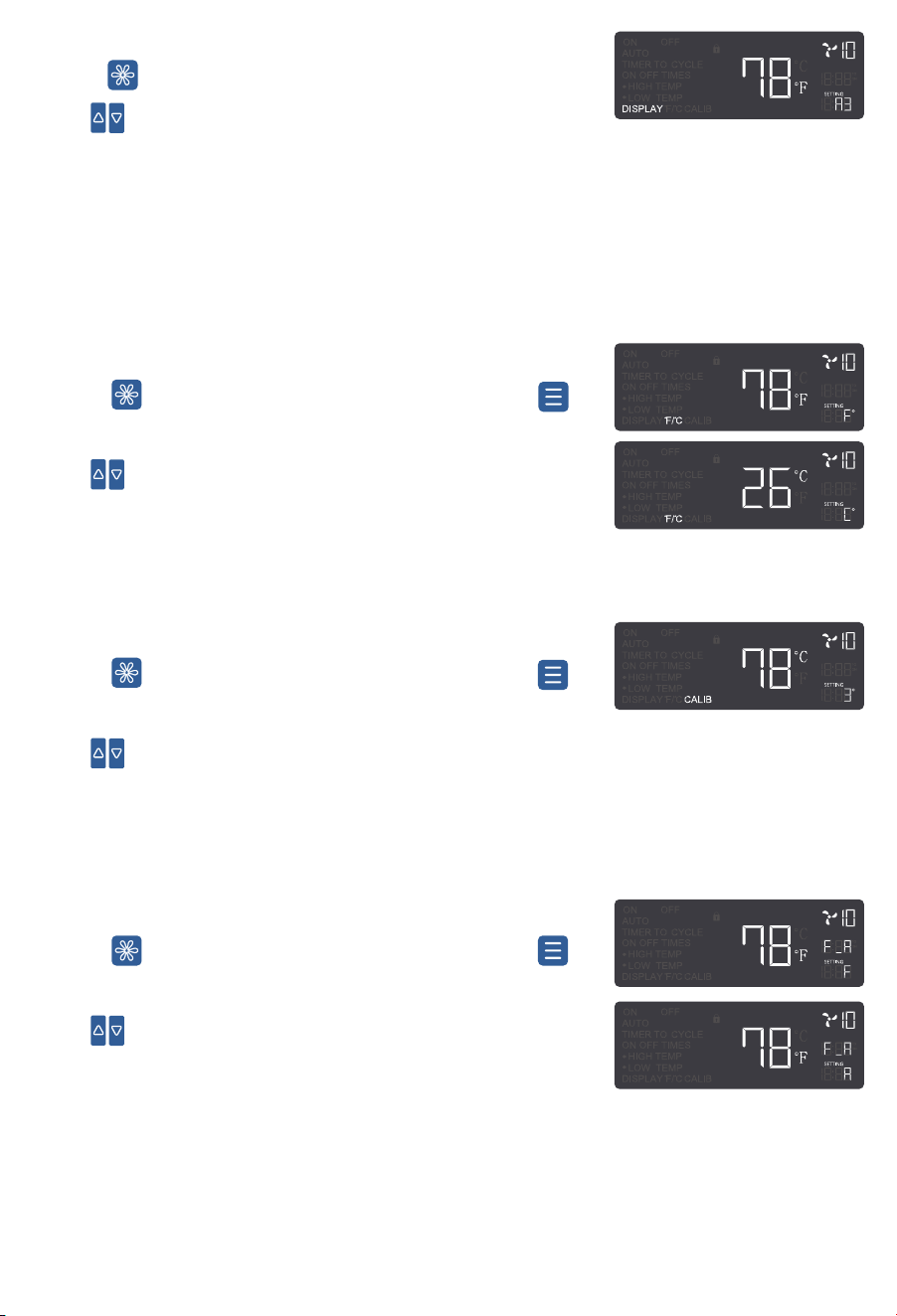
Press to enter DISPLAY settings, then press to
select F/R.
Use to adjust airflow direction:
F (Forward Airflow)–Fan icon spins clockwise
R (Reverse Airflow)–Fan icon spins counterclockwise
Press to enter DISPLAY settings, then press to
select ℉/℃.
Use to switch between Fahrenheit (℉) and Celsius
(℃).
All temperature readings will update accordingly.
Press to enter DISPLAY settings.
Use to switch brightness: Level 1, 2, 3, or “A3”.
Level 3 = Maximum brightness
Level 1 = Minimum brightness
“A3” turns off the screen after 30 seconds of inactivity,
while the fan keeps running.
℉/℃ Settings
DISPLAY Settings
·
·
-
-
-
·
·
·
Press to enter DISPLAY settings, then press to
select CALIB.
Use to manually calibrate the sensor temperature in
1-unit increments (range: -9 to 9) to match the actual
temperature.
CALIB Settings
·
·
F/R Settings
·
·
-
-
13
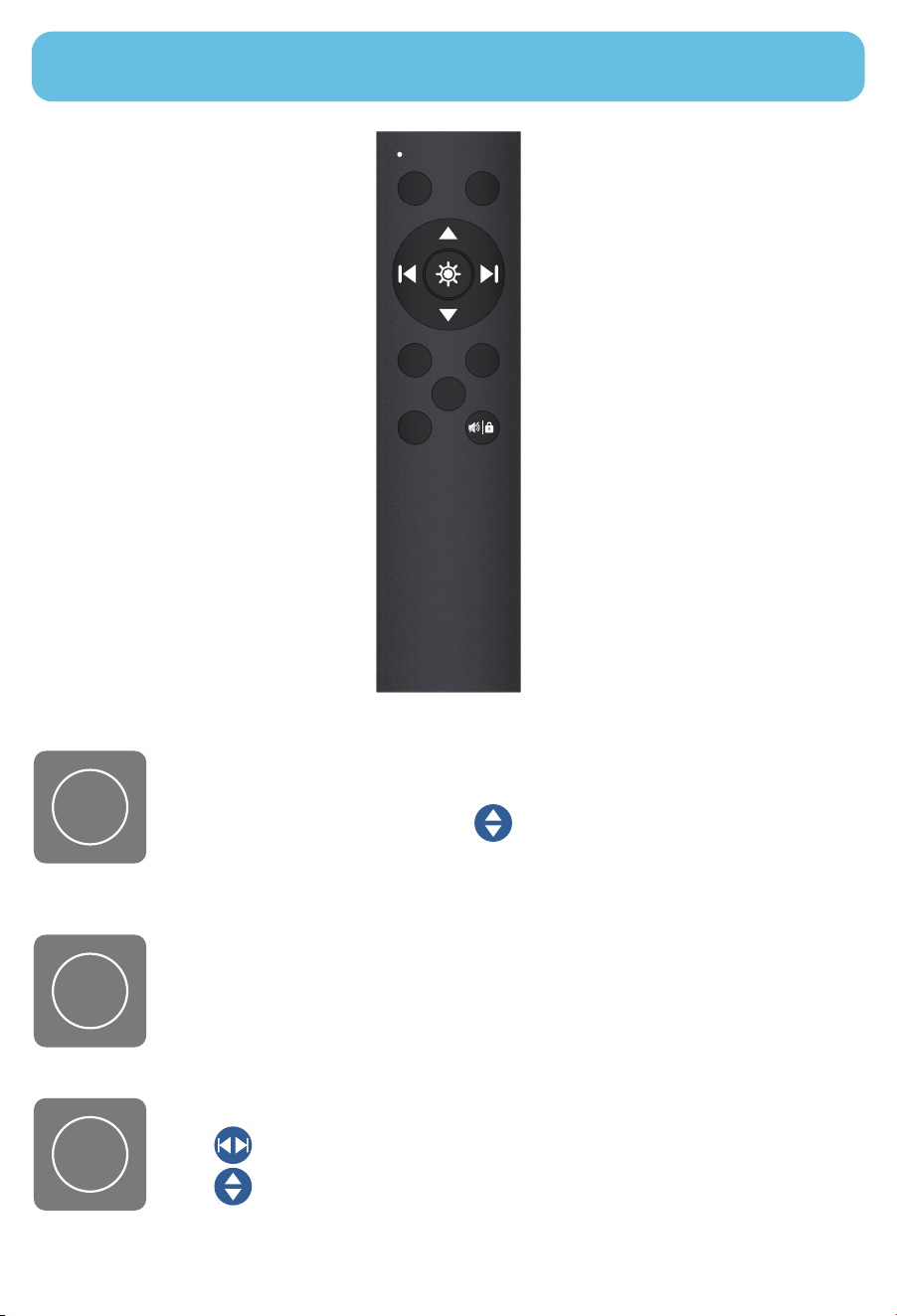
REMOTE CONTROL
Press and hold for 5 seconds to pair the remote (beep confirms).
Press to enter ON mode. Use to adjust the fan speed.
Press to enter OFF mode. The fan will stop running.
Press to enter AUTO mode.
Use to select HIGH TEMP or LOW TEMP.
Use to set the trigger temperature. To disable HIGH TEMP or
LOW TEMP, set the value to OFF (between 0 and -1).
NOTE:
Batteries are not included.
Install 2 AAA batteries
before using the remote.
ON
ON OFF
AUTO TIMER
F
/
R
CYCLE
OFF
AUTO
14
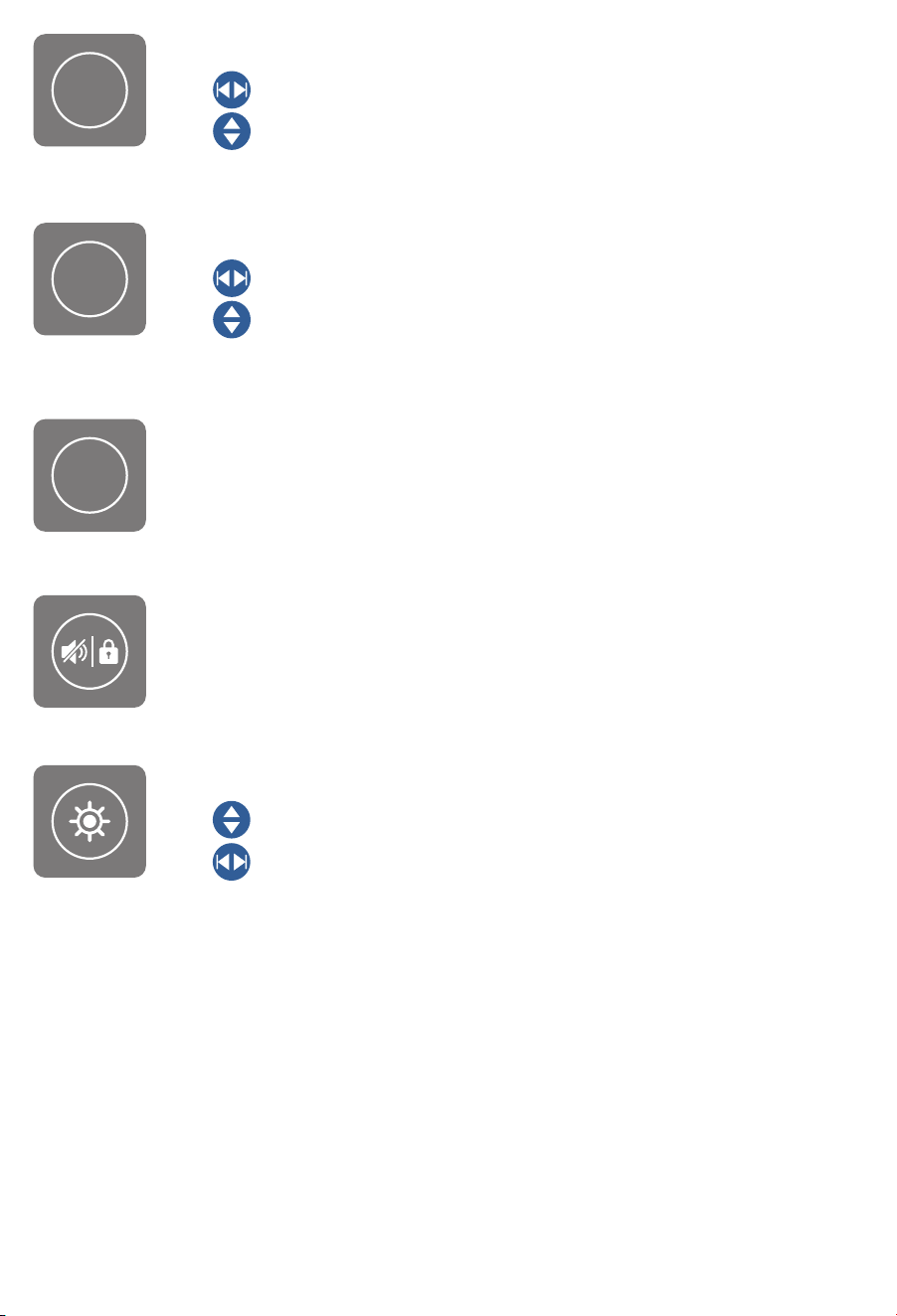
Press to enter TIMER mode.
Use to select TIMER TO ON or TIMER TO OFF.
Use to set the countdown.
Press to enter CYCLE mode.
Use to select ON, OFF, or CYCLE TIMES.
Use to set duration or cycle count.
Press to adjust airflow direction:
F (Forward Airflow)–Fan icon spins clockwise
R (Reverse Airflow)–Fan icon spins counterclockwise
Press to toggle buzzer sound.
Press and hold for 3 seconds to enable/disable child lock.
Press to enter DISPLAY settings.
Use to adjust brightness.
Use to switch between ℉/℃ , CALIB, or F/R settings.
F/R
TIMER
CYCLE
15
FAQS
The remote requires 2 AAA batteries (not included in the package).
Please do not use rechargeable batteries.
Ensure that the plug is securely connected to the outlet. If the issue
persists, try using a different power outlet. If the fan still does not turn
on, please contact our customer support team for assistance.
Q1
Why isn’t the remote control working?
b.
The remote may not have been paired successfully. Press and hold ON
button on the remote for 5 seconds until you hear a beep, indicating
successful pairing.
a.
c.
If the problem persists, please contact our customer support team for
assistance.
Q4
Why doesn't the fan work in AUTO mode when the set high or
low temperature is reached?
b.
Check if the LOW TEMP trigger is set higher than the HIGH TEMP trigger.
If so, the fan will only work within that specific temperature range. Disabling
either the HIGH TEMP or LOW TEMP will restore normal operation.
a.
Q5
Disconnect the power supply before cleaning or servicing the fan.
How do I perform maintenance on this fan?
Step 1
Unscrew the bolts and remove the front grilles and fan blades.
Step 2
Wipe the exterior with a dry cloth or use a light vacuum to remove dust.
Step 4
Clean the grilles and blades with warm, soapy water and a soft cloth.
Do not use abrasive cleaners, wire brushes, or steel wool.
Step 3
Q2
We recommend the following tools for installation: pencil, ruler, tape
measure, screwdriver, drill, drywall saw, and stud finder.
What tools do I need to install this fan?
a.
Q3
You can install the fan in any desired location, except for windows,
fire-rated walls, or exterior walls, as exposure to rain could cause
product damage.
Where can I install this fan?
a.
16
This product is covered with Koviet product and labor warranty for
12 months from the date of its original purchase.
To provide customers with quality shopping and user experience, we
guarantee to replace or issue a full refund within the 30-day period from
the date of purchase.
After the 30-day warranty has expired, Koviet activates a 1-year warranty
from the date of purchase that covers product replacement.
We can only provide after-sales service for products that are sold by
Koviet or Koviet authorized retailers and distributors.
※ Please have your order ID ready before contacting Customer Support.
The warranty does not apply where damage is caused by other factors,
including without limitation:
(a)Normal wear and tear;
(b)Misuse, dismantling, accident, or failure to follow operating instructions;
(c)Exposure to liquid or infiltration;
(d)Servicing or modifications of the product other than by Koviet;
Thanks for choosing Koviet Room to Room Ventilation Fan.
30-Day Limited Warranty
30-Day to 1-Year Warranty Limitations
30-Day to 1-Year Limited Warranty
17

V1