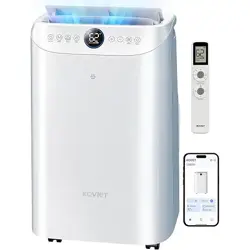
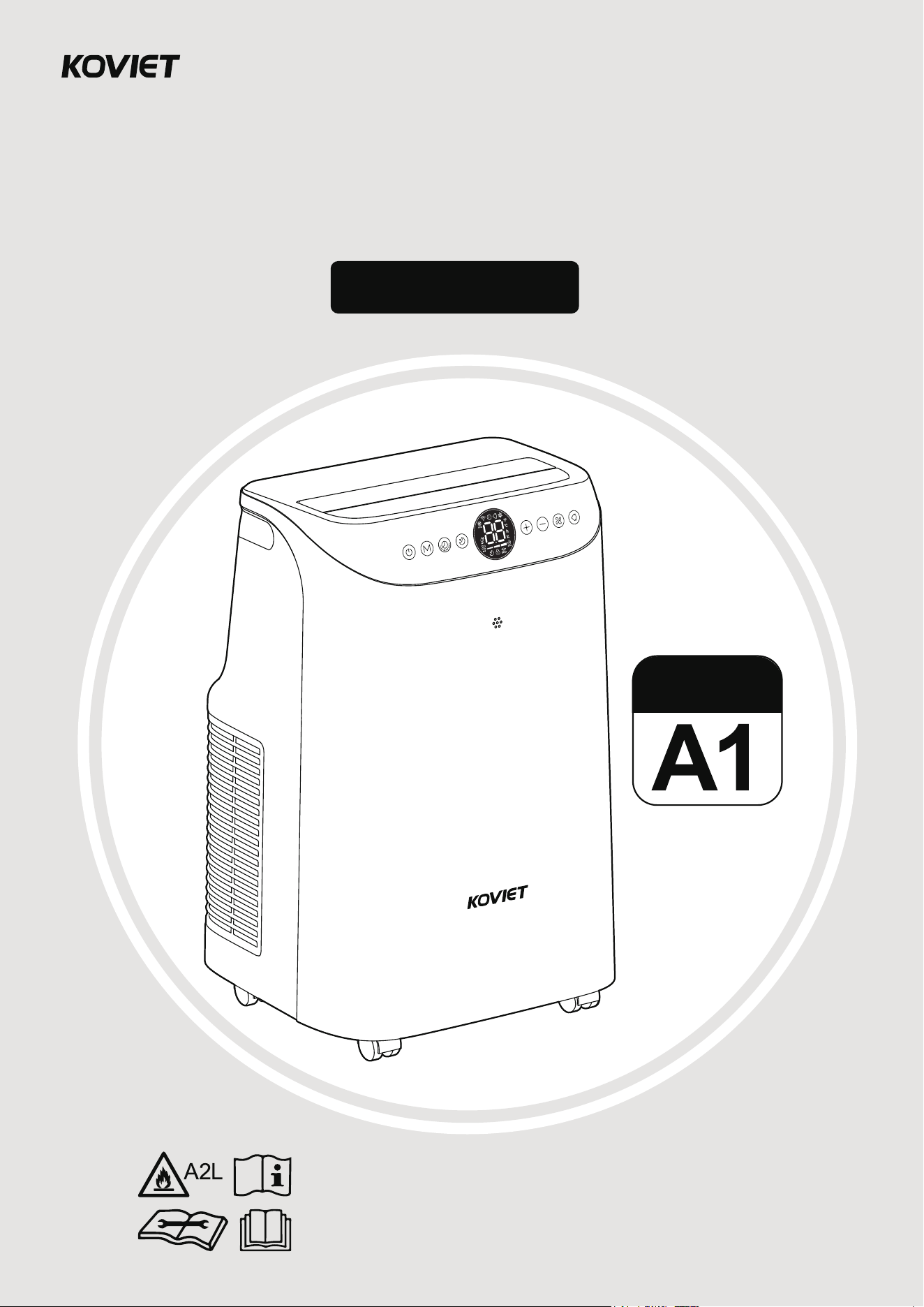
User Manual
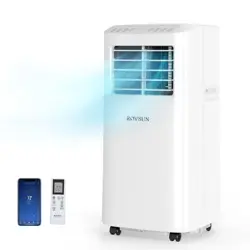
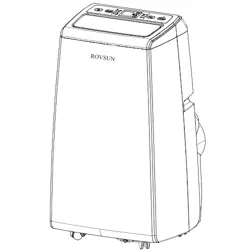
Portable Air Conditioner
The user manual contains important safety information.
Please read and keep it for future reference.
Model No.: A1
Model
Welcome to
Family!
We're excited to have you with us. Your
satisfaction is our top priority, and we're
here for you every step of the way!
EXTEND YOUR WARRANTY FOR FREE
+1 (855) 358-5888
ikoviet.com
(Monday-Friday 9:00 am-5:00 pm PST)
We’ve got you covered! Register now and enjoy a free warranty extension.
Simply scan the QR code or visit ikoviet.com/pages/warranty
— it only takes a minute!
KOVIET
CUSTOMER CARE
CONTENTS
IMPORTANT
SAFEGUARDS
P1 5
INSTALLATION
GUIDE
P6 11
SETTING UP
YOUR AIR CONDITIONER
KNOWING
YOUR AIR CONDITIONER
P13 15P12
USING
THE REMOTE CONTROL
MAINTENANCE
AND CLEANING
P18 20P16 17
P21 22
TROUBLESHOOTING
P23
ON | OFF
Mode
Timer
Sleep
Speed
Swing
Speed
Swing
3
s
f
o
r
L
o
c
k
3
s
f
o
r
°
F
/
°
C
IMPORTANT SAFEGUARDS
DANGER—This symbol indicates immediate hazards which WILL result in severe
personal injury or death
WARNING—This symbol indicates hazards or unsafe practices which COULD
result in severe personal injury or death
CAUTION—This symbol indicates hazards or unsafe practices which COULD
result in minor personal injury
When using electrical appliances, basic safety precautions should be
followed, including the following
WARNING
General Safety
To reduce risk of injury, read this guide before using the appliance.
This appliance is not intended for use by persons (including children) with reduced physical sensory
or mental capabilities or lack of experience & knowledge, unless they have been given supervision
or instruction concerning the use of the appliance by a person responsible for their safety.
Children should be supervised to ensure that they do not play with the appliance.
Always unplug the air conditioner before servicing or moving the unit.
1.
2.
3.
4.
Electrical Safety
Air conditioner must be connected to proper electrical outlet with the correct electrical outlet with the
correct electrical supply.
Proper grounding must be ensured to reduce the risk of shock and fire. DO NOT CUT OR REMOVE
THE GROUNDING PRONG. If you do not have a three-prong electric receptacle outlet in the wall,
have a certified electrician install the proper receptacle. The wall receptacle MUST be properly
grounded.
DO NOT USE AN ADAPTER OR AN EXTENSION CORD.
Do not place any object on the top of the unit.
If the SUPPLY CORD is damaged, it must be replaced by the manufacturer, a service agent or
similarly qualified persons in order to avoid a hazard.
The air conditioner shall be installed in accordance with national wiring regulations.
1.
2.
3.
4.
5.
6.
Operation Safety
Do not use the air conditioner near a bathtub, shower or wash basin.
Never operate the air conditioner without filters in place.
Do not operate air conditioner if power cord is frayed or otherwise damaged. Avoid using it if there are
any cracks or abrasion damage along the length, plug connector or if the unit malfunctions or is damaged
in any manner. Contact an authorized service technician for examination, repairs or adjustments.
Do not block airflow around the air conditioner. The exhaust hose should be free of any obstructions.
Do not install or use the air conditioner in any area where the atmosphere contains combustible gases
or where the atmosphere is oily or sulphurous. Avoid any chemical coming in contact with your air
conditioner.
1.
2.
3.
4.
5.
01
Handling Alkaline Batteries
Should fluid from the battery accidentally get into your eyes, there is a threat of loss of eyesight, do not
rub them. Immediately rinse your eyes with clean tap water and then consult a physician immediately.
Do not put the battery in a fire, expose it to heat, dismantle or modify it. If the insulation or safety valve
is damaged, the battery may leak fluid, overheat or explode.
Do not insert the battery with the poles reversed. Doing so may cause some abnormality or a short and
the battery may leak fluid, overheat or explode.
Keep the battery out of the reach of children. If the battery is swallowed, contact a physician immediately.
If the alkali fluid gets in your mouth, rinse your mouth with water and contact a physician immediately.
If the alkali fluid gets on your skin or clothes, it may burn your skin, thoroughly rinse the affected area
with tap water.
Do not mix new and old batteries or other makes of batteries. The different attributes may cause the
battery to leak fluid, overheat or explode.
This battery was not made to be recharged. Recharging this battery may damage the insulation or
internal structure and may cause the battery to leak fluid, overheat or explode.
Do not damage or remove the label on the exterior of the battery. Doing so may cause the battery to
short, leak fluid, overheat or explode.
Do not drop, throw or expose the battery to extreme impact. Doing so may cause the battery to leak
fluid, overheat or explode.
Do not alter the shape of the battery. If the insulation of safety valve is damaged, the battery may leak
fluid, overheat or explode.
Immediately remove batteries when they have lost all power. Leaving the batteries in the unit for a long
time may cause the batteries to leak fluid, overheat or explode due to gas that is generated by the
batteries.
Remove the batteries from the unit when not using the unit for an extended period of time. The batteries
may leak fluid, overheat or explode due to gas that is generated by the batteries.
Do not apply solder directly to the batteries. The heat may cause the batteries to leak fluid, overheat or
explode.
Do not get the batteries wet. Doing so may cause the batteries to overheat.
Store batteries someplace out of direct sunlight where the temperature and humidity are not high. Not
doing so may cause the batteries to leak fluid, overheat or explode. Also, it may cause the life and
performance of the batteries to decline.
Follow the regulations of the local government when disposing of these batteries.
NEVER mix alkaline, standard (carbon-zinc), rechargeable (nickel-cadmium) batteries with this product.
1.
2.
3.
4.
5.
6.
7.
8.
9.
10.
11.
12.
13.
14.
15.
16.
17.
18.
WARNING—When handling alkaline batteries, basic safety precautions should be
followed, including the following
DANGER—Improper connection of the equipment grounding conductor can result in a risk of
electric shock. The conductor with insulation having an outer surface that is green with or without
yellow stripes is the equipment grounding conductor. If repair or replacement of the cord or plug is
necessary, do not connect the equipment—grounding conductor to a live terminal. Check with a qualified
electrician or service person if the grounding instructions are not completely understood, or if in doubt as
to whether the appliance is properly grounded. Do not modify the plug connected to the appliance—if it
will not fit the outlet, have a proper outlet installed by a qualified electrician.
Grounding Instructions
In the event of malfunction or breakdown, grounding provides a path of least resistance for electric
current to reduce the risk of electric shock. The appliance must be connected to a cord having an
equipment-grounding conductor and a grounding plug. The plug must be plugged into an appropriate
outlet that is properly installed and grounded in accordance with all local codes and ordinances.
ELECTRICAL REQUIREMENTS
02
FOR GROUNDED, CORD-CONNECTED APPLIANCE
RATED LESS THAN 15A AND INTENDED FOR USE ON
A NOMINAL 120V SUPPLY CIRCUIT
LCDI POWER CORD AND PLUG
SAFETY GUIDELINES
WARNING
The power supply cord must be replaced if it fails to reset when either the test button is pushed,
or it cannot be reset.
If power supply cord is damaged, it cannot be repaired.
It must be replaced by one obtained from the product manufacturer.
-
-
-
-
-
-
WARNING—RISK OF FIRE
It is important the plug fits tightly into the wall outlet.
If the plug does not fit securely and appears loose, it should not be used.
Have a licensed electrician replace the receptacle.
-
-
-
Your air conditioner should be used in such a way that it is protected from moisture. E.g. condensation,
splashed water, etc. Do not place or store your air conditioner where it can fall or be pulled into water or
any other liquid. Unplug immediately.
Always transport your air conditioner in a vertical position and stand on a stable, level surface during use.
Turn off the product when not in use.
The appliance is for use on a nominal 120V circuit and should be connected to a grounding outlet
that looks like the one illustrated below.
The use of a temporary adapter is not recommended.
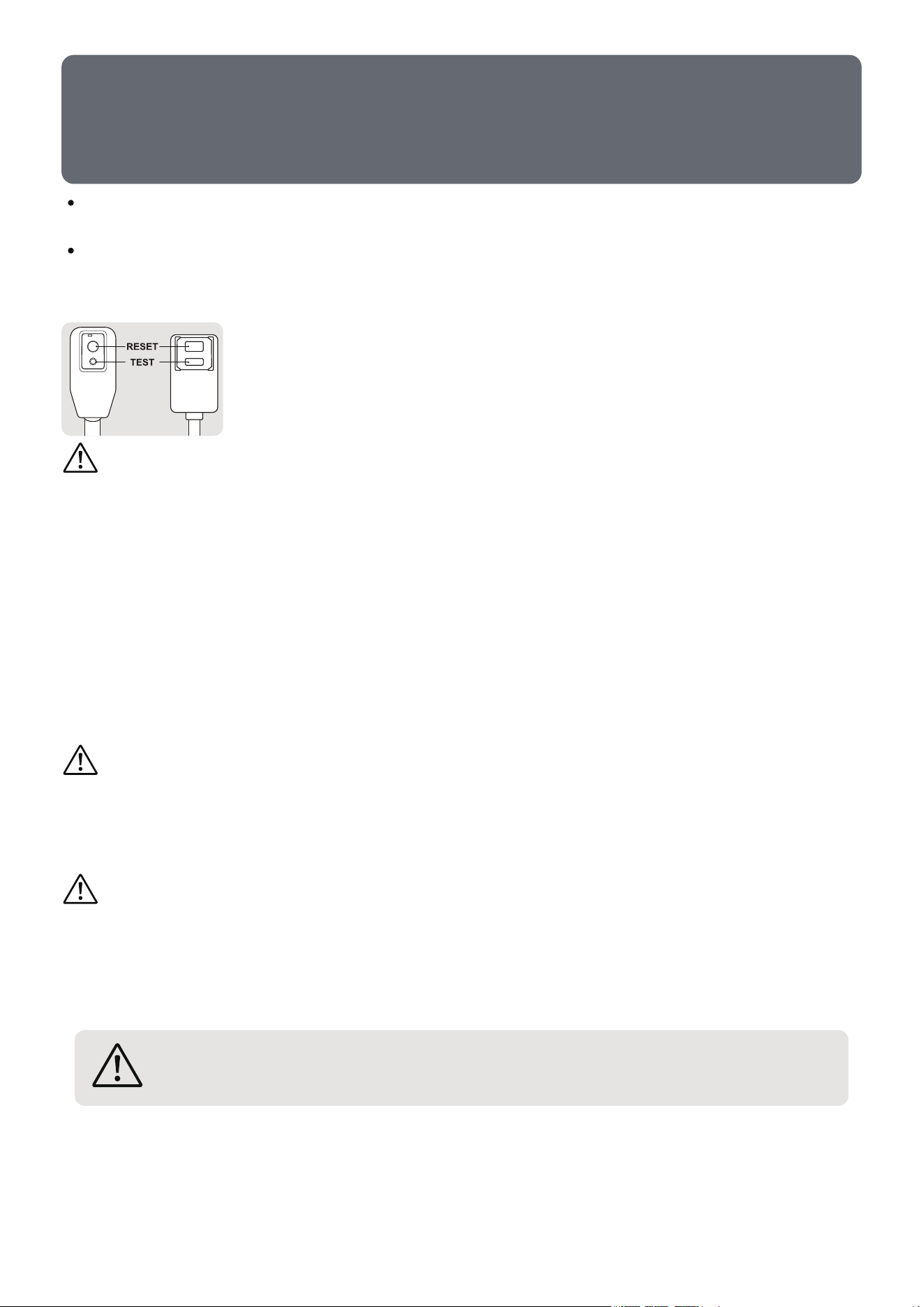
This air conditioner is equipped with an LCDI (Leakage Current Detection and
Interruption) power cord that is required by UL. This power supply cord contains
state-of-the-art electronics that sense leakage current. If the cord is damaged
and leakage occurs, power will be disconnected from the unit. The test and reset
buttons on the LCDI Plug are used to check if the plug is functioning properly.
Do not use this device to turn the unit on or off.
Always make sure the reset button is pushed in for correct operation.
NOTE:
WARNING—TEST LCDI before each use.
-
-
Plug power cord into a grounded 3-prong outlet.
Press RESET (on some units a green light will turn on).
Press the TEST button, the circuit should trip and cut all power to the air conditioner (on some
units green light may turn off).
Press the RESET button for use. You will hear a click and the A/C is ready for use.
The power supply cord must be replaced if it fails to trip when the TEST button is pressed and
the unit fails to reset.
1.
2.
3.
4.
5.
To test the plug:
WARNING—To prevent injury to the user or other people and property damage, the
following instructions must be followed. Incorrect operation due to ignoring of instructions
may cause harm or damage.
03
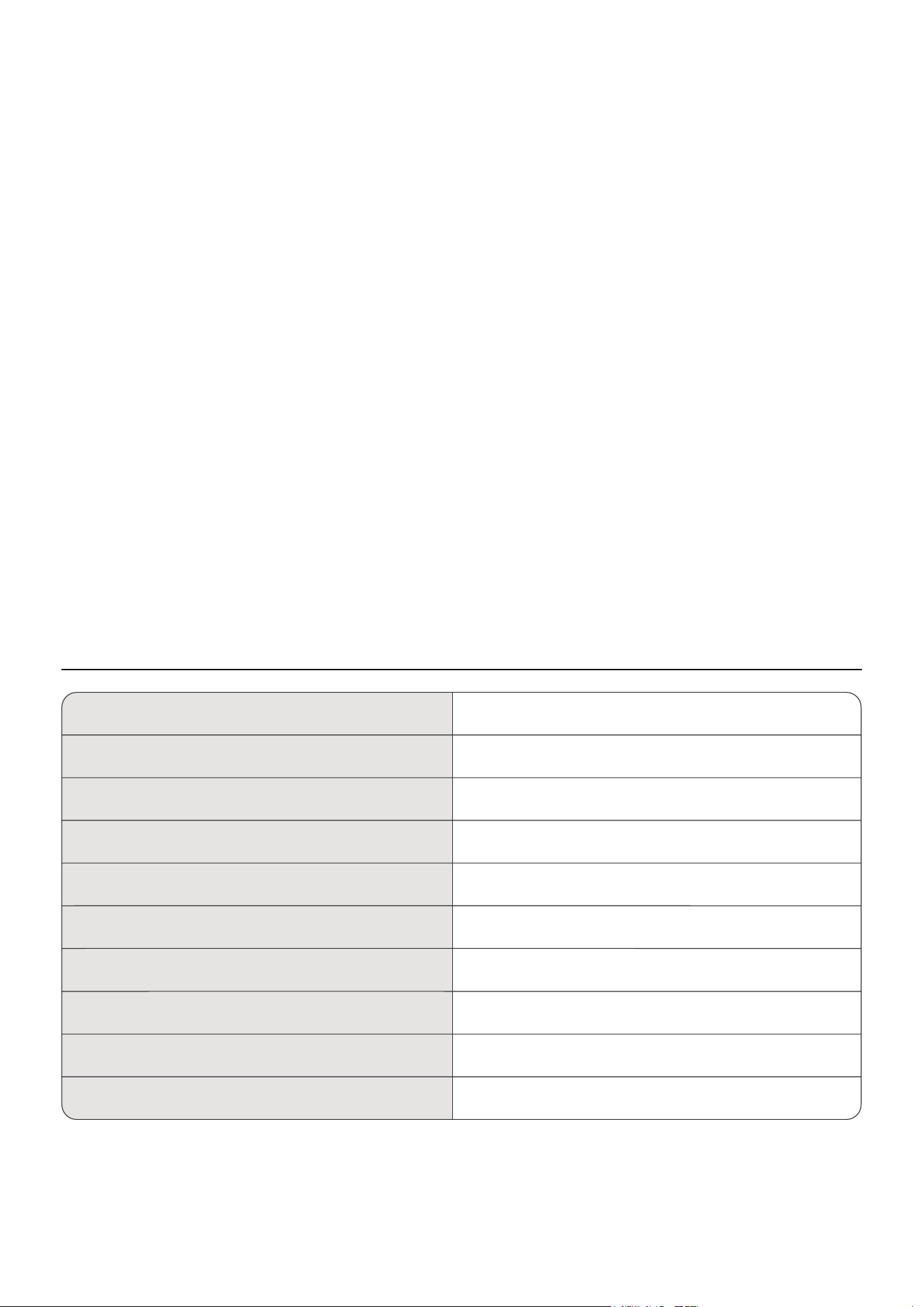
Specifications
-
-
-
-
-
-
-
-
-
-
-
-
-
-
-
-
-
-
Always use the switch on the control to start or shut off the unit.
Always contact a qualified person to carry out repairs. If the supply cord is damaged it must be
repaired by a qualified technician.
Keep an air path of at least 12 inches all around the unit from walls, furniture and curtains.
If the air conditioner is knocked over during use, turn off the unit and unplug from the power supply
immediately.
Do not operate your air conditioner in a wet room such as a bathroom or laundry room.
Do not touch the unit with wet or damp hands or when barefoot.
Do not press the buttons on the control panel with anything other than your fingers.
Do not remove any fixed covers. Never use this appliance if it is not working properly, or if it has
been dropped or damaged.
Never use the plug to start and stop the unit.
Always use the switch on the control panel to start or shut off the unit.
Do not cover or obstruct the inlet or outlet grilles.
Do not use hazardous chemicals to clean or come into contact with the unit. Do not use the unit in
the presence of inflammable substances or vapor such as alcohol, petrol, etc.
Do not allow children to operate the unit unsupervised.
Do not use this product for functions other than those described in this instruction manual.
Locate the unit where furniture cannot obstruct the air flow.
Keep blinds/curtains drawn.
Keep the filters clean.
Keep doors and windows closed to keep cool air in and warm air out.
Cooling Capacity (ASHRAE 128)
Model No.
Compressor RLA/LRA
Total Input Current
Maximum Allowable Pressure
Power Supply
Cooling Capacity (SACC)
Refrigerant/Charge
Condenser Motor FLA/HP
Evaporator Motor FLA/HP
12,000 BTU/h
A1
9.20A/45.0A
9.5A
R32/0.29 kg (10.23 oz)
6.5 MPa
115V~/60Hz
8,000 BTU/h
1.1A/0.06HP
0.45A/0.02HP
04
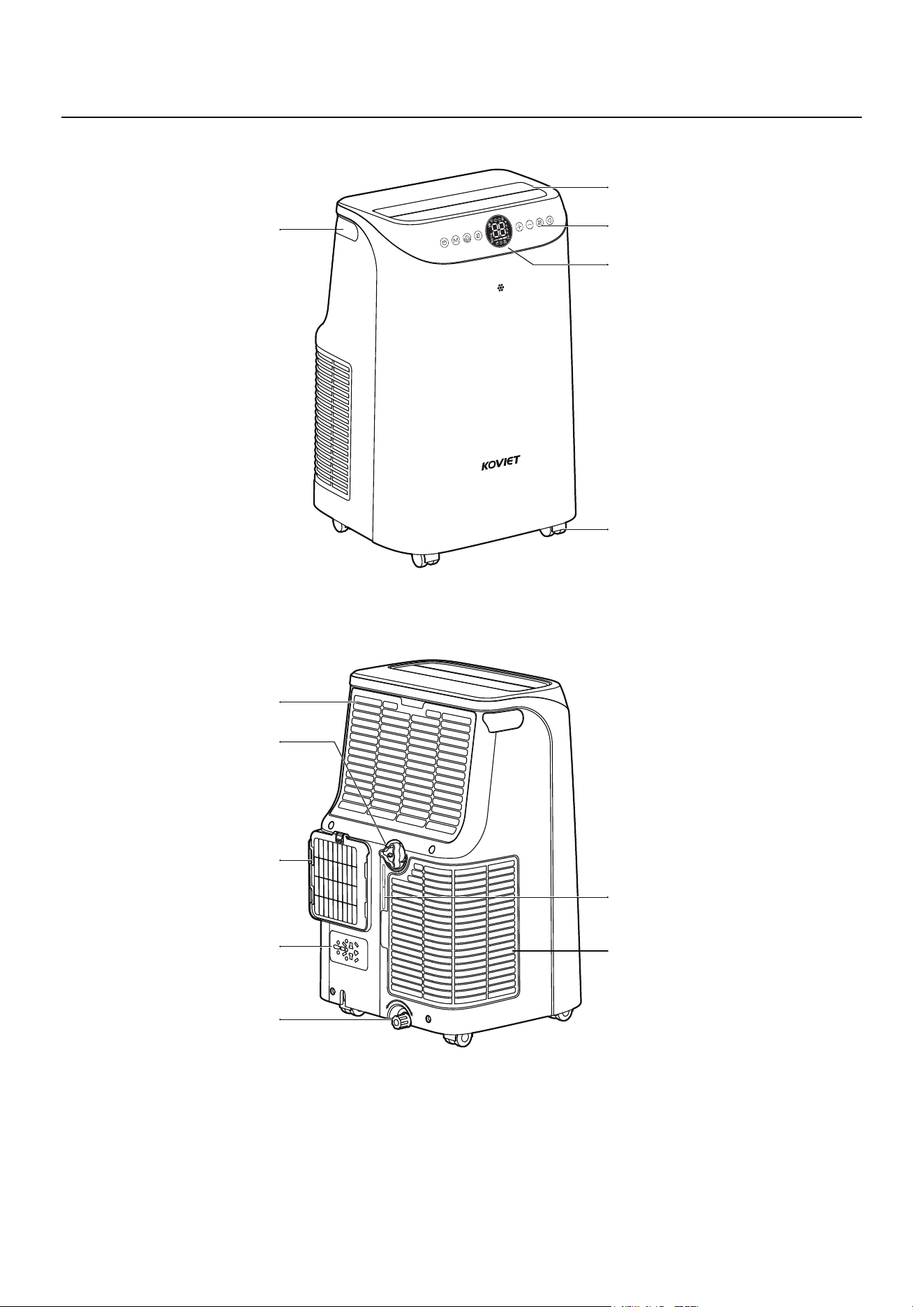
Unpacking Overview
Carry Handles
Swing Louver
Control Panel
LED Display
Plug Storage
Cord Winder
Air Inlet
Top Drain Outlet
Air Exhaust Hose
Housing Outlet
Bottom Drain Outlet
Exhaust Air Inlet
05
Casters
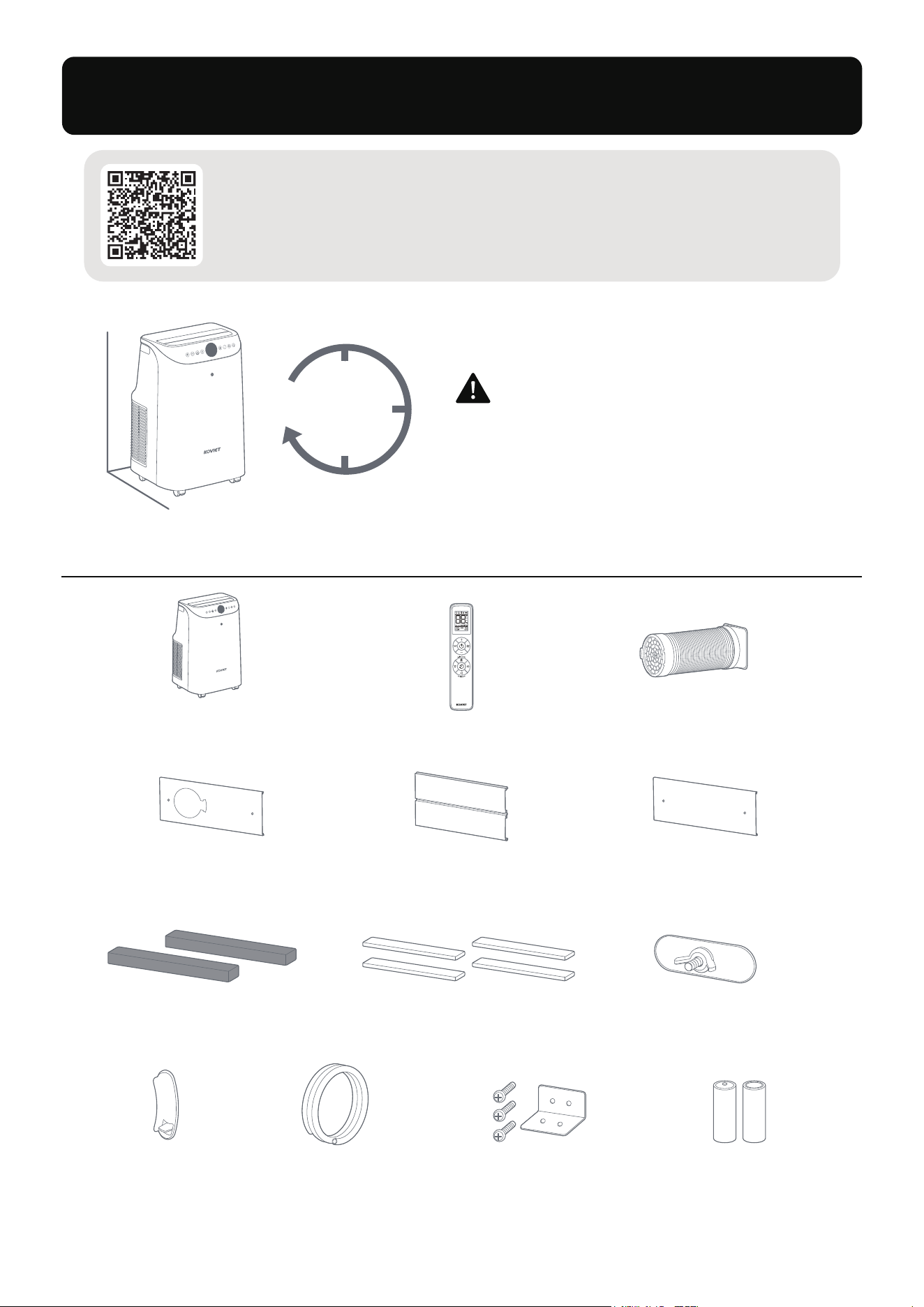
INSTALLATION GUIDE
Please keep the air conditioner
upright for at least 6 hours before
using the unit for the first time.
6h
06
Parts List
Portable
Air Conditioner x1
Air Exhaust
Hose x1
Window Panel
with Hole (A) x1
Window Extension
Panel (C) x1
Window Extension
Panel (B) x1
Locking Plate
and Screw x1
Remote Control
Battery (AAA 1.5V) x2
Butterfly Bolt x2
40-inch Non-Adhesive
Long Foam Seal x2
Remote Control x1
40-inch Adhesive
Long Foam Seal x4
Drainage
Hose x1
Clip x1
Scan the QR code to find
Support and Help
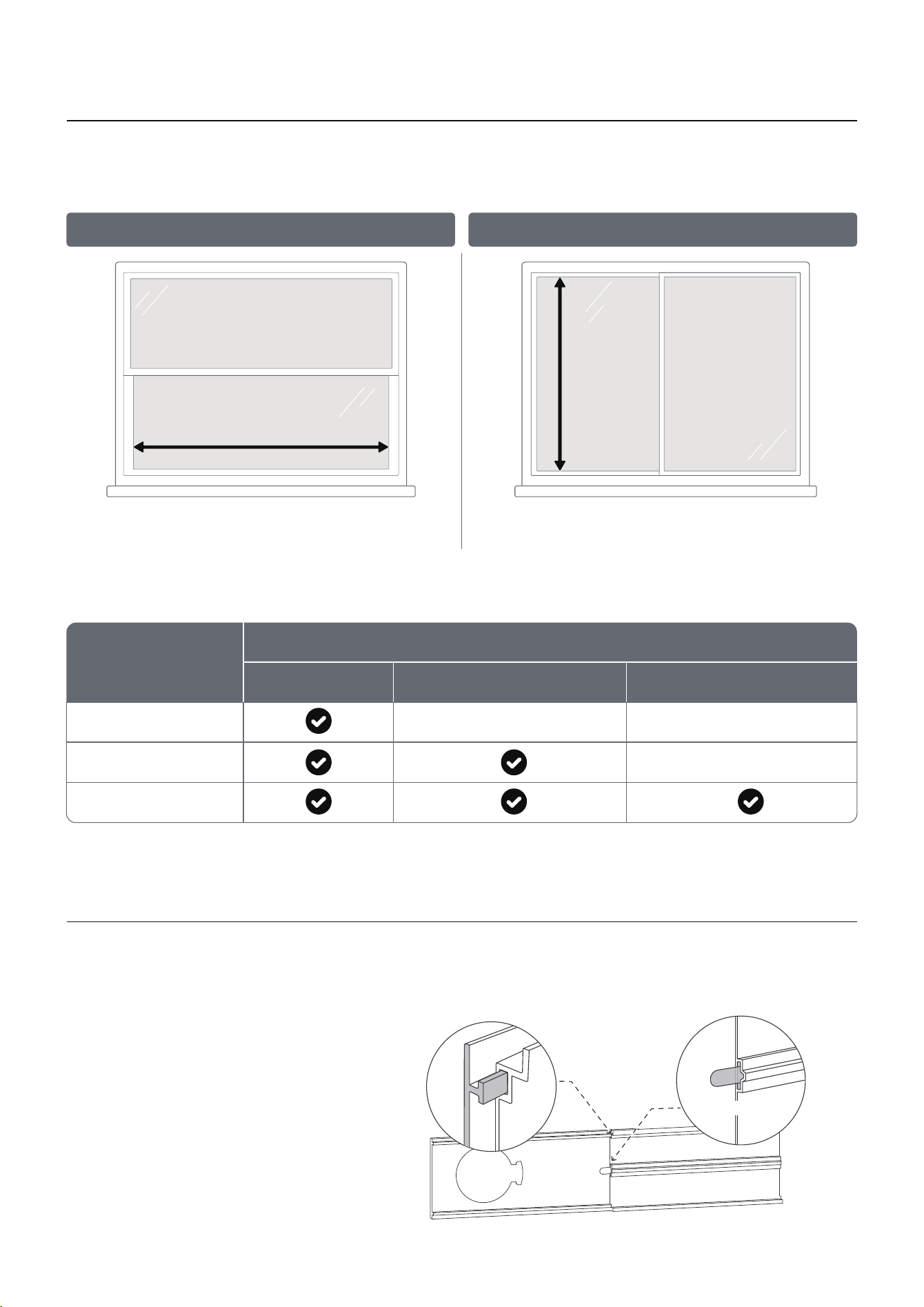
Standard Window Size: 20"–57" (50.8-144.78cm).
Hung Windows: Measure the width when opened.
Sliding Windows: Measure the height when opened.
Step 1: Prepare the Window Panel
Measure the width between the window
frames when opened.
Suitable Range: 20"–57"
Measure the height between the window
frames when opened.
Suitable Range: 20"–57"
Choose the correct panels to fit your window opening.
How to Assemble the Extension Panel
- For openings smaller than 20", proceed to measure and cut Panel A to fit.
- For openings larger than 57", contact Koviet Customer Support.
NOTE:
- Attach the Butterfly Bolt to Panel A.
- Align the back slot of Panel B with the Butterfly Bolt and slide Panel B into Panel A.
The butterfly bolt must be inserted in
the backside slot before installing the
panel on the window.
NOTE:
Window Opening Size
20"
20"-32"
32"-57"
Window Panel (A) Window Extension Panel (B)
Panels to Use
Window Extension Panel (C)
07
Hung Window Sliding Window
Back
A
B
Butterfly Bolt
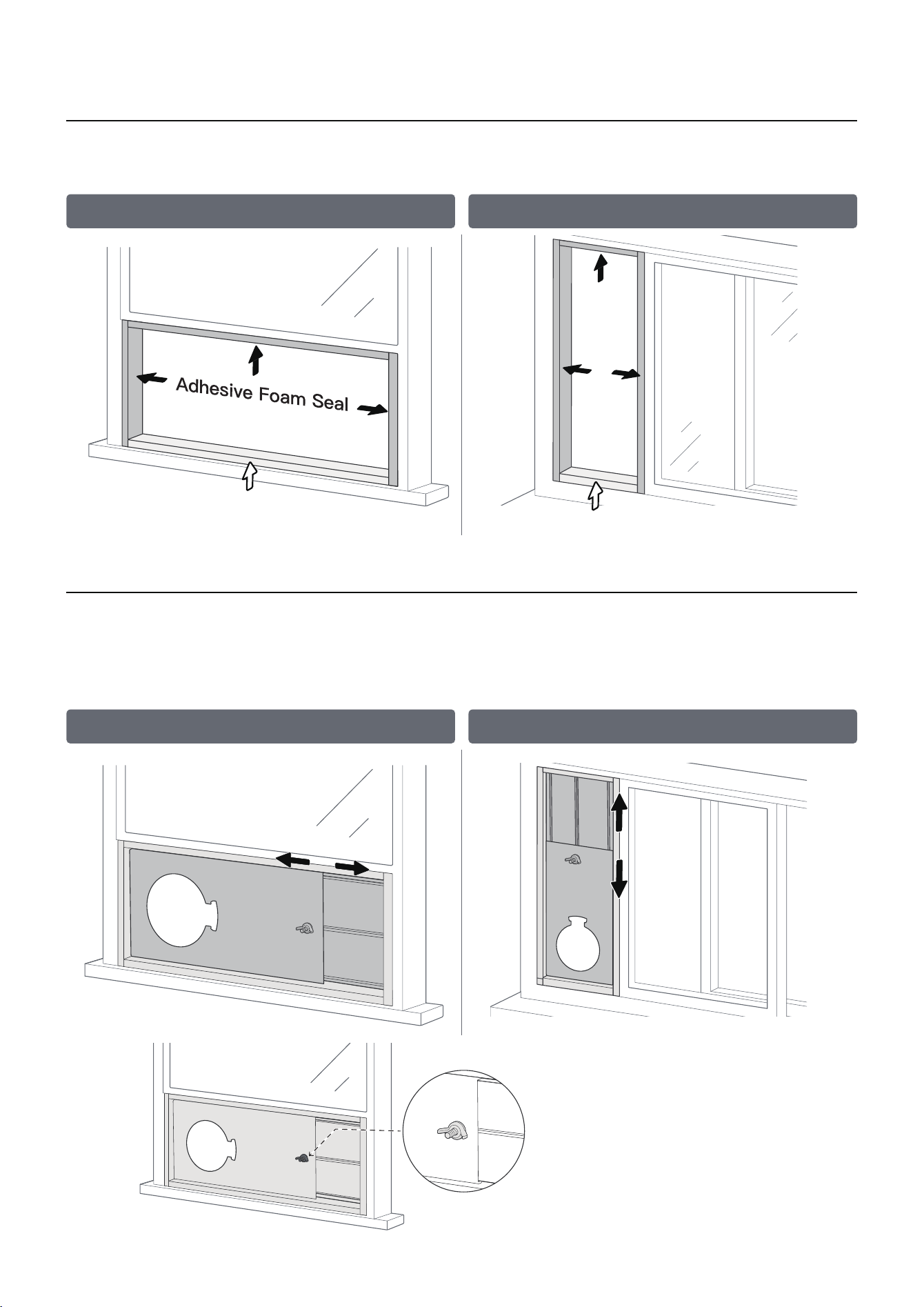
Cut the Adhesive Foam Seals to proper lengths, and stick them to the window frame and sash.
Use Non-Adhesive Foam Seal for the bottom window frame to allow flexibility.
Step 2: Install the Long Foam Seals
If the window opening is smaller than the panel kit's minimum length, trim only the end without
the round hole. Do not cut the hole portion.
NOTE:
Place the Panel onto the window frame, adjust to fit, and tighten the Butterfly Bolt.
Step 3: Mount the Window Panel
Tighten the Butterfly Bolt
08
Hung Window Sliding Window
Hung Window Sliding Window
Adhesive Foam Seal
Non-Adhesive Foam Seal
Non-Adhesive Foam Seal
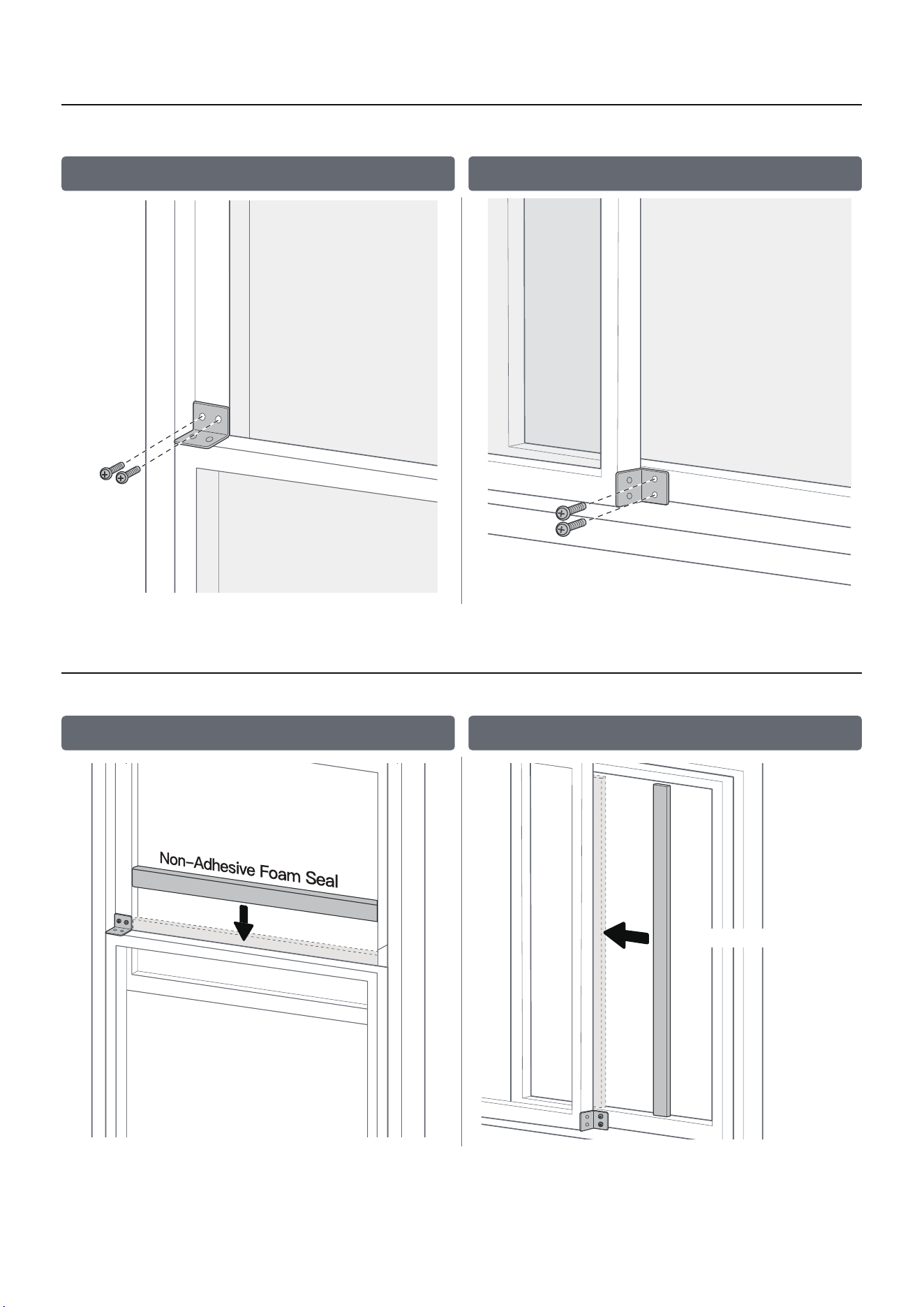
Close the window onto the panel and attach the Locking Plate and Screw for extra stability.
Step 4: Secure the Locking Plate (Optional)
Cut the Non-Adhesive Foam Seal to proper size and fill any gaps to prevent air leaks or insect entry.
Step 5: Add Non-Adhesive Foam Seal
Non-Adhesive Foam Seal
09
Hung Window Sliding Window
Hung Window Sliding Window
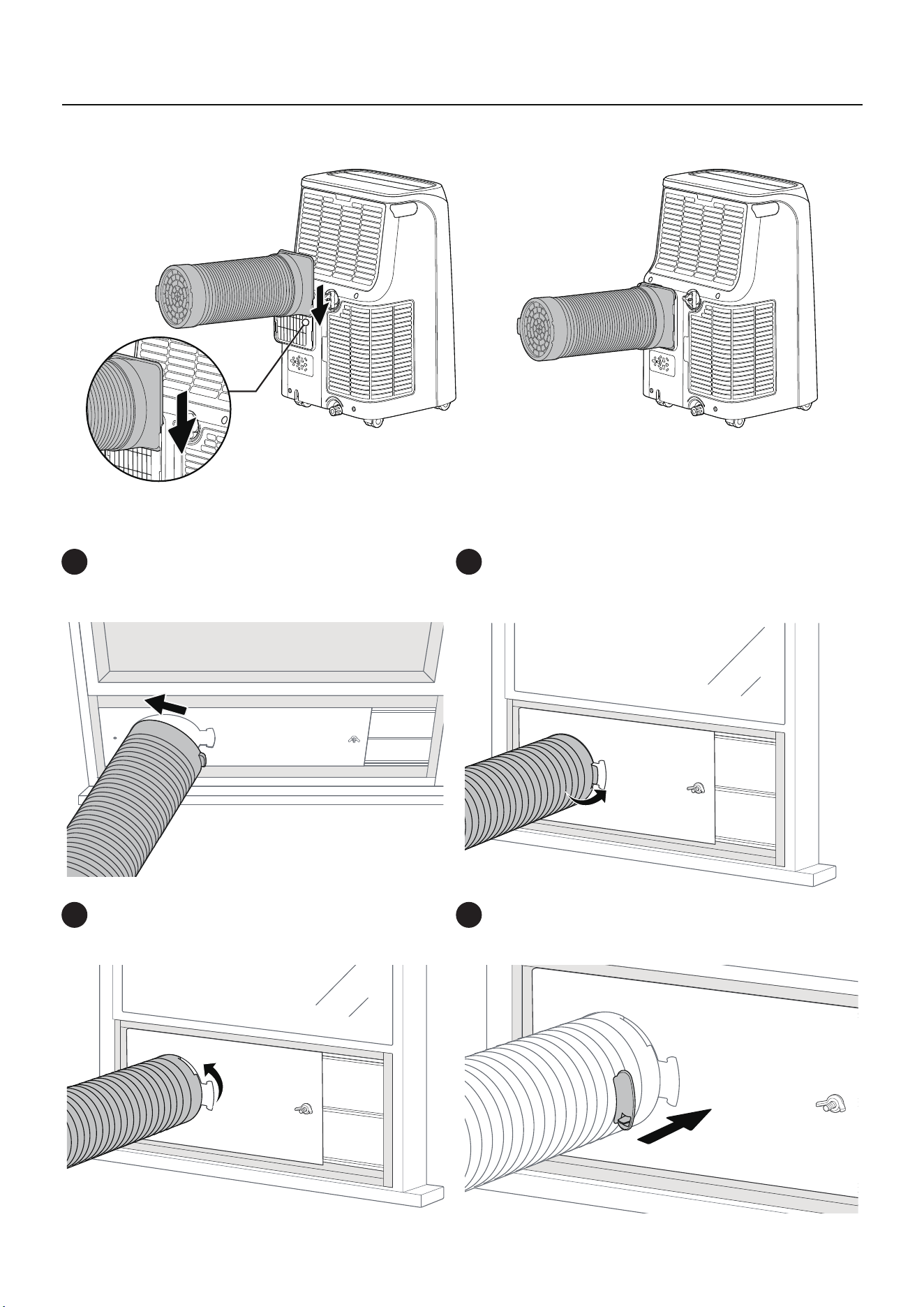
Attach the Air Exhaust Hose with the Round Fitting End to the cutout on the Window Panel.
10
Insert the left slot into the back of
the round hole.
1
Align the right slot with the right-side catch
of the round hole.
2
Rotate the round fitting counterclockwise
by half a turn to secure it.
3
Use the Clip to fasten the Air Exhaust Hose
to the Window Panel.
4
Connect the Air Exhaust Hose with the Square Fitting End to the Air Exhaust Hose Housing
Outlet.
Step 6: Attach the Hose
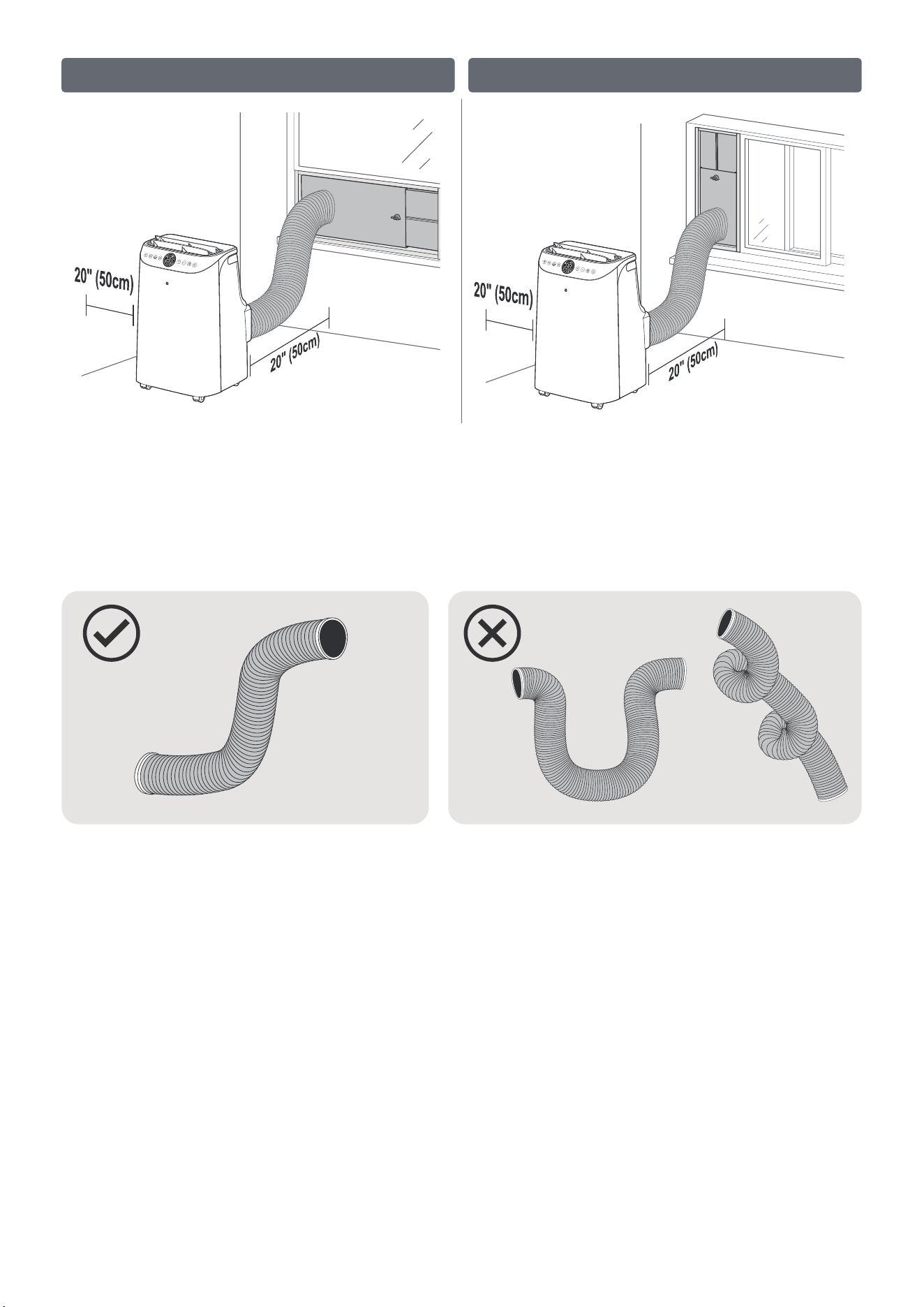
11
- Ensure the exhaust hose is properly connected to the window kit.
- Maintain at least 20" (50cm) of space between the unit and the wall.
NOTE:
Tips for Better Cooling:
- DO NOT overextend or bend the hose.
- DO NOT block or cover the air conditioner.
Hung Window Sliding Window
Scan the QR code to
find Support and Help
SETTING UP YOUR AIR CONDITIONER
12
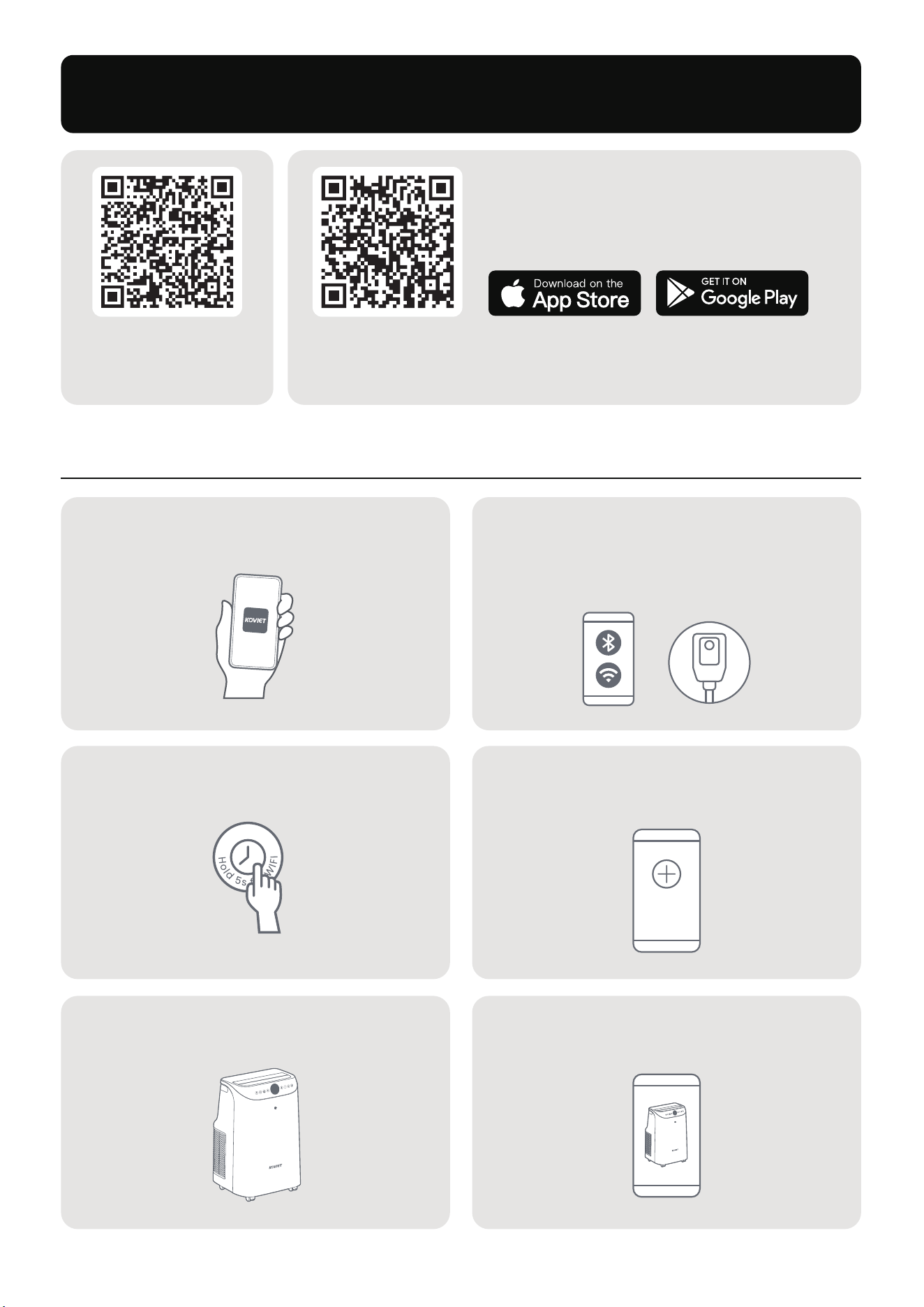
Pair Your Air Conditioner
Open the KOVIET App and sign in
or create an account.
Hold the Timer button for
5 seconds to start Wi-Fi setup.
(Tip: The Wi-Fi icon on the control panel LED will blink during pairing.)
Follow the on-screen instructions
to complete Wi-Fi setup.
In the App, tap the scanned A1 device
or manually select A1.
Device
1 2
3 4
5 6
Enable Bluetooth on your phone and
power on the unit (ensure a 2.4GHz
network and strong Wi-Fi signal).
Once paired, the Wi-Fi icon stays on,
and you can control the air conditioner
via the App.
Scan the QR code or search for “KOVIET" in your App store
to download and install the App.
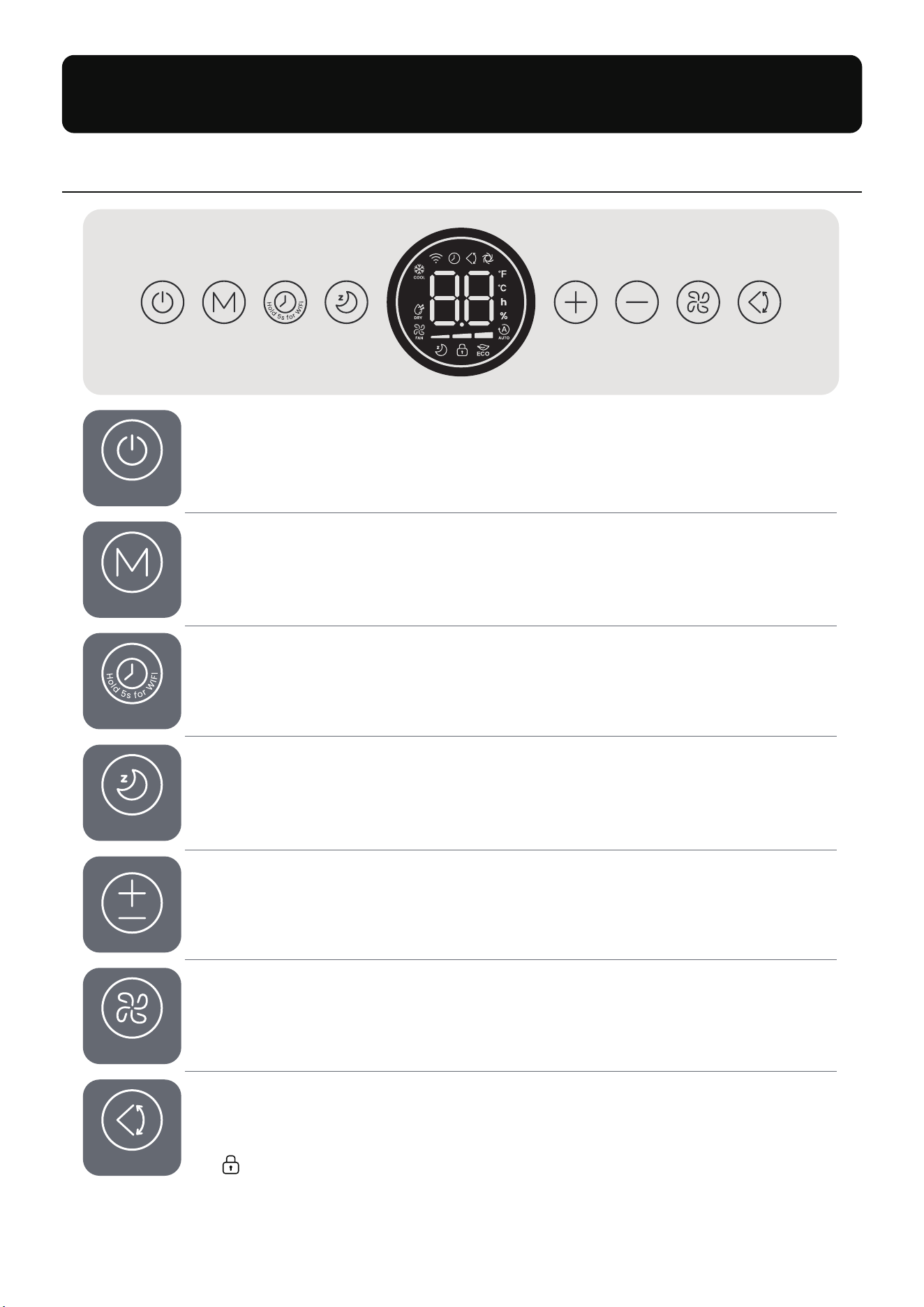
ON/OFF
- Turn the air conditioner on or switch to standby.
ON | OFF
Timer
- Set a timer (0-24 hours) while the air conditioner is on.
- Use the +/- buttons to adjust the time.
- Press and hold for 5 seconds to initiate Wi-Fi setup and pair the device.
Timer
Sleep (Cool Mode Only)
- Beeps and the display are muted (touch any button to wake the screen).
- Can be customized through the KOVIET App.
Sleep
Mode
- Switch between Cool, Dry, and Fan modes.
- Press and hold for 3 seconds to enable ECO Mode (Cool Mode only).
Mode
Fan Speed
- Adjust fan speed: Low, Medium, High, or Auto.
- The speed indicator light shows the current setting.
SpeedSpeed
+ / -
- Adjust temperature (℉/℃), humidity, or timer settings.
- Press and hold the +/- buttons simultaneously for 3 seconds to switch
between ℉ and ℃.
SwingSwing
Swing
- Move the louvers up and down (do not manually adjust them).
- Press and hold for 3 seconds to activate or deactivate Child Lock
( appears when activated).
KNOWING YOUR AIR CONDITIONER
Control Panel
ON | OFF
Mode
Timer
Sleep
Speed
Swing
Speed
Swing
13
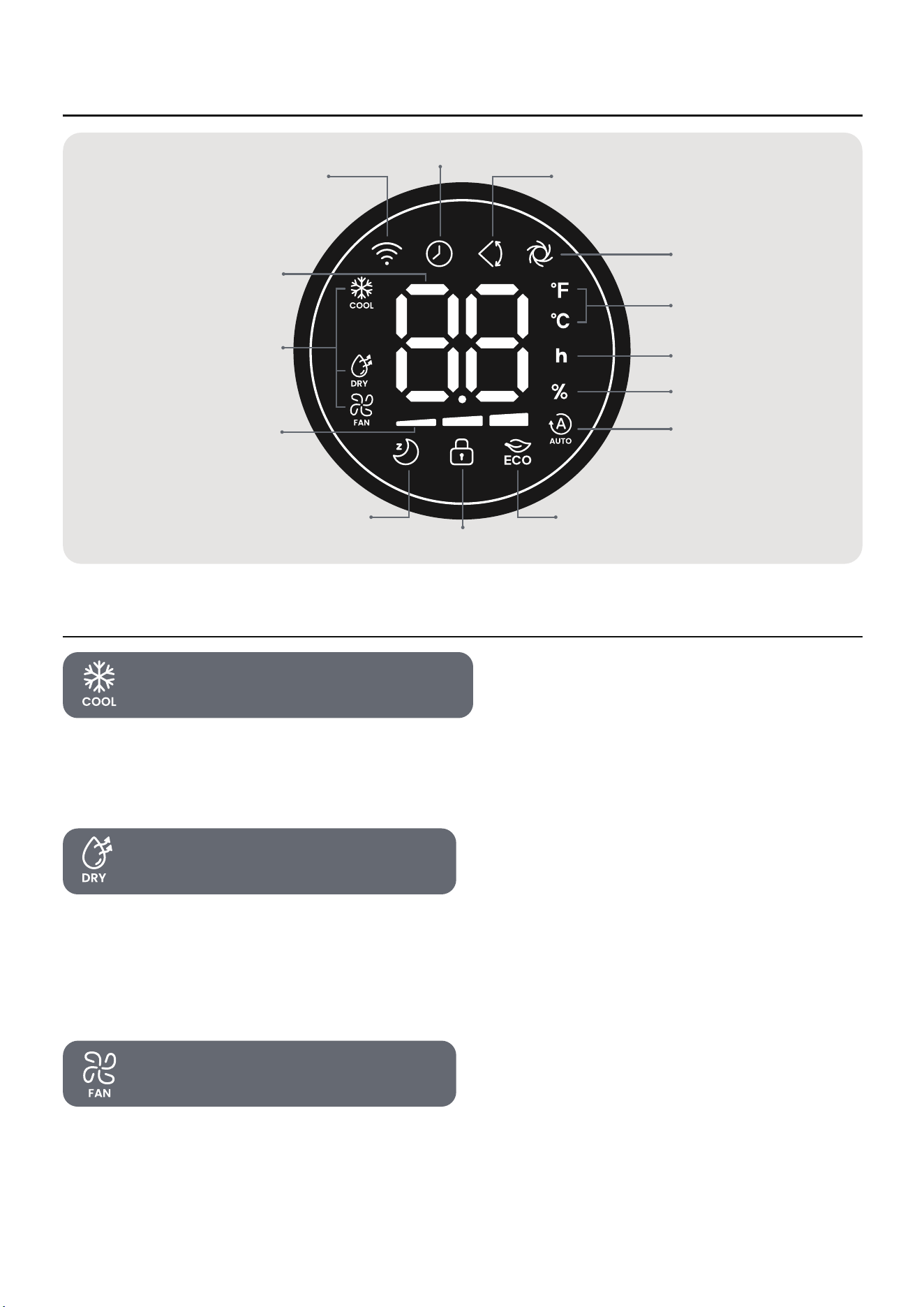
LED Display
Temperature / Humidity
/ Timer Hour Indicator
Fan Speed Indicator
Sleep Mode
ECO Mode
Child Lock Mode
Modes
WiFi Indicator
Timer Indicator
Vertical Swing Indicator
Temperature Unit
Hour Indicator
Humidity Percent
Fan Auto Indicator
TURBO Mode
Working Modes
-
-
Quickly cool the room with adjustable temperature and fan speed.
Press TURBO on the remote or use the KOVIET App to enable maximum fan speed
and lowest temperature.
Set target humidity between 30%-70%.
In Dry Mode, remove the top drain cap and connect the hose to the outlet. Place a
container of at least 2.5 Gal at the other end for drainage, and empty it promptly to
prevent overflow.
-
-
Circulate air without cooling.
Temperature cannot be adjusted in this mode.
-
-
14
Cool Mode (61–86℉ / 16–30℃)
Dry Mode (RH 30%-70%)
Fan Mode
Customize the temperature for each stage via the KOVIET App.
Available only in Cool Mode.
Adjust the target room temperature by using the +/- buttons.
-
-
-
Press and hold the Mode button for 3 seconds or use the KOVIET App to enable ECO Mode.
Available only in Cool Mode.
-
-
15
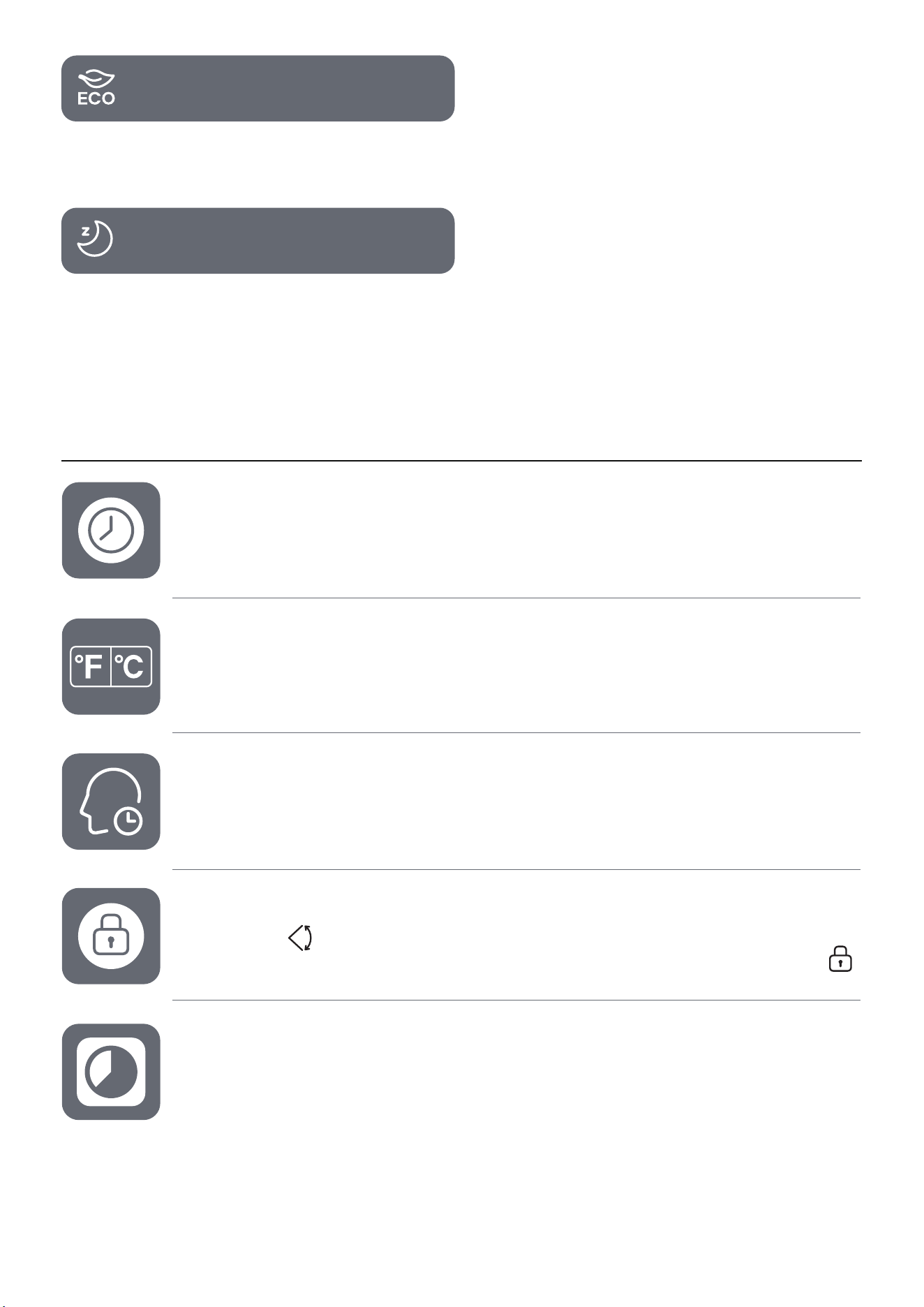
ECO Mode
Sleep Mode
Additional Features
Timer
- Set a timer (0-24 hours) to automatically turn the air conditioner on or off.
- To cancel the timer, set it to 0 hours.
Temperature Unit Switch
- Press and hold the +/- buttons on the control panel simultaneously for 3 seconds.
- Press and hold the TURBO button on the remote for 3 seconds.
- You can also use the KOVIET App to switch between ℉ and ℃.
Memory
- The air conditioner will resume previous settings (except for the timer)
when powered back on.
Firmware Update
- Update via KOVIET App to ensure optimal performance.
- During the update, the display shows “UP".
Do not operate until the update is complete.
Child Lock
- Long press for 3 seconds to activate/deactivate the lock.
- When activated, all buttons except ON/OFF are locked, and the display shows .
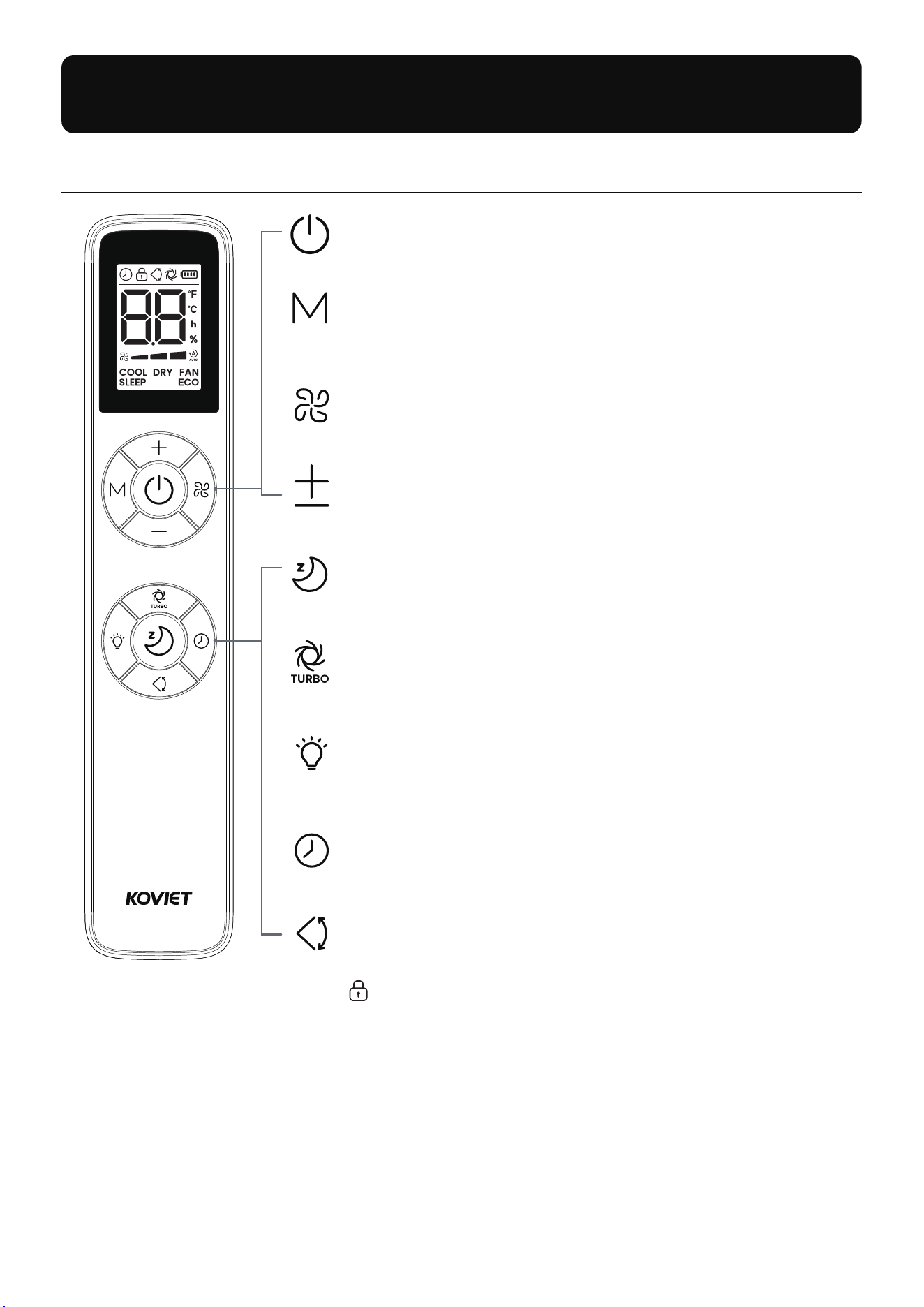
Control Panel
3
s
f
o
r
L
o
c
k
3
s
f
o
r
°
F
/
°
C
ON/OFF
Turn the air conditioner on or off.
+ / -
Adjust temperature (℉/℃), humidity, or timer settings.
Mode
Switch between Cool, Dry, and Fan modes.
Press and hold for 3 seconds to enable ECO Mode (Cool Mode only).
Fan Speed
Adjust airflow speed between low, mid, high and auto.
Sleep Function (Cool Mode only)
Turn the Sleep Mode on and off.
TURBO (Cool Mode only)
Turn the TURBO Mode on and off.
Press and hold TURBO for 3 seconds to switch between °F and °C.
Timer
Set a timer (0-24h) to automatically turn the unit on or off.
LED Lights
Turn off the control panel LED. The screen wakes up when any
button is pressed and turns off automatically after a few seconds.
Swing Louver
Move the louvers up and down.
Press and hold for 3 seconds to activate or deactivate Child Lock
( appears when activated).
USING THE REMOTE CONTROL
16
17
Your air conditioner may come with two batteries. To install:
1. Slide the back of the remote control down to open the battery compartment.
2. Insert the batteries, ensuring the (+) and (-) ends align with the symbols.
3. Slide the battery cover back into place.
Battery Replacement
WARNING
Remove and immediately recycle or dispose of used batteries according to local regulations
and keep away from children. DO NOT dispose of batteries in household trash or incinerate.
Even used batteries may cause severe injury or death.
Call a local poison control center for treatment information.
Compatible battery type: AAA.
Battery nominal voltage: 3.0 Vdc
Non-rechargeable batteries are not to be recharged.
Do not force discharge, recharge, disassemble, heat above (rated temperature: 140℉) or
incinerate. Doing so may result in injury due to venting, leakage or explosion resulting in
chemical burns.
Ensure the batteries are installed correctly according to polarity (+ and -).
Do not mix old and new batteries, different brands or types of batteries, such as alkaline,
carbon-zinc, or rechargeable batteries.
Remove and immediately recycle or dispose of batteries from equipment not used for an
extended period of time according to local regulations.
Always completely secure the battery compartment. If the battery compartment does not close
securely, stop using the product, remove the batteries, and keep them away from children.
)
)
)
)
)
)
)
)
)
)
)
a
b
c
d
e
f
g
h
i
j
k
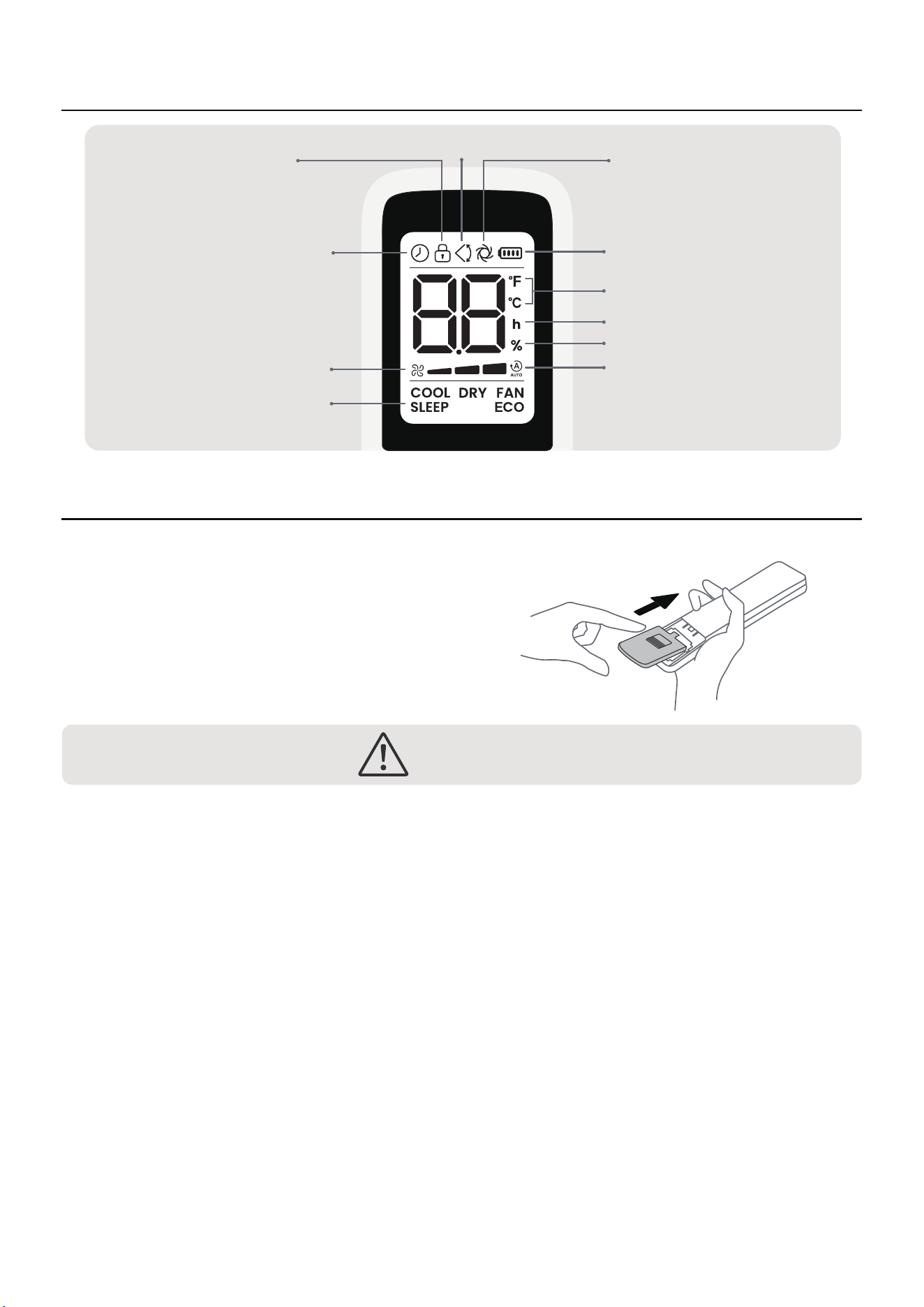
LED Display
Modes
Fan Speed
Child Lock TURBOSwing Louver
Timer
Battery
Temperature Unit
Hour Indicator
Humidity Percent
Fan Auto Indicator
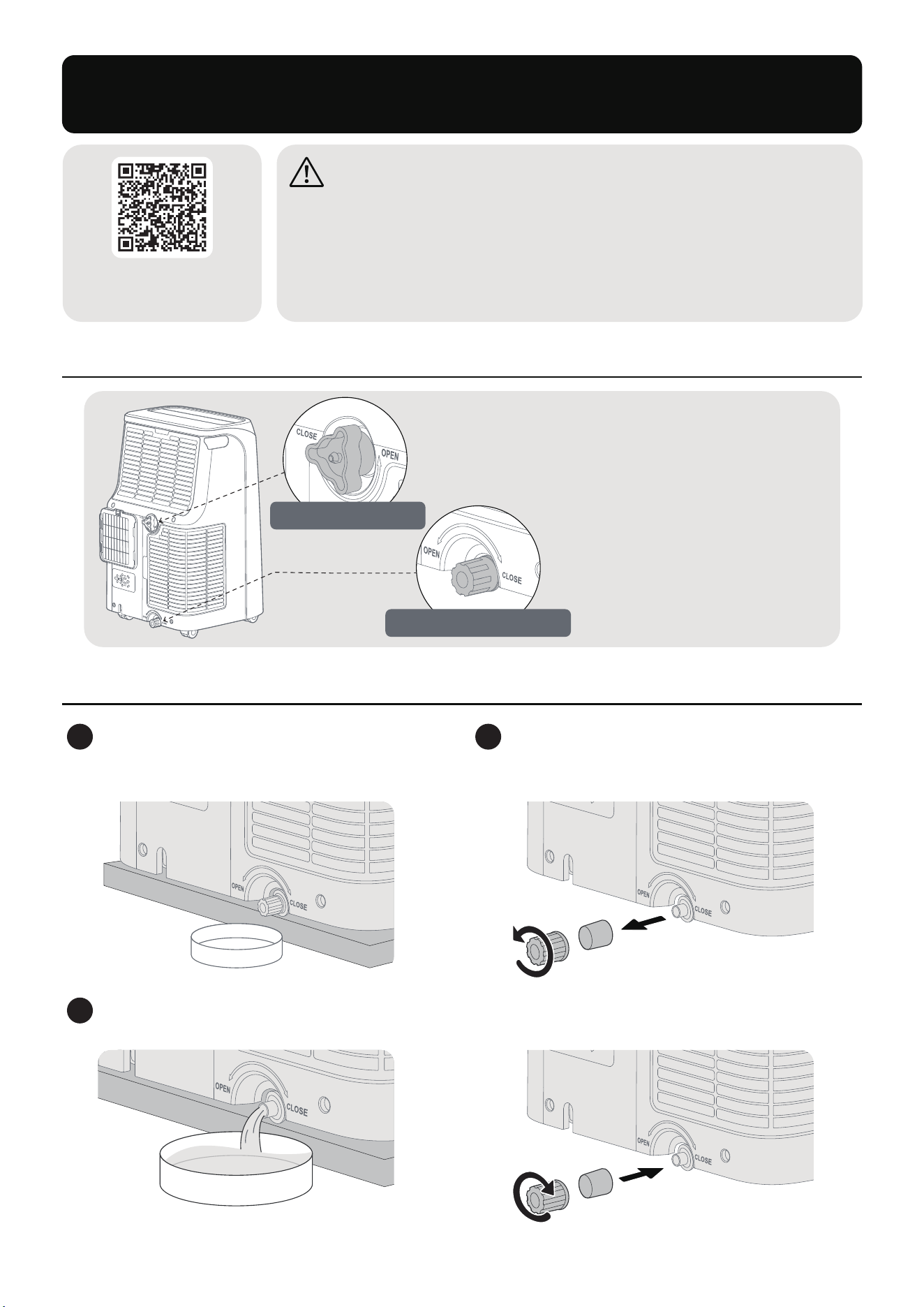
- No drainage is needed.
- Ensure both rubber plugs and
drain caps (top and bottom)
are tightly secured.
For Regular Use:
Draining Water
A. F1 Drainage (When F1 appears on the control panel)
MAINTENANCE AND CLEANING
Scan the QR code to
find Support and Help
-
-
-
-
-
WARNING
Always turn off and unplug the unit before cleaning or servicing.
DO NOT use flammable liquids or chemicals to clean the unit.
DO NOT wash the unit under running water to avoid electrical hazards.
DO NOT operate the unit if the power supply is damaged during cleaning.
Replace a damaged power cord with a new one from the manufacturer.
18
Unplug the unit and move it to a
drain area or place it over a drip tray
(not included).
1
Remove the bottom drain cap to empty
the water.
2
Reinsert the rubber plug securely to prevent leaks. Tighten the drain cap and restart
the unit.
3
Top Drain Outlet
Bottom Drain Outlet
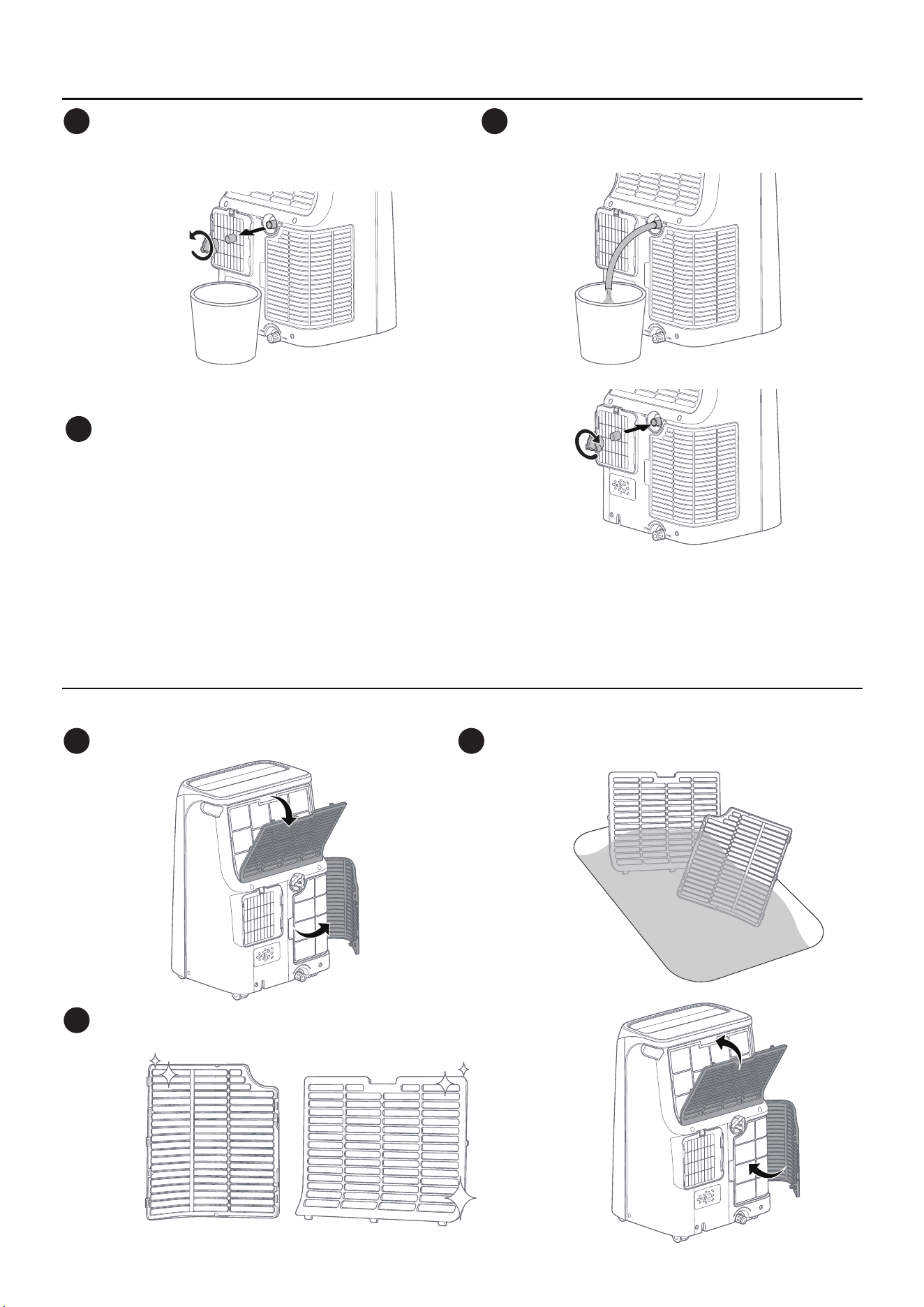
- Ensure the hose and outlet are properly aligned.
- The hose should not be higher than the top drain outlet for proper drainage.
- Empty the container promptly to prevent overflow.
NOTE:
B. Continuous Drainage (Dry Mode or RH > 85%)
For best performance, clean the filters every month:
Filter Maintenance
19
Unplug the unit and prepare a container of
at least
2.5 Gal (not included). Unscrew
the top drain cap.
1
Attach the drainage hose to the outlet and
allow the water to drain.
2
Reinsert the rubber plug securely to prevent leaks.
Tighten the drain cap and restart the unit.
3
Remove both filters from the back.
1
Allow the filters to dry completely before reinstalling.
3
Soak the filters in lukewarm water and rinse.
2
If you won’t be using the air conditioner for a while:
Proper Storage
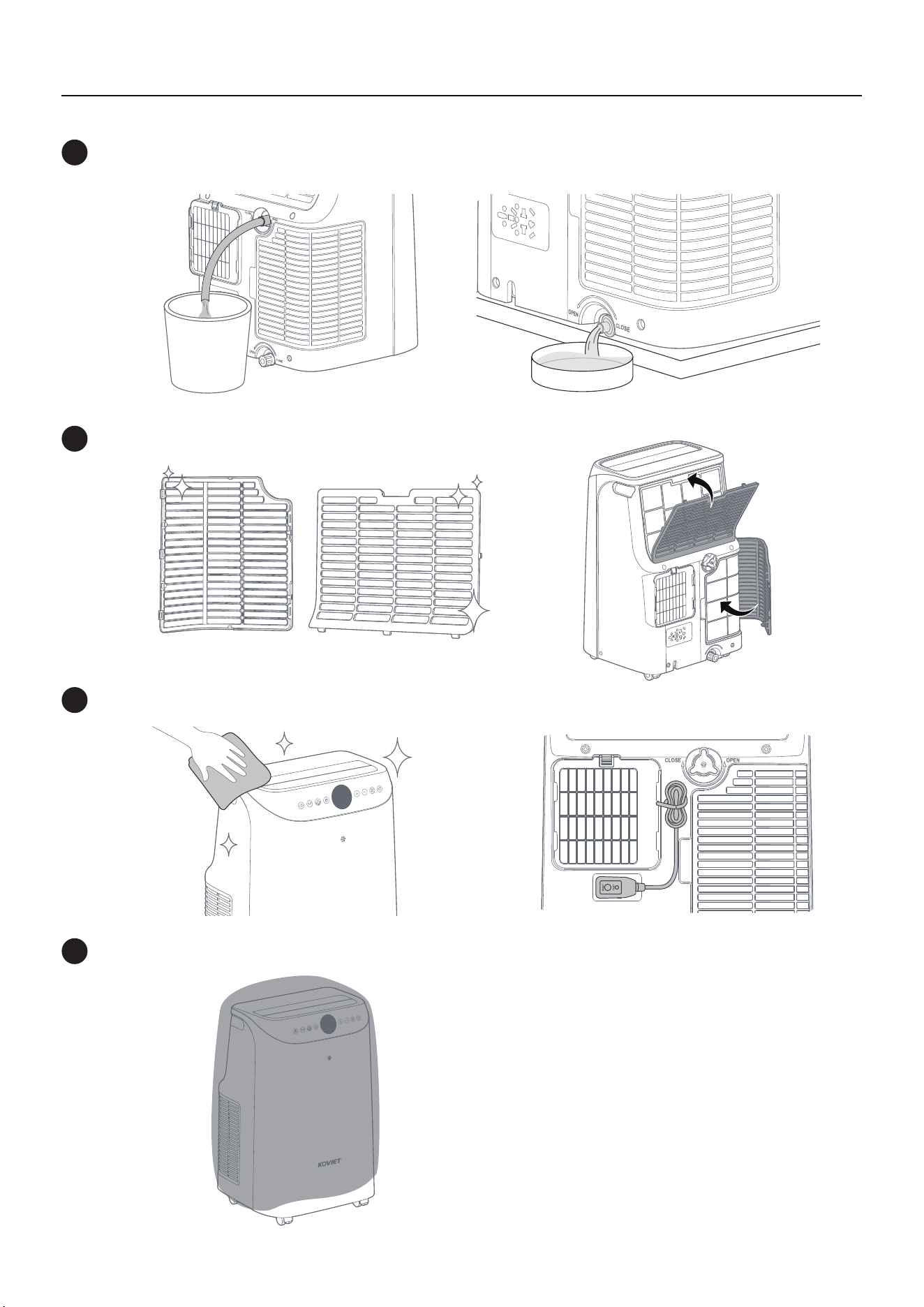
20
Drain any remaining water by opening both drain outlets. Close them once the tank is empty.
1
Wash and dry the filters thoroughly, then reinstall.
2
Clean the louvers, wrap the power cord with a strap, and plug it into the storage outlet.
3
Cover the unit to prevent dust buildup.
4
+1 (855) 358-5888
(Monday-Friday 9:00 am-5:00 pm PST)
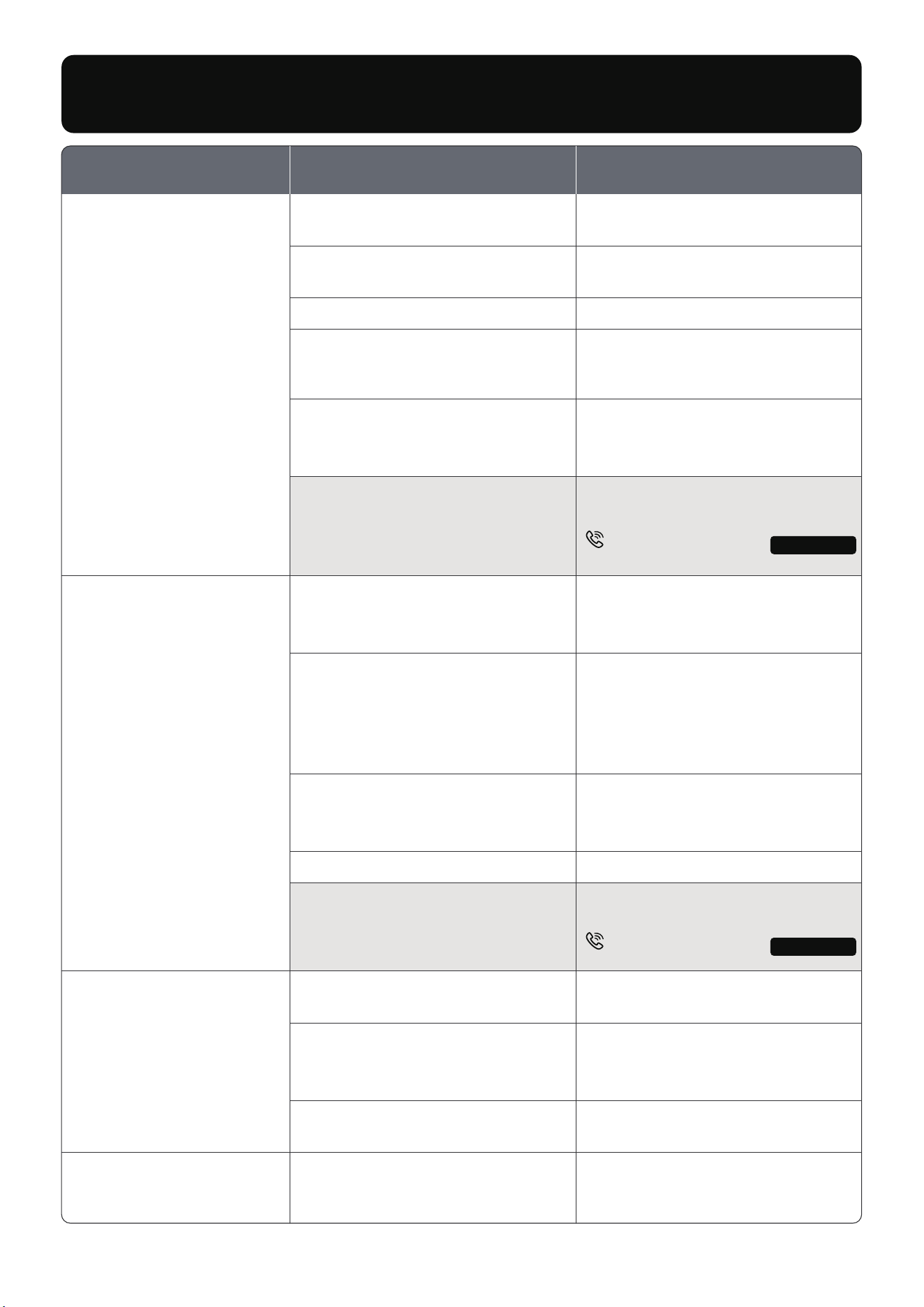
E0/E1/E2 Error Codes.
Device malfunction,
contact KOVIET customer service.
TROUBLESHOOTING
The unit is not on a level surface.
Place the unit on a flat, level
surface.
Air inlet filter or exhaust air inlet
filter is clogged with dust or pet
hair.
Normal compressor noise and
vibration.
Clean the filter by following the
section “Filter Maintenance”.
Slight noise and vibration are
normal during cooling operation.
Unit is noisy and
vibrates too much.
Problem SolutionPossible Cause
Compressor delay after restart.
Wait 3 minutes for the compressor
to start (this is normal).
The unit is not plugged in properly.
Plug Current Device has tripped.
Ensure the unit is properly
plugged into the outlet.
Press the RESET button.
F1 Protection Code.
Air inlet filter or exhaust air inlet
filter is clogged with dust or pet
hair.
Exhaust hose is disconnected,
blocked, bent, or twisted.
Windows or doors are open.
The temperature is set too high,
and the unit has reached ambient
temperature and stopped cooling.
The water collection tray is full.
Drain the water by following the
section “F1 Drainage”.
Lower the temperature setting.
Close all windows and doors.
Low refrigerant levels.
Contact KOVIET customer
service for refrigerant check.
Room temperature is already
lower than the target temperature
(Cool Mode).
Lower the temperature setting.
Clean the filter by following the
section “Filter Maintenance”,
and ensure the unit has at least
20
" of clearance from walls or
curtains for proper airflow.
Turn off the unit, disconnect the
hose, check for blockages or
kinks, and reconnect it properly.
My air conditioner is
not working.
Unit is not cooling well.
This is normal; the compressor
stops working once the set
temperature is reached.
Lower the temperature setting
if needed.
Compressor keeps
turning on/off, making
loud noise.
21
Model No.: A1
+1 (855) 358-5888
(Monday-Friday 9:00 am-5:00 pm PST)
Model No.: A1
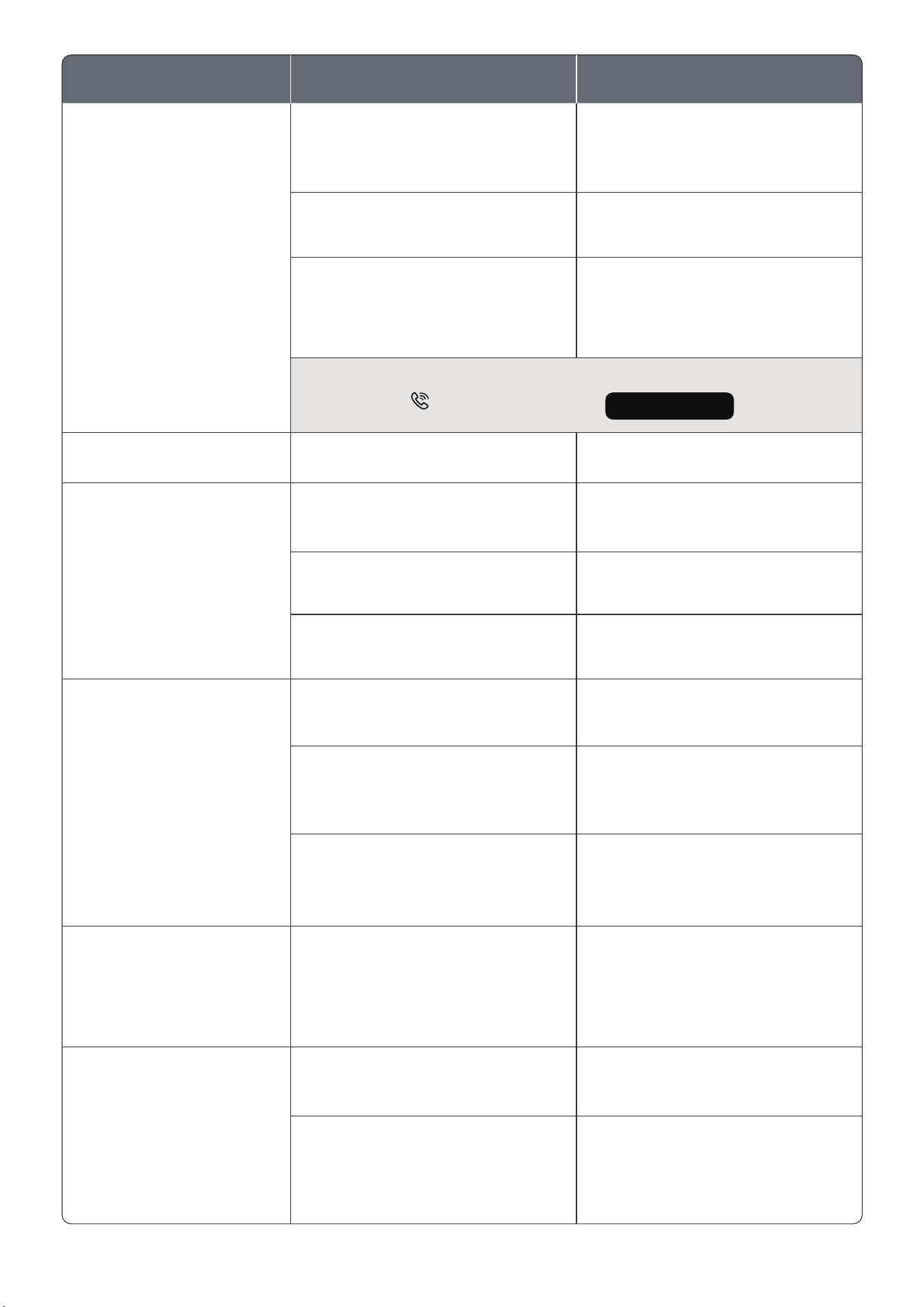
Problem SolutionPossible Cause
Flow of refrigerant inside the unit.
Too many electrical devices are
using power at once.
This sound is normal.
Reduce the use of other devices
on the same circuit.
Loose plug or poor outlet
connection.
Check if the plug is securely
connected.
Dirty air inlet filter or exhaust
air inlet filter.
Clean the filter by following the
section “Filter Maintenance”.
Outdoor temperature is below
60°F (16°C).
Switch to Fan Mode to allow ice
to melt.
Dirty air inlet filter or exhaust
air inlet filter.
Clean the air filter, then switch to
Fan Mode. Once the issue is
resolved, return to Cool Mode.
Drain the water by following the
section “F1 Drainage” if the unit
has been unused for a while.
Clean the air outlet with a soft
cloth and run the unit in Fan Mode
to dry it out.
Lower the set temperature to
achieve the desired cooling.
Old or low capacity wiring.
Stagnant water due to
long-term non-use.
The air outlet on top of the unit
may need cleaning.
The unit only detects temperature
near it, not throughout the room.
Cooling stops once the surrounding
temperature reaches the set level.
Inspect or replace old wiring or
socket if necessary.
+1 (855) 358-5888
(Monday-Friday 9:00 am-5:00 pm PST)
Drain caps or rubber plugs are
not securely tightened after
draining.
Tighten both rubber plugs and
drain caps at the top and bottom
drain outlets.
The water container is too small or
not emptied in time.
The unit was tilted during
movement.
Use a container larger than
2.5 Gal and empty it promptly.
Residual condensation may
remain inside the unit after use.
Avoid tilting the unit when
moving it.
If the issue persists, contact KOVIET customer service.
Unit is leaking water.
Unit makes a gurgling
sound.
Circuit breaker trips.
Unit has a strange odor.
Cooling stops before
reaching the set
temperature.
Ice forms on the cooling
coil behind the air outlet.
22
Model No.: A1

KOVIET CUSTOMER CARE
This product is covered with Koviet product and labor warranty for
12 months from the date of its original purchase.
To provide customers with quality shopping and user experience, we
guarantee to replace or issue a full refund within the 30-day period from
the date of purchase.
After the 30-day warranty has expired, Koviet activates a 1-year warranty
from the date of purchase that covers product replacement.
We can only provide after-sales service for products that are sold by
Koviet or Koviet authorized retailers and distributors.
※ Please have your order ID ready before contacting Customer Support.
The warranty does not apply where damage is caused by other factors,
including without limitation:
(a)Normal wear and tear;
(b)Misuse, dismantling, accident, or failure to follow operating instructions;
(c)Exposure to liquid or infiltration of foreign particles;
(d)Servicing or modifications of the product other than by Koviet;
(e)Commercial or non-household use.
Thanks for choosing Koviet Portable Air Conditioner.
30-Day Limited Warranty
30-Day to 1-Year Warranty Limitations
Register your appliance on our website for a free one-year warranty extension
https://ikoviet.com/pages/warranty.
Extend Your Warranty
30-Day to 1-Year Limited Warranty
23
20
Scan the QR code to find
Support and Help
V1.1