Vinyl Record Player User Manual
Simplified Safety & Operating Instructions
1. Read all safety and operating instructions before use.
2. Keep these instructions for future reference.
3. Follow all warnings on the product and in the manual.
4. Comply with all operating instructions.
5. Do not use near water or moisture (e.g., wet basement, swimming pool).
6. Clean only with a dry cloth.
7. Do not block ventilation openings. Maintain at least 5 cm clearance around the device for ventilation, and
install per manufacturer’s instructions.
8. Do not install near heat sources (radiators, heaters, stoves, etc.).
9. Use only manufacturer-specified attachments and accessories.
10. Use only with manufacturer-approved carts, stands or brackets. Take care when moving the cart to
prevent tipping and injury.
11. Unplug the device during thunderstorms or when not in use for a long time.
MODEL:VR010

RECORD PLAYER OPERATION
1. The speaker has a built-in rechargeable battery. Fully charge it before first use.
2. Place the vinyl record on the turntable.
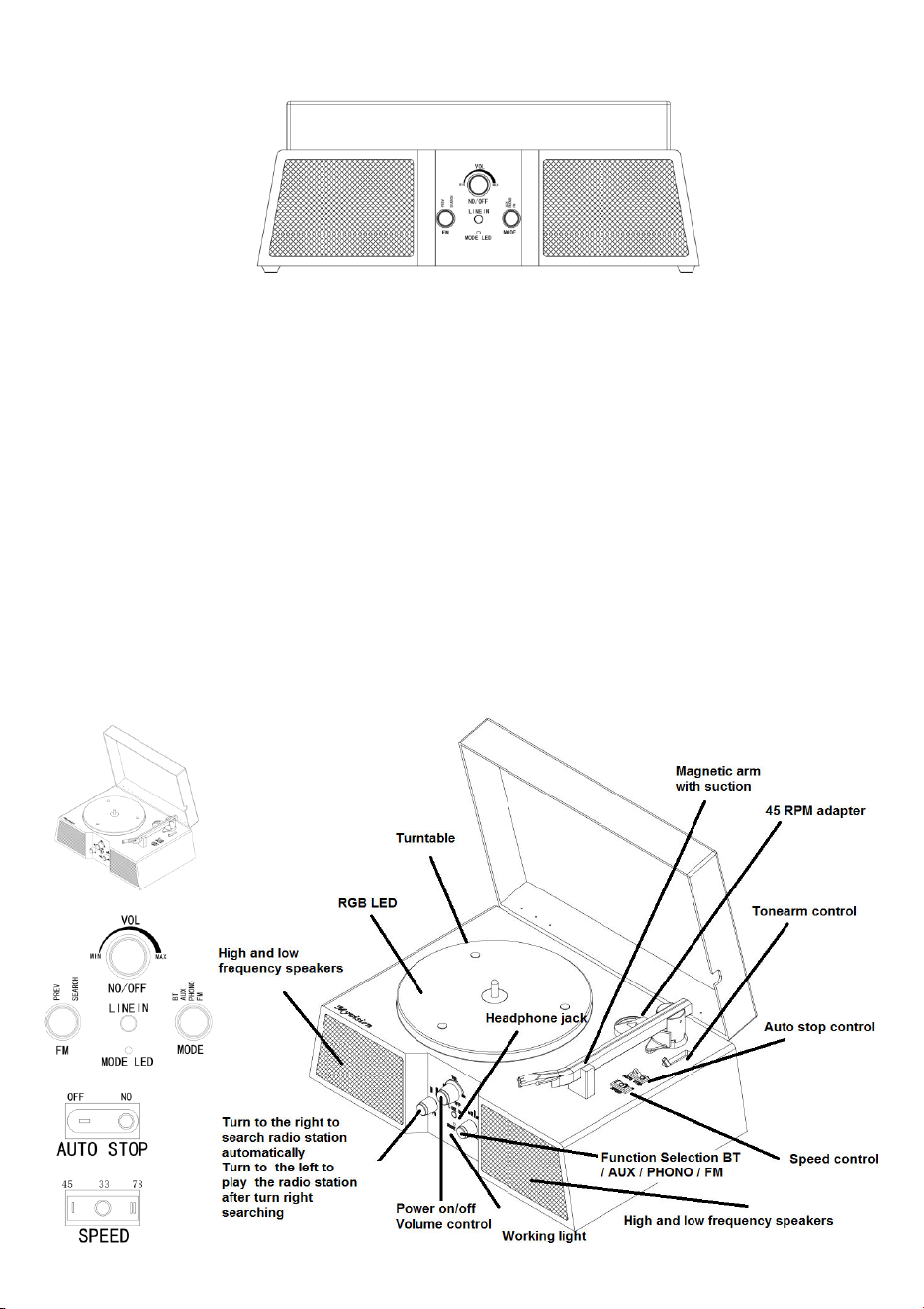
3. Set the correct speed (33/45/78 RPM). Use the RPM adapter for 45 RPM records.
4. Turn the knob to PHONO, then switch on the turntable power.
5. Release the tonearm lock, lift the tonearm, position it over the record, then lower it gently. Playback will start
automatically.
6. Adjust the speaker volume to your preferred level.
7. The tonearm stops automatically at the end of the record. Manually return it to the rest and lock.
8. To stop mid-play: lift the tonearm, manually return and lock it, lower the control, then turn off the power.
Wireless CONNECTION
1. The wireless function turns on automatically when you power on the record player.
2. Enable Bluetooth on your device (phone, tablet, computer).
3. In Bluetooth settings, select “ Myvision ” to pair.
4. Connection is complete; you can now play music.
HEADPHONE JACK
Connect your headphones to this output to listen to music. Headphones are not included with the turntable.
Note: When using headphones, sound will no longer come out of the speakers.
RCA AUDIO OUTPUT
It allows you to play the music from your turntable through external speaker. To make this connection you
need an RCA cable that is not included with the turntable.
PLAYING 45 RPM VINYL RECORDS
Place the 45 RPM adapter on the center shaft. Carefully place a 45 RPM record on the turntable. Follow the
turntable's operating instructions to start playback
HOW TO REPLACE THE NEEDLE HEAD
1. Open the tonearm clamp.
2. Remove the cartridge cover to expose the needle.
3. Carefully detach the cartridge from its holder.
4. Gently pull the audio wires from the cartridge by the connector, not the cable.
5. Carefully reinsert the audio wires.
6. Ensure the audio wires do not touch each other.
7. Slide and secure the cartridge into the holder.
8. To install a new cartridge, reverse steps 3 and 4.
CLEANING
1. Clean records with an anti-static cloth for best sound quality and longer life.
2. Regularly clean the stylus with a soft brush lightly dipped in alcohol, brushing from the back to the
front of the cartridge.
Product Specifications:
Operating Frequency: 2.402–2.480GHz
Maximum Transmit Power: +4 dBm / <2.5
mW Battery: 3.7V 4000mAh
Speaker Output: L 10W X2 ,H 5W X2

FCC Warning
This device complies with Part 15 of the FCC Rules. Operation is subject to the following two conditions:
(1) This device may not cause harmful interference, and (2) this device must accept any interference received, including
interference that may cause undesired operation.
NOTE 1: This equipment has been tested and found to comply with the limits for a Class B digital device, pursuant to part 15 of
the FCC Rules. These limits are designed to provide reasonable protection against harmful interference in a residential
installation. This equipment generates, uses and can radiate radio frequency energy and, if not installed and used in accordance
with the instructions, may cause harmful interference to radio communications. However, there is no guarantee that
interference will not occur in a particular installation. If this equipment does cause harmful interference to radio or television
reception, which can be determined by turning the equipment off and on, the user is encouraged to try to correct the
interference by one or more of the following measures:
- Reorient or relocate the receiving antenna.
- Increase the separation between the equipment and receiver.
-Connect the equipment into an outlet on a circuit different from that to which the receiver is connected.
-Consult the dealer or an experienced radio/TV technician for help.
NOTE 2: Any changes or modifications to this unit not expressly approved by the party responsible for compliance could void the
user's authority to operate the equipment.
The device has been evaluated to meet general RF exposure requirement. The device can be used in portable exposure
condition without restriction.