USER MANUAL
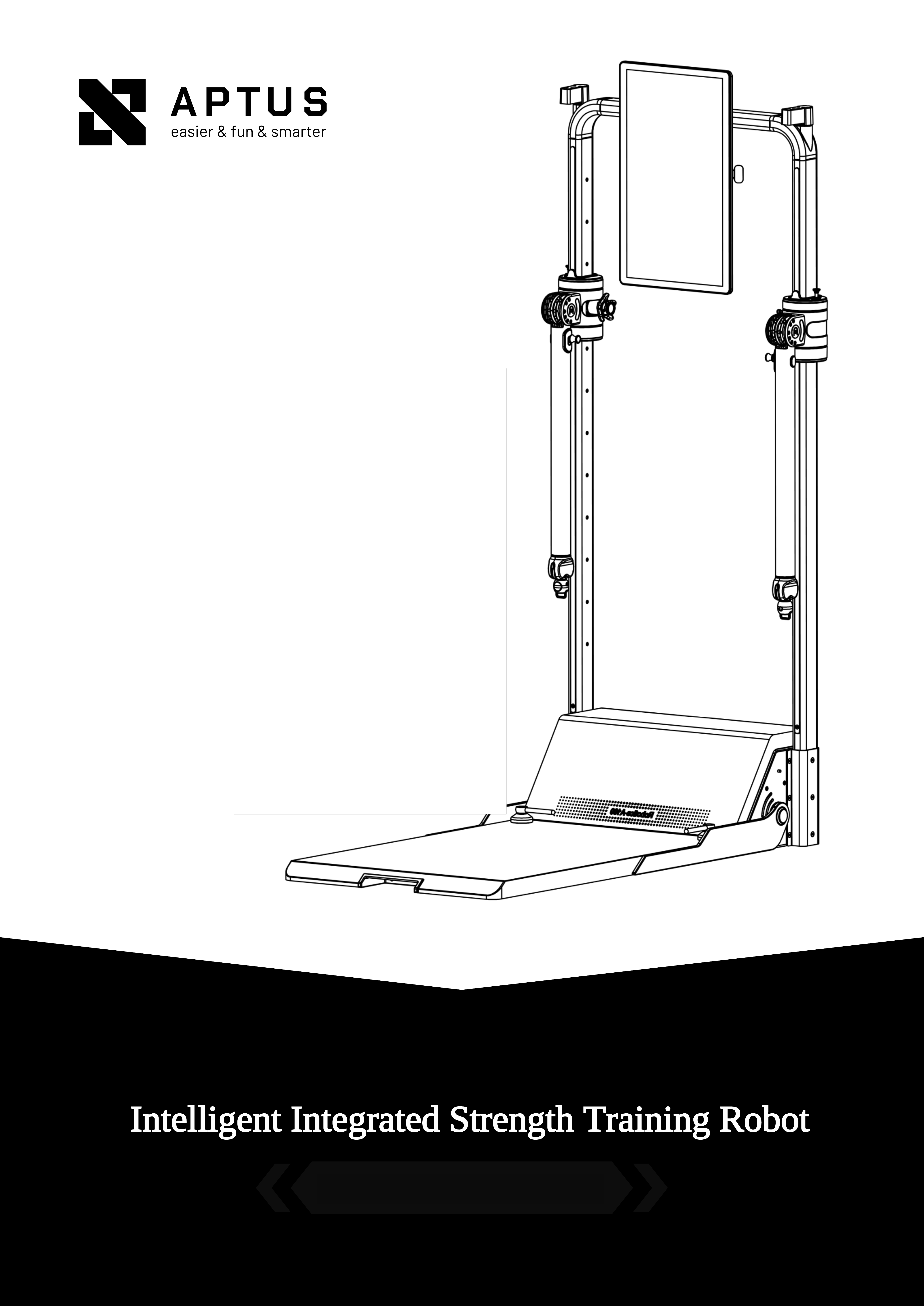
Intelligent Integrated Strength Training Robot
Please read carefully before use and keep it properly.
GYMAPTUS
Welcome
Dear User, Thank you for choosing the GYMAPTUS Intelligent Integrated Strength
Training Robot. Please read this manual carefully before use to ensure proper operation.
eas
i
e
r
&
f
u
n
&
s
m
ar
t
e
In particular, please read the "Safety Precautions" section carefully and follow all
instructions to avoid risks. Any consequences arising from improper use or failure to follow
the recommended instructions shall be borne by the user. GYMAPTUS, the product designer
, reserves the final right of interpretation.
r
Applicable Standards: GB 17498.1-2008, GB 17498.2-2008
Class H for home use
Maximum User Weight: 150 kg
Maximum Training Load: 100 kg
Guides for all workout modes are available on the official account.
GYMAPTUS
Contents
P07
P09
P12
P14
P14
P15
03
How To Use
0
1
P16
Safety Precautions
P02
P02
P03
P04
P04
1. Important Safety Instructions
2. Power Switch Precautions
3. Medical Warnings
4. Routine Maintenance and Inspection
5. Precautions for Use by Minors
0
2
Product Introduction
1. Product Overview
2. Arm Functions
3. Accessories
1. Placement
2. Connecting the Power and Turning On
3. Folding/Unfolding the Pedals
4. Wi-Fi Connection
Contents
5.Smart Handle Connection
6.Bluetooth Controller Connection
7.Body Composition Scale Connection
8.Replacing Accessories
06
1. Service Guide
P17
P17
P18
P18
P19
P21
P25
9.Account Login
0
5
Cleaning and Maintenance
0
4
1. Machine Cleaning
2. Screen Maintenance
P23
P23
Non-Fault Conditions and Solutions
1. Non-Fault Conditions and Solutions
Service Guide
Ⅰ. Safety Precautions
I
.
S
a
f
e
t
y
P
r
eca
u
t
i
o
n
s
△
1. Important Safety Instructions
0
1.Do not touch, operate, or use this product with wet hands or a wet body.
2.The shutdown process consists of two steps: first, turn off the main power
switch; second, unplug the power cord from the outlet.
2
1. This equipment is for indoor use only. Do not place it outdoors. Keep it away
from water and moisture. Do not operate this product in flammable or explosive
environments.
2. You are responsible for your own safety and the safety of others. Ensure that
all operations involving this equipment and its accessories comply with the
relevant safety standards and instructions.
3. The pedals are the designated safe standing area. Always stand on the pedals
when using the equipment to prevent injury caused by the equipment tipping
over.
4. Do not use this product while intoxicated or if you are feeling unwell.
5. To prevent overheating, fire, electric shock, or other hazards, do not cover the
equipment with any objects.
6. This product is intended only for the purposes described in this manual.
7. Do not use accessories that have not been recommended by the manufacturer.
△ 2. Power Switch Precautions
GYMAPTUS
1
.
S
a
f
e
t
y
P
r
e
c
a
u
t
i
o
n
s
0
△
3
.
K
ee
p
t
h
e
c
o
n
t
r
o
l
s
w
i
t
c
h
a
w
a
y
f
r
o
m
a
n
y
l
i
q
u
i
d
s
.
I
f
i
t
c
o
m
e
s
i
n
t
o
c
o
n
t
a
c
t
w
i
t
h
l
i
q
u
i
d
,
p
l
e
as
e
c
o
n
t
ac
t
o
u
r
s
e
r
v
i
ce
h
o
t
l
i
n
e
f
o
r
ass
i
s
t
a
n
ce
.
3. Medical Warnings
1. Before starting any exercise program, consult a medical professional to confirm that
you are physically fit for the activity. Follow your doctor's instructions strictly. You are
solely responsible for any consequences resulting from exercising against medical
advice.
2. Stop exercising immediately and consult a doctor if you experience dizziness, chest
pain, shortness of breath, or any other unusual symptoms,
3. Consult your doctor before using this product if you are taking medication that may
affect your heart rate,
4. People with limited mobility, delayed sensory responses, impaired mental function, or
those advised by a doctor to avoid strenuous exercise should not use this product unless
supervised and guided by someone responsible for their safety. People over 65 with
underlying health conditions should consult a medical professional before using this
product. Improper or excessive training may result in serious injury or even death.
3
I
.
S
a
f
e
t
y
P
r
eca
u
t
i
o
n
s
G
Y
M
AP
T
US
eas
i
e
r
&
f
un
8
s
m
a
r
t
e
r
△
4. Routine Maintenance and Inspection
Before each use, check the product for any signs of damage or wear. If you notice anything
unusual, stop using the product. Please contact customer service promptly for information on safe
and proper use of the product.
Stop using the product immediately and unplug the power cord from the outlet in any of the
following situations:
0
△
1.Water is accidentally splashed onto the product or control switch.
2. Any accessories are damaged or internal components are exposed.
3. Any abnormal conditions occur during operation, such as smoke or unusual odors.
4. With the resistance set to the lowest level, pull out the left and right arm ropes to
check for signs of wear.(The ropes must be replaced after more than 12,000 uses or 3
years of continuous use.)
5. A sudden power failure occurs.
6. During a lightning storm.
5. Precautions for Use by Minors
1. This product and its accessories are designed for fitness users aged 18 and above.
Chil dren aged 13 or below are not permitted to use this product.
4
05
GYMAPTUS
Ⅰ. Safety Precautions
2. Teenagers aged 14 and above may use this equipment under guardian supervision
with prior approval from a doctor. Guardians must read and understand all safety
instructions in this manual, be aware of potential risks, and inform minors accordingly
before use.
3. Do not allow children to play with this product or its accessories, as certain parts or
functions may cause serious injury or death.
4. Children must be supervised at all times. Do not allow them to climb on the
equipment to prevent tipping and possible serious injury or death.
Ⅱ. Product Introduction
Ⅱ
.
Product Introduction
9
7
K
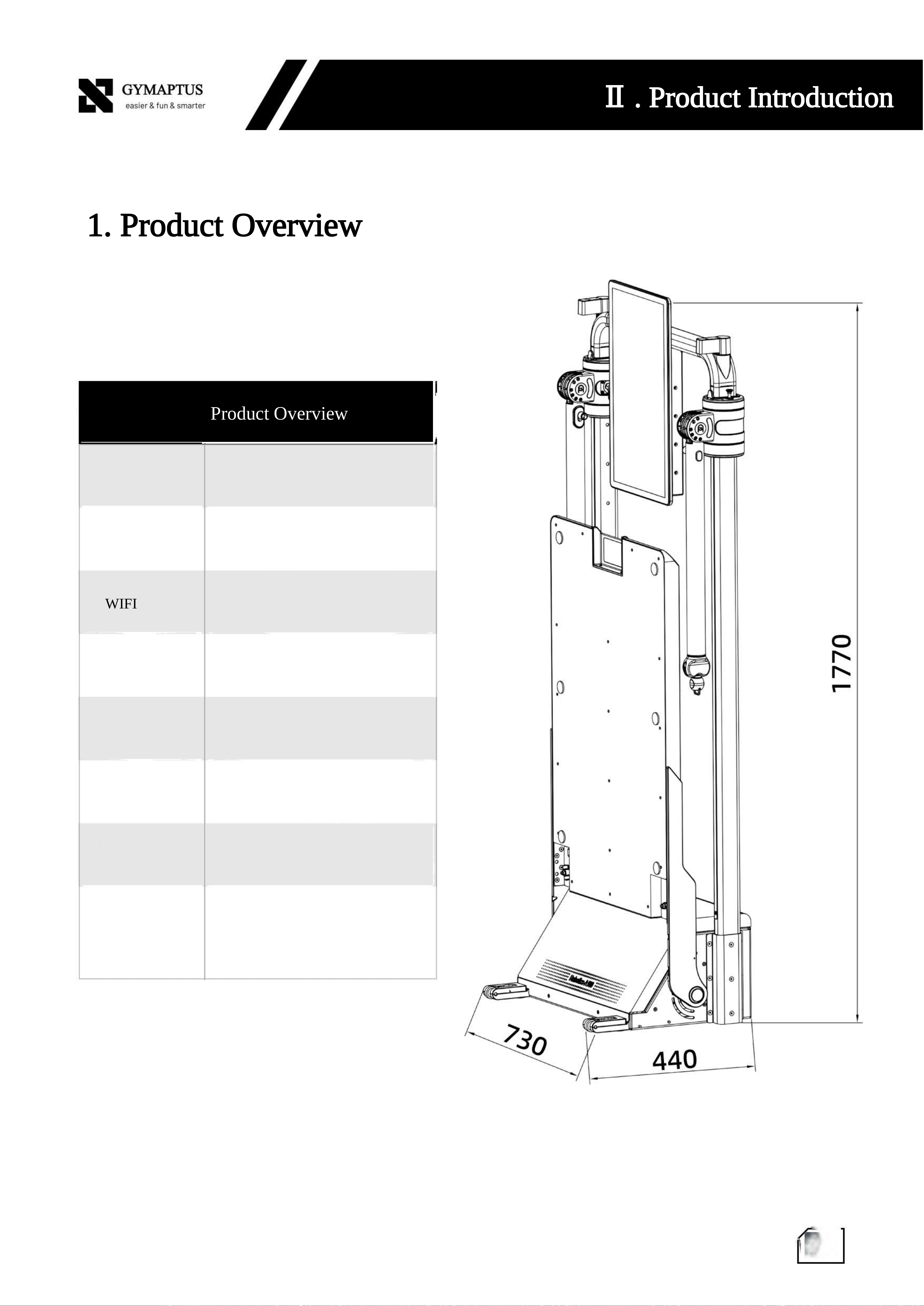
1. Product Overview
Product Overview
G
B
L
U
E
T
OO
T
H
5
.
0
2
.
4
GH
z
/
5
GH
z
2
0
%
-
80
%
220
V
5
0
H
z
22
00
W
(
ma
x
)
0
7
2*2 m (maximum space required
Required Floor
Relative Humidity
Input Voltage
Input Frequency
Input Power
Space
during training)
Weight
BluetoothVersion
WIFI
G
YM
A
P
T
U
Ⅱ. Product Introduction
S
ea
s
i
e
r
&
f
u
n
&
s
mar
t
e
r
5
08
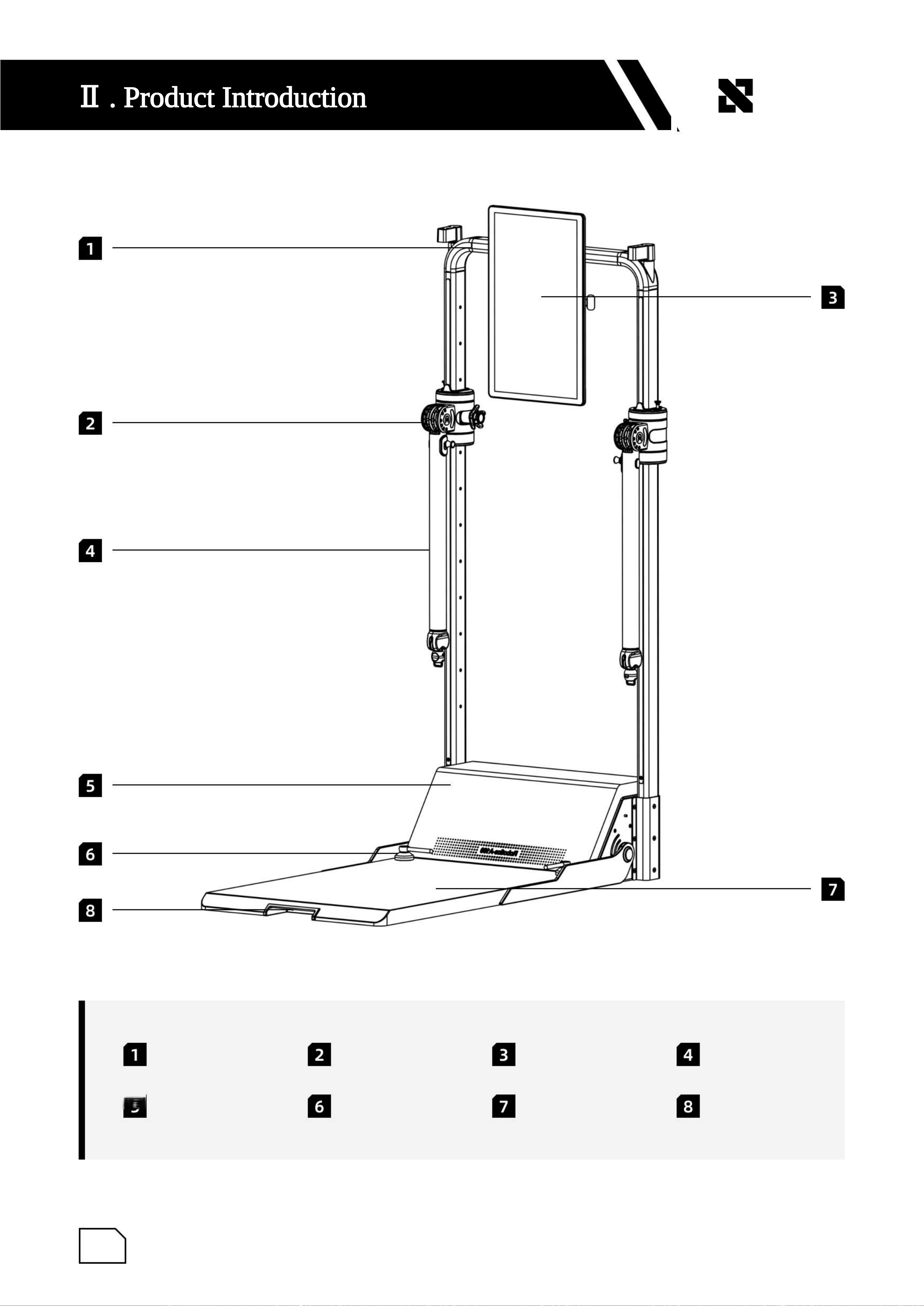
Cable Crossover Frame
Baffle
Adjustable Joint
Locking Handle
Display Screen
Pedals
Arms
Pedal Handrail
Ⅱ
.
P
r
o
d
u
c
t
I
n
t
r
o
d
u
c
t
i
o
n
0
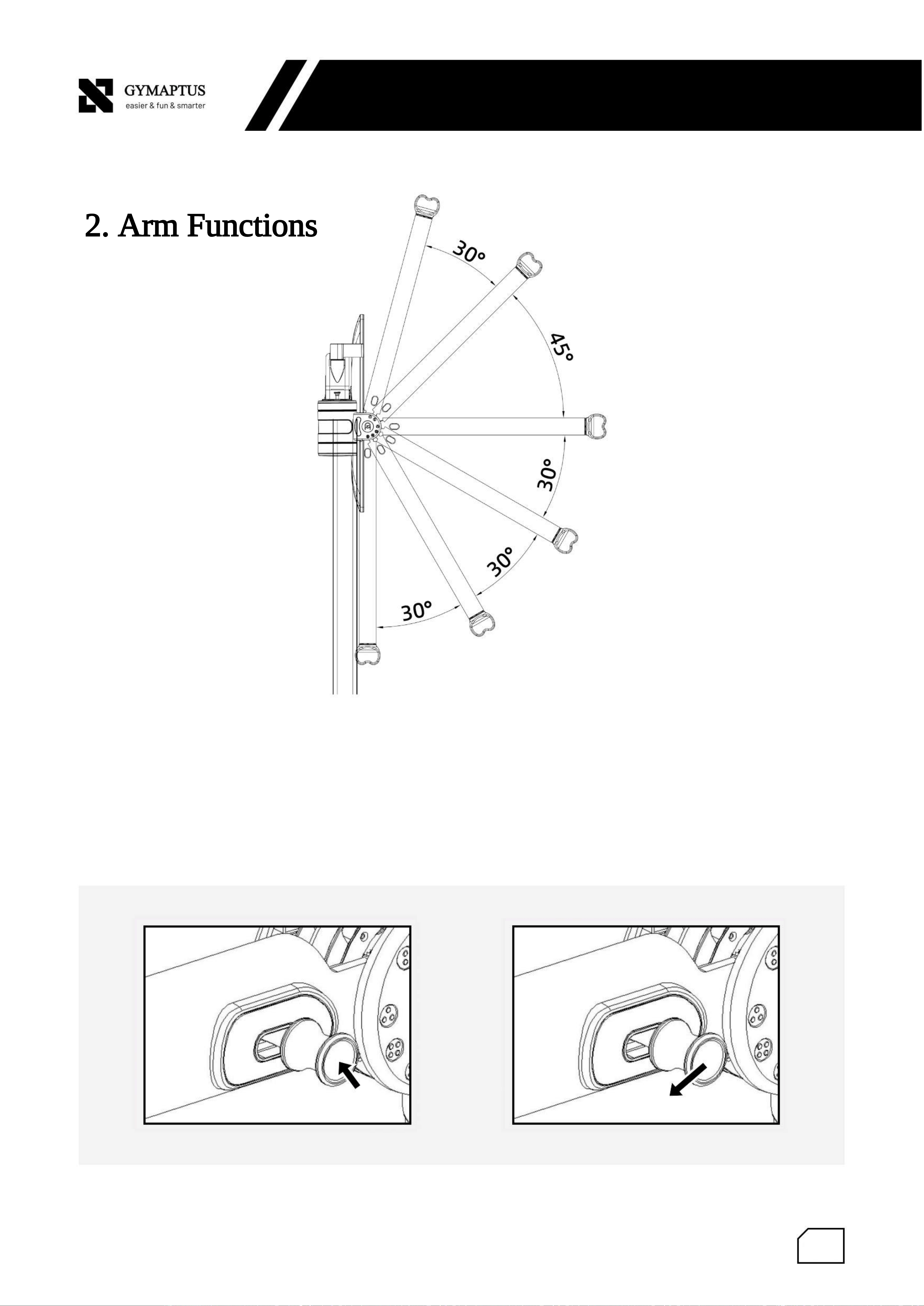
2. Arm Functions
Press and hold the button on the arm, then pull the arm backward. Use your other hand to move the
arm up or down to the desired position, then release the button to complete the vertical angle
adjustment.
9
GY
M
AP
T
US
e
a
s
i
e
r
&
f
un
8
s
m
a
r
t
e
Ⅱ. Product Introduction
r
1
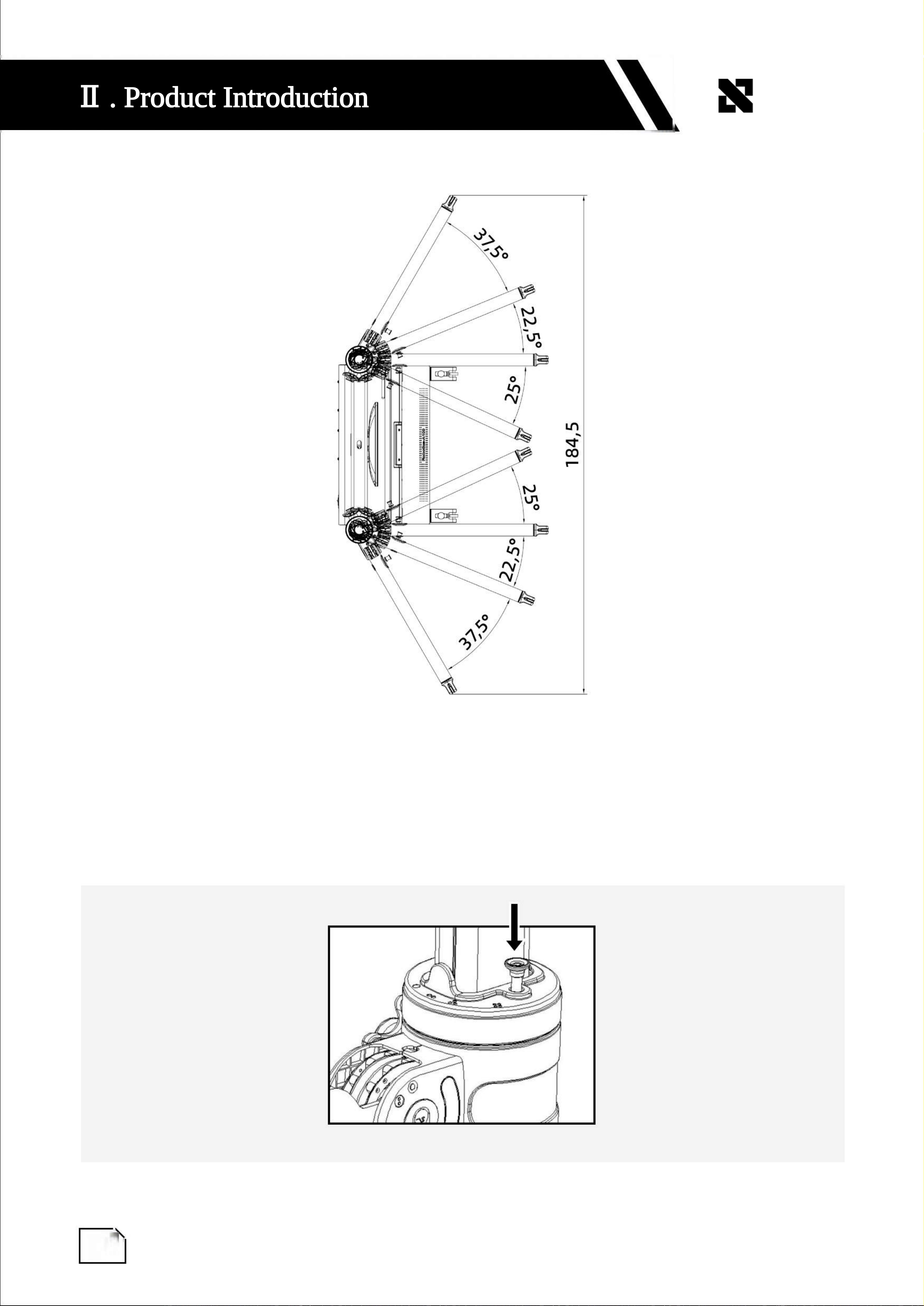
Press and hold the button downward, then use your other hand to adjust the arm left or right to the
desired angle. Release the button to complete the horizontal angle adjustment.
0
Ⅱ
.
P
r
o
d
u
c
t
I
n
t
r
o
d
u
c
t
i
o
n
1
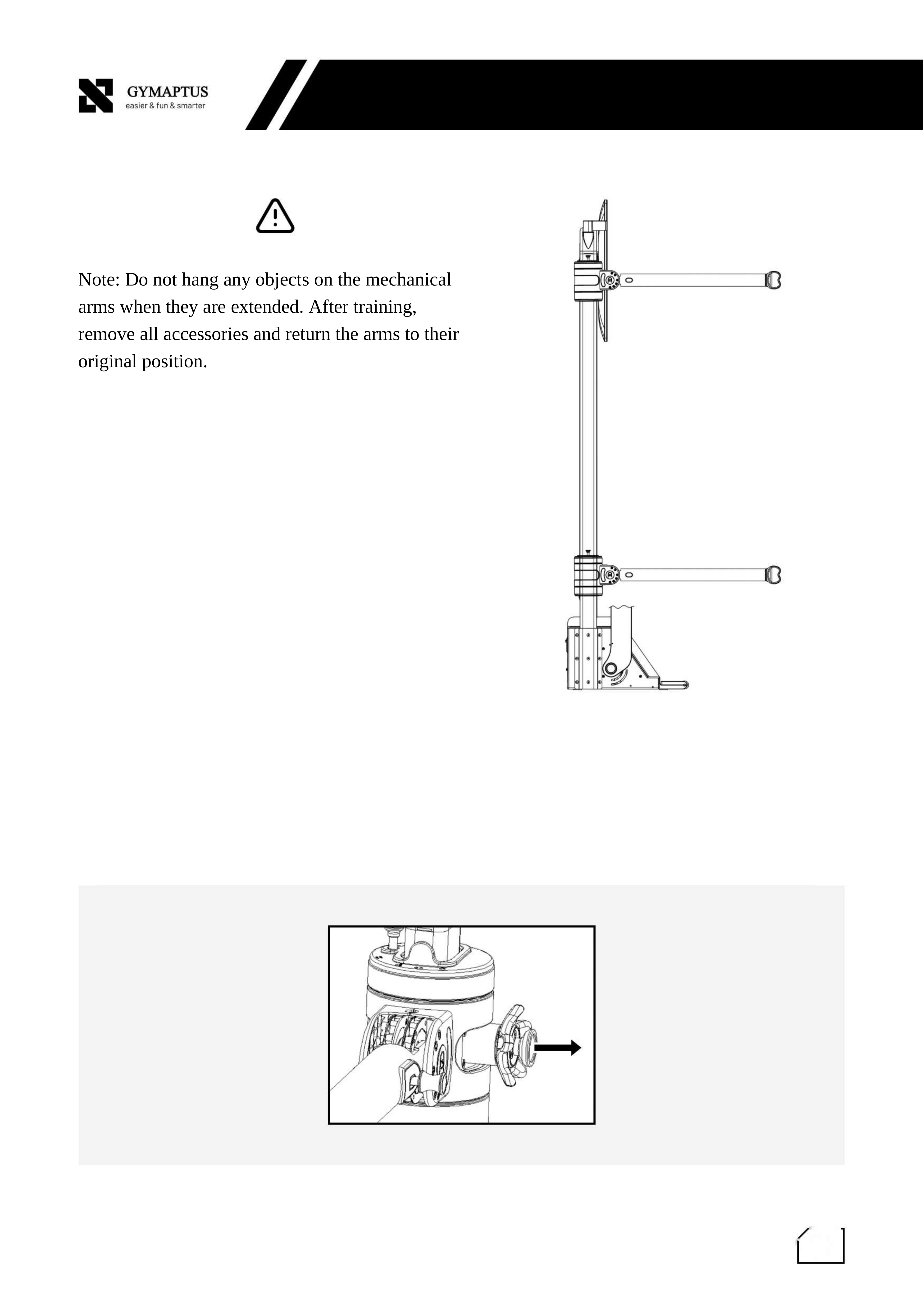
Note: Do not hang any objects on the mechanical
arms when they are extended. After training,
remove all accessories and return the arms to their
original position.
Pull out the locking pin, then adjust the arm up or down to the desired position. Release the locking
pin to lock the arm in place.
1
G
Y
M
A
P
T
U
Ⅱ. Product Introduction
S
e
a
s
i
e
r
&
f
u
n
&
s
m
a
r
t
e
r
1
1
2
1
2
1
2
Main Unit and Accessories
Name
Quantity
Type
Intelligent Integrated Strength
Training Machine
Long Bar
Bluetooth Controller
Bluetooth Handle
Double-Ended Rope
Flat Workout Bench
Ankle Strap
Power Cord
User Manual
1
1
1
1
Main Unit
Accessory
Accessory
Accessory
Accessory
Accessory
Accessory
Installation Accessory
User Instructions
Ⅲ. How to Use
14
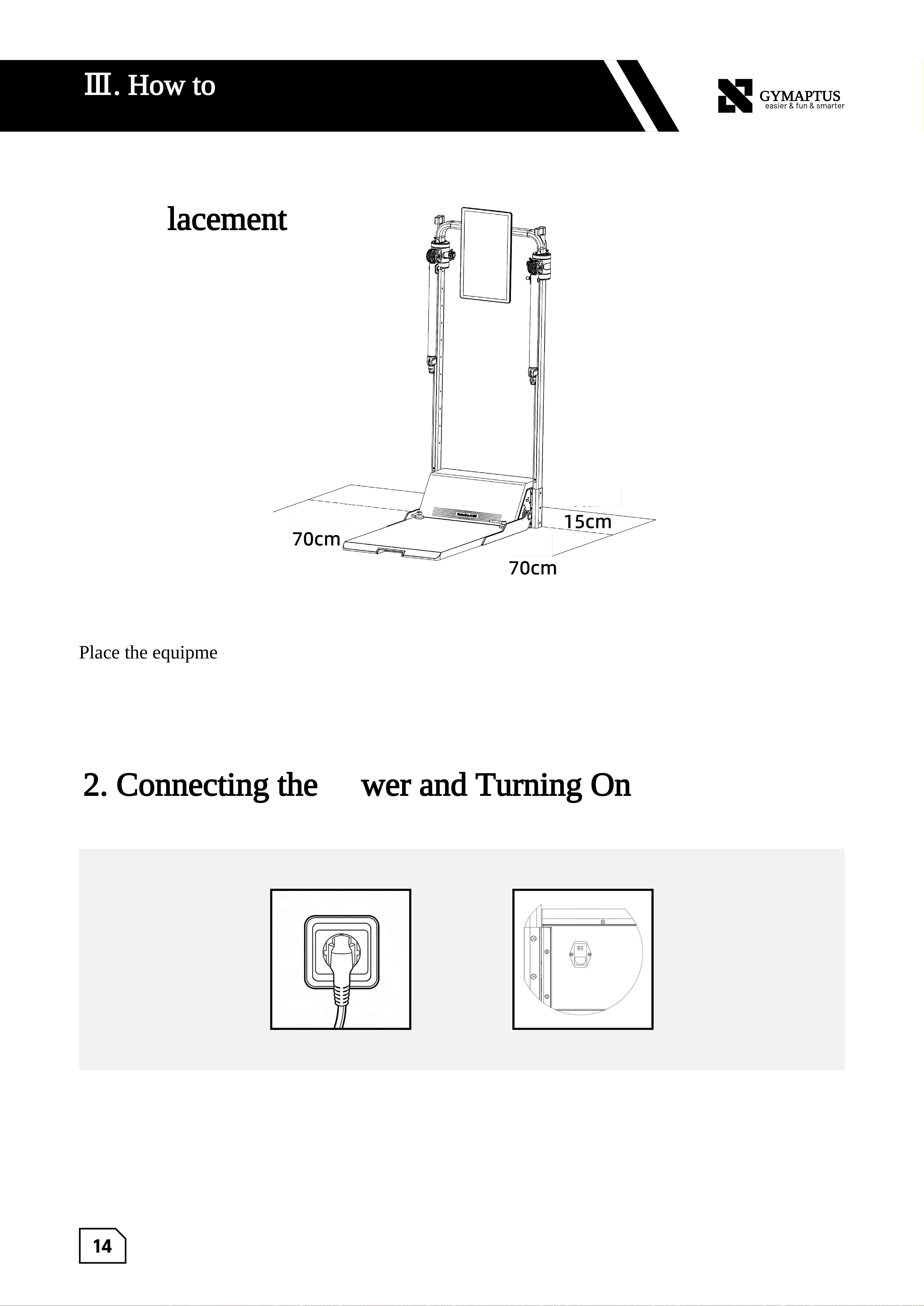
15cm
70cm
70cm
GYMAPTUS
Ⅲ. How to Use
1. Placement
2. Connecting the Power and Turning On
Place the equipment on a flat and level surface. Keep a distance of more than 15 cm
between the back of the equipment and the wall. Leave at least 70 cm of clearance on both
sides to ensure the arms can extend freely.
Rear Side
Right Side
Left Side
Connect the equipment to the power outlet using the provided leakage-protection power
cord, then press the power button to turn on the device.
15
GYMAPTUS
Ⅲ. How to Use
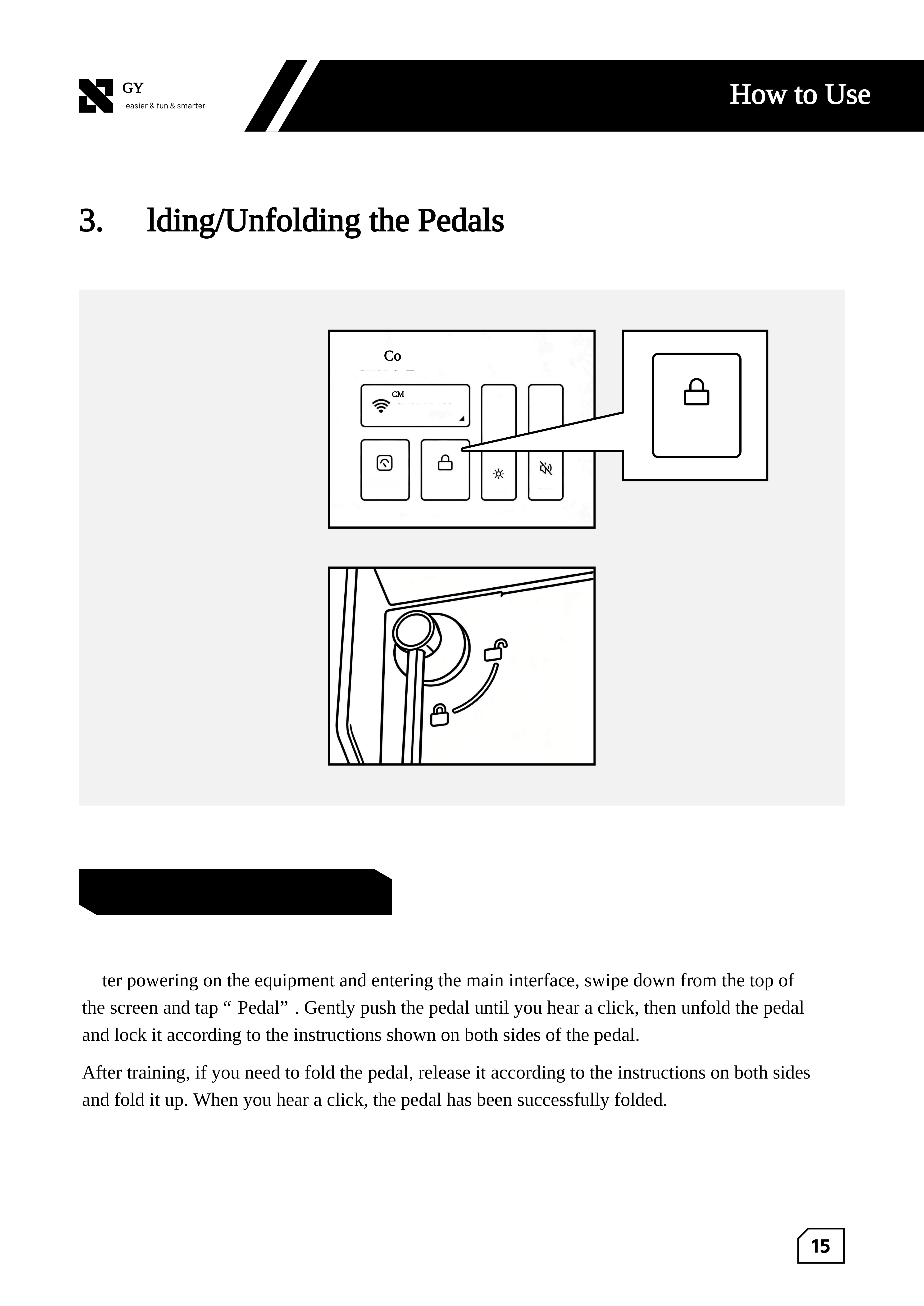
3. Folding/Unfolding the Pedals
Control Center
Pedal
Connected
Body
Composition
Scale
Pedal
Brightness
Volume
Pedal Folding and Unfolding
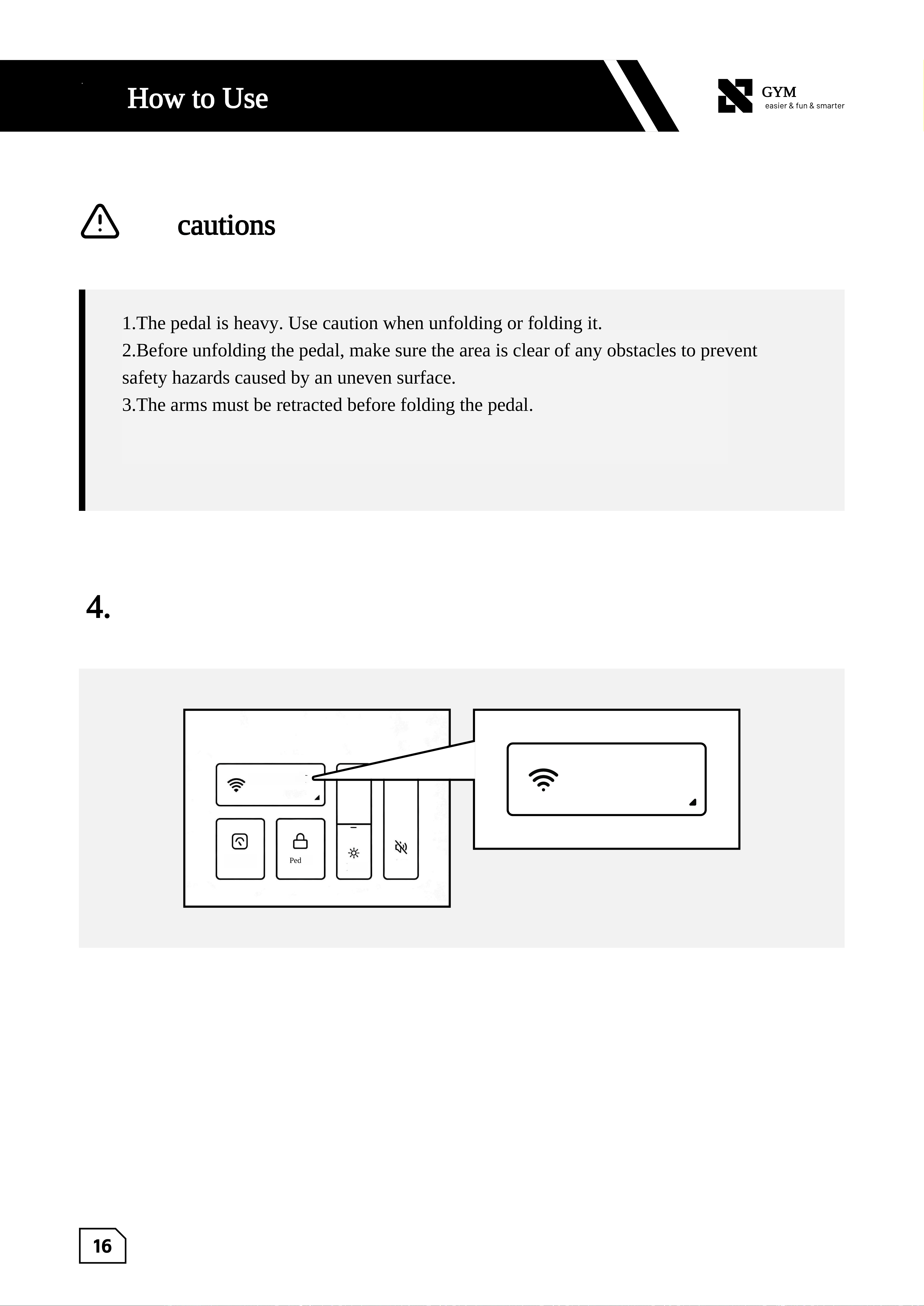
After powering on the equipment and entering the main interface, swipe down from the top of
the screen and tap “Pedal”. Gently push the pedal until you hear a click, then unfold the pedal
and lock it according to the instructions shown on both sides of the pedal.
After training, if you need to fold the pedal, release it according to the instructions on both sides
and fold it up. When you hear a click, the pedal has been successfully folded.
CMCC-GYMAPTUS
16
GYMAPTUS
Ⅲ. How to Use
4. Wifi Connection
Precautions
1.The pedal is heavy. Use caution when unfolding or folding it.
2.Before unfolding the pedal, make sure the area is clear of any obstacles to prevent
safety hazards caused by an uneven surface.
3.The arms must be retracted before folding the pedal.
Pedal
Brightness
Volime
Control Center
Connected
Body
Compositi
on Scale
Connected
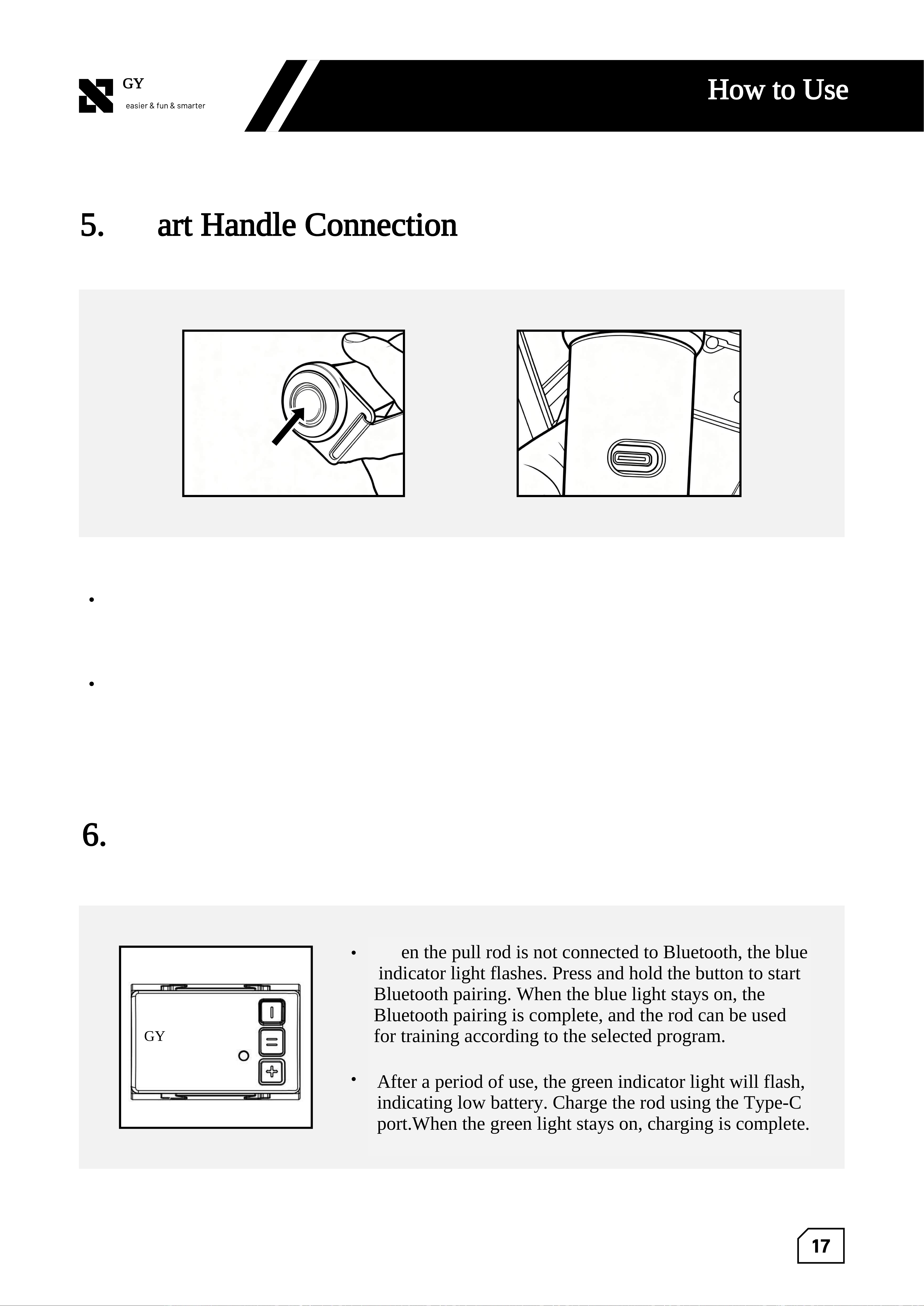
When using the equipment for the first time, a Wi-Fi connection is required. After powering on
the device and entering the main interface, swipe down on the screen, tap the Wi-Fi icon, and
select a Wi-Fi network to connect.
CMCC-GYMAPTUS
HELLO GYMAPTUS
17
GYMAPTUS
Ⅲ. How to Use
5. Smart Handle Connection
6. Bluetooth Controller Connection
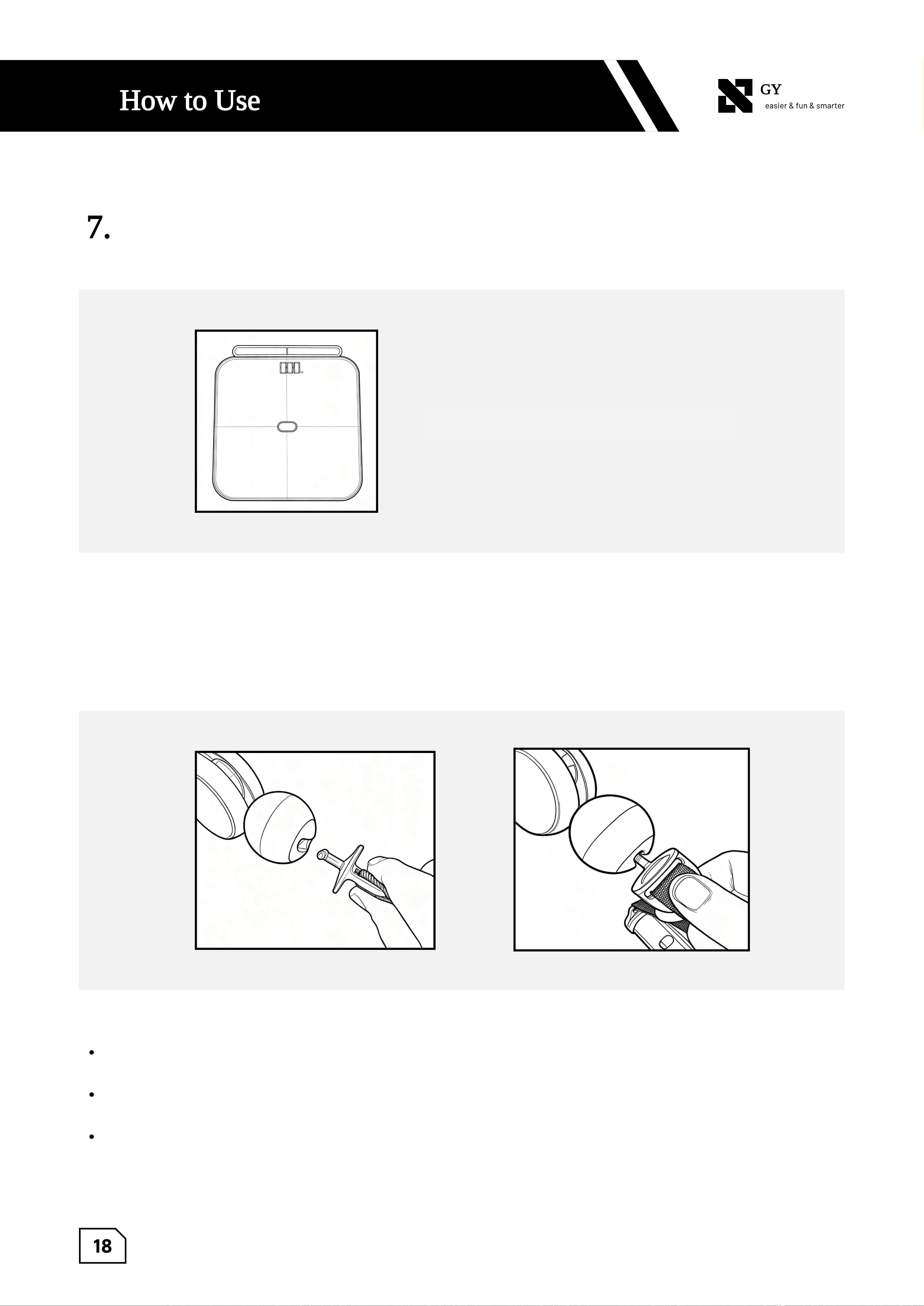
When the handle is not connected to Bluetooth, the blue indicator light flashes. Press and
hold the button on either side of the handle to start Bluetooth pairing. When the blue light
stays on, the Bluetooth connection is successful, and the handle can be used for training
according to the selected program.
After a period of use, the green indicator light will flash, indicating low battery. Charge
the handle using the Type-C port. When the green light stays on, charging is complete.
When the pull rod is not connected to Bluetooth, the blue
indicator light flashes. Press and hold the button to start
Bluetooth pairing. When the blue light stays on, the
Bluetooth pairing is complete, and the rod can be used
for training according to the selected program.
After a period of use, the green indicator light will flash,
indicating low battery. Charge the rod using the Type-C
port.When the green light stays on, charging is complete.
GYMAPTUS
18
GYMAPTUS
Ⅲ. How to Use
7. Body Composition Scale Connection
8. Replacing Accessories
This accessory connects automatically and
can be used directly.
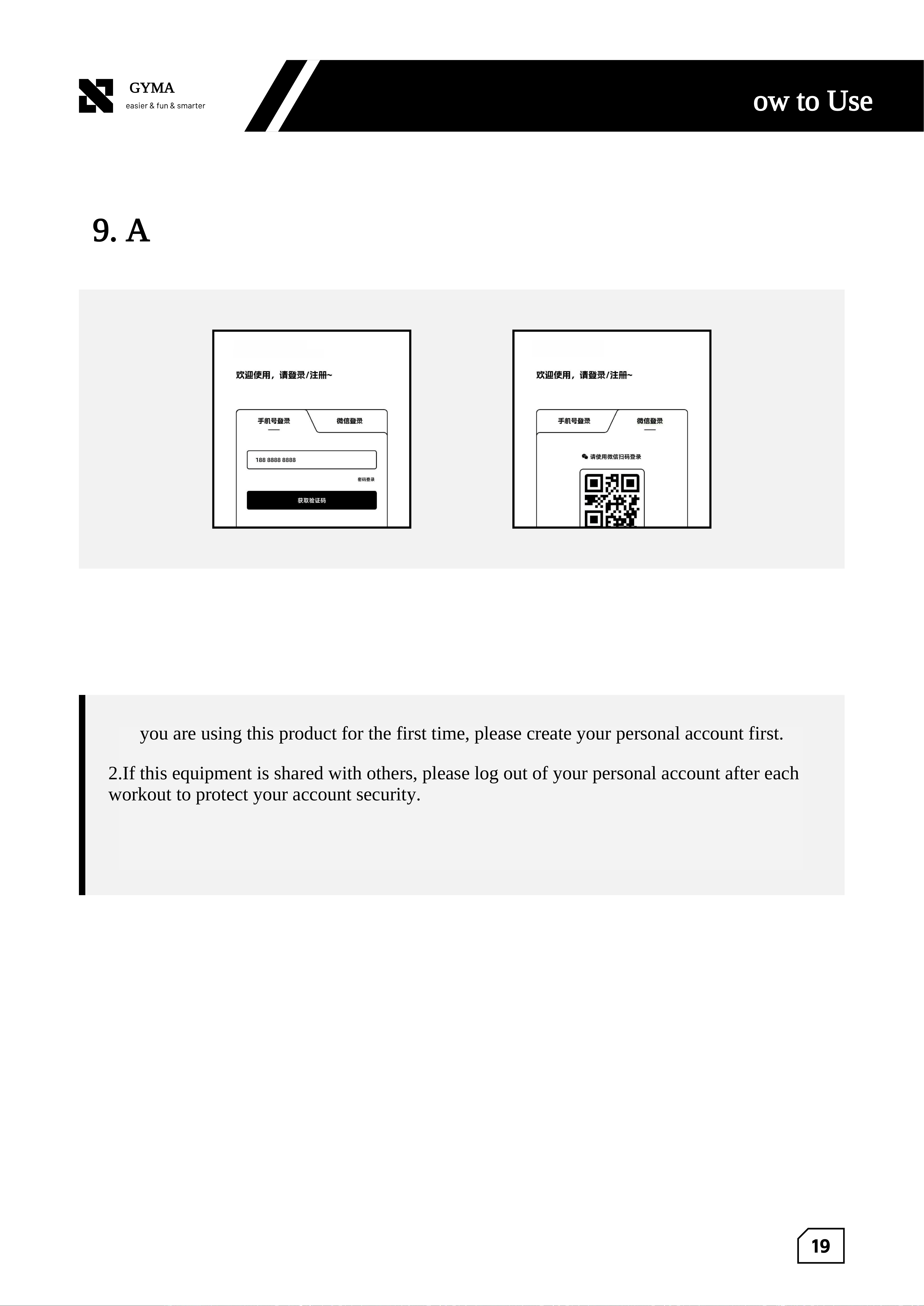
Align the connector with the opening direction of the ball head, insert it, press down, and
rotate it 90° to lock it in place.
The connector is compatible with all accessories (Bluetooth handle, long pull rod, double
-ended rope, leg strap, etc.).
If the connector becomes loose, stop using the equipment immediately and contact
customer service.
三
.
19
GYMAPTUS
Ⅲ. How to Use
9. Account Login
GYMAPTUS
GYMAPTUS
this product requires a Wi-Fi connection to access the latest workout records, training programs
, software updates, and other features.
1.If you are using this product for the first time, please create your personal account first.
2.If this equipment is shared with others, please log out of your personal account after each
workout to protect your account security.
Ⅳ. Non-Fault Conditions and Solutions
21
GYMAPTUS
Ⅳ.Non-Fault Conditions and Solutions
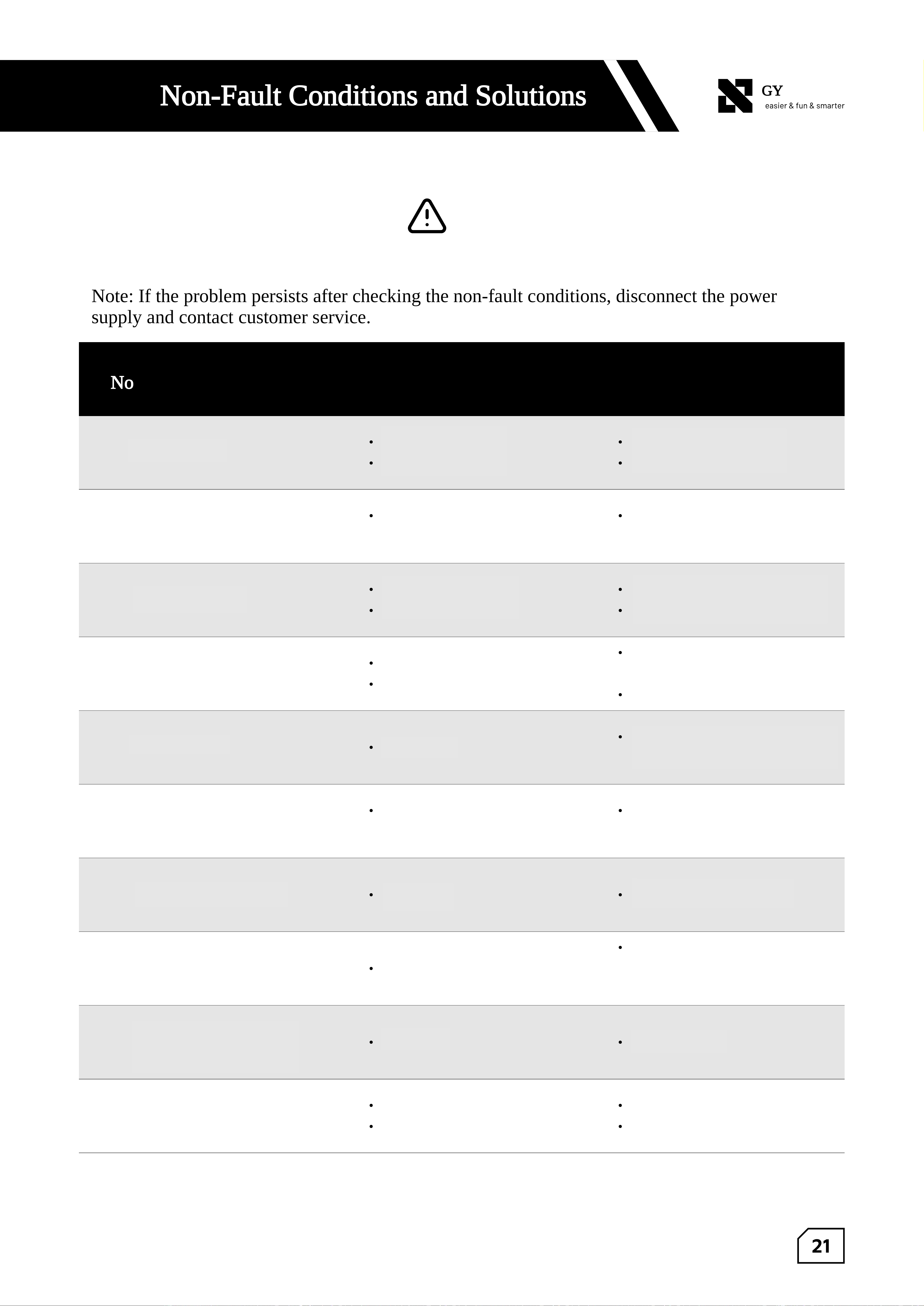
Note: If the problem persists after checking the non-fault conditions, disconnect the power
supply and contact customer service.
Non-Fault Conditions
Not operate after power-on
Loud noise from the machine during use
Equipment shakes during use
Handle/Bluetooth controller buttons
not responding
Locking handle is too loose
Pedal cannot be lowered after tapping
"Pedal" on the screen
Star knob cannot be rotated
Arm vertical adjustment button cannot
be pulled
Arm module does not slide smoothly up
and down
Rope comes off
Cause Analysis
Leakage protection switch off
Plug not properly connected
Internal temperature rises during use,
causing fan speed increase
Uneven floor
Pedal not locked
Indicator flashes after pressing button
Low battery
Loose nut
Pedal weight causes the locking pin
to jam
Handle stuck
Improper use
No load release
Cable broken in the middle
One end detached
Solutions
Press the leakage protection switch
Reconnect the plug properly
Normal condition. Operation will
resume after the temperature
decreases
Place on a level surface or adjust the base
Rotate the locking device to the
locked position
Re-pair Bluetooth until the indicator
stays on
Charge the accessory
Tighten the nut on the back of the
pedal with pliers
Push the pedal forward, then press
"Pedal" again
Rotate firmly in the opposite
direction
Hold the arm with one hand and gently
move it up and down; press the button and
pull it toward you with the other hand
Slide the arm under no-load condition
Contact after-sales service
Reconnect the rope according to the repair
video if needed

Ⅴ. Cleaning and Maintenance
23
GYMAPTUS
Ⅴ. Cleaning and Maintenance
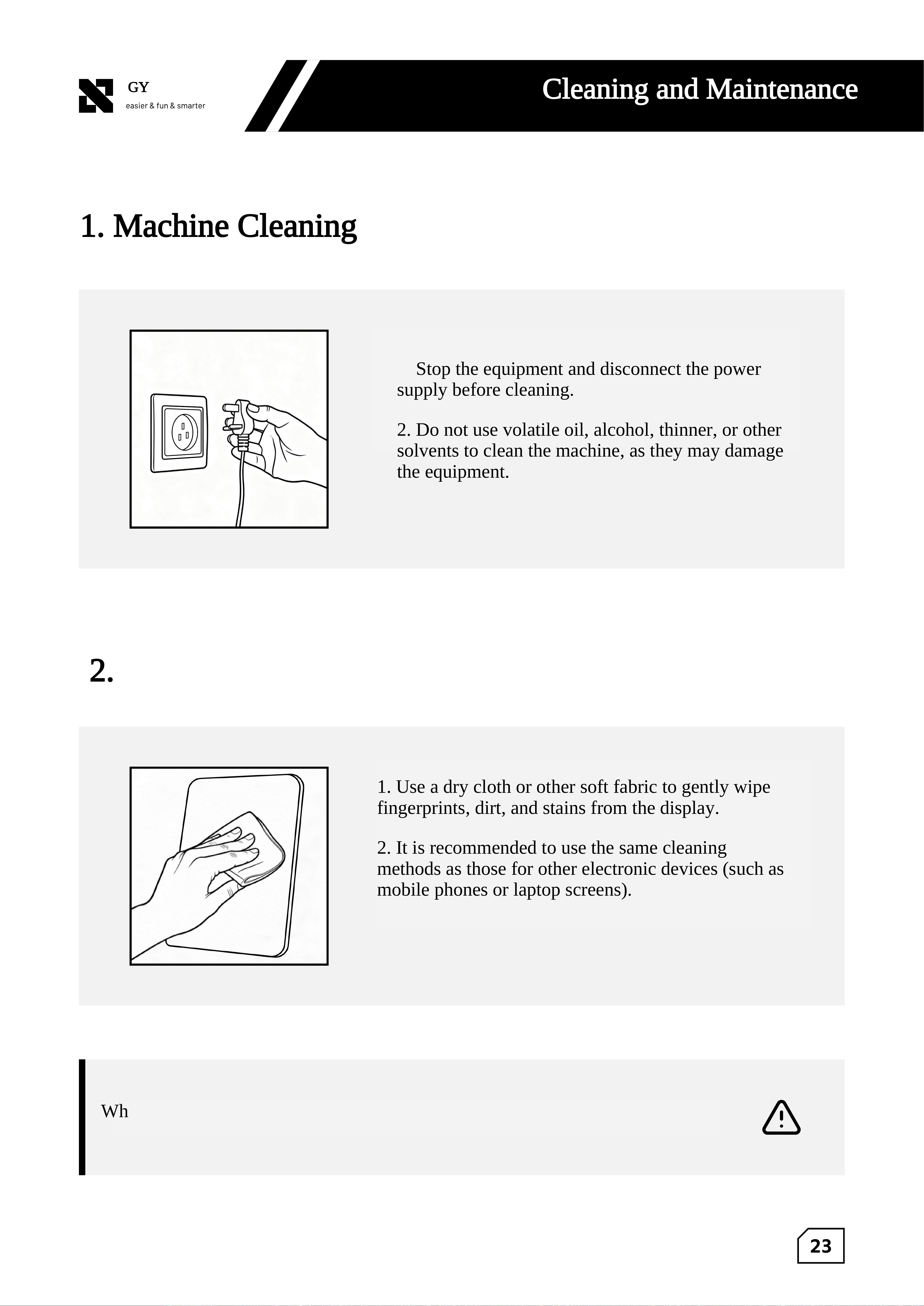
1. Machine Cleaning
2. Screen Maintenance
1. Stop the equipment and disconnect the power
supply before cleaning.
2. Do not use volatile oil, alcohol, thinner, or other
solvents to clean the machine, as they may damage
the equipment.
1. Use a dry cloth or other soft fabric to gently wipe
fingerprints, dirt, and stains from the display.
2. It is recommended to use the same cleaning
methods as those for other electronic devices (such as
mobile phones or laptop screens).
When the product is not in use for an extended period, unplug the power cord to
prevent electric shock or fire caused by cable aging.
Ⅵ. Service Guide
25
GYMAPTUS
Ⅵ. Service Guide
1. After-Sales Service Warranty Policy
Users who purchase this product and complete the warranty registration as required are
entitled to the warranty service provided by our company.
For household use, the entire machine is covered by a 1-year warranty. Main components
(motor, power supply, and display) are covered by a 2-year warranty.
For non-household use (such as commercial or public use by multiple users), the entire
machine and main components (motor, power supply, and display) are covered by a 6-
month warranty.
Warranty Conditions:
1. A valid purchase invoice or proof of purchase can be provided.
2. The product is within the warranty period (calculated from the date of the purchase
invoice or proof of purchase).
3. The failure is caused by non-human factors and is not due to improper use or improper
storage.
4. If a valid proof of purchase cannot be provided, the warranty period may be calculated
based on the production date shown on the product barcode. If the barcode is missing,
damaged, or unreadable, warranty service will not be provided.
26
GYMAPTUS
Ⅵ. Service Guide
2. Items Not Covered Under the Warranty (Chargeable
Service)
Damage caused by using a power supply that does not comply with national safety voltage
standards.
Product contamination, blockage, corrosion, or other damage caused by poor usage environments.
No valid purchase invoice or proof of purchase.
Products beyond the warranty period.
Damage caused by force majeure.
Services or items not covered by our company's warranty commitments.
3. Disclaimer
1. This product complies with the relevant requirements of GB 17498 standards.
2. This manual is for reference only. The actual product appearance and components shall
prevail.
3. Please read the user manual and electronic manual carefully before use. Any product
upgrades or changes made after purchase shall be subject to the electronic manual
available on the official WeChat account and website.
4. After reading and confirming all relevant information, please keep this manual together
with the purchase invoice in a safe place.
h el l o
GYMAPTUS
Strength Explorer
One Machine for Every Workout
Train Anytime, Your Way.
400-015-1518
h e l l o
GYMAPTUS
GYMAPTUS (Changzhou) Intelligent Technology Co., Ltd.
No. 7 Longmen Road, Changzhou City, Jiangsu Province

FCC Caution.
This device complies with part 15 of the FCC Rules. Operation is subject to the following two
conditions:
(1) This device may not cause harmful interference, and
(2) this device must accept any interference received, including interference that may cause
undesired operation.
Any Changes or modifications not expressly approved by the party responsible for compliance
could void the user's authority to operate the equipment.
Note: This equipment has been tested and found to comply with the limits for a Class B digital
device, pursuant to part 15 of the FCC Rules. These limits are designed to provide reasonable
protection against harmful interference in a residential installation. This equipment generates
uses and can radiate radio frequency energy and, if not installed and used in accordance with the
instructions, may cause harmful interference to radio communications. However, there is no
guarantee that interference will not occur in a particular installation. If this equipment does
cause harmful interference to radio or television reception, which can be determined by turning
the equipment off and on, the user is encouraged to try to correct the interference by one or
more of the following measures:
-Reorient or relocate the receiving antenna.
-Increase the separation between the equipment and receiver.
-Connect the equipment into an outlet on a circuit different from that to which the receiver is
connected.
-Consult the dealer or an experienced radio/TV technician for help.
FCC Radiation Exposure Statement:
The device has been evaluated to meet general RF exposure requirement. The device can
be used in portable exposure condition without restriction.