Owner’s Manual
OLED TV
Model No.
TV-55Z95BP
TV-65Z95BP
TV-77Z95BP
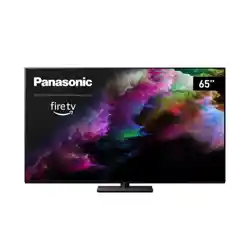
(image: TV-65Z95BP)
55”/65”/77” Class 4K Ultra HD TV*
(54.6/64.5/76.6 inches measured diagonally)
Actual resolution: 3,840 × 2,160p
Refer to the following for more detailed descriptions:
≥ For settings to view broadcasts and for settings of program guides, image quality, sound quality, etc.:
> [ ] (on the screen) > [Device & Software] > [Panasonic eHELP]
≥ For Amazon, Fire TV, and Alexa related items:
> [ ] (on the screen) > [Help] (internet connection required)
Please be advised that the above may be changed without notice. (as of January, 2025)
For assistance (U.S.A.), please visit:
https://help.na.panasonic.com/
Thank you for purchasing this Panasonic product.
Please read these instructions carefully before operating this product and retain
them for future reference.
Please carefully read the “Safety Precautions” of this manual before use.
The images shown in this manual are for illustrative purposes only.
F0225HN1035 English
X41G77MV03716A
English
Español
TV-55_65_77Z95BP_X41G77MV03716A_eng_lsp.book 1 ページ 2025年3月18日 火曜日 午後7時19分

2
English
Contents
Be Sure to Read
Important Notice ·················································· 3
Safety Precautions ·············································· 4
Installing the wall-hanging bracket ·························10
Connections ······················································10
Initial Setup ·······················································11
Identifying Controls ·············································12
FAQs ·······························································15
Maintenance ······················································16
Specifications ····················································17
Limited Warranty ················································18
≥ Refer to the separate sheet for information about how
to install the TV.
≥ Illustrations shown may be different between models
and countries.
≥ This television is a product of Panasonic, which is not
affiliated with Amazon.com, Inc. or any Amazon
affiliate.
≥ You may need to be signed into an Amazon account
in order to access certain online services.
≥ Certain services are subject to change or withdrawal
at any time, may not be available in all countries,
areas and languages, or in 4K, HDR, UHD, HLG,
DOLBY VISION or DOLBY ATMOS and may require
separate subscriptions.
≥ Because the Fire TV operating system is periodically
updated, the images, navigation instructions, titles and
location of menu options shown in this manual may be
different from what you see on the screen.
≥ This document has been created based on
information current as of January 2025.
The terms HDMI, HDMI High-Definition Multimedia
Interface, HDMI Trade dress and the HDMI Logos are
trademarks or registered trademarks of HDMI Licensing
Administrator, Inc.
Dolby, Dolby Vision, Dolby Vision IQ, Dolby Atmos,
Dolby Audio, and the double-D symbol are trademarks of
Dolby Laboratories Licensing Corporation.
Manufactured under license from Dolby Laboratories.
Confidential unpublished works. Copyright © 1992-2024
Dolby Laboratories. All rights reserved.
Wi-Fi
®
is a registered trademark of Wi-Fi Alliance
®
.
WPA3™, WPA2™, WPA™ are trademarks of Wi-Fi
Alliance
®
.
The Bluetooth
®
word mark and logos are registered
trademarks owned by Bluetooth SIG, Inc. and any use of
such marks by Panasonic Holdings Corporation is under
license. Other trademarks and trade names are those of
their respective owners.
Amazon, Alexa, Fire, and all related marks are
trademarks of Amazon.com, Inc. or its affiliates.
© Disney
This product complies with the UHD Alliance Technical
Specification: UHDA Specified Reference Mode, Version
1.0. FILMMAKER MODE™ logo is a trademark of the
UHD Alliance, Inc. in the United States and other
countries.
© 2023 Advanced Micro Devices, Inc. All rights reserved.
AMD, the AMD Arrow logo, FreeSync and combinations
thereof are trademarks of Advanced Micro Devices, Inc.
© 2025 NVIDIA Corporation. All rights reserved. NVIDIA,
the NVIDIA logo, and G-SYNC are trademarks and/or
registered trademarks of NVIDIA Corporation in the U.S.
and other countries.
TV-55_65_77Z95BP_X41G77MV03716A_eng_lsp.book 2 ページ 2025年3月18日 火曜日 午後7時19分
3
English
Important Notice
Installing environment
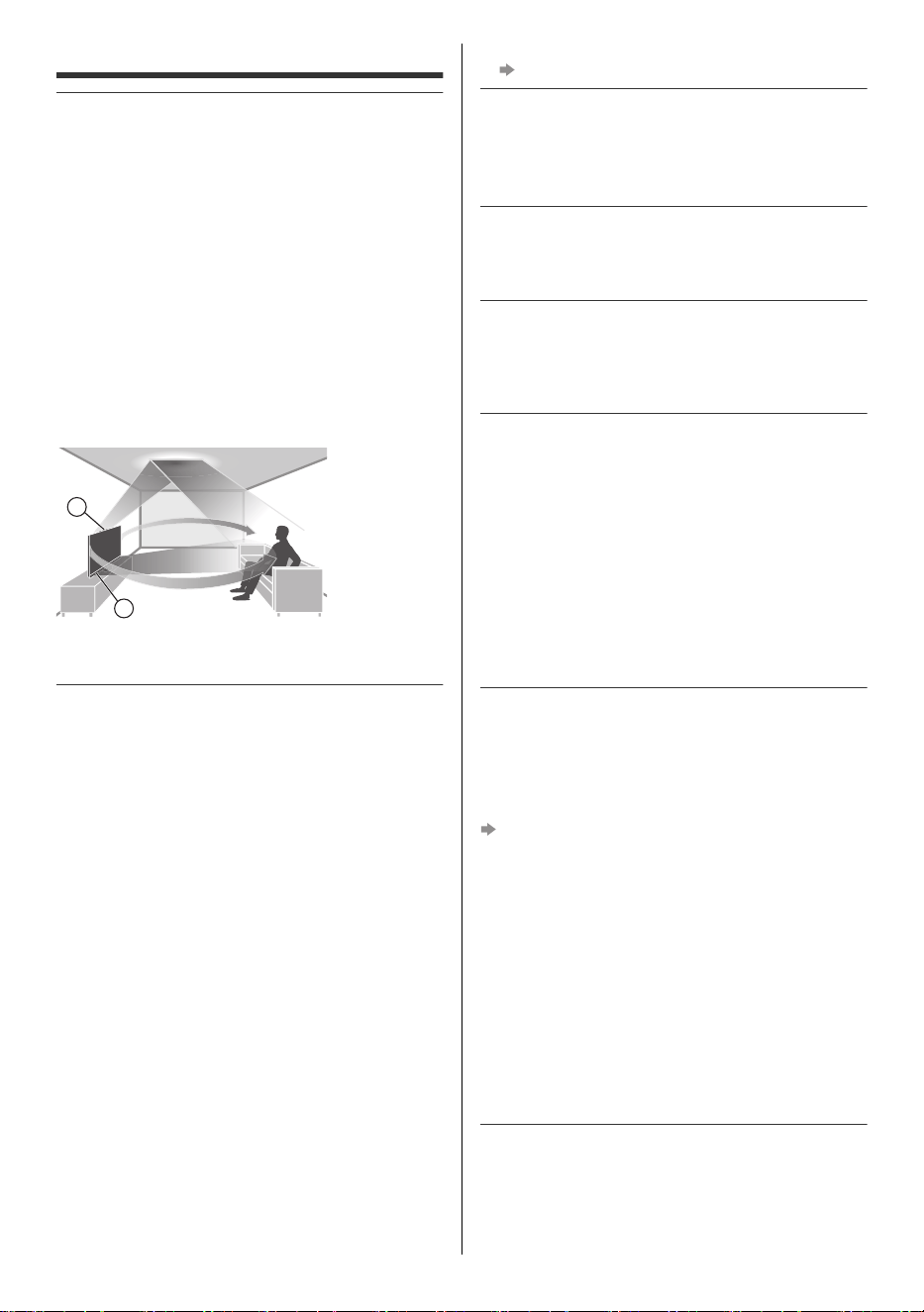
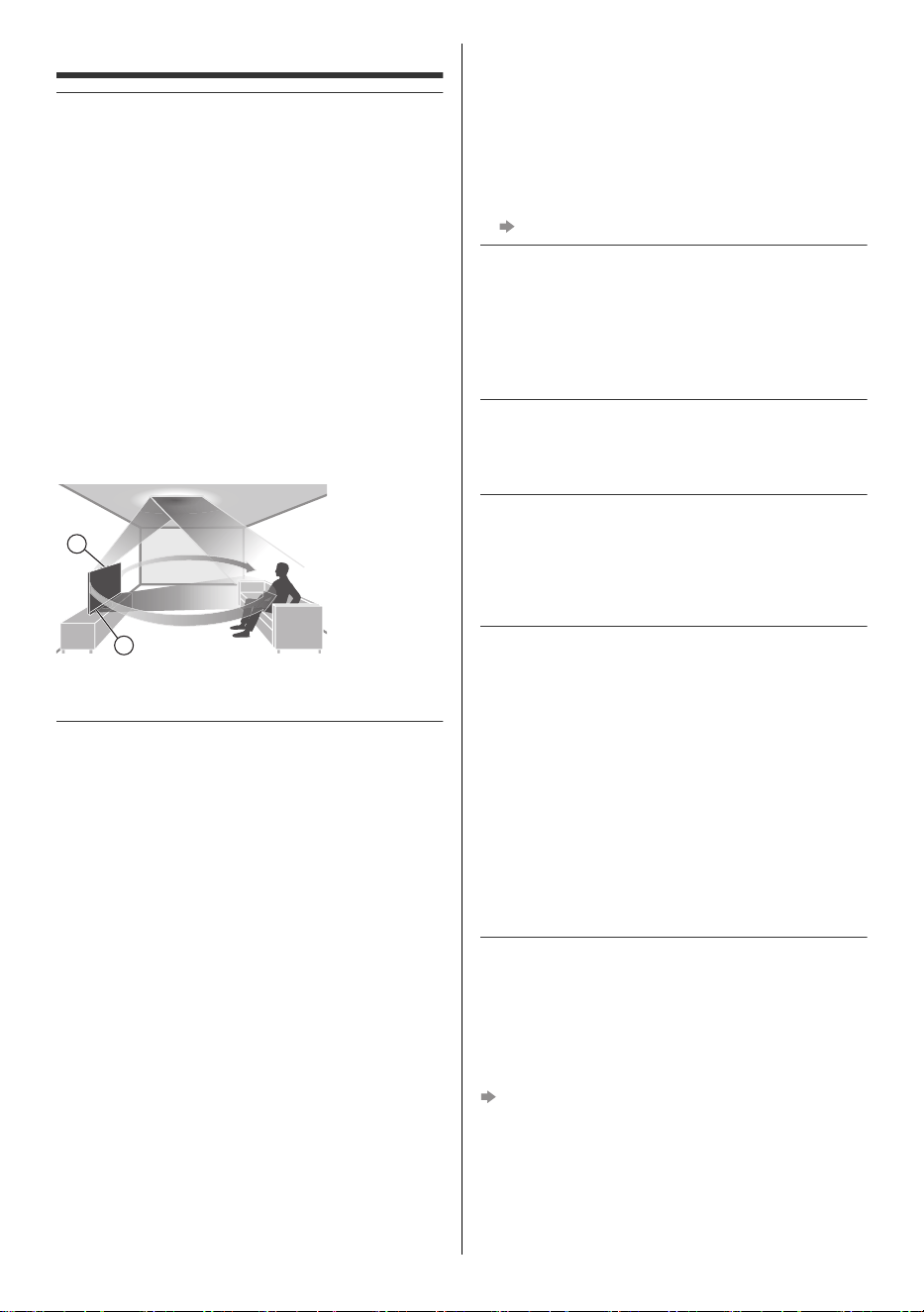
This TV has “Space Tune” function which can adjust the
sound quality automatically according to TV and viewer’s
position. Using the line array speaker settings, it is also
possible to adjust the position that the sound reaches to
match the viewing position and circumstances. You can
enjoy a three-dimensional acoustic space by using the
upward-firing speakers, which reflect sound from the
ceiling, the line array speakers, and the left and right
speakers. The adjustment of the “Space Tune” function
automatically starts when the TV is turned on for the first
time after installing this TV and connecting with the
external equipment. Follow the on-screen instructions for
setting.
≥ If automatic adjustment is selected, loud sounds are
emitted while adjusting Space Tune.
<Example>
A: Upward-firing speakers
B: Line array speakers
Do not display any still part of the image for a
long period
In such cases the still part of the image remains dimly on
the screen (“image retention”). This is not considered a
malfunction and is not covered by the warranty.
≥ Typical still image parts:
• Still images shown continuously on the same area
(ex. channel number, channel logo, other logos or
title image, etc.)
• Still or moving pictures viewed in 4:3 or 16:9 aspect
ratio, etc.
• Video games
≥ Set [Logo Luminance Control] to [Max] to avoid image
retention.
[Panasonic eHELP] (Search by Purpose > Watching >
For best picture > Screen Settings)
≥ To avoid image retention, the screen may become dim
when the motionless image is displayed. This is not a
malfunction. The brightness of the screen returns to
the previous level when the active image is displayed.
≥ Be sure to turn the TV off with the remote control or
Power button to perform the panel maintenance.
During the panel maintenance, LED turns to orange.
(p. 13) The maintenance works as necessary.
≥ Set aspect ratio to [4:3 Full] for 4:3 image. For details,
refer to [Panasonic eHELP] (Search by Purpose >
Watching > For best picture > Aspect).
≥ For more information
“Panel maintenance” (p. 13)
Internet apps, voice control function are provided by their
respective service providers, and may be changed,
interrupted, or discontinued at any time.
Panasonic assumes no responsibility and makes no
warranty for the availability or the continuity of the services.
This equipment is designed to operate in North America
and other countries where the broadcasting system and
AC house current are exactly the same as in North
America.
Panasonic does not guarantee operation and
performance of peripheral devices made by other
manufacturers; and we disclaim any liability or damage
arising from operation and/or performance from usage of
such other maker’s peripheral devices.
Damages
≥ Excepting cases where responsibility is recognized by
local regulations, Panasonic accepts no responsibility
for malfunctions caused by misuse or use of the
product, and other problems or damages caused by
use of this product.
≥ Panasonic accepts no responsibility for the loss, etc.,
of data caused by disasters.
≥ External devices separately prepared by the customer
are not covered by the warranty. Care for the data
stored in such devices is the responsibility of the
customer. Panasonic accepts no responsibility for
abuse of this data.
Handling of customer information
Customer’s personal information may be recorded on
this TV by broadcasting organization or application
provider. Before repairing, transferring or discarding this
TV, erase all the information recorded on this TV
according to the following procedure.
[Reset to Factory Defaults] (p. 16)
Customer information may be collected by provider via
application provided by third parties on this TV or
website. Please confirm the terms and conditions etc. of
provider in advance.
• Panasonic will not be held responsible for collecting or
using customer information via application provided by
third party on this TV or website.
• When entering your credit card number, name, etc.,
pay special attention to the trustworthiness of the
provider.
• Registered information may be registered in the server
etc. of provider. Before repairing, transferring or
discarding this TV, be sure to erase the information
according to the terms and conditions etc. of provider.
The recording and playback of content on this or any
other device may require permission from the owner of
the copyright or other such rights in that content.
Panasonic has no authority to and does not grant you
that permission and explicitly disclaims any right, ability
or intention to obtain such permission on your behalf. It is
A
B
TV-55_65_77Z95BP_X41G77MV03716A_eng_lsp.book 3 ページ 2025年3月18日 火曜日 午後7時19分
4
English
your responsibility to ensure that your use of this or any
other device complies with applicable copyright
legislation in your country. Please refer to that legislation
for more information on the relevant laws and regulations
involved or contact the owner of the rights in the content
you wish to record or playback.
This product is licensed under the AVC patent portfolio
license for the personal use of a consumer or other uses
in which it does not receive remuneration to (i) encode
video in compliance with the AVC Standard (“AVC
Video”) and/or (ii) decode AVC Video that was encoded
by a consumer engaged in a personal activity and/or was
obtained from a video provider licensed to provide AVC
Video. No license is granted or shall be implied for any
other use.
Additional information may be obtained from MPEG LA,
L.L.C.
See http://www.mpegla.com
Panasonic and its affiliates make no representations or
warranties of any kind with respect to the USB devices
and the performance of communication between the
USB devices and the USB port of Panasonic products,
and expressly disclaims any and all warranties, whether
express or implied or otherwise, including without
limitation any implied warranty of fitness for a particular
purpose, any loss of data, and any implied warranties
arising from course of dealing or course of performance
of data communication between the USB devices and
the USB port of Panasonic products.
Transport only in upright position.
This mark indicates the product operates on
AC voltage.
This mark indicates the product operates on
DC voltage.
This mark indicates a Class II or double
insulated electrical appliance wherein the
product does not require a safety connection to
electrical earth (ground).
Safety Precautions
This reminder is provided to direct the CATV system
installer’s attention to Article 820-40 of the NEC that
provides guidelines for proper grounding and, in
particular, specifies that the cable ground shall be
connected to the grounding system of the building, as
close to the point of cable entry as practical.
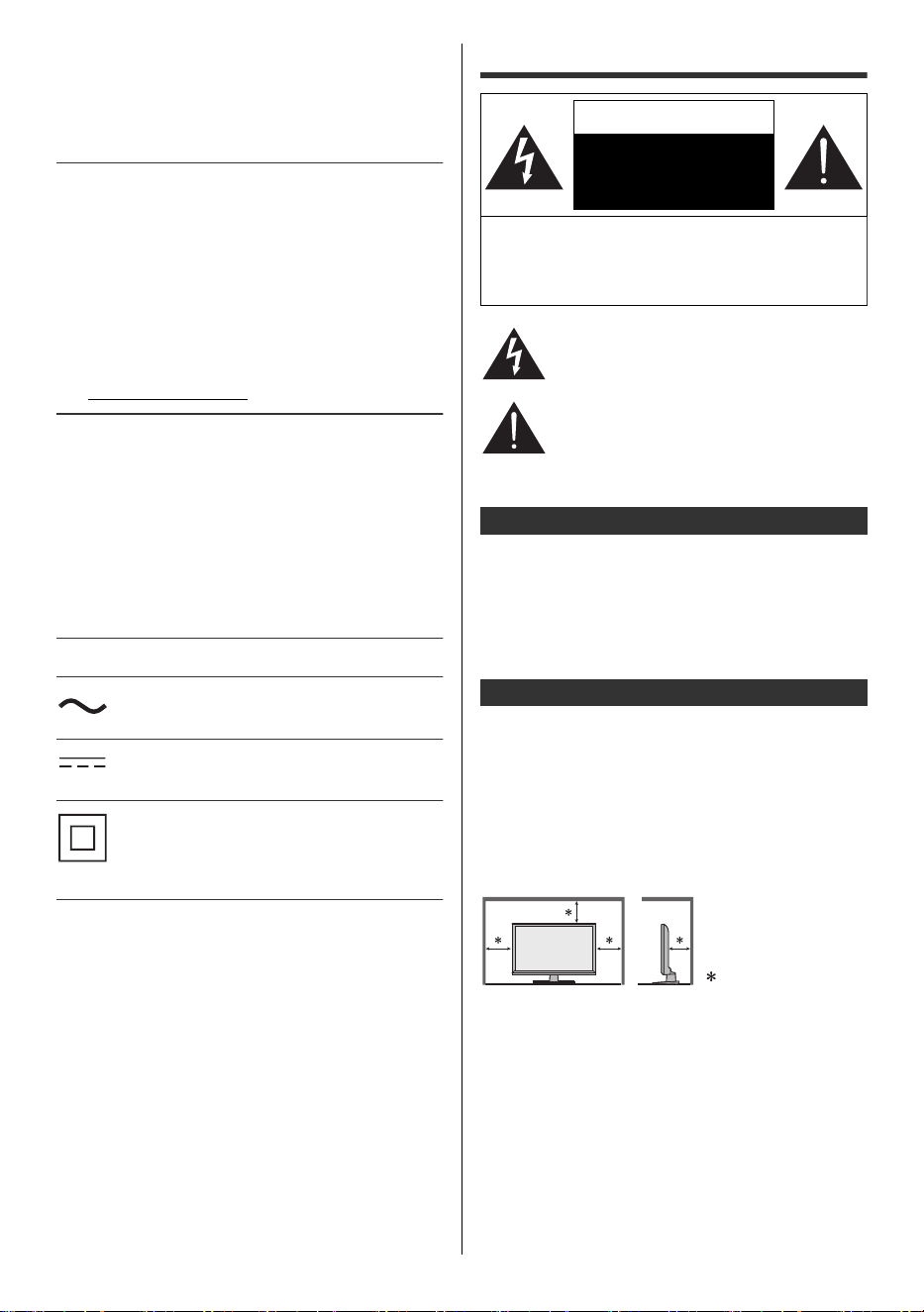
Slots and openings in the cabinet and the back or bottom
are provided for ventilation, and to ensure reliable
operation of the TV and to protect it from overheating.
These openings must not be blocked or covered. There
should be at least 10 cm (4 inches) of space around the
TV. The openings should never be blocked by placing
the TV on a bed, sofa, rug or other similar surface. This
TV should not be placed in a built-in installation such as
a bookcase unless proper ventilation is provided.
CAUTION
RISK OF ELECTRIC
SHOCK
DO NOT OPEN
WARNING: To reduce the risk of electric shock, do
not remove cover or back. No user-serviceable
parts inside. Refer servicing to qualified service
personnel.
The lightning flash with arrowhead within a
triangle is intended to tell the user that parts
inside the product are a risk of electric shock
to persons.
The exclamation point within a triangle is
intended to tell the user that important
operating and servicing instructions are in the
papers with the appliance.
Note to CATV System Installer
Secure Ventilation
10 cm (4″)
TV-55_65_77Z95BP_X41G77MV03716A_eng_lsp.book 4 ページ 2025年3月18日 火曜日 午後7時19分
5
English
1) Read these instructions.
2) Keep these instructions.
3) Heed all warnings.
4) Follow all instructions.
5) Do not use this apparatus near water.
6) Clean only with dry cloth.
7) Do not block any ventilation openings. Install in
accordance with the manufacturer’s instructions.
8) Do not install near any heat sources such as
radiators, heat registers, stoves or other apparatus
(including amplifiers) that produce heat.
9) Do not defeat the safety purpose of the polarized or
grounding-type plug. A polarized plug has two blades
with one wider than the other. A grounding type plug
has two blades and a third grounding prong. The
wide blade or the third prong are provided for your
safety. If the provided plug does not fit into your
outlet, consult an electrician for replacement of the
obsolete outlet.
10) Protect the power cord from being walked on or
pinched particularly at plugs, convenience
receptacles, and the point where they exit from the
apparatus.
11) Only use attachments / accessories specified by the
manufacturer.
13) Unplug this apparatus during lightning storms or
when unused for long periods of time.
14) Refer all servicing to qualified service personnel.
Servicing is required when the apparatus has been
damaged in any way, such as power-supply cord or
plug is damaged, liquid has been spilled or objects
have fallen into the apparatus, the apparatus has
been exposed to rain or moisture, does not operate
normally, or has been dropped.
15) Operate only from the type of power source indicated
on the marking label. If you are not sure of the type of
power supplied to your home, consult your television
dealer or local power company.
16) Follow all warnings and instructions marked on the
TV.
17) Never push objects of any kind into this TV through
cabinet slots as they may touch dangerous voltage
points or short out parts that could result in a fire or
electric shock. Never spill liquid of any kind on the
TV.
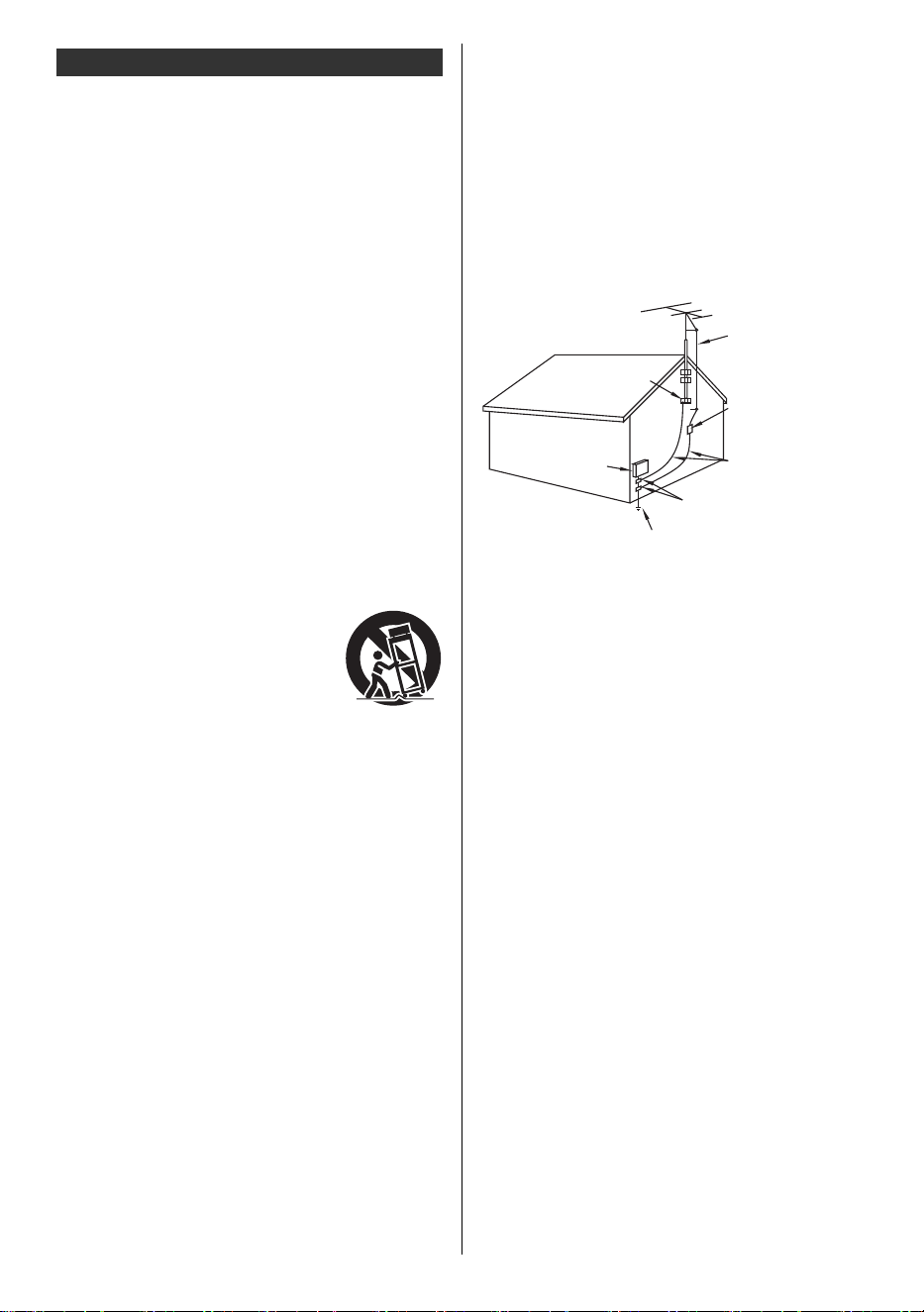
18) If an outside antenna is connected to the television
equipment, be sure the antenna system is grounded
so as to provide some protection against voltage
surges and built up static charges. In the U.S.
Section 810-21 of the National Electrical Code
provides information with respect to proper grounding
of the mast and supporting structure, grounding of
the lead-in wire to an antenna discharge unit, size of
grounding conductors, location of antenna discharge
unit, connection to grounding electrodes, and
requirements for the grounding electrode.
EXAMPLE OF ANTENNA GROUNDING AS PER (NEC)
NATIONAL ELECTRICAL CODE
19) An outside antenna system should not be located in
the vicinity of overhead power lines, other electric
light, power circuits, or where it can fall into such
power lines or circuits. When installing an outside
antenna system, extreme care should be taken to
keep from touching such power lines or circuits as
contact with them might be fatal.
20) Unplug this TV from the wall outlet and refer servicing
to qualified service personnel under the following
conditions:
21) When replacement parts are required, be sure the
service technician uses replacement parts specified
by the manufacturer that have the same
characteristics as the original parts. Unauthorized
substitutions may result in fire, electric shock, or
other hazards.
Important Safety Instructions (TV set)
12) Use only with the cart, stand, tripod,
bracket or table specified by the
manufacturer, or sold with the
apparatus. When a cart is used, use
caution when moving the cart /
apparatus combination to avoid
injury from tip-over.
a. When the power cord or plug is damaged or
frayed.
b. If liquid has been spilled into the TV.
c. If the TV has been exposed to rain or water.
d. If the TV does not operate normally by following
the operating instructions.
Adjust only those controls that are covered by
the operating instructions as improper
adjustment of other controls may result in
damage and will often require extensive work
by a qualified technician to restore the TV to
normal operation.
e. If the TV has been dropped or the cabinet has
been damaged.
f. When the TV exhibits a distinct change in
performance - this indicates a need for service.
ANTENNA
LEAD-IN WIRE
GROUND
CLAMP
ANTENNA
DISCHARGE UNIT
(NEC SECTION
810-20)
GROUNDING
CONDUCTORS (NEC
SECTION 810-21)
GROUND CLAMPS
POWER SERVICE GROUNDING ELECTRODE
SYSTEM (NEC ART 250, PART H)
ELECTRIC
SERVICE
EQUIPMENT
TV-55_65_77Z95BP_X41G77MV03716A_eng_lsp.book 5 ページ 2025年3月18日 火曜日 午後7時19分
6
English
22) WARNING:
TO REDUCE THE RISK OF FIRE OR ELECTRIC
SHOCK, DO NOT EXPOSE THIS APPARATUS
TO RAIN, MOISTURE, DRIPPING OR
SPLASHING.
DO NOT PLACE LIQUID CONTAINERS
(FLOWER VASES, CUPS, COSMETICS, ETC.)
ABOVE THE SET (INCLUDING ON SHELVES
ABOVE, ETC.).
23) WARNING:
SMALL PARTS CAN PRESENT CHOKING
HAZARD IF ACCIDENTALLY SWALLOWED.
KEEP SMALL PARTS AWAY FROM YOUNG
CHILDREN.
DISCARD UNNEEDED SMALL PARTS AND
OTHER OBJECTS, INCLUDING PACKAGING
MATERIALS AND PLASTIC BAGS/SHEETS TO
PREVENT THEM FROM BEING PLAYED WITH
BY YOUNG CHILDREN, CREATING THE
POTENTIAL RISK OF SUFFOCATION.
25) WARNING:
Do not place this TV in any medical institutions
or locations with medical devices.
Radio waves from this TV may interfere with the
medical devices and cause accidents due to the
malfunction.
26) WARNING:
Do not use this TV near any automatic control
devices such as automatic doors or fire alarms.
Radio waves from this TV may interfere with the
automatic control devices and cause accidents due
to the malfunction.
27) WARNING:
Radio waves from this TV may affect certain
medical devices including pacemakers.
Maintain a minimum distance of approximately
50 cm (20 inches) to minimize or prevent
interference.
Consult a physician before use.
28) CAUTION:
The Power switch on this unit will not completely
shut off all power from AC outlet. Since the power
cord serves as the main disconnect device for the
unit, you will need to unplug it from the AC outlet to
shut down all power.
Therefore, make sure the unit has been installed so
that the power cord can be easily unplugged from
AC outlet in case of an accident. To avoid fire
hazard, the power cord should also be unplugged
from the AC outlet when left unused for a long
period of time (for example, when on vacation).
29) CAUTION:
TO PREVENT ELECTRIC SHOCK, DO NOT USE
THIS PLUG WITH A RECEPTACLE OR OTHER
OUTLET UNLESS THE BLADES CAN BE FULLY
INSERTED TO PREVENT BLADE EXPOSURE.
30) CAUTION:
USE WITH OTHER STAND MAY RESULT IN
INSTABILITY POSSIBLY CAUSING INJURY.
31) CAUTION:
DANGER OF EXPLOSION IF BATTERY IS
INCORRECTLY REPLACED. REPLACE ONLY
WITH THE SAME OR EQUIVALENT TYPE.
Warning
A television set may fall, causing serious personal
injury or death. Many injuries, particularly to
children, can be avoided by taking simple
precautions such as:
• ALWAYS use cabinets or stands or mounting
methods recommended by the manufacturer of
the television set.
• ALWAYS use furniture that can safely support
the television set.
• ALWAYS ensure the television set is not
overhanging the edge of the supporting
furniture.
• ALWAYS educate children about the dangers of
climbing on furniture to reach the television set
or its controls.
• ALWAYS route cords and cables connected to
your television so they cannot be tripped over,
pulled or grabbed.
• NEVER place a television set in an unstable
location.
• NEVER place the television set on tall furniture
(for example, cupboards or bookcases) without
anchoring both the furniture and the television
set to a suitable support.
• NEVER place the television set on cloth or
other materials that may be located between
the television set and supporting furniture.
• NEVER place items that might tempt children to
climb, such as toys and remote controls, on the
top of the television or furniture on which the
television is placed.
If the existing television set is going to be retained
and relocated, the same considerations as above
should be applied.
24) WARNING:
To prevent the spread of fire,
keep candles or other open
flames away from this product
at all times.
TV-55_65_77Z95BP_X41G77MV03716A_eng_lsp.book 6 ページ 2025年3月18日 火曜日 午後7時19分

7
English
32) CAUTION:
Do not install in an area subject to insects (vermin).
They can enter the TV and become trapped, which
can cause internal damage or become viewable
through the screen.
33) CAUTION:
Do not install in an area subject to dust or smoke.
Dust or smoke can enter through the TV’s vents
and become trapped inside, which can cause
overheating that can lead to a malfunction or
picture quality deterioration.
∫ Battery for the Remote Control
<Warning>
≥ Keep the batteries out of reach of children to prevent
swallowing.
Adverse physical effects can result if accidentally
swallowed. If you suspect a child has swallowed one,
seek medical attention immediately.
<Caution>
≥ Risk of fire or explosion if the battery is replaced by an
incorrect type.
≥ Incorrect installation may cause battery leakage,
corrosion and explosion.
≥ Replace only with the same or equivalent type.
≥ Do not mix old and new batteries.
≥ Do not mix different battery types (such as alkaline
and manganese batteries).
≥ Do not use rechargeable batteries (Ni-Cd, etc.).
≥ Do not burn or break up batteries.
≥ Do not expose batteries to excessive heat such as
sunshine, fire or the like.
≥ Make sure you dispose or recycle batteries per local
regulations.
≥ Remove the battery from the unit when not using for a
prolonged period of time to prevent battery leakage,
corrosion and explosion.
This equipment has been tested and found to comply
with the limits for a Class B digital device, pursuant to
part 15 of the FCC Rules. These limits are designed to
provide reasonable protection against harmful
interference in a residential installation. This equipment
generates, uses and can radiate radio frequency energy
and, if not installed and used in accordance with the
instructions, may cause harmful interference to radio
communications. However, there is no guarantee that
interference will not occur in a particular installation. If
this equipment does cause harmful interference to radio
or television reception, which can be determined by
turning the equipment off and on, the user is encouraged
to try to correct the interference by one or more of the
following measures:
• Reorient or relocate the receiving antenna.
• Increase the separation between the equipment and
receiver.
• Connect the equipment into an outlet on a circuit
different from that to which the receiver is connected.
• Consult the Panasonic Service Center or an
experienced radio/TV technician for help.
FCC Caution:
To assure continued compliance, use only shielded
interface cables when connecting to peripheral
devices.
Pursuant to 47CFR, Part 15.21 of the FCC rules, any
changes or modifications to this TV not expressly
approved by Panasonic Corporation of North
America could cause harmful interference and would
void the user’s authority to operate this device.
FCC Supplier’s Declaration of Conformity
Model: TV-55Z95BP / TV-65Z95BP / TV-77Z95BP
Responsible Party:
Panasonic Corporation of North America
Two Riverfront Plaza, Newark, NJ 07102-5490 U.S.A
Support Contact:
https://help.na.panasonic.com/
This device complies with part 15 of the FCC Rules.
Operation is subject to the following two conditions:
(1) This device may not cause harmful interference, and
(2) this device must accept any interference received,
including interference that may cause undesired
operation.
FCC STATEMENT
TV-55_65_77Z95BP_X41G77MV03716A_eng_lsp.book 7 ページ 2025年3月18日 火曜日 午後7時19分
8
English
FCC RF Exposure Warning:
• This TV is provided with a built-in transmitter:
Wireless LAN with FCC ID: ACJ-TNPA7911
• This transmitter complies with FCC radiation
exposure limits set forth for an uncontrolled
environment for mobile use with minimum
8 inches (20 cm) spacing requirement between
transmitters and all person’s body (excluding
extremities of hands, wrist and feet) during
wireless modes of operation.
• This TV may also be provided with remote control
approved under FCC ID: PUW-2K24-YKF478
• Other third-party wireless transmitters should not
be used as they have not been RF exposure
evaluated for use with this TV and may not comply
with RF exposure requirements.
<Only for wireless LAN if capable of transmission in
the 5.15 ~ 5.25 GHz and 5.925 ~ 7.125 GHz frequency
band>
This product is restricted to indoor use due to its
operation in the 5.15 to 5.25 GHz and 5.925 to
7.125 GHz frequency range.
Flat panel displays are not always supported on the
proper stands or installed according to the
manufacturer’s recommendations. Flat panel displays
that are inappropriately situated on dressers, bookcases,
shelves, desks, speakers, chests, or carts may fall over
and may cause personal injury or even death.
The Consumer Technology Association (CTA), of which
Panasonic is a member, is committed to making home
entertainment enjoyable and safe. To prevent personal
injury or death, be sure to follow these following safety
guidelines:
PROPER TELEVISION PLACEMENT MATTERS
THE CONSUMER TECHNOLOGY INDUSTRY CARES
Manufacturers, retailers and the rest of the consumer
technology industry are committed to making products
safe and enjoyable. As you enjoy your television, please
note that all televisions – new and old- must be
supported on proper stands or installed according to the
manufacturer’s recommendations. Televisions that are
inappropriately situated on dressers, bookcases,
shelves, desks, speakers, chests, carts, etc., may fall
over, resulting in injury.
TUNE IN TO SAFETY
•
NEVER
allow children to climb on or play on the television
or the furniture on which the television is placed.
• NEVER place the television on furniture that can
easily be used as steps, such as a chest of drawers.
• ALWAYS follow the manufacturer’s recommendations
for the safe installation of your television.
• ALWAYS read and follow all instructions for proper
use of your television.
• ALWAYS install the television where it cannot be
pushed, pulled over or knocked down.
• ALWAYS route cords and cables connected to the
television so that they cannot be tripped over, pulled
or grabbed.
WALL OR CEILING MOUNT YOUR TELEVISION
• ALWAYS contact your retailer about professional
installation if you have any doubts about your ability to
safely mount your television.
• ALWAYS use a mount that has been recommended
by the television manufacturer and has a safety
certification by a Nationally Recognized Testing
Laboratory (NRTL).
• ALWAYS follow all instructions supplied by the
television and mount manufacturers.
• ALWAYS make sure that the wall or ceiling where you
are mounting the television is appropriate. Some
mounts are not designed to be mounted to walls and
ceilings with steel studs or cinder block construction. If
you are unsure, contact a professional installer.
• Televisions can be heavy. A minimum of two people is
required for a wall or ceiling mount installation.
MOVING AN OLDER TELEVISION TO A NEW PLACE
IN YOUR HOME
• REMEMBER Special care should be made in the
placement of older CRT televisions. Many new
television buyers move their older CRT televisions into
a secondary room after the purchase of a flat-panel
television.
• NEVER place your older CRT television on a dresser
where children may be tempted to use the drawers to
climb.
• ALWAYS place your older CRT television on furniture
that is sturdy and appropriate for its size and weight.
• ALWAYS make sure your older CRT television does
not hang over the edge of your furniture.
CTA.tech/Consumer-Resources
Panasonic recommends that a qualified installer
perform the wall-mount installation. See page 10.
WARNING
CHILD SAFETY:
The American Academy of Pediatrics discourages
media viewing for children younger than two
years. For more details, see www.aap.org.
TV-55_65_77Z95BP_X41G77MV03716A_eng_lsp.book 8 ページ 2025年3月18日 火曜日 午後7時19分
9
English
∫ Pedestal
<Warning>
≥ Do not disassemble or modify the pedestal.
<Caution>
≥ Do not use any pedestal other than the one provided
with this TV.
≥ Do not use the pedestal if it becomes warped or
physically damaged. If this occurs, contact your
nearest Panasonic dealer immediately.
≥ During setup, make sure that all screws are securely
tightened.
≥ Ensure that the TV does not suffer any impact during
installation of the pedestal.
≥ Ensure that children do not climb onto the pedestal.
≥ Install or remove the TV from the pedestal with at least
two people.
≥ Install or remove the TV according to the specified
procedure.
≥ Insert the pedestal firmly, otherwise it may come off
when setting up the TV.
∫ Built-in wireless LAN
<Caution>
≥ Do not use the built-in wireless LAN to connect to any
wireless network (SSID*) for which you do not have
usage rights. Such networks may be listed as a result
of searches. However, using them may be regarded
as illegal access.
≥ Do not subject the built-in wireless LAN to high
temperatures, direct sunlight or moisture.
≥ Data transmitted and received over radio waves may
be intercepted and monitored.
≥ The built-in wireless LAN uses 2.4 GHz, 5 GHz and
6 GHz frequency bands. To avoid malfunctions or
slow response caused by radio wave interference
when using the built-in wireless LAN, keep the TV
away from other devices that use 2.4 GHz, 5 GHz and
6 GHz signals such as other wireless LAN devices,
microwave ovens, and mobile phones.
≥ When problems occur due to static electricity, etc., the
TV might stop operating to protect itself. In this case,
turn off the TV by unplugging the power cord, then
turn on by inserting the power cord into the wall outlet.
∫ Bluetooth
®
wireless technology
<Caution>
≥ The TV and the remote control use the 2.4 GHz radio
frequency ISM band (Bluetooth
®
). To avoid
malfunctions or slow response caused by radio wave
interference, keep the TV and the remote control away
from the devices such as other wireless LAN devices,
other Bluetooth
®
devices, microwaves, mobile phones
and the devices that use 2.4 GHz signal.
∫ Moving the TV
<Caution>
Before moving the TV, disconnect all cables.
≥ At least two people are required to move the TV to
prevent injury that may be caused by the tipping or
falling of TV.
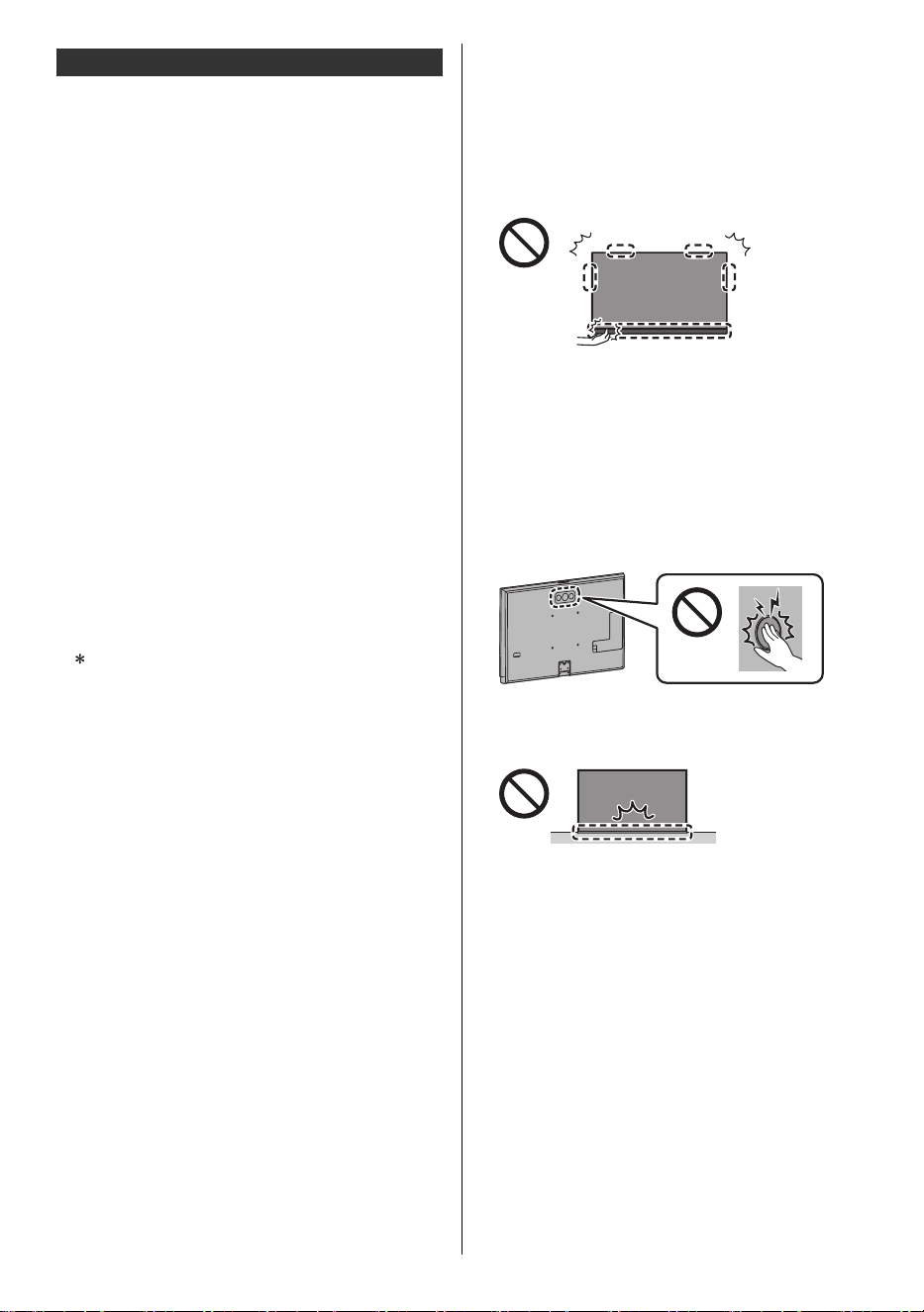
≥ Do not apply any strong force to the speaker parts of
this TV as shown below.
≥ Transport only in upright position. Transporting the TV
with its display panel facing upwards or downwards
may cause damage to the internal circuitry.
• Do not place the TV temporarily on the floor or
desk.
• If the pedestal requires assembly, be sure to
assemble the pedestal before removing the TV
from the carton.
≥ Do not apply strong force to the woofer on the back of
this TV.
≥ There are parts such as switches on the bottom of the
TV, so take care not to cause impacts to these by
bumping on the floor, etc.
≥ Make sure not to scratch or break the TV.
Other Safety Instructions
SSID is a name for identifying a particular wireless
network for transmission.
TV-55_65_77Z95BP_X41G77MV03716A_eng_lsp.book 9 ページ 2025年3月18日 火曜日 午後7時19分
10
English
Installing the wall-hanging
bracket
Please contact a professional installer to purchase the
recommended UL qualified wall-hanging bracket.
<Warning>
≥ Always be sure to ask a qualified technician to carry
out set-up.
≥ Do not mount the unit directly below ceiling lights
(such as spotlights, floodlights or halogen lights) that
typically give off high heat. Doing so may warp or
damage plastic cabinet parts.
≥ Take care when fixing wall brackets to the wall.
Always ensure that there are no electrical cables or
pipes in the wall before hanging bracket.
≥ To prevent fall and injury, remove the TV from its fixed
wall position when it is no longer in use.
≥ Incorrect wall-hanging bracket or incorrect fitting may
cause equipment to fall, resulting in injury and product
damage.
≥ Panasonic disclaims liability for any damage or injury
arising from incorrect wall-hanging bracket, incorrect
fitting or otherwise failure to follow the above
instructions.
Connections
Refer to [Panasonic eHELP] and the separate sheet for
details about connections.
≥ Please ensure that the unit is disconnected from the
wall outlet before attaching or disconnecting any
cables.
≥ Keep the TV away from electronic equipment (video
equipment, etc.) or equipment with an infrared sensor,
otherwise distortion of image / sound may occur or
operation of other equipment may be affected.
≥ Please also read the manual of the equipment being
connected.
∫ AV devices
(Recorder, Player, Satellite box, Camcorder, etc.)
≥ For details, refer to [Panasonic eHELP] (Search by
Purpose > Watching > External equipment > External
connection).
∫ Antenna
TV
<Note>
≥ When using a Cable/Satellite Set top box or external
equipment, a high-definition connection can be made
using an HDMI cable. Cable/Satellite Set top box,
external equipment and HDMI cable shown in this
manual are not supplied with the TV. (p. 11)
≥ For additional assistance, visit us at:
https://help.na.panasonic.com/
∫ Network
A broadband network environment is required to be able
to use internet services.
≥ If you do not have any broadband network services,
please consult your retailer for assistance.
≥ Prepare the internet environment for wired connection
or wireless connection.
≥ Setup of the network connection will start when first
using the TV. (p. 11)
≥ For details, refer to [Panasonic eHELP] (Search by
Purpose > Network > Network connections).
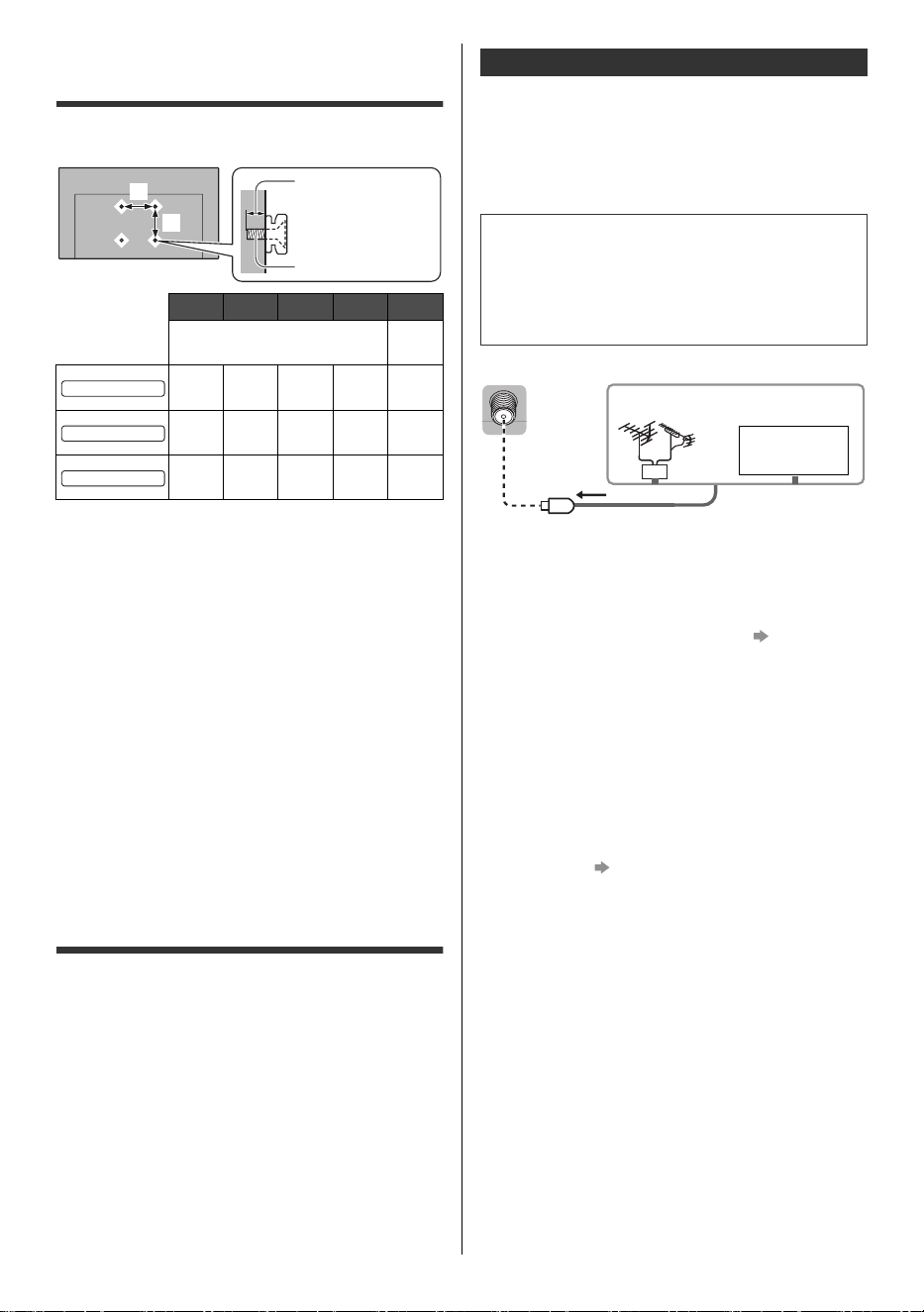
a b c d e
mm
(inch)
–
300
(11.8″)
300
(11.8″)
10
(0.39″)
14
(0.55″)
M6
300
(11.8″)
300
(11.8″)
10
(0.39″)
20
(0.79″)
M6
400
(15.7″)
300
(11.8″)
10
(0.39″)
20
(0.79″)
M6
e
a
b
c (Minimum)
d (Maximum)
55-inch model
65-inch model
77-inch model
Basic connections
VHF/UHF Antenna
• ATSC (Advanced Television Systems Committee):
Digital TV Standards include digital high-definition
television (HDTV), standard-definition television
(SDTV), data broadcasting, multi-channel surround
sound audio and interactive television.
Cable TV
(Clear QAM)
VHF/UHF Antenna
or
TV-55_65_77Z95BP_X41G77MV03716A_eng_lsp.book 10 ページ 2025年3月18日 火曜日 午後7時19分
11
English
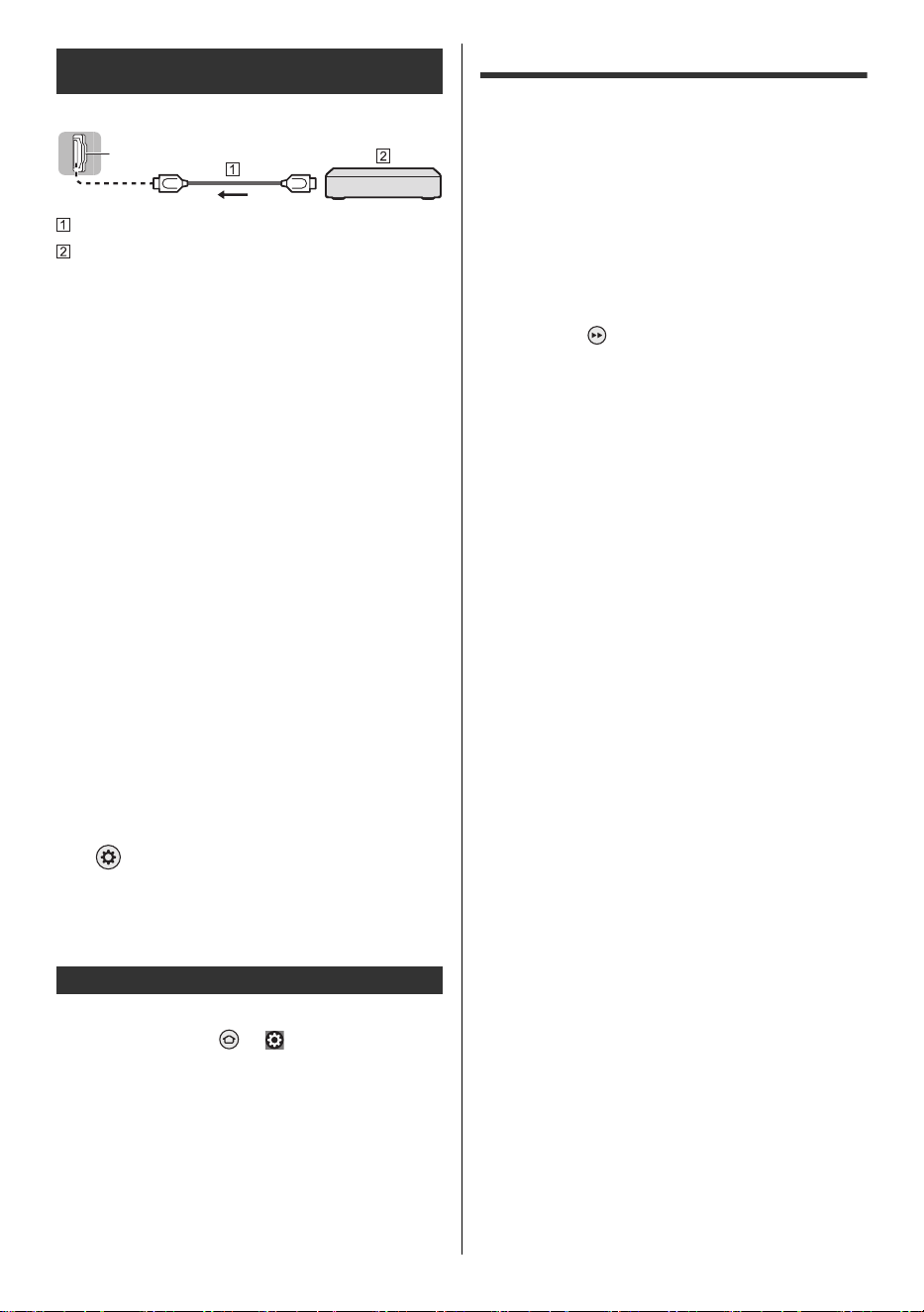
TV
HDMI cable
4K / HDR compatible equipment
≥ Connect the 4K compatible equipment to HDMI
terminal using a 4K compatible cable and you can
watch content in 4K format.
≥ Set to [Mode1] when the image or sound in HDMI
input is not played properly.
≥ Supporting HDR does not increase the peak
brightness capabilities of the TV panel.
∫ [HDMI Auto Setting]
Reproduces the image more precisely with the expanded
color gamut and more smoothly with the high frame rate
when connecting the 4K compatible equipment. Select
the mode depending on the equipment.
[Mode1]:
For better compatibility. Set to [Mode1] when the
image or sound in HDMI input is not played properly.
[Mode2]:
For the 4K compatible equipment that has the function
to output the image precisely with the expanded color
gamut.
[Mode3]:
For the 4K compatible equipment that has the function
to output the high frame rate image.
(This mode is valid in HDMI 1 and 2)
≥ To change the mode
1. Select the HDMI input mode connected to the
equipment.
2. Change the mode in [HDMI Auto Setting].
> [Picture] > [HDMI Settings] > [HDMI Auto
Setting]
≥ For information about the valid format, refer to
[Panasonic eHELP] (Search by Purpose > Watching >
4K resolution > HDMI Auto Setting).
∫ Headphones / Subwoofer
Set [Headphone Jack] ( > [ ] (on the screen) >
[Display & Sounds] > [Audio Output]) to [Connect].
≥ To use headphones, set [Audio Output Mode] to
[Headphone] or [TV Speaker and Headphone].
≥ To use subwoofer, set [Audio Output Mode] to [TV
Speaker and Sub Woofer].
∫ IR blaster
≥ To use an IR blaster, connect it to the IR blaster port.
Initial Setup
A setup screen is displayed when you turn the TV on for
the first time. Follow the on-screen guidance.
1 Choose Your Language
2 Select TV mode
≥ It is recommended to select [Home] for home use.
3 Pair Your Remote with your TV
≥ Pairing of the remote control is completed
automatically.
4 Enable Network
≥ When connecting wirelessly, select the access
point to be connected to. To set up later, you can
press the button on the remote control to skip
and go to step 8.
≥ When using a wired connection, the internet
connection is established automatically.
5 Select Your Experience
≥ Choose the Basic experience to watch live TV and
access select popular content and go to step 8.
≥ Choose the Full experience to interact with Alexa
and access the full selection of compatible content
and go to step 6.
6 Sign In with Your Amazon Account
≥ To use Amazon, Fire TV, and Alexa related
functionality, you will need to sign into your Amazon
account. Note that this step is skipped if there is no
internet connection or you choose Basic
experience in step 5.
≥ You can sign in with a smartphone, a QR code, or
the remote control. Follow the on-screen guidance.
7 Parental Controls (PIN code)
8 Scan for TV channels
≥ Specifications, etc. are subject to change due to
software updates.
≥ You will need an internet connection to sign into your
Amazon account in order to use a variety of services
such as voice controls and video streaming services.
≥ If you set a PIN code, you may be asked to enter your
PIN code when you try to access some menus,
services, content, etc.
Connections for 4K / HDR compatible
equipment
Other connections
HDMI
TV-55_65_77Z95BP_X41G77MV03716A_eng_lsp.book 11 ページ 2025年3月18日 火曜日 午後7時19分
12
English
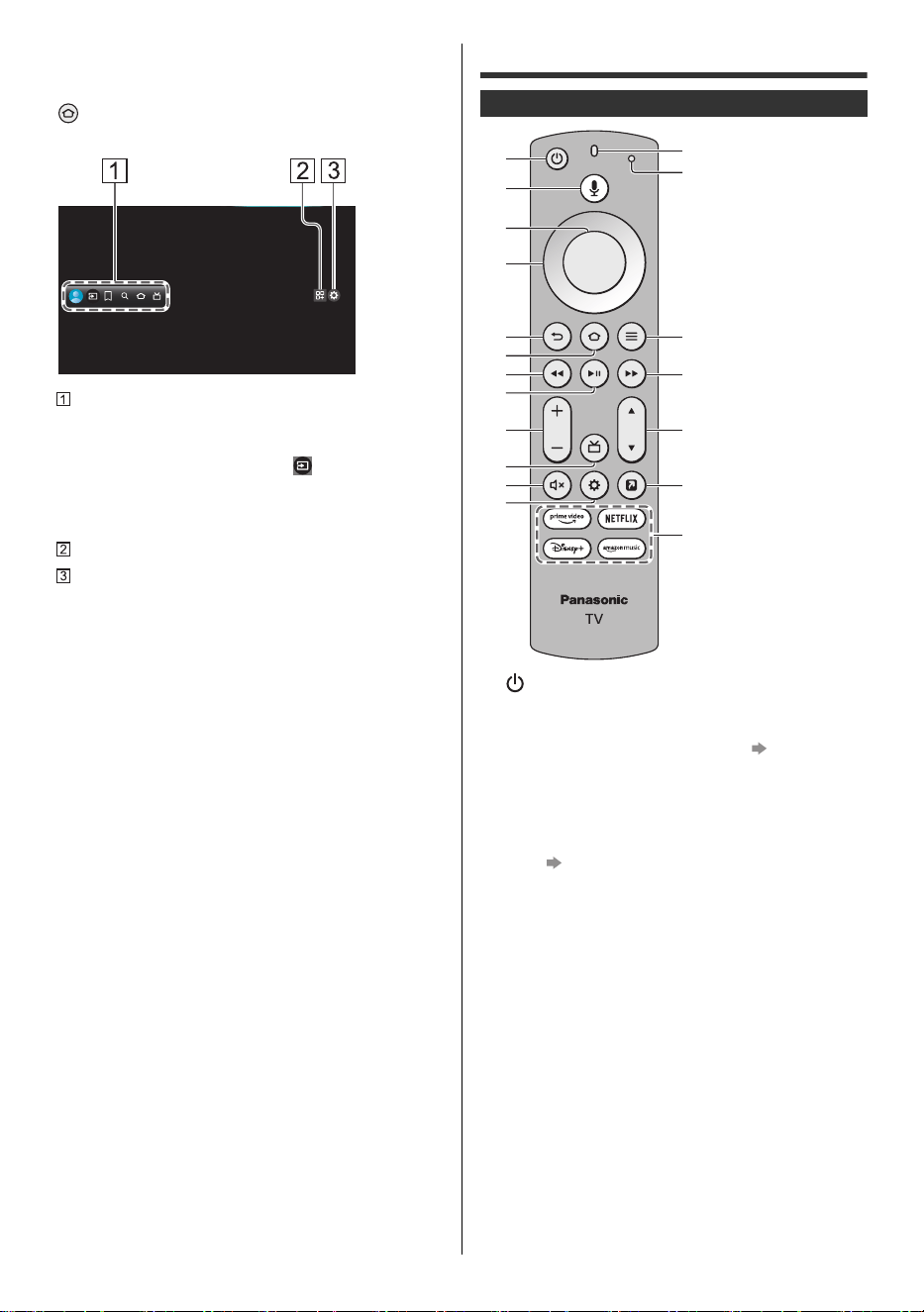
∫ Home
“Home” is a gateway to the TV programs, applications
and connected devices. Home is displayed by pressing
and it provides you an easy way to access all the
features as shown below (example).
Profile / Inputs / My Stuff / Find / Home / Live
≥ For example, to watch TV via a Cable/Satellite Set
Top Box, or any other source (DVD, DVR, gaming
device, etc.): After selecting [ ], press down
navigation button on the remote control, then press
the left or right navigation button to select the
appropriate input.
Applications
Setting menu
≥ UI screen for changing advanced settings for the
TV
≥ For details, refer to [Panasonic eHELP] (Search by
Purpose > Functions > Home).
Identifying Controls
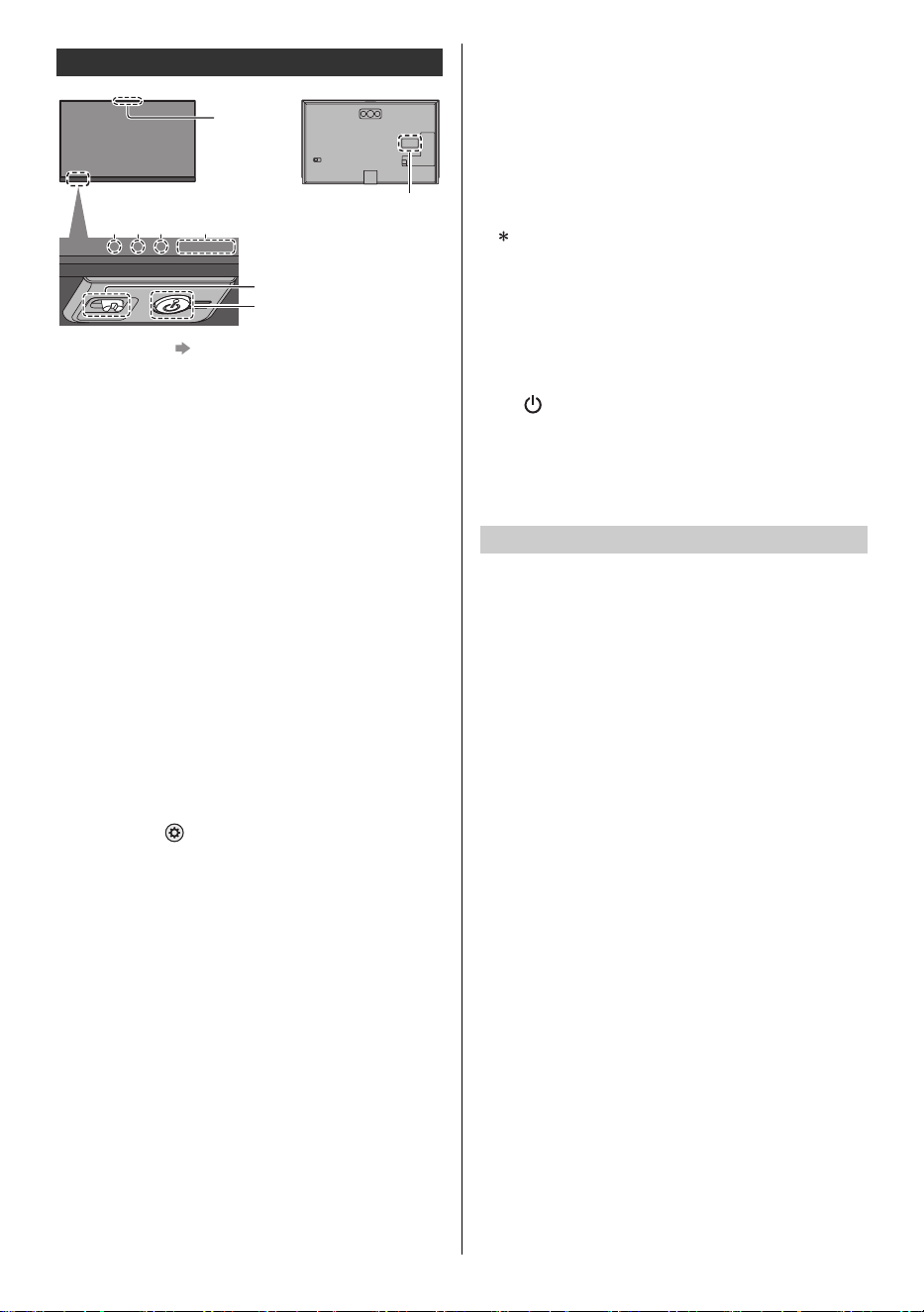
1 [ ]: Power on/off (Standby)
2 Alexa voice button
≥ Press and hold the button and speak into the
microphone to use voice controls. (p. 14)
3Select
4D-pad (up/down/left/right navigation buttons)
5 Back
≥ Return to the previous place in the menu or app.
6Home (p.12)
7Rewind
8 Play/pause
9 Volume
10
Guide
11
Mute
12
Settings
≥ Display quick settings for Picture, Screen, Sound,
etc. on the screen.
13
Microphone
14
LED indicator
≥ Lights in different colors when using the remote
control.
15
Menu/Options
16
Fast forward
17
Channel
18
MY APP (Assigns a favorite application.)
19
Streaming Services
Remote Control
1
5
4
3
9
6
8
7
12
10
2
11
13
14
15
16
18
19
17
TV-55_65_77Z95BP_X41G77MV03716A_eng_lsp.book 12 ページ 2025年3月18日 火曜日 午後7時19分
13
English
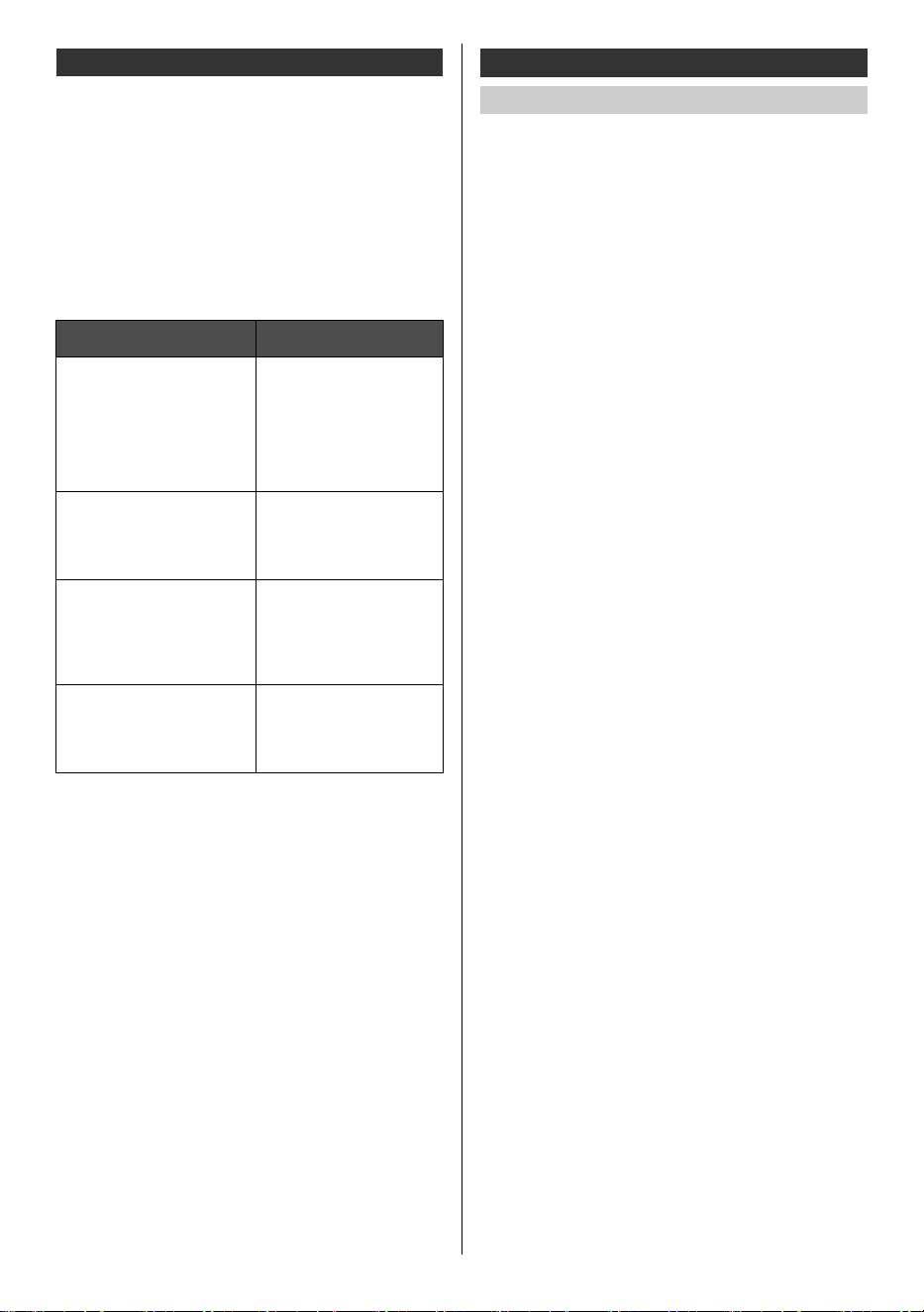
1 Microphones (p. 14)
2Mic LED
3 LED INDICATOR
≥ Lights in different colors.
4POWER LED
≥ The LED blinks when an infrared signal is received
from the remote control.
5 Remote control signal receiver (for infrared
communication)
≥ Do not place any objects between the TV remote
control signal receiver and remote control.
6 Ambient sensor
≥ Senses ambient lighting conditions to adjust the
picture when [Auto Brightness] and [Auto White
Balance] ( > [Picture] > [Ambient Sensor]) are
set to [On].
7 Microphone on/off switch
≥ Switches the microphone on the TV on/off.
8 Power button
≥ Press the button to turn on.
≥ When the TV is on, press the button to display the
operation guide.
The item selection switches between Power Off,
Inputs*, Volume Up-Down, Channel Up-Down, and
Exit each time you press the Power button, and
pressing and holding for about 2 seconds enables
item operation.
Press the button to select the input when the input
selection list appears. Press and hold the button to
confirm.
≥ To Power Off (Standby) with the button on the TV
itself, press and hold the Power button for about
2 seconds while Power Off is selected.
≥ To turn Off the apparatus completely, you must pull
the power cord out of the wall outlet.
≥ [ ]: Standby / On (Bottom of the TV)
9 Model name plate
<Note>
≥ The TV consumes a small amount of electric energy
even when turned off.
Be sure to turn the TV off with the remote control or
Power button to perform the panel maintenance. The
panel maintenance automatically starts, and it takes
approx. 10 minutes. During the panel maintenance, LED
turns to orange. The maintenance works as necessary.
≥ During panel maintenance, avoid touching and
exerting any pressure on the screen. (e.g. wiping the
screen, etc.)
Indicator / Control panel
Red: Microphone on the TV is off
Red: Standby
Green: On
• Depending on the ambient brightness,
adjusts the brightness of LED to easy-
to-view levels automatically.
Orange: Standby with some functions active or
panel maintenance in progress
9
234 5, 6
8
7
1
Bottom of the TV
Panel maintenance
TV-55_65_77Z95BP_X41G77MV03716A_eng_lsp.book 13 ページ 2025年3月18日 火曜日 午後7時19分
14
English
This TV has microphones so you can use Alexa hands-
free. Enjoy hands-free voice control of content, including
search, play, pause, fast forward, and more. Now you
can put down the remote and dive straight into your
favorite movies and TV shows with just the sound of your
voice. From across the room, say, “Alexa,” and Alexa will
respond to your request. Switch inputs and go from
watching your favorite TV show to the big game. You can
also ask Alexa to check the weather, set timers and
reminders, and more—even when the TV screen is off.
Here are a few things that you can do with your
Panasonic Fire TV:
≥ Certain Alexa Skills and features may not be available
in all countries or languages, and are subject to
change at any time.
≥ Whether Alexa responds or not depends on the
volume/tone of your voice and the ambient noise.
≥ To perform searches and other functions, this device
needs to be connected to the internet.
How to turn off the microphones?
Alexa is designed to protect your privacy. For example,
you can slide the Microphone switch on the bottom of the
TV to turn off or on the microphones. When set to OFF,
power will be disconnected from the microphones, you
will see a red LED on the front of your TV, and the TV
cannot record or stream audio requests to the cloud even
if you say the wake word. If you have an Alexa-enabled
remote control, you will still be able to use Alexa through
the remote.
This TV supports Bluetooth
®
communications.
Bluetooth
®
devices that have been registered (paired)
with this TV can connect to (communicate with) this TV.
≥ When registering (pairing) a Bluetooth
®
device with
this TV, move the device within 50 cm of the TV.
≥ It is not possible to register (pair) Bluetooth
®
devices
that are not compatible with this TV.
≥ If a Bluetooth
®
enabled device that you have
registered (paired) with this TV is then registered and
used on another device, it may then be made
unavailable for use with this TV. Register the device
on this TV again if this occurs.
≥ You can register Bluetooth
®
audio devices that
support A2DP on this TV. Due to the characteristics of
wireless technology, there will be some delay between
the playback of video and audio.
It is not possible to use more than one audio device
that supports A2DP simultaneously.
≥ For details, refer to [Panasonic eHELP] (Search by
Purpose > Functions > Bluetooth devices).
Amazon Alexa - virtual (voice) assistant
To do this on your Pansonic
FireTV...
Say this...
Live TV Controls
For supported apps that feature
live TV access, you can use
Alexa to change channels or
control playback for on-demand
programming. You can also use
Alexa to navigate to the Channel
Guide and the Live tab.
“Alexa, go to [channel/
network] on [app].”
“Alexa, watch [channel/
network].”
“Alexa, go to Channel Guide.”
“Alexa, go to Live.”
Search for movies and TV
shows
Alexa can find movies and TV
shows from a range of
supported installed apps.
“Alexa, search for [title].”
“Alexa, find [title/genre].”
“Alexa, show me [tv shows/
movies] with [actor].”
Alexa Requests
See the responses on Fire TV
when you make an Alexa
request.
“Alexa, show me the weather.”
“Alexa, show me my To Do
List.”
“Alexa, show me songs by
[artist].” “Show me restaurants
nearby.”
Control your TV
Alexa can turn on your TV and
dive straight into your favorite
movies and TV shows with the
sound of your voice.
“Alexa, turn on TV.”
“Alexa, increase the volume.”
“Alexa, pause.”
Bluetooth
®
device
Pairing Bluetooth
®
devices
TV-55_65_77Z95BP_X41G77MV03716A_eng_lsp.book 14 ページ 2025年3月18日 火曜日 午後7時19分
15
English
Either Bluetooth
®
wireless technology or the infrared
communication function can be used for the
transmissions between the TV and the remote control.
Since voice controls (p. 14) use Bluetooth
®
wireless
technology, the remote control needs to be registered
(paired) with the TV.
≥ When using the remote control for the first time after
purchase, when you press any button while pointing
the remote control at the remote control signal
receiver with batteries inserted, the remote control is
automatically registered (paired).
≥ When registering, face the remote control at the
remote control signal receiver on the TV, within about
50 cm.
≥ Registration may not be completed correctly if the
batteries in the remote control are running low.
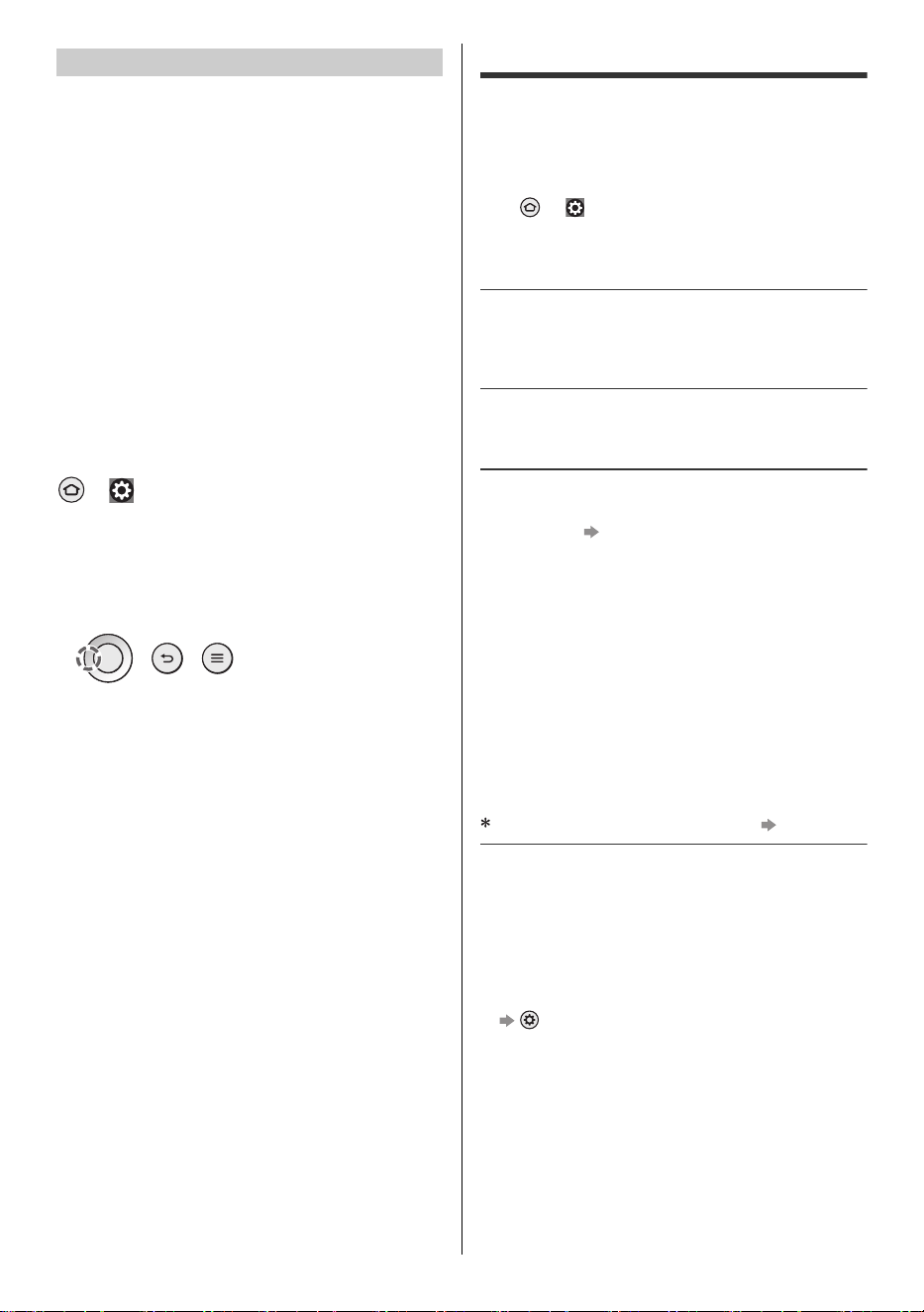
∫ Registering a remote control
Select [Add New Remote] with the following
procedure and follow the on-screen guidance:
> [ ] (on the screen) > [Controllers & Bluetooth
Devices] > [Voice Remotes with Alexa] > [Add New Remote]
If you have problems in pairing the Bluetooth remote
control, you need to reset it and try again.
1 Press and hold the buttons shown below
simultaneously for about 12 seconds.
2 Release the buttons and wait 5 seconds.
3 Remove the batteries and insert them back.
<Note>
≥ If the remote control is registered (paired) with the TV,
they communicate via Bluetooth
®
. You will not need to
face the remote control at the TV’s remote control
signal receiver when Bluetooth
®
communication is
used.
FAQs
Before requesting service or assistance, please follow
these simple guides to solve the problem.
≥ For details, refer to [Panasonic eHELP] (Support /
FAQ > FAQs).
≥ Try restarting the TV.
• > [ ] (on the screen) > [Device & Software] >
[Restart]
• Press and hold the Power button on the TV for
15 seconds or more.
It takes several seconds to display the image after
turning the TV on
≥ When turning the TV on, the panel adjustment is
performed. It is not a malfunction.
The TV does not switch on
≥ Check the power cord is plugged into the TV and the
wall outlet.
The remote control does not work or is intermittent
≥ Has the remote control been paired with the TV via
Bluetooth
®
? (p. 15)
≥ Are the batteries installed correctly?
≥ The batteries may be running low. Replace them with
new ones.
≥ Operation of the remote control is not possible due to
system startup when the LED is blinking orange. You
can use the remote control after the LED turns
constant red.
≥ Point the remote control directly at the TV’s remote
control signal receiver (within about 7 m and a
30 degree angle of the signal receiver).*
≥ Situate the TV away from sunshine or other sources of
bright light so they do not shine on the TV’s remote
control signal receiver.*
When infrared communication is used (p. 13)
No image is displayed
≥ Check the TV is turned on.
≥ Check the power cord is plugged into the TV and the
wall outlet.
≥ Check the correct input mode is selected.
≥ Is [Luminance Level] or [Contrast] set to the
minimum?
> [Picture] > [Brightness]
≥ Check all required cables and connections are firmly
in place.
Pairing the remote control
TV-55_65_77Z95BP_X41G77MV03716A_eng_lsp.book 15 ページ 2025年3月18日 火曜日 午後7時19分
16
English
An unusual image is displayed
≥ This TV has a built-in Self Test. Makes a diagnosis of
picture or sound problems.
> [ ] (on the screen) > [Device & Software]
> [TV Self Test]
≥ Turn off the TV by unplugging the power cord, then
turn on by inserting the power cord into the wall outlet.
≥ If the problem persists, initialize all settings.
> [ ] (on the screen) > [Device & Software]
> [Reset to Factory Defaults]
The image or sound from external equipment are
unusual when the equipment is connected via HDMI
≥ Set [HDMI Auto Setting] to [Mode1]. (p. 11)
No sound is produced from the connected HDMI
equipment
≥ Set the audio output format of the connected HDMI
equipment to PCM.
Voice control function does not work
≥ Has the remote control been paired with the TV via
Bluetooth
®
? (p. 15)
≥ Check the network connections and settings.
≥ Is the microphone switch on the TV set to off?
(p. 13)
Parts of the TV become hot
≥ Parts of the TV may become hot. These temperature
rises do not pose any problems in terms of
performance or quality.
When pushed with a finger, the display panel moves
slightly and makes a noise
≥ There is a little gap around the panel to prevent
damage to the panel. This is not a malfunction.
Why is the screen blank and the power LED
blinking?
≥ The TV has gone into shutdown mode to protect itself.
Try unplugging it for a few minutes and connecting it
again. If there was a temporary power surge on the
AC line it may now be OK. If the blinking returns, visit
https://help.na.panasonic.com/
About the inquiry
≥ Please contact your local Panasonic dealer for
assistance.
If you make an inquiry from a place where this TV is
not present, we cannot answer about contents that
require visual confirmation for connection,
phenomenon, etc. of this TV itself.
LED turns to orange
≥ Panel maintenance may be in progress.
LED turns to orange again in standby mode when the
TV is turned on / off before the panel maintenance is
completed.
≥ During panel maintenance, avoid touching and
exerting any pressure on the screen. (e.g. wiping the
screen, etc.)
≥ For more information
“Panel maintenance” (p. 13)
Maintenance
First, remove the power cord from the wall
outlet.
Regular care:
Gently wipe the surface of the display panel, cabinet, or
pedestal by using a soft cloth to remove dirt or
fingerprints.
For stubborn dirt:
(1) First clean the dust from the surface.
(2) Dampen a soft cloth with clean water or diluted
neutral detergent (1 part detergent to 100 parts
water).
(3) Wring out the cloth firmly. (Please note, do not let
liquid enter the TV inside as it may lead to product
failure.)
(4) Carefully wipe moisten and wipe away the stubborn
dirt.
(5) Finally, wipe away all the moisture.
<Caution>
≥ Do not use a hard cloth or rub the surface too hard,
otherwise this may cause scratches on the surface.
≥ Take care not to subject the surfaces to insect
repellent, solvent, thinner or other volatile substances.
This may degrade surface quality or cause peeling of
the paint.
≥ The surface of the display panel is specially treated
and may be easily damaged. Take care not to tap or
scratch the surface with your fingernail or other hard
objects.
≥ Do not allow the cabinet and pedestal to make contact
with a rubber or PVC substance for a long time. This
may degrade surface quality.
Wipe the power cord with a dry cloth at regular intervals.
Moisture and dust may cause fire or electrical shock.
Display panel, Cabinet, Pedestal
Power cord
TV-55_65_77Z95BP_X41G77MV03716A_eng_lsp.book 16 ページ 2025年3月18日 火曜日 午後7時19分
17
English
Specifications
∫ TV
Model No.
: TV-55Z95BP
: TV-65Z95BP
: TV-77Z95BP
Display Panel
Panel System
OLED panel
Refresh Rate
144 Hz
Screen size
55″ class (54.6 inches measured diagonally)
65″ class (64.5 inches measured diagonally)
77″ class (76.6 inches measured diagonally)
W × H × Diagonal
1,210 mm × 680 mm × 1,388 mm (47.6″ × 26.7″ × 54.6″)
1,428 mm × 804 mm × 1,639 mm (56.2″ × 31.6″ × 64.5″)
1,697 mm × 955 mm × 1,947 mm (66.8″ × 37.5″ × 76.6″)
Number of pixels
3,840 × 2,160
Sound
Speaker output
160 W (70 W + 15 W × 2 + 15 W × 2 + 30 W × 1)
170 W (80 W + 15 W × 2 + 15 W × 2 + 30 W × 1)
180 W (90 W + 15 W × 2 + 15 W × 2 + 30 W × 1)
Headphones / Subwoofer
3.5 mm stereo mini jack × 1
Channel Capability (Digital)
VHF / UHF: 2 - 69, CATV: 1 - 135
DTV Tuner
ATSC / ATSC 3.0 (NEXTGEN TV)
Operating conditions
Temperature
0 °C - 35 °C (32 °F - 95 °F)
Humidity
20 % - 80 % RH (non-condensing)
Connection terminals
HDMI 1 / 2 / 3 / 4 input
TYPE A Connectors
HDMI 1:
4K144Hz, VRR (Variable Refresh Rate), NVIDIA
®
G-
SYNC
®
Compatible, AMD FreeSync™ Premium,
Content Type, Deep Color, x.v.Color™
HDMI 2:
4K144Hz, VRR (Variable Refresh Rate), NVIDIA
®
G-
SYNC
®
Compatible, AMD FreeSync™ Premium,
Content Type, eARC (Enhanced Audio Return Channel)
/ ARC (Audio Return Channel), Deep Color, x.v.Color™
HDMI 3 / 4:
4K, Content Type, Deep Color, x.v.Color
™
≥ This TV supports “HDAVI Control 5” function.
ETHERNET
10BASE-T / 100BASE-TX
≥ Use Shielded Twist Pair (STP) LAN cable.
USB 1 / 2 / 3
USB 1 / 3: DC 5 V, Max. 500 mA [Hi-Speed USB
(USB 2.0)]
USB 2: DC 5 V, Max. 900 mA [SuperSpeed USB
(USB 3.0)]
DIGITAL AUDIO OUT
PCM / Dolby Audio, Fibre optic
IR blaster
3.5 mm mini jack × 1
Built-in wireless LAN
Standard compliance and Frequency band
IEEE802.11ax: 6 GHz band
IEEE802.11a/n/ac/ax: 5 GHz band
IEEE802.11b/g/n/ax: 2.4 GHz band
Security
WPA3-SAE (AES)
WPA2-PSK (TKIP/AES)
WPA-PSK (TKIP/AES)
WEP (64 bit/128 bit)
Bluetooth
®
wireless technology*
Standard Compliance and Frequency band
Bluetooth
®
5.3: 2.4 GHz band
Not all the Bluetooth
®
compatible devices are available with
this TV. Up to 5 devices can be used simultaneously.
<Note>
≥ Design and Specifications are subject to change without notice.
Mass and Dimensions shown are approximate.
≥ For the information about the power source and power
consumption, refer to the nameplate on the rear enclosure.
≥ For information about the open source software, refer to
[Panasonic eHELP] (Search by Purpose > Read first > Before
use > Licence).
55-inch model
65-inch model
77-inch model
55-inch model
65-inch model
77-inch model
55-inch model
65-inch model
77-inch model
55-inch model
65-inch model
77-inch model
TV-55_65_77Z95BP_X41G77MV03716A_eng_lsp.book 17 ページ 2025年3月18日 火曜日 午後7時19分
18
English
Limited Warran ty
Limited Warranty
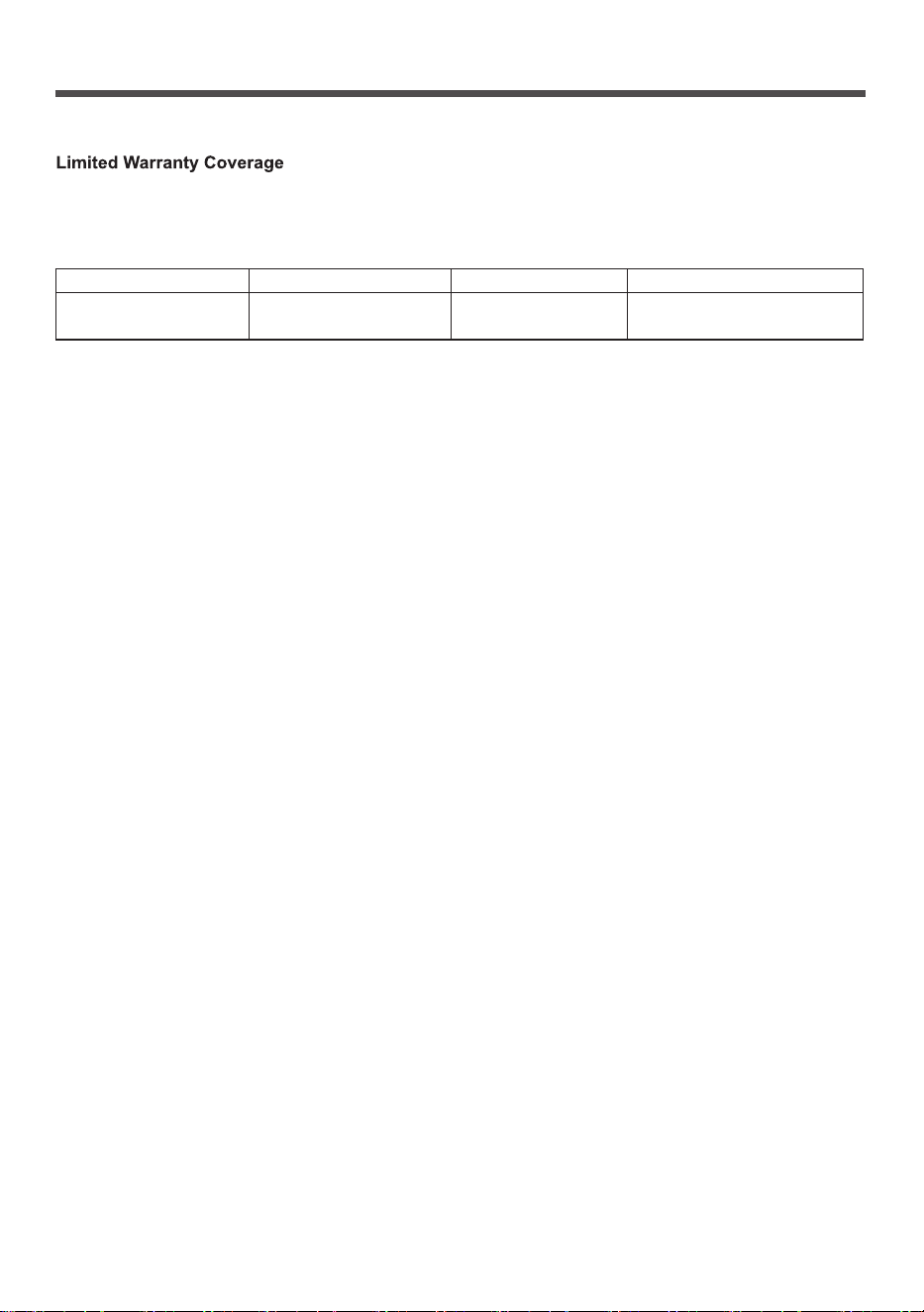
TV CATEGORIES PARTS LABOR SERVICE
1 (ONE) YEAR 1 (ONE) YEAR
If your product does not work properly because of a defect in materials or workmanship, Panasonic Consumer Electronics Company,
Division of Panasonic Corporation of North America (referred to as “the warrantor”) will, for the length of the period indicated on the chart
below, which starts with the date of original purchase (“Limited Warranty period”), at its option either (a) repair your product with new or
refurbished parts, (b) replace it with a
new or a refurbished
equivalent value product, or (c) refund your purchase price. The decision to
Panasonic Television Limited Warranty
During the “Labor” Limited Warranty period there will be no charge for labor. During the “Parts” Limited Warranty period, there will be no
charge for parts.
You must visit https://help.na.panasonic.com/ to arrange for service during the Limited Warranty period. If non-rechargeable batteries are
included, they are not warranted. This Limited Warranty only applies to products purchased and serviced in the United States. This Limited
Warranty is extended only to the original purchaser of a new product which was not sold “as is”. A purchase receipt or other proof of
the original purchase date is required for Limited Warranty service.
To Obtain Service
To submit a repair request and for quick repair status visit our Web Site at https://help.na.panasonic.com/.
Service or replacement, where applicable, requires clear, complete and easy access to the product by the authorized servicer and does not
include removal or re-installation of an installed product. It is possible that certain on-site repairs will not be completed on-site, but will require
that the product or parts of the product, at the servicer’s discretion be removed for shop diagnosis and/or repair and then returned.
When shipping the unit, carefully pack, include all accessories, and send it prepaid, adequately insured and preferably in the
original carton. When shipping Lithium Ion batteries please visit our Web Site at https://help.na.panasonic.com/ as Panasonic is
committed to providing the most up to date information. Include a letter detailing the complaint, a return address and provide a daytime
phone number where you can be reached. A valid registered receipt is required under the Limited Warranty.
Limited Warranty Limits and Exclusions
This Limited Warranty ONLY COVERS failures due to defects in materials or workmanship, and DOES NOT COVER normal wear and tear
or cosmetic damage, nor does it cover markings or retained images on the glass panel resulting from viewing fixed images (including,
among other things, non-expanded standard 4:3 pictures on wide screen TVs, or on-screen data in a stationary and fixed location such as
network logos, video games and banners). The Limited Warranty ALSO DOES NOT COVER damages which occurred in shipment, or
failures which are caused by products not supplied by the warrantor, or failures which result from accidents, misuse, abuse, n
eglect, bug
infestation, mishandling, misapplication, alteration, faulty installation, set-up adjustments, maladjustment of consumer controls, improper
maintenance, power line surge, lightning damage, modification, or rental use of the product, service by anyone other than a Factory
Service Center or other Authorized Servicer, or damage that is attributable to acts of God.
THERE ARE NO EXPRESS WARRANTIES EXCEPT AS LISTED UNDER “LIMITED WARRANTY
COVERAGE”. THE WARRANTOR IS NOT LIABLE FOR INCIDENTAL OR CONSEQUENTIAL
DAMAGES RESULTING FROM THE USE OF THIS PRODUCT, OR ARISING OUT
OF ANY BREACH
OF THIS LIMITED WARRANTY. (As examples, this excludes damages for lost time, cost of having
someone remove or re-install an installed unit if applicable, or travel to and from the servicer. The items
listed are not exclusive, but are for illustration only.) ALL EXPRESS WARRANTIES ARE LIMITED
TO THE PERIOD OF THE LIMITED WARRANTY. ALL EXPRESS WARRANTIES S
PECIFIED ABOVE
ARE IN LIEU OF AND THE WARRANTOR HEREBY DISCLAIMS ALL OTHER WARRANTIES,
EXPRESS, IMPLIED OR STATUTORY, INCLUDING BUT NOT LIMITED TO, THE IMPLIED
WARRANTIES OF MERCHANTABILITY AND FITNESS FOR A PARTICULAR PURPOSE.
Some states do not allow the exclusion or limitation of incidental or consequential damages, or limitations on how long an implied Limited
Warranty lasts, so the exclusions may not apply to you.
This Limited Warranty gives you specific legal rights and you may also have others rights which vary from state to state. If a problem with
this product develops during or after the Limited Warranty period, you may contact your dealer or Service Center. If the problem is not
handled to your satisfaction, then write to:
Panasonic Corporation of North America
Consumer Affairs Department
Two Riverfront Plaza
Newark, NJ 07102-5490
Product registration is not mandatory. Failure to complete the form does not affect the consumer's warranty rights.
PARTS AND SERVICE (INCLUDING COST OF AN ON-SITE SERVICE CALL, WHERE APPLICABLE)
WHICH ARE NOT COVERED BY THIS LIMITED WARRANTY ARE YOUR RESPONSIBILITY.
repair, replace, or refund will be made by the warrantor.
All screen sizes
Please visit:
https://help.na.panasonic.com/
TV-55_65_77Z95BP_X41G77MV03716A_eng_lsp.book 18 ページ 2025年3月18日 火曜日 午後7時19分

TV-55_65_77Z95BP_X41G77MV03716A_eng_lsp.book 19 ページ 2025年3月18日 火曜日 午後7時19分
© Panasonic Entertainment & Communication Co., Ltd. 2025
English
Printed in China
Two Riverfront Plaza
Newark, NJ 07102-5490
Panasonic Consumer Electronics Company,
Division of Panasonic Corporation of North America
Customer’s Record
The model number and serial number are located on the bottom of the unit or the model name plate on the rear of
the unit. You should note this serial number in the space provided below and retain this book, plus your purchase
receipt, as a permanent record of your purchase to aid in identification in the event of theft or loss, and for Warranty
Service purposes.
Model Number Serial Number
To dispose of your product, please recycle in accordance with local environmental regulations. For further recycling
please visit
https://shop.panasonic.com/pages/recycling-program
TV-55_65_77Z95BP_X41G77MV03716A_eng_lsp.book 20 ページ 2025年3月18日 火曜日 午後7時19分
Instrucciones de funcionamiento
OLED TV
N.º de modelo
TV-55Z95BP
TV-65Z95BP
TV-77Z95BP
(imagen: TV-65Z95BP)
55”/65”/77” Clase 4K Ultra HD TV*
(54,6/64,5/76,6 pulgadas medida diagonalmente)
Resolución real: 3.840 × 2.160 p
Consulte lo siguiente para obtener descripciones más detalladas:
≥ Para ver las configuraciones de las transmisiones y para configurar las guías de programación, la calidad de
la imagen, la calidad del sonido, etc.:
> [ ] (en la pantalla) > [Dispositivo y software] > [Panasonic eAYUDA]
≥ Para elementos relacionados con Amazon, Fire TV y Alexa:
> [ ] (en la pantalla) > [Ayuda] (Se requiere conexión a Internet)
Tenga en cuenta que lo anterior puede cambiar sin previo aviso. (a partir de enero, 2025)
Para obtener ayuda (en EE. UU.), visite:
https://help.na.panasonic.com/
Gracias por adquirir este producto Panasonic.
Lea atentamente estas instrucciones antes de utilizar este producto y consérvelas para futuras
consultas.
Por favor lea atentamente las “Precauciones de seguridad” de este manual antes de usarlo.
Las imágenes que se muestran en este manual son sólo para fines ilustrativos.
Español
Español
TV-55_65_77Z95BP_X41G77MV03716A_eng_lsp.book 1 ページ 2025年3月18日 火曜日 午後7時19分

2
Español
Contenidos
Asegúrese de leer
Aviso importante ················································· 3
Precauciones de seguridad ··································· 4
Instalación del soporte para colgar en la pared ·········10
Conexiones ·······················································10
Configuración inicial ············································11
Identificación de controles ····································12
Preguntas frecuentes ··········································15
Mantenimiento ···················································16
Especificaciones ················································17
≥ Consulte la hoja separada para obtener información
sobre cómo instalar el televisor.
≥ Las ilustraciones que se muestran pueden variar entre
los modelos y los países.
≥ Este televisor es un producto de Panasonic, que no
está afiliado a Amazon.com, Inc. ni a ninguna filial de
Amazon.
≥ Es posible que deba iniciar sesión en una cuenta de
Amazon para acceder a ciertos servicios en línea.
≥ Ciertos servicios están sujetos a cambios o
cancelaciones en cualquier momento, pueden no
estar disponibles en todos los países, áreas e
idiomas, o en 4K, HDR, UHD, HLG, DOLBY VISION o
DOLBY ATMOS y pueden requerir suscripciones por
separado.
≥ Debido a que el sistema operativo de Fire TV se
actualiza periódicamente, las imágenes, las
instrucciones de navegación, los títulos y la ubicación
de las opciones de menú que se muestran en este
manual pueden ser diferentes de lo que ve en la
pantalla.
≥ Este documento se ha elaborado con base en
información actualizada a enero de 2025.
Los términos HDMI, HDMI High-Definition Multimedia
Interface, la Imagen comercial de HDMI (Trade dress) y
los logotipos de HDMI son marcas comerciales o marcas
registradas de HDMI Licensing Administrator, Inc.
Dolby, Dolby Vision, Dolby Vision IQ, Dolby Atmos,
Dolby Audio y el símbolo de la doble D son marcas
comerciales de Dolby Laboratories Licensing
Corporation.
Fabricado bajo licencia de Dolby Laboratories.
Trabajos confidenciales no publicados. Copyright ©
1992-2024 Dolby Laboratories. Todos los derechos
reservados.
Wi-Fi
®
es una marca registrada de Wi-Fi Alliance
®
.
WPA3™, WPA2™, WPA™ son marcas registradas de
Wi-Fi Alliance
®
.
La marca denominativa y los logotipos de Bluetooth
®
son
marcas comerciales registradas propiedad de Bluetooth
SIG, Inc. y cualquier uso de dichas marcas se realiza
Panasonic Holdings Corporation bajo licencia. Otras
marcas comerciales y nombres comerciales pertenecen
a sus respectivos propietarios.
Amazon, Alexa, Fire y todas las marcas relacionadas
son marcas comerciales de Amazon.com, Inc. o sus
filiales.
© Disney
Este producto cumple con la especificación técnica de
UHD Alliance: Modo de referencia especificado por
UHDA, versión 1.0. El logotipo de FILMMAKER MODE™
es una marca comercial de UHD Alliance, Inc. en los
Estados Unidos y otros países.
© 2023 Advanced Micro Devices, Inc. Todos los
derechos reservados. AMD, el logotipo de flecha de
AMD, FreeSync y sus combinaciones son marcas
comerciales de Advanced Micro Devices, Inc.
© 2025 NVIDIA Corporation. Todos los derechos
reservados. NVIDIA, el logotipo de NVIDIA y G-SYNC
son marcas comerciales y/o marcas comerciales
registradas de NVIDIA Corporation en los EE. UU. y
otros países.
TV-55_65_77Z95BP_X41G77MV03716A_eng_lsp.book 2 ページ 2025年3月18日 火曜日 午後7時19分
3
Español
Aviso importante
Entorno de instalación
Este televisor tiene la función “Space Tune” que puede
ajustar la calidad del sonido automáticamente según la
posición del televisor y del espectador. Al usar la
configuración de los altavoces de matriz lineal, también
es posible ajustar la posición que alcanza el sonido para
que coincida con la posición y las circunstancias de
visualización. Puede disfrutar de un espacio acústico
tridimensional utilizando los parlantes orientados hacia
arriba, que reflejan el sonido del techo, los parlantes de
matriz lineal y los parlantes izquierdo y derecho. El
ajuste de la función “Space Tune” comienza
automáticamente cuando el televisor se enciende por
primera vez después de instalarlo y conectarlo con el
equipo externo. Siga las instrucciones en pantalla para
realizar la configuración.
≥ Si se selecciona el ajuste automático, se emiten
sonidos fuertes mientras se ajusta Space Tune.
<Example>
A: Altavoces orientados hacia arriba
B: Altavoces de matriz lineal
No muestre ninguna parte fija de la imagen
durante un periodo prolongado.
En tales casos, la parte fija de la imagen permanece
borrosa en la pantalla (“retención de imagen”). Esto no se
considera una avería y no está cubierto por la garantía.
≥ Partes típicas de una imagen fija:
• Imágenes fijas que se muestran de forma continua
en la misma área (por ejemplo, número de canal,
logotipo del canal, otros logotipos o imagen del
título, etc.)
• Imágenes fijas o en movimiento vistas en una
relación de aspecto de 4:3 o 16:9, etc.
• Videojuegos
≥ Ajuste [Control de luminancia del logotipo] a [Máx.]
para evitar la retención de imagen.
[Panasonic eAYUDA] (Búsqueda por finalidad > Ver la
televisión > Para conseguir las mejores imágenes >
Ajustes de Pantalla)
≥ Para evitar la retención de imágenes, la pantalla
puede oscurecerse cuando se muestra la imagen fija.
Esto no es un mal funcionamiento. El brillo de la
pantalla vuelve al nivel anterior cuando se visualiza la
imagen activa.
≥ Asegúrese de apagar el televisor con el control
remoto o el botón de encendido para realizar el
mantenimiento del panel. Durante el mantenimiento
del panel, el LED se vuelve naranja. (pág. 13) El
mantenimiento funciona según sea necesario.
≥ Ajuste la relación de aspecto [4:3 Completo] para una
imagen de 4:3. Para obtener más detalles, consulte
[Panasonic eAYUDA] (Búsqueda por finalidad > Ver la
televisión > Para conseguir las mejores imágenes >
Aspecto).
≥ Para obtener más información
“Mantenimiento del panel” (pág. 13)
Las aplicaciones de Internet y la función de control por
voz son proporcionadas por sus respectivos
proveedores de servicios y pueden cambiarse,
interrumpirse o descontinuarse en cualquier momento.
Panasonic no asume ninguna responsabilidad y no
ofrece ninguna garantía por la disponibilidad o la
continuidad de los servicios.
Este equipo está diseñado para funcionar en América
del Norte y otros países donde el sistema de transmisión
y la corriente alterna de la casa sean exactamente los
mismos que en América del Norte.
Panasonic no garantiza el funcionamiento y el
rendimiento de los dispositivos periféricos fabricados por
otros fabricantes y rechazamos cualquier
responsabilidad o daño que surja del funcionamiento y/o
el rendimiento del uso de dispositivos periféricos de
otros fabricantes.
Daños y perjuicios
≥ Excepto en los casos en los que las regulaciones
locales reconocen la responsabilidad, Panasonic no
acepta responsabilidad por el mal funcionamiento
causado por el mal uso o uso del producto, ni por
otros problemas o daños causados por el uso de este
producto.
≥ Panasonic no acepta ninguna responsabilidad por la
pérdida, etc., de datos provocada por desastres.
≥ Los dispositivos externos preparados individualmente
por el cliente no están cubiertos por la garantía. El
cuidado de los datos almacenados en dichos
dispositivos es responsabilidad del cliente. Panasonic
no acepta ninguna responsabilidad por el uso
indebido de estos datos.
Manejo de la información del cliente.
La información personal del cliente puede ser registrada
en este televisor por una organización de transmisión o
un proveedor de aplicaciones. Antes de reparar,
transferir o desechar este televisor, borre toda la
información grabada en él de acuerdo con el siguiente
procedimiento.
[Restablecer valores de fábrica] (pág. 16)
El proveedor puede recopilar la información del cliente
mediante una aplicación proporcionada por terceros en
este televisor o sitio web. Confirme los términos y
condiciones, etc. del proveedor con anticipación.
• Panasonic no será responsable de recopilar o usar
información del cliente mediante la aplicación
proporcionada por terceros en este televisor o sitio web.
A
B
TV-55_65_77Z95BP_X41G77MV03716A_eng_lsp.book 3 ページ 2025年3月18日 火曜日 午後7時19分
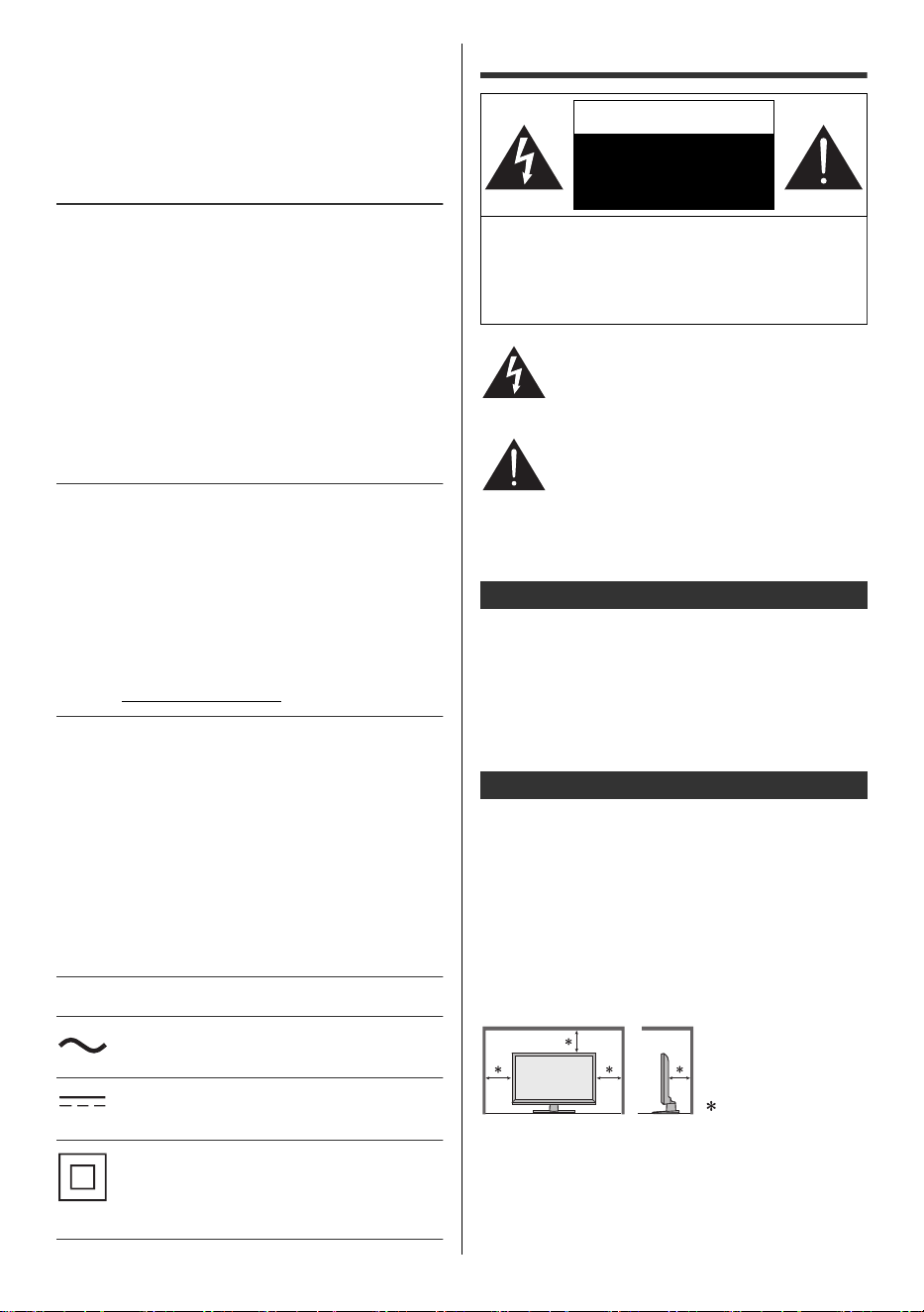
4
Español
• Al introducir el número de su tarjeta de crédito,
nombre, etc., preste especial atención a la
confiabilidad del proveedor.
• La información registrada puede registrarse en el
servidor, etc. del proveedor. Antes de reparar,
transferir o desechar este televisor, asegúrese de
borrar la información según los términos y
condiciones, etc. del proveedor.
La grabación y reproducción de contenido en este o
cualquier otro dispositivo puede requerir permiso del
propietario de los derechos de autor u otros derechos
similares sobre ese contenido. Panasonic no tiene
autoridad para otorgarle ese permiso y renuncia
explícitamente a todo derecho, capacidad o intención de
obtener dicho permiso en su nombre. Es su
responsabilidad garantizar que el uso de este o cualquier
otro dispositivo cumpla con la legislación de derechos de
autor aplicable en su país. Consulte esa legislación para
obtener más información sobre las leyes y regulaciones
relevantes involucradas o comuníquese con el
propietario de los derechos del contenido que desea
grabar o reproducir.
Este producto tiene la licencia de cartera de patentes
AVC para el uso personal de un consumidor u otros usos
en los que no recibe remuneración para (i) codificar
video de conformidad con el estándar AVC (“Video
AVC”) y/o (ii ) decodificar video AVC que fue codificado
por un consumidor involucrado en una actividad
personal y/o fue obtenido de un proveedor de video con
licencia para proporcionar video AVC. No se concede ni
se implicará ninguna licencia para ningún otro uso.
Puede obtenerse más información de MPEG LA, L.L.C.
Consulte http://www.mpegla.com
Panasonic y sus afiliados no hacen ninguna afirmación
ni ofrecen garantías de ningún tipo con respecto a los
dispositivos USB y el rendimiento de la comunicación
entre los dispositivos USB y el puerto USB de los
productos Panasonic, y renuncian expresamente a todas
y cada una de las garantías, ya sean expresas o
implícitas o de otro tipo, incluyendo, entre otras,
cualquier garantía implícita de idoneidad para un
propósito particular, cualquier pérdida de datos y
cualquier garantía implícita que surja del curso del trato
o del curso de desempeño de la comunicación de datos
entre los dispositivos USB y el puerto USB de los
productos Panasonic.
Transporte únicamente en posición vertical.
Esta marca indica que el producto funciona
con voltaje de CA.
Esta marca indica que el producto funciona
con voltaje de CC.
Esta marca indica que se trata de un aparato
eléctrico de clase II o de doble aislamiento en
el que el producto no requiere una conexión de
seguridad a tierra eléctrica (a tierra).
Precauciones de seguridad
Este recordatorio se proporciona para dirigir la atención
del instalador del sistema CATV al Artículo 820-40 del
NEC que proporciona pautas para una conexión a tierra
adecuada y, en particular, especifica que el cable a tierra
debe conectarse al sistema de conexión a tierra del
edificio, lo más cerca posible del punto de entrada de
cables lo más práctico posible.
Se proporcionan ranuras y aberturas en el gabinete y en
la parte posterior o inferior para ventilación, para
garantizar un funcionamiento confiable del televisor y
protegerlo contra el sobrecalentamiento. Estas aberturas
no deben bloquearse ni cubrirse. Debe haber al menos
10 cm (4 pulgadas) de espacio alrededor del televisor.
Nunca se deben bloquear las aberturas colocando el
televisor sobre una cama, sofá, alfombra u otra
superficie similar. Este televisor no debe colocarse en
una instalación empotrada, como una estantería, a
menos que exista una ventilación adecuada.
PRECAUCIÓN
RIESGO DE DESCARGA
ELÉCTRICA
NO LO ABRA
ADVERTENCIA: Para reducir el riesgo de
descarga eléctrica, no retire la cubierta ni el
respaldo. En el interior no hay piezas que el
usuario pueda reparar. Solicite servicio técnico a
personal de servicio calificado.
El rayo con punta de flecha dentro de un
triángulo tiene como objetivo indicar al
usuario que las piezas dentro del producto
representan un riesgo de descarga eléctrica
para las personas.
El signo de exclamación dentro de un
triángulo tiene como objetivo indicar al
usuario que en los documentos que
acompañan al aparato se encuentran
instrucciones importantes de funcionamiento
y servicio.
Nota para el instalador del sistema CATV
Ventilación segura
10 cm (4″)
TV-55_65_77Z95BP_X41G77MV03716A_eng_lsp.book 4 ページ 2025年3月18日 火曜日 午後7時19分
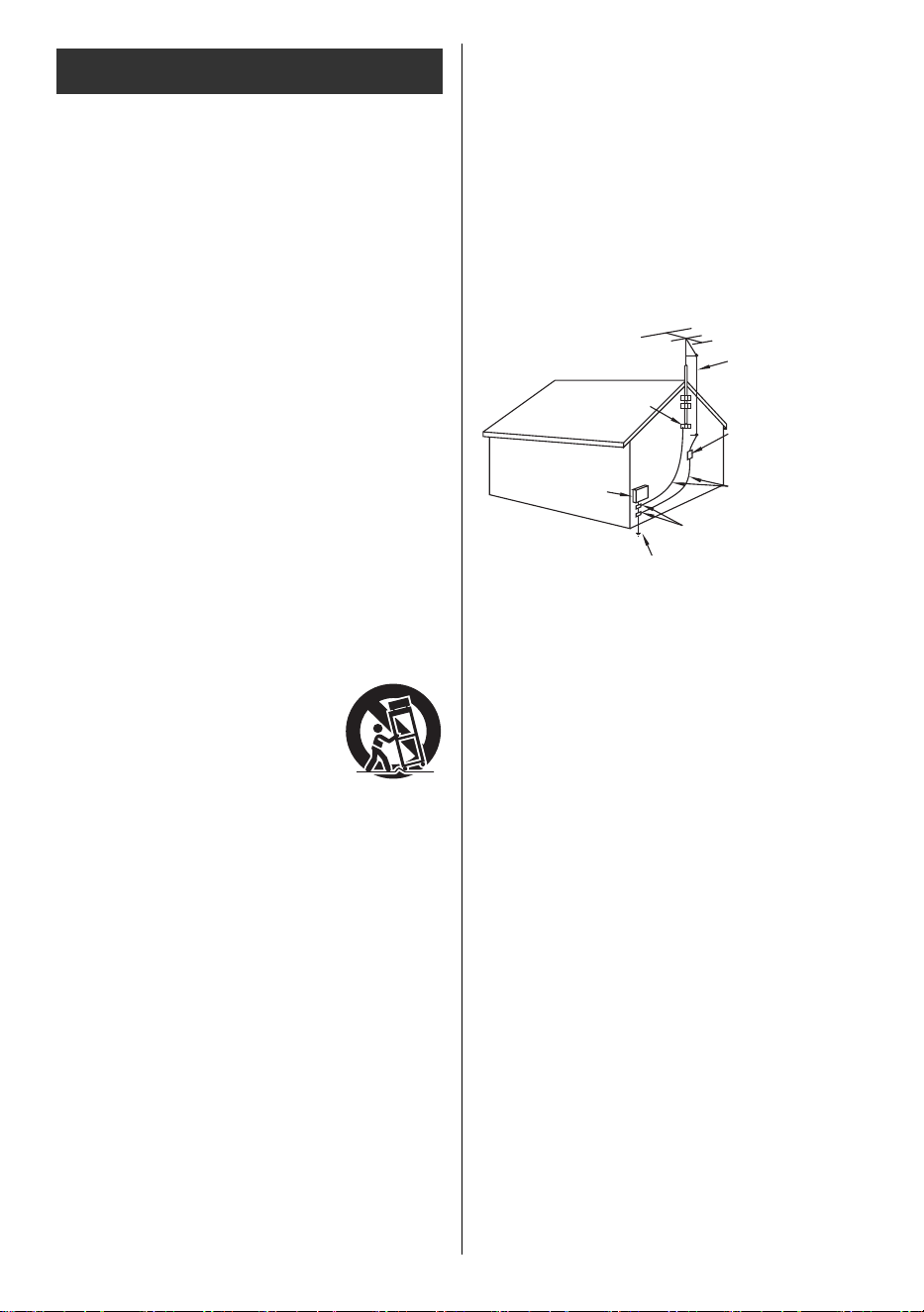
5
Español
1) Lea estas instrucciones.
2) Conserve estas instrucciones.
3) Preste atención a todas las advertencias.
4) Siga todas las instrucciones.
5) No utilice este aparato cerca del agua.
6) Límpielo únicamente con un paño seco.
7) No bloquee ninguna abertura de ventilación. Instálelo
de acuerdo con las instrucciones del fabricante.
8) No lo instale cerca de fuentes de calor como
radiadores, rejillas de calefacción, estufas u otros
aparatos (incluidos amplificadores) que produzcan
calor.
9) No anule el propósito de seguridad del enchufe
polarizado o del tipo con conexión a tierra. Un
enchufe polarizado tiene dos patillas, una más ancha
que la otra. Un enchufe con conexión a tierra tiene
dos clavijas y una tercera clavija de conexión a tierra.
Para su seguridad se proporcionan la clavija de hoja
ancha o la de tercera punta. Si el enchufe
proporcionado no encaja en su toma de corriente,
consulte a un electricista para que reemplace la toma
de corriente obsoleta.
10) Proteja el cable de alimentación para que no lo pisen
ni lo pellizquen, especialmente en los enchufes, los
receptáculos de conveniencia y el punto donde salen
del aparato.
11) Utilice únicamente los accesorios especificados por
el fabricante.
13) Desconecte este aparato durante tormentas
eléctricas o cuando no lo utilice durante períodos
prolongados.
14)Solicite todo el servicio a personal de servicio
calificado. Se requiere reparación cuando el aparato
ha sufrido algún daño, como por ejemplo, si el cable
de alimentación o el enchufe están dañados, se ha
derramado líquido o han caído objetos dentro del
aparato, el aparato ha estado expuesto a la lluvia o la
humedad, o no funciona normalmente, o se ha caído.
15) Opere únicamente con el tipo de fuente de energía
indicado en la etiqueta de marcado. Si no está
seguro del tipo de energía suministrada a su hogar,
consulte a su distribuidor de televisores o a la
compañía eléctrica local.
16) Siga todas las advertencias e instrucciones
marcadas en el televisor.
17)Nunca introduzca objetos de ningún tipo en este
televisor a través de las ranuras del gabinete, ya que
pueden tocar puntos de voltaje peligrosos o provocar
cortocircuitos que podrían provocar un incendio o
una descarga eléctrica. Nunca derrame líquidos de
ningún tipo sobre el televisor.
18) Si se conecta una antena exterior al equipo de
televisión, asegúrese de que el sistema de antena esté
conectado a tierra para brindar cierta protección contra
sobretensiones y cargas estáticas acumuladas. En la
Sección 810-21 del Código Eléctrico Nacional de los
EE. UU., se proporciona información con respecto a la
conexión a tierra adecuada del mástil y la estructura de
soporte, la conexión a tierra del cable de entrada a una
unidad de descarga de antena, el tamaño de los
conductores de conexión a tierra, la ubicación de la
unidad de descarga de antena, la conexión a los
electrodos de conexión a tierra y los requisitos para el
electrodo de conexión a tierra.
EJEMPLO DE PUESTA A TIERRA DE ANTENA SEGÚN
EL CÓDIGO ELÉCTRICO NACIONAL (NEC)
19) Un sistema de antena exterior no debe ubicarse cerca
de líneas eléctricas aéreas, otras luces eléctricas,
circuitos de energía o donde pueda caer sobre dichas
líneas o circuitos de energía. Al instalar un sistema de
antena exterior, se debe tener sumo cuidado para
evitar tocar dichas líneas o circuitos eléctricos, ya que el
contacto con ellos podría resultar fatal.
20) Desconecte este televisor de la toma de corriente de
la pared y solicite la reparación a personal de
servicio calificado en las siguientes condiciones:
21) Cuando se requieren piezas de repuesto, asegúrese
de que el técnico de servicio utilice piezas de
repuesto especificadas por el fabricante que tengan
las mismas características que las piezas originales.
Las sustituciones no autorizadas pueden provocar
incendios, descargas eléctricas u otros peligros.
Instrucciones de seguridad importantes
(del televisor)
12) Utilícelo únicamente con el carrito, la
base, el trípode, el soporte o la mesa
especificados por el fabricante o que
se venden con el aparato. Cuando se
utiliza un carrito, tenga cuidado al
mover la combinación carrito /aparato
para evitar lesiones por vuelco.
a. Cuando el cable de alimentación o el enchufe
están dañados o desgastados.
b. Si se ha derramado líquido en el televisor.
c. Si el televisor ha estado expuesto a la lluvia o al
agua.
d. Si el televisor no funciona normalmente al seguir
las instrucciones de funcionamiento.
Ajuste únicamente los controles que se describen
en las instrucciones de funcionamiento, ya que el
ajuste incorrecto de otros controles puede
provocar daños y, a menudo, requerirá un trabajo
extenso por parte de un técnico calificado para
restablecer el funcionamiento normal del televisor.
e. Si el televisor se ha caído o el gabinete se ha
dañado.
f. Cuando el televisor muestra un cambio notable en
su rendimiento, esto indica que es necesario
realizar un servicio técnico.
CABLE DE ENTRADA
DE ANTENA
ABRAZADERA DE
PUESTA A TIERRA
UNIDAD DE
DESCARGA DE
ANTENA (SECCIÓN
810-20 DEL NEC)
CONDUCTORES DE
PUESTA A TIERRA
(SECCIÓN 810-21
DEL NEC)
ABRAZADERAS DE
PUESTA A TIERRA
SISTEMA DE ELECTRODOS DE PUESTA A TIERRA DEL
SERVICIO ELÉCTRICO (ARTÍCULO 250 DEL NEC, PARTE H)
EQUIPO DE
SERVICIO
ELÉCTRICO
TV-55_65_77Z95BP_X41G77MV03716A_eng_lsp.book 5 ページ 2025年3月18日 火曜日 午後7時19分
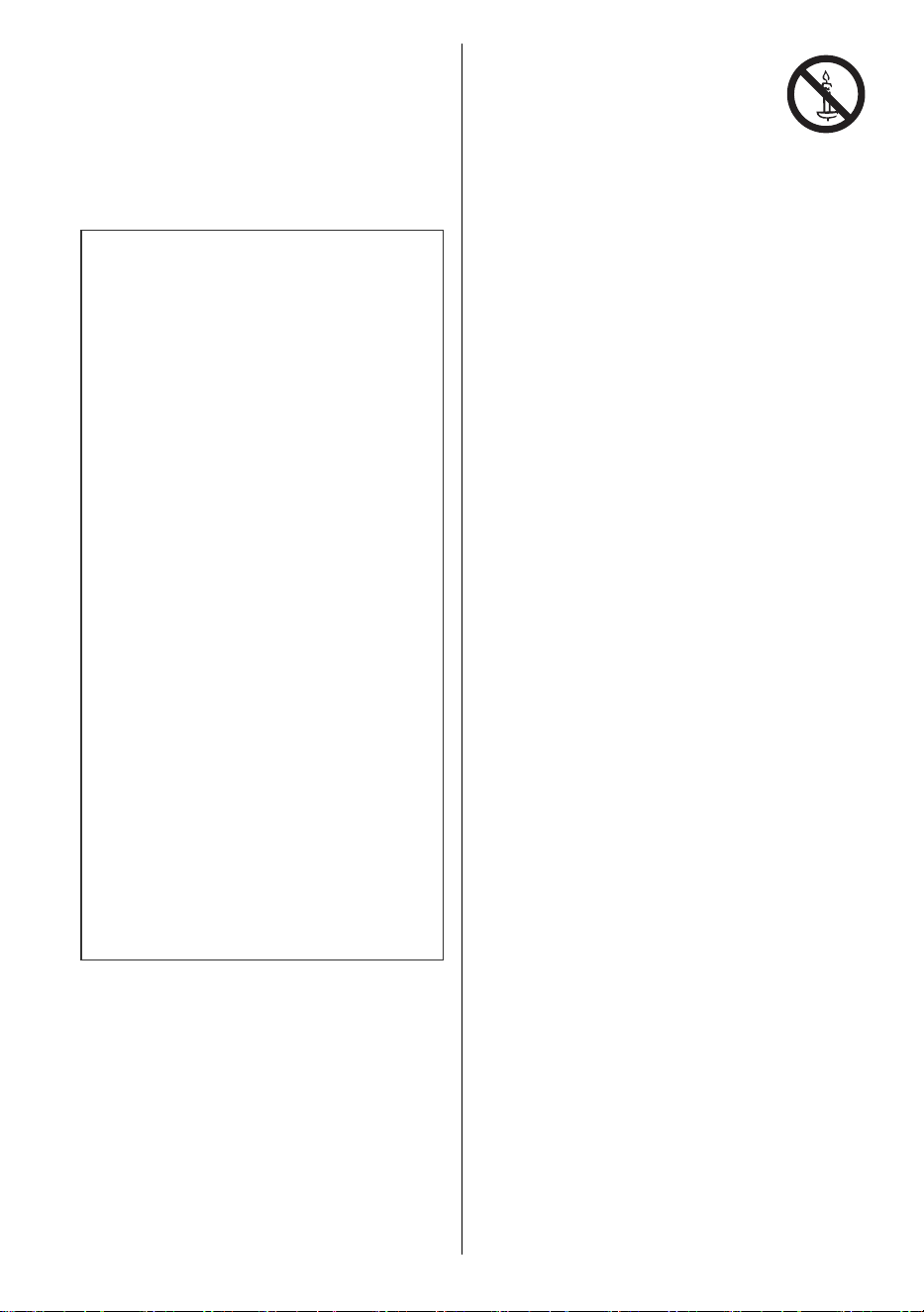
6
Español
22) ADVERTENCIA:
PARA REDUCIR EL RIESGO DE INCENDIO O
DESCARGA ELÉCTRICA, NO EXPONGA ESTE
APARATO A LA LLUVIA, HUMEDAD, GOTEOS
O SALPICADURAS.
NO COLOQUE RECIPIENTES CON LÍQUIDOS
(FLORES, TAZAS, COSMÉTICOS, ETC.)
ENCIMA DEL TELEVISOR (INCLUSO EN
ESTANTES SUPERIORES, ETC.).
23) ADVERTENCIA:
LAS PIEZAS PEQUEÑAS PUEDEN PRESENTAR
PELIGRO DE ASFIXIA SI SE INGIEREN
ACCIDENTALMENTE. MANTENGA LAS PIEZAS
PEQUEÑAS FUERA DEL ALCANCE DE LOS
NIÑOS PEQUEÑOS.
DESECHE LAS PIEZAS PEQUEÑAS Y OTROS
OBJETOS INNECESARIOS, INCLUYENDO
MATERIALES DE EMBALAJE Y BOLSAS/
LÁMINAS DE PLÁSTICO PARA EVITAR QUE
LOS NIÑOS PEQUEÑOS JUEGUEN CON
ELLOS, LO QUE PUEDE CREAR UN RIESGO
POTENCIAL DE ASFIXIA.
25) ADVERTENCIA:
No coloque este televisor en ninguna
institución médica ni en ningún lugar con
dispositivos médicos.
Las ondas de radio de este televisor pueden
interferir con los dispositivos médicos y causar
accidentes debido al mal funcionamiento.
26) ADVERTENCIA:
No utilice este televisor cerca de ningún
dispositivo de control automático, como
puertas automáticas o alarmas de incendio.
Las ondas de radio de este televisor pueden
interferir con los dispositivos de control automático
y provocar accidentes debido a un mal
funcionamiento.
27) ADVERTENCIA:
Las ondas de radio de este televisor pueden
afectar a determinados dispositivos médicos,
incluidos los marcapasos.
Mantenga una distancia mínima de
aproximadamente 50 cm (20 pulgadas) para
minimizar o impedir interferencias.
Consulte al médico antes de su uso.
28) PRECAUCIÓN:
El interruptor de encendido de esta unidad no
cortará por completo la alimentación de la toma de
CA. Dado que el cable de alimentación funciona
como el dispositivo de desconexión principal de la
unidad, deberá desenchufarlo de la toma de CA
para apagarla por completo.
Por lo tanto, asegúrese de que la unidad esté
instalada de manera que el cable de alimentación
se pueda desenchufar fácilmente de la toma de CA
en caso de accidente. Para evitar el riesgo de
incendio, el cable de alimentación también debe
desenchufarse de la toma de CA cuando no se
utilice durante un período prolongado (por ejemplo,
cuando se está de vacaciones).
29) PRECAUCIÓN:
PARA EVITAR DESCARGAS ELÉCTRICAS, NO
UTILICE ESTE ENCHUFE CON UN
RECEPTÁCULO U OTRA TOMA DE CORRIENTE
A MENOS QUE LAS CUCHILLAS PUEDAN
INSERTARSE COMPLETAMENTE PARA EVITAR
LA EXPOSICIÓN DE LAS CUCHILLAS.
30) PRECAUCIÓN:
EL USO CON OTRO SOPORTE PUEDE
PROVOCAR INESTABILIDAD Y POSIBLEMENTE
CAUSAR LESIONES.
31) PRECAUCIÓN:
PELIGRO DE EXPLOSIÓN SI LA BATERÍA SE
SUSTITUYE INCORRECTAMENTE.
SUSTITÚYALA ÚNICAMENTE POR UNA DEL
MISMO TIPO O EQUIVALENTE.
Advertencia
Un televisor puede caerse y causar lesiones
personales graves o la muerte. Muchas lesiones,
especialmente a los niños, pueden evitarse
tomando precauciones sencillas como:
• SIEMPRE utilice gabinetes, soportes o
métodos de montaje recomendados por el
fabricante del televisor.
• SIEMPRE utilice muebles que puedan sostener
de forma segura el televisor.
• SIEMPRE asegúrese de que el televisor no
sobresalga del borde del mueble que lo
sostiene.
• SIEMPRE enseñe a los niños sobre los peligros
de treparse a los muebles para alcanzar el
televisor o sus controles.
• SIEMPRE coloque los cables conectados al
televisor de forma que nadie pueda tropezarse
con ellos, tirar de ellos o agarrarlos.
• NUNCA coloque un televisor en una ubicación
inestable.
• NUNCA coloque el televisor sobre muebles
altos (por ejemplo, armarios o estanterías) sin
anclar tanto el mueble como el televisor a un
soporte adecuado.
• NUNCA coloque el televisor sobre telas u otros
materiales que puedan ubicarse entre el
televisor y los muebles de soporte.
• NUNCA coloque elementos que puedan tentar
a los niños a trepar, como juguetes y controles
remotos, sobre el televisor o los muebles sobre
los que se coloca el televisor.
Si se va a conservar el televisor existente y
reubicarlo, se deben aplicar las mismas
consideraciones que se mencionaron
anteriormente.
24) ADVERTENCIA:
Para evitar la propagación del
fuego, mantenga velas u otras
llamas abiertas alejadas de este
producto en todo momento.
TV-55_65_77Z95BP_X41G77MV03716A_eng_lsp.book 6 ページ 2025年3月18日 火曜日 午後7時19分

7
Español
32) PRECAUCIÓN:
No lo instale en un área sujeta a insectos
(alimañas). Estos pueden ingresar al televisor y
quedar atrapados, lo que puede causar daños
internos o volverse visibles a través de la pantalla.
33) PRECAUCIÓN:
No lo instale en un área expuesta a polvo o humo.
El polvo o el humo pueden entrar por las rejillas de
ventilación del televisor y quedar atrapados en su
interior, lo que puede provocar un
sobrecalentamiento que puede provocar un mal
funcionamiento o un deterioro de la calidad de la
imagen.
∫ Baterías para el control remoto
<Advertencia>
≥ Mantenga las baterías fuera del alcance de los niños
para evitar que se las traguen.
Pueden producirse efectos físicos adversos si se
tragan accidentalmente. Si sospecha que un niño se
ha tragado una, busque atención médica de
inmediato.
<Precaución>
≥ Riesgo de incendio o explosión si se sustituye la
batería por una de tipo incorrecto.
≥ La instalación incorrecta puede provocar fugas,
corrosión y explosión de la batería.
≥ Sustitúyala únicamente por una del mismo tipo o
equivalente.
≥ No mezcle baterías viejas y nuevas.
≥ No mezcle diferentes tipos de baterías (como baterías
alcalinas y de manganeso).
≥ No use baterías recargables (Ni-Cd, etc.).
≥ No queme ni rompa las baterías.
≥ No exponga las baterías a un calor excesivo, como la
luz solar, el fuego o similares.
≥ Asegúrese de desechar o reciclar las baterías de
acuerdo con las normas locales.
≥ Retire la batería de la unidad cuando no la utilice
durante un período prolongado para evitar fugas,
corrosión y explosiones.
Este equipo ha sido probado y se ha determinado que
cumple con los límites establecidos para dispositivos
digitales de Clase B, de conformidad con la parte 15 de
las Normas de la FCC. Estos límites están diseñados
para brindar una protección razonable contra
interferencias perjudiciales en una instalación
residencial. Este equipo genera, utiliza y puede irradiar
energía de radiofrecuencia y, si no se instala y utiliza de
acuerdo con las instrucciones, puede causar
interferencias perjudiciales en las comunicaciones por
radio. Sin embargo, no existe garantía de que no se
produzcan interferencias en una instalación en
particular. Si este equipo causa interferencias
perjudiciales en la recepción de radio o televisión, lo cual
se puede determinar encendiendo y apagando el equipo,
se recomienda al usuario que intente corregir la
interferencia mediante una o más de las siguientes
medidas:
• Reoriente o reubique la antena receptora.
• Aumente la separación entre el equipo y el receptor.
• Conecte el equipo a una toma de corriente en un
circuito diferente de aquel al que está conectado el
receptor.
• Consulte al Centro de servicio técnico de Panasonic o
a un técnico experimentado en radio/TV para obtener
ayuda.
Precaución de la FCC:
Para garantizar el cumplimiento continuo, utilice
únicamente cables de interfaz blindados al conectar
dispositivos periféricos.
De conformidad con el Título 47CFR del Código de
Reglamentos Federales, Parte 15.21 de las normas
de la FCC, cualquier cambio o modificación que se
realice a este televisor que no esté expresamente
aprobado por Panasonic Corporation of North
America podría causar interferencias perjudiciales y
anular la autoridad del usuario para utilizar este
dispositivo.
Declaración de conformidad del proveedor de la FCC
Modelo: TV-55Z95BP / TV-65Z95BP / TV-77Z95BP
Parte responsable:
Panasonic Corporation of North America
Two Riverfront Plaza, Newark, NJ 07102-5490 EE.
UU.
Contacto de soporte:
https://help.na.panasonic.com/
Este dispositivo cumple con la parte 15 de las normas de
la FCC.
Su funcionamiento está sujeto a las dos condiciones
siguientes:
(1) Este dispositivo no puede causar interferencias
perjudiciales y (2) este dispositivo debe aceptar
cualquier interferencia que reciba, incluidas las
interferencias que puedan causar un funcionamiento no
deseado.
DECLARACIÓN DE LA FCC
TV-55_65_77Z95BP_X41G77MV03716A_eng_lsp.book 7 ページ 2025年3月18日 火曜日 午後7時19分
8
Español
Advertencia de exposición a radiofrecuencias, RF,
de la FCC:
• Este televisor está equipado con un transmisor
incorporado:
LAN inalámbrica con identificación de la FCC:
ACJ-TNPA7911
• Este transmisor cumple con los límites de
exposición a la radiación de la FCC establecidos
para un entorno no controlado para uso móvil con
un requisito de espacio mínimo de 8 pulgadas
(20 cm) entre los transmisores y el cuerpo de toda
persona (excluidas las extremidades de las
manos, muñecas y pies) durante los modos de
operación inalámbricos.
• Este televisor también puede contar con un
control remoto aprobado según la identificación
de la FCC: PUW-2K24-YKF478
• No se deben utilizar otros transmisores
inalámbricos de terceros ya que no han sido
evaluados en exposición a RF para su uso con
este televisor y es posible que no cumplan con los
requisitos de exposición a RF.
<Solo para LAN inalámbrica si es capaz de transmitir
en la banda de frecuencias de 5,15 ~ 5,25 GHz y
5,925 ~ 7,125 GHz>
Este producto está restringido para uso en interiores
debido a su funcionamiento en el rango de
frecuencia de 5,15 a 5,25 GHz y 5,925 a 7,125 GHz.
Las pantallas planas no siempre se colocan en los soportes
adecuados ni se instalan según las recomendaciones del
fabricante. Las pantallas planas que se colocan de forma
inadecuada sobre tocadores, estanterías, estantes,
escritorios, altavoces, arcones o carritos pueden caerse y
provocar lesiones personales o incluso la muerte.
La Asociación de Tecnología del Consumidor (CTA), de
la que Panasonic es miembro, se compromete a hacer
que el entretenimiento en el hogar sea agradable y
seguro. Para evitar lesiones personales o la muerte,
asegúrese de seguir las siguientes pautas de seguridad:
LA COLOCACIÓN CORRECTA DEL TELEVISOR ES
IMPORTANTE
LA INDUSTRIA DE LA TECNOLOGÍA DE CONSUMO
SE PREOCUPA
Los fabricantes, los minoristas y el resto de la industria
de la tecnología de consumo se comprometen a fabricar
productos seguros y agradables. Mientras disfruta de su
televisor, tenga en cuenta que todos los televisores –
nuevos y viejos - deben apoyarse en soportes
adecuados o instalarse de acuerdo con las
recomendaciones del fabricante. Los televisores que se
colocan de forma inadecuada sobre tocadores,
estanterías, estantes, escritorios, altavoces, arcones,
carritos, etc., pueden caerse y provocar lesiones.
SINTONICE LA SEGURIDAD
• NUNCA permita que los niños se suban o jueguen en
el televisor o en los muebles sobre los que está
colocado el televisor.
• NUNCA coloque el televisor sobre muebles que
puedan usarse fácilmente como escalones, como una
cómoda.
• SIEMPRE siga las recomendaciones del fabricante
para la instalación segura de su televisor.
• SIEMPRE lea y siga todas las instrucciones para el
uso adecuado de su televisor.
• SIEMPRE instale el televisor en un lugar donde no
pueda ser empujado, tirado o derribado.
• SIEMPRE coloque los cables y cordones conectados
al televisor de forma que nadie pueda tropezarse con
ellos, tirar de ellos o agarrarlos.
MONTE SU TELEVISOR EN LA PARED O EL TECHO
• SIEMPRE comuníquese con su distribuidor para
obtener información sobre la instalación profesional si
tiene alguna duda sobre su capacidad para montar su
televisor de forma segura.
• SIEMPRE utilice un soporte recomendado por el
fabricante del televisor y que tenga certificación de
seguridad de un Laboratorio de Pruebas Reconocido
a Nivel Nacional (NRTL).
• SIEMPRE siga todas las instrucciones
proporcionadas por los fabricantes del televisor y del
soporte.
• SIEMPRE asegúrese de que la pared o el techo
donde va a montar el televisor sea adecuado. Algunos
soportes no están diseñados para montarse en
paredes y techos con vigas de acero o bloques de
cemento. Si no está seguro, póngase en contacto con
un instalador profesional.
• Los televisores pueden ser pesados. Se requiere un
mínimo de dos personas para la instalación en pared
o techo.
TRASLADO DE UN TELEVISOR ANTIGUO A UN
NUEVO LUGAR EN SU HOGAR
• TENGA PRESENTE Se debe tener especial cuidado
en la colocación de televisores CRT más antiguos.
Muchos nuevos compradores de televisores trasladan
sus viejos televisores CRT a una habitación
secundaria después de comprar un televisor de
pantalla plana.
• NUNCA coloque su televisor CRT más antiguo sobre
una cómoda donde los niños puedan verse tentados a
usar los cajones para trepar.
• SIEMPRE Coloque su antiguo televisor CRT sobre
muebles que sean resistentes y apropiados para su
tamaño y peso.
• SIEMPRE asegúrese de que su viejo televisor CRT
no sobresalga del borde de su mueble.
CTA.tech/Consumer-Resources
Panasonic recomienda que un instalador calificado
realice la instalación del soporte en la pared. Vea
página 10.
ADVERTENCIA
SEGURIDAD INFANTIL:
La Academia Estadounidense de Pediatría
desaconseja que los niños menores de dos años
vean medios. Para más detalles, visite www.aap.org.
TV-55_65_77Z95BP_X41G77MV03716A_eng_lsp.book 8 ページ 2025年3月18日 火曜日 午後7時19分
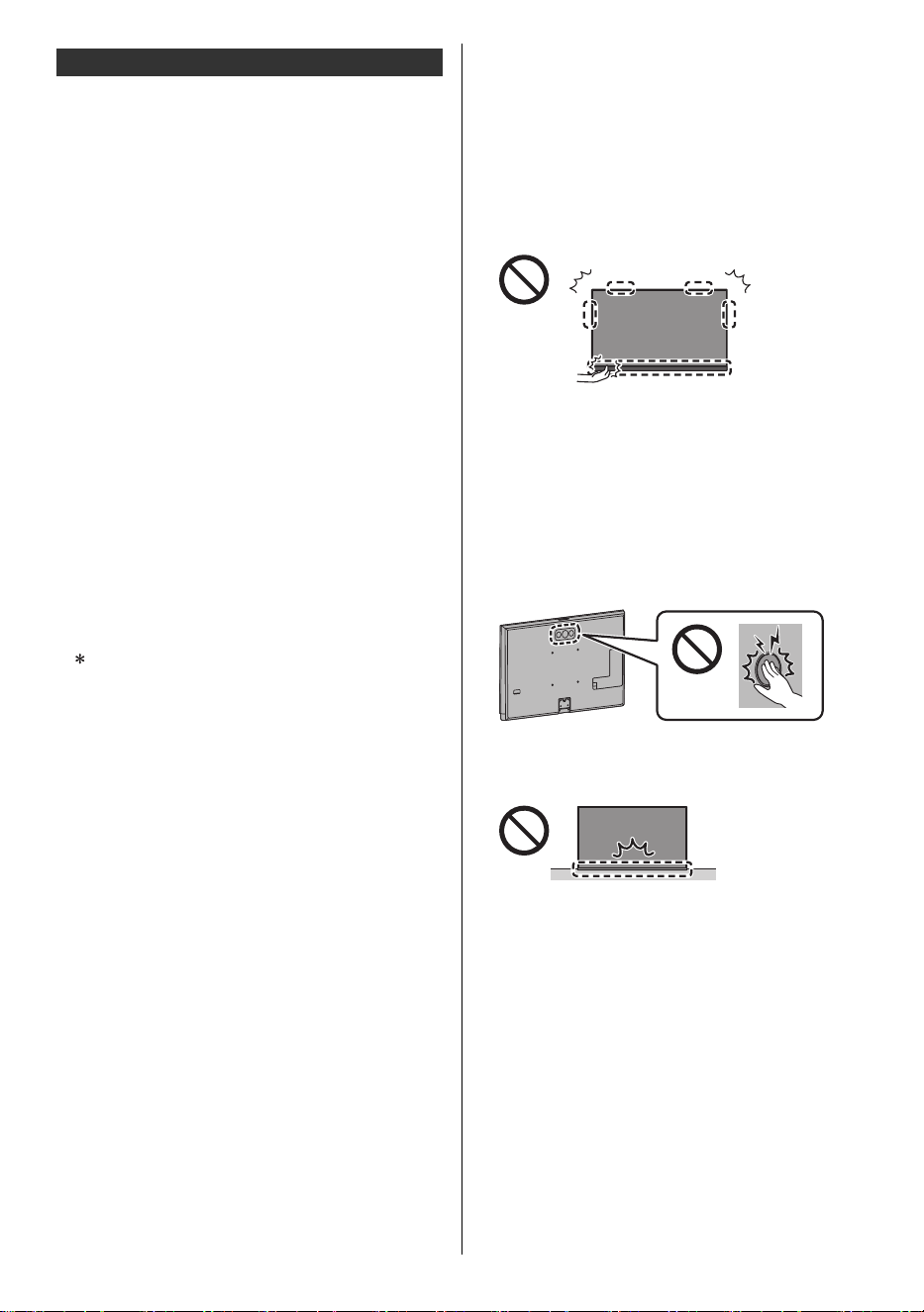
9
Español
∫ Pedestal
<Advertencia>
≥ No desmonte ni modifique el pedestal.
<Precaución>
≥ No utilice ningún pedestal que no sea el suministrado
con este televisor.
≥ No utilice el pedestal si está deformado o presenta
daños físicos. Si esto ocurre, comuníquese con su
distribuidor Panasonic más cercano de inmediato.
≥ Durante la instalación, asegúrese de que todos los
tornillos estén apretados firmemente.
≥ Asegúrese de que el televisor no sufra ningún impacto
durante la instalación del pedestal.
≥ Asegúrese de que los niños no trepen al pedestal.
≥ Instale o retire el televisor del pedestal con al menos
dos personas.
≥ Instale o retire el televisor según el procedimiento
especificado.
≥ Inserte el pedestal con firmeza, de lo contrario, podría
soltarse al instalar el televisor.
∫ LAN inalámbrica incorporada
<Precaución>
≥ No utilice la LAN inalámbrica incorporada para
conectarse a ninguna red inalámbrica (SSID*) para la
cual no tenga derechos de uso. Estas redes pueden
aparecer como resultado de búsquedas. Sin embargo,
su utilización puede considerarse un acceso ilegal.
≥ No exponga la LAN inalámbrica integrada a altas
temperaturas, luz solar directa ni humedad.
≥ Los datos transmitidos y recibidos por ondas de radio
pueden interceptarse y monitorearse.
≥ La LAN inalámbrica incorporada utiliza bandas de
frecuencia de 2,4 GHz, 5 GHz y 6 GHz. Para evitar
fallos de funcionamiento o una respuesta lenta
causada por interferencias de ondas de radio cuando
utilice la LAN inalámbrica incorporada, mantenga el
televisor alejado de otros dispositivos que utilicen
señales de 2,4 GHz, 5 GHz y 6 GHz, tales como otros
dispositivos de LAN inalámbrica, hornos de
microondas y teléfonos móviles.
≥ Cuando ocurren problemas debido a la electricidad
estática, etc., el televisor podría dejar de funcionar
para protegerse. En este caso, apague el televisor
desenchufando el cable de alimentación, luego
enciéndalo insertando el cable de alimentación en el
toma de corriente de la pared.
∫ Tecnología inalámbrica Bluetooth
®
<Precaución>
≥ El televisor y el control remoto utilizan la banda ISM de
radiofrecuencia de 2,4 GHz (Bluetooth
®
). Para evitar
fallas de funcionamiento o una respuesta lenta causada
por interferencias de ondas de radio, mantenga el
televisor y el control remoto alejados de dispositivos
tales como otros dispositivos LAN inalámbricos, otros
dispositivos Bluetooth
®
como microondas, teléfonos
móviles y dispositivos que usan señal de 2,4 GHz.
∫ Traslado del televisor
<Precaución>
Antes de trasladar el televisor, desconecte todos los
cables.
≥ Se necesitan al menos dos personas para trasladar el
televisor a fin de evitar lesiones que puedan ser
causadas por el vuelco o la caída del televisor.
≥ No aplique fuerza excesiva a las partes de los
altavoces de este televisor como se muestra a
continuación.
≥ Transporte únicamente en posición vertical. Si
transporta el televisor con el panel de visualización
hacia arriba o hacia abajo, puede dañar los circuitos
internos.
• No coloque el televisor temporalmente sobre el
suelo o el escritorio.
• Si el pedestal requiere montaje, asegúrese de
montarlo antes de sacar el televisor de la caja.
≥ No aplique fuerza excesiva al woofer situado en la
parte posterior de este televisor.
≥ Hay piezas como los interruptores en la parte inferior
del televisor, así que tenga cuidado de no causarles
impactos al golpearlos con el suelo, etc.
≥ Asegúrese de no rayar ni romper el televisor.
Otras instrucciones de seguridad
SSID es un nombre para identificar una red
inalámbrica particular para la transmisión.
TV-55_65_77Z95BP_X41G77MV03716A_eng_lsp.book 9 ページ 2025年3月18日 火曜日 午後7時19分
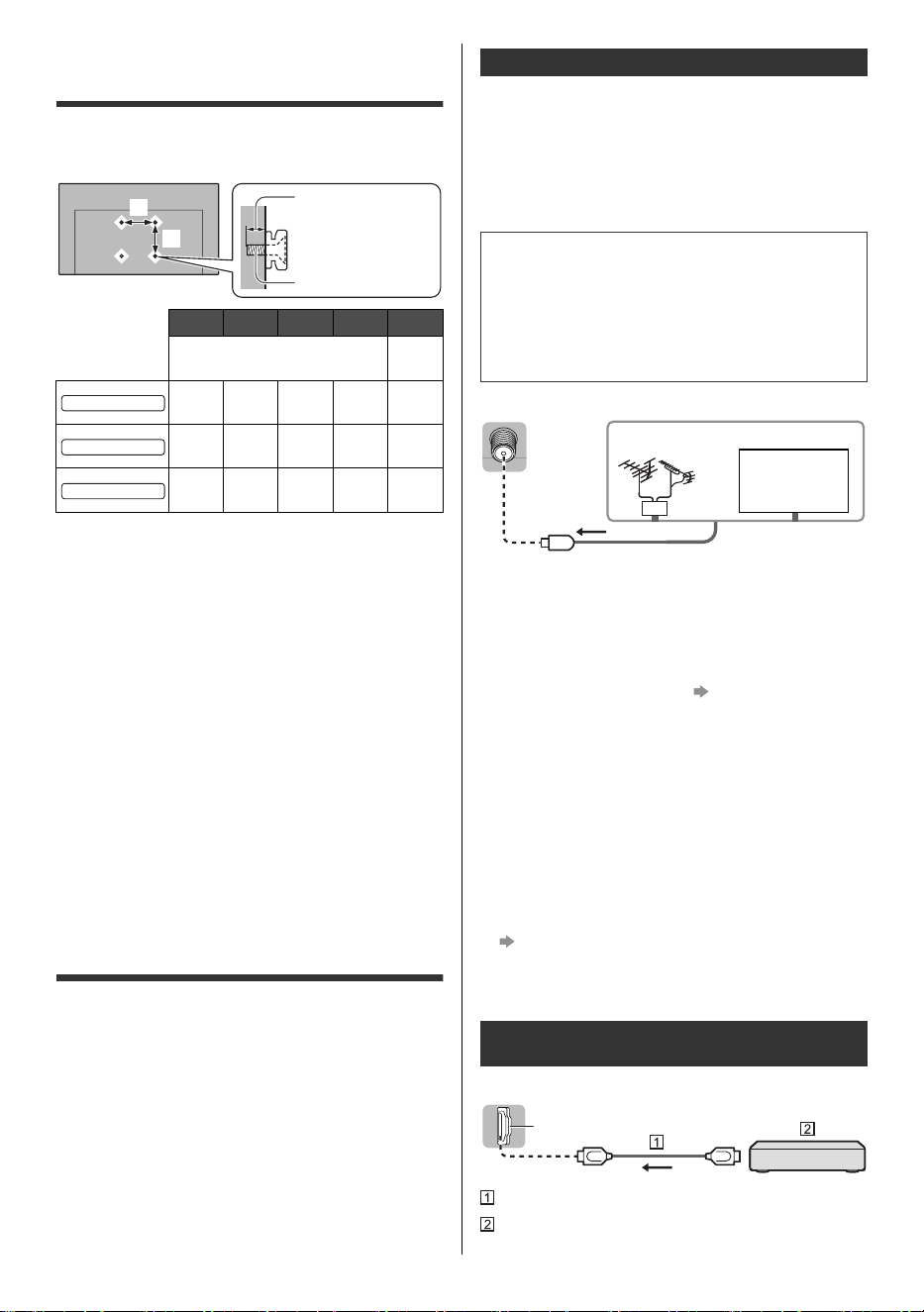
10
Español
Instalación del soporte para
colgar en la pared
Póngase en contacto con un instalador profesional para
comprar el soporte para colgar en la pared recomendado
y calificado por UL.
<Advertencia>
≥ Asegúrese siempre de pedirle a un técnico calificado
que realice la instalación.
≥ No monte la unidad directamente debajo de luces del
techo (como focos, reflectores o luces halógenas) que
suelen emitir mucho calor. Si lo hace, puede deformar
o dañar las piezas de plástico del gabinete.
≥ Tenga cuidado al fijar los soportes de pared a la pared.
Asegúrese siempre de que no haya cables eléctricos ni
tuberías en la pared antes de colgar el soporte.
≥ Para evitar caídas y lesiones, retire el televisor de su
posición fija en la pared cuando ya no lo utilice.
≥ Un soporte para colgar en la pared que no sea el
adecuado o una instalación incorrecta pueden
provocar la caída del equipo, lo que puede provocar
lesiones y daños al producto.
≥ Panasonic no asume ninguna responsabilidad por
daños o lesiones que surjan de un soporte para colgar
en la pared que no sea el adecuado, una instalación
incorrecta o cualquier otro incumplimiento de las
instrucciones anteriores.
Conexiones
Consulte [Panasonic eAYUDA] y la hoja separada para
obtener detalles sobre las conexiones.
≥ Asegúrese de que la unidad esté desconectada de la
toma de corriente de la pared antes de conectar o
desconectar cualquier cable.
≥ Mantenga el televisor alejado de equipos electrónicos
(equipos de video, etc.) o equipos con sensor
infrarrojo, de lo contrario, se puede producir distorsión
de la imagen o el sonido o se puede afectar el
funcionamiento de otros equipos.
≥ Lea también el manual del equipo que se va a conectar.
∫ Dispositivos AV
(Grabadora, Reproductor, Decodificador de satélite,
Videocámara, etc.)
≥ Para obtener más detalles, consulte [Panasonic
eAYUDA] (Búsqueda por finalidad > Ver la televisión
> Equipo externo > Conexión externa).
∫ Antena
Televisión
<Nota>
≥ Al utilizar un decodificador de cable/satélite o un
equipo externo, se puede realizar una conexión de
alta definición mediante un cable HDMI. El
decodificador de cable/satélite, el equipo externo y el
cable HDMI que se muestran en este manual no se
suministran con el televisor. (pág. 10)
≥ Para obtener asistencia adicional, visítenos en:
https://help.na.panasonic.com/
∫ Red
Se requiere un entorno de red de banda ancha para
poder utilizar los servicios de Internet.
≥ Si no dispone de ningún servicio de red de banda
ancha, consulte a su distribuidor para obtener ayuda.
≥ Prepare el entorno de Internet para la conexión por
cable o inalámbrica.
≥ La configuración de la conexión de red comenzará
cuando utilice el televisor por primera vez.
(pág. 11)
≥ Para obtener más detalles, consulte [Panasonic
eAYUDA] (Búsqueda por finalidad > Red >
Conexiones de red).
Televisión
Cable HDMI
Equipo compatible con 4K/HDR
a b c d e
mm
(pulgada)
–
300
(11,8″)
300
(11,8″)
10
(0,39″)
14
(0,55″)
M6
300
(11,8″)
300
(11,8″)
10
(0,39″)
20
(0,79″)
M6
400
(15,7″)
300
(11,8″)
10
(0,39″)
20
(0,79″)
M6
e
a
b
c (Mínimo)
d (Máximo)
55-inch model
65-inch model
77-inch model
Conexiones básicas
Antena VHF/UHF
• ATSC (Comité de sistemas avanzados de
televisión): Los estándares de televisión digital
incluyen la televisión digital de alta definición
(HDTV), la televisión de definición estándar
(SDTV), la transmisión de datos, el audio de sonido
envolvente multicanal y la televisión interactiva.
Conexiones para equipos compatibles
con 4K/HDR
Televisión por
cable (QAM
transparente)
Antena VHF/UHF
o
HDMI
TV-55_65_77Z95BP_X41G77MV03716A_eng_lsp.book 10 ページ 2025年3月18日 火曜日 午後7時19分
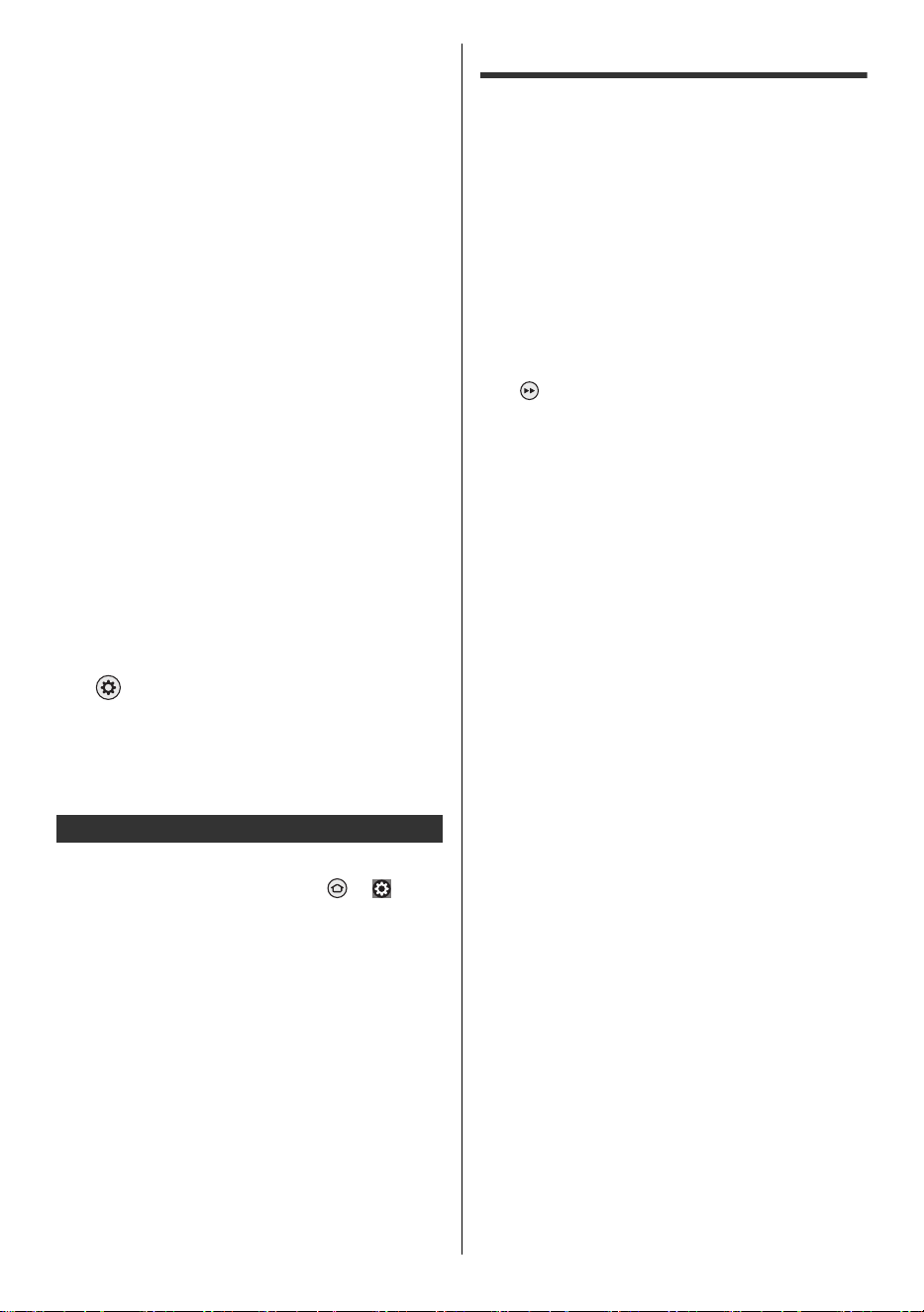
11
Español
≥ Conecte el equipo compatible con 4K a la terminal
HDMI mediante un cable compatible con 4K y podrá
ver contenido en formato 4K.
≥ Configurarlo [Modo1] cuando la imagen o el sonido en
la entrada HDMI no se reproduzcan correctamente.
≥ La compatibilidad con HDR no aumenta las
capacidades de brillo máximo del panel del televisor.
∫ [Configuración automática HDMI]
Reproduce la imagen con mayor precisión con la gama
de colores ampliada y con mayor fluidez con la alta
velocidad de cuadros al conectar el equipo compatible
con 4K. Seleccione el modo dependiendo del equipo.
[Modo1]:
Para una mejor compatibilidad. Configurarlo [Modo1]
cuando la imagen o el sonido en la entrada HDMI no
se reproduzcan correctamente.
[Modo2]:
Para el equipo compatible con 4K que tiene la función
de emitir la imagen con precisión con la gama de
colores ampliada.
[Modo3]:
Para equipos compatibles con 4K que tengan la
función de salida de imagen a alta velocidad de
cuadros.
(Este modo es válido en HDMI 1 y 2)
≥ Para cambiar el modo
1. Seleccione el modo de entrada HDMI conectado al
equipo.
2. Cambie el modo en [Configuración automática
HDMI].
> [Imagen] > [Configuración de HDMI]
> [Configuración automática HDMI]
≥ Para obtener información sobre el formato válido,
consulte [Panasonic eAYUDA] (Búsqueda por
finalidad > Ver la televisión > Resolución 4K >
Configuración automática HDMI).
∫ Auriculares / Subwoofer
Configurar [Conector para auriculares] ( > [ ] (en la
pantalla) > [Pantalla y sonidos] > [Salida de audio]) para
[Conectar].
≥ Para utilizar auriculares, configure [Modo de salida de
audio] para [Auriculares] o [Altavoz del televisor y
auriculares].
≥ Para utilizar subwoofer, configure [Modo de salida de
audio] para [Altavoz del televisor y subwoofer].
∫ Emisor de infrarrojos
≥ Para utilizar un emisor de infrarrojos, conéctelo al
puerto correspondiente.
Configuración inicial
Cuando encienda el televisor por primera vez, aparece
una pantalla de configuración. Siga las instrucciones que
aparecen en pantalla.
1 Elija su idioma
2 Seleccione el modo del televisor
≥ Se recomienda seleccionar [Casa] para uso
doméstico.
3 Sincronice su control remoto con su televisor
≥ La sincronización del control remoto se completa
automáticamente.
4 Habilite la red
≥ Al conectarse de forma inalámbrica, seleccione el
punto de acceso al que se conectará. Para
configurarlo más tarde, puede presionar el botón
en el control remoto para saltar y pasar al paso
8.
≥ Al usar una conexión por cable, la conexión a
Internet se establece automáticamente.
5 Seleccione su experiencia
≥ Elija la experiencia Básica para ver televisión en
vivo y acceder a contenido popular seleccionado y
vaya al paso 8.
≥ Elija la experiencia completa para interactuar con
Alexa y acceder a la selección completa de
contenido compatible y vaya al paso 6.
6 Inicie sesión con su cuenta de Amazon
≥ Para usar Amazon, Fire TV y las funciones
relacionadas con Alexa, tendrá que iniciar sesión
en su cuenta de Amazon. Ten en cuenta que este
paso se omite si no hay conexión a Internet o si
elige la experiencia básica en el paso 5.
≥ Puede iniciar sesión con un teléfono inteligente, un
código QR o el control remoto. Siga las
instrucciones que aparecen en pantalla.
7 Controles parentales (código PIN)
8 Buscar canales del televisor
≥ Las especificaciones, etc., están sujetas a cambios
debido a actualizaciones de software.
≥ Necesitará una conexión a Internet para iniciar sesión
en su cuenta de Amazon y poder usar una variedad
de servicios, como controles de voz y servicios de
transmisión de video.
≥ Si establece un código PIN, es posible que se le
solicite que ingrese su código PIN cuando intente
acceder a algunos menús, servicios, contenido, etc.
Otras conexiones
TV-55_65_77Z95BP_X41G77MV03716A_eng_lsp.book 11 ページ 2025年3月18日 火曜日 午後7時19分
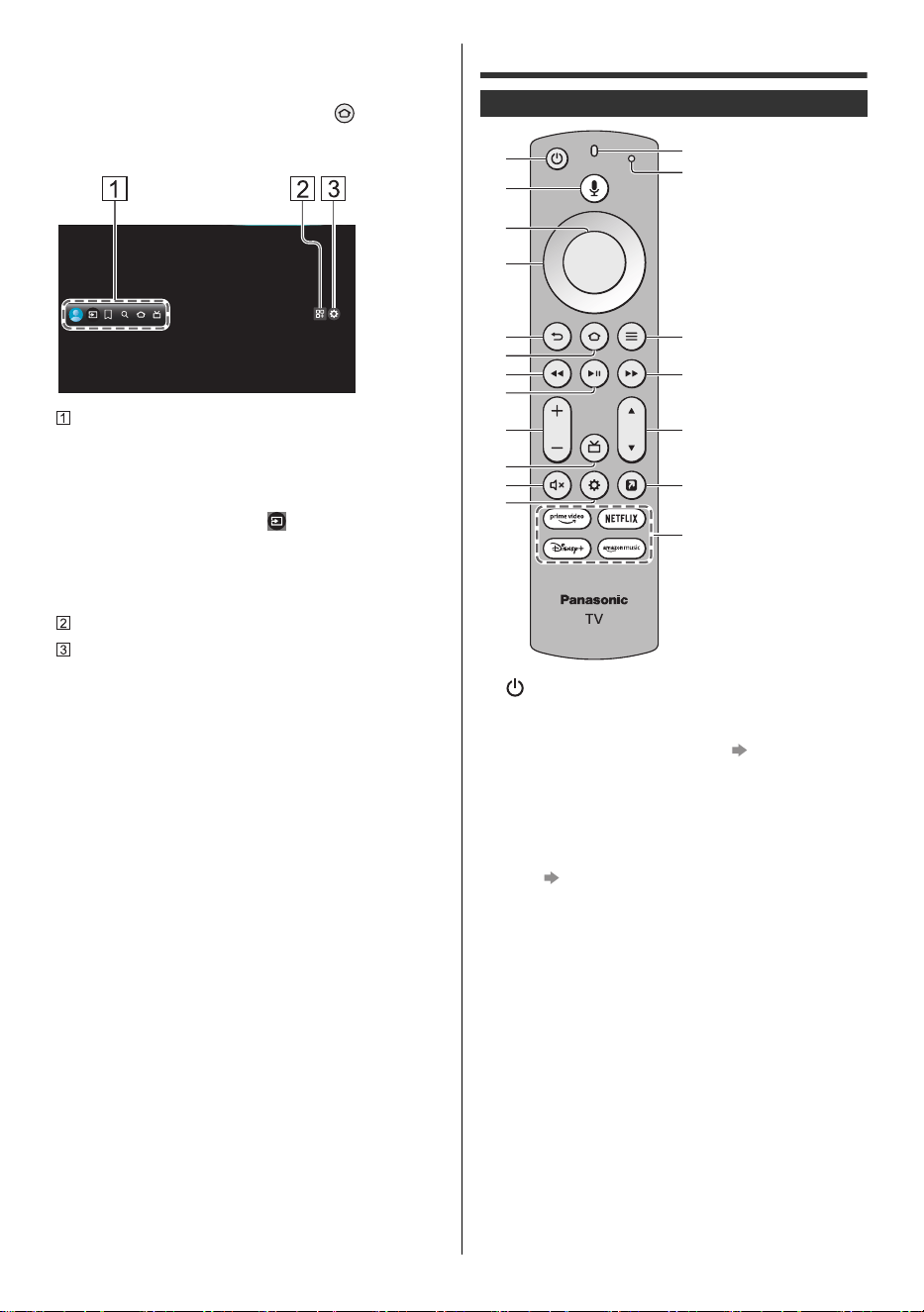
12
Español
∫ Inicio
“Inicio” es una puerta de enlace a los programas del
televisor, aplicaciones y dispositivos conectados. La
página de inicio se muestra al presionar y le brinda
una manera fácil de acceder a todas las funciones como
se muestra a continuación (ejemplo).
Perfil / Entradas / Mis cosas / Buscar / Página de inicio
/ En vivo
≥ Por ejemplo, para ver televisión a través de un
decodificador de cable o satélite o cualquier otra
fuente (DVD, DVR, dispositivo de juegos, etc.):
Después de seleccionar [ ], presione el botón de
navegación hacia abajo en el control remoto, luego
presione el botón de navegación hacia la izquierda
o hacia la derecha para seleccionar la entrada
adecuada.
Aplicaciones
Menú de ajustes
≥ Pantalla de interfaz de usuario para cambiar
configuraciones avanzadas del televisor
≥ Para obtener más detalles, consulte [Panasonic
eAYUDA] (Búsqueda por finalidad > Funciones >
Inicio).
Identificación de controles
1 [ ]: Encendido/apagado (modo de espera)
2 Botón de voz de Alexa
≥ Mantenga presionado el botón y hable al micrófono
para usar los controles de voz. (pág. 14)
3 Seleccione
4D-pad (botones de navegación arriba/abajo/izquierda/
derecha)
5Atrás
≥ Regrese al lugar anterior en el menú o la aplicación.
6 Inicio (pág. 12)
7 Rebobinar
8 Reproducir/pausar
9 Volumen
10
Guía
11
Silencio
12
Configuración
≥ Muestra en la pantalla los ajustes rápidos de
Imagen, Pantalla, Sonido, etc.
13
Micrófono
14
Indicador LED
≥ Se ilumina en diferentes colores cuando se utiliza
el control remoto.
15
Menú/Opciones
16
Avanzar rápidamente
17
Canal
18
MI APLICACIÓN (Asigna una aplicación favorita).
19
Servicios de transmisión
Control remoto
1
5
4
3
9
6
8
7
12
10
2
11
13
14
15
16
18
19
17
TV-55_65_77Z95BP_X41G77MV03716A_eng_lsp.book 12 ページ 2025年3月18日 火曜日 午後7時19分
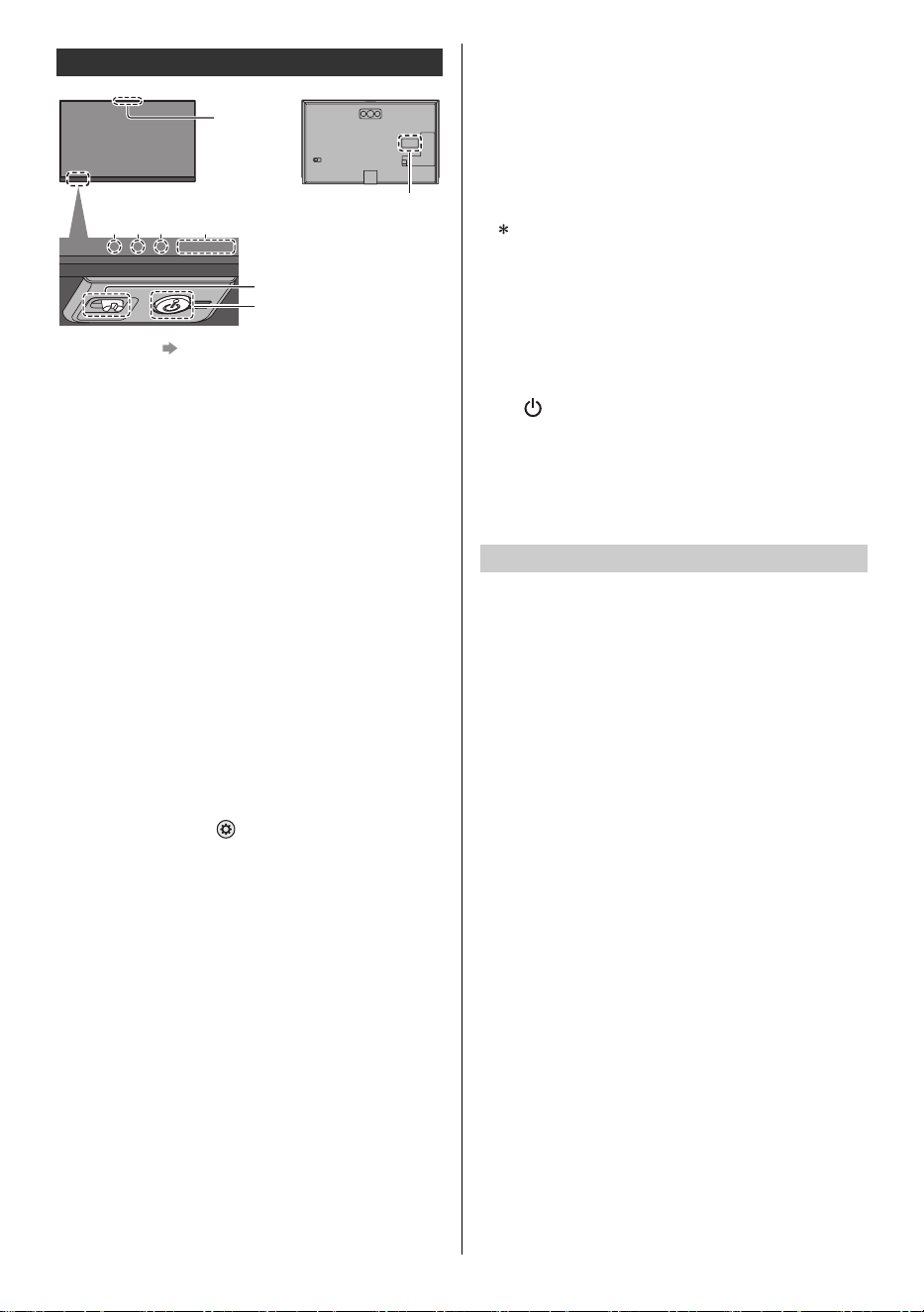
13
Español
1 Micrófonos (pág. 14)
2 LED del micrófono
3 INDICADOR LED
≥ Luces en diferentes colores.
4 LED DE ENCENDIDO
≥ El LED parpadea cuando se recibe una señal
infrarroja del control remoto.
5 Receptor de señal del control remoto (para
comunicación por infrarrojos)
≥ No coloque ningún objeto entre el receptor de señal
del control remoto del televisor y el control remoto.
6 Sensor ambiental
≥ Detecta las condiciones de iluminación ambiental
para ajustar la imagen cuando [Brillo auto.] y [Balance
de blancos auto.] ( > [Imagen] > [Sensor
Ambiental]) están configurados para [Encendido].
7 Interruptor de encendido/apagado del micrófono
≥ Enciende/apaga el micrófono del televisor.
8 Botón de encendido
≥ Presione el botón para encender.
≥ Cuando el televisor esté encendido, presione el
botón para visualizar la guía de operación.
La selección de elementos cambia entre Apagado,
Entradas*, Subir/Bajar volumen, Subir/Bajar canal y
Salir cada vez que presiona el botón de encendido. Si
lo mantiene presionado durante aproximadamente
2 segundos, se habilita la operación del elemento.
Presione el botón para seleccionar la entrada
cuando aparezca la lista de selección de entrada.
Mantenga presionado el botón para confirmar.
≥ Para apagar (modo de espera) con el botón del
televisor, mantenga presionado el botón de
encendido durante aproximadamente 2 segundos
mientras se selecciona Apagado.
≥
Para apagar el aparato por completo, debe desconectar
el cable de alimentación de la toma de corriente.
≥ [ ]: Modo de espera/Encendido (parte inferior del
televisor)
9 Placa de identificación del modelo
<Nota>
≥ El televisor consume una pequeña cantidad de
energía eléctrica incluso cuando está apagado.
Asegúrese de apagar el televisor con el control remoto o
el botón de encendido para realizar el mantenimiento del
panel. El mantenimiento del panel se inicia
automáticamente y demora aproximadamente
10 minutos. Durante el mantenimiento del panel, el LED
se vuelve naranja. El mantenimiento funciona según sea
necesario.
≥ Durante el mantenimiento del panel, evite tocar la
pantalla y ejercer presión sobre ella. (por ejemplo,
limpiar la pantalla, etc.)
Indicador/Panel de control
Rojo: El micrófono del televisor está apagado
Rojo: En espera
Verde: Encendido
• Según el brillo del ambiente, ajusta
automáticamente el brillo del LED a
niveles fáciles de ver.
Naranja: En espera con algunas funciones activas
o mantenimiento del panel en curso
9
234 5, 6
8
7
1
Parte inferior del televisor
Mantenimiento del panel
TV-55_65_77Z95BP_X41G77MV03716A_eng_lsp.book 13 ページ 2025年3月18日 火曜日 午後7時19分
14
Español
Este televisor cuenta con micrófonos para que pueda
utilizar Alexa con manos libres. Disfrute del control de
contenido por voz con manos libres, incluida la
búsqueda, reproducción, pausa, avance rápido y más.
Ahora puedes soltar el control remoto y sumergirte
directamente en sus películas y programas de televisión
favoritos con solo el sonido de su voz. Desde el otro lado
de la habitación, diga "Alexa" y Alexa responderá a su
solicitud. Cambia las entradas y pasa de ver su
programa de televisión favorito al gran partido. También
puede pedirle a Alexa que consulte el clima, configure
temporizadores y recordatorios, y más—incluso cuando
la pantalla del televisor esté apagada. A continuación se
muestran algunas cosas que puede hacer con su
Panasonic Fire TV:
≥ Es posible que algunas funciones y habilidades de
Alexa no estén disponibles en todos los países o
idiomas y estén sujetas a cambios en cualquier
momento.
≥ El hecho de que Alexa responda o no depende del
volumen/tono de su voz y del ruido ambiental.
≥ Para realizar búsquedas y otras funciones, este
dispositivo debe estar conectado a Internet.
¿Cómo desactivar los micrófonos?
Alexa está diseñada para proteger su privacidad. Por
ejemplo, puede deslizar el interruptor del micrófono en la
parte inferior del televisor para apagar o encender los
micrófonos. Cuando se configura en APAGADO, se
desconectará la alimentación de los micrófonos, verá un
LED rojo en el frente de su televisor y el televisor no
podrá grabar ni transmitir solicitudes de audio a la nube
incluso si dice la palabra de activación. Si tiene un
control remoto compatible con Alexa, podrá usar Alexa a
través del control remoto.
Este televisor es compatible con comunicaciones
Bluetooth
®
.
Los dispositivos Bluetooth
®
que se han registrado
(sincronizado) con este televisor pueden conectarse a
(comunicarse con) este televisor.
≥ Al registrar (sincronizar) un dispositivo Bluetooth
®
con
este televisor, mueva el dispositivo a 50 cm del
televisor.
≥ No es posible registrar (sincronizar) dispositivos
Bluetooth
®
que no sean compatibles con este
televisor.
≥ Si un dispositivo habilitado para Bluetooth
®
que ha
registrado (sincronizado) con este televisor luego se
registra y se usa en otro dispositivo, es posible que no
esté disponible para su uso con este televisor.
Registre el dispositivo en este televisor nuevamente si
esto ocurre.
≥ Puede registrar dispositivos de audio Bluetooth
®
compatibles con A2DP en este televisor. Debido a las
características de la tecnología inalámbrica, habrá
cierto retraso entre la reproducción de vídeo y audio.
No es posible utilizar más de un dispositivo de audio
compatible con A2DP simultáneamente.
≥ Para obtener más detalles, consulte [Panasonic
eAYUDA] (Búsqueda por finalidad > Funciones >
Dispositivos Bluetooth).
Amazon Alexa: asistente virtual (de voz)
Para hacer esto en su
Panasonic FireTV...
Diga esto...
Controles del televisor en vivo
En el caso de las aplicaciones
compatibles que cuentan con
acceso al televisor en vivo,
puede usar Alexa para cambiar
canales o controlar la
reproducción de la
programación a pedido.
También puede usar Alexa para
navegar a la Guía de canales y
la pestaña En vivo.
“Alexa, ve a [canal/cadena] en
[aplicación]”.
“Alexa, mira [canal/cadena]”.
“Alexa, ve a la Guía de
canales”.
“Alexa, ve a En vivo”.
Busca películas y programas
del televisor
Alexa puede buscar películas y
programas del televisor en una
variedad de aplicaciones
instaladas compatibles.
“Alexa, busca [título]”.
“Alexa, encuentra [título/
género]”.
“Alexa, muéstrame
[programas del televisor/
películas] con [actor]”.
Solicitudes para Alexa
Consulte las respuestas en Fire
TV cuando hace una solicitud
para Alexa.
“Alexa, muéstrame el clima”.
“Alexa, muéstrame mi lista de
tareas pendientes”.
“Alexa, muéstrame canciones
de [artista]”. “Muéstrame
restaurantes cercanos”.
Controle su televisor
Alexa puede encender su
televisor y sumergirse
directamente en sus películas y
programas de televisión
favoritos con el sonido de su
voz.
“Alexa, enciende el televisor”.
“Alexa, sube el volumen”.
“Alexa, pausa”.
Dispositivo Bluetooth
®
Sincronizar dispositivo Bluetooth
®
TV-55_65_77Z95BP_X41G77MV03716A_eng_lsp.book 14 ページ 2025年3月18日 火曜日 午後7時19分
15
Español
Se puede utilizar la tecnología inalámbrica Bluetooth
®
o
la función de comunicación por infrarrojos para las
transmisiones entre el televisor y el control remoto.
Dado que los controles de voz utilizan tecnología
inalámbrica (pág. 14) Bluetooth
®
el control remoto debe
estar registrado (sincronizado) con el televisor.
≥ Cuando utilice el control remoto por primera vez
después de la compra, cuando presione cualquier
botón mientras apunta el control remoto al receptor de
señal del control remoto con las baterías insertadas,
el control remoto se registra (sincroniza)
automáticamente.
≥ Al registrarse, apunte el control remoto al receptor de
señal del control remoto en el televisor,
aproximadamente a 50 cm.
≥ Es posible que el registro no se complete
correctamente si las baterías del control remoto se
están agotando.
∫ Registrar un control remoto
Seleccione [Añadir nuevo mando] con el siguiente
procedimiento y siga las instrucciones en pantalla:
> [ ] (en la pantalla) > [Mandos y dispositivos
Bluetooth] > [Órdenes por voz con Alexa] > [Añadir
nuevo mando]
Si tiene problemas para sincronizar el control remoto
Bluetooth, debe restablecerlo e intentarlo
nuevamente.
1 Mantenga presionados los botones que se muestran a
continuación simultáneamente durante
aproximadamente 12 segundos.
2 Suelte los botones y espere 5 segundos.
3 Retire las baterías y vuelva a colocarlas.
<Nota>
≥ Si el control remoto está registrado (sincronizado) con
el televisor, se comunicarán a través de Bluetooth
®
.
No necesitará colocar el control remoto frente al
receptor de señal del control remoto del televisor
cuando se utilice la comunicación Bluetooth
®
.
Preguntas frecuentes
Antes de solicitar servicio o asistencia, siga estas
sencillas instrucciones para resolver el problema.
≥ Para obtener más detalles, consulte [Panasonic
eAYUDA] (Soporte / FAQ > Preguntas frecuentes).
≥ Pruebe reiniciar el televisor
• > [ ] (en la pantalla) > [Dispositivo y
software] > [Reinicio]
• Mantenga presionado el botón de encendido del
televisor durante 15 segundos o más.
La imagen tarda varios segundos en mostrarse
después de encender el televisor
≥ Al encender el televisor, se realiza el ajuste del panel.
No se trata de una avería.
El televisor no enciende
≥ Compruebe que el cable de alimentación esté
enchufado al televisor y a la toma de corriente.
El control remoto no funciona o funciona de forma
intermitente.
≥ ¿Se ha sincronizado el control remoto con el televisor
a través de Bluetooth
®
? (pág. 15)
≥ ¿Están instaladas correctamente las baterías?
≥ Es posible que las baterías se estén agotando.
Reemplácelas por otras nuevas.
≥ No es posible utilizar el control remoto debido al inicio
del sistema cuando el LED parpadea en naranja.
Puede utilizar el control remoto después de que el
LED se vuelva rojo fijo.
≥ Apunte el control remoto directamente al receptor de
señal del control remoto del televisor (dentro de unos
7 m y en un ángulo de 30 grados respecto del
receptor de señal).*
≥ Coloque el televisor lejos de la luz solar u otras
fuentes de luz brillante para que no brillen sobre el
receptor de señal del mando a distancia del televisor.*
Cuando se utiliza la comunicación por infrarrojos
(pág. 13)
No se muestra ninguna imagen
≥ Verifique que el televisor esté encendido.
≥ Compruebe que el cable de alimentación esté
enchufado al televisor y a la toma de corriente.
≥ Compruebe que se haya seleccionado el modo de
entrada correcto.
≥ ¿Está [Nivel de luminosidad] o [Contraste] está
configurado al mínimo?
> [Imagen] > [Brillo]
≥ Compruebe que todos los cables y conexiones
necesarios estén bien colocados.
Sincronización del control remoto
TV-55_65_77Z95BP_X41G77MV03716A_eng_lsp.book 15 ページ 2025年3月18日 火曜日 午後7時19分
16
Español
Se muestra una imagen inusual
≥ Este televisor tiene una función de autoprueba
incorporada. Realiza un diagnóstico de problemas de
imagen o sonido.
> [ ] (en la pantalla) > [Dispositivo y
software] > [Autodiagnóstico del televisor]
≥ Apague el televisor desenchufando el cable de
alimentación y luego enciéndalo insertando el cable
de alimentación en la toma de corriente de la pared.
≥ Si el problema persiste, inicialice todas las
configuraciones.
> [ ] (en la pantalla) > [Dispositivo y
software] > [Restablecer valores de fábrica]
La imagen o el sonido del equipo externo son
inusuales cuando el equipo está conectado vía HDMI
≥ Configure [Configuración automática HDMI] para
[Modo1]. (pág. 11)
No se produce sonido desde el equipo HDMI
conectado
≥ Configure el formato de salida de audio del equipo
HDMI conectado a PCM.
La función de control por voz no funciona
≥ ¿Se ha sincronizado el control remoto con el televisor
a través de Bluetooth
®
? (pág. 15)
≥ Verifique las conexiones y configuraciones de red.
≥ ¿El interruptor del micrófono del televisor está
apagado? (pág. 13)
Algunas partes del televisor se calientan
≥ Algunas partes del televisor pueden calentarse. Estos
aumentos de temperatura no suponen ningún
problema en términos de rendimiento o calidad.
Al presionar con un dedo, el panel de visualización
se mueve ligeramente y hace un ruido.
≥ Hay un pequeño espacio alrededor del panel para
evitar que se dañe. Esto no es un mal funcionamiento.
¿Por qué la pantalla está en blanco y el LED de
encendido parpadea?
≥ El televisor ha entrado en modo apagado para
protegerse. Pruebe a desenchufarlo durante unos
minutos y vuelva a enchufarlo. Si hubo una
sobrecarga temporal de energía en la línea de CA, es
posible que ahora esté bien. Si vuelve a parpadear,
visite https://help.na.panasonic.com/
Sobre la consulta
≥ Comuníquese con su distribuidor local de Panasonic
para obtener ayuda.
Si realiza una consulta desde un lugar donde no se
encuentra este televisor, no podemos responder
sobre contenidos que requieran confirmación visual
de la conexión, fenómenos, etc. de este televisor en
sí.
El LED se vuelve naranja
≥ Es posible que se esté realizando mantenimiento del
panel.
El LED se vuelve naranja nuevamente en el modo de
espera cuando el televisor se enciende/apaga antes
de que se complete el mantenimiento del panel.
≥ Durante el mantenimiento del panel, evite tocar la
pantalla y ejercer presión sobre ella. (por ejemplo,
limpiar la pantalla, etc.)
≥ Para obtener más información
“Mantenimiento del panel” (pág. 13)
Mantenimiento
En primer lugar, desconecte el cable de
alimentación de la toma de corriente.
Cuidado habitual:
Limpie suavemente la superficie del panel de
visualización, gabinete o pedestal con un paño suave
para eliminar la suciedad o las huellas dactilares.
Para suciedad persistente:
(1) Primero limpie el polvo de la superficie.
(2) Humedezca un paño suave con agua limpia o
detergente neutro diluido (1 parte de detergente por
100 partes de agua).
(3) Escurra el paño con firmeza. (Tenga en cuenta que
no permita que entre líquido en el interior del
televisor, ya que podría provocar fallas en el
producto).
(4) Limpie con cuidado, humedezca y elimine la
suciedad persistente.
(5) Por último, elimine toda la humedad.
<Precaución>
≥ No utilice un paño áspero ni frote la superficie con
demasiada fuerza, ya que podría rayarla.
≥ Tenga cuidado de no exponer las superficies a
repelentes de insectos, disolventes, diluyentes u otras
sustancias volátiles. Esto puede degradar la calidad
de la superficie o provocar que se despegue la
pintura.
≥ La superficie del panel de visualización está
especialmente tratada y puede dañarse fácilmente.
Tenga cuidado de no golpear ni rayar la superficie con
las uñas u otros objetos duros.
≥ No permita que el gabinete y el pedestal entren en
contacto con una sustancia de goma o PVC durante
un período prolongado. Esto puede degradar la
calidad de la superficie.
Limpie el cable de alimentación con un paño seco a
intervalos regulares. La humedad y el polvo pueden
provocar incendios o descargas eléctricas.
Panel de visualización, gabinete, pedestal
Cable de alimentación
TV-55_65_77Z95BP_X41G77MV03716A_eng_lsp.book 16 ページ 2025年3月18日 火曜日 午後7時19分
17
Español
Especificaciones
∫ Televisión
N.º de modelo
: TV-55Z95BP
: TV-65Z95BP
: TV-77Z95BP
Panel de visualización
Sistema de paneles
Panel OLED
Frecuencia de actualización
144 Hz
Tamaño de pantalla
Clase de 55″ (54,6 pulgadas medidas en diagonal)
Clase de 65″ (64,5 pulgadas medidas en diagonal)
Clase de 77″ (76,6 pulgadas medidas en diagonal)
Ancho × Alto × Diagonal
1.210 mm × 680 mm × 1.388 mm (47,6″ × 26,7″ × 54,6″)
1.428 mm × 804 mm × 1.639 mm (56,2″ × 31,6″ × 64,5″)
1.697 mm × 955 mm × 1.947 mm (66,8″ × 37,5″ × 76,6″)
Número de píxeles
3.840 × 2.160
Sonido
Salida de altavoz
160 W (70 W + 15 W × 2 + 15 W × 2 + 30 W × 1)
170 W (80 W + 15 W × 2 + 15 W × 2 + 30 W × 1)
180 W (90 W + 15 W × 2 + 15 W × 2 + 30 W × 1)
Auriculares / Subwoofer
1 Miniconector estéreo de 3,5 mm
Capacidad del canal (digital)
VHF / UHF: 2 - 69, CATV: 1 - 135
Sintonizador DTV
ATSC / ATSC 3.0 (NEXTGEN TV)
Condiciones de funcionamiento
Temperatura
0 °C - 35 °C (32 °F - 95 °F)
Humedad
20 % - 80 % HR (sin condensación)
Terminales de conexión
Entrada HDMI 1 / 2 / 3 / 4
Conectores TIPO A
HDMI 1:
4K144Hz, VRR (frecuencia de actualización variable),
NVIDIA
®
G-SYNC
®
Compatible, AMD FreeSync™
Premium, Tipo de contenido, Deep Color, x.v.Color™
HDMI 2:
4K144Hz, VRR (frecuencia de actualización variable),
NVIDIA
®
G-SYNC
®
Compatible, AMD FreeSync™
Premium, Tipo de contenido, eARC (Canal de retorno de
audio mejorado) / ARC (Canal de retorno de audio),
Deep Color, x.v.Color™
HDMI 3 / 4:
4K, Tipo de contenido, Deep Color, x.v.Color
™
≥ Este televisor admite la función “HDAVI Control 5”.
ETHERNET
10BASE-T / 100BASE-TX
≥ Utilice un cable LAN de par trenzado blindado (STP).
USB 1 / 2 / 3
USB 1 / 3: CC 5 V, Máximo 500 mA [Hi-Speed USB
(USB 2.0)]
USB 2: CC 5 V, Máximo 900 mA [SuperSpeed
USB (USB 3.0)]
DIGITAL AUDIO OUT
PCM / Dolby Audio, fibra óptica
Emisor de infrarrojos
1 Miniconector de 3,5 mm
LAN inalámbrica incorporada
Cumplimiento de estándares y banda de frecuencia
IEEE802.11ax: banda 6 GHz
IEEE802.11a/n/ac/ax: banda 5 GHz
IEEE802.11b/g/n/ax: banda 2,4 GHz
Seguridad
WPA3-SAE (AES)
WPA2-PSK (TKIP/AES)
WPA-PSK (TKIP/AES)
WEP (64 bit/128 bit)
Bluetooth
®
tecnología inalámbrica*
Cumplimiento de estándares y banda de frecuencia
Bluetooth
®
5.3: banda 2,4 GHz
No todos los dispositivos compatibles con Bluetooth
®
están
disponibles con este televisor. Se pueden utilizar hasta 5
dispositivos simultáneamente.
<Nota>
≥ El diseño y las especificaciones están sujetos a cambios sin
previo aviso. La masa y las dimensiones que se muestran son
aproximadas.
≥ Para obtener información sobre la fuente de alimentación y el
consumo de energía, consulte la placa de identificación en la
parte posterior del gabinete.
≥ Para obtener información sobre el software de código abierto,
consulte [Panasonic eAYUDA] (Búsqueda por finalidad > Antes
de empezar > Antes de usar este producto > Licencia).
55-inch model
65-inch model
77-inch model
55-inch model
65-inch model
77-inch model
55-inch model
65-inch model
77-inch model
55-inch model
65-inch model
77-inch model
TV-55_65_77Z95BP_X41G77MV03716A_eng_lsp.book 17 ページ 2025年3月18日 火曜日 午後7時19分

TV-55_65_77Z95BP_X41G77MV03716A_eng_lsp.book 18 ページ 2025年3月18日 火曜日 午後7時19分

TV-55_65_77Z95BP_X41G77MV03716A_eng_lsp.book 19 ページ 2025年3月18日 火曜日 午後7時19分
© Panasonic Entertainment & Communication Co., Ltd. 2025
Español
Impreso en China
Two Riverfront Plaza
Newark, NJ 07102-5490
Panasonic Consumer Electronics Company,
Division of Panasonic Corporation of North America
Registro del cliente
El número de modelo y el número de serie se encuentran en la parte inferior de la unidad o en la placa de
identificación del modelo en la parte trasera de la unidad. Debe anotar este número de serie en el espacio provisto
a continuación y conservar este libro, además del recibo de compra, como registro permanente de su compra para
facilitar la identificación en caso de robo o pérdida, y para fines del Servicio de Garantía.
Número de modelo Número de serie
Para desechar su producto, reciclelo de acuerdo con las regulaciones ambientales locales. Para mas informacion
sobre reciclaje, visite
https://shop.panasonic.com/pages/recycling-program
TV-55_65_77Z95BP_X41G77MV03716A_eng_lsp.book 20 ページ 2025年3月18日 火曜日 午後7時19分