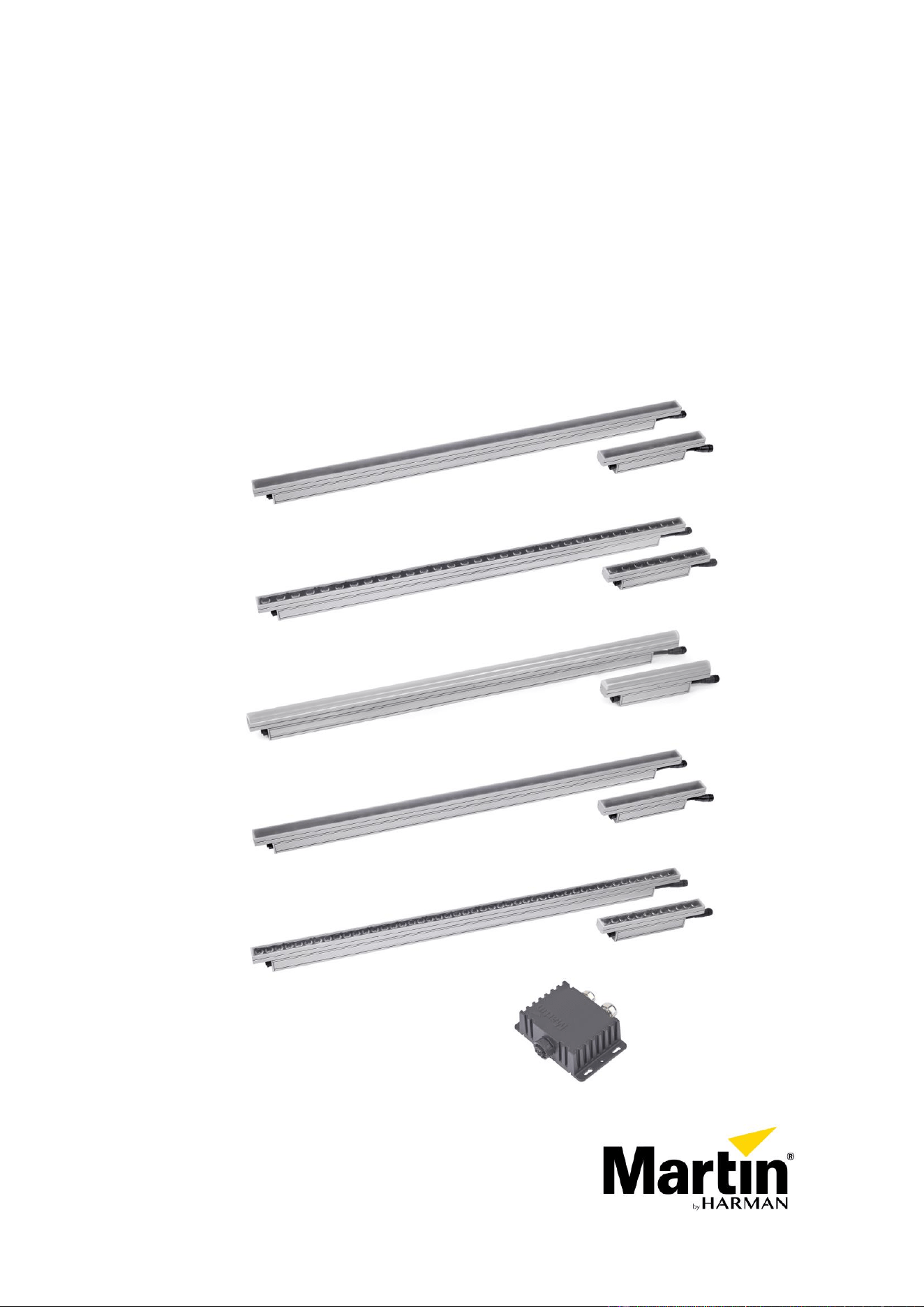
Exterior Linear Pro Series
Exterior Linear Pro QUAD Cove and QUAD Graze
Exterior Linear Pro CTC Cove and CTC Graze
Exterior Linear Pro DV
User manual
(with Installation and Safety Manual attached)
QUAD Cove
QUAD Graze
CTC Cove
QUAD DV
CTC Graze
Junction Box Power DMX to PD

©2022-2023 HARMAN PROFESSIONAL DENMARK ApS. All rights reserved. Features, specifications and appearance
are subject to change without notice. HARMAN PROFESSIONAL DENMARK ApS and all affiliated companies disclaim
liability for any injury, damage, direct or indirect loss, consequential or economic loss or any other loss occasioned by
the use of, inability to use or reliance on the information contained in this document. Martin is a registered trademark of
HARMAN PROFESSIONAL DENMARK ApS registered in the United States and/or other countries.
HARMAN PROFESSIONAL DENMARK ApS, Olof Palmes Allé 44, 8200 Aarhus N, Denmark
HARMAN PROFESSIONAL SOLUTIONS U.S., 8500 Balboa Blvd., Northridge CA 91329, USA
www.martin.com
Exterior Linear Pro Eng. User Manual & Multi-Lang. Safety Manual Revision B, P/N 5140734-00

Table of contents
Introduction .............................................................................................................. 4
Exterior Linear Pro Series .................................................................................. 4
Features ............................................................................................................. 5
Before using the product for the first time ........................................................... 5
Setting up fixtures .................................................................................................... 6
Martin Companion
®
and RDM ............................................................................ 6
Fixture discovery ................................................................................................ 6
Supported parameters ........................................................................................ 6
Setting up DMX operation .................................................................................. 7
Behavior when no DMX signal is present ........................................................... 7
Dimming curves .................................................................................................. 7
Color mode ......................................................................................................... 8
Default color temperature in segment DMX control ............................................ 8
Power limit mode ................................................................................................ 8
Fixture information .............................................................................................. 8
Status messages ................................................................................................ 8
Utilities ................................................................................................................ 8
Setting up standalone operation .............................................................................. 9
Operating the fixture............................................................................................... 12
Test sequences and fixture status .................................................................... 12
Controlling via DMX .......................................................................................... 12
Identifying fixtures in the installation ................................................................. 12
DMX protocols ....................................................................................................... 13
QUAD color mixing models .............................................................................. 13
CTC models ..................................................................................................... 16
RDM functions ....................................................................................................... 19

4 Exterior Linear Pro Series User Manual
Introduction
Warning! Before installing, operating or servicing the Exterior Linear Pro lighting fixture,
read the latest version of the fixture’s Safety and Installation Manual, paying particular
attention to the Safety Precautions section. The Safety and Installation Manual is
supplied with the fixture and also included at the back of this user manual.
Important! Full specifications for Exterior Linear Pro fixtures and accessories are
available in the Exterior Linear Pro area of the Martin® website at www.martin.com.
Thank you for selecting the Exterior Linear Pro lighting fixture from Martin.
This User Guide is a supplement to the Safety and Installation Manual that is supplied with the fixture and
attached to the back of this User Manual. This combined User Manual plus Safety and Installation Manual
is available for download from the Exterior Linear Pro area of the Martin website at www.martin.com. The
User Manual contains information that is mainly of interest for lighting designers and operators, whereas
the Safety and Installation Manual contains important information for all users, especially installers and
technicians.
We recommend that you check the Martin website regularly for updated documentation. We publish
revised versions each time we can improve the quality of the information we provide and each time we
release new firmware with changes or new features. Each time we revise this guide we list any important
changes on page 2 so that you can keep track of updates.
Exterior Linear Pro Series
The Exterior Linear Pro Series from Martin is a line of rugged LED-based outdoor lighting fixtures. Variants
are available to suit a range of applications.
Applications and design
Three types of fixture design are available:
• Graze variants are designed for illumination of walls or other surfaces.
• Cove variants are designed for a range of indirect lighting applications.
• DV variants are designed for direct viewing and feature 6-inch (15 cm) segment control for low-
resolution animation effects.
Color and CTC
QUAD color mixing
Exterior Linear Pro QUAD variants feature RGBW LEDs and offer RGB control with automatic addition of
White. They have a resolution of 8 x LEDs per foot (30 cm). QUAD fixtures have a dedicated color
temperature control channel which accurately follows the black body curve from 1000 K to 12 850 K.
Besides global control of the fixture, QUAD variants feature DMX modes that give RGB control of
individual segments. In segment control modes, you can adjust the default color temperature via RDM.
QUAD fixtures are available in the following variants:
• Graze (15° beam angle)
• Cove (100° beam angle)
• DV (Direct View with round diffuser)
CTC
Exterior Linear Pro Controllable Color Temperature (CTC) variants feature even higher light quality and
efficacy than QUAD variants. They offer White CT mixing from 2700 to 6500 K with 3 x discrete color
LEDs for high efficacy, with a resolution of 12 x LEDs per foot (30 cm).
CTC fixtures are available in the following variants:
• Graze (9° native beam angle)
• Cove (100° native beam angle)
Fixture length
All fixtures are available in 1.02 ft. (312 mm) and 4.02 ft. (1227 mm) lengths.

Exterior Linear Pro Series User Manual 5
Mounting options
A range of mounting options is available. See the Exterior Linear Pro Series Safety and Installation
Manual for details.
Asymmetric diffusers for Graze variants
Microlens asymmetric diffuser film accessories are available for Graze variants only. The diffusers give
additional beam angle options. See the Exterior Linear Pro area of the Martin website at www.martin.com
for details.
Features
All Exterior Linear Pro Series fixtures feature:
• Long-life, high output LEDs
• DMX control
• RDM configuration and addressing
• Stand-alone light show function with up to 20 scenes, compatible with other Martin fixtures
• Functional and discreet optional glare shield and louvre accessories
• Operation as single units or divided into segments down to 6 inches (15 cm) in length
• IP66 ingress protection rating (suitable for permanent outdoor use)
• Integrated 100-277 V, 50/60 Hz auto-ranging AC power supply
• Easy cabling with hybrid (combined power and data) daisy-chain cables
• Range of mounting options
• Local diagnostics called up by swiping magnet over fixture.
Before using the product for the first time
1. Check the Exterior Linear Pro area of the Martin website at www.martin.com for the most recent user
documentation and technical information about the fixture. Martin user manual revisions are identified
by the revision letter at the bottom of the inside cover. Read the latest revision of the Exterior Linear
Pro Safety and Installation Manual that is included at the end of the User Manual, paying particular
attention to the ‘Safety Precautions’ section.
2. Unpack and ensure that there is no transportation damage before using the fixture. Do not attempt to
operate a damaged fixture.
3. Before operating, ensure that the voltage and frequency of the power supply match the power
requirements of the fixture.
4. Remove the protective film from the front lens when you have finished installing the fixture.
5. If fixtures are exposed to a sudden temperature change, give them time to warm or cool to the
ambient temperature before applying power. This will help avoid damage due to condensation.

6 Exterior Linear Pro Series User Manual
Setting up fixtures
Warning! Read the Safety and Installation Manual that is included at the end of this User
Manual, paying particular attention to the Safety Precautions section, before setting up
the fixture for use.
This chapter covers the use of Martin Companion to set up and manage the Exterior Linear Pro via RDM.
While we recommend the use of Martin Companion, most of the commonly available RDM controllers also
support the Exterior Linear Pro. Check with the controller manufacturer if you cannot find the Martin
Exterior Linear Pro in the list of supported fixtures. The exact procedures and command names used by
different RDM controllers vary.
Setting up single or multiple fixtures
You can set behavior in one fixture by sending a unicast RDM command to that one fixture only, or you
can set behavior in all the fixtures on the data link by sending a broadcast RDM command to all the
fixtures.
Martin Companion
®
and RDM
To set up Exterior Linear Pro fixtures via RDM, we invite you to use the Martin Companion Cable PC-to-
DMX interface that is available as an accessory from Martin suppliers. This tool plugs into the USB port of
a Windows PC and connects to Martin fixtures over the DMX data link. The Martin Companion Cable is
designed to work together with the Martin Companion software suite for Windows PCs that can be
downloaded free of charge from the Martin website at www.martin.com. The Martin Companion software
suite will always offer the latest Exterior Linear Pro features and firmware when your PC is connected to
the Internet.
Instructions for connecting the Martin Companion Cable are supplied with the tool and can also be
downloaded from the Martin website.
Martin Companion offers the following features:
• Simple PC-based user interface
• Update of fixture firmware
• RDM configuration and addressing
• Standalone show programming with automatic start when fixtures are powered on.
RDM functions
A full list of the RDM functions that Exterior Linear Pro fixtures support is given at the end of this chapter.
These functions are generally referred to using the more specific term ‘PIDs’ or ‘Parameter IDs’.
Fixture discovery
Before you can communicate with fixtures using RDM, you must send a scan command (fixture discovery
command) to all the devices on the data link so that the RDM controller can identify them. It does this by
retrieving each device’s factory-set unique identifier (UID). This process can take some time, depending
on the number of devices on the link.
To identify the fixtures on the link:
1. Check that the fixtures are correctly connected to the RDM controller on the data link and that power
is applied to all fixtures.
2. Send a discovery command via RDM (Martin Companion does this automatically as soon as the cable
is connected).
3. Give the controller time to identify the devices on the link and prepare for communication with the
devices.
Supported parameters
Exterior Linear Pro fixtures can communicate the control parameters that they support to the RDM
controller and give brief information on each parameter.
Exterior Linear Pro Series User Manual 7
Setting up DMX operation
Setting DMX mode
This RDM command lets you set the DMX mode of fixtures on the data link. The different DMX modes
available give you a range of options for color or color temperature control as well as letting you control
the fixture as one unit or divide the fixture into individually controlled segments. See the ‘DMX protocols’
section at the end of this manual for details of the modes and control options available.
Because DMX mode affects the number of DMX channels a fixture uses, it will affect the assignment of
DMX addresses to fixtures. You should therefore set the DMX mode of all the fixtures in the installation
before you set their DMX addresses.
See the 'DMX protocols’ section at the end of this manual for an overview of the functions available and
number of DMX channels used by Exterior Linear Pro fixtures.
You can set the DMX mode of one fixture by sending a unicast RDM command to that one fixture only, or
you can set the DMX mode of all the fixtures on the data link by sending a broadcast RDM command to all
the devices on the link.
Setting DMX addresses
This RDM command lets you set the DMX addresses of fixtures on the data link.
A fixture’s DMX address is the first DMX channel it uses to receive data communication. It uses this
channel and the channels immediately above it. If a fixture has DMX address 001 and the fixture uses four
DMX channels, it will use channels 001, 002, 003 and 004. DMX address 005 will be available as a DMX
address for the next fixture on the data link. If this fixture also uses four DMX channels, the next available
DMX address will be 009, and so on.
You can set the DMX address of one fixture by sending a unicast RDM command to that one fixture only,
or you can set all the fixtures on the data link to the same DMX address by sending a broadcast RDM
command to all the devices on the link. If all the fixtures have the same DMX address, they will behave
identically and you will not be able to control any single fixture independently.
An example procedure might look like this, depending on which RDM controller you use:
1. Go to Scan → Properties → Advanced → Choose PID → SET DMX START ADDRESS.
2. Enter the DMX address that you want to give to the fixture (or give to all the fixtures if you are sending
a broadcast command).
3. Confirm your selection.
Behavior when no DMX signal is present
Using RDM, you can define how fixtures behave if power is applied but fixtures are not receiving a DMX
signal (or if fixtures are powered on and being controlled by DMX, and then the DMX signal stops). Four
options are available:
• Blackout – Fixture intensity set to zero light output when no DMX signal is being received.
• Standalone – Fixture goes to standalone operation when no DMX signal is being received. If you have
programmed a scene or scenes via RDM and DMX, the fixtures will display that scene when no DMX
signal is present.
• Last received value – Fixture follows the last DMX values it received.
• Default value – All LEDs go to 100% intensity when no DMX signal is being received.
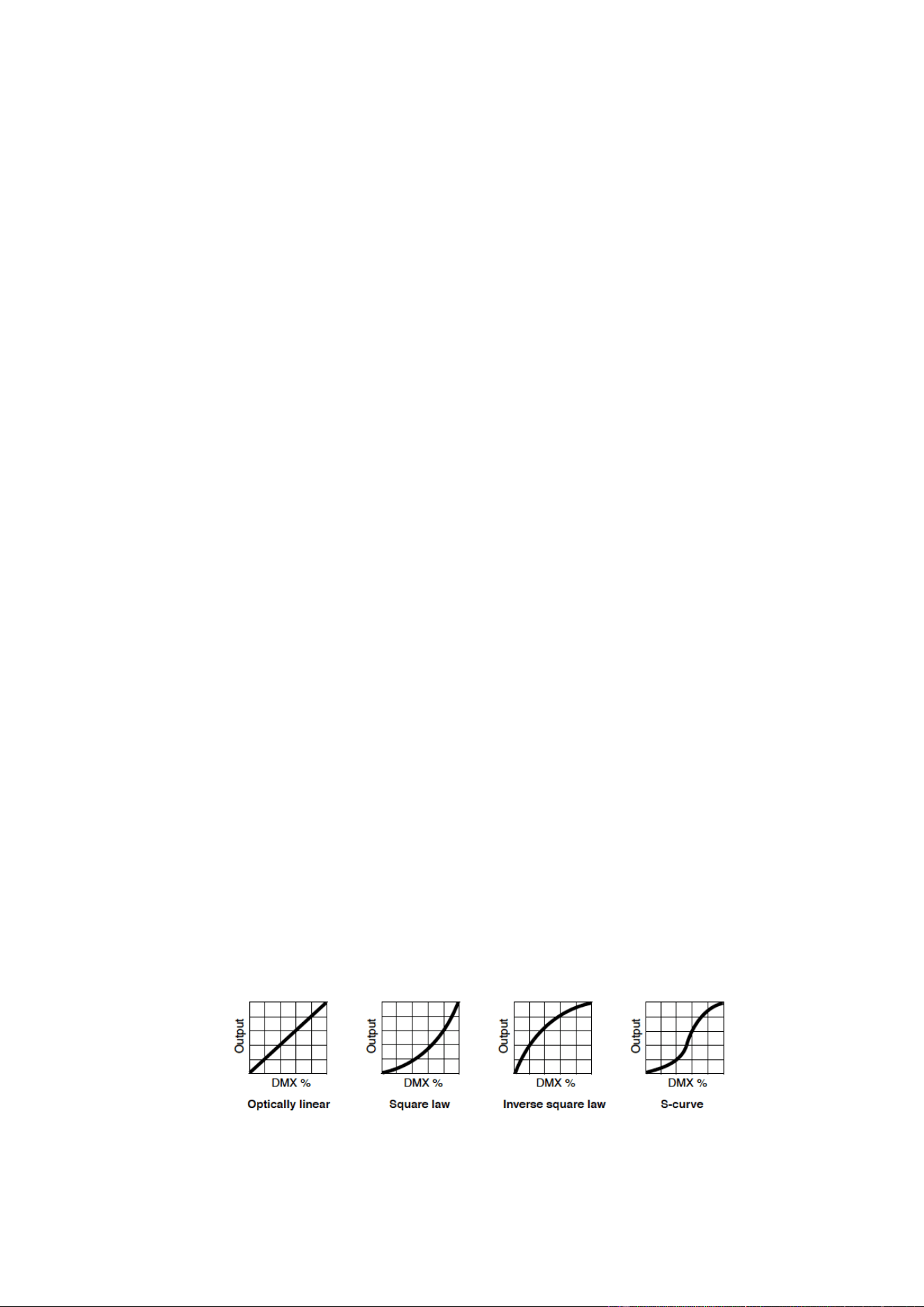
Dimming curves
Four dimming curves are available via RDM:
• Optically linear – The increase in light intensity appears to be linear as DMX value is increased.
• Square law (default setting) – light intensity control is finer at low levels and coarser at high levels.

8 Exterior Linear Pro Series User Manual
• Inverse square law – Light intensity control is coarser at low levels and finer at high levels.
• S-Curve – light intensity control is finer at low levels and high levels and coarser at medium levels.
Color mode
You can select from two color management options:
• Calibrated – All colors stay consistent at all times.
• Calibrated Extended (default setting) – The White point is calibrated, but you can saturate colors to
the maximum level available.
Default color temperature in segment DMX control
In Exterior Linear Pro QUAD variants, the segment DMX control modes offer RGB control only. The global
default color temperature is set to 4000 K. However, it is possible to adjust the default color temperature
via RDM. Using an RDM controller such as Martin Companion, you can enter the desired color
temperature from 1000 K to 12850 K using the MANUAL CTC VALUE adjustment function.
Power limit mode
You can set the maximum power consumption of Exterior Linear Pro fixtures via RDM. The power limit
mode settings let you adjust the balance between electrical power consumption versus light intensity.
Three options are available:
• Max. 12 watt per foot / 30 cm (default setting) – Gives maximum light intensity. Power consumption
will not exceed 12 W per foot / 30 cm length.
• Max. 10 watt per foot / 30 cm – Gives a small reduction in power consumption and light intensity.
• Max. 5 watt per foot / 30 cm – Gives a significant reduction in power consumption and light intensity.
This setting complies with the Californian ASHRAE standard.
Fixture information
Exterior Linear Pro fixtures can communicate the following information to the RDM controller:
• Basic fixture information – type and length of fixture.
• Name of product and manufacturer.
• Device label – This information can be edited by the user, providing a means of giving an individual
fixture its own ID number, for example.
• Currently installed firmware version.
• List of temperature sensors and sensor readouts.
• Number of hours fixture has had power applied since manufacture (non-resettable).
• Number of hours LEDs have been active since manufacture (non-resettable).
• Number of on/off power cycles since manufacture (non-resettable).
• Serial number – This is a factory-set serial number that cannot be changed.
Status messages
The Exterior Linear Pro features a self-diagnostic system that detects any issues concerning correct
operation or safety (temperature that exceeds safe level, for example) and communicates the issues as
status messages or warnings. These messages can be useful in connection with service and
maintenance.
It is possible to:
• Call up a list of any status messages that the fixture has stored in memory.
• View information on the messages.
• Clear the stored list of status messages.
Utilities
The following useful functions are available via RDM:
• Pixel flip – Lets you invert the order of the segments in 2/4/8-segment mode. This can greatly speed
up programming if fixtures are not all installed in the same orientation.
• Reset device – Carries out a full reset of all the fixture’s electronics.
• Perform self-test – The fixture carries out a sequence of functions designed to test the fixture.
Exterior Linear Pro Series User Manual 9
• Self-test description – Lets you select from various sequences that test the fixture’s functionality, the
fixture’s LEDs or every aspect of the fixture.
• Factory defaults – Deletes any custom settings that have been configured via RDM and returns the
fixture to its factory default settings.
Setting up standalone operation
Standalone operation in the Exterior Linear Pro requires the use of Martin Companion. This hardware
cable accessory and free software offers the following features:
• Simple PC-based user interface
• Programming from a remote location over the DMX link.
• Easy programming of multiple fixtures simultaneously
• Combining different types of Martin fixture in one stand-alone show
• Standalone show programming with possibility of automatic start when fixtures are powered on
• Programming of up to twenty scenes with global or individual fade and hold times
In standalone mode, fixtures display a ‘scene’ (a color and intensity) or a sequence of up to twenty scenes
if you use Martin Companion. Once scenes have been programmed, fixtures can display them without
needing a DMX signal.
To program standalone operation using Martin Companion:
1. Connect the Martin Companion Cable and a PC running the Martin Companion application to the
DMX link. Apply power to the fixtures on the DMX link that you want to program. If the fixtures have
not already been discovered by Martin Companion, wait until the Discovery counter stops. This will
indicate that all fixtures have been discovered.
2. Once all fixtures have been discovered and are shown in the list of connected fixtures, set them all to
the desired DMX Mode using the Mode column. The DMX Mode that you select for a fixture
determines what controls are available when you create scenes in the next steps.
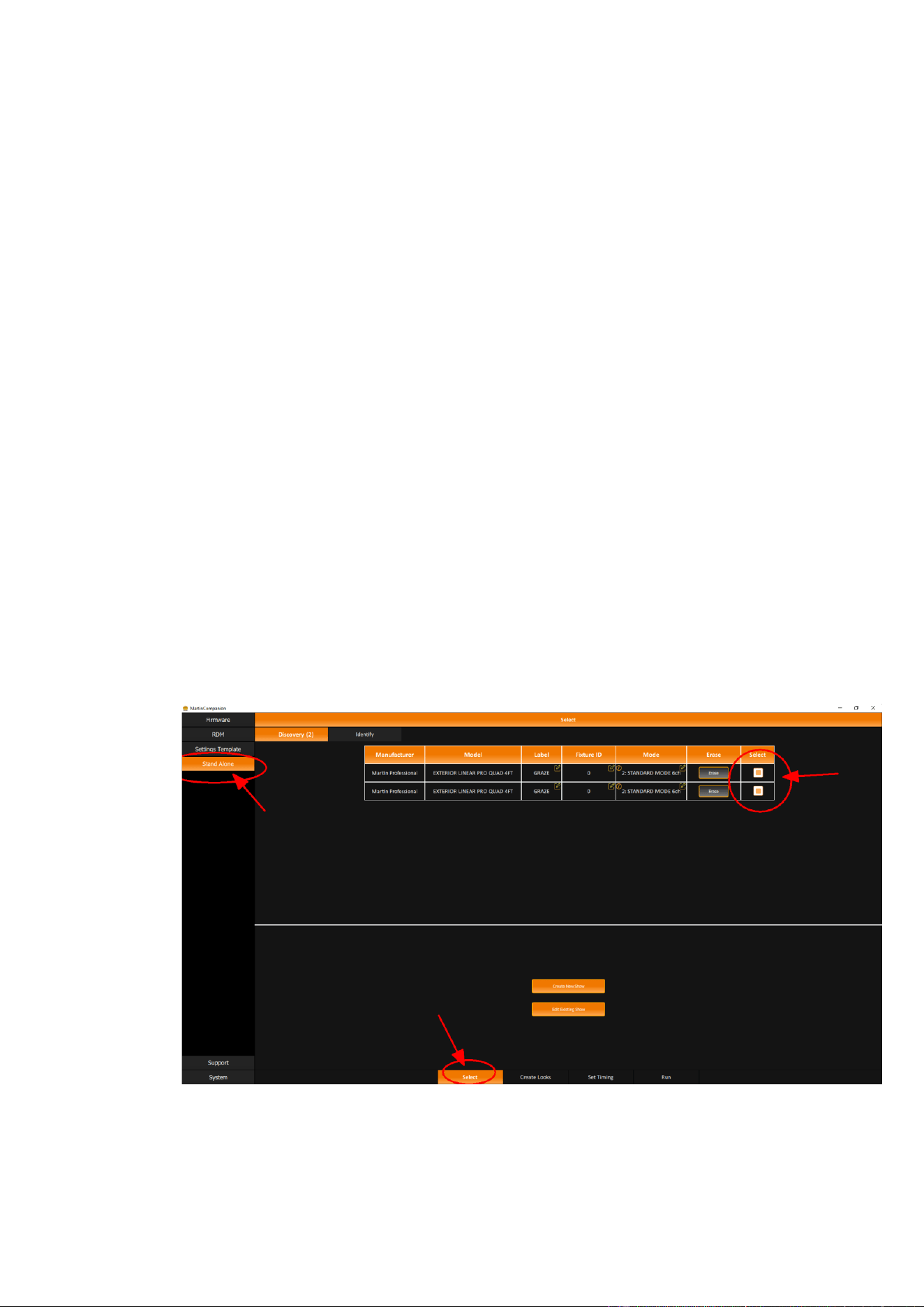
3. See screenshot below. Select the fixtures that you want to set up for stand-alone operation using the
checkboxes in the Select column, and then click Create New Show to continue to the next step (it is
also possible to edit an existing show that has already been programmed into the fixtures).
10 Exterior Linear Pro Series User Manual
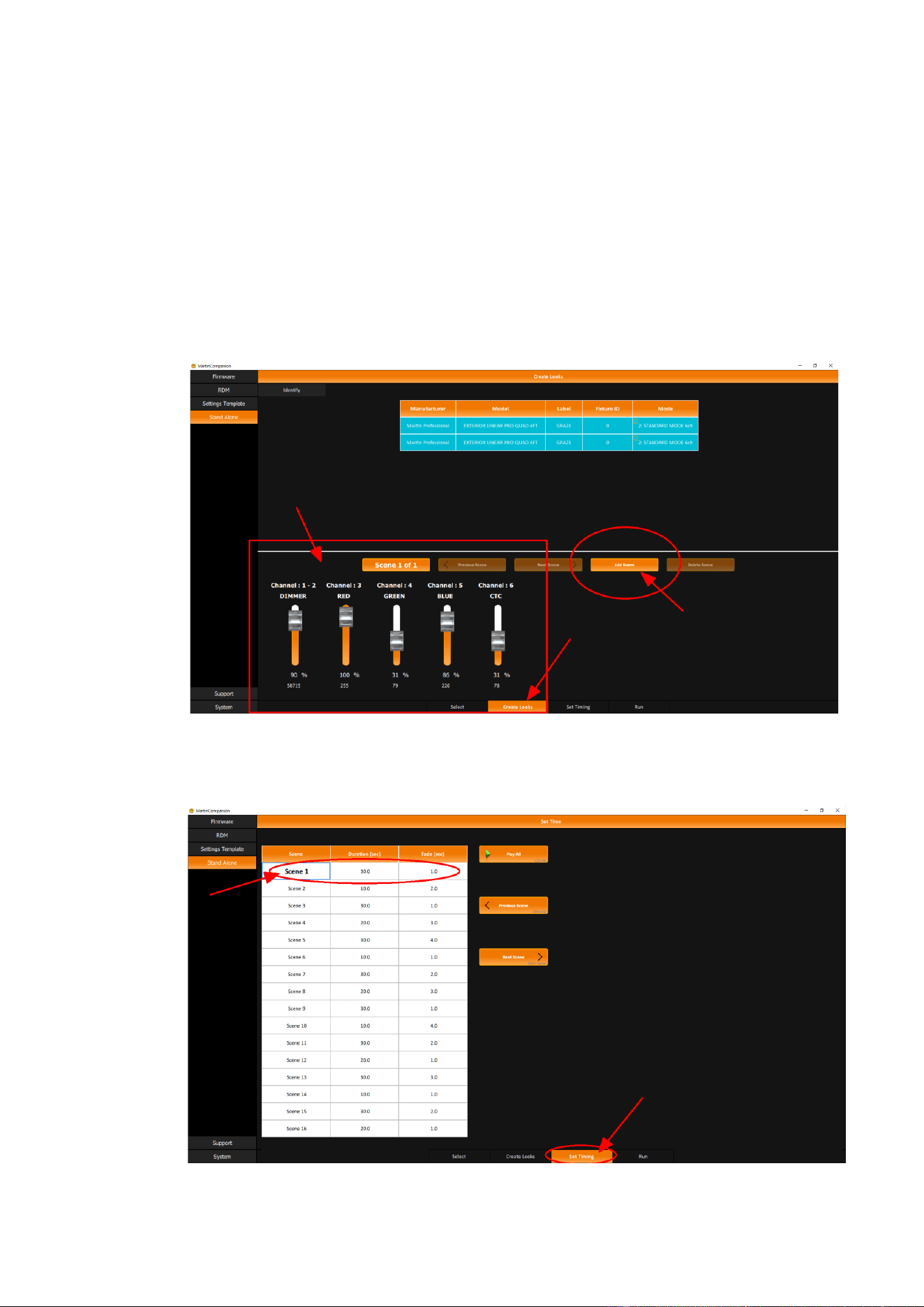
4. See screenshot below. Click on the Create Looks button to open the scene creation controls.
a. Select the fixture or fixtures that you want to control in the list at the top of the screen.
b. Create the desired look for the selected fixture(s) in Scene 1 using the sliders shown below. The
sliders shown depend on which DMX Mode you set for the fixtures in the previous step.
c. Select any other fixtures that you want to control in the list at the top of the screen.
d. Repeat steps b. and c. until you are happy with the output from ALL the fixtures in Scene 1.
e. To create a second scene, click on Add Scene.
f. Repeat steps a. to d. to create the desired look for all the fixtures in scene 2.
g. Repeat steps e. and f. to add more scenes.
h. You can step through the scenes that have been programmed using the Previous Scene and
Next Scene buttons.
i. When you have finished creating scenes, click on Set Timing to continue to the next step.
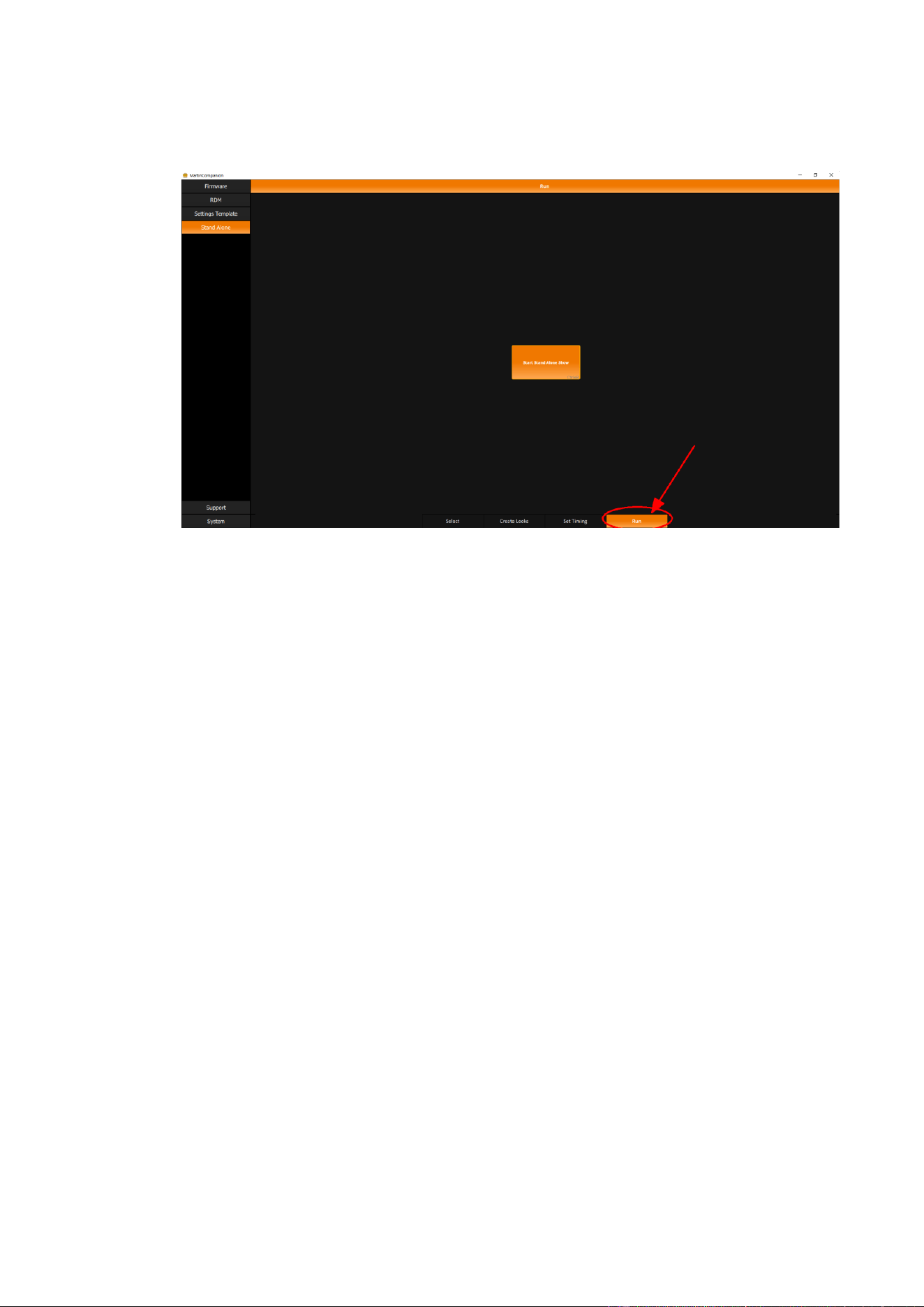
5. See screenshot below. On the Set Timing page, you can now set the Duration and Fade Time for
each scene. Simply select one or multiple cells to edit the timing values. You can click Play All to let
all fixtures play the recorded scenes with the entered Duration and Fader times. Once you are
satisfied with the result, click on Run to continue to the next step.
Exterior Linear Pro Series User Manual 11
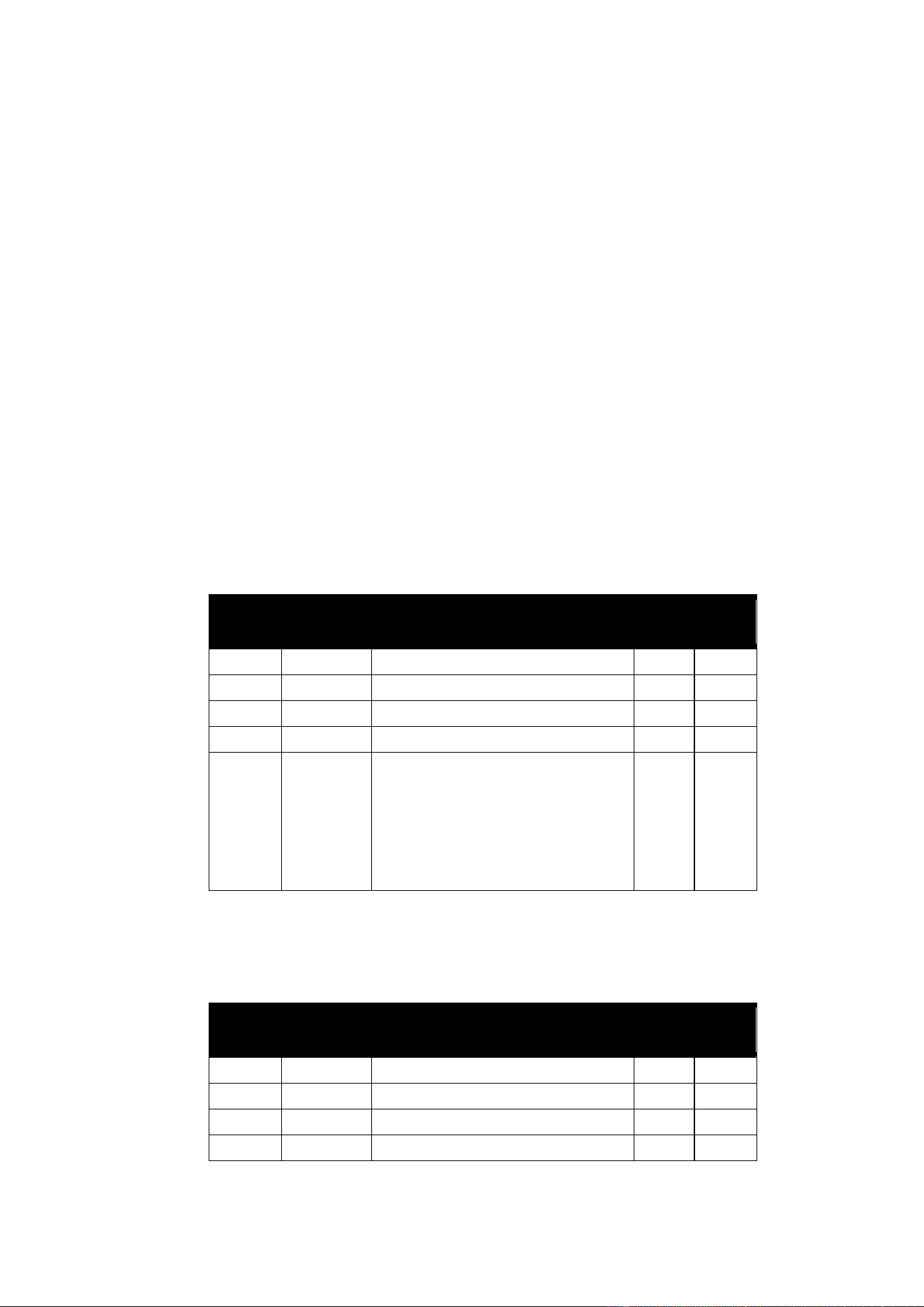
6. See screenshot below. In the Run tab, simply click on Start Stand Alone Show to finalize
programming. The application will now tell you to disconnect the DMX cable between Martin
Companion and the fixtures. Once you do that, the fixtures will start to run their standalone show.
Synchronized standalone operation
All fixtures programmed together for standalone operation will also synchronize the playback of their
standalone scenes. Fixtures need to be connected with each other using DMX cables (but not to a DMX
controller) to allow this synchronization to happen. The synchronization makes sure that all fixtures switch
to the same scene number with the same duration and fade time. But each fixture can have a different
look programmed into it for each scene.
Note that Martin Companion automatically assigns one fixture as the standalone host, and all the others
as clients. The host fixture only tells the client fixtures to “go to scene X with fade time Y”. The color /
dimmer level / CTC that each fixture uses in a specific scene is stored inside each fixture individually.
Again, not all fixtures have to show the same color in each scene. Only the duration and fade times are
synchronized.

12 Exterior Linear Pro Series User Manual
Operating the fixture
Warning! Read the Safety and Installation Manual that is included at the end of this User
Manual, paying particular attention to the Safety Precautions section, before operating
the fixture.
Be aware that the output of LEDs, like all light sources, changes gradually over many thousands of hours
of use. If you require products to perform to very precise color specifications, you may eventually need to
make small readjustments at the lighting controller.
Test sequences and fixture status
The Exterior Linear Pro Series Safety and Installation Manual that is included at the end of this User
Manual contains information on displaying fixture status codes and running test sequences that you may
find useful before starting fixture operation.
Controlling via DMX
Once you have set up fixtures’ DMX modes and DMX addresses via RDM, you can control fixtures using
the DMX controller that is connected to the installation.
See the ‘DMX protocols’ section at the end of this manual for details of the control options available.
Identifying fixtures in the installation
To help with programming scenes and controlling the installation, it is possible to send an RDM command
that causes a fixture to flash a signal so that you can identify it. To identify a fixture:
1. Black out all fixtures if you have been using them.
2. Send an IDENTIFY DEVICE unicast command to an individual fixture in the installation via RDM. The
fixture will respond by flashing white, letting you identify it. In Martin Companion you can simply
enable the “Identify” button in the toolbar, and then any fixture(s) you select will immediately identify
itself. You can even use arrow keys to navigate through the list of fixtures, with the corresponding
fixture flashing as soon as you get to it.
3. If your RDM-compatible DMX controller allows it, you can now identify the fixture at the controller.
Exterior Linear Pro Series User Manual 13
DMX protocols
QUAD color mixing models
QUAD models feature RGBW LEDs. The following DMX control modes are available:
All models
• Standard mode gives 16-bit control of overall fixture intensity, RGB control of the fixture using one
channel per color with White added automatically, and a CTC channel with color temperature variable
from 1000 K to 12 850 K in 50 K steps.
• Raw mode gives raw RGBW control of the fixture using one channel per color.
4 ft. models
• 8-segment mode (8 x 15 cm/6 in. segments)
• 4-segment mode (4 x 30 cm/1 ft. segments)
• 1-segment mode (1 x 120 cm/4 ft. segment)
give RGB control of segments. White is added automatically.
1 ft. models
• 2-segment mode (2 x 15 cm/6 in. segments)
• 1-segment mode (1 x 30 cm/1 ft. segment)
give RGB control of segments. White is added automatically.
In segment modes, you can adjust the global default color temperature via RDM.
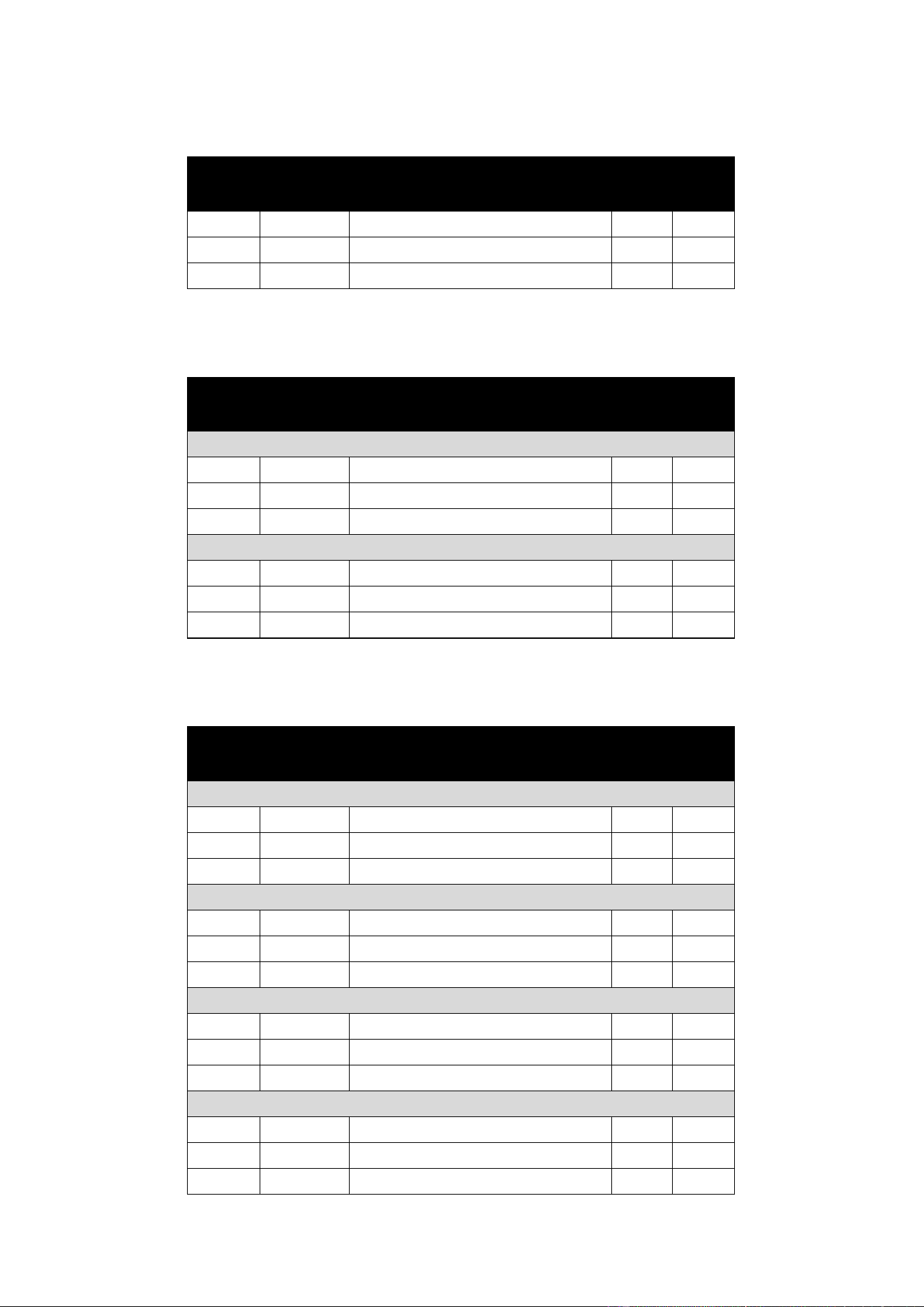
Standard Mode – 6 DMX channels
Channel
DMX Value
Function
Fade
type
Default
value
1 and 2
0-65535
Dimmer Overall intensity 0 – 100%
Fade
0
3
0-255
Red Intensity 0-100%
Fade
255
4
0-255
Green Intensity 0-100%
Fade
255
5
0-255
Blue Intensity 0-100%
Fade
255
6
0-18
19-77
78
79-127
128
129-254
255
Color Temperature Control
1000 K
1050 K to 3950 K in 50 K steps
4000 K
4050 K to 6450 K in 50 K steps
6500 K
6550 K to 12 800 K in 50 K steps
12 850 K
Fade
78
Raw Mode – 4 DMX channels
Channel
DMX Value
Function
Fade
type
Default
value
1
0-255
Red Intensity 0-100%
Fade
0
2
0-255
Green Intensity 0-100%
Fade
0
3
0-255
Blue 0-100%
Fade
0
4
0-255
White 0-100%
Fade
0
14 Exterior Linear Pro Series User Manual
1-segment Mode – 3 DMX channels
Channel
DMX Value
Function
Fade
type
Default
value
1
0-255
Red Intensity 0-100%
Fade
0
2
0-255
Green Intensity 0-100%
Fade
0
3
0-255
Blue 0-100%
Fade
0
2-segment Mode (1 ft. models only) – 6 DMX channels
Channel
DMX Value
Function
Fade
type
Default
value
Segment 1
1
0-255
Red Intensity 0-100%
Fade
0
2
0-255
Green Intensity 0-100%
Fade
0
3
0-255
Blue Intensity 0-100%
Fade
0
Segment 2
4
0-255
Red Intensity 0-100%
Fade
0
5
0-255
Green Intensity 0-100%
Fade
0
6
0-255
Blue Intensity 0-100%
Fade
0
4-segment Mode (4 ft. models only) – 12 DMX channels
Channel
DMX Value
Function
Fade
type
Default
value
Segment 1
1
0-255
Red Intensity 0-100%
Fade
0
2
0-255
Green Intensity 0-100%
Fade
0
3
0-255
Blue Intensity 0-100%
Fade
0
Segment 2
4
0-255
Red Intensity 0-100%
Fade
0
5
0-255
Green Intensity 0-100%
Fade
0
6
0-255
Blue Intensity 0-100%
Fade
0
Segment 3
7
0-255
Red Intensity 0-100%
Fade
0
8
0-255
Green Intensity 0-100%
Fade
0
9
0-255
Blue Intensity 0-100%
Fade
0
Segment 4
10
0-255
Red Intensity 0-100%
Fade
0
11
0-255
Green Intensity 0-100%
Fade
0
12
0-255
Blue Intensity 0-100%
Fade
0
Exterior Linear Pro Series User Manual 15
8-segment Mode (4 ft. models only) – 24 DMX channels
Channel
DMX Value
Function
Fade
type
Default
value
Segment 1
1
0-255
Red Intensity 0-100%
Fade
0
2
0-255
Green Intensity 0-100%
Fade
0
3
0-255
Blue Intensity 0-100%
Fade
0
Segment 2
4
0-255
Red Intensity 0-100%
Fade
0
5
0-255
Green Intensity 0-100%
Fade
0
6
0-255
Blue Intensity 0-100%
Fade
0
Segment 3
7
0-255
Red Intensity 0-100%
Fade
0
8
0-255
Green Intensity 0-100%
Fade
0
9
0-255
Blue Intensity 0-100%
Fade
0
Segment 4
10
0-255
Red Intensity 0-100%
Fade
0
11
0-255
Green Intensity 0-100%
Fade
0
12
0-255
Blue Intensity 0-100%
Fade
0
Segment 5
13
0-255
Red Intensity 0-100%
Fade
0
14
0-255
Green Intensity 0-100%
Fade
0
15
0-255
Blue Intensity 0-100%
Fade
0
Segment 6
16
0-255
Red Intensity 0-100%
Fade
0
17
0-255
Green Intensity 0-100%
Fade
0
18
0-255
Blue Intensity 0-100%
Fade
0
Segment 7
19
0-255
Red Intensity 0-100%
Fade
0
20
0-255
Green Intensity 0-100%
Fade
0
21
0-255
Blue Intensity 0-100%
Fade
0
Segment 8
22
0-255
Red Intensity 0-100%
Fade
0
23
0-255
Green Intensity 0-100%
Fade
0
24
0-255
Blue Intensity 0-100%
Fade
0
16 Exterior Linear Pro Series User Manual
CTC models
Color Temperature Control (variable CT white) models offer 0 to 100% intensity control and color
temperature control from 2700 K to 6500 K in 50 K steps. The following DMX control modes are available:
All models
• Standard mode gives 16-bit control of overall fixture intensity and a CTC channel with color
temperature variable from 2700 K to 6500 K in 50 K steps.
4 ft. models
• 8-segment mode (8 x 15 cm/6 in. segments)
• 4-segment mode (4 x 30 cm/1 ft. segments)
• 1-segment mode (1 x 120 cm/4 ft. segment)
give raw control of 2700 K, 4000 K and 6500 K white LEDs, allowing flexible control of color
temperature and intensity.
1 ft. models
• 2-segment mode (2 x 15 cm/6 in. segments)
• 1-segment mode (1 x 30 cm/1 ft. segment)
give raw control of 2700 K, 4000 K and 6500 K white LEDs, allowing flexible control of color
temperature and intensity.
Standard Mode – 3 DMX channels
Channel
DMX Value
Function
Fade
type
Default
value
1 and 2
0-65535
Dimmer Overall intensity 0 – 100%
Fade
0
3
0-51
52
53-77
78
79-127
128-255
Color Temperature Control
2700 K
2700 K
2750 K to 3950 K in 50 K steps
4000 K
4050 K to 6450 K in 50 K steps
6500 K
Fade
78
1-segment Mode – 3 DMX channels
Channel
DMX Value
Function
Fade
type
Default
value
1
0-255
2700 K Intensity 0-100%
Fade
0
2
0-255
4000 K Intensity 0-100%
Fade
0
3
0-255
6500 K Intensity 0-100%
Fade
0
Exterior Linear Pro Series User Manual 17
2-segment Mode (1 ft. models only) – 6 DMX channels
Channel
DMX Value
Function
Fade
type
Default
value
Segment 1
1
0-255
2700 K Intensity 0-100%
Fade
0
2
0-255
4000 K Intensity 0-100%
Fade
0
3
0-255
6500 K Intensity 0-100%
Fade
0
Segment 2
4
0-255
2700 K Intensity 0-100%
Fade
0
5
0-255
4000 K Intensity 0-100%
Fade
0
6
0-255
6500 K Intensity 0-100%
Fade
0
4-segment Mode (4 ft. models only) – 12 DMX channels
Channel
DMX Value
Function
Fade
type
Default
value
Segment 1
1
0-255
2700 K Intensity 0-100%
Fade
0
2
0-255
4000 K Intensity 0-100%
Fade
0
3
0-255
6500 K Intensity 0-100%
Fade
0
Segment 2
4
0-255
2700 K Intensity 0-100%
Fade
0
5
0-255
4000 K Intensity 0-100%
Fade
0
6
0-255
6500 K Intensity 0-100%
Fade
0
Segment 3
7
0-255
2700 K Intensity 0-100%
Fade
0
8
0-255
4000 K Intensity 0-100%
Fade
0
9
0-255
6500 K Intensity 0-100%
Fade
0
Segment 4
10
0-255
2700 K Intensity 0-100%
Fade
0
11
0-255
4000 K Intensity 0-100%
Fade
0
12
0-255
6500 K Intensity 0-100%
Fade
0
18 Exterior Linear Pro Series User Manual
8-segment Mode (4 ft. models only) – 24 DMX channels
Channel
DMX Value
Function
Fade
type
Default
value
Segment 1
1
0-255
2700 K Intensity 0-100%
Fade
0
2
0-255
4000 K Intensity 0-100%
Fade
0
3
0-255
6500 K Intensity 0-100%
Fade
0
Segment 2
4
0-255
2700 K Intensity 0-100%
Fade
0
5
0-255
4000 K Intensity 0-100%
Fade
0
6
0-255
6500 K Intensity 0-100%
Fade
0
Segment 3
7
0-255
2700 K Intensity 0-100%
Fade
0
8
0-255
4000 K Intensity 0-100%
Fade
0
9
0-255
6500 K Intensity 0-100%
Fade
0
Segment 4
10
0-255
2700 K Intensity 0-100%
Fade
0
11
0-255
4000 K Intensity 0-100%
Fade
0
12
0-255
6500 K Intensity 0-100%
Fade
0
Segment 5
13
0-255
2700 K Intensity 0-100%
Fade
0
14
0-255
4000 K Intensity 0-100%
Fade
0
15
0-255
6500 K Intensity 0-100%
Fade
0
Segment 6
16
0-255
2700 K Intensity 0-100%
Fade
0
17
0-255
4000 K Intensity 0-100%
Fade
0
18
0-255
6500 K Intensity 0-100%
Fade
0
Segment 7
19
0-255
2700 K Intensity 0-100%
Fade
0
20
0-255
4000 K Intensity 0-100%
Fade
0
21
0-255
6500 K Intensity 0-100%
Fade
0
Segment 8
22
0-255
2700 K Intensity 0-100%
Fade
0
23
0-255
4000 K Intensity 0-100%
Fade
0
24
0-255
6500 K Intensity 0-100%
Fade
0
Exterior Linear Pro Series User Manual 19
RDM functions
Exterior Linear Pro fixtures support the following RDM PIDs:
PID
Name
Description
GET
SET
Device discovery
0x0001
DISC_UNIQUE_BRANCH
Fixture discovery
N/A
N/A
0x0002
DISC_MUTE
Fixture discovery
N/A
N/A
0x0003
DISC_UN_MUTE
Fixture discovery
N/A
N/A
Device information
0x0060
DEVICE_INFO
Get basic fixture info
✓
0x0080
DEVICE_MODEL_DESCRIPTION
Product Name
✓
0x0081
MANUFACTURER_LABEL
Manufacturer Name
✓
0x0082
DEVICE_LABEL
Info label (user-settable)
✓
✓
0x8003
FIXTURE_ID
Fixture number (user- settable)
✓
✓
0x8700
SERIAL_NUMBER
Fixture serial number
✓
0x00C0
SOFTWARE_VERSION_LABEL
Firmware version
✓
0x0200
SENSOR_DEFINITION
Sensor description
✓
0x0201
SENSOR_VALUE
Sensor value
✓
✓
0x0400
DEVICE_HOURS
Fixture hours (non-resettable)
✓
✓
0x0401
LAMP_HOURS
LED hours (non-resettable)
✓
✓
0x0405
DEVICE_POWER_CYCLES
Fixture power cycles (non-
resettable)
✓
✓
DMX setup
0x00E0
DMX_PERSONALITY
DMX mode
✓
✓
0x00E1
DMX_PERSONALITY_DESCRIPTION
DMX mode details
✓
0x00F0
DMX_START_ADDRESS
DMX start address
✓
✓
0x0121
SLOT_DESCRIPTION
DMX channel details
✓
Device management
0x0050
SUPPORTED_PARAMETERS
Parameter discovery
✓
0x0051
PARAMETER_DESCRIPTION
Parameter discovery
✓
0x0090
FACTORY_DEFAULTS
Reset to factory defaults
✓
✓
0x1000
IDENTIFY_DEVICE
Identify fixture in rig
✓
✓
0x1001
RESET_DEVICE
Reset fixture
✓
0x1020
PERFORM_SELFTEST
Run self-test
✓
✓
0x1021
SELF_TEST_DESCRIPTION
Self-test description
✓
0x8004
COLOR_MODE
Set color mode
✓
✓
0x8310
DIMMER_CURVE
Set dimmer curve
✓
✓
0x832F
PIXEL_FLIP
Invert order of segments
✓
✓
0x8335
POWER_LIMIT_MODE
Max. power per foot setting
✓
✓
0x8339
MANUAL_CTC_VALUE
Set default color temp. in
Segment DMX modes
✓
✓
Status messages
0x0020
QUEUED_MESSAGE
Get Queued Messages
✓
0x0030
STATUS_MESSAGES
Get Status/Error Information
✓
0x0031
STATUS_ID_DESCRIPTION
Status/Error Description
✓
0x0032
CLEAR_STATUS_ID
Clear Status/Error Queue
✓
✓

20 Exterior Linear Pro Series User Manual
PID
Name
Description
GET
SET
Standalone operation
0x1030
CAPTURE_PRESET
Capture current DMX values for
use as standalone preset
✓
0x1031
PRESET_PLAYBACK
Play back standalone preset
✓
✓
0x8220
MANUAL_MODE_OVERRIDE
Remote manual control
✓
✓
0x810B
PRESET_PLAYBACK_LIMIT
Standalone cue counter
✓
✓
0x8101
SYNCHRONIZED
Sync mode in standalone
✓
✓
0x810C
OFFLINE_MODE
Set behavior when DMX stops
✓
✓
Exterior Linear Pro Series User Manual 21
Disposing of this product
Martin® products are supplied in compliance with Directive 2012/19/EC
of the European Parliament and of the Council of the European Union on
WEEE (Waste Electrical and Electronic Equipment), where applicable.
Help preserve the environment! Ensure that this product is recycled at
the end of its life. Your supplier can give details of local arrangements for
the disposal of Martin products.
Compliance and specifications
See the Safety and Installation Manual attached to this user manual for details of this product’s
compliance with national and international standards, FCC rules etc. See the Martin website at
www.martin.com for technical specifications for this product.

www.martin.com
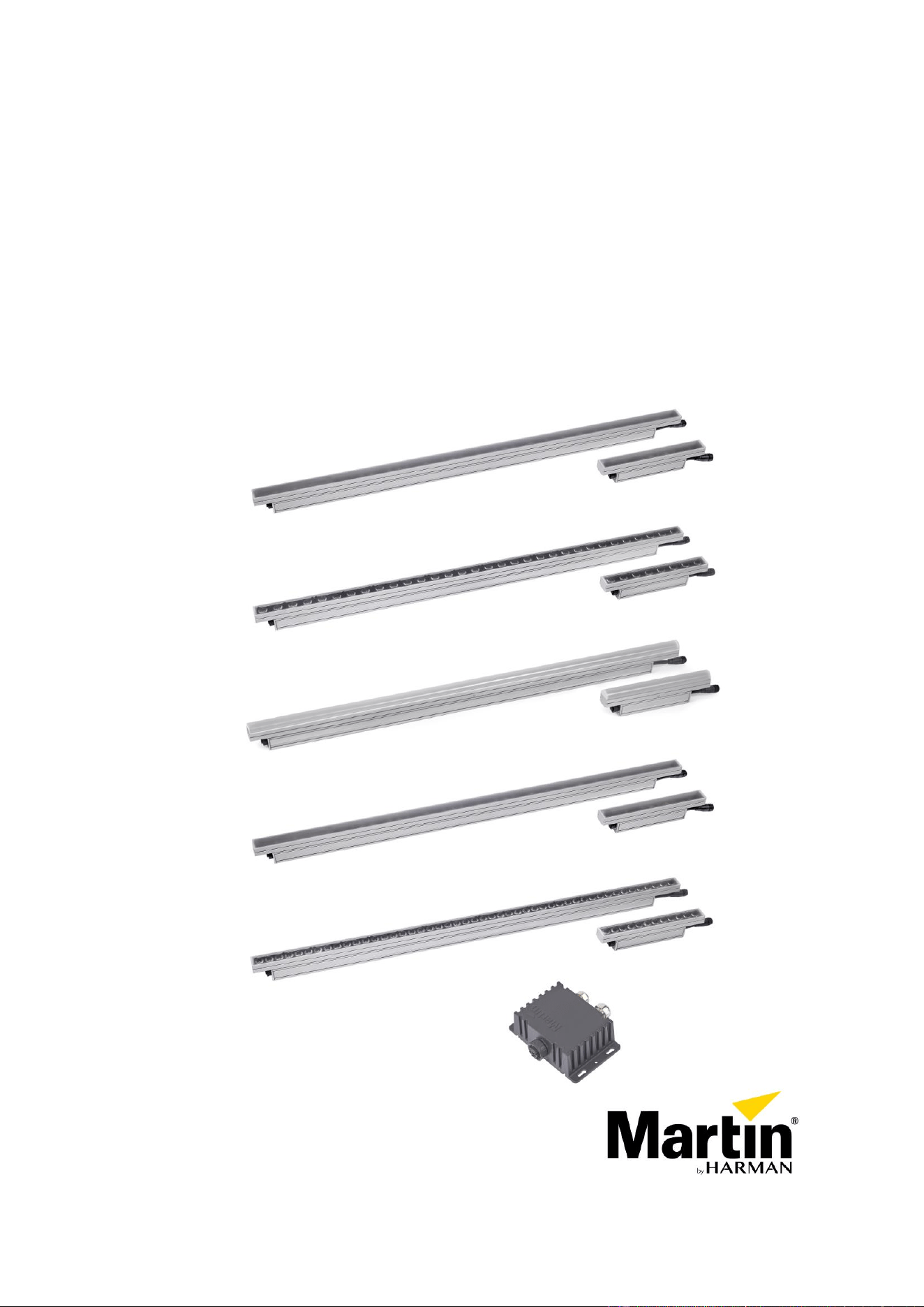
Exterior Linear Pro Series
Exterior Linear Pro QUAD Cove and QUAD Graze
Exterior Linear Pro QUAD DV
Exterior Linear Pro CTC Cove and CTC Graze
Safety and Installation manual
QUAD Cove
QUAD Graze
CTC Cove
QUAD DV
CTC Graze
Junction Box Power DMX to PD

Table of contents
Dimensions .......................................................................................................... 3
Safety information ................................................................................................ 8
Introduction ........................................................................................................ 11
General information ...................................................................................... 11
Before using the product for the first time ....................................................... 11
Physical installation ............................................................................................ 12
Fixture location ............................................................................................. 12
Mounting the fixture ...................................................................................... 12
Mounting bracket accessories ....................................................................... 13
AC power and data connection ........................................................................... 15
Power requirements ...................................................................................... 15
Safety limits for chains of fixtures .................................................................. 15
System layout ............................................................................................... 16
Connecting via the Martin Junction Box ......................................................... 16
Interconnecting a chain of fixtures ................................................................. 17
Data network requirements ........................................................................... 18
Accessories ....................................................................................................... 19
Installing a glare shield .................................................................................. 19
Installing a louvre .......................................................................................... 19
Installing a microlens diffuser (Graze fixtures only) ......................................... 20
Maintenance ...................................................................................................... 21
Running test sequences ................................................................................ 21
Managing humidity ........................................................................................ 22
Cleaning ....................................................................................................... 22
©2022-2023 HARMAN PROFESSIONAL DENMARK ApS. All rights reserved. Features, specifications and appearance
are subject to change without notice. HARMAN PROFESSIONAL DENMARK ApS and all affiliated companies disclaim
liability for any injury, damage, direct or indirect loss, consequential or economic loss or any other loss occasioned by
the use of, inability to use or reliance on the information contained in this document. Martin is a registered trademark of
HARMAN PROFESSIONAL DENMARK ApS registered in the United States and/or other countries.
HARMAN PROFESSIONAL DENMARK ApS, Olof Palmes Allé 44, 8200 Aarhus N, Denmark
HARMAN PROFESSIONAL SOLUTIONS U.S., 8500 Balboa Blvd., Northridge CA 91329, USA
www.martin.com
Exterior Linear Pro Safety and Installation Manual (Multi-Language) Revision B, P/N 5140733-00
Martin® Exterior Linear Pro Series Safety and Installation Manual 3
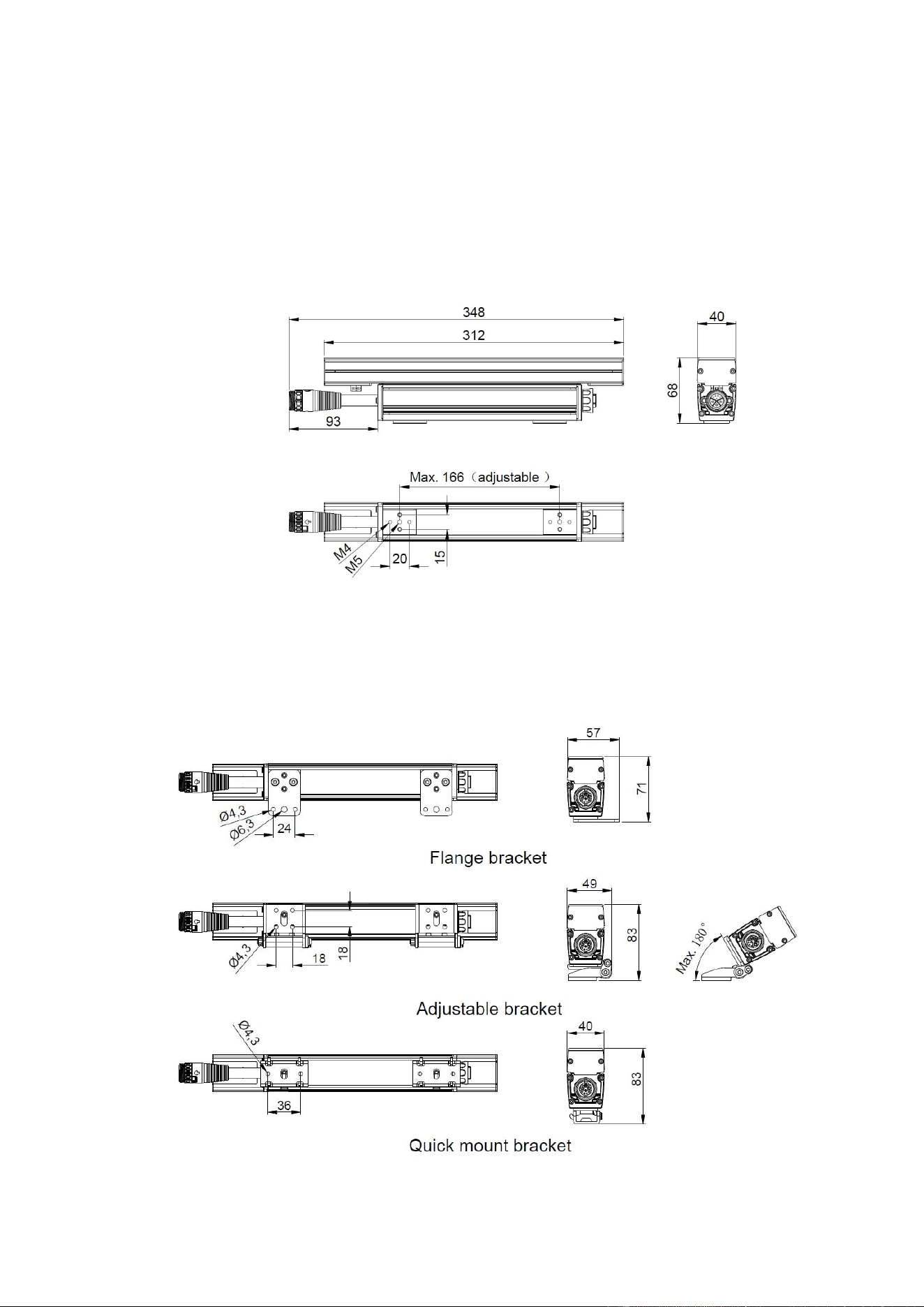
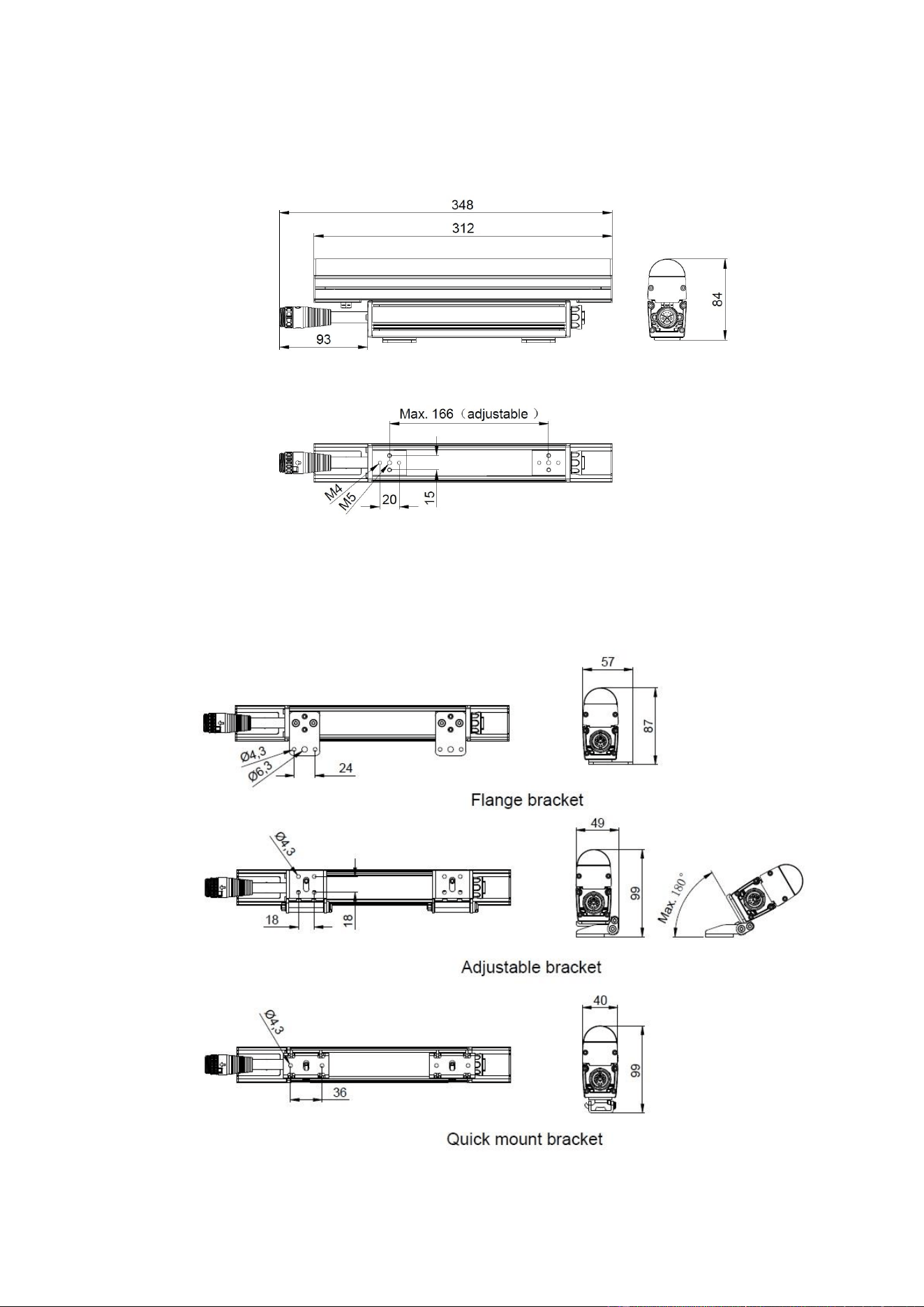
Dimensions
All dimensions are given in millimeters
Exterior Linear Pro QUAD Graze, QUAD Cove and CT 1 ft.
Exterior Linear Pro QUAD Graze, QUAD Cove and CT 1 ft.
with mounting bracket accessories
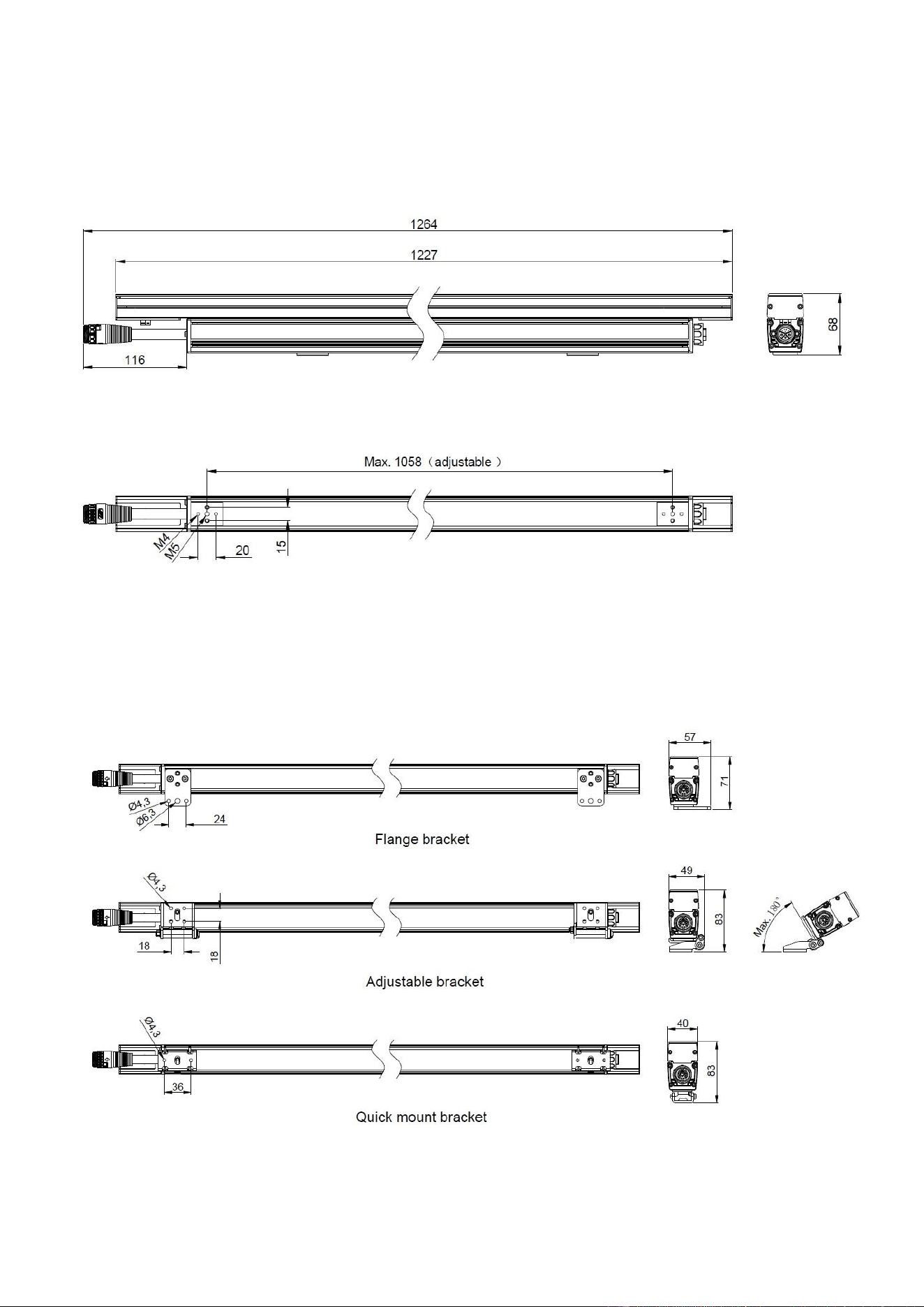
4 Martin® Exterior Linear Pro Series Safety and Installation Manual
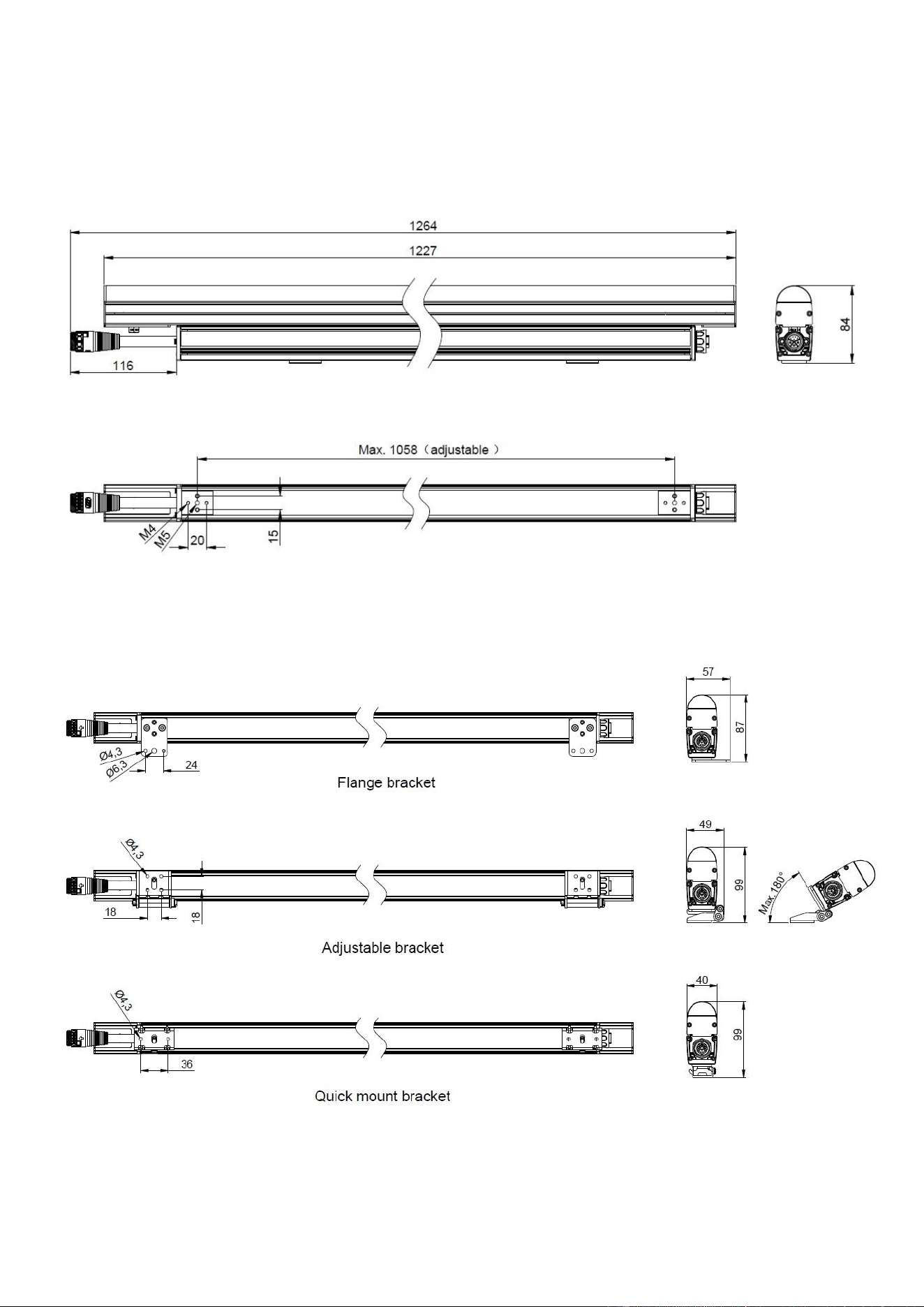
Exterior Linear Pro QUAD Graze, QUAD Cove and CT 4 ft.
Exterior Linear Pro QUAD Graze, QUAD Cove and CT 1 ft.
With mounting bracket accessories
Martin® Exterior Linear Pro Series Safety and Installation Manual 5
Exterior Linear Pro QUAD DV 1 ft.
Exterior Linear Pro QUAD DV 1 ft.
with mounting bracket accessories
6 Martin® Exterior Linear Pro Series Safety and Installation Manual
Exterior Linear Pro QUAD DV 4 ft.
Exterior Linear Pro QUAD DV 4 ft.
with mounting bracket accessories
Martin® Exterior Linear Pro Series Safety and Installation Manual 7
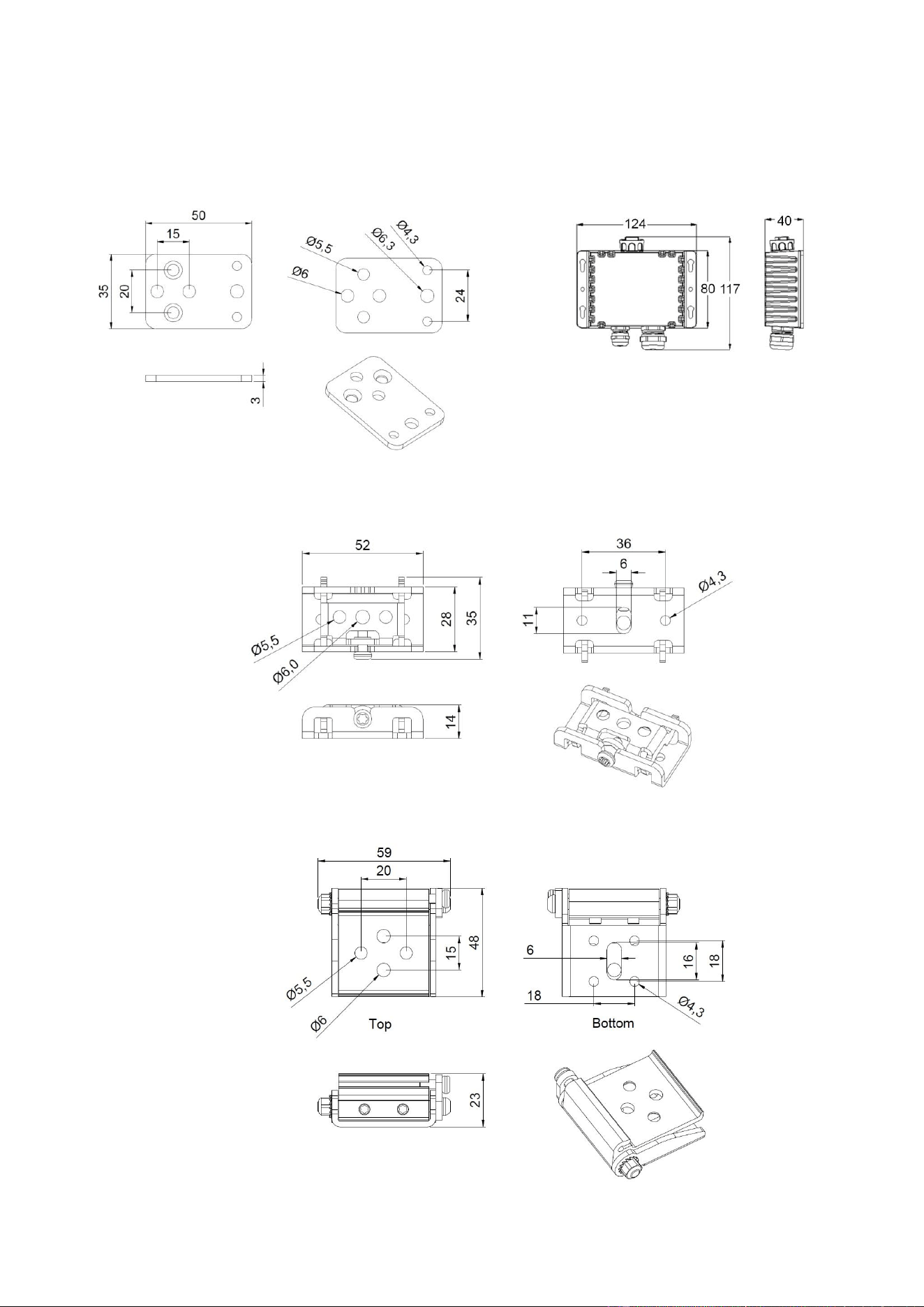
Accessories
Flange bracket Junction box, power DMX to PD
Quick mount bracket
Adjustable bracket
8 Martin® Exterior Linear Pro Series Safety and Installation Manual
Safety information
WARNING!
Read the safety precautions in this manual before installing, operating or
servicing this product.
The following symbols are used to identify important safety information on the product and in this manual:
Warning!
Safety hazard.
Risk of severe
injury or
death.
Warning!
Powerful light
emission. Risk
of eye injury.
Warning!
See user
documentation
for important
safety
information.
Warning!
Hazardous
voltage. Risk
of lethal or
severe electric
shock.
Warning!
Fire hazard.
Warning!
Hot surfaces.
Warning! Risk Group 2 product according to EN 62471. This product produces intense
light output that may be hazardous if suitable precautions are not taken. Do not view the
light output with optical instruments or any device that may concentrate the beam. Do not
stare directly into the beam.
This product presents risks of severe injury or death due to fire and burn hazards,
electric shock and falls if the safety precautions in this manual are not followed.
Read this manual before installing, powering or servicing the fixture. Follow the safety
precautions and note all warnings and information in this Safety and Installation Manual,
in the Exterior Linear Pro User Manual and printed on the fixture.
The latest versions of this Safety and Installation Manual and the Exterior Linear Pro
User Manual are available for download from the Exterior Linear Pro area of the Martin®
website at www.martin.com. Before you install, operate or service the fixture, check the
Martin website and make sure that you have the latest user documentation for the fixture.
Document revisions are indicated at the bottom of page 2.
This product is for professional use only. It is not for household use. Respect all locally
applicable laws, codes and regulations when installing, powering, operating or servicing
the fixture. Install, operate and service Martin products and accessories only as directed
in their user documentation, or you may create a safety hazard or cause damage that is
not covered by product warranties.
The latest software, manuals and other documentation for all Martin products are
available for download at www.martin.com
Technical Support
If you have questions about how to install or operate the fixture safely, please contact
Harman Professional Technical support:
• For technical support in North America, please contact
ProTechSupportUSA@harman.com, phone: (844) 776-4899
• For technical support outside North America, please contact your national distributor.
Protection from electric shock
Ensure that the fixture is electrically connected to ground (earth).
Disconnect the fixture from AC power when not in use.
Shut down power to the entire installation at the main power distribution board and lock
out power before connecting or disconnecting cables and before carrying out any other
installation or maintenance work.
Do not connect or disconnect a live hybrid (power + data) cable.
Martin® Exterior Linear Pro Series Safety and Installation Manual 9
The fixture accepts AC power at 100 - 277 V nominal, 50 or 60 Hz. Do not connect it to
power at any other voltage or frequency.
Use only a source of AC power that complies with local building and electrical codes and
has both overload and ground-fault (earth-fault) protection.
Use a cable with 15 AWG / 2.5 mm
2
minimum conductor size to connect the junction box
to AC power.
Isolate the fixture from power immediately if any seal, cover, cable, or other component
is damaged, defective, deformed or showing signs of overheating. Do not reapply power
until repairs have been completed.
Before using the fixture, check that all power distribution equipment and cables are in
perfect condition, are rated for the current requirements of all connected devices, are
protected to IP66 minimum and are of suitable type for the location (including water,
pollution, temperature and UV resistance).
Do not immerse the fixture in water or any other fluid.
Do not install the fixture in a location where flooding may occur.
Do not open the fixture or remove any cover. Refer any service operation not described
in this manual to an authorized Martin Service partner.
The light source in this fixture is not user-replaceable. When the light source LEDs reach
the end of their service life, they may be replaced only by Martin Service or an authorized
Martin Service agent.
The external flexible cable (cord) of this fixture cannot be replaced. If the cord is
damaged, the fixture must be sent to Martin Service or an authorized Martin Service
agent for repair.
Protection from burns and fire
Do not operate the fixture if the ambient temperature (Ta) exceeds 45° C (113° F).
The surface of the fixture can reach up to 65° C (149° F) if the fixture is operated at the
maximum permitted ambient temperature. Ensure that accidental physical contact with
the fixture is impossible. Allow the fixture to cool for at least 5 minutes before handling.
Do not aim the fixture towards combustible materials (fabric, wood, paper etc.) that are
within 10 cm (4 in.) of the fixture.
Keep the fixture well away from flammable materials (volatile liquids etc.).
Allow at least 2 cm (3/4 in.) free space around the fixture. Ensure that there is free and
unobstructed airflow around the fixture.
Do not attempt to bypass thermostatic switches or fuses.
Do not modify the fixture in any way not described in this manual or install other than
genuine Martin parts. Do not stick filters, masks or other materials onto any lens or other
optical component. Use only accessories approved by Martin to modify the light output.
Protection from eye injury
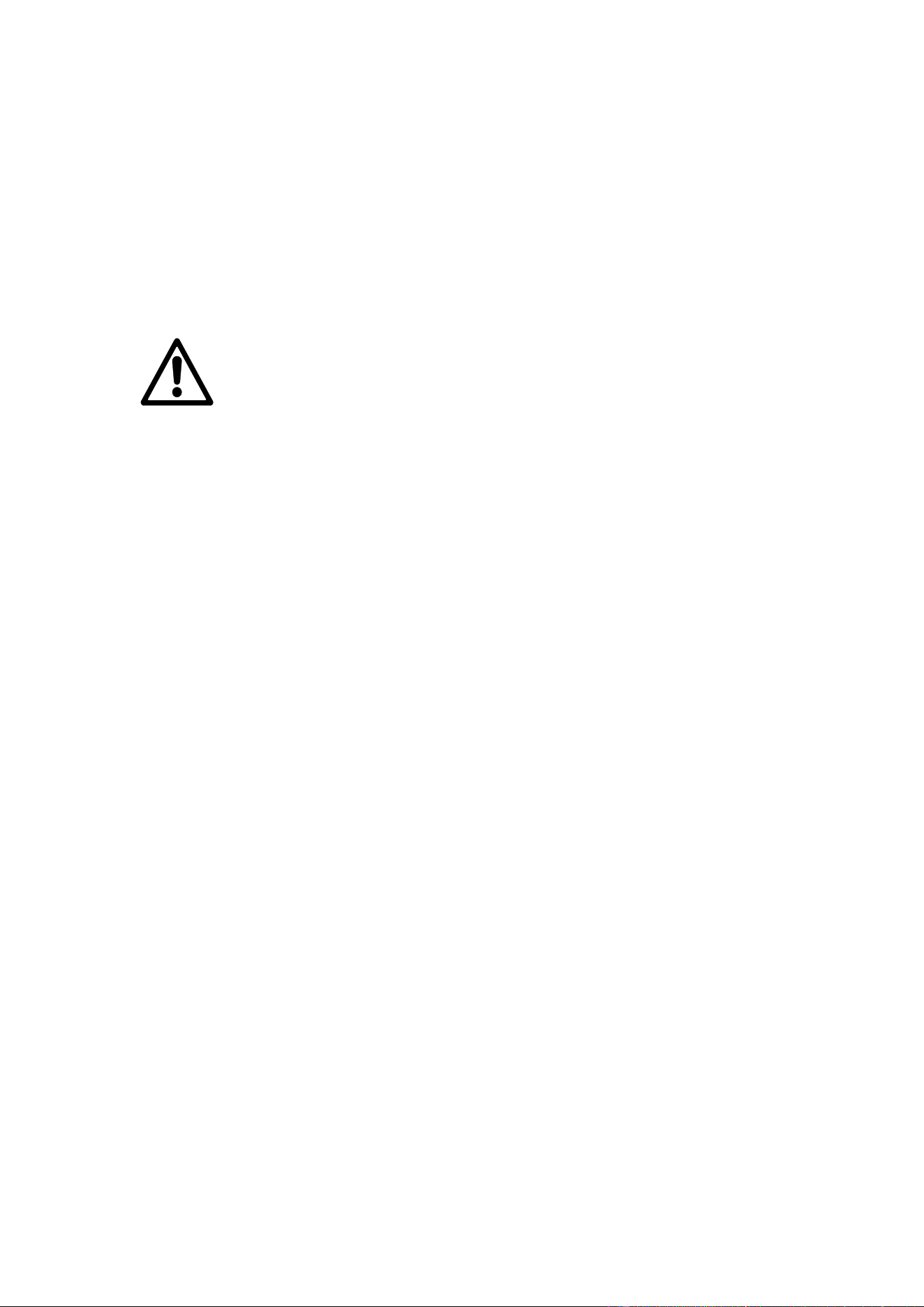
Exterior Linear Pro fixtures fall into the following risk groups according to EN 62471 at
the distances indicated:
The risk group distances given above apply to the light output from one fixture only. If
fixtures are operated in combination, light intensity can increase. In this case consult a
lighting professional for safety recommendations.
Position the fixture so that prolonged staring into the light output at less than 9.2 m
(30.2 ft.) from the fixture is not expected.
Do not look directly into the fixture’s light output.
10 Martin® Exterior Linear Pro Series Safety and Installation Manual
Do not look at the light output with magnifiers, telescopes, binoculars or similar optical
instruments that may concentrate the light output.
Ensure that persons are not looking directly into the front of the fixture when the product
lights up suddenly. This can happen when power is applied, when the product receives a
DMX signal, or when an RDM command is sent to the fixture.
Shut down power to the fixture when the fixture is not in use.
Provide well-lit conditions to reduce the pupil diameter of anyone working on or near the
fixture.
Wear protective glasses and other PPE (personal protective equipment) when working
on or near the fixture.
Protection from injury
Fasten the fixture securely to a fixed surface or structure when in use. The fixture is not
portable when installed.
The EPA (Effective Projected Area) of all fixtures in the Exterior Linear Pro series is
0.04 m² (0.44 ft.
2
) per foot (300 mm) of fixture length. Use this figure as a starting point
when calculating the wind resistance requirements of supporting structures.
The weight of the fixtures in the Exterior Linear Pro series is as follows:
• All models, 1.02 ft. (312 mm) version: 0.85 kg (1.9 lbs.)
• All models, 4.02 ft. (1227 mm) version: 2.8 kg (6.2 lbs.)
Ensure that all supporting structures, surfaces, fasteners and lifting equipment can bear
the weight of all the devices that they are intended to support plus an adequate safety
margin, and that they conform to all local building and safety regulations.
Ensure that any accessory such as a glare shield is securely fastened so that it cannot
fall, causing injury or damage.
Freely hanging cables present a safety hazard. To reduce the risk of injury, fix all flexible
wiring connected to this luminaire effectively to the installation surface or structure if the
wiring is within arm's reach.
Block access below the work area and work from a stable platform whenever installing,
setting up, adjusting, servicing or cleaning the fixture.
Do not operate the fixture with missing or damaged covers, shields or any optical
component.
If an operating problem occurs, stop using the fixture immediately and disconnect it from
power. Do not attempt to use a fixture that is obviously damaged.

Martin® Exterior Linear Pro Series Safety and Installation Manual 11
Introduction
The Exterior Linear Pro Series from Martin® is a line of rugged LED-based outdoor lighting fixtures that
are available in the following configurations:
QUAD variants
Exterior Linear Pro QUAD variants feature RGBW LEDs and offer RGB control with automatic addition of
White. They have 8 x LEDs per foot (30 cm). QUAD fixtures have a dedicated color temperature control
channel which accurately follows the black body curve and allows lighting designers to set their favorite
default color temperature.
QUAD fixtures are available in the following models:
• Graze (15° native beam angle)
• Cove (100° native beam angle)
• DV (Direct View with round diffuser)
CTC variants
Exterior Linear Pro Controllable Color Temperature (CTC) variants feature even higher light quality and
efficacy than QUAD variants. They offer white CT mixing with 3 x discrete color LEDs (2700 K, 4000 K and
6500 K) for high efficacy, with 12 x LEDs per foot (30 cm).
CTC fixtures are available in the following models:
• Graze (9° native beam angle)
• Cove (100° native beam angle)
General information
See the Martin website at www.martin.com for technical specifications for the Exterior Linear Pro series.
Variants
All fixtures are available in 1.02 ft. (312 mm) and 4.02 ft. (1227 mm) lengths.
Besides these two length options, three types of fixture are available:
• Cove variants are designed for a range of indirect lighting applications.
• Graze variants are designed for illumination of walls or other surfaces.
• DV variants are designed for direct viewing and feature 6-inch (15 cm) segment control for low-
resolution content.
Mounting brackets
Fixtures are supplied with sliding plates on the rear of the housing that accept the different types of
mounting bracket that are available from Martin as accessories (see the Exterior Linear Pro area of the
Martin website at www.martin.com for details). Brackets are sold separately from fixtures so that you can
choose the type of bracket that best matches a specific installation or location. The sliding plate system
also allows for easy design of custom brackets to cover special installation needs.
Asymmetric diffusers for Graze variants
Microlens asymmetric diffuser film accessories are available for Graze variants only. The diffusers give
additional beam angle options. See the photometrics information in the Exterior Linear Pro area of the
Martin website at www.martin.com for details.
Before using the product for the first time
1. Read the ‘Safety information’ chapter starting on page 8 before installing, operating or servicing the
fixture.
2. Unpack and ensure that there is no transportation damage before using the fixture. Do not attempt to
operate a damaged fixture.
3. Before operating, ensure that the voltage and frequency of the power supply match the power
requirements of the fixture.
4. Remove the protective film from the front lens when you have finished installing the fixture.
5. If fixtures are exposed to a sudden temperature change, give them time to warm or cool to the
ambient temperature before applying power. This will help avoid damage due to condensation.
6. Check the support pages on the Martin Professional website at www.martin.com for the most recent
user documentation and technical information about the fixture. Martin user manual revisions are
identified by the revision letter at the bottom of the inside cover.
12 Martin® Exterior Linear Pro Series Safety and Installation Manual
Physical installation
Warning! Read the ‘Safety information’ chapter starting on page 8 before installing,
operating or servicing the fixture.
Warning! The safety and suitability of lifting equipment, installation location, anchoring
method, mounting hardware and electrical installation are the responsibility of the
installer. All local safety regulations and legal requirements must be observed when
installing and connecting the Exterior Linear Pro Series. Installation must be carried out
by qualified professionals only.
Warning! Install the Martin Junction Box Power Data to PD so that cables enter it
horizontally. This will minimize the risk of water pooling at cable glands.
Important! See the dimensions drawings at the beginning of this manual.
Important! Allow for thermal expansion by leaving 2 mm (0.08 in.) free space at the
ends of fixtures and between fixtures installed in a line. The cable tails on fixtures are
designed to give a distance of 2 - 3 mm between fixtures.
Contact your Martin supplier for assistance if you have any questions about how to install this fixture
safely.
Fixture location
Exterior Linear Pro fixtures are intended for outdoor use. With an IP rating of 66, they are dust-resistant
and able to withstand powerful water jets, but they are not submersible. Fixtures require free and
unobstructed airflow around them to ensure adequate cooling.
Observe the following limitations in selecting a location:
• Respect the limitations listed in the ‘Safety information’ chapter starting on page 8.
• Do not allow water to collect on or near the pressure relief valve
located on the rear of the fixture behind the cable tail (see
drawing on right). Do not install the fixture in such a way that
water can form a pool covering the valve membrane.
• Ensure sufficient drainage to cope with the heaviest rainfall.
Make sure that water can drain away from the installation area
at least as fast as it can enter it.
• Do not bury or locate the fixture in an unventilated space.
• If the fixture is operated at the maximum permitted ambient temperature, the housing can reach a
temperature of up to 65° C (149° F). Restrict public access or locate the fixture so that it cannot
accidentally be touched.
Mounting the fixture
Warning! All fasteners used to mount Exterior Linear Pro fixtures must
be corrosion-resistant and strong enough to mount the fixture safely.
Install a washer directly under the head of each fastener when
anchoring mounting brackets to the installation surface.
Warning! When fastening fixtures to a surface or structure using the
sliding plates in the back of fixtures, either alone or in combination with
mounting brackets, use a minimum of two (2) sliding plates per fixture
The fixture can be mounted in any orientation.
The fixture and mounting brackets must be securely fastened to a suitable surface or structure that can
safely support the weight of all fixtures, cables and accessories. using suitable mechanical fasteners. Do
not stand a fixture on a surface or leave it where it can be moved or fall over. Fasteners must be high-
strength, corrosion-resistant (recommended minimum properties: stainless steel A4-70 grade according to
ISO 3506 or steel grade 8.8 according to ISO 898-1). Any nuts used must be self-locking.
Refer to ‘Interconnecting a chain of fixtures’ on page 17 when connecting each fixture’s hybrid (power and
data) input to the output of the previous fixture.
Leave a minimum of 2 mm (0.08 in.) free space at the end of each fixture and between fixtures installed in
a line in order to allow for thermal expansion.
Martin® Exterior Linear Pro Series Safety and Installation Manual 13
The fixture, sliding plates in the rear of the fixture, and mounting bracket accessories from Martin are
manufactured in corrosion-resistant anodized aluminum. Avoid direct contact with other types of metal, as
this can cause galvanic corrosion.
• When fastening a mounting bracket or fixture to a metal surface that is not anodized aluminum, use an
electrically insulating material (such as rubber or plastic) or coating between the mounting bracket and
the other metal.
• Use a non-conductive coating such as Delta Seal on fasteners (screws, bolts, washers, etc.) where
they come into contact with the mounting bracket.
Installing fixtures will usually be easiest if you make the power/data connection each time you add a new
fixture to the installation. See ‘Interconnecting a chain of fixtures’ on page 17.
Fixtures are supplied with a film stuck to the front lens to protect from scratches. Remove this protective
film when you have finished installing the fixture.
You can use the glare shield accessory described later in this manual to help you install a row of fixtures in
a straight line.
Mounting bracket accessories
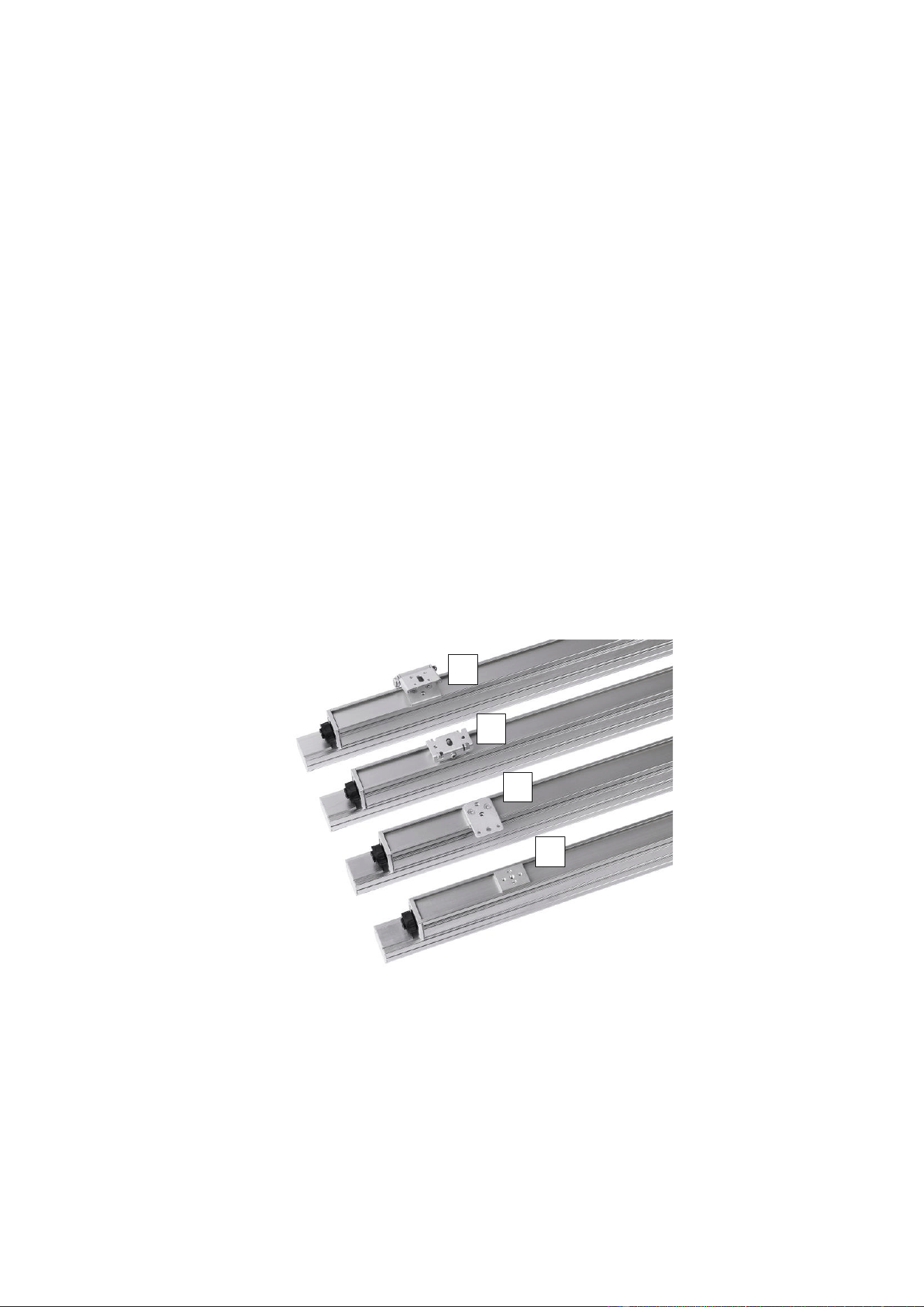
See illustration below. Exterior Linear Pro fixtures are supplied with sliding brackets A on the back of the
fixture. The sliding brackets are designed to let you mount the fixture using the bracket accessories
available from Martin (see the Exterior Linear Pro area of the Martin website at www.martin.com):
• Flange Brackets (B)
• Quick-Mount Brackets (C)
• Adjustable Brackets (D)
Before you install mounting bracket accessories on fixtures, plan the installation so that the sliding plates
A in the back of fixtures will be evenly spaced with one plate close to each end of the fixture. Do not install
the sliding plates where they will be exposed to significant lateral twisting forces (do not install two plates
at one end of a fixture where the weight of the fixture will twist them, for example).
Fasten each sliding plate into its channel in the back of the fixture before you install a bracket accessory.
Flange brackets
To mount the fixture using the Flange Brackets available from Martin for the Exterior Linear Pro:
1. See B in Figure 1. Fasten a flange bracket B securely to each sliding plate A in the back of the fixture
using the two screws supplied with the bracket.
2. Hold the fixture up to the mounting surface or structure and fasten each flange bracket securely to the
surface or structure using one or more suitable screws or bolts that can safely hold the weight that
they will support. Check that the fixture is held safely and securely.
3. If convenient, prepare the connection to the next fixture.
A
B
C
D
Figure 1. Mounting bracket accessories
14 Martin® Exterior Linear Pro Series Safety and Installation Manual
Adjustable brackets
To mount the fixture using the adjustable brackets available from Martin for the Exterior Linear Pro:
1. See D in Figure 1. Fasten each adjustable bracket D securely to a sliding plate A in the back of the
fixture using the two screws supplied with the bracket.
2. Hold the fixture up to the mounting surface and fasten each adjustable bracket securely to the
mounting surface or structure using one or more suitable screws or bolts that can safely hold the
weight that they will support.
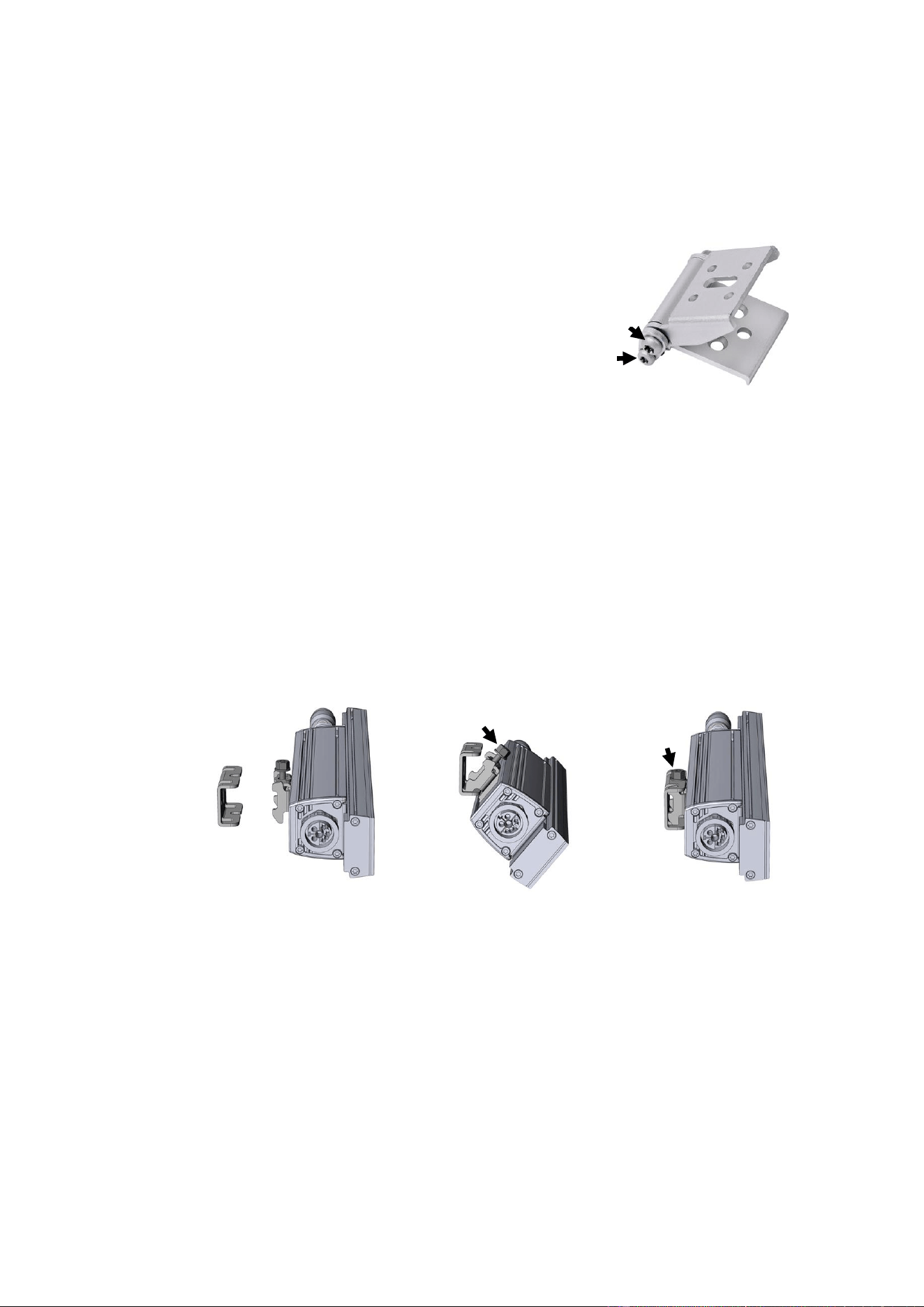
3. See Figure 2. Tighten the Torx 20 locking screw E on both brackets
to lock the brackets in position and hold the fixture securely at the
desired angle. Check that the fixture is held safely and securely.
4. If the Adjustable Bracket ever becomes loose (this would only
happen after several adjustments), tightening the Torx 25 pivot
screw F will restore the correct tension.
5. If convenient, prepare the connection to the next fixture.
Quick-mount brackets
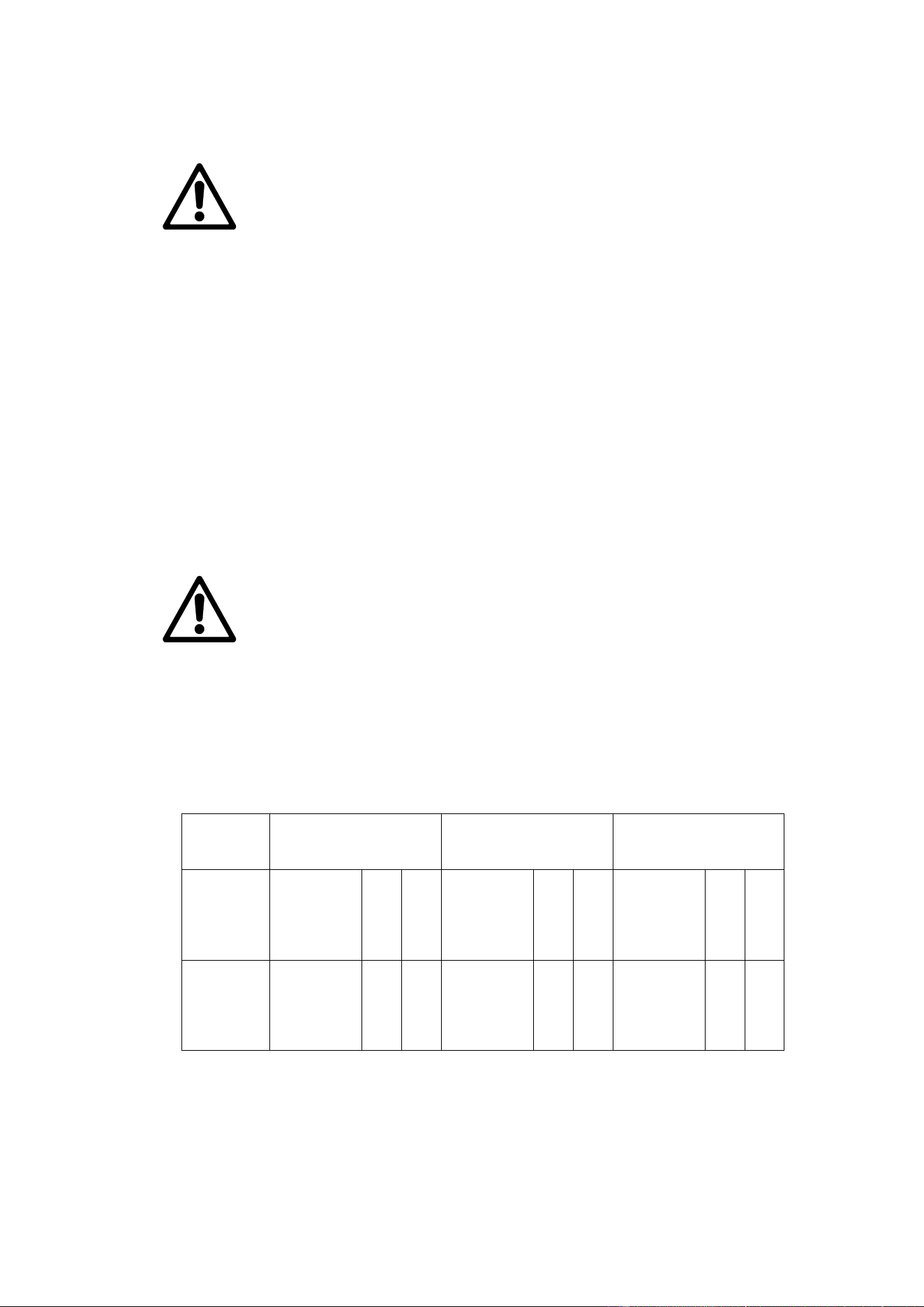
To mount the fixture using the Quick-mount Brackets available from Martin for the Exterior Linear Pro:
1. Use Figure 3. as a guide. Fasten each fixture bracket H securely to a sliding plate A in the back of the
fixture using the two screws supplied with the bracket.
2. Mark up the mounting surface so that you can install wall brackets G on the surface. Make sure that
you can line up each wall bracket G with a fixture bracket H. Install each wall bracket G securely on
the mounting surface or structure using one or more suitable screws or bolts that can safely hold the
weight that they will support.
3. Insert the hooks in each fixture bracket H into the corresponding cutouts in a wall bracket G, lift the
fixture up so that the locking bolt I engages in the corresponding slot in the top of the wall bracket G.
4. Tighten the locking bolt I so that the fixture is held safely and securely.
5. If convenient, prepare the connection to the next fixture.
Figure 3. Quick-mount bracket installation
G
H
I
G
1
2
3
I
E
F
Figure 2. Adjustable
Bracket locking screw
Martin® Exterior Linear Pro Series Safety and Installation Manual 15
AC power and data connection
Warning! Read the ‘Safety information’ chapter starting on page 8 before installing,
operating or servicing the fixture.
Warning! Make sure that cables from fixtures open into dry areas (e.g. junction boxes in
dry locations). If there is a break or cut at any point in a cable (for example at a
connection point), and if this is exposed to water, moisture can be drawn up the inside of
the cable due to the vacuum effect of temperature fluctuations during operation. Ensure
that the fixture is protected from the entry of water via the power cable by using IP66-
rated connectors or junction boxes, or by protecting connectors with weatherproof
housings.
Warning! There is no power on/off switch. Power is applied to the fixtures as soon as
they are connected to power. Provide a means to disconnect or shut down power to
fixtures that is easily accessible and is located close to the fixtures.
Important! Do not use an external dimming system to supply power to the fixture, as
this may cause damage to the fixture that is not covered by the product warranty.
Power requirements
Exterior Linear Pro fixtures must be supplied with AC mains power at 100 - 277 V nominal, 50/60 Hz,
using either a grounded single-phase (live, neutral, ground/earth) distribution system or one phase of a
grounded three-phase (3 live phases, neutral, ground/earth) distribution system.
Safety limits for chains of fixtures
Warning! Read this section carefully and respect the safety limits given, or you may
create a risk of fire or electric shock. Consult your Martin supplier if you have any
questions about installation safety.
Maximum length of chain and number of fixtures
The maximum permitted total length of any line of fixtures that you can connect to AC mains power in one
daisy-chain is 150 m (492 ft.), including fixtures and cable.
The maximum permitted total number of fixtures, excluding cable, that you can connect to AC mains
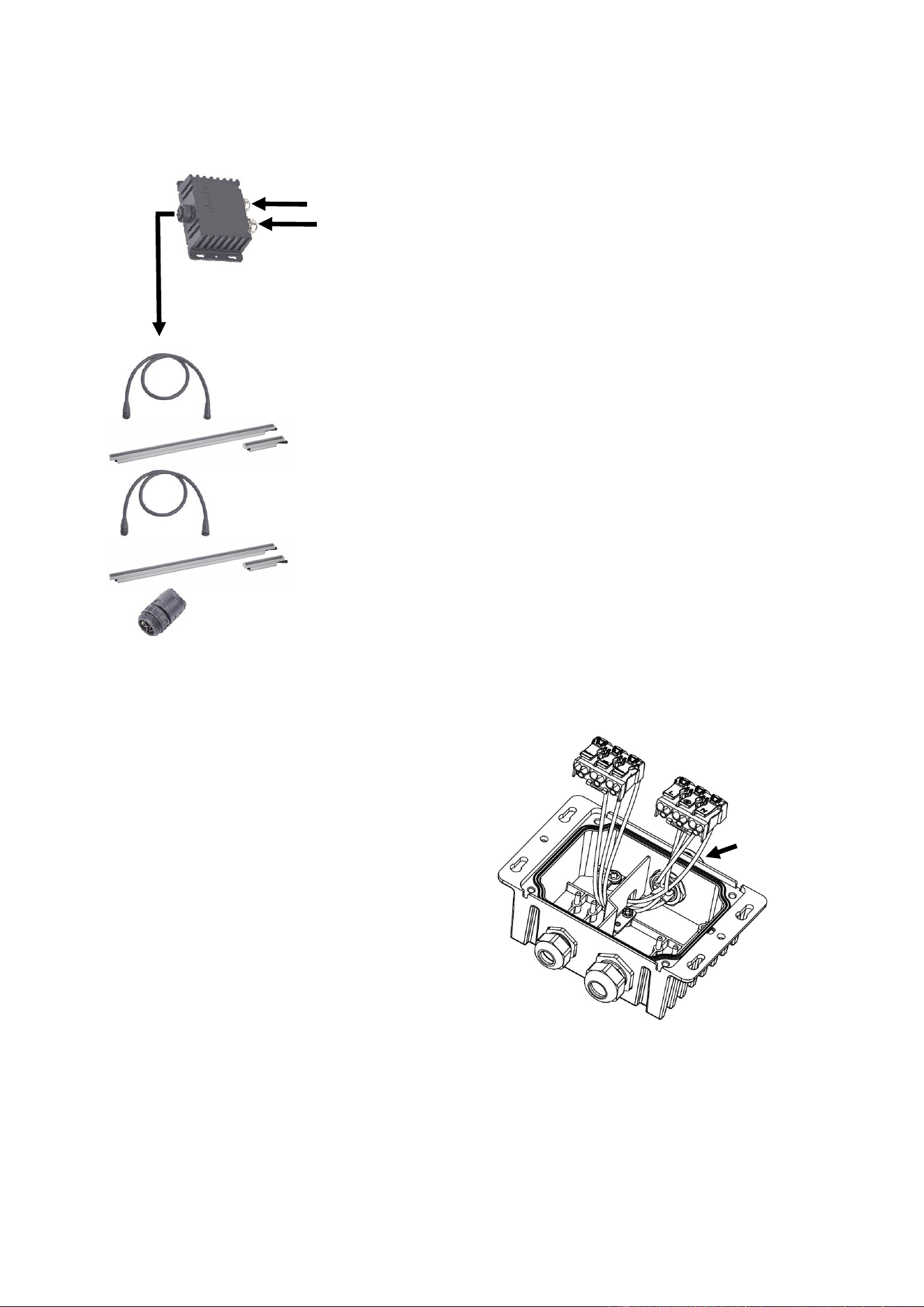
power in one daisy-chain varies depending on the AC mains power voltage, length of the fixtures, the
wattage mode of the fixtures and the DMX mode the fixtures are set to. The table below shows the
maximum permitted number of fixtures per daisy-chain taking these factors into account:
AC mains
power
voltage
Number of fixtures in
chain, 12-watt mode
Number of fixtures in
chain, 10-watt mode
Number of fixtures in
chain, 5-watt mode
DMX Mode
1ft.
4ft.
DMX Mode
1ft.
4ft.
DMX Mode
1ft.
4ft.
100-120 V
Raw
Standard
1 Seg.
2/4 Seg.
8 Seg.
42
42
42
42
42
24
24
24
24
21
Raw
Standard
1 Seg.
2/4 Seg.
8 Seg.
42
42
42
42
42
30
30
30
30
21
Raw
Standard
1 Seg.
2/4 Seg.
8 Seg.
42
42
42
42
42
42
42
42
42
21
220-277 V
Raw
Standard
1 Seg.
2/4 Seg.
8 Seg.
42
42
42
42
42
42
42
42
42
21
Raw
Standard
1 Seg.
2/4 Seg.
8 Seg.
42
42
42
42
42
42
42
42
42
21
Raw
Standard
1 Seg.
2/4 Seg.
8 Seg.
42
42
42
42
42
42
42
42
42
21
Maximum number of fixtures connected to power in one daisy-chain
16 Martin® Exterior Linear Pro Series Safety and Installation Manual
System layout
See illustration on left. An Exterior Linear
Pro installation requires AC mains power
at 100-277 V nominal, 50/60 Hz and
control data from an RDM-compatible
DMX controller.
Mains power and DMX/RDM control data
are fed to a hybrid (combined power and
data) connector inside a Martin Junction
Box Power Data to PD.
Exterior Linear Pro fixtures are then
connected in a daisy-chain using Martin
hybrid cable with PD-type connectors that
draws power and data from the hybrid
connector on the junction box.
Finally, a Martin End Termination Cap
must be installed on the unused THRU
connector of the last fixture on the power
and data link.
Hybrid cables are available from Martin in
EU and US versions as accessories.
Lengths of 0.2 m, 1 m, 2.5 m, 5 m and
10 m with pre-installed connectors are
available, as well as rolls of 100 m of
hybrid cable and bulk connectors. The
Exterior Linear Pro area of the Martin
website at www.martin.com gives full
details of the junction box, cables and
connectors available.
Connecting via the Martin Junction Box
The Martin Junction Box Power DMX to PD lets you
connect a fixture or chain of fixtures to AC mains power
and to DMX/RDM data inside a protected, IP66-rated
environment. Installing the junction box involves
connecting the chain of fixtures to a pre-wired hybrid
(power and data) connector and connecting the cables
from the mains power and DMX/RDM data sources to
terminal blocks inside the junction box.
Connecting to the power and data sources
To connect the cables from the mains power and
DMX/RDM data sources:
1. Fasten the junction box to a surface or structure
using the screw holes in the flanges on the box.
Install the box so that cables will enter the box
horizontally. This will avoid water pooling at cable
glands.
2. Use a three-conductor cable that is rated for the
installation environment with conductor size
AWG 15 / 2.5 mm2 minimum to supply the junction
box with AC mains power. Make sure that power
cannot be applied to the power cable during
installation work.
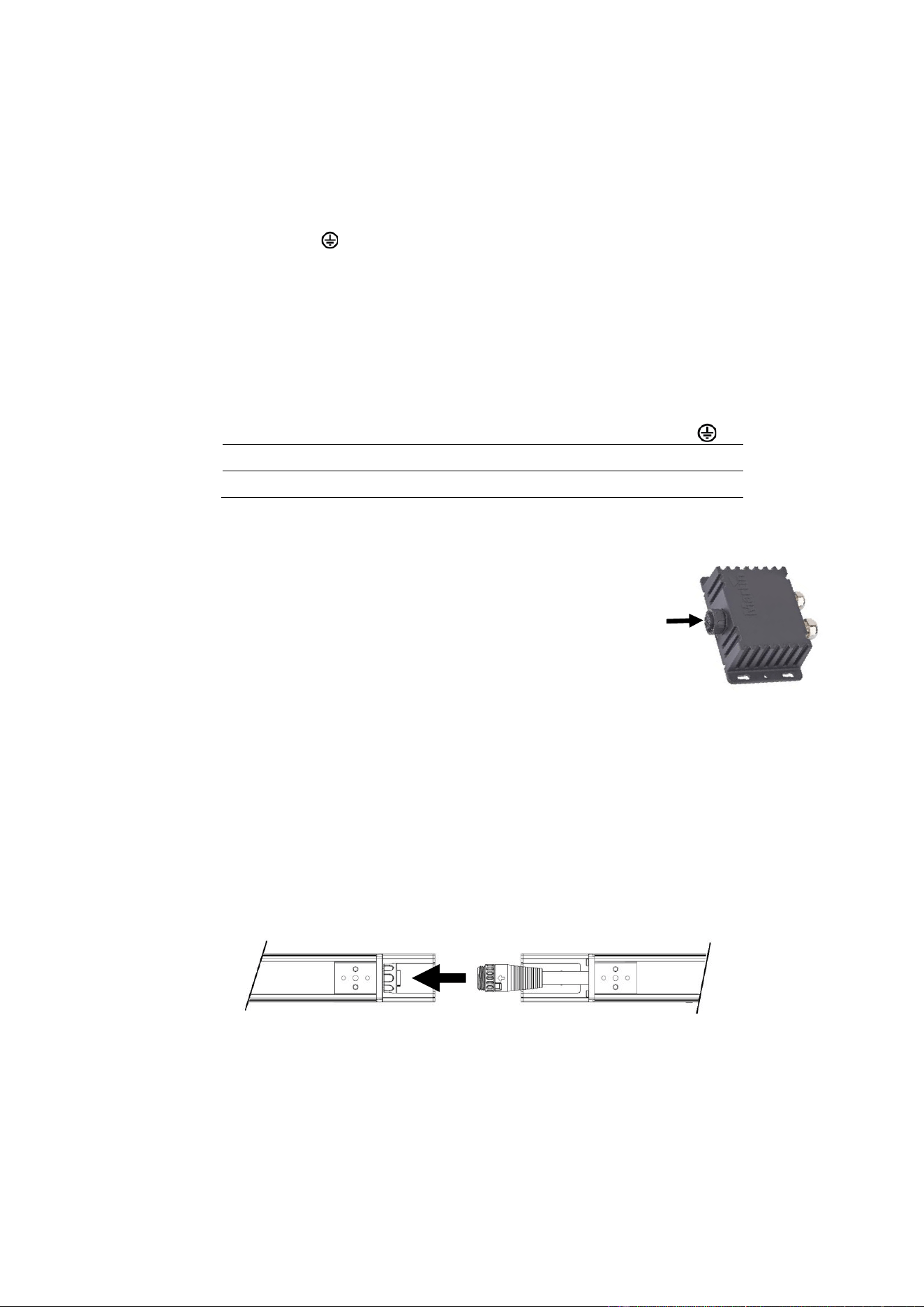
3. See Figure 4. Lift the terminal blocks off their pins
in the junction box to give easier access.
4. Strip insulation as necessary from the power cable and data cable, then pass the cables through their
respective cable glands and into the junction box.
Hybrid (power
and data) link
Junction
Box
AC mains power 100-277 V
DMX / RDM control signal
Martin End
Termination Cap
Martin hybrid cable
Martin hybrid cable
(not required if fixtures are
joined end-to-end)
Exterior Linear Pro
fixture
Exterior Linear Pro
fixture
Figure 4. Junction box connections
Hybrid out
(pre-wired
connector)
Power
cable
gland
Data
cable
gland
Data
terminal
s
Power
terminal
s
Martin® Exterior Linear Pro Series Safety and Installation Manual 17
5. Fasten wires into the power and data terminals respecting the following terminal markings:
Data
• Data shield to DMX common
• Data hot (+) to Data +
• Data cold (-) to Data -
Mains power
• Protective Earth to
• Live (phase) to L
• Neutral to N
See ‘Mains power wire color coding’ below for a guide to EU and US wire color coding systems.
6. Re-position the terminal blocks on their pins in the junction box and tighten the cable glands to make
a waterproof seal at the cable entries.
7. Fasten the cover onto the junction box to make a waterproof seal.
Mains power wire color coding
Live or L
Neutral or N
Earth, Ground, PE or
US system
Black
White
Green
EU system
Brown
Blue
Yellow/green
Connecting a chain of fixtures to power and data
To connect a daisy-chain of fixtures to mains power and DMX/RDM data, see
illustration on right. Connect one of the hybrid (power and data) cables
available as accessories from Martin to the hybrid connector (arrowed) on the
Martin Junction Box and to the first fixture in the daisy chain.
To use hybrid connectors, position them so that the power and data pins line
up and push the connectors together. Then tighten the locking ring on the
female connector to create a seal.
Interconnecting a chain of fixtures
You can connect fixtures to each other either:
• directly, hybrid input cable tail to hybrid throughput connector (see Figure 5) or
• using the hybrid extension cables listed in the Exterior Linear Pro area of the Martin website at
www.martin.com.
If you use the bulk connectors available from Martin, follow the instructions supplied with the connectors.
When installing two fixtures at an angle to each other (a 90° angle at the corner of a square, for example),
use a 20 cm (8 inch) hybrid extension cable to connect the fixtures to each other.
The cable tails on fixtures allow the required 2 mm / 0.08 in. thermal expansion gap between fixtures when
installing them end-to-end.
To connect fixtures to each other:
1. Make sure that power cannot be applied to the installation. Do not connect or disconnect a hybrid
cable that is live.
2. See Figure 5. Connect one fixture’s throughput connector to the next fixture’s input connector, either
directly or with hybrid extension cables from Martin.
3. Install a termination cap in the throughput connector of the last fixture in the chain.
4. Check that all installation work is completed and carry out appropriate tests and safety checks before
applying power.
Figure 5. Interconnecting fixtures
Power and
data thru
Power and
data in

18 Martin® Exterior Linear Pro Series Safety and Installation Manual
Data network requirements
Though other configurations are possible, the recommended configuration for the data network is to use
one DMX universe for each chain of Exterior Linear Pro fixtures. The following considerations must be
taken into account when laying out the data network:
• 512 DMX channels are available in a single DMX universe. Each time the combined channel
requirements of a group of connected fixtures exceeds 512, an additional DMX universe will be
required.
• You can reliably connect up to 42 Exterior Linear Pro fixtures in a single daisy chain using the
proprietary Martin DMX interface.
• Use RS-485 data cable designed for exterior use. RS-485 cable has low capacitance and a
characteristic impedance of 85 to 150 Ohms. It is electrically shielded and has at least 1 twisted pair of
conductors. The minimum recommended wire size is 0.25 mm2 (24 AWG) for runs up to 200 meters
(1000 ft.) and 0.32 mm2 (22 AWG) for runs up 500 meters (1640 ft).
• Each daisy-chain of fixtures must be terminated by installing an End Termination Cap on the
throughput connector of the last fixture on the chain.
• Long parallel runs of AC power and control data cables may cause interference on the data link and
must be avoided. Even if not required by law, use separate conduits for power and data cables.
• Make sure that data connections are totally protected from water, or the suction created by normal
heating and cooling may suck moisture up the inside of the cable and into fixtures.
• Exterior Linear Pro fixtures and hybrid cables use the first data pair (data 1 + and data 1 - conductors)
but do not use the second data pair allowed for in the DMX512-A standard.
The DMX transceiver of the Exterior Linear Pro fixture is insulated, SELV design to prevent ground loops
and for safety reasons.
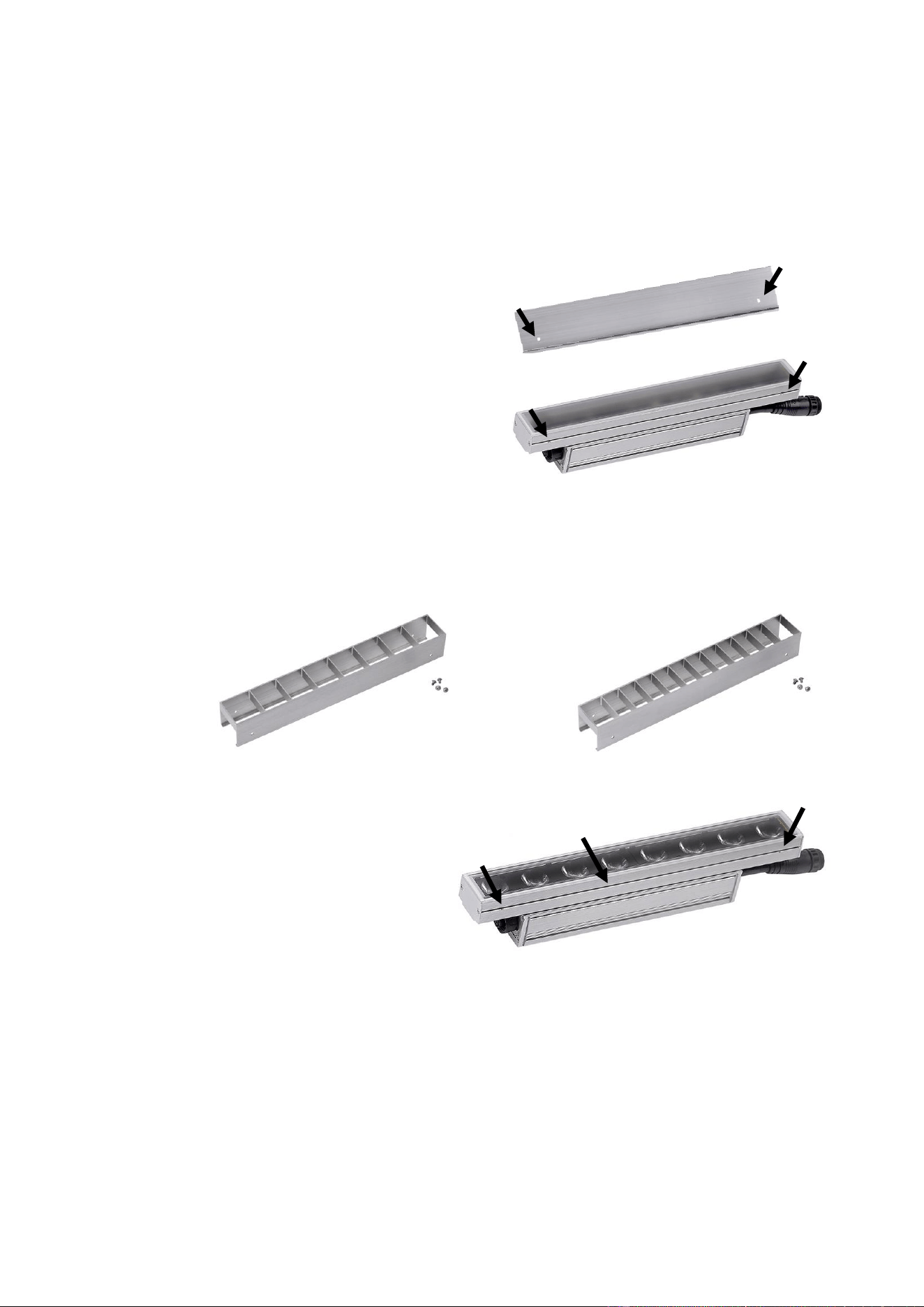
Martin® Exterior Linear Pro Series Safety and Installation Manual 19
Accessories
Installing a glare shield
Glare shields designed to limit lateral glare in one direction are available from Martin in 1 ft. (300 mm) and
4 ft. (1200 mm) lengths for the Exterior Linear Pro. See details in the Exterior Linear Pro area of the Martin
website at www.martin.com.
To install a glare shield, see illustration on right. Slide
the glare shield into the channel in the side of the
fixture and tighten the supplied screws through holes
A in the glare shield and into holes B in the fixture.
You can use the glare shield accessory to help you
install a row of fixtures connected end-to-end in a
straight line. Temporarily slide the glare shield over
two connected fixtures to carry out the alignment.
If you are using adjustable brackets, temporarily
sliding the glare shield over two fixtures can also help
you install fixtures at the same angle.
Installing a louvre
Accessory louvres designed to limit all lateral glare are available from Martin in 1 ft. (300 mm) lengths for
the Exterior Linear Pro. Different louvres are available to fit QUAD and CTC fixtures. See details in the
Exterior Linear Pro area of the Martin website at www.martin.com.
Louvres slide into accessory mounting
channels in the fixture profile. To install a
louvre:
1. See illustration on right (QUAD Graze 1
ft. fixture illustrated). Align the louvre with
the mounting channel A.
2. Slide the louvre fully into the channel.
3. Secure the louvre by fastening the four
screws supplied with each louvre
through the louvre and into holes B in
the fixture. Check that the louvre is held
securely.
Louvre, QUAD fixtures
Louvre, CTC fixtures
A
B
B
B
B
A
A
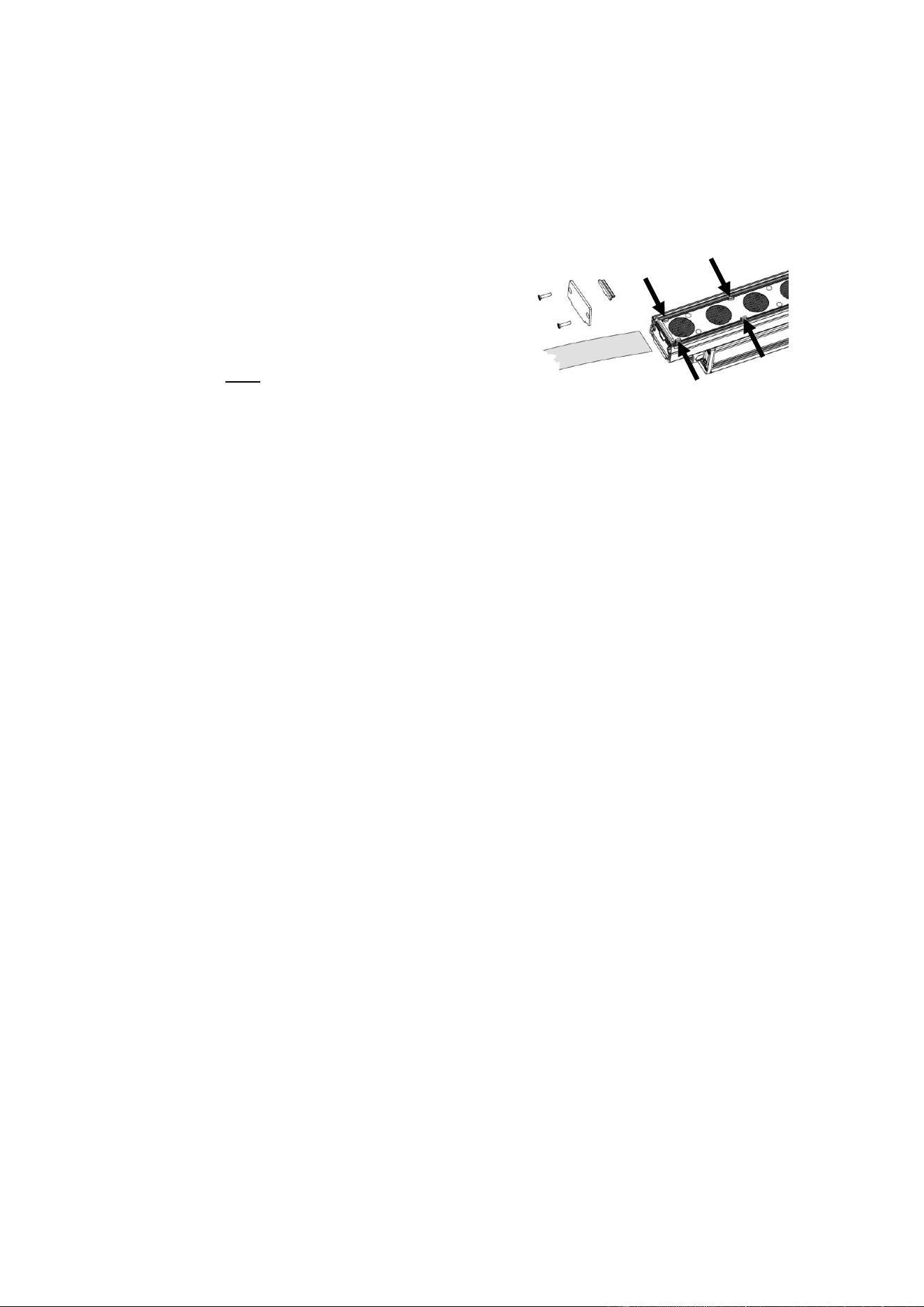
20 Martin® Exterior Linear Pro Series Safety and Installation Manual
Installing a microlens diffuser (Graze fixtures only)
Asymmetric microlens diffusers that give wider, softer light output are available from Martin as accessories
for the Exterior Linear Pro QUAD and CTC Graze. See the Exterior Linear Pro area of the Martin website
at www.martin.com for details. Diffuser films are supplied in 4 foot lengths that can be cut into 1 foot
lengths if required.
The diffuser film slides into a mounting channel in the Graze fixture profile.
To install a microlens diffuser:
1. See illustration on right. Undo and remove the two
screws A in either end of the fixture.
2. Remove the end cap B and waterproof seal C from the
end of the fixture.
3. Align the diffuser film D with the mounting channel and
slide the film fully into the channel. Make sure that the
film slides under the tabs (arrowed) in the fixture.
4. Reinstall the seal C, end cap B and screws A.
A
B
C
D
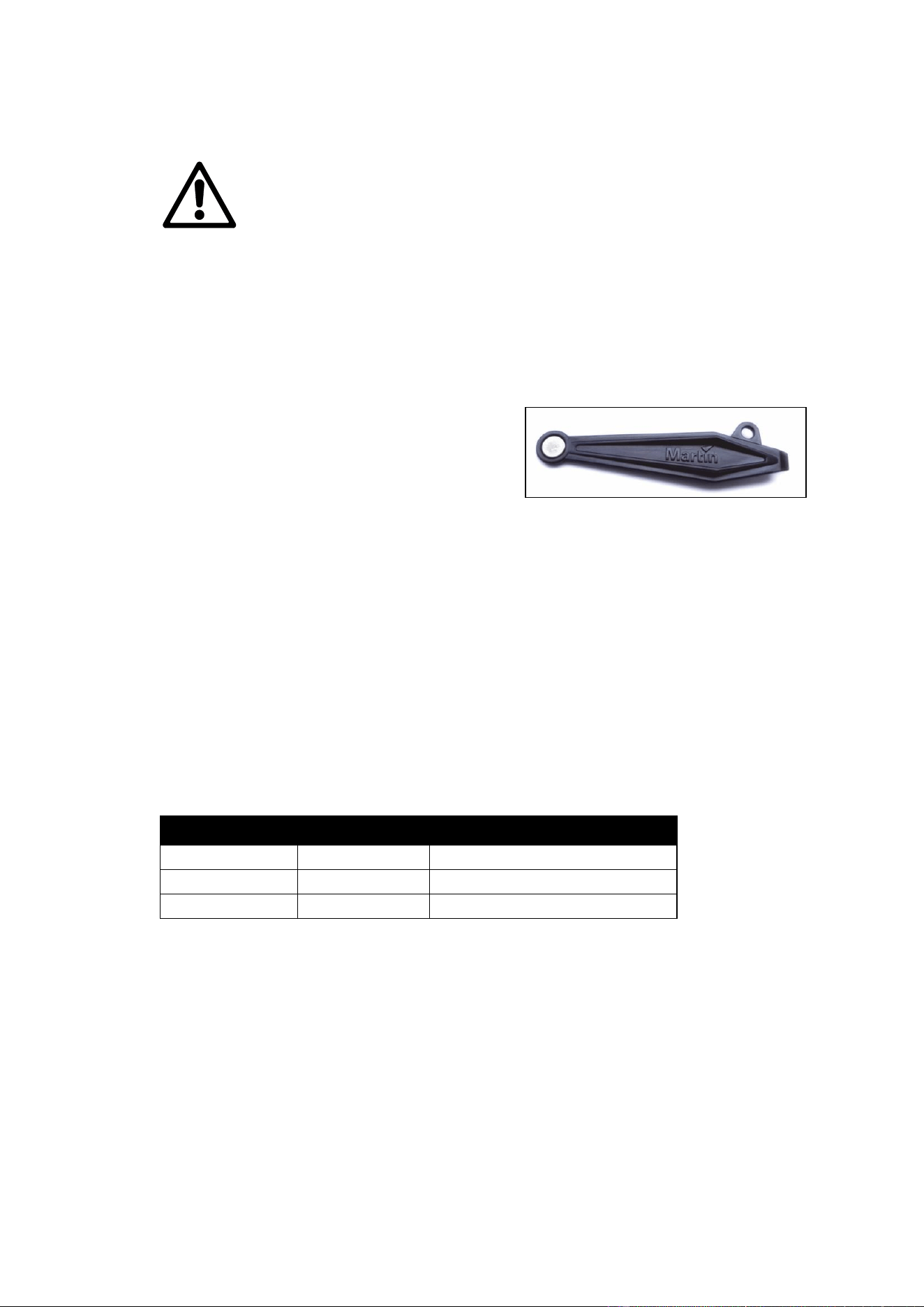
Martin® Exterior Linear Pro Series Safety and Installation Manual 21
Maintenance
Warning! There are no user-serviceable parts inside. Do not open the housing. Refer
any service operation not described in this manual to Martin Professional or its
authorized service agents.
The only service operation the user can carry out on Exterior Linear Pro fixtures is
occasional cleaning.
Be aware that the output of LEDs, like all light sources, changes gradually over many thousands of hours
of use. If you require products to perform to very precise color specifications, you may eventually need to
make small readjustments at the lighting controller.
Running test sequences
Exterior Linear Pro fixtures are programmed with a test sequence that is activated by ‘swiping’ (moving) a
magnet past a magnetic switch inside the fixture. The magnetic switch is located on the side of the fixture,
approximately halfway between the ends of the fixture. A
magnet icon is provided on the fixture to show the correct
location.
See illustration on right. We recommend that you use the
Martin Service Tool to swipe and activate the magnetic
switch.
Activating the magnetic switch lets you display the
product’s status and test the LEDs.
Exterior Linear Pro QUAD models
Swiping a magnet past the magnetic switch causes the fixture to step through the following sequence:
1. Display status code (see table below for meaning).
2. All LEDs at full intensity.
3. All red LEDs at full intensity.
4. All green LEDs at full intensity.
5. All blue LEDs at full intensity.
6. All white LEDs at full intensity.
7. Exit sequence and resume normal operation.
You can also resume normal operation by cycling power off and on. If you are sending a DMX signal to the
fixture, it will exit the sequence and enter normal DMX operation again after a short period.
Fixture status is indicated as follows:
LED color
Signal
Status
Blue
Fast flash
Busy (booting or uploading SW)
Blue
Slow flash
No DMX detected
Green/blue
Alternating
Running normally in DMX mode
Exterior Linear Pro CTC models
Swiping a magnet past the magnetic switch causes the fixture to step through the following sequence:
1. Display status code (see table below for meaning).
2. All LEDs at full intensity.
3. All cold white LEDs at full intensity.
4. All neutral white LEDs at full intensity.
5. All warm white LEDs at full intensity.
6. Exit sequence and resume normal operation.
You can also resume normal operation by cycling power off and on. If you are sending a DMX signal to the
fixture, it will exit the sequence and enter normal DMX operation again after a short period.
Fixture status is indicated as follows.
22 Martin® Exterior Linear Pro Series Safety and Installation Manual
LED color
Signal
Status
Cold
Fast flash
Busy (booting or uploading SW)
Cold
Slow flash
No DMX detected
Cold/warm
Alternating
Running normally in DMX mode
Managing humidity
Exterior Linear Pro fixtures are IP66-rated and are designed to resist water and moisture in environments
with widely varying climate, temperature and humidity conditions. But if fixtures are not managed correctly
during installation and service, water and moisture can enter, leading to humidity and condensation inside
the fixtures. Follow the precautions in this chapter to avoid this problem.
General
• Air, and even water, can be sucked along cables and into fixtures. A cracked or porous cable jacket
can allow water into the cable. Replace any cable that is not in perfect condition. Make sure that cables
from fixtures open into dry areas (e.g. junction boxes in dry locations).
• Do not clean fixtures with high-pressure water jets or immerse them.
Pressure relief valve
A valve with a Gore-Tex membrane on the back of the fixture equalizes pressure by allowing air to pass
through it when the fixture heats up and cools down, but at the same time it acts as a barrier to water in
liquid form. The expulsion of warm air (with a slightly higher water vapor content) and intake of cool air
(with a slightly lower water vapor content) prevents humidity buildup over time, provided that the valve
works correctly and the fixture is correctly sealed.
Pressure relief valves have a limited service life. They become blocked over time as the micropores in the
membrane fill with particles. When a valve becomes blocked, excess pressure can damage seals or cause
air and even water to be sucked into the fixture along cables. A blocked valve cannot be cleaned and must
be replaced if it shows any signs of contamination or is not in perfect condition.
For maximum fixture service life, have the pressure relief valve replaced after an extended period of use.
Intervals for valve replacement depend on the installation environment. Please consult your Martin dealer
about a suitable replacement schedule. To ensure optimum humidity control, valve replacement must be
carried out by Martin Service.
Cleaning
Regular cleaning is essential for fixture life and performance. Buildup of dust and dirt degrades the
fixture’s light output and cooling ability.
Cleaning schedules will vary greatly depending on the operating environment. It is therefore impossible to
specify precise cleaning intervals for the Exterior Linear Pro Series. Inspect fixtures within their first few
weeks of operation to see whether cleaning is necessary. Check again at frequent intervals. This
procedure will allow you to assess cleaning requirements in your particular situation. If in doubt, consult
your Martin dealer about a suitable maintenance schedule.
Do not use products that contain solvents, abrasives or caustic agents for cleaning, as they can cause
surface damage to the fixture. The aluminum housing and front glass can be cleaned with mild detergents
such as those for washing cars.
To clean the housing and front glass:
1. Visually check that the silicone seals and the power and data cables are in good condition. If any seal
or cable shows signs of damage, cracking or loss of water resistance, stop cleaning the fixture and
contact a Martin authorized service technician for replacement.
2. If seals are in good condition, rinse off loose dirt with a hose or low-pressure water spray.
3. Wash the aluminum housing and front glass using warm water with a little mild detergent and a soft
brush or sponge. Do not use abrasive cleaners.
4. Rinse with clean water and wipe dry.
Approvals
This product has been tested and found to comply with the following standards:
• Global CB Certification/IECEE: IEC 60598-2-5 (IEC 60598-1)
Martin® Exterior Linear Pro Series Safety and Installation Manual 23
• EU safety: EN 60598-2-5 (EN 60598-1), EN 62471, EN62493
• EU EMC: EN 55015, EN 55032, EN 61547, EN 55035, EN 61000-3-2, EN 61000-3-3
• US safety: UL1598
• US EMC: FCC Part 15 Class B
• Canadian safety: CSA C22.2 No. 250.0
• Canadian EMC: ICES-003 Class B; ICES-005 Class B
• United Kingdom: UKCA
• Australia/NZ: RCM
FCC Compliance
This device complies with part 15 of the FCC Rules. Operation is subject to the following two conditions:
1. This device may not cause harmful interference, and
2. this device must accept any interference received, including interference that may cause undesired
operation.
This equipment has been tested and found to comply with the limits for a Class B digital device, pursuant
to part 15 of the FCC Rules. These limits are designed to provide reasonable protection against harmful
interference in a residential installation. This equipment generates, uses and can radiate radio frequency
energy and, if not installed and used in accordance with the instructions, may cause harmful interference
to radio communications. However, there is no guarantee that interference will not occur in a particular
installation. If this equipment does cause harmful interference to radio or television reception, which can
be determined by turning the equipment off and on, the user is encouraged to try to correct the
interference by one or more of the following measures:
• Reorient or relocate the receiving antenna.
• Increase the separation between the equipment and receiver.
• Connect the equipment into an outlet on a circuit different from that to which the receiver is connected.
• Consult the dealer or an experienced radio/TV technician for help.
Disposing of this product
Martin® products are supplied in compliance with Directive 2012/19/EC
of the European Parliament and of the Council of the European Union on
WEEE (Waste Electrical and Electronic Equipment), where applicable.
Help preserve the environment! Ensure that this product is recycled at
the end of its life. Your supplier can give details of local arrangements for
the disposal of Martin products

www.martin.com