For additional self-service support options and community forums, please visit: www.StarTech.com/support
Revision: November 26, 2025
Quick-Start Guide
USB Type-C to 10G Ethernet Adapter - USB4 and Thunderbolt 3 Compatible
Product ID
USB4-10GBE-ETHERNET
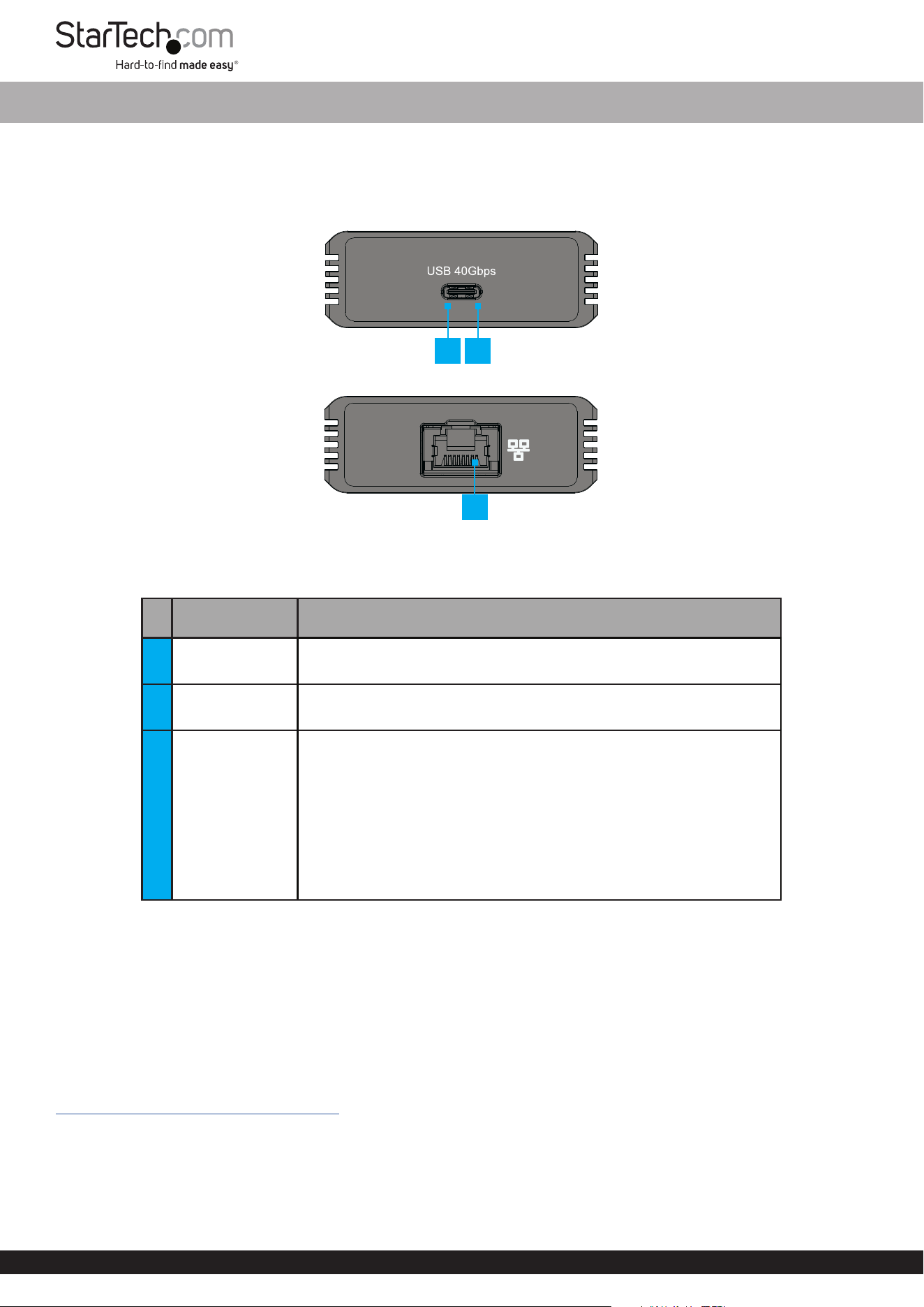
Front View
Rear View
Feature Function
1 Host Connection • Connect to a USB4 or Thunderbolt compatible Host Computer
2 LED Indicator
• Solid Green = Indicates that the USB4 Network Adapter is
connected to the Host Computer
3
Ethernet Port &
LED Indicators
• Connect an Ethernet Cable
Use Cat6 or better cabling for 10 Gbps speeds
• Left LED Indicator is Link Speed
• Solid Green = 10 Gbps
• Solid Orange = 5 Gbps/2.5 Gbps/1 Gbps/100 Mbps
• Right LED Indicator is Link Status
• Solid Green = Active link
• Flashing Green = Activity
Package Contents
• USB4 Network Adapter x 1
• 20 in (50 cm) USB4 Cable x 1
• Quick-Start Guide x 1
Requirements
For the latest manuals, product information, technical specications, and declarations of conformance, please visit:
www.StarTech.com/USB4-10GBE-ETHERNET
• USB4 or Thunderbolt compatible host computer
• Ethernet Cable (Cat6 or better)
*Product may vary from image
2 1
3
Quick-Start Guide
FR
FR: startech.com/fr
DE: startech.com/de
ES: startech.com/es
NL: startech.com/nl
IT: startech.com/it
JP: startech.com/jp
HQ Contact:
StarTech.com Ltd.
45 Artisans Crescent,
London, ON N5V 5E9,
Canada
UK Contact:
StarTech.com Ltd.
15 Gowerton Rd,
Northampton, NN4 7BW,
United Kingdom
US Contact:
StarTech.com USA LLP
4490 South Hamilton Rd,
Groveport, OH 43125,
United States
EU Contact:
StarTech.com Ltd.
Siriusdreef 17-27
2132 WT Hoofddorp
The Netherlands
JP Contact:
StarTech.com K.K.
Atelier Yours Ogawamachi 7F
1-10-2 Kanda Ogawamachi
Chiyoda-ku, Tokyo 101-0052
Japan
Installation
USB4 Host
1. Connect the included USB4 Cable from a USB4 port on the Host Computer to the Host Connection on the front of the
USB4 Network Adapter.
2. Connect an Ethernet Cable from the Ethernet Port on the back of the USB4 Network Adapter to a Network Port or
Device.
Install the Driver
Note: For the latest list of supported operating systems, please visit: www.StarTech.com/USB4-10GBE-ETHERNET
1. Navigate to www.StarTech.com/USB4-10GBE-ETHERNET
2. Click the Drivers & Downloads tab.
3. Under Driver(s), download the Driver for your operating system.
For Windows Systems
a. Extract the contents of the Driver Package by Right Clicking the Driver Folder that was downloaded from the website
and select Extract All. Follow the on-screen instructions to nish the Extraction.
b. Follow the instructions on the accompanying PDF le for further Installation Instructions.
For Linux Systems
a. Extract the contents of the Driver Package.
b. Follow the instructions on the accompanying README.txt le.