
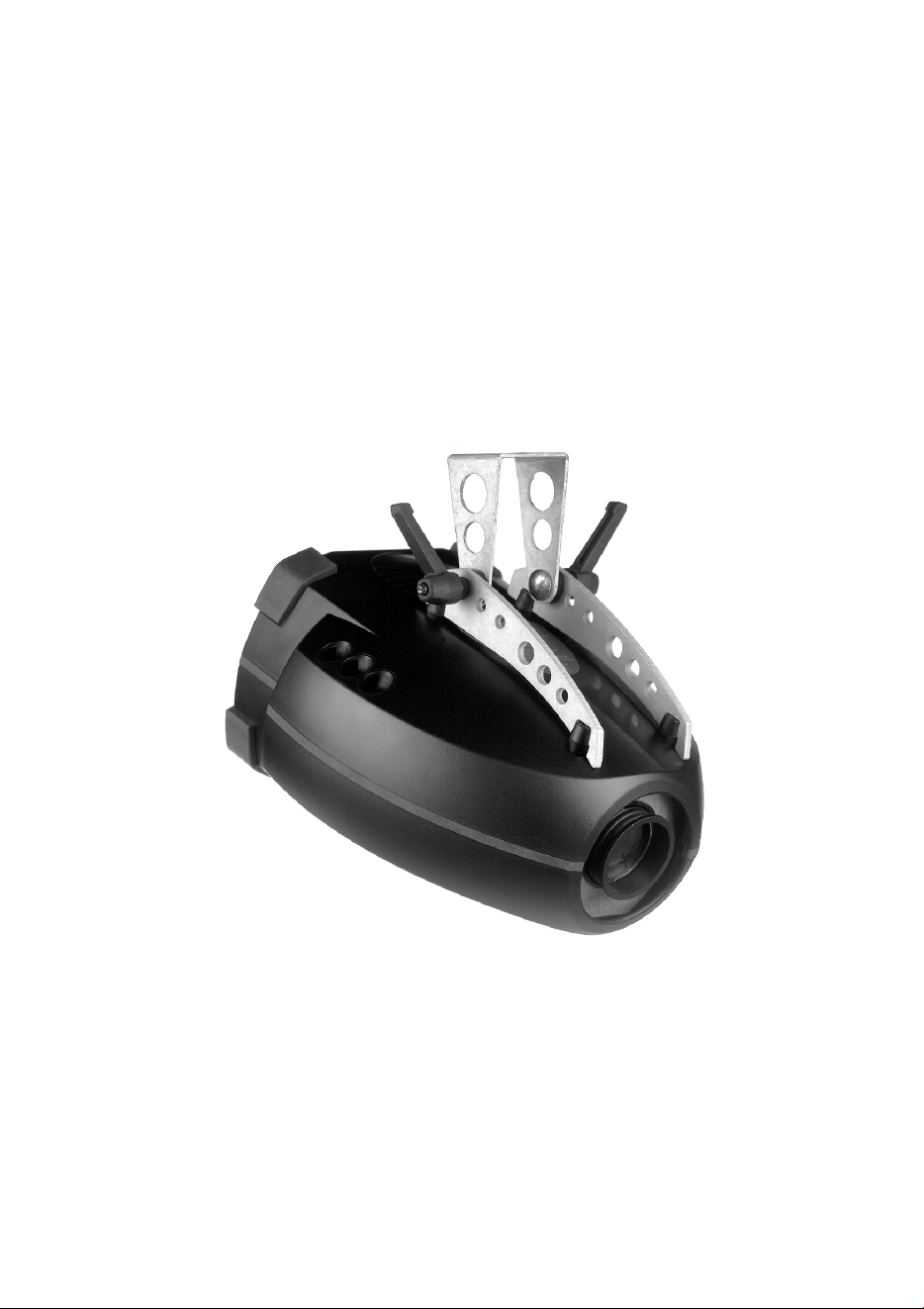
CX-4
user manual
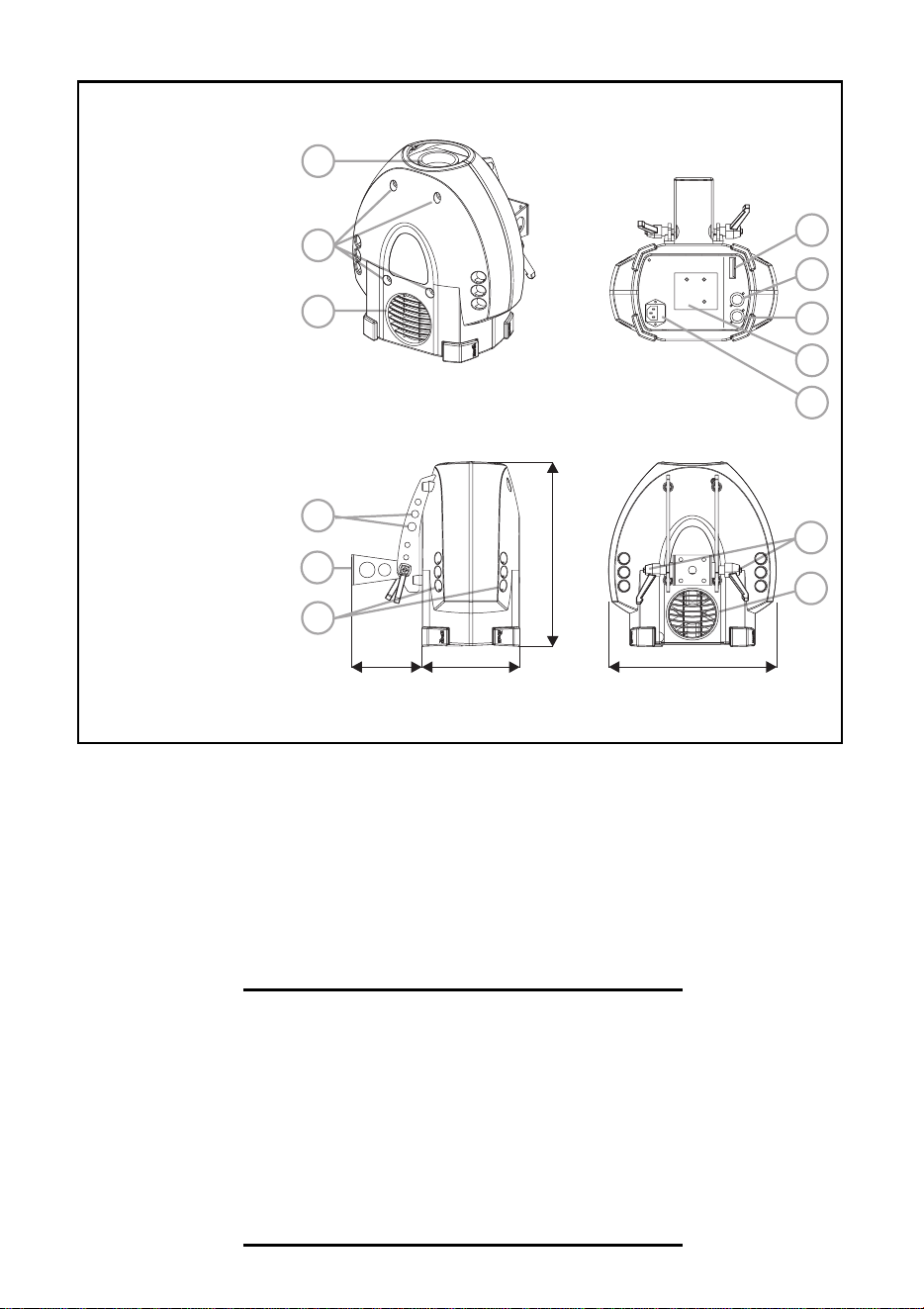
269 mm
296 mm
114 mm 156 mm
5
4
6
13
1
2
3
11
7
9
8
12
10
1 focus lens
2 cover screws
3 air vent
4 safety cable holes
5 mounting bracket
6 air vents
7 DIP-switch
8 data output
9 data input
10 lamp access &
adjustment
11 AC input & main
fuse
12 swivel locks
13 cooling fan
© 2000 Martin Professional A/S, Denmark.
All rights reserved. No part of this manual may be
reproduced, in any form or by any means, without
permission in writing from Martin Professional A/S,
Denmark.
Printed in Denmark.
P/N 35000093, Rev. B

CX-4 user manual 3
Introduction. . . . . . . . . . . . . . . . . . . . . . . . . . . . . . . . . . . . . . . . .4
Lamp . . . . . . . . . . . . . . . . . . . . . . . . . . . . . . . . . . . . . . . . . . . . . .6
AC power connection. . . . . . . . . . . . . . . . . . . . . . . . . . . . . . . . .8
Installation. . . . . . . . . . . . . . . . . . . . . . . . . . . . . . . . . . . . . . . . .11
Data connection . . . . . . . . . . . . . . . . . . . . . . . . . . . . . . . . . . . .12
Stand-alone operation . . . . . . . . . . . . . . . . . . . . . . . . . . . . . . .13
MC-1 operation . . . . . . . . . . . . . . . . . . . . . . . . . . . . . . . . . . . . .15
DMX operation . . . . . . . . . . . . . . . . . . . . . . . . . . . . . . . . . . . . .16
Basic service. . . . . . . . . . . . . . . . . . . . . . . . . . . . . . . . . . . . . . .19
Troubleshooting . . . . . . . . . . . . . . . . . . . . . . . . . . . . . . . . . . . .21
DMX protocol . . . . . . . . . . . . . . . . . . . . . . . . . . . . . . . . . . . . . .22
Specifications . . . . . . . . . . . . . . . . . . . . . . . . . . . . . . . . . . . . . .25

4 Introduction CX-4 user manual
I
NTRODUCTION
1
Thank you for selecting the Martin CX-4. The CX-4 is an automated profile
spotlight designed for a 150 watt discharge source. It provides colors, gobos, 5
beam angles, a frost effect, continuous dimming, adjustable focus, and multiple
control options.
CX-4 SAFETY INFORMATION
Warning! This product is for professional use only. It is not for
household use.
This product presents risks of lethal or severe injury due to fire and heat, electric
shock, and falls. Read this manual before powering or installing the fixture,
follow the safety precautions listed below and observe all warnings in this manual
and printed on the fixture. If you have questions about how to operate the fixture
safely, please contact your Martin dealer or call the Martin 24-hour service
hotline at +45 70 200 201.
To protect yourself and others from electric shock
• Disconnect the fixture from AC power before removing or installing the lamp,
fuses, or any part, and when not in use.
• Always ground (earth) the fixture electrically.
• Use only a source of AC power that complies with local building and electrical
codes and has both overload and ground-fault protection.
• Do not expose the fixture to rain or moisture.
• Refer any service operation not described in this manual to a qualified technician.
• Never operate the fixture with missing or damaged lenses and/or covers.

CX-4 user manual Introduction 5
To protect yourself and others from burns and fire
• Never attempt to bypass the thermostatic switch or fuses. Always replace
defective fuses with ones of the specified type and rating.
• Keep all combustible materials (for example fabric, wood, paper) at least 0.1
meters (4 inches) away from the fixture. Keep flammable materials well away
from the fixture.
• Replace the lamp if it becomes defective or worn out. When replacing the lamp,
allow the fixture to cool for at least 5 minutes before opening the fixture or
removing the lamp. Protect your hands and eyes with gloves and safety glasses.
• Do not illuminate surfaces within 0.3 meters (12 inches) of the fixture.
• Provide a minimum clearance of 0.1 meters (4 inches) around fans and air vents.
• Never place filters or other materials over the lens.
• The exterior of the fixture can reach temperatures up to 65° C (149° F). Allow the
fixture to cool for at least 5 minutes before handling.
• Do not modify the fixture or install other than genuine Martin parts.
• Do not operate the fixture if the ambient temperature (Ta) exceeds 40° C (104° F).
To protect yourself and others from injury due to falls
• When suspending the fixture above ground level, verify that the structure can
hold at least 10 times the weight of all installed devices.
• Verify that all external covers and rigging hardware are securely fastened and use
an approved means of secondary attachment such as a safety cable.
• Block access below the work area whenever installing or removing the fixture.
UNPACKING
The packing material is carefully designed to protect the fixture during shipment
- always use it to transport the fixture.
The CX-4 comes with:
• Philips CDM-SA/T 150W discharge lamp
• 3-meter, 3-wire IEC power cable
• User manual

6 Lamp CX-4 user manual
L
AMP
2
The CX-4 uses the Philips CDM-SA/T (short-arc, tubular) 150W discharge lamp.
If desired, the GE Arcstream 150 may be substituted.
The CX-4 can be modified with a different lamp socket that allows use of the
following lamps:
• Martin HTI 150 W, 2000 h
• OSRAM HTI 150 W, 750 h
• GE CSS 150 W, 1000 h
Please contact your Martin dealer for details.
Warning! Installing a lamp other than specified may be hazardous.
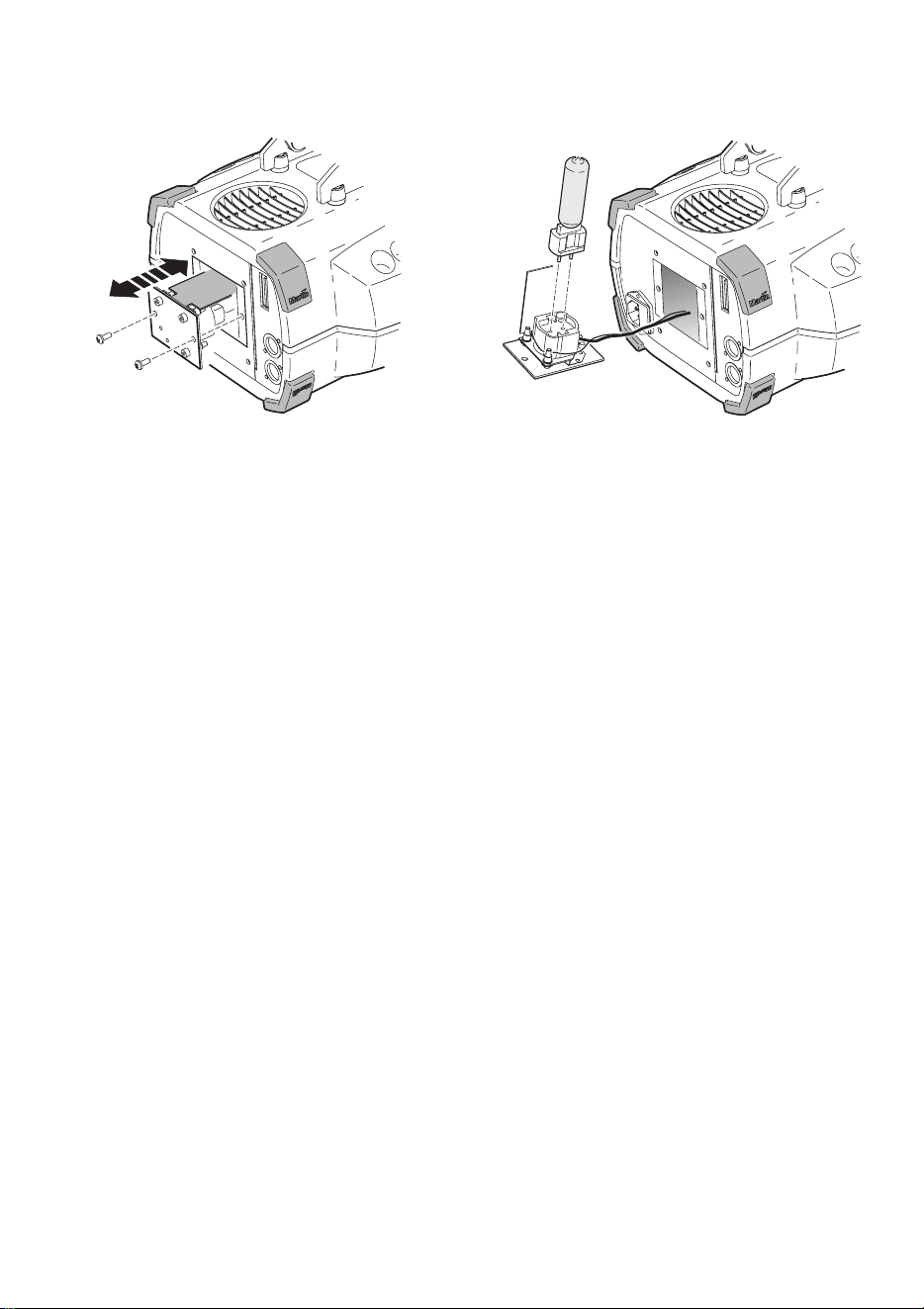
To install a lamp
Warning! Disconnect the fixture from AC power and allow the fixture to
cool before opening the fixture.
1 Remove 2 screws from the lamp-socket assembly with a Pozidriv #2
screwdriver. Remove the lamp assembly.
2 Remove the old lamp from the socket.
3 Holding the new lamp by its base (do not touch the glass), insert the lamp
pins squarely into the socket.
4 If your fingers touched the glass bulb, clean it with a clean, lint-free cloth
wetted with alcohol.
Lamp Efficiency Color Temp. Average Life
Philips CDM-SA/T 150W 85 Lm/W 4000 K 6000 h
GE Arcstream 150 77 Lm/W 4000 K 6000 h
CX-4 user manual Lamp 7
5 Insert the lamp assembly with the black metal shield up, between the lamp
and the fan. Replace the screws.
To align the lamp
Realignment when changing the lamp may improve performance.
1 Strike the lamp and project the light on a flat surface.
2 Using a 3 mm Allen wrench, center the hot-spot horizontally with the top-left
adjustment screw. Center the hot-spot vertically with the bottom-right
adjustment screw.
3 if there is significant hot-spot, flatten the field by turning all 3 adjustment
screws clockwise 1/4-turn at a time until the light is evenly distributed and
there is no further improvement.
4 If the light is brighter around the edge than it is in the center, or if light output
is low, turn the screws counterclockwise 1/4-turn at a time until the light is
evenly distributed and there is not further improvement.

8 AC power connection CX-4 user manual
AC
POWER
CONNECTION
3
The CX-4 power supply must be wired to the voltage and frequency setting that
most closely matches the local AC supply. The factory setting is shown on the
serial number label.
Warning! For protection from fire and electric shock, the fixture must be
grounded (earthed). The power supply shall have overload and
ground-fault protection.
Warning! Verify that the feed cables are undamaged and rated for the
current requirements of all connected devices before use.
Important! Check the power supply setting before applying power.
Important! Do not connect the fixture to a dimmer system.
To install a plug on the mains lead
The mains lead must be fitted with a grounding-type cord cap that fits your
power distribution system. Consult a qualified electrician if you have any
doubts about proper installation.
• Following the cord cap manufacturer’s instructions, connect the yellow and
green wire to ground (earth), the brown wire to live, and the blue wire to
neutral. The table below shows some pin identification schemes.
Wire Pin Marking Screw color
brown live “L” yellow or brass
blue neutral “N” silver
yellow/green ground green
Table 1: Cord cap wiring
CX-4 user manual AC power connection 9
To rewire the power supply
1 Disconnect the fixture from AC power. Remove the top cover bolts with a 4
mm Allen wrench and lift off the cover.
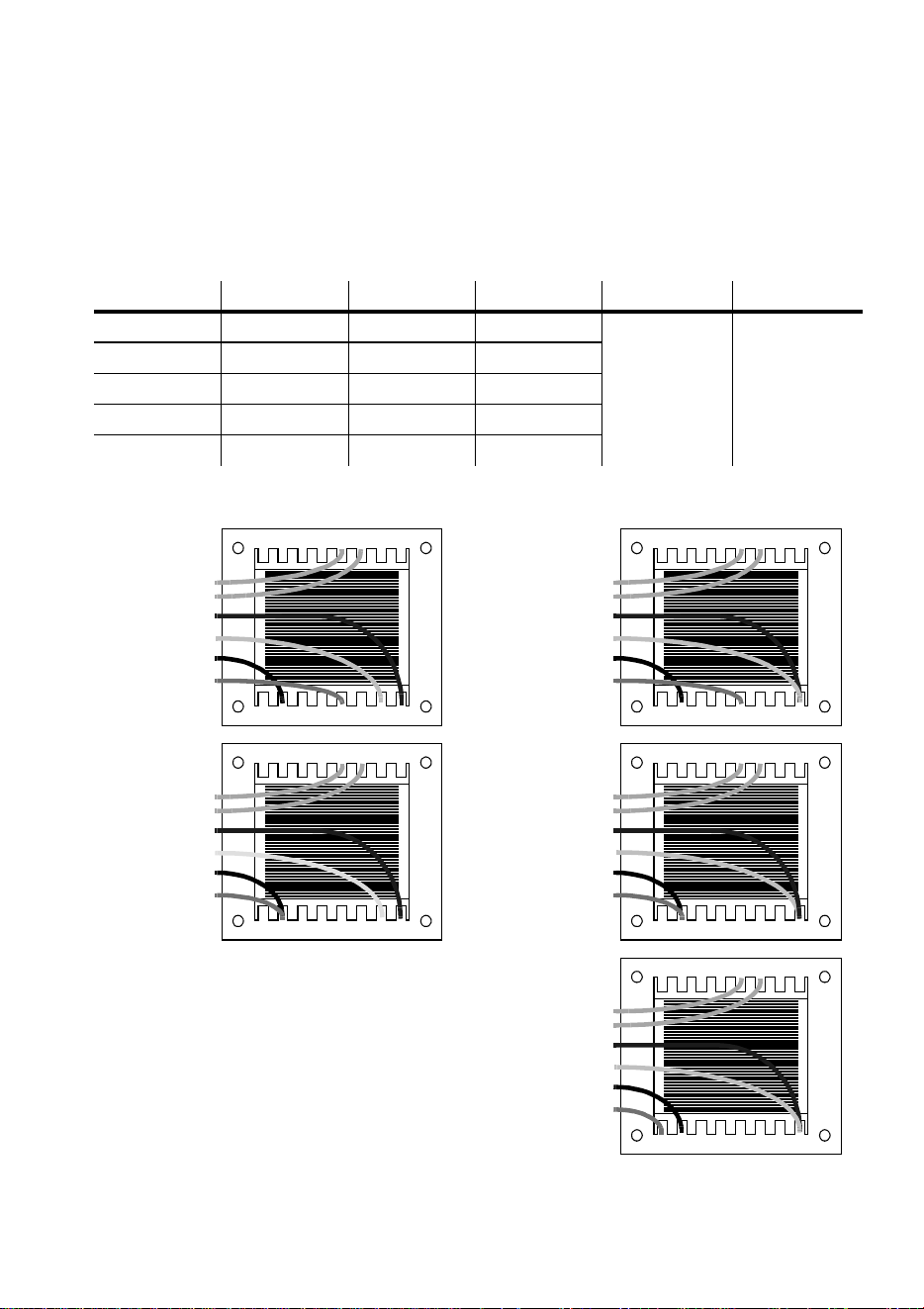
2 On the transformer, which is located behind the color wheel, move the brown
and white wires to the transformer taps shown below for your mains voltage.
Do not move the blue wire from terminal 9 or the black wire from terminal 15.
Mains voltage Setting Brown White Blue Black
95 - 109 V 100 V 12 10
915
110 - 130 V 120 V 12 9
200 - 219 V 210 V 15 10
219 - 239 V 230 V 15 9
240 - 260 V 250 V 16 9
Table 2: Transformer settings
1 1 12 13 1 1 19
23456781
orange
orange
blue
white
black
brown
210 V
1 1 12 13 1 1 19
23456781
orange
orange
blue
white
black
brown
230 V
1 1 12 13 1 1 19
23456781
orange
orange
blue
white
black
brown
250 V
1 1 12 13 1 1 19
23456781
orange
orange
blue
white
black
brown
100 V
1 1 12 13 1 1 19
23456781
orange
orange
blue
white
black
brown
120 V
10 AC power connection CX-4 user manual
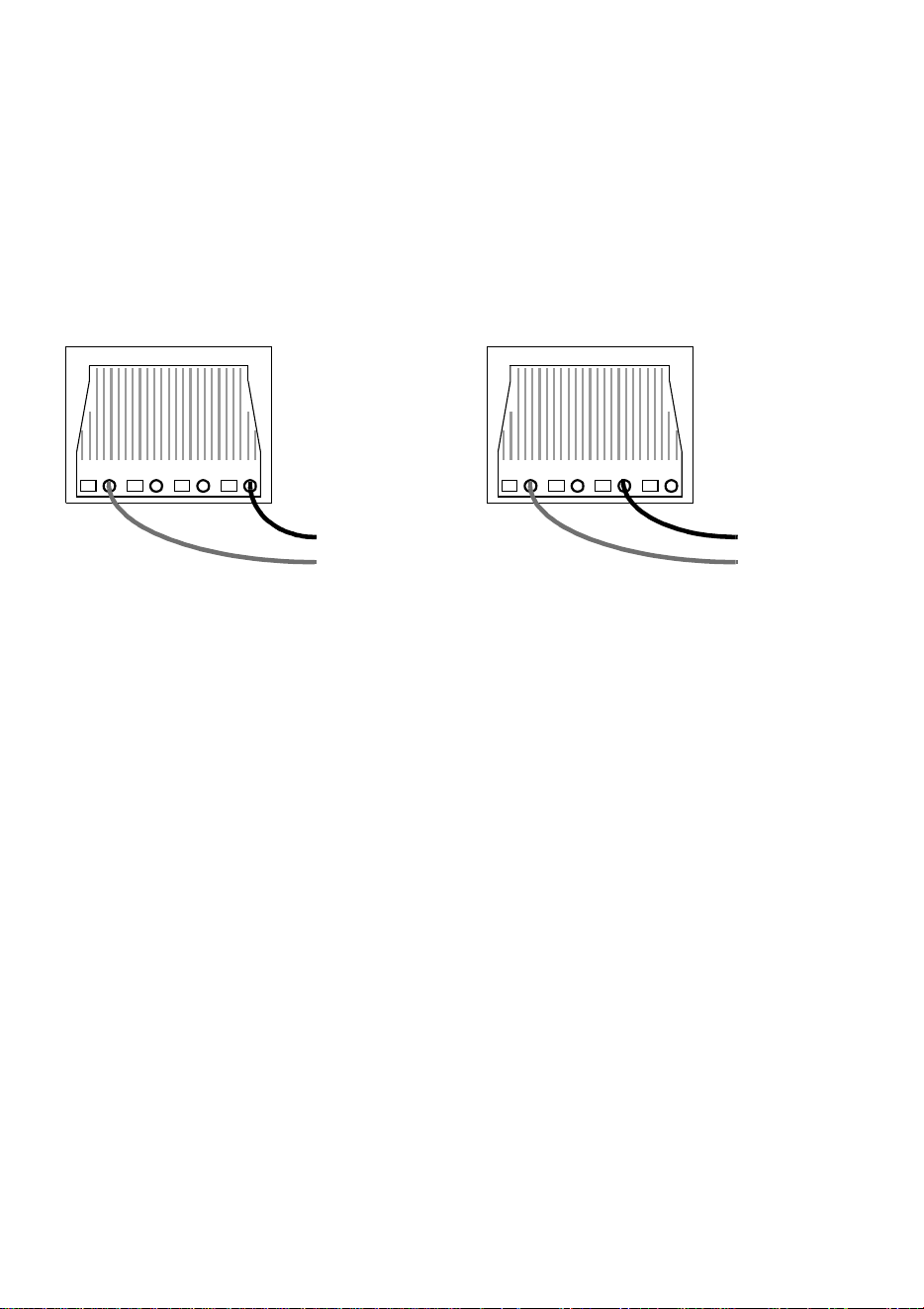
3 The frequency setting (50 or 60 Hz) is selected by moving the black wire on
the ballast, which is located behind the effect wheel. To set for 50 Hz, move
the black wire to the “230-50” terminal. To set for 60 Hz, move the black wire
to the “230-60” terminal. See below. The wire is released and locked by
inserting a small screwdriver in the square hole next to the terminal and
prying back the spring.
4 Tug lightly on the black wire to make sure that it is connected securely.
5 Replace the top cover.
black
brown
50 Hz
black
brown
60 Hz
CX-4 user manual Installation 11
I
NSTALLATION
4
The CX-4 can be fastened directly to a suitable surface or hung with a rigging
clamp bolted to its adjustable mounting bracket.
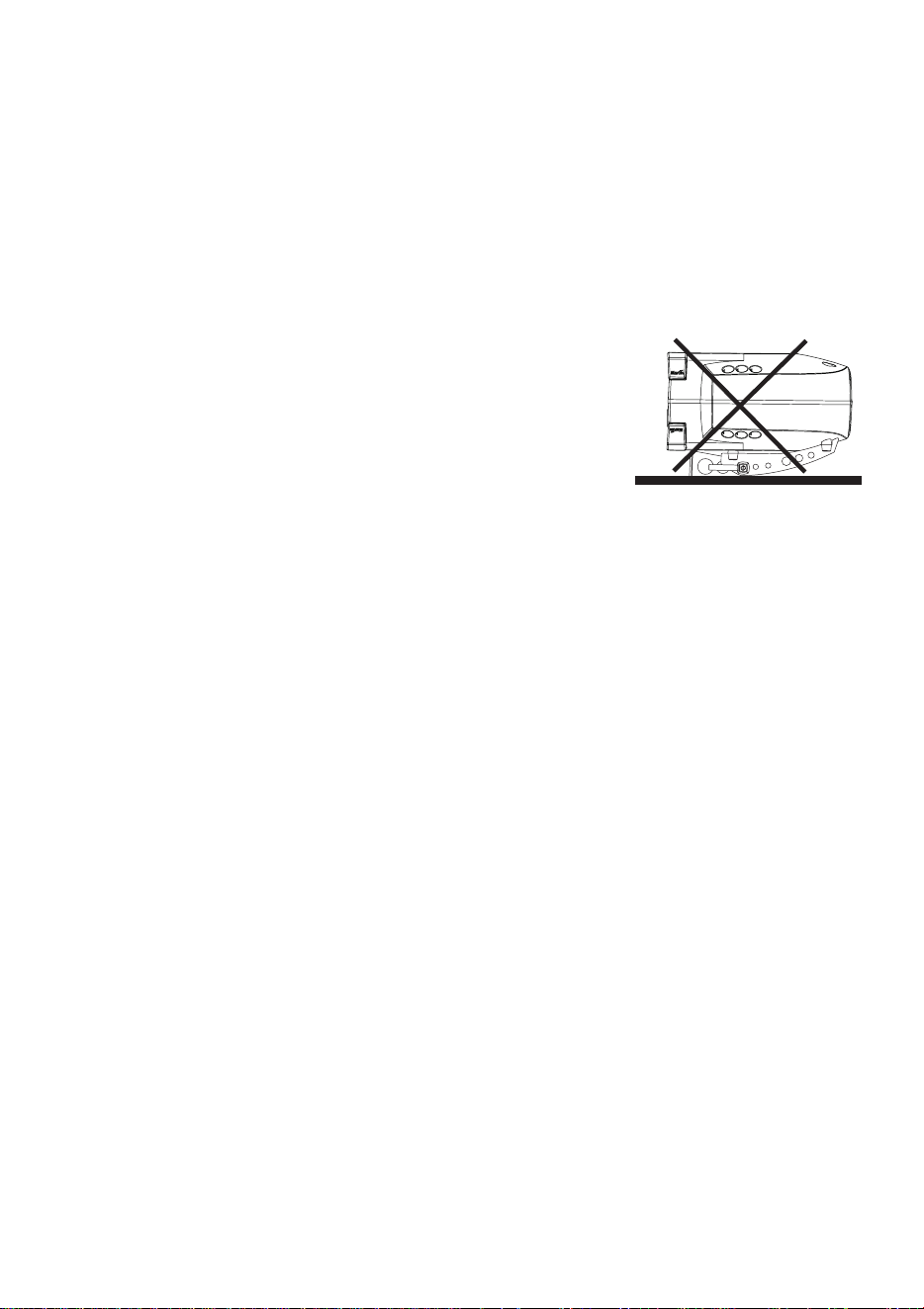
Do not lay the fixture flat on its mounting bracket
arms or position it so that there is less than 10 cm
(4 in.) clearance around the fan and air vents.
For maximum lamp life, do not place the fixture
directly on or beside a speaker cabinet.
To rig the CX-4
Warning! Always use a secure means of secondary attachment. Block
access below the work area before proceeding.
1 If clamping the fixture, verify that the clamp (not included) is undamaged and
can bear at least 10 times the fixture’s weight. Bolt the clamp securely to the
bracket with a grade 8.8 (minimum) M12 bolt and lock nut, or as
recommended by the clamp manufacturer, through the 13 mm hole in the
center of the mounting bracket.
2 If permanently installing the fixture, verify that the hardware (not included)
and mounting surface can bear at least 10 times the fixture’s weight. The four
6.2 mm holes and/or the 13 mm hole in the mounting bracket may be used.
3 Verify that the structure can support at least 10 times the weight of all
installed fixtures, clamps, cables, auxiliary equipment, etc.
4 Working from a stable platform, clamp or fasten the fixture to the structure.
5 Install a safety cable that can hold at least 10 times the weight of the fixture
through/over the support and through a hole in one of the aluminum arms.
6 Loosen the swivel locks and tilt the fixture to the desired angle. Turn the
swivel locks clockwise to tighten. If a swivel lock does not tighten fully, pull
the handle out, turn it counterclockwise, and retighten. Repeat as necessary.
7 Verify that the fixture is located at least 0.3 meters (12 in.) away from the
surface to be illuminated and at least 0.1 meters (4 in.) from any combustible
materials. Verify that the clearance around the fan and air vents is at least 0.1
meters (4 in.). Verify that there are no flammable materials nearby.
12 Data connection CX-4 user manual
D
ATA
CONNECTION
5
A reliable data connection begins with the right cable. For best results, use cable
specifically designed for RS-485 applications, available from your Martin dealer.
CONNECTIONS
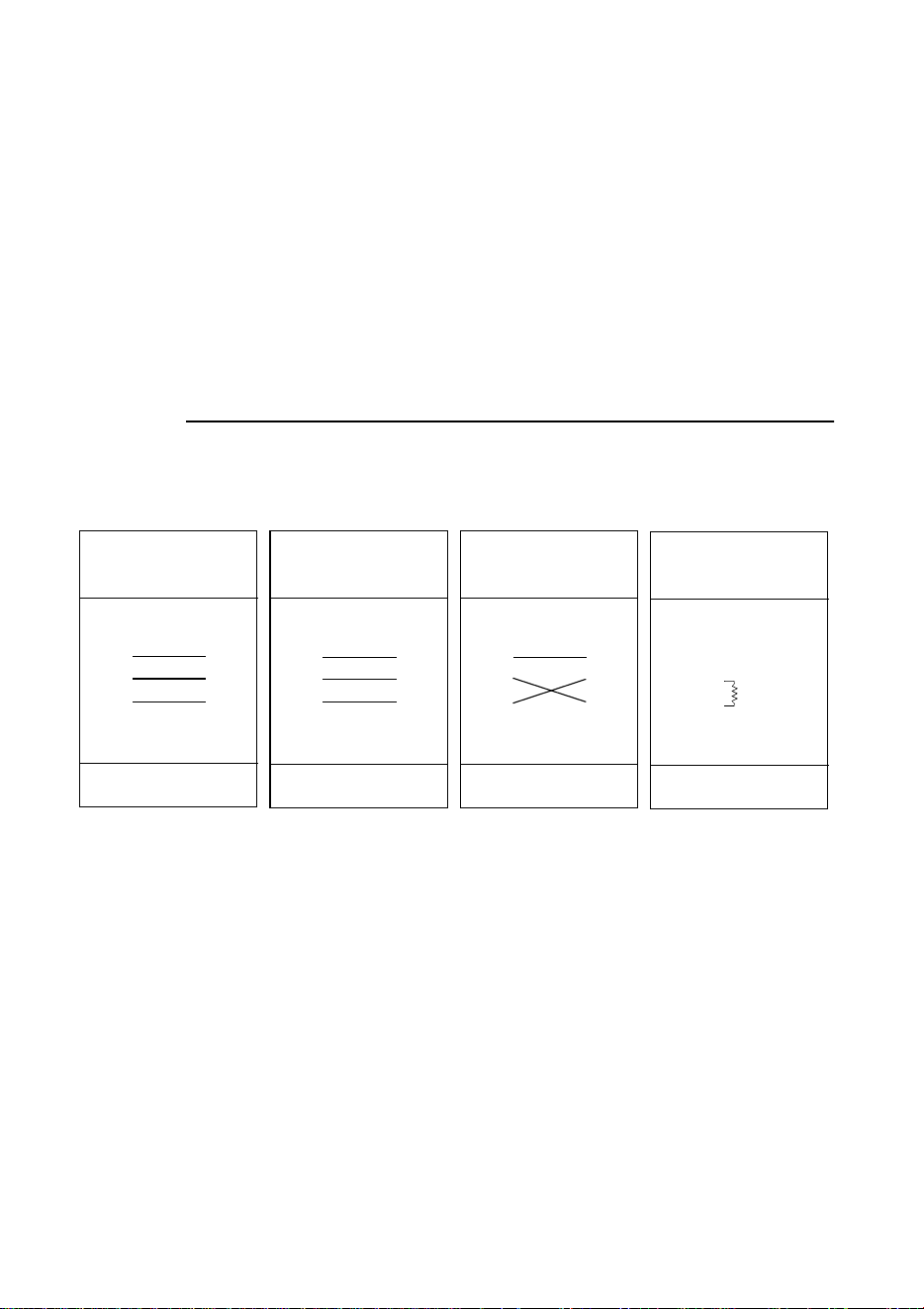
The data sockets are wired with pin 1 to ground, pin 2 to signal - (cold), and pin 3
to signal + (hot) for compatibility with DMX devices. One or more adaptor cables
as shown below may be required for connection to the controller or other lights.
To connect the data link
1 Connect a cable to the controller’s data output. If the output socket has a 5
pins, use a 5-pin male to 3-pin female adaptor. Lead the cable to the first
fixture and plug it into the data input.
2 Connect the output of the fixture closest to the controller to the input of the
next fixture. If connecting to a fixture with reversed-polarity (pin 3 cold),
insert a phase-reversing cable between the two fixtures. Continue connecting
fixtures output to input. Up to 32 devices may be connected on a serial link.
3 Terminate the link by inserting a male termination plug (P/N 91613017) into
the data output of the last fixture. A termination plug is simply an XLR
connector with a 120 ohm, 0.25 W resistor soldered across pins 2 and 3.
Phase-Reversing
Adaptor
Male Female
1
2
3
1
2
3
3-pin to 3-pin
P/N 11820006
Adaptor
Male Female
1
2
3
4
5
1
2
3
5-pin to 3-pin
P/N 11820005
Adaptor
Male Female
1
2
3
1
2
3
4
5
3-pin to 5-pin
P/N 11820004
Male XLR
1
2
3
Male
P/N 91613017
120
Termination Plug

CX-4 user manual Stand-alone operation 13
S
TAND
-
ALONE
OPERATION
6
The CX-4 may be operated in a random-action stand-alone mode without a
controller. It may be operated as a single unit or in synchronization with other
CX-4s in “master/slave” configuration. Several options are available to modify
operation. These are selected with the DIP-switch and are described on page 14.
Important! The CX-4 transmits a signal on the data link when DIP-switch
pins 2 and 10 are set to ON. To avoid possible damage,
connect no more than 1 transmitting device to the data link.
SINGLE UNIT OPERATION
The fixture enters stand-alone mode with music trigger when power is applied
and no control signal is received for 5 seconds. To operate, simply apply power
and disconnect the data link.
Options for trigger type and speed may be selected as described below under
“Stand-alone settings”. To select stand-alone mode with auto trigger, set DIP-
switch pins 1, 3, 5, 6, 7, 8, 9, and 11 to off; set pins 2 and 10 to on. Pins 4 and 12
may be on or off.
MASTER / SLAVE OPERATION
Multiple CX-4s can be connected together for synchronized “master/slave”
operation in which the slaves mimic the behavior of the master, which may be
any one of the connected fixtures.
To connect units for master / slave operation
1 Connect the output of one CX-4 to the input of the next CX-4.
2 Connect additional CX-4s output to input. Up to 32 may be connected.
3 Terminate the link on both ends by inserting a
female
termination plug (P/N
91613018) into the data
input
of the first fixture and a
male
termination plug
into the data
output
of the last fixture. The female terminator may not be
required if the first fixture is the master.
14 Stand-alone operation CX-4 user manual
To set the master
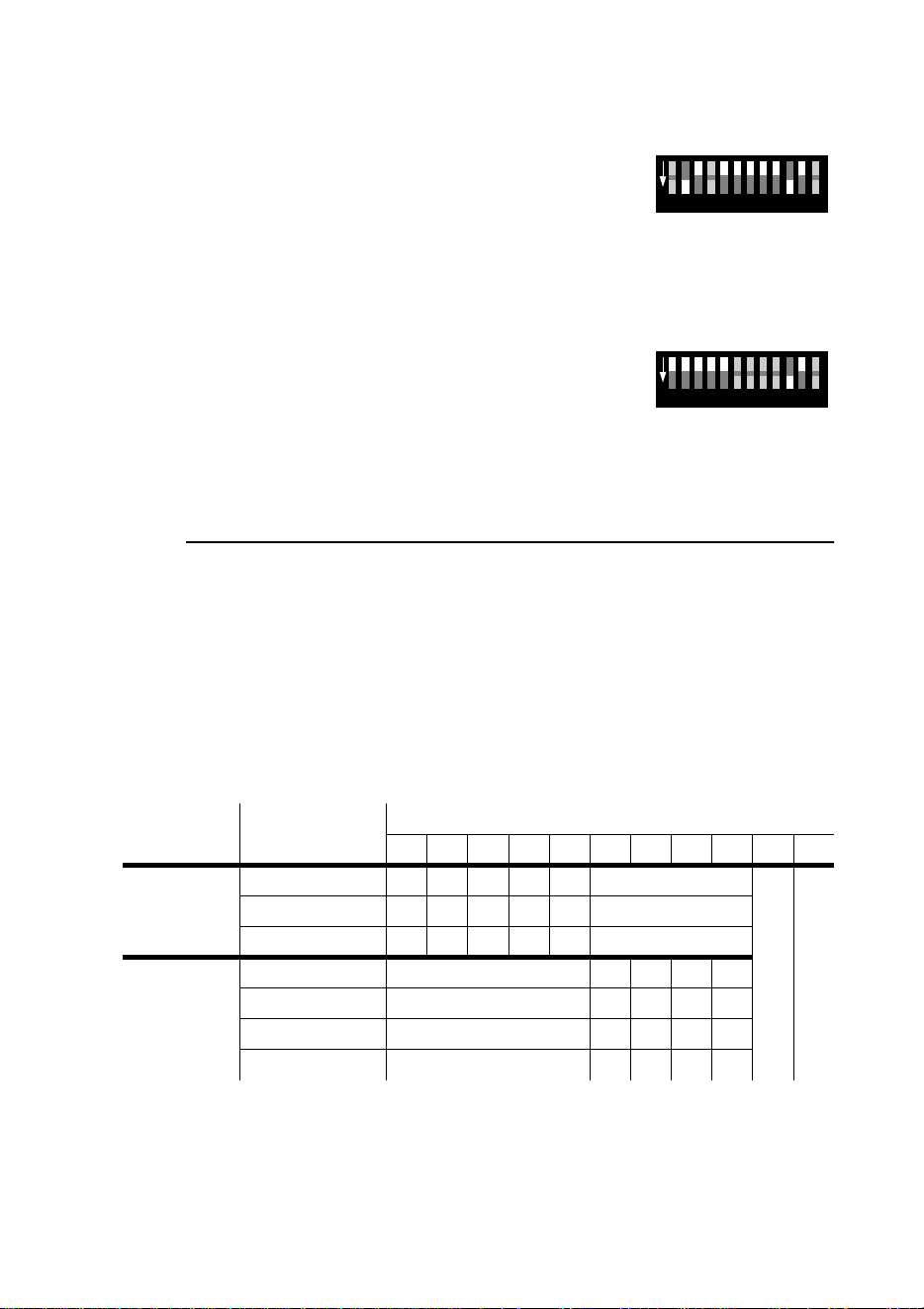
Important! Set only 1 fixture as master (DIP-switch pin 2 and 10 ON).
1 Set DIP-switch pins 2 and 10 to ON.
2 Set DIP-switch pins 3, 5, 6, 7, 8, 9, and 11 to OFF.
3 Select trigger and speed options with DIP-switch
pins 1 and 4.
To set a slave
1 Set DIP-switch 10 to ON.
2 Set pins 1, 2, 3, 4, 5 and 11 to OFF.
3 Select options with DIP-switch pins 6, 7, 8, and 9.
STAND-ALONE SETTINGS
DIP-switch pins 1-9 enable stand-alone options only when pin 10 is ON. When
pin 10 is off, the DIP-switch selects a DMX address. Pin 11 selects 1-channel
DMX mode and must be OFF for stand-alone operation.
Pin 12 selects the DMX protocol for the effect wheel and has no effect in stand-
alone mode.
The DIP-switch 10 setting takes effect only after the fixture has been turned off
and on.
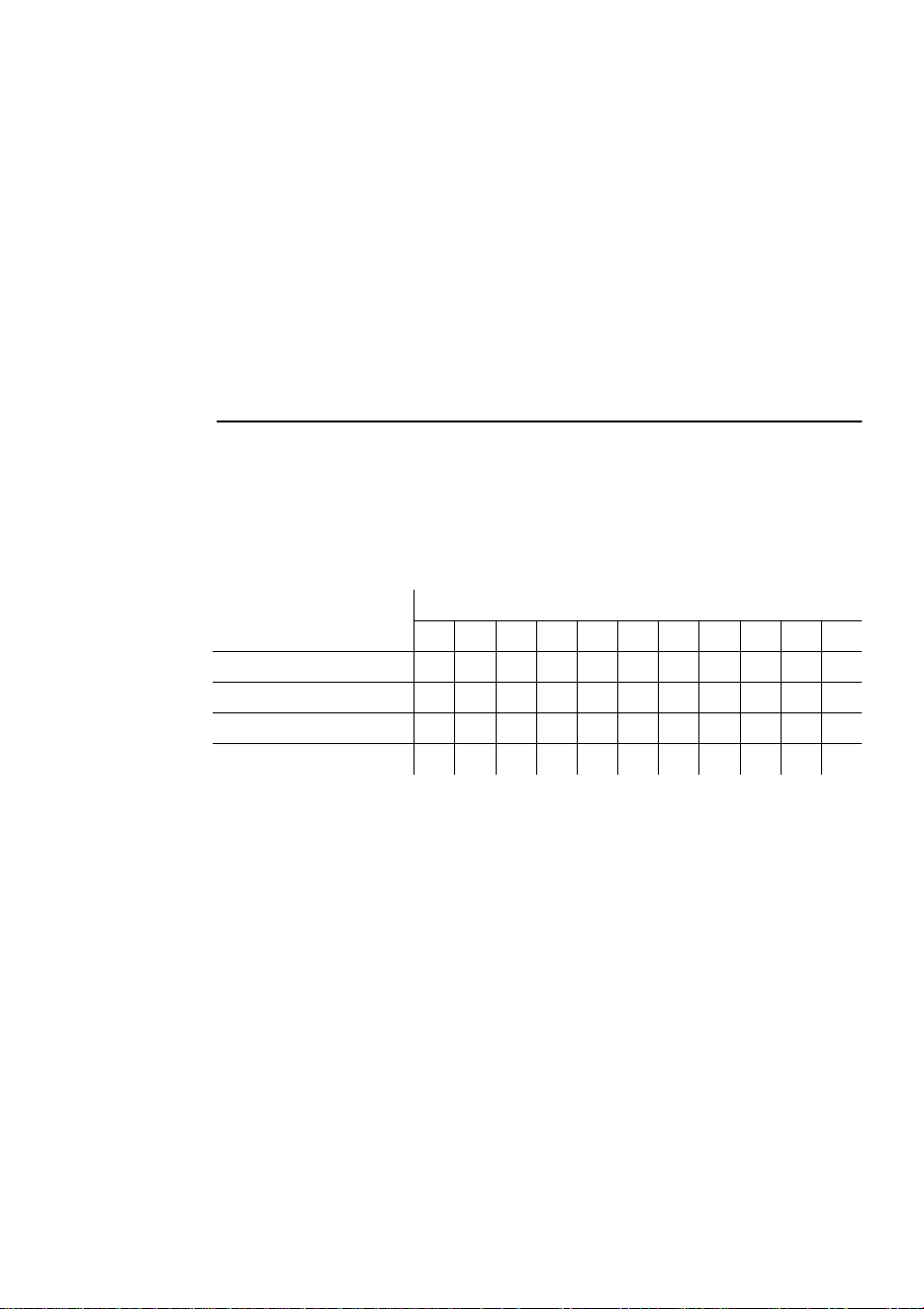
Fixture Option Setting (0 = OFF, 1 = ON)
1234567891011
single or
master
auto trigger 0 1 0 0
10
music trigger 1 1 0 0
slow change 1 0 1 0
slave
random color 0 1
random effect 0 1
inverted color 0 1
inverted effect 0 1
102 3 4 51 86 7 9
ON
1211
102 3 4 51 86 7 9
ON
1211
CX-4 user manual MC-1 operation 15
MC-1
OPERATION
7
The CX-4 is fully compatible with the Martin MC-1 Controller. See the MC-1
user manual for additional information.
MC-1 MODE SETTINGS
DIP-switch pin 10 must be set to OFF to enable MC-1 mode operation. Changes
to the setting take effect after the fixture has been turned off and on.
DIP-switch pins 6, 7, 8, and 9 select control options. The remaining pins have no
effect in MC-1 mode.
Option Setting (0 = OFF, 1 = ON)
1234567891011
random color 1 0
random effect 1 0
inverted color 1 0
inverted effect 1 0

16 DMX operation CX-4 user manual
DMX
OPERATION
8
DMX MODES
The CX-4 has 2 DMX modes to choose from: a 1-channel mode that provides
control of the built-in stand-alone features, and a 6-channel mode that provides
full control of all effects.
The 6-channel mode provides 2 options for controlling the effect wheel that are
selected with DIP-switch 12.
To select DMX mode
1 Disconnect the fixture from power.
Set DIP-switch pin 10 to OFF.
2 To select 1-channel DMX mode, set DIP-switch pin 11 to ON. To select 6-
channel DMX mode, set DIP-switch pin 11 to OFF
3 Select the effect wheel control option. Set DIP-switch pin 12 to OFF if you
want the effect wheel to be open at DMX values 0 - 9. Set it to ON if you want
the gobo wheel to blackout the light at DMX 0 - 9.
DMX ADDRESS
DIP-switch pins 1-9 are used to set the control address. The address, also known
as the start channel, is the first channel used to receive instructions from the
controller.
For independent control, each fixture must be assigned its own address and non-
overlapping control channels. Two CX-4s may share the same address only if
they are to respond identically: they will receive the same instructions and
individual control will not be possible.
To set the DMX address
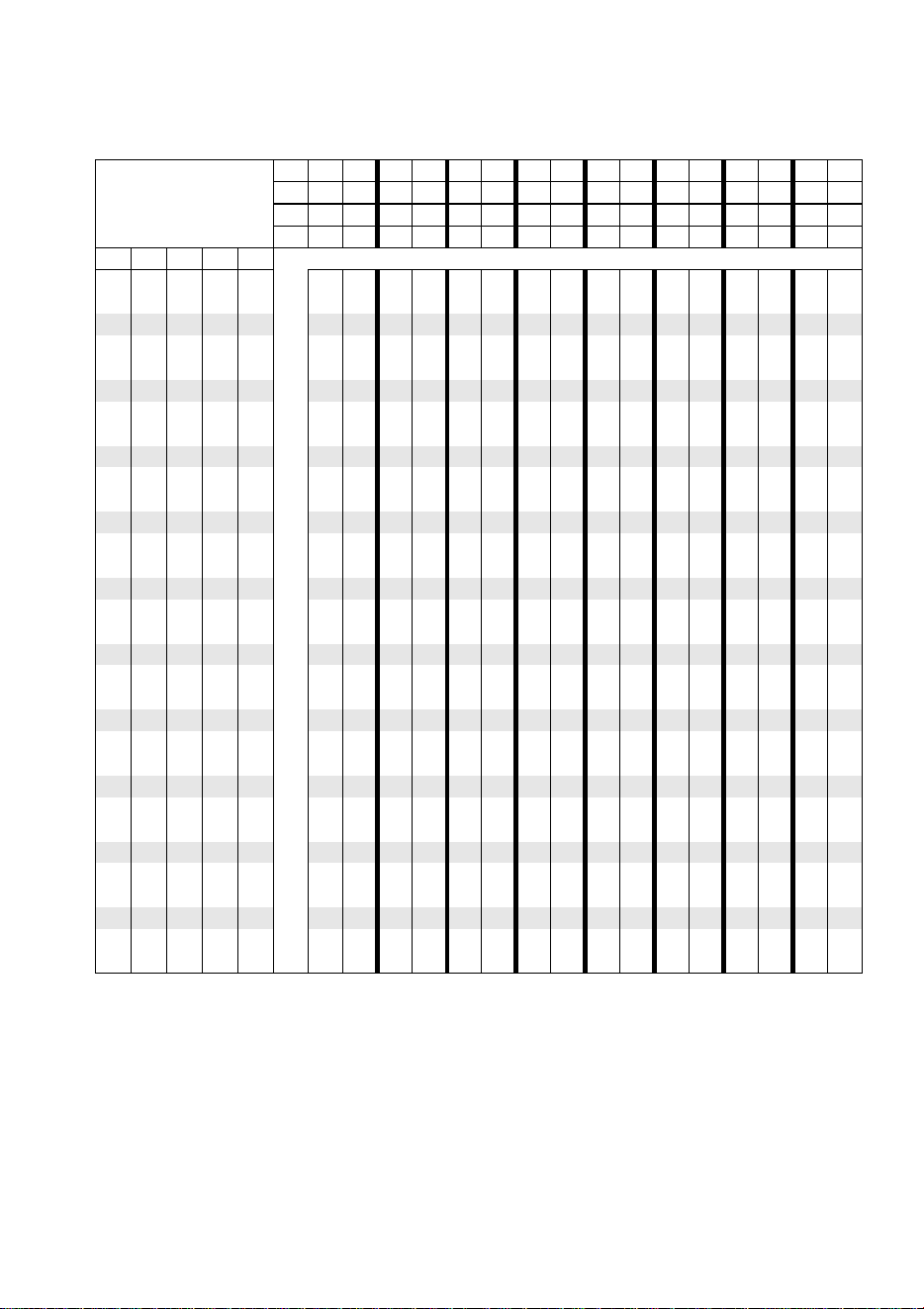
1 Select an address for the fixture on your controller. Look up the DIP-switch
setting for the address in the table below.
2 Disconnect the fixture from power.
3 Set pins 1 through 9 to the ON (1) or OFF (0) position as listed in the table.
CX-4 user manual DMX operation 17
Find the address in the table. Read the settings for pins 1 - 5 to the left and read
the settings for pins 6 - 9 above the address. “0” means OFF and “1” means ON.
Pin 10 is always OFF for DMX operation.
DIP-Switch Setting
0 = OFF
1 = ON
#90000000011111111
#80000111100001111
#70011001100110011
#60101010101010101
#1 #2 #3 #4 #5
00000 326496128160192224256288320352384416448480
10000 1336597129161193225257289321353385417449481
0 1 0 0 0 2 34 66 98 130 162 194 226 258 290 322 354 386 418 450 482
11000 3356799131163195227259291323355387419451483
00100 43668100132164196228260292324356388420452484
1 0 1 0 0 5 37 69 101 133 165 197 229 261 293 325 357 389 421 453 485
01100 63870102134166198230262294326358390422454486
11100 73971103135167199231263295327359391423455487
0 0 0 1 0 8 40 72 104 136 168 200 232 264 296 328 360 392 424 456 488
10010 94173105137169201233265297329361393425457489
01010 104274106138170202234266298330362394426458490
1 1 0 1 0 11 43 75 107 139 171 203 235 267 299 331 363 395 427 459 491
00110 124476108140172204236268300332364396428460492
10110 134577109141173205237269301333365397429461493
0 1 1 1 0 14 46 78 110 142 174 206 238 270 302 334 366 398 430 462 494
11110 154779111143175207239271303335367399431463495
00001 164880112144176208240272304336368400432464496
1 0 0 0 1 17 49 81 113 145 177 209 241 273 305 337 369 401 433 465 497
01001 185082114146178210242274306338370402434466498
11001 195183115147179211243275307339371403435467499
0 0 1 0 1 20 52 84 116 148 180 212 244 276 308 340 372 404 436 468 500
10101 215385117149181213245277309341373405437469501
01101 225486118150182214246278310342374406438470502
1 1 1 0 1 23 55 87 119 151 183 215 247 279 311 343 375 407 439 471 503
00011 245688120152184216248280312344376408440472504
10011 255789121153185217249281313345377409441473505
0 1 0 1 1 26 58 90 122 154 186 218 250 282 314 346 378 410 442 474 506
11011 275991123155187219251283315347379411443475507
00111 286092124156188220252284316348380412444476508
1 0 1 1 1 29 61 93 125 157 189 221 253 285 317 349 381 413 445 477 509
01111 306294126158190222254286318350382414446478510
11111 316395127159191223255287319351383415447479511

18 DMX operation CX-4 user manual
1-CHANNEL DMX OPERATION
The functions shown in the following table are available in 1-channel mode.
When a “stand-alone” function is selected, the fixture steps through a routine
using a built-in microphone to trigger the action to the beat of the music. Note that
multiple fixtures cannot be synchronized in this mode.
FULL DMX OPERATION
See also the DMX protocol on page 22.
Channel 1 controls lamp power and strobe rate. It also allows you to execute a
program with random color and gobo change using automatic or music trigger.
All effect wheels are reset to their home position when the fixture is powered up;
they can also be reset from the controller by sending a reset command on channel
1.
Channel 2 controls the dimmer.
Channel 3 controls the color wheel. When set to 100 percent, the wheel moves to
random positions using the trigger selected on channel 1.
Channel 4 controls the effect wheel. The wheel’s position depends on the setting
of DIP-switch pin 12 as well as the DMX value. When pin 12 is off, the wheel
goes from open at 0 percent to closed at 90 percent. When pin 12 is on, the wheel
goes from closed at 0 percent, open at 3 percent, to the small iris at 90 percent.
When set to 100 percent, the effect wheel moves to random positions using the
trigger selected on channel 1. See the DMX protocol for complete details.
Channel 5 controls the dimmer speed, allowing you to program fades on
controllers without cross-faders. If your controller has cross-faders, and you use
them, then set channel 5 to the “tracking” speed (0 percent).
Channel 6 controls the speed of the color and effect wheels. If your controller has
cross-faders, and you use them, then set channel 6 to fast (0 percent).
DMX value Percent Function
0 - 10
11 - 20
21 - 80
81 - 115
116 - 140
141 - 175
176 - 210
211 - 255
0 - 4
5 - 7
8 - 31
32 - 45
46 - 55
56 - 68
69 - 82
83 - 100
Blackout (dimmer closed)
Open
Strobe
Stand-alone with slow music trigger
Stand-alone with medium music trigger
Stand-alone with fast music trigger
Stand-alone with random music trigger
Manual trigger area, crossover at 240 (94%)

CX-4 user manual Basic service 19
B
ASIC
SERVICE
9
The CX-4 requires simple routine maintenance. The maintenance schedule
depends heavily on the operating environment; please consult a Martin service
technician for recommendations.
Any service procedure not described here should be referred to a qualified
technician.
Important! Excessive dust, grease, and smoke fluid buildup degrades
performance and causes overheating and damage to the
fixture that is not covered by the warranty.
Warning! Disconnect the fixture from AC power before removing any
cover.
CLEANING
To clean optical components
Use care when cleaning optical components. The surface of the color filters is
fragile and small scratches may be visible.
1 Disconnect the fixture from AC power and allow the components to cool
completely.
2 Remove the top cover bolts with a 4 mm Allen wrench and lift off the cover.
3 Blow or vacuum away loose dust. Remove residues from lenses and filters
with a soft cloth or cotton swabs wetted with isopropyl alcohol. Regular
glass cleaner may also be used, but no residues may remain.
4 Rinse with distilled water. Mixing the water with a small amount of wetting
agent such as Kodak Photoflo will help prevent streaking and spotting.
5 Dry with a clean, soft and lint-free cloth or blow dry with compressed air.
6 Replace the top cover.

20 Basic service CX-4 user manual
To clean the fan and air vents
To maintain adequate cooling, dust must be cleaned from the fan and air vents
periodically.
1 Remove the data and power cables and stand the fixture on end.
2 Remove dust and dirt from the fan blades and vent grills using a soft brush,
cotton swab, vacuum, or compressed air.
REPLACING FUSES
The CX-4 has 2 fuses. The main fuse holder is built in to the mains input socket.
The secondary fuse is located on the printed circuit board.
Warning! Never replace fuses with ones of a different rating!
To replace the main fuse
1 Unplug the mains cable from the input socket. Pry open the fuse holder and
remove the fuse.
2 Replace the fuse with one of the same type. The fuse rating is listed on serial
number label.
To replace the secondary fuse
1 Disconnect the fixture from AC power. Remove the top cover bolts with a 4
mm Allen wrench and lift off the cover.
2 The fuse is located right behind the data input connector. Pry out the
defective fuse and replace it with one of the same rating.
3 Replace the cover before applying power.
CX-4 user manual Troubleshooting 21
T
ROUBLESHOOTING
10
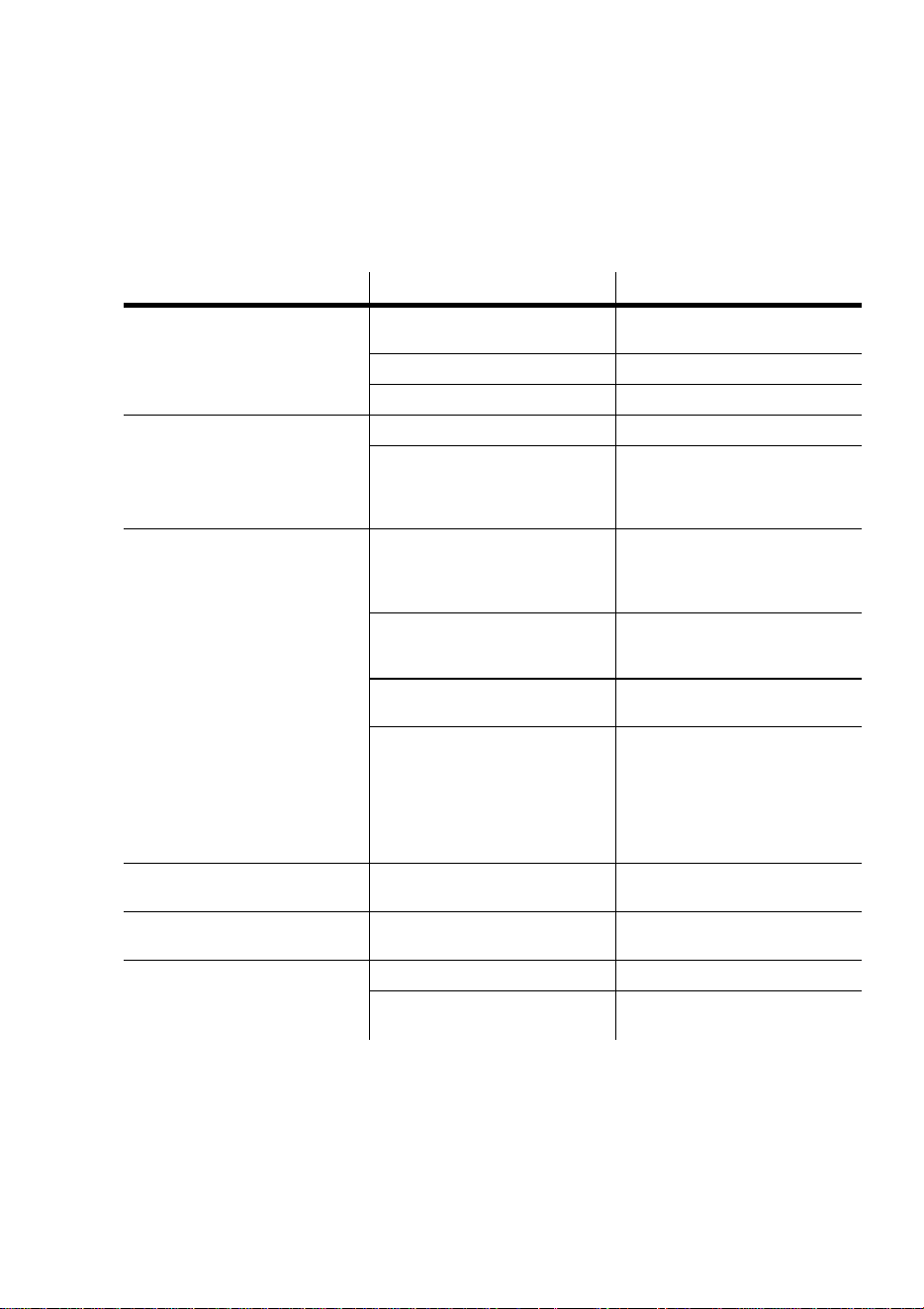
Problem Probable cause(s) Remedy
One or more of the fixtures is
completely dead.
No power to fixture.
Check that power is switched on
and cables are plugged in.
Primary fuse blown. Replace fuse.
Secondary fuse blown. Replace fuse.
Fixtures reset correctly but all
respond erratically or not at all
to the controller.
The controller is not connected. Connect controller.
XLR pin-out of the controller
does not match pin-out of the
first fixture on the link (i.e.
signal is reversed).
Install a phase-reversing cable
between the controller and the
first fixture on the link.
Fixtures reset correctly but
some respond erratically or not
at all to the controller.
Bad data link connection
Inspect connections and cables.
Correct poor connections.
Repair or replace damaged
cables.
Data link not terminated with
120Ω termination plug.
Insert termination plug in output
jack of the last fixture on the
link.
Incorrect addressing of the
fixtures.
Check DIP-switch settings.
One of the fixtures is
transmitting as a master or is
defective.
Bypass one fixture at a time
until normal operation is
regained: unplug both
connectors and connect them
directly together. Have the
defective fixture serviced by a
qualified technician.
An effect fails to reset correctly.
The effect requires mechanical
adjustment.
Contact Martin technician for
service.
No light. Lamp missing or blown
Disconnect fixture and replace
lamp.
Lamp cuts out intermittently or
burns out too quickly.
Fixture is too hot. Allow fixture to cool.
The transformer setting does not
match local AC voltage.
Check AC setting.

22 DMX protocol CX-4 user manual
DMX
PROTOCOL
A
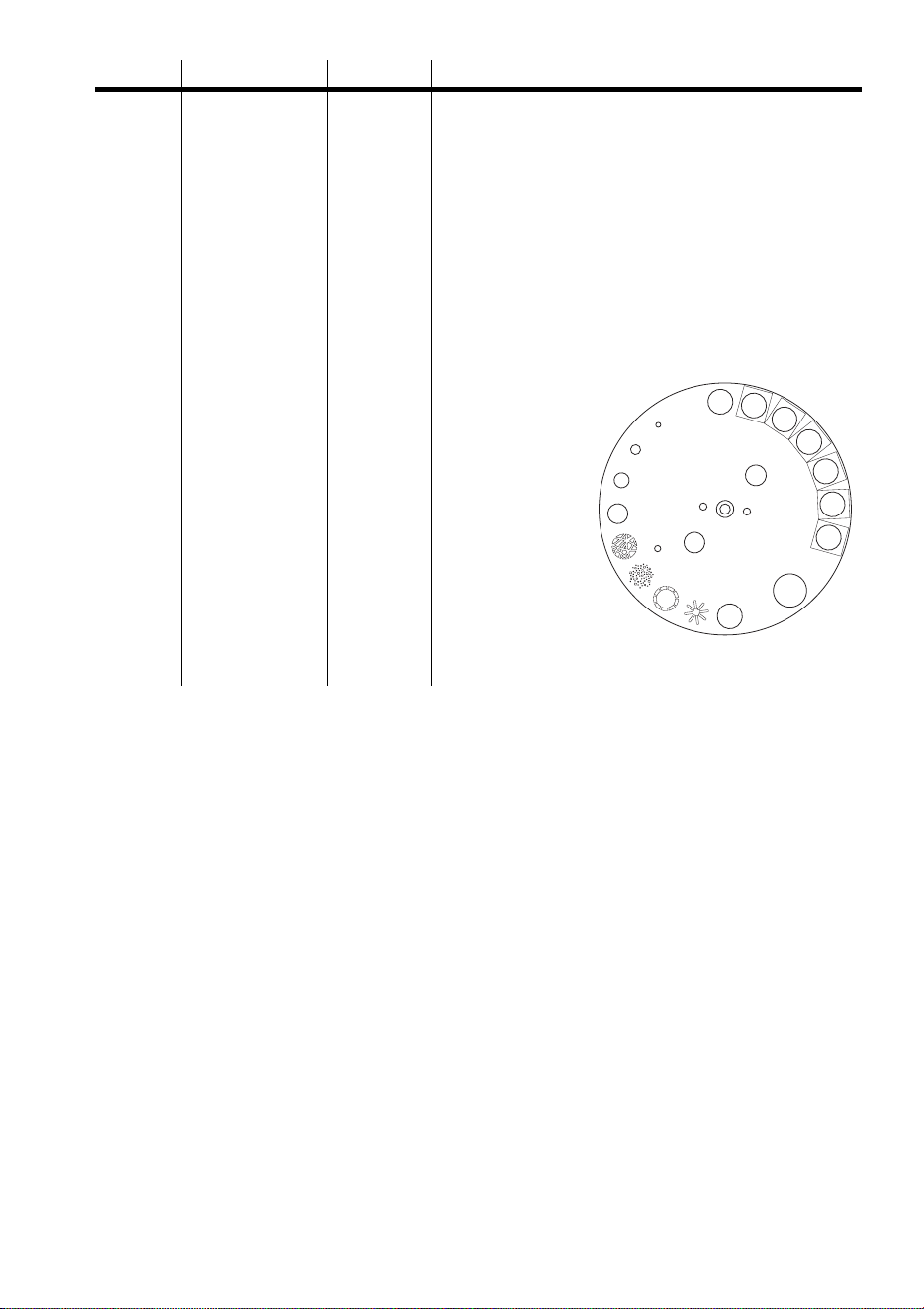
Channel Value Percent Function
1
0 - 9
10 - 19
20 - 99
100 - 159
160 - 179
180 - 204
205 - 229
230 - 239
240 - 249
250 - 255
0 - 3
3 - 7
7 - 39
39 - 62
63 - 70
70 - 80
80 - 90
90 - 94
94 - 98
98 - 100
Strobe, Lamp power, Reset
No function
Lamp-on
No function
Strobe, fast to slow
Shutter closed
Remote action w/ music trigger
Remote action w/ auto trigger
No function
Reset (hold for 5 sec.)
Lamp-off (w/ ch. 2 & 3 > 252, hold for 5 sec.)
2
0 - 255 0 - 100
Dimmer
Closed to open
3
0 - 10
11 - 21
22 - 32
33 - 43
44 - 54
55 - 65
66 -76
77 - 87
88 - 98
99 - 109
110 - 120
121 - 131
132 - 142
143 - 153
154 - 164
165 - 175
176 - 186
187 - 197
198 - 208
209 - 219
220 - 230
231 - 255
0 - 3
4 - 8
8 - 12
13 - 16
17 - 21
21 - 25
26 - 29
30 - 34
34 - 38
39 - 42
43 - 47
47 - 51
52 -55
56 - 60
60 - 64
65 - 68
69 - 73
73 - 77
78 - 81
82 - 86
87 - 90
91- 100
Color Wheel
Open
Open / CTC 3200K - 4100K
CTC 3200K - 4100K
CTC 3200K - 4100K / CTC ½ Minus Green
CTC ½ Minus Green
CTC ½ Minus Green / CTC 5500K - 3400K
CTC 5500K - 3400K
CTC 5500K - 3400K / Cyan 104
Cyan 104
Cyan 104 / Magenta 507
Magenta 507
Magenta 507 / Yellow 603
Yellow 603
Yellow 603 / Medium Blue 108
Medium Blue 108
Medium Blue 108 / Primary Green 206
Primary Green 206
Primary Green 206 / Primary Red 308
Primary Red 308
Primary Red 308 / Color Mix 4
Color Mix 4
Random position w/ trigger selected on ch. 1
CX-4 user manual DMX protocol 23
4
0-9
10-19
20-29
30-39
40-49
50-59
60-69
70-79
80-89
90-99
100-109
110-119
120-129
130-139
140-149
150-159
160-169
170-179
180-189
190-199
200-209
210-219
220-229
230-239
240-255
0 - 3
3 - 7
7 - 11
11 - 15
15 - 19
19 - 23
23 - 27
27 - 31
31 - 35
35 - 39
39 - 42
43 - 46
47 - 50
51 - 54
55 - 58
59 - 62
63 - 66
66 - 70
70 - 74
74 - 78
78 - 82
82 - 86
86 - 90
90 - 94
94 - 100
Effect Wheel, DIP-switch 12 OFF
Open
Open / Red 304
Red 304
Red 304 / Light Green 204
Light Green 204
Light Green 204 / Amber 604
Amber 604
Amber 604 / Blue 101
Blue 101
Blue 101 / Pink 312
Pink 312
Pink 312 / Orange 306
Orange 306
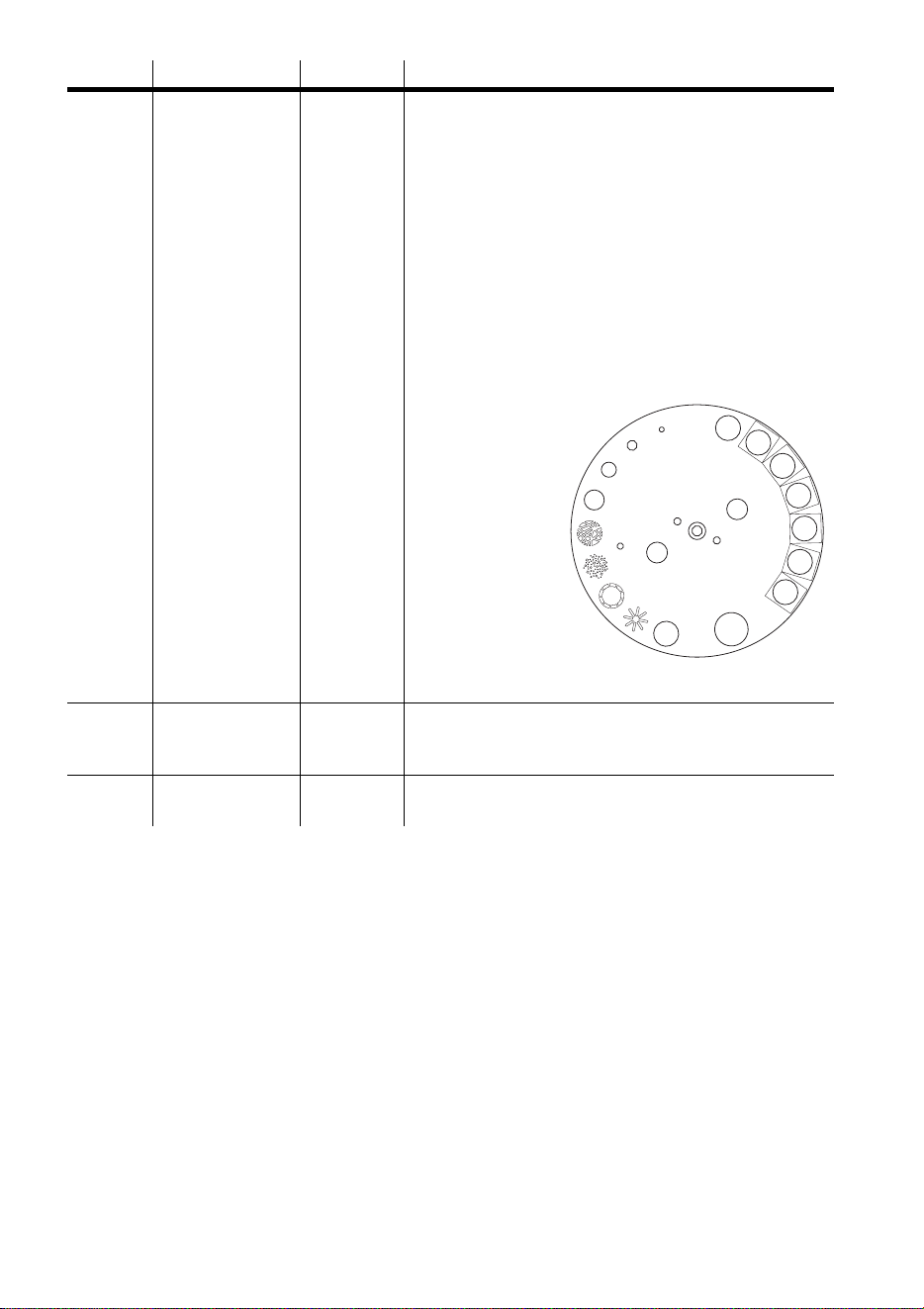
Frost
Open
Spokes
Dot Circles
Star Dots
Highways
80% Iris
60% Iris
40% Iris
20% Iris
Closed
Random position
w/ trigger selected on ch. 1
Channel Value Percent Function
24 DMX protocol CX-4 user manual
4
0-9
10-19
20-29
30-39
40-49
50-59
60-69
70-79
80-89
90-99
100-109
110-119
120-129
130-139
140-149
150-159
160-169
170-179
180-189
190-199
200-209
210-219
220-229
230-239
240-255
0 - 3
3 - 7
7 - 11
11 - 15
15 - 19
19 - 23
23 - 27
27 - 31
31 - 35
35 - 39
39 - 42
43 - 46
47 - 50
51 - 54
55 - 58
59 - 62
63 - 66
66 - 70
70 - 74
74 - 78
78 - 82
82 - 86
86 - 90
90 - 94
94 - 100
Effect Wheel, DIP-switch 12 ON
Closed
Open
Open / Red 304
Red 304
Red 304 / Light Green 204
Light Green 204
Light Green 204 / Amber 604
Amber 604
Amber 604 / Blue 101
Blue 101
Blue 101 / Pink 312
Pink 312
Pink 312 / Orange 306
Orange 306
Frost
Open
Spokes
Dot Circles
Star Dots
Highways
80% Iris
60% Iris
40% Iris
20% Iris
Random position
w/ trigger selected
on ch. 1
5 0 - 2
3 - 255
0 - 1
2 - 100
Dimmer Speed
Tracking (speed function off)
Fast to slow
6
0 - 255 0 - 100
Color and Effect Wheel Speed
Fast to slow
Channel Value Percent Function

CX-4 user manual Specifications 25
S
PECIFICATIONS
B
PHYSICAL
Size (L x W x H): . . . . . . . . . . . . . . . . . . . . . . . 296 x 269 x 270 mm (11.7 x 10.6 x 10.6 in)
Weight: . . . . . . . . . . . . . . . . . . . . . . . . . . . . . . . . . . . . . . . . . . . . . . . . . . . . .8.5 kg (18.7 lbs)
THERMAL
Maximum ambient temperature (Ta): . . . . . . . . . . . . . . . . . . . . . . . . . . . . . . 40° C (104° F)
Maximum surface temperature: . . . . . . . . . . . . . . . . . . . . . . . . . . . . . . . . . . . 65° C (149° F)
CONTROL AND PROGRAMMING
DMX-512 (1990) control: . . . . . . . . . . . . . . . . . . . . . . . . . . 1 and 6 channel control modes
Stand-alone control: . . . . . . . . . . . . . automatic & music trigger, master/slave configurable
Data pinout: . . . . . . . . . . . . . . . . . . . .3-pin XLR - pin 1 shield, pin 2 cold (-), pin 3 hot (+)
AC SUPPLY
AC input: . . . . . . . . . . . . . . . . . . . . . . . . . . . . . . . . . . . . . . . . . . . . . . 3-pin IEC male socket
Wiring options: . . . . . . . . . . . . . . . . . . . . . . . . . . . . . . . . .100/120/210/230/250 V, 50/60 Hz
MAXIMUM POWER AND CURRENT
@ 100 V, 50 Hz. . . . . . . . . . . . . . . . . . . . . . . . . . . . . . . . . . . . . . . . . . . . . . . . . 210 W, 2.9 A
@ 120 V, 60 Hz. . . . . . . . . . . . . . . . . . . . . . . . . . . . . . . . . . . . . . . . . . . . . . . . . 205 W, 2.1 A
@ 210 V, 60 Hz. . . . . . . . . . . . . . . . . . . . . . . . . . . . . . . . . . . . . . . . . . . . . . . . . 160 W, 1.1 A
@ 230 V, 50 Hz. . . . . . . . . . . . . . . . . . . . . . . . . . . . . . . . . . . . . . . . . . . . . . . . . 205 W, 1.1 A
@ 250 V, 50 Hz. . . . . . . . . . . . . . . . . . . . . . . . . . . . . . . . . . . . . . . . . . . . . . . . . 200 W, 1.1 A
FUSES
Primary fuse: . . . . . . . . . . . . . . . . . . . . . . . . . . . . . . . . . . . . . . . . T 3.15 A, high I
2
t, 250 V
Secondary fuse: . . . . . . . . . . . . . . . . . . . . . . . . . . . . . . . . . . . . . . . . . . . . . . .T 2.0 A, 250 V
CONSTRUCTION
Housing: . . . . . . . . . . . . . . . . . . . . . . . . . . . . . . . . . UV-resistant fiber-reinforced composite
Finish, black: . . . . . . . . . . . . . . . . . . . . . . . . . . . . . . . . . . . . . . . . . . . . . . . . . . integral color
Finish, titanium: . . . . . . . . . . . . . . . . . . . . . . . . . . . . . . . . . . . . . . . . . . polyurethane coating
INSTALLATION
Minimum distance to combustible materials: . . . . . . . . . . . . . . . . . . . . . . . . . . 0.1 m (4 in)
Minimum distance to illuminated surfaces: . . . . . . . . . . . . . . . . . . . . . . . . . . . 0.3 m (12 in)
Minimum clearance around fan and air vents: . . . . . . . . . . . . . . . . . . . . . . . . . . 0.1 m (4 in)

26 Specifications CX-4 user manual
ACCESSORIES
CX-4 lamp socket conversion kit. . . . . . . . . . . . . . . . . . . . . . . . . . . . . . . . . . . . . . 91614011
MC-1 Controller, EU: . . . . . . . . . . . . . . . . . . . . . . . . . . . . . . . . . . . . . . . . . . . . . . 90718000
MC-1 Controller, US: . . . . . . . . . . . . . . . . . . . . . . . . . . . . . . . . . . . . . . . . . . . . . . 90718100
G-clamp: . . . . . . . . . . . . . . . . . . . . . . . . . . . . . . . . . . . . . . . . . . . . . . . . . . . . . . . . 91602003
Half-coupler clamp: . . . . . . . . . . . . . . . . . . . . . . . . . . . . . . . . . . . . . . . . . . . . . . . . 91602005