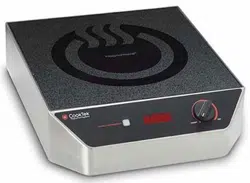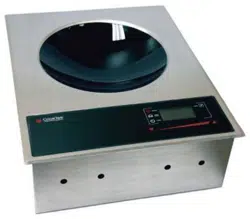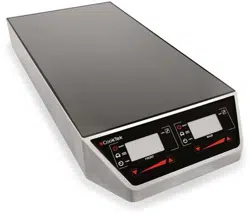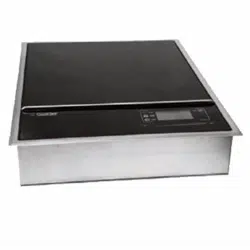

OWNER’S MANUAL
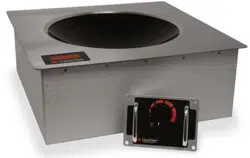
INDUCTION SINGLE HOBS, DOUBLE HOBS, AND WOKS

INDUCTION SINGLE HOBS, DOUBLE HOBS, AND WOKS
.
HSHW- OWN-A / December 2025
2801 Trade Center Drive
Carrollton, Texas 75007
cooktek.com
Page 2 of 36
TABLE OF CONTENTS
1. REVISION HISTORY .................................................................................................................................................................................. 5
2. IMPORTANT SAFETY INSTRUCTIONS ................................................................................................................................................. 6
2.1 General Safety Information ............................................................................................................................................................ 6
2.2 Air Flow and Ambient Temperature ............................................................................................................................................. 8
2.3 Reducing Fire Risk ........................................................................................................................................................................... 8
2.4 Warranty ............................................................................................................................................................................................ 8
2.5 Grounding Instructions ................................................................................................................................................................... 8
2.6 Power Cord Replacement .............................................................................................................................................................. 9
2.7 Protective Earth (Ground) Symbol ................................................................................................................................................ 9
2.8 Equipotential Bonding Symbol ...................................................................................................................................................... 9
2.9 Approved For Commercial Use ..................................................................................................................................................... 9
3. SPACING REQUIREMENTS.................................................................................................................................................................... 10
4. SPECIFICATIONS .................................................................................................................................................................................... 11
4.1 Freestanding Unit Dimensions .................................................................................................................................................... 11
4.2 Drop-In Unit Dimensions .............................................................................................................................................................. 15
4.2.1 Drop-in Single Hob Cutout Dimensions ..................................................................................................................................... 16
4.2.1 Drop-in Double Hob, Front to Back Cutout Dimensions ......................................................................................................... 18
4.2.1 Drop-in Side to Side Double Hob Cutout Dimensions ............................................................................................................. 20
4.2.2 Drop-in Woks Cutout Dimensions .............................................................................................................................................. 22
5. DROP-IN COOKTOP AND WOK INSTALLATION ................................................................................................................................ 23
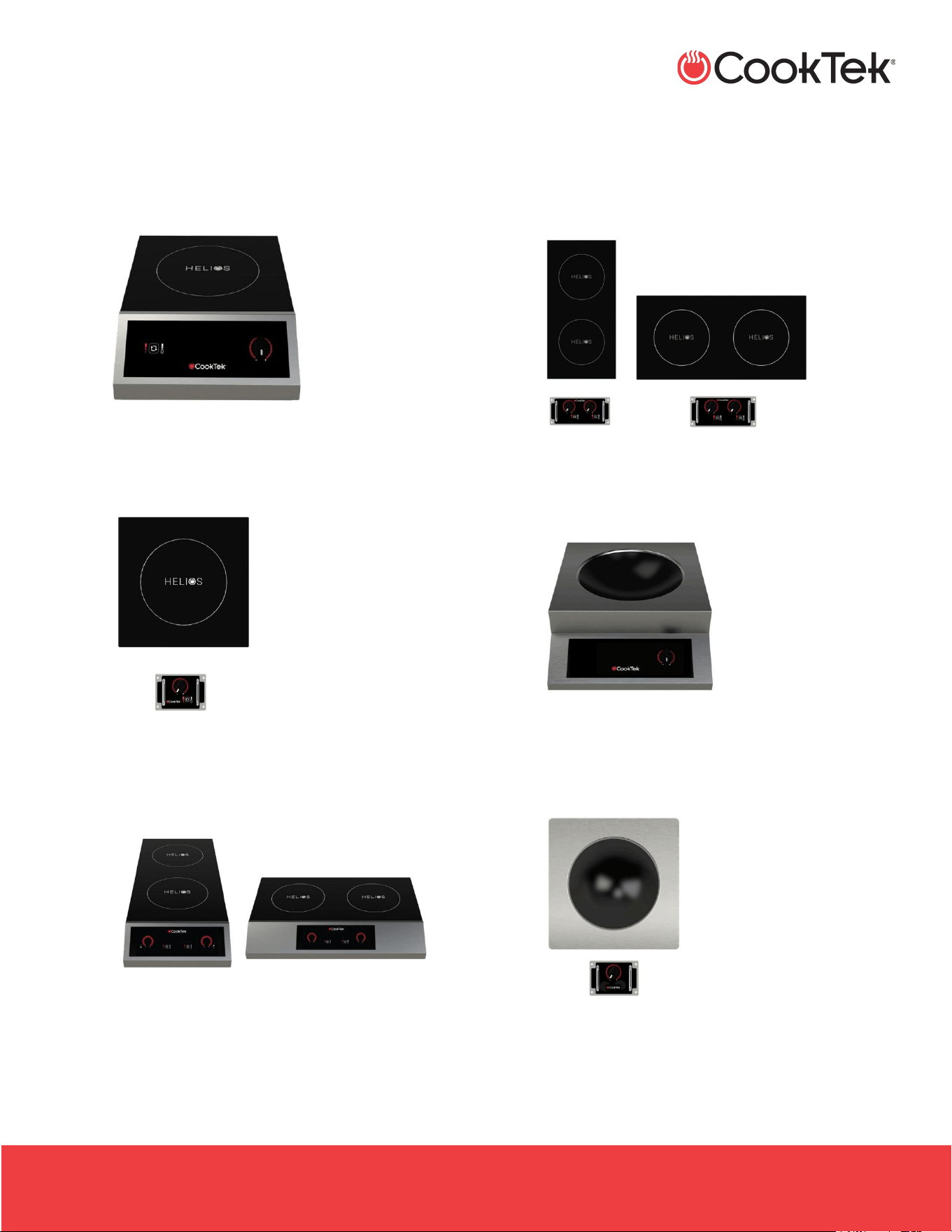
6. HELIOS STANDARD (NON-TOUCH DISPLAY) .................................................................................................................................... 24
6.1 Power Mode .................................................................................................................................................................................... 25
6.2 Helios Standard Cooktop - Temperature Mode ....................................................................................................................... 26
6.3 Helios Standard Wok Operation .................................................................................................................................................. 26
7. HELIOS TOUCH........................................................................................................................................................................................ 27
7.1 Power Mode .................................................................................................................................................................................... 27
7.2 Helios Touch Cooktop - Temperature Mode ............................................................................................................................. 28

INDUCTION SINGLE HOBS, DOUBLE HOBS, AND WOKS
.
HSHW- OWN-A / December 2025
2801 Trade Center Drive
Carrollton, Texas 75007
cooktek.com
Page 3 of 36
7.3 Helios Touch Wok Operation ....................................................................................................................................................... 29
8. DOUBLE HOB COOKTOPS OPERATION .............................................................................................................................................. 30
9. CLEANING AND MAINTENANCE ......................................................................................................................................................... 31
9.1 Grease Filter Maintenance ........................................................................................................................................................... 31
10. TROUBLESHOOTING .............................................................................................................................................................................. 32
11. ERROR CODES ......................................................................................................................................................................................... 34
12. WARRANTY .............................................................................................................................................................................................. 36

INDUCTION SINGLE HOBS, DOUBLE HOBS, AND WOKS
.
HSHW- OWN-A / December 2025
2801 Trade Center Drive
Carrollton, Texas 75007
cooktek.com
Page 4 of 36
For further information, call
800.908.8726
or
+1 214.379.6000
INDUCTION SINGLE HOBS, DOUBLE HOBS, AND WOKS
.
HSHW- OWN-A / December 2025
2801 Trade Center Drive
Carrollton, Texas 75007
cooktek.com
Page 5 of 36
1. REVISION HISTORY
Revision
Revision Date
By
Revision Description
A
30-Dec-25
BA
• New template, updated version DOC-1868 Rev B
• Added information for 400 VAC version

INDUCTION SINGLE HOBS, DOUBLE HOBS, AND WOKS
.
HSHW- OWN-A / December 2025
2801 Trade Center Drive
Carrollton, Texas 75007
cooktek.com
Page 6 of 36
I M P O R T A N T S A F E T Y I N S T R U C T I O N S
2. IMPORTANT SAFETY INSTRUCTIONS
This manual provides essential information for the installation, operation, cleaning, and maintenance of CookTek Helios
freestanding and drop-in induction cooktops and woks, including single-hob, double-hob, and wok configurations in both
Standard and Touch models. This document ensures the equipment is used correctly, safely, and in accordance with
applicable regulatory, electrical, and commercial kitchen standards. Information and specifications are subject to change
without notice. Retain for future reference.
WARNINGS:
• When operating this oven, strictly adhere to the following safety precautions to reduce the risk of burns, electric
shock, fire, injury, or damage to the cooktop or property near the cooktop.
• This appliance has hot surfaces! During use, the accessible parts of the cooktop can become very hot.
2.1 General Safety Information
Each installation site has unique electrical wiring. Since numerous local codes may apply, it is the owner's and installer’s
responsibility to comply with them. CookTek is not liable for any consequential damage resulting from failure to meet
installation requirements.
• Always unplug the appliance immediately after use and allow for cooling time if handling, transporting, or
storing.
• Turn off the cooktop/wok after each use.
• To disconnect the appliance, turn off the unit completely by pressing the power button, pressing Power Off,
then removing the plug from the outlet.
• Never heat empty cookware. Doing so may damage the unit or the cookware or cause it to overheat.
• If overheating happens, an error code will flash on the display, and the unit will shut itself off automatically.
When the temperature returns to normal, the unit can be used again.
• If the power is ON, the appliance will heat continuously. The cookware will be hot; exercise caution when
working on or near the appliance.
• Drop-in CookTek cooktops and woks come with a stand-alone (not built-in) control box for unit operation. Use
ONLY the control box that comes with the unit to avoid any possible operational hazards.
• The cooktops/woks are designed to work with CookTek's recommended induction-compatible cookware only.
• Users wearing a pacemaker should consult their doctor or the pacemaker manufacturer prior to operating
CookTek induction equipment. The electromagnetic field may interfere with the pacemaker's proper function.
• Metallic objects such as kitchen utensils, knives, spoons, etc., should not be placed on the appliance. Use
caution when wearing rings, watches, and other metallic objects, as they may get hot if placed near the unit’s
surface.
• Remove the cooktop carefully from the carton.

INDUCTION SINGLE HOBS, DOUBLE HOBS, AND WOKS
.
HSHW- OWN-A / December 2025
2801 Trade Center Drive
Carrollton, Texas 75007
cooktek.com
Page 7 of 36
I M P O R T A N T S A F E T Y I N S T R U C T I O N S
• Remove all loose packaging and accessories and keep them for future shipment or in case of concealed
shipping damage.
• Any installation that does not follow the specifications outlined in this manual automatically voids the product’s
warranty.
• CookTek requires a dedicated electrical line to be used for each cooktop installed.
• Electrical circuits should not be shared with any other electrical equipment.
• Maximum allowable line voltage is 132 VAC for 100–120 VAC units, 265 VAC for 200–240 VAC units, and 430
VAC for 380–415 VAC units. Exceeding these limits may damage the equipment.
• Always provide a dedicated electrical circuit for the equipment.
• Place the unit on a dry, level, rigid, stable, and non-flammable surface.
• Keep the unit away from other heat sources.
Note: Refer to the Spacing Requirements section for spacing and clearance information for all cooktop units.
• Review the Cleaning and Maintenance section if your unit is equipped with a grease filter on the bottom.
• All units should be checked for build-up and debris around the intake and exhaust vents on the bottom of the
unit.
• Unplug the unit and clean any debris from the vents with a dry cloth to ensure proper airflow to the equipment.
DO NOT perform the following:
Use the cooktop/wok surface for storage purposes
Use the cooktop/wok for anything other than its intended use as described in this manual. This unit is
designed to heat food and is not intended for laboratory or industrial use
Use any accessories or attachments that the manufacturer does not recommend. Use of unapproved
accessories may cause injuries and void the warranty.
Use any appliance that has a damaged cord or plug, or one that has malfunctioned or been damaged.
Let the power cord touch hot surfaces or hang over the edge of the counter.
Move the appliance when electric power is connected.
Immerse cords, plugs, or the appliance in water.
Put food or unopened cans on the cooktop/wok surface.
Leave the appliance unattended while in use.
Place aluminum foil or plastic objects on the cooktop/wok surface.
Use the cooktop/wok near a faucet, swimming pool, sink, or other areas where water can be found. Never
store the unit upside down or in a non-climate-controlled environment.
Obstruct, block, or alter openings or holes in the cooktop/wok housing.
Stick foreign objects into these openings.
Use a water jet to clean the appliance.

INDUCTION SINGLE HOBS, DOUBLE HOBS, AND WOKS
.
HSHW- OWN-A / December 2025
2801 Trade Center Drive
Carrollton, Texas 75007
cooktek.com
Page 8 of 36
I M P O R T A N T S A F E T Y I N S T R U C T I O N S
2.2 Air Flow and Ambient Temperature
• Avoid ambient temperatures exceeding 122 °F (50 °C).
• For drop-in units, the following minimum airflow must be provided:
o Single units require a minimum of 70 CFM (2.0 m3/min) of fresh air to the unit
o Double units require a minimum of 140 CFM (4.0 m3/min) of fresh air to the unit
2.3 Reducing Fire Risk
• In the unlikely event of a grease fire, smother flame by covering cookware with a tight-fitting lid, cookie sheet, or
flat tray. DO NOT USE WATER. When the fire is under control, turn off the appliance and unplug it from the wall.
• Keep the cooktop/wok away from metallic surfaces, gas and electric ranges, and open flames.
2.4 Warranty
Visit cooktek.com/warranty-service for CookTek Warranty information.
• This product may only be serviced by an authorized service agent or by CookTek personnel. Do not attempt to
open the unit or perform any service. For service information, contact CookTek at +1 (214) 379-6000.
• Throwing or dropping the unit can damage the internal components or crack it, voiding your warranty.
• If the cooktop/wok becomes cracked, unplug the unit immediately and do not use it
2.5 Grounding Instructions
The cooktop must be properly grounded. In the event of an electrical short circuit, grounding reduces the risk of electric
shock by providing a safe path for the electric current to flow. The cooktop has a power cord with a 3-prong grounding
plug, which must be used in a compatible and properly grounded outlet. It is the owner’s responsibility to replace any 2-
prong wall outlet with a properly grounded 3-prong wall receptacle. For your safety, never cut, remove, or disable the
electrical (ground) connection from the plug. Never use an adapter plug or an extension cord with the cooktop.
WARNING: Improper grounding can result in risk of electric shock.
Some units may come equipped with a removable IEC power cord. Ensure this power cord is firmly attached to your
CookTek unit before plugging the unit into the power receptacle and attempting operation.
Do not use an extension cord. If the power cord is too short, have a qualified electrician or serviceman install an
outlet near the appliance.

INDUCTION SINGLE HOBS, DOUBLE HOBS, AND WOKS
.
HSHW- OWN-A / December 2025
2801 Trade Center Drive
Carrollton, Texas 75007
cooktek.com
Page 9 of 36
I M P O R T A N T S A F E T Y I N S T R U C T I O N S
2.6 Power Cord Replacement
If the power cord is damaged, it must be replaced by the manufacturer, its service agent, or a similarly
qualified person.
WARNING: If the oven is unplugged during service or maintenance, the user must be able to always access and see
the plug to ensure that the oven remains unplugged. The plug must remain near the oven and cannot be placed behind
another appliance or in another room.
2.7 Protective Earth (Ground) Symbol
This symbol identifies the terminal intended for connecting an external conductor to protect against electric
shock in case of a fault, or the terminal of a protective earth (ground) electrode.
2.8 Equipotential Bonding Symbol
This symbol identifies the terminals which, when connected, bring the various parts of an equipment or of a
system to the same potential, not necessarily being the earth (ground) potential, e.g., for local bonding.
2.9 Approved For Commercial Use
CookTek Helios induction appliances are certified to UL 197 and CSA C22.2 commercial cooking standards and comply
with applicable requirements of the European Economic Area (EEA), bearing the CE mark to indicate conformity. These
certifications confirm that the equipment is approved for commercial food service applications.
INDUCTION SINGLE HOBS, DOUBLE HOBS, AND WOKS
.
HSHW- OWN-A / December 2025
2801 Trade Center Drive
Carrollton, Texas 75007
cooktek.com
Page 10 of 36
S P A C I N G R E Q U I R E M E N T S
3. SPACING REQUIREMENTS
• All units require a minimum clearance of 2” (51 mm) between all sides of the housing and any surface or obstacle.
If
Then
The unit is being placed near a grill or stove
A divider must exist between the unit and the open heat source,
with a minimum of 6” (153 mm) between the unit and the divider.
The unit is placed near a fryer
A divider must exist between the unit and the fryer, with a
minimum of 12” (305 mm) between the unit and the divider.
• All drop-in units require a minimum clearance of open space below the unit of 6” (152 mm). The space must have
openings that allow cool air (ambient temperature not to exceed 122 °F (50 °C)) to flow to the cooktop housing
intake vents. If either the air intake or the exhaust outlet is blocked, the internal temperature will rise, triggering an
error code.
Note: The 6” (152 mm) can be reduced if additional fans and ducting are added to provide forced ventilation.
• Do not install the unit near other equipment that generates excessive heat or grease that can be pulled into the
CookTek unit by its fan (i.e., griddles, fryers, etc.).
• Do not place the unit near items that generate excessive steam that can be pulled into the CookTek unit by its fan
(i.e., pasta cookers, steam baths, dishwashers, etc.).
INDUCTION SINGLE HOBS, DOUBLE HOBS, AND WOKS
.
HSHW- OWN-A / December 2025
2801 Trade Center Drive
Carrollton, Texas 75007
cooktek.com
Page 11 of 36
S P E C I F I C A T I O N S
4. SPECIFICATIONS
4.1 Freestanding Unit Dimensions
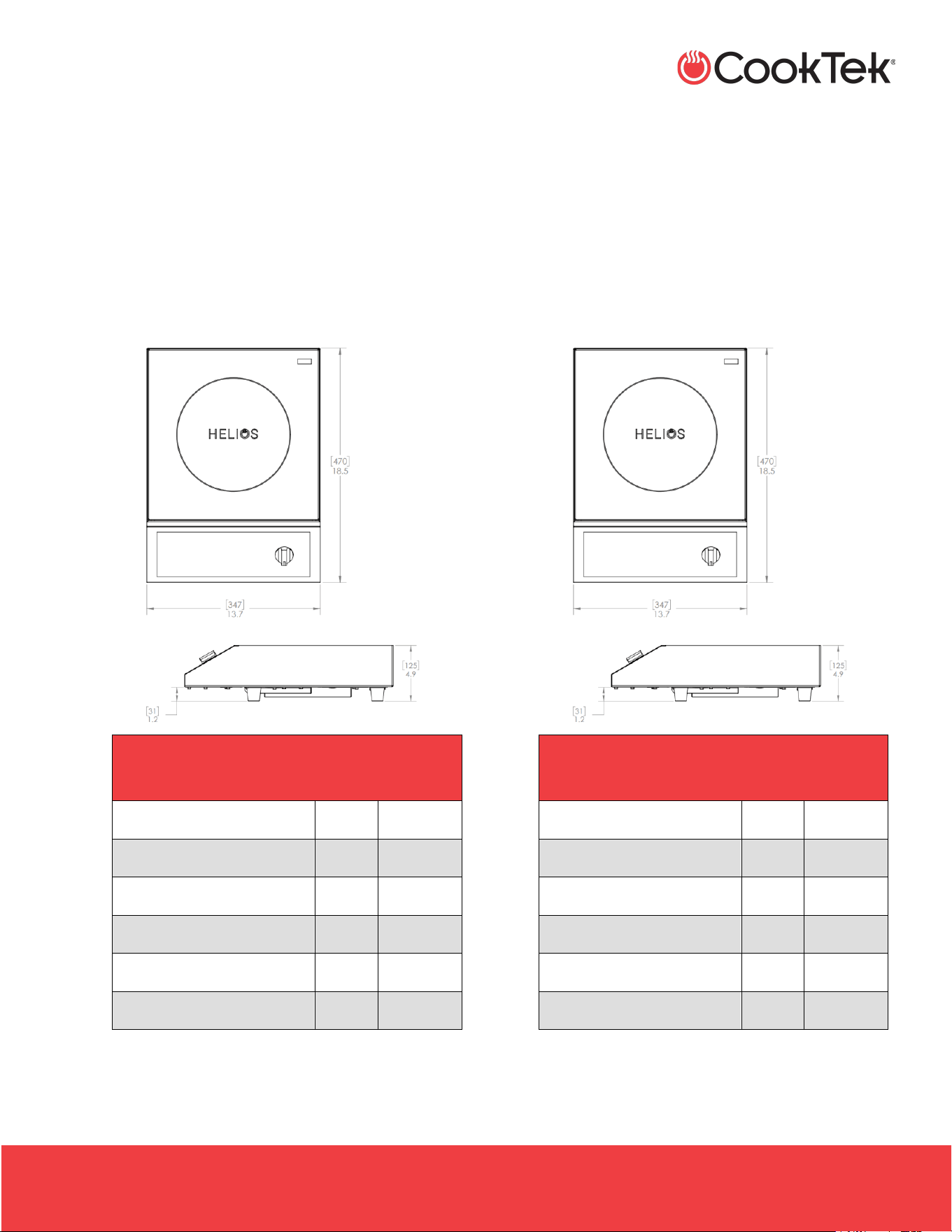
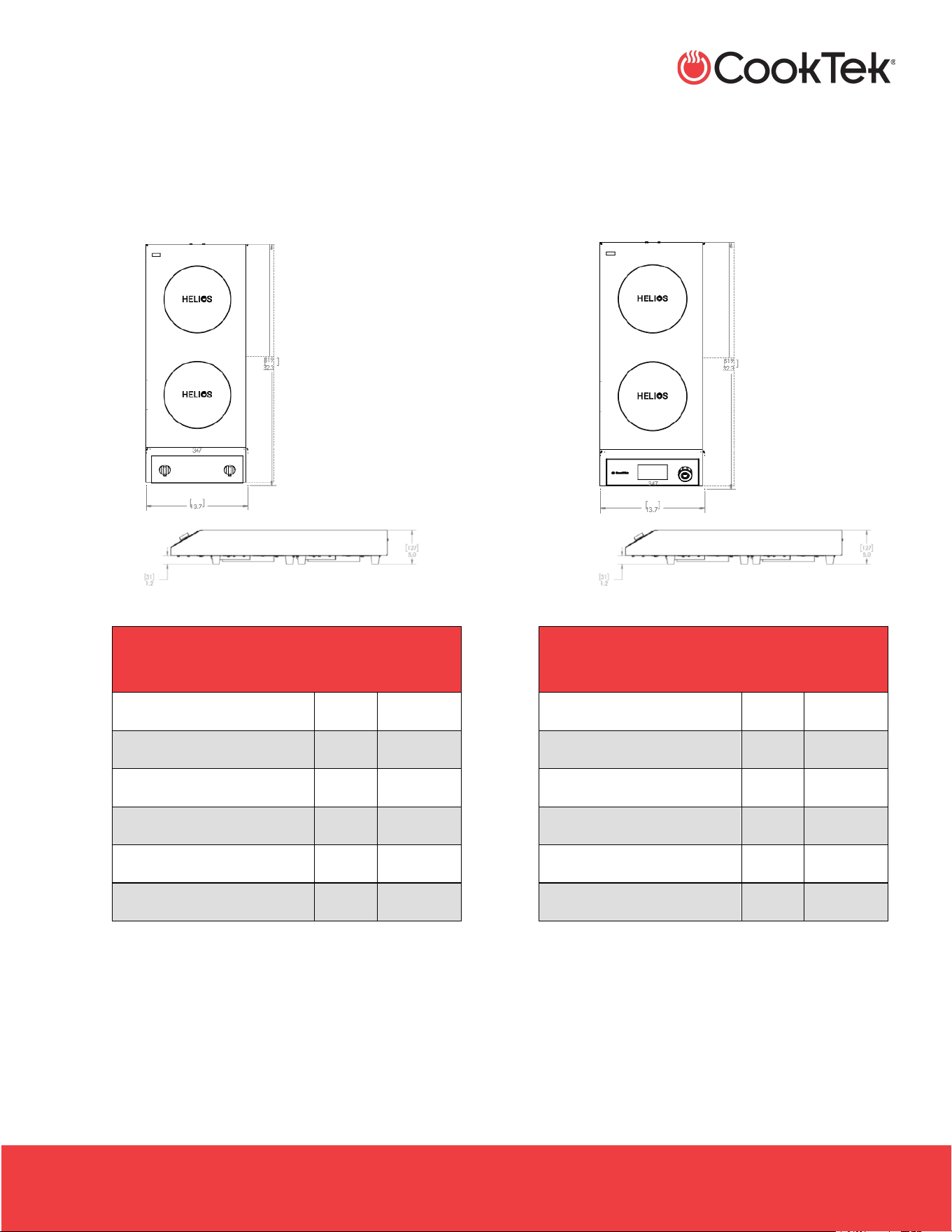
• Freestanding Single Hob, Helios Standard
- HRF-9500-SH18-1
- HRF-9500-SH25-1
- HRF-9500-SH35-1
HELIOS STANDARD FREESTANDING
SINGLE HOB
Full Unit Height
4.9”
125 mm
Full Unit Width
13.7”
347 mm
Full Unit Depth
18.5”
470 mm
Feet Height
1.2”
31 mm
Weight
19 lb
8.6 kg
Max Ambient Temperature
122 °F
50 °C
• Freestanding Single Hob, Helios Touch
- HTF-9500-SH18-1
- HTF-9500-SH25-1
- HTF-9500-SH35-1
HELIOS TOUCH FREESTANDING
SINGLE HOB
Full Unit Height
4.9”
125 mm
Full Unit Width
13.7”
347 mm
Full Unit Depth
18.5”
470 mm
Feet Height
1.2”
31 mm
Weight
19 lb
8.6 kg
Max Ambient Temperature
122 °F
50 °C
INDUCTION SINGLE HOBS, DOUBLE HOBS, AND WOKS
.
HSHW- OWN-A / December 2025
2801 Trade Center Drive
Carrollton, Texas 75007
cooktek.com
Page 12 of 36
S P E C I F I C A T I O N S
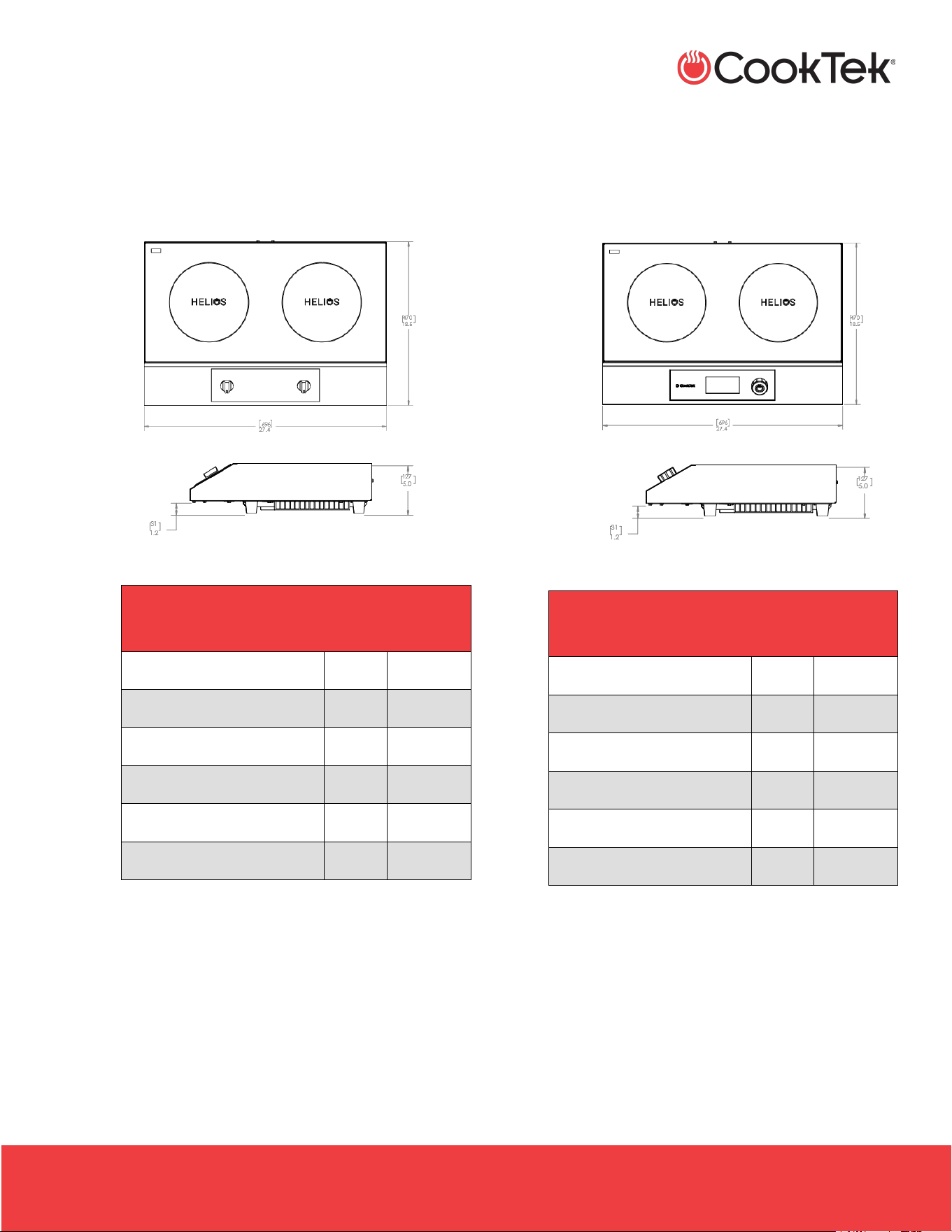
• Freestanding Double Hob, Helios Standard,
Front to Back
- HRF-9500-FB25-1
- HRF-9500-FB35-1
HELIOS STANDARD FREESTANDING
DOUBLE HOB FRONT TO BACK
Full Unit Height
5”
127 mm
Full Unit Width
13.7”
347 mm
Full Unit Depth
32.3”
819 mm
Feet Height
1.2”
31 mm
Weight
31 lb
14 kg
Max Ambient Temperature
122 °F
50 °C
• Freestanding Double Hob, Helios Touch, Front
to Back
- HTF-9500-FB25-1
- HTF-9500-FB35-1
HELIOS TOUCH FREESTANDING
DOUBLE HOB FRONT TO BACK
Full Unit Height
5”
127 mm
Full Unit Width
13.7”
347 mm
Full Unit Depth
32.3”
819 mm
Feet Height
1.2”
31 mm
Weight
31 lb
14 kg
Max Ambient Temperature
122 °F
50 °C
INDUCTION SINGLE HOBS, DOUBLE HOBS, AND WOKS
.
HSHW- OWN-A / December 2025
2801 Trade Center Drive
Carrollton, Texas 75007
cooktek.com
Page 13 of 36
S P E C I F I C A T I O N S
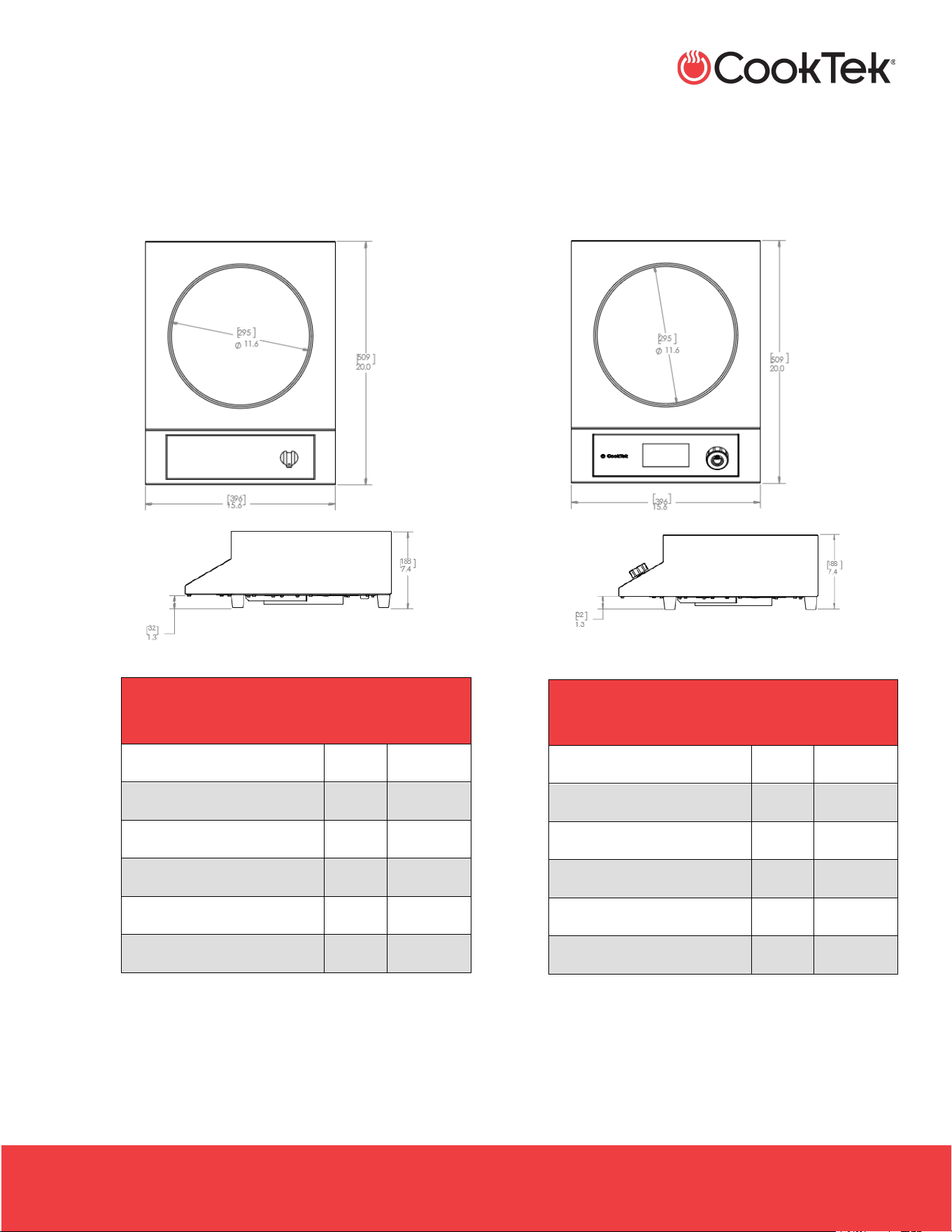
• Freestanding Double Hob, Helios Standard,
Side to Side
- HTF-9500-SS25-1
- HTF-9500-SS35-1
HELIOS STANDARD FREESTANDING
DOUBLE HOB SIDE TO SIDE
Full Unit Height
5”
127 mm
Full Unit Width
27.4”
696 mm
Full Unit Depth
18.5”
470 mm
Feet Height
1.2”
31 mm
Weight
31 lb
14 kg
Max Ambient Temperature
122 °F
50 °C
• Freestanding Touch Hob, Helios Standard,
Side to Side
- HRF-9500-SS25-1
- HRF-9500-SS35-1
HELIOS TOUCH FREESTANDING
DOUBLE HOB SIDE TO SIDE
Full Unit Height
5”
127 mm
Full Unit Width
27.4”
696 mm
Full Unit Depth
18.5”
470 mm
Feet Height
1.2”
31 mm
Weight
31 lb
14 kg
Max Ambient Temperature
122 °F
50 °C
INDUCTION SINGLE HOBS, DOUBLE HOBS, AND WOKS
.
HSHW- OWN-A / December 2025
2801 Trade Center Drive
Carrollton, Texas 75007
cooktek.com
Page 14 of 36
S P E C I F I C A T I O N S
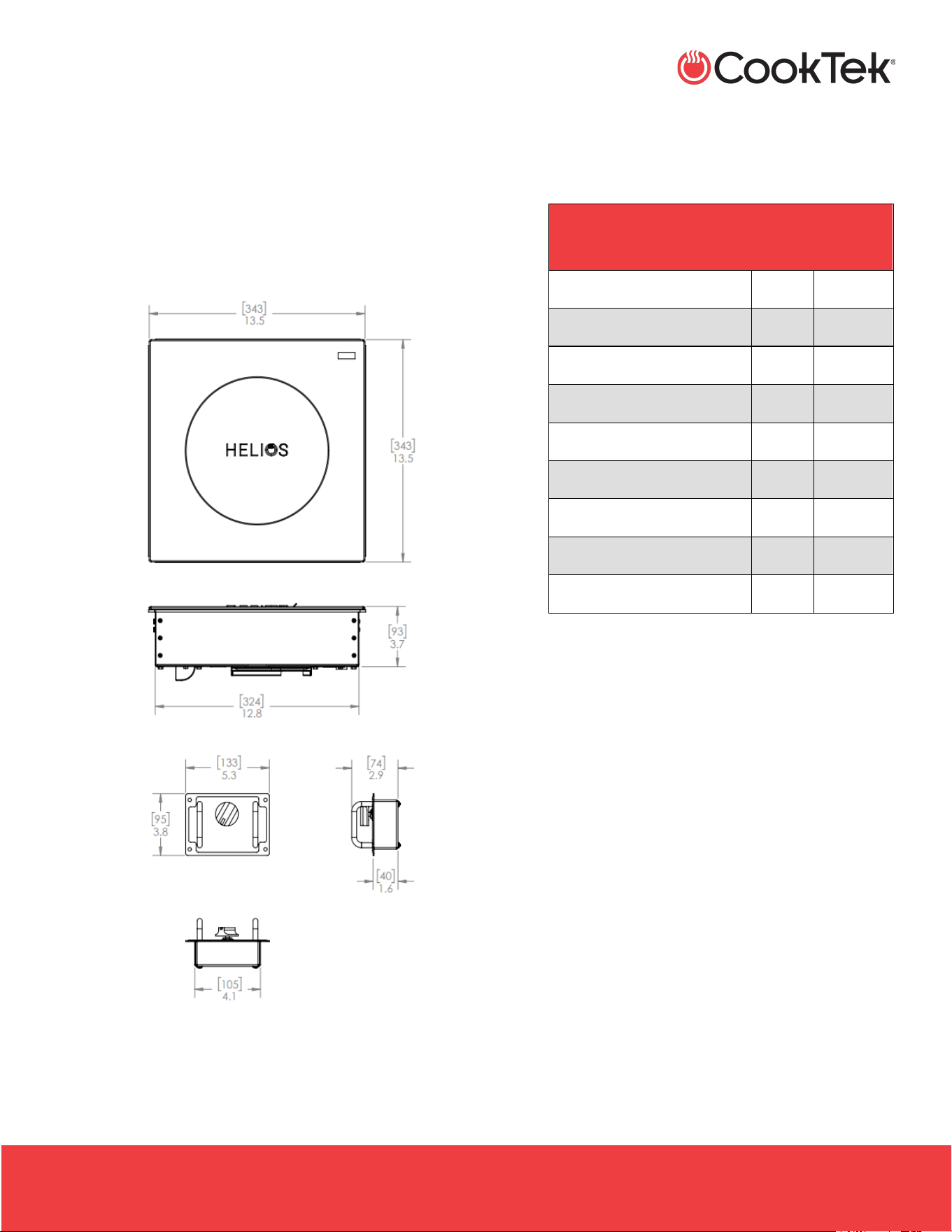
• Freestanding Wok, Helios Standard
- HRF-9500-WK18-1
- HRF-9500-WK25-1
- HRF-9500-WK35-1
HELIOS STANDARD FREESTANDING
WOK
Full Unit Height
7.4”
188 mm
Full Unit Width
15.6”
396 mm
Full Unit Depth
20”
509 mm
Feet Height
1.3”
32 mm
Weight
22 lb
8.6 kg
Max Ambient Temperature
122 °F
50 °C
• Freestanding Wok, Helios Touch
- HTF-9500-WK18-1
- HTF-9500-WK25-1
- HTF-9500-WK35-1
HELIOS STANDARD FREESTANDING
WOK
Full Unit Height
7.4”
188 mm
Full Unit Width
15.6”
396 mm
Full Unit Depth
20”
509 mm
Feet Height
1.3”
32 mm
Weight
22 lb
8.6 kg
Max Ambient Temperature
122 °F
50 °C
INDUCTION SINGLE HOBS, DOUBLE HOBS, AND WOKS
.
HSHW- OWN-A / December 2025
2801 Trade Center Drive
Carrollton, Texas 75007
cooktek.com
Page 15 of 36
S P E C I F I C A T I O N S
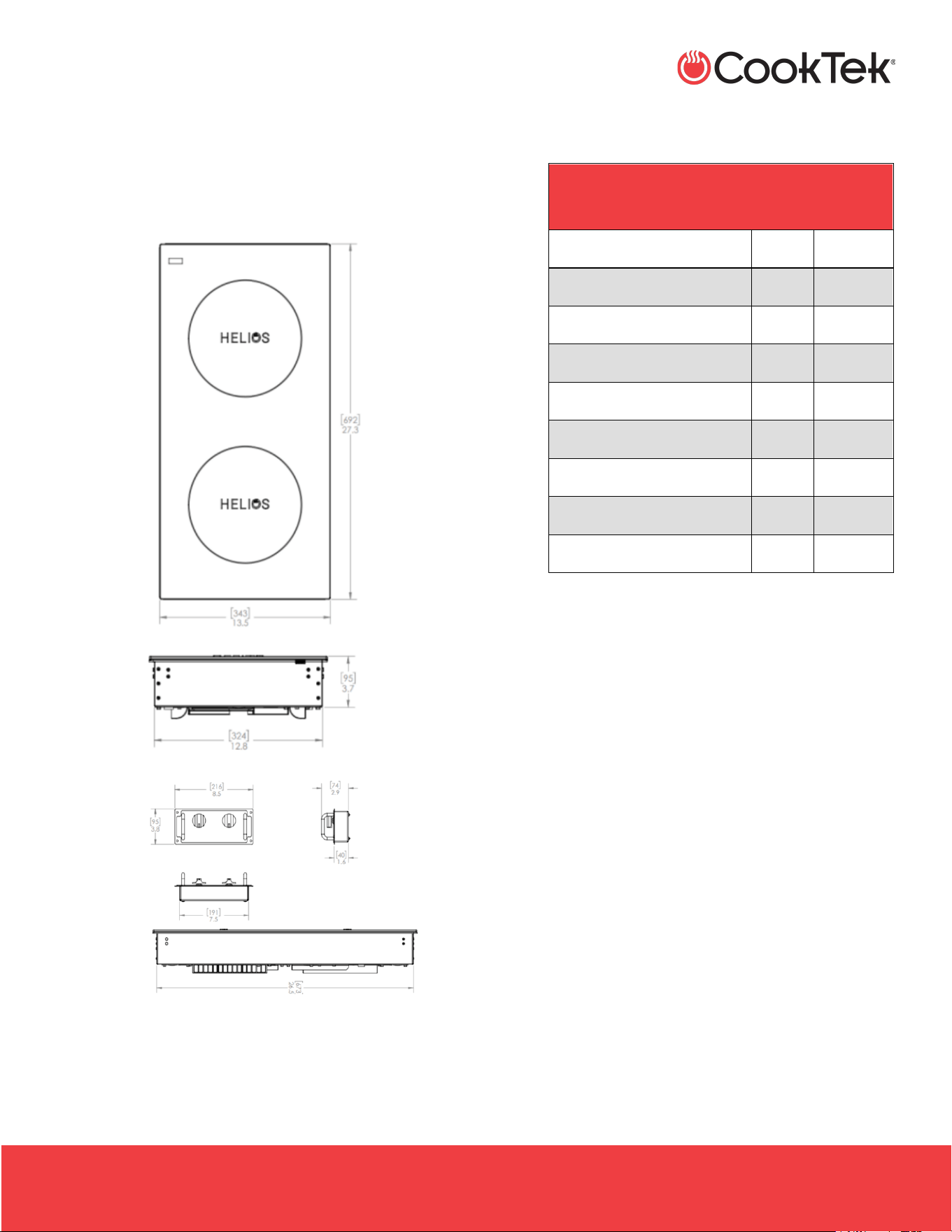
4.2 Drop-In Unit Dimensions
• Drop-in Single Hob, Helios Standard
- HRD-9500-SH18-1
- HRD-9500-SH25-1
- HRD-9500-SH35-1
HELIOS STANDARD DROP-IN
SINGLE HOB
Full Unit Height
3.7”
93 mm
Full Unit Width
13.5”
343 mm
Housing Width
12.8”
324 mm
Full Unit Depth
13.5”
343 mm
Housing Depth
12.8”
324mm
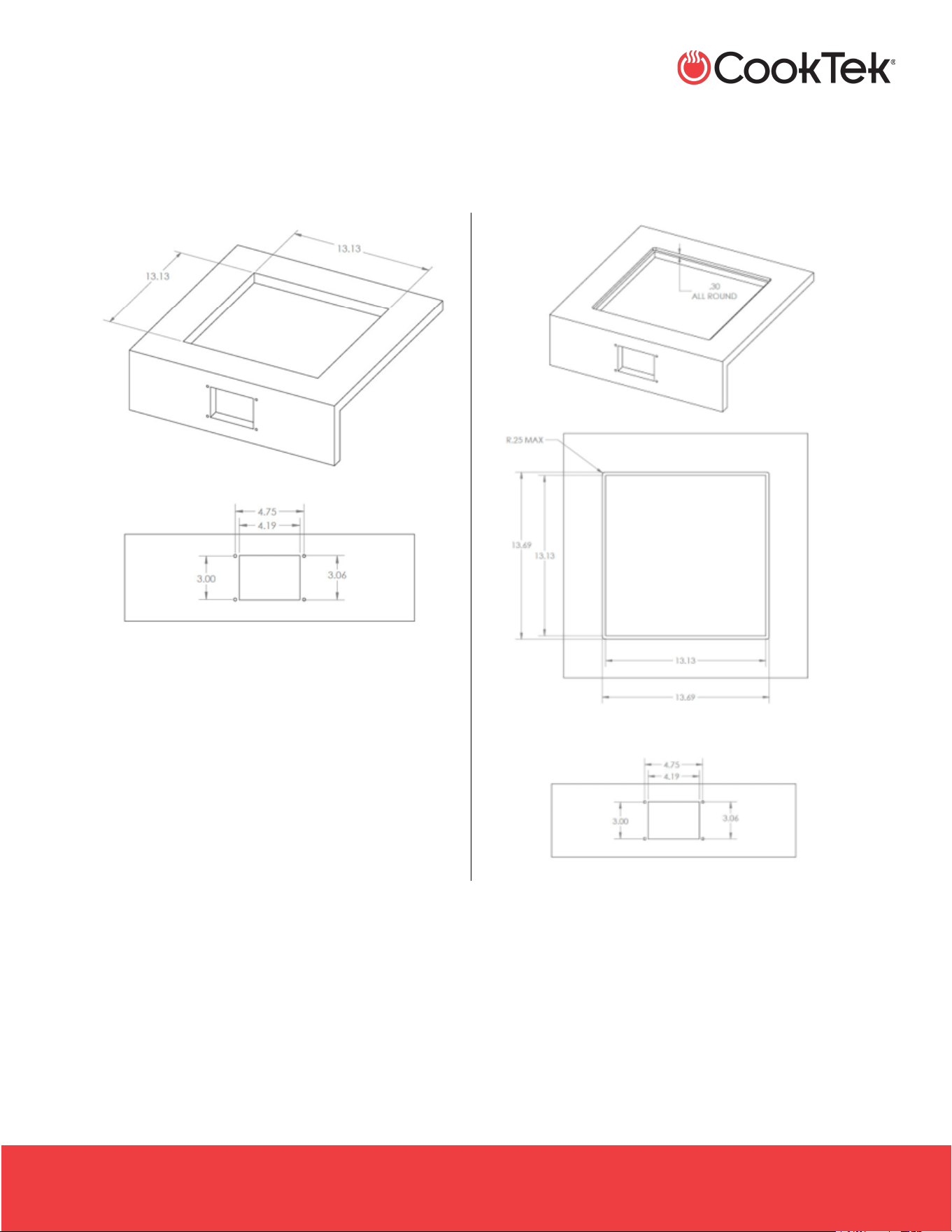
Cutout Width
13.13”
334 mm
Cutout Depth
13.13”
334 mm
Weight
15 lb
6.8 kg
Max Ambient Temperature
122 °F
50 °C
INDUCTION SINGLE HOBS, DOUBLE HOBS, AND WOKS
.
HSHW- OWN-A / December 2025
2801 Trade Center Drive
Carrollton, Texas 75007
cooktek.com
Page 16 of 36
S P E C I F I C A T I O N S
4.2.1 Drop-in Single Hob Cutout Dimensions
Top Mount
Flush Mount
INDUCTION SINGLE HOBS, DOUBLE HOBS, AND WOKS
.
HSHW- OWN-A / December 2025
2801 Trade Center Drive
Carrollton, Texas 75007
cooktek.com
Page 17 of 36
S P E C I F I C A T I O N S
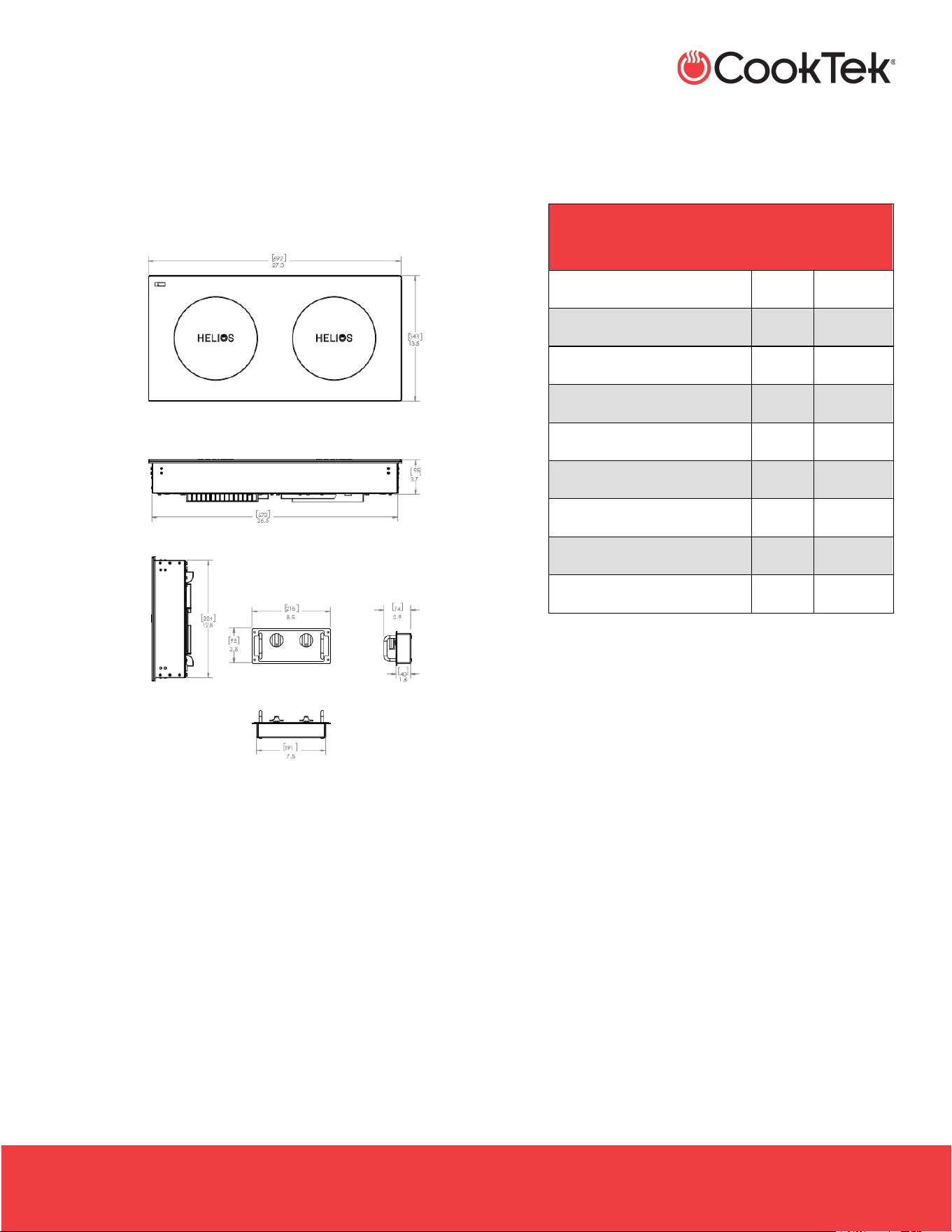
• Drop-in Double Hob, Front to Back, Helios
Standard
- HRD-9500-FB25-1
- HRD-9500-FB35-1
HELIOS STANDARD DROP-IN
DOUBLE HOB FRONT TO BACK
Full Unit Height
3.7”
95 mm
Full Unit Width
13.5”
343 mm
Housing Width
12.8”
324 mm
Full Unit Depth
27.3”
692 mm
Housing Depth
26.5”
673 mm
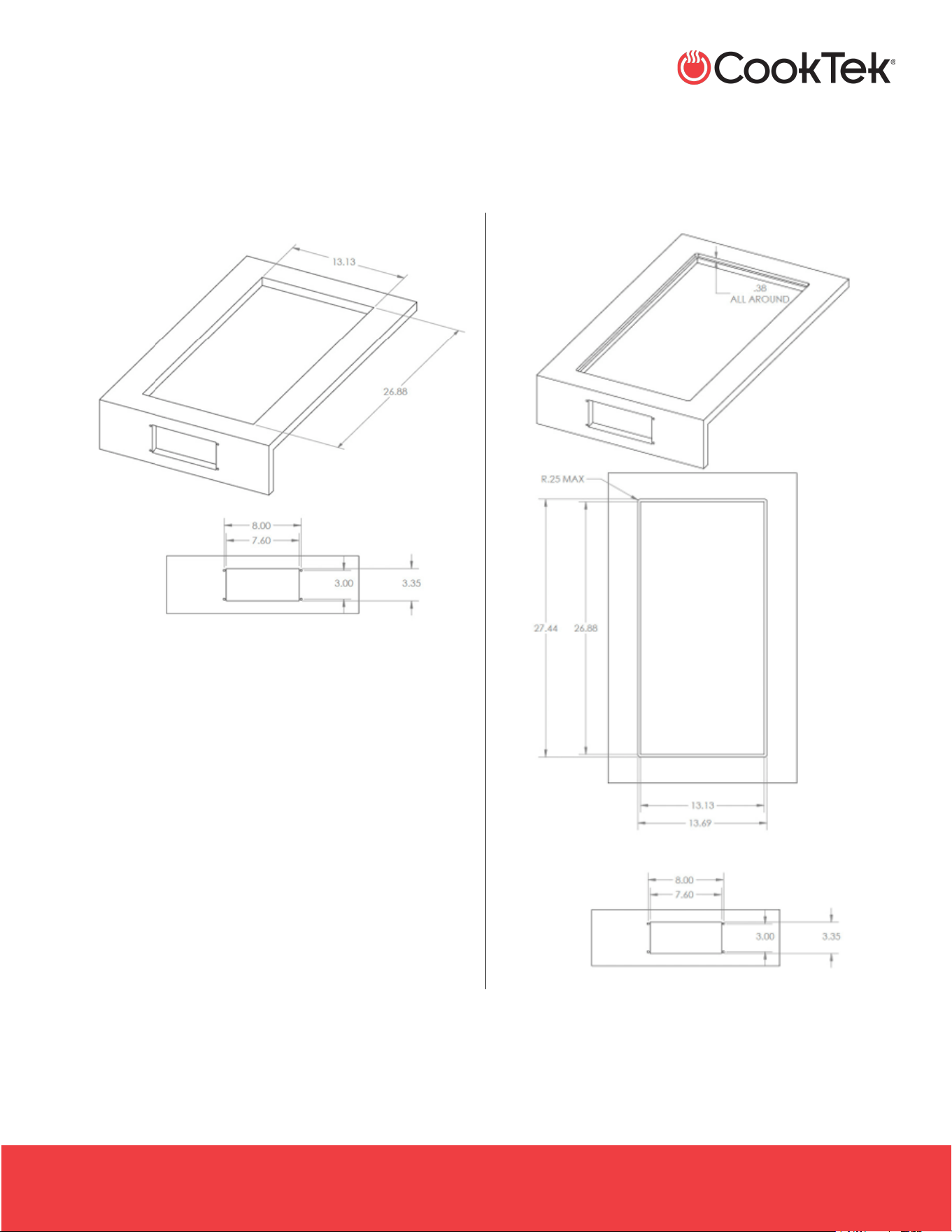
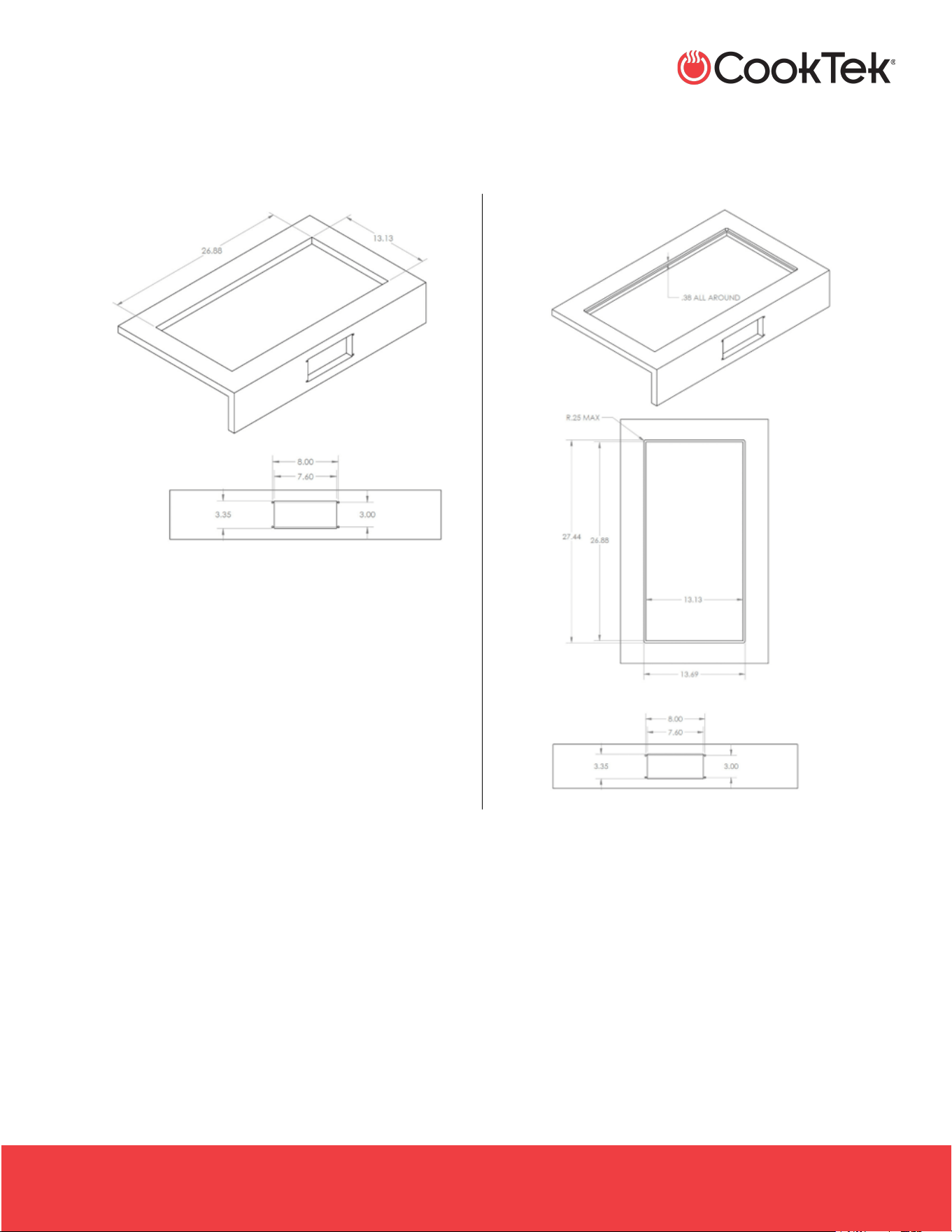
Cutout Width
13.13”
334 mm
Cutout Depth
26.88”
683 mm
Weight
30 lb
13.6 kg
Max Ambient Temperature
122 °F
50 °C
INDUCTION SINGLE HOBS, DOUBLE HOBS, AND WOKS
.
HSHW- OWN-A / December 2025
2801 Trade Center Drive
Carrollton, Texas 75007
cooktek.com
Page 18 of 36
S P E C I F I C A T I O N S
4.2.1 Drop-in Double Hob, Front to Back Cutout Dimensions
Top Mount
Flush Mount
INDUCTION SINGLE HOBS, DOUBLE HOBS, AND WOKS
.
HSHW- OWN-A / December 2025
2801 Trade Center Drive
Carrollton, Texas 75007
cooktek.com
Page 19 of 36
S P E C I F I C A T I O N S
• Drop-in Double Hob, Side to Side, Helios
Standard
- HRD-9500-SS25-1
- HRD-9500-SS35-1
HELIOS STANDARD DROP-IN
DOUBLE HOB SIDE TO SIDE
Full Unit Height
3.7”
95 mm
Full Unit Width
27.3”
692 mm
Housing Width
26.5”
673 mm
Full Unit Depth
13.5”
343 mm
Housing Depth
12.8”
324 mm
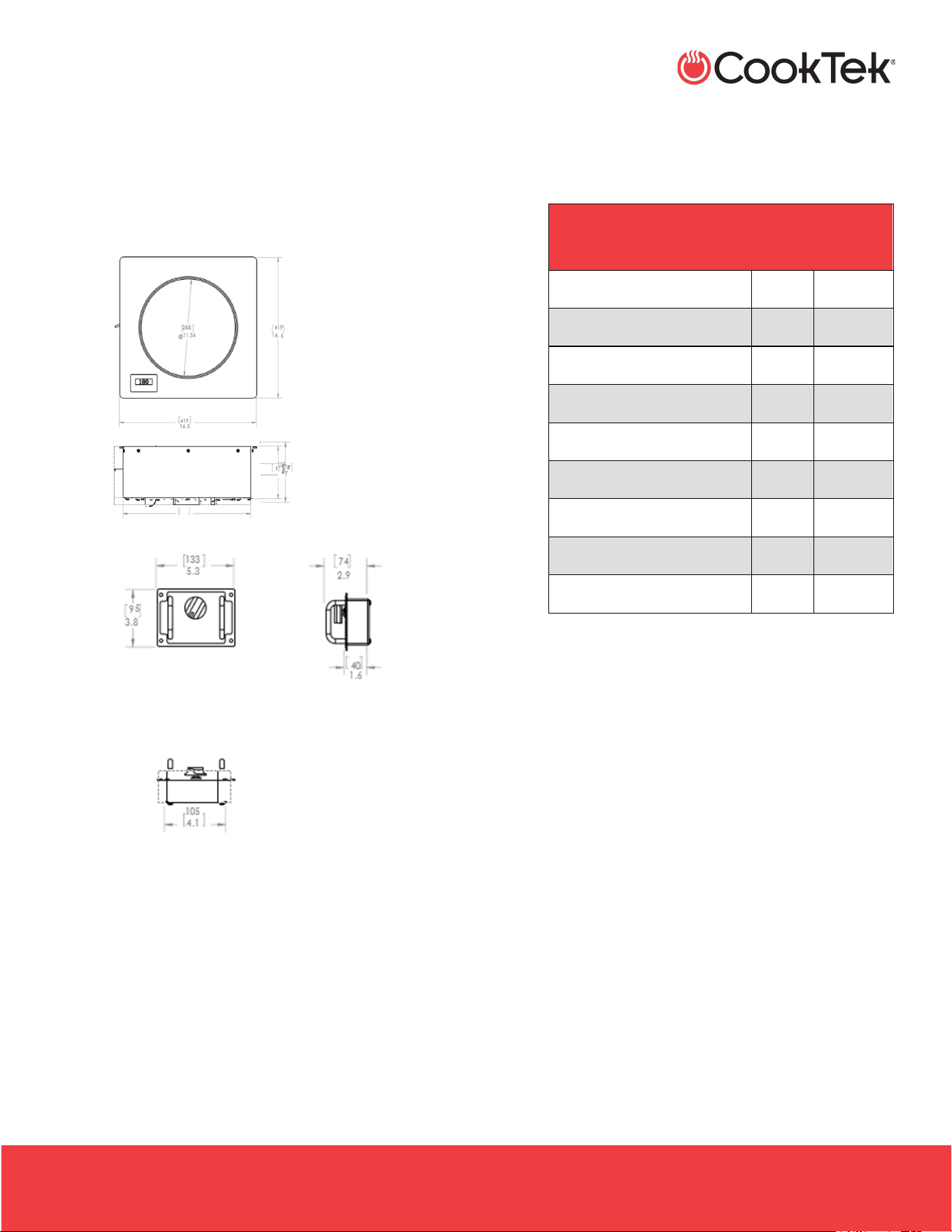
Cutout Width
26.88”
683 mm
Cutout Depth
13.13”
334 mm
Weight
30 lb
13.6 kg
Max Ambient Temperature
122 °F
50 °C
INDUCTION SINGLE HOBS, DOUBLE HOBS, AND WOKS
.
HSHW- OWN-A / December 2025
2801 Trade Center Drive
Carrollton, Texas 75007
cooktek.com
Page 20 of 36
S P E C I F I C A T I O N S
4.2.1 Drop-in Side to Side Double Hob Cutout Dimensions
Top Mount
Flush Mount
INDUCTION SINGLE HOBS, DOUBLE HOBS, AND WOKS
.
HSHW- OWN-A / December 2025
2801 Trade Center Drive
Carrollton, Texas 75007
cooktek.com
Page 21 of 36
S P E C I F I C A T I O N S
• Drop-in Wok, Helios Standard
- HRD-9500-WK18-1
- HRD-9500-WK25-1
- HRD-9500-WK35-1
HELIOS STANDARD DROP-IN
WOK
Full Unit Height
6.2”
178 mm
Full Unit Width
16.5”
419 mm
Housing Width
15.38”
391 mm
Full Unit Depth
16.5”
419 mm
Housing Depth
15.38”
391 mm
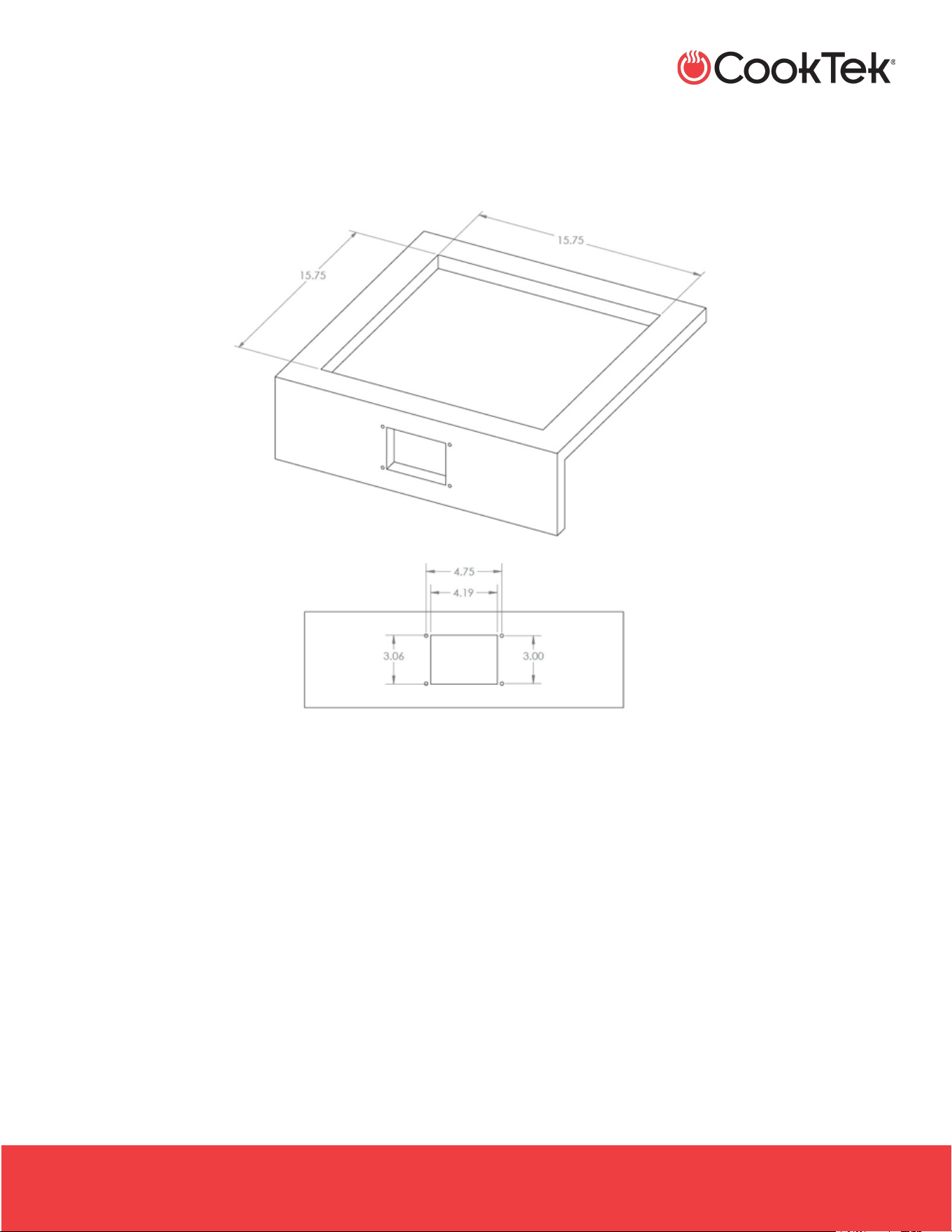
Cutout Width
15.75”
400 mm
Cutout Depth
15.75”
400 mm
Weight
22 lb
8.6 kg
Max Ambient Temperature
122 °F
50 °C
INDUCTION SINGLE HOBS, DOUBLE HOBS, AND WOKS
.
HSHW- OWN-A / December 2025
2801 Trade Center Drive
Carrollton, Texas 75007
cooktek.com
Page 22 of 36
S P E C I F I C A T I O N S
4.2.2 Drop-in Woks Cutout Dimensions

INDUCTION SINGLE HOBS, DOUBLE HOBS, AND WOKS
.
HSHW- OWN-A / December 2025
2801 Trade Center Drive
Carrollton, Texas 75007
cooktek.com
Page 23 of 36
D R O P - I N C O O K T O P A N D W O K I N S T A L L A T I O N
5. DROP-IN COOKTOP AND WOK INSTALLATION
1. Cut out and drill holes as required in the countertop.
2. Drill holes for control box mounting.
3. Apply a bead of an NSF Standard 51-approved
sealant (such as Dow Corning 732 Multi-Purpose
Sealant or GE RTV 108) around all four edges of the
countertop cutout.
Note: Carefully follow the sealant manufacturer’s
instructions to ensure proper adhesion.
4. Place cooktop or wok over countertop cutout.
5. Pass the control panel and cord through the cutout,
then pass the base of the cooktop or wok through
the hole until the flange rests on the countertop.
6. Mount the control panel using the screws supplied.
Note: Mounting options are illustrated in the attached
drawing.
7. Connect the cooktop or wok to a grounded 120 VAC
or 200–240 VAC single-phase receptacle, or to a
380–415 VAC three-phase supply for applicable
models.
8. Check the rating plate on the cooktop or wok to
verify the correct voltage.
Note: For proper operation, a dedicated circuit should
be used for each unit installed. Each circuit should be
protected with a 20-amp minimum circuit breaker. For
optimal operation, the counter should have an
opening near the unit to allow fresh air to circulate
beneath it.
INDUCTION SINGLE HOBS, DOUBLE HOBS, AND WOKS
.
HSHW- OWN-A / December 2025
2801 Trade Center Drive
Carrollton, Texas 75007
cooktek.com
Page 24 of 36
H E L I O S S T A N D A R D ( N O N
- T O U C H D I S P L A Y )
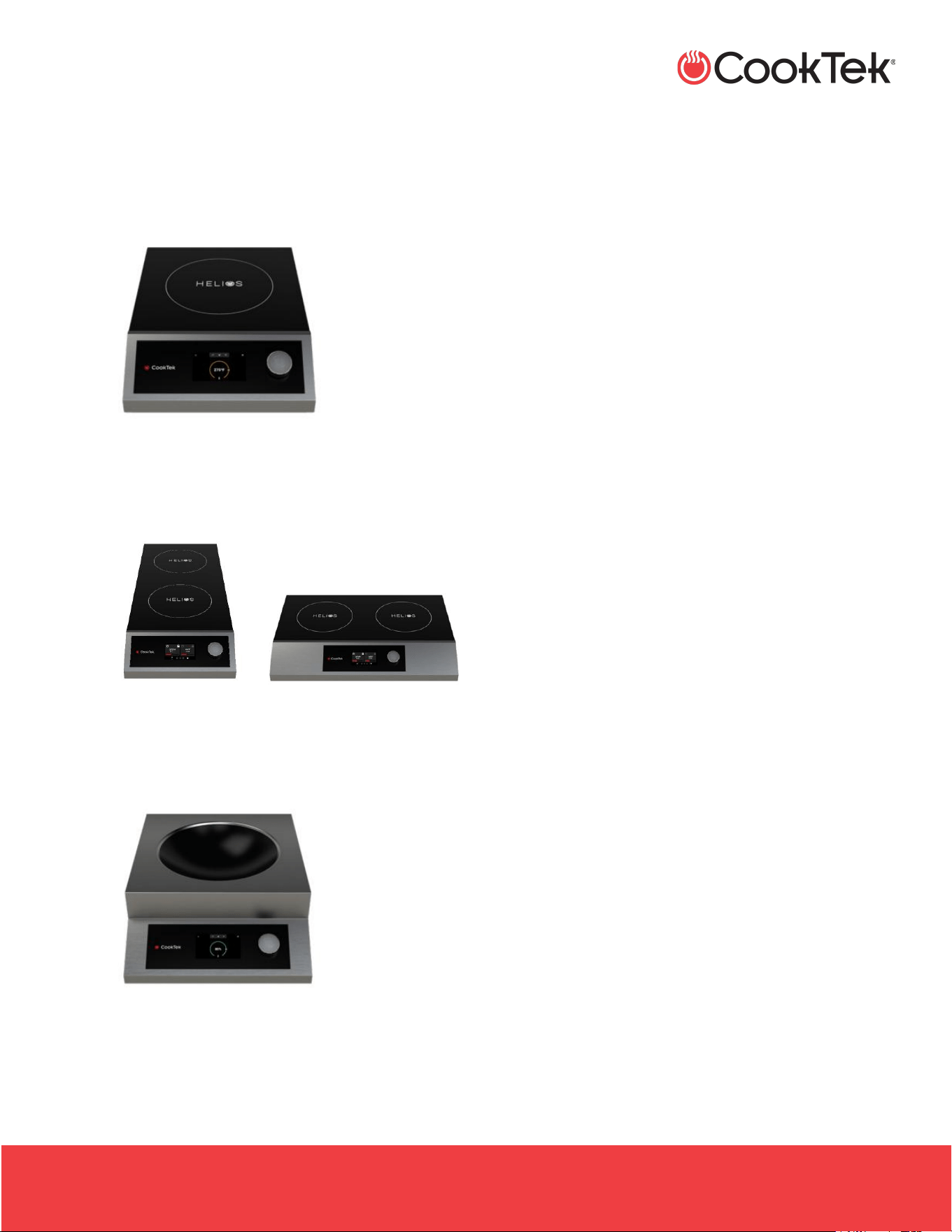
6. HELIOS STANDARD (NON-TOUCH DISPLAY)
• Freestanding: HRF-9500-SH18-1, HRF-9500-SH25-1,
HRF-9500-SH35-1
• Drop-in: HRD-9500-SH18-1, HRD-9500-SH25-1,
HRD-9500-SH35-1
• Freestanding Double Hobs: HRF-9500-FB25-1, HRF-
9500-FB35-1, HRF-9500-SS25-1, HRF-9500-SS35-1
• Drop-in Double Hobs: HRD-9500-FB25-1, HRD-9500-
FB35-1, HRD-9500-SS25-1, HRD-9500-SS35-1
• Freestanding Woks: HRF-9500-WK18-1, HRF-9500-
WK25-1, HRF-9500-WK35-1
• Drop-in Woks: HRD-9500-WK18-1, HRD-9500-WK25-
1, HRD-9500-WK35-1
INDUCTION SINGLE HOBS, DOUBLE HOBS, AND WOKS
.
HSHW- OWN-A / December 2025
2801 Trade Center Drive
Carrollton, Texas 75007
cooktek.com
Page 25 of 36
H E L I O S S T A N D A R D ( N O N
- T O U C H D I S P L A Y )
6.1 Power Mode
Your CookTek cooktop has two different cooking modes:
Temperature Mode and Power Mode. Woks only operate
in Power Mode.
• Connect the cooktop to a grounded power
source. Models operate on 100–120 VAC (up to
1800 W), 200–240 VAC (up to 3500 W), or 380–
415 VAC three-phase (up to 3500 W), depending
on the model. Refer to the rating plate to verify
the correct voltage and wattage. Operating
below the rated voltage may reduce power and
slow heating.
Note: For proper operation, use an independently
dedicated circuit for each installed unit. Each
circuit should be protected with a 20-amp
breaker. When your application requires high-
intensity heat or a quick temperature rise, activate
the Power mode.
• Turn the cooktop ON by turning the control knob
to the right.
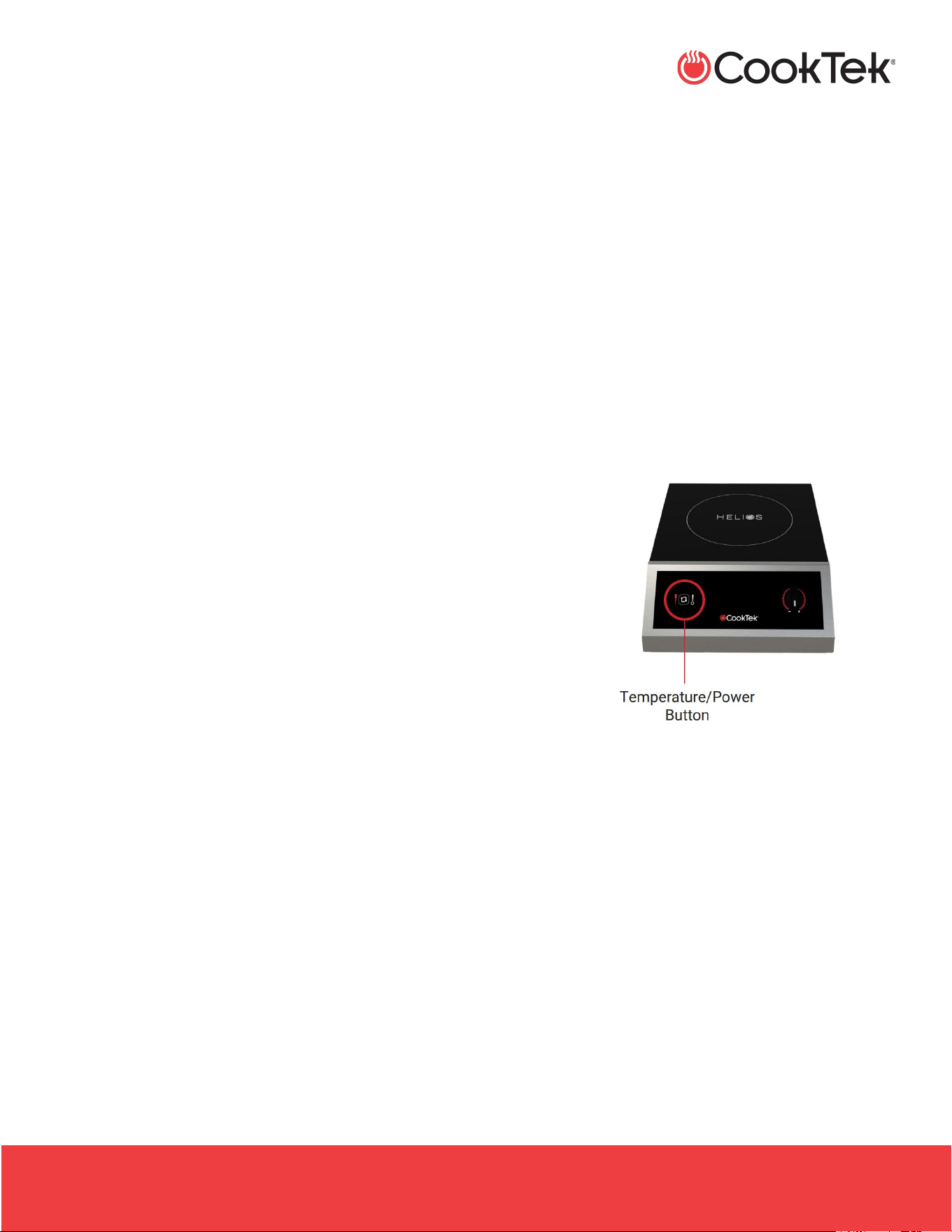
• Press the Temperature/Power button briefly.
• Turn the control knob until the desired Power
setting (1-20) appears on the LED display.
• Turn the control knob to the left to decrease
power and to the right to increase power.
• To turn off the cooktop or wok, rotate the
control knob all the way to the left until it clicks,
and the LED display turns off.
Notes:
o You can switch between Temperature
Mode and Power Mode at any time by
pressing the Temperature/Power button
(cooktops only).
o The internal cooling fan may operate briefly
after the power supply has been
disconnected. This behavior is typical and
should not be a cause for concern.

INDUCTION SINGLE HOBS, DOUBLE HOBS, AND WOKS
.
HSHW- OWN-A / December 2025
2801 Trade Center Drive
Carrollton, Texas 75007
cooktek.com
Page 26 of 36
H E L I O S S T A N D A R D ( N O N
- T O U C H D I S P L A Y )
6.2 Helios Standard Cooktop - Temperature
Mode
When the recipe requires maintaining a precise, even
temperature for a set period, Temperature Mode is
recommended. Woks only operate in Power Mode.
Note: Temperature Mode monitors the temperature of the
bottom of the pan. For the actual temperature of the food
contents, a contact thermometer should be used.
• Turn the cooktop ON by turning the control knob
to the right.
• Put the cookware with ingredients on the
cooktop.
• Press the Temperature Mode button.
• Turn the control knob until the desired cooking
temperature appears on the LED display.
Note: The displayed temperature will change
from the set temperature to the measured
temperature three seconds after the control knob
is moved. The LED will display the measured
temperature until the target temperature is
reached.
• To turn off the cooktop, turn the control knob to
the far left until it clicks, and the LED display
turns off.
Note: If the unit is left on and unattended for five
or more minutes without a pan on its surface, it
will automatically enter Sleep Mode to save
energy. You can tell it's in Sleep Mode because
the LED shows horizontal dashes. To resume
normal operation, rotate the power knob
clockwise or counterclockwise.
6.3 Helios Standard Wok Operation
Wok operation is similar to using a standard cooktop, with
just a few minor differences.
• Use the control knob to select a relative cooking
level, which will indicate a setting ranging from 1
(lowest setting) to 20 (highest setting).
• DO NOT leave any unattended pans on the wok.
• Turn the wok off when not in use.
• Do not place an empty pan on the wok. This can
cause the pan and the unit to overheat,
potentially damaging the unit.
• This wok unit is intended for use with 14”
induction-compatible wok pans. Using smaller
pans may result in frequent nuisance errors and
automatic precautionary shutdowns.
INDUCTION SINGLE HOBS, DOUBLE HOBS, AND WOKS
.
HSHW- OWN-A / December 2025
2801 Trade Center Drive
Carrollton, Texas 75007
cooktek.com
Page 27 of 36
H E L I O S T O U C H
7. HELIOS TOUCH
• Freestanding Single Hob: HTF-9500-SH18-1, HTF-
9500-SH25-1, HTF-9500-SH35-1
• Freestanding Double Hobs: HTF-9500-FB25-1, HTF-
9500-FB35-1, HTF-9500-SS25-1, HTF-9500-SS35-1
• Freestanding Woks: HTF-9500-WK18-1, HTF-9500-
WK25-1, HTF-9500-WK35-1
7.1 Power Mode
Your CookTek cooktop has two different cooking modes:
Temperature Mode and Power (%) Mode. Woks only
operate with Power Mode.
• Connect the cooktop to a grounded power
source. Models operate on 100–120 VAC (up to
1800 W), 200–240 VAC (up to 3500 W), or 380–
415 VAC three-phase (up to 3500 W), depending
on the model. Refer to the rating plate to verify
the correct voltage and wattage. Operating
below the rated voltage may reduce power and
slow heating.
Note: For proper operation, use an independently
dedicated circuit for each installed unit. Each
circuit should be protected with a 20-amp
breaker. When your application requires high-
intensity heat or a quick temperature rise, activate
the Power mode.
• Turn the cooktop ON by turning the control knob
to the right.
Note: The internal cooling fan may briefly operate
after the power supply is disconnected. This
behavior is typical and should not be a cause for
concern.
• Turn the control knob until the desired power
percentage appears on the display.
INDUCTION SINGLE HOBS, DOUBLE HOBS, AND WOKS
.
HSHW- OWN-A / December 2025
2801 Trade Center Drive
Carrollton, Texas 75007
cooktek.com
Page 28 of 36
H E L I O S T O U C H
• Turn the control knob to the left to decrease
power and to the right to increase power.
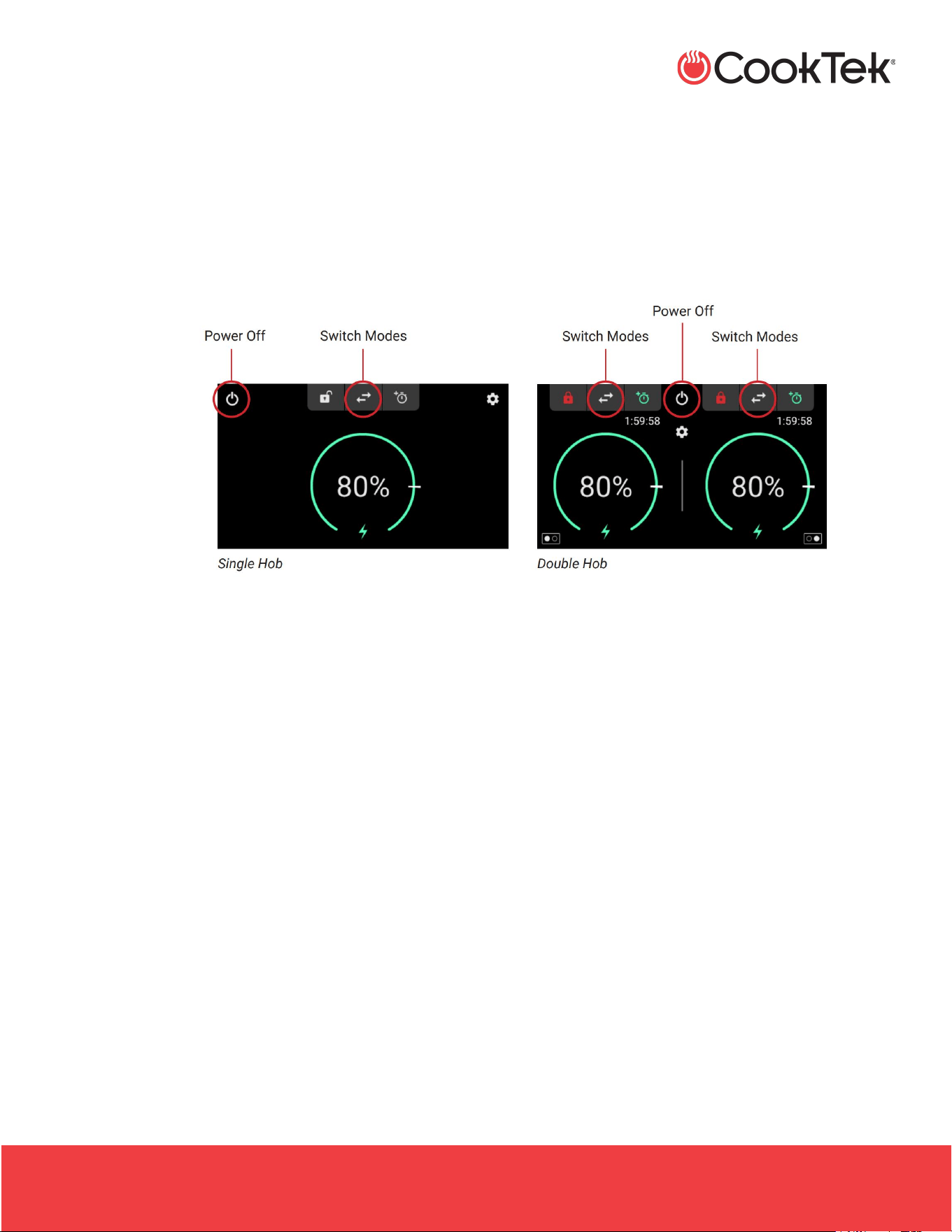
• To turn off the cooktop or wok, press the power
button.
• Press the Temperature/Power button briefly.
Note: You can switch between Temperature
Mode and Power Mode at any time by pressing
the toggle arrows (available on single- and
double-hob models only).
7.2 Helios Touch Cooktop - Temperature
Mode
When the recipe requires a precise, even temperature to be
maintained for a period, the
Temperature Mode is recommended.
Note: Temperature Mode monitors the temperature of the
bottom of the pan. For the actual temperature of the food
contents, a contact thermometer should be used.
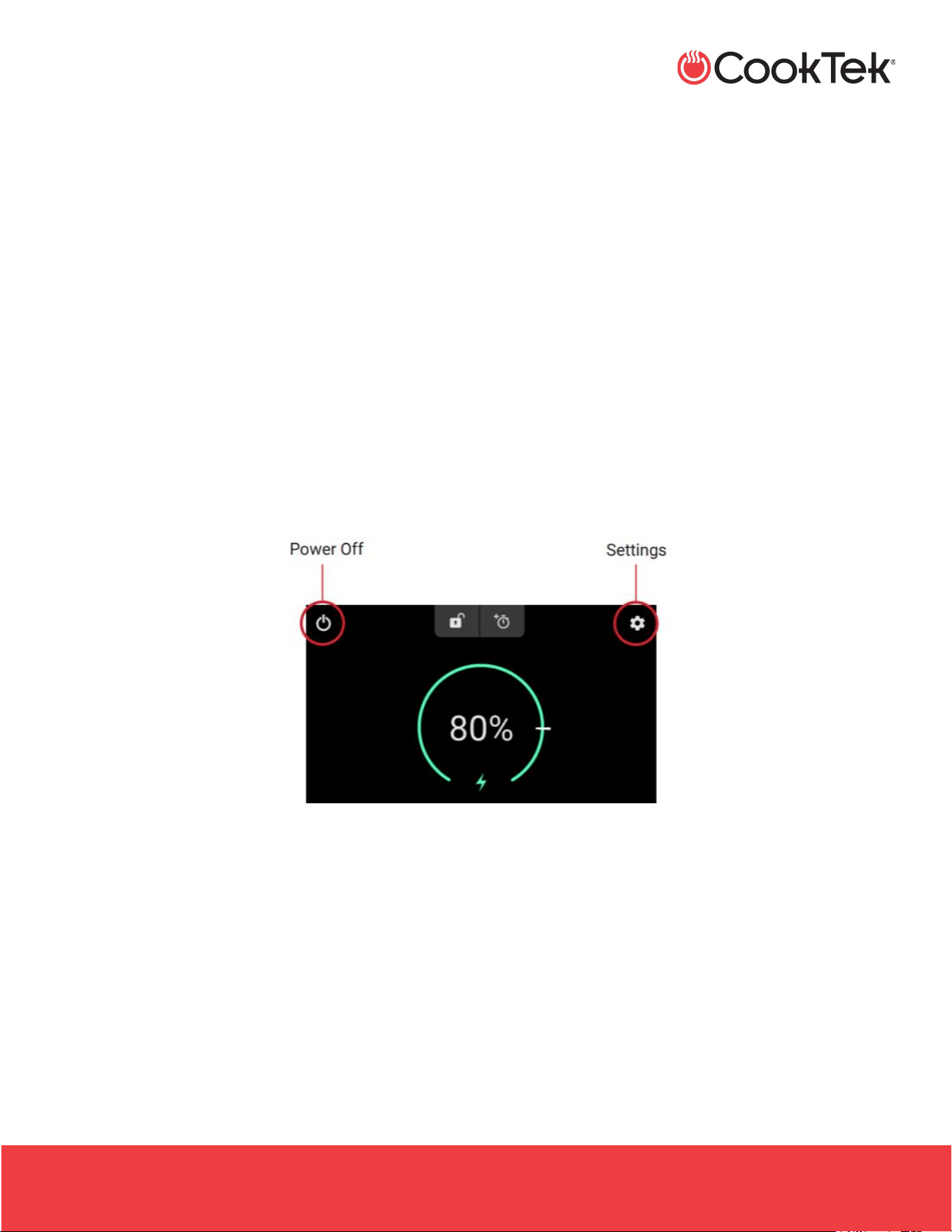
• Press the power button on the user interface to
turn the cooktop ON.
Note: The unit defaults to Temperature Mode.
• Press the toggle arrows on the user interface to
switch to Power Mode.
• Put the cookware with ingredients on the
cooktop.
• Turn the control knob until the desired cooking
temperature appears on the user interface.
Note: The temperature displayed will change
from the set temperature to the measured
temperature three seconds after the control knob
is moved. The LED will display the measured
temperature until the target temperature is
reached.
• To turn off the cooktop, press the power button.
INDUCTION SINGLE HOBS, DOUBLE HOBS, AND WOKS
.
HSHW- OWN-A / December 2025
2801 Trade Center Drive
Carrollton, Texas 75007
cooktek.com
Page 29 of 36
H E L I O S T O U C H
7.3 Helios Touch Wok Operation
Wok operation is similar to using a standard cooktop, with
just a few minor differences. Woks only operate in Power
Mode.
• Use the control knob to select a power
percentage.
• Turn the control knob to the left to decrease
power and to the right to increase power.
• DO NOT leave any unattended pans on the wok
• Do not place an empty pan on the wok. This can
cause the pan and the unit to overheat,
potentially damaging the unit.
Note: The screen will display No Pan if left
unattended.
• This wok unit is intended for use with 14”
induction-compatible wok pans. The unit may
not recognize a smaller pan and will not heat
correctly.
• Turn the wok off when not in use.
Note: The internal cooling fan may briefly operate
after the power supply is disconnected. This
behavior is typical and should not be a cause for
concern.
INDUCTION SINGLE HOBS, DOUBLE HOBS, AND WOKS
.
HSHW- OWN-A / December 2025
2801 Trade Center Drive
Carrollton, Texas 75007
cooktek.com
Page 30 of 36
D O U B L E H O B C O O K T O P S O P E R A T I O N
8. DOUBLE HOB COOKTOPS OPERATION
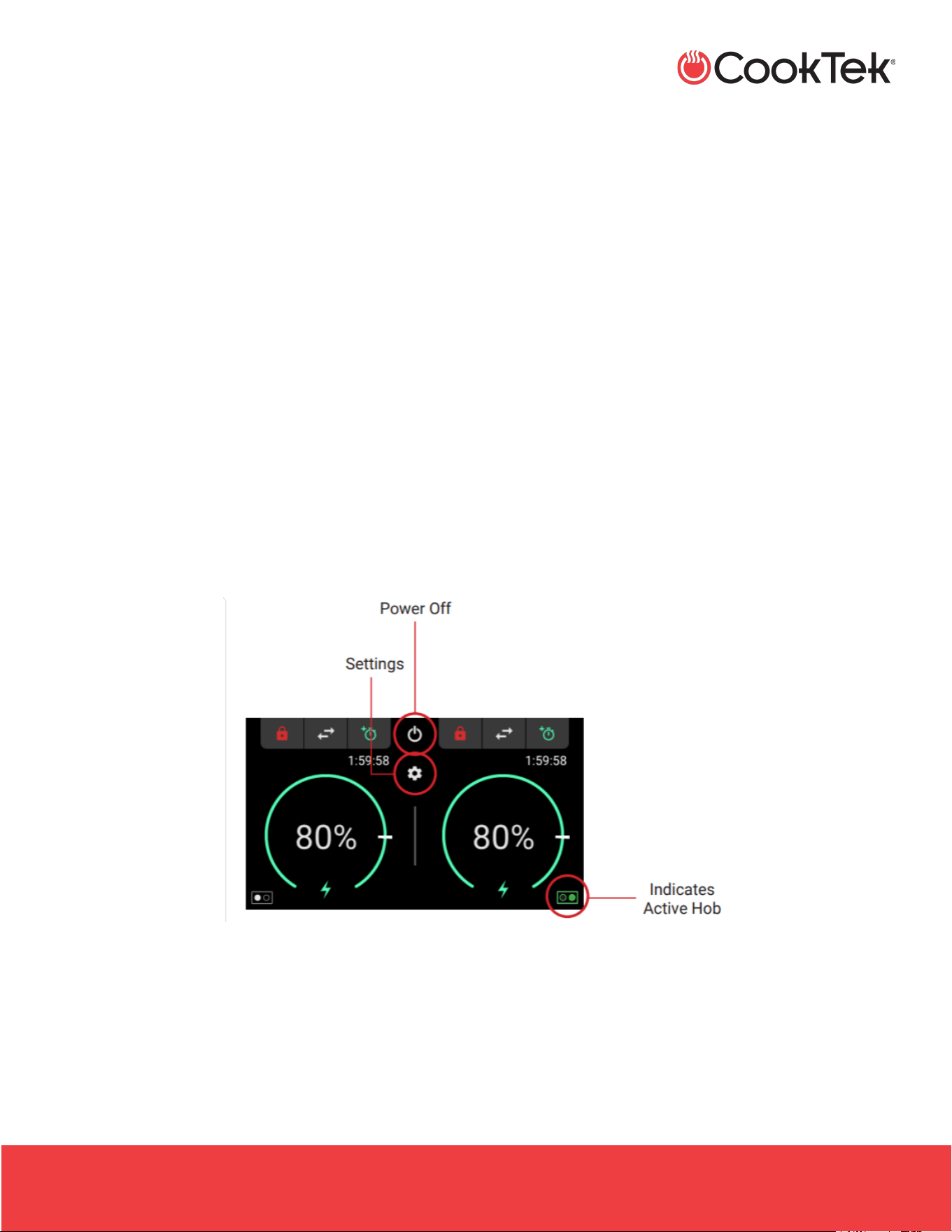
• Press the power button on the user interface to turn
the cooktop ON.
Note: The unit defaults to Power Mode.
• Each hob has its own independently controlled
Temperature/Power Mode toggle arrows.
• To select a hob for adjusting the temperature or
power percentage, press the control knob
downward, or press the temperature/power
percentage ring corresponding to the desired hob.
• The icons in the bottom corners indicate which hob
is active by highlighting the circle green.
• Turn the control knob until the desired power
percentage appears on the user interface.
• Turn the control knob to the left to decrease power
and to the right to increase power.
• To turn the cooktop off, press the power button.
Note: For proper operation, a dedicated circuit is
required for each installed unit. Each unit must be
protected with a 30A minimum circuit breaker.
Settings
Press the gear icon to access the settings:
• Temperature Scale - Select Fahrenheit or
Celsius
• Error Log
• Screen Brightness
• Firmware Versions
• Performance Data

INDUCTION SINGLE HOBS, DOUBLE HOBS, AND WOKS
.
HSHW- OWN-A / December 2025
2801 Trade Center Drive
Carrollton, Texas 75007
cooktek.com
Page 31 of 36
C L E A N I N G A N D M A I N T E N A N C E
9. CLEANING AND MAINTENANCE
Your CookTek induction cooktop is easy to keep clean
and maintain. Follow the instructions below:
1. Turn the unit OFF and remove the plug from any
power outlets prior to cleaning.
2. When the unit is cool, wipe the surface and body
with a damp cloth.
3. Use a mild scouring agent on the stainless-steel
housing, such as Bon Ami or Barkeeper’s Friend,
for greasy or resistant soiling.
Note: Do not use a lye-based cleaner, such as an
oven cleaner, as it may damage the cooktop.
4. To clean the glass surface, use a mild detergent
or glass cooktop cleansing cream.
Note: Never immerse the cooktop in water or put it
in the dishwasher.
9.1 Grease Filter Maintenance
This unit comes equipped with a grease filter(s) to
protect the electronics from contaminants. Grease filter
cleaning procedures:
• Grease filter(s) should be removed and cleaned
every two weeks.
• More frequent cleaning may be necessary if they
appear clogged and/or operate in heavy, grease-
laden environments.
CAUTION:
• Do not operate the unit without the grease
filter(s) installed.
• If the unit displays an error code of “E4,” the
overheat error, this may indicate a clogged
filter.
Note: Follow the procedure below and allow the
unit to cool before resuming operation (turn it off
for approximately 5 minutes).
1. Slide filter(s) out of the track on the bottom of the
unit.
2. Rinse with hot water to remove dirt and grease.
3. Shake remaining water out and let stand until
completely dry before reinstalling.
4. Reinstall filter(s), ensuring the arrow on the edge
of the filter(s) is pointing into the unit.
Note: Filters are also dishwasher safe.
INDUCTION SINGLE HOBS, DOUBLE HOBS, AND WOKS
.
HSHW- OWN-A / December 2025
2801 Trade Center Drive
Carrollton, Texas 75007
cooktek.com
Page 32 of 36
T R O U B L E S H O O T I N G
10. TROUBLESHOOTING
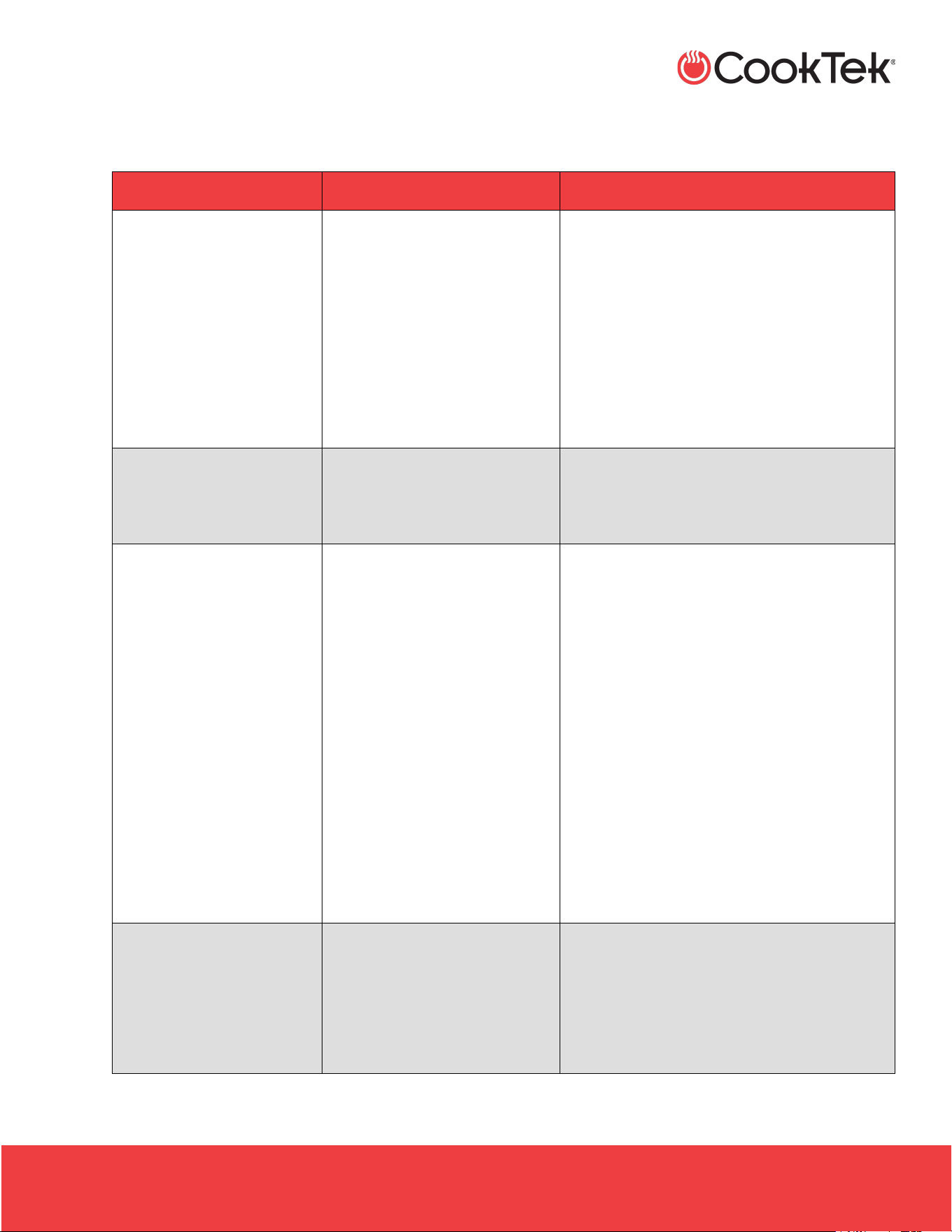
Symptom
Probable Cause
Corrective Action
No power (no lights or fan
noise)
• Unit is unplugged
• No power to the receptacle
• Plug the unit into the appropriate
receptacle.
• Make sure that the receptacle is energized.
• Check wall switches.
• Check the circuit breaker.
• Plug a different electronic device into the
receptacle to make sure that power is
present.
Pan does not heat
• Pan is not induction
compatible
• Pan not centered
• Use an induction-compatible pan.
• Center pan.
The cooktop or wok
suddenly stops heating
• Possible power brownout
• Circuit shared with another
electrical device
• Air vents blocked or
insucient air circulation
• Safety shut off engaged
• Assure proper voltage/power levels
• Make sure the cooktop is not sharing a
circuit with other electrical devices
• Check air vents to make sure that they are
not blocked
• Make sure that there is sucient air ow
around the appliance
• The safety shut-off will engage if an empty
pan is left on the cooktop surface while the
unit is working at full power
• Make sure that the cooktop surface is clear
and then wait 15-20 minutes for the unit to
reset
Pan does not get hot
enough, even though power
levels are set to maximum
– induction-compatible pan
in use
• Extension cord in use
• Circuit shared with another
electrical device
• DO NOT use extension cords
• Extension cords may affect the power
levels reaching the appliance
• Make sure that the cooktop is not sharing a
circuit with other electrical devices

INDUCTION SINGLE HOBS, DOUBLE HOBS, AND WOKS
.
HSHW- OWN-A / December 2025
2801 Trade Center Drive
Carrollton, Texas 75007
cooktek.com
Page 33 of 36
T R O U B L E S H O O T I N G
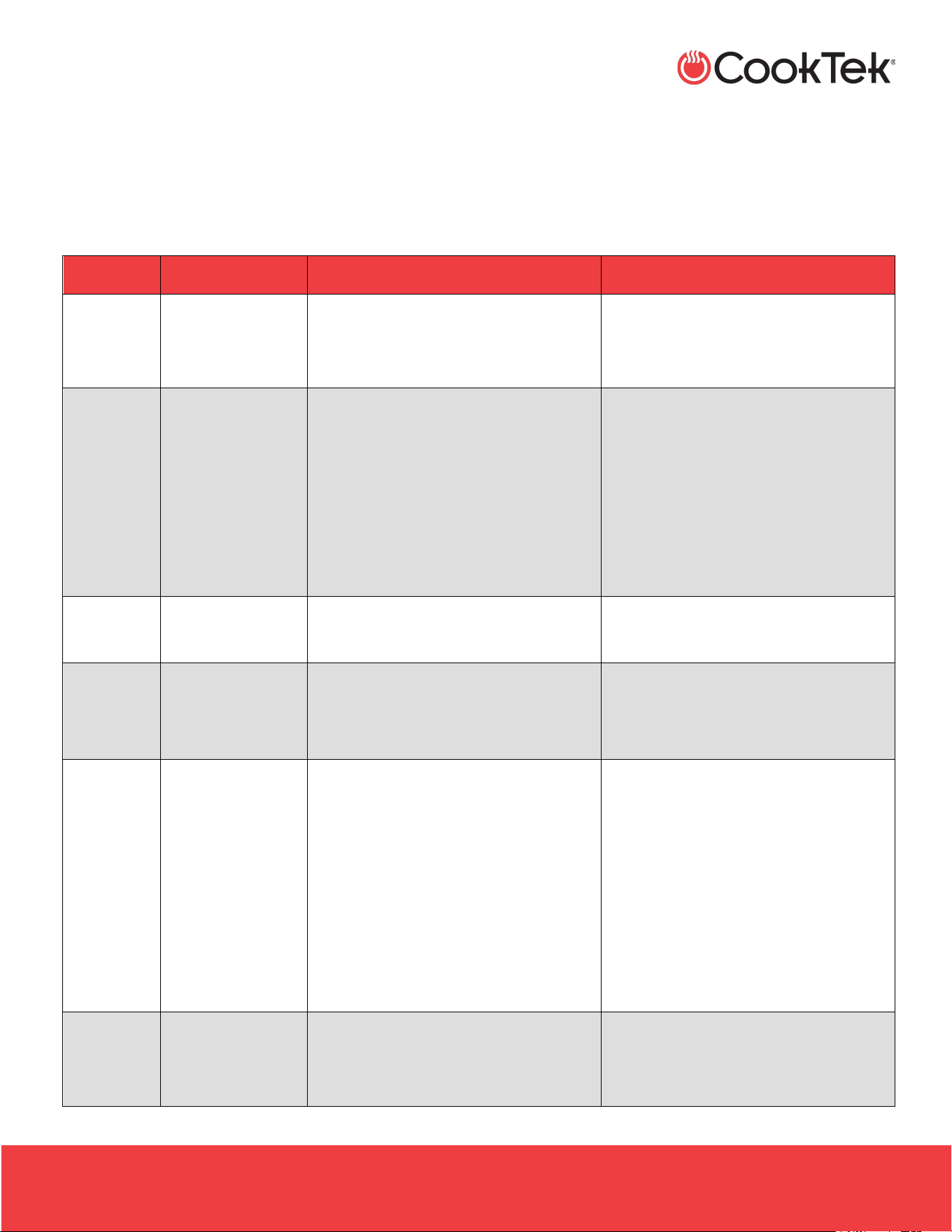
Symptom
Probable Cause
Corrective Action
Pan heats unevenly, does
not maintain the heat level,
or overheats
• Pan is not induction
compatible
• Pan bottom may not be at
enough
• Pan not centered
• Pan diameter is less than 7”
(178 mm)
• Use an induction-compatible pan
• Use a atter pan
• Center pan
• Use a larger induction-compatible pan
INDUCTION SINGLE HOBS, DOUBLE HOBS, AND WOKS
.
HSHW- OWN-A / December 2025
2801 Trade Center Drive
Carrollton, Texas 75007
cooktek.com
Page 34 of 36
E R R O R C O D E S
11. ERROR CODES
If a malfunction occurs, your CookTek cooktop/wok will display an error code on the interface and beep the number of
times specified by the code. Refer to the following table when encountering an error code. To clear the error, remove the
pan from the unit, press the POWER button, or unplug the unit.
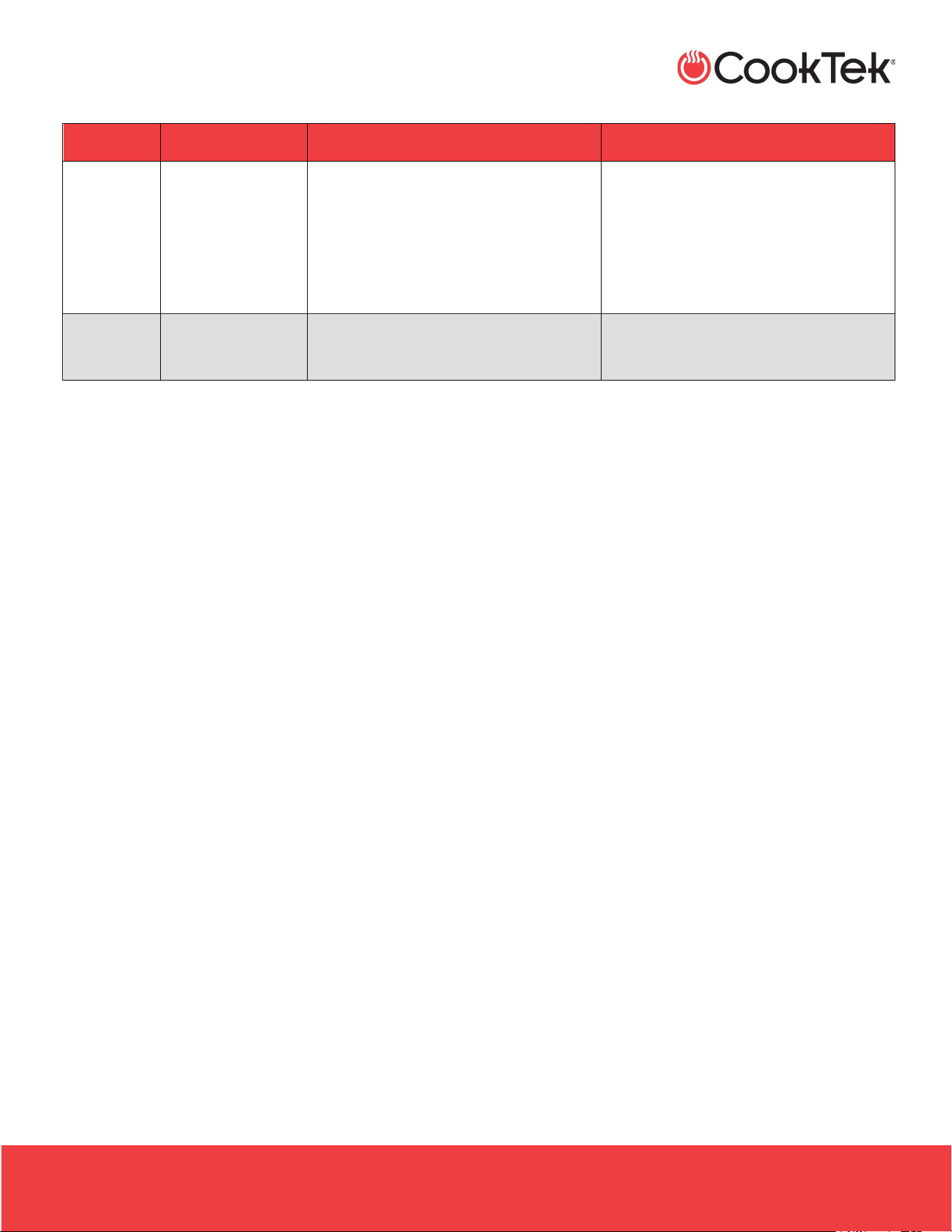
Error Code
Description
Probable Cause
Corrective Action
1
RTD (temperature
sensor) is
malfunctioning.
RTD sensor has shorted.
Reconnect or replace RTD. Service may
be required.
2
RTD temperature
is too high.
Glass surface is too hot or RTD sensor
has broken.
• Remove any pans from the cooktop
surface and let the unit cool.
• Turn the unit off, then on.
• If the problem was temperature-
related, the unit will return to regular
operation. Otherwise, service is
required.
3
Current is too high
Possible mechanical damage to the coil
or a foreign object on the cooktop
Try different cookware. Service may be
required.
4
Electronics are
overheating
The fan is broken, the ventilation is bad,
or the ambient temperature is too hot
• Check airow.
• Clear air vents.
• Listen for fan operation.
6
Input line (from
power outlet)
voltage is too high
Something else is on the same circuit.
Line voltage uctuations at the end or
beginning of the workday.
Voltage:
> 132 VAC for 100–120 VAC units,
>264 VAC for 200–240 VAC units,
or
>430 VAC for 380–415 VAC units
• Unplug the unit, wait 5 seconds, and
plug it in again to reset.
• If the problem persists, have an
electrician monitor the line voltage.
7
Hardware failure.
Inverter I/O problem
Unplug the unit, wait 5 seconds, then
plug it back in to reset.
Service may be required.
INDUCTION SINGLE HOBS, DOUBLE HOBS, AND WOKS
.
HSHW- OWN-A / December 2025
2801 Trade Center Drive
Carrollton, Texas 75007
cooktek.com
Page 35 of 36
E R R O R C O D E S
Error Code
Description
Probable Cause
Corrective Action
8
Zero cross error
Bad AC source, board component failure
• Turn the unit off, then on.
• Plug the unit into an outlet on a
different circuit breaker.
• If the problem persists, service is
required on the device.
16
System error
CPU I/O problem
Unplug the unit, wait 5 seconds, and
plug it in again to reset

12. WARRANTY
Refer to the Advanced Replacement Warranty policy for more information.
Global Operations
2801 Trade Center Drive
Carrollton, Texas 75007 USA
+1 214.379.6000
+1 214.379.6073 fax
Business & Technology Centre
Bessemer Drive
Stevenage
Herts SG1 2DX
United Kingdom
+44 8456021544
+44 8456021636 fax
Customer Support
+1 214.379.6000
+1 214-379-6073 fax
cooktek.com
Country Code: NA/EU