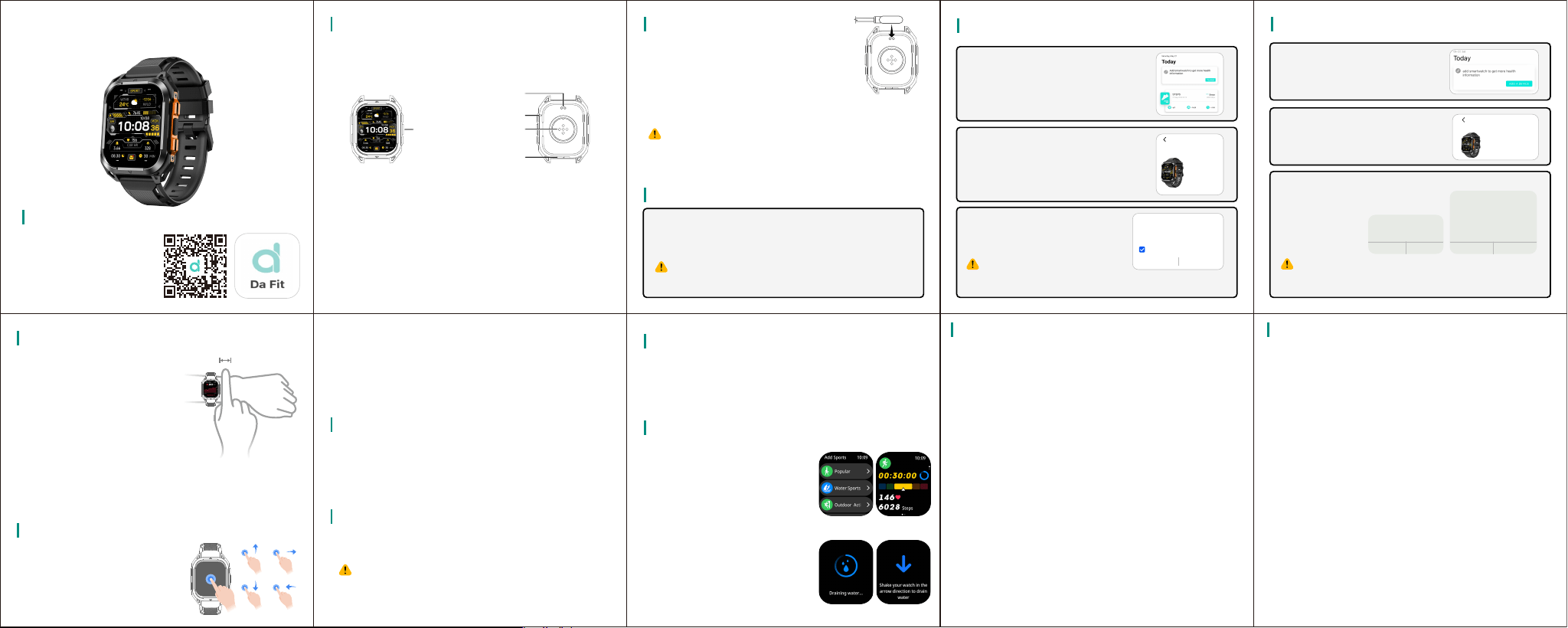
APP Download
Scan QR code with mobile
phone to download App.
User Manual
About the Smart Watch
The watch features press-buttons and color screen design,
integrating multiple functions into one. The large color
display provides a broader field of view.
Wake up:
(1)Single press any button to wake up the screen.
(2)Raise or inwardly flip your wrist to light up the
screen.
Screen off:
(1)After turning on the screen with a button press or wrist
raise, the screen will automatically turn off after a period
of inactivity.
(2)Select setting > Display > Sleep, set screen off time.
Charging: Align the charging cable with the
charging area on the back of the device,
connect the other end to a charger and power
it on until the screen shows the charging
indicator.
Power on: The device will power on automatically when
charging, or you can long-press the top button to turn it on.
Charging Guide
For Android Users
In DaFit App, click Add Device, the app
will automatically scan for connectable
devices.
Paired Device
After the first power on, the device Bluetooth is in pairable
status by default. Please download and install the latest
version of DaFit App before pairing.
Please make sure your phone has Bluetooth and
location services turned on.
For iOS Apple Users
Turn to the DaFit App, click “Add
Device”, find the “C36” in the list to
pair.
Click the Bluetooth name C36 to bind or
scan the QR code to connect.
You need to agree to the following
permissions before using the
Bluetooth call function.
If replacing a paired connected
phone, you will need to go to App > Remove Device.
1. Please do not use high power fast charger;
2. Please keep the charging cable, device. dry when charging.
It is recommended to use a power adapter with a rated output voltage
of 5V and a rated output current of 1A to power the charging cable.
Consumers should use a power adapter that is CCC certified and
meets the standard requirements for charging.
Tap the device whose Bluetooth
name is C36 on the search device
page to bind or connect using code
scanning, and you need to confirm
twice on your watch when connecting.
You need to agree to the following
permission before using the
Bluetooth calling function.
Bluetooth Pairing Request
Cancel Pair
"C36" would like to pair with your
iPhone.
Allow C36 to Receive Your iPhone
Notifications ?
Don't Allow Allow
When connected, all notifications you
receive on your iPhone will also be sent
to C36 and may be shown on its
display.
If replacing a paired connected phone, you will need
to go to App > Remove Device.
C36
ADD A DEVICE
F2:ED:80:5D:0E:38
Watch Wearing
Button and Screen Control
The smart watch support full
screen touch, slide up, slide down,
slide left, slide right, long press
operation.
Heart Rate Measurement
To ensure the accuracy of heart rate measurement, please
wear the device normally, avoiding the bone joints, not too
loose, and please wear it as tightly as possible when
exercising.
Single Heart Rate Measurement
Select Heart Rate in the watch app list for a single heart rate
measurement.
Due to external factors (e.g., hairy arms, tattoos, darker
skin color, sagging arms, shaky arms), etc., measure-
ments may not be accurate, or the value may not come
out.
Continuous Heart Rate Measurement
Enter the DaFit app, click Other Settings > All-day heart rate,
and turn on the Continuous heart rate measurement switch.
Once turned on, the device will continuously measure heart
rate according to the set time.
Sports Mode
1. Tap Workout in the app list of the
watch
2. Select the workout type in the
workout screen. You can also
swipe up the screen and tap
Customize to add and select
another exercise.
3. Tap Start icon to start the workout.
4. If the watch is submerged in
water, you can use the Smart
Drain function in conjunction with
flinging the arm to drain the water
out of the speaker and
microphone holes.
Frequently Asked Questions
Q1. Why Won't the Watch Turn On?
A1: Use the original charger to charge the watch for more than 30 minutes.
A2: Use high power charger to charge the watch (e.g. 9V/2A) and other fast
chargers.
A3: Please contact customer service to replace the data cable.
Q2. Why Can't the Watch Connect Through the App?
A1: Unpair all Bluetooth devices on your phone, delete the APP and
reconnect according to the user manual.
A2: Reset the watch and restart your phone.
A3: Switch to another phone to reconnect the watch.
Q3. Why Is the Data Collected by the Watch Inaccurate?
A1: Fill in actual personal information such as gender, age, height, weight
and other information on the APP.
A2: Make sure the protective film on the back of the watch is removed.
A3: Make sure the watch is worn neither too loose nor too tight.
A4: Reset the watch to recheck the accuracy of the data.
A5: Considering that different brands use different software algorithms.
The way in which data is collected varies from device to device (e.g.,
smartwatch, smartphone, treadmill, etc.).
Q4. Can't Synchronize Whatsapp or Facebook with My Watch?
A1: Please make sure to allow the app to access the notifications on the phone.
4.2 Please make sure WhatsApp or Facebook notifications are turned on in the
phone.
4.3 Please make sure WhatsApp or Facebook notification in app has been
opened.
4.3 Disconnect the watch and reconnect it.
Q5. Why Is the Battery Life Too Short?
A1: Reduce the screen brightness and adjust the screen timeout to five seconds.
A2: Turn off 24-hour heart rate monitoring without notifications.
EN
To pair with
Allow access to your contacts and call history
C36
Bluetooth pairing request
CANCEL
PAIR
C36
Add device
F2:ED:80:5D:0E:38
Please wear the watch correctly to
maintain a comfortable and snug fit.
Please tear off the film on the back
of the watch before wearing it,
because there is a sensor on the
bottom of the watch to identify the
human body. Once it is blocked, the
recognition will be inaccurate, which
will lead to the accuracy of heart
rate, blood oxygen, and other
records.
Please avoid wearing the watch at least one finger distance
from the bone joints, and keep the strap loosened and
tightened moderately, and try to wear it as tight as possible
when you are exercising.
POWER ( buttons ):
1.Short press: Return to the watch face/function menu
2.Long press: Power on/off
Power Button
Function Button
Microphone
Heart Rate &
Blood Oxygen
Sensor
Charging Port
Speaker
FCC Statement
This device complies with part 15 of the FCC Rules. Operation is
subject to the following two conditions: (1) This device may not cause
harmful interference, and (2) this device must accept any interference
received, including interference that may cause undesired operation.
FCC warning:
Any Changes or modifications not expressly approved by the party
responsible for compliance could void the user's authority to operate the
equipment.
Note: This equipment has been tested and found to comply with the
limits for a Class B digital device, pursuant to part 15 of the FCC Rules.
These limits are designed to provide reasonable protection against
harmful interference in a residential installation. This equipment
generates uses and can radiate radio frequency energy and, if not
installed and used in accordance with the instructions, may cause
harmful interference to radio communications. However, there is no
guarantee that interference will not occur in a particular installation. If
this equipment does cause harmful interference to radio or television
reception, which can be determined by turning the equipment off and on,
the user is encouraged to try to correct the interference by one or more
of the following measures:
-Reorient or relocate the receiving antenna.
-Increase the separation between the equipment and receiver.
-Connect the equipment into an outlet on a circuit different from that to
which the receiver is connected.
-Consult the dealer or an experienced radio/TV technician for help.
The device has been evaluated to meet general RF exposure
requirement. The device can be used in portable exposure condition
without restriction.