
LUMOS SNAPIX
QUICK START GUIDE
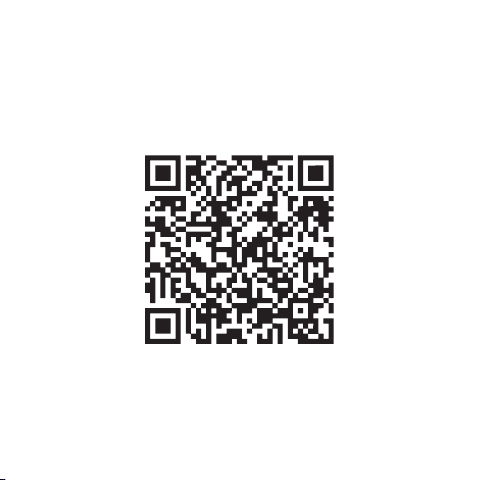
Visit: www.ridelumos.com/support for more information.
QR CODE AND WEBSITE OF THE
SUPPORT CENTER
1
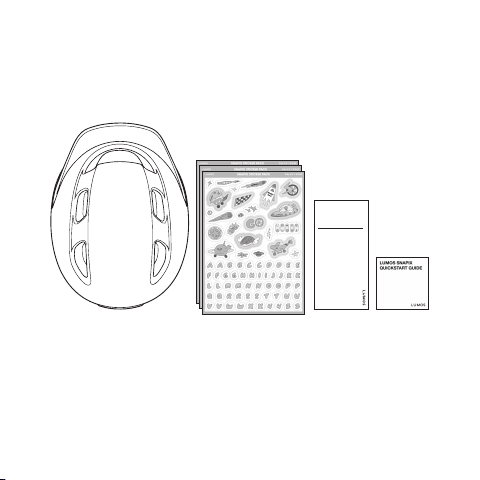
WHAT’S IN THE BOX
3. User Manual
1. Snapix Helmet 2. Sticker x3
4. Quick Start Guide
1.
3.
2.
4.
USER
MANUAL
GUIDE DE L’UTILISATEUR
BENUTZERHANDBUCH
B1
2
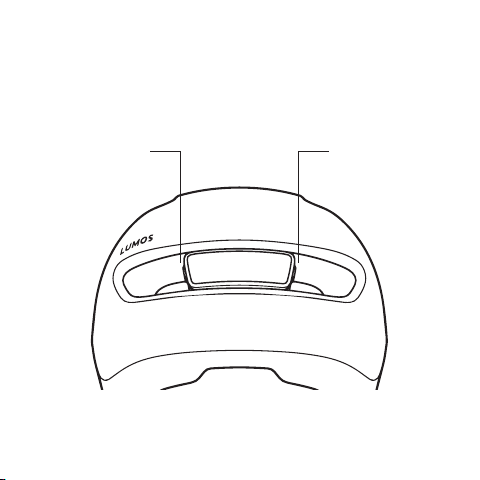
HOW TO USE THE HELMET
Power
Button
Charging
Port
3
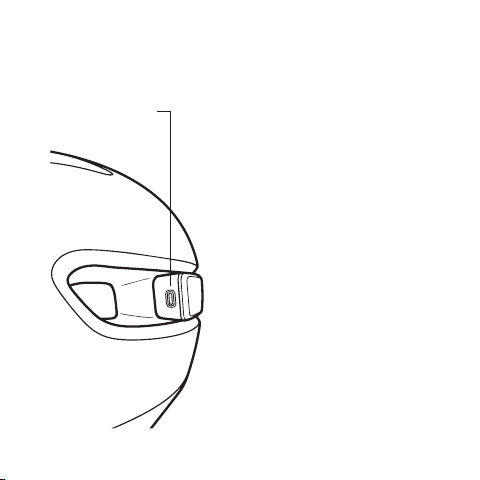
POWER BUTTON
Power
Button
Press
Power on
Press and hold
Power off
Mode Switching
Press when powered on:
Cycle through 3 light modes:
Solid / Fast Flash / Slow Flash
Explore more colors and light
patterns in the Lumos App.
Double Press
Sync current light pattern
with Lumos devices
4
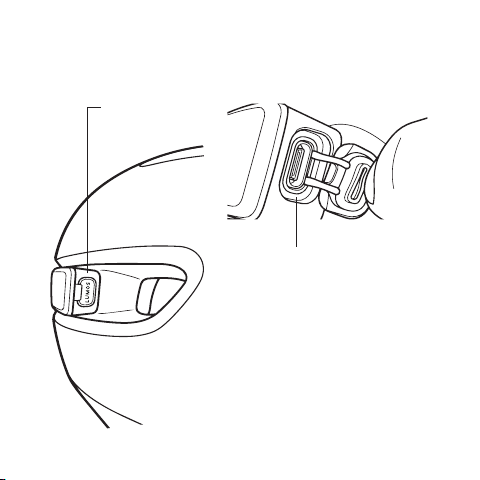
Charging Status
Pulsing Red: Below 35%
Pulsing Orange: Battery 35% –70%
Pulsing Green: Above 70%
Solid Green: Fully charged
Charging
Port
CHARGING
Lift the rubber cover to access
the charging port.
5

1. Enter pairing mode:
With helmet off, press and hold Power
button for 3s until the rear LED flashes red.
2. Search device:
Launch Lumos App, allow permissions,
and tap + on All Devices page.
3. Complete pairing:
Select your helmet, tap Pair, then tap
Continue once Paired.
6
PAIRING WITH APP
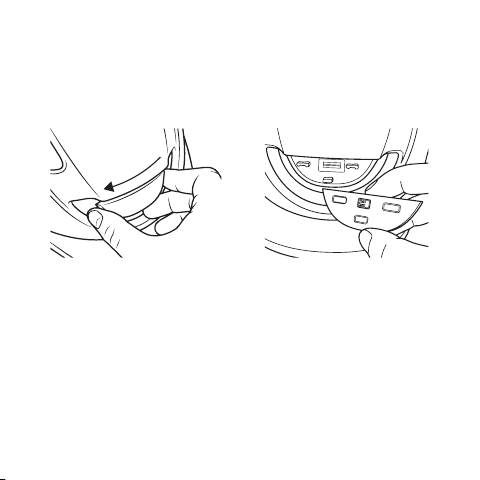
Unlock
REPLACEABLE ELECTRONIC
MODULE
Front Light Removal
1. Ensure the helmet is turned off.
2. Slide the module horizontally to the left.
3. Pull the module off the mounting base once it snaps free.
7
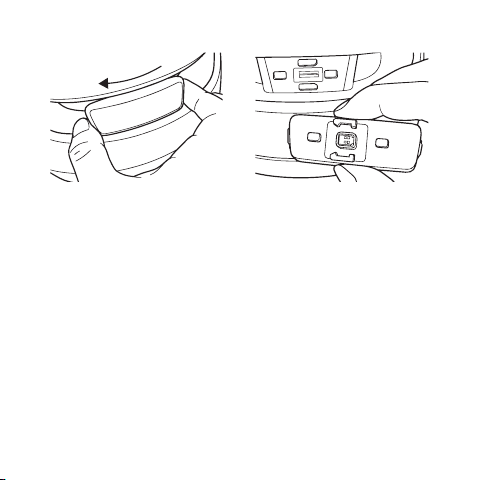
Rear Light Removal
1. Ensure the helmet is turned off.
2. Slide the module horizontally to the left.
3. Pull the module off the mounting base once it snaps free.
Unlock
8
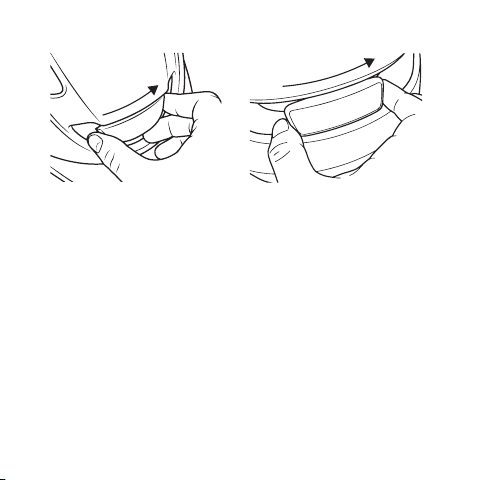
Lock
Installation
1. Align the module with the three slots on the base
(refer to the "Install" arrow and lock icon).
2. Slide the module horizontally to the right until it
snaps securely into place.
Lock
9

CAUTION
Do Not Repeatedly Remove and Install
the Lights
Only remove the lights when replacing the helmet or light units.
Frequent disassembly may cause unpredictable structural
damage.
Do Not Ride Without Lights Installed
Never ride if the front or rear lights are missing. The lights are
essential for your safety; riding without them compromises
protection.
Do Not Disassemble the Light Units
Do not open or alter the light units. They feature a waterproof
structure; self-disassembly will destroy the seals and cause
water damage.
10

IMPORTER INFORMATION
11
Importer in USA:
Lumen Labs Inc.
4550 New Linden Hill Road,
Suite 201, Wilmington,
DE 19808
(617) 528-9968
Importer in Netherlands:
GROFA® Action Sports GmbH
Otto-Hahn-Straße 17
Bad Camberg 65520
Germany
+49 6434 2008200
Importer in Germany:
GROFA® Action Sports GmbH
Otto-Hahn-Straße 17
Bad Camberg 65520
Germany
+49 6434 2008200
Importer in Switzerland:
Bucher et Walt SA
Route de Soleure 8
CH-2072 St-Blaise
Switzerland
+41 32 755 95 00
Importer in UK:
Lumos Labs International Pte Ltd
Unit I, Hove Technology Centre
St Josephs Close
Hove East Sussex
Importer in France:
Now Company sprl
Avenue Leonard de Vinci 14,
Wavre 1300,
Belgium
+32 48562002

Importer in Vietnam:
SAFFRONCLUB VIETNAM
COMPANY, LTD
P7-33.OT02, Park 7 Vinhomes
Central Park,
720A Dien Bien Phu street,
Thanh My Tay Ward,
Ho Chi Minh City
Importer in Philippines:
Liberty & Co.
20 Talisay Road
Barangay Forbes Park
Makati City 1219
Philippines
Importer in Japan:
Riteway Products Japan
Ikebukuro City Heights 102,
3-18-34, Minami Ikebukuro
Toshima-ku,Tokyo, Japan
Importer in Singapore:
Kian Hong Cycle Pte Ltd
13 Kaki Bukit Road 1
#02-08 Eunos Technolink
Singapore 415928
+65 6749 5787
Importer in Indonesia:
Khcycle Indonesia
Ruko the Prominence,
Jl. Jalur Sutera 38D, No. 5
Alam Sutera -
Tangerang City 15143
Indonesia
+6222-30052581
Importer in Malaysia:
Khcycle Malaysia Sdn Bhd
No. 9, Jalan PJU 3/48,
Sunway Damansara Technology Park,
47810 Petaling Jaya, Selangor,
Malaysia
+603 7865 2188
12

Importer in Norway:
Deler AS
Hestehagen 4
NO-1448 Drøbak
Norway
+47 47 48 94 18
13
Importer in Denmark:
Søndergård & Sønner A/S
Fabrikvej 3
8260 Viby J
Denmark
+45 86 28 10 22