
1 2 3 4 5 6 7 8
Lighting
Owner’s Manual
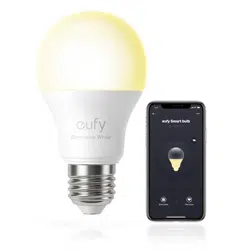
eufy Lumos Smart Bulb 2.0
Installing Lumos Smart Bulb
Make sure the power switch controlling Lumos is
turned off before installing.
T
When the bulb is turned on, it will become hot as
light is emitted. To avoid burning your hands, do
not touch the bulb. Do not touch the bulb
immediately after turning it off.
Downloading the EufyHome App
What you need:
• AWi-Firoutersupportingthe2.4GHzand802.11b/g/n
bands;the5GHzbandisnotsupported.
• AsmartphoneortabletconnectedtoaWi-Finetwork.
• AsmartphoneortabletrunningiOS8.0(orabove)
orAndroid4.3(orabove).
EufyHome
DownloadtheEufyHomeappfromtheAppStore(iOS
devices)orGooglePlay(Androiddevices).
Connecting to a Wi-Fi Network
Note: BeforestartingWi-Fisetup,makesureLumosis
turnedonandblinks.
Forfirsttimeusers,createanewaccountinthe
EufyHomeapp.
Find“SmartBulbs”inthedevicelistandadditto
yourEufyHomeaccount.
Followtheon-screeninstructionstocomplete
setup.
- Make sure your smart device has already
connected to your home network.
- The instructions in this manual are for your
reference only. The app will be updated from
time to time. Always follow the instructions in
the app to complete Wi-Fi setup.
T
Using Lumos with the EufyHome App
Control Lumos remotely.
Adjust the brightness of the bulb(s).
Select White Mode (T1016)
Adjustthecolortemperaturefromwarmwhitetocool
white.
Set schedules for Lumos.
Enable Away Mode
Lumoswillrandomlyturnonandoffduringtheset
periodoftime.
Add and manage groups of bulbs
Thisfeatureisonlyavailableforsame-modelbulbs.
Enable multiple users to control Lumos
Lumosallowsanymemberofthehouseholdto
controlthelight.Youjustneedtogettheowner's
permissionintheapp.
Using Lumos with Amazon Alexa / the
Google Assistant (Optional)
Before you start, make sure that:
• LumosisconnectedwiththeeufyHomeapp.
• YouhaveanAlexa-enableddevice(i.e.EufyGenie,
AmazonEcho,EchoDot,AmazonTap,etc)ora
deviceenabledwiththeGoogleAssistant(i.e.
GoogleHome).Thesedevicesaresoldseparately.
• TheAmazonAlexaapportheGoogleHomeapp
isalreadyinstalledonyoursmartdevice,andyou
havecreatedanaccount.
T
Actualusagemaybedifferentfromtheinstructions
inthisusermanualduetoupdatesoftheAmazon
Alexaand/ortheGoogleHomeapp.Alwaysfollow
theinstructionsinthisapptoconnecttoLumos.
To control Lumos with Amazon Alexa:
OpentheAlexaappandselect“Skills”fromthe
menu.
OntheSkillsscreen,searchfor“EufyHome”.
Onceyouhavefoundthe“EufyHome”skill,tapEnable.
LoginwithyourEufyHomeaccountsothatAlexa
cancontrolyourLumos.
Discovernewsmartdevicesviathe“SmartHome”
menuintheAlexaapporAlexavoicecontrol.
Oncethedeviceisfound,youcancontrolLumos
withyourvoice.
SaysimplecommandstoAlexa.
Belowaresomeexamples:
Note: Thedefaultdevicenameis"MySmart
Bulb".Youcanmodifythedevice’snameinthe
EufyHomeapp.
"Alexa, turn on My Smart Bulb."
"Alexa, set My Smart Bulb to 70
percent brightness."
"Alexa, dim My Smart Bulb."
"Alexa, set My Smart Bulb to
daylight."
To control Lumos with the Google Assistant:
LumosnowworkswiththeGoogleAssistanton
devicesliketheGoogleHome.
OpentheGoogleHomeapp.
FromthemenuoftheGoogleHomeapp,tap
Home Control.IfyoucannotndHome Control,
upgradeyourapptothelatestversion.
Tapthe“+”iconintheDeviceListandthenselect
“EufyHome”.
FollowtheinstructionsintheGoogleHomeappto
authorizetheGoogleAssitantwithyourEufyHome
account.
Aftersuccessfulconfiguration,saysimple
commandstotheGoogleAssistanttocontrol
Lumoswithyourvoice.
Note:Youcanmodifyyourdevicenameineither
theEufyHomeapportheGoogleHomeapp.
"Ok Google, turn on My Smart Bulb."
"Ok Google, set My Smart Bulb to 70
percent brightness."
"Ok Google, dim My Smart Bulb."
"
O
k Google, set My Smart Bulb to
daylight."

7 8 9 10 11 12 13 14
www.eufylife.com
For FAQs and more information, please visit
• Ifyoursmartdeviceisconnectedtoa3Gor
4Gmobilenetwork,checktoseeifthemobile
network’ssignalisabnormal.Tryagainwhenthe
signalisstable.
5. Cannot control Lumos with Alexa voice control.
• CheckifyouhaveinstalledtheAlexaapponto
yoursmartdeviceandenabledthe“EufyHome”
SkillintheAlexaapp.Fordetails,refertotheUsing
Lumos with Amazon Alexa / the Google Assistant
(Optional)sectionofthismanual.
• Checkifyouareusingthepropercommandswhen
talkingtoAlexa.Youmustsaythewakeword
“Alexa”rstwhenmakingyourrequest.
• Repeatyourquestion.SpeakclearlytoAlexa.
• MakesureLumosisatleasteightinchesawayfrom
wallsorotherobjectsthatmaycauseinterference
(suchasmicrowaveovens).
• CheckifthereareanyInternetconnectionproblems.
6. Cannot control Lumos with the Google Assistant
voice control.
• CheckifthereareanyInternetconnection
problems.
• CheckifyouhaveinstalledtheGoogleHome
appontoyoursmartdeviceandenabledthe
“EufyHome”SkillintheGoogleHomeapp.For
details,refertotheUsing Lumos with Amazon
Alexa / the Google Assistant (Optional)section
ofthismanual.
Troubleshooting
1. Cannot connect to your Wi-Fi network.
• MakesureyouareconnectingLumostoa2.4GHz
wirelessnetwork.
• CheckifyouhaveenteredthecorrectWi-Fi
passwordduringWi-Fisetup.
2. Cannot connect to your Wi-Fi network.
• MakesureyouareconnectingLumostoa2.4GHz
wirelessnetwork.
• CheckifyouhaveenteredthecorrectWi-Fi
passwordduringWi-Fisetup.
• CheckifthereareanyInternetconnection
problems.IftheWi-Fisignalistooweak,tryto
placeyourwirelessrouterclosertoLumosandtry
again.
3. How to reset the Wi-Fi connection for Lumos.
• TurnLumossmartbulboffandonfivetimesina
rowuntilthesmartbulbblinks.Thenyoucanreset
theWi-FiconnectionforLumos.
4. No response when using Lumos with the
EufyHome app.
• CheckifLumosisturnedoff.Ifyes,turnitonand
waituntilLumosreconnectswiththeWi-Finetwork
automatically.
• CheckifthereareanyInternetproblems.If
necessary,resetyourwirelessrouterandtryagain.
51005001339V02
T1015/T1016
• Checkifyouareusingthepropercommandswhen
talkingtotheGoogleAssistant.Whenmakingyour
request,rstsaythewakewords“OkGoogle”.
• Repeatyourquestion.SpeakclearlytotheGoogle
Assistant.
• CheckifyouhavemodiedthenameofLumosin
theEufyHomeapp.Ifyes,unlinkyourEufyHome
accountfromtheGoogleHomeappandthenrelink.
Important Safety Instructions
Readandfollowallthesafetyinstructions:
• Thisdeviceisforindooruseonly.
• Thisdeviceshouldnotbeexposedtodrippingor
splashingwater.
• Thisdeviceusesanon-replaceablelightsource.
Whenthelightsourcereachestheendofitslife
cycle,thisdeviceshouldbereplaced.
• Thisdeviceshouldonlybeinstalledbyadults.
Childrenshouldnotinstallthisdevice.
• Donotinstallnearanyheatsources.
• Donotusethisdevicewithdimmers.
• Donotplaceanysourcesofdangeronthisdevice
(e.g.liquidlledobjects,lightedcandles).
• Donotusethisdeviceintotallyenclosedluminaires.
Usethisdeviceinopenluminairesonly.
• Donotusethisdeviceinemergencyexits.
• Ifthisdeviceismuchheavierthanthelamptobe
replaced,theincreasedweightmayreducethe
mechanicalstabilityofcertainluminairesand
lampholdersandmayimpaircontactmakingand
lampretention.
• Ifthisdeviceisheavierthanthelamptobereplaced,
theaddedweightofthisdevicemaycauseinstability
ofafreestandingportableluminaire.
• Whenusingthisdeviceintheportabletable
luminaire,theluminaireshouldbeprovidedwitha
shade.
• RISKOFELECTRICSHOCK:USEINDRYLOCATIONS
ONLY.Donotinstallthisdevicewithwethands.
Notice
Thissymbolmeanstheproductmustnotbe
discardedashouseholdwaste,andshouldbe
deliveredtoanappropriatecollectionfacility
forrecycling.Properdisposalandrecycling
helpsprotectnaturalresources,humanhealth
andtheenvironment.Formoreinformationon
disposalandrecyclingofthisproduct,contact
yourlocalmunicipality,disposalservice,orthe
shopwhereyouboughtthisproduct.
FCC Statement
1.ThisdevicecomplieswithPart15oftheFCCRules.
Operationissubjecttothefollowingtwoconditions:(1)
Thisdevicemaynotcauseharmfulinterference,and
(2)thisdevicemustacceptanyinterferencereceived,
includinginterferencethatmaycauseundesired
operation.
2.Changesormodicationsnotexpresslyapproved
bythepartyresponsibleforcompliancecouldvoid
theuser'sauthoritytooperatetheequipment.
NOTE:Thisequipmenthasbeentestedandfound
tocomplywiththelimitsforaClassBdigitaldevice,
pursuanttoPart15oftheFCCRules.Theselimitsare
designedtoprovidereasonableprotectionagainst
harmfulinterferenceinaresidentialinstallation.
Thisequipmentgenerates,uses,andcanradiate
radiofrequencyenergyand,ifnotinstalledand
usedinaccordancewiththeinstructions,maycause
harmfulinterferencetoradiocommunications.
However,thereisnoguaranteethatinterferencewill
notoccurinaparticularinstallation.Ifthisequipment
doescauseharmfulinterferencetoradioortelevision
reception,whichcanbedeterminedbyturningthe
equipmentoffandon,theuserisencouragedto
trytocorrecttheinterferencebyoneormoreofthe
followingmeasures:
Reorientorrelocatethereceivingantenna.
Increasetheseparationbetweentheequipment
andreceiver.
Connecttheequipmentintoanoutletonacircuit
differentfromthattowhichthereceiverisconnected.
Consultthedealeroranexperiencedradio/TV
technicianforhelp.
FCC Radiation Exposure Statement
ThisequipmentcomplieswithFCCradiationexposure
limitssetforthforanuncontrolledenvironment.This
equipmentshouldbeinstalledandoperatedwitha
minimumdistanceof20cmbetweentheradiator&
yourbody.
Trademark Notice
• Amazon,Echo,Alexaandallrelatedlogosare
trademarksofAmazon.com,Inc.oritsafliates.
• AppleandtheApplelogoaretrademarksofApple
Inc.,registeredintheU.S.andothercountries.App
StoreisaservicemarkofAppleInc.,registeredin
theU.S.andothercountries.
• GooglePlayandtheGooglePlaylogoare
trademarksofGoogleInc.
• GoogleHomeisatrademarkofGoogleInc.
Specifications
T1015
Smart Bulb -
Dimmable White
T1016
Smart Bulb -
Tunable White
RatedInputVoltage AC120V,60Hz AC120V,60Hz
Power 9W 9W
InputCurrent 80mA 80mA
LightOutput Max.800Lumens Max.800Lumens
LampBase E26 E26
ColorTemperature 2700KWarmWhite 2700-6500K
TunableWhite
LEDLifetime >20,000hours >20,000hours
Dimensions 60x60x107mm/
2.4x2.4x4.2in
60x60x107mm/
2.4x2.4x4.2in
Weight 105g/3.7oz 105g/3.7oz
Customer Service
18-monthlimitedwarranty
Lifetimetechnicalsupport
support@eufylife.com
+1(800)9887973(US)Mon-Fri9:00-17:00(PT)
+44(0)1604936200(UK)Mon-Fri6:00-11:00(GMT)
+49(0)6995797960(DE)Mo-Fr6:00-11:00
+810344557823(JP)
月
-
金
9:00-17:00
+864000550036(
中国
)Mon-Fri9:00-17:30
@EufyOfficial
@EufyOfficial
@EufyOfficial
@EufyOfficial