RL
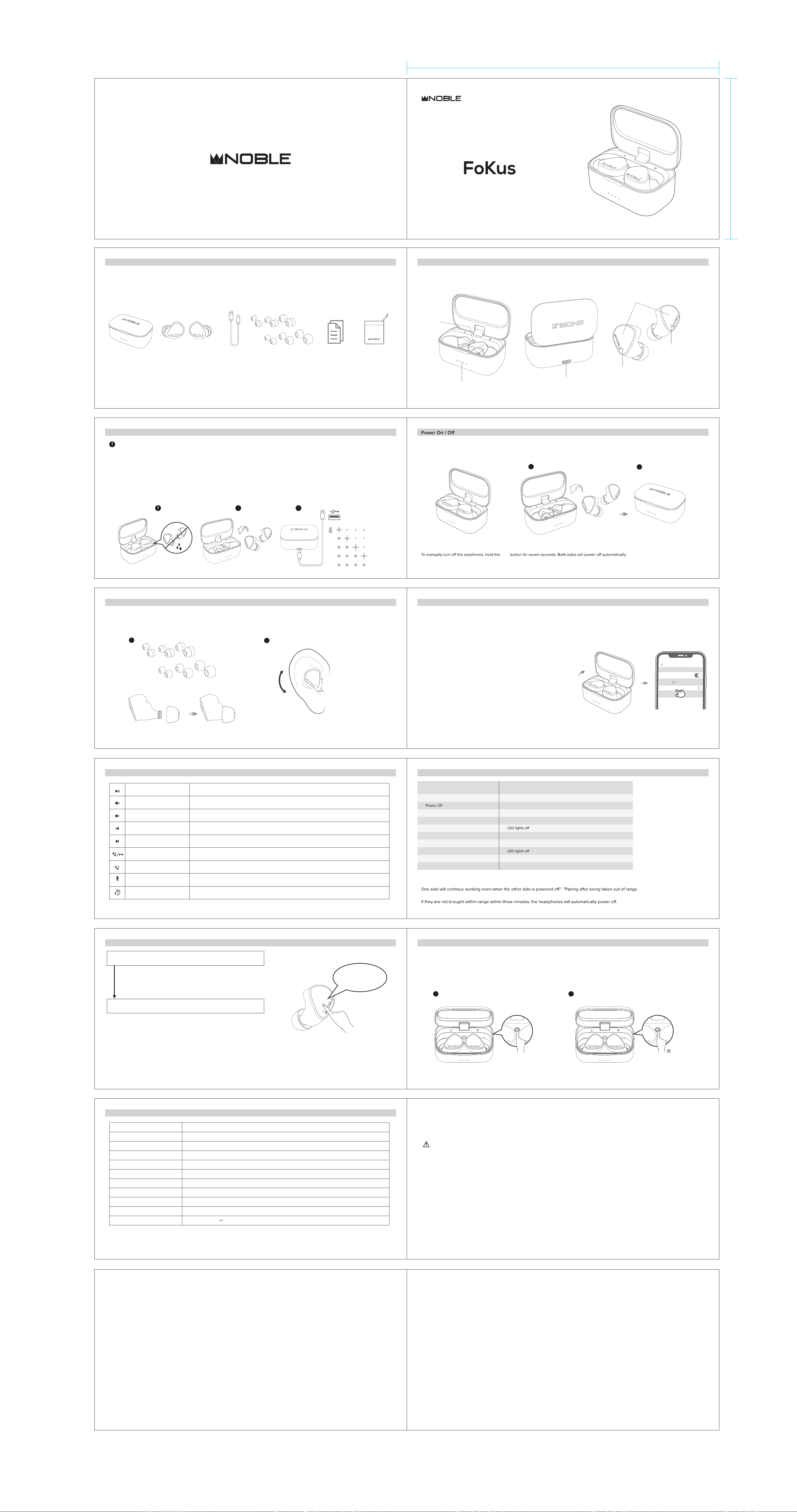
Packing List
Charging Case x1 Earphones
USB Charging Cable x1
Ear Tips x6 Instruction Manual x1 Storage Bag x1
Reset Button
01
LED Light Indicators
02
Overview
USB Type C Charging Port
Microphone
Multifunction Sensor (MFS)
Microphone
04
The earphones will power on automatically when charging lid is opened.
The earphones will power o automatically when put back in the charging case and the charging lid is closed.
OFF
ON
1
2
Pairing a new device
Pairing
The Noble FoKus Mystique will need to be paired to your device before use. Once paired, they will connect automatically each time they are activated.
1. Open the lid of the charging case.
The earphones will power on automatically and enter pairing mode, with blue and
white indicator lights flashing alternately.
2. Enable Bluetooth on your smartphone and search for "Noble FoKus Mystique" in
available Bluetooth devices. Once found, select "Noble FoKus Mystique" to initiate
pairing. You will hear "connected", now the earphones are ready for use.
1. Open the lid of your charging case. The earphones will power on automatically
and connect to your current device.
2. To unpair the earphones from your last connected smartphone by "disconnecting" or
deleting "Noble FoKus Mystique" from your smartphone's Bluetooth device list.
3. Once disconnected, the earphones will automatically enter pairing mode, with blue
and white indicator lights flashing alternately.
4. Enable Bluetooth on your new device, and search for "Noble FoKus Mystique" in the
available Bluetooth devices. Once found, select "Noble FoKus Mystique" to initiate
pairing. You will hear "connected", now the earphones are ready for use.
Pairing/Unpairing Procedure
LED Indicator Lights
06
08
1 2
1. Select an ear tip size suitable for your ear and slide them on to the tip of the earphone.
2. Insert the earphones into your ear canals and adjust them to a comfortable fit. Be sure that the eartips have a secure seal.
Fit
05
Charging
Notes:
Charging Steps:
03
Please make sure the earphones and charging case are fully charged prior to first use.
The earphones and charging case need to be clean and dry before and during the charging process.
To manually turn the earphones on, hold the MFS button for three seconds.
MFS
1. The earphones will power o automatically when put back in the charging case and the charging lid is closed.
The LED light will indicate the power capacity when lid is opened or closed.
2. Connect the charging case with power source by inserting the USB Type C charging cable.
1 2
< 25%
25% - 50%
50% - 75%
> 75%
100%
Operation
07
Single Click MFS (L/R)
Single Click
MFS (L/R)
Triple Click
MFS (L)
Double Click
MFS (L)
Double Click
MFS (R)
Triple Click MFS(R)
Single Pairing mode: Put one side back in the charging case and the other earphone will work independently.
The earphones will automatically pair to the smartphone within 3 minutes if they are close to the smartphone again after being taken out of range.
Press the MFS for 3 seconds(R)
Press the MFS for 2 seconds(L/R)
Press the MFS for 3 seconds(L)
Play/Pause
Volume Up+
Volume Down-
Previous Track
Next Track
Answer Call/Hang Up
Reject Call
Voice Assistant function-
Siri / Google
This device complies with Part 15 of the FCC Rules. Operation is subject to the following two conditions:
Warning: Changes or modifications not expressly approved by the party responsible for compliance could void the user's authority to operate the
equipment.
( 1 ) This device may not cause harmful interference, and
( 2 ) This device must accept any interference received, including interference that may cause undesired operation.
Reorient or relocate the receiving antenna.
Increase the separation between the equipment and receiver.
Connect the equipment into an outlet on a circuit dierent from that to which the receiver is connected.
Consult the dealer or an experienced radio/TV technician for help.
NOTE: This equipment has been tested and found to comply with the
limits for a Class B digital device, pursuant to Part 15 of the FCC Rules.
These limits are designed to provide reasonable protection against
harmful interference in a residential installation. This equipment
generates uses and can radiate radio frequency energy and, if not
installed and used in accordance with the instructions, may cause harmful
interference to radio communications. However, there is no guarantee
that interference will not occur in a particular installation. If this equipment
does cause harmful interference to radio or television reception, which
can be determined by turning the equipment o and on, the user is
encouraged to try to correct the interference by one or more of the
following measures:
FCC STATEMENT
13
www.nobleaudio.com
https://www.facebook.com/NobleAudio
https://www.instagram.com/nobleaudio/
https://twitter.com/noblebywizard
White LED light flashes for one second
Blue LED light flashes for one second
White LED light flashes twice every 8 seconds
White LED light flashes every 7 seconds
Blue and White LED alternating flash
Power On
Pairing
Pairing succeeds
Playing music or on calling
Low Power
When put earphones in the charger case
Earphones are sitted in the charger case
All LED lights on
Blue LED light on
Charging
Fully charged
The last LED light flashes
Usage Scenario
LED Indicator Status
Noble FoKus Mystique
Settings
Bluetooth
Bluetooth
DEVICES
TRUE WIRELESS STEREO EARPHONE
INSTRUCTION MANUAL
175mm
封面封底
90mm
S
XS S M
M L
S
XS S M
M L
5”
x1
2. If the earphones cannot pair to each other or to your bluetooth devices, please reset them.
Hold the reset button for 5 seconds until the blue LED lights on both earphones flash quickly. The reset process is completed.
In the case that only one earphone is accidently reset, both earphones will need to be reset to function as a pair again.
1.
Press the reset button once. The blue and white LED lights on both earphones will flash alternately twice. All previously paired devices will be cleared.
21
Reset Procedure
10
Specification
11
Product Model
Bluetooth Version
Bluetooth Profile
Resistance
Connection Distance
Earphone Battery Capacity
Charging Case Battery Capacity
Play time 7 hours for earphone and more than 24 hours for charger case. Around 31 hours in total
Charging time ruoh 1~
Charging Port USB Type C (5V 1A)
DD Diameter
500mAh
45mAh
≥10m
30Ω±(15%)
Triple-driver arrangement, 1 Dynamic & 2 Balanced Armature
A2DP, AVRCP, HFP, HSP
V 5.2
Noble FoKus Mystique
12
WARNING!
Declarations and Warnings
Disconnect previous devices before pairing a new device.
Hearing-through
09
Hearing-through
Hearing-through OFF
Press and hold the left earbud touch sensor for 3 seconds with voice prompt
“Ambient Mode On”, it will activate the external sound capturing function.
Press and hold the left earbud touch sensor for 3 seconds with voice prompt
“Ambient Mode O ”.
Press and hold for 3 secs
Press and hold for 3 secs
In standby mode or when playing music
In a word, hevre is the loop for “Ambient Mode On” and “Ambient Mode O ” long
pressing LEFT earbud for 3 seconds.
Press and hold
for 3 secs
Hearing-through
Mystique
Long-term exposure to high noise volumes may cause permanent hearing loss.
Do not use the Noble FoKus Mystique earphones in locations prohibiting the use of electronic equipment.
Consult your physician prior to using your Noble FoKus Mystique earphones if you have a pacemaker or other electrical medical devices.
This package contains small parts, which may pose a hazard to small children.
Do not disassemble the Noble FoKus Mystique as it contains lithium batteries, and disassembly could result in electric shock or fire or serious injury.
Any disassembly of the Noble FoKus Mystique, or attempt to replace or repair the Noble FoKus Mystique by an unauthorized person, will void the
Noble FoKus Mystique warranty.
This product is not designed for use in water or wet environments. Keep product away from water and liquids.
Failure to do so will void any warranty and may cause permanent damage to the product.
Dispose of the product if it becomes swollen or cracked as it may be an indication that the battery is degraded and
may burst and cause a fire.