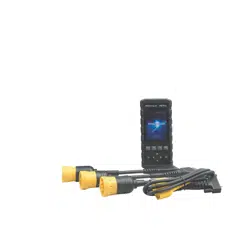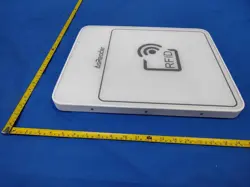

ASR-P351N
User’s Manual
Product Type: DESKTOP-Type Pro RFID reader
Compatible with iOS, Android, Windows and Linux devices
1
st
Edition
January 11, 2026

ASR-P351N User's Manual
1
Table of Contents
About ASR-P351N .......................................................................................................................................2
Safety Instructions ......................................................................................................................................4
1Preparation Before Use ..........................................................................................................................5
2 Name of Each Part ....................................................................................................................................6
3 Operation Guide .......................................................................................................................................7
Appendix: Product Specifications ............................................................................................................9

ASR-P351N User's Manual
2
About ASR-P351N
Thank you very much for purchasing the ASR-P351N (hereinafter referred to as "this product").
This manual contains important precautions for the correct handling of this product. Please be
sure to read it before use. After reading, please store this manual carefully for future reference.
This product is an integrated antenna RFID reader/writer. It enables simple and reliable reading
of RFID tags placed on it. For example, it is suitable for reading shopping baskets containing
clothing with attached RFID tags or batch reading large quantities of ID cards. Additionally, it
supports the PoE port, allowing both power supply and communication through a single cable. It
can be used in various system environments, such as iOS, Android, Windows, and Linux.
ASR-P351N User's Manual
3
■Revision history
Version
Changes
Date
1
Initial version
January 11, 2025
Note: The contents of this document are subject to change without notice.
ASR-P351N User's Manual
4
Safety Instructions
⚠ Warnings
Please do NOT disassemble, modify, or repair the ASR-P351N yourself.
Please stop using the ASR-P351N if you notice anything unusual during operation such as
smoke, noise, or an abnormal odor.
Please do NOT subject the ASR-P351N to strong impacts by dropping or throwing it.
If the body of the ASR-P351N is damaged, please do NOT touch the damaged part or the
parts inside.
The ASR-P351N is a RFID interrogator with 1W output power, which may affect medical
devices in certain circumstances.
When operating the ASR-P351N, please make sure to keep it more than 22cm away from
implantable medical devices and users of implantable medical devices.
⚠ Cautions
Since each country or region has different regulations regarding radio waves, it is necessary to
comply with the respective regulations. Modification of the AsReader is prohibited, and
violations may result in penalties according to the regulations of each country or region.
Use the PoE hub/injector specified in this manual when connecting the AsReader. Use of non-
standard PoE hub/injector may cause the AsReader failure or malfunction.
Please refer to local regulations when you recycle this device.
If you notice any abnormalities, please discontinue use and contact your distributor
immediately.
Do not use, store, or leave the AsReader in hot places (eg. by the fire, near a heater, in direct
sunlight, in a car in hot weather). It may cause rupture, malfunction, fire or injury.
Do not place the AsReader on an unstable surface such as a wobbly table or a tilted place. It
may fall and cause damage to the crisis or injury.
ASR-P351N User's Manual
5
1Preparation Before Use
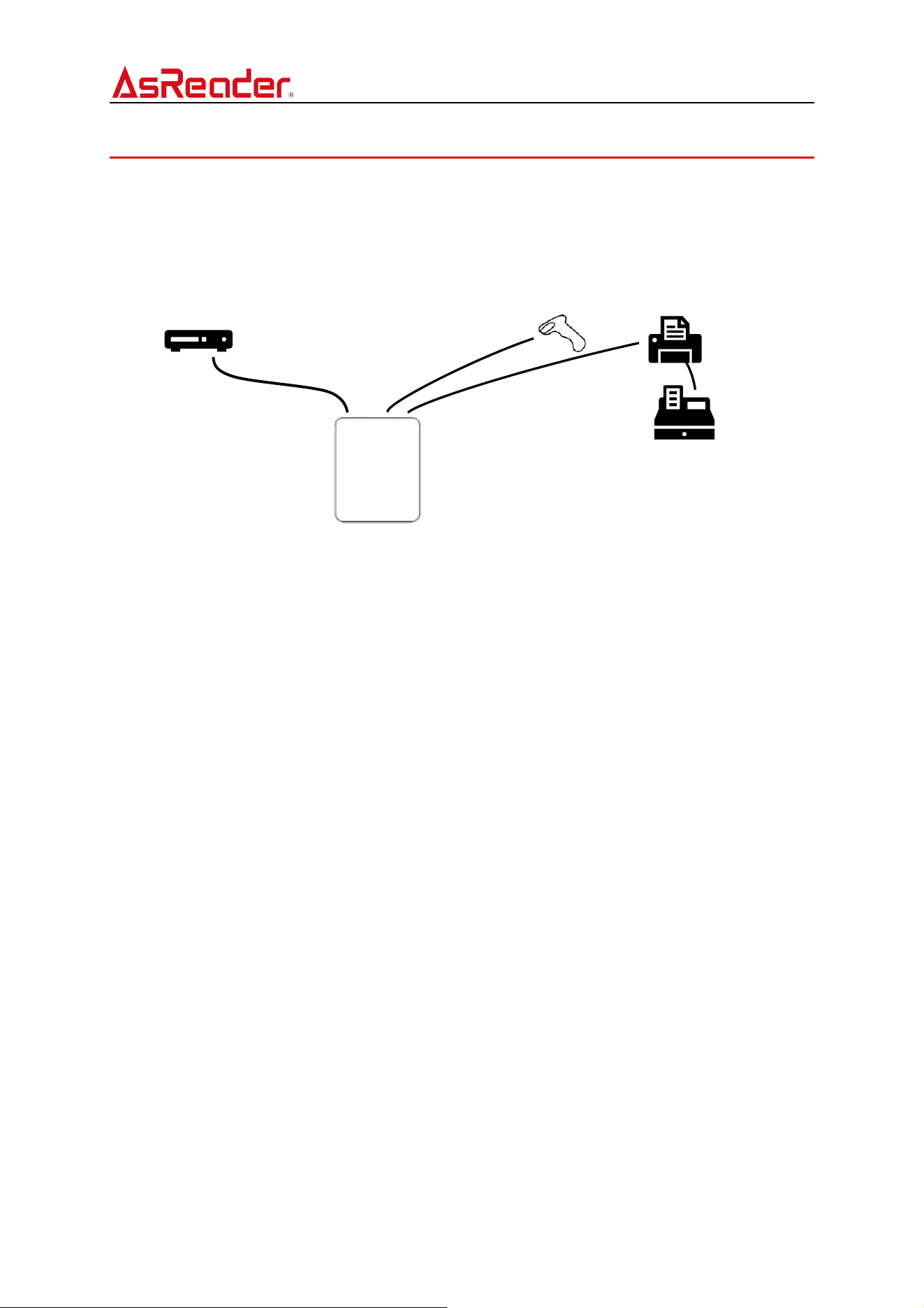
To build a system using the ASR-P351N, the following hardware is required in addition to the
ASR-P351N itself.
PoE hub/injector
(sold separately)
Ethernet cable
(sold separately)
Printer
(sold separately)
Barcode reader
(sold separately)
Cash drawer
(sold separately)
ASR-P351N User's Manual
6
2 Name of Each Part
ASR-P351N User's Manual
7
3 Operation Guide
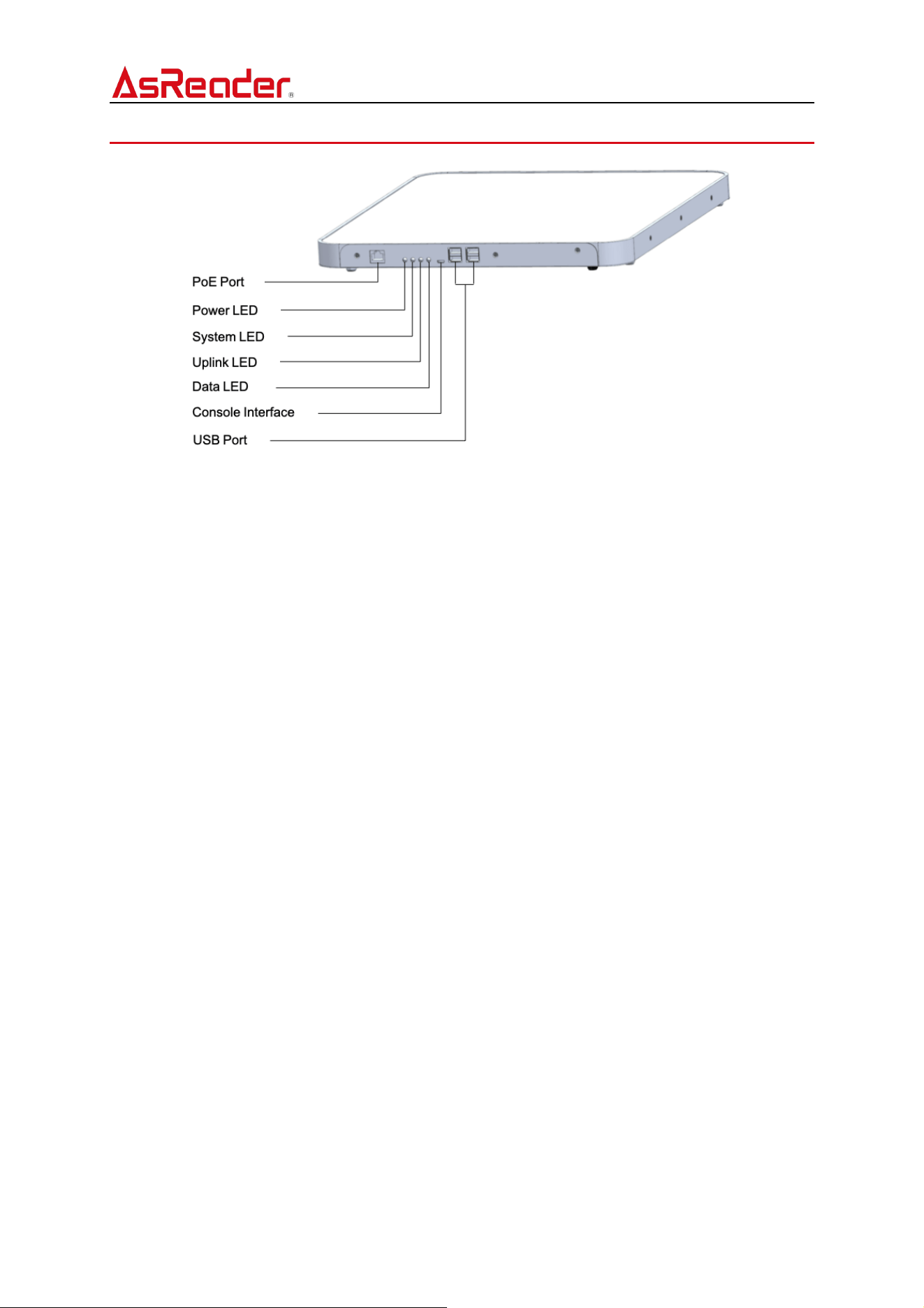
1 PoE Port
Power supply and network connection can be achieved by connecting to a PoE-compatible
port.
Connection method:
1) Connect the PoE power supply device and this product using an Ethernet cable.
2) Connect the PoE power supply device and the router.
* Please use a PoE power supply device that complies with the IEEE 802.3at standard.
* Please use a Category 5e or higher UTP cable as the Ethernet cable for connection.
Power On:
After connecting the devices as described above, once PoE power supply begins, the
product will automatically start up. After startup is complete, all four LEDs will either light
up or blink.
Power Off:
Turn off the power of the PoE power supply device, or disconnect the product from the PoE
power supply device.
2 LED Indicator
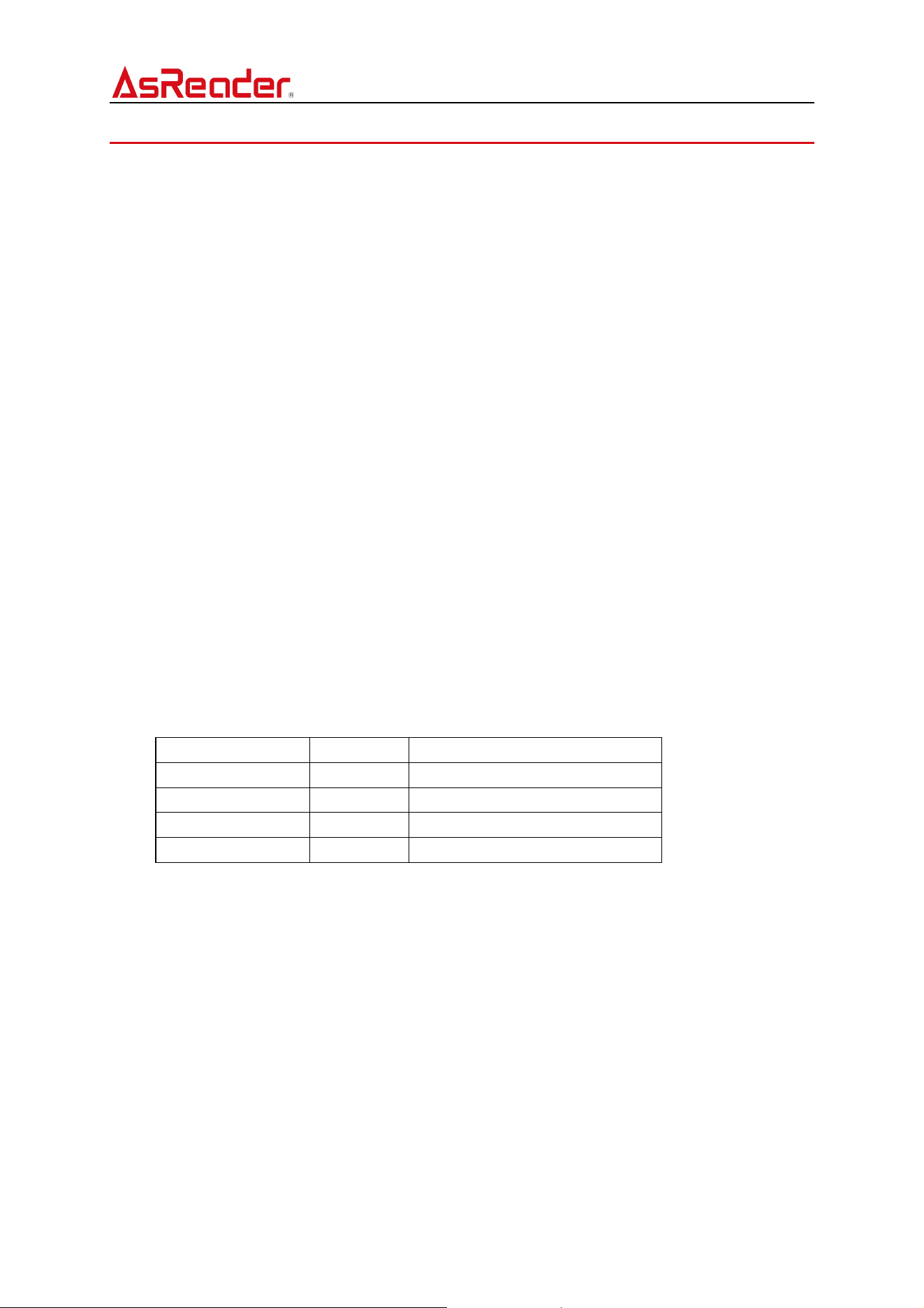
LED
Color
Description
POWER
Red
Lights up when power is supplied.
SYSTEM
Orange
Blinks when the product is operating.
UPLINK
Green
Blinks when Ethernet is connected.
DATA
Green
Blinks during communication.
3 Console Interface
Maintenance port (not available for customer use).
4 External Device Connection Interface
The interface supports connecting HID devices such as barcode scanners, as well as
ESC/POS-compatible printers for use.
⚫ Connecting HID Devices

ASR-P351N User's Manual
8
Connect HID devices such as barcode scanners to the USB port of this product. The total
power output from the USB ports of this product is 2500mW (5V/500mA) across all four ports
combined. If connecting a device that requires power consumption exceeding this limit,
please connect the device to this product via a self-powered USB hub.
⚫ Connecting Printers
Connect the printer to the USB port of this product and connect the printer’s power supply.
Ensure the printer used is compatible with ESC/POS.
⚫ Connecting Cash Drawers
After connecting the printer to this product, connect the cash drawer to the printer. The cash
drawer is controlled through the printer.
ASR-P351N User's Manual
9
Appendix: Product Specifications
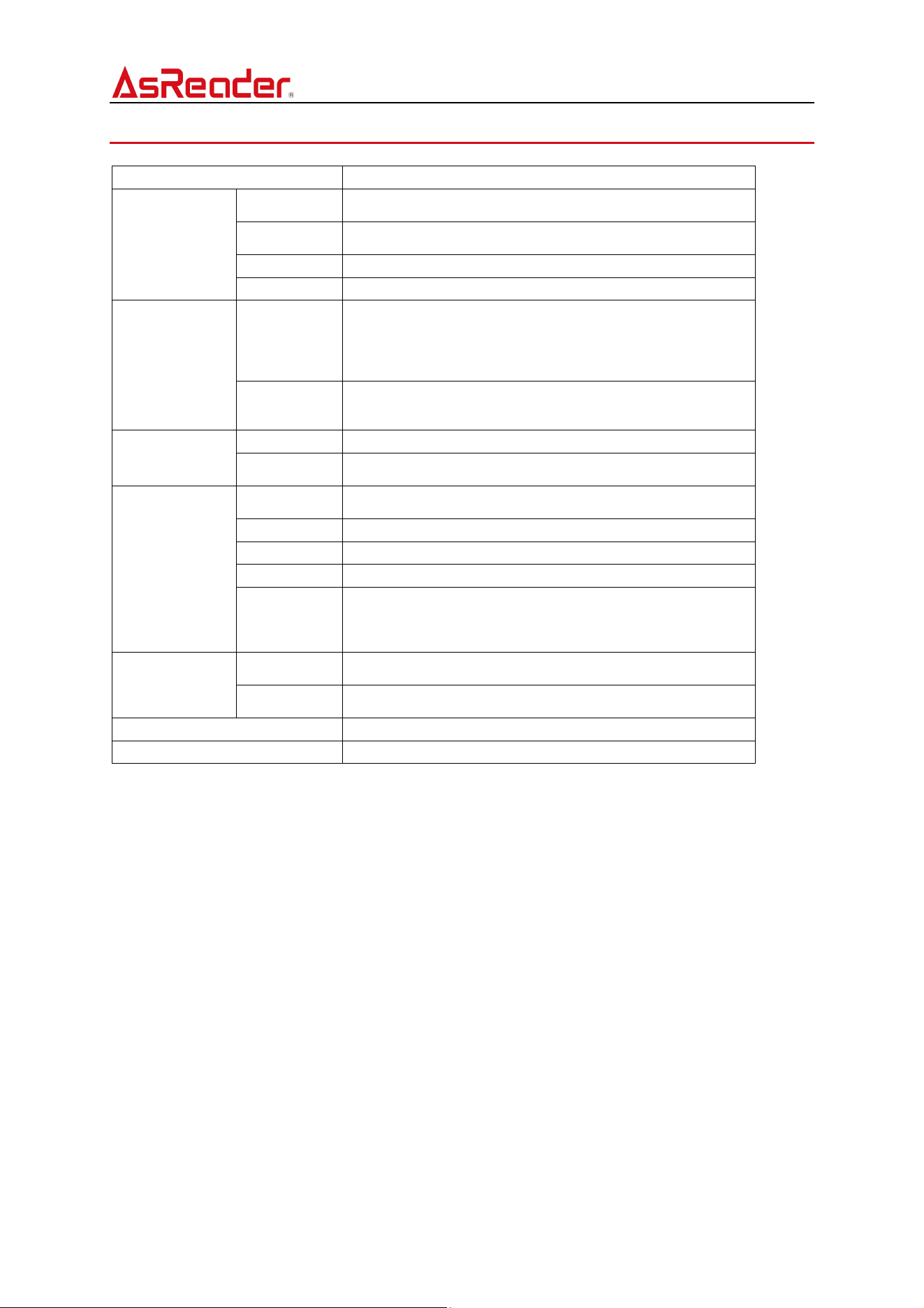
Model
ASR-P351N
RFID
Spec
ISO/IEC 18000-63 (Former 18000-6C) / EPCglobal Class 1 Gen
2
Radio
Frequency
North America: 902.75MHz ~ 927.25MHz
Output
Max 30dBm (1W)
Functions
Inventory/Read/Write/Lock/Kill
Power Source
Input
·RJ45 ×1 PoE (IEEE802.3at compliant)
* Be sure to use the following specifications for the PoE
hub/injector and Ethernet cable to be used.
Ethernet cable: Category 5e or higher
PoE hub/injector: IEEE802.3at compliant
Output
·USB 2.0 Type-A ×4: 2500mW (4 ports in total)
*In case of connecting a device that requires more than the
specified input, connect it via a self-powered USB hub.
Communication
Interface
Ethernet
RJ45
USB 2.0
Type-A ×4
To connect HID communication devices such as barcode
scanners and ESC/POS compatible printers.
Appearance
Dimensions
(W)×(D)×(H)
433 × 352 × 31 mm
Weight
Approx. 1900g
Material
Aluminum, PMMA
Color
White
LED Indicator
Red
Orange
Green
Green
Environment
Operation
Temp.
-10~45 ˚C, 20~85 % RH
Storage
Temp.
-20~60 ˚C, 10~95 % RH
Certifications
FCC, ISED, RoHS
Supported OS
iOS, Android, Windows, Linux
ASR-P351N User's Manual
10
ASR-P351N
User’s Manual
Asterisk Inc. (Japan HQ)
AsTech Osaka Building
2-2-1 Kikawa-nishi
Yodogawa-ku, Osaka-shi
Osaka 532-0013 JAPAN
AsReader is a registered trademark of Asterisk Inc.
- App Store, iPad, iPadOS, iPhone, iPod touch, Mac, Macintosh, and macOS are trademarks of Apple Inc.
- iPhone is a registered trademark of AIHONE CO., LTD. in Japan and is used under a license.
- iOS is a trademark of Cisco Systems, Inc. in the United States and other countries and is used under a license.
- Google Play and Android are trademarks of Google LLC.
- Microsoft, Visual C#, Visual C++, Visual Studio, and Windows are trademarks or registered trademarks of
Microsoft Corporation in the United States, Japan, and other countries.

FCC Warnning:
This equipment has been tested and found to comply with the limits for a Class B digital device,
pursuant to part 15 of the FCC Rules. These limits are designed to provide
reasonable
protection againstharmful interference in a residential installation. This equipment generates,
uses and can radiateradio
frequency
energy
and,
if
not
installed
and
used
in
accordance
with
the
instructions,
maycause
harmful
interference
to
radio
communications.
However,
there
is
no
guarantee
thatinterference
will
not
occur
in
a
particular
installation.
If
this
equipment
does
cause
harmfulinterference to radio or television reception, which can be
determined by turning the equipmentoff
and
on,
the
user
is
encouraged
to
try
to
correct
the
interference
by
one
or
more
of
thefollowing measures:
•
Reorient or relocate the receiving antenna.
•
Increase the separation between the equipment and receiver.
•
Connect the equipment into an outlet on a circuit different from that to which the receiver is
connected.
• Consult the dealer or an experienced radio/TV technician for help.
Caution:
Any
changes
or
modifications
to
this
device
not
explicitly
approved
by
manufacturer
could void your authority to operate this equipment.
This
device
complies
with
part
15
of
the
FCC
Rules.
Operation
is
subject
to
the
following
two
conditions:
(1)This
device
may
not
cause
harmful
interference,
and
(2)
this
device
must
accept
any
interference received, including interference that may cause undesired operation.
This
equipment
complies
with
FCC
radiation
exposure
limits
set
forth
for
an
uncontrolled
environment.
This
equipment
should
be
installed
and
operated
with
minimum
distance
20cm
between the radiator and your body.

ISED Statement
‐
English:
This device contains licence-exempt transmitter(s)/receiver(s) that
comply with Innovation, Science and Economic
Development Canada’s licence-exempt RSS(s).
Operation is subject to the following two conditions:
(1) This device may not cause interference.
(2) This device must accept any interference, including interference that may cause undesired
operation of the device.
‐
French:Cet appareil contient des émetteurs/récepteurs exempts de licence qui sont
conformes aux CNR exempts de licence d’Innovation, Sciences et
Développement économique
Canada. Le fonctionnement est soumis aux deux conditions suivantes :
(1) Cet appareil ne doit pas causer d’interférences.
(2) Cet appareil doit accepter toute interférence, y compris les interférences susceptibles de
provoquer un fonctionnement indésirable de l’appareil.
This
equipment
complies
with
Canada
radiation
exposure
limits
set
forth
for
an
uncontrolled
environment.
This
equipment
should
be
installed
and
operated
with
minimum
distance
20cm
between
the
radiator & your body.
Cet équipement est conforme Canada limites d'exposition aux radiations dans un environnement
non contrôlé.
Cet équipement doit être installé et utilisé avec une distance minimale de 20 cm entre le
radiateur et votre corps.