myAvro A1
Overview
Mobile Data Terminal
Precau�ons
1、Read all informa�on in this guide before using the device to ensure safe and
proper opera�on.
2、Please use the accessories that have been approved by this manufacturer
and corresponds to this model.Use of any power source,charger,ba�ery,etc.
That has not been approved by this manufacturer may cause a fire,explosion,
or other hazards.
3、Please use device and accessories within the specified temperature range.
Equipment failure may occur when the ambient temperature is too high or too low.
4、Do not disassemble the product and its accessories.If the equipment or any
of its components are not working properly,consult the a�er-sales service of the
company promptly,or send the equipment to the a�er-sales service outlet for
tes�ng and maintenance.
5、The ba�ery is made from a flammable and explosive material.Do not
disassemble,squeeze,drop and make any other destruc�ve apera�ons on the
ba�ery.Do not place the ba�ery in high temperatures.
6、Disposal of used ba�eries is subject to local relevant documents or policies
regarding disposal of used ba�eries.
Warranty Policy
Thank you for using intelligent terminal series products. In the situa�on
of quality problems, which arise from raw materials or produc�on
processes, during normal use of purchased products, the seller will be
responsible for free maintenance within one year from the date of purchase.
The company may provide repairs due to the user's failure to use the
product according to the provided instruc�ons of the product. However
corresponding service fee and component fee will be charged.
Warranty regula�ons:
1、Under normal circumstances, the warranty period of the device is 12
months (3 months for accessories), subject to the sales agreement.
2、During the product warranty period, under the normal use condi�ons
(determined by our technical staff), the user will be en�tled to a free
warranty for damaged or faulty warranty parts.
3、During the warranty period, faults caused by repair , disassembly or
modifica�on of the product by a personnel other than our company
improper installa�on, improper use by the user (failure to follow
instruc�ons), serial number damage, accident or natural disaster
, will not be covered under the warranty
4、The warranty will expire immediately if any altera�ons are made to
the warranty card.
5、Please show the equipment SN and purchase cer�ficate for repair
The company reserves the right to interpret the above contents.
.
Note: The contents of the manual are subject to change without prior no�ce.
In the EU and UK member states, opera�on of 5150-5350MHz and 5945-6425MHz
are restricted to indoor use only.
Place of Origin:
Dong guan
Quality Inspector:
02
MYAVRO LIMITED
h�ps://www.myavro.com
Ba�ery Informa�on
Cau�on:
1、Risk of explosion if ba�ery is replaced by an incorrect type. Dispose
of ba�eries according to instruc�ons.
2、However, there are limita�ons as to how long a ba�ery can operate or
be stored before needing replacement. Many factors affect the actual life
cycle of a ba�ery pack such as heat, cold,harsh environmental condi�ons,
and severe drops.
3、When ba�eries are stored over six months, some irreversible
deteriora�on in overall ba�ery quality may occur. Store ba�eries at half of
full charge in a dry, cool place, removed from the equipment to prevent loss
of capacity, rus�ng of metallic parts, and electrolyte leakage. When storing
ba�eries for one year or longer, the charge level should be verified at least
once a year and charged to half of full charge.
4、Replace the ba�ery when a significant loss of run �me is detected.
Ba�ery Safety Guidelines
1、The area in which the units are charged should be clear of rubbish and
combus�ble material or chemicals. Par�cular care should be taken where
the device is charged in non-commercial environment.
2、Follow ba�ery usage, storage, and charging guidelines found in the
user’s guide.
3、Improper ba�ery use may result in a fire, explosion, or other hazard.
4、To charge the mobile device ba�ery, the ba�ery and charger
temperatures must be between0℃and +40℃.
5、Do not use incompa�ble ba�eries and chargers. Use of an incompa�ble
ba�ery or charger may present a risk of fire, explosion, leakage, or other
hazard.
6、 For devices that u�lize a USB port as a charging source, the devise
shall only be connected to products that bear the USB-IF logo or have
completed the USB-IF compliance program.
7、Do not disassemble or open, crush, bend or deform, puncture, or shred.
8、Severe impact from dropping any ba�ery-operated device on a hard
surface could cause the ba�ery to overheat.
9、Do not short circuit a ba�ery or allow metallic or conduc�ve objects to
contact the ba�ery terminals.
10、 Do not modify or remanufacture, a�empt to insert foreign objects into
the ba�ery, immerse or expose to water or other liquids, or expose to fire,
explosion, or other hazard.
11、 Do not leave or store the equipment in or near areas that might get
very hot, such as in a parked vehicle or near a radiator or other heat
source. Do not place ba�ery into a microwave oven or dryer.
12、Ba�ery usage by children should be supervised.
13. Please follow local regula�ons to promptly dispose of used
re-chargeable ba�eries.
14、Do not dispose of ba�eries in fire.
15、Seek medical advice immediately if a ba�ery has been swallowed.
16、In the event of a ba�ery leak, do not allow the liquid to come in
contact with the skin or eyes. If contact has been made, wash the
affected area with large amounts of water and seek medical advice.
Indicator
Ba�ery
Network Signal
Full power
Medium power
Charging
Low power
Less power
SIM card error/no service
Good signal
Unstable signal
SIM card not installed
NONE
Wi-Fi
Wi-Fi on. No available
wireless networks for
connec�on
Wi-Fi connected
Wi-Fi switched of
NONE
Table of Toxic and Hazardous Substances
and Content in this product
Adapter
x 1
USB cable
x 1
Quick Start Guide
Package Contents
Device x 1
Quick Start Guide & Warranty Policy x 1
Ba�ery x 1
Se�ng Up Your Smart Terminal
SIM Card, TF Card Installa�on Method
Ba�ery Installa�on
PC Connec�ons
Connect device to PC using the USB cable provided.If addi�onal
driver is required,PC will automa�aclly download from internet.
Once the USB port has been connected,drag the no�fica�on bar
from the top of the screen to display the USB se�ng interface.
1、Tap this to ac�vate developer menu shown.(Figure 1)
2、Tap this to ac�vate USB preference menu shown.(Figure 2)
On Windows PC,go to “My Computer”.Click on “Removable Disk”
to view and transfer device data.
Press and hold the func�on key on the right side of the phone for 3 seconds,
and the device will display the cer�fica�on informa�on.
Hereby, [MYAVRO LIMITED] declares that the radio equipment type [myAvro A1 5G
Digital Smartphone] is in compliance with Direc�ve 2014/53/EU.
The full text of the EU declara�on of conformity is available at the following internet
address:h�ps://www.myavro.com
Step
2
The effect after installation,
as shown in the picture.
Step
You need to choose the correct direction and
position to install the SIM card and TF card.
1
Note:1:SIM card is Nano-SIM cards,support 5G/4G/3G/2G .
2:The above two SIM cards and TF card can be used simultaneously.
The ba�ery cover is part of the fireproof enclosure. It is necessary to ensure that the
ba�ery cover is on the product.
WARNING
To prevent possible hearing damage,do not listen at high volume
levels for long periods.
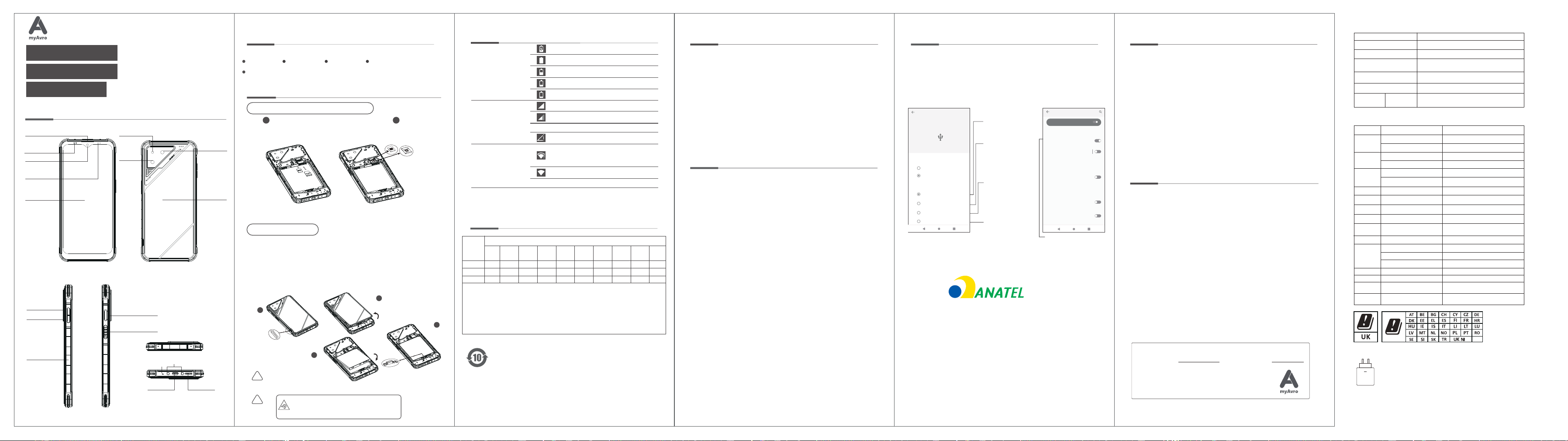
1:Find the hand button at the bottom left corner of the battery cover.
2 : Gently open the battery cover upwards.
3:Install the battery (pay attention to the installation direction), align
the bottom of the battery with the battery compartment slot, and gently
press it.
4:Adjust the battery lock to the locked state.
(As shown in the following figure)
Touch screen
Charging
indicator
light
Op�cal
distance
sensor
Receiver
Front Camera
Rear
camera
Flashlight
Ba�ery
cover
Secondary Camera
Volume Up+
Volume Down-
POGO PIN
MIC
Fingerprint
power on/off button
Front shell
Type-C
connector
speaker
function key
Step
1
Step
2
Step
3
Step
4
Spezifika�onen
Produktmodell
Hauptbildschirmparameter
Dimension
Ba�erie
Kamera
Betriebstemperatur
SAR-Werte
CE SAR
0.358W/kg (Kopf)
1.149 W/kg (Körper)
6.583''
171.90mm*79.5mm*10.92mm
4500mAh/17.46Wh(Min)
4600mAh/17.85Wh(Typ)
0°C-35°C
50 Megapixels +2 Megapixels Rear
8 Megapixels Front
Max. Ausgangsleistung
myAvro A1
Note: The SAR value indicated above is the highest value reported for this device.
Radio
900MHz
Bands 5/8
1800MHz
Bands 1
Bands 1/3/7
Bands 5/8/18/19/20/28/71
Bands 38/40/41/42
n1/3/5/7/8/20/28/71
n38/40
n41/77/78
GSM
WCDMA
Frequenz
(MHz)
2.402 GHz-2.48GHz
2.412GHz-2.472GHz
5.150GHz-5.350GHz
5.470GHz-5.725GHz
5.725G
Hz-5.850GHz
5
13.56MHz
1559-1610MHz(RX)
1164-1215MHz(RX)
/
/
8.78 dBμA/m@3m
.945G
Hz-6.425 GHz
LTE FDD
LTE TDD
NR FDD
NR TDD
NR TDD
Bluetooth
2.4G
5G
Wi-Fi
34 .13dBm
30.48dBm
24.43dBm
24.71dBm(B5) , 24.88dBm(B8)
23.46dBm(B5),23.49dBm(B8),23.3dBm(B18)
17.64dBm(EIRP)
16.78dBm( EIRP)
16.82dBm( EIRP)
13.11dBm( EIRP)
14.567dBm( EIRP)
9.62dBm( EIRP)
Wi-Fi
6G
NFC
GPS L1 C/A,
BDS B1I, Galileo
Wi-F
E1, GLONASS G1
GPS-L5
i
(
(
!
!
Select this op�on
to access device
storage.
Figure 1 Figure 2
Choose this op�on
to transfer images.
Checking this op�on
allows you to select
the MIDI sound
source or output
method
Debugging
USB debugging
Debug mode when USB is connected
开启
Developer options
Wireless debugging
Debug mode when Wi-Fi is connected
Bug report shortcut
Show a button in the power menu for
taking a bug report
Disable adb authorization
timeout
Disable automatic revocation of adb
authorizations for systems that have not
reconnected within the default(7 days)or
user-configured(minimun 1 day)amount of time.
Enable view attribute inspection
Use developer options
Click this to switch on
debug mode.
MIDI
PTP
USB
USB tethering
File Transfer
Use USB for
USB Perferences
Connected device
USB controlled by
This device
Enable network
connec�vity between
the phone and other
devices using a USB
data cable.
This form is prepared in accordance with the provisions of SJ/T 11364.
This logo refers to the period ( 10 years ) during which the toxic or hazardous
substances or elements contained in electronic informa�on products will not
leak or mutate so that the use of these [substances or elements] will not
result in any severe environmental pollu�on, any bodily injury or damage to
any assets. Due to different models, the product may not include all of the
above components other than the main unit, so please refer to the actual
sales configura�on of the product.
PBBCdHgPb
OO O O OOOOX O
OO O O OOOOX O
OO O O OOOOX O
Cr(VI) PBDE
Part
Host
Adapter
USB cable
DEHP BBP DBP DIBP
Toxic and hazardous substances or elements
O : Indicates that the content of the hazardous substance in all homogeneous materials
of the component is below the limit requirements specified in GB/ T 26572.
X : Indicates that the content of the hazardous substance in at least one homogeneous
material of the component exceeds the limit requirements specified in GB/T 26572, and
currently there is no mature alterna�ve in the industry, in compliance with the
environmental requirements of the EU RoHS direc�ve.
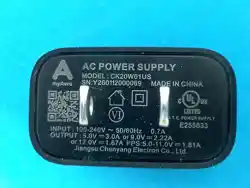
The power delivered by the charger must be between min [2.5] Wa�s required by the radio
equipment, and max [18] Wa�s in order to achieve the maximum charging speed
USB PD :5V⎓2A,9V⎓2A
The device supports BC1.2 and PE2.0 charging protocols.
2.5 18
W
US B PD
HHHHH-AA-FFFFF
23.97dBm(B1),24.11dBm(B3),21.96dBm(B7)
23.39dBm(B19),23.36dBm(B20),23.20dBm(B28),23.7dBm(B71)
22.38dBm(B38),22.93dBm(B40),23.12dBm(B41),22.99dBm(B42)
24.74dBm(n1),24.23dBm(n3),24.37dBm(n5),23.68dBm(n7)
24.6dBm(n8),24.33dBm(n20),24.09dBm(n28),24.45dBm(n71)
23.46dBm(n38),23.9dBm(n40)
22.37dBm(n41),23.9dBm(n77),23.99dBm(n78)
RF specifications(only for CE)