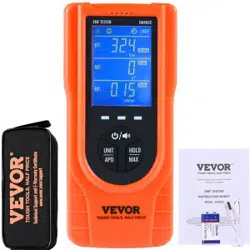

Technical Support and E-Warranty Certificate
www.vevor.com/support
EMF TESTER
INSTRUCTION SHEET
We continue to be committed to provide you tools with competitive price.
"Save Half", "Half Price" or any other similar expressions used by us only represents an
estimate of savings you might benefit from buying certain tools with us compared to the major
top brands and does not necessarily mean to cover all categories of tools offered by us. You
are kindly reminded to verify carefully when you are placing an order with us if you are
actually saving half in comparison with the to
p major brands.
MODEL: EM4556
MODEL: EM4556
Have product questions? Need technical support? Please feel free to
contact us:
Technical Support and E-Warranty Certificate
www.vevor.com/support
NEED HELP? CONTACT US!
This is the original instruction, please read all manual instructions
carefully before operating. VEVOR reserves a clear interpretation of our
user manual. The appearance of the product shall be subject to the
product you received. Please forgive us that we won't inform you again if
there are any technology or software updates on our product.
EMF TESTER
- 1 -- 1 -
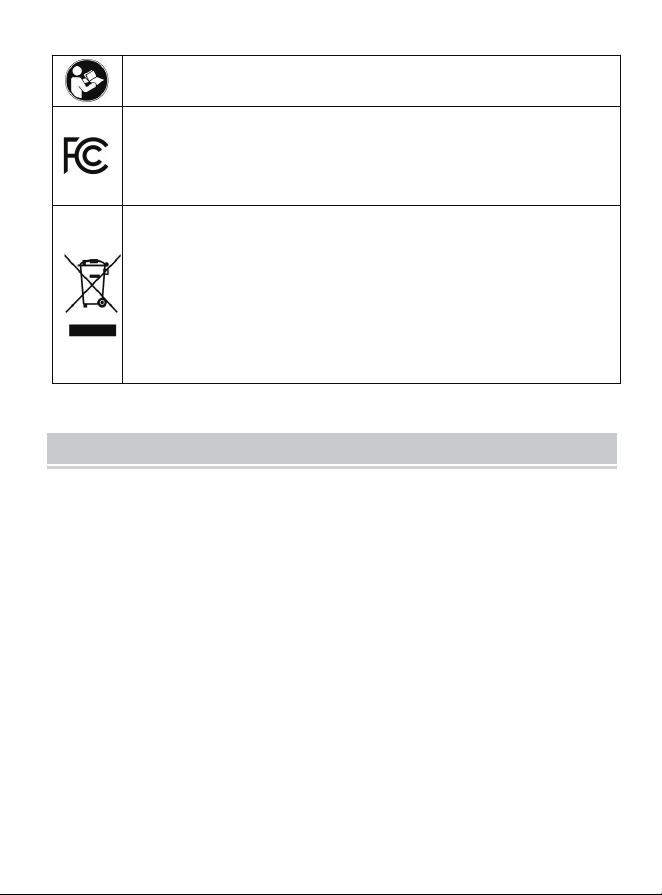
Warning-To reduce the risk of injury, user must read instructions
manual carefully.
This device complies with Part 15 of the FCC Rules. Operation is
subject to the following two conditions:(1)This device may not cause
harmful interference, and (2)this device must accept any interference
received, including interference that may cause undesired operation.
This product is subject to the provision of European Directive
2012/19/EC. The symbol showing a wheelie bin crossed through
indicates that the product requires separate refuse collection in the
European Union. This applies to the product and all accessories
marked with this symbol. Products marked as such may not be
discarded with normal domestic waste, but must be taken to a
collection point for recycling electrical and electronic devices
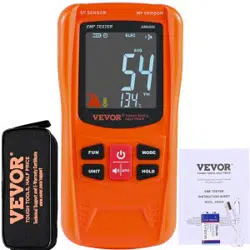
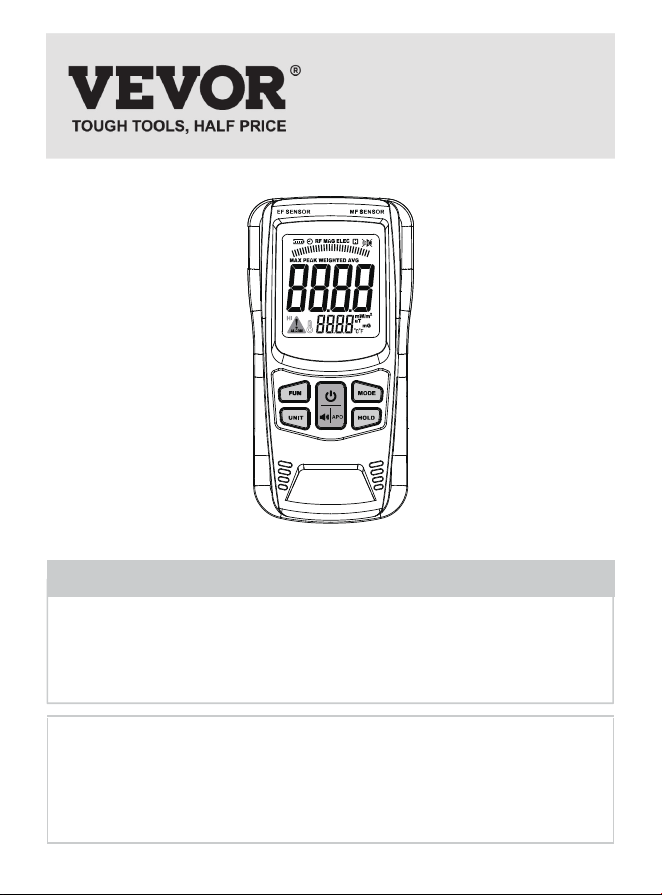
This meter is a multifunctional EMF tester designedto measure electric
field (EF), magnetic field (MF) andradio frequency field (RF) radiation
level. It is equippedwith built-in electromagnetic radiation sensors,
whichcan display the radiation value on LCD screen afterprocessing by
the micro-control chip. Users can makereasonable processing or take
effective preventionmeasures toward the electromagnetic radiation
accordingto the test result.
INTRODUCTION
- 2 -

Electromagnetic Radiation Monitoring
Residence, Office, Outdoors, Industrial sites.
Electromagnetic Radiation Detection
Mobile phones, Computers, Routers, Microwave ovens.
Radiation Protection Product Testing
Radiation-proof clothes, Radiation-blocking films.
●
●
●
Measure and display EF, MF and RF radiation level
Temperature measurement
Two magnetic field units to select from
Average / Weighted / Peak / Maximum mode
Audible alarm
Battery level indication
Data hold
Auto power off
●
●
●
●
●
●
●
●
Do not tamper with the internal circuits of the instrument.
Do not bump or drop the instrument. Keep the instrument clean and
dry.
Replace the battery as soon as the battery level indicator becomes
empty ( ).
●
●
APPLICATIONS
FEATURES
WARNING
- 3 -

If you do not use the instrument for a long period of time, remove the
battery from the battery compartmentto avoid damage.
Do not expose the instrument to direct sunlight or to extreme
temperatures and humidity.
Before use, verify the instrument's operation by testing a device (
e.g. electric fan, router ) which is producing electromagnetic field. Do
not use the instrument if it operates abnormally or it is damaged.
Adhere to local and national safety codes.
Use caution when working in the vicinity of powerful radiation
sources. Long term exposure toelectromagnetic field may be the
cause of childhoodleukemia and other forms of cancer.
Persons with electronic implants ( e.g. cardiac pacemakers ) should
avoid powerful radiation sources.
Carefully read the operating instructions for equipment generating
electromagnetic field that will be measured.
Do not operate the instrument where explosive gas, vapor or dust is
present.
Please measure from a distance for high-pressure facilities to make
sure of safety.
●
●
●
●
●
●
●
●
●
- 4 -
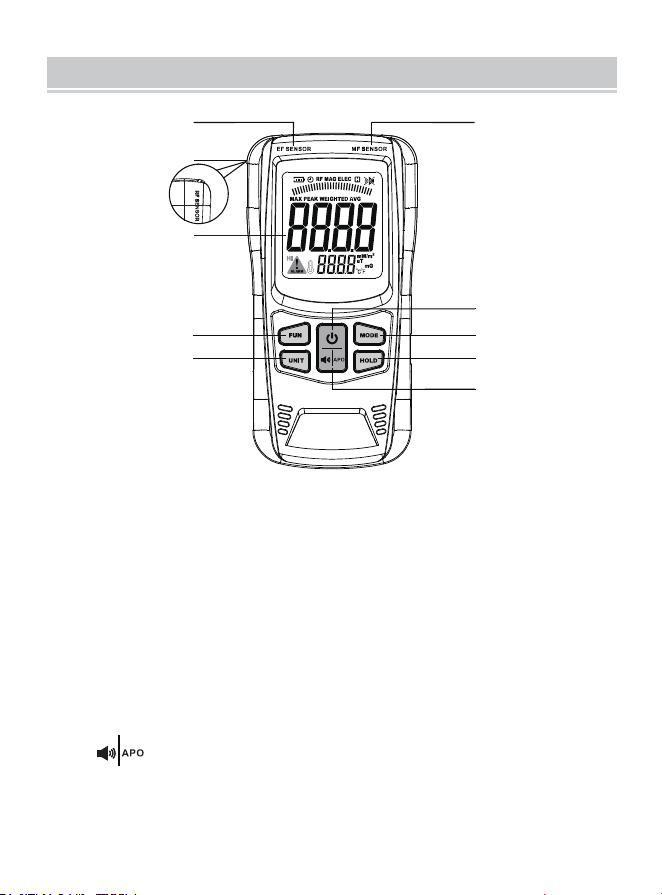
EF Sensing Area
RF Sensing Area
Display
" FUN " Button
Used to switch the Average / Weighted / Peak / Maximum mode.
" UNIT " Button
Short press to change the temperature unit.
Long press to change the magnetic field unit when the tester is in
MF measurement mode.
" " Button
Short press to enable or disable the audible alarm function.
Long press to enable or disable the automatic power off feature.
1.
2.
3.
4.
5.
6.
3
4
5
6
7
8
1
2
9
10
Figure 1
FRONT PANEL
- 5 -
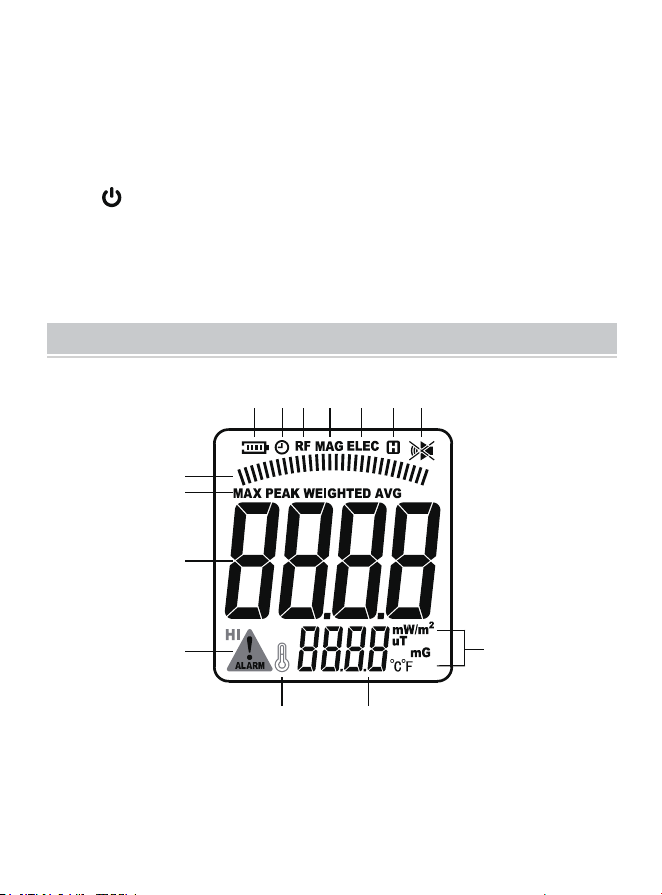
" HOLD " Button
Used to lock or unlock the displayed reading.
" MODE " Button
Used to switch the measurement mode between
EF, MF and RF.
" " Button
Used to turn on or off the tester.
MF Sensing Area
7.
8.
9.
10.
1
7
8
9
10
11
12
Radiation
Display
Figure 2
Temperature Display
6
6 5 4 3 2
DISPLAY DESCRIPTION
- 6 -
5
6
9
10
11
12
7
8
1
2
3
4
No.
Description
Symbol
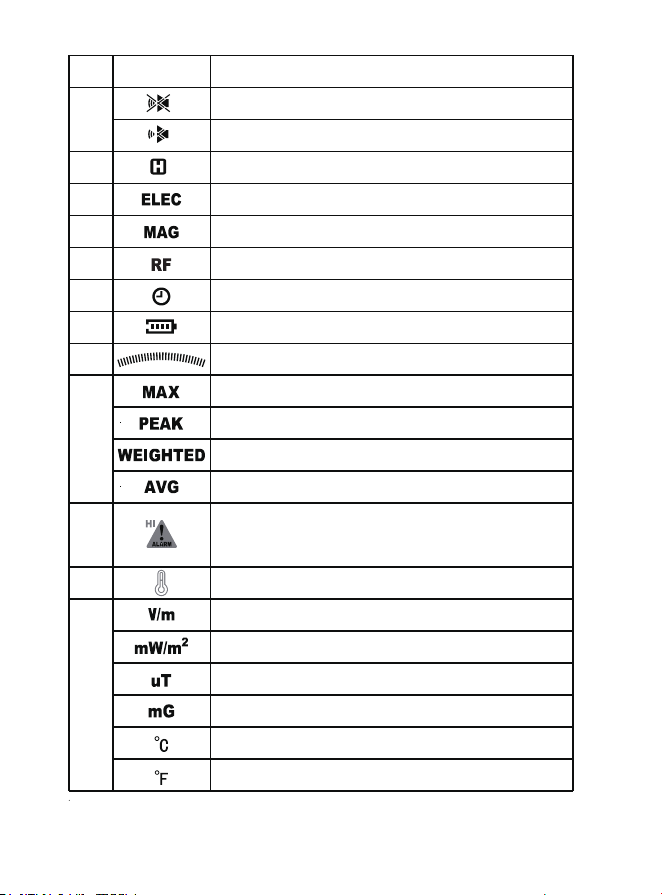
The audible alarm function is disabled.
The audible alarm function is enabled.
The present reading is locked.
The tester is in EF measurement mode.
The tester is in MF measurement mode.
The tester is in RF measurement mode.
Auto power-off feature is enabled.
Battery level indicator
Radiation level indicator bars
The maximum value is displayed.
The peak value is displayed.
The weighted value is displayed.
The average value is displayed.
Warning icon. The measured
radiation is in a high level.
Temperature icon
EF unit: volts per meter
MF unit: milli Gauss
RF unit: milliwatts per square meter
MF unit: micro Tesla
Temperature unit: Celsius degree
Temperature unit: Fahrenheit degree
- 7 -

Due to the possible electromagnetic fiel dinterference in the
environment, the displaymay show a small value after powering
on.This is not the malfunction of the tester.
Press and hold the " " button for about 2 secondsto power the
tester. The display shows all thesegments briefly and the buzzer
sounds a longbeep. Then the tester enters the measurement mode.
To power off the tester, press and hold the " " button again.
Note:
The radiation intensity increases as the tester gets closer to a
radiation source. The higher the measured radiation intensity, the
more indicator bars are displayed and the higher the testing value.
Note:
1. Power On/Off
Hold the tester in hand with the sensing area of the tester slowly
approaching the electromagnetic radiation source to be tested (
refer to Figure 3 ). The testing value and the indicator bar(s) show
up to indicate the measured radiation intensity.
When the measured radiation value exceeds the tester's alarm
threshold ( EF>40V/m, MF>0.4μT, RF>10mW/m2 ), the warning
icon will appear on the display to show that the current radiation
level is high. If the audible alarm function is enabled, the buzzer will
sound.
2. Making Measurements
OPERATION INSTRUCTION
- 8 -
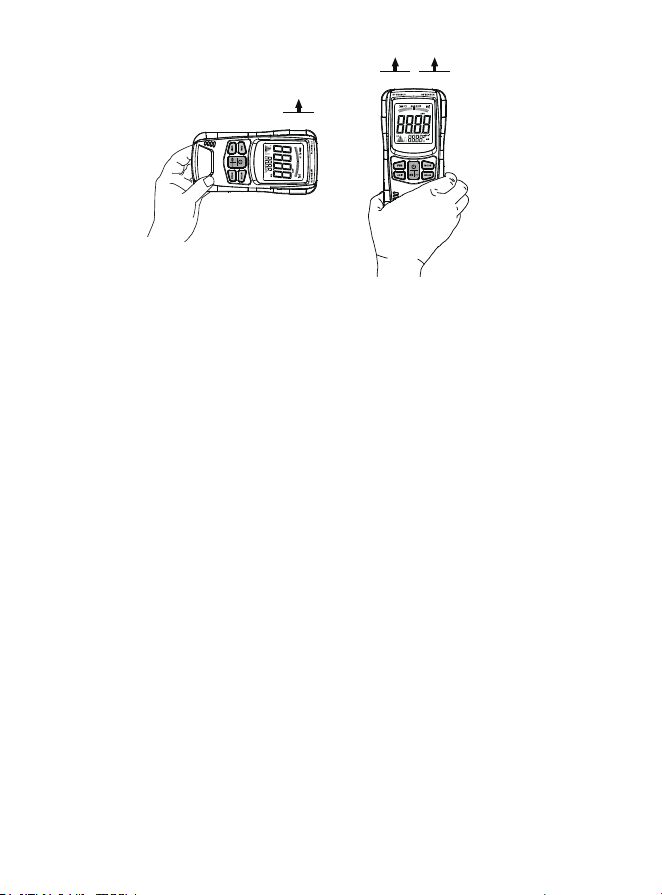
RF Sensor
EF Sensor MF Sensor
Figure 3
Default electric field ( EF ) measurement mode after power-on, and
short press the " MODE " button to switch the measurement mode.
Try different angles approaching the radiation source while making
measurements. The highest radiation intensity indicated by the
tester is the most accurate measurement result.
Do not cover the sensors with your hand or other objects while
holding the tester.
During detection, ensure that there are no metals or other
conductive materials in the vicinity of the measured object.
1.
2.
3.
4.
Note:
Every time the tester is turned on, it defaults to enter the electric
field measurement mode. Briefly press the " MODE " button to
switch between the following three measurement modes:
● Electric field measurement mode
( The display shows the symbol " ELEC ". )
3. Measurement Modes
- 9 -

After each power-on, the tester is in Average mode by default. The
display shows the symbol " AVG " as an indicator. Short press the "
FUN " button to sequentially switch to Weighted mode ( the symbol
" WEIGHTED " is displayed ), Peak mode ( the symbol " PEAK " is
displayed ) and Maximum mode ( the symbol " MAX " is displayed
). The four modes are described as follows:
Average Mode: The display shows the real-time average value
of the current measurement.
Weighted Mode: The display shows the real-time weighted
average value of the current measurement.
Peak Mode: The display shows the peak value detected since
entering Peak mode.
Maximum Mode: The display shows the maximum value
measured since entering Maximum mode.
4. Average / Weighted / Peak / Maximum Mode
In any measurement mode, short press the " UNIT " button to
switch the temperature unit between °C and °F.
In magnetic field measurement mode, long press the " UNIT "
button to switch the magnetic field unit between mG and μT.
5. Unit Switch
●
●
●
●
● Magnetic field measurement mode
( The display shows the symbol " MAG ". )
● Radio frequency field measurement mode
( The display shows the symbol " RF ". )
- 10 -
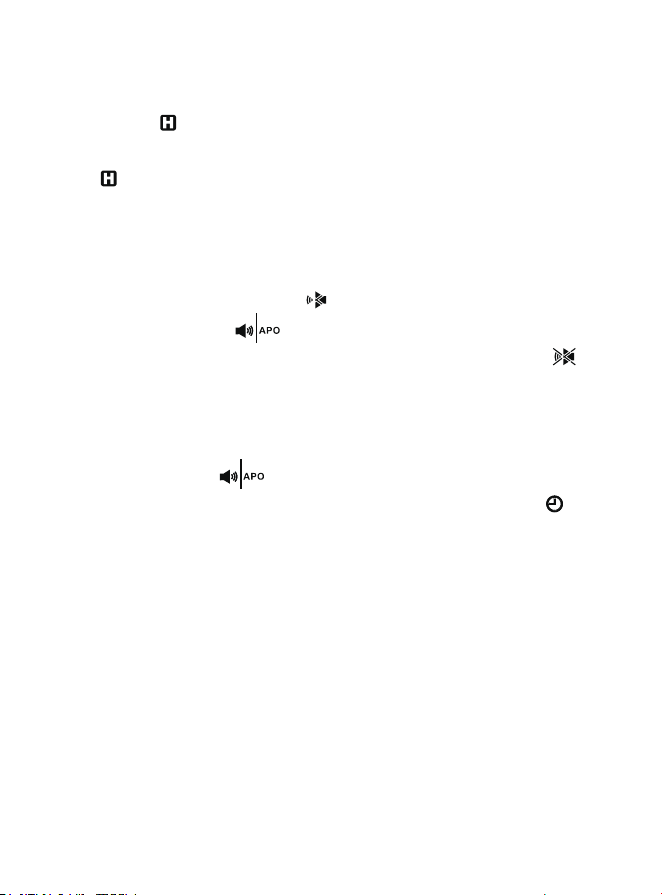
When the tester is turned on, the audible alarm function is on. The
display shows the symbol " " as an indicator.
Briefly press the " " button to enable or disable the audible
alarm function. When this function is disabled, the symbol " " is
shown.
7. Audible Alarm Function
Long press the " " button to enable or disable the automatic
power-off feature. When the display shows the symbol " ", it
means the auto power off
is on.
Without any button press in about 10 minutes, the tester will
automatically power off.
8. Auto Power Off
Briefly press the " HOLD " button, the current reading is locked. The
symbol " " appears on the display.
To unlock the reading, press the" HOLD " button gain. The symbol
" " disappears.
6. Data Hold
- 11 -
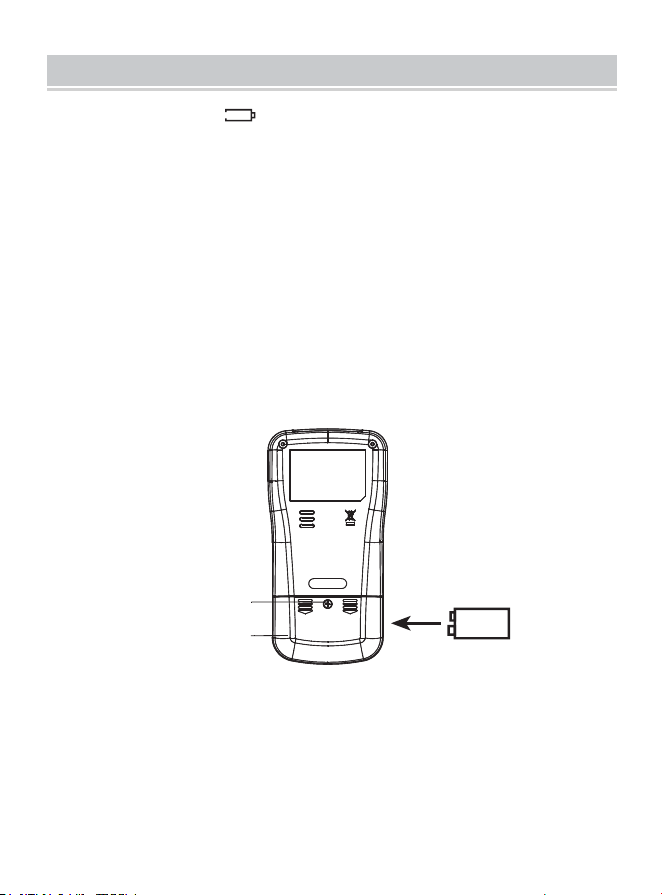
Use a Phillips screwdriver to remove the screw that secures the
battery compartment.
Remove the battery cover in the direction indicated by the arrow on
the battery cover.
Replace the old battery with a new one of the same type, make sure
that the polarity connections are correct.
Reinstall the battery cover and secure the screw.
1.
2.
3.
4.
When the symbol " " is shown on the display, the battery is not
high enough and replacement of the battery is needed. The steps are
as follows:
BATTERY CHARGING/REPLACEMENT
- 12 -
Battery cover
9V battery
Phillips head
screw
Figure 4

It is recommended to measure the presence of the electromagnetic
field inside and outside of your home and business locations regularly.
For area where a high level of electromagnetic radiation is detected by
the tester, re-arrangement of this region is lightly recommended.
Always try the best to avoid long term exposure in the strong
electromagnetic field.
RECOMMENDATION
- 13 -
SPECIFICATION
- 14 -
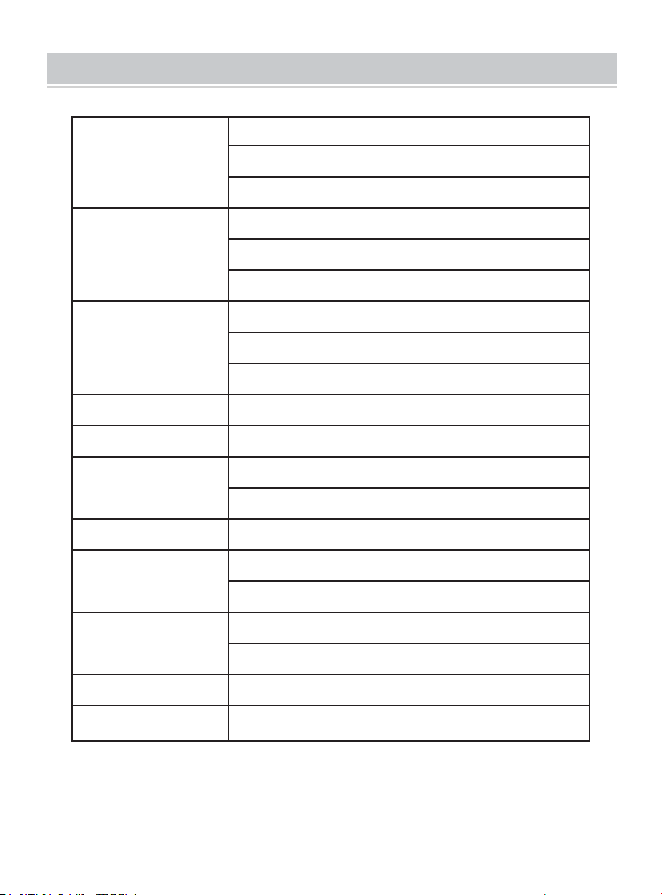
Resolution
Range
Alarm
Threshold
EF: 1V/m
MF: 0.1mG/0.01μT
RF: 0.01mW/m
2
4 digits
About 0.4 seconds
9V battery, 6F22 or equivalent, 1 piece
EF: 1~1999V/m
MF: 0.1~999.9mG/0.01~99.99μT
RF: 0.01~99.99mW/m
2
Display 4 digits
About 0.4 seconds
Battery 9V battery,
6F22 or equivalent, 1 piece
No button press for about 10 minutes.
Temperature: 0°C to 40°C
Relative Humidity: < 80%
Temperature: -10°C to 50°C
Relative Humidity: < 90%
167mm x 85mm x 35mm
About 190g ( without battery )
Display
Sampling Time
Battery
Auto Power Off
Operating
Environment
Storage
Environment
Dimensions
Weight

This manual is subject to change without notice.
Our company will not take the other responsibilities for any loss.
The contents of this Manual can not be used as the reason to use the
tester for special application.
1.
2.
3.
Instruction manual *1
Storage bag *1
9V lithium battery *1
USB charging cable *1
Phillips screwdriver*1
1.
2.
3.
4.
5.
NOTE
ACCESSORIES LIST
- 15 -
DISPOSAL OF THIS ARTICLE
Dear Customer,
If you at some point intend to dispose of this
article, then please keep in mind that many of its
components consist of valuable materials, which
can be recycled.
Please do not discharge it in the garbage bin, but
check with your local council for recycling
facilities in your area.
- 16 -
Address: Shuangchenglu 803nong11hao1602A-1609shi, baoshanqu,
shanghai 200000 CN.
Imported to AUS: SIHAO PTY LTD, 1 ROKEVA STREETEASTWOOD
NSW 2122 Australia
Imported to USA: Sanven Technology Ltd, Suite 250, 9166 Anaheim
Place, Rancho Cucamonga, CA 91730
REPEC
E-CrossStu GmbH.
Mainzer Landstr.69, 60329 Frankfurt am Main.
REPUK
YH CONSULTING LIMITED.
C/O YH Consulting Limited Office 147, Centurion House,
London Road, Staines-upon-Thames, Surrey, TW18 4AX
Made In China


Technical Support and E-Warranty Certificate
www.vevor.com/support