Or
Quick Installation Guide
Ceiling Mount Access Point
Note: EAP727 is used as an example throughout the guide. Images may dier from your actual product.
©2025 TP-Link 7100002183 REV1.0.0
Scan for
EAP Start Guide
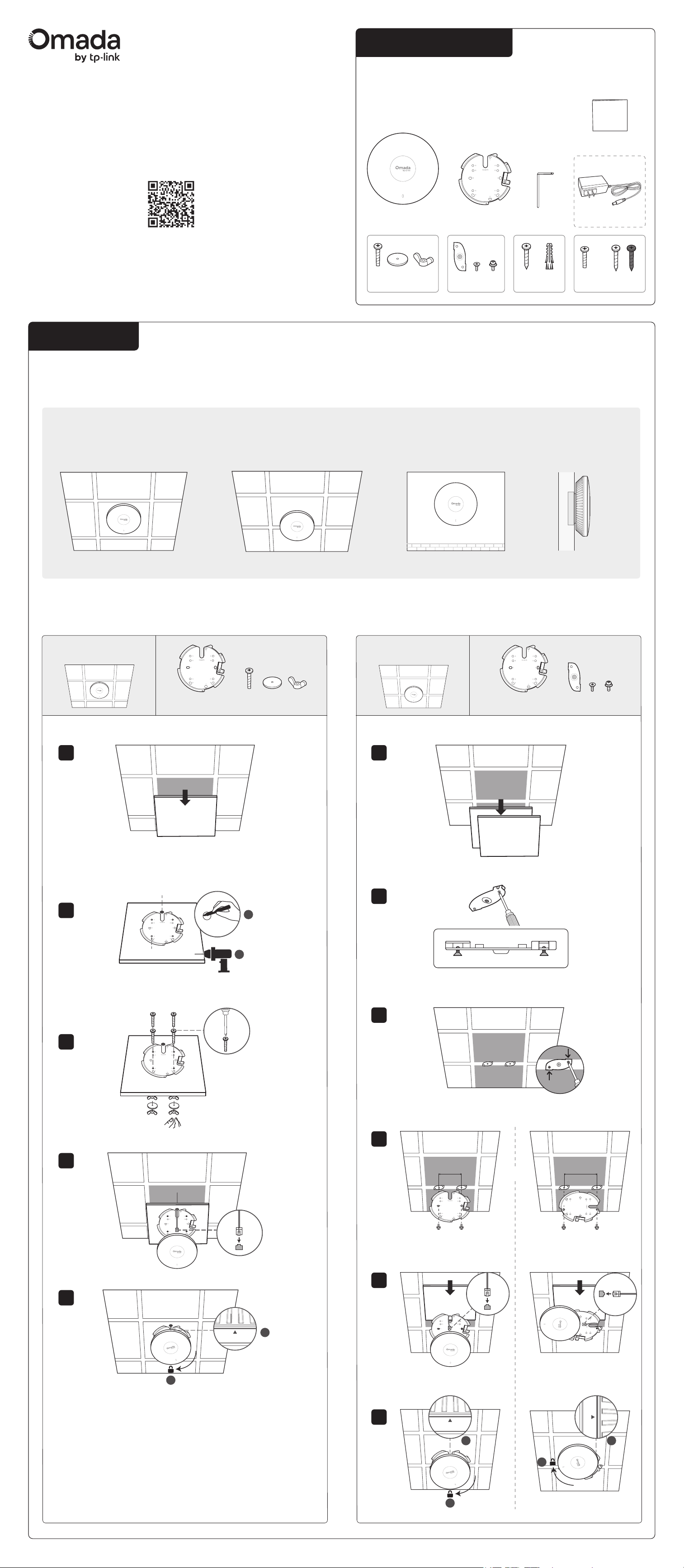
Installation
Option 1
Ceiling Mounting (on a Tile)
1
2
3
4
5
Package Contents
1× Φ 25 mm (63/64 in)
4× Φ 4 mm (5/32 in)
1
2
A
Option 2
Ceiling Mounting (on a T-bar)
1
2
3
4
5
6
A 1-pack product contains the following contents, while a 5-pack
provides five sets of accessories and one installation guide.
Note: Accessories may vary by region and model.
2
1
60 mm
83 mm
Option 3
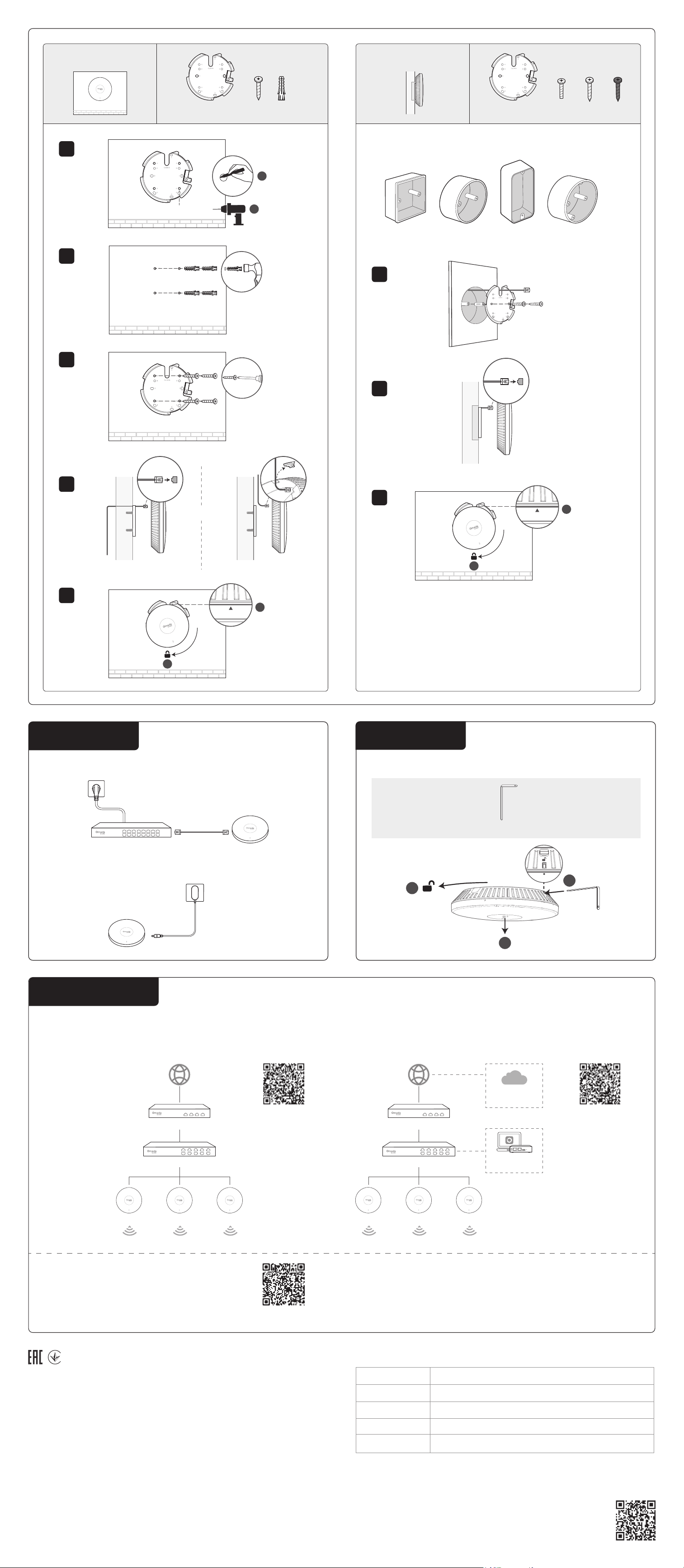
Wall Mounting
Option 4
Junction Box Mounting
Option 1
1× 4× 4×4×
Option 2
1×
2× 2×4×
2
1
1×1×
Quick Installation Guide
1×
4× 4×4×
4×4× 2× 2×2×
OR
2× 2×4×
1×
(Only for some models)
1×
Note: The AP will be locked after installed. To uninstall, see the Appendix on the back page.
2
1
For details on the warranty period, policy, and procedures, visit
https://support.omadanetworks.com/warranty-services/.
Warranty
Support
For technical support, user guides, and other information, please visit
https://support.omadanetworks.com/, or simply scan the QR code.
More Resources
Main Site https://www.omadanetworks.com/
https://support.omadanetworks.com/video/
https://support.omadanetworks.com/document/
https://support.omadanetworks.com/product/
https://support.omadanetworks.com/contact-support/
Video Center
Product Support
Documents
Technical Support
1
2
3
4
5
4× Φ 7.6 mm (19/64 in)
2
1
A
1
2
Option 3
1×
4×4×
Power On
Option 1: Via PoE Switch
Option 2: Via Power Adapter
Power Port
Power Adapter
PoE Switch ETH PoE Port
More Configurations
For more configurations, refer to the User Guides of the Omada
Controller and Omada Access Points at:
https://support.omadanetworks.com/document/
Omada App
With the TP-Link Omada app, you can access and
manage your Omada devices at a local site or
remotely with a tap of your phone.
Scan for
Omada App
Switch
Gateway/Router
On-Premises
Controller
Omada Central
(Cloud-Based)
Or
EAP EAP EAP
Congure and manage EAPs (and other Omada devices) centrally with
an Omada Controller.
Option 2: Controller Mode
Scan for
Controller Start Guide
Configuration
Switch
Gateway/Router
EAP EAP EAP
Congure and manage each EAP on its standalone page.
Option 1: Standalone Mode
Scan for
Standalone Start Guide
1
2
3
Choose the accessory screws that t your junction box.
Compatible wall junctions are as follows:
For simplicity, an 86 mm wall junction box is used as an example.
Option 4
1×
2× 2×2×
OR OR
1
2
3
Uninstalling the AP
Appendix
1×
Safety Information
• Keep the device away from water, re, humidity or hot environments.
• Do not attempt to disassemble, repair, or modify the device. If you need service, please contact us.
• Do not use the device where wireless devices are not allowed.
• (For IN version) The EAP can be powered only by a power adapter or a PSE device (such as a PoE
switch) which complies with Limited Power Source (LPS) of IEC 60950-1.
(For other versions) The EAP can be powered only by a power adapter or a PSE device (such as a PoE
switch) which complies with Power Source Class 2 (PS2) or Limited Power Source (LPS) dened in the
standard of IEC 62368-1.
• Use only power supplies listed in the user instructions. Refer to the User Manual on the product
support page.
For models with adapters:
• Do not use damaged charger or USB cable to charge the device.
• Do not use any other chargers than those recommended.
• Adapter shall be installed near the equipment and shall be easily accessible.
TP-Link hereby declares that the Access Point is in compliance with the essential requirements and
other relevant provisions of directives 2014/53/EU, 2009/125/EC, 2011 /65/EU, and (EU) 2015/863.
The original EU Declaration of Conformity may be found at https://www.tp-link.com/en/support/ce/
TP-Link hereby declares that the Access Point is in compliance with the essential requirements and
other relevant provisions of the Radio Equipment Regulations 2017. The original UK Declaration of
Conformity may be found at https://www.tp-link.com/support/ukca/
Cable through wall Cable along wall
Or
1
2