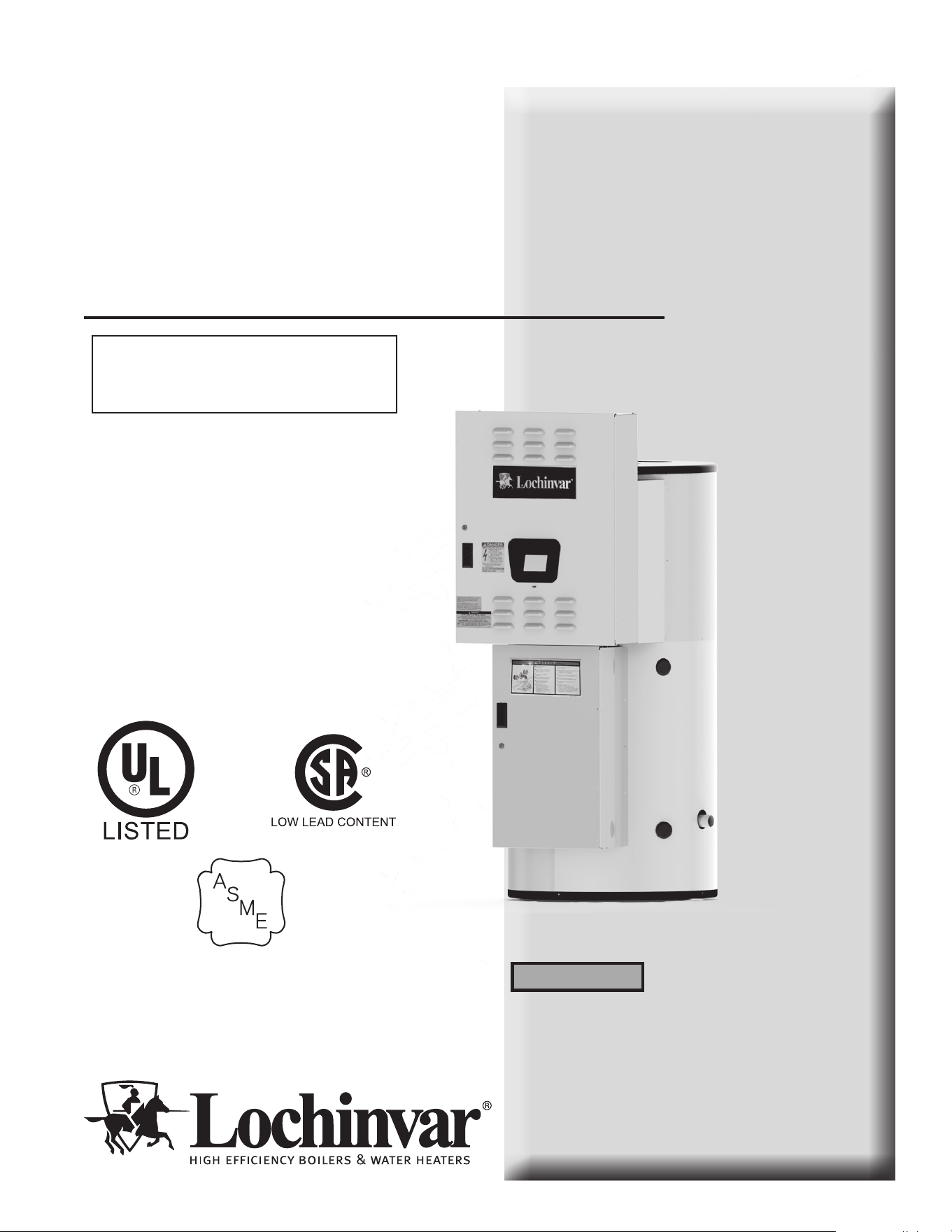
Commercial Electric
Water Heater
Installation & Service
Manual
Models: CHV and CHH
0150 - 1000
This manual must only be used
by a qualified heating installer
/service technician. Read all
instructions, including this
manual, before installing.
Perform steps in the order given.
Failure to comply could result in
severe personal injury, death, or
substantial property damage.
⚠WARNING
Save this manual for future reference.
100278842_2000537422_Rev C
⚠WARNING: If the information in this
manual is not followed exactly, a fire or
explosion may result causing property damage,
personal injury, or loss of life.
HLW
2
Hazard definitions
The following defined terms are used throughout this manual to bring attention to the presence of hazards of various risk levels or
to important information concerning the life of the product.
⚠DANGER
⚠WARNING
⚠CAUTION
CAUTION
NOTICE
DANGER indicates an imminently hazardous situation which, if not avoided, will result in death or serious
injury.
WARNING indicates a potentially hazardous situation which, if not avoided, could result in death or serious
injury.
CAUTION indicates a potentially hazardous situation which, if not avoided, may result in minor or moderate
injury.
CAUTION used without the safety alert symbol indicates a potentially hazardous situation which, if not
avoided, may result in property damage.
NOTICE indicates special instructions on installation, operation, or maintenance that are important but not
related to personal injury or property damage.
HAZARD DEFINITIONS .................................................. 2
PLEASE READ BEFORE PROCEEDING ..................... 3
INTRODUCTION .............................................................. 4
RATINGS .......................................................................... 5
1. FEATURES AND COMPONENTS
CHV Models (Vertical Water Heater) ................................. 6
CHH Models (Horizontal Water Heater) ............................. 7
Dimensions and Capacities Data ................................... 8-9
2. DETERMINE WATER HEATER LOCATION
Facts to Consider About the Location ......................... 10-11
3. INSTALLATION
Mixing Valve Usage ......................................................... 12
Chemical Vapor Corrosion ............................................... 12
Circulating Pump .............................................................. 12
Insulation Blankets .......................................................... 12
Temperature - Pressure Relief Valve ...........................12-13
Closed Water Systems ...................................................... 13
Thermal Expansion .......................................................... 13
4. ELECTRICAL
General ............................................................................. 14
Branch Circuit ................................................................... 14
Heater Circuits.................................................................. 14
Power Circuit .................................................................... 14
Amp Chart ................................................................... 15-16
Electrical and Recoveries Data ................................... 17-18
5. OPERATION
General ............................................................................. 19
Filling the Water Heater ................................................... 19
Initial Start-up ................................................................... 19
Draining the Water Heater ............................................... 19
6. TEMPERATURE REGULATION
High Temperature Limit Controls (ECO) .......................... 20
Thermostat Controls ......................................................... 20
Temperature Adjustment .................................................. 20
7. CONTROL SYSTEM OPERATION
Heating Banks Operation ................................................. 21
Control System Features ................................................. 21
Control System Navigation ............................................... 21
The Display Screen .......................................................... 21
Control System Operation Tables ............................... 22-23
Temperatures Menu ......................................................... 24
Temperature Screens ...................................................... 25
Water Heater Status Menu .............................................. 26
Economy Mode Setup Menu ............................................ 27
Economy Mode Settings Tables ................................. 28-30
Alarm Output Setup Menu ............................................... 31
Display Settings Menu ..................................................... 31
Heater Information Menu ................................................. 32
Current Fault / Alert Menu ................................................ 32
Fault History Menu ........................................................... 32
Fault Occurrence Menu .................................................... 33
Restore Factory Defaults Menu ....................................... 34
8. MAINTENANCE
General ............................................................................. 35
Anode Rod Inspection ...................................................... 35
Flushing the Water Heater ............................................... 35
Sediment Removal ........................................................... 36
Lime Scale Removal ........................................................ 36
9. TROUBLESHOOTING
Checklist ........................................................................... 37
10. DIAGRAMS
Wiring Diagram .......................................................... 38-39
Revision Notes .................................................. Back Cover
Contents
Please read before proceeding
Installer – Read all instructions before
installing. Perform steps in the order
given.
Have this water heater serviced/inspected
by a qualified service technician, at least
annually.
Failure to comply with the above could
result in severe personal injury, death, or
substantial property damage.
Failure to adhere to the guidelines on this
page can result in severe personal injury,
death, or substantial property damage.
When servicing the water heater –
• To avoid electric shock, disconnect electrical supply
before performing maintenance.
• To avoid severe burns, allow the water heater to cool
before performing maintenance.
• Do not use this water heater if any part has been under
water. The possible damage to a flooded appliance can
be extensive and present numerous safety hazards. Any
appliance that has been under water must be replaced.
When calling or writing about the water
heater – Please have the water heater
model and serial number from the water
heater rating plate.
Consider piping and installation when
determining water heater location.
Any claims for damage or shortage in
shipment must be filed immediately
against the transportation company by the
consignee.
Factory warranty (shipped with unit) does
not apply to units improperly installed or
improperly operated.
3
⚠WARNING
NOTICE
⚠WARNING
⚠WARNING
If the information in this manual is not
followed exactly, a fire or explosion may
result causing property damage, personal
injury, or loss of life.
⚠WARNING
The California Safe Drinking Water and
Toxic Enforcement Act requires the
Governor of California to publish a list of
substances known to the State of California
to cause cancer, birth defects, or other
reproductive harm, and requires businesses
to warn of potential exposure to such
substances.
This product contains a chemical known to
the State of California to cause cancer, birth
defects, or other reproductive harm. This
water heater can cause low level exposure
to some of the substances listed in the Act.
Grounding Instructions –
• This water heater must be grounded in accordance
with the National Electrical Code and/or local codes.
These must be followed in all cases. Failure to ground
this water heater properly may also cause erratic
control system operation on ELECTRONIC
CONTROL models.
• This water heater must be connected to a grounded
metal, permanent wiring system, or an equipment
grounding conductor must be run with the circuit
conductors and connected to the equipment grounding
terminal or lead on the water heater.
Installation & Operation Manual
Hydrogen Gas (Flammable) –
Hydrogen gas can be produced in a hot water system,
served by this heater, that has not been used for a long
period of time (generally two weeks or more). Hydrogen
gas is extremely flammable. To reduce the risk of injury,
it is recommended that the hot water faucet be opened
for several minutes at the kitchen sink before using any
electrical appliance connected to the hot water system.
If hydrogen is present, there will probably be an unusual
sound, such as air escaping through the pipe as water
begins to flow.
⚠WARNING
There should be no smoking or open
flame near the faucet at the time it
is open.
⚠WARNING
Flammable hydrogen gases may be
present.
⚠WARNING
Keep all ignition sources away from
faucet when turning on hot water.
4
Introduction
ank you for purchasing this water heater. Properly installed
and maintained, it should give you years of trouble-free
service.
Abbreviations found in this instruction manual include:
• ANSI - American National Standards Institute
• ASME - American Society of Mechanical Engineers
• NEC - National Electrical Code
• NFPA - National Fire Protection Association
• UL - Underwriters Laboratory
• CSA - Canadian Standards Association
• AHRI - Air Conditioning, Heating, & Refrigeration
Institute
Abbreviations Used
Preparing for the Installation
⚠WARNING
Before removing any access panels
or servicing the water heater, make
sure the electrical supply to the water
heater is turned OFF. Failure to do
this could result in death, serious
bodily injury, or property damage.
Read the Please read before proceeding... section of this manual
rst, then read the entire manual carefully. If you don’t follow
the safety rules, the water heater may not operate safely, which
could result in death, serious bodily injury, and/or property
damage.
is manual contains instructions for the installation,
operation, and maintenance of the water heater. It also
contains warnings throughout the manual that you must
read and be aware of. All warnings and all instructions are
essential to the proper operation of the water heater and your
safety. Read the entire manual before attempting to install or
operate the water heater.
General outline diagrams are in this manual. ese diagrams
will serve to provide the installer with a reference for basic
installation of this product. It is necessary that all water piping
and electrical wiring be installed and connected as shown in
the diagrams.
Be sure to turn power OFF when working on or near the
electrical system of the water heater. Never touch electrical
components with wet hands or when standing in water. When
replacing fuses always use the correct size for the circuit. Use
the same size and type of fuse when replacing.
Detailed installation diagrams are in this manual. ese
diagrams will serve to provide the installer with a reference for
the materials and method of piping suggested. It is necessary
that all water piping and electrical wiring be installed and
connected as shown in the diagrams.
e principle components of the heater are identied on pages
6 and 7. e model and rating plate on page 5 interprets certain
markings into useful information. Both of these references
should be used to identify the heater, its components, and
optional equipment.
e installation must conform with these instructions
and the local code authority having jurisdiction and the
requirements of the power company. In the absence of local
codes, the installation must comply with the current editions
of the National Electrical Code, NFPA 70 or the Canadian
Electrical Code, CSA C22.1. e National Electrical Code
may be ordered from: National Fire Protection Association,
1 Batterymarch Park, Quincy, MA 02269. e Canadian
Electrical Code is available from the Canadian Standards
Association, 8501 East Pleasant Valley Road, Cleveland, OH
44131.
If aer reading this manual you have any questions or do not
understand any portion of the instructions, call the telephone
number on the back cover for further assistance. Please have
the model and serial number of the unit available for the
technician.
Carefully plan your intended placement of the water heater.
Examine the location to ensure the water heater complies with
the Determine Water Heater Location section in the manual.
Clearance must be maintained so that the heating elements
may be removed for servicing aer installation.
Installation and service of this water heater requires ability
equivalent to that of a licensed tradesman or qualied agency
in the eld involved. Plumbing and electrical work are
required.
For installation in California, this water heater must be braced
or anchored to avoid falling or moving during an earthquake.
See instructions for correct installation procedures.
Instructions may be obtained from the California Oce of
the State Architect, 1102 Q Street, Suite 5100, Sacramento,
CA 95811.
Massachusetts Code requires this water heater to be installed
in accordance with Massachusetts 248-CMR 2.00: State
Plumbing Code and 248-CMR 5.00.
Installation & Operation Manual
5
HLW
Ratings
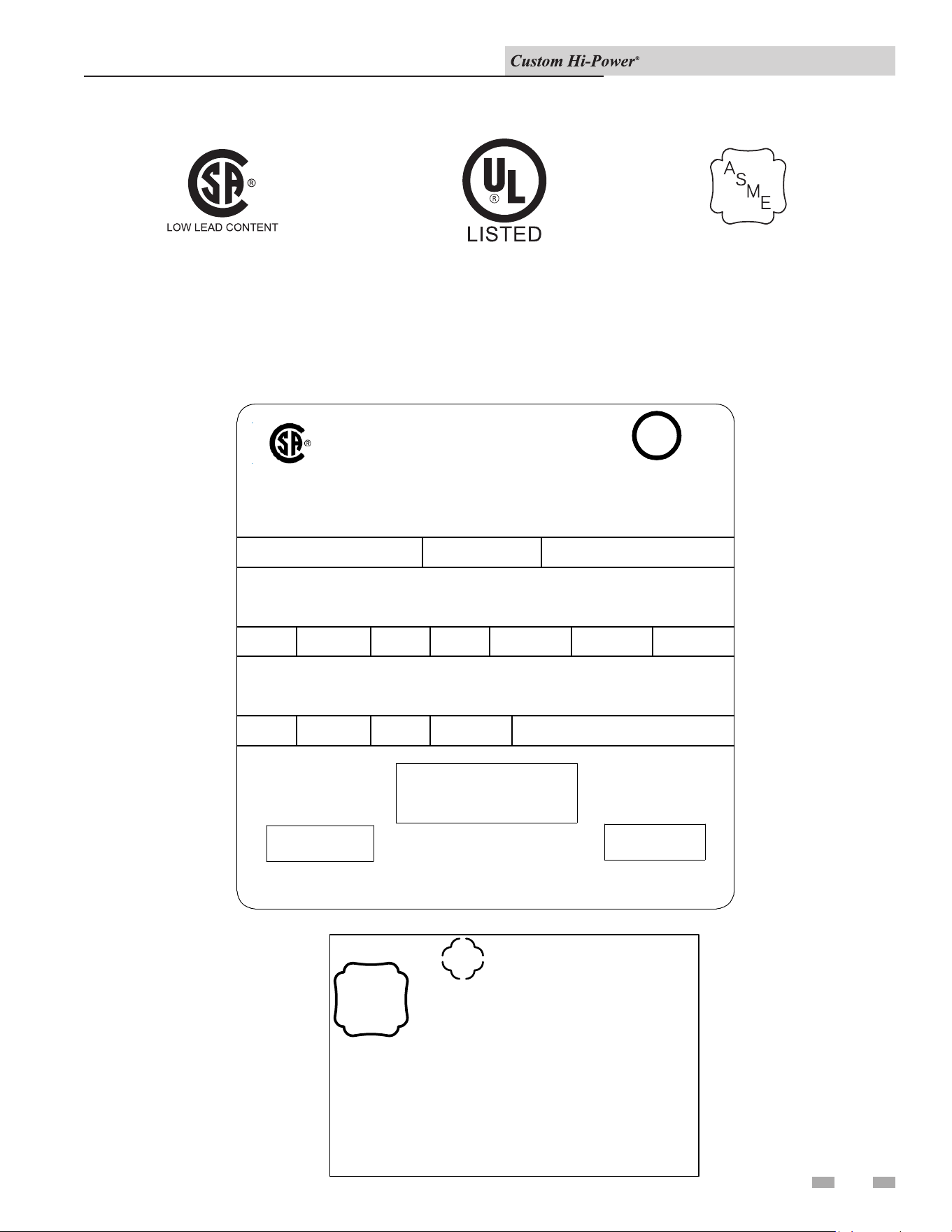
All models are listed
by Underwriters
Laboratories Inc.
Rating & Model Plate
L
LISTED
932N
®
L
LL
L
U
UU
U
SERIAL NUMBER ITEM ID/PART NUMBERMODEL NUMBER
PHASEVOLTS, AC UPPER
KILOWATTS
LOWER
KILOWATTS
CONNECTED
TOTAL kW
LOW LEAD CONTENT
ELECTRIC STORAGE
TANK WATER HEATER
US GALLONS
CAPACITY
PRESSURE
MAX WORKING
VOLTS, AC UPPER
KILOWATTS
LOWER
KILOWATTS
CONNECTED
TOTAL kW
CIRCUIT
SERIAL NUMBER BARCODE
SERIAL NUMBER
MODEL NUMBER BARCODE
MODEL NUMBER
ADDRESS
XXXXXXXX
123456789
A
S
M
E
HLW
NB
123456
S/N123456789
CERTIFIED BY LC
MAWP XXX PSI
MAX ALLOWABLE INPUT
XXXXXXXXX BTU/HR
CRN XXXXXXXXXXXXXXXXXXXX
YEAR BUILT YYWW
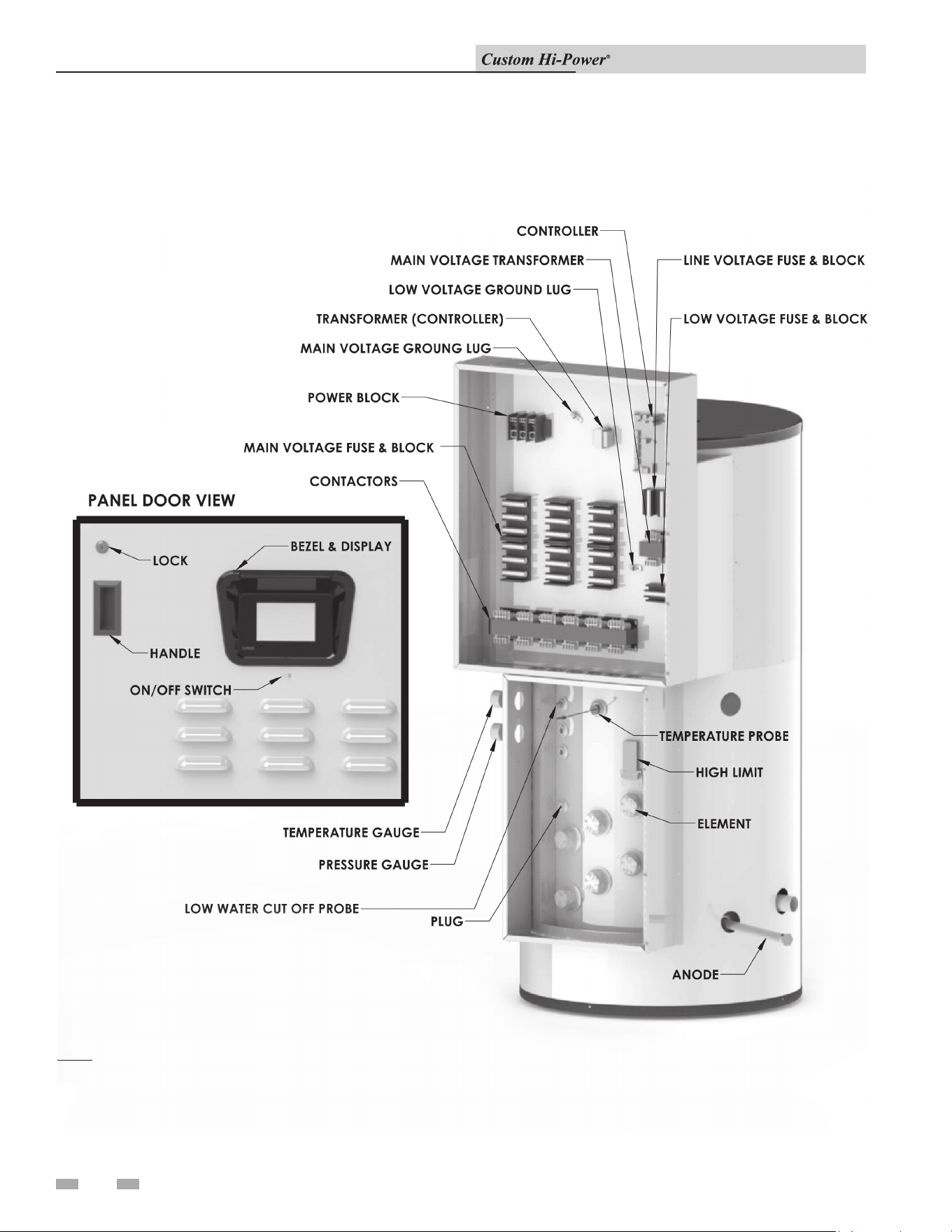
Installation & Operation Manual
6
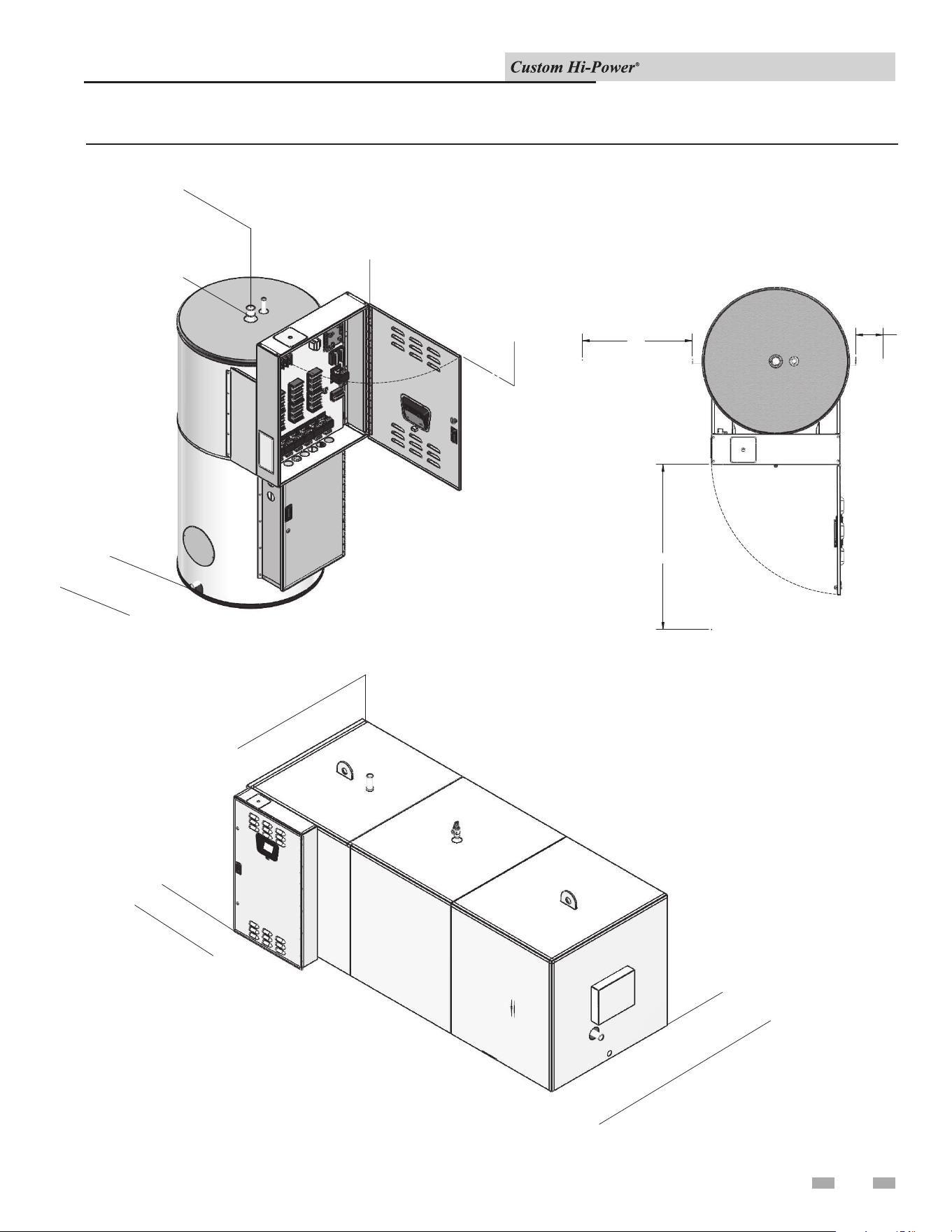
1 Features and Components
CHV Models (Vertical Water Heater)
Note: Model shown for illustration purposes only. Actual congurations may vary.
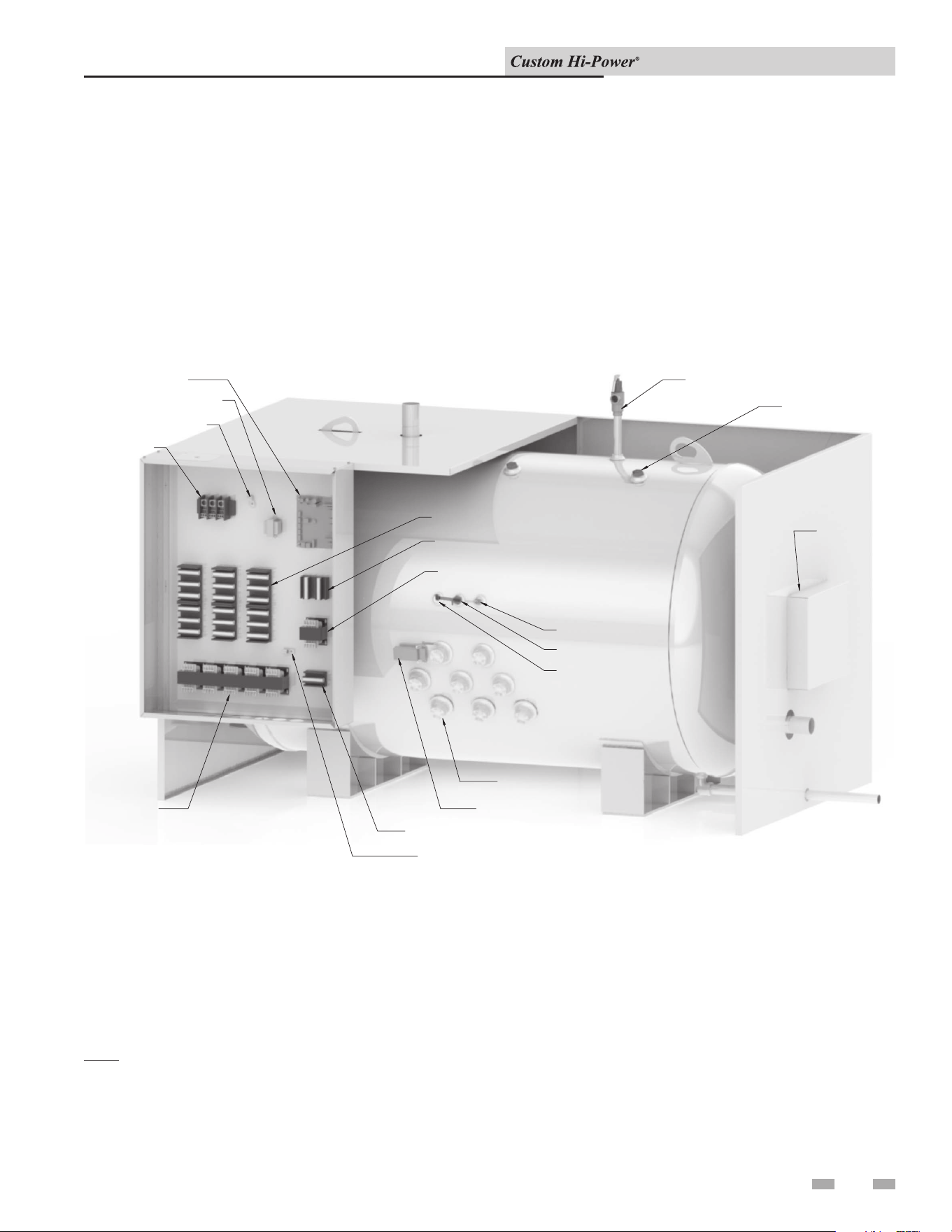
Installation & Operation Manual
7
LOW VOLTAGE FUSE & BLOCK
HIGH LIMIT
LOW VOLTAGE GROUND LUG
MAIN VOLTAGE TRANSFORMER
ELEMENTS
LOW VOLTAGE FUSE & BLOCK
RELIEF VALVE
ANODE
POWER BLOCK
MAIN VOLTAGE GROUND LUG
MAIN VOLTAGE FUSE & BLOCK
CONTACTORS
TEMPERATURE PROBE
PLUG
HANDHOLE/
MANWAY
ACCESS
LOW WATER CUT OFF PROBE
CONTROLLER
TRANSFORMER (CONTROLLER)
CHH Models (Horizontal Water Heater)
1 Features and Components
Note: Model shown for illustration purposes only. Actual congurations may vary.
Installation & Operation Manual
8
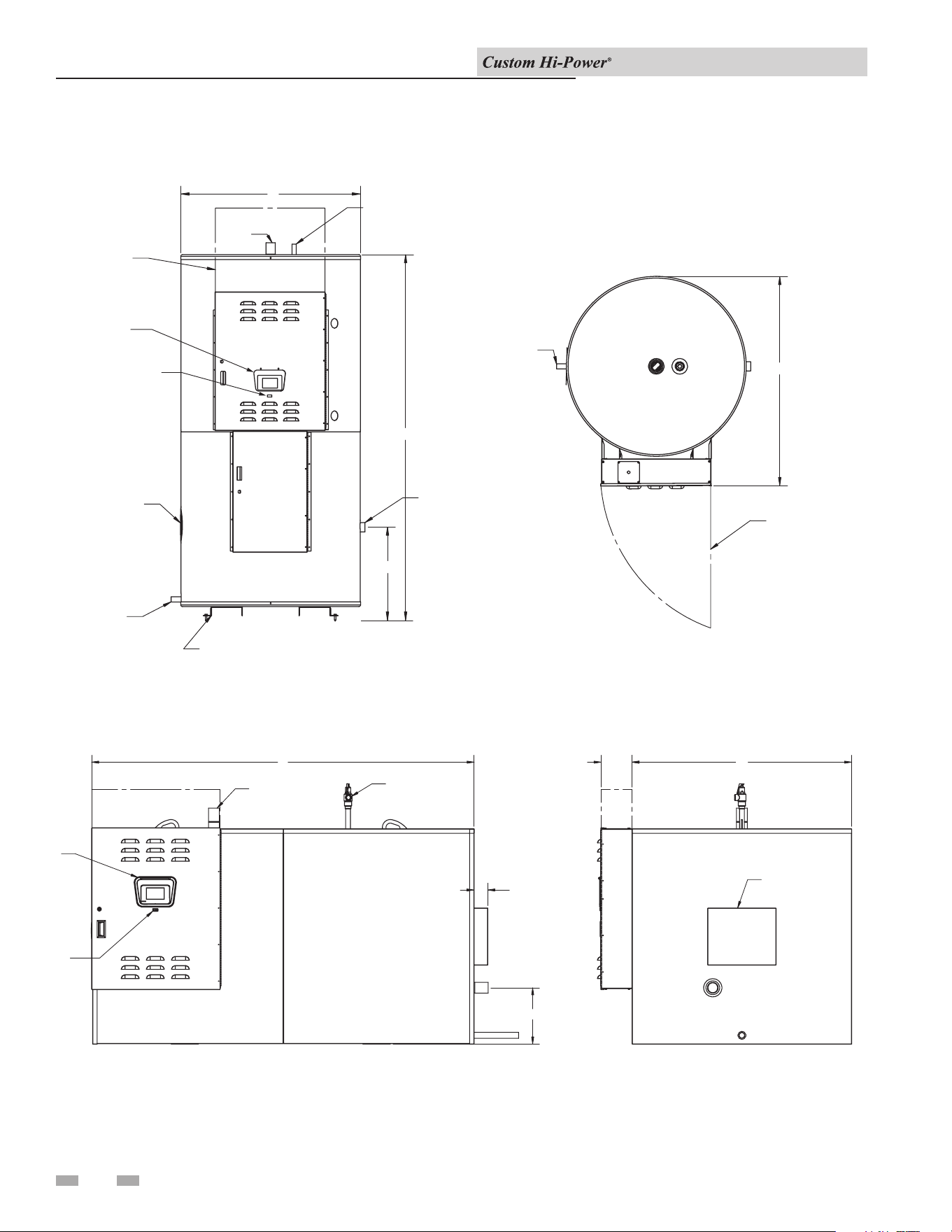
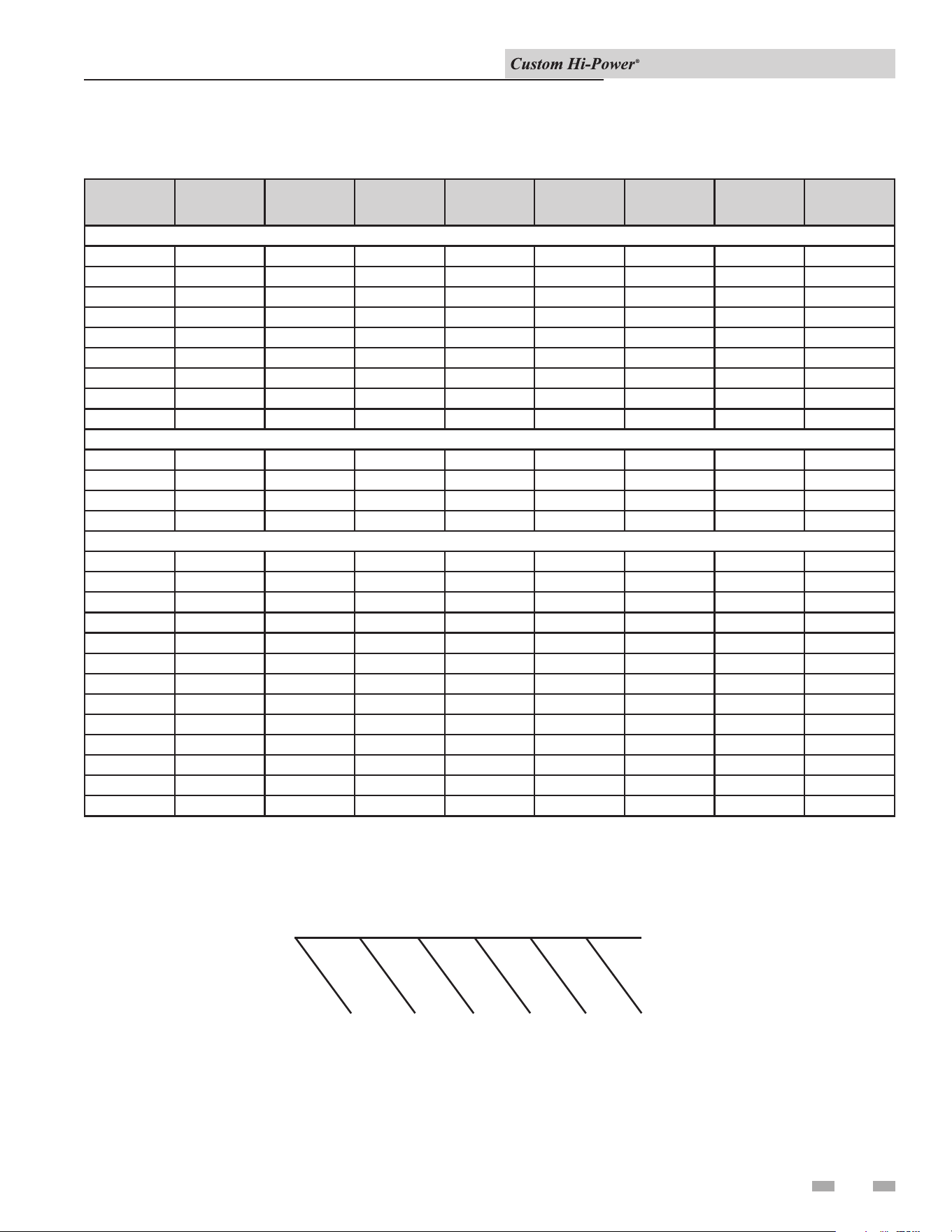
1 Features and Components (continued)
Specifications Data
Installation & Operation Manual
RELIEF
CLEANOUT
COLD WATER
ADDITIONAL
OUTLET
REQUIRED
HEIGHT IF
VALVE
CONNECTION
HOT WATER
INLET
DRAIN
3/4"
T & P
CONTROL VOLTAGE
ON/OFF SWITCH
CHANNEL (150 & 200 GALLON DO NOT HAVE CHANNELS)
B
A
D
3/4" OR 1" DRAIN
HINGED DOOR
TO ELECTRICAL
COMPARTMENT
TOP VIEW
C
ELECTRONIC
CONTROL
C 6.688
HIGHER THAN 72KW. CONSULT FACTORY.
INLET
EXTRA PANEL BOX MAY BE NECESSARY FOR INPUTS
DRAIN
A & D ELEVATION FROM FINISHED FLOOR
OUTLET
HOT WATER
T&P RELIEF VALVE
4.000
D
B
ELECTRONIC
CONTROL
CONTROL VOLTAGE
ON/OFF SWITCH
HEIGHT IF
REQUIRED
ADDITIONAL
HANDHOLE
Model*
Maximum KW
Input
Height
A
Width
(Length)
B
Depth
C
D
Inlet
Water
Connection
Outlet Water
Connection
Shipping
Weight (lbs)
VERTICAL ROUND ELECTRIC STORAGE HEATER
CHV0150 162 65 1/2" 32" 38 3/4" 8 1/4" 1 1/2" 1 1/2" 650
CHV0200 216 78" 32" 38 3/4" 8 1/4" 1 1/2" 1 1/2" 750
CHV0250 270 91 3/8" 34" 40 3/4" 19 1/4" 1 1/2" 1 1/2" 1,165
CHV0300 162 80" 40" 46 3/4" 20 3/4" 2" 2" 1,350
CHV0400 162 80" 46" 52 3/4" 22 1/4" 2" 2" 1,590
CHV0500 270 91 3/8" 46" 52 3/4" 22 1/4" 2" 2" 1,700
CHV0600 270 92 5/8" 52" 58 3/4" 24 1/4" 2 1/2" 2 1/2" 2,010
CHV0800 432 104" 52" 58 3/4" 24 1/4" 2 1/2" 2 1/2" 2,450
CHV1000 486 128" 52" 58 3/4" 24 1/4" 2 1/2" 2 1/2" 3,160
VERTICAL SQUARE ELECTRIC STORAGE HEATER
CHV1250 648 132 1/2" 64 1/2" 64 1/2" 23 1/4" 3" 3" 3,560
CHV1500 918 128 1/2" 70 1/2" 70 1/2" 25 1/4" 3" 3" 4,120
CHV2000 918 140 1/2" 76 1/2" 76 1/2" 27 1/4" 3" 3" 4,350
CHV2500 918 146 1/2" 82 1/2" 82 1/2" 29" 3" 3" 5,750
HORIZONTAL SQUARE ELECTRIC STORAGE HEATER
CHH0150 162 37" 68 1/2" 34 1/4" 12" 2" 2" 1,180
CHH0200 198 37" 78" 34 1/4" 12" 2" 2" 1,370
CHH0250 240 39" 90 1/4" 36 1/4" 13" 2" 2" 1,450
CHH0300 300 45" 78 1/4" 42 1/4" 14 3/4" 2" 2" 1,530
CHH0400 324 52" 78 1/4" 48 1/4" 16" 2" 2" 1,750
CHH0500 432 52" 90 3/4" 48 1/4" 16" 2" 2" 1,860
CHH0600 414 58" 90 3/4" 54 1/4" 13 1/2" 2 1/2" 2" 2,340
CHH0800 468 58" 102 1/4" 54 1/4" 13 1/2" 2 1/2" 2" 2,850
CHH1000 648 58" 126 1/4" 54 1/4" 13 1/2" 2 1/2" 2" 3,040
CHH1250 648 64" 130 1/4" 60 1/4" 15" 3" 3" 3,750
CHH1500 918 70" 126 1/4" 66 1/4" 16" 3" 3" 4,340
CHH2000 918 76" 137 1/4" 72 1/4" 17 1/2" 3" 3" 4,580
CHH2500 918 82" 144 1/4" 78 1/4" 16 1/2" 3" 3" 6,060
1 Features and Components (continued)
Specifications Data (continued)
Installation & Operation Manual
9
CONTROL
BOARD WITH
DISPLAY
HI-POWER
VERTICAL
VOLTAGE
KILOWATT
GALLON
CHVX
072
0250
This unit is a Control Board with Display, Hi-Power, Vertical, 480 Volt,
Three Phase, 72 Kilowatt, 250 Gallon Water Heater.
FOR EASE IN ORDERING
BY MODEL NUMBER
10
2 Determine Water Heater Location
Determine Water Heater Location
All water heaters eventually leak. Do
not install without adequate drainage.
CAUTION
Carefully choose a location for the new water heater. e
placement is a very important consideration for the safety of the
occupants in the building and for the most economical use of
the appliance.
Whether replacing an old water heater or putting the water
heater in a new location, the following critical points must be
observed. e water heater must be located:
1. On a level surface. Shim the channel-type skid base as
necessary if leveling is required.
2. Near a oor drain. e heater should be located in an area
where leakage of the tank or connections will not result in
damage to the area adjacent to the heater or to lower oors
of the structure. When such locations cannot be avoided, a
suitable drain pan should be installed under the heater. e
pan should be at least 2 inches deep, have a minimum length
and width of at least 2 inches greater than the dimensions of
the water heater, and should be piped to an adequate drain.
e discharge opening of the relief valve should always be
piped to an open drain.
3. Close to the point of major hot water usage and the power
supply.
Installation & Operation Manual
Hot water piping and branch circuit wiring should be as short as
possible. Insulate hot and cold water piping where heat loss and
condensation may be a problem.
Heater construction permits installation, maintenance, and
service work to be performed through the element box door and
control box door.
Suggested clearances from adjacent surfaces are 12 inches on
top, 30 inches in front of access doors, 24 inches for cleanout/
handhole/manway side, and 6 inches on the inlet water piping
side.
e heater may be installed on or against combustible surfaces.
e back may be placed ush against adjacent surfaces. Be sure
to place the cover plates over the rear crating couplings before
locating vertical model heaters that were shipped laying down.
e heater may be installed in a conned space if adequate
ventilation is provided.
e temperature of the space in which the water heater is
installed must not go below 320F or above 1220F.
2 Determine Water Heater Location (continued)
Installation & Operation Manual
24"
36"
6"
FRONT
←
REAR
←
RIGHT
12"
←
LEFT
←
←
24"
←
FRONT
30"
MANWAY OR
HANDHOLE
CLEARANCE
TOP
CLEARANCE
ACCESS DOOR
CLEARANCE
ACCESS DOOR
CLEARANCE
MANWAY OR
HANDHOLE
CLEARANCE
INLET WATER
PIPING
CLEARANCE
↓
12"
FRONT
REAR
24"
↓
↓
↓
↓
↓
*30"
ACCESS DOOR
CLEARANCE
MANWAY OR
HANDHOLE
CLEARANCE
TOP
CLEARANCE
*DISTANCE FOR DOOR TO OPEN
RIGHT
Figure 2-1 Clearances from Combustible Construction
11
12
3 Installation
e installation must conform to these instructions and local
code authority having jurisdiction. Grounding and electrical
wiring connected to the water heater must also conform to the
National Electrical Code, NFPA 70. is publication is available
from e National Fire Protection Association, 1 Batterymarch
Park, Quincy, MA 02269.
⚠DANGER
Water temperature over 1250F (520C)
can cause severe burns instantly resulting
in severe injury or death. Children, the
elderly, and the physically or mentally
disabled are at highest risk for scald
injury. Feel water before bathing or
showering. Temperature limiting devices,
such as mixing valves, must be installed
when required by code and to ensure safe
temperatures at fixtures.
Mixing Valve Usage
Water heaters are intended to produce hot water. Water heated to
a temperature which will satisfy clothes washing, dish washing,
cleaning, and other sanitizing needs can scald and permanently
injure you upon contact. Some people are more likely to be
permanently injured by hot water than others. ese include the
elderly, children, the inrm, or the physically or developmentally
disabled. If anyone using hot water in your home ts into one
of these groups, or if there is a local code or state law requiring a
maximum water temperature at the hot water tap, then you must
take special precautions. In addition to using the lowest possible
temperature setting that satises your hot water needs, a means
such as a mixing valve, should be used at the hot water taps or at
the water heater.
Mixing valves for reducing point-of-use temperature are
available. Consult a qualied installer or service agency. Follow
all manufacturer’s instructions for installation of mixing valves.
Before changing the factory setting on the thermostat, read the
Temperature Regulation section in this manual.
⚠WARNING
Toxic chemical hazard: Do not connect
to non-potable water system.
Chemical Vapor Corrosion
is water heater shall not be connected to any heating
system(s) or component(s) used with a non-potable water
heating appliance. Toxic chemicals, such as those used for boiler
treatment, shall not be introduced into this system. Water heater
corrosion and component failure can be caused by the heating and
breakdown of airborne chemical vapors. Spray can propellants,
cleaning solvents, refrigerator and air conditioning refrigerants,
swimming pool chemicals, water soener chemicals, calcium
and sodium chloride, waxes, and process chemicals are typical
Insulation Blankets
Insulation blankets are available to the general public for
external use on electric water heaters, but are not necessary with
this product. e purpose of an insulation blanket is to reduce
the standby heat loss encountered with storage tank heaters.
Your water heater meets or exceeds the EPACT and ASHRAE/
IES 90.1 standards with respect to insulation and standby loss
requirements, making an insulation blanket unnecessary.
Should you choose to apply an insulation blanket to this heater,
you should follow the instructions below. Failure to follow these
instructions can result in re, serious personal injury, or death.
• Do NOT cover the temperature and pressure relief (T & P)
valve with an insulation blanket.
• Do NOT cover the instruction manual. Keep it on the side
of the water heater or nearby for future reference.
• DO obtain new warning and instruction labels for placement
on the blanket directly over the existing labels.
compounds which are potentially corrosive. ese materials
are corrosive at very low concentration levels with little or no
odor to reveal their presence. Products of this sort should not
be stored near the heater. Also, air which is brought in contact
with the water heater should not contain any of these chemicals.
If necessary, uncontaminated air should be obtained from
remote or outside sources.
⚠WARNING
The temperature and pressure relief
valve must comply with ANSI Z21.22
and ASME code. A properly sized
temperature and pressure relief valve
must be installed in the opening
provided. Failure to install a relief
valve can result in overheating and
excessive tank pressure. Failure to
follow these instructions can cause
serious injury or death.
Temperature - Pressure Relief Valve
is water heater is provided with a properly rated/sized and
certied combination temperature-pressure relief valve by the
manufacturer. e valve is certied by a nationally recognized
testing laboratory that maintains periodic inspection of
production of listed equipment of materials as meeting the
requirements for Relief Valves for Hot Water Supply Systems,
ANSI Z21.22 • CSA 4.4, and the code requirements of ASME.
Installation & Operation Manual
CAUTION
Do NOT test electrical system before
heater is lled with water. Follow the
Start-up procedure in the Operation
section of this manual.
e principle components of the heater are identied in the
Features and Components illustration on pages 6 and 7.
The water inlet and outlet threaded
connections are steel. When connecting
the unit to piping made of a different
material, use of a dielectric fitting or a
dielectric union conforming to ASSE 1079
is recommended to prevent corrosion and
potential subsequent water leaks at or near
the connection. Dielectric fittings may be
required by local plumbing codes.
NOTICE

Installation & Operation Manual
13
3 Installation (continued)
CAUTION
The temperature-pressure relief valve
discharge pipe must terminate at adequate
drain.
e discharge pipe:
• Shall NOT be smaller in size than the outlet pipe size of the
valve or have any reducing couplings or other restrictions.
• Shall NOT be plugged or blocked.
• Shall NOT be exposed to freezing temperatures.
• Shall be of material listed for hot water distribution.
• Shall be installed in such a way that allows complete
drainage of both the temperature-pressure relief valve and
the discharge pipe.
• Must terminate a maximum of six inches above a oor
drain or external to the building. In cold climates, it is
recommended that the discharge pipe be terminated at an
adequate drain inside the building.
• Shall NOT have any valve or other obstruction between the
relief valve and the drain.
e temperature-pressure relief valve must be manually operated
at least once a year. Caution should be taken to ensure that
no one is in front of or around the outlet of the temperature-
pressure relief valve discharge line, and that the water manually
discharged will not cause any bodily injury or property damage
because the water may be extremely hot. If aer manually
operating the valve, it fails to completely reset and continues
to release water, immediately close the cold water inlet to the
water heater, follow the draining instructions in this manual,
and replace the temperature-pressure relief valve with a properly
rated/sized new one.
If you do not understand these instructions or have any
questions regarding the temperature-pressure relief valve, call
the telephone number listed on the back cover of this manual for
technical assistance.
⚠DANGER
Water temperature over 1250F (520C)
can cause severe burns instantly resulting
in severe injury or death. Children, the
elderly, and the physically or mentally
disabled are at highest risk for scald
injury. Feel water before bathing or
showering. Temperature limiting devices,
such as mixing valves, must be installed
when required by code and to ensure safe
temperatures at fixtures. Read instruction
manual for safe temperature setting.
Closed Water Systems
Water supply systems may, because of code requirements or such
conditions as high line pressure, among others, have installed
devices such as pressure reducing valves, check valves, and back
ow preventers. Devices such as these cause the water system to
be a closed system.
Thermal Expansion
As water is heated, it expands (thermal expansion). In a closed
system, the volume of water will grow when it is heated. As the
volume of water grows, there will be a corresponding increase in
water pressure due to thermal expansion. ermal expansion
can cause premature tank failure (leakage). is type of failure
is not covered under the limited warranty. ermal expansion
can also cause intermittent temperature-pressure relief valve
operation, water discharged from the valve due to excessive
pressure build-up. is condition is not covered under the
limited warranty. e temperature-pressure relief valve is not
intended for the constant relief of thermal expansion.
A properly sized thermal expansion tank must be installed
on all closed systems to control the harmful eects of thermal
expansion. Contact a local plumbing service agency to have a
thermal expansion tank installed.
If replaced, the new valve must meet the requirements of local
codes, but not less than a combination temperature and pressure
relief valve rated/sized and certied as indicated in the above
paragraph. e new valve must be marked with a maximum set
pressure not to exceed the marked hydrostatic working pressure
of the water heater (150 psi = 1,035 kPa) and a discharge capacity
not less than the water heater Btu/hr or KW input rate as shown
on the water heater’s model rating plate.
For safe operation of the water heater, the temperature and
pressure relief valve must not be removed from its designated
opening nor plugged. e temperature-pressure relief valve
must be installed directly into the tting of the water heater
designed for the relief valve. Install discharge piping so that
any discharge will exit only within 6 inches (15.2 cm) above, or
external to the structure. Do not pipe the discharge to a crawl
space. Be certain that no contact is made with any live electrical
part. e discharge opening must not be blocked or reduced
in size under any circumstances. Excessive length, over 30 feet
(9.14 m), or use of more than four elbows can cause restriction
and reduce the discharge capacity of the valve.
No valve or other obstruction is to be placed between the relief
valve and the tank. Do NOT connect discharge piping directly
to the drain unless a 6" (15.2 cm) air gap is provided. To prevent
bodily injury, hazard to life, or property damage, the relief valve
must be allowed to discharge water in adequate quantities,
should circumstances demand. If the discharge pipe is not
connected to a drain or other suitable means, the water ow may
cause property damage.
14
4 Electrical
Check the water heater model and rating plate information
against the characteristics of the branch circuit electrical supply.
Do NOT connect the heater to an improper source of electricity.
Voltage applied to the heater should not vary more than +5%
to -10% of the model and rating plate marking for satisfactory
operation.
e factory wiring is attached to a terminal block on the unit.
e branch circuit is connected to the block through an opening
provided on the heater. e factory terminal block has 500
MCM maximum copper wire size capacity in each opening.
If apparent eld wire size is over 500 MCM, multiple terminal
blocks will be furnished. If other opening sizes are desired, they
should be specied when the unit is ordered.
e installation must conform with these instructions and the
local code authority having jurisdiction and the requirements of
the power company. In the absence of local codes, the installation
must comply with the current editions of the National Electrical
Code, NFPA 70, or the Canadian Electrical Code CSA C22.1.
General
Branch Circuit
e branch circuit wire size should be established through
reference to the NEC (National Electrical Code) or other locally
approved sources in conjunction with the water heater amperage
rating. Wire rated at 75°C should be used. Please see Table 4-1
for additional information. It is suggested that the electrician
size the branch circuit at 125% of the heater rating and further
increase wire size as necessary to compensate for voltage drop
in long runs. Voltage drop should not exceed 3% at the water
heater.
Heater Circuits
e water heater’s electrical components are pictured and
identied by the Features and Components illustrations on pages
6 and 7. e model and rating plate illustration identies the
heater electrical characteristics. e heater has two electrical
circuits.
• Control Circuit: 120V circuit containing all safety and
control devices. e control circuit operates the contactors
in the power circuit.
• Power Circuit: High voltage, single or three-phase circuit
that carries the heating element load.
e following section and pages describe the water heater
circuits. See pages 38 - 39 for the wiring diagram.
Installation & Operation Manual
Power Circuit
Power circuit wiring is type THHN (or equivalent) rated 600
volts, 105°C, sized as necessary.
e wiring diagrams at the end of this manual are included
to show typical arrangements of electrical components in the
control and power circuits by voltage and phase characteristics.
ey are to be used as a reference by the installer or servicer in
performing their work. An actual diagram of the water heater
wiring is furnished with the heater.
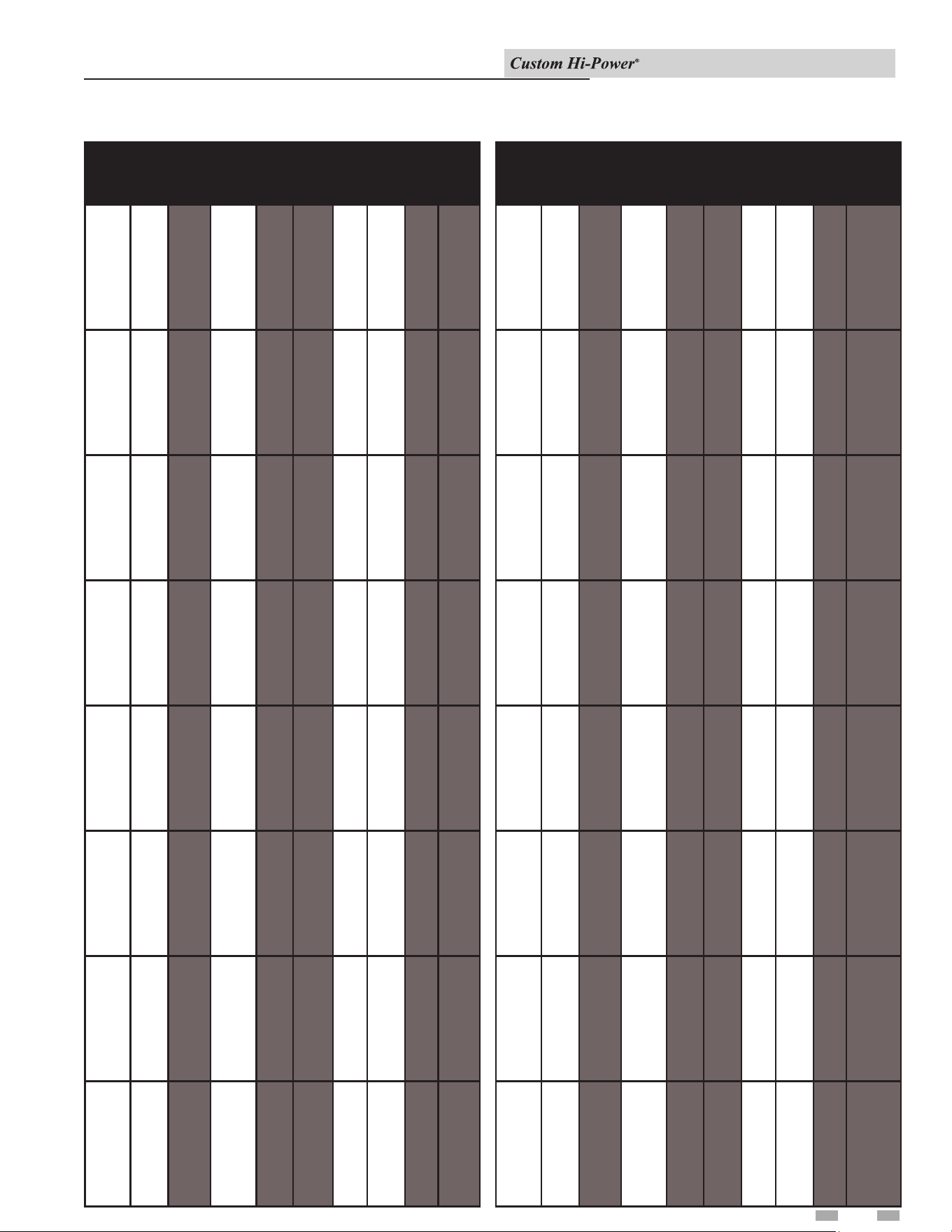
Table 4-1 Amp Chart
4 Electrical (continued)
Installation & Operation Manual
Total Ele.
Total
AMPS
Main Line
Fuse
Field Wire
Per Leg
KW KW Qnty Volt 10 30 10 30 10 30
15 15 1 208
240
380
400
415
480
600
73
63
**
**
**
**
**
42
36
23
22
21
18
14
110
110
**
**
**
**
**
60
50
30
30
30
25
20
3
4
**
**
**
**
**
6
8
10
10
10
10
12
18 18 1 208
240
380
400
415
480
600
87
75
**
**
**
**
**
50
44
27
26
25
22
17
110
110
**
**
**
**
**
70
60
35
35
35
30
25
2
3
**
**
**
**
**
4
6
8
8
8
10
12
24 12 2 208
240
380
400
415
480
600
115
100
**
**
**
**
**
67
58
36
35
33
29
23
150
150
**
**
**
**
**
90
80
50
50
50
40
30
0
0
**
**
**
**
**
3
4
6
6
6
8
10
30 15 2 208
240
380
400
415
480
600
145
125
**
**
**
**
**
83
72
46
43
42
36
29
200
175
**
**
**
**
**
110
100
60
60
60
50
40
3/0
2/0
**
**
**
**
**
2
2
6
6
6
6
8
36 18 2 208
240
380
400
415
480
600
174
150
**
**
**
**
**
100
87
55
52
50
43
35
225
200
**
**
**
**
**
150
110
70
70
70
60
45
4/0
3/0
**
**
**
**
**
0
2
4
4
4
6
8
45 15 3 208
240
380
400
415
480
600
217
188
**
**
**
**
**
125
108
68
65
63
54
43
300
250
**
**
**
**
**
175
150
90
90
80
70
60
300
250
**
**
**
**
**
3/0
2/0
3
3
4
4
6
54 18 3 208
240
380
400
415
480
600
260
225
**
**
**
**
**
150
130
82
78
75
65
52
350
300
**
**
**
**
**
200
175
110
100
100
90
70
400
350
**
**
**
**
**
4/0
3/0
2
2
2
3
4
60 15 4 208
240
380
400
415
480
600
289
250
**
**
**
**
**
167
144
91
87
83
72
58
400
350
**
**
**
**
**
225
200
125
110
110
100
80
500
400
**
**
**
**
**
4/0
4/0
1
1
2
2
4
Total Ele.
Total
AMPS
Main Line
Fuse
Field Wire
Per Leg
KW KW Qnty Volt 10 30 10 30 10 30
72 18 4 208
240
380
400
415
480
600
**
**
**
**
**
**
**
200
173
109
104
100
87
69
**
**
**
**
**
**
**
250
225
150
150
125
110
90
**
**
**
**
**
**
**
250
4/0
0
0
1
2
3
90 15 6 208
240
380
400
415
480
600
**
**
**
**
**
**
**
250
217
137
130
125
108
87
**
**
**
**
**
**
**
350
300
175
175
175
150
110
**
**
**
**
**
**
**
500
350
3/0
3/0
3/0
2/0
2
108 18 6 208
240
380
400
415
480
600
**
**
**
**
**
**
**
300
260
164
156
150
130
104
**
**
**
**
**
**
**
400
350
225
200
200
175
150
**
**
**
**
**
**
**
(2) 3/0
500
4/0
4/0
3/0
2/0
0
120 15 8 208
240
380
400
415
480
600
**
**
**
**
**
**
**
333
289
182
173
167
144
115
**
**
**
**
**
**
**
450
400
250
225
225
200
150
**
**
**
**
**
**
**
(2) 4/0
(2) 3/0
250
250
4/0
3/0
0
135 15 9 208
240
380
400
415
480
600
**
**
**
**
**
**
**
375
325
205
195
188
162
130
**
**
**
**
**
**
**
500
450
300
250
250
225
175
**
**
**
**
**
**
**
(2) 250
(2) 4/0
350
350
250
4/0
2/0
144 18 8 208
240
380
400
415
480
600
**
**
**
**
**
**
**
400
346
219
208
200
173
139
**
**
**
**
**
**
**
500
450
300
300
250
225
175
**
**
**
**
**
**
**
(2) 250
(2) 4/0
350
300
250
4/0
2/0
162 18 9 208
240
380
400
415
480
600
**
**
**
**
**
**
**
450
390
246
234
225
195
156
**
**
**
**
**
**
**
600
500
350
300
300
250
200
**
**
**
**
**
**
**
(2) 350
(2) 250
500
350
350
250
3/0
180 18 10 208
240
380
400
415
480
600
**
**
**
**
**
**
**
500
433
273
260
250
217
173
**
**
**
**
**
**
**
700
600
350
350
350
300
225
**
**
**
**
**
**
**
(2) 500
(2) 350
500
500
500
350
4/0
15
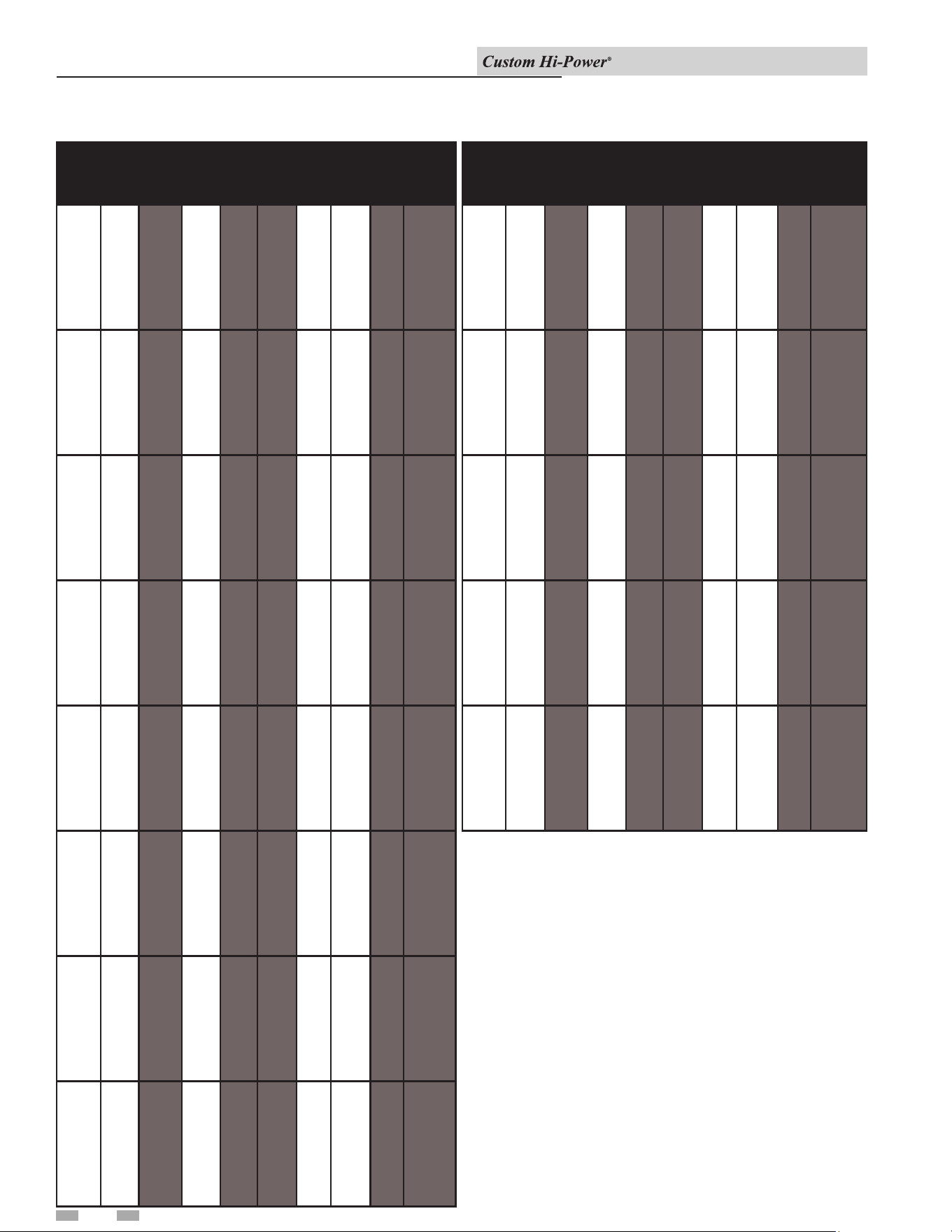
4 Electrical
Installation & Operation Manual
Total Ele.
Total
AMPS
Main Line
Fuse
Field Wire
Per Leg
KW KW Qnty Volt 10 30 10 30 10 30
216 18 12 208
240
380
400
415
480
600
**
**
**
**
**
**
**
600
520
328
312
301
260
208
**
**
**
**
**
**
**
800
700
450
400
400
350
300
**
**
**
**
**
**
**
(3) 300
(2) 500
(2) 4/0
(2) 3/0
(2) 3/0
500
350
234 18 13 208
240
380
400
415
480
600
**
**
**
**
**
**
**
650
563
356
338
326
281
225
**
**
**
**
**
**
**
1000
800
500
450
450
400
300
**
**
**
**
**
**
**
(2) 400
(2) 300
(2) 250
(2) 4/0
(2) 4/0
(2) 3/0
350
252 18 14 208
240
380
400
415
480
600
**
**
**
**
**
**
**
694
606
383
364
351
303
242
**
**
**
**
**
**
**
1000
800
500
500
450
400
350
**
**
**
**
**
**
**
(3) 400
(3) 300
(2) 250
(2) 4/0
(2) 4/0
(2) 3/0
500
270 18 15 208
240
380
400
415
480
600
**
**
**
**
**
**
**
749
650
410
390
376
325
260
**
**
**
**
**
**
**
1000
1000
600
500
500
450
350
**
**
**
**
**
**
**
(3) 400
(3) 400
(2) 350
(2) 250
(2) 250
(2) 4/0
500
288 18 16 208
240
380
400
415
480
600
**
**
**
**
**
**
**
799
693
438
416
401
346
277
**
**
**
**
**
**
**
1000
1000
600
600
600
450
350
**
**
**
**
**
**
**
(3) 400
(3) 400
(2) 350
(2) 350
(2) 350
(2) 4/0
500
306 18 17 208
240
380
400
415
480
600
**
**
**
**
**
**
**
849
736
465
442
426
368
294
**
**
**
**
**
**
**
1200
1000
600
600
600
500
400
**
**
**
**
**
**
**
(4) 350
(3) 400
(2) 350
(2) 350
(2) 350
(2) 250
(2) 3/0
324 18 18 208
240
380
400
415
480
600
**
**
**
**
**
**
**
899
779
492
468
451
390
312
**
**
**
**
**
**
**
1200
1000
700
600
600
500
400
**
**
**
**
**
**
**
(4) 350
(3) 400
(2) 500
(2) 350
(2) 350
(2) 250
(2) 3/0
342 18 19 208
240
380
400
415
480
600
**
**
**
**
**
**
**
949
823
520
494
476
411
329
**
**
**
**
**
**
**
1200
1200
700
700
600
600
450
**
**
**
**
**
**
**
(4) 350
(4) 350
(2) 500
(2) 350
(2) 350
(2) 350
(2) 4/2
Total Ele.
Total
AMPS
Main Line
Fuse
Field Wire
Per Leg
KW KW Qnty Volt 10 30 10 30 10 30
360 18 20 208
240
380
400
415
480
600
**
**
**
**
**
**
**
999
866
547
520
501
433
346
**
**
**
**
**
**
**
1600
1200
700
700
700
600
450
**
**
**
**
**
**
**
(5) 400
(4) 350
(2) 500
(2) 500
(2) 500
(2) 350
(2) 4/0
378 18 21 208
240
380
400
415
480
600
**
**
**
**
**
**
**
1049
909
574
546
526
455
364
**
**
**
**
**
**
**
1600
1200
800
700
700
600
500
**
**
**
**
**
**
**
(5) 400
(4) 350
(3) 300
(2) 500
(2) 500
(2) 350
(2) 250
396 18 22 208
240
380
400
415
480
600
**
**
**
**
**
**
**
1099
953
602
572
551
476
381
**
**
**
**
**
**
**
1600
1200
800
800
700
600
500
**
**
**
**
**
**
**
(5) 400
(4) 350
(3) 300
(2) 500
(2) 500
(2) 350
(2) 250
414 18 23 208
240
380
400
415
480
600
**
**
**
**
**
**
**
1149
996
629
598
576
498
398
**
**
**
**
**
**
**
1600
1600
800
800
800
700
500
**
**
**
**
**
**
**
(5) 400
(5) 400
(3) 300
(3) 300
(3) 300
(2) 500
(2) 250
432 18 24 208
240
380
400
415
480
600
**
**
**
**
**
**
**
1199
1039
656
624
601
520
416
**
**
**
**
**
**
**
1600
1600
1000
800
800
700
600
**
**
**
**
**
**
**
(5) 400
(5) 400
(3) 400
(3) 300
(3) 300
(2) 500
(2) 350
*CONSULT FACTORY FOR 432 KW AND HIGHER.
Table 4-1 Amp Chart (continued)
16
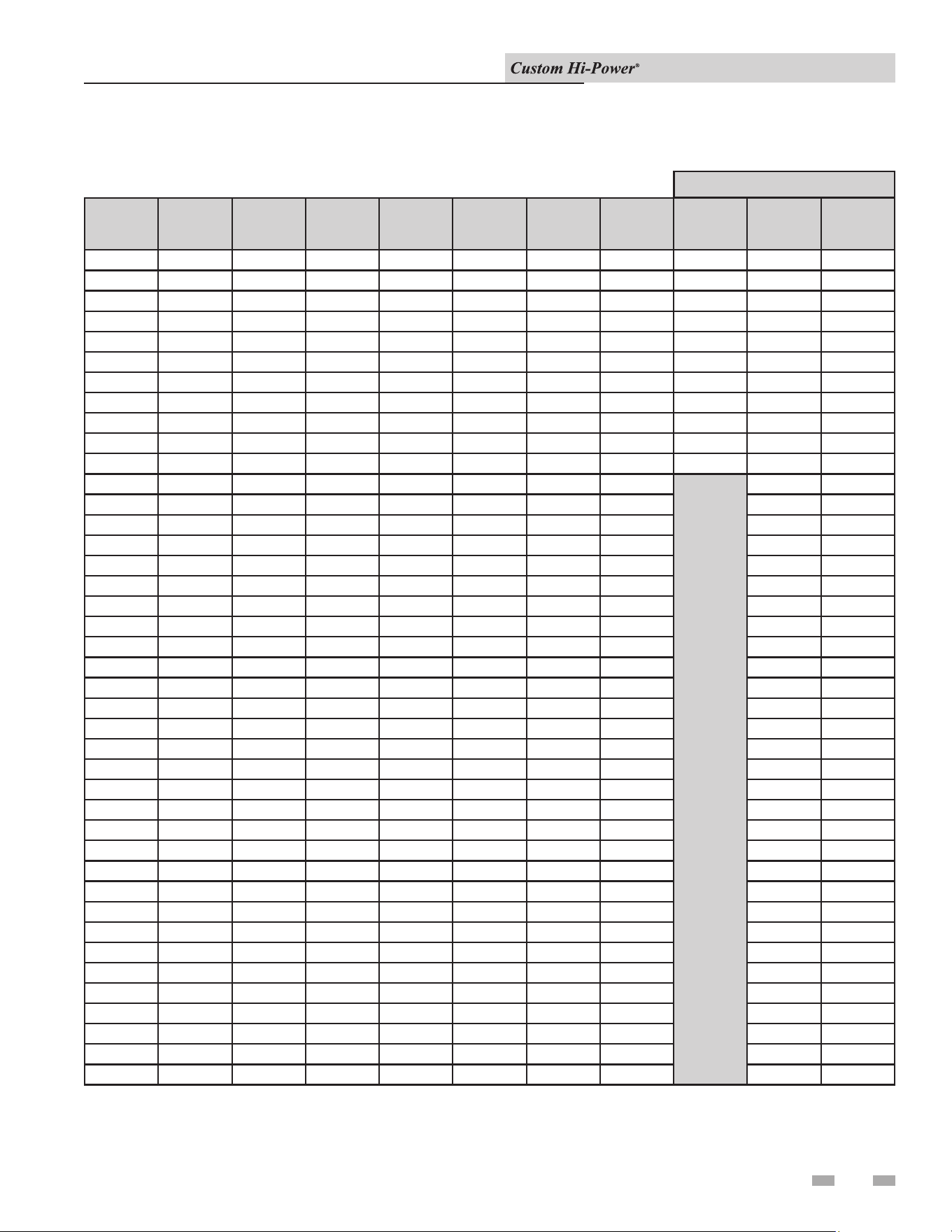
Table 4-2_Electrical and Recoveries Data
Standard
KW Ratings
KW of
Element
Maximum
Number of
Elements
Number of
Elements
per Bank
Number of
Banks
Number
of Control
Boards
BTU Input
GPH
Recovery
208V/240V
1Ø
208V/240V
3Ø
480V/600V
3Ø
15 15 1 1 1 1 51,180 61 1 1 1
18 18 1 1 1 1 61,416 74 2 2 1
24 12 2 1 2 1 81,888 98 2 2 2
30 15 2 1 2 1 102,360 123 2 2 2
36 12 3 1 3 1 122,832 147 3 3 3
36 18 2 1 2 1 122,832 147 4 4 2
45 15 3 1 3 1 153,540 184 3 3 3
48 12 4 1 4 1 163,776 197 4 4 4
54 18 3 1 3 1 184,248 221 6 6 3
60 12 5 1 5 1 204,720 246 5 5 5
60 15 4 1 4 1 204,720 246 4 4 4
72 12 6 2 3 1 245,664 295 6 6
72 18 4 1 4 1 245,664 295 8 4
75 15 5 5 1 1 255,900 307 5 5
90 15 6 2 3 1 307,080 369 6 3
90 18 5 1 5 1 307,080 369 10 5
96 12 8 2 4 1 327,552 393 8 4
108 12 9 3 3 1 368,496 442 9 6
108 18 6 2 3 1 368,496 442 12 6
120 12 10 2 5 1 409,440 492 10 5
120 15 8 2 4 1 409,440 492 8 8
135 15 9 3 3 1 460,620 553 9 6
144 18 8 2 4 1 491,328 590 16 8
150 15 10 2 5 1 511,800 614 10 5
162 18 9 3 3 1 552,744 664 18 9
180 12 15 3 5 1 614,160 737 15 10
180 15 12 3 4 1 614,160 737 12 12
180 18 10 2 5 1 614,160 737 20 10
192 12 16 2 8 2 655,104 786 16 8
210 15 14 2 7 2 716,520 860 14 14
216 12 18 3 6 2 736,992 885 18 9
216 18 12 3 4 1 736,992 885 24 8
225 15 15 3 5 1 767,700 922 15 10
240 12 20 2 10 3 818,880 983 20 10
240 15 16 2 8 2 818,880 983 16 16
252 18 14 2 7 2 859,824 1,032 28 14
270 15 18 3 6 2 921,240 1,106 18 12
270 18 15 3 5 1 921,240 1,106 30 10
288 12 24 3 8 2 982,656 1,180 24 12
288 18 16 2 8 2 982,656 1,180 32 16
300 15 20 2 10 3 1,023,600 1,229 20 20
Number of Contactors
4 Electrical (continued)
Installation & Operation Manual
17
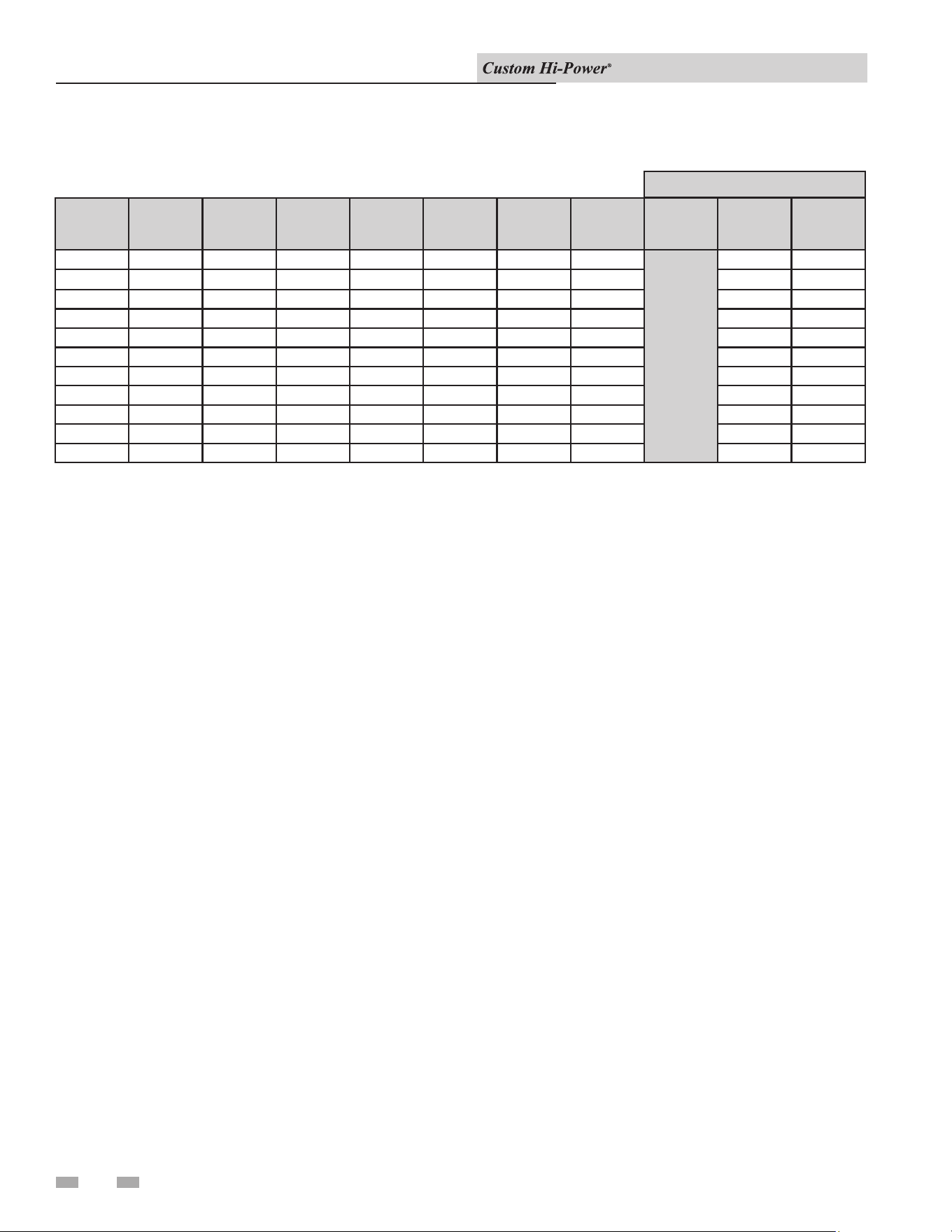
Table 4-2_Electrical and Recoveries Data (continued)
Standard
KW Ratings
KW of
Element
Maximum
Number of
Elements
Number of
Elements
per Bank
Number of
Banks
Number
of Control
Boards
BTU Input
GPH
Recovery
208V/240V
1Ø
208V/240V
3Ø
480V/600V
3Ø
315 15 21 3 7 2 1,074,780 1,290 21 14
324
12 27 3 9 2 1,105,488 1,327 27 18
324 18 18 3 6 2 1,105,488 1,327 36 12
360 15 24 3 8 2 1,228,320 1,475 24 16
360 18 20 2 10 3 1,228,320 1,475 40 20
378 18 21 3 7 2 1,289,736 1,548 42 21
390 15 26 2 13 3 1,330,680 1,597 26 26
396 18 22 2 11 3 1,351,152 1,622 44 22
405 15 27 3 9 2 1,381,860 1,659 27 18
420 15 28 2 14 3 1,433,040 1,720 28 28
432 18 24 3 8 2 1,473,984 1,769 48 16
Number of Contactors
4 Electrical
Installation & Operation Manual
18
19
General
Refer to the Features and Components section of this manual for
the location of components mentioned in the instructions that
follow.
NEVER operate the heating elements without being certain the
water heater is lled with water and a temperature and pressure
relief valve is installed in the relief valve opening on top of the
heater.
A low water cuto is provided on all heaters as standard
equipment. e water probe is installed near the top of the tank
to monitor the presence of water. e control circuit is opened if
the water level is below this point.
e pilot switch (power on/o toggle switch) on the cabinet
front permits the heater to be turned on and o without having
to operate the electrical disconnect switch.
5 Operation
Full power is present whenever the cabinet
door is opened, even with the pilot switch
turned off.
⚠DANGER
Optional manual override switches on the cabinet front allow
elements to be manually de-energized if full capacity is not
needed.
Filling the Water Heater
CAUTION
In order to avoid heating element damage,
fill the tank with water before operating.
To ll the water heater with water:
1. Turn OFF the electrical disconnect switch.
2. Turn OFF the ON/OFF switch.
3. Close the heater drain valve.
4. Open a nearby hot water faucet to allow the air in the system
to escape.
5. Fully open the cold water inlet valve, lling the heater and
piping.
6. Close the hot water faucet when the water starts to ow from
the faucet. Leave the cold water inlet valve fully open. e
heater is now ready for start-up and temperature regulation.
7. Close the cabinet door and perform the start-up checks
listed below before turning on the electricity.
Initial Start-up
e following checks should be made by the installer when the
water heater is placed into operation for the rst time:
1. Check all factory and eld-made water and electrical
connections for tightness. Also check connections on top
of the heater. Repair water leaks and tighten electrical
connections as necessary.
2. Turn on the electrical disconnect switch and pilot toggle
switch. e pilot toggle switch is located on the cabinet.
3. Observe the operation of the electrical components during
the rst heating cycle. Exercise care as the electrical circuits
are energized.
Temperature control and contactor operation should be checked
by allowing the heater to come up to temperature and shut
o automatically. Exercise care as the electrical circuits are
energized.
Draining the Water Heater
e water heater must be drained if it is to be shut down and/
or exposed to freezing temperatures. Maintenance and service
procedures may also require draining the heater.
1. Turn OFF the electrical disconnect switch.
2. Turn OFF the ON/OFF switch.
3. Close the cold water inlet valve to heater.
4. Open a nearby hot water faucet to vent the system.
5. Open the drain valve.
6. If the heater is being drained for an extended shutdown,
it is suggested that the drain valve be le open during this
period.
Follow Filling the water heater instructions when restoring hot
water service. See the list above.
Burn hazard. Keep clear of drain valve
discharge outlet.
⚠DANGER
Installation & Operation Manual
20
If a dry bulb style high limit is used in place of a surface mount
in the limit, it should not be set above 190°F/88°C.
When the high limit switch contacts open, the electronic control
system locks out and displays a fault message. Voltage to the
contactor coils and heating elements is terminated to prevent
further heating operation. Once the water temperature has
cooled below this point, press the manual reset button. en the
power supply to the water heater must be turned o and then
back on to reset the control system.
High Temperature Limit Controls
(ECO)
Water temperature over 125°F (52°C) can
cause severe burns instantly resulting in
severe injury or death. Children, the elderly,
and the physically or mentally disabled are
at highest risk for scald injury. Feel water
before bathing or showering. Temperature
limiting devices such as mixing valves must
be installed when required by codes and to
ensure safe temperatures at fixtures. Read
the instruction manual for safe temperature
setting.
⚠DANGER
e water heaters covered in this instruction manual are
equipped with adjustable thermostat controls to control water
temperature. Hot water temperatures required for automatic
dishwasher and laundry use can cause scald burns resulting
in serious personal injury and/or death. e temperature at
which injury occurs varies with the person’s age and duration
of exposure. e slower response time of children, the elderly,
or disabled persons increases the hazards to them. Never allow
small children to use a hot water tap or draw their own bath water.
Never leave a child or disabled person unattended in a bathtub
or shower. e water heater should be located in an area where
the general public does not have access to set temperatures.
Setting the water heater temperatures at 120°F will reduce the
risk of scalds. Some states require settings at specic lower
temperatures.
Water Temperature °F
Time for 1st Degree Burn
(Less Severe Burns)
Time for Permanent Burns
2nd & 3rd Degree
(Most Severe Burns)
110 (normal shower temp.)
116 (pain threshold)
116 35 minutes 45 minutes
122 1 minute 5 minutes
131 5 seconds 25 seconds
140 2 seconds 5 seconds
149 1 second 2 seconds
154 Instantaneous 1 second
(U.S. Government Memorandum, C.P.S.C., Peter L. Armstrong, Sept. 15, 1978)
Full power is present whenever the cabinet
door is opened, even with the ON/OFF
switch turned off.
⚠DANGER
e water heaters covered in this instruction manual are equipped
with an electronic control system. e control system senses
temperature from a factory-installed immersion temperature
probe. See the Features and Components illustrations at the
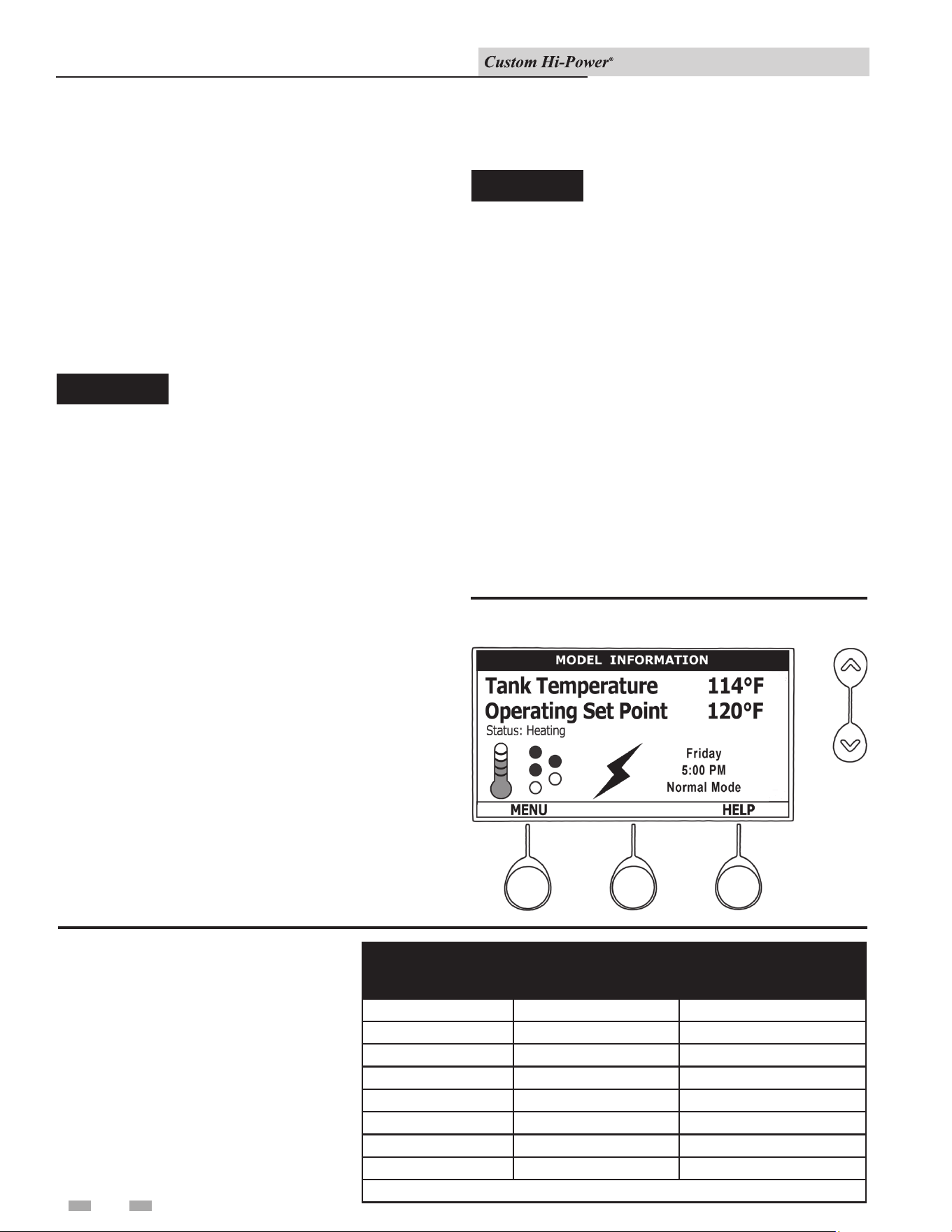
beginning of this manual for location. e Operating Set Point
is adjusted to control water temperature. is is an adjustable
user setting in the control system’s Temperature Menu. is and
all control system menus are accessed through the UIM (User
Interface Module) located on the front panel of the water heater.
(FIG. 6-1).
e operating set point is adjustable from 90°F/42°C to
190°F/88°C. e factory setting is 120°F/49°C. See the Control
System Operation section of this manual for instructions on how
to adjust the Operating Set Point and other user settings.
Set the Operating Set Point at the lowest setting which produces
an acceptable hot water supply. is will always give the most
energy ecient operation.
Figure 6-1_UIM (User Interface Module)
6 Temperature Regulation
Thermostat Controls
Table 6-1_Approximate time to burn
normal adult skin
Temperature Adjustment
Installation & Operation Manual
21
Progressive Sequencing: Banks are energized and de-energized
according to adjustable (1 to 20°F) dierential set points for each
bank. e rst bank on is rotated with each successive call for
heat (bank rotation). e rst heating bank energized at the
beginning of a heating cycle is the rst bank de-energized at the
end of the heating cycle (First on/rst o). Successive heating
cycles would progress as follows on a model equipped with three
(3) heating bank:
• First heating cycle: Banks come on [1, 2, 3] and cycle o
[1, 2, 3]
• Second heating cycle: Banks come on [2, 3, 1] and cycle o
[2, 3, 1]
• ird heating cycle: Banks come on [3, 1, 2] and cycle o
[3, 1, 2]
• Fourth heating cycle: Pattern repeats - same as rst heating
cycle
Heating Banks Operation
7 Control System Operation
Advanced Diagnostics
Plain English text and animated icons display detailed operational
and diagnostic information. e LCD screen on the front of the
water heater displays the sequence of operation in real time.
Fault or alert messages are displayed when operational problems
occur. e Advanced Service Menu displays a list of possible
causes for current fault and alert conditions to aid in servicing.
Economy Mode Operation
e control system automatically lowers the Operating Set Point
by a programmed value during user dened time periods. is
helps reduce operating costs during unoccupied or peak demand
periods.
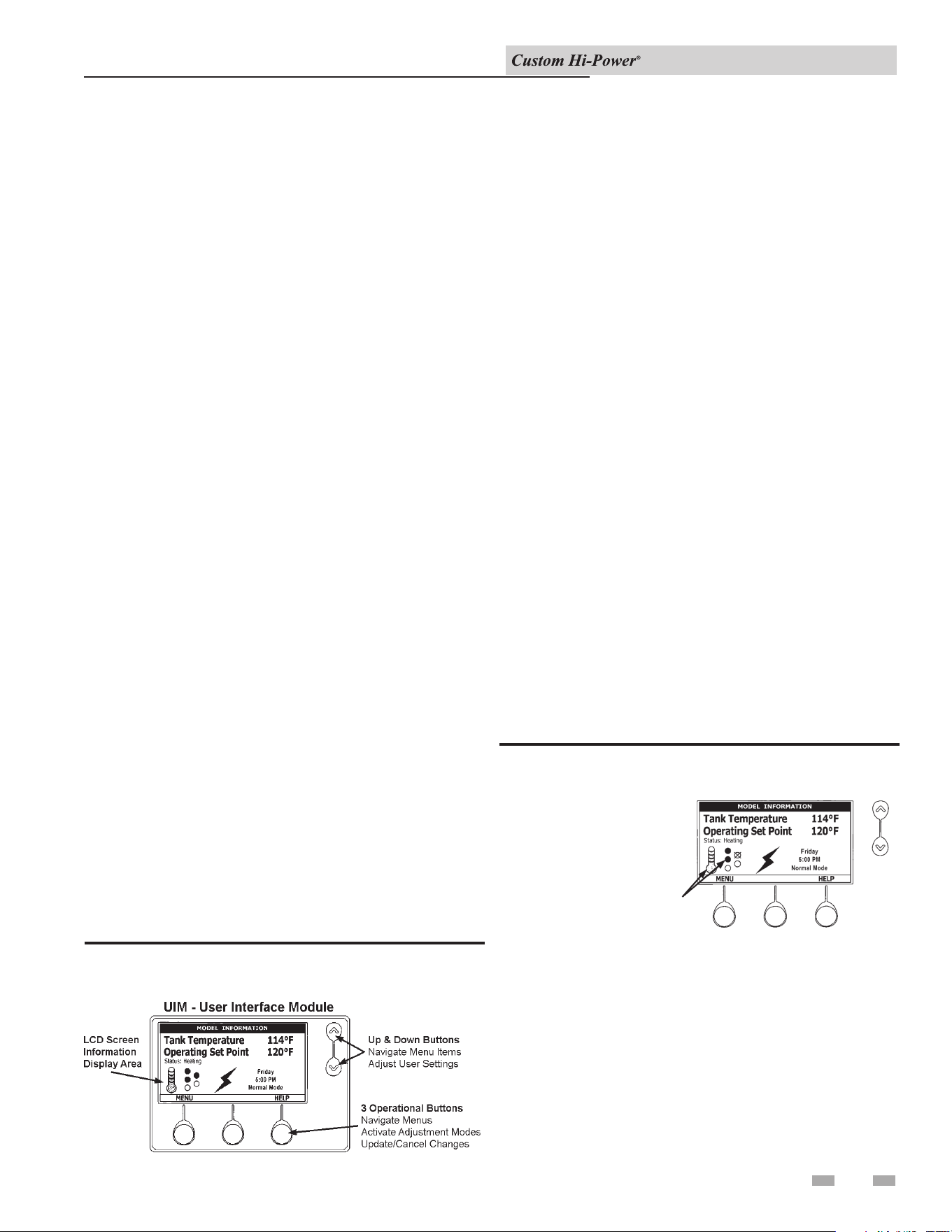
e UIM (User Interface Module) is located on the front cabinet
of the water heater. All operational information and user
settings are displayed and accessed using the UIM. e UIM
includes ve (5) snap-acting (momentary) user input buttons; an
UP, DOWN, and three (3) operational buttons (FIG 7-1).
Figure 7-1_Control System Navigation
Up & down Buttons
ese buttons are used to navigate (up and down) and to select
(highlight) menu items. ey are also used to adjust or change
(increase/decrease, on/o, set time) various user settings.
Operational Buttons
e three (3) operational buttons are multifunctional. eir
current function is dened by the text that appears directly
above each button on the LCD screen. e function will change
depending on what menu is currently displayed or what menu
item is selected. When no text appears on the LCD screen above
an operational button, there is no function assigned.
e illustration below shows the control system display screen.
is is the default screen. If there are no active fault or alert
conditions and no user input for approximately 10 minutes the
control system will return to this screen automatically.
• Model Information: Model information and menu titles
are shown in the black bar at the top of the display screen.
• Tank Temperature: Current water temperature as sensed
from the immersion temperature probe.
• Operating Set Point: Temperature at which the control
system will maintain tank (water) temperature in the normal
mode. is line of text will read ECONOMY SET POINT
whenever the control system is operating in the Economy
Mode.
• Status: e operating state of the control system is displayed
beneath the operating set point.
Figure 7-2_The Display Screen
Service Note: The Desktop Screen
displays text and animated icons that
convey operational information.
Review the Status Icons explanation
in Table 7-1 on page 18. Learning to
use this real time visual display of
the operating sequence will help to
quickly and accurately diagnose
operational problems.
STATUS
ICONS
• Menu: e le operational button is pressed to enter the
main menu where all control system menus are accessed.
See Table 7-3 for a list of control system menus.
• Help: e right operational button is pressed to access
instructions and explanations for user settings, operating
states, status icons, manufacturer’s web address, technical
support phone number, and service agent contact
information.
Control System Features
Control System Navigation
The Display Screen
Installation & Operation Manual
22
7 Control System Operation
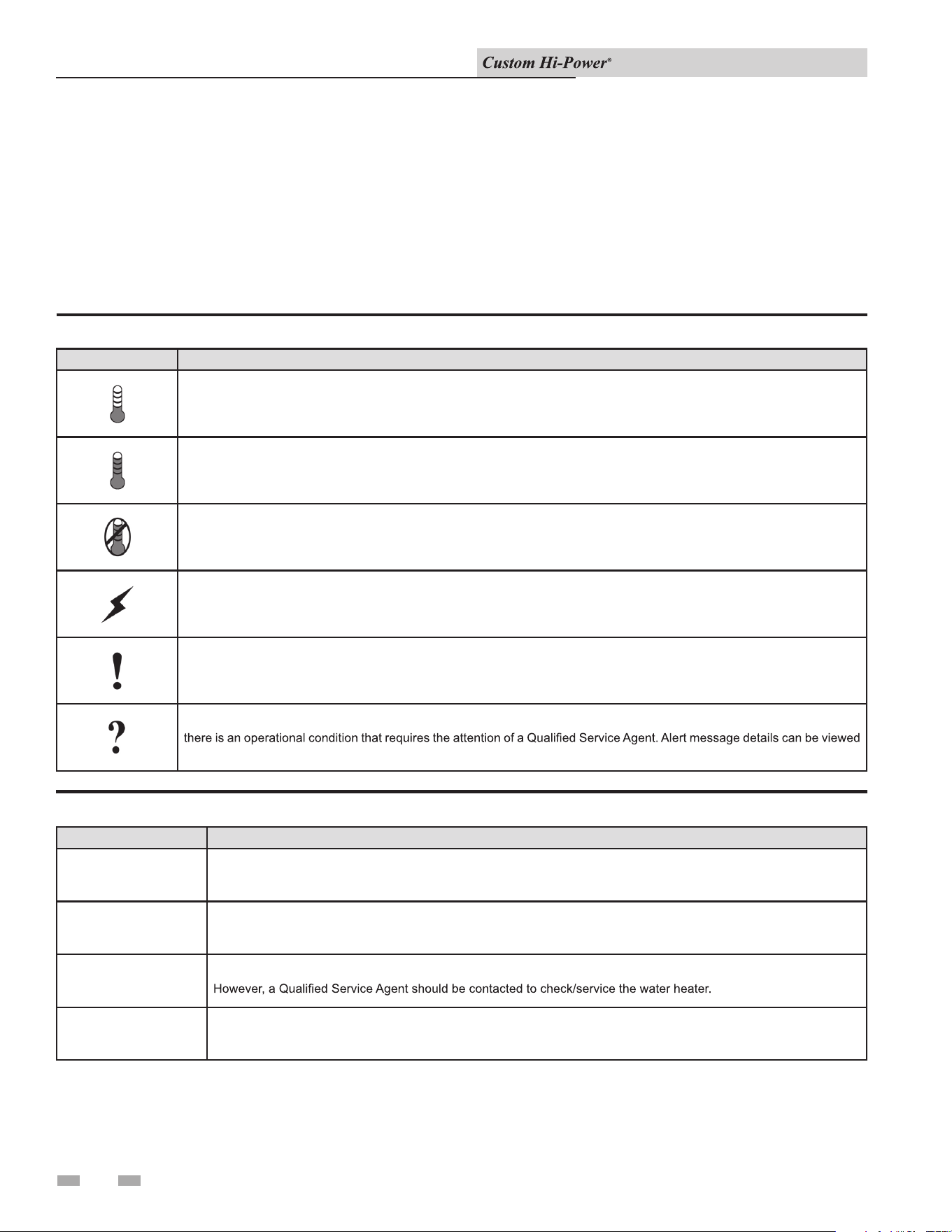
Table 7-1_Status Icons
ICON DESCRIPTION
Water temperature in the tank has fallen. Shaded area of the animated thermometer icon will rise and fall in response to
water temperature in the storage tank as sensed from the immersion Temperature Probe.
Water temperature in the tank has reached the Operating Set Point. Shaded area of the animated thermometer icon will rise
and fall in response to water temperature in the storage tank as sensed from the immersion Temperature Probe.
The control is unable to initiate a heating cycle. This will happen whenever a Fault condition is detected by the control system
or when either of the two Enable/Disable circuits are open circuits.
The control system is in Heating Mode and has energized the electromagnetic contactor coils for at least one heating
bank. This animated icon DOES NOT indicate current has been sensed from the heating banks, only that there is a
call for heat present and the control system has initiated heating bank operation.
The control has detected/declared a Fault Condition. Fault message details can be viewed in the Current Fault menu.
Heating operation is discontinued (locked out) until the condition that caused the fault is corrected. Power to the water heater
must be cycled off and on to reset the control system. Note; cycling power will not reset the control system if the condition
that caused the fault has not been corrected.
The control has detected/declared an Alert Condition. The water heater will continue to operate during an Alert Condition but
in the Current Alert menu.
Table 7-2_Operating States
DESCRIPTIONSTATE
Standby
Heating The control system is in the Heating Mode. At least one heating bank has been energized.
Alert
The water heater is not in an active heating cycle. This usually indicates the temperature in the tank has reached the
Operating Set Point and the control system has terminated the heating cycle.
Fault
The control system has detected/declared an Alert Condition. The controls system will continue heating operation.
The control system has detected/declared a Fault Condition. The control system will discontinue heating operation and
“lock out.” Power to the water heater must be cycled off and on to reset the control system. Note; cycling power will not
reset the control system until the condition that caused the fault has been corrected.
• Day/Time/Operating Mode: e current time and day are
also displayed on the display screen. CLOCK NOT SET
will be displayed until the time clock has been initially set.
Day and time are adjusted in the Economy Mode Setup
Menu. e current operating mode, either Normal Mode
or Economy Mode, is displayed beneath the day and time.
• Discreet Menu Contact Information: From the display
screen, press and hold down the middle (unmarked)
operational button for 30 seconds, then release it. is
will launch a discreet menu where personalized contact
information can be entered. Installing contractors and/or
service agents can enter their company name and telephone
number. is contact information will be displayed with all
fault and alert messages.
Installation & Operation Manual
23
7 Control System Operation (continued)
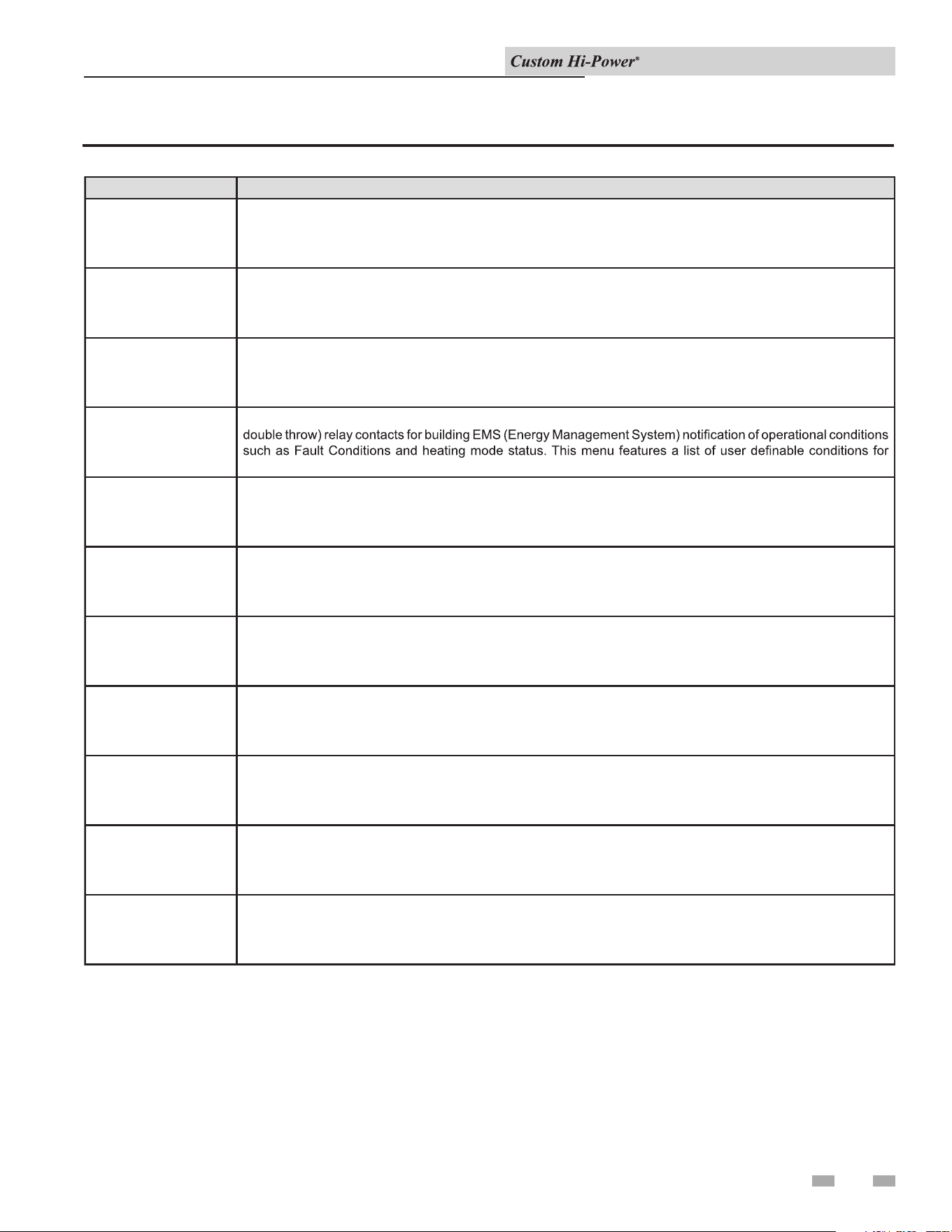
Table 7-3_Control System Menus
MENUS DESCRIPTION
Temperatures
Heater Status
Economy Mode Setup
Operating Set Point, Differential settings, Tank Te mperature and Tank Probe Offset are located in this menu.
Current Operating State/Mode (heating/standby etc) and status (open/closed - on/off - yes/no) of monitored
water heater functions and components are displayed in this menu.
Alarm Output Setup
Seven day 24 hour time clock with temperature set back capability to reduce operating costs during unoccupied
or reduced demand periods.
Display Settings
Heater Information
Temperature units (°F or °C), appearance (brightness contrast) and backlight delay user adjustable settings are
located in this menu.
Current Fault/Alert
Fault History
Displays any current Alert or Fault messages.
The control system’s CCB (Central Control Board - see wiring diagram) features on board SPDT (single pole
relay activation.
Elapsed time of operation, total heating cycle time, heating cycle count, heating bank(s) cycle count and on
time along with UIM and CCB software revisions can be viewed in this menu.
Fault Occurrence
Restore Factory Defaults
Retains 9 event history of Fault/Alert messages with time stamp. The Fault History is useful when dealing with
intermittent operational problems or when the customer has reset the control system prior to a service agent’s
arrival.
Help Menu
Total accumulated number each individual Fault condition has occurred is displayed in this menu. This
running total of Fault Occurrences can be useful in determining which (if any) operational problems have been
persistent.
This control system feature allows the user to restore control system user settings to their factory default settings.
Alarm Output Setup and Display Settings menu items ARE NOT changed when factory defaults are restored.
Accessible by pressing the corresponding Operational Button from most menus and screen displays. This menu
provides access to instructions and explanations for user settings, Operating States, Status Icons, manufacturer’s
web address, technical support phone number and service agent contact information.
Installation & Operation Manual
24
Operating Set Point
User adjustable setting 90°F to 190°F range; factory default is
120°F. When the water temperature sensed by the control system
from the immersion temperature probe reaches the operating set
point the control system will end the heating cycle. A call for
heat will be activated again when the water temperature drops
below the operating set point minus the rst dierential setting.
Example: Operating set point is 120°F, the rst dierential
setting is 2°F (factory default). A call for heat will be activated
when the sensed water temperature drops to 118°F.
Dierential Settings
Adjustable user setting(s) 1°F to 20°F range; factory default is 2°F.
e water heaters covered in this manual will have between one
(1) and ve (5) heating banks per control board. ere is at least
one dierential setting on all models. ere will be additional
dierential settings for each additional heating bank installed.
Operating Sequence Example
On a water heater equipped with three (3) heating banks, with
an operating set point of 120°F, and all dierential settings at 2°F,
the on/o sequencing of heating banks would be as follows in
Table 7-4.
Tank Temperature
Non-adjustable information display. Current water temperature
as sensed by the control system from the immersion temperature
probe.
Tank Probe Oset
User adjustable setting -5°F to +5°F range; factory default is 0°F.
If the current tank temperature is sensed from the immersion
temperature probe at 120°F and the oset is adjusted to -5°F, the
control system would calibrate, or oset, the tank temperature
to 115°F. Heating cycles would then start and stop based on the
calibrated tank temperature.
Used to calibrate for slight dierences in control system
temperature sensing. is can improve the precision of
temperature control in the storage tank and at points of use. is
feature can also be used to compensate for building recirculation
loops (hot water returning to the storage tank) that may cause
the heating cycle to terminate prematurely.
BANK
NUMBER
DIFFERENTIAL
SETTING
TURN ON TEMP TURN OFF TEMP
Bank 12°F 118°
F1
20°F
Bank 22°F 116°
F1
18°F
Bank 32°F 114°
F1
16°F
7 Control System Operation
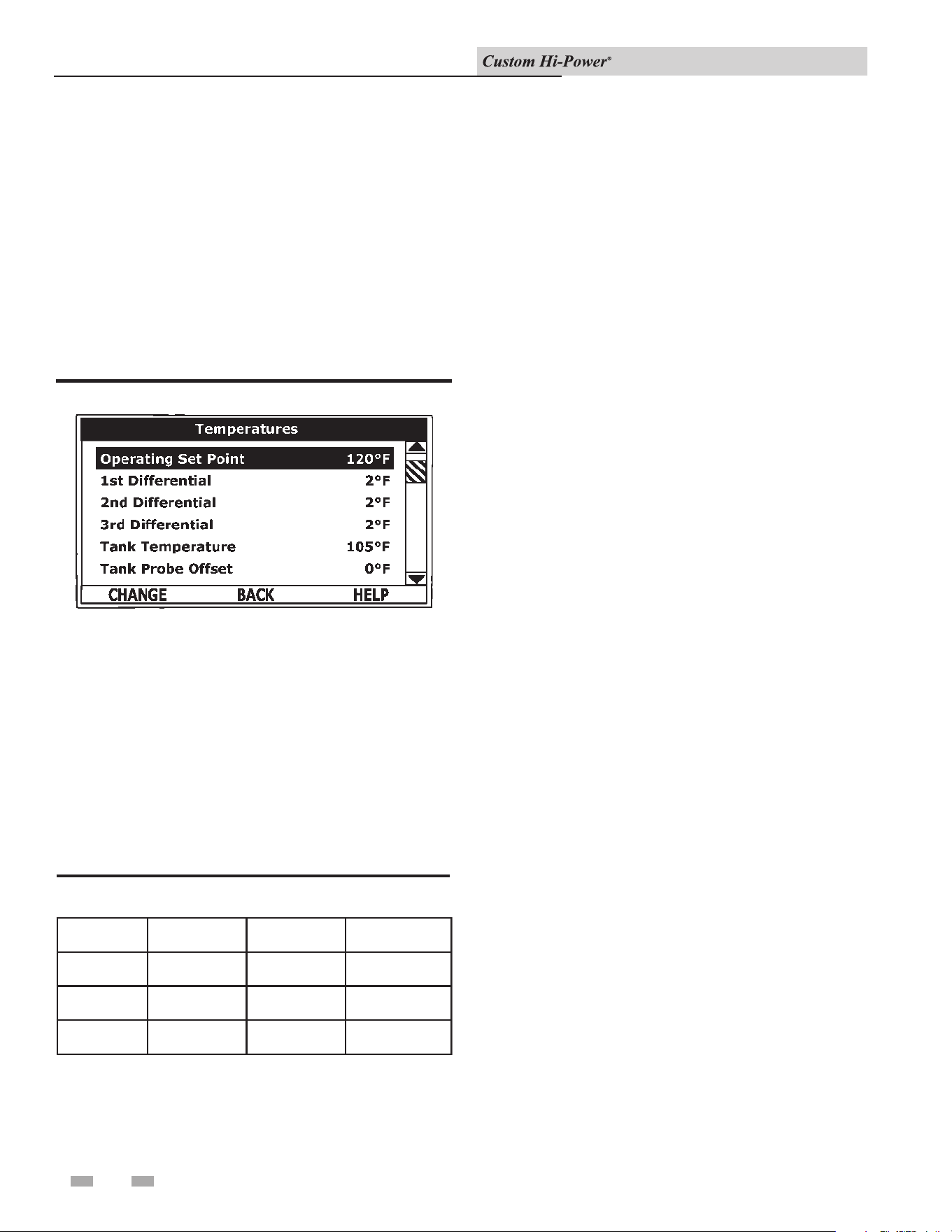
Temperature Settings
e Operating Set Point and the Dierential Settings are adjusted
in the Temperatures Menu. e following instructions, on page
25, explain how to adjust these user settings and navigate the
control system menus.
Temperatures Menu
Figure 7-3_Operating Set Point
Table 7-4_Sequencing of Heating Banks
Installation & Operation Manual
25
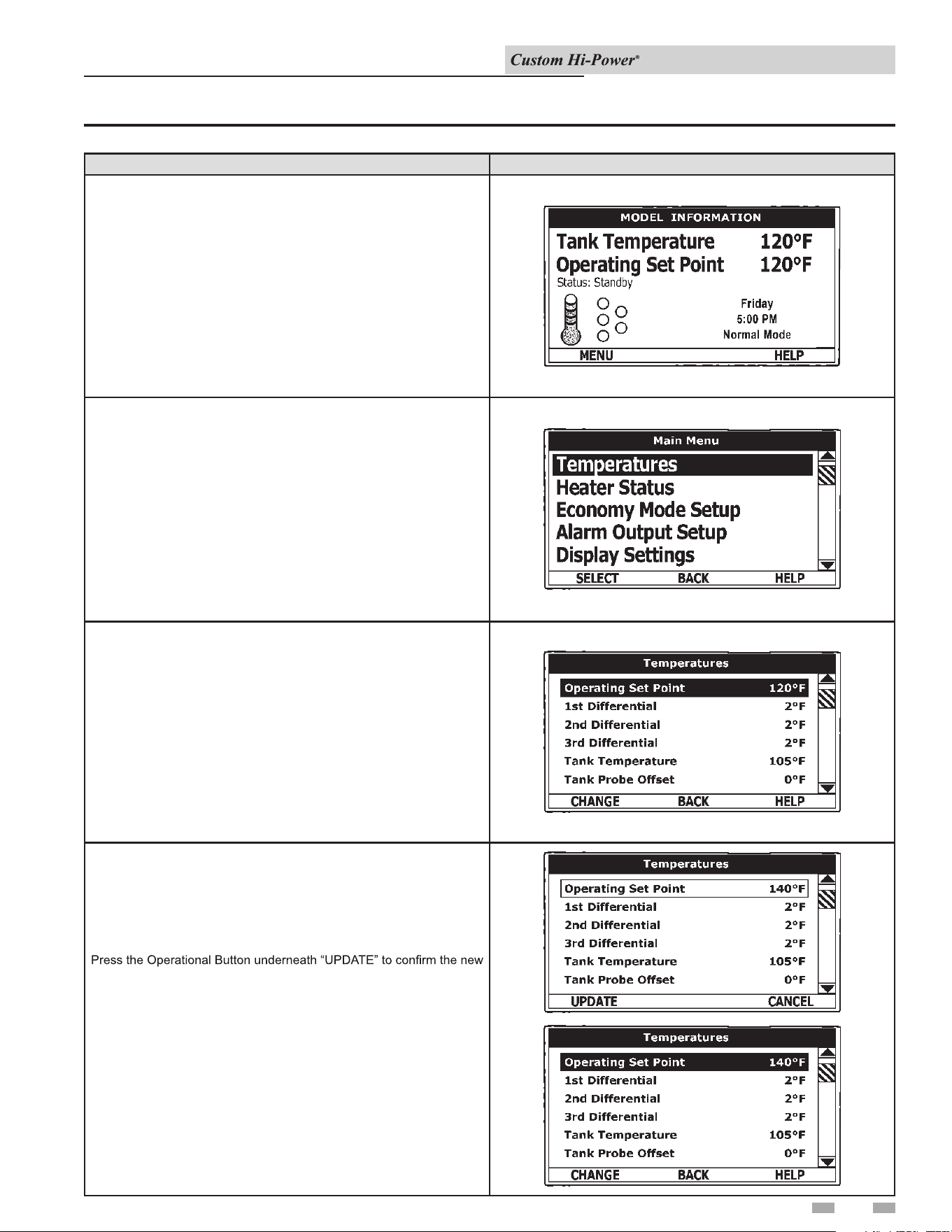
ACTION DISPLAY
From the Desktop Screen, press the Operational Button underneath
“MENU” to enter the Main Menu.
Notice how the text above the Operational Buttons on the display
changes as you navigate through the various menus and screens.
With the Operating Set Point selected (highlighted in black) in the
Temperatures Menu, press the Operational Button underneath
“CHANGE” to activate the adjustment mode for this menu item.
With Temperatures selected (highlight in black) in the Main Menu,
press the Operational Button underneath “SELECT” to enter the
Temperature Menu.
If Temperatures is not selected use the Up and Down buttons to select
this menu item.
Press the Up and Down buttons to adjust the Operating Set Point to
the desired setting.
setting. Press the Operational Button underneath “CANCEL” to discard
the new setting and retain the previous setting.
The new Operating Set Point value should now be displayed as the
current value.
NOTE: Use this same procedure to adjust the Differential settings and
the Tank Probe Offset in the Temperatures Menu.
This same procedure is used to change user settings in other control
system menus.
7 Control System Operation (continued)
Table 7-5_Temperature Screens
Installation & Operation Manual
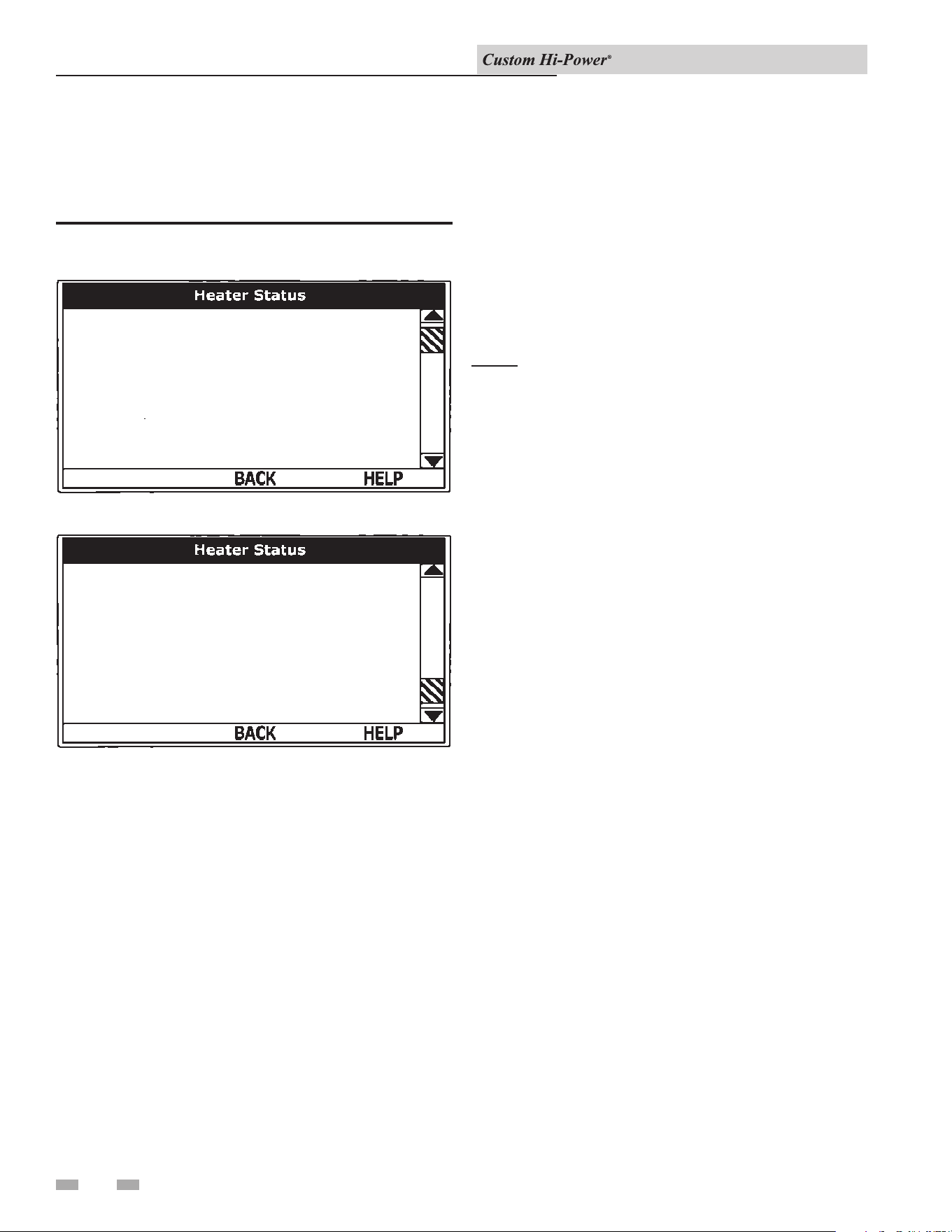
26
7 Control System Operation
is menu displays non-adjustable operational information. Use
the up and down buttons to navigate to the bottom of this menu.
Figure 7-4_Status Menu Screens
Bank 1 On
Bank 2 On
Banks On
Status
ECO Contact
Enable / Disable 1
Enable / Disable 2
Heating
1
Closed
Closed
Closed
Yes
No
Alarm Condition
Alarm Relay Output
Bank 1 On
Enable / Disable 2
Bank 2 On
Bank 3 On
Tank Full
Closed
Yes
No
No
Yes
No
Open
TOP OF MENU
BOTTOM OF MENU
Status
Displays the current operating state of the control system, such
as heating, standby, and fault.
Banks On #
Displays the number of heating elements the control system has
energized.
ECO Contact
Displays the current state of the ECO high temperature limit
switch contacts.
Enable / Disable 1 & 2
Displays the current state, open or closed, of the two enable/
disable circuits (J7 socket on the CCB - see wiring diagrams)
provided for external supervisory controls such as building EMS
(Energy Management System). Both of these enable/disable
circuits must be closed to enable heating operation. If either
enable/disable circuit is open for any reason, heating operation
will be disabled. ere is a plug with two jumper wires installed
from the factory in the CCB J7 socket to enable heating operation
when external controls are not in use.
NOTE: If a supervisory control is used to enable or disable
heating operation, install eld wiring between the J7 socket on
the CCB and a set of dry contacts on the external control per all
applicable building codes. is is a switching circuit only. DO
NOT apply any external voltage or connect any load (i.e., relay
coil) to either circuit.
Element # On
Displays the on/o status of each heating bank. Yes = On, No
= O.
Tank Full
Displays the status of the LWCO (Low Water Cut O) device.
Yes = water level is acceptable, No = water level is low.
Alarm Condition
Displays the status of the user denable alarm output function
- see alarm output setup menu. Yes = alarm condition has been
met, No = alarm condition has not been met.
Alarm Relay Output
Displays the state of the normally open contacts of the alarm
output relay. is relay (J3 contacts on the CCB - see wiring
diagrams) is used for building EMS (Energy Management
System) notication of operational conditions such as fault
conditions.
Water Heater Status Menu
Installation & Operation Manual
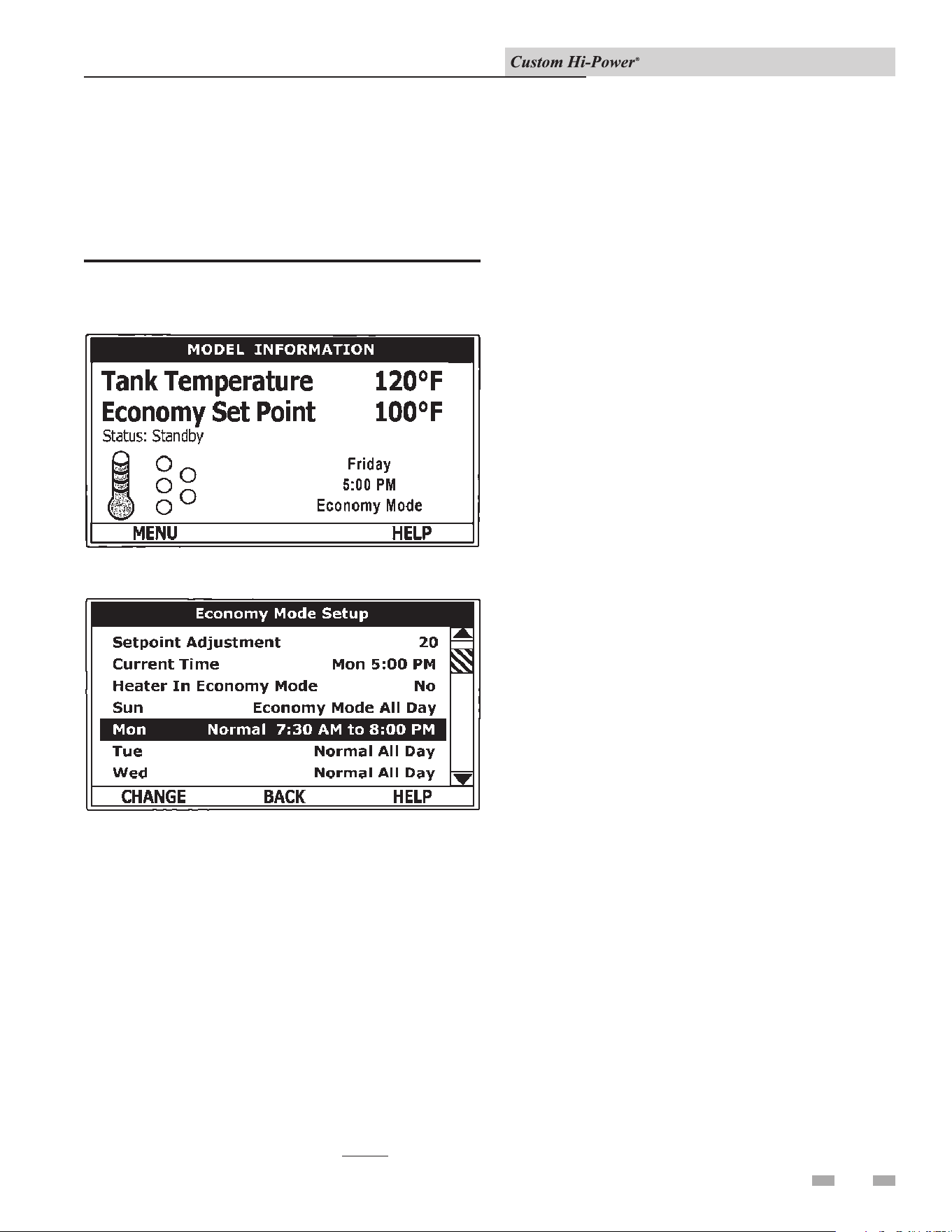
27
is menu contains settings used to establish an economy set
point and economy mode operating periods, or night setback.
is control system feature can help reduce operating costs
during unoccupied, low load, or peak demand periods.
7 Control System Operation (continued)
Figure 7-5_Economy Mode Screens
DISPLAY SCREEN DURING ECONOMY MODE
ECONOMY MODE SETUP MENU
Set Point Adjustment
Adjustable user setting (2°F to 50°F - factory default is 20°F) the
control system uses to calculate the Economy Set Point. e
Economy Set Point is the normal operating set point minus the
programmed set point adjustment value.
e Economy Set Point is the water temperature that the
control system maintains during programmed economy mode
time periods. ECONOMY SET POINT is displayed instead of
OPERATING SET POINT, and ECONOMY MODE appears
beneath the current time on the display screen during economy
mode time periods.
Current Time
Seven Day 24 hr clock. Use this menu item to set the current
time and day of the week. Current day and time are not set from
the factory. CLOCK NOT SET will be displayed on the display
until the time/day has been initially set. NOTE: e time will
not self adjust for Daylight Savings Time.
Daily Operating Mode (Sun - Mon - Tue - Wed -
Thu - Fri - Sat)
Seven daily sub menus are listed at the bottom of the Economy
Mode Setup menu. ere are 3 Operating Modes in each sub
menu. Normal Operation All Day, Economy Mode All Day, and
Normal Operation Between. Only one Operating Mode can be
active. e factory default is Normal Operation All Day.
Normal Operation All Day: When this operating mode is
active, the normal Operating Set Point is used for the entire day.
Economy Mode All Day: When this operating mode is active
the Economy Set Point is used for the entire day.
Normal Operation Between: When this operating mode is
active, there will also be start and stop times to program. e
normal Operating Set Point is used between the programmed
start and stop times, and the Economy Set Point will be in eect
during the rest of the day. ere is one start time and one stop
time event per day.
Economy Mode Setup Menu
Installation & Operation Manual
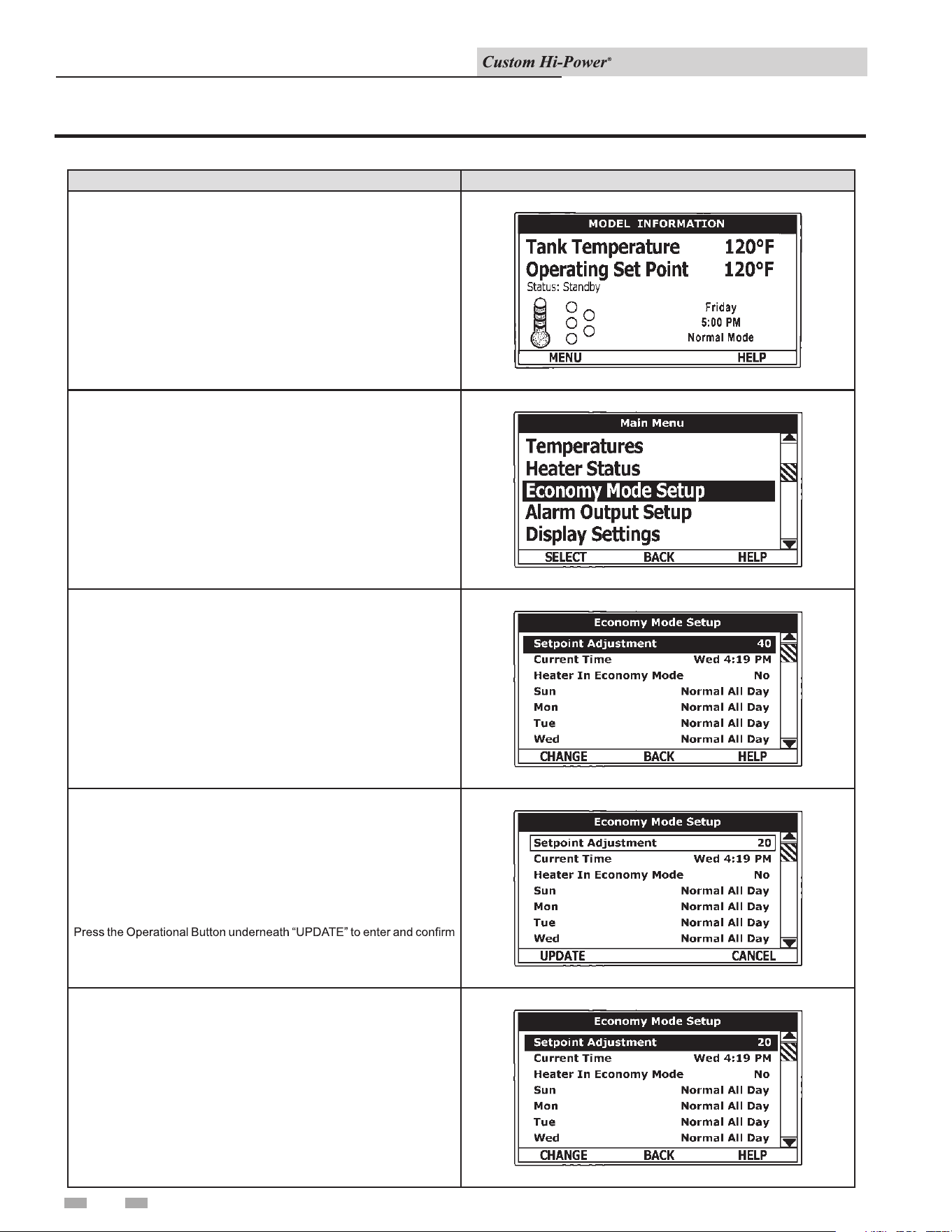
28
7 Control System Operation
Table 7-6_Economy Mode Settings - Setpoint Adjustment Value
ACTION DISPLAY
From the Display Screen, press the Operational Button underneath
“MENU” to enter the Main Menu.
Notice how the text above the Operational Buttons on the display
changes as you navigate through the various menus and screens.
Use the Up/Down buttons to select (highlight in black) the Economy
Mode Setup menu from the Main Menu. Press the Operational Button
underneath “SELECT” to enter the Economy Mode Setup menu.
Use the Up/Down buttons to select (highlight in black) Setpoint
Adjustment. Press the Operational Button underneath “CHANGE” to
activate the adjustment mode for the Setpoint Adjustment value.
The new Setpoint Adjustment value should now be displayed as the
current value.
Use the Up/Down buttons to change the Setpoint Adjustment to the
desired value. The Setpoint Adjustment value is adjustable from 2°F to
50°F. The factory default is 20°F.
Notice how the text above the Operational Buttons on the display changes
to “UPDATE” & “CANCEL” when the adjustment mode is activated and
how the current value is outlined rather than highlighted in black.
the new value. Pressing the Operational Button underneath “CANCEL”
would discard the new value and retain the previous value.
Installation & Operation Manual
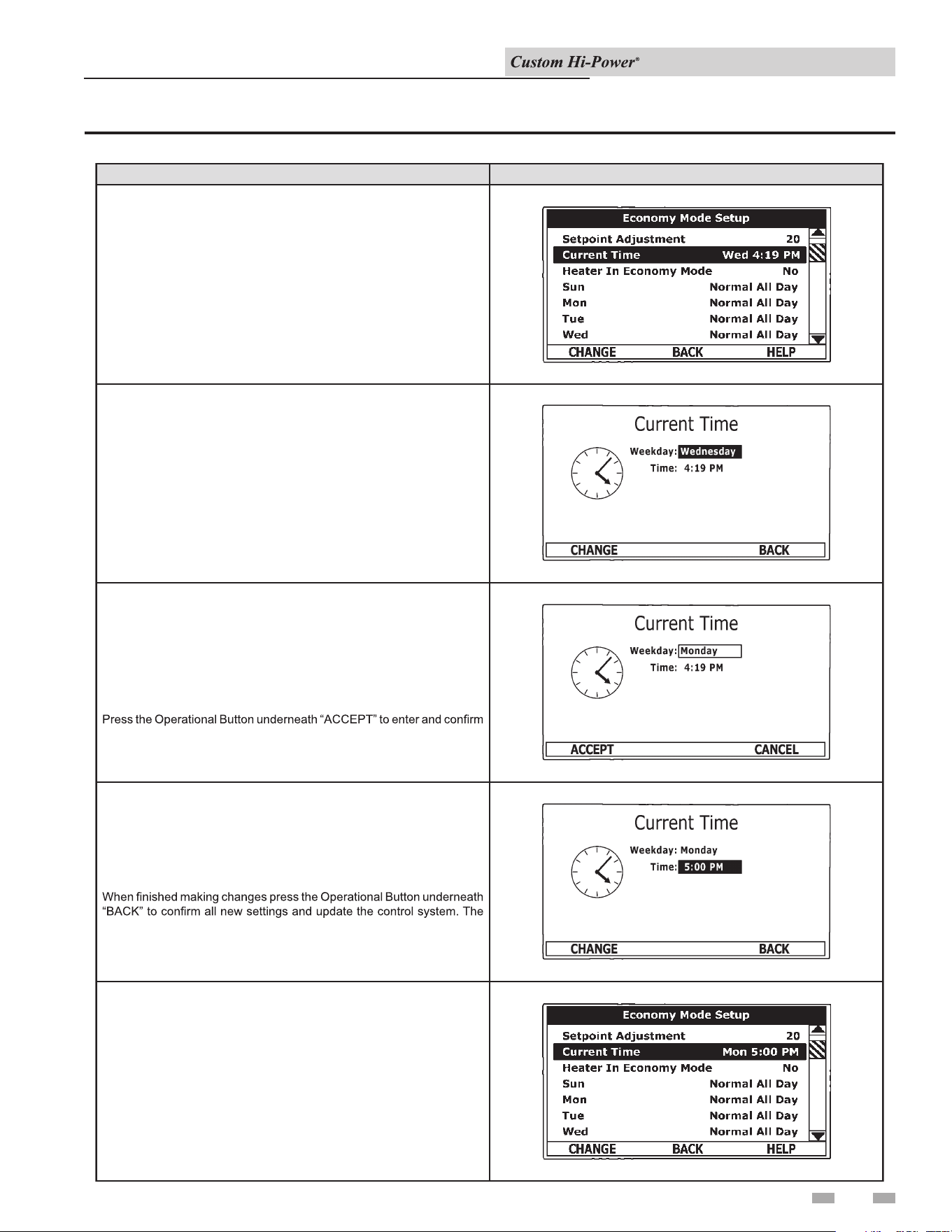
29
7 Control System Operation (continued)
Table 7-7_Economy Mode Settings - Time Clock Settings
ACTION DISPLAY
Use the Up/Down buttons to select the “Weekday” setting.
Press the Operational Button underneath “CHANGE” to activate the
adjustment mode for this setting.
Use the Up/Down buttons to select (highlight in black) Current Time sub
menu. Press the Operational Button underneath “CHANGE” to enter the
Current Time sub menu.
The new settings should be displayed as the Current Time.
Press the Up/Down buttons to adjust the Weekday setting to the current
day.
Notice how the text above the Operational Buttons on the display changes
to “ACCEPT” & “CANCEL” when the adjustment mode is activated and
how the current setting is outlined rather than highlighted in black.
the new setting. Pressing the Operational Button underneath “CANCEL”
would discard the new setting and retain the previous setting.
Use the Up/Down and the CHANGE/ACCEPT Operational Buttons to
individually select and change the remaining time settings (Hour, Minutes,
AM/PM) to the current time in the same way as outlined above.
display will automatically return to the Economy Mode Setup menu.
Installation & Operation Manual
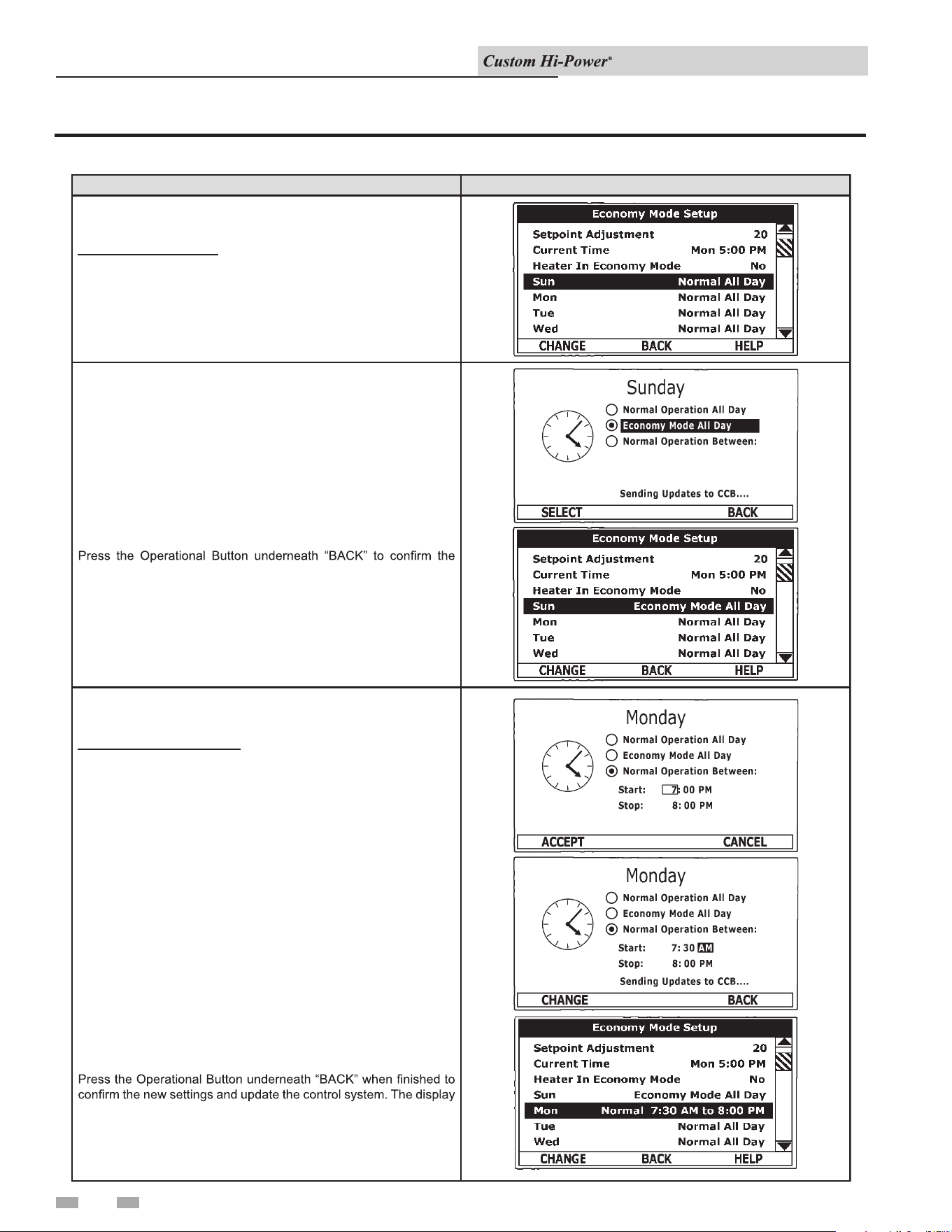
30
7 Control System Operation
Table 7-8_Economy Mode Settings - Daily Operating Mode Settings
ACTION DISPLAY
Economy Mode All Day:
From the Economy Mode Setup menu use the Up/Down buttons to
select (highlight in black) the Daily sub menu for “Sun.” Press the
Operational Button underneath “CHANGE” to enter this menu.
Use the Up/Down buttons to select (highlight in black) the “Economy
Mode All Day” setting.
Press the Operational Button underneath “SELECT” to change from
the factory default Normal Operation All Day setting to the Economy
Mode All Day setting.
new setting and update the control system. You will be returned to
the Economy Mode Setup menu. The new setting should now be
displayed for Sun.
Normal Operation Between:
From the Economy Mode Setup menu Use the Up/Down and
CHANGE buttons to enter the Mon sub menu as described above.
Use the Up/Down buttons to select (highlight in black) the “Normal
Operation Between” setting. Press the Operational Button
underneath “SELECT” to change the operating mode for Monday to
Normal Operation Between. Note that when this setting is selected
Start and Stop time user settings appear on the display.
Use the Up/Down buttons to navigate between the Start and Stop
time Hour, Minutes and AM/PM settings.
With each item selected press the Operational Button underneath
“CHANGE” to activate the adjustment mode for each setting. Use
the Up/Down buttons to change the value to the desired setting.
Press the Operational Button underneath “ACCEPT” to enter the
new setting or “CANCEL” to discard the new setting and retain the
previous setting.
will return to the Economy Mode Setup menu with the new settings
shown for Mon.
Installation & Operation Manual
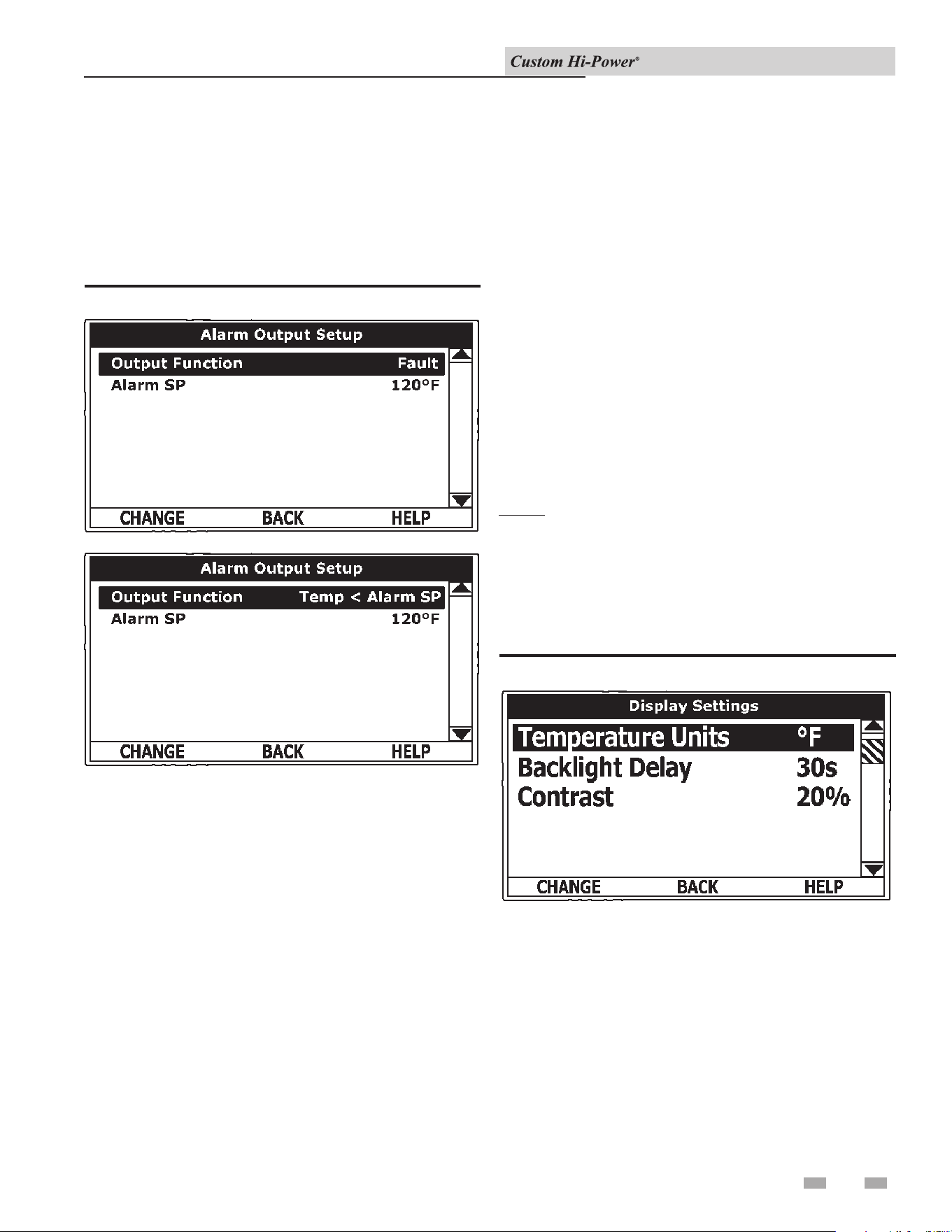
31
7 Control System Operation (continued)
is menu permits the user to set the condition (from a list of
options) for when the CCB’s integral alarm output relay will be
energized. Alarm relay connections (common, normally open,
and normally closed) are located on the J3 terminal strip on the
CCB - see wiring diagrams. Alarm output relay contacts are
capable of switching 1 amp maximum at 120 VAC.
e alarm relay operates in the background according to
the settings in this menu, and it is not capable of disabling
water heater operation. e alarm relay is used for external
notication/verication of various operational conditions such
as fault conditions and heating mode status. is relay can be
used with Building Management Systems and other external
supervisory controls.
Output Function
Adjustable user setting. Available options for the alarm output
function setting are:
Heating Mode: Used for heating mode on/o status notication.
Enable / Disable Closed: Used for notication and/or
verication of the enable/disable circuits open/closed status.
ere are two enable/disable circuits available for external
supervisory control(s) at the J7 socket on the CCB - see wiring
diagrams. Enable/disable circuit(s) status can be viewed in the
Heater Status Menu.
Temp < Heater SP: Used for external notication when current
tank temperature drops below Operating Set Point.
Temp < Alarm SP: Used for external notication when current
tank temperature drops below programmable Alarm SP.
Fault or Alert: Used for external notication whenever a fault
or alert condition is active.
Fault: Used for notication whenever a fault condition is active.
Disabled: Disables the Alarm Relay Output function.
Alarm SP
Adjustable user setting (90°F to 190°F) the control system uses
for the Temp < Alarm SP function described above. is setting
has no eect with any other Alarm Output functions.
Alarm Output Settings
Changing the user settings in this menu is done using the same
methods for changing the Operating Set Point.
NOTE: Adjustable user settings in the Alarm Output Setup
menu are unaected by Restore Factory Defaults.
Figure 7-6_Alarm Output Setup Menu
is menu permits the user to set display options for viewing
information on the UIM’s LCD screen.
Figure 7-7_Display Settings Menu
Temperature Units
Adjustable user setting that changes the temperature units
display to Celsius °C or Fahrenheit °F.
Backlight Delay
Adjustable user setting that determines how long the UIM’s
LCD backlight remains illuminated aer a key has been pressed.
Available settings are: Always O, 10, 30, or 60 seconds, and
Always On.
Contrast
Adjustable user setting to adjust the UIM’s LCD screen contrast
between text and background.
Alarm Output Setup Menu
Display Settings Menu
Installation & Operation Manual
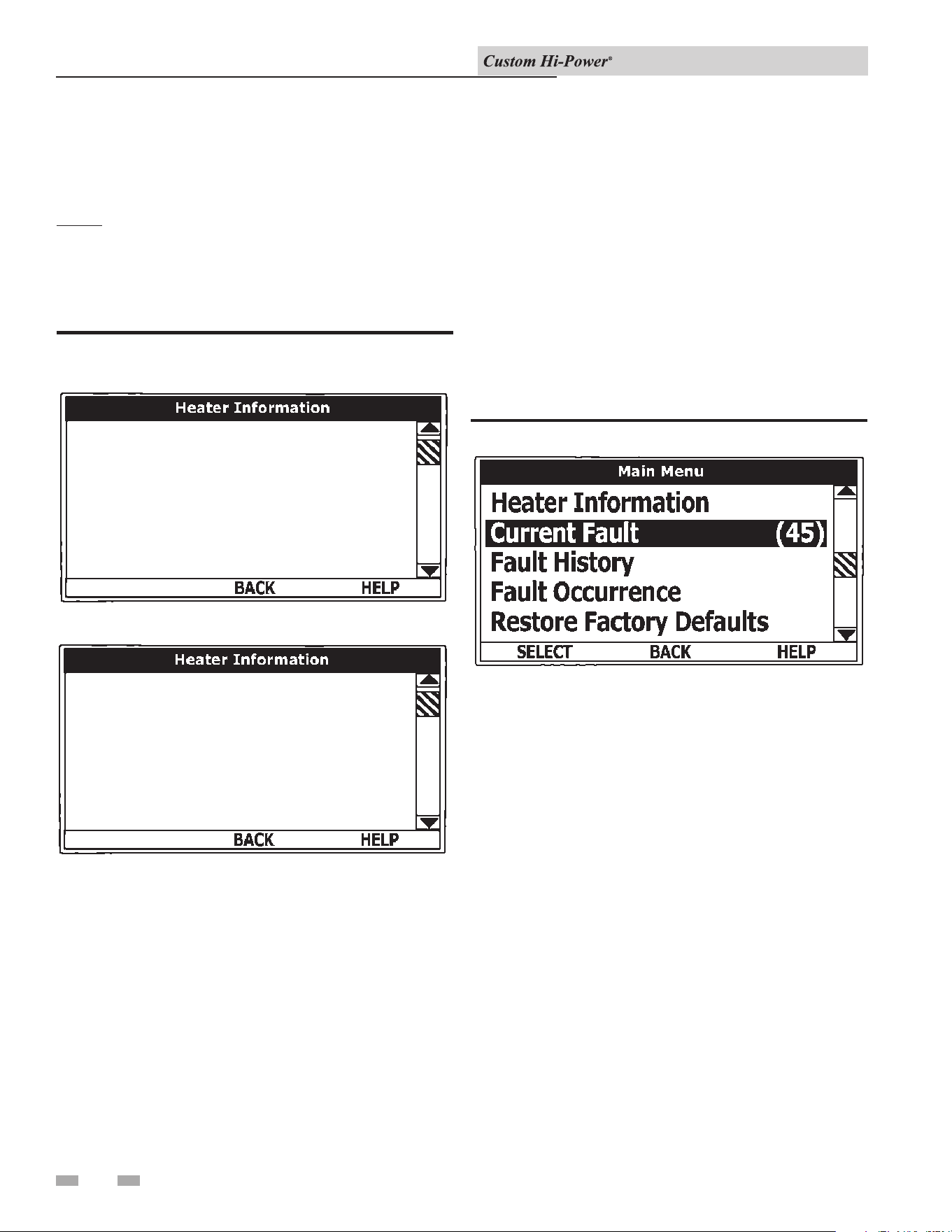
32
Display Settings
Changing the user settings in this menu is done using the same
methods for changing the Operating Set Point.
NOTE: Adjustable user settings in the Display Settings menu
are unaected by Restore Factory Defaults.
7 Control System Operation
is menu displays non-adjustable operational information.
Figure 7-8_Heater Information Menu
Bank 1 On Time
00000035
Bank 1 Cycles
00000042
2 days 46 mins
Total Heating Time
Elapsed Time
Cycle Count
7 days 18 hrs 35 mins
UIM Version 0.00
CCB Version 0.00
8 hrs 30 mins
Bank 3 Cycles
Bank 2 On Time
Bank 3 On Time
1 day 4 hrs 44 mins
00000025
TOP OF MENU
BOTTOM OF MENU
Elapsed Time
Total accumulated time the control system (water heater) has
been energized.
Total Heating Time
Total accumulated time the control system has been in the
heating mode (i.e., any heating elements have been energized).
Bank # Cycles
Total accumulated count of heating cycles for each heating bank.
Bank # On Time
Total accumulated heating on time for each heating bank.
CCB Version
Soware version for Central Control Board.
UIM Version
Soware version for User Interface Module.
is menu displays non-adjustable operation information. With
the Fault History sub menu selected in Main Menu, press the
Operational button underneath SELECT to display the current
fault or alert message. If there is not a fault or alert condition
currently active NONE is displayed to the right of this menu.
Figure 7-9_Main Menu - Current Fault Selected
is menu displays non-adjustable operational information.
e control system records and stores the last nine (9) fault and
alert messages in chronological order and displays them in this
menu. e most recent message will be at the top of the list. A
time stamp is displayed below each listed fault and alert message
showing when the fault or alert condition occurred.
e Fault History is useful when dealing with intermittent
operation problems or when the customer has reset the control
system prior to a service agent’s arrival.
With a fault or alert item selected, press the Operational
Button underneath VIEW to display the details for the fault or
alert message. e Fault/Alert message screen displays a brief
description of the condition, contact information, and access to
the Advanced Service Information sub menu.
Heater Information Menu Current Fault / Alert Menu
Fault History Menu
Installation & Operation Manual
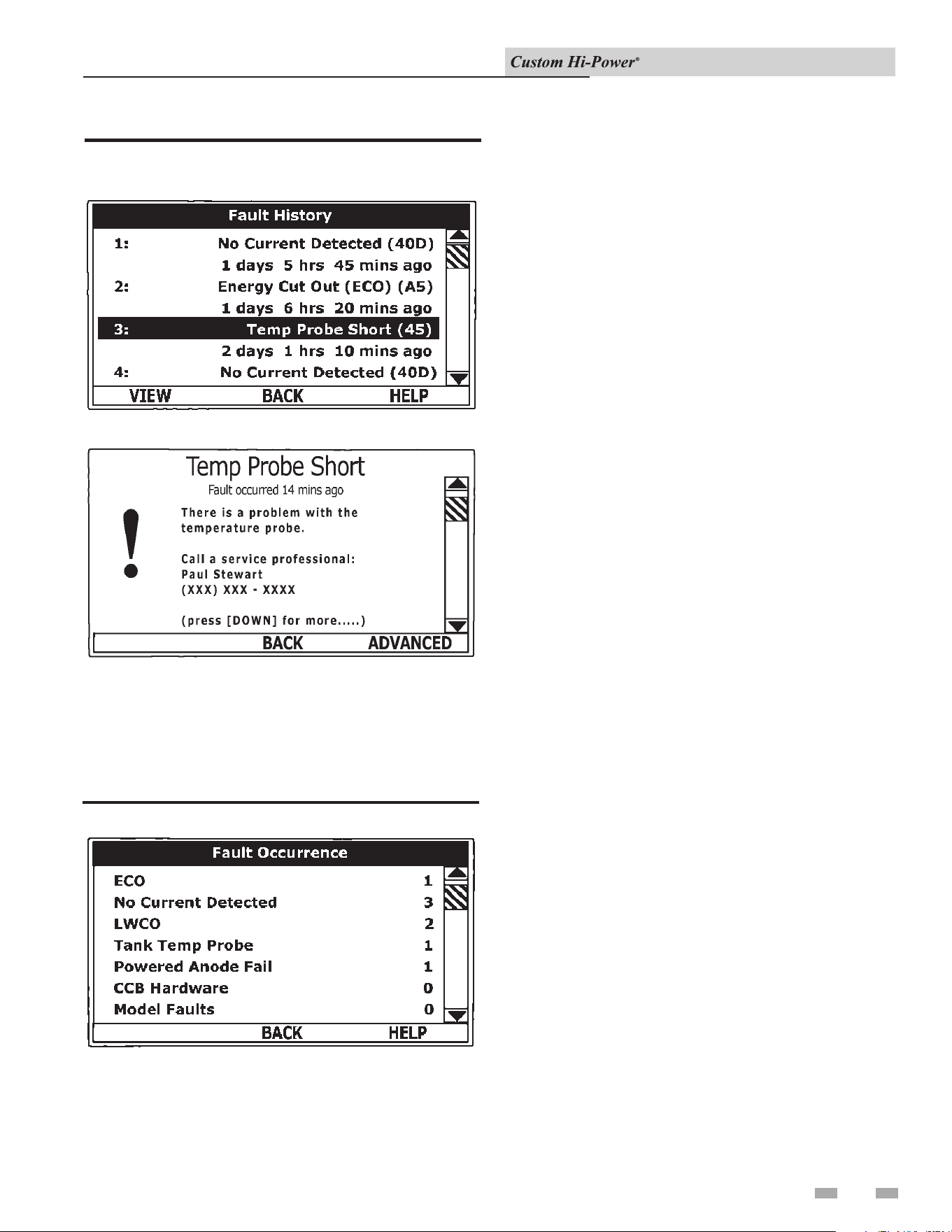
33
Figure 7-10_Fault History Screens
7 Control System Operation (continued)
FAULT HISTORY MENU
CURRENT / HISTORY FAULT MESSAGE
is menu displays the total accumulated number of times each
individual fault condition has occurred. is running total of
fault occurrences can be useful in determining which, if any,
operational problems have been persistent.
Figure 7-11_Fault Occurrence Menu
Fault Occurrence Menu
Installation & Operation Manual
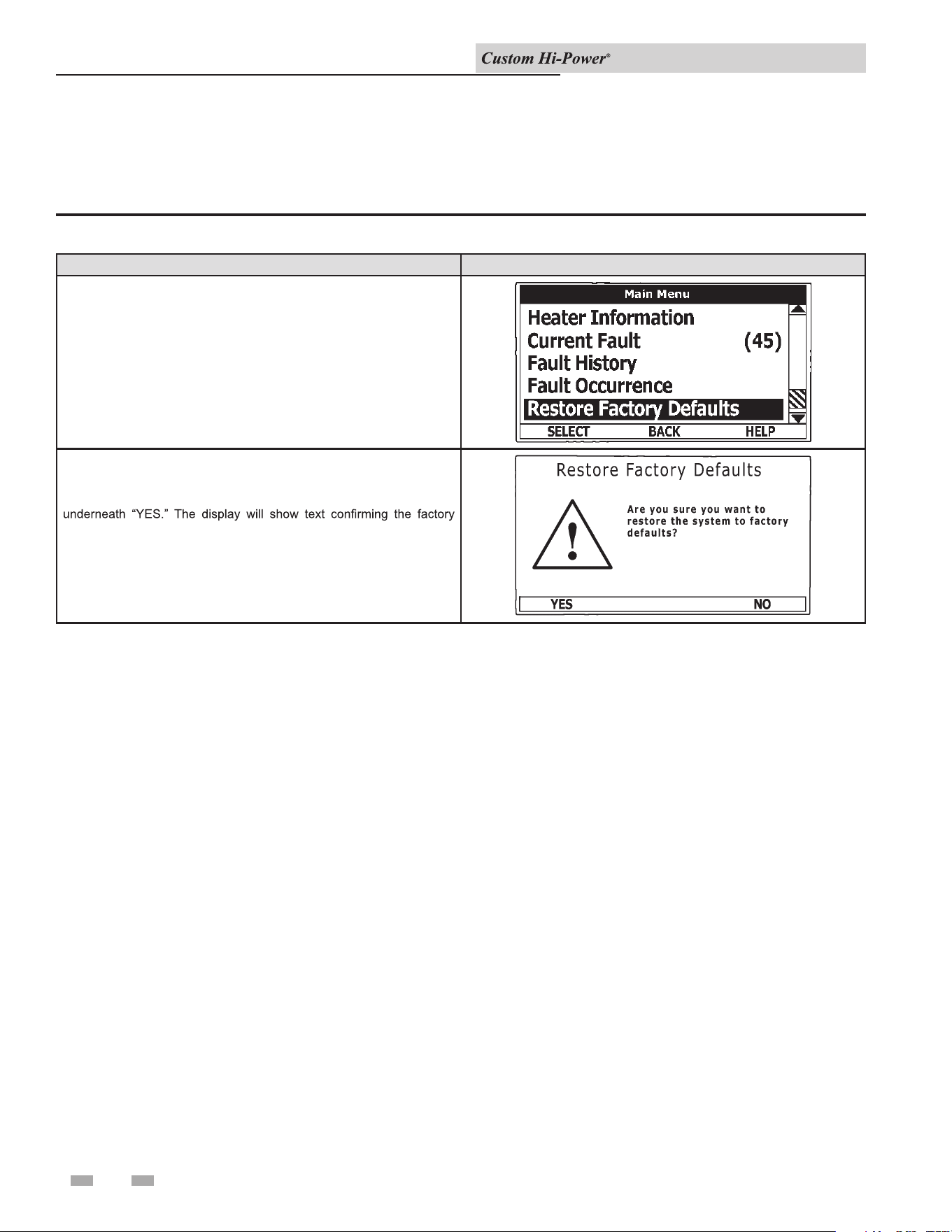
34
7 Control System Operation
is control system menu allows the user to restore most of the control system’s user settings to their factory default settings. User
settings in the Alarm Output Setup and Display Settings menus are unaected by executing Restore Factory Defaults.
Table 7-9_Restore Factory Defaults
ACTION DISPLAY
From the Main Menu use the Up/Down buttons to select (highlight in
black) the “Restore Factory Defaults” menu.
Press the Operational Button underneath “SELECT.” The Restore
Factory Defaults menu will be displayed.
From the Restore Factory Defaults menu press the Operational Button
default settings have been restored.
Press the Operational Button underneath “BACK” to exit the Restore
Factory Defaults menu.
Restore Factory Defaults Menu
Installation & Operation Manual
35
8 Maintenance
Burn hazard. Keep clear of drain valve
discharge outlet.
⚠DANGER
Periodically, the drain valve should be opened and the water
allowed to run until it ows clean. is will help to prevent
sediment buildup in the tank bottom.
Periodically check the temperature and pressure relief valve to
ensure that it is in operating condition. Li the lever at the top of
the valve several times until the valve seats properly and operates
freely.
Water heater maintenance includes periodic tank ushing and
cleaning and removal of lime scale from the heating element.
e heater tank is equipped with an anode rod to aid in corrosion
control and should be inspected periodically (see Anode Rod
Inspection).
Each water heater contains at least one (1) anode rod, which
will slowly deplete, due to electrolysis, prolonging the life of the
water heater by protecting the glass-lined tank from corrosion.
Adverse water quality, hotter water temperatures, high hot water
usage, hydronic heating devices, and water soening methods
can increase the rate of anode rod depletion. Once the anode rod
is depleted, the tank will start to corrode, eventually developing
a leak.
Articially soened water is exceedingly corrosive because the
process substitutes sodium ions for magnesium and calcium
ions.
e use of a water soener may decrease the life of the water
heater tank.
e anode rod should be inspected aer a maximum of three (3)
years and annually thereaer until the condition of the anode
rod dictates its replacement.
NOTE: Articially soened water requires the anode rod to be
inspected annually.
All water heaters eventually leak. Do
not install without adequate drainage.
CAUTION
e following are typical, but not all, signs of a depleted anode
rod:
• e majority of the rods diameter is less than 3/8".
• Signicant sections of the support wire (approximately 1/3
or more of the anode rod’s length) are visible.
If the anode rod shows signs of either or both, it should be
replaced. NOTE: Whether re-installing or replacing the anode
rod, check for any leaks and immediately correct if found.
To replace the anode:
1. Turn OFF electric supply to the water heater.
2. Shut OFF the water supply and open a nearby hot water
faucet to depressurize the water tank.
3. Drain the tank. Refer to Draining and Flushing for proper
procedures. Close the drain valve.
4. Remove the old anode rod.
5. Use Teon® tape or approved pipe sealant on threads, and
install a new anode rod.
6. Turn ON water supply and open a nearby hot water faucet
to purge air from the water system. Check for any leaks and
immediately correct any if found.
7. Restart the water heater as directed in this manual. See
the Features and Components illustrations for anode rod
location.
1. Turn OFF the electrical supply to the water heater at the
breaker or disconnect switch.
2. Ensure the cold water inlet valve is open.
3. Open a nearby hot water faucet and let the water run until
the water is no longer hot, then close the hot water faucet.
4. Connect a hose to the water heater drain valve and terminate
it to an adequate drain.
5. Ensure that the drain hose is secured before and during
the entire ushing procedure. Flushing is performed with
system water pressure applied to the water heater.
6. Open the water heater drain valve to ush the storage tank.
7. Flush the water heater storage tank to remove sediment and
allow the water to ow until it runs clean.
8. Close the water heater drain valve when ushing is
completed.
9. Remove the drain hose.
10. Fill the water heater (see the Filling the Water Heater section
in this manual).
11. Turn ON the electrical supply to the water heater.
12. Place the water heater back in operation. Allow the water
heater to complete several heating cycles to ensure it is
operating properly.
General
Anode Rod Inspection
Flushing the Water Heater
Installation & Operation Manual
8 Maintenance
36
Water borne impurities consist of ne particles of soil and sand,
which settle out and form a layer of sediment on the bottom of
the tank. In time, if not removed, the level of sediment might
reach the heating banks and cause their failure.
For convenience, sediment removal and bank lime scale removal
should be performed at the same time as follows in this chapter.
Lime scale accumulations on the heating banks is a normal
condition, common to all immersion-type banks. Factors which
aect the amounts of this formation are:
1. e amount of hot water used. As the volume of water
heated increases, more scale results.
2. Water temperature. As the temperature of the water is
increased, more scale is deposited on the banks.
3. Characteristics of water supply.
Regardless of water treatment, it is recommended that the banks
be inspected periodically. is can be completed by viewing the
element through the cleanout, optional 4"x 6" handhole, 12"x 16"
manway, ore removing the element.
Lime scale accumulations may cause noises to occur during
operation.
It is recommended that a heating bank be removed periodically
for examination. If it is scaled, all of the banks should be
removed and cleaned. If the tank bottom has an accumulation
of sediment, it should be removed.
Lime scale should be removed by dissolving the accumulation
in delimer. Do NOT use muriatic or hydrochloric acid based
deliming solutions to remove lime scale from the banks.
The process for lime scale removal is as follows:
1. Turn OFF electrical disconnect switch.
2. Drain the heater following Draining instructions.
3. Open front panel.
4. Disconnect the bank wiring. Try not to disturb the wiring
unnecessarily and reconnection will be easier.
5. Unscrew each bank.
6. Remove the banks and gaskets from the openings. Use a
twisting, pulling action to remove banks scaled beyond the
size of the tank openings. Brush loose scale from the banks.
7. Remove lime scale by placing the limed ends of the heating
banks into delimer and allow scale to dissolve. Do NOT
permit delimer or water to contact the heating bank
electrical terminals. Silicates, sulfates, and aluminates must
be removed by scraping or other mechanical means. Lime
scale dissolvents will not remove these types of scale which
are occasionally encountered.
Other Scale Removal:
1. Flush cleaned ends of banks with water when deliming or
cleaning is completed.
2. Remove sediment and scale from the tank bottom through
the access provided by the bank openings or drain valve
opening. e cold water inlet valve and drain valve may be
opened to aid the clean-out process.
3. Clean remaining gasket material from the tank and bank
anges. Do NOT reuse original bank gaskets.
4. Put new gaskets on each bank and install into tank openings.
Uniformly tighten bank bolts. Torque to approximately 32
./lbs.
5. Attach bank wires to the connection points from which they
were removed.
6. Follow Filling instructions to restore hot water service.
Check for water leaks around the banks, and check for
proper operation when the heater is lled. Close the front
panel.
Sediment Removal
Lime Scale Removal
Installation & Operation Manual
37
9 Troubleshooting
Before calling for service, check the following points to see if the
cause of trouble can be identied and corrected. Reviewing this
checklist may eliminate the need of a service call and quickly
restore hot water service.
1. Be certain the electrical disconnect switch serving the water
heater is in the ON position. e pilot toggle switch on the
cabinet should be ON.
In some areas, water heater electrical service may be limited
by the power company. If the heater operates on a controlled
circuit, heater recovery may be aected.
e optional manual override switches on the cabinet front
may be turned o, de-energizing the elements.
2. Check the fuses. e electrical disconnect switch usually
contains fuses. e water heater has fuses located behind
the cabinet front door (see the Features and Components
section of this manual for their location).
3. If the water was excessively hot, and is now cold, the ECO
high limit switch may have activated. See the Temperature
Regulation section of this manual for more information on
how to reset the ECO high limit controls. Repeated activation
of the ECO high limit switch should be investigated by a
qualied service agent.
4. e storage capacity and/or recovery rate of the water heater
may have been exceeded by a large demand for hot water.
Large demands require a recovery period to restore water
temperature.
5. Cold incoming water temperature will lengthen the time
required to heat water to the desired temperature. If the
heater was installed when incoming water temperature was
warm, colder water creates the eect of less hot water.
6. Sediment or lime scale may be aecting water heater
operation.
⚠WARNING
Before removing any access panels or
servicing the water heater, make sure
the electrical supply to the water heater
is turned OFF. Failure to do this could
result in death, serious bodily injury, or
property damage.
Refer to the Temperature Regulation section of this manual.
1. Sediment or lime scale accumulations on the elements causes
sizzling and hissing noises when the heater is operating. e
sounds are normal, however, the tank bottom and elements
should be cleaned. Refer to the Maintenance section of this
manual for details.
2. Some of the electrical components of the water heater make
sounds which are normal (i.e., contactors will “click” or snap
as the heater starts and stops).
1. Check to see if the drain valve is tightly closed.
2. e apparent leakage may be condensation which forms on
cool surfaces of the heater and piping.
3. If the outlet of the relief valve is leaking it may represent
excessive water pressure, excessive water temperature, or a
faulty temperature and pressure relief valve.
Excessive water pressure is the most common cause of relief
valve leakage. Water supply systems may, because of code
requirements or such conditions as high line pressure, among
others, have installed devices such as pressure reducing valves,
check valves, and back ow preventers. Devices such as these
cause the water system to be a closed system.
As water is heated, it expands (thermal expansion). In a closed
system the volume of water will grow when it is heated. As the
volume of water grows, there will be a corresponding increase in
water pressure due to thermal expansion. ermal expansion
can cause intermittent temperature-pressure relief valve
operation, or water discharged from the valve due to excessive
pressure build-up. is condition is not covered under the
limited warranty. e temperature-pressure relief valve is not
intended for the constant relief of thermal expansion.
A properly sized thermal expansion tank should be installed
on all closed systems to control the harmful eects of thermal
expansion. Contact a local qualied service agency to have a
thermal expansion tank installed.
4. Examine the ange area of the elements for gasket leakage.
Tighten the bolts or, if necessary, follow the Water and Lime
Scale Removal procedure in the Maintenance section of this
manual to replace the gaskets.
If You Cannot Identify or Correct the Source of
Malfunction:
1. Place the water heater electrical disconnect switch in the
OFF position.
2. Close the cold water inlet valve to the heater.
3. Contact a Qualied Service Agency in your area.
Call the telephone number listed on this manual for assistance
in locating replacement parts. When ordering parts, specify
complete model number, serial number (see rating plate),
quantity, and name of part desired. Standard hardware items
should be purchased locally.
Checklist
Water is Too Hot
Not Enough or No Hot Water
Replacement Parts
Leakage Checkpoints
Water Heater Makes Strange Sounds
Installation & Operation Manual
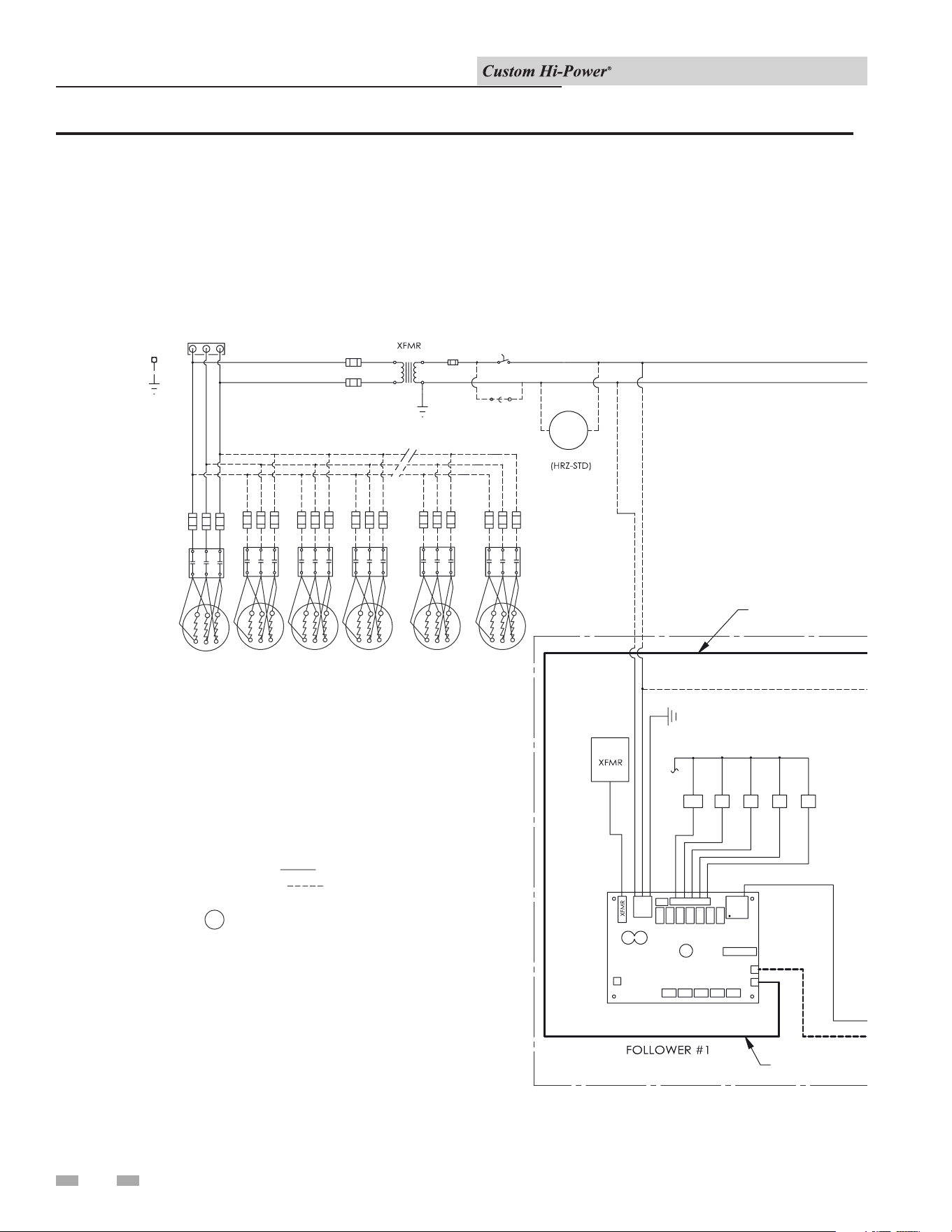
10 Diagrams
Installation & Operation Manual
Figure 10-1 Wiring Diagram
RD
BK
BL
PILOT
SWITCH
12345
120V
24V
120V SEC
BL
RD
N
G
W
BK
RD
FUSES
PRIMARY
FUSE
SECONDARY
208 - 600/3PH
BK
BK
J7
J3
PUMP
GND
12345
120V
24V
N
W
J7
J3
12345
24V
N
W
J7
J3
12345
24V
N
J7
J3
12345
24V
N
J7
J3
W
BK
BK
GG G
120V
120V
120V
W
W
OUT
IN
OUT
IN
OUT
IN
OUT
IN
OUT
IN
W
BK
BLK
BLK
RED
RED
BLK
BLK
RED
RED
BLK
BLK
RED
RED
BLK
BLK
RED
RED
BLK
BLK
RED
RED
HI TEMP
LIMIT SW.
BK
RD
RD
RDRD
RD
RD
RD
J5
J5
J5 J5 J5
14
RD
141414
14
J9
J11
J9
J11
J9
J11
J9
J11
J9
J11
TEMP
PROBE
CONTACTORS
BANKS
1234 6
(ONE (1), TWO (2), OR THREE (3)
ELEMENTS PER BANK)
G
BK BK BK
BANK 9
BANK 10
BANK 11
BANK 12
BANK 13
BANK 14
LEADER
(MULTIPLE CONTROL BOARDS)
DISPLAY
J10
PROBE
(SINGLE CONTROL BOARD)
NOTES:
STD WIRING
OPT'L WIRING
R1 REQUIRED IF AT
LEAST ONE FOLLOWER
BOARD IS USED.
BK BLACK
W WHITE
G GREEN
RD RED
SDI
JUMPER
CABLE (CAT 5)
CABLE (CAT 5)
CABLE (CAT 5)
CABLE (CAT 5)
CABLE (CAT 5)
CABLE (CAT 5)
LWCO
5
BK
W
JUMPER/BMS
BK
BK
BK
BK
BK
BK
BK
BK
BK
BK
TEMP
PROBE
SEE NOTES
J11
J9
RD
41
J5
DISPLAY
LIMIT SW.
HI TEMP
RED
RED
BLK
BLK
IN
OUT
J7
BK
BK
R1
BLK
W
N
24V
120V
54321
G
FUSES
BK
BANK 8
BANK 7
BANK 6
BANK 5
KBKBKBKBKB
W
BANK 19
BANK 18
BANK 17
BANK 16
BANK 15
KBKBKBKBKB
BANK 24
W
BANK 23
BANK 22
BANK 21
BANK 20
KBKBKBKBKB
RD
BANK 1
BANK 2
BANK 3
BANK 4
BANK 1
BANK 2
BANK 3
BANK 4
BANK 5
1
R1
3
RD
BK
BK
J3
JUMPER
JUMPER
JUMPER
CABLE (CAT 5)
CABLE (CAT 5)
LWCO
PROBE
RD
J10
JUMPER/BMS
38
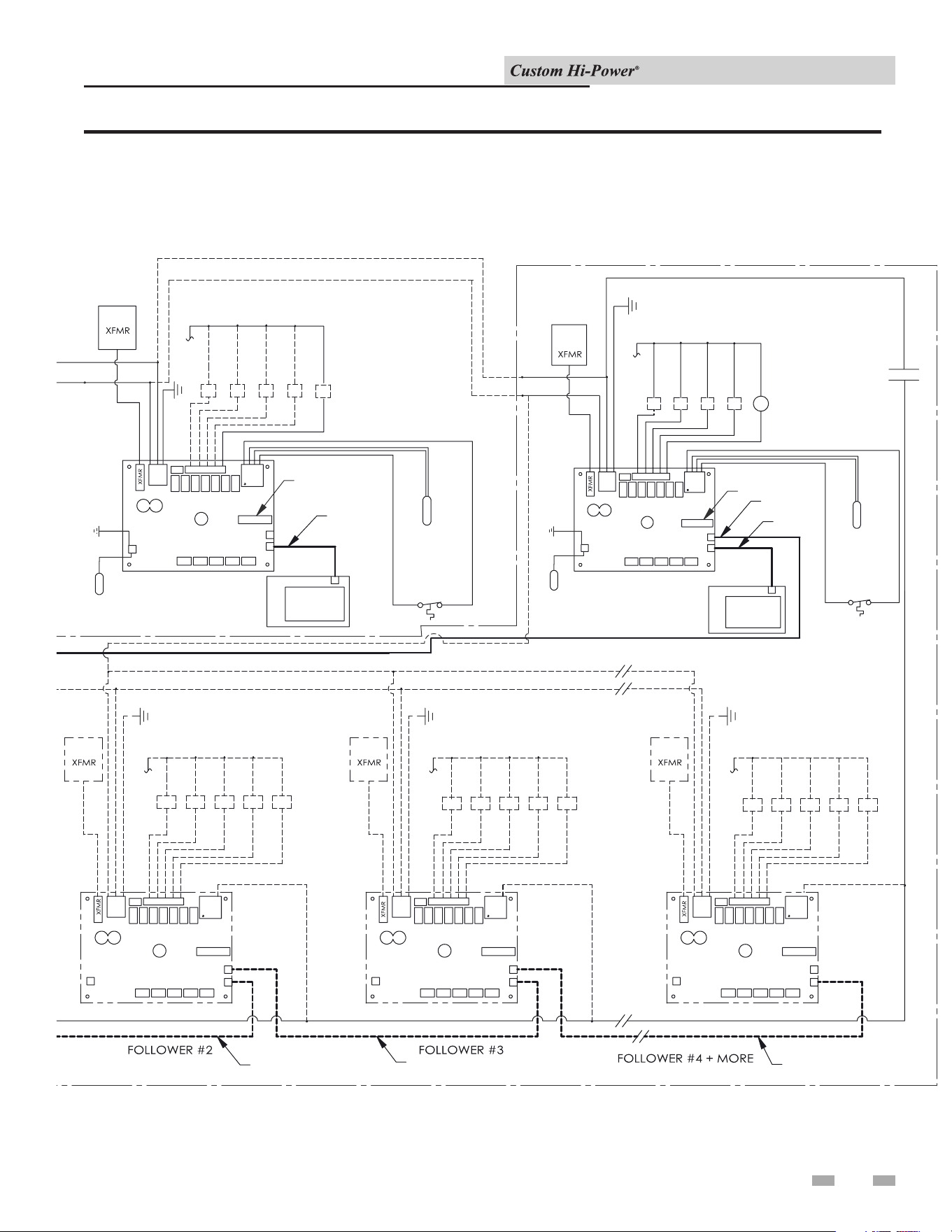
10 Diagrams (continued)
Installation & Operation Manual
Figure 10-1 Wiring Diagram (continued)
39
RD
BK
BL
PILOT
SWITCH
12345
120V
24V
120V SEC
BL
RD
N
G
W
BK
RD
FUSES
PRIMARY
FUSE
SECONDARY
208 - 600/3PH
BK
BK
J7
J3
PUMP
GND
12345
120V
24V
N
W
J7
J3
12345
24V
N
W
J7
J3
12345
24V
N
J7
J3
12345
24V
N
J7
J3
W
BK
BK
GG G
120V
120V
120V
W
W
OUT
IN
OUT
IN
OUT
IN
OUT
IN
OUT
IN
W
BK
BLK
BLK
RED
RED
BLK
BLK
RED
RED
BLK
BLK
RED
RED
BLK
BLK
RED
RED
BLK
BLK
RED
RED
HI TEMP
LIMIT SW.
BK
RD
RD
RDRD
RD
RD
RD
J5
J5
J5 J5 J5
14
RD
141414
14
J9
J11
J9
J11
J9
J11
J9
J11
J9
J11
TEMP
PROBE
CONTACTORS
BANKS
1234 6
(ONE (1), TWO (2), OR THREE (3)
ELEMENTS PER BANK)
G
BK BK BK
BANK 9
BANK 10
BANK 11
BANK 12
BANK 13
BANK 14
LEADER
(MULTIPLE CONTROL BOARDS)
DISPLAY
J10
PROBE
(SINGLE CONTROL BOARD)
NOTES:
STD WIRING
OPT'L WIRING
R1 REQUIRED IF AT
LEAST ONE FOLLOWER
BOARD IS USED.
BK BLACK
W WHITE
G GREEN
RD RED
SDI
JUMPER
CABLE (CAT 5)
CABLE (CAT 5)
CABLE (CAT 5)
CABLE (CAT 5)
CABLE (CAT 5)
CABLE (CAT 5)
LWCO
5
BK
W
JUMPER/BMS
BK
BK
BK
BK
BK
BK
BK
BK
BK
BK
TEMP
PROBE
SEE NOTES
J11
J9
RD
41
J5
DISPLAY
LIMIT SW.
HI TEMP
RED
RED
BLK
BLK
IN
OUT
J7
BK
BK
R1
BLK
W
N
24V
120V
54321
G
FUSES
BK
BANK 8
BANK 7
BANK 6
BANK 5
KBKBKBKBKB
W
BANK 19
BANK 18
BANK 17
BANK 16
BANK 15
KBKBKBKBKB
BANK 24
W
BANK 23
BANK 22
BANK 21
BANK 20
KBKBKBKBKB
RD
BANK 1
BANK 2
BANK 3
BANK 4
BANK 1
BANK 2
BANK 3
BANK 4
BANK 5
1
R1
3
RD
BK
BK
J3
JUMPER
JUMPER
JUMPER
CABLE (CAT 5)
CABLE (CAT 5)
LWCO
PROBE
RD
J10
JUMPER/BMS

Revision Notes: Revision A (PCP# 3000005344 / CN# 500005576)
initial release.
Revision B (PCP #3000054496 / CN #500041133) reflects the removal
of the "circulating pump" paragraph on page 12.
Revision C (PCP #3000060820 / CN #500046810) reflects the addition
of a dielectric notice on page 12.
100278842_2000537422_Rev C
06/24