Part Number 000015432 4/18
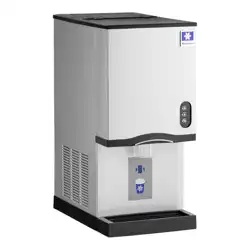
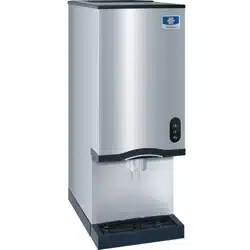
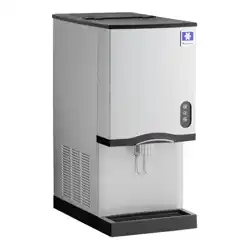
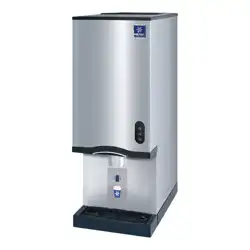
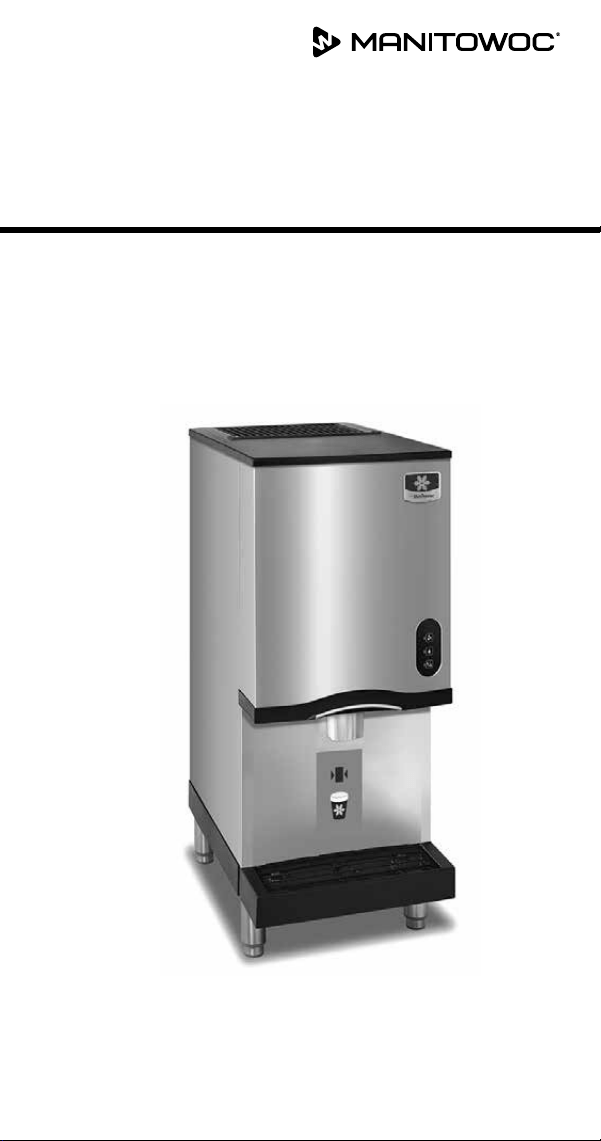
Countertop Nugget
Ice Machines
CNF201 & CNF202
Technician’s Handbook


Safety Notices
Read these precautions to prevent personal injury:
• Read this manual thoroughly before operating,
installing or performing maintenance on the
equipment. Failure to follow instructions in this
manual can cause property damage, injury or death.
• Routine adjustments and maintenance procedures
outlined in this manual are not covered by the
warranty.
• Proper installation, care and maintenance are essential
for maximum performance and trouble-free operation
of your equipment.
• Visit our website www.manitowocice.com for manual
updates, translations, or contact information for
service agents in your area.
• This equipment contains high voltage electricity and
refrigerant charge. Installation and repairs are to be
performed by properly trained technicians aware of
the dangers of dealing with high voltage electricity
and refrigerant under pressure. The technician
must also be certified in proper refrigerant handling
and servicing procedures. All lockout and tag out
procedures must be followed when working on this
equipment.
• This equipment is intended for indoor use only. Do not
install or operate this equipment in outdoor areas.
As you work on this equipment, be sure to pay close
attention to the safety notices in this handbook.
Disregarding the notices may lead to serious injury and/or
damage to the equipment.

n
Warning
Follow these electrical requirements during
installation of this equipment.
• All field wiring must conform to all applicable
codes of the authority having jurisdiction. It is
the responsibility of the end user to provide the
disconnect means to satisfy local codes. Refer to
rating plate for proper voltage.
• This appliance must be grounded.
• This equipment must be positioned so that the plug
is accessible unless other means for disconnection
from the power supply (e.g., circuit breaker or
disconnect switch) is provided.
• Check all wiring connections, including factory
terminals, before operation. Connections can
become loose during shipment and installation.

n
Warning
Follow these precautions to prevent personal injury
during installation of this equipment:
• Installation must comply with all applicable
equipment fire and health codes with the authority
having jurisdiction.
• To avoid instability the installation area must be
capable of supporting the combined weight of the
equipment and product. Additionally the equipment
must be level side to side and front to back.
• Ice machines require a deflector when installed on
an ice storage bin. Prior to using a non-OEM ice
storage system with this ice machine, contact the
bin manufacturer to assure their ice deflector is
compatible.
• Remove all removable panels before lifting and
installing and use appropriate safety equipment
during installation and servicing. Two or more
people are required to lift or move this appliance to
prevent tipping and/or injury.
• Do not damage the refrigeration circuit when
installing, maintaining or servicing the unit.
• Connect to a potable water supply only.
• This equipment contains refrigerant charge.
• Installation of the line sets must be performed by
a properly trained and EPA certified refrigeration
technician aware of the dangers of dealing with
refrigerant charged equipment.

n
Warning
Follow these precautions to prevent personal injury
while operating or maintaining this equipment.
• Legs or casters must be installed and the legs/casters
must be screwed in completely. When casters
are installed the mass of this unit will allow it to
move uncontrolled on an inclined surface. These
units must be tethered/secured to comply with all
applicable codes. Swivel casters must be mounted
on the front and rigid casters must be mounted on
the rear. Lock the front casters after installation is
complete.
• Some 50 Hz models may contain up to 150 grams
of R290 (propane) refrigerant. R290 (propane)
is flammable in concentrations of air between
approximately 2.1% and 9.5% by volume (LEL lower
explosion limit and UEL upper explosion limit). An
ignition source at a temperature higher than 470°C
is needed for a combustion to occur.
• Refer to nameplate to identify the type of refrigerant
in your equipment.
• Only trained and qualified personnel aware of the
dangers are allowed to work on the equipment.
• Read this manual thoroughly before operating,
installing or performing maintenance on the
equipment. Failure to follow instructions in this
manual can cause property damage, injury or death.
• Crush/Pinch Hazard. Keep hands clear of moving
components. Components can move without
warning unless power is disconnected and all
potential energy is removed.
• Moisture collecting on the floor will create a
slippery surface. Clean up any water on the floor
immediately to prevent a slip hazard.
n
Warning
Follow these precautions to prevent personal injury
while operating or maintaining this equipment.
• Objects placed or dropped in the bin can affect
human health and safety. Locate and remove any
objects immediately.
• Never use sharp objects or tools to remove ice or
frost.
• Do not use mechanical devices or other means to
accelerate the defrosting process.
• When using cleaning fluids or chemicals, rubber
gloves and eye protection (and/or face shield) must
be worn.
DANGER
Do not operate equipment that has been misused,
abused, neglected, damaged, or altered/modified
from that of original manufactured specifications.
This appliance is not intended for use by persons
(including children) with reduced physical, sensory
or mental capabilities, or lack of experience and
knowledge, unless they have been given supervision
concerning use of the appliance by a person
responsible for their safety. Do not allow children to
play with, clean or maintain this appliance without
proper supervision.

n
Warning
Follow these precautions to prevent personal injury
during use and maintenance of this equipment:
• It is the responsibility of the equipment owner to
perform a Personal Protective Equipment Hazard
Assessment to ensure adequate protection during
maintenance procedures.
• Do Not Store Or Use Gasoline Or Other Flammable
Vapors Or Liquids In The Vicinity Of This Or Any
Other
• Appliance. Never use flammable oil soaked cloths or
combustible cleaning solutions for cleaning.
• All covers and access panels must be in place and
properly secured when operating this equipment.
• Risk of fire/shock. All minimum clearances must be
maintained. Do not obstruct vents or openings.
• Failure to disconnect power at the main power
supply disconnect could result in serious injury or
death. The power switch DOES NOT disconnect all
incoming power.
• All utility connections and fixtures must be
maintained in accordance with the authority having
jurisdiction.
• Turn off and lockout all utilities (gas, electric, water)
according to approved practices during maintenance
or servicing.
• Units with two power cords must be plugged
into individual branch circuits. During movement,
cleaning or repair it is necessary to unplug both
power cords.
.

Table of Contents
Part Number 000015432 4/18 9
General Information
Model Numbers............................... 13
Model/Serial Number Location ............... 13
Manitowoc Cleaner and Sanitizer............. 13
Legs........................................... 14
Touchless Sensing Option .................... 14
Ice Machine Warranty Information............14
Installation
Location of Ice Machine....................... 15
Ice Machine Clearance Requirements ......... 16
Ice Machine Heat of Rejection ................ 16
Electrical Service.............................. 17
Circuit Ampacity .......................... 17
Ice Machine Head Section Water
SupplyandDrains ............................ 18
Potable Water Supply...................... 18
Potable Water Inlet Lines .................. 18
Drain Connections ........................ 19
Operation.....................................21
Ice Making Sequence of Operation ........... 21
CNF201 - CNF202 Nugget Machines........ 21
Touch Pad Sequence of Operation ......... 23
Water Level Check......................... 23
Sequence of Operation Chart ............. 24

10 Part Number 000015432 4/18
Maintenance
Manitowoc’s Cleaning Technology............ 26
Exterior Cleaning .......................... 27
Preventative Maintenance Procedure ........ 28
Heavily Scaled Cleaning Procedure ........... 31
Cleaning Procedure ........................... 33
Sanitizing Procedure.......................... 35
Component Disassembly for Cleaning and
Sanitizing ..................................... 37
General Information ....................... 37
Cleaning the Condenser ................... 51
Removal from Service/Winterization ......... 52
General ................................... 52
Troubleshooting
SafeGuard Feature ............................ 53
SafeGuards ................................... 55
No Water.................................. 55
No Ice Production ......................... 56
Ice Machine Will Not Run Diagnostics......... 58
Refrigeration Diagnostics..................... 64
Before Beginning Service . . . . . . . . . . . . . . . . . . 64
Installation/Visual Inspection Checklist..... 64
Water System Checklist .................... 65
Ice Production/Quality Check .............. 66
Analyzing Discharge Pressure.............. 67
Analyzing Suction Pressure ................69

Part Number 000015432 4/18 11
Component Check Procedures
Electrical Components ........................ 71
Main Fuse ................................. 71
ICE/OFF/CLEAN Toggle Switch ............. 72
Float Switch ............................... 73
Ice Damper and Hall Effect Switches .......74
Selector Switch............................ 77
Dispense Lever Activated .................. 77
Touchless Sensor Activated ................ 78
Dispense Switch........................... 80
Touchless Sensor .......................... 81
High Pressure Cutout Control .............. 82
Fan Cycle Control.......................... 83
Low Pressure Cutout (LPCO) Control ....... 84
Compressor Electrical Diagnostics ......... 85
Diagnosing Start Components ............. 87
Refrigerant Recovery/Evacuation............. 89
Normal Self-Contained Procedures.........89
System Contamination Clean-Up ............. 93
Determining Severity of Contamination.... 93
Cleanup Procedure ........................ 95
Replacing Pressure Controls Without
Removing Refrigerant Charge..............98
Component Specifications
Main Fuse ................................101
ICE/OFF/CLEAN Toggle Switch ............101
High Pressure Cutout (HPCO) Control .....101
Filter-Driers ..............................101
Total System Refrigerant Charge.............102

12 Part Number 000015432 4/18
Charts
Cycle Times/24-Hour Ice Production/Refrigerant
Pressure Charts ..............................103
CNF201 ..................................104
CNF202 ..................................105
Diagrams
Wiring Diagrams .............................107
CNF201 & CNF202 115/60/1 - 230/60/1 -
230/50/1 .................................108
Electronic Control Board.....................110
CNF201 & CNF202 Control Board..........110
Refrigeration Tubing Schematic .............112
CNF201 - CNF202.........................112
Part Number 000015432 4/18 13
Model Numbers
Self-Contained Air-Cooled
CNF201A - Air-cooled lever dispense model
CNF201AT - Air-cooled touchless dispense model
CNF202A - Air-cooled lever dispense model
CNF202AT - Air-cooled touchless dispense model
Model/Serial Number Location
These numbers are required when requesting information
from your local Manitowoc Distributor, service
representative, or Manitowoc Ice, Inc. The model and
serial number are listed on the OWNER WARRANTY
REGISTRATION CARD. They are also listed on the MODEL/
SERIAL NUMBER DECAL affixed to the ice machine.
Manitowoc Cleaner and Sanitizer
Manitowoc Ice Machine Cleaner and Sanitizer are available
in 16 oz. (473 ml) bottles. These are the only cleaners and
sanitizer approved for use with Manitowoc products.
,
Caution
Nugget models must use cleaner part number
000000084 ONLY (clear cleaner). Damage to the
evaporator will result with repeated use or high
concentrations of standard (green) cleaner. This
damage is not covered by the warranty.
Cleaner Part Number Sanitizer Part Number
16 oz. 000000084 16 oz. 9405653
1 gal N/A 1 gal. 9405813
General Information

14 Part Number 000015432 4/18
Legs
Optional four inch adjustable legs are available.
SEALING TO COUNTERTOP OR STAND
Ice machines installed without legs must be sealed to the
countertop or stand. This prevent liquids or debris from
infiltrating beneath the ice machine.
Touchless Sensing Option
Touchless sensing can be ordered installed on the ice
machine from the factory or a field conversion kit is
available. The field conversion kit includes a replacement
front panel and instructions for installation
Ice Machine Warranty Information
For warranty information visit:
http://www.manitowocice.com/Service/Warranty
• Warranty Verification
• Warranty Registration
• View and download a copy of the warranty Owner
Warranty Registration Card
Warranty coverage begins the day the ice machine is
installed.

Part Number 000015432 4/18 15
n
Warning
PERSONAL INJURY POTENTIAL
Remove all ice machine panels before lifting and
installing.
Location of Ice Machine
The location selected for the ice machine must meet the
following criteria. If any of these criteria are not met,
select another location.
• The location must be indoors and free of airborne and
other contaminants..
• The air temperature must be at least 45°F (7°C), but
must not exceed 110°F (43°C).
• The water temperature must be at least 45°F (7°C), but
must not exceed 90°F (32°C).
• The location must not be near heat-generating
equipment or in direct sunlight.
• The location must be capable of supporting the weight
of the ice machine and a full bin of ice and allow the
ice machine to be level front to back and side to side.
• The location must allow enough clearance for water
and electrical connections in the rear of the ice
machine. The drain can be routed out the rear or
bottom of dispenser.
• The location must not obstruct airflow through or
around the ice machine. Airflow is in the left side and
out the top. Refer to chart for clearance requirements.
• The ice machine must be protected if it will be
subjected to temperatures below 32°F (0°C). Failure
caused by exposure to freezing temperatures is not
covered by the warranty. See “Removal from Service/
Winterization”
Installation
16 Part Number 000015432 4/18
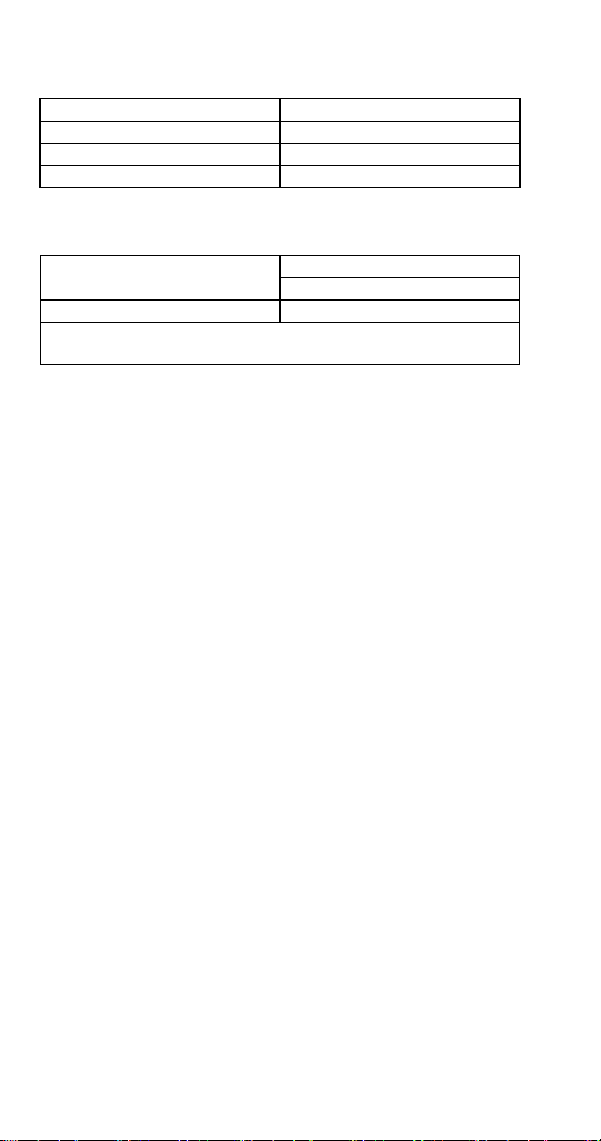
Ice Machine Clearance Requirements
CNF201 - CNF202 Self-Contained Air-Cooled
Top 24" (61.0 cm)
Sides 8" (20.3 cm)
Back 5" (12.7 cm)
Ice Machine Heat of Rejection
Series Ice Machine Heat of Rejection*
Air Conditioning
CNF201 - CNF202 2,300
* BTU/Hour. Because the heat of rejection varies during the ice
making cycle, the figure shown is an average.
Ice machines, like other refrigeration equipment, reject
heat through the condenser. It is helpful to know the
amount of heat rejected by the ice machine when sizing air
conditioning equipment where self-contained air-cooled
ice machines are installed.
Part Number 000015432 4/18 17
Electrical Service
General
n
Warning
All wiring must conform to local, state and national
codes.
Voltage
The maximum allowable voltage variation is ± 10% of the
rated voltage on the ice machine model/serial number
plate at start-up (when the electrical load is highest).
Fuse/Circuit Breaker
A separate fuse/circuit breaker must be provided for each
ice machine. Circuit breakers must be H.A.C.R. rated (does
not apply in Canada).
n
Warning
The ice machine must be grounded in accordance with
national and local electrical codes.
CIRCUIT AMPACITY
The minimum circuit ampacity is used to help select
the wire size of the electrical supply. (Minimum circuit
ampacity is not the ice machine’s running amp load.)
The wire size (or gauge) is also dependent upon location,
materials used, length of run, etc., so it must be
determined by a qualified electrician.
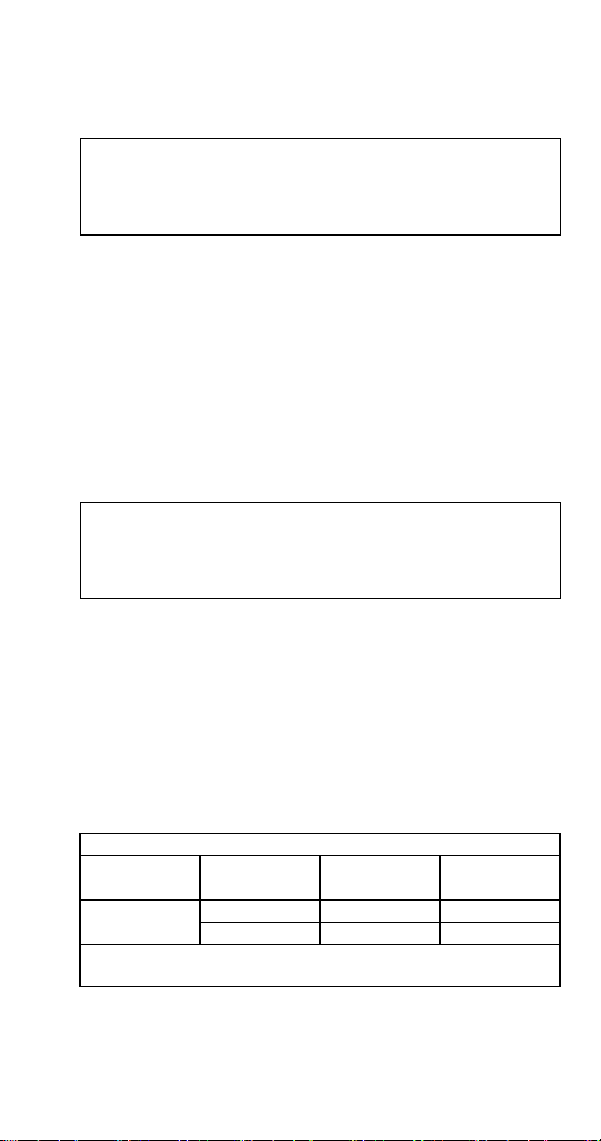
Self Contained Air-Cooled
Ice Machine
Voltage Phase
Cycle
Max. Fuse/
Circuit Breaker
Total Amps
CNF201
CNF202
115/1/60 15* 10.3*
230/1/50 15* 5.4*
*Indicates preliminary data - Model/Serial plate information
overrides the data in this chart.

18 Part Number 000015432 4/18
Ice Machine Head Section Water
Supply and Drains
POTABLE WATER SUPPLY
The ice machine must be connected to a potable water
supply only. Local water conditions may require treatment
of the water to inhibit scale formation, filter sediment,
remove chlorine, and improve taste and clarity.
Important
If you are installing a Manitowoc water filter system,
refer to the Installation Instructions supplied with the
filter system for ice making water inlet connections.
POTABLE WATER INLET LINES
Follow these guidelines to install water inlet lines:
• Do not connect the ice machine to a hot water supply.
Be sure all hot water restrictors installed for other
equipment are working. (Check valves on sink faucets,
dishwashers, etc.)
• If water pressure exceeds the maximum recommended
pressure of 80 psig (5.5 Bar), obtain a water pressure
regulator from your Manitowoc Distributor.
• Install a water shut-off valve and union for both the ice
making and condenser water lines.
• Insulate water inlet lines to prevent condensation.

Part Number 000015432 4/18 19
DRAIN CONNECTIONS
Follow these guidelines when installing drain lines to
prevent drain water from flowing back into the ice
machine and storage bin:
• Drain lines must have a 1.5 in. drop per 5 ft. of run
(2.5 cm per meter), and must not create traps.
• The floor drain must be large enough to accommodate
drainage from all drains.
• Run separate bin drain line. Insulate to prevent
condensation.
• Vent the bin drain to the atmosphere.
• Drains must have a union or other suitable means to
allow a place of disconnection from the ice machine
when servicing is required.


Part Number 000015432 4/18 21
Ice Making Sequence of Operation
CNF201 - CNF202 NUGGET MACHINES
Ice Making Sequence of Operation
PRIOR TO START-UP
When the toggle switch is placed in the ICE position, the
following must occur in the listed order before ice making
will start.
• The 15-minute delay period must be expired. The
delay period starts upon application of power or a
change in toggle switch position.
• The ice chute damper must be in the closed or down
position.
• The water sensing switch must be closed (water
reservoir full of water and water sensing float in the up
position).
INITIAL START-UP
A 15-minute delay period must expire. The delay period
starts to time out upon application of power and can
only be overridden by depressing the test switch on the
control board. The gear motor energizes and when water
in the reservoir closes the water sensing (float switch) the
compressor and condenser fan motor energize.
FREEZE CYCLE
The float valve automatically maintains the water level in
the reservoir. The ice damper will open and close to verify
ice production. The ice machine will continue to make ice
until the ice damper is held open (up) as ice fills the bin.
Operation

22 Part Number 000015432 4/18
AUTOMATIC SHUTOFF
When the ice damper is held open by ice, the gear motor,
compressor and condenser fan de-energize. The ice
machine will remain off until the 15-minute delay period
expires and the ice damper closes.
RESTART AFTER AUTOMATIC SHUTOFF
The 15-minute delay period must be expired. The delay
period starts when the ice machine enters Automatic
Shutoff and can not be overridden.
The restart sequence is dependent on the amount of time
the ice machine has been off:
1. The ice machine was off for less than 30 minutes.
When the 15-minute delay period expires, the gear motor,
compressor and condenser fan motor energize.
2. The ice machine was off for more than 30 minutes.
The gear motor and dump valve energize to drain the
water from the evaporator and reservoir. After 45 seconds,
the dump valve de-energizes. When the reservoir fills with
water, the water sensing switch closes and the compressor
and condenser fan motor energize.
CHANGING TOGGLE SWITCH POSITION IN THE
FREEZE CYCLE
Moving the toggle switch from ICE to OFF will start a
15-minute delay period.
• Moving the toggle switch immediately to the ICE
position - The ice machine waits 15 minutes, then
starts.
• Moving the toggle switch to the ICE position after 15
minutes have elapsed - The ice machine immediately
starts.

Part Number 000015432 4/18 23
Control Board Features
POWER INTERRUPTION DELAY
If power is disconnected, the ice machine stops. When
power is reapplied, a 15-minute delay is initiated.
SAFEGUARDS
The ice machine control board has safety features to
protect the ice machine from severe failures. The ice
machine will stop when conditions arise that would cause
major component failure. Refer to Safeguards for details.
TOUCH PAD SEQUENCE OF OPERATION
1. The control board monitors the touch pad. Pressing/
selecting Ice, Water, or Ice & Water will energize
the corresponding blue Led selection and waits for
dispense lever or touchless sensor activation.
2. Depressing the dispense lever or activating the
touchless sensor closes the relay selected with the
touch pad. Depending on selection, either the water
solenoid, ice dispense motor or both components
activate.
WATER LEVEL CHECK
The float valve maintains the correct water level. The
water level is factory set and normally will not require
adjustment. The water level is correct if the Water Level
indicator light is energized and no water is entering the
overflow tube.
The float valve is secured with 2 stop nuts. If an
adjustment is required, raise or lower the stop nuts as
needed.
24 Part Number 000015432 4/18
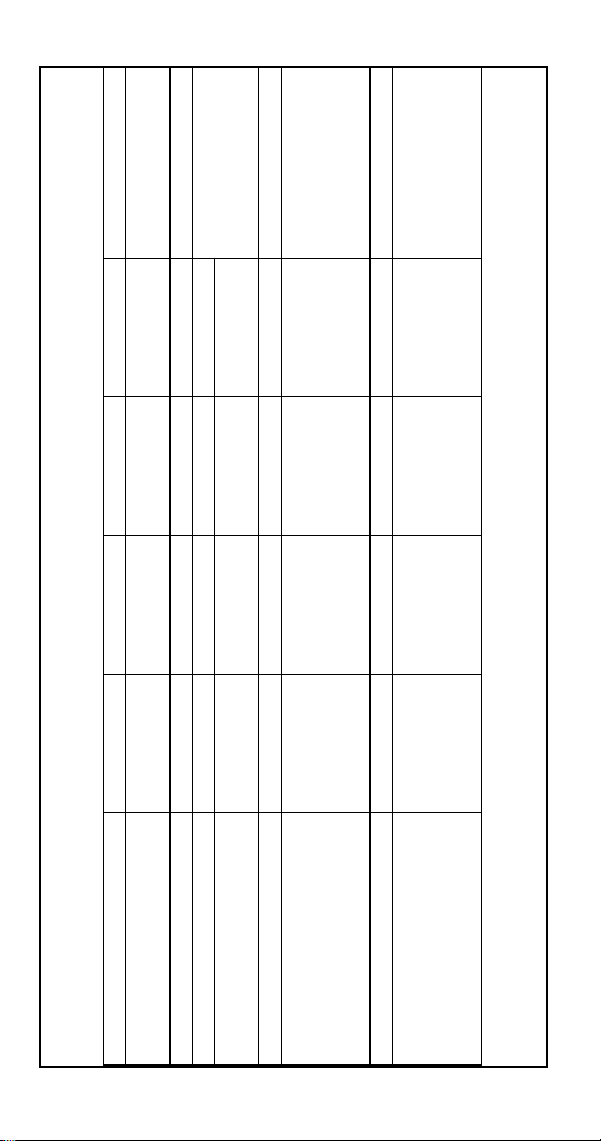
SEQUENCE OF OPERATION CHART
Nugget Machines
Sequence Contactor Coil Dump Valve Gear Motor Ice Damper Duration
Initial Start-Up
Time Delay
Off Off Off Closed 15 Minutes
Gear Motor Start Off Off On Closed 5 Seconds
Compressor Start On Off On Closed
Until Ice Holds Damper
OpenFreeze Cycle On Off On
Moves to Verify
Ice Production
Automatic Shut-Off Off Off Off Open Until Damper Closes
Restart
More than 30 minutes have
passed since automatic shutoff
cycle initiated
Off On Off Closed 45 Second Flush cycle,
Initial Startup Off Off On Closed 5 Seconds
Restart
Less than 30 minutes have
passed since automatic shutoff
cycle initiated
Off Off On Closed
15 minute delay from
full bin initiation must
expire, then gear motor
starts
Part Number 000015432 4/18 25
Maintenance procedures or failures due to a lack of
maintenance are not covered by the warranty.
Manitowoc Ice Machine Cleaner and Sanitizer are the only
products approved for use in Manitowoc ice machines.
,
Caution
Use the correct Manitowoc approved metal safe
Ice Machine Cleaner (part number 000000084) and
Sanitizer (part number 9405653). It is a violation
of Federal law to use these solutions in a manner
inconsistent with their labeling. Read and understand
all labels printed on bottles before use.
,
Caution
Do not mix Cleaner and Sanitizer solutions together. It
is a violation of Federal law to use these solutions in a
manner inconsistent with their labeling.
n
Warning
Wear rubber gloves and safety goggles (and/or face
shield) when handling ice machine Cleaner or Sanitizer.
n
Warning
If you do not understand the procedures or the safety
precautions that must be followed, call your local
Manitowoc Distributor or Manitowoc Ice.
Maintenance

26 Part Number 000015432 4/18
Manitowoc’s Cleaning Technology
Manitowoc CNF201 - CNF202 Ice Machines allow the
initiation and completion of a cleaning cycle at the flip
of a switch. This cycle will permit cleaning of all surfaces
that come in contact with the water distribution system.
Periodic maintenance must be performed that includes
sanitizing the bin and adjacent surface areas, which are not
contacted by the water distribution system.
Depending on local water conditions Manitowoc
recommends initiating preventative maintenance
cleaning procedures between the 6-month cleanings. This
preventive maintenance removes mineral build-up from
the evaporator, which results in peak efficiency and lower
operating costs.
This technology allows initiation and completion of a clean
cycle, after which the ice machine automatically starts ice
making again.
There are three separate cleaning procedures.
Heavily Scaled Cleaning Procedure
Perform this procedure if you have some or all of these
symptoms.
• Grinding, popping or squealing noises from the
evaporator.
• Grinding noise from gearbox.
• Ice machine trips speed sensor.
A Cleaning/Sanitizing Procedure must be performed after
this procedure.
Cleaning/Sanitizing Procedure
This procedure must be performed a minimum of once
every six months:
• All ice must be removed from the bin/dispenser.
• The ice machine and bin/dispenser must be
disassembled, cleaned and sanitized.
• The ice machine produces ice with the cleaner and
sanitizer solutions.
• All ice produced during the cleaning and sanitizing
procedure must be discarded.

Part Number 000015432 4/18 27
Preventative Maintenance Cleaning Procedure
Perform this procedure as often as required for your water
conditions:
• Allows cleaning the ice machine without removing all
of the ice from the bin/dispenser.
• Removes mineral deposits from areas that are in direct
contact with water during the Freeze cycle (reservoir,
evaporator, auger, drain lines).
EXTERIOR CLEANING
Clean the area around the ice machine as often as
necessary to maintain cleanliness and efficient operation.
Use cleaners designed for use with stainless steel products.
Sponge any dust and dirt off the outside of the ice machine
with mild soap and water. Wipe dry with a clean, soft
cloth.
Heavy stains should be removed with stainless steel wool.
Never use plain steel wool or abrasive pads. They will
scratch the panels.
WEEKLY
Remove grill from scrap ice tray and wipe splash panel,
scrap ice tray and grill with sanitizer & water solution. Pour
excess solution in scrap ice tray to clear drain.
TOUCHLESS SENSOR ONLY
Wipe sensor window with a soft cloth and mild detergent.
Rinse with clear water and dry with a clean soft cloth.
Dust and dirt can be removed from exterior surfaces with
mild household dish-washing detergent and warm water.
Wipe dry with a clean, soft cloth.
28 Part Number 000015432 4/18
Preventative Maintenance Procedure
Ice machine cleaner is used to remove lime scale or other
mineral deposits. It is not used to remove algae or slime.
Refer to “Sanitizing Procedure” for removal of algae and
slime. To initiate a cleaning cycle using Manitowoc’s
Cleaning Technology use the following procedure.
Step 1 To start a cleaning cycle, move the toggle switch
to the CLEAN position. Water will flow through the water
dump valve and down the drain.
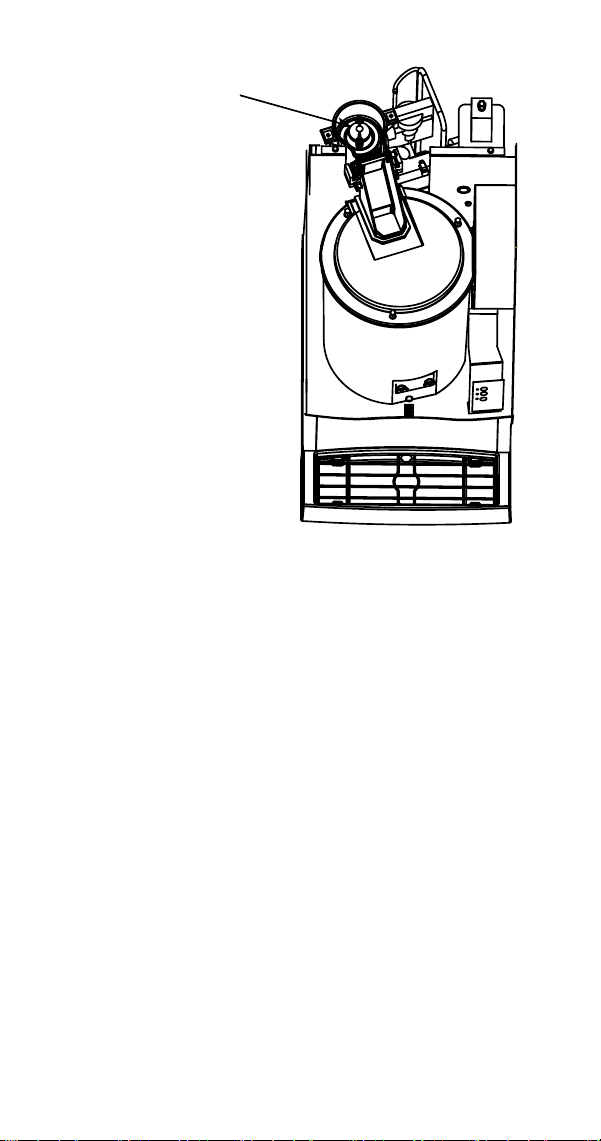
Step 2 Remove the top panel and translucent plastic
ice chute cover. Wait about one minute then add the
proper amount of Manitowoc Ice Machine Cleaner. Rinse
the cleaner from the top of the evaporator with 2 ounces
(60 ml) of clear water and re-install cover
,
Caution
Use only Manitowoc approved Ice Machine Cleaner
part number 000000084. It is a violation of Federal law
to use these solutions in a manner inconsistent with
their labeling. Read and understand all labels printed
on bottles before use.
Model Amount of Cleaner
Part Number 000000084
CNF201 CNF202 2 ounces (60 ml)
Part Number 000015432 4/18 29
ICE
WATER
ICE /
WATER
Add solution here
Step 3 The ice machine will run a wash cycle, a series
of rinse cycles and then stop. This entire cycle lasts
approximately 30 minutes.
NOTE: Periodic cleaning must be performed on adjacent
surface areas not contacted by the water distribution
system.
NOTE: The ice machine may be set to start and finish
a cleaning procedure, and then automatically start ice
making again
A. After cleaner is added, move the switch from
CLEAN to ICE position.
B. When the cleaning cycle is complete, ice making
will start automatically.

30 Part Number 000015432 4/18
Changing toggle switch position during clean cycle:
1. Less than 60 seconds into Clean cycle - The Clean
cycle will end when the toggle switch is moved to the
OFF position.
2. More than 60 seconds into Clean cycle - The ice
machine will complete the clean cycle. Toggle switch
position will determine the next cycle after the Clean
cycle is completed.
• CLEAN POSITION - The ice machine will wait for a
change in toggle switch position.
• OFF POSITION - The ice machine will wait for a
change in toggle switch position.
• ICE POSITION - The ice machine will start making
ice automatically.
3. To abort the clean cycle move the toggle switch from
CLEAN to OFF to CLEAN and back to OFF within a 15
second time period.
Manitowoc recommends disassembling, cleaning and
sanitizing the ice machine and dispenser every six months.
Part Number 000015432 4/18 31
Heavily Scaled Cleaning Procedure
Ice machines that are heavily scaled or have not been
cleaned on a regular basis will need to run this Procedure.
Failure to do so may result in binding of the auger as the
lime scale releases from the auger and evaporator barrel.
Step 1 Remove panels and set the ICE/OFF/CLEAN
toggle switch to the OFF position.
Step 2 Remove all ice from the bin.
Step 3 Turn off the water supply to the ice machine.
Step 4 Place ICE/OFF/CLEAN toggle switch in the
CLEAN position. The dump valve will open and drain the
water from the evaporator and reservoir.
Step 5 Wait approximately 30 seconds (or until the
evaporator is drained) and place the toggle switch in the
OFF position.
Step 6 Refer to chart and add the correct amount of
cleaner for your model ice machine.
Model Amount of Cleaner
Part Number 000000084
CNF201 CNF202 12 ounces (355 ml)
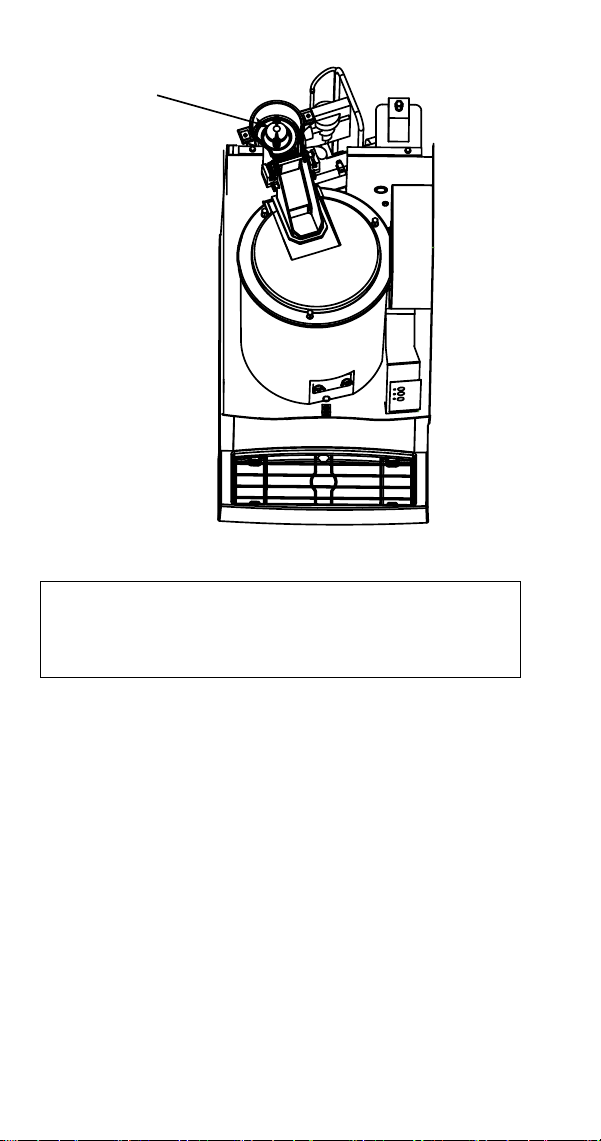
32 Part Number 000015432 4/18
ICE
WATER
ICE /
WATER
Add solution here
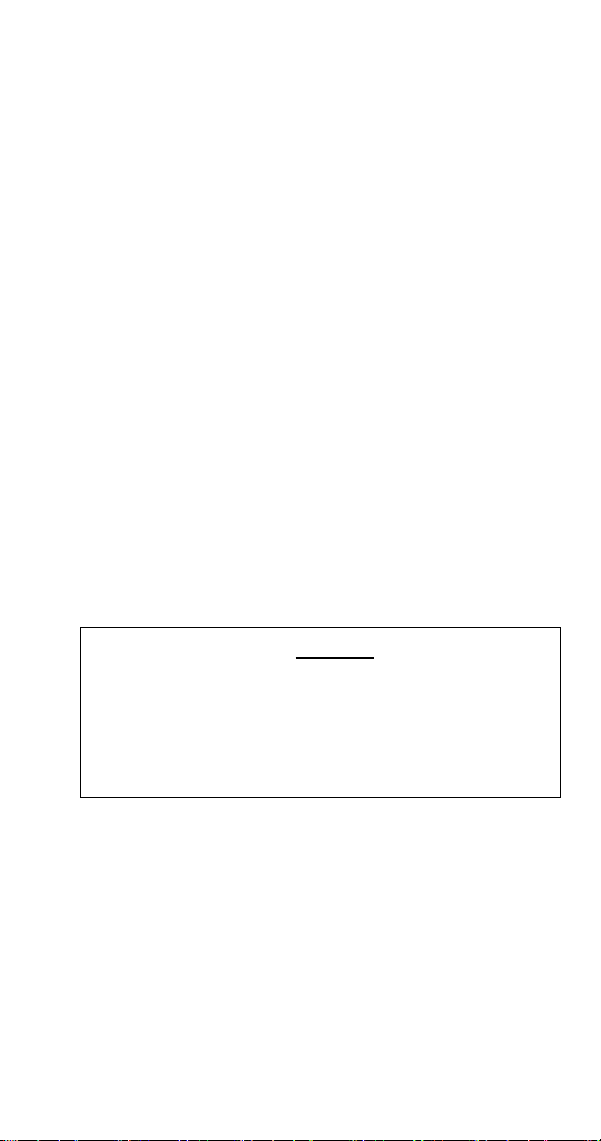
Step 7 Turn on the water supply to the ice machine.
Important
Leave the cleaner/water solution in the evaporator for
a minimum of 4 hours.
Step 8 Move the toggle switch to the ICE position. The
compressor will energize and produce ice with the cleaning
solution. Continue the freeze cycle for 15 minutes.
Step 9 Move the toggle switch to the OFF position,
then follow the standard cleaning and sanitizing
procedures.
Part Number 000015432 4/18 33
Cleaning Procedure
Ice machines that are heavily scaled or have not been
cleaned on a regular basis will need to run the Heavily
Scaled Cleaning Procedure before this one. Failure to do
so may result in binding of the auger as the lime scale
releases from the auger and evaporator barrel.
Ice machine cleaner is used to remove lime scale or other
mineral deposits. Ice machine sanitizer is used to remove
algae or slime.
Step 1 Remove panels and set the ICE/OFF/CLEAN
toggle switch to the OFF position.
Step 2 Turn off the water supply to the ice machine.
Step 3 Remove all ice from the bin.
Step 4 Place ICE/OFF/CLEAN toggle switch in the
CLEAN position. The dump valve will open and drain the
water from the evaporator and reservoir.
Step 5 Wait approximately 30 seconds (or until the
evaporator is drained) and place the toggle switch in the
OFF position.
,
Caution
Use only Manitowoc approved Ice Machine Cleaner
part number 000000084. It is a violation of Federal law
to use these solutions in a manner inconsistent with
their labeling. Read and understand all labels printed
on bottles before use.
34 Part Number 000015432 4/18
Step 6 Refer to chart and premix the correct solution
of cleaner and cool water for your model ice machine.
Model Amount of Cleaner
Part Number
000000084
Amount of
Water
CNF201 CNF202 2 oz (60 ml) 32 oz (1 liter)
Step 7 Remove the top cover from the ice chute and
pour the cleaner/water solution into the evaporator. Add
the entire amount of premixed solution (excess solution
will exit through the overflow tube in the water reservoir).
Step 8 Replace the ice chute cover and allow the ice
machine to stand for 30 minutes.
Step 9 Turn on the water supply to the ice machine.
Step 10 Move the toggle switch to the ICE position. The
compressor will energize and produce ice with the cleaning
solution.
Step 11 The ice machine will freeze and discharge the
cleaning solution into the bin. Allow the cycle to run for 15
minutes.
NOTE: Discard all ice produced during the cleaning process.
Cleaning and sanitizing must be performed on adjacent
surface areas not contacted by the water distribution
system. Refer to “Removal of Parts for Cleaning or
Sanitizing” on page 38 - Disassemble, clean and sanitize
the ice machine a minimum of once every six months.
Part Number 000015432 4/18 35
Sanitizing Procedure
Ice machine sanitizer is used to remove algae or slime. It is
not used to remove lime scale or other mineral deposits.
Refer to the “Cleaning Procedure” for removal of lime scale
or other mineral deposits.
NOTE: Sanitizing must be performed on adjacent surface
areas not contacted by the water distribution system.
Always perform Component Disassembly for Cleaning/
Sanitizing procedure and a Cleaning Procedure before
sanitizing the ice machine.
Step 1 Turn off the water supply to the ice machine.
Step 2 Place ICE/OFF/CLEAN toggle switch in the
CLEAN position. The dump valve will open and drain the
water from the evaporator and reservoir.
Step 3 Wait approximately 30 seconds (or until the
evaporator is drained) and place the toggle switch in the
OFF position.
Step 4 Refer to chart and premix the correct solution
of sanitizer and cool water for your model ice machine.
Model Amount of Sanitizer
Part Number
9405653
Amount of Water
CNF201 CNF202 2 ounces (60 ml) 3 gallons (11.4L)
Step 5 Remove the top cover from the ice chute and
pour the sanitizer/water solution into the evaporator. Add
the entire amount of premixed solution (excess solution
will exit through the overflow tube in the water reservoir).
Step 6 Replace the ice chute cover and allow the ice
machine to stand for 30 minutes.
Step 7 Turn on the water supply to the ice machine.
Step 8 Move the toggle switch to the ICE position. The
compressor will energize after the 15 minute delay and
produce ice with the sanitizing solution.

36 Part Number 000015432 4/18
Step 9 The ice machine will freeze and discharge the
sanitizing solution into the bin. Allow the cycle to run for
15 minutes.
Step 10 Discard all ice produced during the sanitizing
process.
Step 11 Place the toggle switch in the CLEAN position.
The ice machine will automatically time out a series of
flush and rinse cycles, and then stops. This entire cycle
lasts approximately 30 minutes.
Step 12 Refer to Component Disassembly for Cleaning
and Sanitizing and remove, clean and sanitize all parts
listed.
Part Number 000015432 4/18 37
Component Disassembly for Cleaning and
Sanitizing
n
Warning
Disconnect electric power to the ice machine at the
electric switch box before proceeding.
n
Warning
Wear rubber gloves and safety goggles (and/or face
shield) when handling Ice Machine Cleaner or Sanitizer.
,
Caution
Do not mix Cleaner and Sanitizer solutions together. It
is a violation of Federal law to use these solutions in a
manner inconsistent with their labeling.
GENERAL INFORMATION
The ice machine must be disassembled, cleaned and
sanitized every six months.
1. Turn off the water supply to the ice machine at the
water service valve, or disconnect water supply line
at float valve quick disconnect by depressing stainless
steel lever.
2. Remove the components you want to clean or
sanitize. See the pages specific to the model you are
working on for removal procedures.
3. Soak the removed parts to clean and sanitize.
Solution
Type
Water Mixed With
Cleaner 1 gal. (4 L) 16 oz. (500 ml) cleaner
Sanitizer 6 gal. (23 L) 4 oz. (120 ml) sanitizer
38 Part Number 000015432 4/18
4. Use a soft-bristle brush or sponge (NOT a wire brush)
to carefully clean the parts.
5. Use the solution and a brush to clean all disassembled
components and the inside of the bin.
6. Re-install the removed parts and turn on the water
and electrical supply.
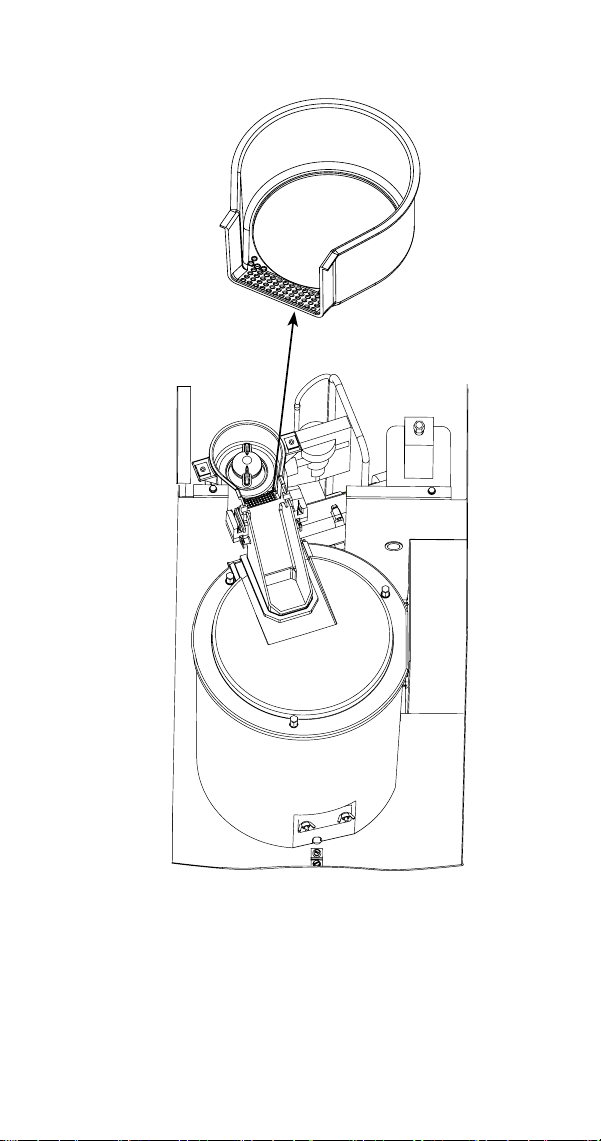
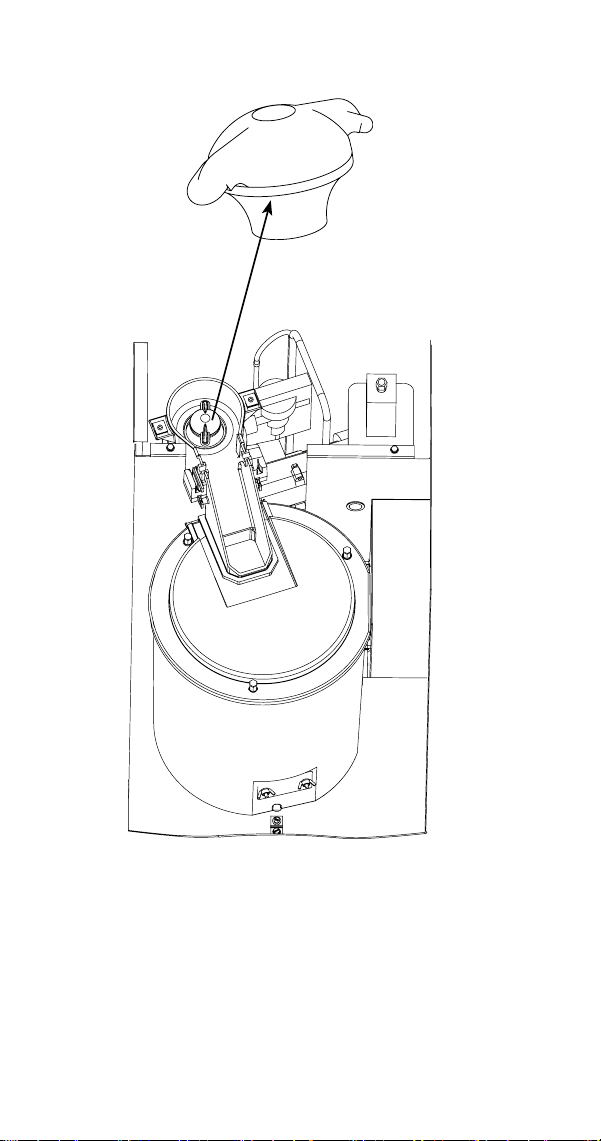
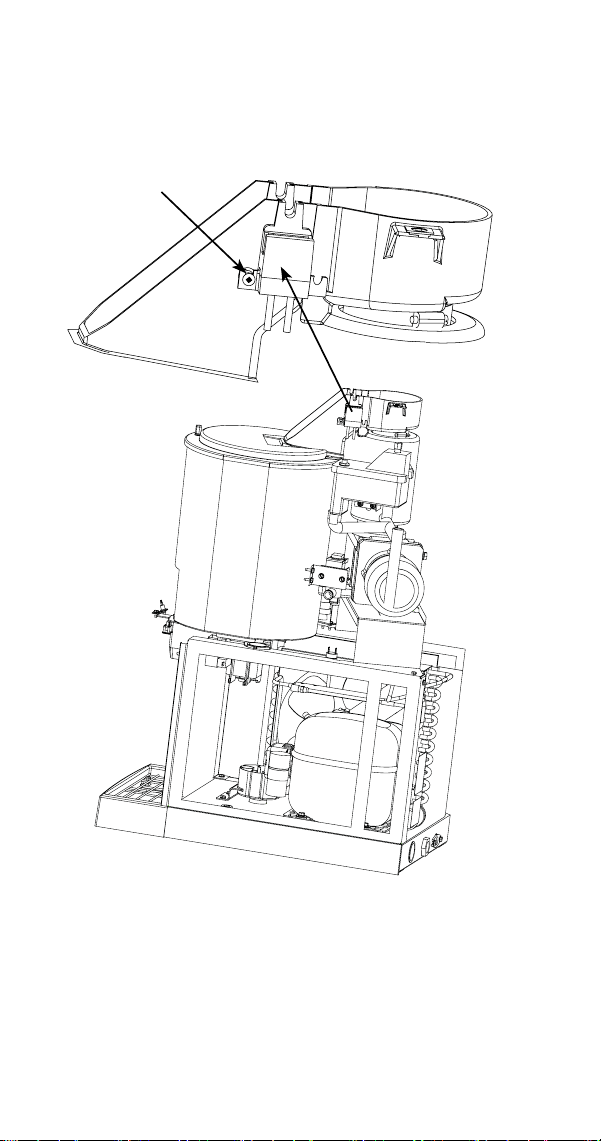
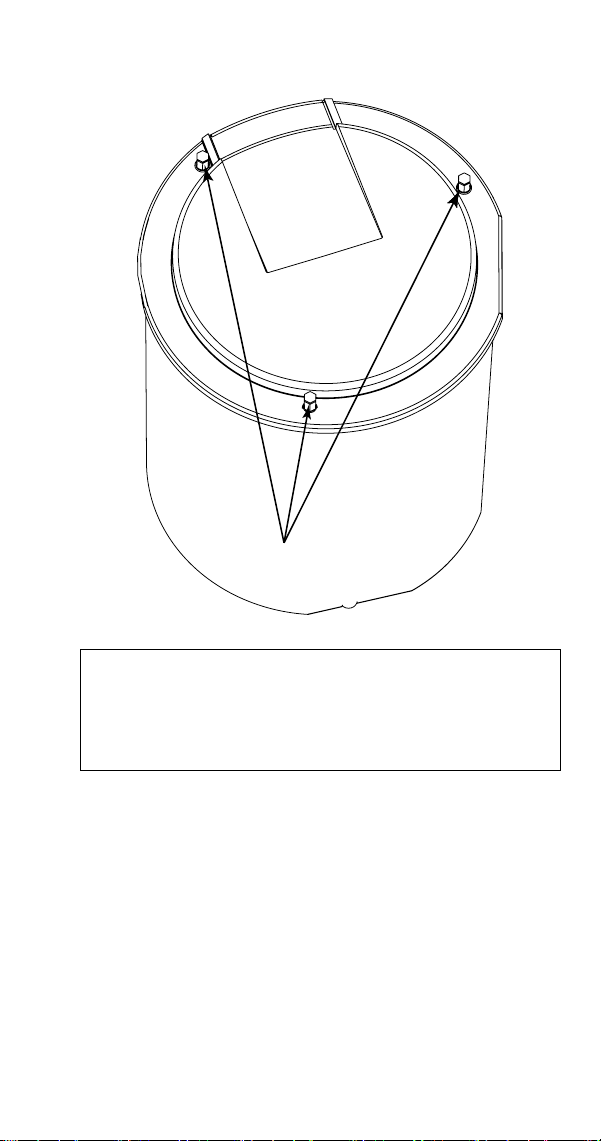
Removal of Parts for Cleaning or Sanitizing
1. Turn off water supply to ice machine.
2. Place toggle switch in the clean position for 30
seconds to drain water from reservoir, then move
toggle switch to Off position.
3. Run dispenser to transfer all ice from the bin to a
container.
n
Warning
Disconnect electric power to the ice machine at the
electric switch box before proceeding.
4. Disconnect electrical power to the ice machine.
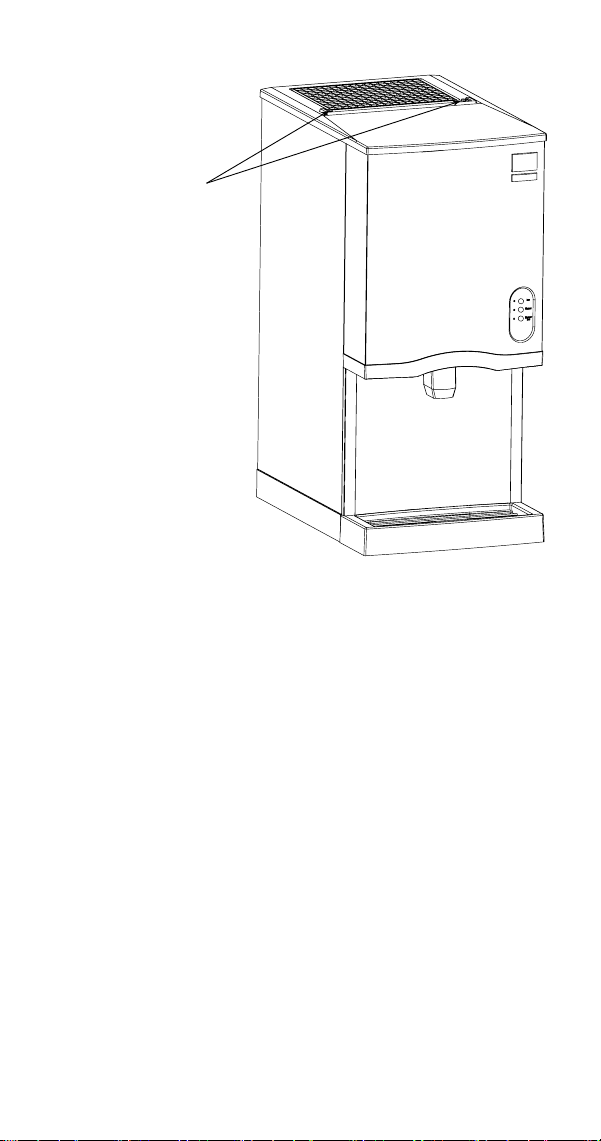
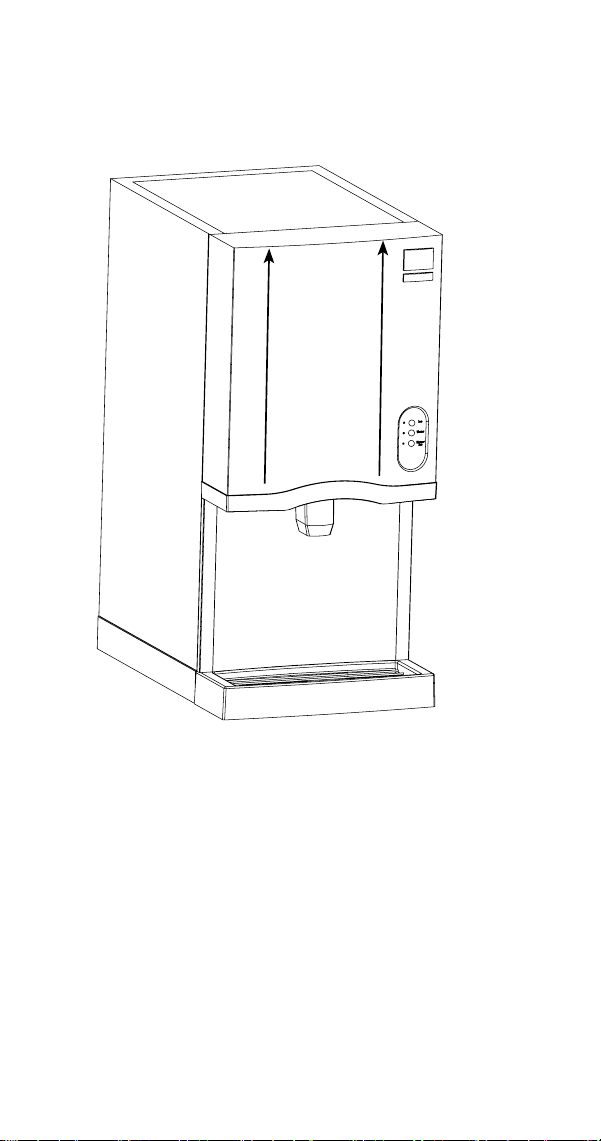
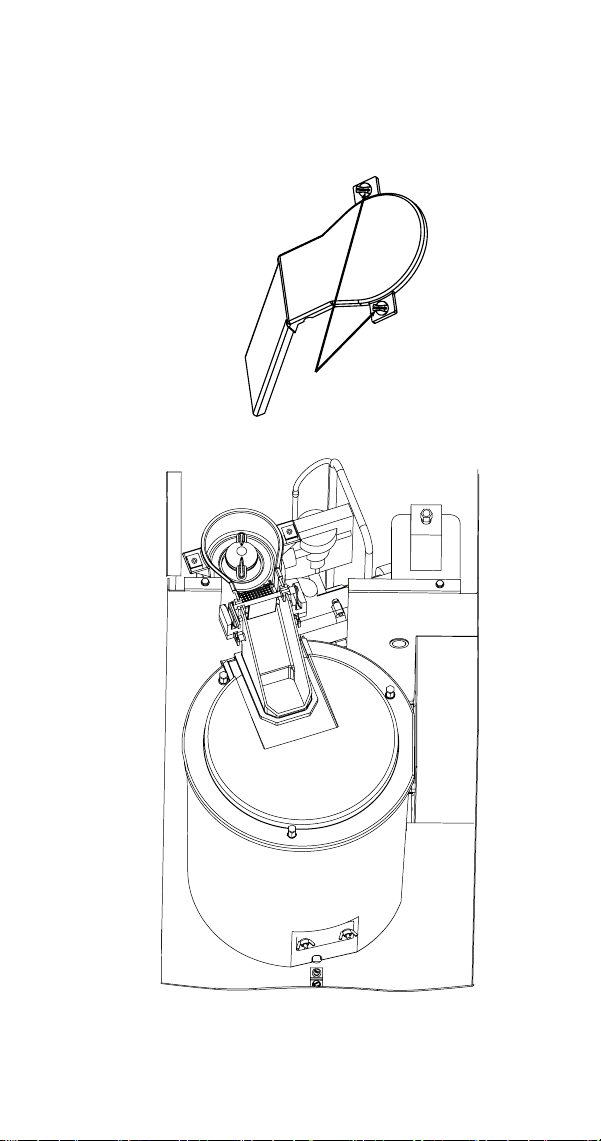
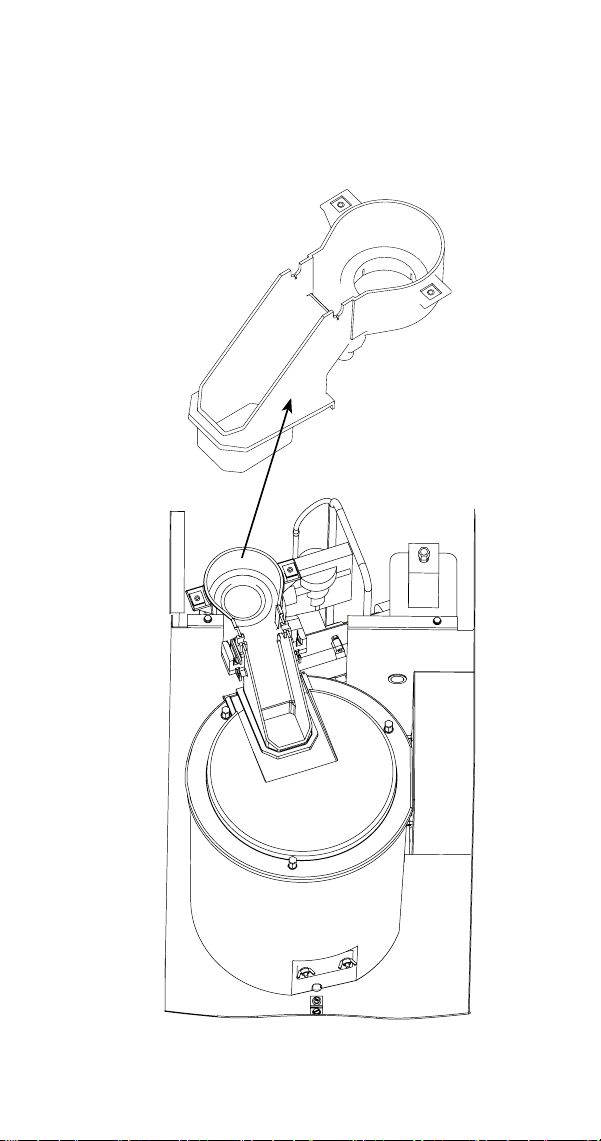
5. Remove top cover.
A. Remove two screws.
B. Lift up on top cover to remove.
48 Part Number 000015432 4/18
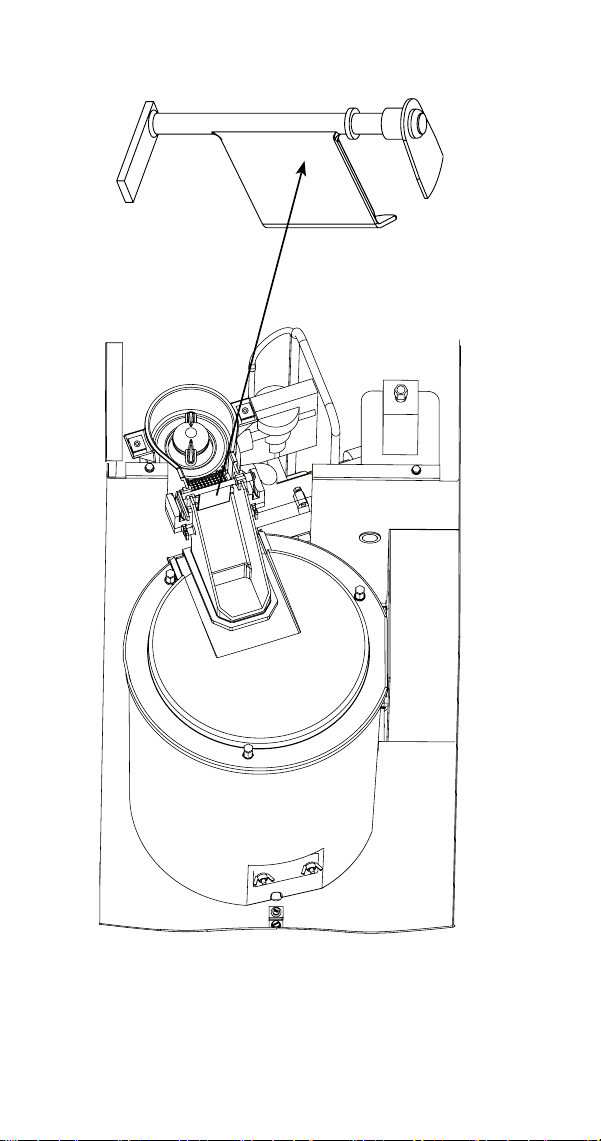
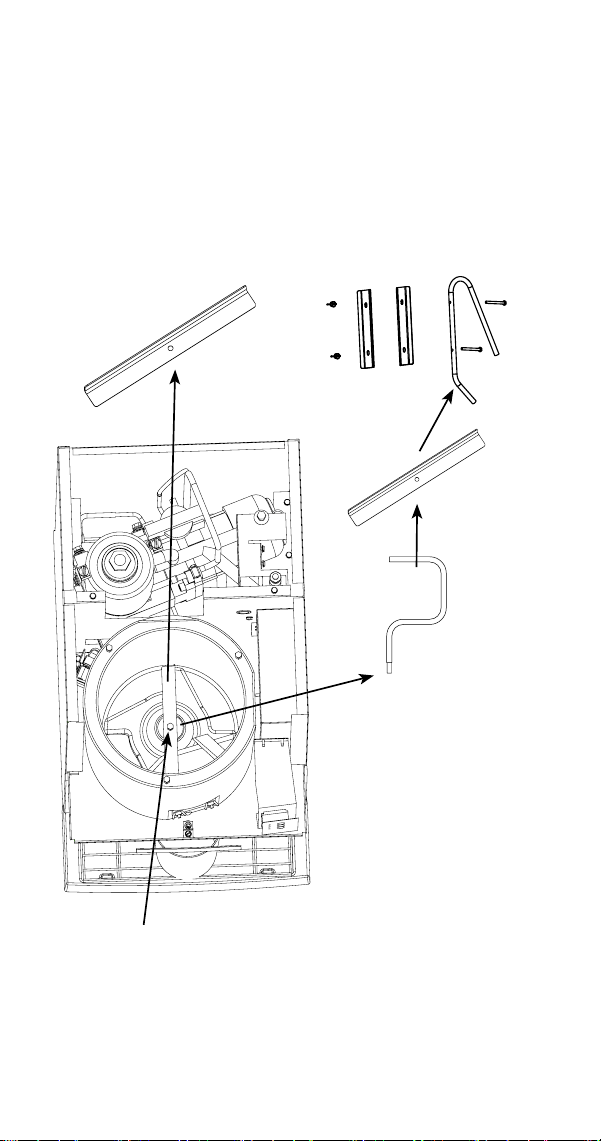
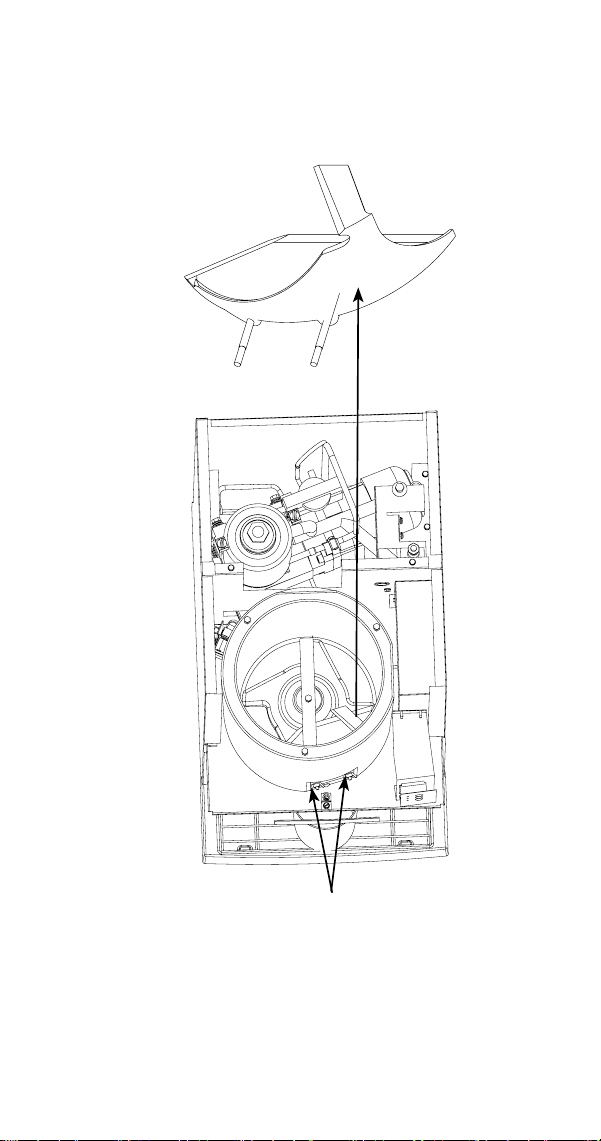
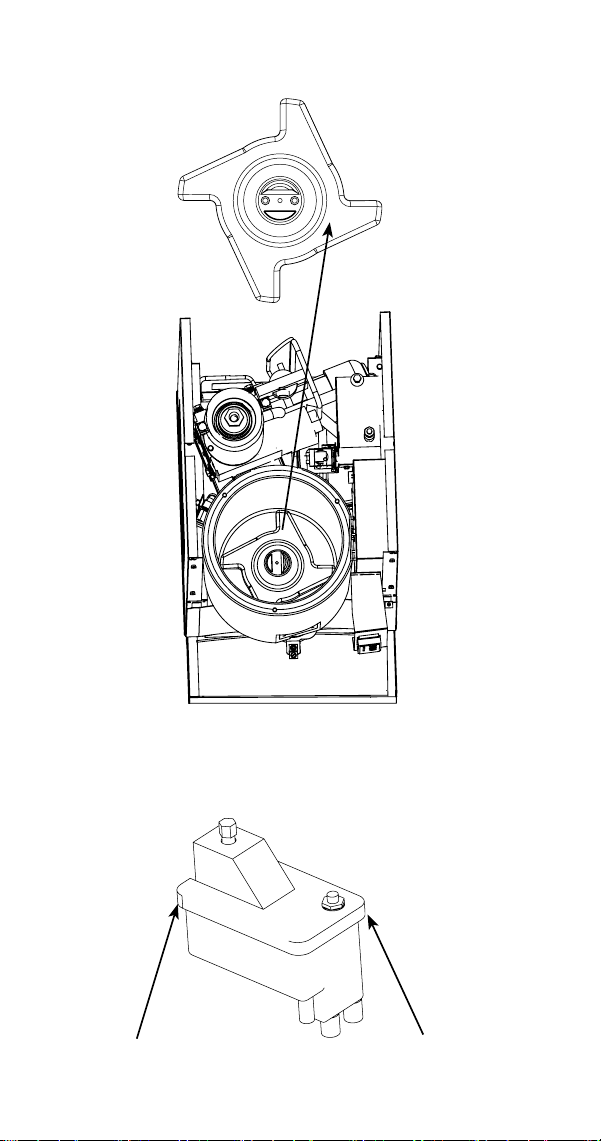
17. Remove agitator bar.
• CNF201 - Remove the thumbscrew and lift off.
• CNF202 - Unscrew the upright agitator bar.
NOTE: Bar must be reassembled by inserting front edge
into the paddle wheel, then lowering the back edge
(rounded 90 angle) to prevent water leakage into the
compressor compartment.
CNF201 REMOVE THUMBSCREW
AND AGITATOR BAR
CNF202 REMOVE
AGITATOR,
AGITATOR BAR AND
ICE BREAKER
Part Number 000015432 4/18 51
CLEANING THE CONDENSER
n
Warning
Disconnect electric power to the ice machine at the
electric service switch before cleaning the condenser.
The condenser fins are sharp. Use care when cleaning
them.
A dirty condenser restricts airflow, resulting in excessively
high operating temperatures. This reduces ice production
and shortens component life. Clean the condenser at least
every six months. Follow the steps below.
1. The washable foam filter on self-contained ice
machines is designed to catch dust, dirt, lint and
grease. This helps keep the condenser clean. Clean
the filter with a mild soap and water solution.
2. Clean the outside of the condenser with a soft brush
or a vacuum with a brush attachment. Clean from top
to bottom, not side to side. Be careful not to bend the
condenser fins.
3. Shine a flashlight through the condenser to check for
dirt between the fins. If dirt remains:
A. Blow compressed air through the condenser fins
from the inside. Be careful not to bend the fan
blades.
B. Use a commercial condenser coil cleaner. Follow
the directions and cautions supplied with the
cleaner.
4. Straighten any bent condenser fins with a fin comb.
5. Carefully wipe off the fan blades and motor with
a soft cloth. Do not bend the fan blades. If the fan
blades are excessively dirty, wash with warm, soapy
water and rinse thoroughly.
n
Warning
If you are cleaning the condenser fan blades with
water, cover the fan motor to prevent water damage.

52 Part Number 000015432 4/18
Removal from Service/Winterization
GENERAL
Special precautions must be taken if the ice machine is to
be removed from service for an extended period of time or
exposed to ambient temperatures of 32°F (0°C) or below.
,
Caution
If water is allowed to remain in the ice machine
in freezing temperatures, severe damage to some
components could result. Damage of this nature is not
covered by the warranty.
1. Disconnect the electric power at the circuit breaker or
the electric service switch.
2. Turn off the water supply.
3. Disconnect and drain the incoming ice-making water
line at the rear of the ice machine.
4. Disconnect drain tubing (from the inlet to dump
valve) and drain water into container and discard.
5. Make sure water is not trapped in any of the water or
drain lines.

Part Number 000015432 4/18 53
SafeGuard Feature
The ice machine will stop when conditions arise that would
cause major component failure.
Standby Mode
The first time a failure occurs, the ice machine de-
energizes and initiates a Standby Mode. The ice machine
will remain off for 60 minutes, then automatically restart
to see if the problem reoccurs. If the same failure keeps
occurring, the ice machine will initiate a SafeGuard Mode
and remain off until manually restarted.
SafeGuard Indicator Lights
During a SafeGuard Mode, the corresponding control
board light will flash continuously.
The SafeGuard will remain in memory for 48 hours of
ice making time. After 48 hours of ice making time,
the SafeGuard will automatically be erased. If power is
interrupted during the 48 hours, the timing will resume
when power is applied to the ice machine.
Placing the toggle switch in the OFF position:
The corresponding light will flash continuously.
Placing the toggle switch in the ICE position:
The light will de-energize and a start-up sequence will
initiate. The corresponding light will flash anytime the
toggle switch is placed in the OFF position provided 48
hours of ice making time has not been exceeded.
Troubleshooting

54 Part Number 000015432 4/18
Reset Procedure
1. Move the ICE/OFF/CLEAN toggle switch to OFF.
A. If a safeguard feature has stopped the ice
machine, it will restart after a short delay.
Proceed to Step 2.
B. If the ice machine does not restart, see “Ice
Machine Does Not Operate.”
2. Allow the ice machine to run to determine if the
condition is reoccurring.
A. If the ice machine continues to run, the condition
has corrected itself. Allow the ice machine to
continue running.
B. If the ice machine stops, determine the
safeguard mode, then refer to the specific
safeguard for troubleshooting procedures.

Part Number 000015432 4/18 55
SafeGuards
• No Water
• No Ice Production
NO WATER
The water sensing switch opens for more than 30 seconds.
Operation
When the float switch is open at initial start-up, the ice
machine will wait for the switch to close before starting.
During the freeze cycle, if the water float opens for 30
seconds, the ice machine will:
1. De-energize the compressor and gear motor.
2. The Water Ok light on the control board will de-
energize.
3. A 15-minute delay is initiated.
The water Ok light will flash when the float switch closes or
when the toggle switch is placed in the OFF position.
The ice machine will remain off until the 15-minute delay
period expires and the water float switch closes.

56 Part Number 000015432 4/18
NO ICE PRODUCTION
The ice damper did not open and close at least once every
90 seconds in the freeze cycle.
Operation
During the first 12 minutes of operation:
The control board must see the ice damper open/close at
least once. This allows time for ice production to start at all
ambient temperatures.
After the initial 12-minute period:
The control board must see the ice damper open/close at
least once every 90 seconds.
When the ice damper does not open/close within the
specified time, the control board will:
1. De-energize the compressor and gear motor.
2. HES #1 light on the control board will flash (the light
will not flash if the ice damper is open).
3. A 15-minute delay is initiated.
4. After the 15-minute delay the ice machine will:
A. Energize the dump valve for 30 seconds
B. Energize the gear motor
C. Wait until the water float valve closes and then
energize the compressor and fan motor.

Part Number 000015432 4/18 57
5. If the ice damper fails to open/close at least once in
the initial 12-minute period, the control board will
initiate another safety shutdown. This sequence will
repeat until:
A. The ice machine restarts and operates normally
for 10 minutes.
B. The ice machine is unable to run normally within
300 minutes of the initial shutdown.
If the ice machine does not run normally within 300
minutes of the initial shutdown, the control board will lock
out and require a manual reset.
The control board will flash the HES #1 light anytime the
toggle switch is placed in the OFF position for the first 48
hours after the failure.
Reset Procedure
Move the ICE/OFF/CLEAN toggle switch from OFF to ICE or
disconnect and reapply power to the ice machine.

58 Part Number 000015432 4/18
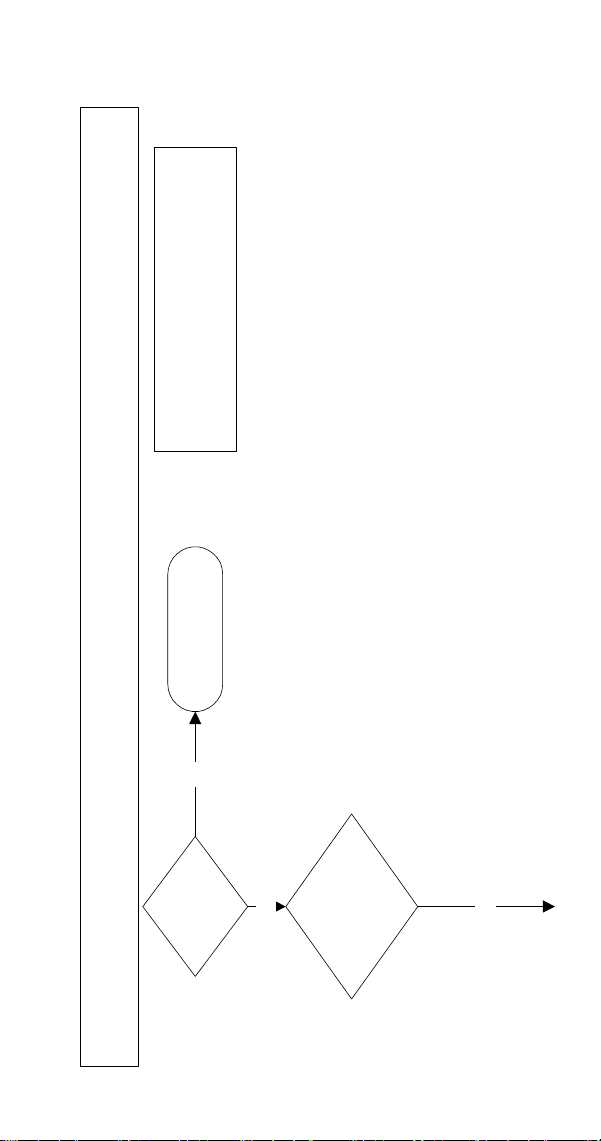
Ice Machine Will Not Run Diagnostics
n
Warning
High (line) voltage is applied to the control board
(terminals #39 and #90) at all times. Removing control
board fuse or moving the toggle switch to OFF will not
remove the power supplied to the control board.
The following sequence describes the normal start-
up procedure for the ice machine when line voltage is
disconnected then reconnected to the ice machine.
1. Power is supplied to the control board.
2. The control board lights race (energize/de-energize
in sequence) to indicate the ice machine is in a
15-minute delay mode.
3. When the 15-minute delay ends, the ice machine
starts. The following lights are energized:
• HES #1
• HES #2
• Water OK
The HES #1 light will de-energize and re-energize as ice
passes beneath the ice damper.
When the ice damper lifts approximately 45 degrees, HES
#2 de-energizes and the ice machine shuts off immediately
on full bin. A 15-minute time delay is initiated, which
prevents the ice machine from immediately restarting.
Part Number 000015432 4/18 59
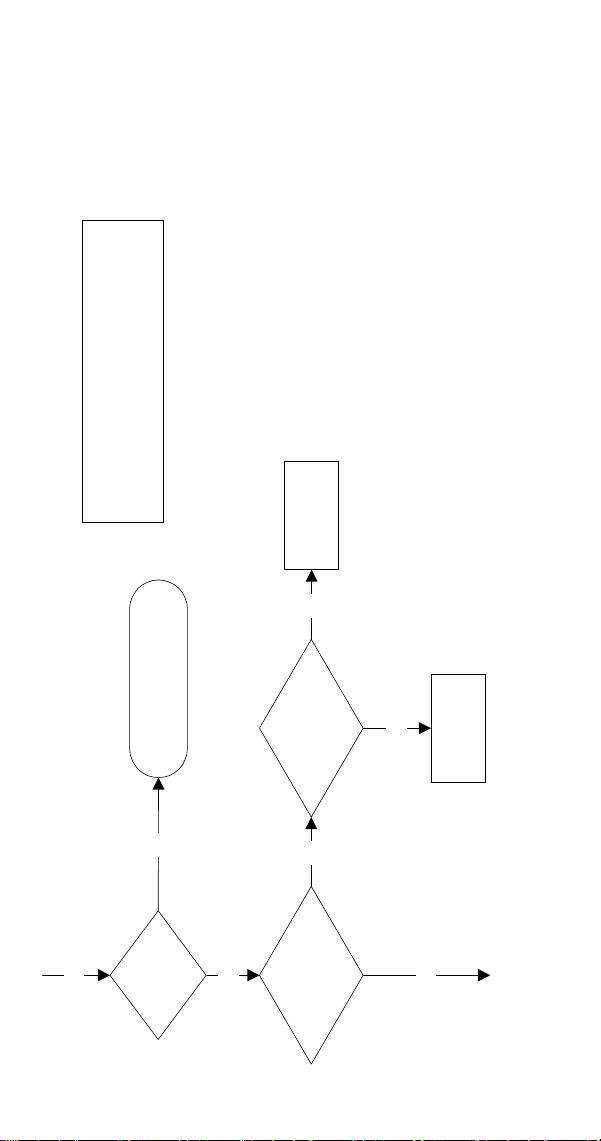
Power Supplied to
Ice Machine?
Reset Control Board,
Disconnect And
Reconnect Line Voltage
Plug In Ice Machine,
Reset Breaker
NO
YES
Ice Machine Will Not Run
YES
IMPORTANT
A 15-Minute Delay Initiates After The Problem
Is Corrected. This Delay Must Expire Before
The Ice Machine Will Start.
60 Part Number 000015432 4/18
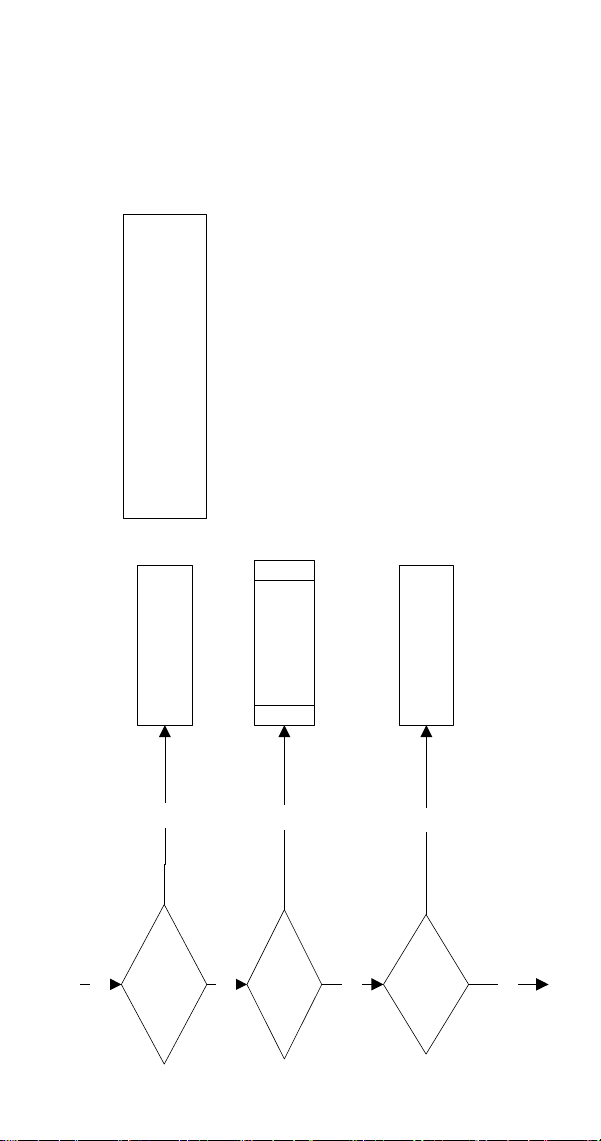
Power At
Terminals
#90 & #39?
Refer To Low and High
Pressure Cutout
Specifications.
NO
Nugget Contro
l Board
Light Energized?
NO
YES
Replace Control
Board
IMPORTANT
A 15-Minute Delay Initiates After The Problem Is
Corrected. This Delay Must Expire Before The Ice
Machine Will Start.
YES
YES
Disconnect HES #2
From Control Board.
Light Energizes?
NO
Replace HES #2
YES
Part Number 000015432 4/18 61
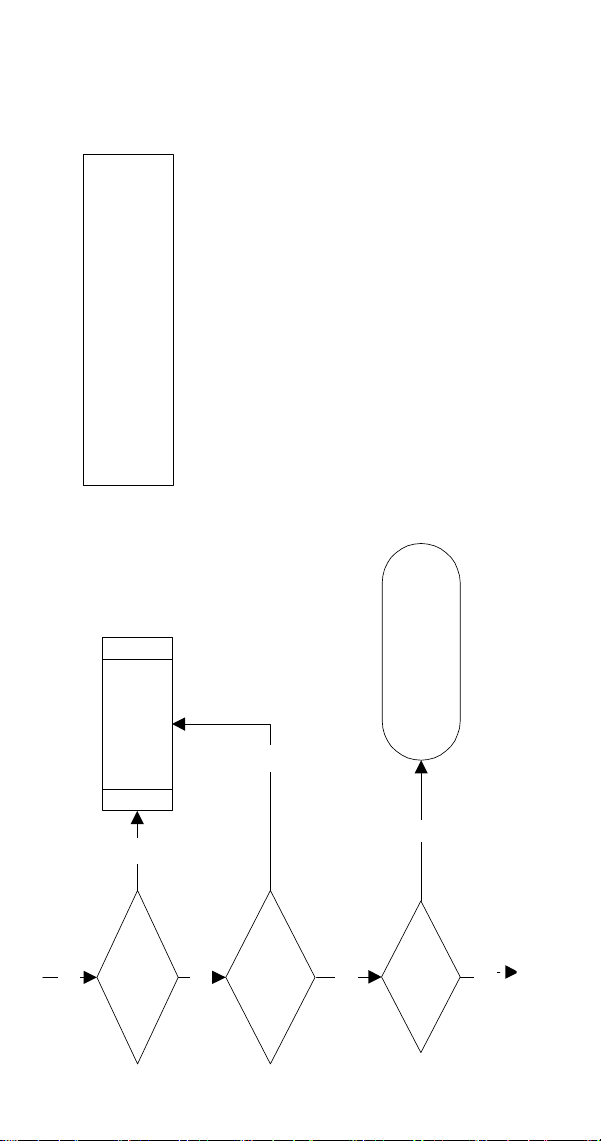
Damper Door
Closed?
Water Light
On?
Reservoir Fu
ll Of
Water?
NO
YES
NO
YES
NO
Restore Water Supply
Refer To Float
Switch Diagnostics
Install/Close Damper Door
YES
YES
IMPORTANT
A 15-Minute Delay Initiates After The Problem
Is Corrected. This Delay Must Expire Before
The Ice Machine Will Start.
62 Part Number 000015432 4/18
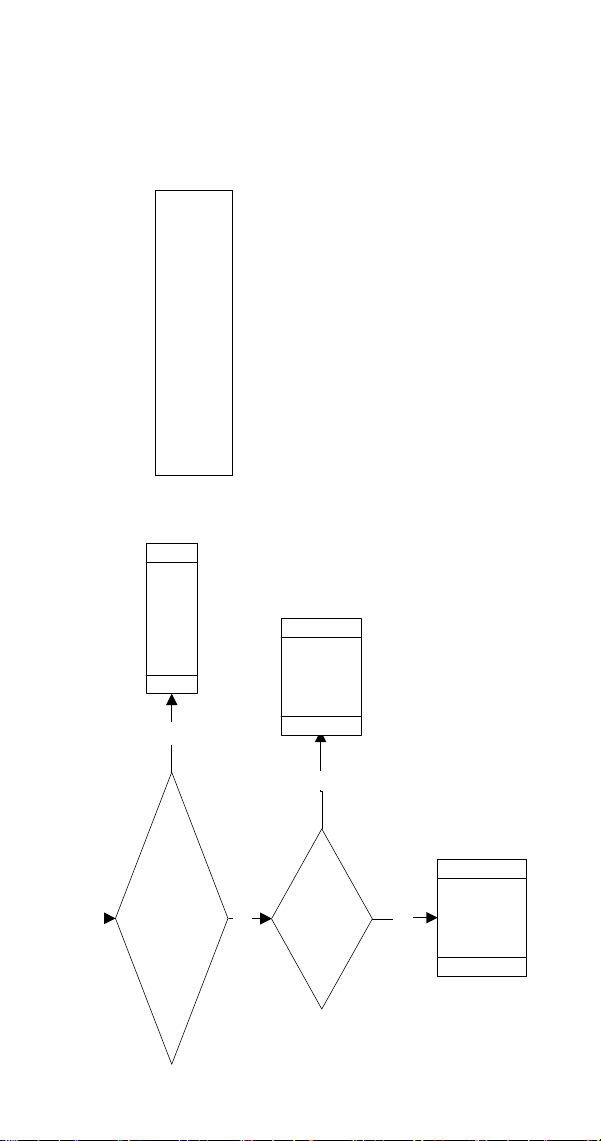
HES #1 Light
Energized?
Hes # 2 Light
YES
YES
NO
NO
Refer To Hall
Effect Switch
Diagnostics
IMPORTANT
A 15-Minute Delay Initiates After The Problem
Is Corrected. This Delay Must Expire Before
The Ice Machine Will Start.
15-Minute Delay
Expired?
Wait For Delay To Expire,
Then Refer To SafeGuards
YES
YES
No
Part Number 000015432 4/18 63
Gearmotor
Or
Compressor Energizes?
No
Refer to
Compressor
or
Gearmotor
Diagnostics
YES
IMPORTANT
A 15-Minute Delay Initiates After The Problem
Is Corrected. This Delay Must Expire Before
The Ice Machine Will Start.
Refer to
Control
Board Fuse
Diagnostics
NO
Refer to Toggle
Switch Diagnostics
YES
Energized?
Toggle Switch Functions?
(If The Toggle Switch Energizes
And De-Energizes The BLue Light,
The Toggle Switch Is Ok)
64 Part Number 000015432 4/18
Refrigeration Diagnostics
BEFORE BEGINNING SERVICE
Ice machines may experience operational problems
only during certain times of the day or night. A machine
may function properly while it is being serviced, but
malfunctions later. Information provided by the user can
help the technician start in the right direction, and may be
a determining factor in the final diagnosis.
Ask these questions before beginning service:
• When does the ice machine malfunction? (night, day,
all the time, only during the Freeze cycle, etc.)
• When do you notice low ice production? (one day a
week, every day, on weekends, etc.)
• Can you describe exactly what the ice machine seems
to be doing?
• Has anyone been working on the ice machine?
• During “store shutdown,” is the circuit breaker, water
supply or air temperature altered?
• Is there any reason why incoming water pressure
might rise or drop substantially?
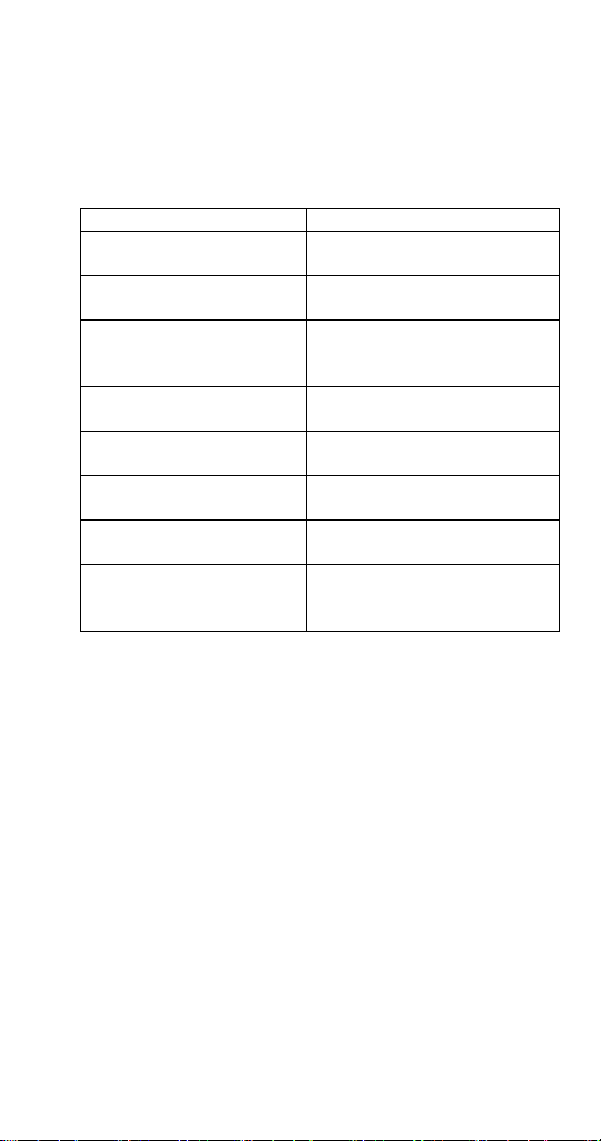
INSTALLATION/VISUAL INSPECTION CHECKLIST
Possible Problem List Corrective Action List
Filter and/or condenser is dirty. Clean the filter and condenser.
Water filtration is plugged (if
used).
Install a new water filter.
Water drain is not vented or is
improperly installed.
Run and vent drains according
to the installation manual.
Part Number 000015432 4/18 65
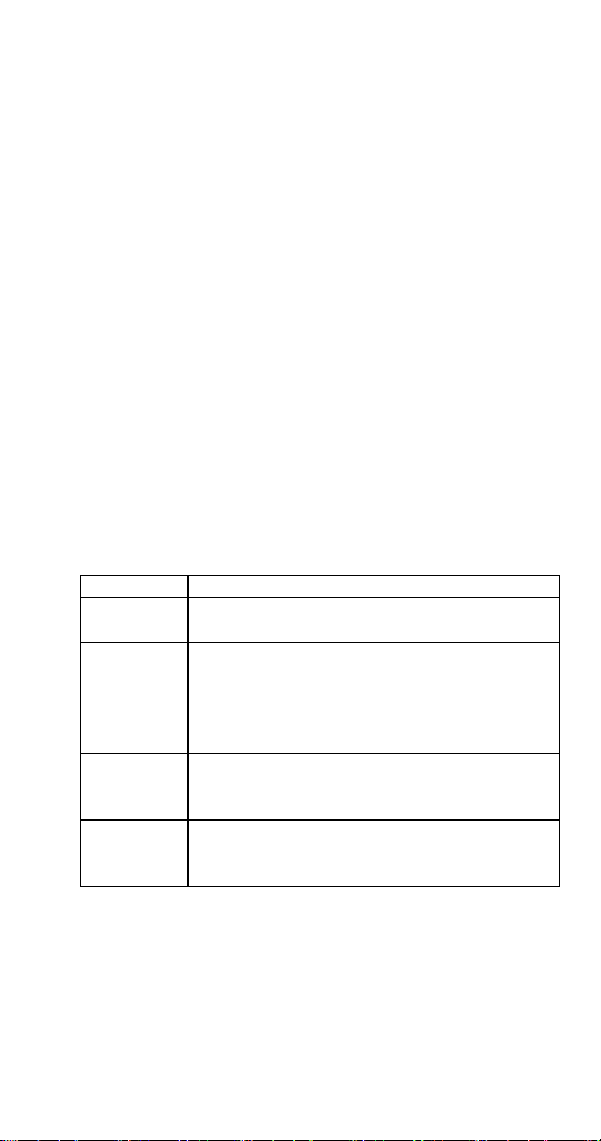
WATER SYSTEM CHECKLIST
A water-related problem could cause component
misdiagnosis.
Water system problems must be identified and eliminated
prior to replacing other components.
Possible Problem List Corrective Action List
Water area (evaporator) is
dirty.
Clean as needed.
Water inlet pressure not
between 20 and 80 psig.
Install a water regulator valve or
increase the water pressure.
Incoming water temperature
is not between 45°F (1.7°C)
and 90°F (32.2°C).
If too hot, check the hot water
line check valves in other store
equipment.
Water filtration is plugged (if
used).
Install a new water filter.
Vent tube is not installed on
water outlet drain.
See installation instructions.
Hoses, fittings, etc., are
leaking water.
Repair/replace as needed.
Water float valve is stuck
open or closed.
Clean/replace as needed.
Dump valve is leaking. Clean dump valve.
Ice machine will shut off on Low
Water SafeGuard.

66 Part Number 000015432 4/18
ICE PRODUCTION/QUALITY CHECK
QUALITY CHECK
Ice quality will vary with ambient and water temperatures,
and is measured by the amount of excess water in the ice.
An easy test is to squeeze a handful of ice. High quality ice
releases only a small amount of water. As ice quality drops,
more water can be removed.
Generally speaking, higher incoming water temperature
results in lower ice quality.
Lower water temperature results in higher ice quality.
ICE PRODUCTION CHECK
1. Run the ice machine a minimum of 10 minutes to
allow the system to stabilize.
2. Catch the ice in a non-perforated container for
7 minutes and 12 seconds or for more accuracy
14 minutes and 24 seconds.
3. Weigh the container and ice, then deduct the weight
of the container.
4. Convert ounces to pounds.
Example: 3 lbs. 12 oz. converts to 3.75 lbs.
(12 oz. ÷ 16 oz. =.75 lb.)
5. Determine the 24-hour ice production capacity.
• 7 minutes 12 seconds: Multiply the total ice weight
by 200.
• 14 minutes 24 seconds: Multiply the total ice
weight by 100.
Example:
1. Collected ice for 7 minutes 12 seconds.
2. Total weight (minus container) = 3.75 lbs.
3. 3.75 lbs. x 200 = 750 lbs. of ice every 24 hours.
4. Compare the capacity to the 24-hour ice production
chart for the model being tested.
5. Ice production checks that are within 10% of the
charted capacity are considered normal due to
variances in air and water temperatures. Actual
temperatures will seldom match the chart exactly.
Part Number 000015432 4/18 67
ANALYZING DISCHARGE PRESSURE
1. Determine the ice machine operating conditions:
• Air temperature entering condenser
• Air temperature around ice machine
• Water temperature entering water reservoir
2. Refer to 24-Hour Ice Production/Refrigeration
Pressure Chart for ice machine being checked.
Use the operating conditions determined in Step 1 to
find the published normal discharge pressures and
compare to actual discharge pressure readings.
3. Measure the actual discharge pressure.
4. Compare the actual discharge pressure (step 3) with
the published discharge pressure (step 2).
The discharge pressure is normal when the actual
pressure falls within the published pressure range for
the ice machine’s operating conditions.
Discharge Pressure High Checklist
Problem Cause
Improper
installation
Refer to “Installation/Visual Inspection Checklist.”
Restricted
condenser air
flow
Dirty air filter
High inlet air temperature
Condenser discharge air recirculation
Dirty condenser fins
Defective fan motor
Improper
refrigerant
charge
Overcharged
Non-condensible in system
Wrong type of refrigerant
Other
Non-Manitowoc components in system
High side refrigerant line/component restricted
(before mid-condenser)

68 Part Number 000015432 4/18
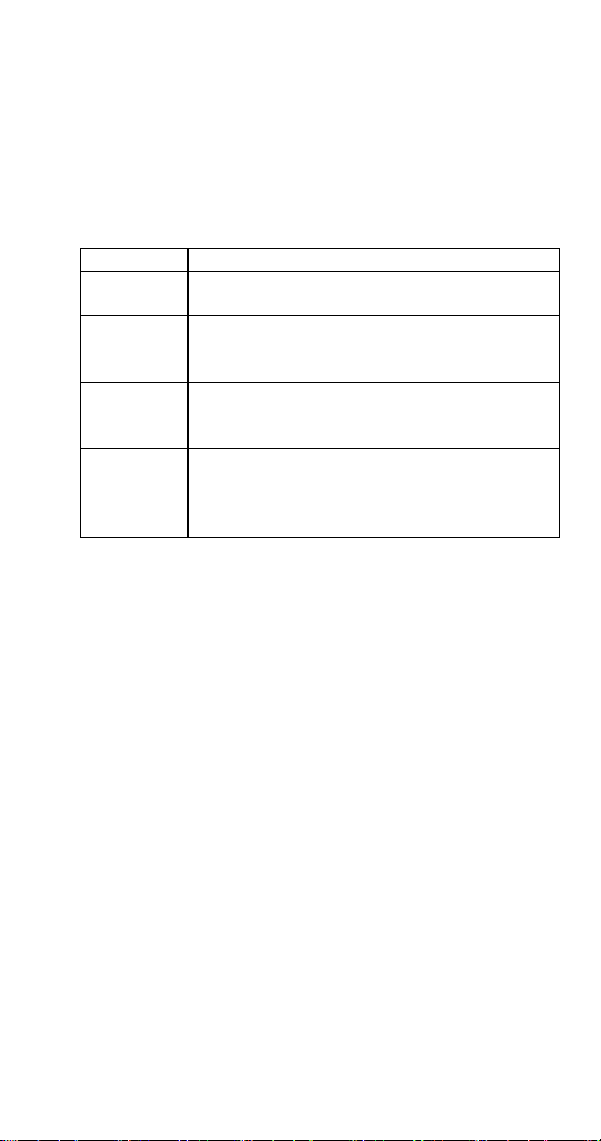
Discharge Pressure Low Checklist
Problem Cause
Improper
installation
Refer to “Installation/Visual Inspection Checklist.”
Improper
refrigerant
charge
Undercharged
Wrong type of refrigerant
Other
Low ambient temperature
Non-Manitowoc components in system
High side refrigerant lines/component restricted
(before mid-condenser)
Suction pressure is too low and affecting
discharge pressure. (Refer to “Suction Pressure
Low Checklist.”)
No water or insufficient pressure
Expansion valve incorrectly adjusted
Defective compressor
Moisture in refrigeration system
NOTE: Do not limit your diagnosis to only the items listed
in the checklists.
Part Number 000015432 4/18 69
ANALYZING SUCTION PRESSURE
NOTE: Analyze discharge pressure before analyzing suction
pressure.
High or low discharge pressure may be causing high or low
suction pressure.
Suction Pressure High Checklist
Problem Cause
Improper
installation
Refer to “Installation/Visual Inspection Checklist.”
Discharge
pressure
Discharge pressure is too high and is affecting
suction pressure. Refer to “Discharge Pressure
High Checklist.”
Improper
refrigerant
charge
Overcharged
Wrong type of refrigerant
Non condensible in system
Other
Dump valve leaking
Non-Manitowoc components in system
Expansion valve incorrectly adjusted
Defective compressor

70 Part Number 000015432 4/18
Suction Pressure Low Checklist
Problem Cause
Improper
installation
Refer to “Installation/Visual Inspection Checklist.”
Discharge
pressure
Discharge pressure is too low and is affecting
suction pressure. Refer to “Discharge Pressure
Low Checklist.”
Improper
refrigerant
charge
Undercharged
Wrong type of refrigerant
Other
Non-Manitowoc components in system
Restricted/plugged liquid line drier
Restricted/plugged tubing in suction side of
refrigeration system
Expansion valve starving
No water or insufficient pressure
Moisture in refrigeration system
Dirty Evaporator
NOTE: Do not limit your diagnosis to only the items listed
in the checklist.
Part Number 000015432 4/18 71
Electrical Components
MAIN FUSE
FUNCTION
The control board fuse stops ice machine operation if
electrical components fail causing high amp draw.
SPECIFICATIONS
• The main fuse is 250 Volt, 10 amp, time delay.
n
Warning
High (line) voltage is applied to the control board at
all times. Removing the control board fuse or moving
the toggle switch to OFF will not remove the power
supplied to the control board.
CHECK PROCEDURE
1. Energized control board lights do not indicate a good
fuse.
n
Warning
Disconnect electrical power to the entire ice machine
before proceeding.
2. Remove the fuse. Check for continuity across the fuse
with an ohmmeter.
Reading Result
Open (OL) Replace fuse
Closed (O) Fuse is good
Component Check Procedures
72 Part Number 000015432 4/18
ICE/OFF/CLEAN TOGGLE SWITCH
FUNCTION
The switch is used to place the ice machine in ICE, OFF or
CLEAN mode of operation.
SPECIFICATIONS
Single-pole, double-throw switch. The switch is connected
into a varying low D.C. voltage circuit.
CHECK PROCEDURE
NOTE: Because of a wide variation in D.C. voltage, it is not
recommended that a voltmeter be used to check toggle
switch operation.
1. Inspect the toggle switch for correct wiring.
2. Isolate the toggle switch by disconnecting the molex
connector.
3. Check continuity across the toggle switch terminals.
Note where the wire numbers are connected to the
switch terminals, or refer to the wiring diagram to
take proper readings.
Switch Setting Terminals Ohm Reading
ICE
1-6 Open
1-2 Closed
2-6 Open
CLEAN
1-6 Closed
1-2 Open
2-6 Open
OFF
1-6 Open
1-2 Open
2-6 Open
4. Replace the toggle switch if continuity readings do not
match all three switch settings.
Part Number 000015432 4/18 73
FLOAT SWITCH
FUNCTION
The float switch prevents the ice machine from running
when the water level is below the control setpoint.
The float switch must be closed (float in up position)
before the ice machine will start, and must remained
closed throughout the freeze cycle.
SPECIFICATIONS
A mechanical liquid level sensor, that magnetically
operates a reed switch.
CHECK PROCEDURE
NOTE: The water float switch is connected to the water
reservoir cover. The reservoir cover must be in place and
water must be present in the reservoir to close the switch.
Verify water is supplied to the float valve, the water
inlet screen is clean, and the float and float arm are free
moving.
1. Disconnect power to the ice machine.
2. Disconnect the float switch from the control board
and connect an ohm meter to the switch wires.
3. Verify the switch is in the up position (reservoir full of
water), then check continuity.
Step 3 Check for Continuity
Reading Result
Closed The switch is working properly
Open Replace the switch
4. Remove cover from reservoir by lifting straight up.
Verify the switch opens as the float drops.

74 Part Number 000015432 4/18
ICE DAMPER AND HALL EFFECT SWITCHES
Damper Door
FUNCTION
Opens and closes as ice passes from the ice chute to the
bin. A metal lever attached to the damper interrupts the
magnetic field sensed by the Hall Effect switches as the
damper opens and closes.
Hall Effect Switch #1 - Operational Sensing
This switch will open and re-close in conjunction with the
ice damper as ice is discharged from the evaporator. The
control board must see this switch open and close at least
once every 90 seconds during the freeze cycle.
Hall Effect Switch #2 - Shut-Off and Restart
This switch also works in conjunction with the ice
damper. When the switch opens, the ice machine stops
immediately. The ice machine restarts when the switch re-
closes and the five-minute delay period expires.
FUNCTION TEST
Place toggle switch in OFF position. HES#1 and HES#2 lights
will energize. Move ice damper slowly to open position.
• HES#1 light de-energizes, HES#2 remains energized.
• HES#2 light de-energizes as damper continues to open.
Move damper slowly to closed position. HES#2 energizes,
HES#1 remains de-energized.
HES#1 energizes as the damper continues to close.

Part Number 000015432 4/18 75
Hall Effect Switch Diagnostics
All diagnostics must be performed with the ice damper
installed and in the closed position. The control board
lights will not indicate as described below with the ice
damper in the open position. The ice damper must swing
freely, if the damper is binding adjust/loosen screws that
hold the Hall Effect switch housing in place.
SWITCH FAILS OPEN OR IS DISCONNECTED
HES#1
1. Reset line voltage to the ice machine
2. Wait 15 minutes for delay to expire.
3. HES#1 light energizes and ice machine starts.
4. When 15-minute delay period ends, the ice machine
shuts off and flashes the HES#1 light.
HES#2
1. Reset line voltage to the ice machine.
2. Wait 15 minutes for delay to expire.
3. HES#2 light is energized and HES#1 light is de-
energized.
4. Ice machine starts.
5. After 15 minutes the ice machine shuts off. HES#1 is
de-energized and HES#2 is energized.

76 Part Number 000015432 4/18
SWITCH FAILS CLOSED
HES#1
1. Reset line voltage to the ice machine
2. Wait 15 minutes for delay to expire.
3. HES#1 light de-energized.
4. The ice machine starts, runs for 20 seconds, then de-
energizes.
5. HES#1 light is de-energized.
HES#2
1. Reset line voltage to the ice machine
2. Wait 15 minutes for delay to expire.
HES #2 is a three wire switch and can stop in three
separate failure modes.
• HES #1 is energized, HES #2 is de-energized, and the
ice machine will not start.
• HES #1 and HES #2 lights are de-energized, and the ice
machine will not start.
• HES #1 and HES #2 are energized. The ice machine
starts, immediately shuts off and starts another
15-minute delay period (control board lights race to
indicate 15-minute delay period). The ice machine will
repeat the sequence until the toggle switch is moved
to OFF or power is disconnected to the ice machine.
In all failure modes, disconnecting HES #2 from the control
board will result in Switch Fails Open or Is Disconnected
symptoms (see previous page).

Part Number 000015432 4/18 77
SELECTOR SWITCH
FUNCTION
Selects product dispensed. Ice, Water or Ice and Water.
CHECK
DISPENSE LEVER ACTIVATED
Step 1 Verify line voltage is present at control board
wires #20 & #22. Note - If a blue indicator light is energized
on the touch pad, the control board has line voltage.
Step 2 Depress each selection on the touch pad.
• 1 or more LEDs do not energize/de-energize when a
selection is pressed - Replace touch pad
• Each touch pad LED energizes/de-energizes as
selections are pressed - Go to next step
Step 3 Isolate and ohm the ice dispense switch (Wires
#59 & #60). The selector switch closes when depressed
and opens when released.
• Switch does not close/open when the switch is
pressed/released - Replace switch
• Switch closes/opens as the switch is pressed/released
- Go to next step
Step 4 Reconnect dispense switch and test both relays
for line voltage:
• Wires #58 & #54 = Ice Dispense Motor
• Wires #52 & #56 = Water Solenoid
• Replace wiring, component or control board as
required.

78 Part Number 000015432 4/18
TOUCHLESS SENSOR ACTIVATED
Step 1 Verify line voltage is present at control board
wires #20 & #22. Note - If a blue indicator light is energized
on the touch pad, the control board has line voltage.
Step 2 Depress each selection on the touch pad.
• 1 or more LEDs do not energize/de-energize when a
selection is pressed - Replace touch pad
• Each touch pad LED energizes/de-energizes as
selections are pressed - Go to next step
Step 3 Verify line voltage is supplied to touchless
sensing control board at wires #49 & #50.
Will Not Dispense
• Disconnect wires from C (common) and NO (normally
open) terminals on the sensor control board.
• Use an ohm meter to verify the switch is opening and
closing. Place hand in front of sensor, if the sensor
activates and closes the switch, the sensor is working
correctly.
• If the sensor does not activate the switch, disconnect
the sensor wire from the sensor control board. Short
+5 and SIG.
• If the contacts close, replace the sensor.
• If the contacts remain open, replace the sensor
control board.

Part Number 000015432 4/18 79
Will Not Stop Dispensing
• Disconnect sensor plug from sensor control board.
• If the dispensing stops, replace the sensor
• If the dispensing continues, disconnect wires #59
& #60 from the control board
• Check resistance across control board contacts
• Closed = Replace the touchless sensing control
board
• Open = Dispense control board is not functioning
correctly, check control board relays
Replace the selector switch if ohm readings do not match
all three switch settings.
80 Part Number 000015432 4/18
DISPENSE SWITCH
FUNCTION
Supplies power to the product selector switch when
activation lever is depressed.
CHECK
1. Inspect the selector switch for correct wiring.
2. Isolate the switch by disconnecting all wires from the
switch.
3. Check across the switch terminals with an ohm meter.
Activation Lever Position Resistance Reading
Depressed Closed
Released Open
Replace the selector switch if ohm readings do not match.

Part Number 000015432 4/18 81
TOUCHLESS SENSOR
FUNCTION
Supplies power to the product selector switch when
container activates sensor.
CHECK
Container must be within an inch of sensor to activate.
Will Not Dispense
1. Verify power is supplied to the ice machine. When the
toggle switch is in ICE position, the blue LED light will
be on.
2. Disconnect wires from C (common) and NO (normally
open) terminals on the sensor control board.
3. Use an ohm meter to verify the switch is opening and
closing. Place hand in front of sensor, if the sensor
activates and closes the switch, the sensor is working
correctly.
4. If the sensor does not activate, disconnect the sensor
wire from the sensor control board. Short +5 and SIG.
• If the contacts close, replace the sensor.
• If the contacts remain open, replace the sensor
control board.
Will Not Stop Dispensing
1. Disconnect sensor plug from sensor control board.
• If the dispensing stops, replace the sensor.
• If the dispensing continues, disconnect wires 22 &
59/60 from the control board.
2. Check resistance across control board contacts.
• Closed = Replace the sensor control board
• Open = Refer to selector switch diagnostics
82 Part Number 000015432 4/18
HIGH PRESSURE CUTOUT CONTROL
FUNCTION
Stops the ice machine if subjected to excessive high-side
pressure.
The HPCO control is normally closed, and opens on a rise
in discharge pressure.
Specifications
Cut-Out Cut-In
450 psig ±10
(3103 kPa ±69)
31 bar ±.69
Automatic Reset
(Must be below 300 psig
[2068 kPa 20.68 bar] to reset.)
CHECK PROCEDURE
1. Set ICE/OFF/CLEAN switch to OFF, (Manual reset
HPCO reset if tripped).
2. Disconnect main power supply to the ice machine.
3. Connect manifold gauges to the access valves.
4. Hook voltmeter in parallel across the HPCO, leaving
wires attached.
5. Reconnect main power supply to the ice machine.
6. Set ICE/OFF/CLEAN switch to ICE.
7. No water or air flowing through the condenser will
cause the HPCO control to open because of excessive
pressure. Watch the pressure gauge and record the
cut-out pressure.
n
Warning
If discharge pressure exceeds 460 psig (3172 kPa
31.72 bar) and the HPCO control does not cut out,
set ICE/OFF/CLEAN switch to OFF to stop ice machine
operation.
Replace the HPCO control if it:
1. Will not reset (below 300 psig [2068 kPa 20.68 bar]).
2. Does not open at the specified cut-out point.
Part Number 000015432 4/18 83
FAN CYCLE CONTROL
FUNCTION
Energizes and de-energizes the condenser fan motor.
The fan cycle control closes on an increase, and opens on a
decrease in discharge pressure.
Specifications
Cut-In (Close) Cut-Out (Open)
250 psig ±5 200 psig ±5
CHECK PROCEDURE
1. Verify fan motor windings are not open or grounded,
and fan spins freely.
2. Connect manifold gauge set to ice machine.
3. Hook voltmeter in parallel across the fan cycle control,
leaving wires attached.
4. Refer to chart below.
FCC Setpoint: Reading Should Be: Fan
Should Be:
Above Cut-In 0 Volts Running
Below Cut-Out Line Voltage Off
84 Part Number 000015432 4/18
LOW PRESSURE CUTOUT (LPCO) CONTROL
FUNCTION
Stops the ice machine if the low side pressure is too low.
The LPCO control is closed at pressures above setpoint and
opens at pressures below setpoint.
Specifications
Cut-Out Cut-In
Current Production &
Replacement Part
17 psig ±5 35 psig ±7
CHECK PROCEDURE
1. Connect manifold gauge set to suction access valve.
2. Disconnect wires from low pressure switch and
connect ohm meter across LPCO terminals.
Replace the LPCO control if it:
1. Is not closed at the specified setpoint.
2. Does not open at the specified setpoint.

Part Number 000015432 4/18 85
COMPRESSOR ELECTRICAL DIAGNOSTICS
The compressor does not start or will trip repeatedly on
overload.
Check Resistance (Ohm) Values
NOTE: Compressor windings can have very low ohm
values. Use a properly calibrated meter.
Perform the resistance test after the compressor cools. The
compressor dome should be cool enough to touch (below
120°F/49°C) to assure that the overload is closed and the
resistance readings will be accurate.
SINGLE PHASE COMPRESSORS
1. Disconnect power, then remove the wires from the
compressor terminals.
2. The resistance values between C and S and between
C and R, when added together, should equal the
resistance value between S and R.
3. If the overload is open, there will be a resistance
reading between S and R, and open readings between
C and S and between C and R. Allow the compressor
to cool, then check the readings again.
Check Motor Windings to Ground
Check continuity between all three terminals and the
compressor shell or copper refrigeration line. Scrape metal
surface to get good contact. If continuity is present, the
compressor windings are grounded and the compressor
should be replaced.

86 Part Number 000015432 4/18
Compressor Drawing Locked Rotor
To determine if the compressor is seized, check the amp
draw while the compressor is trying to start.
The two likely causes of this are a defective starting
component and a mechanically seized compressor.
To determine which you have:
1. Install gauge on high and low side.
2. Try to start the compressor.
3. Watch the pressures closely.
A. If the pressures do not move, the compressor is
seized. Replace the compressor.
B. If the pressures move, the compressor is turning
slowly and is not seized. Check the capacitors
and relay.
COMPRESSOR DRAWING HIGH AMPS
The continuous amperage draw on start-up should not be
near the maximum fuse size indicated on the serial tag.
Diagnosing Capacitors
• If the compressor attempts to start, or hums and trips
the overload protector, check the starting components
before replacing the compressor.
• Visual evidence of capacitor failure can include a
bulged terminal end or a ruptured membrane. Do not
assume a capacitor is good if no visual evidence is
present.
• A good test is to install a known good substitute
capacitor.
• Use a capacitor tester when checking a suspect
capacitor. Clip the bleed resistor off the capacitor
terminals before testing.

Part Number 000015432 4/18 87
DIAGNOSING START COMPONENTS
If the compressor attempts to start, or hums and trips the
overload protector, check the start components before
replacing the compressor.
Capacitor
Visual evidence of capacitor failure can include a bulged
terminal end or a ruptured membrane. Do not assume a
capacitor is good if no visual evidence is present. A good
test is to install a known good substitute capacitor. Use
a capacitor tester when checking a suspect capacitor.
Clip the bleed resistor off the capacitor terminals before
testing.
Relay
The relay has a set of contacts that connect and disconnect
the start capacitor from the compressor start winding. The
contacts on the relay are normally closed (start capacitor in
series with the start winding). The relay senses the voltage
generated by the start winding and opens the contacts as
the compressor motor starts. The contacts remain open
until the compressor is de-energized.
88 Part Number 000015432 4/18
Relay Operation Check
n
Warning
Disconnect electrical power to the ice machine before
proceeding.
1. Disconnect wires from relay terminals.
2. Verify the contacts are closed.
Measure the resistance between terminals 1 and 2.
No continuity indicates open contacts. Replace the
relay.
3. Check the relay coil.
Measure the resistance between terminals 2 and
5. No resistance indicates an open coil. Replace the
relay.
4. Move toggle switch to the ICE position.
5. The compressor start winding should energize for less
than 1 second. Continued high amperage draw could
indicate:
• Low incoming power supply.
(Check voltage at compressor start-up when load
is greatest.)
• Defective relay.
• Defective capacitor.
• Defective compressor.
6. Verify voltage and replace all start components.
7. If all of the previous tests are satisfactory and the
compressor will not operate or continue to operate,
replace the compressor.
Part Number 000015432 4/18 89
Refrigerant Recovery/Evacuation
NORMAL SELF-CONTAINED PROCEDURES
Do not purge refrigerant to the atmosphere. Capture
refrigerant using recovery equipment. Follow the
manufacturer’s recommendations.
Important
Manitowoc Ice assumes no responsibility for the
use of contaminated refrigerant. Damage resulting
from the use of contaminated refrigerant is the sole
responsibility of the servicing company.
Important
Replace the liquid line drier before evacuating and
recharging. Use only a Manitowoc (OEM) liquid line
filter-drier to prevent voiding the warranty.
CONNECTIONS
Manifold gauge sets must utilize low loss fittings to comply
with U.S. Government rules and regulations.
Make these connections:
• Suction side of the compressor through the suction
service valve.
• Discharge side of the compressor through the
discharge service valve.
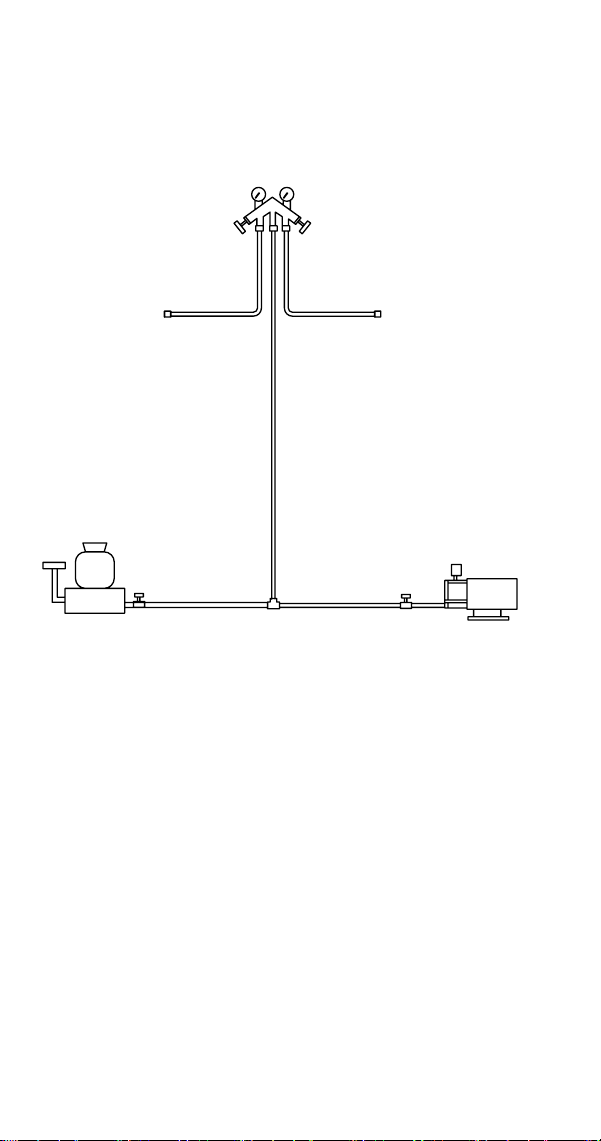
90 Part Number 000015432 4/18
Recovery/Evacuation Procedures
1. Place the toggle switch in the OFF position.
2. Install manifold gauge set, scale, and recovery unit or
two-stage vacuum pump.
OPEN OPEN
LOW SIDE
ACCESS
VALVE
HIGH SIDE
ACCESS
VALVE
REFRIGERANT
CYLINDER
VACUUM PUMP/
RECOVERY UNIT
SCALE
CLOSED
OPEN
SV3055
RECOVERY/EVACUATION CONNECTIONS
3. Perform recovery or evacuation:
A. Recovery: Operate the recovery unit as directed
by the manufacturer’s instructions.
B. Evacuation prior to recharging: Pull the system
down to 250 microns. Then allow the pump to
run for an additional half hour. Turn off the pump
and perform a standing vacuum leak check.
NOTE: Check for leaks using an electronic leak detector
after charging the ice machine.
4. Follow the Charging Procedures on the next page.
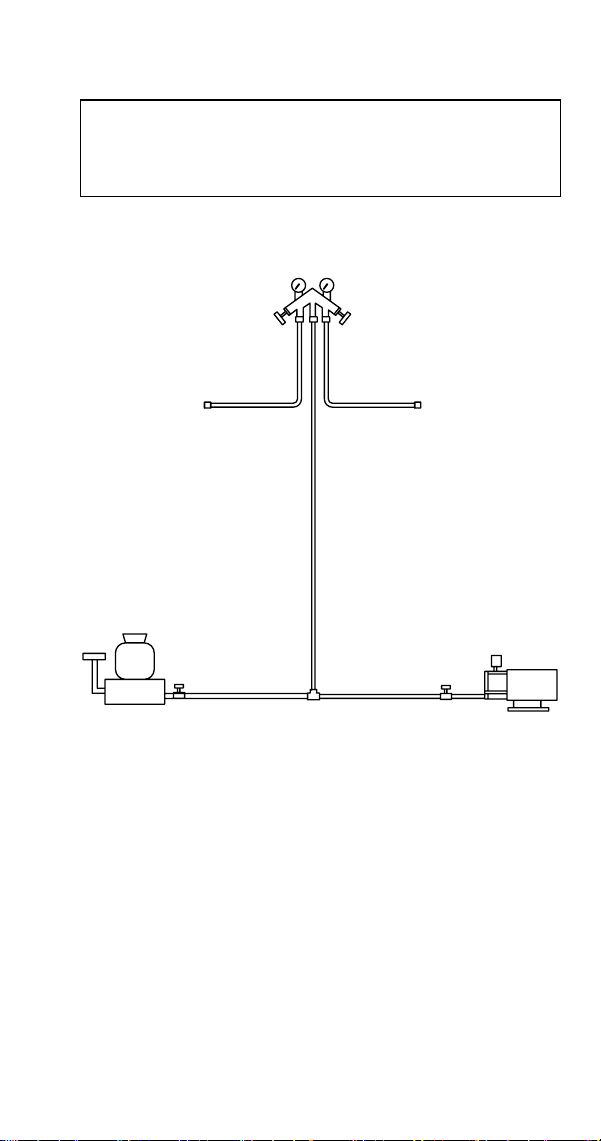
Part Number 000015432 4/18 91
Charging Procedures
Important
The charge is critical on all Manitowoc ice machines.
Use a scale to ensure the proper charge is installed.
1. Be sure the toggle switch is in the OFF position.
MANIFOLD SET
CLOSED OPEN
LOW SIDE
ACCESS
VALVE
HIGH SIDE
ACCESS
VALVE
REFRIGERANT
CYLINDER
VACUUM PUMP/
RECOVERY UNIT
SCALE
OPEN
CLOSED
SV3055
CHARGING CONNECTIONS
2. Close the vacuum pump valve and the low side
manifold gauge valve.
3. Open the high side manifold gauge valve.
4. Open the refrigerant cylinder and add the proper
refrigerant charge (shown on nameplate) through the
discharge access valve.
5. Let the system “settle” for 2 to 3 minutes.
6. Place the toggle switch in the ICE position.

92 Part Number 000015432 4/18
7. Close the high side on the manifold gauge set. Add
any remaining vapor charge through the suction
access valve (if necessary).
NOTE: Manifold gauge set must be removed properly to
ensure that no refrigerant contamination or loss occurs.
8. Make sure that all of the vapor in the charging hoses
is drawn into the ice machine before disconnecting
the charging hoses.
A. Run the ice machine in the Freeze cycle.
B. Remove the quick disconnect fitting from the
high side access valve at the ice machine.
C. Open the low side service valve at the ice
machine.
D. Open the high and low side valves on the
manifold gauge set. Any refrigerant in the lines
will be pulled into the low side of the system.
E. Allow the pressures to equalize while the ice
machine is in the Freeze cycle.
F. Remove the quick disconnect fitting from the low
side access valve at the ice machine and install
both access valve caps.

Part Number 000015432 4/18 93
System Contamination Clean-Up
General
This section describes the basic requirements for restoring
contaminated systems to reliable service.
Important
Manitowoc Ice assumes no responsibility for the
use of contaminated refrigerant. Damage resulting
from the use of contaminated refrigerant is the sole
responsibility of the servicing company.
DETERMINING SEVERITY OF CONTAMINATION
System contamination is generally caused by either
moisture or residue from compressor burnout entering the
refrigeration system.
Inspection of the refrigerant usually provides the first
indication of system contamination. Obvious moisture or
an acrid odor in the refrigerant indicates contamination.
If either condition is found, or if contamination is
suspected, use a Total Test Kit from Totaline or a similar
diagnostic tool. These devices sample refrigerant,
eliminating the need to take an oil sample. Follow the
manufacturer’s directions.
If a refrigerant test kit indicates harmful levels of
contamination, or if a test kit is not available, inspect the
compressor oil.
1. Remove the refrigerant charge from the ice machine.
2. Remove the compressor from the system.
3. Check the odor and appearance of the oil.
4. Inspect open suction and discharge lines at the
compressor for burnout deposits.
5. If no signs of contamination are present, perform an
acid oil test.
Check the chart on the next page to determine the type of
cleanup required.
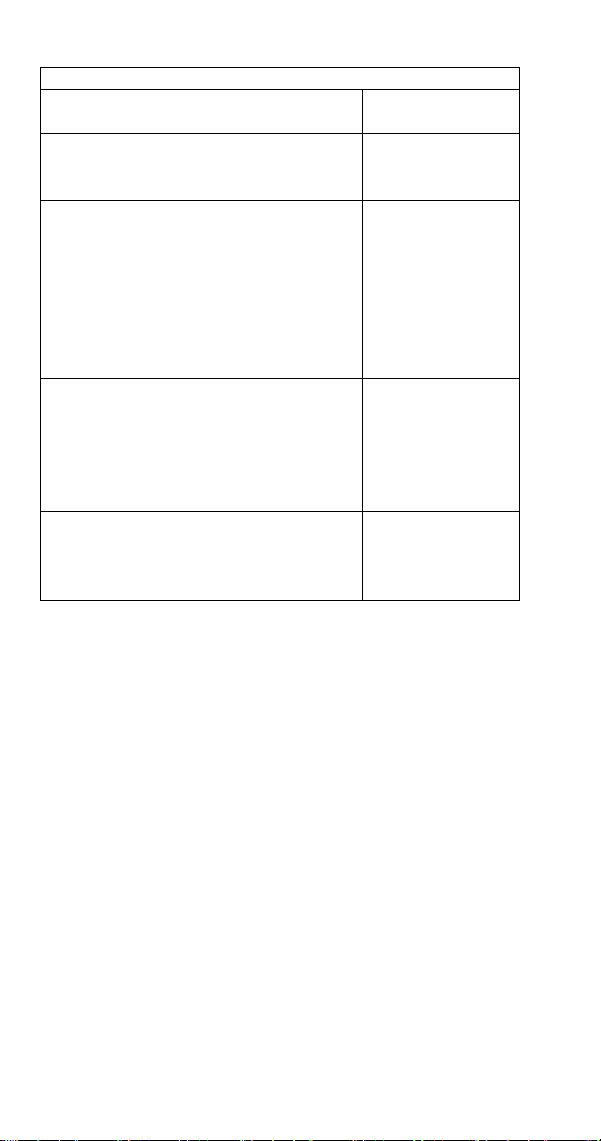
94 Part Number 000015432 4/18
Contamination/Cleanup Chart
Symptoms/Findings Required Cleanup
Procedure
No symptoms or suspicion of
contamination
Normal evacuation/
recharging
procedure
Moisture/Air Contamination symptoms
Refrigeration system open to atmosphere
for longer than 15 minutes
Refrigeration test kit and/or acid oil test
shows contamination
Leak in water cooled condenser
No burnout deposits in open compressor
lines
Mild contamination
cleanup procedure
Mild Compressor Burnout symptoms
Oil appears clean but smells acrid
Refrigeration test kit or acid oil test shows
harmful acid content
No burnout deposits in open compressor
lines
Mild contamination
cleanup procedure
Severe Compressor Burnout symptoms
Oil is discolored, acidic, and smells acrid
Burnout deposits found in the compressor,
lines, and other components
Severe
contamination
cleanup procedure
Part Number 000015432 4/18 95
CLEANUP PROCEDURE
Mild System Contamination
1. Replace any failed components.
2. If the compressor is good, change the oil.
3. Replace the liquid line drier.
NOTE: If the contamination is from moisture, use heat
lamps during evacuation. Position them at the compressor,
condenser and evaporator prior to evacuation. Do not
position heat lamps too close to plastic components, or
they may melt or warp.
Important
Dry nitrogen is recommended for this procedure. This
will prevent refrigeration release.
4. Follow the normal evacuation procedure, except
replace the evacuation step with the following:
A. Pull vacuum to 1000 microns. Break the vacuum
with dry nitrogen and sweep the system.
Pressurize to a minimum of 5 psig (35 kPa,
.35 bar).
B. Pull vacuum to 500 microns. Break the vacuum
with dry nitrogen and sweep the system.
Pressurize to a minimum of 5 psig (35 kPa,
.35 bar).
C. Change the vacuum pump oil.
D. Pull vacuum to 500 microns. Run the vacuum
pump for 1/2 hour on self-contained models,
1 hour on remotes.
NOTE: You may perform a standing vacuum test to make a
preliminary leak check. You should use an electronic leak
detector after system charging to be sure there are no
leaks.
5. Charge the system with the proper refrigerant to the
nameplate charge.
6. Operate the ice machine.

96 Part Number 000015432 4/18
Severe System Contamination
1. Remove the refrigerant charge.
2. Remove the compressor.
3. Wipe away any burnout deposits from suction and
discharge lines at compressor.
4. Sweep through the open system with dry nitrogen.
Important
Refrigerant sweeps are not recommended, as they
release refrigerant into the atmosphere.
5. Install a new compressor and new start components.
6. Install a suction line filter-drier with acid and moisture
removal capability. Place the filter drier as close to the
compressor as possible.
7. Install an access valve at the inlet of the suction line
drier.
8. Install a new liquid line drier.
Part Number 000015432 4/18 97
Important
Dry nitrogen is recommended for this procedure. This
will prevent refrigerant release.
9. Follow the normal evacuation procedure, except
replace the evacuation step with the following:
A. Pull vacuum to 1000 microns. Break the vacuum
with dry nitrogen and sweep the system.
Pressurize to a minimum of 5 psig (35 kPa,
.35 bar).
B. Change the vacuum pump oil.
C. Pull vacuum to 500 microns. Break the vacuum
with dry nitrogen and sweep the system.
Pressurize to a minimum of 5 psig (35 kPa,
.35 bar).
D. Change the vacuum pump oil.
E. Pull vacuum to 500 microns. Run the vacuum
pump for 1/2 hour on self-contained models,
1 hour on remotes.
NOTE: You may perform a standing vacuum test to make a
preliminary leak check. You should use an electronic leak
detector after system charging to be sure there are no
leaks.
10. Charge the system with the proper refrigerant to the
nameplate charge.
11. Operate the ice machine for one hour. Then, check
the pressure drop across the suction line filter-drier.
A. If the pressure drop is less than 1 psig (7 kPa,
.7 bar), the filter-drier should be adequate for
complete cleanup.
B. If the pressure drop exceeds 1 psig (7 kPa,
.7 bar), change the suction line filter-drier and
the liquid line drier. Repeat until the pressure
drop is acceptable.
12. Operate the ice machine for 48-72 hours. Then
remove the suction line drier and change the liquid
line drier.
13. Follow normal evacuation procedures.
98 Part Number 000015432 4/18
REPLACING PRESSURE CONTROLS WITHOUT
REMOVING REFRIGERANT CHARGE
This procedure reduces repair time and cost. Use it when
any of the following components require replacement, and
the refrigeration system is operational and leak-free.
• Fan cycle control
• High pressure cut-out control
• Low pressure control
• High side service valve
• Low side service valve
Important
This is a required in-warranty repair procedure.
1. Disconnect power to the ice machine.
2. Follow all manufacturer’s instructions supplied with
the pinch-off tool. Position the pinch-off tool around
the tubing as far from the pressure control as feasible.
(See the figure on next page.) Clamp down on the
tubing until the pinch-off is complete.
n
Warning
Do not unsolder a defective component. Cut it out of
the system. Do not remove the pinch-off tool until the
new component is securely in place.
3. Cut the tubing of the defective component with a
small tubing cutter.
4. Solder the replacement component in place. Allow
the solder joint to cool.
5. Remove the pinch-off tool.
6. Re-round the tubing. Position the flattened tubing in
the proper hole in the pinch-off tool. Tighten the wing
nuts until the block is tight and the tubing is rounded.
NOTE: The pressure controls will operate normally once
the tubing is re-rounded. Tubing may not re-round 100%.
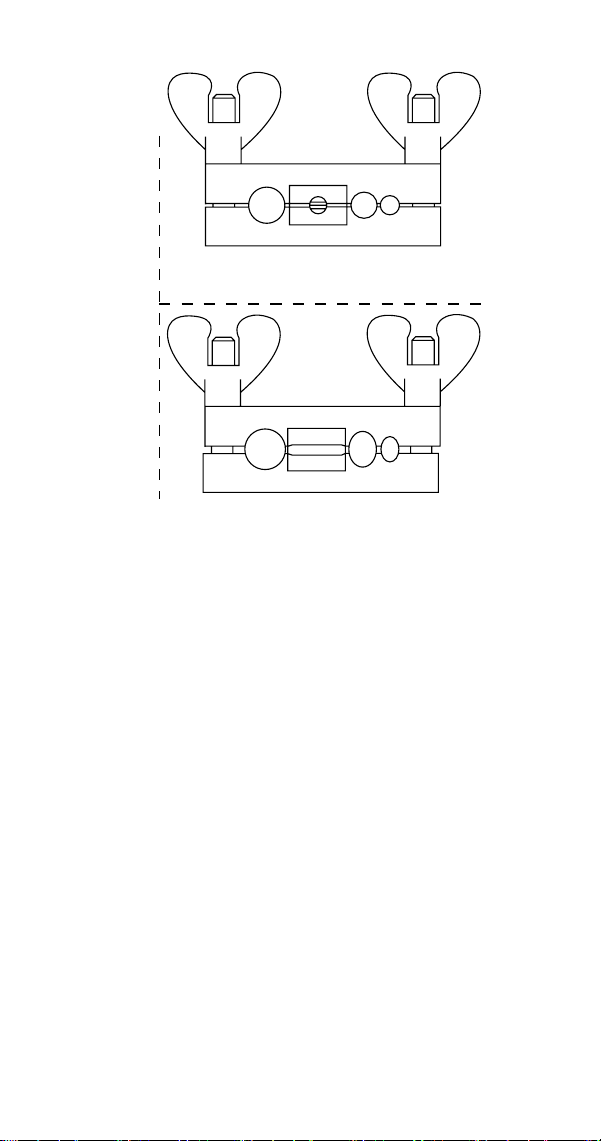

Part Number 000015432 4/18 101
MAIN FUSE
The main fuse is 250 Volt, 10 amp.
ICE/OFF/CLEAN TOGGLE SWITCH
Single-pole, double-throw switch. The switch is connected
into a varying low D.C. voltage circuit.
HIGH PRESSURE CUTOUT (HPCO) CONTROL
Cut-Out Cut-In
450 psig ±10
(3103 kPa ±69)
31 bar ±.69
Automatic Reset
(Must be below 300 psig
[2068 kPa 20.68 bar] to reset.)
FILTER-DRIERS
Driers are covered as a warranty part. The drier must be
replaced any time the system is opened for repairs.
The size of the filter-drier is important. The refrigerant
charge is critical. Using an improperly sized filter-drier
will cause the ice machine to be improperly charged with
refrigerant. Listed below is the recommended OEM field
replacement drier:
Model Drier Size End Connection Size
CNF201 CNF202 DML-032S 1/4"
Component Specifications
102 Part Number 000015432 4/18
Total System Refrigerant Charge
Important
This information is for reference only. Refer to the ice
machine serial number tag to verify the system charge.
Serial plate information overrides information listed
on this page.
Model Refrigerant Charge
CNF201 CNF202 9 oz. / 255 *g
*Indicates preliminary data - Model/Serial plate information
overrides the data in this chart.
NOTE: All ice machines are charged using R-404A
refrigerant.

Part Number 000015432 4/18 103
Cycle Times/24-Hour Ice Production/
Refrigerant Pressure Charts
These charts are used as guidelines to verify correct ice
machine operation.
Accurate collection of data is essential to obtain the
correct diagnosis.
• Refer to “Refrigeration System Diagnostics” for the
data that must be collected. This list includes: before
beginning service, ice production check, installation/
visual inspection, water system checklist, safeguards,
discharge and suction pressure analysis.
• Ice production checks that are within 10% of the chart
are considered normal. This is due to variances in
water and air temperature. Actual temperatures will
seldom match the chart exactly.
• Zero out manifold gauge set before obtaining pressure
readings to avoid misdiagnosis.
• Discharge and suction pressure are highest at the
beginning of the cycle. Allow system to stabilize, then
verify the pressures are within the range indicated.
• All pressure readings must be obtained at the ice
machine head section. Line set length will affect
pressures at the condensing unit.
• Water temperature will affect suction and discharge
pressure - 50° water temperature will result in
pressures on the lower end of the ranges specified.
90° water temperatures will result in pressures on the
upper end of the ranges specified.
Charts
104 Part Number 000015432 4/18
CNF201
SELF-CONTAINED AIR-COOLED
NOTE: These characteristics will vary depending on
operating conditions.
24-Hour Ice Production
Air Temperature
Entering Condenser
°F/°C
Water Temperature °F/°C
50/10 70/21 90/32
50/10 325 300 280
70/21 310 275 260
80/27 265 250 230
90/32 240 225 210
100/38 210 195 185
110/43 180 165 150
Operating Pressures (PSIG)
Air Temperature
Entering Condenser
°F/°C
Freeze Cycle
Discharge
Pressure
Suction
Pressure
50/10 180-210 28-31
70/21 210-230 28-31
90/32 260-290 28-31
100/38 320-375 28-31
110/43 360-380 28-31
NOTE: Data is preliminary and subject to change
Part Number 000015432 4/18 105
CNF202
SELF-CONTAINED AIR-COOLED
NOTE: These characteristics will vary depending on
operating conditions.
24-Hour Ice Production
Air Temperature
Entering Condenser
°F/°C
Water Temperature °F/°C
50/10 70/21 90/32
50/10 325 300 280
70/21 310 275 260
80/27 265 250 230
90/32 240 225 210
100/38 210 195 185
110/43 180 165 150
Operating Pressures (PSIG)
Air Temperature
Entering Condenser
°F/°C
Freeze Cycle
Discharge
Pressure
Suction
Pressure
50/10 180-210 28-31
70/21 210-230 28-31
90/32 260-290 28-31
100/38 320-375 28-31
110/43 360-380 28-31
NOTE: Data is preliminary and subject to change


Part Number 000015432 4/18 107
Wiring Diagrams
The following pages contain electrical wiring diagrams. Be
sure you are referring to the correct diagram for the ice
machine you are servicing.
n
Warning
Always disconnect power before working on electrical
circuitry.
Wiring Diagram Legend
The following symbols are used on all of the wiring
diagrams:
* Internal Compressor Overload
(Some models have external compressor
overloads)
** Fan Motor Run Capacitor
(Some models do not incorporate fan motor run
capacitor)
( ) Wire Number Designation
(The number is marked at each end of the wire)
—>>— Multi-pin Connection
(Electrical Box Side) —>>—
(Compressor Compartment Side)
Diagrams
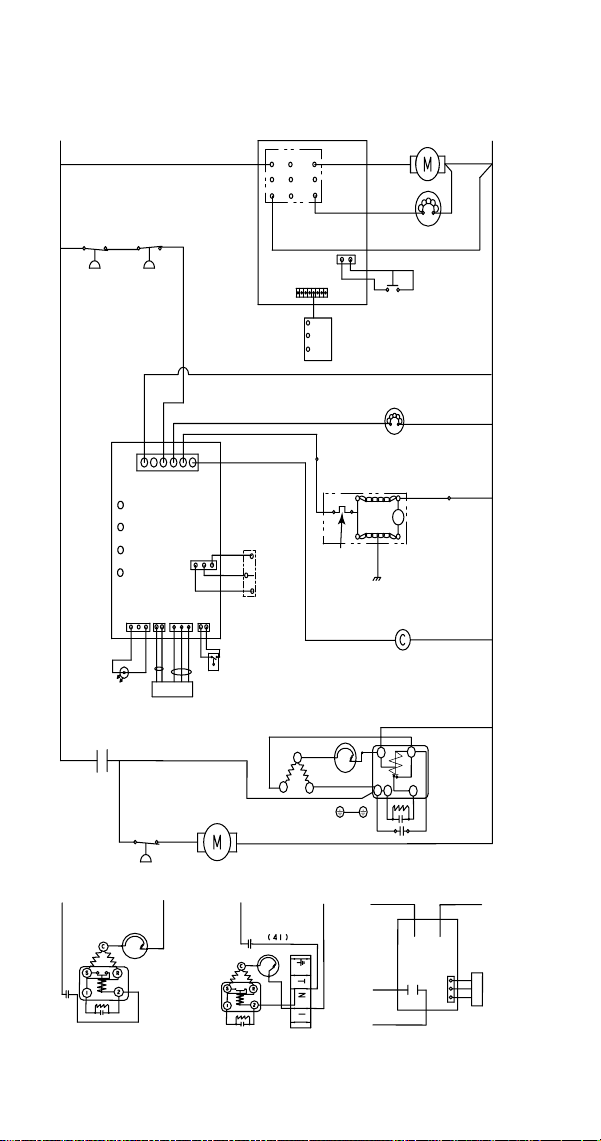
108 Part Number 000015432 4/18
CNF201 & CNF202 115/60/1 - 230/60/1 - 230/50/1
Refer to Nameplate for Voltage Rating
144
RED
3
2
1
(41)
WHT
C
S
R
2
5
(45)
(43)
BLK
(43)
BLK
(43)
BLK
(41)
(45)
(45)
1
2
3
1
2
3
(59)
(60)
(50) (49)
(96)(21)
(97)(43)
WHT
GND
(42)
(44)
(21)
(46)
(55)(51)
(54)
(56)
(59)
(60)
(58)
(52)
4
5
6
7
8
9
1
2
3
(22)
(90)(92)(95)
(39) (51)
1
2
6
BLK
RED
6665
67 68 69
L1 L1
L1 L2
L2L2
L1 L2 or N
230/50/1230/60/1
115/60/1
GND
5
14
36
12
47
55
17
31
40
52-1
52
41
29-1
13
52-2
18
51
52-3
27
20
30
34
25
29-2
29
34-1
34-2
34-3
34-4
51-1
40-1
40-2
40-3
1
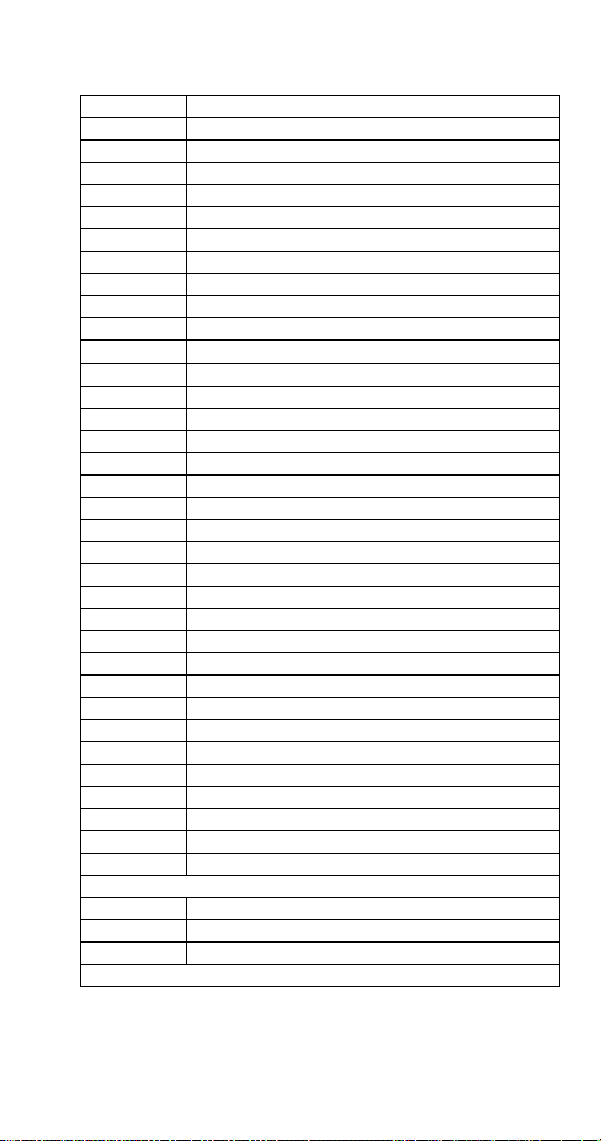
Part Number 000015432 4/18 109
CNF201 & CNF202 Electrical Diagram
Number Component
1 Control board Line Voltage Connector
5 Compressor
12 Compressor Start Capacitor
13 Compressor Start Relay
14 Condenser Fan Motor
17 Contactor Coil
18 Contactor Contacts
20 Dispense Switch
25 Fan Cycle Control
27 Float Switch - Water Level
29 Motor - Dispense
29-1 Motor - Evaporator
29-2 Motor - Evaporator Overload
30 Hall Effect Switch
31 High Pressure Cutout
36 Low Pressure Control
34 LED - HES1
34-1 LED - HES2
34-2 LED - Clean
34-3 LED - Water Level
34-4 LED - Blue Light
40 On/Off/Clean Switch
40-1 Ice
40-2 Off
40-3 Clean
41 See Control Board Schematic For Detail
47 Solenoid Valve - Water Dispense
51 Touchless Control Board
51-1 Touchless Control Board Wiring
52 Touchless Control Pad
52-1 Ice Only Selection
52-2 Water Only Selection
52-3 Water and Ice Selection
55 Water Dump Valve
Wire Colors
BLK Black
RED Red
WHT White
Refer to control board schematic for control board detail
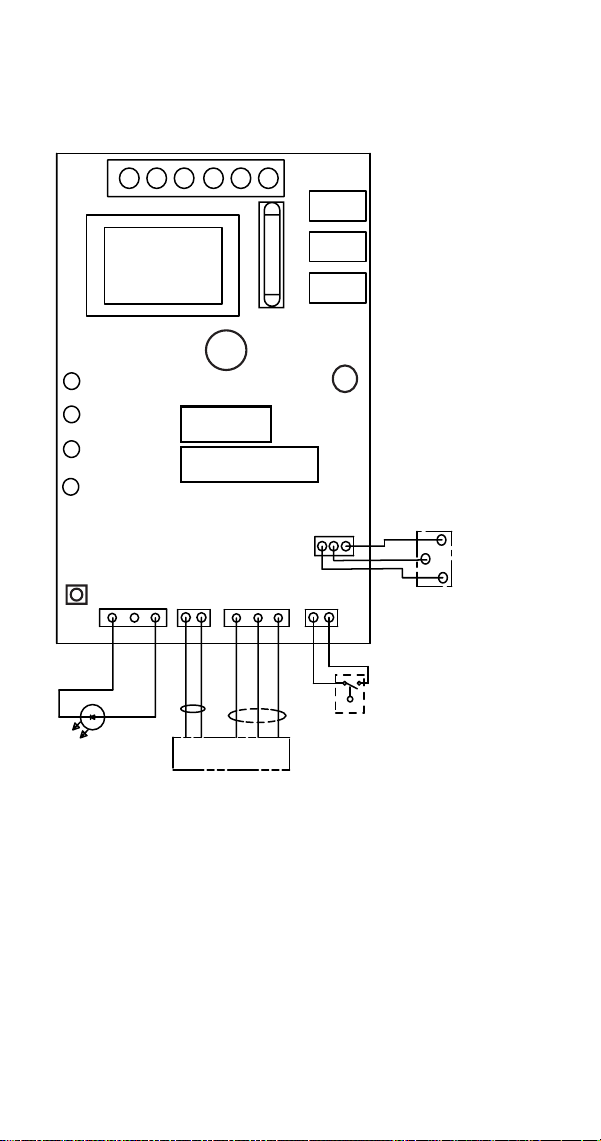
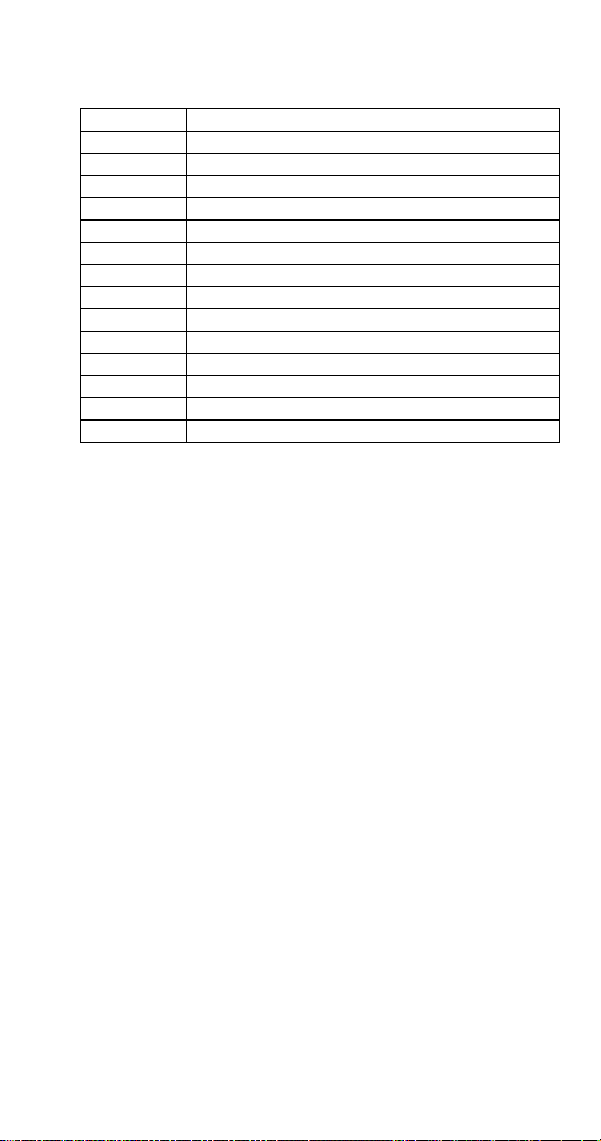
Part Number 000015432 4/18 111
Electronic Control Board Schematic
Number Description
1 Power Connector Lne Voltage
27 Float Switch
28 Fuse
30 Hall Effect Switch
34 LED - HES1
34-1 LED - HES2
34-2 LED - Clean
34-3 LED - Water Level
34-4 LED - Blue Light
40 On/Off/Clean Switch
40-1 Ice
40-2 Off
40-3 Clean
54 Transformer
Control Board Lights
HES #1 - Green, works in conjunction with the Hall Effect
Switch #1. When the ice damper is closed the light is on.
HES #2 - Green, works in conjunction with the Hall Effect
Switch #2. When the ice damper is closed the light is on.
Clean - Yellow, indicates the unit is in a clean sequence.
Water - Energizes when the water level in the reservoir
closes (raises) the float switch. De-energizes when the float
switch opens.
Racing Lights - All lights racing indicates a 15-minute delay
period is timing out.
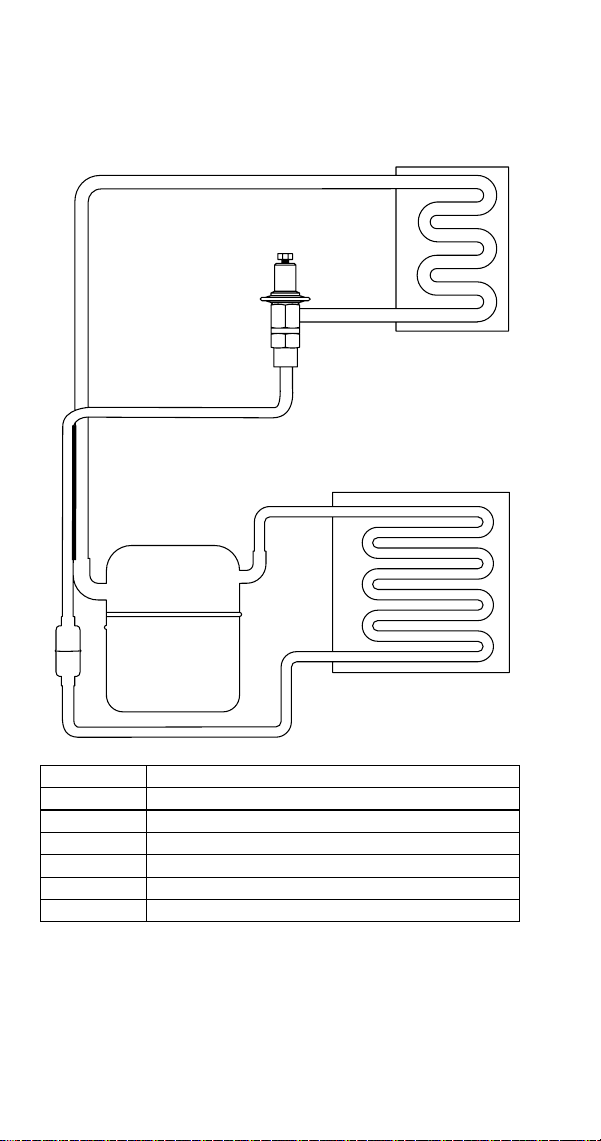



MANITOWOC ICE
2110 SOUTH 26TH STREET
MANITOWOC, WI 54220
844-724-2273
WWW.MANITOWOCICE.COM
Part Number 000015432 4/18
Welbilt provides the world’s top chefs, and premier chain operators
or growing independents with industry leading equipment and
soluons. Our cung-edge designs and lean manufacturing taccs
are powered by deep knowledge, operator insights, and culinary
experse.
All of our products are backed by KitchenCare® – our aermarket,
repair, and parts service.
Bringing innovation to the table
WWW.WELBILT.COM
CLEVELAND
CONVOTHERM®
DELFIELD®
FITKITCHEN™
FRYMASTER®
GARLAND
KOLPAK®
LINCOLN
MANITOWOC®
MERCO®
MERRYCHEF®
MULTIPLEX®
©2018 Welbilt Inc. except where explicitly stated otherwise. All rights
reserved.