SE-100 Bluetooth Glasses Instructions
Product Overview
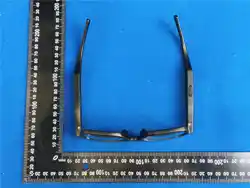
The SE-100 Bluetooth Glasses is a smart wearable device that integrates audio playback,
call functions, and an AI assistant. It adopts Bluetooth 5.3 technology to provide a stable
wireless connection experience, making it suitable for daily commuting, sports, and office
use.
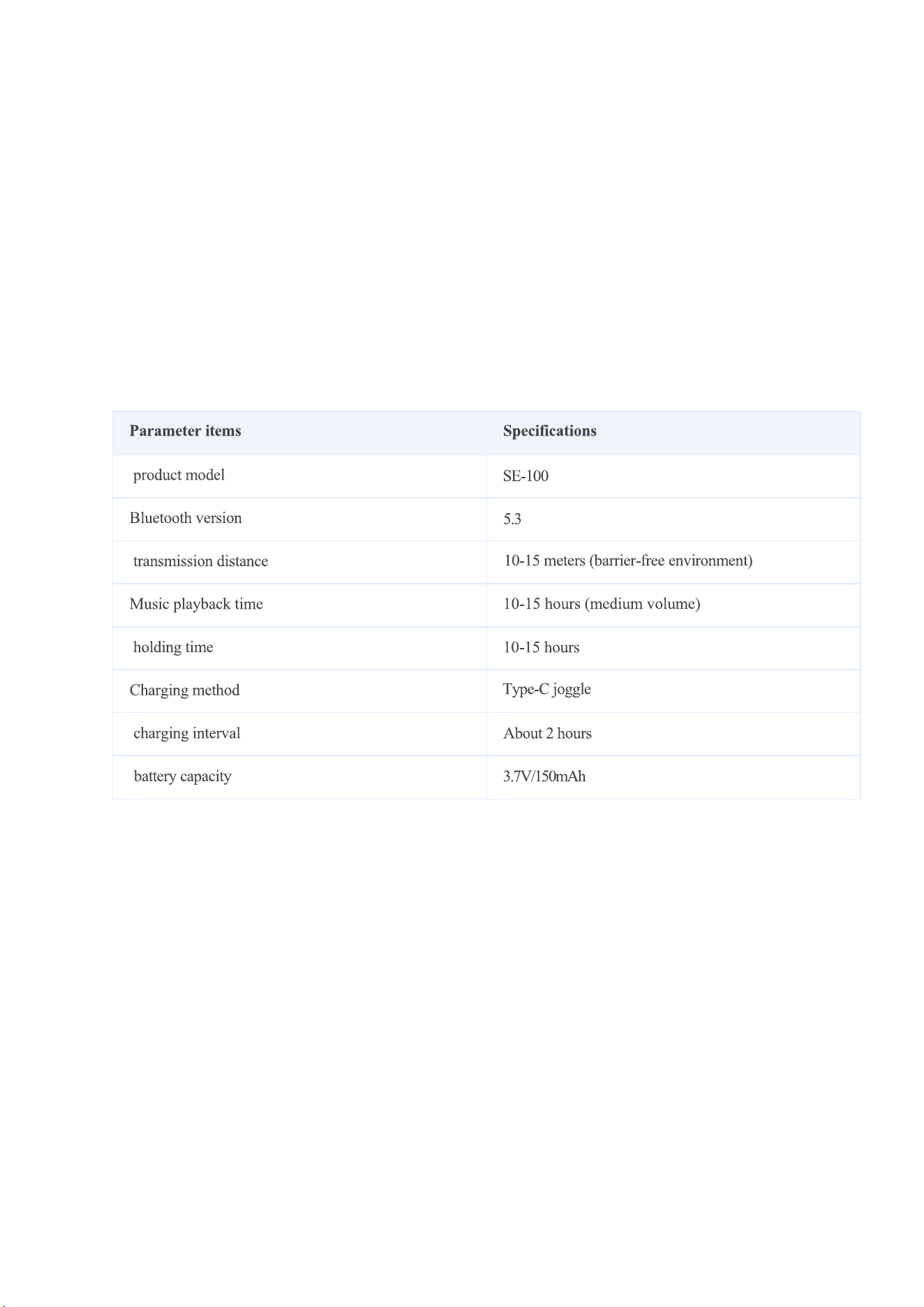
Technical Parameters
Operation Manual
I. Music Control
1. Play/Pause: Click the function key once.
2. Volume Adjustment:
◦ Double-click the function key to increase the volume by 3 levels.
◦ Triple-click the function key to decrease the volume by 3 levels.
1. Note: This device does not support track forward/backward switching.
II. Call Control

1. Answer a Call: Click the function key once.
2. Reject an Incoming Call: Long-press the function key for 2 seconds.
3. End a Call: Long-press the function key for 2 seconds.
4. Call Volume Adjustment: Same as the volume adjustment method for music control.
III. AI Control
1. Activate AI Assistant: Long-press the function key for 2 seconds.
2. Deactivate AI Assistant: Long-press the function key for 2 seconds.
Charging Instructions
1. Connect the glasses to a charger using a standard Type-C cable.
2. The indicator light turns red during charging and turns off once fully charged.
3. It is recommended to use a 5V/1A charger and avoid fast-charging devices.
Matters Needing Attention
1. Keep this product out of the reach of children.
2. Use and store the product and its accessories within a temperature range of 0℃–40℃.
Extreme high or low ambient temperatures may cause product malfunctions.
3. Reasonably control the volume and duration of product use to prevent hearing damage.
4. Do not use the product while driving, riding a bicycle, operating machinery, or performing
tasks that require attention to external sounds.
5. Do not disassemble, impact, squeeze, or expose the product to fire, as this may cause an
explosion. If the battery swells or leaks, stop using the product immediately.
6. Do not use the device during thunderstorms, as this may cause abnormal operation of the
device and increase the risk of electric shock.
7. When using this device, maintain a distance of at least 15 cm from implanted medical
devices (e.g., pacemakers).
8. Due to the characteristics of Bluetooth technology, signal strength depends on the usage
environment. If there are many overlapping wireless signals or strong electromagnetic
interference nearby, the product’s received signal may weaken or even disconnect.
9. If the product will not be used for an extended period, charge it every three months to
prevent battery damage that may render the product unbootable.
10. Stop using the device before cleaning or maintenance. Wipe the device with a clean,
dry, soft cloth.
11. It is recommended to use a brand-manufactured charger that is CCC-certified and has
an output voltage of 5V to charge this product. Avoid using fast chargers with an output
voltage exceeding 5V, as this may damage the product.

12. Maintain a steady press when using the long-press function to avoid accidental
triggering.
13. The waterproof function is not permanent, and its protection level may decrease due to
daily wear and tear. Do not charge the glasses in wet conditions.
Additional Information
• Storage Method: Store in a cool, dry place.
• Main Material: PC (Polycarbonate)

FCC Warnning:
This equipment has been tested and found to comply with the limits for a Class B digital device,
pursuant to part 15 of the FCC Rules. These limits are designed to provide
reasonable
protection against harmful interference in a residential installation. This equipment generates,
uses and can radiate radio
frequency
energy
and,
if
not
installed
and
used
in
accordance
with
the
instructions,
may cause
harmful
interference
to
radio
communications.
However,
there
is
no
guarantee
that interference
will
not
occur
in
a
particular
installation.
If
this
equipment
does
cause
harmful interference to radio or television reception, which can be
determined by turning the equipment off
and
on,
the
user
is
encouraged
to
try
to
correct
the interference
by
one
or
more
of
the following measures:
•
Reorient or relocate the receiving antenna.
•
Increase the separation between the equipment and receiver.
•
Connect the equipment into an outlet on a circuit different from that to which the receiver is
connected.
• Consult the dealer or an experienced radio/TV technician for help.
Caution:
Any
changes
or
modifications
to
this
device
not
explicitly
approved
by
manufacturer
could void your authority to operate this equipment.
This
device
complies
with
part
15
of
the
FCC
Rules.
Operation
is
subject
to
the
following
two
conditions:
(1)This
device
may
not
cause
harmful
interference,
and
(2)
this
device
must
accept
any
interference received, including interference that may cause undesired operation.
This
equipment
complies
with
FCC
radiation
exposure
limits
set
forth
for
an
uncontrolled
environment.
This
equipment
should
be
installed
and
operated
with
minimum
distance
0cm
between the radiator and your body.