MD38 Body Camera
Manual V1.1.3
Note: Please read the manual carefully before using.
Please abide by local laws and do not use this product for any illegal purpose. All
consequences shall be borne by yourself.
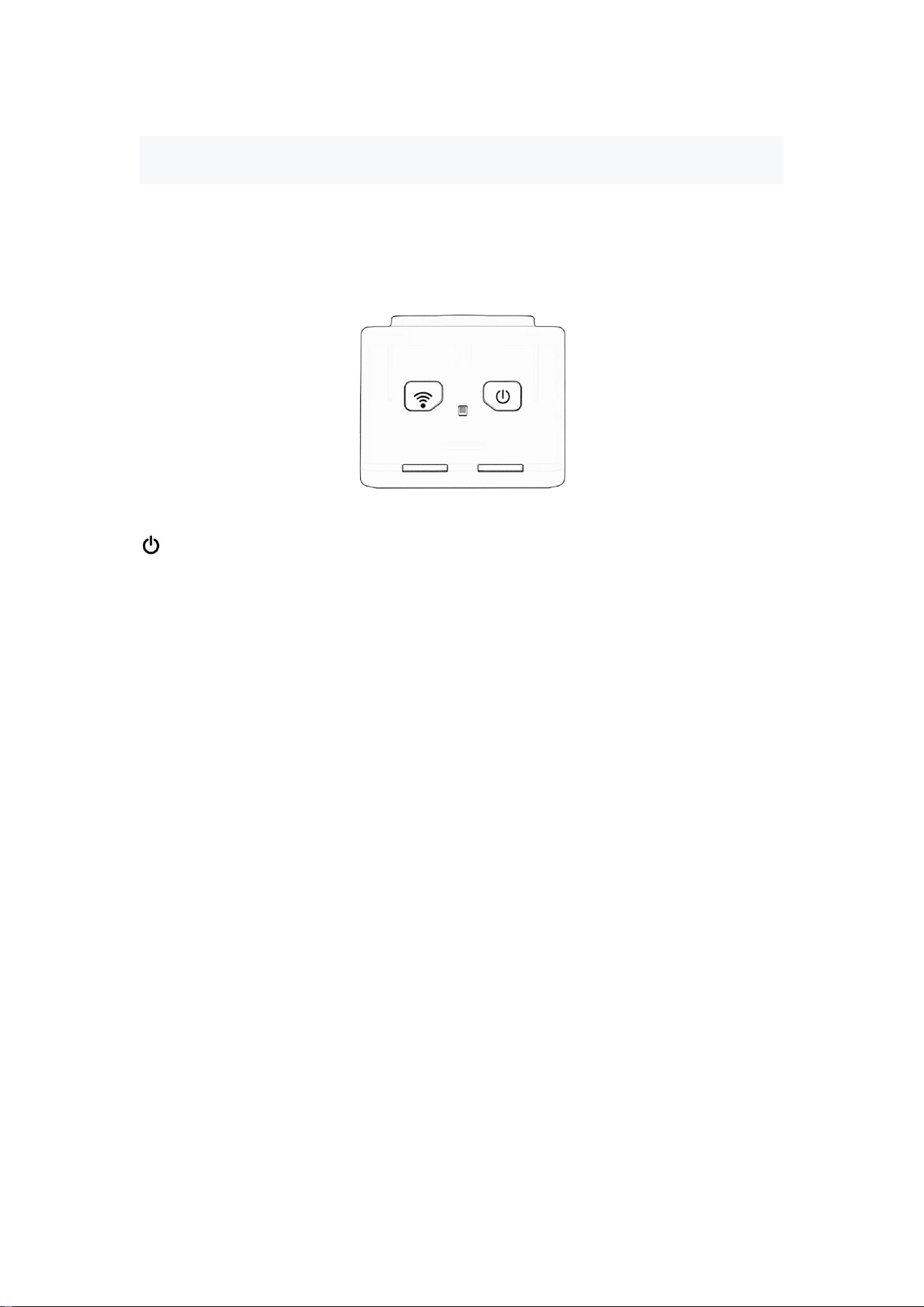
Button introduction:
-Power button: Press the button 2 seconds to power on or power off
WIFI Switch: Press the button 2 seconds to on or off
R-Reset Button
Indicator Lights:
Blue Light - Recording Indicator Light: When recording, the blue light flashes; when in
standby mode, the blue light stays on.
Red Light - Charging Indicator Light: When charging, the red light flashes. The red
light turns off when fully charged.
Green Light - WIFI Indicator Light: When the green light is on, WIFI is enabled; when
the green light is off, WIFI is disabled.
Note:
1) Before using the device, insert a normal memory card (TF card) firstly.
2) The device memory card must be 8GB or above. Data can't be saved normally less
than 8GB memory .
3) After power on, it will automatically enter video mode.
4) After the WIFI is turned on, the recording will be paused, and it can be operated
within the APP.
Charging:
This device is equipped with a rechargeable lithium battery. When the battery is
low, you can connect it to a charger for charging
Note: Please use a 5V 1A charger;
The red light is on when charging, and it goes off when fully charged.

One. Product operation:
1. Video:
Video: Press the power button for 2 seconds to turn on the device. After turning
on, the blue light flashes slowly to enter video recording mode.
Save:While recording, click the power button once to stop and save the
recording, the blue light will be on, and the device will return to standby mode.
One paragraph,5 minutes, support loop recording.
2. Record with charging:
When the device is turned off, connect it to a charger. The blue light flashes, the
device is recording normally. Press the power button once to stop and save the
video.
Note: It is not possible to record while charging when the device is connected to
a computer.
3. Reset:
In case of system error or malfunctioning, need to reset the device.
Method:
Press the reset button(R) to reset.
4. Time setting:
When the APP connects to the device, it will synchronize the correct time.
Two.WIFI Hot spot Connection Instructions:
1. APP Download : Scan the QR code below to install, or search for "Viidure" on Google Play or
the App Store to download and install.
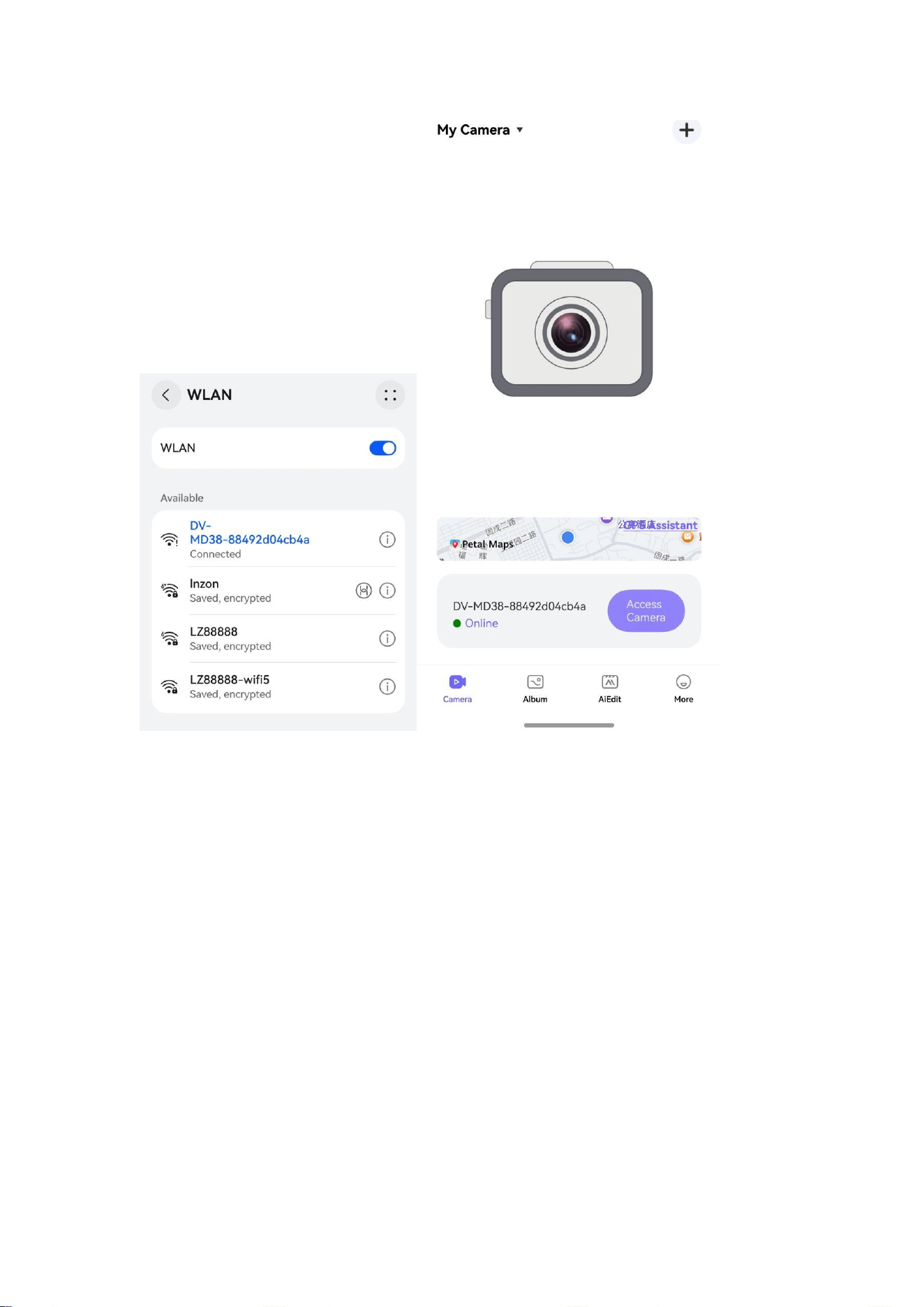
2. Turn on the WIFI: After the device is powered on, press the Wifi button for 2 seconds. When
the green light is on, the WIFI is turned on.
3. Click to add the device: Select the device hotspot: DV-MD38-XXXX, and the initial password is:
12345678.
Note:
If you forget the WIFI password of the device, you can reset it to restore the default password.
Three.
Product
parameters:
Video
format:
AVI
Video
coding:
M-JPEG
Video
resolution:
1920*1080
Video
frame
rate:
30fps
Motion
detection
record:
Support
Battery
capacity:
800mAh
Record
time:
about
210
minutes
Charge
voltage:
DC-5V
1A
Storage
support:
8GB-128GB
Transmission
speed:
USB
2.0
Interface
type:
Type-C
Storage
temperature:
-
10-40
℃
Working
humidity:
15-85%
RH9
Disclaimer
1.
The
usage
of
this
device
is
subject
to
the
relevant
national
laws
and

regulations, DO NOT use this product for any illegal activities.
2. DO NOT point the camera lens to the direct sun light or permanent damage
may occur.
3. Keep away from fire. Never expose the device to any fire source.
4. DO NOT disassemble and modify. Doing so causes the risk of electric shock,
burn injury and other health related hazard.
5. DO NOT let water, liquids, or foreign matter get inside the device. Extra
precaution is advised where it is raining, snowing, near the ocean or other
form of water. In case any of the symptoms are present, turn off the device
immediately and contact us for further support.
6. DO NOT drop the device or permanent damage may occur.

FCC Warnning:
This equipment has been tested and found to comply with the limits for a Class B digital device,
pursuant to part 15 of the FCC Rules. These limits are designed to provide
reasonable
protection againstharmful interference in a residential installation. This equipment generates,
uses and can radiateradio
frequency
energy
and,
if
not
installed
and
used
in
accordance
with
the
instructions,
maycause
harmful
interference
to
radio
communications.
However,
there
is
no
guarantee
thatinterference
will
not
occur
in
a
particular
installation.
If
this
equipment
does
cause
harmfulinterference to radio or television reception, which can be
determined by turning the equipmentoff
and
on,
the
user
is
encouraged
to
try
to
correct
the
interference
by
one
or
more
of
thefollowing measures:
•
Reorient or relocate the receiving antenna.
•
Increase the separation between the equipment and receiver.
•
Connect the equipment into an outlet on a circuit different from that to which the receiver is
connected.
• Consult the dealer or an experienced radio/TV technician for help.
Caution:
Any
changes
or
modifications
to
this
device
not
explicitly
approved
by
manufacturer
could void your authority to operate this equipment.
This
device
complies
with
part
15
of
the
FCC
Rules.
Operation
is
subject
to
the
following
two
conditions:
(1)This
device
may
not
cause
harmful
interference,
and
(2)
this
device
must
accept
any
interference received, including interference that may cause undesired operation.
This
equipment
complies
with
FCC
radiation
exposure
limits
set
forth
for
an
uncontrolled
environment.
This
equipment
should
be
installed
and
operated
with
minimum
distance
20cm
between the radiator and your body.