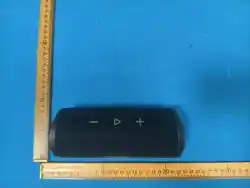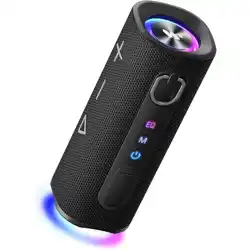

Wireless Speaker Q8
QUICK START GUIDE
SPECIFICATION
Model: Q8
Wireless Version: V5.4
Input: 5V / 2A
Frequency Response: 40Hz-20KHz
SNR: 80dB
Operation Frequency: 2402 - 2480MHz
Wireless Transmission Distance: 10 meters
Charging Time: 4 Hours
Playback Time: 18 Hours at 50% volume
Weight: 714 Grams
Dimensions: 82.40*77.45*205.50mm
Important Notice for Charging
- Before charging, be sure the speaker is at room temperature, between 46° F
(8° C) and 102° F (39° C).
- Use this product only with an agency approved power supply which meets local
regulatory requirements (e.g., UL, CSA, VDE, CCC).
- Use included charging cable to charge the speaker.
- For the first use, please fully charge the product.
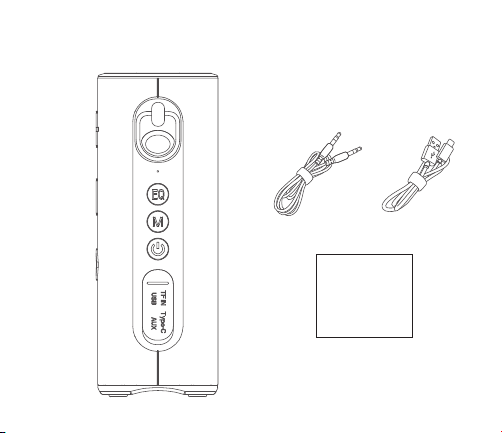
WHAT'S IN THE BOX?
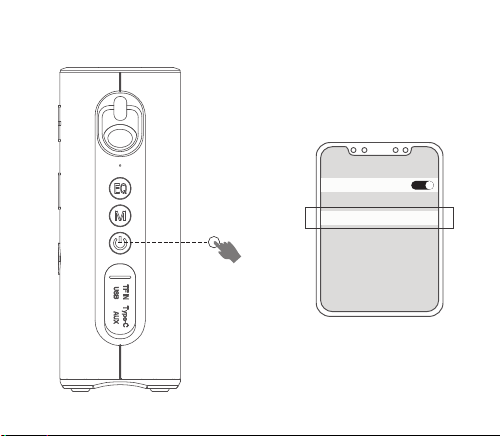
FIRST USAGE
>2S
TWS Connected /
Disconnected
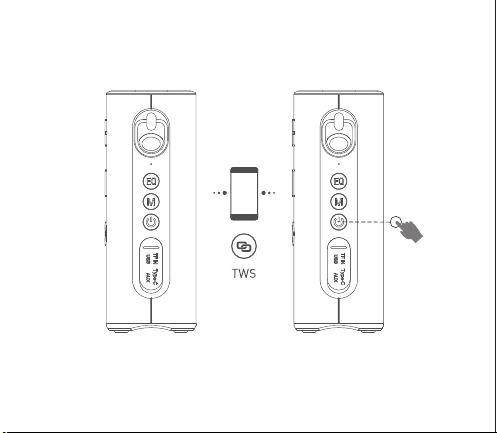
TWS CONNECTION
More details operation, please read the notice for TWS connection.
Notice for TWS Connection
If you have two pieces Q8, you can use TWS to achieve wireless stereo combined
playing music.
Note: Before TWS pairing, make sure the two Q8 speakers are not connected
over Bluetooth.
1. Press for 2 seconds to power on both speakers.
2. Aer you turn on the device, you should make sure neither is connected to any
Bluetooth since both will automatically reconnect to your previous device. So you
should disconnect existing device first or just turn o Bluetooth on your devices.
3. Press twice on either speaker, a beep will be heard once TWS is connected.
4.Then make connection with mobile phone.
Note: This equipment has been tested and found to comply with the limits for a
Class B digital device, pursuant to Part 15 of the FCC Rules. These limits are
designed to provide reasonable protection against harmful interference in a
residential installation. This equipment generates, uses and can radiate radio
frequency energy and, if not installed and used in accordance with the instructions,
may cause harmful interference to radio communications. However, there is no
guarantee that interference will not occur in a particular installation.If this
equipment does cause harmful interference to radio or television reception, which
can be determined by turning the equipment o and on, the user is encouraged to
try to correct the interference by one or more of the following measures:
— Reorient or relocate the receiving antenna.
— Increase the separation between the equipment and receiver.
— Connect the equipment into an outlet on a circuit dierent from that to which
the receiver is connected.
— Consult the dealer or an experienced radio/ TV technician for help.
Warning: Changes or modifications to this unit not expressly approved by the party
responsible for compliance could void the user’s authority to operate the
equipment.
FCC STATEMENT
This device complies with part 15 of the FCC Rules. Operation is subject to the
following two conditions:
(1) This device may not cause harmful interference, and
(2) this device must accept any interference received, including interference that
may cause undesired operation.
FCC Radiation Exposure Statement
The device has been evaluated to meet general RF exposure requirement.
The device can be used in portable exposure condition without restriction.
Electromagnetic Compatibility Regulations 2016.
Electrical Equipment (Safety) Regulations 2016.
1. The electrical and electronic equipment are part of a separate collection.
Do not throw electrical or electronic equipment away with unsorted
municipal waste, but ensure that it is collected separately. Collection
systems and locations (sorting centers, rubbish dumps) are provided for you by
local councils and retailers. By entrusting your end-of-life product to the proper
recycling process, you are helping to protect the environment and your health.
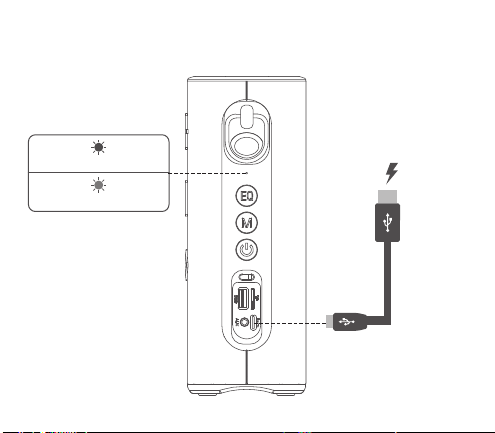
CHARGING
Q8
BLUETOOTH
Bluetooth
Connected
>2S
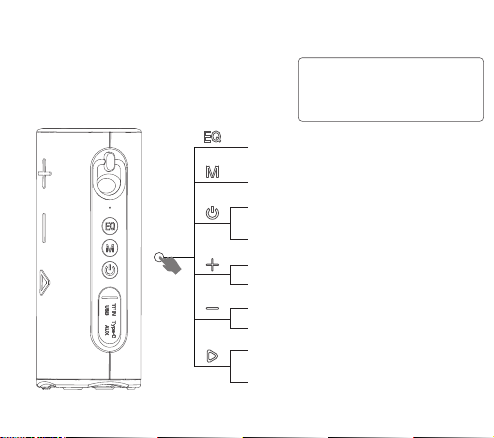
CONTROLS
x 1 Press Once
x 2 Press Twice
x 3 Press Triple
>2S Press and hold for 2 seconds
Red on while charging
Red o once fully charged
Q8说明书,材质:105g铜板纸,折页
折叠成品尺寸: 80x70mm 双面单色印刷
x 1 Volume Up
>2S Next Track
x 1 Volume Down
>2S Previous Track
x 1 Music Play / Pause
Calling Answer / End
>2S Calling Decline
Redial the last dialed number when
connected to a phone via Bluetooth.
x 1 EQ Switch among Bass and Vocal as well
as Standard
>3S Disconnect Bluetooth in Bluetooth mode
>2S Power On/O
TWS Connected / Disconnected
x 3 Light Mode Switch
Resetting & Force shutdown
1. Press and hold for 8 seconds to reset to factory settings in Bluetooth mode.
2. Press and hold for 8 seconds to force a shutdown when the speaker is frozen.
Operation of this equipment is subject to the following two conditions:
(1) this equipment or device may not cause harmful interference, and (2) this
equipment or device must accept any interference, including interference that
may cause undesired operation.
MADE IN CHINAFCC ID: 2AWG3-M18P
Care and Maintenance
This logo means the prohibition of the naked flame sources such as a
lighted candle on or near the device.
Before using this product, carefully read these instructions and keep the user
manual for future reference.
1. Connect the type C end of the included charging cable to the charging port on
your speaker. Then plug the other end of the USB charging cable into a suitable
USB port on your computer ( or with a standard cell phone charger) to recharge
your speaker’s internal rechargeable battery.
2. Please charge the speaker in the earliest convenience when the lighting flashes
red. The speaker will power o automatically when the battery runs out.
3.It may take several minutes for your speaker to begin charging when it's
drained. The battery needs to charge to a minimum voltage before the
system can boot up.
4. It's recommended to turn the speaker o while it is charging. Please don't play
audio until the speaker has been charged for 30 minutes at least. It will help to
prolong the battery's life and protect the speaker well.
2. Use the product in temperate climates only.
3. This product is not a toy – never allow children to play with the appliance.
Always store the product out of reach of children and pets.
4. Always unplug the device before cleaning it.
5. Clean the speaker with a so dry cloth only. Never use solvents.
6. Attention should be drawn to the environmental aspects of battery disposal.
7. The battery (batteries or battery pack) shall not be exposed to excessive heat
such as sunshine, fire or the like.
8. Stop using the device immediately in case of an abnormality or failure.
9. Avoid dropping. Dropping or hitting the device may damage it.
10. Do not tamper with the product. Never attempt to service, dismantle the
product yourself, or push objects of any kind into the products, as this may result
in fire, electric shock, or equipment damage and will also invalidate the warranty.
Wireless Speaker Q8
QUICK START GUIDE
Wireless Speaker Q8
QUICK START GUIDE
SPECIFICATION
Model: Q8
Wireless Version: V5.4
Input: 5V / 2A
Frequency Response: 40Hz-20KHz
SNR: 80dB
Operation Frequency: 2402 - 2480MHz
Wireless Transmission Distance: 10 meters
Charging Time: 4 Hours
Playback Time: 18 Hours at 50% volume
Weight: 714 Grams
Dimensions: 82.40*77.45*205.50mm
Important Notice for Charging
- Before charging, be sure the speaker is at room temperature, between 46° F
(8° C) and 102° F (39° C).
- Use this product only with an agency approved power supply which meets local
regulatory requirements (e.g., UL, CSA, VDE, CCC).
- Use included charging cable to charge the speaker.
- For the first use, please fully charge the product.
WHAT'S IN THE BOX?
FIRST USAGE
>2S
TWS Connected /
Disconnected
TWS CONNECTION
More details operation, please read the notice for TWS connection.
Notice for TWS Connection
If you have two pieces Q8, you can use TWS to achieve wireless stereo combined
playing music.
Note: Before TWS pairing, make sure the two Q8 speakers are not connected
over Bluetooth.
1. Press for 2 seconds to power on both speakers.
2. Aer you turn on the device, you should make sure neither is connected to any
Bluetooth since both will automatically reconnect to your previous device. So you
should disconnect existing device first or just turn o Bluetooth on your devices.
3. Press twice on either speaker, a beep will be heard once TWS is connected.
4.Then make connection with mobile phone.
Note: This equipment has been tested and found to comply with the limits for a
Class B digital device, pursuant to Part 15 of the FCC Rules. These limits are
designed to provide reasonable protection against harmful interference in a
residential installation. This equipment generates, uses and can radiate radio
frequency energy and, if not installed and used in accordance with the instructions,
may cause harmful interference to radio communications. However, there is no
guarantee that interference will not occur in a particular installation.If this
equipment does cause harmful interference to radio or television reception, which
can be determined by turning the equipment o and on, the user is encouraged to
try to correct the interference by one or more of the following measures:
— Reorient or relocate the receiving antenna.
— Increase the separation between the equipment and receiver.
— Connect the equipment into an outlet on a circuit dierent from that to which
the receiver is connected.
— Consult the dealer or an experienced radio/ TV technician for help.
Warning: Changes or modifications to this unit not expressly approved by the party
responsible for compliance could void the user’s authority to operate the
equipment.
FCC STATEMENT
This device complies with part 15 of the FCC Rules. Operation is subject to the
following two conditions:
(1) This device may not cause harmful interference, and
(2) this device must accept any interference received, including interference that
may cause undesired operation.
FCC Radiation Exposure Statement
The device has been evaluated to meet general RF exposure requirement.
The device can be used in portable exposure condition without restriction.
Electromagnetic Compatibility Regulations 2016.
Electrical Equipment (Safety) Regulations 2016.
1. The electrical and electronic equipment are part of a separate collection.
Do not throw electrical or electronic equipment away with unsorted
municipal waste, but ensure that it is collected separately. Collection
systems and locations (sorting centers, rubbish dumps) are provided for you by
local councils and retailers. By entrusting your end-of-life product to the proper
recycling process, you are helping to protect the environment and your health.
CHARGING
Q8
BLUETOOTH
Bluetooth
Connected
>2S
CONTROLS
x 1 Press Once
x 2 Press Twice
x 3 Press Triple
>2S Press and hold for 2 seconds
Red on while charging
Red o once fully charged
Q8说明书,材质:105g铜板纸,折页
折叠成品尺寸: 80x70mm 双面单色印刷
x 1 Volume Up
>2S Next Track
x 1 Volume Down
>2S Previous Track
x 1 Music Play / Pause
Calling Answer / End
>2S Calling Decline
Redial the last dialed number when
connected to a phone via Bluetooth.
x 1 EQ Switch among Bass and Vocal as well
as Standard
>3S Disconnect Bluetooth in Bluetooth mode
>2S Power On/O
TWS Connected / Disconnected
x 3 Light Mode Switch
Resetting & Force shutdown
1. Press and hold for 8 seconds to reset to factory settings in Bluetooth mode.
2. Press and hold for 8 seconds to force a shutdown when the speaker is frozen.
Operation of this equipment is subject to the following two conditions:
(1) this equipment or device may not cause harmful interference, and (2) this
equipment or device must accept any interference, including interference that
may cause undesired operation.
MADE IN CHINAFCC ID: 2AWG3-M18P
Care and Maintenance
This logo means the prohibition of the naked flame sources such as a
lighted candle on or near the device.
Before using this product, carefully read these instructions and keep the user
manual for future reference.
1. Connect the type C end of the included charging cable to the charging port on
your speaker. Then plug the other end of the USB charging cable into a suitable
USB port on your computer ( or with a standard cell phone charger) to recharge
your speaker’s internal rechargeable battery.
2. Please charge the speaker in the earliest convenience when the lighting flashes
red. The speaker will power o automatically when the battery runs out.
3.It may take several minutes for your speaker to begin charging when it's
drained. The battery needs to charge to a minimum voltage before the
system can boot up.
4. It's recommended to turn the speaker o while it is charging. Please don't play
audio until the speaker has been charged for 30 minutes at least. It will help to
prolong the battery's life and protect the speaker well.
2. Use the product in temperate climates only.
3. This product is not a toy – never allow children to play with the appliance.
Always store the product out of reach of children and pets.
4. Always unplug the device before cleaning it.
5. Clean the speaker with a so dry cloth only. Never use solvents.
6. Attention should be drawn to the environmental aspects of battery disposal.
7. The battery (batteries or battery pack) shall not be exposed to excessive heat
such as sunshine, fire or the like.
8. Stop using the device immediately in case of an abnormality or failure.
9. Avoid dropping. Dropping or hitting the device may damage it.
10. Do not tamper with the product. Never attempt to service, dismantle the
product yourself, or push objects of any kind into the products, as this may result
in fire, electric shock, or equipment damage and will also invalidate the warranty.
Wireless Speaker Q8
QUICK START GUIDE
Wireless Speaker Q8
QUICK START GUIDE
SPECIFICATION
Model: Q8
Wireless Version: V5.4
Input: 5V / 2A
Frequency Response: 40Hz-20KHz
SNR: 80dB
Operation Frequency: 2402 - 2480MHz
Wireless Transmission Distance: 10 meters
Charging Time: 4 Hours
Playback Time: 18 Hours at 50% volume
Weight: 714 Grams
Dimensions: 82.40*77.45*205.50mm
Important Notice for Charging
- Before charging, be sure the speaker is at room temperature, between 46° F
(8° C) and 102° F (39° C).
- Use this product only with an agency approved power supply which meets local
regulatory requirements (e.g., UL, CSA, VDE, CCC).
- Use included charging cable to charge the speaker.
- For the first use, please fully charge the product.
WHAT'S IN THE BOX?
FIRST USAGE
>2S
TWS Connected /
Disconnected
TWS CONNECTION
More details operation, please read the notice for TWS connection.
Notice for TWS Connection
If you have two pieces Q8, you can use TWS to achieve wireless stereo combined
playing music.
Note: Before TWS pairing, make sure the two Q8 speakers are not connected
over Bluetooth.
1. Press for 2 seconds to power on both speakers.
2. Aer you turn on the device, you should make sure neither is connected to any
Bluetooth since both will automatically reconnect to your previous device. So you
should disconnect existing device first or just turn o Bluetooth on your devices.
3. Press twice on either speaker, a beep will be heard once TWS is connected.
4.Then make connection with mobile phone.
Note: This equipment has been tested and found to comply with the limits for a
Class B digital device, pursuant to Part 15 of the FCC Rules. These limits are
designed to provide reasonable protection against harmful interference in a
residential installation. This equipment generates, uses and can radiate radio
frequency energy and, if not installed and used in accordance with the instructions,
may cause harmful interference to radio communications. However, there is no
guarantee that interference will not occur in a particular installation.If this
equipment does cause harmful interference to radio or television reception, which
can be determined by turning the equipment o and on, the user is encouraged to
try to correct the interference by one or more of the following measures:
— Reorient or relocate the receiving antenna.
— Increase the separation between the equipment and receiver.
— Connect the equipment into an outlet on a circuit dierent from that to which
the receiver is connected.
— Consult the dealer or an experienced radio/ TV technician for help.
Warning: Changes or modifications to this unit not expressly approved by the party
responsible for compliance could void the user’s authority to operate the
equipment.
FCC STATEMENT
This device complies with part 15 of the FCC Rules. Operation is subject to the
following two conditions:
(1) This device may not cause harmful interference, and
(2) this device must accept any interference received, including interference that
may cause undesired operation.
FCC Radiation Exposure Statement
The device has been evaluated to meet general RF exposure requirement.
The device can be used in portable exposure condition without restriction.
Electromagnetic Compatibility Regulations 2016.
Electrical Equipment (Safety) Regulations 2016.
1. The electrical and electronic equipment are part of a separate collection.
Do not throw electrical or electronic equipment away with unsorted
municipal waste, but ensure that it is collected separately. Collection
systems and locations (sorting centers, rubbish dumps) are provided for you by
local councils and retailers. By entrusting your end-of-life product to the proper
recycling process, you are helping to protect the environment and your health.
CHARGING
Q8
BLUETOOTH
Bluetooth
Connected
>2S
CONTROLS
x 1 Press Once
x 2 Press Twice
x 3 Press Triple
>2S Press and hold for 2 seconds
Red on while charging
Red o once fully charged
Q8说明书,材质:105g铜板纸,折页
折叠成品尺寸: 80x70mm 双面单色印刷
x 1 Volume Up
>2S Next Track
x 1 Volume Down
>2S Previous Track
x 1 Music Play / Pause
Calling Answer / End
>2S Calling Decline
Redial the last dialed number when
connected to a phone via Bluetooth.
x 1 EQ Switch among Bass and Vocal as well
as Standard
>3S Disconnect Bluetooth in Bluetooth mode
>2S Power On/O
TWS Connected / Disconnected
x 3 Light Mode Switch
Resetting & Force shutdown
1. Press and hold for 8 seconds to reset to factory settings in Bluetooth mode.
2. Press and hold for 8 seconds to force a shutdown when the speaker is frozen.
Operation of this equipment is subject to the following two conditions:
(1) this equipment or device may not cause harmful interference, and (2) this
equipment or device must accept any interference, including interference that
may cause undesired operation.
MADE IN CHINAFCC ID: 2AWG3-M18P
Care and Maintenance
This logo means the prohibition of the naked flame sources such as a
lighted candle on or near the device.
Before using this product, carefully read these instructions and keep the user
manual for future reference.
1. Connect the type C end of the included charging cable to the charging port on
your speaker. Then plug the other end of the USB charging cable into a suitable
USB port on your computer ( or with a standard cell phone charger) to recharge
your speaker’s internal rechargeable battery.
2. Please charge the speaker in the earliest convenience when the lighting flashes
red. The speaker will power o automatically when the battery runs out.
3.It may take several minutes for your speaker to begin charging when it's
drained. The battery needs to charge to a minimum voltage before the
system can boot up.
4. It's recommended to turn the speaker o while it is charging. Please don't play
audio until the speaker has been charged for 30 minutes at least. It will help to
prolong the battery's life and protect the speaker well.
2. Use the product in temperate climates only.
3. This product is not a toy – never allow children to play with the appliance.
Always store the product out of reach of children and pets.
4. Always unplug the device before cleaning it.
5. Clean the speaker with a so dry cloth only. Never use solvents.
6. Attention should be drawn to the environmental aspects of battery disposal.
7. The battery (batteries or battery pack) shall not be exposed to excessive heat
such as sunshine, fire or the like.
8. Stop using the device immediately in case of an abnormality or failure.
9. Avoid dropping. Dropping or hitting the device may damage it.
10. Do not tamper with the product. Never attempt to service, dismantle the
product yourself, or push objects of any kind into the products, as this may result
in fire, electric shock, or equipment damage and will also invalidate the warranty.
Wireless Speaker Q8
QUICK START GUIDE
Wireless Speaker Q8
QUICK START GUIDE
SPECIFICATION
Model: Q8
Wireless Version: V5.4
Input: 5V / 2A
Frequency Response: 40Hz-20KHz
SNR: 80dB
Operation Frequency: 2402 - 2480MHz
Wireless Transmission Distance: 10 meters
Charging Time: 4 Hours
Playback Time: 18 Hours at 50% volume
Weight: 714 Grams
Dimensions: 82.40*77.45*205.50mm
Important Notice for Charging
- Before charging, be sure the speaker is at room temperature, between 46° F
(8° C) and 102° F (39° C).
- Use this product only with an agency approved power supply which meets local
regulatory requirements (e.g., UL, CSA, VDE, CCC).
- Use included charging cable to charge the speaker.
- For the first use, please fully charge the product.
WHAT'S IN THE BOX?
FIRST USAGE
>2S
TWS Connected /
Disconnected
TWS CONNECTION
More details operation, please read the notice for TWS connection.
Notice for TWS Connection
If you have two pieces Q8, you can use TWS to achieve wireless stereo combined
playing music.
Note: Before TWS pairing, make sure the two Q8 speakers are not connected
over Bluetooth.
1. Press for 2 seconds to power on both speakers.
2. Aer you turn on the device, you should make sure neither is connected to any
Bluetooth since both will automatically reconnect to your previous device. So you
should disconnect existing device first or just turn o Bluetooth on your devices.
3. Press twice on either speaker, a beep will be heard once TWS is connected.
4.Then make connection with mobile phone.
Note: This equipment has been tested and found to comply with the limits for a
Class B digital device, pursuant to Part 15 of the FCC Rules. These limits are
designed to provide reasonable protection against harmful interference in a
residential installation. This equipment generates, uses and can radiate radio
frequency energy and, if not installed and used in accordance with the instructions,
may cause harmful interference to radio communications. However, there is no
guarantee that interference will not occur in a particular installation.If this
equipment does cause harmful interference to radio or television reception, which
can be determined by turning the equipment o and on, the user is encouraged to
try to correct the interference by one or more of the following measures:
— Reorient or relocate the receiving antenna.
— Increase the separation between the equipment and receiver.
— Connect the equipment into an outlet on a circuit dierent from that to which
the receiver is connected.
— Consult the dealer or an experienced radio/ TV technician for help.
Warning: Changes or modifications to this unit not expressly approved by the party
responsible for compliance could void the user’s authority to operate the
equipment.
FCC STATEMENT
This device complies with part 15 of the FCC Rules. Operation is subject to the
following two conditions:
(1) This device may not cause harmful interference, and
(2) this device must accept any interference received, including interference that
may cause undesired operation.
FCC Radiation Exposure Statement
The device has been evaluated to meet general RF exposure requirement.
The device can be used in portable exposure condition without restriction.
Electromagnetic Compatibility Regulations 2016.
Electrical Equipment (Safety) Regulations 2016.
1. The electrical and electronic equipment are part of a separate collection.
Do not throw electrical or electronic equipment away with unsorted
municipal waste, but ensure that it is collected separately. Collection
systems and locations (sorting centers, rubbish dumps) are provided for you by
local councils and retailers. By entrusting your end-of-life product to the proper
recycling process, you are helping to protect the environment and your health.
CHARGING
Q8
BLUETOOTH
Bluetooth
Connected
>2S
CONTROLS
x 1 Press Once
x 2 Press Twice
x 3 Press Triple
>2S Press and hold for 2 seconds
Red on while charging
Red o once fully charged
Q8说明书,材质:105g铜板纸,折页
折叠成品尺寸: 80x70mm 双面单色印刷
x 1 Volume Up
>2S Next Track
x 1 Volume Down
>2S Previous Track
x 1 Music Play / Pause
Calling Answer / End
>2S Calling Decline
Redial the last dialed number when
connected to a phone via Bluetooth.
x 1 EQ Switch among Bass and Vocal as well
as Standard
>3S Disconnect Bluetooth in Bluetooth mode
>2S Power On/O
TWS Connected / Disconnected
x 3 Light Mode Switch
Resetting & Force shutdown
1. Press and hold for 8 seconds to reset to factory settings in Bluetooth mode.
2. Press and hold for 8 seconds to force a shutdown when the speaker is frozen.
Operation of this equipment is subject to the following two conditions:
(1) this equipment or device may not cause harmful interference, and (2) this
equipment or device must accept any interference, including interference that
may cause undesired operation.
MADE IN CHINAFCC ID: 2AWG3-M18P
Care and Maintenance
This logo means the prohibition of the naked flame sources such as a
lighted candle on or near the device.
Before using this product, carefully read these instructions and keep the user
manual for future reference.
1. Connect the type C end of the included charging cable to the charging port on
your speaker. Then plug the other end of the USB charging cable into a suitable
USB port on your computer ( or with a standard cell phone charger) to recharge
your speaker’s internal rechargeable battery.
2. Please charge the speaker in the earliest convenience when the lighting flashes
red. The speaker will power o automatically when the battery runs out.
3.It may take several minutes for your speaker to begin charging when it's
drained. The battery needs to charge to a minimum voltage before the
system can boot up.
4. It's recommended to turn the speaker o while it is charging. Please don't play
audio until the speaker has been charged for 30 minutes at least. It will help to
prolong the battery's life and protect the speaker well.
2. Use the product in temperate climates only.
3. This product is not a toy – never allow children to play with the appliance.
Always store the product out of reach of children and pets.
4. Always unplug the device before cleaning it.
5. Clean the speaker with a so dry cloth only. Never use solvents.
6. Attention should be drawn to the environmental aspects of battery disposal.
7. The battery (batteries or battery pack) shall not be exposed to excessive heat
such as sunshine, fire or the like.
8. Stop using the device immediately in case of an abnormality or failure.
9. Avoid dropping. Dropping or hitting the device may damage it.
10. Do not tamper with the product. Never attempt to service, dismantle the
product yourself, or push objects of any kind into the products, as this may result
in fire, electric shock, or equipment damage and will also invalidate the warranty.
Wireless Speaker Q8
QUICK START GUIDE
Wireless Speaker Q8
QUICK START GUIDE
SPECIFICATION
Model: Q8
Wireless Version: V5.4
Input: 5V / 2A
Frequency Response: 40Hz-20KHz
SNR: 80dB
Operation Frequency: 2402 - 2480MHz
Wireless Transmission Distance: 10 meters
Charging Time: 4 Hours
Playback Time: 18 Hours at 50% volume
Weight: 714 Grams
Dimensions: 82.40*77.45*205.50mm
Important Notice for Charging
- Before charging, be sure the speaker is at room temperature, between 46° F
(8° C) and 102° F (39° C).
- Use this product only with an agency approved power supply which meets local
regulatory requirements (e.g., UL, CSA, VDE, CCC).
- Use included charging cable to charge the speaker.
- For the first use, please fully charge the product.
WHAT'S IN THE BOX?
FIRST USAGE
>2S
TWS Connected /
Disconnected
TWS CONNECTION
More details operation, please read the notice for TWS connection.
Notice for TWS Connection
If you have two pieces Q8, you can use TWS to achieve wireless stereo combined
playing music.
Note: Before TWS pairing, make sure the two Q8 speakers are not connected
over Bluetooth.
1. Press for 2 seconds to power on both speakers.
2. Aer you turn on the device, you should make sure neither is connected to any
Bluetooth since both will automatically reconnect to your previous device. So you
should disconnect existing device first or just turn o Bluetooth on your devices.
3. Press twice on either speaker, a beep will be heard once TWS is connected.
4.Then make connection with mobile phone.
Note: This equipment has been tested and found to comply with the limits for a
Class B digital device, pursuant to Part 15 of the FCC Rules. These limits are
designed to provide reasonable protection against harmful interference in a
residential installation. This equipment generates, uses and can radiate radio
frequency energy and, if not installed and used in accordance with the instructions,
may cause harmful interference to radio communications. However, there is no
guarantee that interference will not occur in a particular installation.If this
equipment does cause harmful interference to radio or television reception, which
can be determined by turning the equipment o and on, the user is encouraged to
try to correct the interference by one or more of the following measures:
— Reorient or relocate the receiving antenna.
— Increase the separation between the equipment and receiver.
— Connect the equipment into an outlet on a circuit dierent from that to which
the receiver is connected.
— Consult the dealer or an experienced radio/ TV technician for help.
Warning: Changes or modifications to this unit not expressly approved by the party
responsible for compliance could void the user’s authority to operate the
equipment.
FCC STATEMENT
This device complies with part 15 of the FCC Rules. Operation is subject to the
following two conditions:
(1) This device may not cause harmful interference, and
(2) this device must accept any interference received, including interference that
may cause undesired operation.
FCC Radiation Exposure Statement
The device has been evaluated to meet general RF exposure requirement.
The device can be used in portable exposure condition without restriction.
Electromagnetic Compatibility Regulations 2016.
Electrical Equipment (Safety) Regulations 2016.
1. The electrical and electronic equipment are part of a separate collection.
Do not throw electrical or electronic equipment away with unsorted
municipal waste, but ensure that it is collected separately. Collection
systems and locations (sorting centers, rubbish dumps) are provided for you by
local councils and retailers. By entrusting your end-of-life product to the proper
recycling process, you are helping to protect the environment and your health.
CHARGING
Q8
BLUETOOTH
Bluetooth
Connected
>2S
CONTROLS
x 1 Press Once
x 2 Press Twice
x 3 Press Triple
>2S Press and hold for 2 seconds
Red on while charging
Red o once fully charged
Q8说明书,材质:105g铜板纸,折页
折叠成品尺寸: 80x70mm 双面单色印刷
x 1 Volume Up
>2S Next Track
x 1 Volume Down
>2S Previous Track
x 1 Music Play / Pause
Calling Answer / End
>2S Calling Decline
Redial the last dialed number when
connected to a phone via Bluetooth.
x 1 EQ Switch among Bass and Vocal as well
as Standard
>3S Disconnect Bluetooth in Bluetooth mode
>2S Power On/O
TWS Connected / Disconnected
x 3 Light Mode Switch
Resetting & Force shutdown
1. Press and hold for 8 seconds to reset to factory settings in Bluetooth mode.
2. Press and hold for 8 seconds to force a shutdown when the speaker is frozen.
Operation of this equipment is subject to the following two conditions:
(1) this equipment or device may not cause harmful interference, and (2) this
equipment or device must accept any interference, including interference that
may cause undesired operation.
MADE IN CHINAFCC ID: 2AWG3-M18P
Care and Maintenance
This logo means the prohibition of the naked flame sources such as a
lighted candle on or near the device.
Before using this product, carefully read these instructions and keep the user
manual for future reference.
1. Connect the type C end of the included charging cable to the charging port on
your speaker. Then plug the other end of the USB charging cable into a suitable
USB port on your computer ( or with a standard cell phone charger) to recharge
your speaker’s internal rechargeable battery.
2. Please charge the speaker in the earliest convenience when the lighting flashes
red. The speaker will power o automatically when the battery runs out.
3.It may take several minutes for your speaker to begin charging when it's
drained. The battery needs to charge to a minimum voltage before the
system can boot up.
4. It's recommended to turn the speaker o while it is charging. Please don't play
audio until the speaker has been charged for 30 minutes at least. It will help to
prolong the battery's life and protect the speaker well.
2. Use the product in temperate climates only.
3. This product is not a toy – never allow children to play with the appliance.
Always store the product out of reach of children and pets.
4. Always unplug the device before cleaning it.
5. Clean the speaker with a so dry cloth only. Never use solvents.
6. Attention should be drawn to the environmental aspects of battery disposal.
7. The battery (batteries or battery pack) shall not be exposed to excessive heat
such as sunshine, fire or the like.
8. Stop using the device immediately in case of an abnormality or failure.
9. Avoid dropping. Dropping or hitting the device may damage it.
10. Do not tamper with the product. Never attempt to service, dismantle the
product yourself, or push objects of any kind into the products, as this may result
in fire, electric shock, or equipment damage and will also invalidate the warranty.
Wireless Speaker Q8
QUICK START GUIDE
Wireless Speaker Q8
QUICK START GUIDE
SPECIFICATION
Model: Q8
Wireless Version: V5.4
Input: 5V / 2A
Frequency Response: 40Hz-20KHz
SNR: 80dB
Operation Frequency: 2402 - 2480MHz
Wireless Transmission Distance: 10 meters
Charging Time: 4 Hours
Playback Time: 18 Hours at 50% volume
Weight: 714 Grams
Dimensions: 82.40*77.45*205.50mm
Important Notice for Charging
- Before charging, be sure the speaker is at room temperature, between 46° F
(8° C) and 102° F (39° C).
- Use this product only with an agency approved power supply which meets local
regulatory requirements (e.g., UL, CSA, VDE, CCC).
- Use included charging cable to charge the speaker.
- For the first use, please fully charge the product.
WHAT'S IN THE BOX?
FIRST USAGE
>2S
TWS Connected /
Disconnected
TWS CONNECTION
More details operation, please read the notice for TWS connection.
Notice for TWS Connection
If you have two pieces Q8, you can use TWS to achieve wireless stereo combined
playing music.
Note: Before TWS pairing, make sure the two Q8 speakers are not connected
over Bluetooth.
1. Press for 2 seconds to power on both speakers.
2. Aer you turn on the device, you should make sure neither is connected to any
Bluetooth since both will automatically reconnect to your previous device. So you
should disconnect existing device first or just turn o Bluetooth on your devices.
3. Press twice on either speaker, a beep will be heard once TWS is connected.
4.Then make connection with mobile phone.
Note: This equipment has been tested and found to comply with the limits for a
Class B digital device, pursuant to Part 15 of the FCC Rules. These limits are
designed to provide reasonable protection against harmful interference in a
residential installation. This equipment generates, uses and can radiate radio
frequency energy and, if not installed and used in accordance with the instructions,
may cause harmful interference to radio communications. However, there is no
guarantee that interference will not occur in a particular installation.If this
equipment does cause harmful interference to radio or television reception, which
can be determined by turning the equipment o and on, the user is encouraged to
try to correct the interference by one or more of the following measures:
— Reorient or relocate the receiving antenna.
— Increase the separation between the equipment and receiver.
— Connect the equipment into an outlet on a circuit dierent from that to which
the receiver is connected.
— Consult the dealer or an experienced radio/ TV technician for help.
Warning: Changes or modifications to this unit not expressly approved by the party
responsible for compliance could void the user’s authority to operate the
equipment.
FCC STATEMENT
This device complies with part 15 of the FCC Rules. Operation is subject to the
following two conditions:
(1) This device may not cause harmful interference, and
(2) this device must accept any interference received, including interference that
may cause undesired operation.
FCC Radiation Exposure Statement
The device has been evaluated to meet general RF exposure requirement.
The device can be used in portable exposure condition without restriction.
Electromagnetic Compatibility Regulations 2016.
Electrical Equipment (Safety) Regulations 2016.
1. The electrical and electronic equipment are part of a separate collection.
Do not throw electrical or electronic equipment away with unsorted
municipal waste, but ensure that it is collected separately. Collection
systems and locations (sorting centers, rubbish dumps) are provided for you by
local councils and retailers. By entrusting your end-of-life product to the proper
recycling process, you are helping to protect the environment and your health.
CHARGING
Q8
BLUETOOTH
Bluetooth
Connected
>2S
CONTROLS
x 1 Press Once
x 2 Press Twice
x 3 Press Triple
>2S Press and hold for 2 seconds
Red on while charging
Red o once fully charged
Q8说明书,材质:105g铜板纸,折页
折叠成品尺寸: 80x70mm 双面单色印刷
x 1 Volume Up
>2S Next Track
x 1 Volume Down
>2S Previous Track
x 1 Music Play / Pause
Calling Answer / End
>2S Calling Decline
Redial the last dialed number when
connected to a phone via Bluetooth.
x 1 EQ Switch among Bass and Vocal as well
as Standard
>3S Disconnect Bluetooth in Bluetooth mode
>2S Power On/O
TWS Connected / Disconnected
x 3 Light Mode Switch
Resetting & Force shutdown
1. Press and hold for 8 seconds to reset to factory settings in Bluetooth mode.
2. Press and hold for 8 seconds to force a shutdown when the speaker is frozen.
Operation of this equipment is subject to the following two conditions:
(1) this equipment or device may not cause harmful interference, and (2) this
equipment or device must accept any interference, including interference that
may cause undesired operation.
MADE IN CHINAFCC ID: 2AWG3-M18P
Care and Maintenance
This logo means the prohibition of the naked flame sources such as a
lighted candle on or near the device.
Before using this product, carefully read these instructions and keep the user
manual for future reference.
1. Connect the type C end of the included charging cable to the charging port on
your speaker. Then plug the other end of the USB charging cable into a suitable
USB port on your computer ( or with a standard cell phone charger) to recharge
your speaker’s internal rechargeable battery.
2. Please charge the speaker in the earliest convenience when the lighting flashes
red. The speaker will power o automatically when the battery runs out.
3.It may take several minutes for your speaker to begin charging when it's
drained. The battery needs to charge to a minimum voltage before the
system can boot up.
4. It's recommended to turn the speaker o while it is charging. Please don't play
audio until the speaker has been charged for 30 minutes at least. It will help to
prolong the battery's life and protect the speaker well.
2. Use the product in temperate climates only.
3. This product is not a toy – never allow children to play with the appliance.
Always store the product out of reach of children and pets.
4. Always unplug the device before cleaning it.
5. Clean the speaker with a so dry cloth only. Never use solvents.
6. Attention should be drawn to the environmental aspects of battery disposal.
7. The battery (batteries or battery pack) shall not be exposed to excessive heat
such as sunshine, fire or the like.
8. Stop using the device immediately in case of an abnormality or failure.
9. Avoid dropping. Dropping or hitting the device may damage it.
10. Do not tamper with the product. Never attempt to service, dismantle the
product yourself, or push objects of any kind into the products, as this may result
in fire, electric shock, or equipment damage and will also invalidate the warranty.
Wireless Speaker Q8
QUICK START GUIDE

Wireless Speaker Q8
QUICK START GUIDE
SPECIFICATION
Model: Q8
Wireless Version: V5.4
Input: 5V / 2A
Frequency Response: 40Hz-20KHz
SNR: 80dB
Operation Frequency: 2402 - 2480MHz
Wireless Transmission Distance: 10 meters
Charging Time: 4 Hours
Playback Time: 18 Hours at 50% volume
Weight: 714 Grams
Dimensions: 82.40*77.45*205.50mm
Important Notice for Charging
- Before charging, be sure the speaker is at room temperature, between 46° F
(8° C) and 102° F (39° C).
- Use this product only with an agency approved power supply which meets local
regulatory requirements (e.g., UL, CSA, VDE, CCC).
- Use included charging cable to charge the speaker.
- For the first use, please fully charge the product.
WHAT'S IN THE BOX?
FIRST USAGE
>2S
TWS Connected /
Disconnected
TWS CONNECTION
More details operation, please read the notice for TWS connection.
Notice for TWS Connection
If you have two pieces Q8, you can use TWS to achieve wireless stereo combined
playing music.
Note: Before TWS pairing, make sure the two Q8 speakers are not connected
over Bluetooth.
1. Press for 2 seconds to power on both speakers.
2. Aer you turn on the device, you should make sure neither is connected to any
Bluetooth since both will automatically reconnect to your previous device. So you
should disconnect existing device first or just turn o Bluetooth on your devices.
3. Press twice on either speaker, a beep will be heard once TWS is connected.
4.Then make connection with mobile phone.
Note: This equipment has been tested and found to comply with the limits for a
Class B digital device, pursuant to Part 15 of the FCC Rules. These limits are
designed to provide reasonable protection against harmful interference in a
residential installation. This equipment generates, uses and can radiate radio
frequency energy and, if not installed and used in accordance with the instructions,
may cause harmful interference to radio communications. However, there is no
guarantee that interference will not occur in a particular installation.If this
equipment does cause harmful interference to radio or television reception, which
can be determined by turning the equipment o and on, the user is encouraged to
try to correct the interference by one or more of the following measures:
— Reorient or relocate the receiving antenna.
— Increase the separation between the equipment and receiver.
— Connect the equipment into an outlet on a circuit dierent from that to which
the receiver is connected.
— Consult the dealer or an experienced radio/ TV technician for help.
Warning: Changes or modifications to this unit not expressly approved by the party
responsible for compliance could void the user’s authority to operate the
equipment.
FCC STATEMENT
This device complies with part 15 of the FCC Rules. Operation is subject to the
following two conditions:
(1) This device may not cause harmful interference, and
(2) this device must accept any interference received, including interference that
may cause undesired operation.
FCC Radiation Exposure Statement
The device has been evaluated to meet general RF exposure requirement.
The device can be used in portable exposure condition without restriction.
Electromagnetic Compatibility Regulations 2016.
Electrical Equipment (Safety) Regulations 2016.
1. The electrical and electronic equipment are part of a separate collection.
Do not throw electrical or electronic equipment away with unsorted
municipal waste, but ensure that it is collected separately. Collection
systems and locations (sorting centers, rubbish dumps) are provided for you by
local councils and retailers. By entrusting your end-of-life product to the proper
recycling process, you are helping to protect the environment and your health.
CHARGING
Q8
BLUETOOTH
Bluetooth
Connected
>2S
CONTROLS
x 1 Press Once
x 2 Press Twice
x 3 Press Triple
>2S Press and hold for 2 seconds
Red on while charging
Red o once fully charged
Q8说明书,材质:105g铜板纸,折页
折叠成品尺寸: 80x70mm 双面单色印刷
x 1 Volume Up
>2S Next Track
x 1 Volume Down
>2S Previous Track
x 1 Music Play / Pause
Calling Answer / End
>2S Calling Decline
Redial the last dialed number when
connected to a phone via Bluetooth.
x 1 EQ Switch among Bass and Vocal as well
as Standard
>3S Disconnect Bluetooth in Bluetooth mode
>2S Power On/O
TWS Connected / Disconnected
x 3 Light Mode Switch
Resetting & Force shutdown
1. Press and hold for 8 seconds to reset to factory settings in Bluetooth mode.
2. Press and hold for 8 seconds to force a shutdown when the speaker is frozen.
Operation of this equipment is subject to the following two conditions:
(1) this equipment or device may not cause harmful interference, and (2) this
equipment or device must accept any interference, including interference that
may cause undesired operation.
MADE IN CHINAFCC ID: 2AWG3-M18P
Care and Maintenance
This logo means the prohibition of the naked flame sources such as a
lighted candle on or near the device.
Before using this product, carefully read these instructions and keep the user
manual for future reference.
1. Connect the type C end of the included charging cable to the charging port on
your speaker. Then plug the other end of the USB charging cable into a suitable
USB port on your computer ( or with a standard cell phone charger) to recharge
your speaker’s internal rechargeable battery.
2. Please charge the speaker in the earliest convenience when the lighting flashes
red. The speaker will power o automatically when the battery runs out.
3.It may take several minutes for your speaker to begin charging when it's
drained. The battery needs to charge to a minimum voltage before the
system can boot up.
4. It's recommended to turn the speaker o while it is charging. Please don't play
audio until the speaker has been charged for 30 minutes at least. It will help to
prolong the battery's life and protect the speaker well.
2. Use the product in temperate climates only.
3. This product is not a toy – never allow children to play with the appliance.
Always store the product out of reach of children and pets.
4. Always unplug the device before cleaning it.
5. Clean the speaker with a so dry cloth only. Never use solvents.
6. Attention should be drawn to the environmental aspects of battery disposal.
7. The battery (batteries or battery pack) shall not be exposed to excessive heat
such as sunshine, fire or the like.
8. Stop using the device immediately in case of an abnormality or failure.
9. Avoid dropping. Dropping or hitting the device may damage it.
10. Do not tamper with the product. Never attempt to service, dismantle the
product yourself, or push objects of any kind into the products, as this may result
in fire, electric shock, or equipment damage and will also invalidate the warranty.
Wireless Speaker Q8
QUICK START GUIDE
Wireless Speaker Q8
QUICK START GUIDE
SPECIFICATION
Model: Q8
Wireless Version: V5.4
Input: 5V / 2A
Frequency Response: 40Hz-20KHz
SNR: 80dB
Operation Frequency: 2402 - 2480MHz
Wireless Transmission Distance: 10 meters
Charging Time: 4 Hours
Playback Time: 18 Hours at 50% volume
Weight: 714 Grams
Dimensions: 82.40*77.45*205.50mm
Important Notice for Charging
- Before charging, be sure the speaker is at room temperature, between 46° F
(8° C) and 102° F (39° C).
- Use this product only with an agency approved power supply which meets local
regulatory requirements (e.g., UL, CSA, VDE, CCC).
- Use included charging cable to charge the speaker.
- For the first use, please fully charge the product.
WHAT'S IN THE BOX?
FIRST USAGE
>2S
TWS Connected /
Disconnected
TWS CONNECTION
More details operation, please read the notice for TWS connection.
Notice for TWS Connection
If you have two pieces Q8, you can use TWS to achieve wireless stereo combined
playing music.
Note: Before TWS pairing, make sure the two Q8 speakers are not connected
over Bluetooth.
1. Press for 2 seconds to power on both speakers.
2. Aer you turn on the device, you should make sure neither is connected to any
Bluetooth since both will automatically reconnect to your previous device. So you
should disconnect existing device first or just turn o Bluetooth on your devices.
3. Press twice on either speaker, a beep will be heard once TWS is connected.
4.Then make connection with mobile phone.
Note: This equipment has been tested and found to comply with the limits for a
Class B digital device, pursuant to Part 15 of the FCC Rules. These limits are
designed to provide reasonable protection against harmful interference in a
residential installation. This equipment generates, uses and can radiate radio
frequency energy and, if not installed and used in accordance with the instructions,
may cause harmful interference to radio communications. However, there is no
guarantee that interference will not occur in a particular installation.If this
equipment does cause harmful interference to radio or television reception, which
can be determined by turning the equipment o and on, the user is encouraged to
try to correct the interference by one or more of the following measures:
— Reorient or relocate the receiving antenna.
— Increase the separation between the equipment and receiver.
— Connect the equipment into an outlet on a circuit dierent from that to which
the receiver is connected.
— Consult the dealer or an experienced radio/ TV technician for help.
Warning: Changes or modifications to this unit not expressly approved by the party
responsible for compliance could void the user’s authority to operate the
equipment.
FCC STATEMENT
This device complies with part 15 of the FCC Rules. Operation is subject to the
following two conditions:
(1) This device may not cause harmful interference, and
(2) this device must accept any interference received, including interference that
may cause undesired operation.
FCC Radiation Exposure Statement
The device has been evaluated to meet general RF exposure requirement.
The device can be used in portable exposure condition without restriction.
Electromagnetic Compatibility Regulations 2016.
Electrical Equipment (Safety) Regulations 2016.
1. The electrical and electronic equipment are part of a separate collection.
Do not throw electrical or electronic equipment away with unsorted
municipal waste, but ensure that it is collected separately. Collection
systems and locations (sorting centers, rubbish dumps) are provided for you by
local councils and retailers. By entrusting your end-of-life product to the proper
recycling process, you are helping to protect the environment and your health.
CHARGING
Q8
BLUETOOTH
Bluetooth
Connected
>2S
CONTROLS
x 1 Press Once
x 2 Press Twice
x 3 Press Triple
>2S Press and hold for 2 seconds
Red on while charging
Red o once fully charged
Q8说明书,材质:105g铜板纸,折页
折叠成品尺寸: 80x70mm 双面单色印刷
x 1 Volume Up
>2S Next Track
x 1 Volume Down
>2S Previous Track
x 1 Music Play / Pause
Calling Answer / End
>2S Calling Decline
Redial the last dialed number when
connected to a phone via Bluetooth.
x 1 EQ Switch among Bass and Vocal as well
as Standard
>3S Disconnect Bluetooth in Bluetooth mode
>2S Power On/O
TWS Connected / Disconnected
x 3 Light Mode Switch
Resetting & Force shutdown
1. Press and hold for 8 seconds to reset to factory settings in Bluetooth mode.
2. Press and hold for 8 seconds to force a shutdown when the speaker is frozen.
Operation of this equipment is subject to the following two conditions:
(1) this equipment or device may not cause harmful interference, and (2) this
equipment or device must accept any interference, including interference that
may cause undesired operation.
MADE IN CHINAFCC ID: 2AWG3-M18P
Care and Maintenance
This logo means the prohibition of the naked flame sources such as a
lighted candle on or near the device.
Before using this product, carefully read these instructions and keep the user
manual for future reference.
1. Connect the type C end of the included charging cable to the charging port on
your speaker. Then plug the other end of the USB charging cable into a suitable
USB port on your computer ( or with a standard cell phone charger) to recharge
your speaker’s internal rechargeable battery.
2. Please charge the speaker in the earliest convenience when the lighting flashes
red. The speaker will power o automatically when the battery runs out.
3.It may take several minutes for your speaker to begin charging when it's
drained. The battery needs to charge to a minimum voltage before the
system can boot up.
4. It's recommended to turn the speaker o while it is charging. Please don't play
audio until the speaker has been charged for 30 minutes at least. It will help to
prolong the battery's life and protect the speaker well.
2. Use the product in temperate climates only.
3. This product is not a toy – never allow children to play with the appliance.
Always store the product out of reach of children and pets.
4. Always unplug the device before cleaning it.
5. Clean the speaker with a so dry cloth only. Never use solvents.
6. Attention should be drawn to the environmental aspects of battery disposal.
7. The battery (batteries or battery pack) shall not be exposed to excessive heat
such as sunshine, fire or the like.
8. Stop using the device immediately in case of an abnormality or failure.
9. Avoid dropping. Dropping or hitting the device may damage it.
10. Do not tamper with the product. Never attempt to service, dismantle the
product yourself, or push objects of any kind into the products, as this may result
in fire, electric shock, or equipment damage and will also invalidate the warranty.
Wireless Speaker Q8
QUICK START GUIDE

Wireless Speaker Q8
QUICK START GUIDE
SPECIFICATION
Model: Q8
Wireless Version: V5.4
Input: 5V / 2A
Frequency Response: 40Hz-20KHz
SNR: 80dB
Operation Frequency: 2402 - 2480MHz
Wireless Transmission Distance: 10 meters
Charging Time: 4 Hours
Playback Time: 18 Hours at 50% volume
Weight: 714 Grams
Dimensions: 82.40*77.45*205.50mm
Important Notice for Charging
- Before charging, be sure the speaker is at room temperature, between 46° F
(8° C) and 102° F (39° C).
- Use this product only with an agency approved power supply which meets local
regulatory requirements (e.g., UL, CSA, VDE, CCC).
- Use included charging cable to charge the speaker.
- For the first use, please fully charge the product.
WHAT'S IN THE BOX?
FIRST USAGE
>2S
TWS Connected /
Disconnected
TWS CONNECTION
More details operation, please read the notice for TWS connection.
Notice for TWS Connection
If you have two pieces Q8, you can use TWS to achieve wireless stereo combined
playing music.
Note: Before TWS pairing, make sure the two Q8 speakers are not connected
over Bluetooth.
1. Press for 2 seconds to power on both speakers.
2. Aer you turn on the device, you should make sure neither is connected to any
Bluetooth since both will automatically reconnect to your previous device. So you
should disconnect existing device first or just turn o Bluetooth on your devices.
3. Press twice on either speaker, a beep will be heard once TWS is connected.
4.Then make connection with mobile phone.
Note: This equipment has been tested and found to comply with the limits for a
Class B digital device, pursuant to Part 15 of the FCC Rules. These limits are
designed to provide reasonable protection against harmful interference in a
residential installation. This equipment generates, uses and can radiate radio
frequency energy and, if not installed and used in accordance with the instructions,
may cause harmful interference to radio communications. However, there is no
guarantee that interference will not occur in a particular installation.If this
equipment does cause harmful interference to radio or television reception, which
can be determined by turning the equipment o and on, the user is encouraged to
try to correct the interference by one or more of the following measures:
— Reorient or relocate the receiving antenna.
— Increase the separation between the equipment and receiver.
— Connect the equipment into an outlet on a circuit dierent from that to which
the receiver is connected.
— Consult the dealer or an experienced radio/ TV technician for help.
Warning: Changes or modifications to this unit not expressly approved by the party
responsible for compliance could void the user’s authority to operate the
equipment.
FCC STATEMENT
This device complies with part 15 of the FCC Rules. Operation is subject to the
following two conditions:
(1) This device may not cause harmful interference, and
(2) this device must accept any interference received, including interference that
may cause undesired operation.
FCC Radiation Exposure Statement
The device has been evaluated to meet general RF exposure requirement.
The device can be used in portable exposure condition without restriction.
Electromagnetic Compatibility Regulations 2016.
Electrical Equipment (Safety) Regulations 2016.
1. The electrical and electronic equipment are part of a separate collection.
Do not throw electrical or electronic equipment away with unsorted
municipal waste, but ensure that it is collected separately. Collection
systems and locations (sorting centers, rubbish dumps) are provided for you by
local councils and retailers. By entrusting your end-of-life product to the proper
recycling process, you are helping to protect the environment and your health.
CHARGING
Q8
BLUETOOTH
Bluetooth
Connected
>2S
CONTROLS
x 1 Press Once
x 2 Press Twice
x 3 Press Triple
>2S Press and hold for 2 seconds
Red on while charging
Red o once fully charged
Q8说明书,材质:105g铜板纸,折页
折叠成品尺寸: 80x70mm 双面单色印刷
x 1 Volume Up
>2S Next Track
x 1 Volume Down
>2S Previous Track
x 1 Music Play / Pause
Calling Answer / End
>2S Calling Decline
Redial the last dialed number when
connected to a phone via Bluetooth.
x 1 EQ Switch among Bass and Vocal as well
as Standard
>3S Disconnect Bluetooth in Bluetooth mode
>2S Power On/O
TWS Connected / Disconnected
x 3 Light Mode Switch
Resetting & Force shutdown
1. Press and hold for 8 seconds to reset to factory settings in Bluetooth mode.
2. Press and hold for 8 seconds to force a shutdown when the speaker is frozen.
Operation of this equipment is subject to the following two conditions:
(1) this equipment or device may not cause harmful interference, and (2) this
equipment or device must accept any interference, including interference that
may cause undesired operation.
MADE IN CHINAFCC ID: 2AWG3-M18P
Care and Maintenance
This logo means the prohibition of the naked flame sources such as a
lighted candle on or near the device.
Before using this product, carefully read these instructions and keep the user
manual for future reference.
1. Connect the type C end of the included charging cable to the charging port on
your speaker. Then plug the other end of the USB charging cable into a suitable
USB port on your computer ( or with a standard cell phone charger) to recharge
your speaker’s internal rechargeable battery.
2. Please charge the speaker in the earliest convenience when the lighting flashes
red. The speaker will power o automatically when the battery runs out.
3.It may take several minutes for your speaker to begin charging when it's
drained. The battery needs to charge to a minimum voltage before the
system can boot up.
4. It's recommended to turn the speaker o while it is charging. Please don't play
audio until the speaker has been charged for 30 minutes at least. It will help to
prolong the battery's life and protect the speaker well.
2. Use the product in temperate climates only.
3. This product is not a toy – never allow children to play with the appliance.
Always store the product out of reach of children and pets.
4. Always unplug the device before cleaning it.
5. Clean the speaker with a so dry cloth only. Never use solvents.
6. Attention should be drawn to the environmental aspects of battery disposal.
7. The battery (batteries or battery pack) shall not be exposed to excessive heat
such as sunshine, fire or the like.
8. Stop using the device immediately in case of an abnormality or failure.
9. Avoid dropping. Dropping or hitting the device may damage it.
10. Do not tamper with the product. Never attempt to service, dismantle the
product yourself, or push objects of any kind into the products, as this may result
in fire, electric shock, or equipment damage and will also invalidate the warranty.
Wireless Speaker Q8
QUICK START GUIDE

Wireless Speaker Q8
QUICK START GUIDE
SPECIFICATION
Model: Q8
Wireless Version: V5.4
Input: 5V / 2A
Frequency Response: 40Hz-20KHz
SNR: 80dB
Operation Frequency: 2402 - 2480MHz
Wireless Transmission Distance: 10 meters
Charging Time: 4 Hours
Playback Time: 18 Hours at 50% volume
Weight: 714 Grams
Dimensions: 82.40*77.45*205.50mm
Important Notice for Charging
- Before charging, be sure the speaker is at room temperature, between 46° F
(8° C) and 102° F (39° C).
- Use this product only with an agency approved power supply which meets local
regulatory requirements (e.g., UL, CSA, VDE, CCC).
- Use included charging cable to charge the speaker.
- For the first use, please fully charge the product.
WHAT'S IN THE BOX?
FIRST USAGE
>2S
TWS Connected /
Disconnected
TWS CONNECTION
More details operation, please read the notice for TWS connection.
Notice for TWS Connection
If you have two pieces Q8, you can use TWS to achieve wireless stereo combined
playing music.
Note: Before TWS pairing, make sure the two Q8 speakers are not connected
over Bluetooth.
1. Press for 2 seconds to power on both speakers.
2. Aer you turn on the device, you should make sure neither is connected to any
Bluetooth since both will automatically reconnect to your previous device. So you
should disconnect existing device first or just turn o Bluetooth on your devices.
3. Press twice on either speaker, a beep will be heard once TWS is connected.
4.Then make connection with mobile phone.
Note: This equipment has been tested and found to comply with the limits for a
Class B digital device, pursuant to Part 15 of the FCC Rules. These limits are
designed to provide reasonable protection against harmful interference in a
residential installation. This equipment generates, uses and can radiate radio
frequency energy and, if not installed and used in accordance with the instructions,
may cause harmful interference to radio communications. However, there is no
guarantee that interference will not occur in a particular installation.If this
equipment does cause harmful interference to radio or television reception, which
can be determined by turning the equipment o and on, the user is encouraged to
try to correct the interference by one or more of the following measures:
— Reorient or relocate the receiving antenna.
— Increase the separation between the equipment and receiver.
— Connect the equipment into an outlet on a circuit dierent from that to which
the receiver is connected.
— Consult the dealer or an experienced radio/ TV technician for help.
Warning: Changes or modifications to this unit not expressly approved by the party
responsible for compliance could void the user’s authority to operate the
equipment.
FCC STATEMENT
This device complies with part 15 of the FCC Rules. Operation is subject to the
following two conditions:
(1) This device may not cause harmful interference, and
(2) this device must accept any interference received, including interference that
may cause undesired operation.
FCC Radiation Exposure Statement
The device has been evaluated to meet general RF exposure requirement.
The device can be used in portable exposure condition without restriction.
Electromagnetic Compatibility Regulations 2016.
Electrical Equipment (Safety) Regulations 2016.
1. The electrical and electronic equipment are part of a separate collection.
Do not throw electrical or electronic equipment away with unsorted
municipal waste, but ensure that it is collected separately. Collection
systems and locations (sorting centers, rubbish dumps) are provided for you by
local councils and retailers. By entrusting your end-of-life product to the proper
recycling process, you are helping to protect the environment and your health.
CHARGING
Q8
BLUETOOTH
Bluetooth
Connected
>2S
CONTROLS
x 1 Press Once
x 2 Press Twice
x 3 Press Triple
>2S Press and hold for 2 seconds
Red on while charging
Red o once fully charged
Q8说明书,材质:105g铜板纸,折页
折叠成品尺寸: 80x70mm 双面单色印刷
x 1 Volume Up
>2S Next Track
x 1 Volume Down
>2S Previous Track
x 1 Music Play / Pause
Calling Answer / End
>2S Calling Decline
Redial the last dialed number when
connected to a phone via Bluetooth.
x 1 EQ Switch among Bass and Vocal as well
as Standard
>3S Disconnect Bluetooth in Bluetooth mode
>2S Power On/O
TWS Connected / Disconnected
x 3 Light Mode Switch
Resetting & Force shutdown
1. Press and hold for 8 seconds to reset to factory settings in Bluetooth mode.
2. Press and hold for 8 seconds to force a shutdown when the speaker is frozen.
Operation of this equipment is subject to the following two conditions:
(1) this equipment or device may not cause harmful interference, and (2) this
equipment or device must accept any interference, including interference that
may cause undesired operation.
MADE IN CHINAFCC ID: 2AWG3-M18P
Care and Maintenance
This logo means the prohibition of the naked flame sources such as a
lighted candle on or near the device.
Before using this product, carefully read these instructions and keep the user
manual for future reference.
1. Connect the type C end of the included charging cable to the charging port on
your speaker. Then plug the other end of the USB charging cable into a suitable
USB port on your computer ( or with a standard cell phone charger) to recharge
your speaker’s internal rechargeable battery.
2. Please charge the speaker in the earliest convenience when the lighting flashes
red. The speaker will power o automatically when the battery runs out.
3.It may take several minutes for your speaker to begin charging when it's
drained. The battery needs to charge to a minimum voltage before the
system can boot up.
4. It's recommended to turn the speaker o while it is charging. Please don't play
audio until the speaker has been charged for 30 minutes at least. It will help to
prolong the battery's life and protect the speaker well.
2. Use the product in temperate climates only.
3. This product is not a toy – never allow children to play with the appliance.
Always store the product out of reach of children and pets.
4. Always unplug the device before cleaning it.
5. Clean the speaker with a so dry cloth only. Never use solvents.
6. Attention should be drawn to the environmental aspects of battery disposal.
7. The battery (batteries or battery pack) shall not be exposed to excessive heat
such as sunshine, fire or the like.
8. Stop using the device immediately in case of an abnormality or failure.
9. Avoid dropping. Dropping or hitting the device may damage it.
10. Do not tamper with the product. Never attempt to service, dismantle the
product yourself, or push objects of any kind into the products, as this may result
in fire, electric shock, or equipment damage and will also invalidate the warranty.
Wireless Speaker Q8
QUICK START GUIDE

Wireless Speaker Q8
QUICK START GUIDE
SPECIFICATION
Model: Q8
Wireless Version: V5.4
Input: 5V / 2A
Frequency Response: 40Hz-20KHz
SNR: 80dB
Operation Frequency: 2402 - 2480MHz
Wireless Transmission Distance: 10 meters
Charging Time: 4 Hours
Playback Time: 18 Hours at 50% volume
Weight: 714 Grams
Dimensions: 82.40*77.45*205.50mm
Important Notice for Charging
- Before charging, be sure the speaker is at room temperature, between 46° F
(8° C) and 102° F (39° C).
- Use this product only with an agency approved power supply which meets local
regulatory requirements (e.g., UL, CSA, VDE, CCC).
- Use included charging cable to charge the speaker.
- For the first use, please fully charge the product.
WHAT'S IN THE BOX?
FIRST USAGE
>2S
TWS Connected /
Disconnected
TWS CONNECTION
More details operation, please read the notice for TWS connection.
Notice for TWS Connection
If you have two pieces Q8, you can use TWS to achieve wireless stereo combined
playing music.
Note: Before TWS pairing, make sure the two Q8 speakers are not connected
over Bluetooth.
1. Press for 2 seconds to power on both speakers.
2. Aer you turn on the device, you should make sure neither is connected to any
Bluetooth since both will automatically reconnect to your previous device. So you
should disconnect existing device first or just turn o Bluetooth on your devices.
3. Press twice on either speaker, a beep will be heard once TWS is connected.
4.Then make connection with mobile phone.
Note: This equipment has been tested and found to comply with the limits for a
Class B digital device, pursuant to Part 15 of the FCC Rules. These limits are
designed to provide reasonable protection against harmful interference in a
residential installation. This equipment generates, uses and can radiate radio
frequency energy and, if not installed and used in accordance with the instructions,
may cause harmful interference to radio communications. However, there is no
guarantee that interference will not occur in a particular installation.If this
equipment does cause harmful interference to radio or television reception, which
can be determined by turning the equipment o and on, the user is encouraged to
try to correct the interference by one or more of the following measures:
— Reorient or relocate the receiving antenna.
— Increase the separation between the equipment and receiver.
— Connect the equipment into an outlet on a circuit dierent from that to which
the receiver is connected.
— Consult the dealer or an experienced radio/ TV technician for help.
Warning: Changes or modifications to this unit not expressly approved by the party
responsible for compliance could void the user’s authority to operate the
equipment.
FCC STATEMENT
This device complies with part 15 of the FCC Rules. Operation is subject to the
following two conditions:
(1) This device may not cause harmful interference, and
(2) this device must accept any interference received, including interference that
may cause undesired operation.
FCC Radiation Exposure Statement
The device has been evaluated to meet general RF exposure requirement.
The device can be used in portable exposure condition without restriction.
Electromagnetic Compatibility Regulations 2016.
Electrical Equipment (Safety) Regulations 2016.
1. The electrical and electronic equipment are part of a separate collection.
Do not throw electrical or electronic equipment away with unsorted
municipal waste, but ensure that it is collected separately. Collection
systems and locations (sorting centers, rubbish dumps) are provided for you by
local councils and retailers. By entrusting your end-of-life product to the proper
recycling process, you are helping to protect the environment and your health.
CHARGING
Q8
BLUETOOTH
Bluetooth
Connected
>2S
CONTROLS
x 1 Press Once
x 2 Press Twice
x 3 Press Triple
>2S Press and hold for 2 seconds
Red on while charging
Red o once fully charged
Q8说明书,材质:105g铜板纸,折页
折叠成品尺寸: 80x70mm 双面单色印刷
x 1 Volume Up
>2S Next Track
x 1 Volume Down
>2S Previous Track
x 1 Music Play / Pause
Calling Answer / End
>2S Calling Decline
Redial the last dialed number when
connected to a phone via Bluetooth.
x 1 EQ Switch among Bass and Vocal as well
as Standard
>3S Disconnect Bluetooth in Bluetooth mode
>2S Power On/O
TWS Connected / Disconnected
x 3 Light Mode Switch
Resetting & Force shutdown
1. Press and hold for 8 seconds to reset to factory settings in Bluetooth mode.
2. Press and hold for 8 seconds to force a shutdown when the speaker is frozen.
Operation of this equipment is subject to the following two conditions:
(1) this equipment or device may not cause harmful interference, and (2) this
equipment or device must accept any interference, including interference that
may cause undesired operation.
MADE IN CHINAFCC ID: 2AWG3-M18P
Care and Maintenance
This logo means the prohibition of the naked flame sources such as a
lighted candle on or near the device.
Before using this product, carefully read these instructions and keep the user
manual for future reference.
1. Connect the type C end of the included charging cable to the charging port on
your speaker. Then plug the other end of the USB charging cable into a suitable
USB port on your computer ( or with a standard cell phone charger) to recharge
your speaker’s internal rechargeable battery.
2. Please charge the speaker in the earliest convenience when the lighting flashes
red. The speaker will power o automatically when the battery runs out.
3.It may take several minutes for your speaker to begin charging when it's
drained. The battery needs to charge to a minimum voltage before the
system can boot up.
4. It's recommended to turn the speaker o while it is charging. Please don't play
audio until the speaker has been charged for 30 minutes at least. It will help to
prolong the battery's life and protect the speaker well.
2. Use the product in temperate climates only.
3. This product is not a toy – never allow children to play with the appliance.
Always store the product out of reach of children and pets.
4. Always unplug the device before cleaning it.
5. Clean the speaker with a so dry cloth only. Never use solvents.
6. Attention should be drawn to the environmental aspects of battery disposal.
7. The battery (batteries or battery pack) shall not be exposed to excessive heat
such as sunshine, fire or the like.
8. Stop using the device immediately in case of an abnormality or failure.
9. Avoid dropping. Dropping or hitting the device may damage it.
10. Do not tamper with the product. Never attempt to service, dismantle the
product yourself, or push objects of any kind into the products, as this may result
in fire, electric shock, or equipment damage and will also invalidate the warranty.
Wireless Speaker Q8
QUICK START GUIDE
Wireless Speaker Q8
QUICK START GUIDE
SPECIFICATION
Model: Q8
Wireless Version: V5.4
Input: 5V / 2A
Frequency Response: 40Hz-20KHz
SNR: 80dB
Operation Frequency: 2402 - 2480MHz
Wireless Transmission Distance: 10 meters
Charging Time: 4 Hours
Playback Time: 18 Hours at 50% volume
Weight: 714 Grams
Dimensions: 82.40*77.45*205.50mm
Important Notice for Charging
- Before charging, be sure the speaker is at room temperature, between 46° F
(8° C) and 102° F (39° C).
- Use this product only with an agency approved power supply which meets local
regulatory requirements (e.g., UL, CSA, VDE, CCC).
- Use included charging cable to charge the speaker.
- For the first use, please fully charge the product.
WHAT'S IN THE BOX?
FIRST USAGE
>2S
TWS Connected /
Disconnected
TWS CONNECTION
More details operation, please read the notice for TWS connection.
Notice for TWS Connection
If you have two pieces Q8, you can use TWS to achieve wireless stereo combined
playing music.
Note: Before TWS pairing, make sure the two Q8 speakers are not connected
over Bluetooth.
1. Press for 2 seconds to power on both speakers.
2. Aer you turn on the device, you should make sure neither is connected to any
Bluetooth since both will automatically reconnect to your previous device. So you
should disconnect existing device first or just turn o Bluetooth on your devices.
3. Press twice on either speaker, a beep will be heard once TWS is connected.
4.Then make connection with mobile phone.
Note: This equipment has been tested and found to comply with the limits for a
Class B digital device, pursuant to Part 15 of the FCC Rules. These limits are
designed to provide reasonable protection against harmful interference in a
residential installation. This equipment generates, uses and can radiate radio
frequency energy and, if not installed and used in accordance with the instructions,
may cause harmful interference to radio communications. However, there is no
guarantee that interference will not occur in a particular installation.If this
equipment does cause harmful interference to radio or television reception, which
can be determined by turning the equipment o and on, the user is encouraged to
try to correct the interference by one or more of the following measures:
— Reorient or relocate the receiving antenna.
— Increase the separation between the equipment and receiver.
— Connect the equipment into an outlet on a circuit dierent from that to which
the receiver is connected.
— Consult the dealer or an experienced radio/ TV technician for help.
Warning: Changes or modifications to this unit not expressly approved by the party
responsible for compliance could void the user’s authority to operate the
equipment.
FCC STATEMENT
This device complies with part 15 of the FCC Rules. Operation is subject to the
following two conditions:
(1) This device may not cause harmful interference, and
(2) this device must accept any interference received, including interference that
may cause undesired operation.
FCC Radiation Exposure Statement
The device has been evaluated to meet general RF exposure requirement.
The device can be used in portable exposure condition without restriction.
Electromagnetic Compatibility Regulations 2016.
Electrical Equipment (Safety) Regulations 2016.
1. The electrical and electronic equipment are part of a separate collection.
Do not throw electrical or electronic equipment away with unsorted
municipal waste, but ensure that it is collected separately. Collection
systems and locations (sorting centers, rubbish dumps) are provided for you by
local councils and retailers. By entrusting your end-of-life product to the proper
recycling process, you are helping to protect the environment and your health.
CHARGING
Q8
BLUETOOTH
Bluetooth
Connected
>2S
CONTROLS
x 1 Press Once
x 2 Press Twice
x 3 Press Triple
>2S Press and hold for 2 seconds
Red on while charging
Red o once fully charged
Q8说明书,材质:105g铜板纸,折页
折叠成品尺寸: 80x70mm 双面单色印刷
x 1 Volume Up
>2S Next Track
x 1 Volume Down
>2S Previous Track
x 1 Music Play / Pause
Calling Answer / End
>2S Calling Decline
Redial the last dialed number when
connected to a phone via Bluetooth.
x 1 EQ Switch among Bass and Vocal as well
as Standard
>3S Disconnect Bluetooth in Bluetooth mode
>2S Power On/O
TWS Connected / Disconnected
x 3 Light Mode Switch
Resetting & Force shutdown
1. Press and hold for 8 seconds to reset to factory settings in Bluetooth mode.
2. Press and hold for 8 seconds to force a shutdown when the speaker is frozen.
Operation of this equipment is subject to the following two conditions:
(1) this equipment or device may not cause harmful interference, and (2) this
equipment or device must accept any interference, including interference that
may cause undesired operation.
MADE IN CHINAFCC ID: 2AWG3-M18P
Care and Maintenance
This logo means the prohibition of the naked flame sources such as a
lighted candle on or near the device.
Before using this product, carefully read these instructions and keep the user
manual for future reference.
1. Connect the type C end of the included charging cable to the charging port on
your speaker. Then plug the other end of the USB charging cable into a suitable
USB port on your computer ( or with a standard cell phone charger) to recharge
your speaker’s internal rechargeable battery.
2. Please charge the speaker in the earliest convenience when the lighting flashes
red. The speaker will power o automatically when the battery runs out.
3.It may take several minutes for your speaker to begin charging when it's
drained. The battery needs to charge to a minimum voltage before the
system can boot up.
4. It's recommended to turn the speaker o while it is charging. Please don't play
audio until the speaker has been charged for 30 minutes at least. It will help to
prolong the battery's life and protect the speaker well.
2. Use the product in temperate climates only.
3. This product is not a toy – never allow children to play with the appliance.
Always store the product out of reach of children and pets.
4. Always unplug the device before cleaning it.
5. Clean the speaker with a so dry cloth only. Never use solvents.
6. Attention should be drawn to the environmental aspects of battery disposal.
7. The battery (batteries or battery pack) shall not be exposed to excessive heat
such as sunshine, fire or the like.
8. Stop using the device immediately in case of an abnormality or failure.
9. Avoid dropping. Dropping or hitting the device may damage it.
10. Do not tamper with the product. Never attempt to service, dismantle the
product yourself, or push objects of any kind into the products, as this may result
in fire, electric shock, or equipment damage and will also invalidate the warranty.
Wireless Speaker Q8
QUICK START GUIDE