PANDA PWR V1.0
User Manual

BIGTREETECH PANDA PWR User Manual
2
Table of Contents
Revision Log ..................................................................3
1. Product Profile ............................................................4
1.1. Specifications .......................................................4
1.2. Dimensions .........................................................4
2. Interface ..................................................................5
2.1. Interface Diagram ...................................................5
2.2. Interface Introduction .................................................5
3. Instructions ...............................................................6
3.1. USB Interface .......................................................6
3.2. Bind Key ...........................................................6
3.3. Web UI .............................................................6
3.4. How to Bind Panda PWR and Panda Touch .............................9
3.5. Unbind Panda PWR from Panda Touch ................................10
3.6. Enable Automatic Power-Off Function .................................11
3.7. Clearing Electricity Consumption .....................................11
3.8. USB1 Follows the Printer Light .......................................11
3.9. Indicator Light Description ...........................................12
4. Precautions ..............................................................12
5. FCC WARNING ..........................................................12

Revision Log
Version
Date
Revisions
v1.00
June 19th, 2024
Initial Version
1. Product Profile
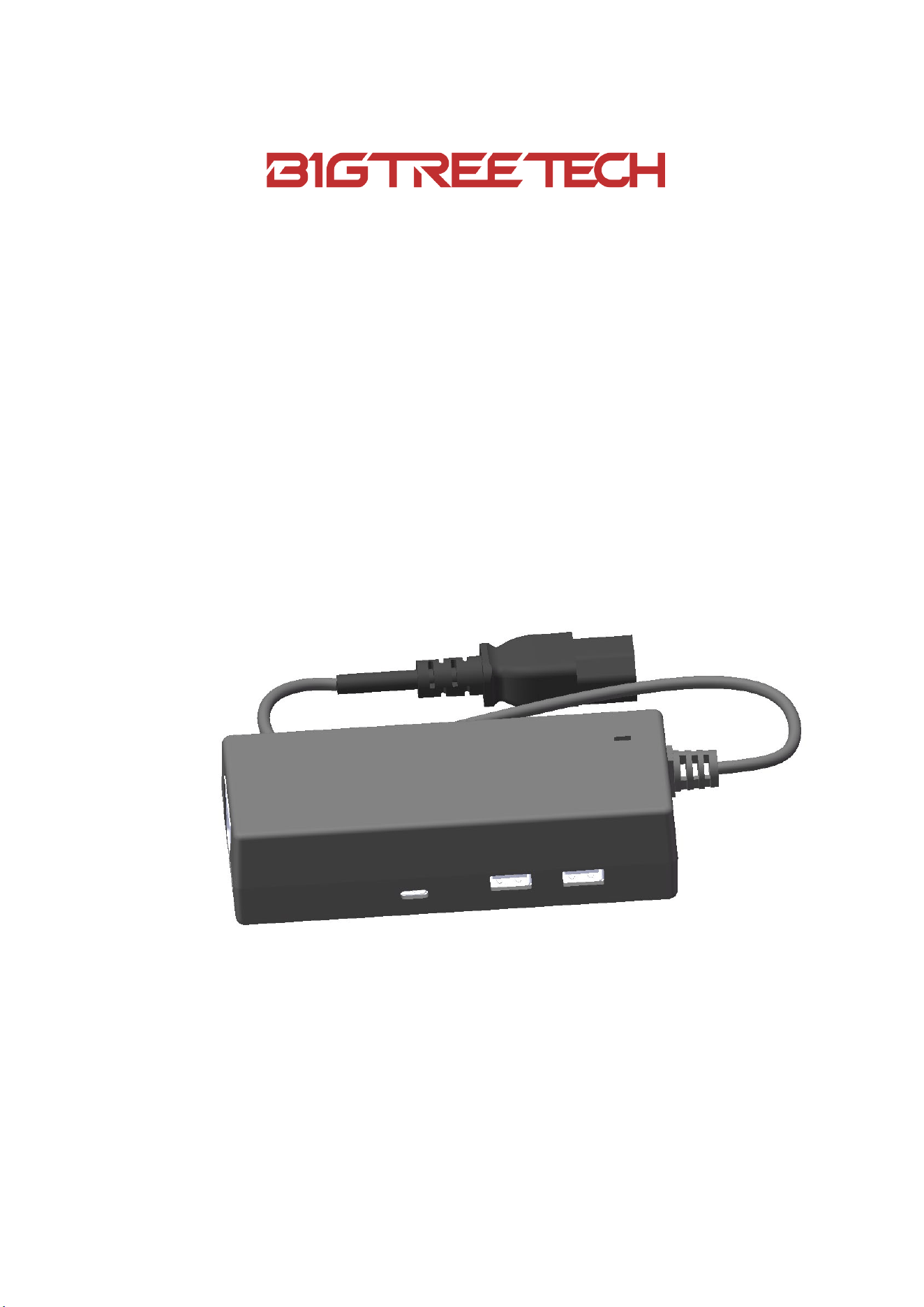
The BIGTREETECH PANDA PWR is a power management and control device for
printers. It powers the printer and displays real-time power on the PANDA
TOUCH, also enabling on/off control via a WiFi connection with PANDA TOUCH.
Additionally, the PANDA PWR features a USB port to power the PANDA TOUCH
directly.
1.1. Specifications
MCU: ESP8684-MINI-1-H4
IEC-C14 Input Voltage: 100VAC~240VAC
Type-C Input Voltage: 5V
Maximum Output Current: 1.5A+1.5A
PC Connection Interface: Type-C
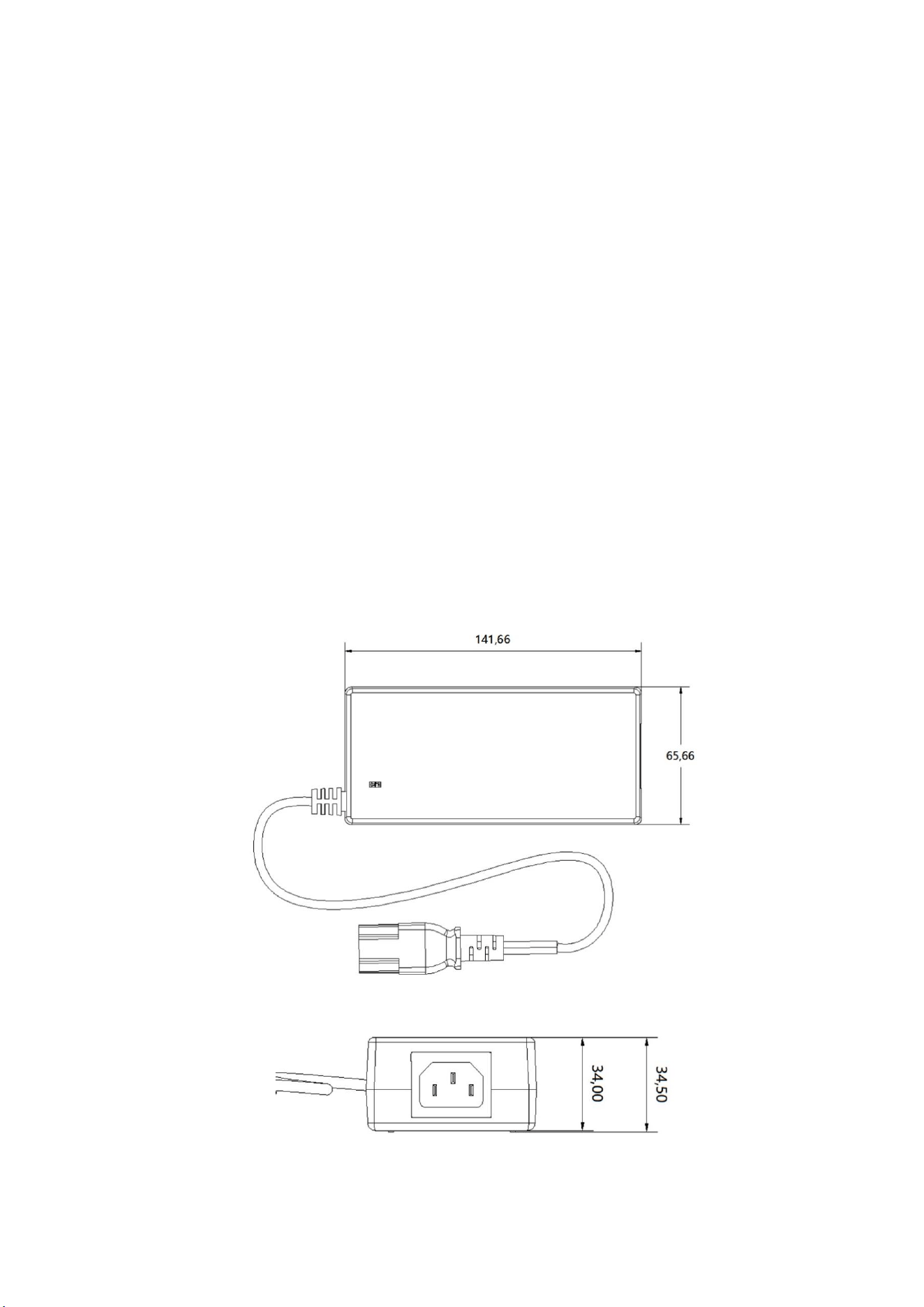
1.2. Dimensions
BIGTREETECH PANDA PWR User Manual
5
2. Interface
2.1. Interface Diagram
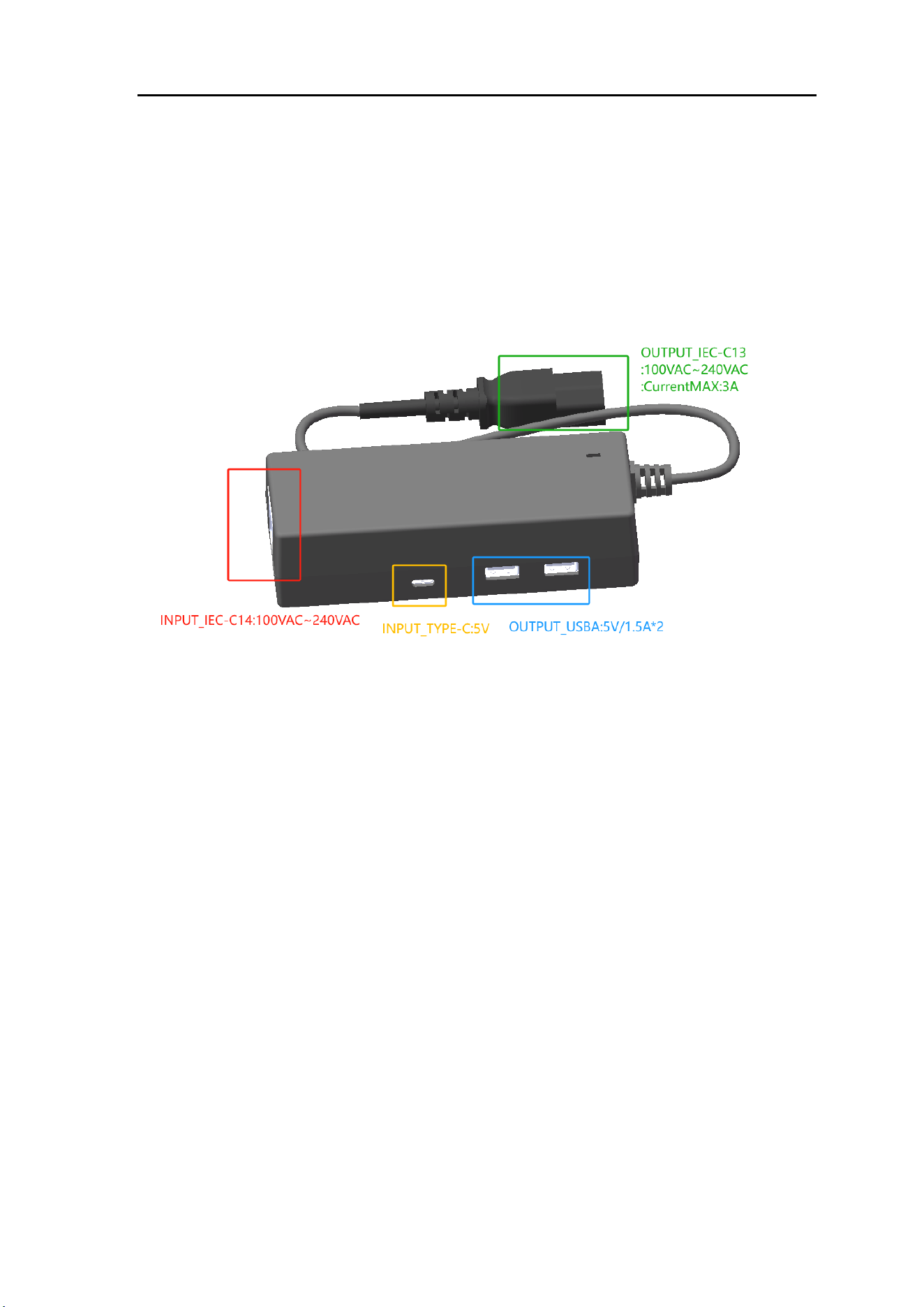
2.2. Interface Introduction
IEC-C14: AC voltage input of 100VAC~240VAC
IEC-C13: AC voltage output of 100VAC~240VAC, rated load current 3A
TYPE-C: 5V input, can communicate with a computer
USBA: Two 5V/1.5A outputs
3. Instructions
3.1. USB Interface
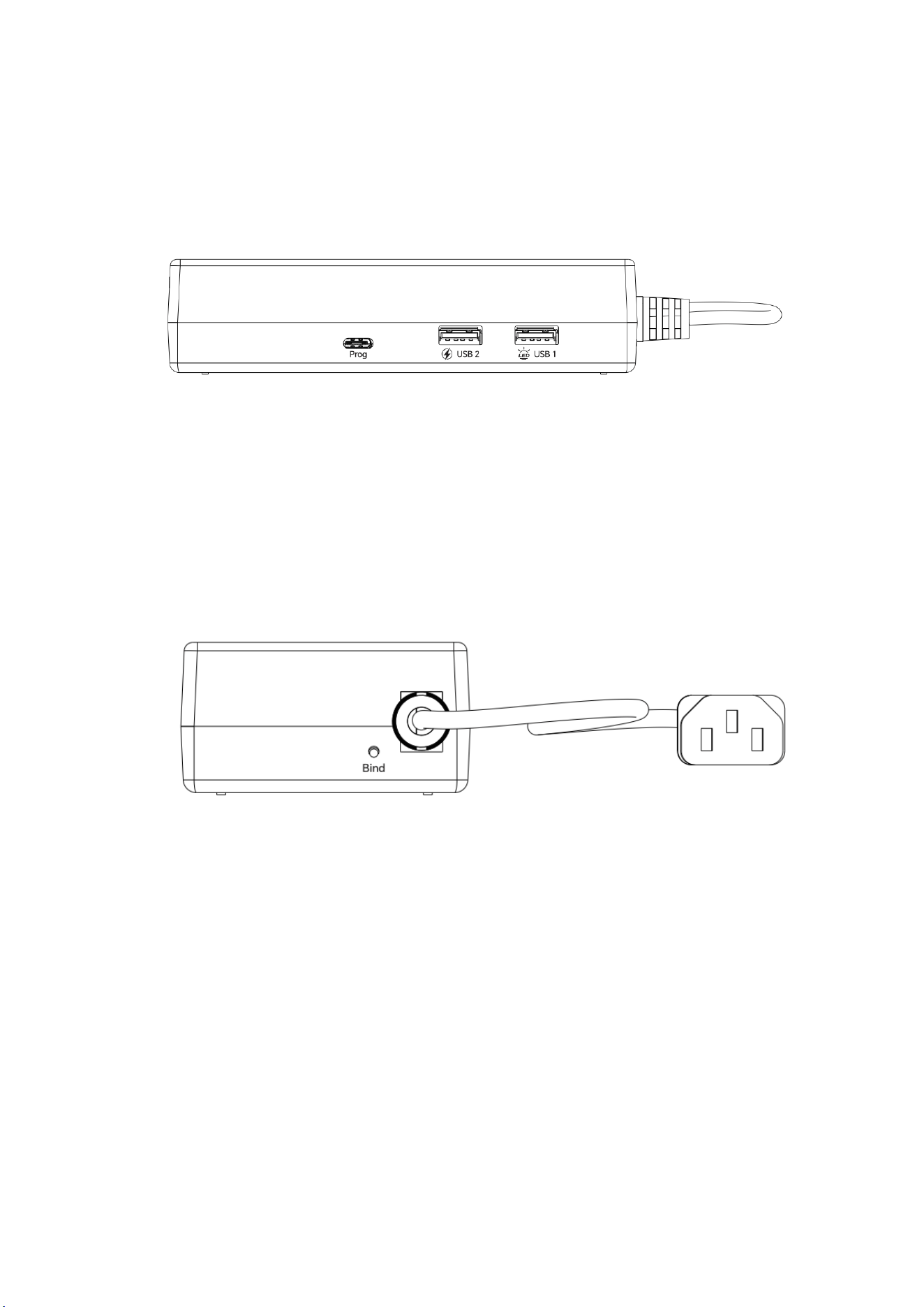
3.1.1. USB1 (5V Output, Controllable)
Used for modules that require control switches, such as a USB light strip.
3.1.2. USB2 (Fixed 5V Output)
Can provide power to some modules, such as Panda Touch.
3.2. Bind Key
3.2.1. Bind a Panda Touch
Long press for several seconds to enter the binding mode.
3.2.2. Activate the 220V Power Supply
Activate the 220V power supply by double-clicking the Bind key.
3.3. Web UI
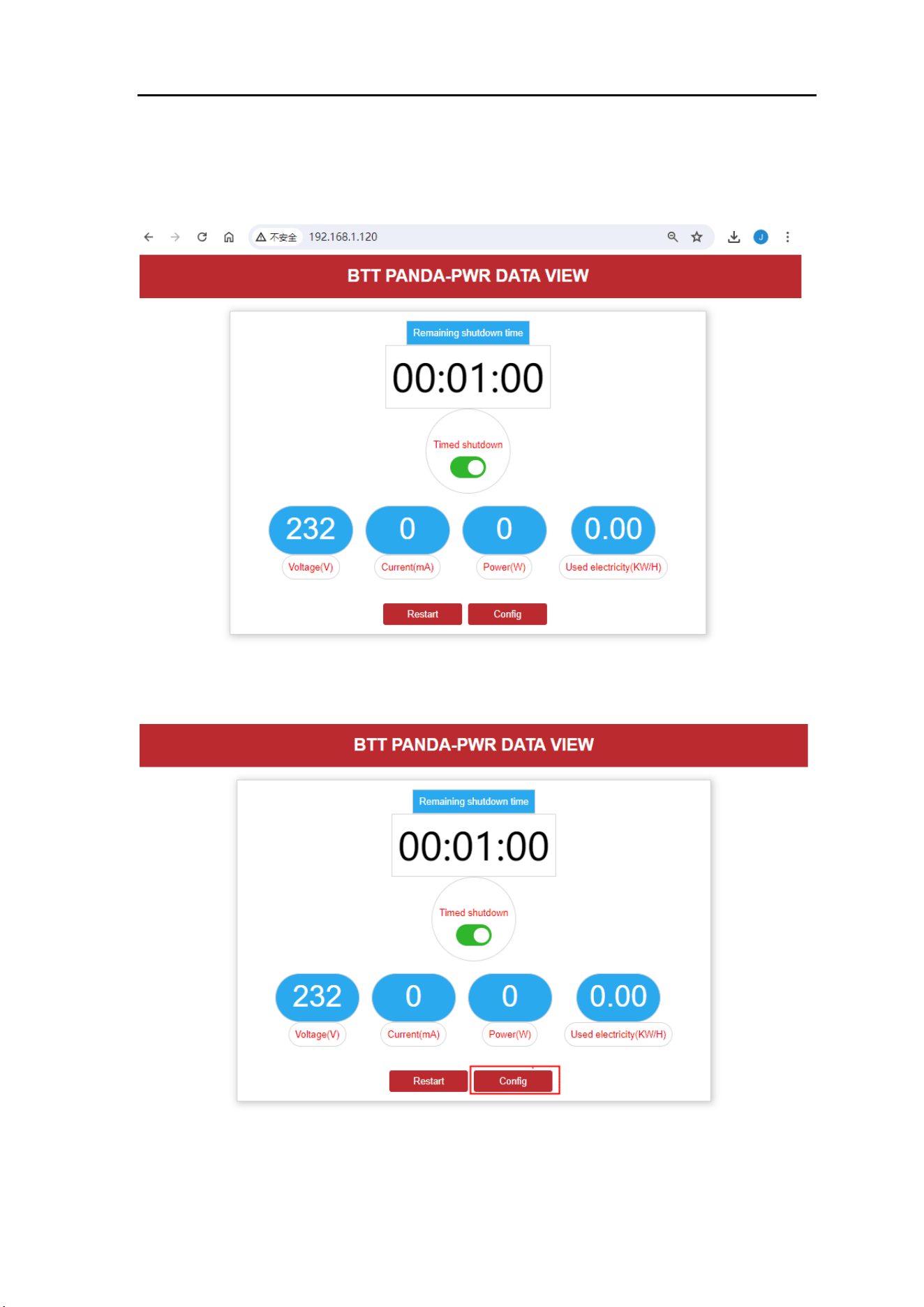
3.3.1. View Power Parameters
Before proceeding, you must bind a Panda Touch, obtain the IP address from the
Panda PWR interface, and then enter the IP address in your computer or mobile
BIGTREETECH PANDA PWR User Manual
7
browser.
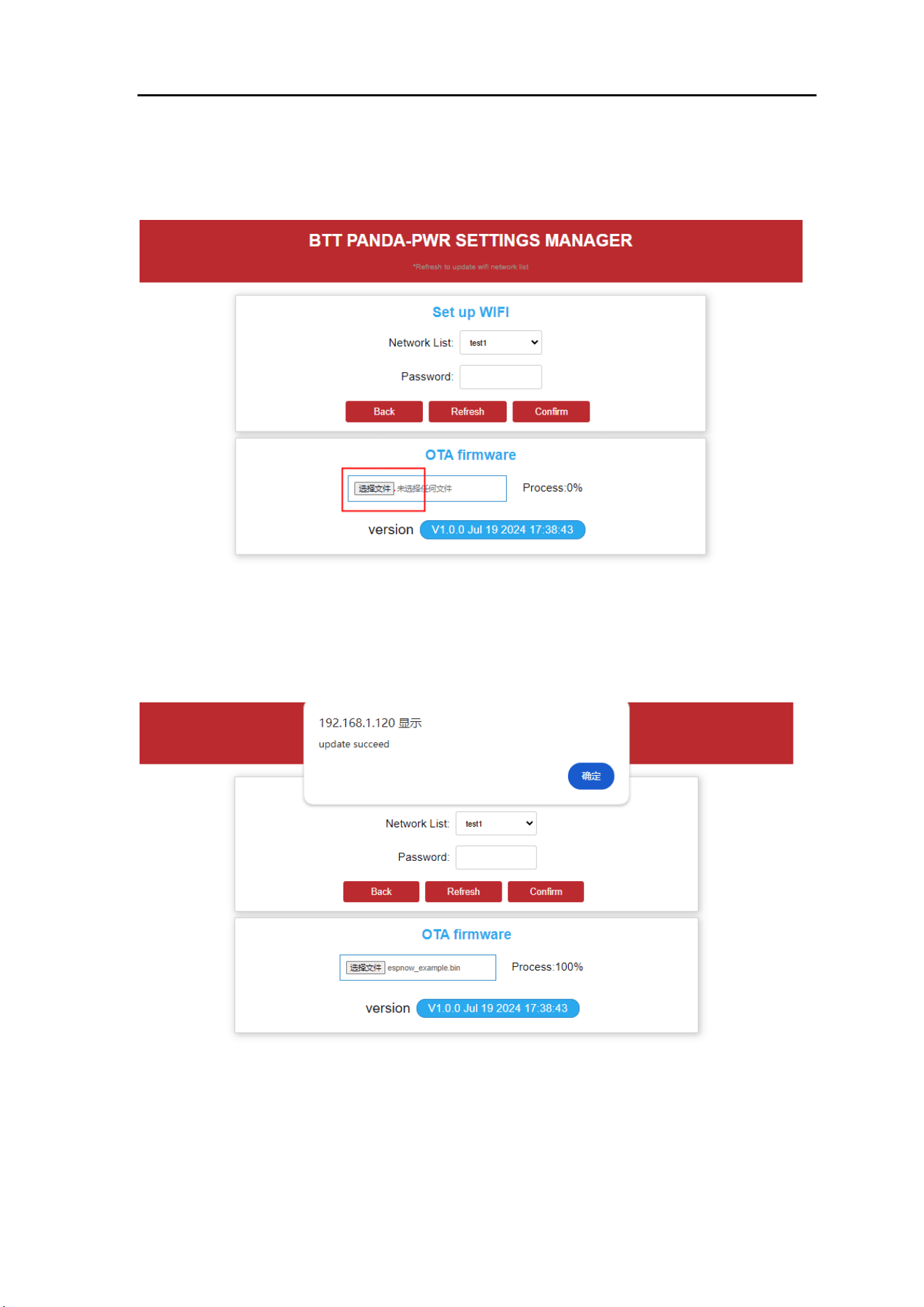
3.3.2. OTA
Click the "Config" button to enter the OTA page.
BIGTREETECH PANDA PWR User Manual
8
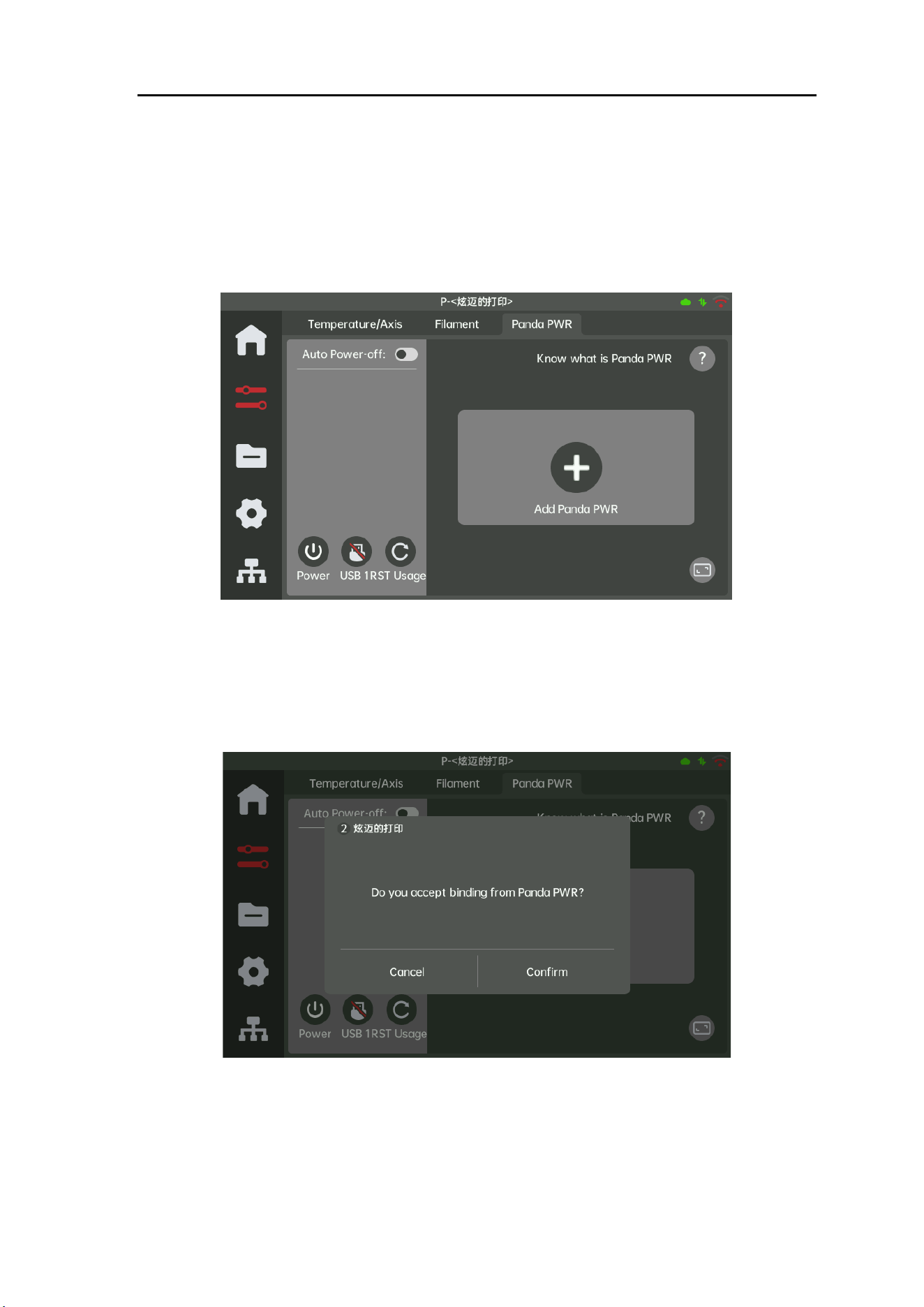
Click the "Select File" button to update the firmware.
After the upgrade is completed, a success prompt will be displayed.
BIGTREETECH PANDA PWR User Manual
9
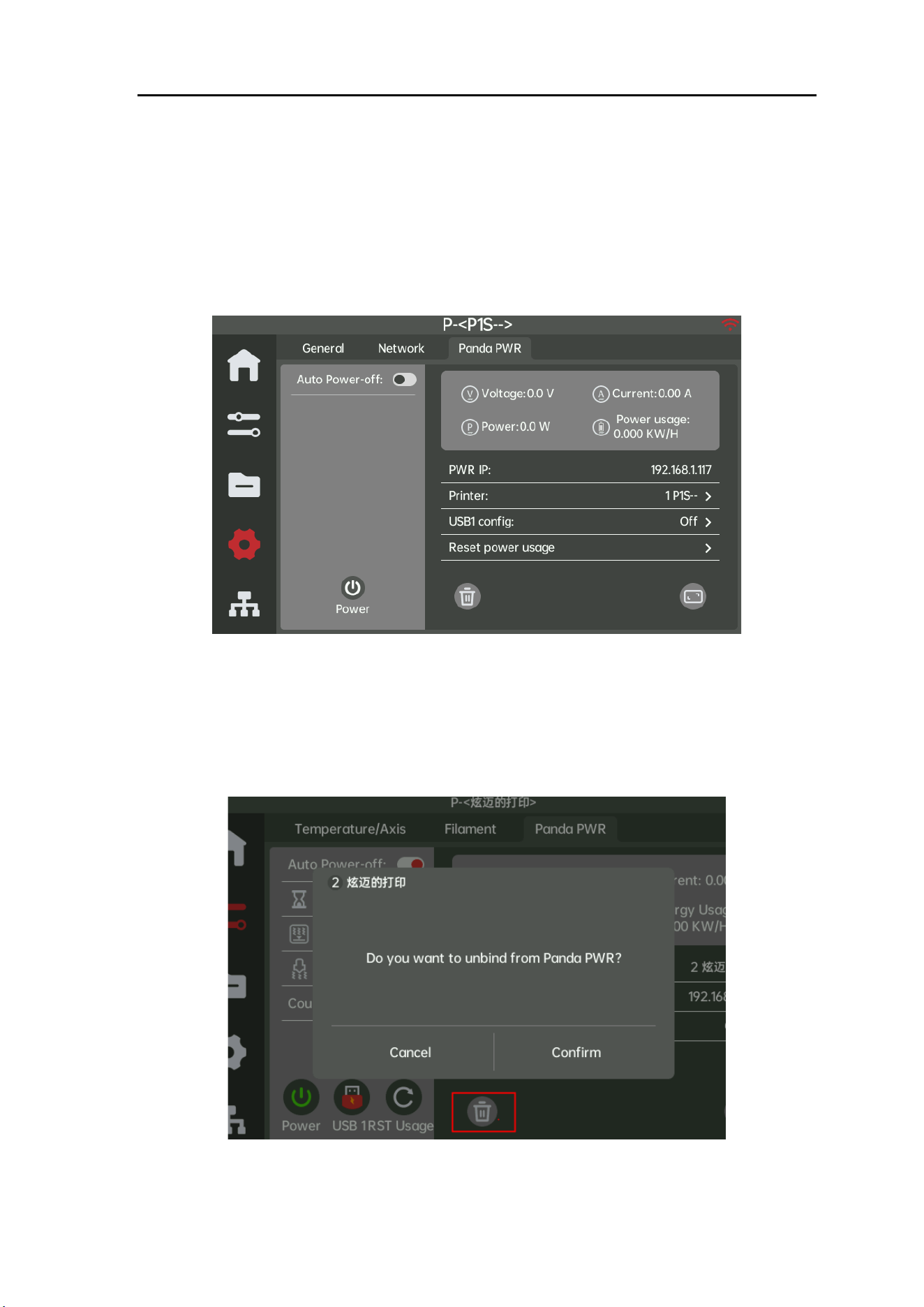
3.4. How to Bind Panda PWR and Panda Touch
Open the Panda PWR page.
Bring Panda PWR and Panda Touch Closer Together
Press and hold the bind button for about 3 seconds, wait for the light to turn blue
and enter a breathing state, then wait for a pop-up prompt to appear and click
confirm.
BIGTREETECH PANDA PWR User Manual
10
NOTE:
Please bring Panda PWR and Panda Touch closer together and complete the
confirmation within 15 seconds, otherwise, it will prompt a binding timeout, and
the PWR light will turn red. At this point, re-binding is required.
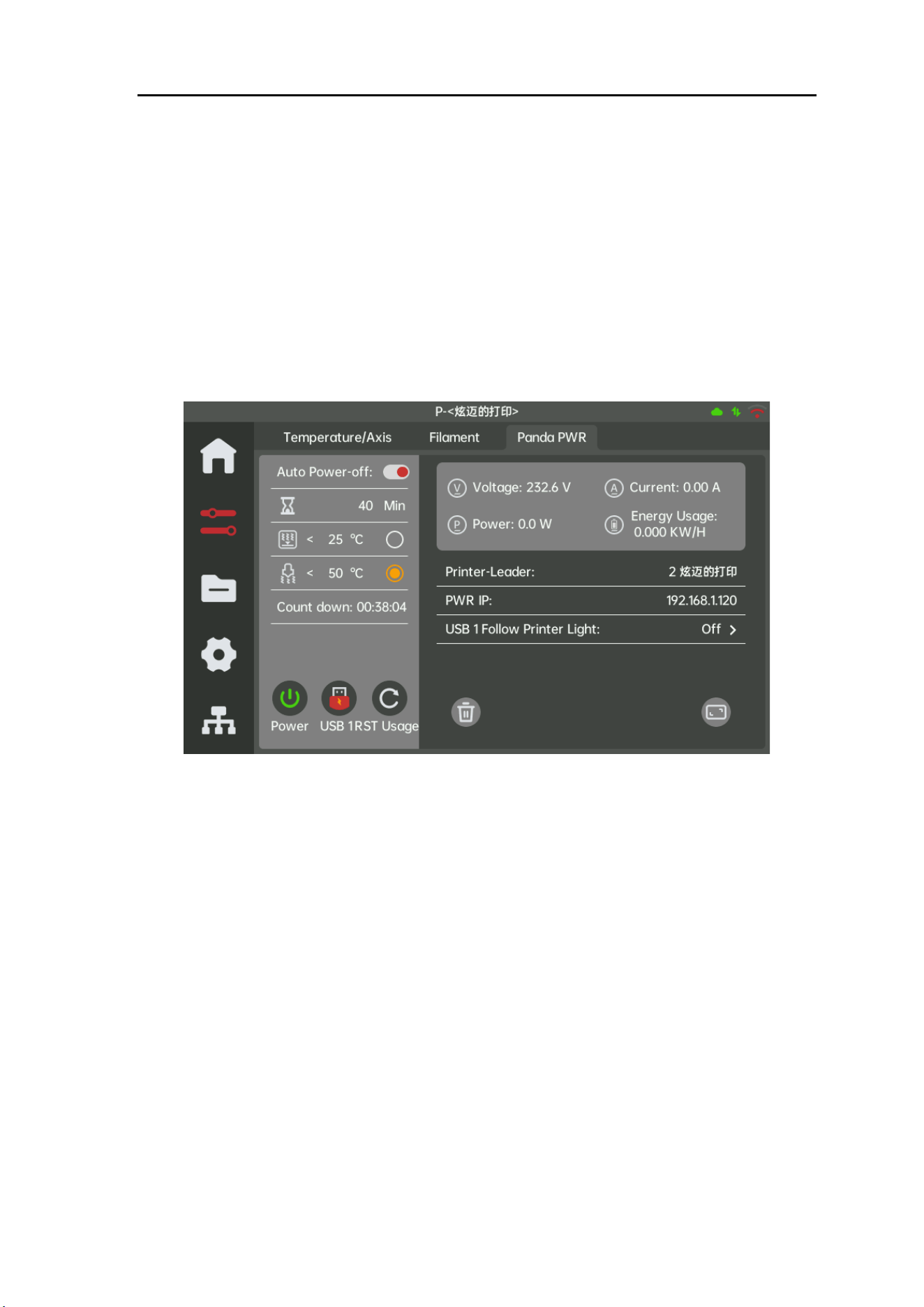
3.5. Unbind Panda PWR from Panda Touch
If you wish to bind another printer, you must first unbind the current connection.
BIGTREETECH PANDA PWR User Manual
11
3.6. Enable Automatic Power-Off Function
When you need the printer to shut down after printing, activate the automatic
power-off switch, configure the countdown time and temperature limit values, and
start the countdown when the conditions are met. After the countdown is
completed, Panda PWR will automatically cut off the power supply to the printer.
3.7. Clearing Electricity Consumption
Panda PWR records the power consumption of the load. Press "RST Usage" to
clear the power consumption data.
3.8. USB1 Follows the Printer Light
When set to ON, USB1 will follow the changes in the printer's LED. If the LED is
on, USB1 will output 5V voltage; otherwise, the output will be turned off.
Additionally, USB1 supports manual setting for on and off. When set to OFF,
USB1 only supports manual control.

BIGTREETECH PANDA PWR User Manual
12
3.9. Indicator Light Description
Blue: Unbound status
Blue Breath: Binding in progress
Red: Binding timeout
Green: Normal communication
Green Flashing: Communication error
4. Precautions
1. The communication between Panda PWR and Panda Touch uses a short-
range method, which may be affected by obstructions. Please ensure there
are no obstructions around the Panda PWR.
2. When connecting to a 220VAC input, first connect the input wires on the
Panda PWR before connecting the wires to the socket.
3. The TYPE-C port can only be used for input.
4. The USB-A port can only be used for output.
5. FCC WARNING
This device complies with Part 15 of the FCC Rules. Operation is subject to the
following two conditions: (1) this device may not cause harmful interference, and
(2) this device must accept any interference received, including interference that
may cause undesired operation. Any changes or modifications not expressly
approved by the party responsible for compliance could void the user's authority
to operate the equipment.
NOTE: This equipment has been tested and found to comply with the limits for a
Class B digital device, pursuant to Part 15 of the FCC Rules. These limits are
designed to provide reasonable protection against harmful interference in a
residential installation. This equipment generates, uses, and can radiate radio
frequency energy and, if not installed and used in accordance with the
instructions, may cause harmful interference to radio communications. However,
there is no guarantee that interference will not occur in a particular installation. If
this equipment does cause harmful interference to radio or television reception,
which can be determined by turning the equipment off and on, the user is

BIGTREETECH PANDA PWR User Manual
13
encouraged to try to correct the interference by one or more of the following
measures:
- Reorient or relocate the receiving antenna.
- Increase the separation between the equipment and receiver.
- Connect the equipment into an outlet on a circuit different from that to which the
receiver is connected.
- Consult the dealer or an experienced radio/TV technician for help.
To maintain compliance with FCC’s RF exposure guidelines, this equipment
should be installed and operated with a minimum distance of 20 cm between the
radiator and your body. Use only the supplied antenna.

Should you require further resources for this product, you can find them at
[GitHub](https://github.com/bigtreetech/). If you cannot find what you need, you may
If you encounter any other problems during use or have suggestions or feedback, please
contact us. Thank you for choosing BIGTREETECH products.