
V2 .D.01.Z
Digital Video Recorder
Quick Start Guide
For more information of your new system, please refer to www.zositech.com
The electronic user manual can be viewed on your mobile
devices by scanning the QR code using a browser or camera.
Contents
EN
ES
01
13
1
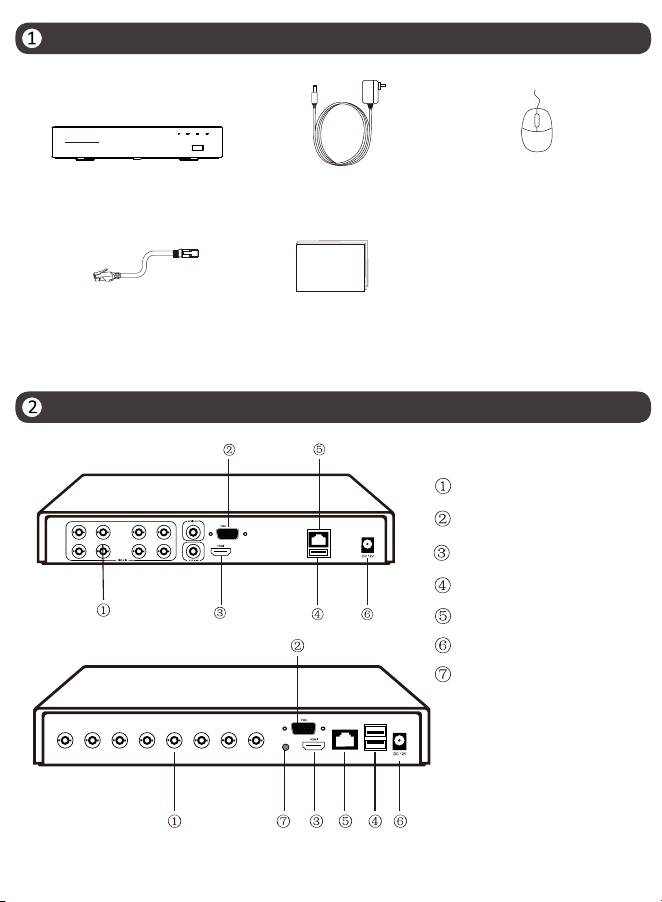
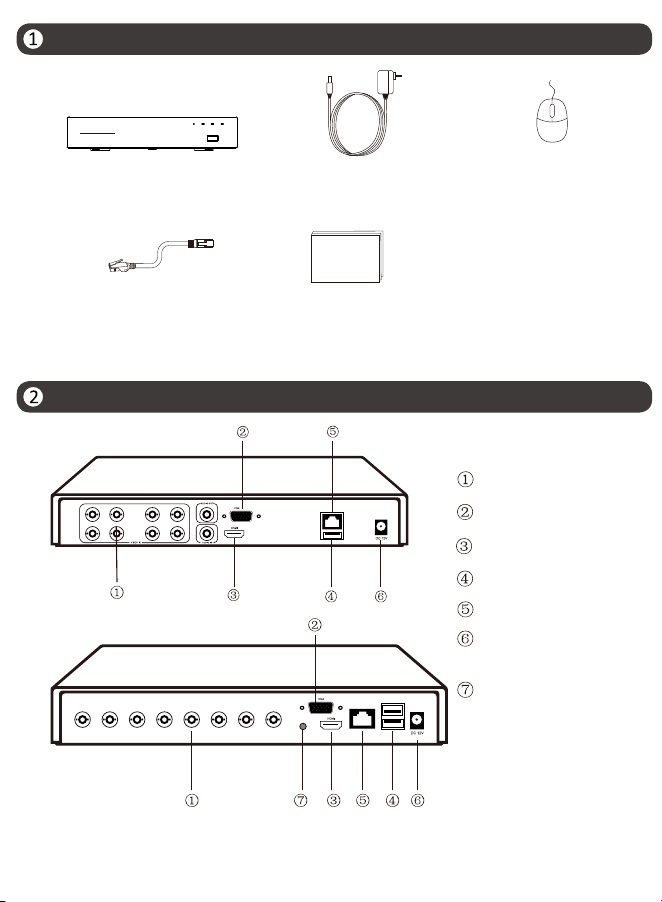
What’s in the box
Introduce the DVR
NOTE: The actual appearance and components may vary with different products, please
refer to the actual product.
NOTE: Products and accessories vary by product models, please refer to the actual product.
DVR DVR Power Adapter USB Mouse
Ethernet Cable Quick Start Guide
Quick Start Guide
HD Digital Video Recorder
IR POWER LAN HDD
Monitor(VGA)
Monitor(HDMI)
Camera
Mouse/USB 2.0
Router
Power Supply
Audio(3.5mm)
2
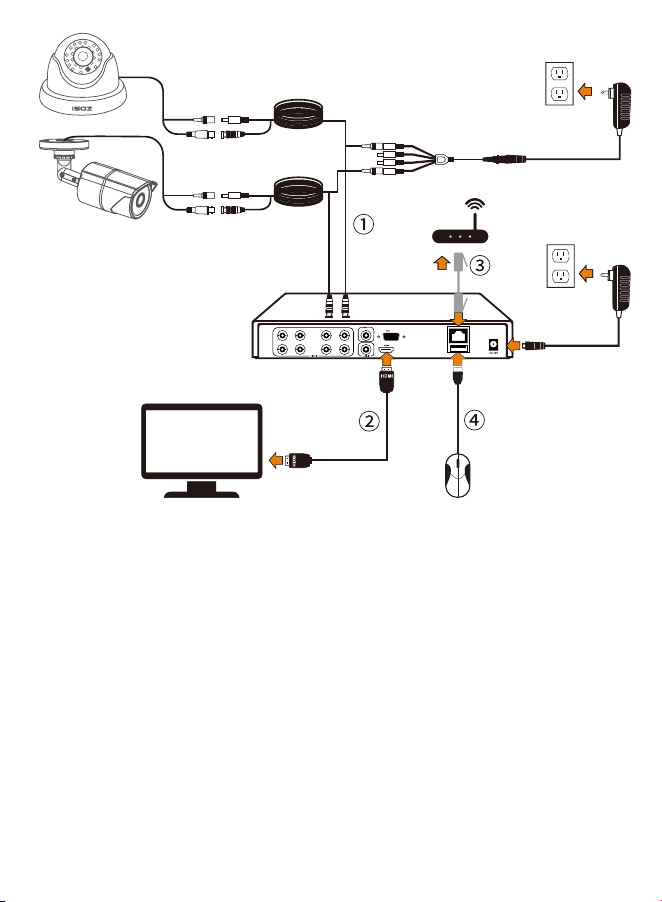
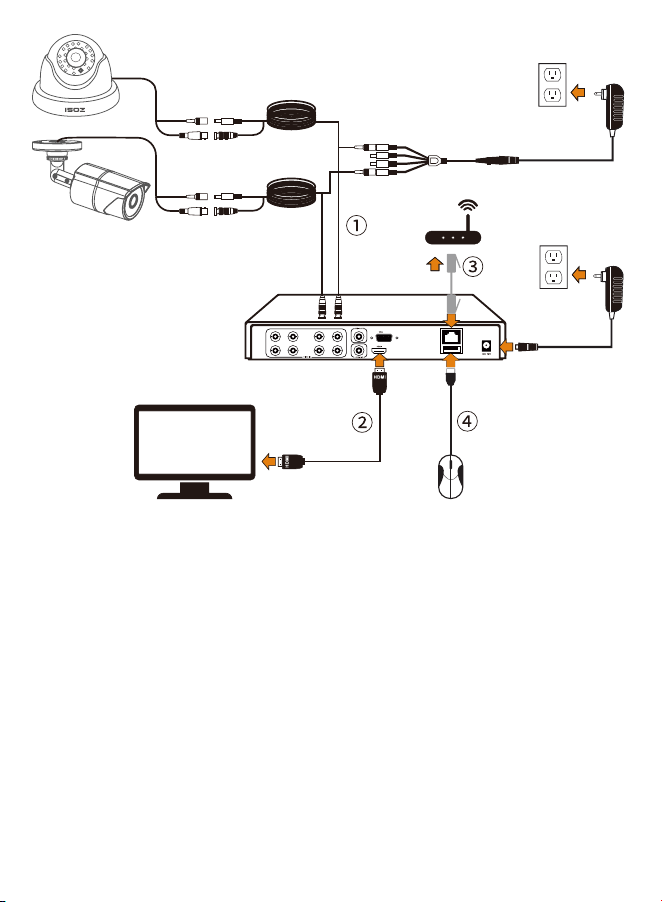
NOTE: To ensure the device works properly, it is recommended to power on the DVR
first for testing before a final installation.
② Connect monitor to DVR via HDMI cable or VGA cable.
③ Connect DVR to router via Ethernet cable.
④ Connect Mouse to the USB port on DVR, then power on DVR and cameras.
① Connect the Cameras to the DVR via BNC cable.
3
Access the System via Smartphone or PC
Set up the DVR System
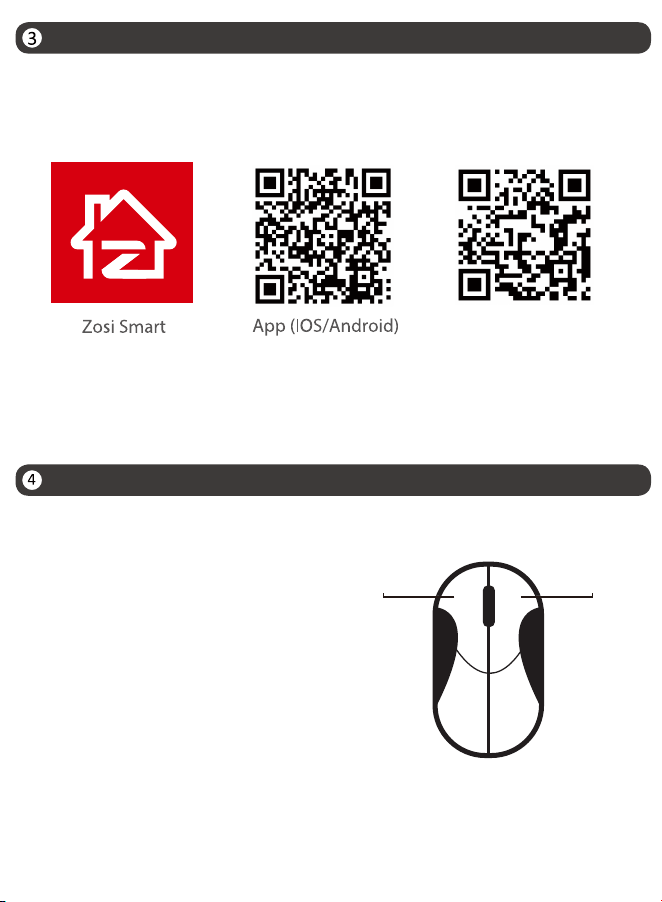
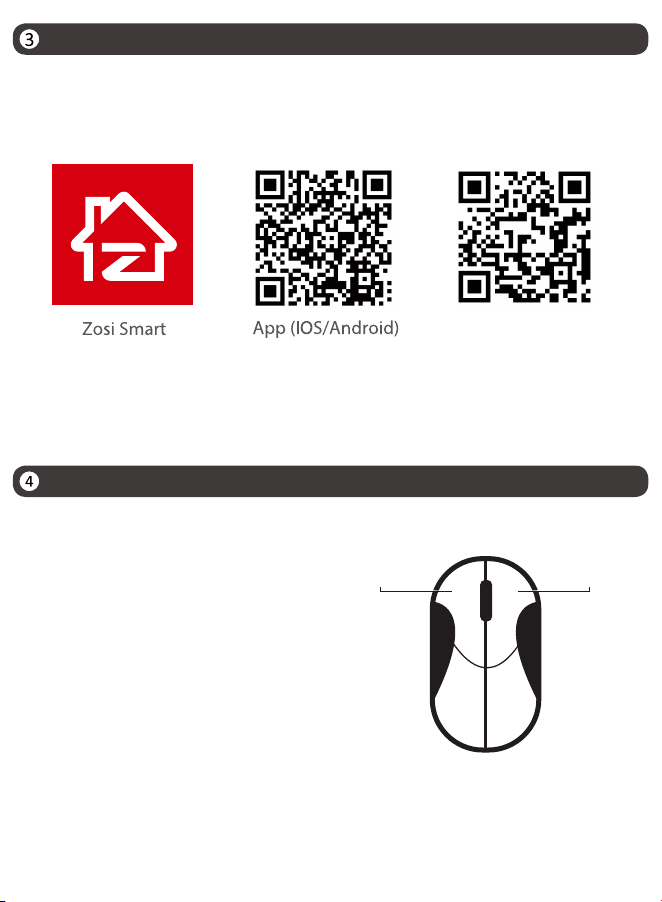
3.1. Smartphone
Search “ZOSI Smart” in the APP Store or use a browser to scan the QR code below,
download and install the app and follow the instructions to register an account.
3.2. PC
Download path: Go to https://www.zositech.com/pages/app.
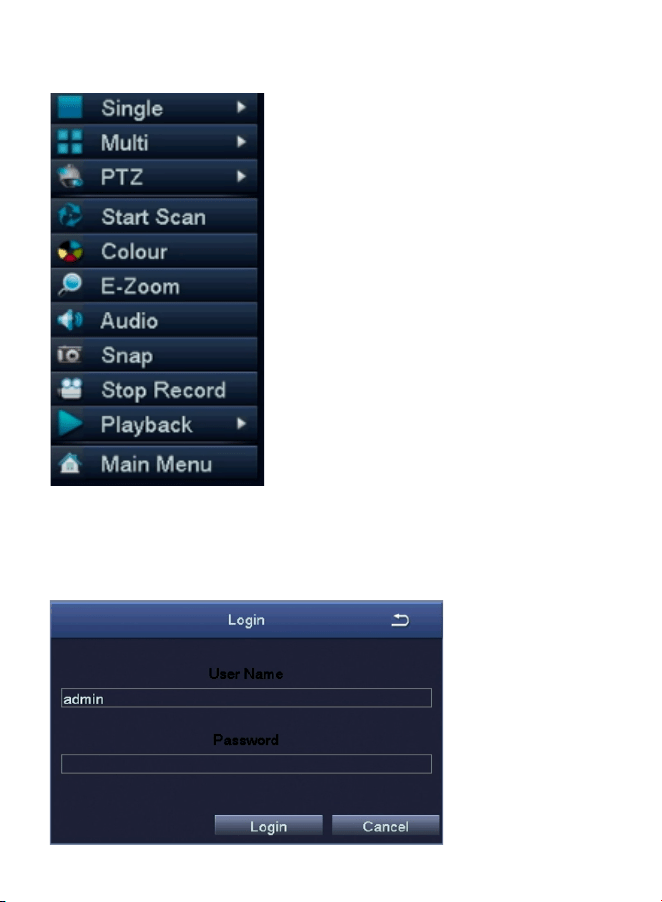
4.1. Mouse Operation:
Left Button:
• Preview or Playback Interface:
Double-click a single channel to enter full
screen and double-click again to exit full screen.
• Navigation Menu: Left click to select a menu option.
Right Button:
• Right click to bring up the main menu when the mouse
is on the preview interface.
• Navigation Menu: Right click to exit the menu or return
to previous menu option.
Left Button Right Button
App video
opera�on link
4
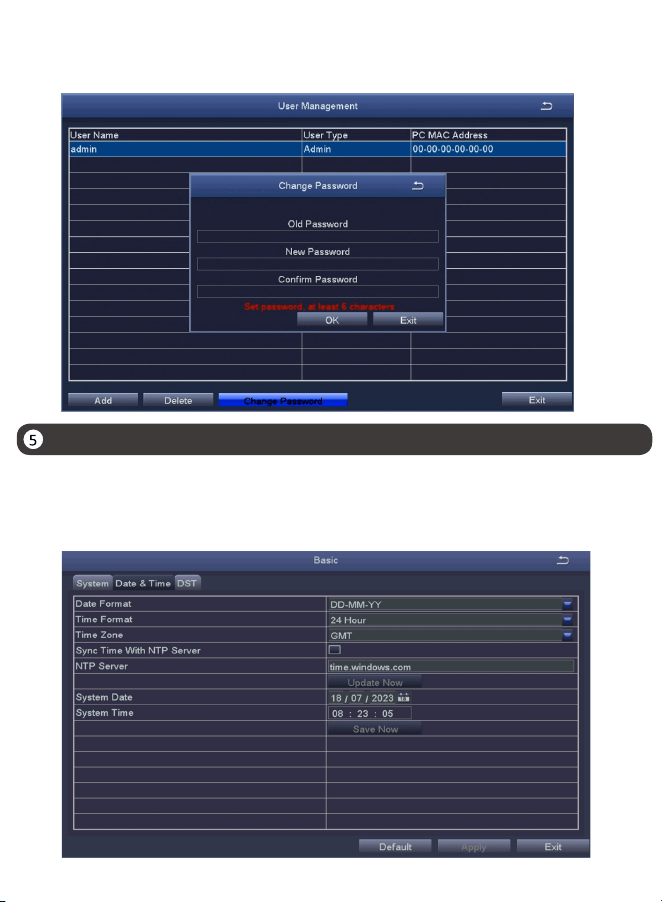
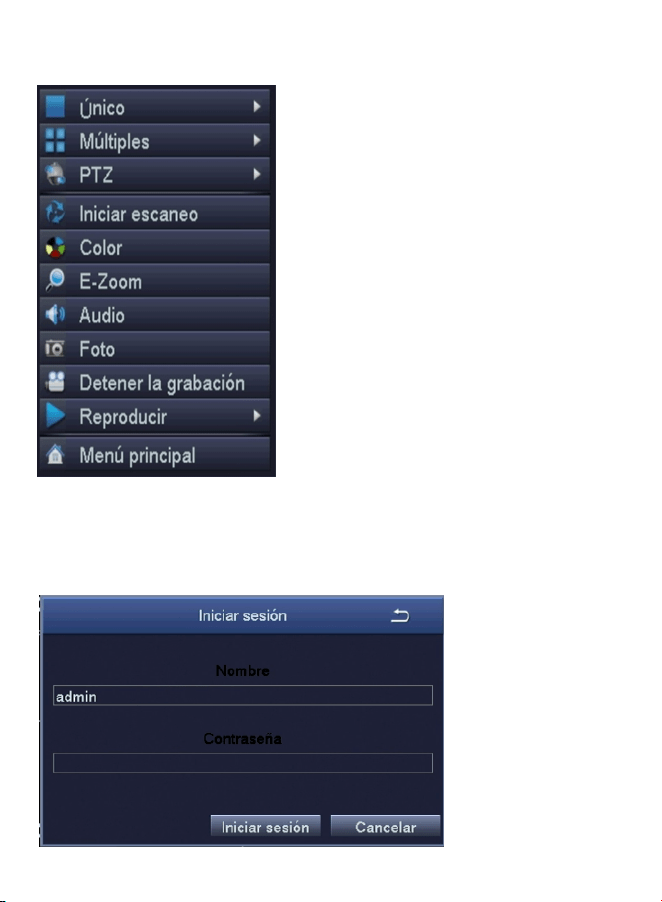
4.2. Introduce the Menu Bar:
4.3. System Password:
Right-click anywhere on the screen to open the menu bar.
The factory default username is “admin” and the password is empty, so the first
time users can login the system directly.
• Single - Select single channel for live viewing
• Main Menu - Enter the Main Menu
• PTZ: Control the rotation of PTZ camera
• Playback - Search Video playback and quick
playback
• Stop Record - Start/stop record
• Snap - Snap and save the live view images
• Audio - Adjust the camera volume
• E-Zoom - E-Zoom the preview interface
• Colour - Adjust colour and image settings
• Start Scan - Start/Stop Scan
• Multi - Select multi-channel for live viewing
Date & Time Setting
Change Password Path: Right click the mouse-Main Menu-Setup-Users-Change Password
NOTE: The new password setting cannot be less than 6 characters, please keep the
password properly.
Right click the mouse - Main Menu - Setup - Basic - Date & Time - Choose the
corresponding time according to your region and then click “Apply” to save.
NOTE: The default time zone is GMT, please choose the corresponding time
according to your region
5
Video Playback
6
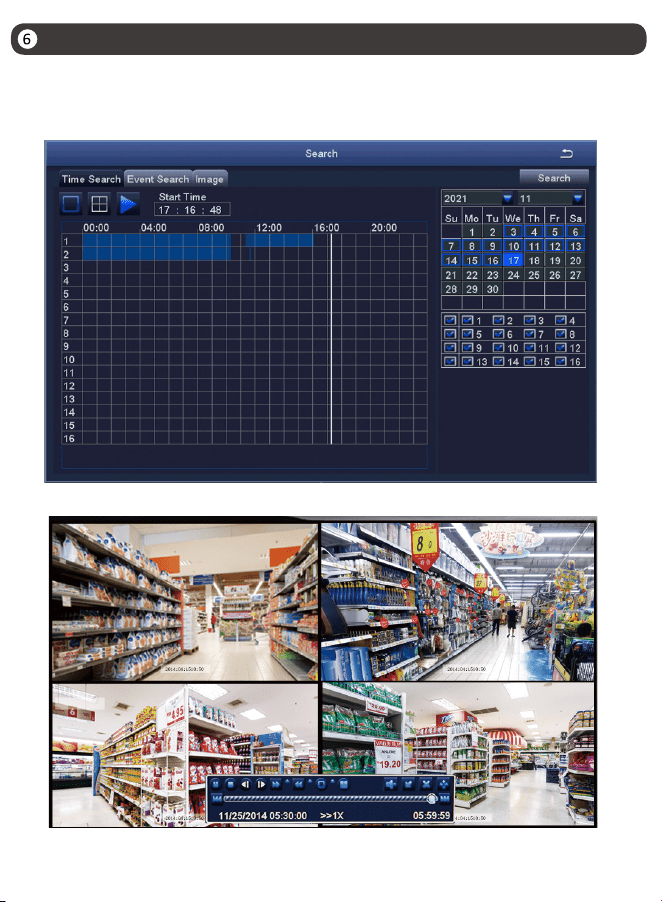
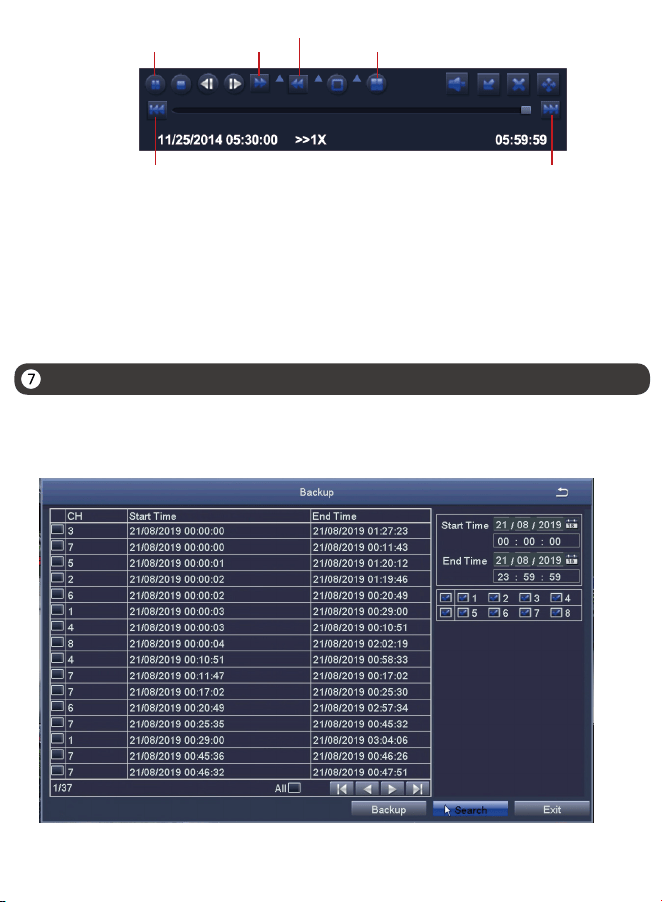
Right click the mouse - Playback - Video Playback/Quick Playback,
Video Playback: Playback the video clips via time search or event search.
Quick Playback: Quick playback of the first 30 minutes of video.
7
Backup
Previous Video: Play the previous video.
Next Video: Play the next video.
Fast forward:You can play the video clips at 1/4 time speed to 16 times speed.
Rewind: You can rewind the video clips at 1 time speed, 8 times speed, 16 times
speed, and 32 times speed.
Screen Modes: Single Channel Playback/Multi-channel Playback. Channels
without video playback will show a black screen.
Play/Pause
Fast
Forward
Rewind
Multi-screen display
Previous Record Next Record
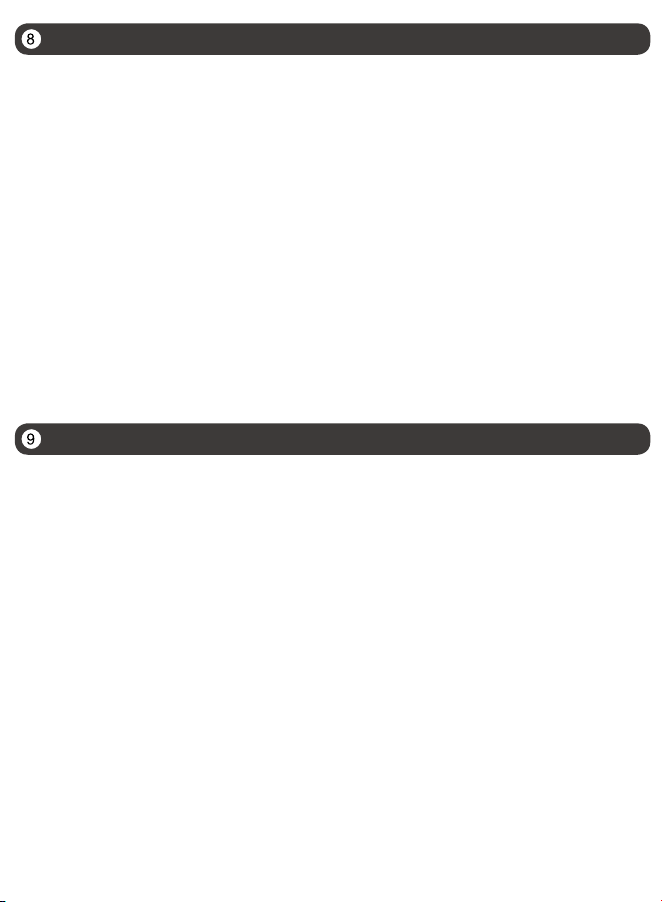
②Right click the mouse > Main Menu > Backup > Select channels and time period > Search >
Select the video clips you want to back up > Click “Apply”.
①Insert a USB into the USB 2.0 port on the DVR.
Usage Specification
8
● Read this guide carefully and keep it for future reference.
● Follow all instructions for safe use of the product and handle with care.
● Use the product within given temperature, humidity, voltage level noted in the
device’s specifications.
● Do not disassemble the product.
● Use only a regulated power supply with the product (optional). Use of a non-
regulated, non-conforming power supply can damage the product and void the
warranty.
● Periodic cleaning may be required. Use a damp cloth only. Do not use any harsh,
chemical-based cleaners.
● Do not use the product in a sealed, humid environment. It is recommended to
place it in a location that is easily ventilated for installation.
● Do not disassemble the device while power is on.
FAQ
Q: No Video Output on the Monitor?
• Ensure the lowest resolution of the monitor is no less than 720p.
• Ensure the NVR is powered on normally.
• Check the connection of the HDMI/VGA cable or use another cable to try again.
Q: Failed to Remotely Access the Camera via Mobile Phone or Computer?
• Ensure the DVR is connected to the network normally, you can go to the DVR
Menu-Network-Test
• Test and verify whether you can access the Internet by connecting your phone or
computer to the same network as the DVR.
• Reboot your DVR or router.
Q:Does the system support motion detection and image capture?
• It captures images automatically when people, cars, are detected or when there
is a change in detected images. Users can also manually capture images using our
ZOSI Smart APP.
FCC Compliance Statement
Simplified EU Declaration of Conformity
Correct Disposal of this Product
9
Notification of Compliance
This device complies with Part 15 of FCC Rules.
Operation is subject to the following two conditions:
(1) This device may not cause harmful interference.
(2) This device must accept any interference received, including inference that
may cause undesired operation.
ZOSI declares that the device is in compliance with the essential requirements and
other relevant provisions if Directive 2014/30/EU.
This marking indicates that this product cannot be disposed with other household
wastes throughout the EU. To prevent possible harm to the environment or human
health from uncontrolled waste disposal and promote the sustainable reuse of
material resources, please recycle it responsibly. To return your used device, please
visit the Return and Collection System or contact the retailer from whom the product
was purchased. They can take this product away for environmentally safe recycling.
10
10
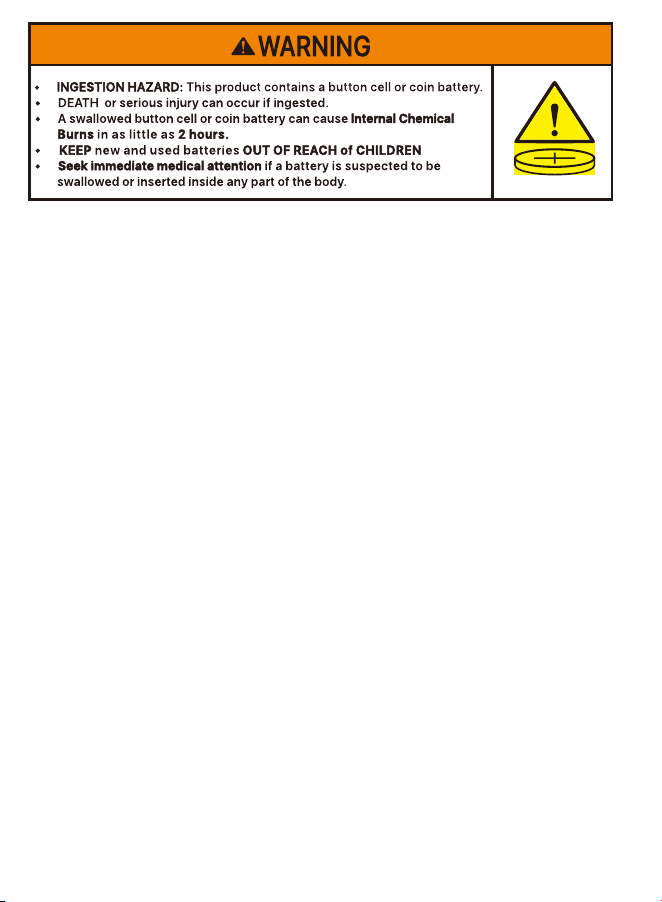
a) Remove and immediately recycle or dispose of used batteries according to local
regulations and keep away from children. Do NOT dispose of batteries in
household trash or incinerate.
b) Even used batteries may cause severe injury or death.
c) Call a local poison control center for treatment information.
d) The compatible battery type: CR2032
e) The nominal battery voltage: 3V
f) Non-rechargeable batteries are not to be recharged.
g) Do not force discharge, recharge, disassemble, heat above 60℃(manufacturer’s
specified temperature rating) or incinerate. Doing so may result in injury due to
venting, leakage or explosion resulting in chemical burns.
Products with non-replaceable button/coin cell batteries shall additionally
include a statement indicating the product contains non-replaceable batteries

11
NOTE: This equipment has been tested and found to comply with the limits for a
Class B digital device, pursuant to part 15 of the FCC Rules. These limits are
designed to provide reasonable protection against harmful interference in a
residential installation. This equipment generates, uses and can radiate radio
frequency energy and, if not installed and used in accordance with the instruc-
tions, may cause harmful interference to radio communications. However, there
is no guarantee that interference will not occur in a particular installation. If this
equipment does cause harmful interference to radio or television reception,
which can be determined by turning the equipment off and on, the user is
encouraged to try to correct the interference by one or more of the following
measures:
- Reorient or relocate the receiving antenna.
- Increase the separation between the equipment and receiver.
-Connect the equipment into an outlet on a circuit different from that to which the
receiver is connected.
-Consult the dealer or an experienced radio/TV technician for help
Changes or modifications not expressly approved by the party responsible for
compliance could void the user's authority to operate the equipment.
This device complies with Part 15 of the FCC Rules. Operation is subject to the
following two conditions:
(1) this device may not cause harmful interference, and (2) this device must
accept any interference received, including interference that may cause
undesired operation.
RF Exposure Warning Statements:
This equipment complies with FCC radiation exposure limits set forth for an
uncontrolled environment. This equipment shall be installed and operated with
minimum distance 20cm between the radiator & body.
For USA: The frequency stability of all transmission frequencies of U-NII-1, U-NII
2A, U-NII 2C and U-NII-3 meets the requirements of 47 CFR FCC Part15.407(g), and
the manufacturer declares that their transmission is maintained at Band U-NII-1,
U-NII 2A, U-NII 2C and U-NII-3.

12
This device contains licence-exempt transmitter(s)/receiver(s) that comply with
Innovation, Science and Economic Development Canada’s licence-exempt
RSS(s). Operation is subject to the following two conditions:
(1) This device may not cause interference.
(2) This device must accept any interference, including interference that may
cause undesired operation of the device.
L’émetteur/récepteur exempt de licence contenu dans le présent appareil est
conforme aux CNR d’Innovation, Sciences et Développement économique
Canada applicables aux appareils radio exempts de licence. L’exploitation est
autorisée aux deux conditions suivantes:
(1) L' appareil ne doit pas produire de brouillage;
(2) L' appareil doit accepter tout brouillage radioélectrique subi, même si le
brouillage est susceptible d' en compromettre le fonctionnement.
ISED Radio Frequency Exposure Statement:
The device has been evaluated to meet general RF exposure requirements. The
device can be used in mobile exposure conditions. The min separation distance is
20 cm.
ISED Déclaration d'exposition aux radiofréquences:
L'appareil a été évalué pour répondre aux exigences générales en matière
d'exposition aux RF. L'appareil peut être utilisé dans des conditions d'exposition
mobiles. La distance de séparation minimale est de 20 cm.
Operation of this device is restricted to indoor use only. (5150-5350MHz)
Le fonctionnement de cet appareil est limité à une utilisation en intérieur
uniquement. (5150-5350MHz)
For Canada: The frequency stability of all transmission frequencies of U-NII-1,
U-NII 2A, U-NII 2C and U-NII-3 meets the 47 CFR FCC Part15.407(g) requirements,
and the manufacturer states that their transmissions remain within the U-NII-1,
U-NII 2A, U-NII 2C and U-NII-3 bands.
Pour le Canada : La stabilité de fréquence de toutes les fréquences de transmis-
sion de U-NII-1, U-NII 2A, U-NII 2C et U-NII-3 est conforme aux exigences 47 CFR
FCC Part15.407(g), et le fabricant déclare que leurs transmissions restent dans les
bandes U-NII-1, U-NII 2A, U-NII 2C et U-NII-3.
Lista de empaque
13
NOTA: La apariencia y los componentes variarán por diferentes productos, por favor
consulte el producto específico.
NOTA: Los productos y accesorios varían por diferentes modelos, por favor consulte el
producto específico.
Fuente de alimentación
para DVR
Ratón USB
Introducción del DVR
DVR
Cable Ethernet Manual
Quick Start Guide
HD Digital Video Recorder
IR POWER LAN HDD
Monitor VGA
Monitor HDMI
Entrada de cámara
Ratón/USB 2.0
Enrutador
Adaptador de
corriente
Audio(3.5mm)
14
NOTA: Para asegurarse de que el dispositivo funcione correctamente, se recomienda
que probe el dispositivo antes de la instalación.
② Conecte el grabador al monitor mediante un cable HDMI o un cable VGA
(no suministrado).
③ Conecte el grabador al enrutador mediante un cable Ethernet.
④ Conecte el ratón al puerto USB, luego conecte la fuente de alimentación para
encender el grabador y la cámara.
① Conecte la cámara al grabador usando un cable BNC.
4.1. Operación del ratón:
Botón izquierdo:
• Interfaz de vista previa o reproducción:
Haga doble clic en único canal para entrar
en la pantalla completa y haga doble clic de
nuevo para salir de la pantalla completa.
• Menú de navegación: haga clic con el botón
izquierdo para seleccionar una opción en el
menú.
Botón derecho:
• Haga clic con el botón derecho para entrar en el menú principal cuando el ratón esté
en la interfaz de vista previa.
• Menú de navegación: haga clic con el botón derecho para salir del menú o volver a la
opción anterior.
15
Acceso al sistema a través de Teléfono Móvil o PC
3.1. Teléfono Móvil
Busque "Zosi Smart" en la APP Store o escanee el código QR a continuación, descargue
e instale la aplicación siguiendo las instrucciones para registrar una cuenta.
3.2. PC
Página web de descarga: https://www.zositech.com/pages/app.
Botón izquierdo
Botón derecho
Configuración del sistema DVR
Enlace de video
de operación de
la aplicación
16
4.2. Introducción del menú:
4.3. Contraseña del sistema:
Haga clic derecho en cualquier lugar de la pantalla para abrir el menú.
El nombre de usuario por defecto es "admin" y la contraseña está vacía, así que los
usuarios pueden iniciar sesión en el sistema directamente por primera vez.
• Único: Seleccione un solo canal para vista en vivo
• Menú principal: Entre al Menú principal
• Reproducir: Busque reproducción de video y
reproducción rápida
• Detener la grabación: Iniciar/Detener las grabaciones
• Foto: Capture y guarde imágenes de vista en vivo
• Audio: Ajuste el volumen de la cámara
• E-Zoom: Agrande la interfaz de vista previa
• Color: Ajuste la configuración de color e imagen
• Iniciar escaneo: Iniciar/Detener escaneo
• Múltiples: Seleccione múlti-canales para vista en vivo
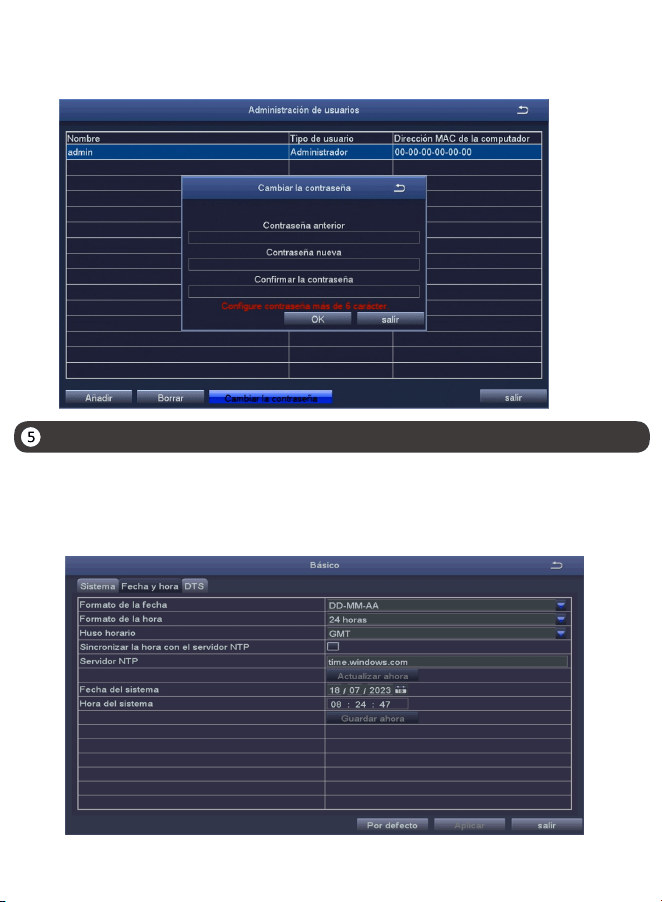
Configuración de la fecha y hora
Método de cambiar contraseña: haga clic con el botón derecho del ratón - Menú
principal - Configuración - Usuarios - Cambiar contraseña.
NOTA: La nueva contraseña no puede ser menos de 6 caracteres, por favor conserve
la contraseña correctamente.
Haga clic con el botón derecho del ratón - Menú principal - Configuración - Básico -
Fecha y hora - Elija la hora correspondiente según su región y luego haga clic en
"Aplicar" para guardar.
NOTA: El horario predeterminado es GMT, elija la hora correspondiente según su región.
17
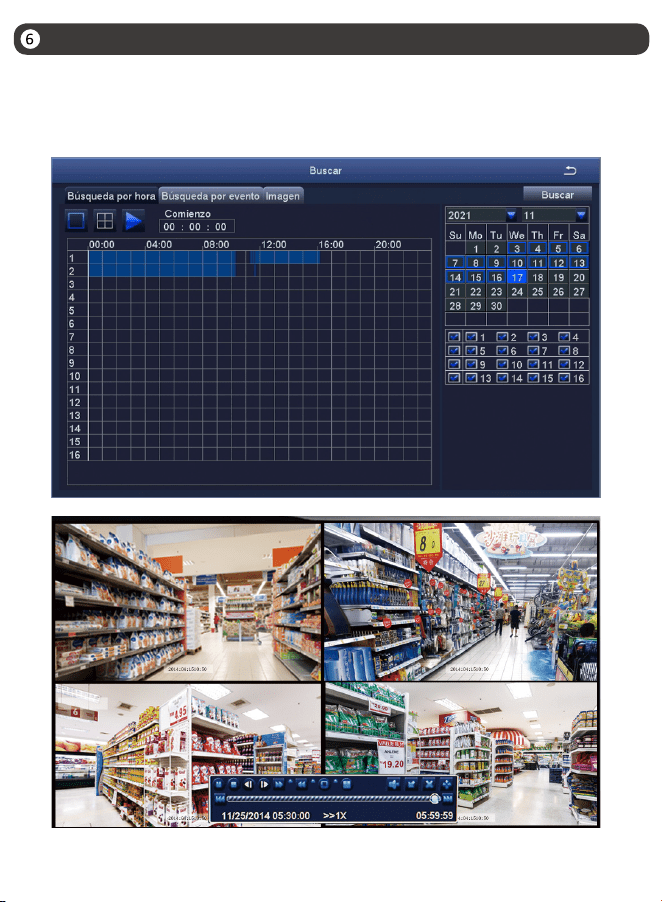
Reproducción de vídeos
18
Haga clic derecho del ratón - Reproducir - Reproducción de video/Reproducción rápida,
Reproducción de video: reproduzca videos a través de la búsqueda de tiempo o la
búsqueda de evento.
Reproducción rápida: reproduzca rápidamente el video de 30 minutos antes.
19
Copia de seguridad
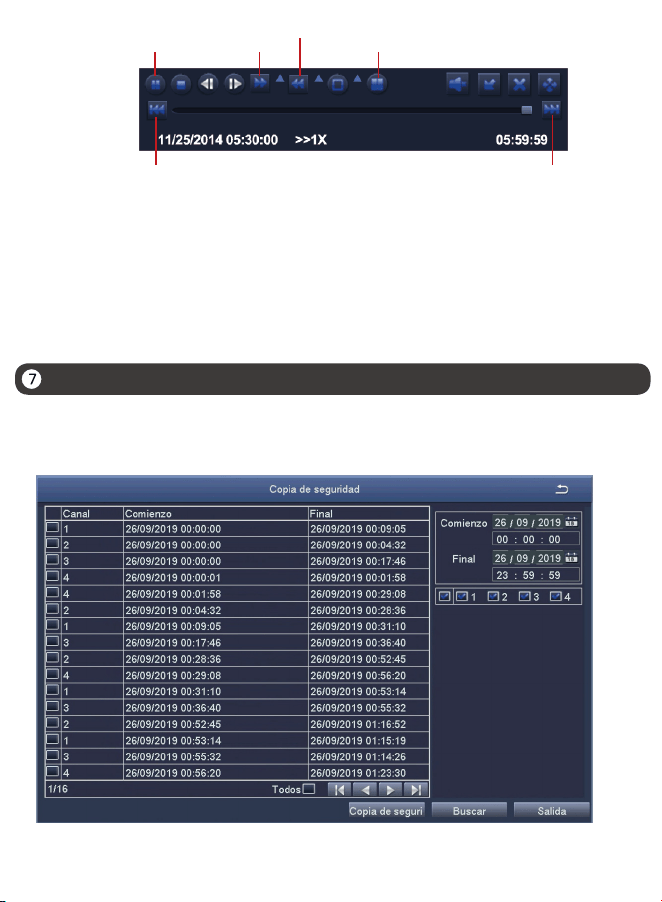
Anterior video: reproduzca el video anterior.
Siguiente video: reproduzca el siguiente video.
Avance rápido:puede reproducir videos a una velocidad de 1/4 a 16 veces.
Rebobinar: puede rebobinar videos a una velocidad de 1 vez, 8 veces, 16 veces
y 32 veces.
Modos de pantalla: Reproducción de Único Canal/Reproducción Múlti-canales.
Los canales sin reproducción de video mostrarán una pantalla negra.
Reproducir/
pausar
Avance
rápido
Rebobinar
Pantalla mul�pantalla
Vídeo anterior Vídeo siguiente
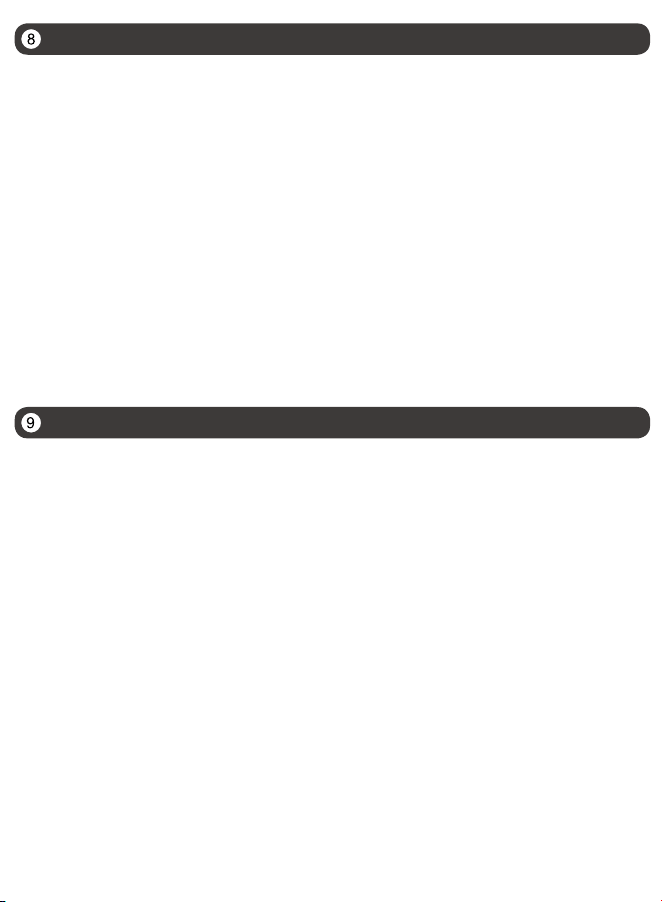
②Haga clic derecho del ratón - Menú principal - Copia de seguridad - Elija el canal y el
período de tiempo - Buscar - Eliga los videos que desea copiar > Haga clic en "Aplicar".
①Inserte un pendrive USB en el puerto USB 2.0 del DVR.
Especificación de uso
20
● Lea esta guía detenidamente y consérvela para consultarla en el futuro.
● Siga todas las instrucciones para un uso seguro del producto y manéjelo con
cuidado.
● Utilice el producto dentro de la temperatura, la humedad y el nivel de voltaje
indicados en las especificaciones del dispositivo.
● No desmonte el producto.
● Use una fuente de alimentación regulada con el producto (opcional) solamente.
El uso de una fuente de alimentación no regulada y no conforme puede dañar el
producto y anular la garantía.
● Es posible que se requiera una limpieza periódica. Utilice únicamente un paño
húmedo. No utilice limpiadores agresivos a base de productos químicos.
● No utilice el producto en un entorno húmedo y sellado. Se recomienda
colocarlo en un lugar que sea fácilmente ventilado para su instalación.
● No desmonte el dispositivo mientras esté encendido.
Preguntas frecuentes
Q: ¿No hay salida de vídeo en el monitor?
• Asegúrese de que la resolución mínima del monitor no es inferior a 720p;
• Asegúrese de que el grabador está encendido correctamente;
• Por favor compruebe la conexión del cable HDMI/VGA o cambie un otro cable de
conexión/ monitor y vuelva a intentarlo.
Q: ¿No se puede acceder al dispositivo de forma remota por teléfono móvil o PC?
• Asegúrese de que el grabador está correctamente conectado a la red, Menú
principal - Red - Prueba;
• Por favor compruebe el estado de la red conectándose a la misma red que el
grabador por teléfono móvil o PC para la prueba;
• Reinicie el grabador o el router.
Q: ¿Soporta la detección de movimiento y la captura de imágenes el sistema?
A: Habilitarán la detección de movimiento y la captura de imágenes instantánea
si la cámara está conectada a un DVR compatible. Capturará imágenes
automáticamente cuando se detectan personas, vehículos o cuando el objetivo
detectado mueve. Los usuarios también pueden capturar imágenes manualmente
en la aplicación Zosi Smart.
21
Declaración de Cumplimiento de la FCC
Declaración de Conformidad de UE Simplificada
Eliminación Correcta de este Producto
Notificación de Cumplimiento
Este dispositivo cumple con la Parte 15 de las Normas de la FCC.
La operación está sujeta a las siguientes dos condiciones:
(1) Este dispositivo no puede causar interferencias perjudiciales.
(2) Este dispositivo debe aceptar cualquier interferencia recibida, incluidas
las inferencias que puedan provocar una operación no deseada.
ZOSI declara que el dispositivo cumple con los requisitos esenciales y otras
disposiciones relevantes de la Directiva 2014/53/UE.
Esta marca indica que este producto no se puede desechar con otros residuos
domésticos en toda la UE. Para evitar posibles daños al medio ambiente o la
salud humana por la eliminación descontrolada de desechos y promover la
reutilización sostenible de los recursos materiales, recíclelo de manera responsable.
Para devolver su dispositivo usado, visite el Sistema de Devolución y Recolección o
comuníquese con el minorista donde compró el producto. Pueden llevarse este
producto para un reciclaje seguro para el medio ambiente.
10
22
a) Retire las pilas usadas y recíclelas o deséchelas inmediatamente de acuerdo con
la normativa local y manténgalas fuera del alcance de los niños. NO tire las pilas a la
basura doméstica ni las incinere.
b) Incluso las pilas usadas pueden causar lesiones graves o la muerte.
c) Llame a un centro de toxicología local para obtener información sobre el
tratamiento.
d) El tipo de pila compatible: CR2032
e) El voltaje nominal de la pila: 3V
f) Las pilas no recargables no deben recargarse.
g) No fuerce la descarga, la recarga, el desmontaje, el calentamiento por encima de
60℃(temperatura nominal especificada por el fabricante) ni la incineración. De lo
contrario, podrían producirse lesiones por ventilación, fuga o explosión que
provoque quemaduras químicas.
Los productos con pilas de botón/batería de moneda no sustituibles deberán
además incluir una declaración que indique que el producto contiene pilas no
sustituibles.
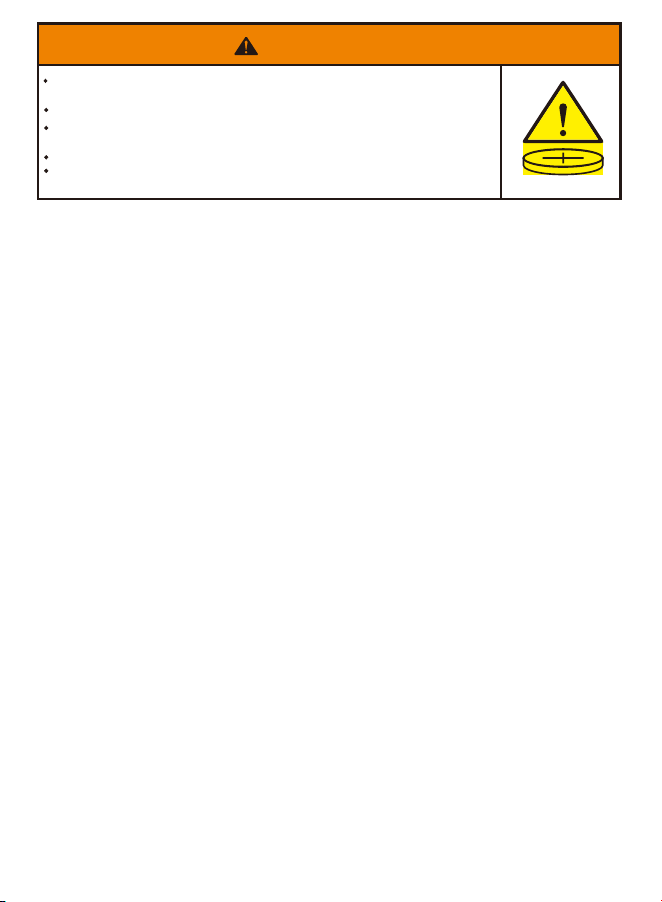
RIESGO DE INGESTIÓN: Este producto contiene una pila botón o batería de
moneda.
En caso de ingestión puede producirse la MUERTE o lesiones graves.
A la ingestión de una pila de botón o batería de moneda puede provocar
Quemaduras Químicas Internas en tan sólo 2 horas.
MANTENGA pilas nuevas y usadas FUERA DEL ALCANCE DE LOS NIÑOS.
Busque Atención médica inmediata si se sospecha que se ha tragado o
introducido una pila en cualquier parte del cuerpo.
ADVERTENCIA
F921014Z3008320
www.zositech.com
Copyright © 2025 ZOSI Technology Co., Ltd.
No part of this publication may be reproduced in any way without the written
permission of ZOSI. The information in this publication is believed to be
accurate in all respects. ZOSI assumes no responsibility for any consequenc-
es resulting from their use. As our products require continuous improvement,
ZOSI reserves the right to modify product designs, specifications and prices
without notice and without any obligation. All rights reserved,and ZOSI
reserves the final interpretation right of this manual.
Support Email: [email protected]
Facebook: https://www.facebook.com/ZosiTechnology/
Whatsapp: +1-866-841-6932
UK Whatsapp: +86 18675610962

