Quick Start Guide / Guide de démarrage rapide
Kurzanleitung / Guía de inicio rápido
Guida rapida / Snabbstartsguide
Hurtigstartguide / Guide til hurtig opstart
Stručná referenční příručka / Skrócona instrukcja obsługi
Hızlı Başlangıç Kılavuzu / Краткое руководство
عيرسلا ءدبلا ليلد / Guía de inicio rápido
Guia de início rápido / Guide de démarrage rapide
快速入門指南
/
快速入门使用指南
PREDATOR AETHON 550
PKR400

1
English
Quick Start Guide
This guide outlines the operating procedures and safety precautions.
Please read it carefully to make sure you are using your product
properly and keep it for future reference.
Specifications
• Model: PKR400
• Connector Type: USB
• Switch: Mechanical switch
• Key No: 87 Keys
• Backlight: RGB
• Cable Length: 1800 mm
• Dimensions (L x W x H): 362 x 138 x 38 mm
• Weight: 1015 g ± 10 g
Getting Started
Wired
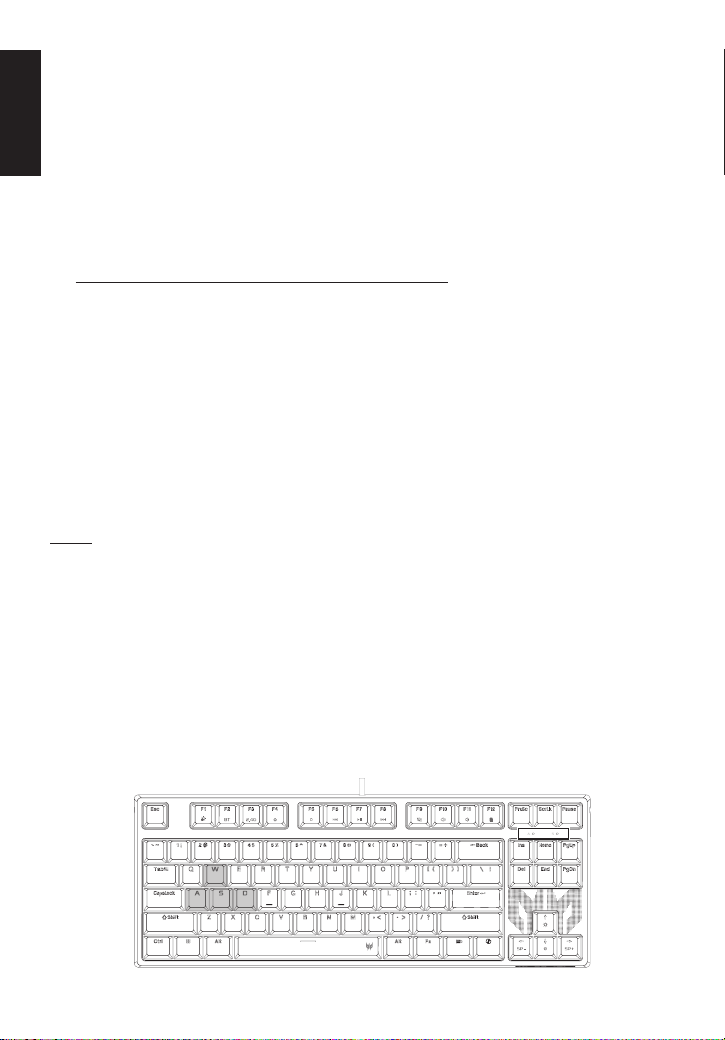
Plug & Play: Simply connect the keyboard to an available USB port and
the keyboard will automatically install all necessary drivers.
Wireless
• BT Pairing: Need to support Swift BLE Pairing
Press and hold the BT button (F2) for 3 seconds to enter pairing
mode. During pairing, the F2 button (BT indicator light) flashes purple.
Once pairing is successful, the light stays on for 10 seconds, then
returns to the original light effect. If pairing exceeds 10 minutes, the
F2 flashing purple light turns off (the original light effect is restored
after completing the action).
During BT pairing, short press the F2 button
The BT channel indicator light displays channels 1-3 in sequence. The
BT channel indicator light flashes the selected channel for 5 seconds
and then returns the original light effect (CAPS, SCRLK).
BT reconnection status
The F2 button (BT indicator light) flashes purple until reconnection
is successful and the light stays on for 10 seconds and then returns
to the original light effect. If reconnection speed is too fast, the
F2button (BT indicator light) directly displays a steady light for
10seconds, then returns to the original light effect.
2
English
• 2.4G Pairing
Plug the dongle into the computer. The keyboard automatically pairs
within a 2-meter range (no need to re-plug). If automatic pairing fails,
press the 2.4G button (F3) to force pairing. During forced pairing,
the 2.4G button flashes purple. After successful pairing, the purple
light stays on for 10 seconds before turning off. In 2.4G mode, the
2.4G button displays a purple light, and the original light effect will
be restored after 10 seconds (the original light effect always restores
after completing the action).
1. You can download the QuarterMaster software from
http://go.acer.com/predator-quartermaster
2. Backlight mode, color and Marco can be adjusted after installation
completes. (Drag and select the single or multiple keys to configure
the lighting effect for the keyboard.)
3. In regions where Dynamic Lighting is supported in Windows11, you
can control the Lighting modes through Windows11 by selecting
[Settings] > [Personalization] > [Dynamic Lighting].
4. Please note that in scenarios where Dynamic Lighting is supported, if
you want to control Lighting modes by using QuarterMaster software,
please select [Settings] > [Personalization] > [Dynamic Lighting] and
turn off [Use Dynamic Lighting on my devices] and [Compatible apps
in the foreground always control lighting].
Note
• Low battery voltage: When the battery voltage is lower than 3.3V,
the blank button light flashes red; when charging, the blank button
indicator light stays on red. When the battery is fully charged, the
blank button indicator light stays on green for 20 seconds and then
goes out; the battery voltage is lower than After 3.1V, the keyboard
automatically shuts down and the keys are invalid; the blank key
indicator lights up and flashes red, indicating that the current state
requires charging.
• 2 independent indicators represent the status of CAPS and SCRLK
(locked to red light); WINLOCK (button light effect indication, locked to
TEAL BLUE; if not locked, the original light effect will be used).
3
English
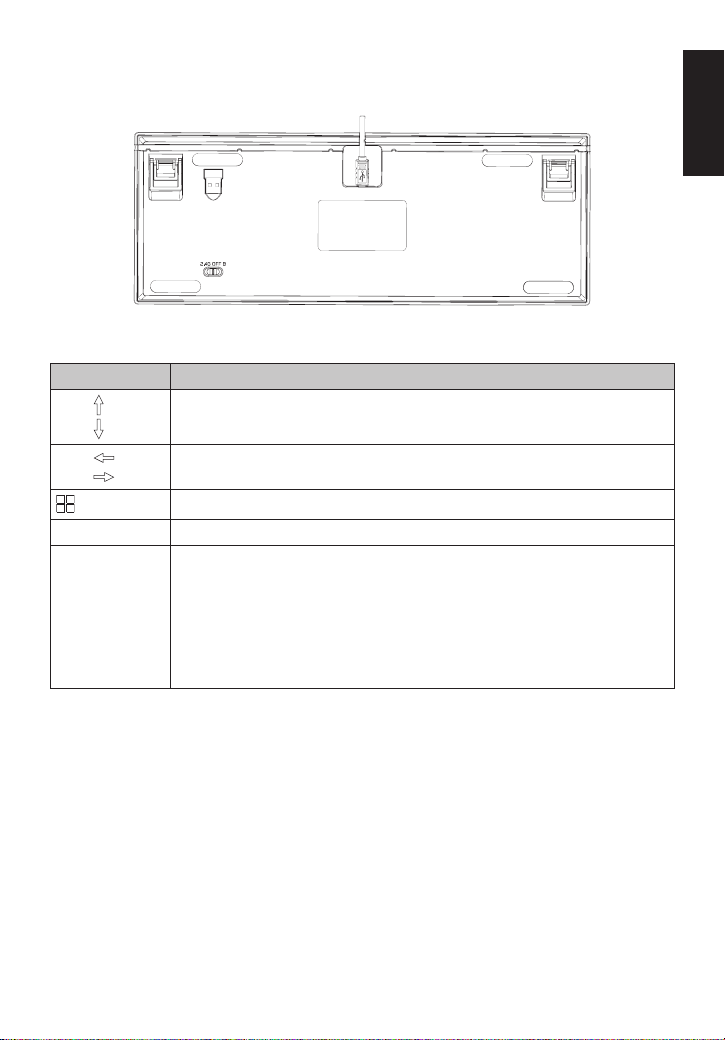
• Switch description: When OFF, plug in the USB CABEL to charge;
in 2.4G & BT mode, plug in the USB CABEL to switch to USB wired
mode.
Keyboard function
Hotkey Description
FN +
FN +
Adjust backlight brightness. Four sections can be adjusted.
FN +
FN +
Adjust the color flow speed, three levels can be adjusted.
WIN Lock.
FN + W Swap A/S/D/W with up/down/left/right direction keys.
FN + F1 ~ F12 Please refer to the instructions:
FN + F1: Lighting on/off
FN + F2: BT mode
FN + F3: 2.4G mode
FN + F4: www web
FN + F5: non
FN + F6: Pre Track
FN + F7: Play/Pause
FN + F8: Next Track
FN + F9: Mute
FN + F10: Volume +
FN + F11: Volume -
FN + F12: Calculator
4
English
Hot-swapping for Mechanical Switches
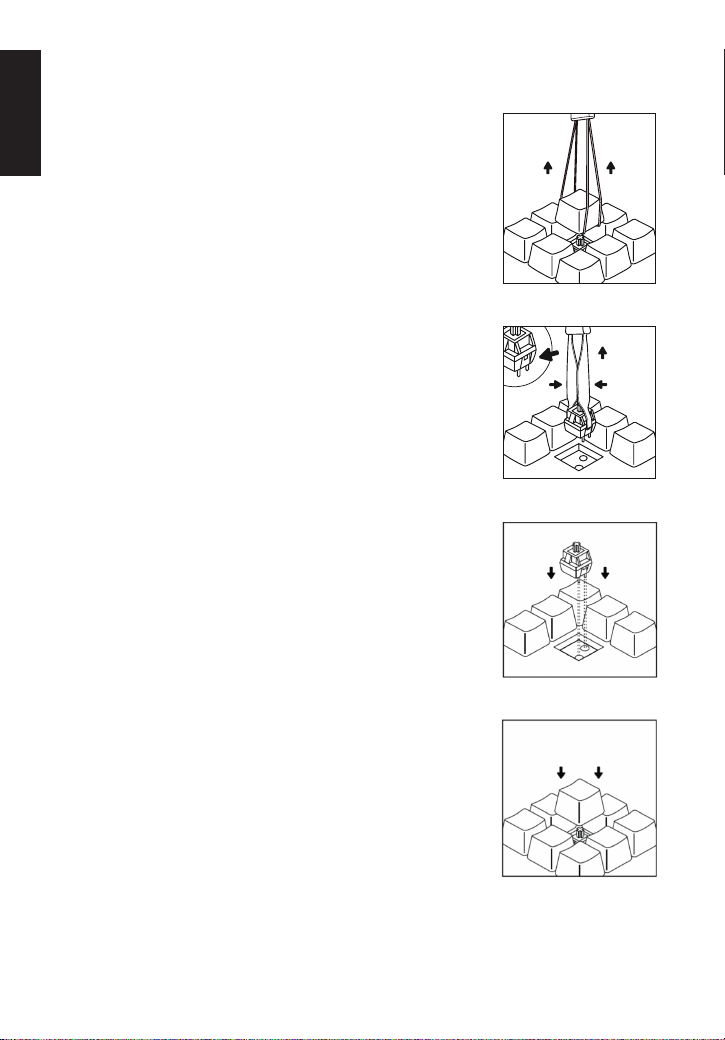
• Remove Keycap
Use Keycap Puller to remove the Keycap.
• Remove Switch
Use Switch Puller to remove the switch.
Warning: It is very easy to scratch your keyboard case
with the tool, so take caution when removing switch.
• Insert Switch
Align switch to holes on the keyboard and
insert straight down. There should be minimal
resistance, and the switch should pop into the
frame of the keyboard.
• Insert Keycap
Once you have confirmed the switch was
properly inserted, snap back in the appropriate
keycap.

5
English
Package Contents
• Predator Gaming Keyboard x 1
• Swappable mechanical red switch x 4
• Keycap-switch puller x 1
• USB Cable x 1
• Quick Start Guide x 1
• Warranty Booklet x 1
System Compatibility
• Windows Operating System
• Interface: USB port
• Internet connection for optional software downloads
Comfort Guideline
Some research has suggested long periods of repetitive motion; using an
improper operation space, body position, and poor work habits may be
associated with physical discomfort and injury to nerves, tendons, and
muscles. Below are some guidelines for optimizing comfort of usage and
avoiding injury.
1. Put the keyboard and monitor in front of you, and place the mouse
within easy reach.
2. Have your elbow next to your side and adjust the height of the table
and chair to make the mouse and keyboard placed below your elbow.
3. Have your feet well supported and your shoulders relaxed.
4. Taking frequent short breaks can help ease the tiredness from using
the keyboard for a long time.
5. Do not sit in the same position all day operating the keyboard and
mouse. Leave the seat, do some exercise for arms and shoulders, and
relax your wrists, neck and legs.
6. Beware of discomfort; when you experience body conditions like pain,
numbness, or tingling in hands, wrists, arms, shoulders, neck and legs,
please consult qualified health professionals.
Caution
• Do not disassemble the device or operate the device under abnormal
conditions.
• Do not submerge the device in water.
• If the device RGB lights could not be lightened up, please re-plug in
the USB.
• If the device could not be functional, or there was thermal abnormal
situation, please re-plug in the USB.

6
English
• If you still encounter problems after going through the corrective
measures, please contact your dealer or an authorized service center
for assistance.
• For more information regarding the PREDATOR accessories, please
visit the PREDATOR website at www.acer.com/predator
Environment
Temperature:
• Operating: 0 °C to 40 °C
• Non-operating: -10 °C to 65 °C
Humidity (non-condensing):
• Operating: 20% to 90%
• Non-operating: 20% to 95%
Manufacturer address
Acer Inc.
8F, 88, Sec. 1, Xintai 5th Rd. Xizhi, New Taipei City 221
Please visit www.acer.com/predator for warranty.
7
English
Europe – EU Declaration of Conformity
We declare under our sole responsibility that the product
is conformity with all the essential requirements and other
provisions of the European Council Directive RoHS Directive
(2011/65/EU), EMC Directive (2014/30/EU) on issued by the
Commission of the European Community.
This product must not be disposed of with your other House
hold waste or treat them in compliance with the local regulations
or contact your local city office, your household waste disposal
service or the shop where you purchased the product.
FEDERAL COMMUNICATIONS COMMISSION
(FCC) STATEMENT
This equipment has been tested and found to comply with the
limits for a Class B digital device, pursuant to part 15 of the FCC
Rules. These limits are designed to provide reasonable protection
against harmful interference in a residential installation. This
equipment generates, uses and can radiate radio frequency energy
and, if not installed and used in accordance with the instructions,
may cause harmful interference to radio communications.
However, there is no guarantee that interference will not
occur in a particular installation. If this equipment does cause
harmful interference to radio or television reception, which can
be determined by turning the equipment off and on, the user is
encouraged to try to correct the interference by one or more
of the following measures:
• Reorient or relocate the receiving antenna.
• Increase the separation between the equipment and receiver.
• Connect the equipment into an outlet on a circuit different
from that to which the receiver is connected.
• Consult the dealer or an experienced radio/TV technician
for help.
FCC Caution
Changes or modifications not expressly approved by the part
responsible for compliance could void the users authority to
operate the equipment.
This device complies with Part 15 of the FCC Rules. Operation
is subject to the following two conditions: (1) this device may
not cause harmful interference, and (2) this device must accept
any interference received, including interference that may
cause undesired operation.
IC Satement
CAN ICES-003(B) / NMB-003(B)

8
English
EU Declaration of Conformity
We,
Acer Incorporated
8F, 88, Sec. 1, Xintai 5th Rd., Xizhi, New Taipei City 221
And,
Acer Italy s.r.l.
Viale delle Industrie 1/A, 20044 Arese (MI), Italy
Tel: +39-02-939-921, Fax: +39-02 9399-2913
www.acer.it
Product: PREDATOR GAMING KEYBOARD
Trade Name: ACER
Model Number: PKR400
SKU Number: PKR400 *********
(“*”=0~9, a~z, A~Z, or Blank)
We, Acer Incorporated, hereby declare under our sole responsibility that the product
described above is in conformity with the relevant Union harmonization legislation:
EMC Directive 2014/30/EU and RoHS Directive 2011/65/EU. The following
harmonized standards and/or other relevant standards have been applied:
EN 55032:2015+A11:2020 Class B
EN 55035:2017+A11:2020
EN IEC 63000:2018
Year to begin affixing CE marking: 2025.
4/15/2025
RU Jan / Sr. Manager
Acer Incorporated (New Taipei City)
Date

9
English
Acer America Corporation
333 West San Carlos St., Suite 1500
San Jose, CA 95110, U. S. A.
Tel : 254-298-4000
Fax : 254-298-4147
www.acer.com
Federal Communications Commission
Declaration of Conformity
This device complies with Part 15 of the FCC Rules. Operation is subject to the
following two conditions: (1) this device may not cause harmful interference, and
(2) this device must accept any interference received, including interference that
may cause undesired operation.
The following local Manufacturer /Importer is responsible for this declaration:
Product: PREDATOR GAMING KEYBOARD
Model Number: PKR400
SKU Number: PKR400 *********
(“*” = 0~9, a~z, A~Z or Blank)
Name of Responsible Party: Acer America Corporation
Address of Responsible Party: 333 West San Carlos St.
Suite 1500
San Jose, CA 95110
U. S. A.
Contact Person: Acer Representative
Phone No.: 254-298-4000
Fax No.: 254-298-4147

Product name / Наименование / 產品名稱 / 产品名称:
Gaming Keyboard / Игровая Клавиатура / 電競鍵盤 / 电竞键盘
Model / Модель / 型號 / 型号: PKR400
Rated / Номинальный ток / 額定功率 / 额定功率: 5V
1000mA
Made in China / Сделано в Китае / 中國製造 / 中国制造
www.acer.com/predator
A warning that batteries (battery pack or batteries installed)
shall not be exposed to excessive heat such as sunshine, fire or
the light.
1) Replacement of a battery with an incorrect type that can defeat
a safeguard;
2) Disposal of a battery into fire or a hot oven, or mechanically
crushing or cutting of a battery, that can result in an explosion;
3) Leaving a battery, in an extremely high temperature
surrounding environment that can result in an explosion or the
leakage of flammable liquid or gas;
4 )A battery subjected to extremely low air or essure that may result
in an explosion or the leakage of flammable liquid or gas.
Battery Capacity: 3.7V 3000mAh 11.1WhType: Li-ion Polymer Battery