EdenPURE
®
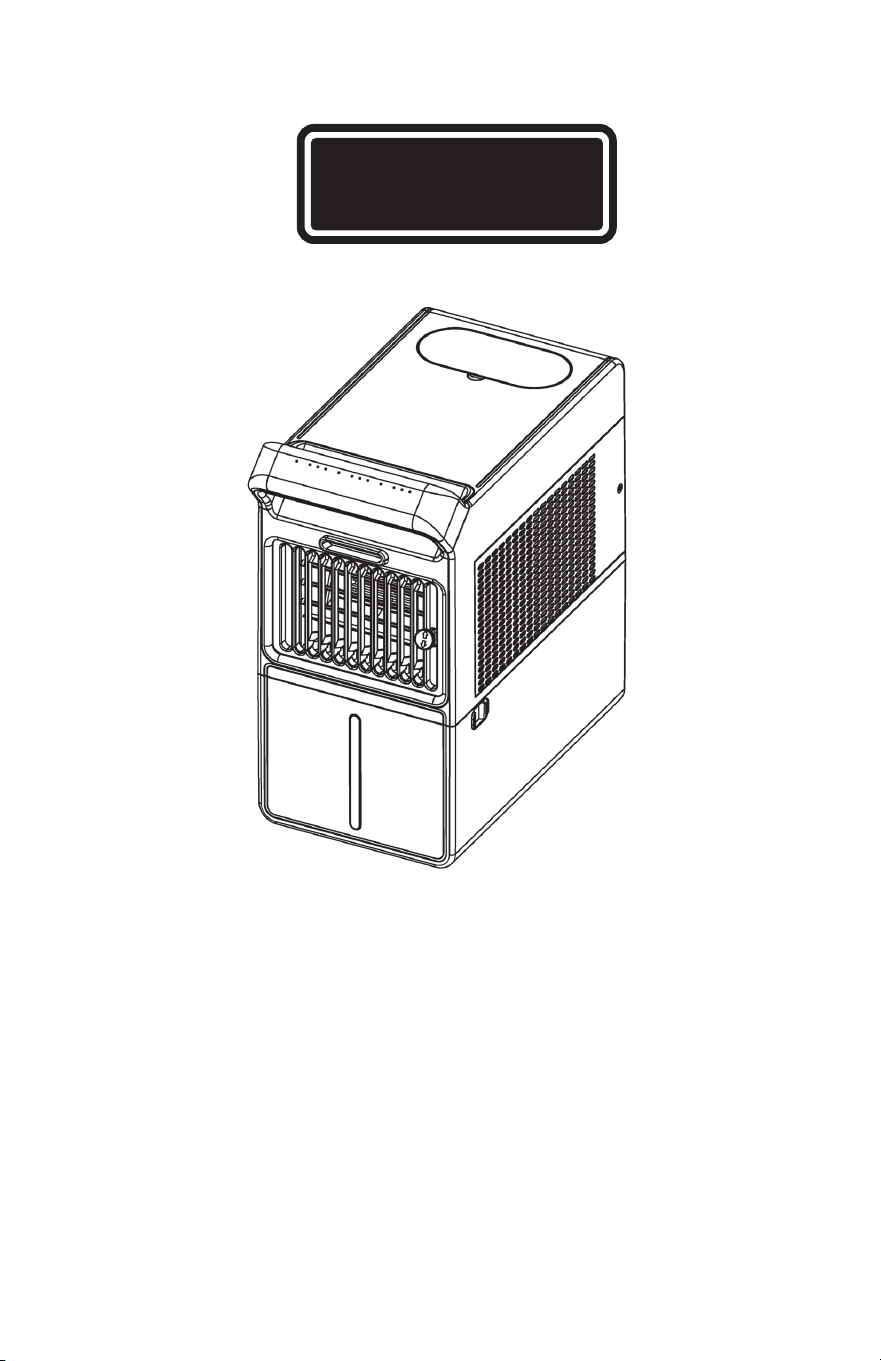
INSTRUCTION MANUAL
PolarAIR Cooler
Model: YK2
©2026 EdenPURE® I-5955 BR1243R-1
EdenPURE
®
7584 Whipple Avenue NW
N. Canton, OH 44720
In the event your unit does not appear to be working properly,
contact customer service at 1-800-225-6595 or custserv@
edenpure.com.
To place an order call 1-800-360-1070
or go to www.edenpure.com.
Product Introduction
Accessories List
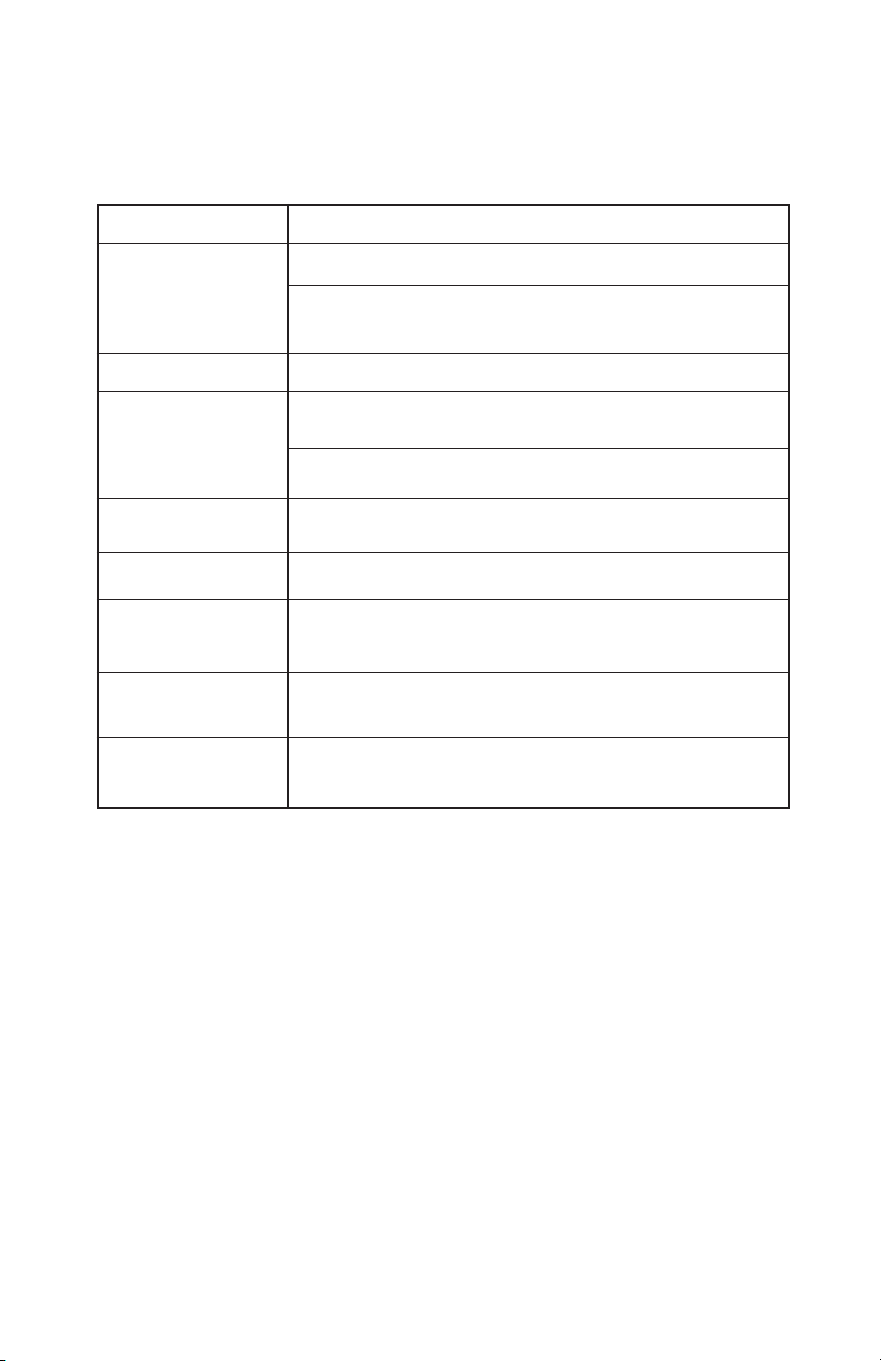
Troubleshooting
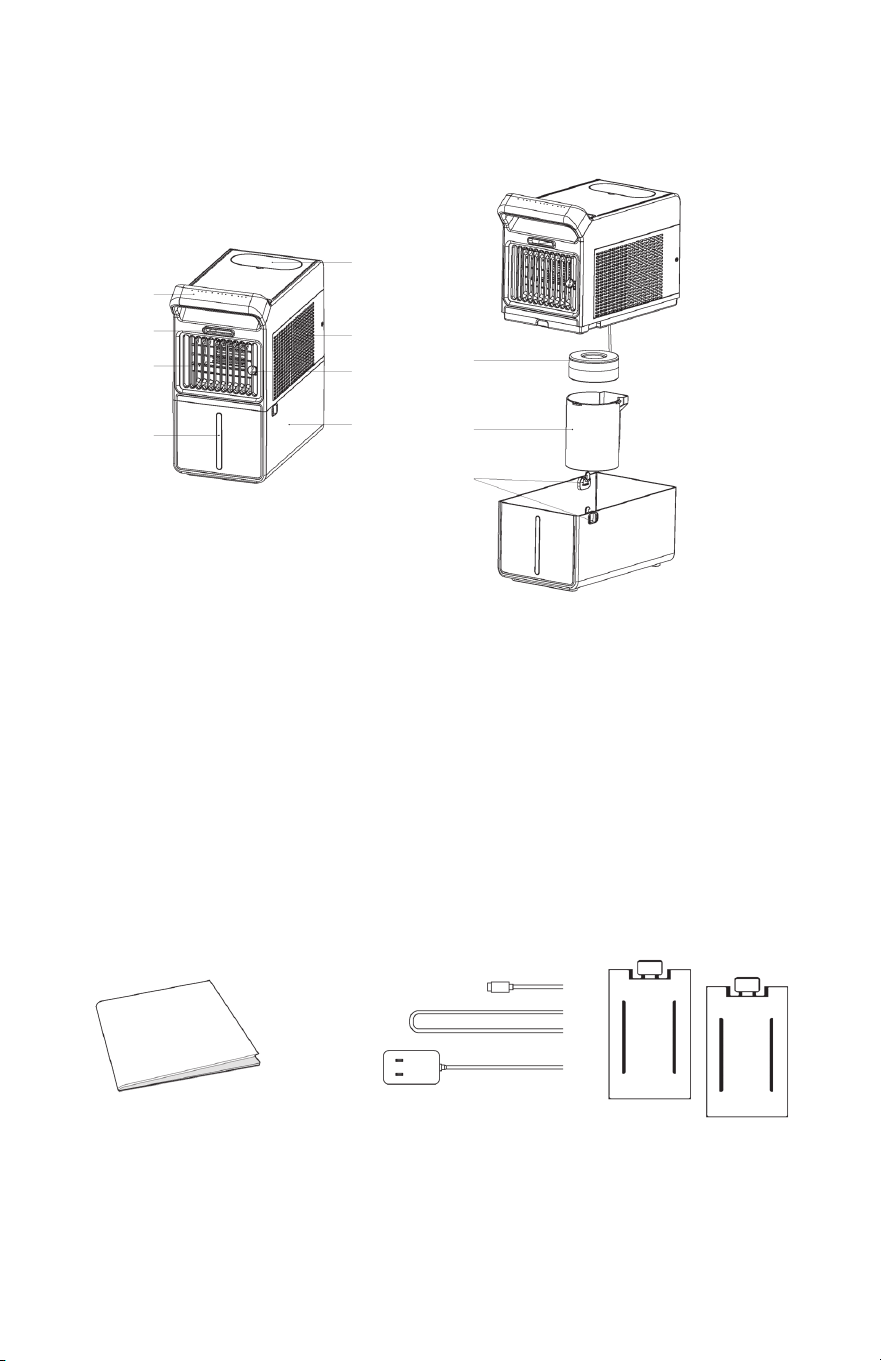
1 Control Panel/Handle 5 Filling Port 9 Atomizer
2 Mist Outlet 6 Filter Cover 10 Mist Tunnel
3 Wind Outlet 7 Airflow Direction Control 11 Lock
4 Fill Window 8 Water Tank
Manual Adapter
Two Ice
Packs
1
2
3
4
5
6
7
8
9
10
11
1
6
Make sure the machine is connected to power.
Machine does
not work
No air flow
Mist feature not
working
Unpleasant odor
from the machine
Not oscillating
Louvers jammed
Unit is making noise
while turned on
Water leakage
from the tank
Ensure the water level is between the minimum and maximum
lines and that the atomizer set is correctly installed.
Unplug the unit, plug it back in and restart the machine.
Clean the water tank and replace with fresh water.
Select the correct function key.
The louvers may be blocked by foreign objects. Turn the power
off, unplug the unit and remove the object.
Mechanical failure; please contact customer service.
Ensure the water in the tank is not overfilled.
Problems Solutions
Check to make sure the power adapter is properly connected;
use an adapter with DC24V 1.5A output or higher.
Ensure the filter cover is clean and unobstructed.
Cleaning and Maintenance
Note:
1. Before cleaning/maintenance/descaling, ensure the unit is unplugged from the outlet.
2. Do not use abrasive, corrosive, or flammable cleaning agents (e.g., bleach or alcohol) to clean any
part of the air cooler.
3. Regularly clean the water tank, atomizer cylinder, and atomizer head of scale and debris. It is
recommended that you clean it once a week.
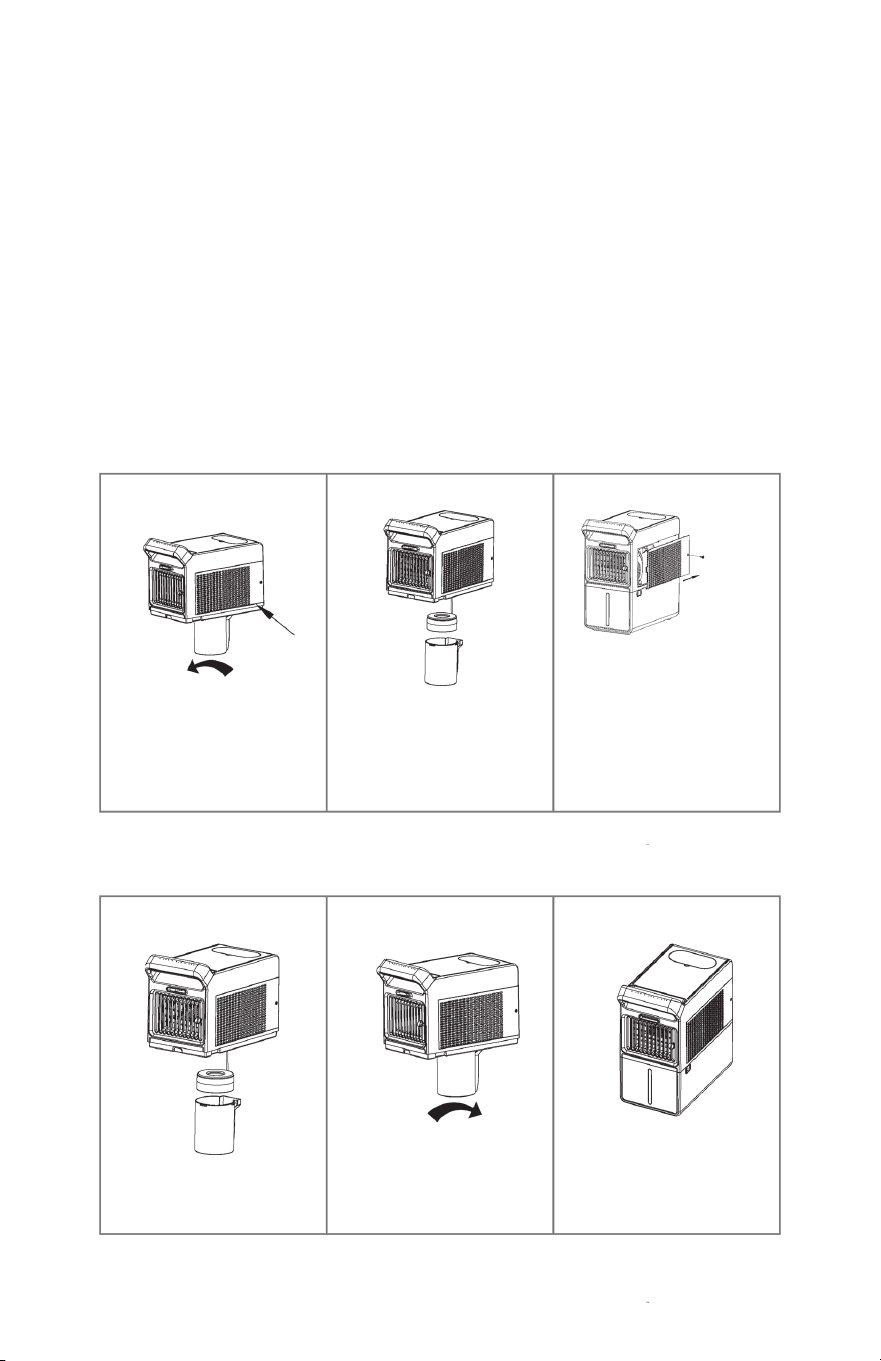
1. The Atomizer set can be
disassembled by rotating
counterclockwise.
2. Wipe the atomizer with a clean,
damp cloth. Do not immerse the
main unit directly in water or under
a faucet. The slide track can be
wiped with a clean, damp cloth or
rinsed directly with a faucet.
3. Use a Phillips-head screwdriver
to remove the securing screws.
Loosen and remove the filter
by moving it backward (in the
direction indicated by the arrow).
Clean the filter either by wiping
it with a clean, damp cloth or
rinsing it directly under a faucet.
1. Insert the clean atomize into the
slide track.
2. Align the atomizer slide with the
fixed position on the unit and
tighten by rotating clockwise.
3. Finally, insert the water tank.
Installation is now complete.
5
2
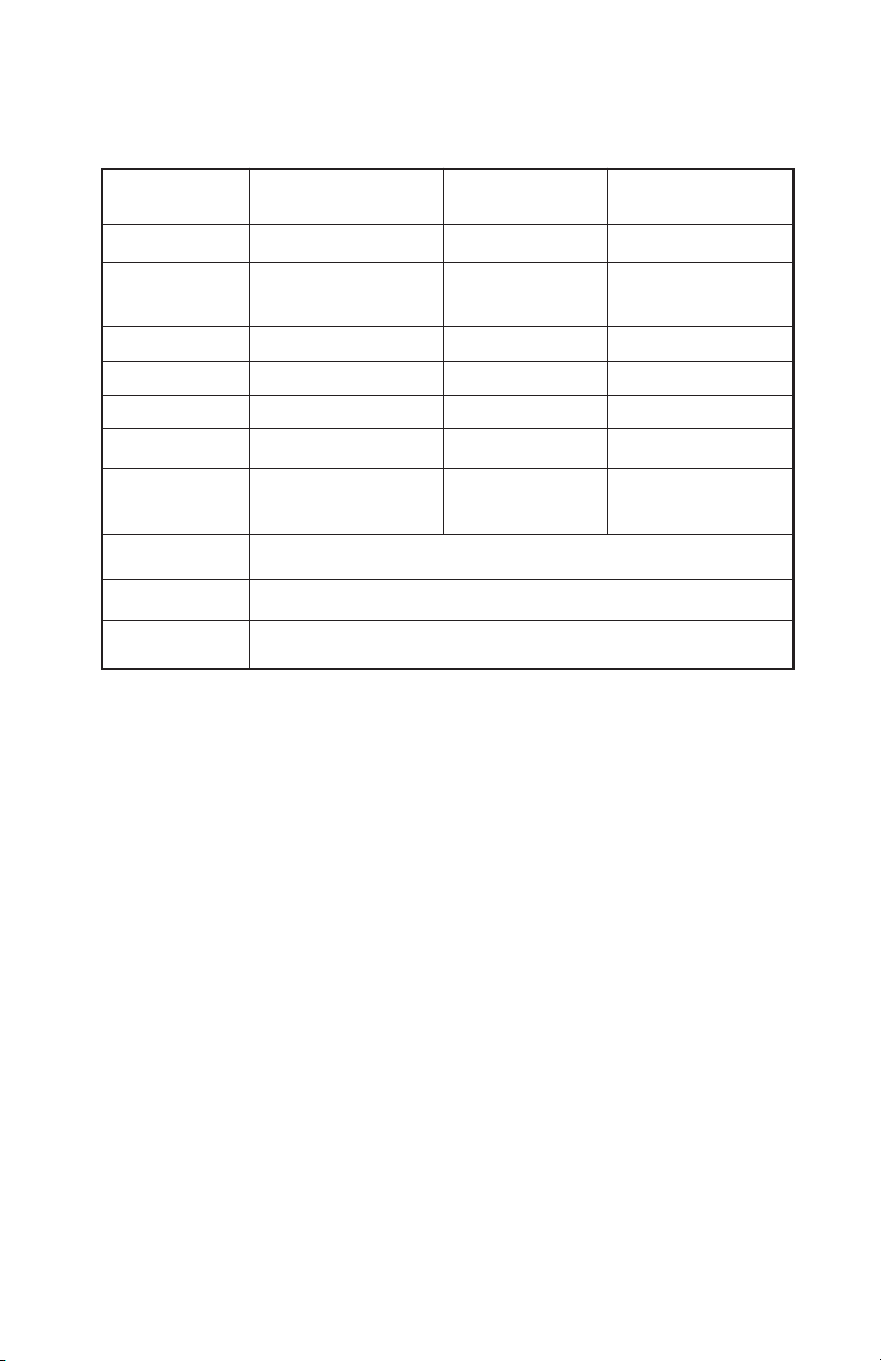
Specifications
Product Name
Rated Voltage
Rated Mist
Volume
Wind Distance
Noise
Mist Volume
Light
Swing
Product Size
Power Inlet
Power Outlet
PolarAIR Cooler Model Number YK2
24V Rated Power 28W
8.5fl. oz./h Tank Volume 3L (.8 gallon)
8.2 ft. Time 2, 5, 8h
35/45dB Using Time 8h
1, 2, 3 Wind Speed 1, 2, 3
Turn On / Off Child Lock Yes
Swing from left
Net Weight
4.4 lb.
to right. top left
10.7” x 5.9” x 12”
100 240V-, 50/60Hz. 0.95A
24V 1.5A
1. External Unit Cleaning
Cleaning with a damp cloth, do not immerse in water.
2. Component Cleaning
Body
Screw
Pick-up
backward
1.
2. 3.
3.
1.
2.
Safety Warning
1. Do not plug or unplug the adapter with wet hands when connecting power to avoid electric shock.
2. Ensure the power source complies with the product’s specified voltage range.
3. Do not obstruct the atomizer outlet, air outlet, or filter cover; keep them clear.
4. Do not disassemble, modify, or repair internal components.
5. Place the unit away from children and do not allow them to climb or sit on the unit.
6. Do not immerse the body into water; wipe with a clean damp cloth.
7. Do not clean the unit with volatile oil, alcohol, or solvents, as this may damage the product.
8. Keep the unit at least 12” away from other products.
9. Do not sit water containers on top of this unit to prevent water ingress which can
weaken electrical insulation, leading to electric shock or fire hazards.
10. Change the water in the water tank frequently to prevent bacterial growth.
11. When moving the unit, disconnect the power adapter first and ensure the water tank is stable
to prevent spillage.
12. If the unit tips over while the water tank has water, immediately disconnect the power adapter.
3
4
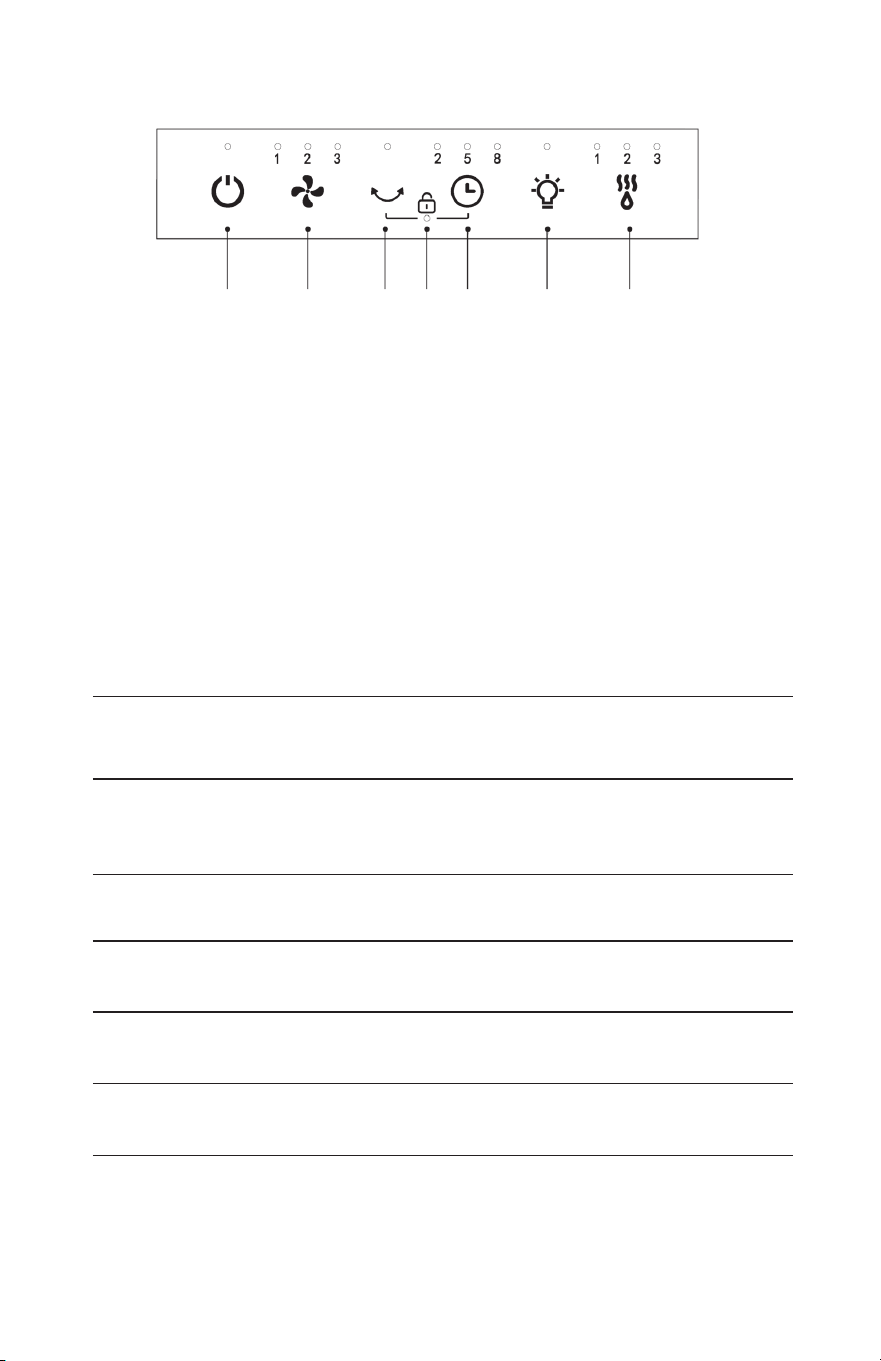
Control Panel Instructions
Press the On/Off button. The device will start with default settings of Wind Speed Level 3
and Mist Level 3. The corresponding indicator lights turn white and the water tank light
will illuminate. Press the On/Off button again to turn the unit off.
The wind speed starts at Level 3 when the unit is turned on. Each press of the Wind Speed
Button cycles through Levels 1, 2, and 3 in sequence. The corresponding level indicator
will turn white, repeating this cycle.
When the unit is on, press the Swing Button once which will cause the louvers to oscillate
left and right. The corresponding indicator turns white. Press again to deactivate swing
function, and the indicator light will turn off.
When the unit is on, hold the Swing Button and Timer Button simultaneously for 3 seconds
to lock the control panel. The corresponding indicator will turn white. Hold both buttons
again for 3 seconds to unlock the control panel, and the indicator light will turn off.
When the Light Button is turned on, the water tank will display a seven-color light show.
The corresponding indicator will turn white. Press the Light Button again to turn the lights
off, also turning off the indicator light.
When the unit is turned on the Mist starts at Level 3. Each press of the Mist Button chang-
es the mist level in the sequence of Level 3, Level 2, Level 1, and OFF. The corresponding
indicator turns white.
When the unit is on, press the Timer Button and it will cycle through 2H, 5H, and 8H timing
settings. The corresponding level indicator will turn white. After reaching 8H, pressing the
Timer Button again disables the timer, turning off the indicator light.
1. Power On/Off
2. Wind Speed
3. Swing
4. Child Lock
5. Timer
6. Light
7. Mist
Button
Control Panel Instructions
Control Panel
Additional Notes:
1. Low Water Protection for Atomization: When the water level drops below the minimum line, the buzzer
sounds three “beeps,” atomization stops, and the current mist level indicator blinks continuously. The
water tank’s seven-color light blinks red (if the light function is enabled). Other functions continue to
operate. Atomization resumes and protection is lifted after refilling the water tank.
2. Initial Positioning After Power Reconnection: Each time the device is powered off and then reconnected,
the outlet louvers automatically swing to the right until they reach an appropriate position and then stop
in the center.
1 Power ON/OFF 2 Wind Speed 3 Swing 4 Child Lock 5 Timer 6 Light 7 Mist
1 2 3 4 5 6 7
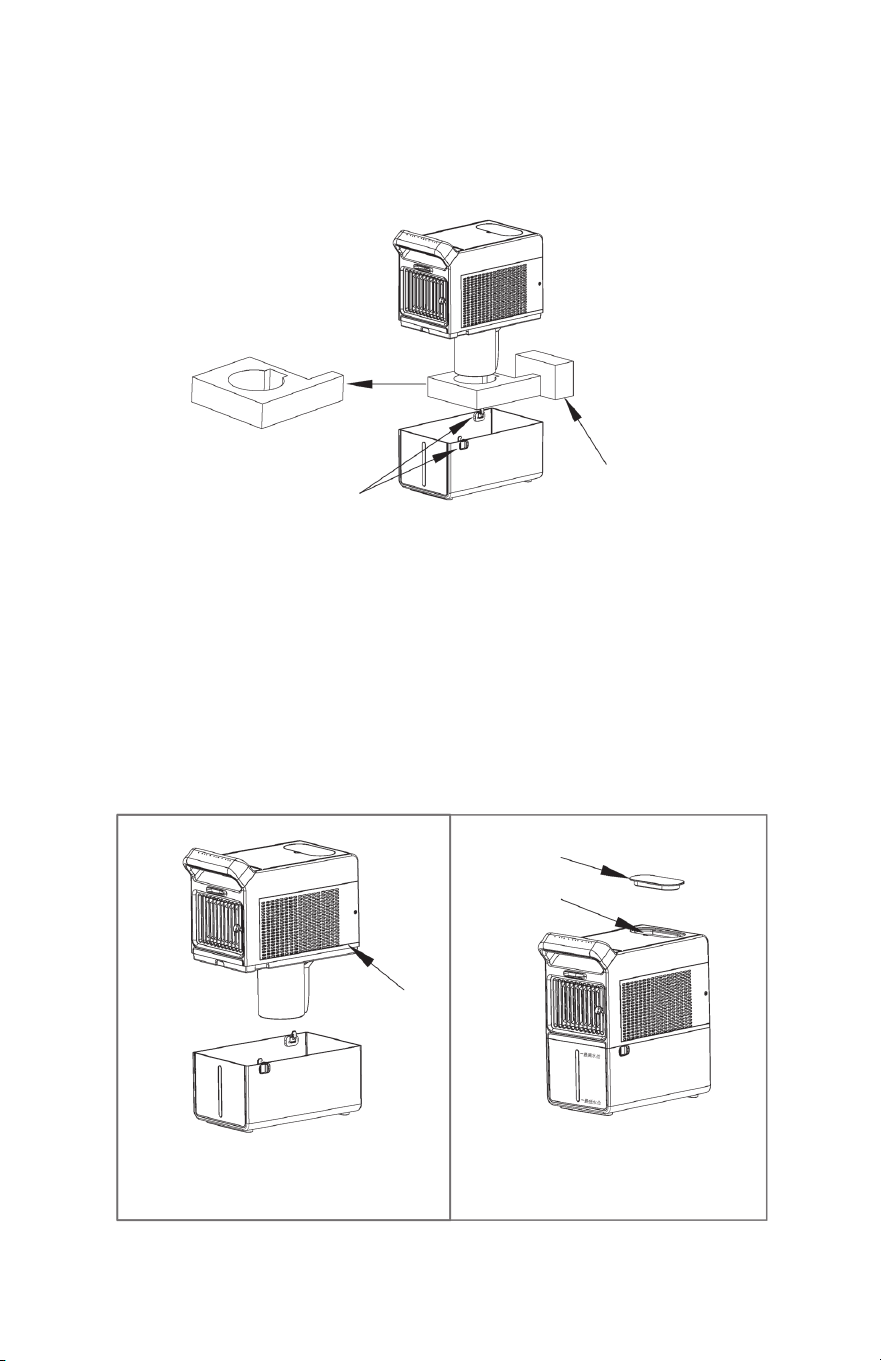
Follow the sequence shown in the diagram to operate:
Unlock the side latches, lift the body upward, remove the packing foam, remove the adapter box from the water tank,
reistall it into the body, add an appropriate amount of water (recommended 1/4 - 3/4 gallons), connect the power supply,
and start using.
2. Remove the packing material.
3. Remove the adaptor from the tank.
1. Open the side latches
(NOTE: The water tank latches should only be
enaged when the tank is empty. Do not lift the
unit with water in the tank.)
Unpacking Instructions
Water Filling Instructions
1. It is recommended to use purified water to prevent scale formation on the atomizer components
and water tank surface due to long-term use.
2. Before adding water, make sure to unplug the power cord.
3. Do not add additives such as essential oils, perfumes, or medications to the water.
4. Ensure the water level does not fall below the minimum or exceed the maximum water level line.
5. You can also use the included Ice Packs in this water tank. Freeze the ice packs until they’re
completely frozen. Then you can add them to the water for extra cold mist or use them without
water for cool air.
Body
Silicone Cover
Filing Port
Method 1:
Unlock the side latches, lift the body, then
add water. Re-lock the side latches.
Method 2:
Open the silicone cover on the top, then add
water through the filling port.
1
2
3
4
Control Panel Instructions
Press the On/Off button. The device will start with default settings of Wind Speed Level 3
and Mist Level 3. The corresponding indicator lights turn white and the water tank light
will illuminate. Press the On/Off button again to turn the unit off.
The wind speed starts at Level 3 when the unit is turned on. Each press of the Wind Speed
Button cycles through Levels 1, 2, and 3 in sequence. The corresponding level indicator
will turn white, repeating this cycle.
When the unit is on, press the Swing Button once which will cause the louvers to oscillate
left and right. The corresponding indicator turns white. Press again to deactivate swing
function, and the indicator light will turn off.
When the unit is on, hold the Swing Button and Timer Button simultaneously for 3 seconds
to lock the control panel. The corresponding indicator will turn white. Hold both buttons
again for 3 seconds to unlock the control panel, and the indicator light will turn off.
When the Light Button is turned on, the water tank will display a seven-color light show.
The corresponding indicator will turn white. Press the Light Button again to turn the lights
off, also turning off the indicator light.
When the unit is turned on the Mist starts at Level 3. Each press of the Mist Button chang-
es the mist level in the sequence of Level 3, Level 2, Level 1, and OFF. The corresponding
indicator turns white.
When the unit is on, press the Timer Button and it will cycle through 2H, 5H, and 8H timing
settings. The corresponding level indicator will turn white. After reaching 8H, pressing the
Timer Button again disables the timer, turning off the indicator light.
1. Power On/Off
2. Wind Speed
3. Swing
4. Child Lock
5. Timer
6. Light
7. Mist
Button
Control Panel Instructions
Control Panel
Additional Notes:
1. Low Water Protection for Atomization: When the water level drops below the minimum line, the buzzer
sounds three “beeps,” atomization stops, and the current mist level indicator blinks continuously. The
water tank’s seven-color light blinks red (if the light function is enabled). Other functions continue to
operate. Atomization resumes and protection is lifted after refilling the water tank.
2. Initial Positioning After Power Reconnection: Each time the device is powered off and then reconnected,
the outlet louvers automatically swing to the right until they reach an appropriate position and then stop
in the center.
1 Power ON/OFF 2 Wind Speed 3 Swing 4 Child Lock 5 Timer 6 Light 7 Mist
1 2 3 4 5 6 7
Follow the sequence shown in the diagram to operate:
Unlock the side latches, lift the body upward, remove the packing foam, remove the adapter box from the water tank,
reistall it into the body, add an appropriate amount of water (recommended 1/4 - 3/4 gallons), connect the power supply,
and start using.
2. Remove the packing material.
3. Remove the adaptor from the tank.
1. Open the side latches
(NOTE: The water tank latches should only be
enaged when the tank is empty. Do not lift the
unit with water in the tank.)
Unpacking Instructions
Water Filling Instructions
1. It is recommended to use purified water to prevent scale formation on the atomizer components
and water tank surface due to long-term use.
2. Before adding water, make sure to unplug the power cord.
3. Do not add additives such as essential oils, perfumes, or medications to the water.
4. Ensure the water level does not fall below the minimum or exceed the maximum water level line.
5. You can also use the included Ice Packs in this water tank. Freeze the ice packs until they’re
completely frozen. Then you can add them to the water for extra cold mist or use them without
water for cool air.
Body
Silicone Cover
Filing Port
Method 1:
Unlock the side latches, lift the body, then
add water. Re-lock the side latches.
Method 2:
Open the silicone cover on the top, then add
water through the filling port.
1
2
Cleaning and Maintenance
Note:
1. Before cleaning/maintenance/descaling, ensure the unit is unplugged from the outlet.
2. Do not use abrasive, corrosive, or flammable cleaning agents (e.g., bleach or alcohol) to clean any
part of the air cooler.
3. Regularly clean the water tank, atomizer cylinder, and atomizer head of scale and debris. It is
recommended that you clean it once a week.
1. The Atomizer set can be
disassembled by rotating
counterclockwise.
2. Wipe the atomizer with a clean,
damp cloth. Do not immerse the
main unit directly in water or under
a faucet. The slide track can be
wiped with a clean, damp cloth or
rinsed directly with a faucet.
3. Use a Phillips-head screwdriver
to remove the securing screws.
Loosen and remove the filter
by moving it backward (in the
direction indicated by the arrow).
Clean the filter either by wiping
it with a clean, damp cloth or
rinsing it directly under a faucet.
1. Insert the clean atomize into the
slide track.
2. Align the atomizer slide with the
fixed position on the unit and
tighten by rotating clockwise.
3. Finally, insert the water tank.
Installation is now complete.
5
2
Specifications
Product Name
Rated Voltage
Rated Mist
Volume
Wind Distance
Noise
Mist Volume
Light
Swing
Product Size
Power Inlet
Power Outlet
PolarAIR Cooler Model Number YK2
24V Rated Power 28W
8.5fl. oz./h Tank Volume 3L (.8 gallon)
8.2 ft. Time 2, 5, 8h
35/45dB Using Time 8h
1, 2, 3 Wind Speed 1, 2, 3
Turn On / Off Child Lock Yes
Swing from left
Net Weight
4.4 lb.
to right. top left
10.7” x 5.9” x 12”
100 240V-, 50/60Hz. 0.95A
24V 1.5A
1. External Unit Cleaning
Cleaning with a damp cloth, do not immerse in water.
2. Component Cleaning
Body
Screw
Pick-up
backward
1.
2. 3.
3.
1.
2.
Safety Warning
1. Do not plug or unplug the adapter with wet hands when connecting power to avoid electric shock.
2. Ensure the power source complies with the product’s specified voltage range.
3. Do not obstruct the atomizer outlet, air outlet, or filter cover; keep them clear.
4. Do not disassemble, modify, or repair internal components.
5. Place the unit away from children and do not allow them to climb or sit on the unit.
6. Do not immerse the body into water; wipe with a clean damp cloth.
7. Do not clean the unit with volatile oil, alcohol, or solvents, as this may damage the product.
8. Keep the unit at least 12” away from other products.
9. Do not sit water containers on top of this unit to prevent water ingress which can
weaken electrical insulation, leading to electric shock or fire hazards.
10. Change the water in the water tank frequently to prevent bacterial growth.
11. When moving the unit, disconnect the power adapter first and ensure the water tank is stable
to prevent spillage.
12. If the unit tips over while the water tank has water, immediately disconnect the power adapter.
Product Introduction
Accessories List
Troubleshooting
1 Control Panel/Handle 5 Filling Port 9 Atomizer
2 Mist Outlet 6 Filter Cover 10 Mist Tunnel
3 Wind Outlet 7 Airflow Direction Control 11 Lock
4 Fill Window 8 Water Tank
Manual Adapter
Two Ice
Packs
1
2
3
4
5
6
7
8
9
10
11
1
6
Make sure the machine is connected to power.
Machine does
not work
No air flow
Mist feature not
working
Unpleasant odor
from the machine
Not oscillating
Louvers jammed
Unit is making noise
while turned on
Water leakage
from the tank
Ensure the water level is between the minimum and maximum
lines and that the atomizer set is correctly installed.
Unplug the unit, plug it back in and restart the machine.
Clean the water tank and replace with fresh water.
Select the correct function key.
The louvers may be blocked by foreign objects. Turn the power
off, unplug the unit and remove the object.
Mechanical failure; please contact customer service.
Ensure the water in the tank is not overfilled.
Problems Solutions
Check to make sure the power adapter is properly connected;
use an adapter with DC24V 1.5A output or higher.
Ensure the filter cover is clean and unobstructed.

EdenPURE
®
INSTRUCTION MANUAL
PolarAIR Cooler
Model: YK2
©2026 EdenPURE® I-5955 BR1243R-1
EdenPURE
®
7584 Whipple Avenue NW
N. Canton, OH 44720
In the event your unit does not appear to be working properly,
contact customer service at 1-800-225-6595 or custserv@
edenpure.com.
To place an order call 1-800-360-1070
or go to www.edenpure.com.