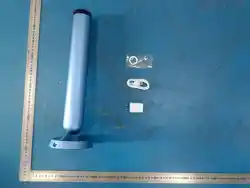

(1) (2) (3) (4) (5)
INSTRUCTION
This device adopts all-metal, double-threaded design, which is easy to operate. The product has a exquisite
appearance and is perfectly integrated with various styles. It adopts touch and Bluetooth dual control
modes. It can be placed independently, and the fragrance is accurate and stable. Its main function is to
create different fragrance styles for life, suitable for KTV, sales offices, shopping malls, 4S stores, hotels,
airports, homes and health centers and other place
s
Aroma Diffuser User Manual
.
ParameterIntroduction s
Accessories
atomizer
Air outlet
Essential oil bottle
Control base
Power
interface
Power cable User manual Atomizer core Flat washer
Item
Diagram
Installation
Precautions
1. Rotate the atomizer counterclockwise ①, lift up the atomizer and essential oil bottle, and take out
the atomizer and essential oil bottle. ②
2. Hold the essential oil bottle and rotate it counterclockwise to take out the essential oil bottle to separate
it from the atomizer, and fill it with essential oil (110ml, the upper limit). ③
3. Tighten the essential oil bottle and contain the essential oil clockwise with the atomizer. ④
4. Put the essential oil bottle and the atomizer into the machine, and tighten it clockwise (no need to
correct the direction). ⑤
5. Set working hours and start using the equipment.
Description of LCD display
1. Operating instructions:
① Connect the power cord to the power adapter (5V-1A).
② Connect the cord to the Type-C IN.
③ The power adapter is plugged into the power socket, and the device is powered on.
2.Controlling instruction:
Turn on: Switch ON/OFF button is blue light;
Short press the Switch button to turn on/off;
Long press the Switch button for 5 seconds to restore factory settings.
Touch mode:
① Touch mode: lights on, WI-FI indicator lights off .
Long press the to change mode to WI-FI mode.
② Set the countdown time 1/2/4/8 hours in turn by touching with corresponding indicator
lights on.
③ Set the 3 work modes by touching in turn with corresponding lights on.
1st mode: 60 seconds work/60 seconds pause
2nd mode: 60 seconds work/180 seconds pause
3rd mode: 60 seconds work/300 seconds pause
④ Last settings will be reserved for next use.
WI-FI mode:
① WI-FI indicator lights on/ Timer indicator lights off.
Long press the to change mode to Touch mode.
② Turn on the GPS&WI-FI on the phone.
③ The WI-FI indicator flash quickly during exchange data.
④ Last settings will be reserved for next use.
Work Frequency: Spray time 5s-300s(can be adjusted, 5s per beat)
Pause time 5s-300s(can be adjusted, 5s per beat)
Work Day : Default everyday, can be set as your like on the APP.
Warranty Card
Start Date of
Warranty Period
Malfunction
Description
Date of Verify
Maintenance
Result
Maintainer's
Signature
Warranty card one
Warranty card two
Start Date of
Warranty Period
Malfunction
Description
Date of Verify
Maintenance
Result
Maintainer's
Signature
This card is the warranty for device
s quality, please fill it with actual information.
Maintenance
In order to ensure the best diffusive effect, please check and maintain the device every six months, or when
you replace a new fragrance, or when the diffusing effect get weak as the following steps.
1. Take off the oil canister which is spent.
2. Fill industrial alcohol into the canister and clean it.
3. After clean the oil canister, refill canister with little alcohol and install it on the device then make the
device stay in working status for 5-8 minutes.
4. Turn off the power when finish cleaning.
Malfunction Debugging
Please try to solve the problem as below before fixing the machine.
Breakdown Solution Breakdown Solution
No mist
Mist gets
weak
Oil leakageNot working
Abnormal
noise
-Please check that the power adapter is
USB 5V-1A and that the Type-C and USB
ports are plugged in correctly.
-Check if device is not in work period.
-Check if pump works or not, and if
airflow from air outlet.
-Check if atomizer core and oil tube
are loose or blocked.
-Check if seal ring gets damaged
or fall off.
-Check if canister connects to
atomizer closely.
-Check if seal ring is deformed
or damaged
-Check if atomizer is damaged.
-Check if air pump is loose,
please fix it correctly.
-Check if air pump is damage,
please replace a new one.
After-sale Service
The warranty is 1 year from the date of sale, not including device shell, adapter, electric wires, seal ring and
the other vulnerable parts, as well as the damage caused by human or accident. Permanent maintaining
for value will be provided if the machine exceed the warranty.
If there is any issue of after-sales, please contact authorized sales service in c
orresponding area, or contact
Sales Center directly.
Size
Capacity
N.W
1.15kg
110ml
Coverage
Voltage
Type-C 5V-1A
2.5W
≤38db
Power
Noise
W437*D183*H153(mm)
Package
Φ125*412(mm)
300m³
1
3
4
5
Working time
Work intensity
WI-FI indicator
Time botton
Mode botton
Switch button
Attentions
Please read through this manual carefully before using and keep it properly.
1. Forbid using overloaded power socket/broken wire/adaptor in order to protect your safety and avoid
fire disaster.
2. Device modify/disassemble/repair for the technician only. Please check the manual and ensure your
operation correctly if device work abnormally. Please contact to the retailer for unsolved problems.
3. Forbid tilting and inverting the device as using. In order to prevent device jeopardize from oil leaking,
please clean and maintain the device before packing and transferring.
4. Please maintain and clean the device regularly to ensure the device in best working state.
Instruction of Essential Oil
1. Before refilling the oil, please turn off the device for 2 minutes waiting the inside oil of atomizer flow
back to the bottle.
2.
Serra
Serra
WiFi Connection
Long press the to change mode to WI-FI mode. At this point, open the mobile app to connect and pair with
the network. Once pairing is successful, the indicator light will remain steadily on.
Serra

FCC WARNING
This device complies with part 15 of the FCC Rules.
Operation is subject to the following two conditions:
(1) This device may not cause harmful interference;
(2) This device must accept any interference received,including interference that may cause undesired operation.
Changes or modifications not expressly approved by the party responsible for compliance could void the user's authority to operate
the equipment.
This equipment has been tested and found to comply with the limits for a Class B digital device,pursuant to part 15 of the FCC
Rules.These limits are designed to provide reasonable protection against harmful interference in a residential installation.This
equipment generates,uses and can radiate radio frequency energy and,if not installed and used in accordance with the instructions,
may cause harmful interference to radio communications. However,there is no guarantee that interference will not occur in a
particlar installation.If this equipment does cause harmful interference to radio or television reception,which can be determined
by turning the equipment off and on,the user is encouraged to try to correct the interference by one or more of the following
measures:
-Reorient or relocate the receiving antenna.
-Increase the separation between the equipment and receiver.
-Connect the equipment into an outlet on a circuit different from that to which the receiver is connected.
-Consult the dealer or an experienced radio/TV technician for help.
This equipment complies with FCC radiation exposure limits set forth for an uncontrolled environment. This equipment should be
installed and operated with minimum distance 20cm between the radiator & your body.