OWNER'S MANUAL
DISHWASHER
Read this owner's manual thoroughly before operating the
appliance and keep it handy for reference at all times.
ENGLISH
LDNPQ445*, LDNPQ44H*
MFL71917427
Rev.00_121125
www.lg.com
Copyright © 2025 LG Electronics. All Rights Reserved
Scan to see the online manual.
TABLE OF CONTENTS
2
3 IMPORTANT SAFETY
INSTRUCTIONS
3 READ ALL INSTRUCTIONS BEFORE USE
3 WARNING STATEMENTS
6 CAUTION STATEMENTS
8 PRODUCT OVERVIEW
8 Product Features
11 INSTALLATION
11 Before Installing
13 Preparing Cabinet Opening
14 Preparing Water and Electrical Connections
15 Preparing Dishwasher
16 Attaching Installation Brackets
17 Sliding Dishwasher into Cabinet Opening
18 Connecting Water Supply Line and Power
20 Connecting the Drain Hose
22 Leveling Dishwasher
23 Securing Dishwasher in Cabinet Opening
24 Final Installation Check
26 OPERATION
26 Before Using
28 Control Panel
29 Wash Cycles
30 Options and Extra Functions
33 Loading the Dishwasher
33 Loading the Silverware Basket
34 Loading the Lower Rack
35 Loading the Upper Rack
38 Loading the Cutlery Rack
38 Adding Cleaning Products
41 SMART FUNCTIONS
41 LG ThinQ Application
44 Smart Diagnosis
TM
Function
45 MAINTENANCE
45 Cleaning and Care
49 TROUBLESHOOTING
49 Before Calling for Service
57 LIMITED WARRANTY
57 USA
61 CANADA
3IMPORTANT SAFETY INSTRUCTIONS
ENGLISH
IMPORTANT SAFETY INSTRUCTIONS
READ ALL INSTRUCTIONS BEFORE USE
Safety Messages
Your safety and the safety of others are very important.
We have provided many important safety messages in this manual and on your appliance. Always read and
follow all safety messages.
All safety messages will tell you what the potential hazard is, tell you how to reduce the chance of injury,
and tell you what may happen if the instructions are not followed.
WARNING STATEMENTS
WARNING
• To reduce the risk of explosion, fire, death, electric shock, scalding or injury to persons when using this
product, follow basic precautions, including the following:
Installation
• Connect to a properly rated, protected, and sized power circuit to avoid electrical overload.
• To reduce the risk of severe injury or death, follow all installation instructions.
• The appliance must be installed and electrically grounded by qualified service personnel in accordance
with local codes.
• Disconnect the power supply line, house fuse or circuit breaker before installing or servicing the
appliance.
• When moving or installing the product in a different location, call qualified service personnel for
installation and service.
• Keep packing materials out of the reach of children. Packaging material can be dangerous for children.
There is a risk of suffocation.
• Moving or installation of the appliance requires two or more people.
• This appliance is not designed for maritime use or for mobile installations such as in RVs, trailers, or
aircraft.
• Store and install the appliance where it will not be exposed to temperatures below freezing or exposed
to outdoor weather conditions.
• This appliance must be positioned near to an electrical power supply.
• Do not, under any circumstances, cut or remove the ground from the power supply line.
This is the safety alert symbol.
This symbol alerts you to potential hazards that can kill or injure you and others. All safety messages
will follow the safety alert symbol and either the word WARNING or CAUTION.
These words mean:
WARNING
You may be killed or seriously injured if you do not follow instructions.
CAUTION
You may be injured or cause damage to the product if you do not follow instructions.

4 IMPORTANT SAFETY INSTRUCTIONS
• When installing or moving the appliance, be careful not to pinch, crush, or damage the power supply
line.
• Do not install the appliance in humid spaces.
• Destroy the carton, plastic bag, and other packing materials after the appliance is unpacked. Children
might use them for play. Cartons covered with rugs, bedspreads, or plastic sheets can become airtight
chambers.
• Never attempt to operate this appliance if it is damaged, malfunctioning, partially disassembled, or has
missing or broken parts, including a damaged power supply line.
• Adhere to all industry recommended safety procedures including the use of long-sleeved gloves and
safety glasses.
• The installer must ensure that the dishwasher is completely enclosed at the time of installation.
• Use new hoses when connecting the appliance to the water supply. Do not reuse old hoses.
• After installing, check the hose connection for leaks.
• Do not damage or place heavy items on the power supply line of the appliance.
Operation
• Repair or immediately replace all power supply lines that have become frayed or otherwise damaged. Do
not use a power supply line that shows cracks or abrasion damage along its length or at either end.
• If you detect a strange sound, a chemical or burning smell, or smoke coming from the appliance, unplug
it immediately, and contact an LG Electronics customer information center.
• Never unplug the appliance by pulling on the power supply line.
• Do not use an extension cable or adapter with this appliance.
• Do not grasp the power supply line or touch the appliance controls with wet hands.
• Do not modify or extend the power cable.
• If the product has been submerged, contact an LG Electronics customer information center for
instructions before resuming use.
• Do not store or use gasoline or other flammable vapors and liquids in the vicinity of this or any other
appliance.
• Keep the area underneath and around your appliances free of combustible materials (lint, paper, rags,
etc.), gasoline, chemicals and other flammable vapors and liquids.
• This appliance is not intended for use by persons (including children) with reduced physical, sensory or
mental capabilities, or lack of experience and knowledge, unless they have been given supervision or
instruction concerning the use of the appliance by a person responsible for their safety.
• If the electrical supply line is damaged, it must only be replaced by the manufacturer or its service agent
or a similar qualified person in order to avoid a hazard.
• Do not abuse, sit on, or stand on the door of the appliance.
• Read all instructions before using the appliance and save these instructions.
• Use this appliance only for its intended purpose.
• Do not allow children to play on, in or with the appliance. Close supervision of children is necessary when
the appliance is used near children.
• Do not tamper with controls.
• In the event of a gas leak (propane gas, LP gas, etc.) do not operate this or any other appliance. Open a
window or door to ventilate the area immediately.
• Under certain conditions, hydrogen gas may be produced in a hot-water system that has not been used
for two weeks or more. HYDROGEN GAS IS EXPLOSIVE. If the hot-water system has not been used for
such a period, before using the appliance turn on all hot water faucets and let the water flow from each
for several minutes. This will release any accumulated hydrogen gas. As the gas is flammable, do not
smoke or use an open flame during this time.

5IMPORTANT SAFETY INSTRUCTIONS
ENGLISH
• Fix the drain hose securely in place.
• Use only detergents or wetting agents recommended for use in a dishwasher and keep them out of the
reach of children.
• Do not let children eat detergent or dishwasher rinse agent.
• When loading items to be washed:
- Locate sharp items so that they are not likely to damage the door seal.
- Load sharp knives with the handles up to reduce the risk of cuts or other injuries.
• Do not wash plastic items unless they are marked "dishwasher safe" or the equivalent. For plastic items
not so marked, check the manufacturer’s recommendations.
• Do not touch the HEATING ELEMENT during or immediately after use.
• Do not operate your dishwasher unless all ENCLOSURE panels are properly in place.
• Do not abuse, sit on, or stand on the door or dish rack of the dishwasher.
• Do not install or store the dishwasher where it will be exposed to weather conditions.
• After cleaning the dishes, turn off the water supply. Before cleaning, turn the water supply back on and
check the connections.
• Do not open the appliance door while it is operating. For safety reasons, the drain pump operates if the
door is opened, resulting in a longer cycle time.
• Be careful not to catch your hand when closing the door of the product.
• Do not plug the dishwasher into a damaged outlet.
• Do not install or keep the dishwasher near electrical components or exposed flames.
• Do not wash dishes exposed to gasoline, solvents or other flammable materials.
• When cleaning, do not spray water on the product directly.
• Do not press buttons with a sharp object such as an awl or pin.
• Do not use solvent-based detergent.
• Do not come into contact with the steam outlet.
• Small parts, such as rack clips and filter retaining posts can be a choke hazard to small children if
removed from the dishwasher. Keep out of reach of small children.
• Do not touch the heat dry blower during operation, as it is hot.
• Do not touch the inside of the product or the door-opening mechanism while this function is in
operation.
Maintenance
• Do not repair or replace any part of the appliance. All repairs and servicing must be performed by
qualified service personnel unless specifically recommended in this Owner’s Manual. Use only
authorized factory parts.
• Do not disassemble or repair the appliance by yourself.
• Remove any dust or foreign matter from the power supply line.
• Disconnect this appliance from the power supply before cleaning and attempting any user maintenance.
Turning the controls to the OFF position does not disconnect this appliance from the power supply.
• Remove the door before the appliance is removed from service or discarded to avoid the danger of
children or small animals getting trapped inside.
• Unplug the appliance before cleaning to avoid the risk of electric shock.
• Before discarding the appliance, cut off the power supply line and destroy the appliance's control panel.
6 IMPORTANT SAFETY INSTRUCTIONS
Grounding Instructions
• For a permanently connected dishwasher: This appliance must be connected to a grounded metal,
permanent wiring system, or an equipment-grounding conductor must be run with the circuit
conductors and connected to the equipment-grounding terminal or lead to the appliance.
• Connect the ground wire to the green ground connector in the terminal box.
• For a cord connected dishwasher: This appliance must be grounded. In the event of a malfunction or
breakdown, grounding will reduce the risk of electric shock by providing a path of least resistance for
electric current.
• This appliance is equipped with a cord having an equipment-grounding conductor and a grounding
plug.
• The plug must be plugged into an appropriate outlet that is installed and grounded in accordance with
all local codes and ordinances.
WARNING
Improper connection of the equipment-grounding conductor can result in a risk of electric shock. Check
with a qualified electrician or service representative if you are in doubt whether the appliance is properly
grounded. Do not modify the plug provided with the appliance, if it will not fit the outlet, have a proper
outlet installed by a qualified electrician.
Tip Over Hazard
• Do not use the dishwasher until completely installed.
• Do not push down on the open dishwasher door.
• Failure to follow these instructions may result in serious injury or cuts.
CAUTION STATEMENTS
CAUTION
• To reduce the risk of minor or moderate injury to persons, malfunction, or damage to the product or
property when using this product, follow basic precautions, including the following:
Installation
• Install the product on a firm and level floor.
• This dishwasher must be connected to a hot water supply with a temperature range between 120 °F (49
°C) and 149 °F (65 °C). This temperature range provides the best washing results and shortest cycle time.
The temperature should not exceed 149°F (65 °C) to prevent damage to dishes.
• Do not put the drain hose under the dishwasher during installation.
• Do not turn the dishwasher upside down. Doing so can damage the product.
• Follow these instructions
a) The power-supply receptacle for the appliance must be installed in a cabinet or on a wall adjacent to
the undercounter space in which the appliance is to be installed;
b) There must be an opening through the partition between the compartments specified in (a) that is
large enough for the attachment plug to pass through. The longest dimension of the opening must not
be more than 1 1/2” (38.1 mm);
c) The edges of the opening specified in (b) must, if the partition is wood, be smooth and rounded, or, if
the partition is metal, be covered with an edge protector; and
d) Care must be exercised, when the appliance is installed or removed, to reduce the likelihood of
damage to the power-supply cord.

7IMPORTANT SAFETY INSTRUCTIONS
ENGLISH
SAVE THESE INSTRUCTIONS
• If the power supply cord, water supply hose, or drain hose is passed through an opening in a metal
cabinet, the edges of the opening must be covered by an edge protector to avoid risk of electric shock,
leaking, or fire. 1 1/2" (38.1 mm) plastic or rubber wire grommets can be purchased online or at a local
hardware store for this purpose. For further details, call an LG Electronics Customer Information Center
at 1-800-243-0000
(U.S.A.) or 1-888-542-2623 (Canada).
Operation
• Do not place objects on top of the appliance.
• Turn off the water faucets and unplug the appliance if the appliance is to be left for an extended period
of time, such as during vacations.
• Do not store or spill liquid detergents, cleaners, or bleaches (chlorine bleach, oxygen bleach) on the
appliance. Doing so may result in corrosion, discoloration or damage to the surface of the appliance.
• Do not touch draining water which may be hot.
• If the drain hose and the water supply hose are frozen in winter, defrost before using the appliance.
• Do not put hands, feet, or metal objects below or behind the appliance.
• Do not put the drain hose under the dishwasher during installation.
Maintenance
• If cooking oil is spilled on the exterior of the product, wipe it off immediately. Do not clean the exterior of
the product with cleaners which contain alcohol, thinners, bleach, benzene, flammable liquids, or
abrasives. These substances may discolor or damage the appliance.
• Aromatic hydrocarbons such as benzene can damage the surface of the product. These compounds are
found in many common household products such as detergents, paints, cosmetics, air fresheners,
disinfectants, and even some foods such as oils, spices, and smoked meat or fish. Regularly wipe down
the control panel and other outside surfaces of the product with a clean, damp cloth to help prevent
damage.
8 PRODUCT OVERVIEW
PRODUCT OVERVIEW
Product Features
The images in this guide may be different from the actual components and accessories, which are subject
to change by the manufacturer without prior notice for product improvement purposes.
NOTE
• For your safety and for extended product life, use only authorized components. The manufacturer is not
responsible for product malfunction or accidents caused by the use of separately purchased
unauthorized components or parts.
• Do not remove the safety cover at any time.
• To ensure reliability, each LG dishwasher goes through thorough quality control before it leaves the
factory.
• You may find water droplets or water spots from this process inside your new dishwasher.
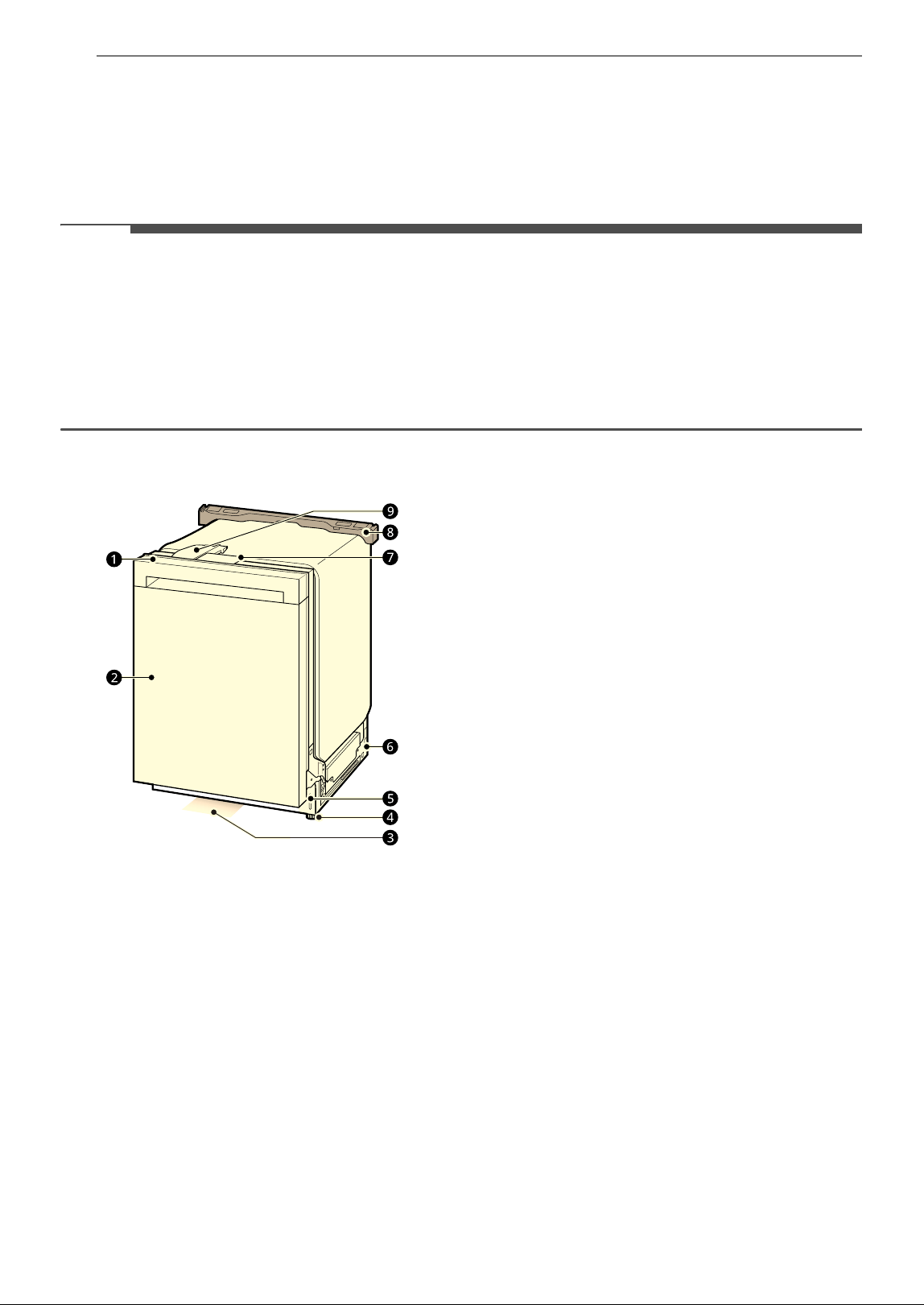
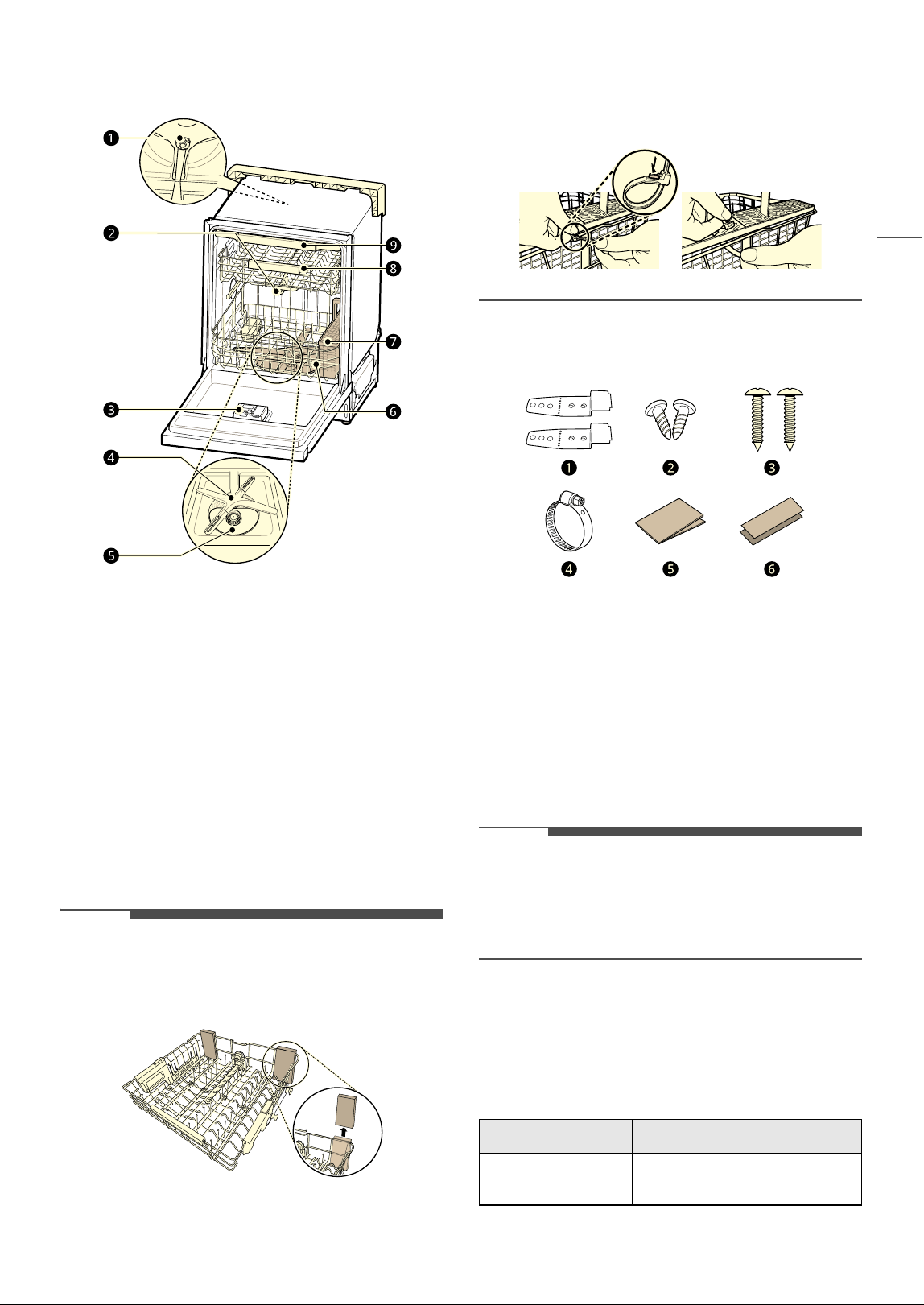
Front View
a Control Panel & Door Handle
b Front Cover
c Status Indicator Light
d Leveling Feet
e Lower Cover
f Base
g Safety Cover
h Shipping Brace
i Auto Open Dry
Status Indicator Light
The Status Indicator light at the bottom of the
dishwasher shows the status of the appliance:
whether it has encountered any problems,
whether it is operating normally, or whether it is
ready to wash dishes.
White LED
• Pulses when the cycle is running
• Remains on when the cycle is finished.
• Turns off when the door is opened.
Red LED
• Flashes if the appliance encounters an error. For
more information about error codes, see the
TROUBLESHOOTING section.
9PRODUCT OVERVIEW
ENGLISH
Interior View
a Top Wash Impeller
b Upper Spray Arm
c Detergent and Rinse Aid Dispenser
d Lower Spray Arm
e Filtration System
f Lower Rack (appearance may vary)
g Silverware Basket
h Upper Rack
i Cutlery Rack
NOTE
• Remove all packing materials from the exterior
and interior of the dishwasher before installing
the appliance.
• Press the tab to remove the cable tie by hand.
Cutting the tie with a knife or scissors may
damage the rack or the silverware basket.
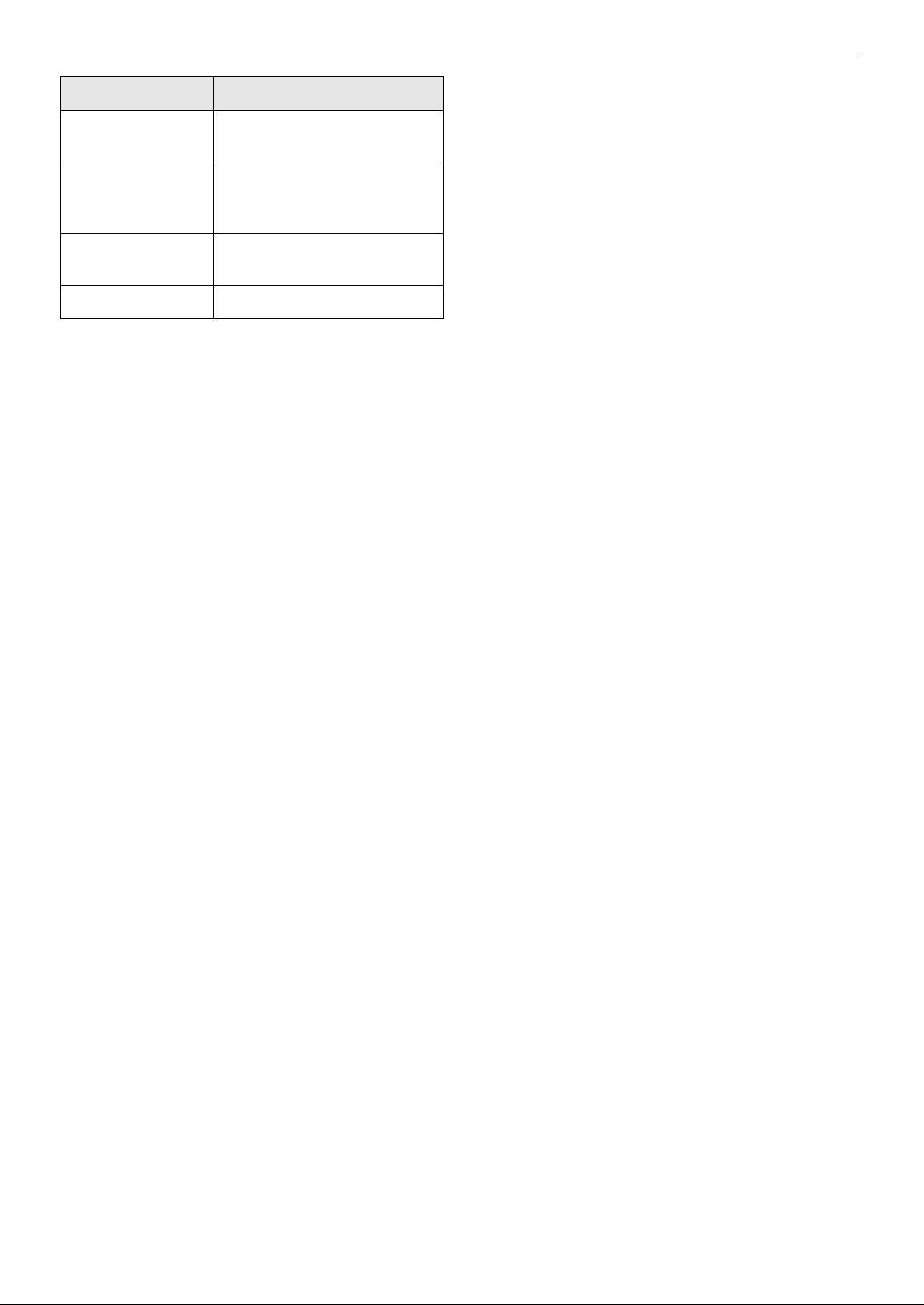
Accessories
a Installation Brackets: 2 EA
b Wood Screws (Φ 4.5 mm x 12 mm): 2 EA
c Wood Screws (Φ 4 mm x 20 mm): 2 EA
d Hose Clamp: 1 EA
e Moisture Barrier for Top (Aluminum Tape): 1 EA
f Moisture Barrier for Side (Aluminum Tape): 2
EA
NOTE
• Installation brackets, wood screws and hose
clamp are inside the silverware basket.
• Moisture barrier tape is included in the manual
assembly bag.
Product Specifications
The appearance and specifications listed in this
manual may vary due to constant product
improvements.
Model LDNPQ445*, LDNPQ44H*
Electrical
Requirements
120 V, 60 Hz AC only,
15 A circuit breaker
10 PRODUCT OVERVIEW
Water Pressure 20 psi - 80 psi
(140 kPa - 550 kPa)
Dimensions
(Width X Height X
Depth)
23 3/4” X 33 5/8” X 23 3/4”
(603 mm X 854 mm X 603 mm
)
Inlet Water
Temperature
120 ℉ - 149 ℉
(49 ℃ - 65 ℃)
Net Weight 75 lb (34 kg)
Model LDNPQ445*, LDNPQ44H*
11INSTALLATION
ENGLISH
INSTALLATION
Before Installing
Online Installation Guide
This QR code is for reference only. For complete
installation instructions, see the owner's manual
supplied with each dishwasher.
English (USA)
https://www.lg.com/us/support/video-tutorials/lg-
dishwasher-installation-CT10000009-
1366643457088
English (CANADA)
https://www.lg.com/ca_en/support/video-
tutorials/CT20098058-1424294103269
French (CANADA)
https://www.lg.com/ca_fr/soutien/aide-produit/
CT20100059-20152463332979
WARNING
• DISCLAIMER - This Guide is strictly confidential
and shall not be copied, disclosed, distributed,
disseminated, publicized or reproduced, in
whole or in part, without the prior written
authorization of LG Electronics.
The Guide may contain inaccuracies and/or
typographical errors and may be changed or
updated at any time by LGE without notice.
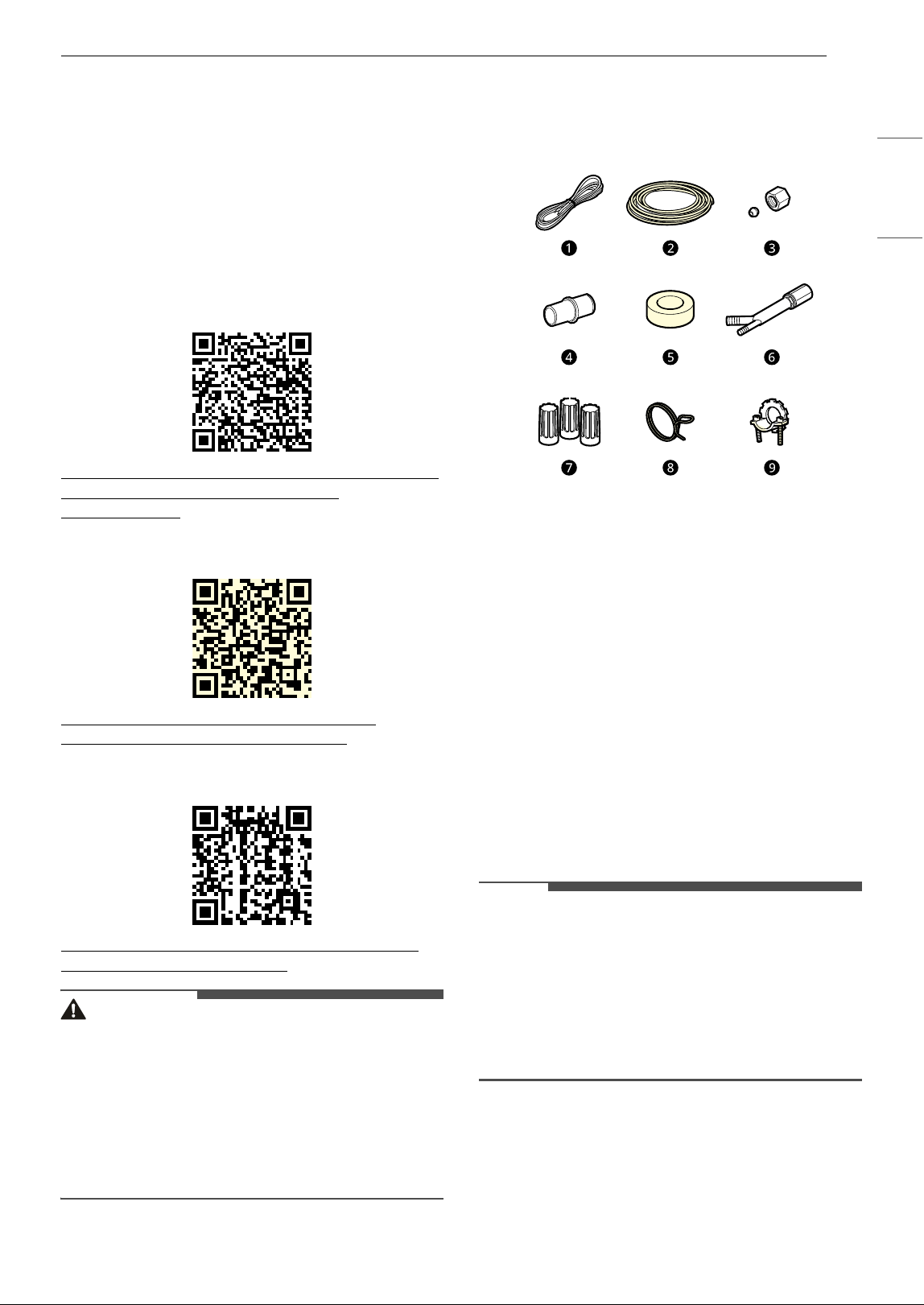
Parts not Provided
a Electrical Cable
• 16 AWG, with 2 conductors and 1 ground
b Water Supply Tube
• Minimum 3/8″ O.D. copper tubing or
stainless steel braided water supply line
c Fittings for Tube
d Coupler
e Electrical Tape
f Air Gap
g Wire Nuts for 16-Gauge Wiring
h Hose Clamp
i 3/8″ UL Approved Strain Relief
NOTE
• Power cord installation kit is available on
LG.com, part number AEM75698901 (Model
name : D-PC1)
• Inlet hose installation kit is available on LG.com,
part number AEM75698902.
• Drain extension hose installation kit is available
on LG.com, part number AEM75698903.
12 INSTALLATION
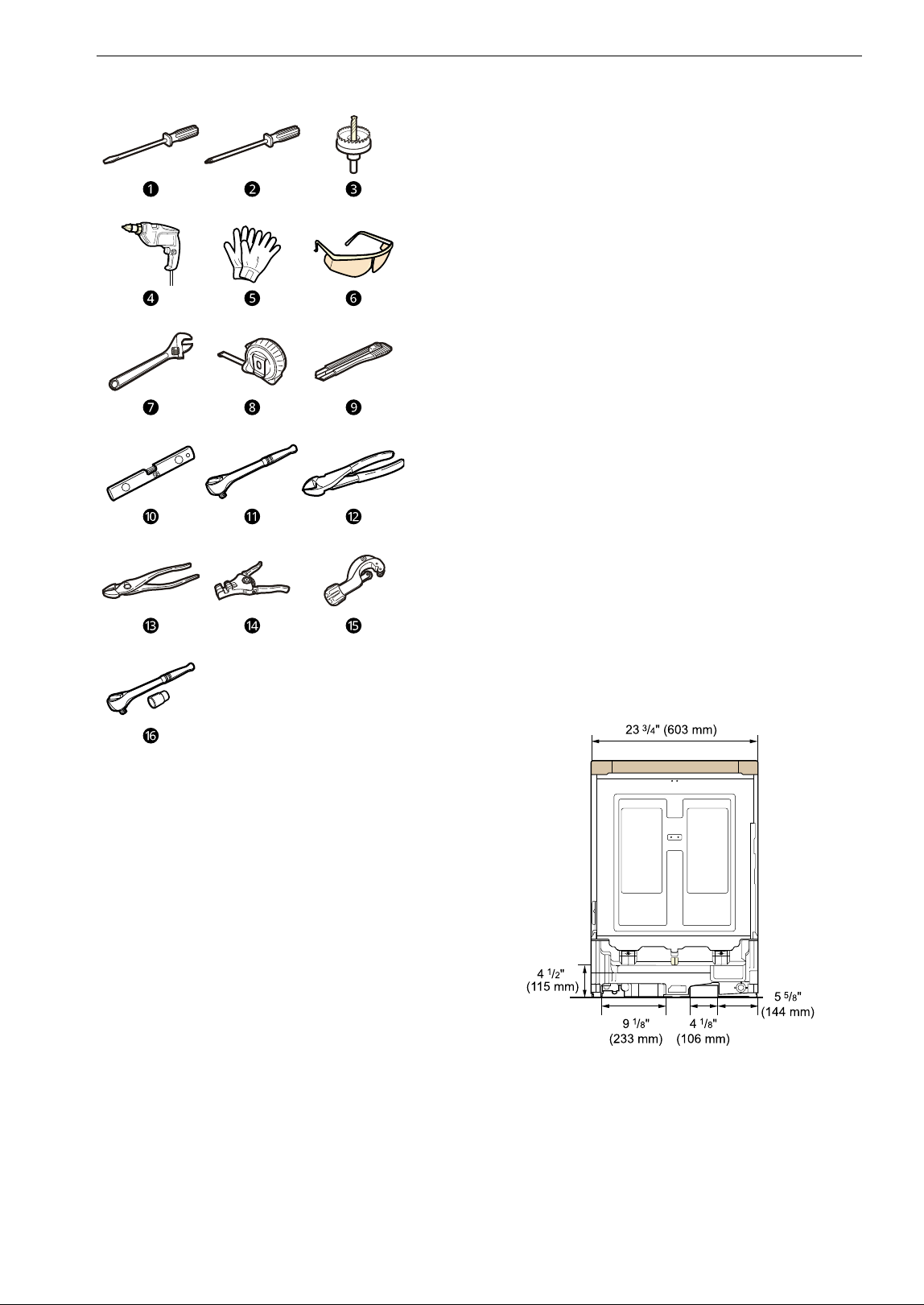
Tools Needed
a Flat-Blade Screwdriver
b Phillips Screwdriver
c Hole Saw min. 2 1/2” bit
d Electric Drill
e Gloves
f Safety Glasses
g Adjustable Wrench
h Tape Measure
i Utility Knife
j Level
k 1/4” Square Drive Wrench
l Nipper
m Pliers
n Wire Stripper
o Tubing Cutter
p 3/8” Square Drive Wrench + 1/2” Socket
Installation Overview
Please read the following installation instructions
first after purchasing this dishwasher or
transporting it to another location.
a Preparing Cabinet Opening
b Preparing Water and Electrical Connections
c Preparing Dishwasher
d Sliding Dishwasher into Cabinet Opening
e Connecting Water Supply Line and Power
f Connecting the Drain Hose
g Leveling Dishwasher
h Securing Dishwasher in Cabinet Opening
i Final Installation Check
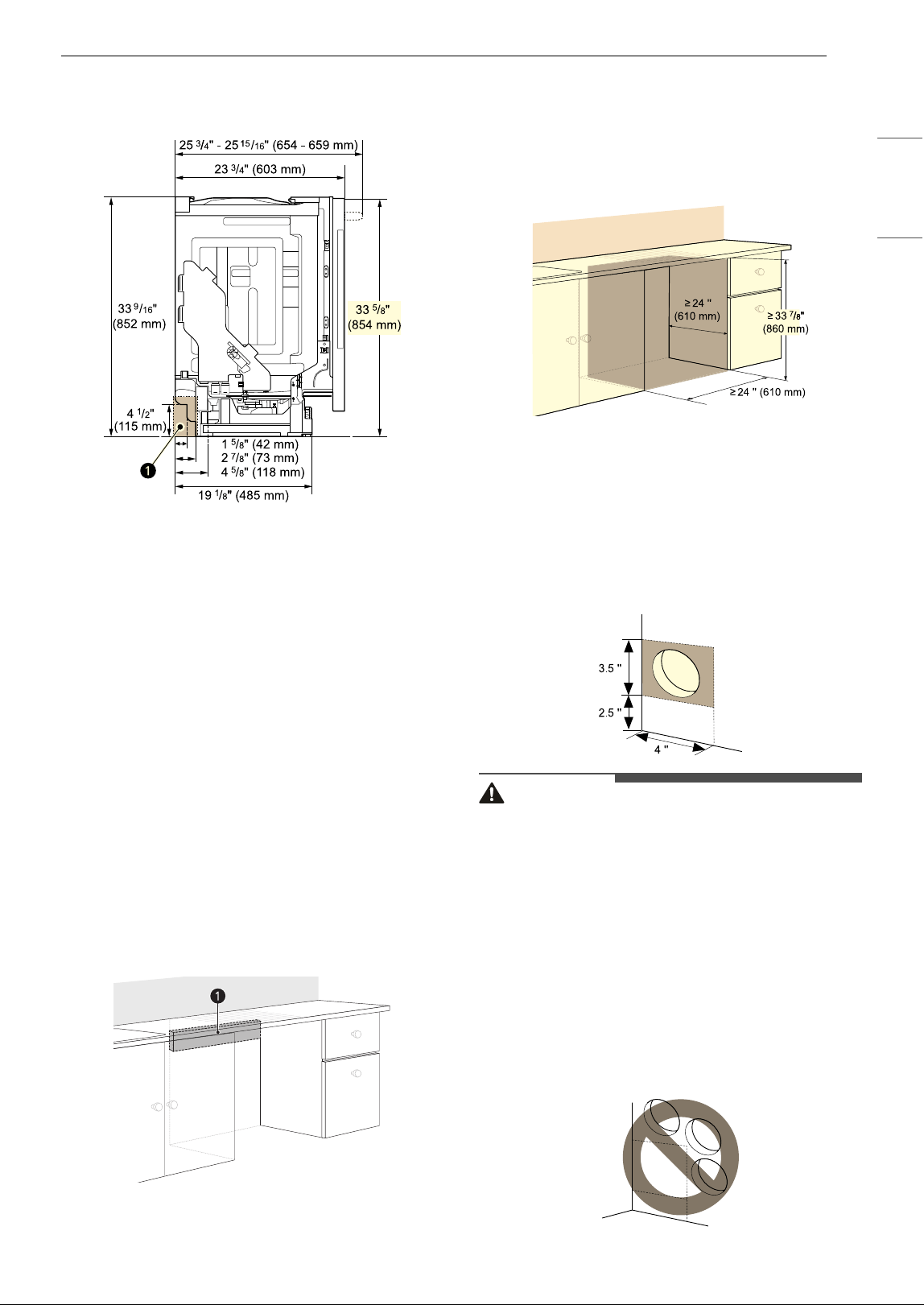
Product Dimensions
Back View
Side View
For easiest installation, see marked areas a for
water and electrical clearances in base of
13INSTALLATION
ENGLISH
dishwasher. Water supply hose, drain hose and
electric cable should be passed through this area.
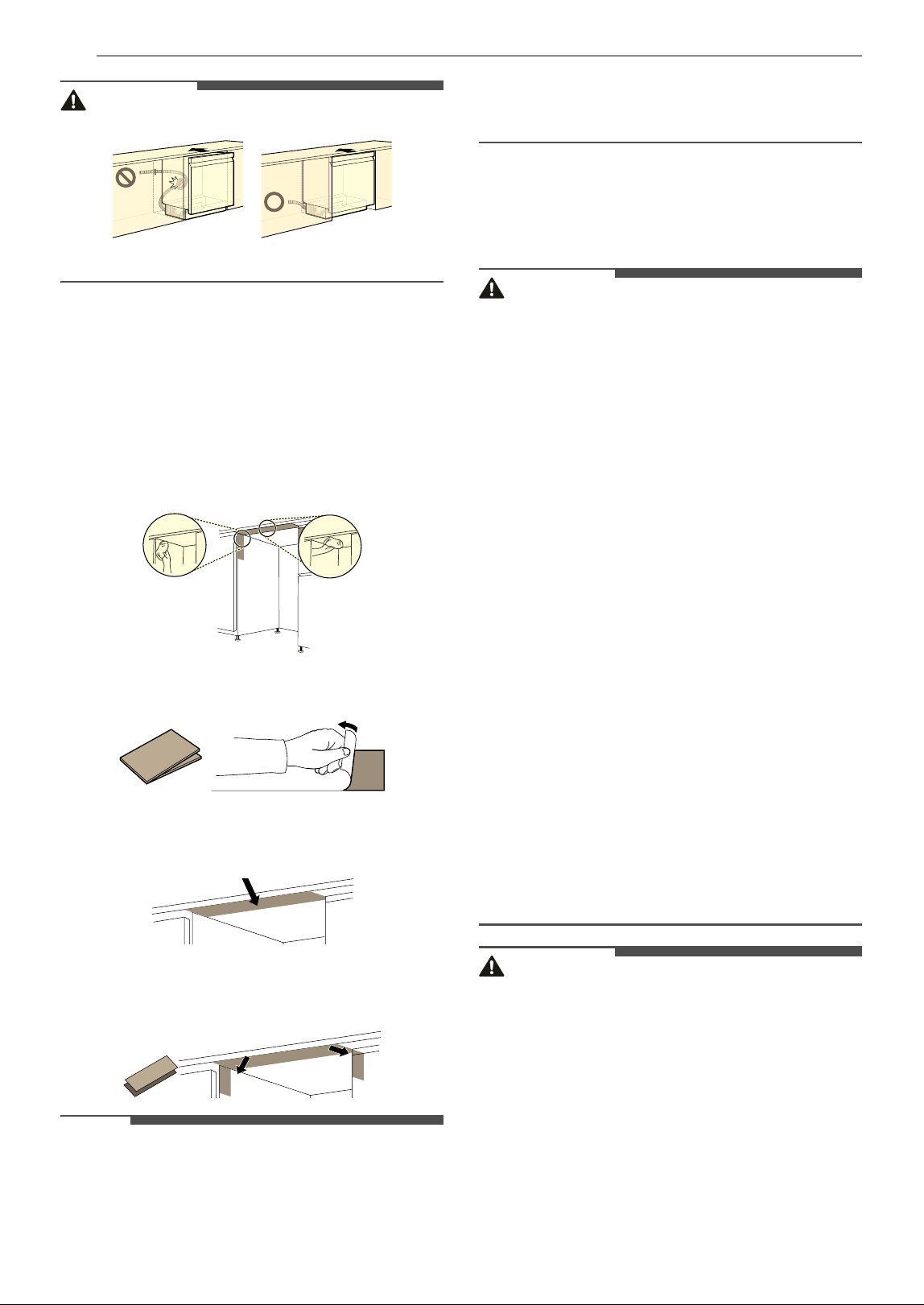
Preparing Cabinet Opening
This dishwasher is designed to fit a standard
dishwasher opening. An opening may be needed
on both sides to route plumbing and electrical
connections.
• To ensure proper drainage, install the
dishwasher no more than 12 ft. (3.65 m) from
the sink.
• The location must have sufficient space for the
dishwasher door to open easily and provide at
least 0.1” (2 mm) between the dishwasher and
the cabinet sides.
• If installing the dishwasher in a corner, leave a
minimum of 2” (50 mm) between the dishwasher
and the adjacent wall.
• The adjacent wall must be free of obstructions.
• For flush installations only, you may remove the
cabinet brace
a inside the cabinet.
Choosing the Proper Location
1 Select a location as close to the sink as
possible for easy connections to water supply
line, drain hose and electrical connection.
2 To allow for proper clearance of plumbing
and electrical, use the template included with
the literature to determine the clearance on
the side of the cabinet where the cabinet
meets the back wall. Using a 2 1/2” diameter
hole saw, drill a hole in the target area as
shown.
WARNING
• The opening must be at least 2 1/2" (63.5 mm) in
diameter to prevent damage to the cables and
hoses during installation.
• Installation damage is not covered by the
warranty, and leaks caused by improper
installation may result in property damage.
• Do not use existing holes unless they are in the
target area.
• Failure to properly locate the hole for the water
and drain lines may prevent the dishwasher
from installing flush with the cabinets and could
result in kinked, pinched, crushed, stressed or
damaged lines.
14 INSTALLATION
WARNING
Installing Moisture Barrier Tape
Install the moisture barrier tape to the underside
of the countertop to protect the surface from
condensation when the appliance is opened.
1 Clean and dry the area on the underside of
the countertop and the sides of the cabinet
opening where the tape will be applied.
2 Remove the protective film from the tape.
3 Install the tape on the underside of the
countertop.
4 Install the shorter pieces of tape on the sides
of the cabinet opening at the top.
NOTE
• Moisture barrier tape is included in the manual
assembly bag.
• Condensation may occur on the underside or
along the front edge of the countertop when the
room temperature is low.
Preparing Water and
Electrical Connections
WARNING
• Water Connection
- Do not reuse an old hose. Use only a new hose
when installing the dishwasher. The old hose
could leak or burst causing flooding and
property damage. Contact an LG Customer
Information Center for assistance in buying a
new hose.
• Electrical Connection
- Use a time-delay fuse or circuit breaker.
- Operate this appliance with the correct voltage
as shown in this manual and on the rating
plate.
- The wiring must be grounded properly. If in
doubt, have it checked by a qualified
electrician.
- Connect the appliance using 3-wires, including
a ground wire.
- The appliance and outlet must be positioned
so that the plug is easily accessible.
- Do not use an extension cable or adapter with
this dishwasher.
- Do not overload the outlet with more than one
appliance.
- The included 16AWG wire nuts should be used.
- It is the personal responsibility and obligation
of the product owner to have a proper outlet
installed by a qualified electrician.
CAUTION
• When connecting the dishwasher water supply
line to the house water supply, sealing tape or
compound should be used on pipe threads to
avoid leaks. Tape or compound should not be
used on compression fittings.
• Connect the dishwasher to a hot water supply
with a temperature range between 120 °F (49 ℃)
and 149 °F (65 ℃). This temperature range
provides the best washing results and shortest
cycle time. To prevent damage to dishes, the
temperature should not exceed 149 °F (65 ℃).
• Water supply pressure must be between 20 psi
and 80 psi (140–550 kPa). If the water supply
15INSTALLATION
ENGLISH
pressure exceeds 80 psi, a pressure reducing
valve must be installed. Otherwise premature
failure of the inlet valve may occur.
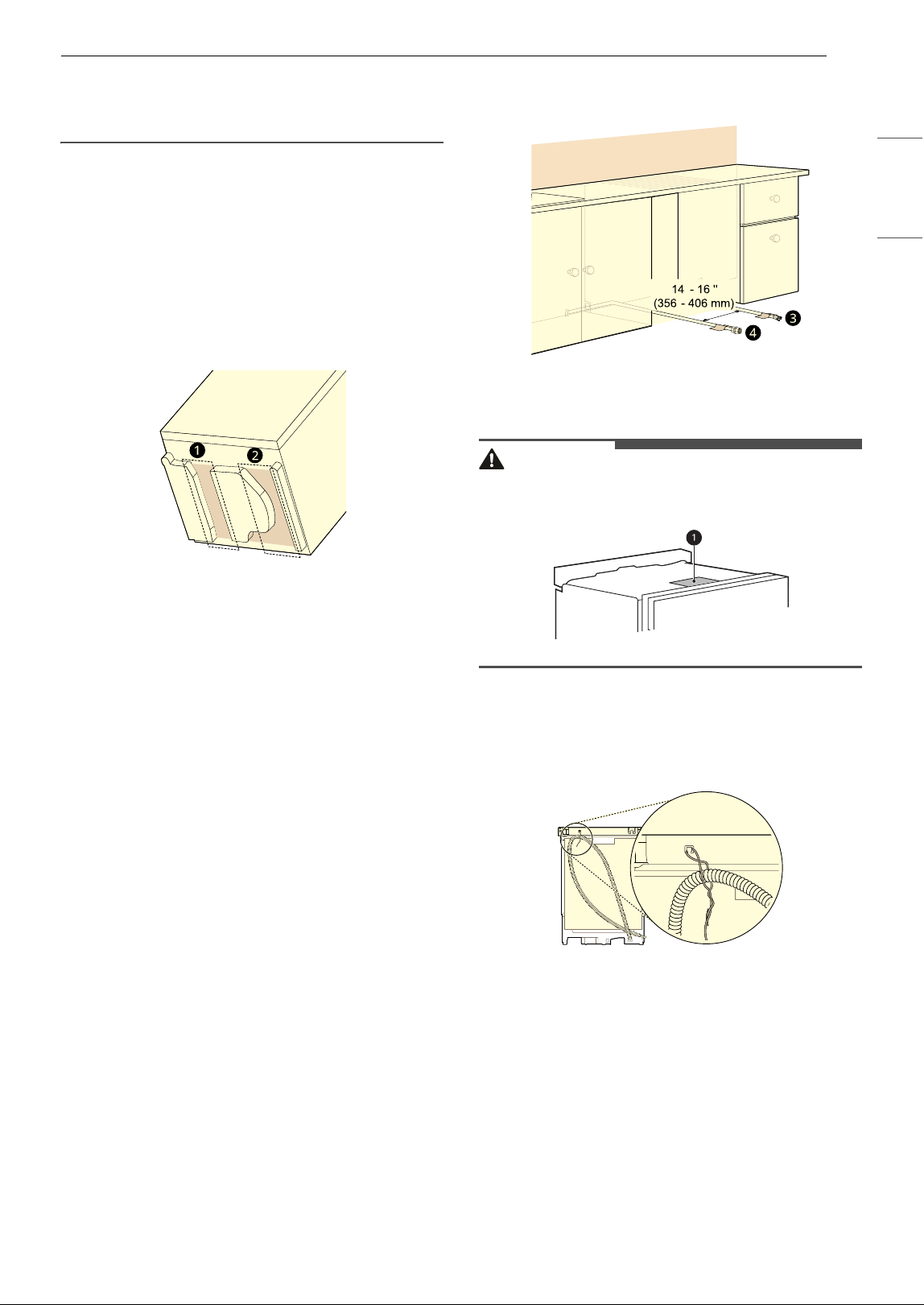
Routing Water Supply Line and
Electrical Wiring
There are 2 channels in the bottom of the
dishwasher for routing the water and electrical
connections.
• As shown in the bottom view below, channel
a
is for the water supply line, and channel
b is for
the electrical cable.
1 Turn off the house water supply and the
circuit breaker or dedicated power before
connecting the dishwasher.
2 Run the water supply line along the floor 6 1/
2" – 7 3/4" (165 mm – 197 mm) from the left
side of the opening and tape it in place in
front of the opening.
3 Run the electrical cable c along the floor 14"
– 16" (356 mm – 406 mm) from the water
supply line d and tape it in place.
• The electrical outlet must be within 4 ft.
(1.22 m) of either side of the dishwasher.
• The best location for the electrical conduit is
on the right side of the back wall. Re-route
the electrical cable before installation if the
electrical conduit pipe is longer than 3" (76
mm) and is centered on the back wall.
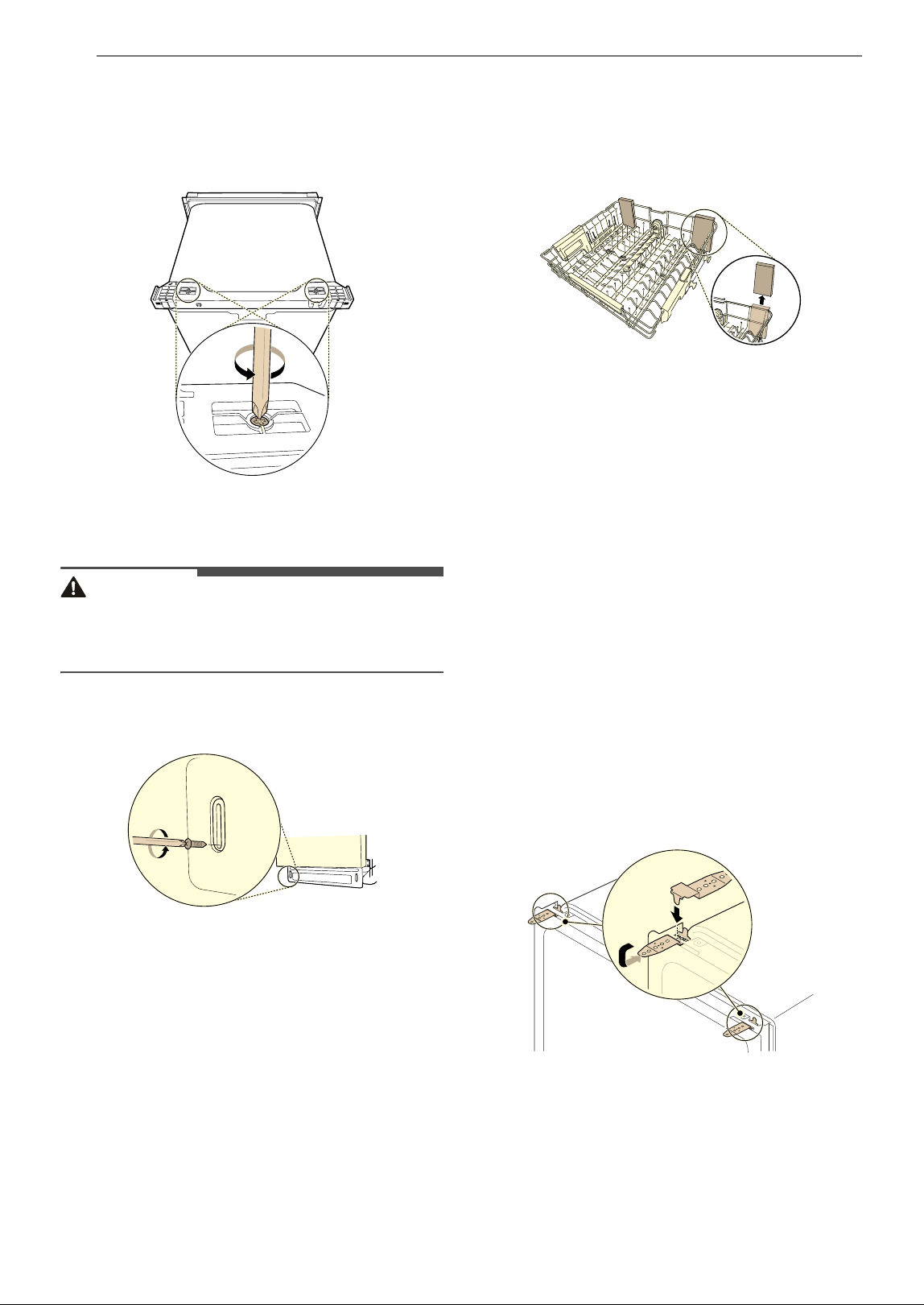
Preparing Dishwasher
WARNING
• Do not remove safety cover a. Removal can
result in fire, electric shock or death.
Releasing Drain Hose
Remove the twist tie holding the drain hose to the
back of the shipping brace.
16 INSTALLATION
Removable Shipping Brace
The rear shipping brace can be removed if
additional clearance is needed when installing the
dishwasher under a low countertop.
Removing Lower Cover
CAUTION
• If you lay the dishwasher on its back, do so
carefully to avoid damaging the drain hose and
the tub.
1 Remove the screws at either side which attach
the lower cover to the dishwasher.
2 Remove the lower cover.
3 If there is insulation padding behind the lower
cover, remove it.
4 Set the parts aside until the installation is
complete.
Removing Packing Materials from
the Interior
Remove all packing materials from the interior of
the dishwasher before installing the appliance.
Attaching Installation
Brackets
There are 2 options for securing the dishwasher.
For countertops made of wood or other materials
that won’t be damaged by drilling, use method 1.
For countertops made of granite, marble, or other
materials that could be damaged by drilling, use
method 2.
For a flush installation, choose the appropriate
method considering your installation conditions.
(A flush installation may not be possible because of
the cabinet size or installation circumstances.)
Method 1: Securing to Countertop
1 Insert the tabbed end of the installation
brackets into the slots in the upper frame.
Rotate the brackets until the tabbed ends are
facing up.
2 Bend the tabs on the brackets to secure them
to the frame using a pair of needle nose
pliers.
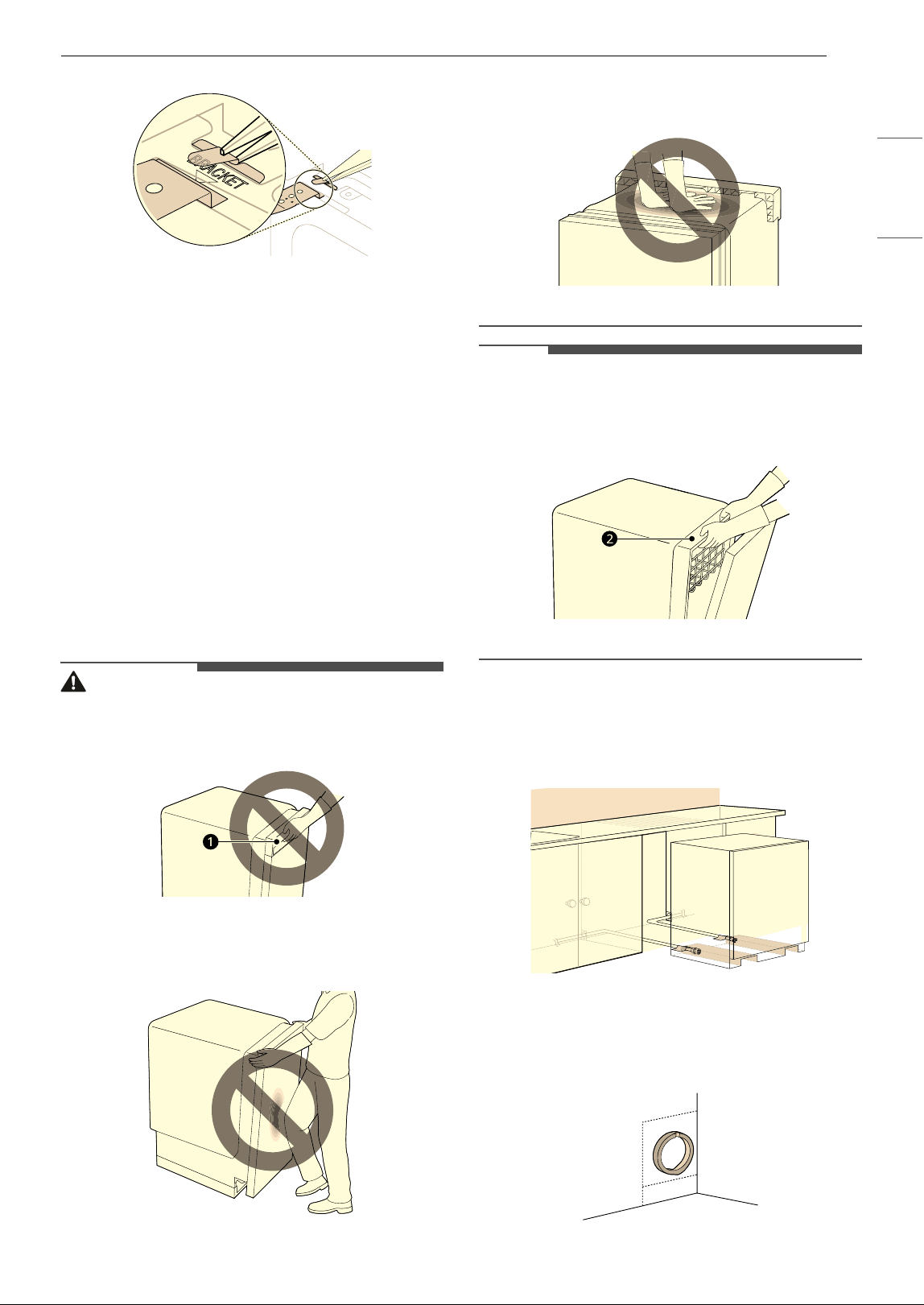
17INSTALLATION
ENGLISH
Method 2: Securing to Cabinets
For countertops made of granite, marble, or other
materials that could be damaged by drilling,
secure the dishwasher to the cabinets. If you have
framed cabinets, use screws that are long enough
to secure the dishwasher to the cabinets or attach
wood spacers (not included) to the cabinets on
either side of the dishwasher. See Securing
Dishwasher in Cabinet Opening for more details.
Sliding Dishwasher into
Cabinet Opening
How to Slide Dishwasher
CAUTION
• Do not pull or lift the dishwasher using the
handle
a. Doing so can damage the door and
hinges.
• Do not push the door of the dishwasher with
knees when sliding the dishwasher into position.
Doing so can damage the front cover.
• Do not push the top of the dishwasher. Doing so
can damage the interior of the dishwasher.
NOTE
• Open the door and grab the body frame and the
top front opening b of the tub to move or lift the
dishwasher.
1 Align the dishwasher with the opening. Make
sure the water supply line and electrical cable
are in the correct positions to slide into their
channels properly.
2 Smooth out or pad the edges of the hole
drilled for the water supply to avoid damaging
the drain hose.
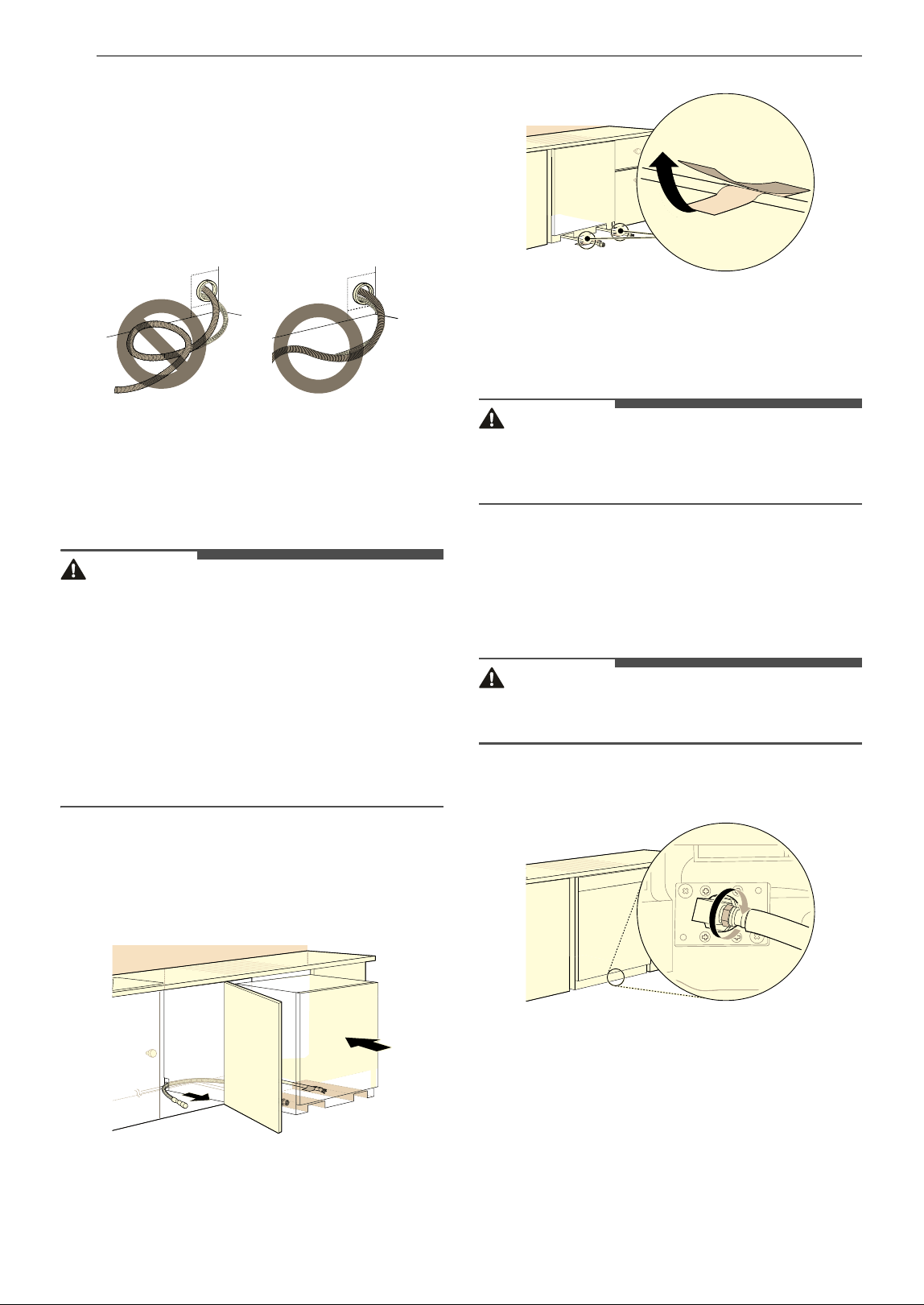
18 INSTALLATION
3 Make sure the drain hose is straight before
feeding the end of it through the hole for the
water supply. As you slide the dishwasher into
the opening, you will want to slowly pull on
the drain hose from inside the cabinet to take
up some slack. Be careful not to kink, pinch,
crush or stress the drain hose during
installation to avoid leaking and water
damage.
4 Gradually slide the dishwasher into the
opening, making sure that the water supply
line and electrical cable are passing freely
through the channels and do not get caught
under the dishwasher.
CAUTION
• To avoid malfunctions or leakage, it is important
that the drain hose not get kinked, pinched,
stressed or crushed behind or under the
dishwasher or inside the neighboring cabinet.
• Damage resulting from improper installation is
not covered under the warranty.
• Slide the dishwasher into place so the door is
flush with cabinet doors or drawers. Make sure
the rubber trim is not folded over behind the
cabinet opening.
• As you slide the dishwasher into the
opening, stop periodically (or have an
assistant help) to take up the slack by
pulling the drain hose farther into the
cabinet.
5 Remove the tape from the water supply line
and the electrical cable.
Connecting Water Supply
Line and Power
CAUTION
• Do not turn the dishwasher upside down to
connect the water supply line or electrical
supply. Doing so can damage the product.
Connecting Water Supply Line
1 With the home water supply turned off,
connect the water supply line to the inlet valve
on the left front of the dishwasher.
CAUTION
• Tape or compound should not be used on
dishwasher inlet valve.
2 Tighten the compression nut.
3 Slide the water supply line back through the
channel, pulling gently from inside the
cabinet to make sure the line is not kinked,
pinched, stressed or crushed.
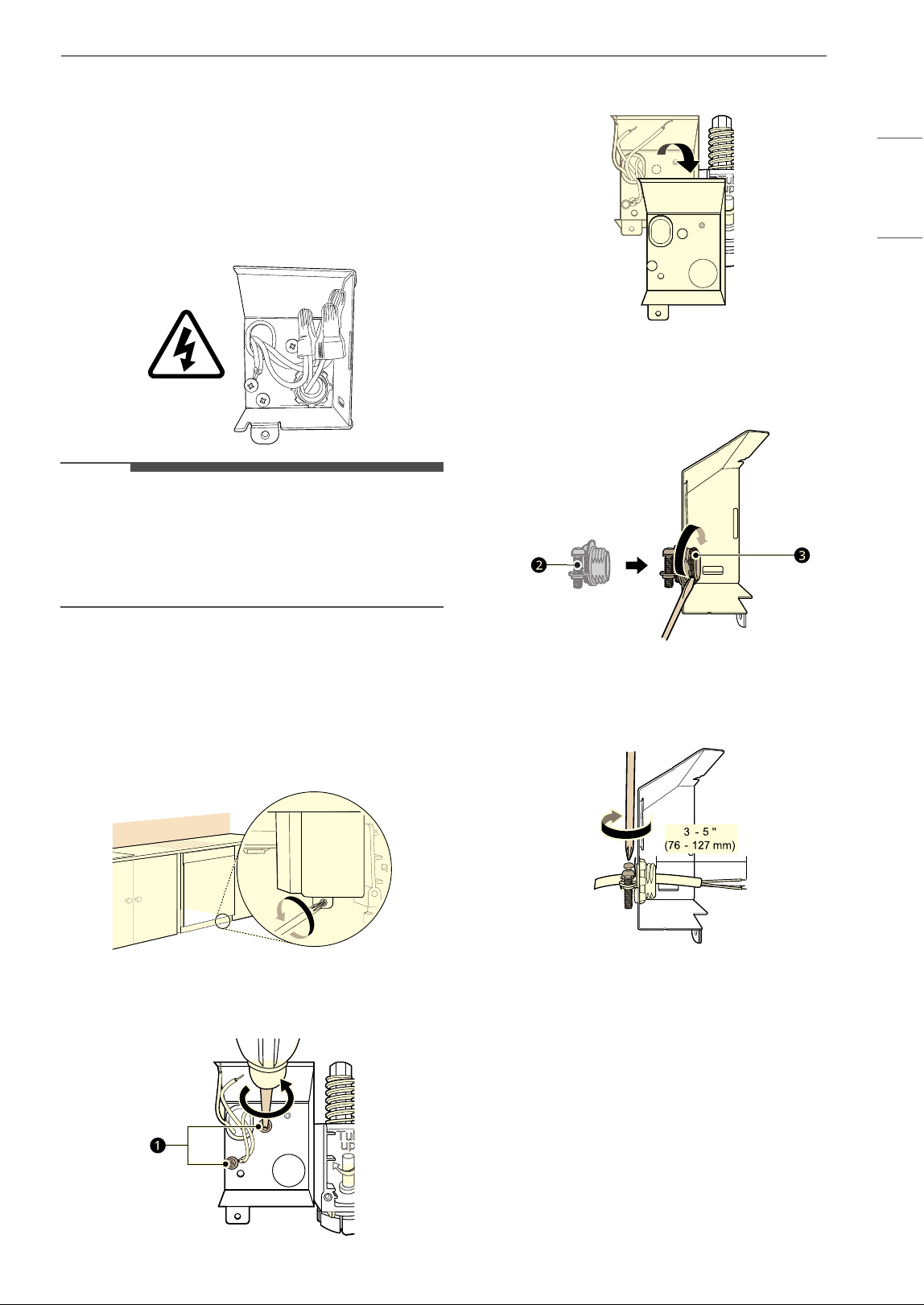
19INSTALLATION
ENGLISH
Connecting Power
The dishwasher should have a dedicated properly
grounded branch circuit to connect the 3 wire
setup which includes the ground wire.
If a 3-prong power supply is used, it should be in
an accessible location adjacent to the dishwasher
within 4 ft. (1.22 m) of the dishwasher side and not
behind the dishwasher.
NOTE
• The best location for the electrical conduit is on
the right side of the back wall. Re-route the
electrical cable before installation if the electrical
conduit pipe is longer than 3” (76 mm) and is
centered on the back wall.
1 Turn off electrical power to the unit at the
circuit breaker.
2 Use a Phillips screwdriver to remove the
screw from the junction box cover and
remove the cover.
3 Use a Phillips screwdriver to remove 2 screws
a.
4 Remove the junction box from the appliance.
5 Insert a 3/8” strain relief b through the hole
in the junction box. Tighten the ring nut
c to
secure it in place.
6 Insert the electrical cable through the hole in
the strain relief. Tighten 2 screws to secure
the cable.
7 Pull the existing wires through the openings
in the junction box. Tighten 2 screws d to
reassemble the junction box in the appliance.
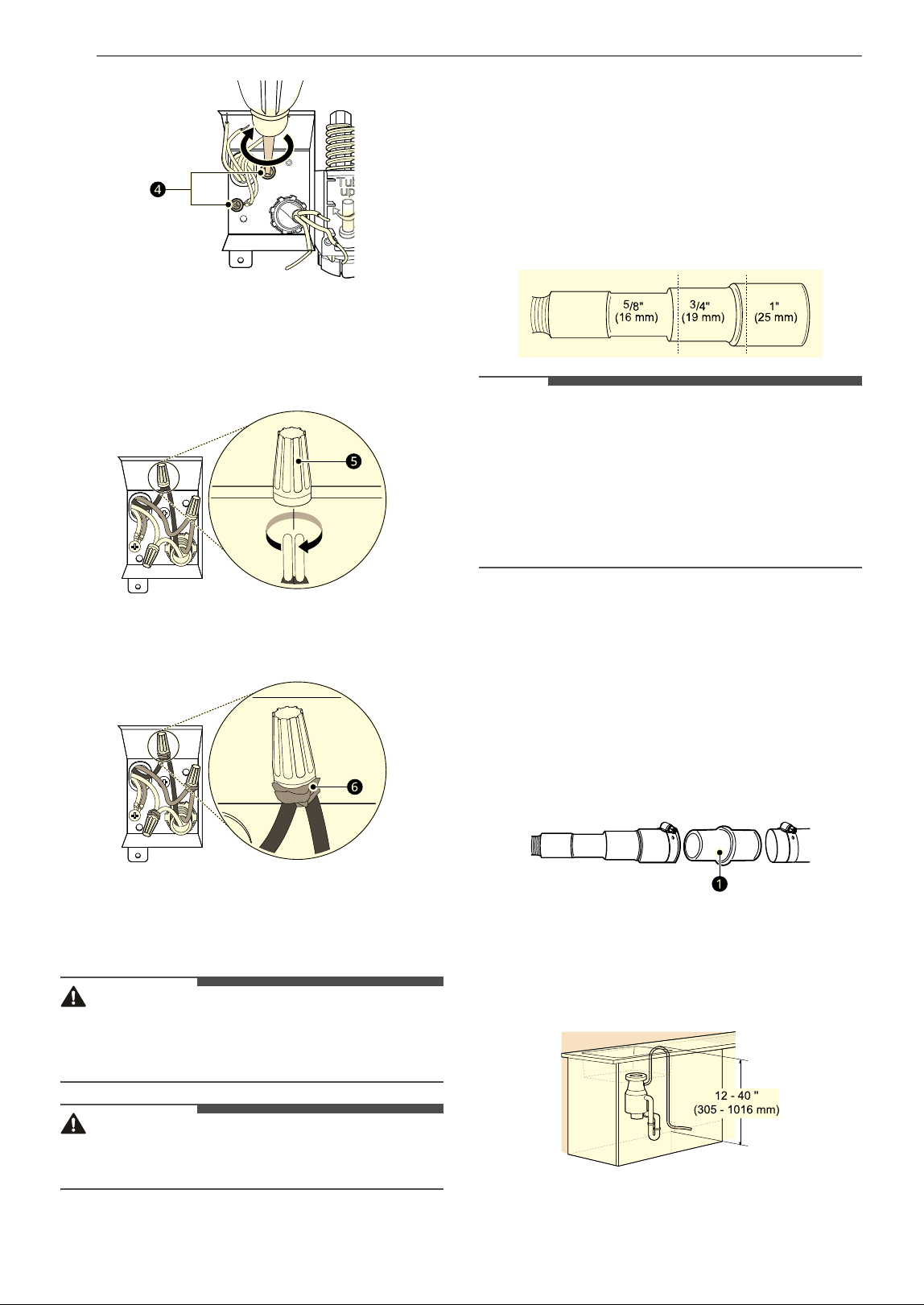
20 INSTALLATION
8 Pair the white, black, and green wires to the
matching colored wires from the dishwasher.
Then twist on the provided wire nuts e tightly
to connect the corresponding wires.
9 Wrap electrical tape f around each
connection.
10 Fold the connected wires back into the
junction box and screw on the junction box
cover.
WARNING
• Verify that the black wire is hot (120 V). If not, or
if you are unsure of the power supply, have it
checked by a licensed electrician.
CAUTION
• Do not leave stripped wire exposed. Trim
stripped wire to fit completely inside wire nuts.
Connecting the Drain Hose
If the end of the drain hose does not fit the drain
line, use a heat and detergent resistant adapter
(not supplied). These may be obtained from a local
plumbing supply store.
• Cut the adapter to match the size of the drain
connection as shown. Cutting just beyond the
flare helps to keep the band clamp in place.
NOTE
• For drain hose installation, use the screw style
hose clamp provided with this dishwasher in the
silverware basket.
• If connecting the dishwasher’s drain hose to the
garbage disposal, be sure to follow your
garbage disposal’s manual for proper
installation instructions.
Drain Hose Requirements
• Follow local codes and ordinances.
• Do not exceed 12 ft. (3.65 m) distance to drain.
• Do not connect drain hoses from other
appliances to the dishwasher’s drain hose.
• If an extension drain hose is required, use a 5/8"
or 7/8" inside diameter, 2 ft. – 3 ft. (0.6 m – 0.9
m). length hose and a coupler
a for connecting
the two hose ends.
Height of the Drain Hose
The height of the drain hose end must be at least
12" (305 mm) and within 40" (1016 mm) from the
base of the dishwasher to avoid water being
siphoned from the tub.
21INSTALLATION
ENGLISH
Connecting to Disposal without Air
Gap
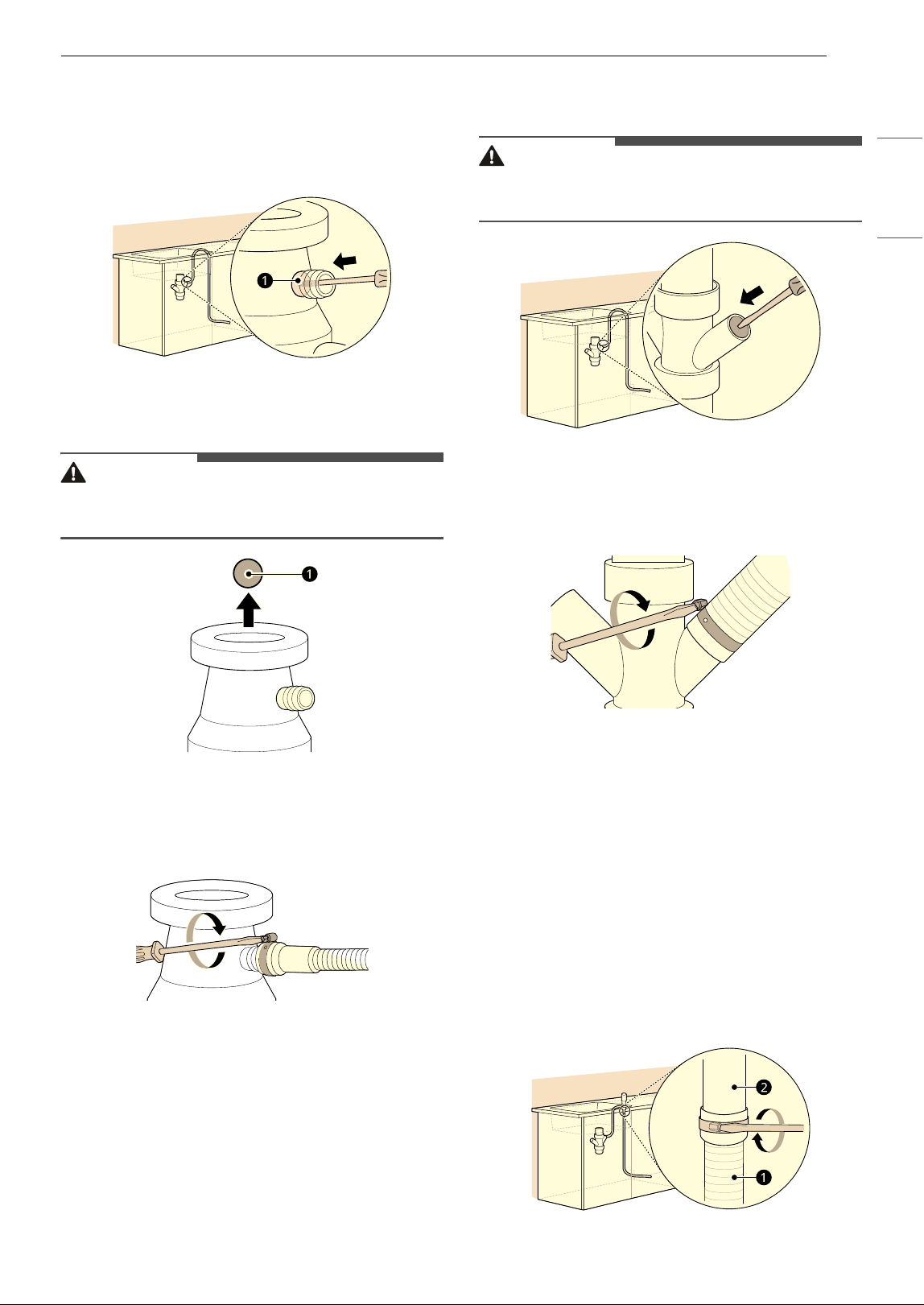
1 Remove the knockout plug on the disposal
with a hammer and screwdriver.
2 Remove the knockout plug a from the
disposal.
CAUTION
• If the knockout plug has not been removed, the
dishwasher will not be able to drain properly.
3 Attach the drain hose to the disposal with the
hose clamp provided. Move the hose clamp
into position and tighten it with a flat-blade
screwdriver.
Connecting Waste Tee without Air
Gap
The height of the drain hose end must be at least
12” (305 mm) and within 40” (1016 mm) from the
base of the dishwasher to avoid water being
siphoned from the tub.
1 Remove the knockout plug with a hammer
and screwdriver.
CAUTION
• If the knockout plug has not been removed, the
dishwasher will not be able to drain properly.
2 Attach the drain hose to the waste tee with
the hose clamp provided. Move the clamp into
position and tighten it with a flat-blade
screwdriver.
Connecting to Disposal or Waste
Tee with Air Gap
1 Remove the knockout plug with a hammer
and screwdriver.
2 Connect the end of the drain hose a to the air
gap b with the hose clamp provided. Move
the clamp into position and tighten it with a
flat-blade screwdriver.
• This avoids water being siphoned from the
tub.
22 INSTALLATION
3 If it is not connected, attach the rubber hose
connector to the disposal or waste tee with a
hose clamp (not provided).
Leveling Dishwasher
Check that the dishwasher is level and adjust the
leveling feet if necessary.
CAUTION
• Failure to level the dishwasher may result in
leakage, problems closing the door, or noise.
• Where the cabinet opening is narrower than
recommended (see Preparing Cabinet
Opening), the dishwasher must be carefully
leveled and aligned so that the dishwasher is
supported fully by the 3 leveling feet and is not
hanging from the installation brackets. Failure to
do so can result in leaks from the front of the
dishwasher,
AE errors, difficulty in closing the
door, or failure to operate.
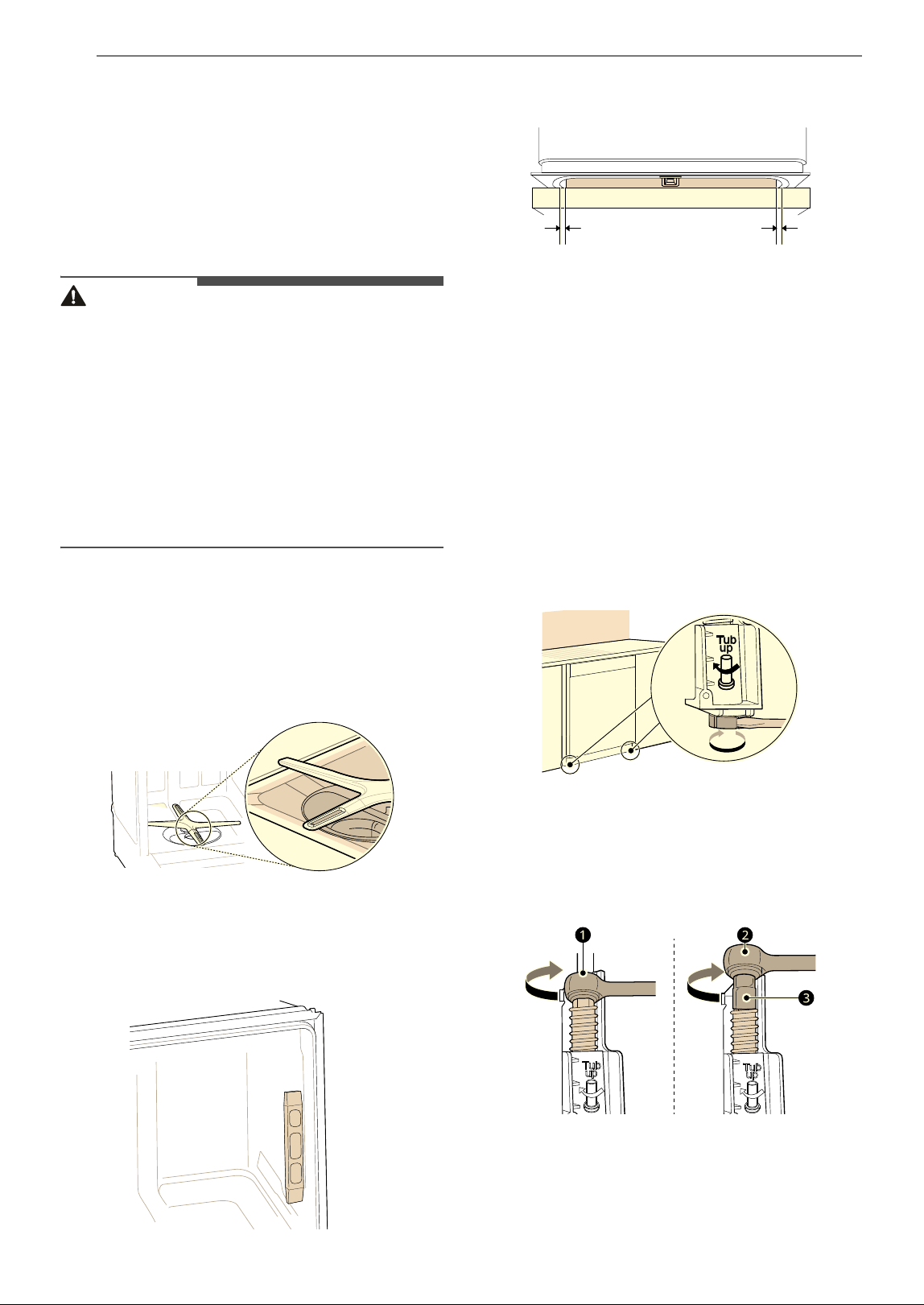
Checking Leveling
To check that the tub is level from front to back,
remove the lower rack and pour 169 oz. (5 L) of
water into the bottom of the tub. The water level
should be near the center of both tub lower
indentations at the front.
With the lower rack removed, place a level on the
inside wall of the tub to check that the dishwasher
is level from side to side.
• If you do not have a level, try using a
smartphone level application instead.
Make sure that the gap between the tub walls and
the door liner is the same on either side.
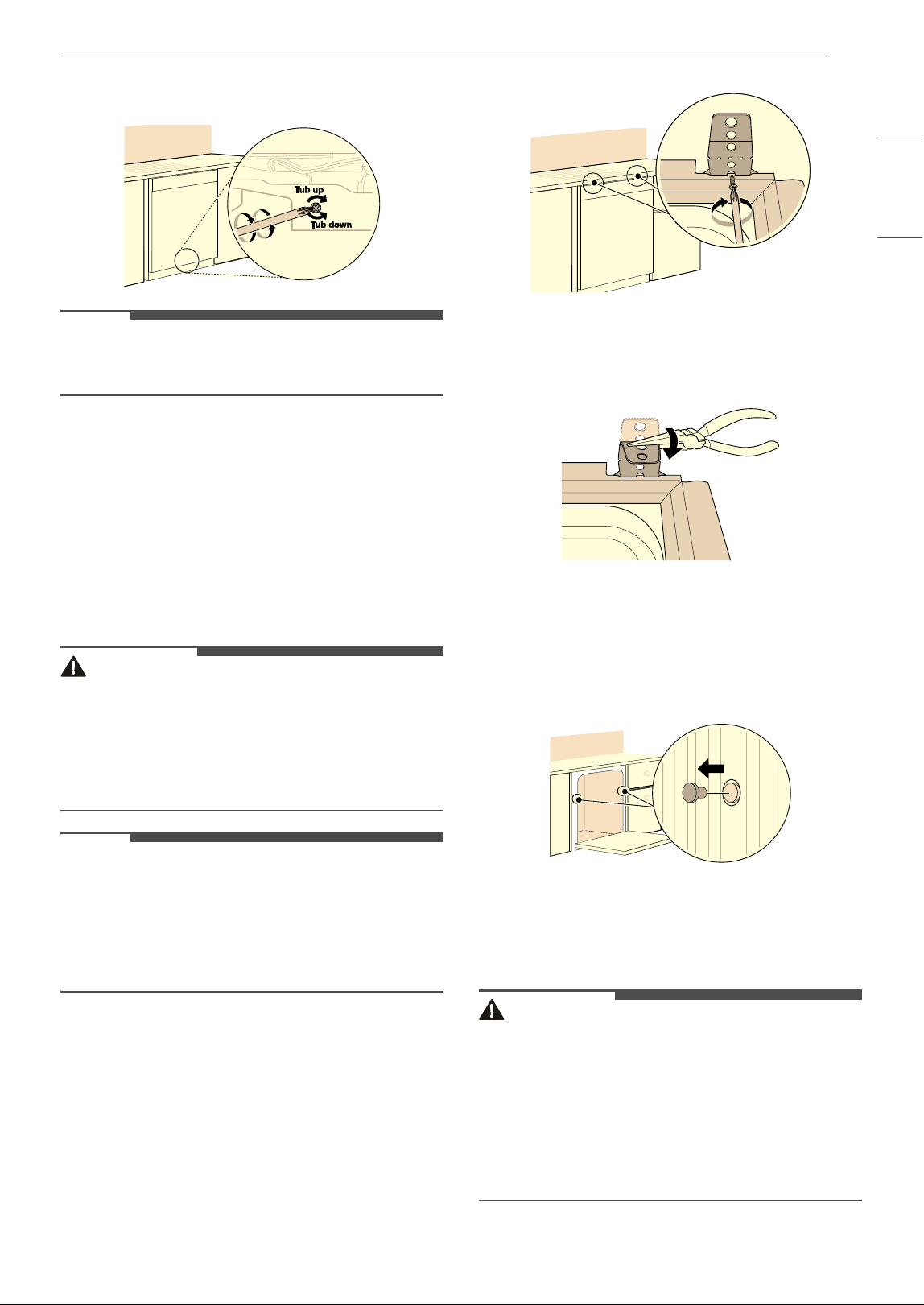
Adjusting Leveling Feet
Adjust as needed until the dishwasher is
completely leveled.
• Adjust the front and rear leveling feet until they
are all in firm contact with the floor. Failure to
level the dishwasher may prevent the door from
closing properly and the dishwasher will not turn
on.
Adjusting Front Leveling Feet
Use a flat-blade screwdriver to turn the front
leveling feet and adjust the front of the tub.
• Turn the front leveling feet clockwise to raise the
front of the tub and counterclockwise to lower it.
• The adjustments work identically for both front
leveling feet.
• When a flat-blade screwdriver is unavailable, use
a 1/4" square drive wrench
a or 3/8" square
drive wrench
b with 1/2" socket c to turn the
front leveling feet and adjust the front of the tub.
Adjusting Rear Leveling Foot
Use a Phillips screwdriver to adjust the rear
leveling foot and the rear of the tub using the
center screw at the base of the appliance in the
front.
23INSTALLATION
ENGLISH
• Turn the center screw clockwise to raise the rear
of the tub and counterclockwise to lower it.
NOTE
• To avoid damaging the screw, do not use an
electric screwdriver.
Securing Dishwasher in
Cabinet Opening
There are 2 options for securing the dishwasher.
For countertops made of wood or other materials
that won’t be damaged by drilling, use method 1.
For countertops made of granite, marble, or other
materials that could be damaged by drilling, use
method 2.
CAUTION
• Ensure the dishwasher is level and all leveling
feet are in firm contact with the floor before
attaching the dishwasher to the countertop or
cabinet. If the dishwasher is not leveled
properly, the door may not close properly or
water may leak.
NOTE
• Installation brackets and screws can be found in
the silverware basket.
• Use a magnetic screwdriver.
• Cover the filter hole with towels to prevent
screws from falling down into the pump.
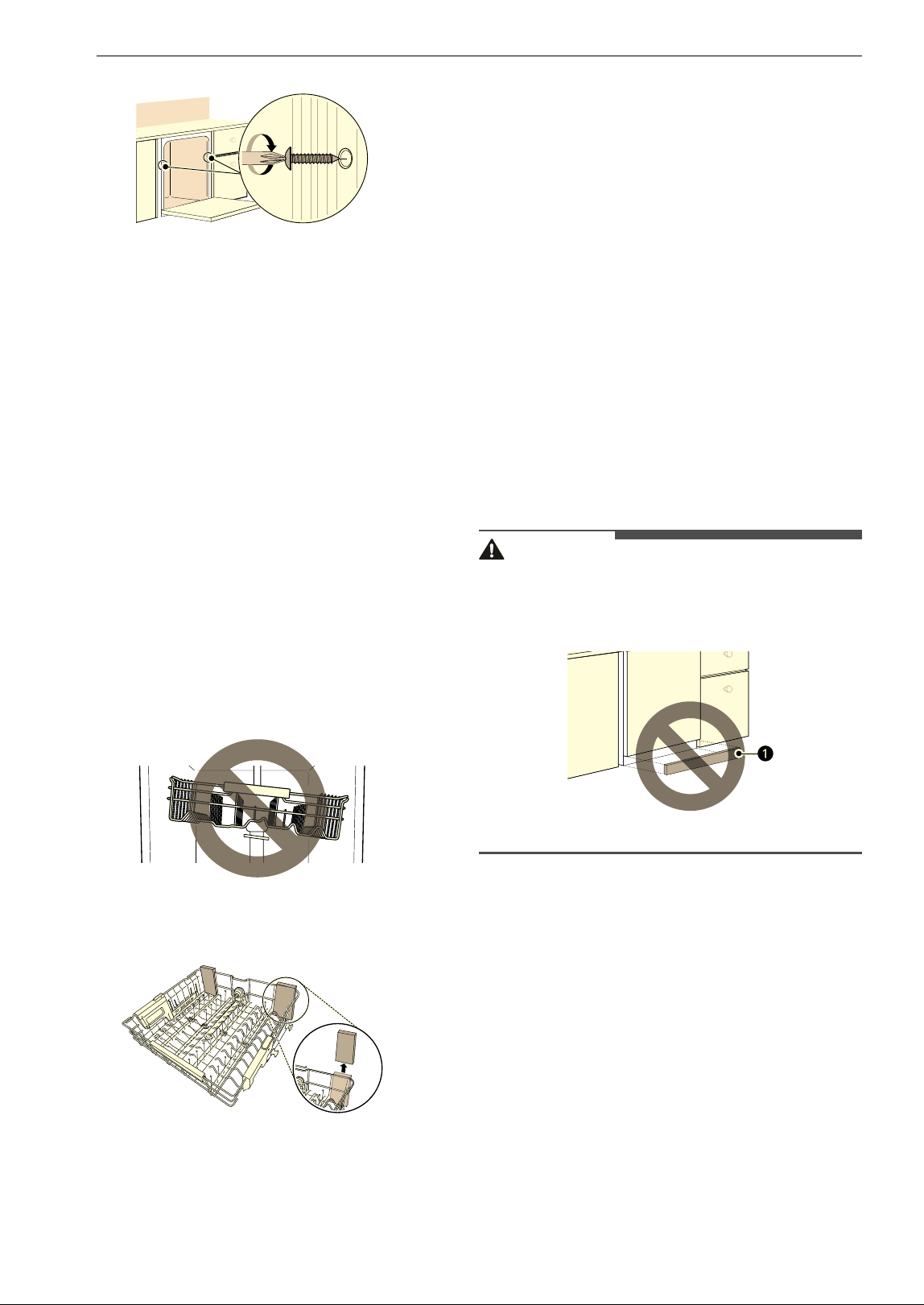
Method 1: Securing to Countertop
1 Use the shorter 12 mm wood screws provided
to secure the brackets at the top of the
dishwasher to the underside of the wood
countertop. Drive the screw through the
appropriate hole in the installation bracket.
2 Use a nipper or tin snips to carefully trim off
the excess part of the bracket.
Method 2: Securing to Cabinets
1 Remove the 2 plastic caps from the mounting
bracket access holes.
2 Drive a 20 mm wood screw (longer screw)
through the mounting bracket and into the
cabinet side.
CAUTION
• If the provided 20 mm screws are not long
enough to secure the dishwasher to the cabinet
side, use screws that are long enough to secure
to the cabinets.
• If you have framed cabinets, use screws that are
long enough to secure the dishwasher to the
cabinets or attach wood spacers (not included)
to the cabinets on either side of the dishwasher.
24 INSTALLATION
3 Reinstall the plastic caps.
Final Installation Check
Testing the Dishwasher
Check if the dishwasher is properly installed.
1 Turn on the circuit breaker.
2 Turn on the house water supply.
3 Make sure that the door opens and closes
smoothly.
• If necessary, level the dishwasher again.
• If the door will not close, make sure the rack
is level.
• Make sure that all packaging materials have
been removed.
4 Power on the dishwasher and run any cycle to
verify proper operation.
5 Check for leaks at the drain hose and water
supply connection.
6 If a water leak is detected, open the door and
then press and hold the START button for 3
seconds to cancel the wash cycle and
automatically drain the water from the
dishwasher. Tighten all water connections
and run another cycle. Repeat until no leaks
are detected.
Sound Insulation Sheet
If your model shipped with a sound insulation
sheet, follow the instructions provided to
install the sheet now. But wait to install the
insulation pad and lower cover until after the
final installation check.
7 Replace the lower cover.
CAUTION
• Only install the lower cover provided with the
dishwasher. Do not install cabinet baseboard
a
as it may cause noise and leakage.
8 Remove the protective film from the door, if
present. Leaving the film on may cause
discoloration or condensation on the door.
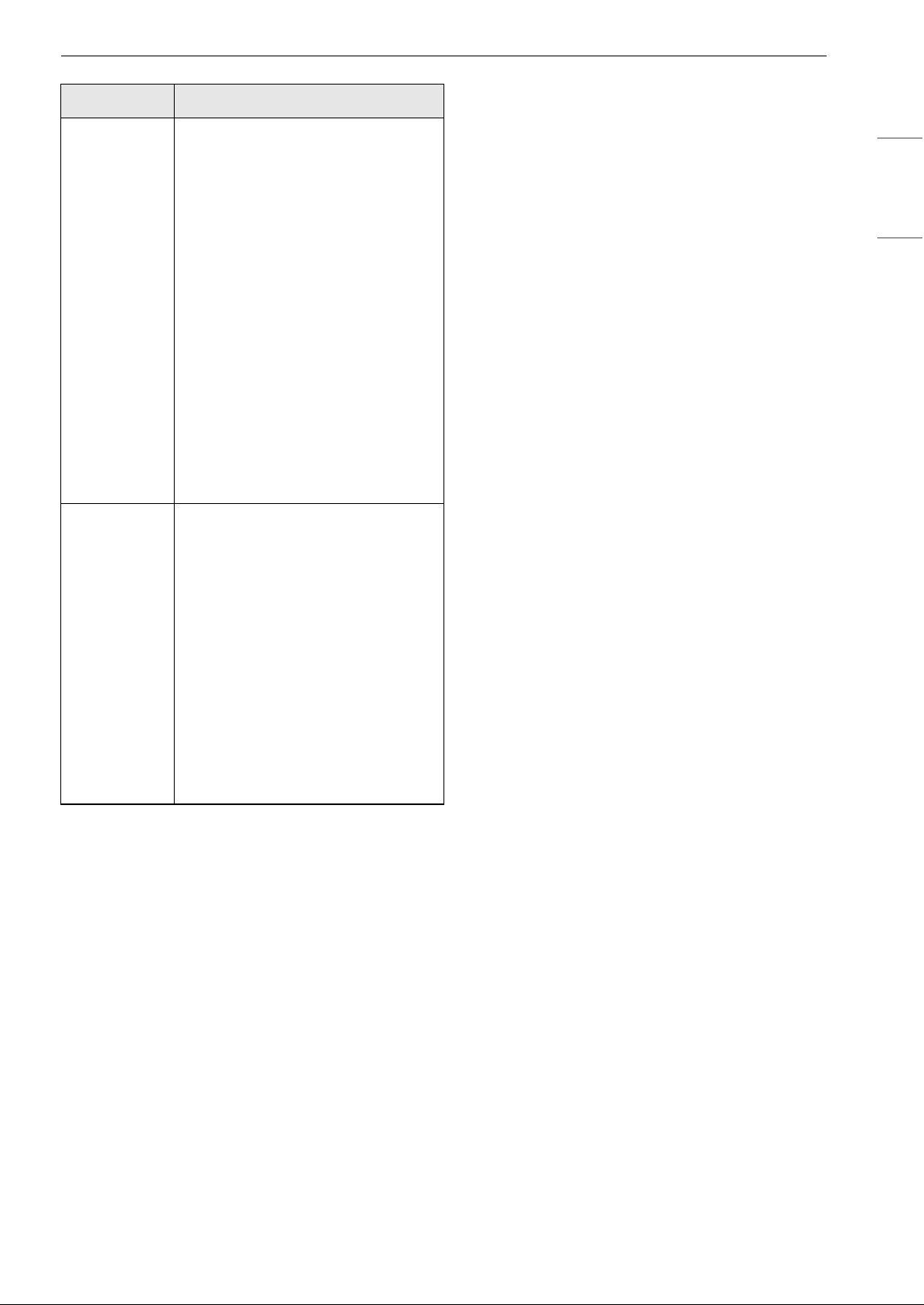
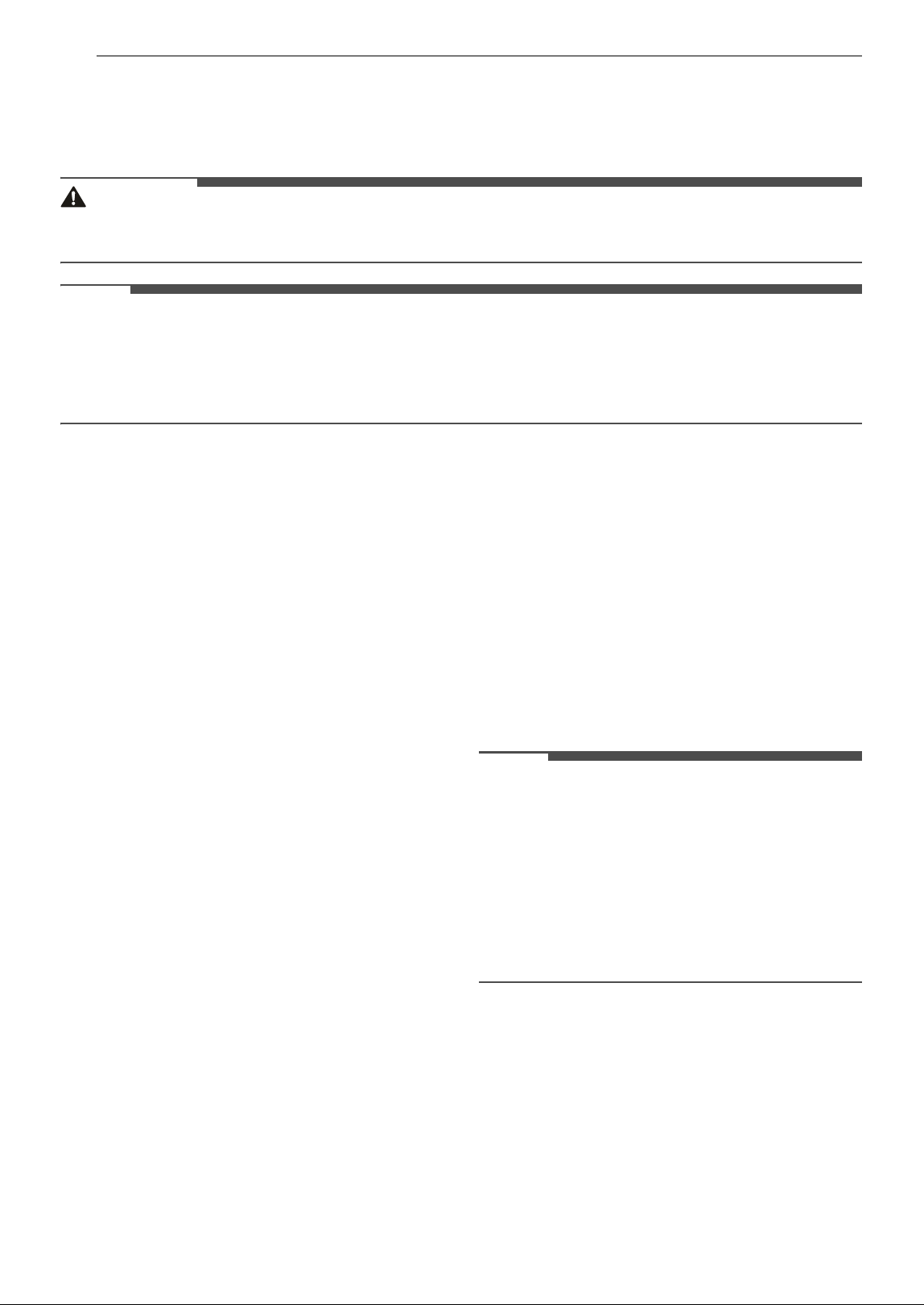
Installation Check Error Codes
Refer to the chart below before calling for service.
25INSTALLATION
ENGLISH
Error Code Possible Cause and Solution
OE
Drain hose is kinked or pinched.
• Feed the drain and water
supply hoses through the hole
under the sink. Then gradually
slide the dishwasher into the
cabinet while pulling on the
hoses under the sink to take up
any slack. This helps avoid
kinking the hoses or trapping
them beneath the dishwasher.
Drain hose is connected to the
disposal without removing the
knockout plug.
• Remove the knockout plug
from the disposal.
Waste tee or disposal is clogged.
• Remove knockout plug on the
waste tee or disposal.
IE
Water supply line is kinked
under dishwasher.
• Feed the drain and water
supply hoses through the hole
under the sink. Then gradually
slide the dishwasher into the
cabinet while pulling on the
hoses under the sink to take up
any slack. This helps avoid
kinking the hoses or trapping
them beneath the dishwasher.
House water supply is not turned
on.
• Turn the water faucet on.
26 OPERATION
OPERATION
Before Using
WARNING
• To reduce the risk of fire, electric shock, or injury to persons, read the SAFETY INSTRUCTIONS before
operating this appliance.
NOTE
• Connect to the hot water supply only. The water supply temperature should be a minimum of 120 °F (49
°C) for better washing performance and shorter cycle time.
• Follow the instructions for loading the dishwasher to ensure effective cleaning.
• Remove insoluble items such as bones, toothpicks, and pieces of paper while loading the dishwasher.
Quick Start
1 Load the dishes.
• Pull each rack out and load the dishes as
described in this manual.
• Only load items that are dishwasher-safe.
• Scrape the dishes free of excess food,
bones, and any other hard, non-soluble
residue. Remove solid, burned-on scraps
from dishes prior to loading in the
dishwasher.
• Place items with deep dish bottoms at an
angle to help water run off and speed the
drying process.
• Do not load items that are not heat-
resistant or have decorative metal trim.
2 Add the detergent.
• Using the guidelines in this manual, fill the
detergent cup with the recommended
amount of detergent and close the lid. If a
prewash is desired, the recess on top of the
lid should also be filled with detergent.
3 Turn on the dishwasher.
• To turn on the display panel, press the
POWER button.
4 Check the rinse aid.
•The Rinse Aid LED will flash if the level of
rinse aid in the dishwasher is low. Add rinse
aid if the level is low to maintain the
effectiveness of the dry cycle.
5 Select the cycle and options.
• Select the cycle and options that best fit the
load by referring to the Cycle Guide. The
display will show the estimated time for the
cycle and options selected.
6 Operate the dishwasher.
•Press the START button and then close the
door in less than four seconds to operate
the dishwasher. If the door is not closed
within four seconds, START button flashes,
and the cycle does not start.
NOTE
• If the door is opened during the cycle, the
dishwasher will stop. To resume the cycle, see
methods 1 and 2 above.
• If the door is opened during the cycle and is not
closed within four seconds after selecting the
START button, or if the door is closed without
pressing the START button, the white LED (on
some models) with time flashes, an audible tone
is heard, and the cycle does not start.
7 End of cycle.
• When the cycle is complete, a chime will
sound and the display will show
ENd for 30
seconds.
• It is normal for the dishwasher to chime
continuously if you open it during operation
or just after the cycle ends. The dishwasher
is letting you know that the interior
temperatures of the unit are hot and to use
27OPERATION
ENGLISH
caution when reaching inside. Once the unit
has cooled down, the chiming will stop.
CAUTION
• Do not open the door during operation or
immediately after it has completed the wash
cycle as the escaping steam may cause scalding
as the door is opened.
NOTE
• Empty the lower rack first and then the upper
rack. This will avoid water dripping from the
upper rack onto dishes in the lower rack.
Auto-Off
The dishwasher automatically turns off after four
minutes of inactivity if paused or if no cycle is
started.
28 OPERATION
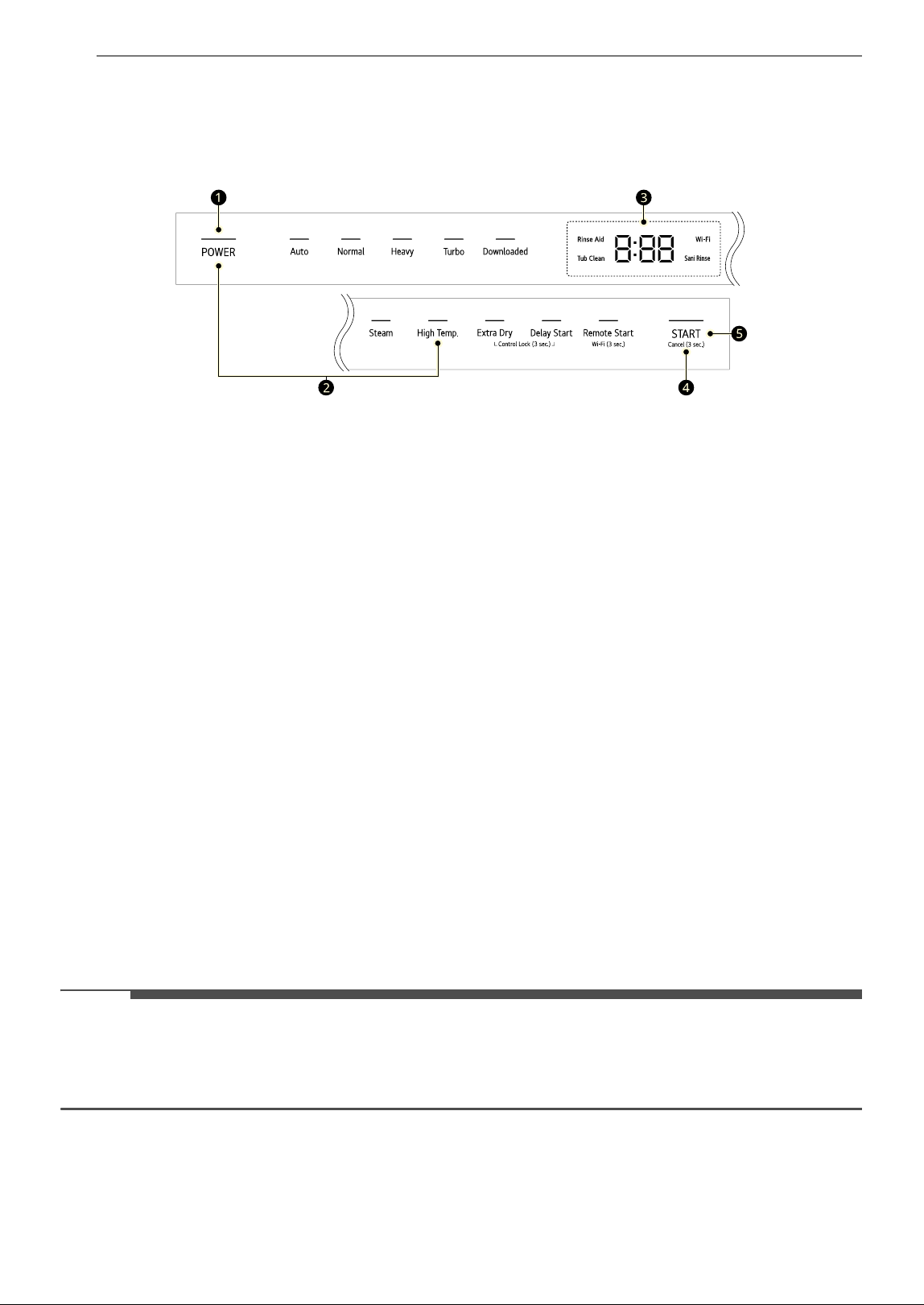
Control Panel
Control Panel Features
• Refer to the Using the Option Setting Mode topic for details on each option.
a POWER On/Off Button
• Press this button to turn the dishwasher on or off.
• After the cycle is complete, the power automatically turns off for purposes of safety and economy.
• If there is a power surge, power outage, or disruption of any kind, power is automatically turned off
for safety.
• When power is connected again, the dishwasher will turn on automatically and resume the cycle.
b Option Setting Mode
• Set various options using the Option Setting Mode.
• While the appliance is off, Press POWER and High Temp. at the same time.
• Refer to the Using the Option Setting Mode topic for each function of the Option Setting Mode.
c Display
• Rinse Aid
- This LED flashes when the rinse aid level is low. The LED automatically shuts off when the rinse aid
is refilled or the level is set to 0.
- To adjust the rinse aid level, refer to the Using the Option Setting Mode topic.
• Tub Clean
- The Tub Clean LED flashes every 30 cycles. To activate or deactivate the LED, refer to the Using the
Option Setting Mode topic.
•
8:88 : Digital Display
- The digital display on the control panel shows the ESTIMATED cycle time. When the cycle and
options are selected, the display shows the total estimated time to complete those selections.
During operation, the display shows the remaining estimated operating time.
NOTE
• The estimated time shown on the display does not include delay times for heating water, etc.
•If Delay Start is selected, the display shows the delay time in hours.
• Cycle time may vary depending on the soil level of your load.
• [L : Control Lock
- This feature locks all of the buttons on the control panel.
- To activate or deactivate Control Lock, press and hold Extra Dry and Delay Start simultaneously
for 3 seconds.
29OPERATION
ENGLISH
• Sani Rinse
- If the High Temp. option is added to a cycle, the Sani Rinse LED stays lit at the end of the cycle if
the water reached a sufficiently high temperature (except on the Refresh (P9) cycle).
• Wi-Fi
- When the appliance is connected to the internet through a home Wi-Fi network, this LED
illuminates.
- Press and hold Remote Start for approximately 3 seconds to connect to the network.
d Cancel Button
• The drain pump activates and the cycle cancels. Once the dishwasher finishes draining, the power
turns off.
•Press and hold START for 3 seconds to activate.
e START Button
• To operate the machine, either press START and close the door within 4 seconds or close the door
and press START.
• If more than 4 seconds have passed since pressing START, an alarm will sound when the door is
closed.
NOTE
• All buttons on the control panel are locked during the cycle to prevent settings from being changed
during a cycle.
• Buttons can be controlled after opening the door.
• The door is not locked during the cycle.
Wash Cycles
Select your desired cycle.
Auto
This cycle senses the soil amount and soil
toughness and is optimized to achieve the best
cleaning.
Normal
This cycle is for daily, regular, or typical use to
completely wash a full load of normally soiled
dishes. The energy usage label is based on this
cycle without any options.
Heavy
This cycle is for heavily soiled dishes and dishes
with hardened on soil. This cycle defaults to the
strongest spray intensity and uses it to wash
heavily soiled dishes.
Turbo
This cycle will clean heavily soiled dishes in an hour
using slightly more energy and water.
• This cycle does not have drying. Select the Extra
Dry option for better drying.
Downloaded
Use a dedicated cycle downloadable via Wi-Fi or
NFC. You must install the LG ThinQ smartphone
app to download cycles other than the default Tub
Clean cycle.
NOTE
• Only the cycle code for the current Downloaded
cycle appears on the appliance. See the
smartphone app for cycle codes, names, and
more information about the available cycles.
- Default Cycle : P1-Tub Clean
• Tub Clean (P1)
This cycle is for cleaning the inside of the
dishwasher. Use the cycle without dishes in the
machine. It eliminates residual soils, odor, white
spots, and other dirt. Add citric acid or another
cleaning agent for more effective results.
30 OPERATION
NOTE
• Express (P2)
This cycle will quickly clean lightly soiled dishes.
- This cycle does not have drying.
• Rinse (P3)
This cycle is a quick rinse for dishes that will not
be washed immediately. The cycle rinses dishes
that have excess soil to soften dried on residue.
Rinsing the dishes helps prevent odors in the
dishwasher. No detergent should be used.
- This cycle does not have drying.
• Pots & Pans (P4)
Cleans heavily soiled cookware. No more hand
scrubbing frying pans and pots.
• Casseroles (P5)
Cleans greasy and heavily soiled dishes.
Casseroles come out clean.
• Glassware (P6)
Safely washes delicate glassware, leaving it
sparkling.
• Night Care (P7)
Quietly washes dishes overnight. Sleep soundly
knowing dishes will be clean in the morning.
• Delicate (P8)
Use this cycle to clean delicate items such as fine
china and stemware.
• Refresh (P9)
This cycle freshens up and warms dishes that
have been unused for a long time.
- Do not use detergent when using this cycle.
- The steam option cannot be turned off on this
cycle.
Options and Extra Functions
Select the desired cycle and then select the options
for that cycle.
Steam
This option adds steam at the start of the cycle to
improve wash performance.
High Temp.
Raises the main wash temperature to improve
cleaning.
If the High Temp. option is added to a cycle, the
Sani Rinse LED stays lit at the end of the cycle if
the water reached a sufficiently high temperature.
If the dishwasher did not reach a high enough
temperature because the High Temp. option was
not selected, the cycle was interrupted, or the
water could not be heated to the required
temperature, the indicator will not light up at the
end of the cycle. Open and close the door or press
POWER to turn the indicator off.
NOTE
• This high temperature rinse option can reach
temperatures high enough to meet the NSF/
ANSI Standard 184 test criteria for dishes and
glasses. Certified residential dishwashers are not
intended for use in licensed food
establishments. Only the High Temp. option has
been designed to meet the requirements for
NSF/ANSI Standard 184 test criteria. There is no
intention, either directly or indirectly, that all
cycles on a certified machine have passed for
NSF 184.
Extra Dry
Select the Extra Dry option for better drying
performance. This option adds extra drying time to
the cycle and raises the heated rinse temperature.
• When the rinse aid is empty, the Extra Dry
option is selected automatically.
Delay Start
This feature delays the start of a selected cycle.
Each time the Delay Start button is pressed, the
delay time increases by an hour. The delay time
can be set from 1 to 12 hours, in one-hour
increments.
Remote Start
Use a smartphone to control your appliance
remotely. You can also monitor your cycle
operation so you know how much time is left in the
cycle. Once this function is enabled, you can start a
cycle from the smartphone application. If the door
is not closed within 4 seconds after pressing
Remote Start, Remote Start is canceled.
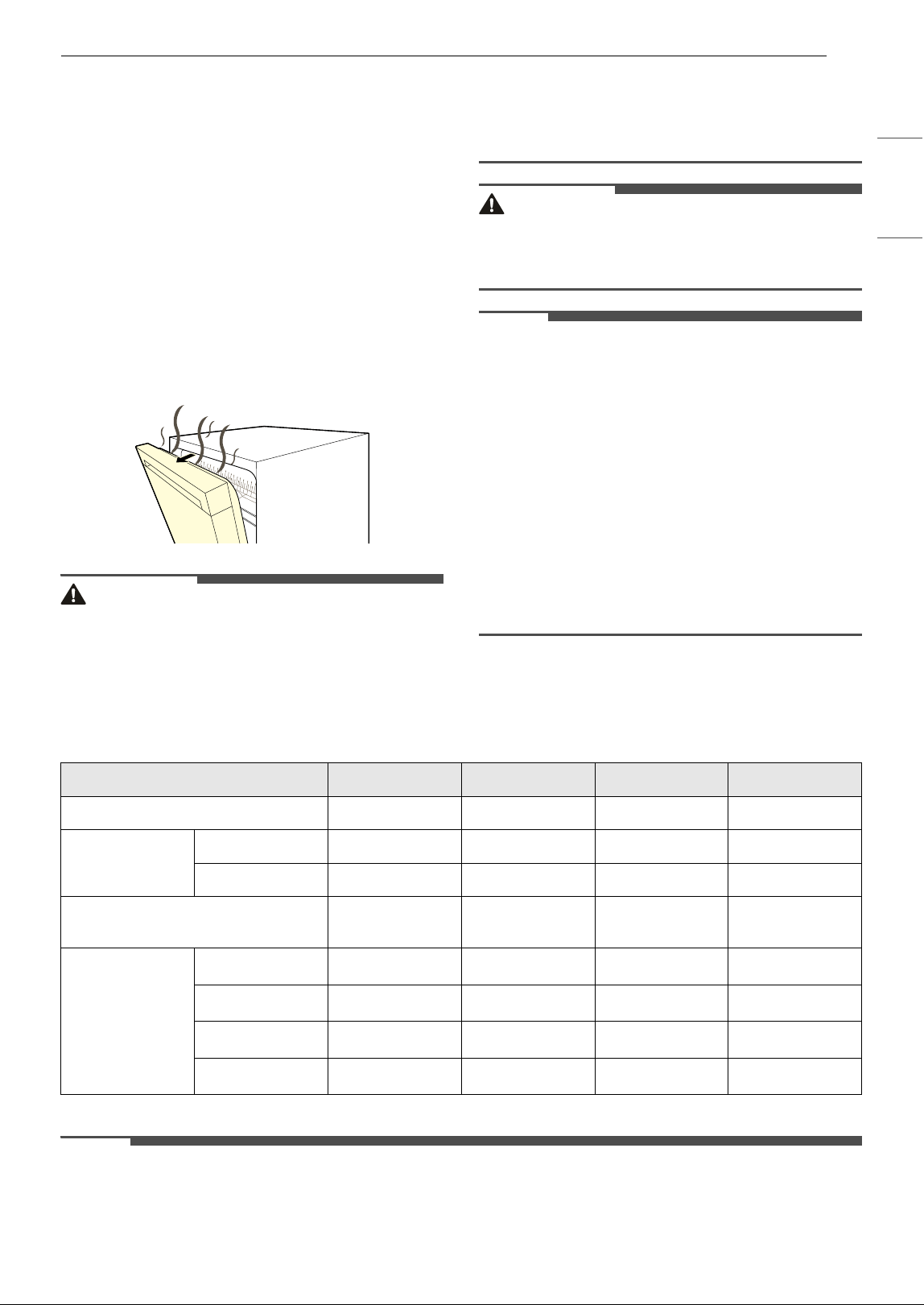
Using Auto Open Dry
The Auto Open Dry feature enhances the drying
performance by opening the door automatically
during the drying stage within the displayed cycle
time. For optimum drying results wait until the
31OPERATION
ENGLISH
cycle ends before unloading the dishwasher. The
cycle is fully complete when the display shows
"End". The door opening time varies depending on
the cycle selected.
• The default setting is
ON.
• To turn the Auto Open Dry function ON or OFF,
see Using the Option Setting Mode.
Turning the Auto Open Dry function off may
decrease drying performance. For best drying
performance, leave the Auto Open Dry function
turned on.
•The Auto Open Dry function activates only when
the product's internal temperature is within a
safe range.
WARNING
• Be careful as hot air and steam are released
when the door opens, and they can cause burns.
• Do not touch the inside of the product or the
door-opening mechanism while this function is
in operation. Doing so may cause burns, severe
injury, or product malfunction.
CAUTION
• Make sure there are no obstacles in front of the
product door when it opens automatically, as
this may lead to damage or a malfunction.
NOTE
• Even after the door opens automatically,
moisture may remain on some dishes or inside
the product.
• The end sound indicates that the wash cycle is
finished. For better drying, do not remove the
dishes immediately after the end of the sound.
Instead, let them dry naturally for at least 30
minutes.
• Natural drying may take 1 to 3 hours depending
on the surrounding temperature, humidity, and
the material of the dishes.
• Due to the nature of plastic materials, moisture
may remain even after using rinse aid.
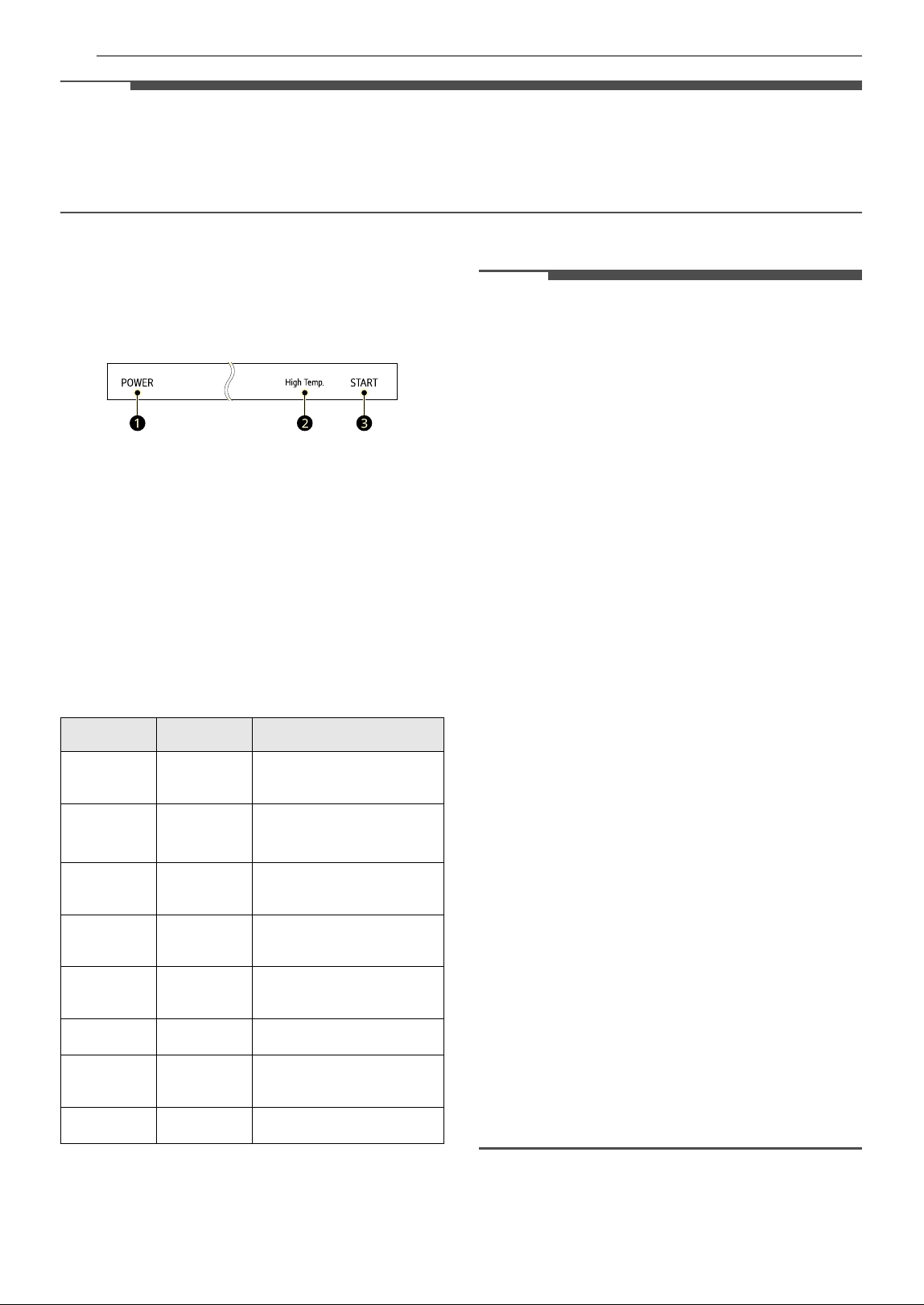
Cycle/Option Guide
The cycle guide below shows the available options for each cycle.
* Default setting
NOTE
• Actual water consumption will vary depending on soil level and hardness of water.
Cycle Auto Normal Heavy Turbo
Soil Level All levels All levels Heavy Light
Water Usage
(L) 13.1 - 23.6 9.2 - 29.2 24.7 - 27.8 25.3
(gal) 3.5 - 6.2 2.4 - 7.7 6.5 - 7.3 6.7
Wash Time with
Options (Mins.)
117 - 271 129 - 276 168 - 285 60 - 149
Available
Options
Steam
###*
High Temp.
####
Extra Dry
####
Delay Start
####
32 OPERATION
NOTE
• The actual running time and cycle time displayed may change depending on options chosen, soil level,
water temperature, and hardness of water. Therefore, display time and actual running time can be
different.
• Options are not available for Downloaded. The Tub Clean cycle is the default Downloaded.
Using the Option Setting Mode
You can set various options by using the Option
Setting Mode.
1 Ensure the appliance is off.
2 Press POWER a and High Temp. b at the
same time.
3 Refer to the table to set up each function.
4 Press START c to save.
NOTE
• Tub Clean Reminder
- The Tub Clean LED flashes every 30 cycles. You
can activate or deactivate the LED.
• Rinse Aid Level
- Adjust the level of rinse aid from L0 to L4.
- For more information, refer to the Rinse Aid
Dispenser Adjustment section.
• Clean Light (End Indicator)
- Turning on Auto Open Dry disables the Clean
Light .
- If Auto Open Dry is off, the Clean Light default
is ON, and the white light at the bottom front
of the dishwasher remains on after the cycle
until the door is opened. If the Clean Light is
turned OFF, the end of cycle light turns off
after 90 seconds.
•Chime Sound
- Turn button sounds and notification sounds
on or off.
- The error alert sound cannot be turned off.
• Auto Setting
- The default ON setting selects options
automatically for better washing and drying
performance.
- If the setting is changed to OFF, the options
are not selected.
•End Sound
- Turn the end of cycle sound on or off.
•Auto Open Dry
- Turn Auto Open Dry on or off.
- The Auto Open Dry feature enhances the
drying performance by opening the door
automatically while drying.
•Wi-Fi
- Turn the Wi-Fi on or off.
Function Button Display
Tub Clean
Reminder
Extra Dry
Off
& On
Rinse Aid
Level
High
Temp.
L2
~ L3 ~ L4 ~ L0
~ L1 ~ L2 ~
Clean
Light
Steam
On
& Off
Chime
Sound
Download
ed
On
& Off
Auto
Setting
Turbo
On
& Off
End Sound Heavy
On
& Off
Auto Open
Dry
Remote
Start
On
& Off
Wi-Fi Normal
On
& Off
33OPERATION
ENGLISH
Loading the Dishwasher
For effective washing performance, always follow
these instructions.
• Remove large particles of food debris from
plates including bones before loading.
• Items with burnt on food should be soaked prior
to loading in the dishwasher.
• Deep pots or dishes should be placed upside
down.
• Make sure that all items do not touch each other.
Non-Dishwasher Safe Items
The combination of high water temperature and
dishwasher detergents may damage certain items.
Do not wash the following items in the dishwasher.
• Copper or anodized aluminum
• Hand painted silver or gold leaf china
• Wood or bone handled utensils
• Iron or non-rustproof utensils
• Plastic items which are not dishwasher safe
• Sterling silver or gold-plated flatware or delicate
or metal-rimmed china
• Fragile items such as crystal glasses
CAUTION
• Do not place pots or pans with plastic handles in
the appliance as the handles may deteriorate
due to the heat and detergent.
• Waterproof or long-lasting lipstick smudges on
glasses may not be removed during the wash.
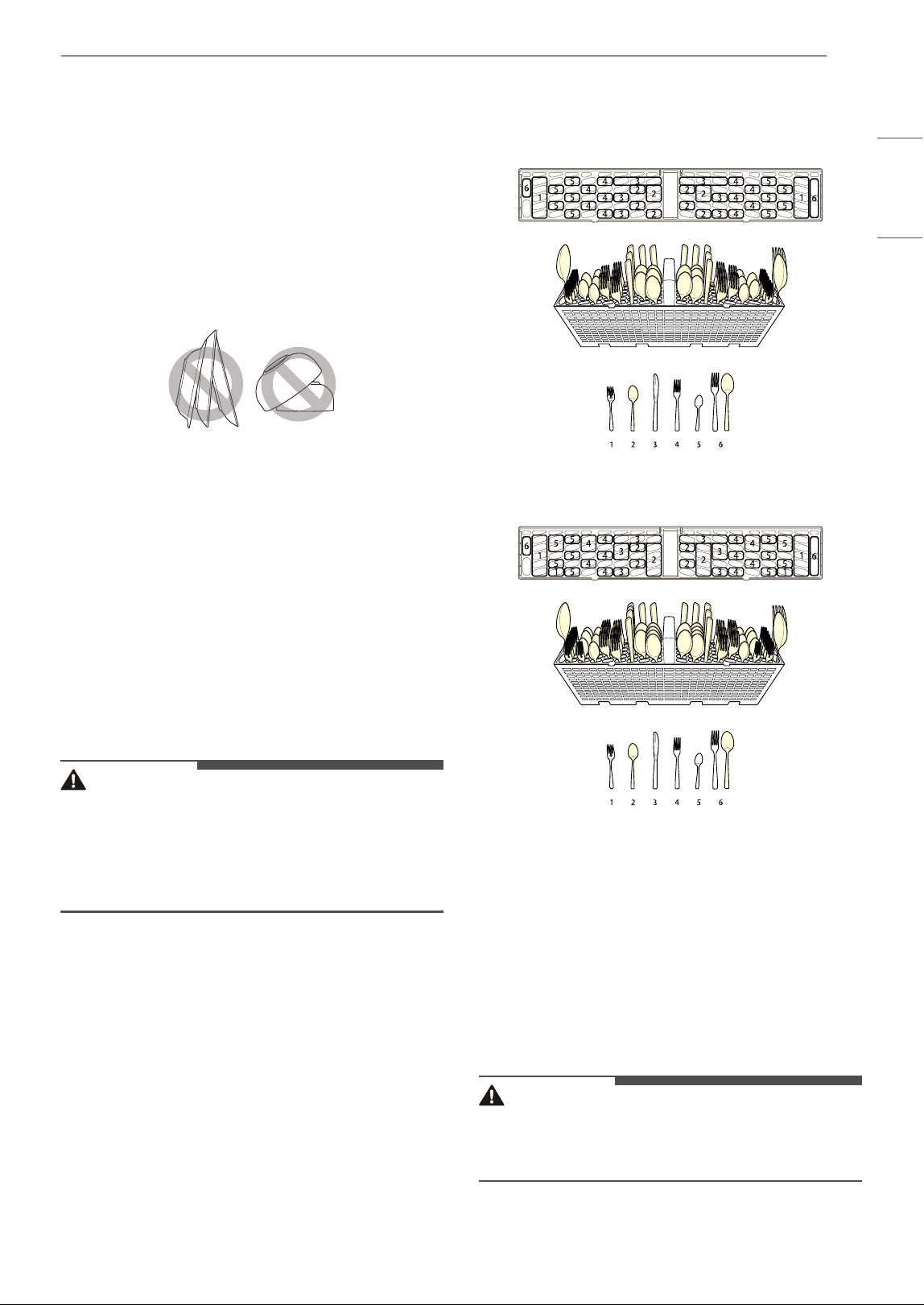
Loading the Silverware
Basket
The silverware basket has separators to avoid
scratching and tarnishing of delicate silverware.
Loading Silverware into the Basket
Loading 10 Place Settings
Loading 12 Place Settings
Silverware Loading Tips:
• For best cleaning results, use the top separators
in the basket when loading silverware. The
separators will prevent nesting of silverware.
• Load sharp items, such as knives, pointing down.
• When unloading the dishwasher, it is best to
start with the silverware basket. Doing so will
prevent water droplets from falling on your
silverware from the upper rack.
WARNING
• Be careful when loading and unloading sharp
items. Load sharp knives with the handles up to
reduce the risk of personal injury.
34 OPERATION
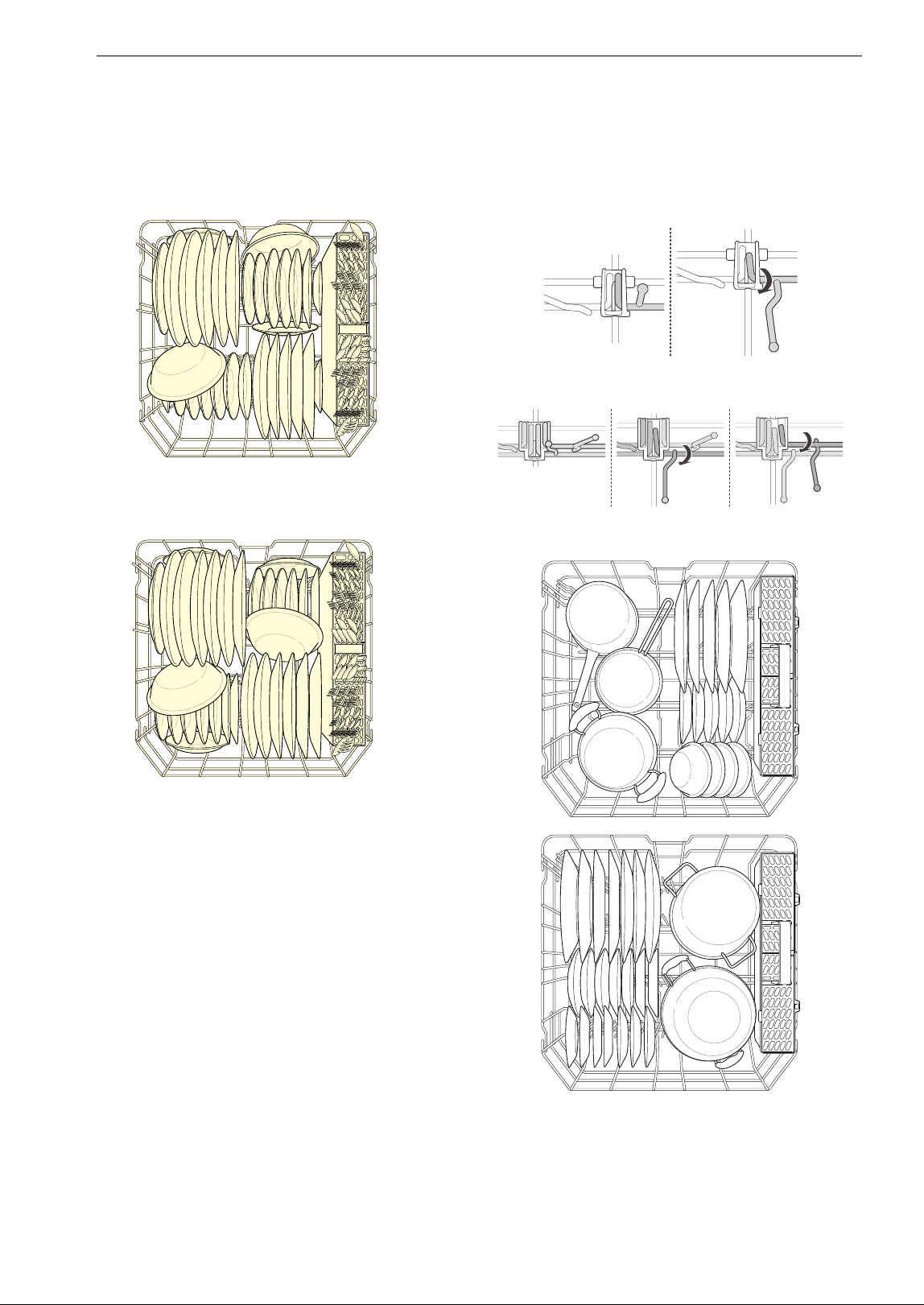
Loading the Lower Rack
Loading Dishes into the Lower Rack
Loading 10 Place Settings
Loading 12 Place Settings
Lower Rack Loading Tips
• Plates should be positioned upright and facing
the center of the rack, and pots, pans and large
dishes must be turned upside down.
• Load dinner plates, dishes, soup bowls, etc.
between the tines.
• Load cookie sheets, cake pans and other large
items at the sides or back of the rack. Loading
these items in the front of the dishwasher can
prevent the water spray from reaching the
detergent dispenser.
• Make sure that pot handles and other large
items do not stop the rotation of the spray arms.
• The lower rack should not be used for small
items such as cups, wine glasses, or small plates.
These items should be loaded in the upper rack.
• Make sure that large items do not interfere with
the rotation of the spray arms, and do not
prevent the detergent dispenser from opening.
Folding Down the Lower Tines
This feature is only available on some models.
Fold tines down to fit larger dishes; pull tines back
up to fit smaller dishes.
Case 1
Case 2
Loading Dishes & Pots
35OPERATION
ENGLISH
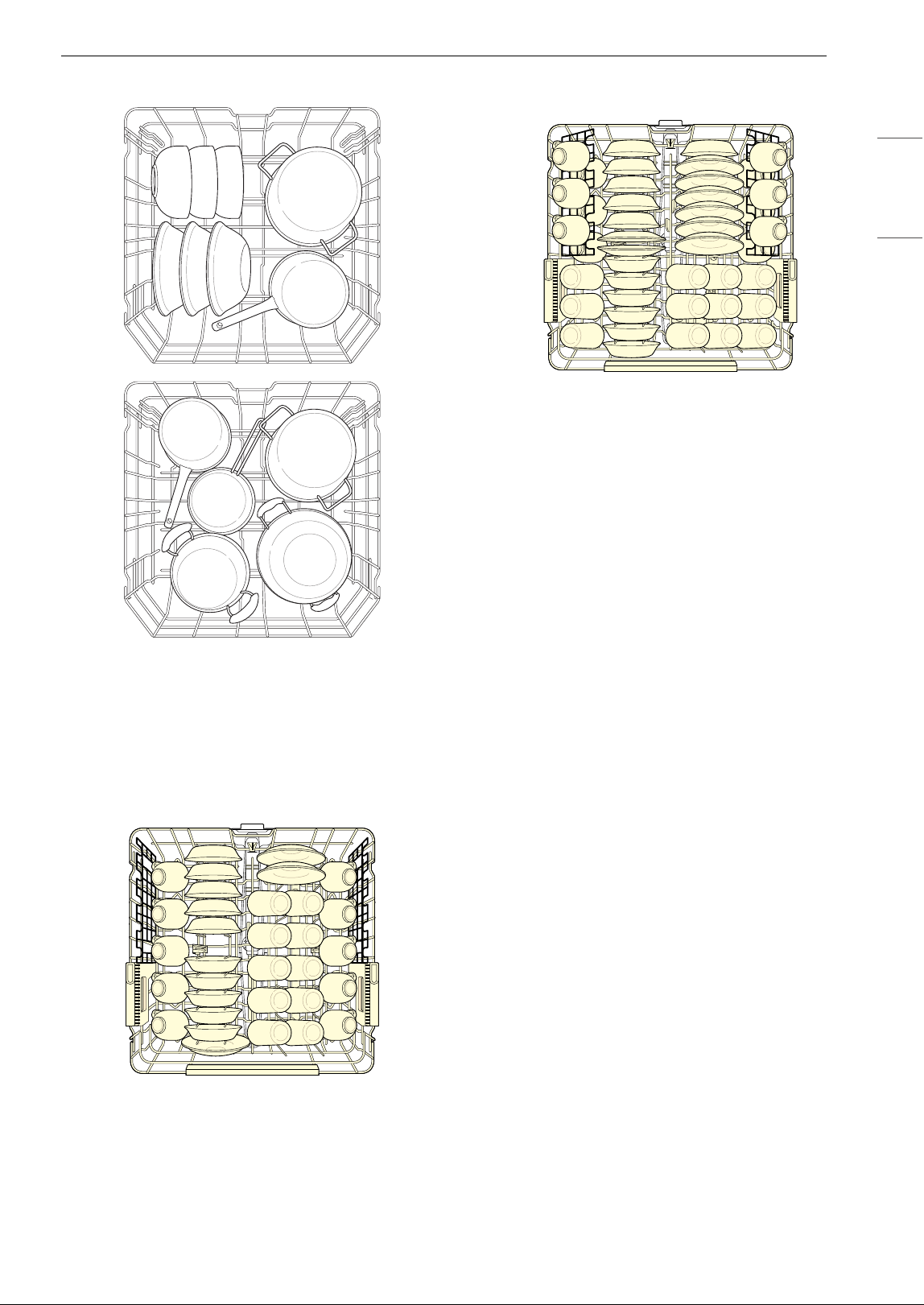
Loading Pots & Bowls
Loading the Upper Rack
Loading Dishes into the Upper Rack
Loading 10 Place Settings
Loading 12 Place Settings
Upper Rack Loading Tips
• Place cups and glasses in the rows between the
rack tines. Placing them over the rack tines can
lead to breakage and water spots.
• To avoid chipping, do not let stemware touch
other items.
• Place items so that the open end faces down for
cleaning and drying.
• Do not stack items on top of each other.
• Use the upper rack for small or delicate items
such as small plates, cups, saucers, glasses, and
dishwasher-safe plastic items.
• Cups, glasses, and bowls must be positioned
upside down.
• Make sure items do not interfere with the
rotation of the spray arms above and below the
upper rack.
• When loading larger items in the upper rack,
such as wine glasses or taller cups, it may be
necessary to remove the cutlery rack if one is
present. (For models with cutlery rack)
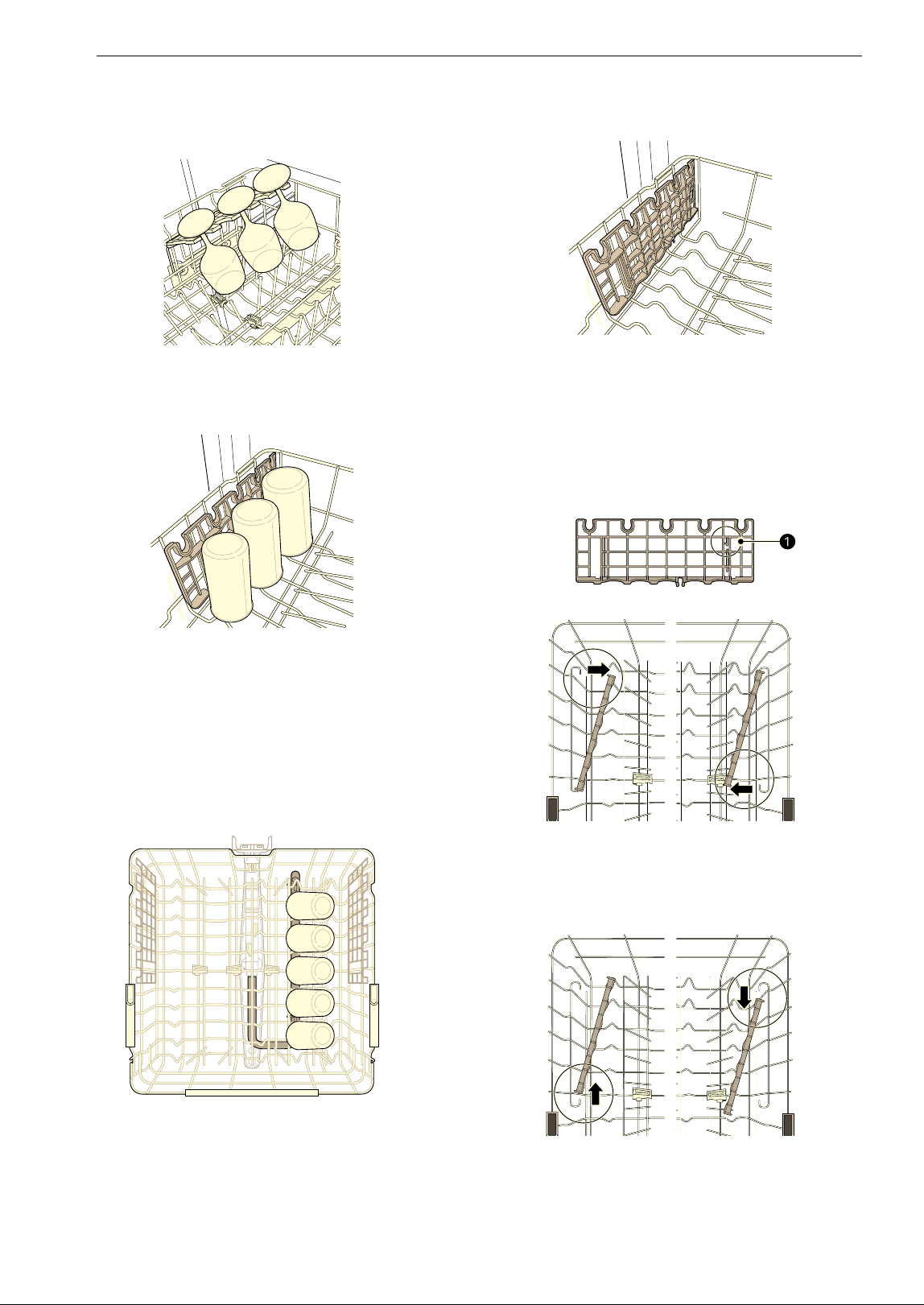
Loading the Cup Rack
This feature is only available on some models.
36 OPERATION
Extra cups or cooking utensils can be laid on the
fold down cup racks, which also provide support
for long-stemmed glasses.
The cup racks can be folded up out of the way for
tall glasses.
BlastZone
TM
This feature is only available on some models.
Get items such as tall glasses, water bottles, or
baby bottles cleaner by locating them over the
BlastZone
TM
nozzle holes in the upper rack.
Removing and Replacing Cup Rack
This feature is only available on some models.
The left and right cup racks are interchangeable
and can be removed.
1 Slide the cup rack down into its closed
position.
2 Locate the assembly slot a on the cup rack,
align the slot with the bar, and firmly pop the
rack off the support bar on that side.
• The rack on the left pops free at the back.
The rack on the right pops free at the front.
3 Slide the cup rack off the support bar on the
opposite side.
4 Follow the instructions in reverse to replace
the cup rack.
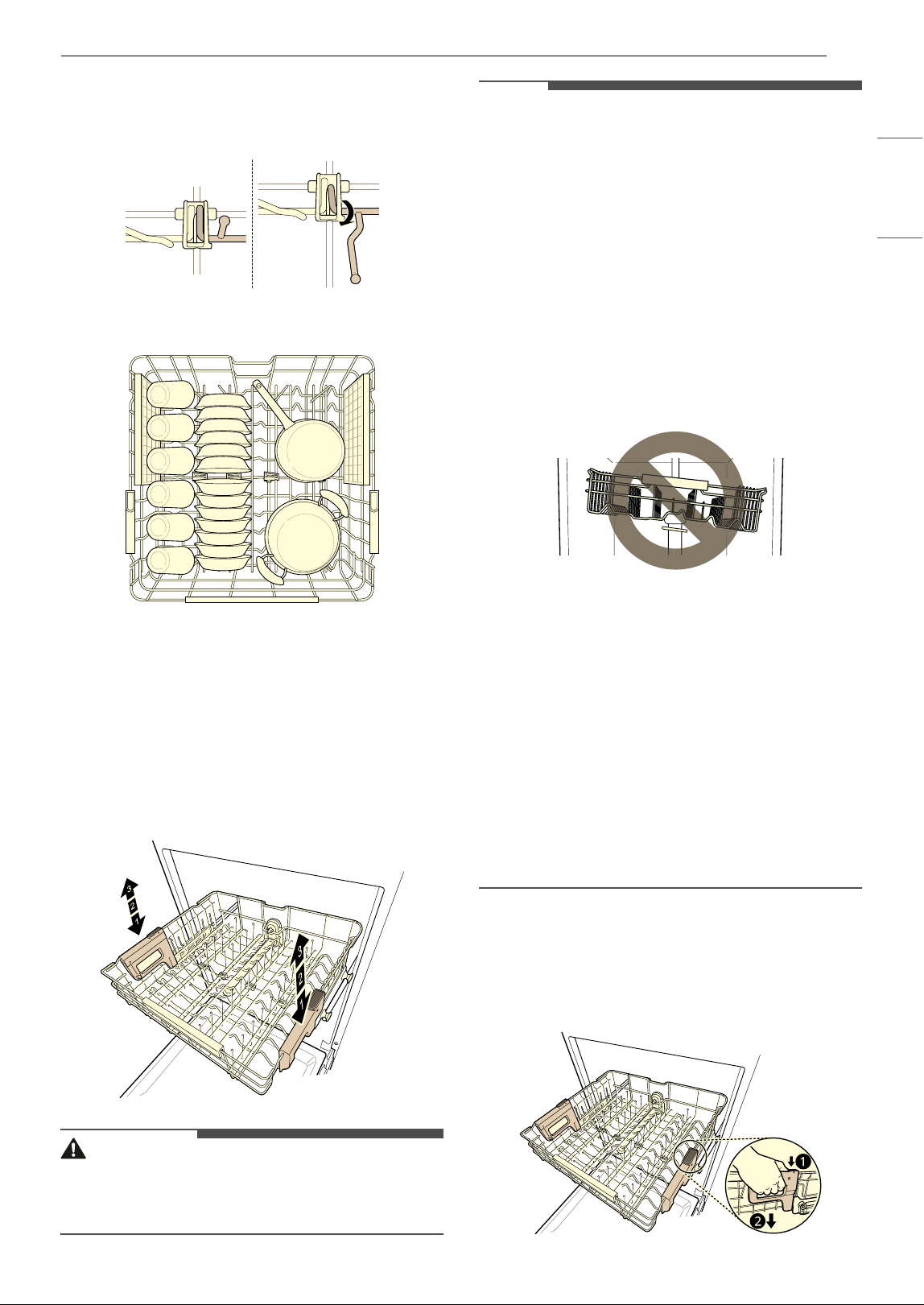
37OPERATION
ENGLISH
Folding Down the Upper Tines
Fold tines down to fit larger dishes; pull tines back
up to fit smaller dishes.
Loading Dishes & Pots
Height Adjustable Upper Rack
To accommodate larger items, the upper rack can
be adjusted up or down using the buttons on the
left and right sides. The dishwasher ships with the
upper rack raised.
There are three available positions for adjusting
the height of the upper rack to create more space.
WARNING
• Before adjusting, ensure the rack is empty of all
dishes. Otherwise dishes may get damaged or
you may get injured.
NOTE
• Raise the upper rack without pushing the
buttons on each side. Pushing the buttons when
raising the rack will prevent the rack from
locking into position.
• To set the rack to the middle position, it may be
easier to lower the rack all the way down and
then raise each side of the rack individually until
it clicks into place.
• Before pushing the upper rack into the
dishwasher, ensure the rack height is the same
on both sides. If the height is not the same on
both sides, the dishwasher door will not shut
and the upper spray arm will not connect to the
water inlet.
• There is a 2 3/16 inches (56 mm) gain in height
when the upper rack is moved to the lower
position.
• After adjusting the rack levels, check that the
spray arms are free to rotate.
• When the upper rack is in the lower position,
make sure the rack and the spray arm do not hit
the items on the lower rack.
• When the upper rack is in the lower position,
push in the upper rack first, and the lower rack
later.
• Pull out the lower rack first, and the upper rack
later.
Lowering the Rack
Hold the rack at the center of each side to support
its weight. Then, push the button on each side to
release the rack and lower it into position.
38 OPERATION
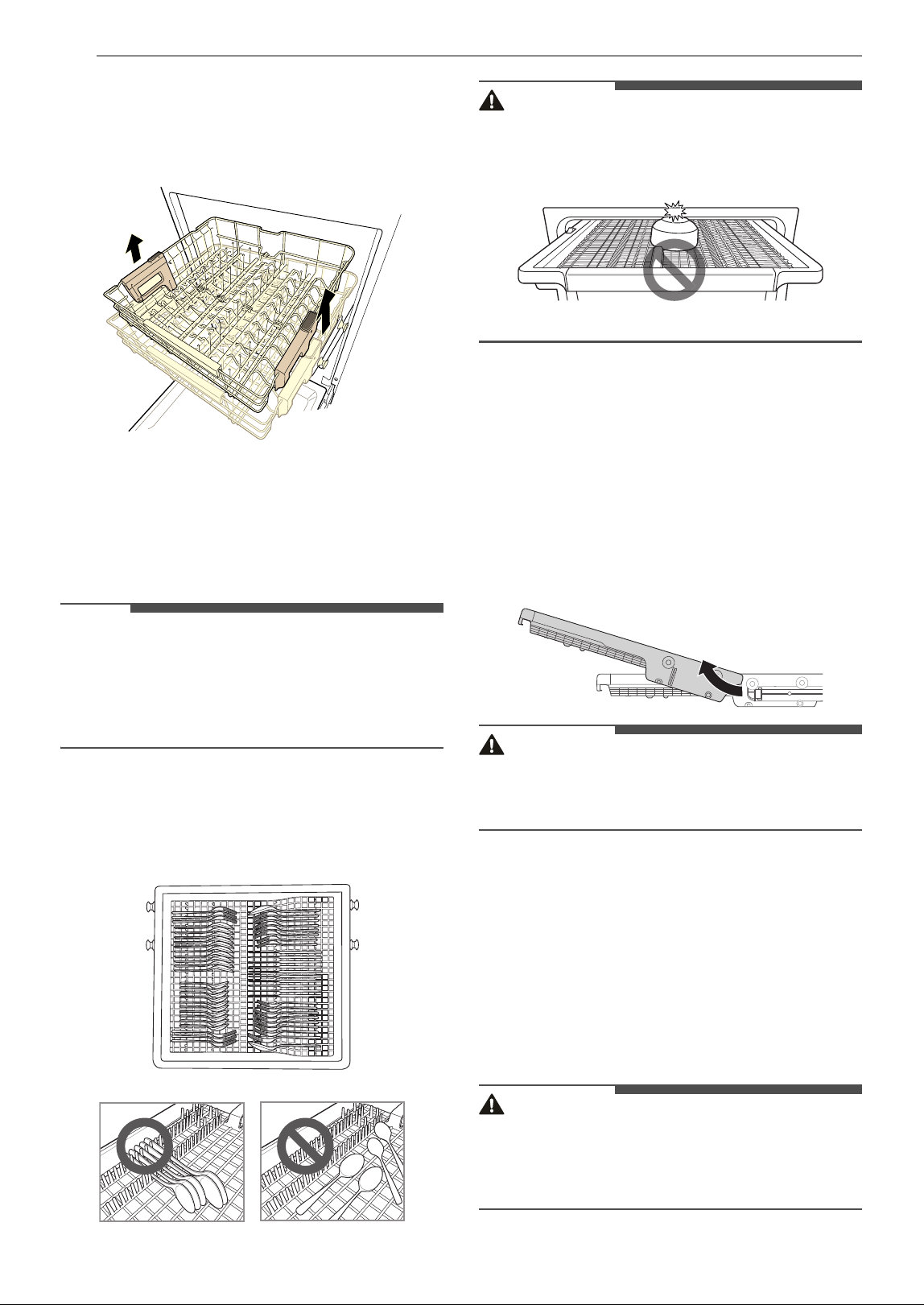
Raising the Rack
Lift the rack at the center of each side until the rack
locks into place in the upper position. It is not
necessary to lift the lock levers to raise the rack.
Loading the Cutlery Rack
The cutlery rack is best suited for flatware. The
separators on the cutlery racks help keep flatware
separated to avoid damage and improve cleaning.
NOTE
• For best cleaning performance, place flatware in
the silverware baskets. Heavily soiled utensils or
items with baked on foods should be placed in
the upper rack or spoon basket for best
performance.
Loading Silverware into the Cutlery
Rack
Loading 10 Place Settings
CAUTION
• Do not place bowls in the center of the cutlery
rack. The door may not close properly, resulting
in leakage.
Removing the Cutlery Rack
The entire cutlery rack can be removed if more
space is needed on the upper rack for larger items.
Always remove the cutlery from the rack before
removing the rack.
Pull the rack out to the end of the rails. Then, lift
the front of the rack so that the rollers clear the
stop on the end of the rail. The rack can now be
slid forward and removed from the rails.
WARNING
• Be careful when loading and unloading items
with sharp edges. Load sharp knives with the
blade down to reduce the risk of injury.
Adding Cleaning Products
Adding Detergent to the Dispenser
• The amount of detergent needed depends on
the cycle, load size, and soil level of dishes.
• Put detergent into the detergent compartment
before starting any cycle, except the Rinse
(Downloaded: P3) cycle.
WARNING
• Dishwasher detergent and rinse aid contain
chemical components, like all other household
detergent. So, they must be kept out of the
reach of children.
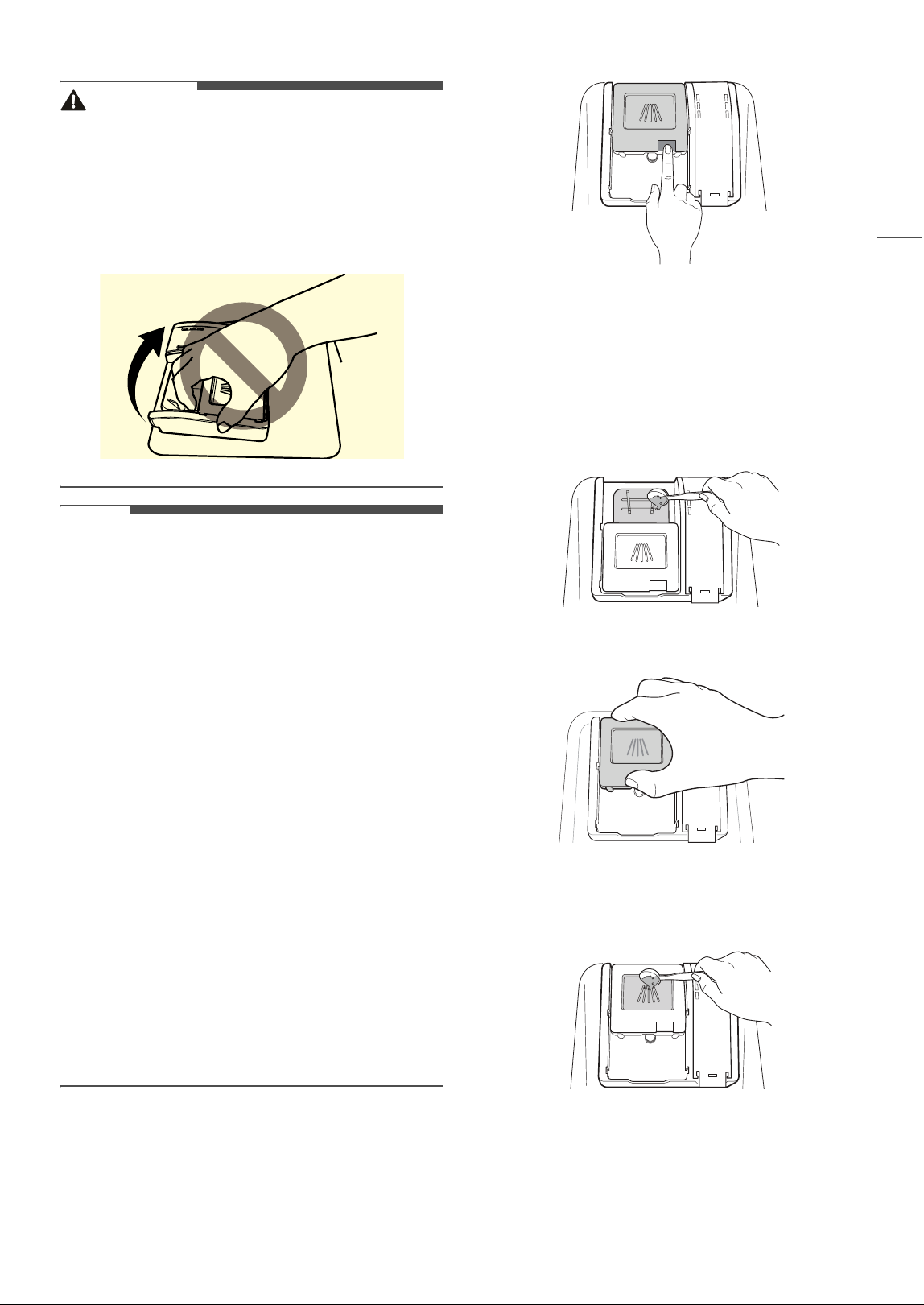
39OPERATION
ENGLISH
CAUTION
• Use only detergent intended for dishwashers.
Incorrect detergent may cause the dishwasher
to fill with suds during operation. Excess suds
may reduce wash performance and may cause
the dishwasher to leak.
• To avoid damaging the dispenser, do not pull up
on the dispenser to close the dishwasher door.
NOTE
• After completion of the wash program, check
whether the detergent was completely washed
out.
• Some dishwasher detergent tablets may become
stuck in the dispenser due to their excessive size.
Tablets can be placed onto the base of the wash
tub next to the filter before starting the cycle.
• Too much detergent can leave a film on dishes
and in the dishwasher, resulting in poor wash
performance.
• If dishwasher detergent tablets are used without
liquid rinse aid, the dishes and dishwasher
interior will have excessive moisture. Select the
Dry Boost option for better drying performance.
• Using liquid rinse aid improves drying
performance by allowing water to drain off of
dishes after the final rinse.
• Do not use detergent tablets for shorter wash
cycles. The tablet may not dissolve completely,
causing detergent residue on dishes and
inefficient cleaning.
• Using a wash booster helps remove spots,
residue, and the white film caused by hard
water. It does not help remove excess detergent
residue.
1 Push the button on the dispenser lid to open
the cover.
2 Add dishwashing detergent to the main wash
compartment until the level is between the
lines marked 15 and 25.
• Fill to over the 25 line for hard water or
heavily soiled loads.
• Fill to the 15 line for soft water or lightly
soiled loads.
3 Slide the detergent lid closed until it clicks.
4 If a prewash is desired, fill the recessed
prewash compartment area on the lid with
detergent.
Adding Rinse Aid to the Dispenser
The Rinse Aid LED appears in the display when
more rinse aid is needed.
۱٥
۲٥
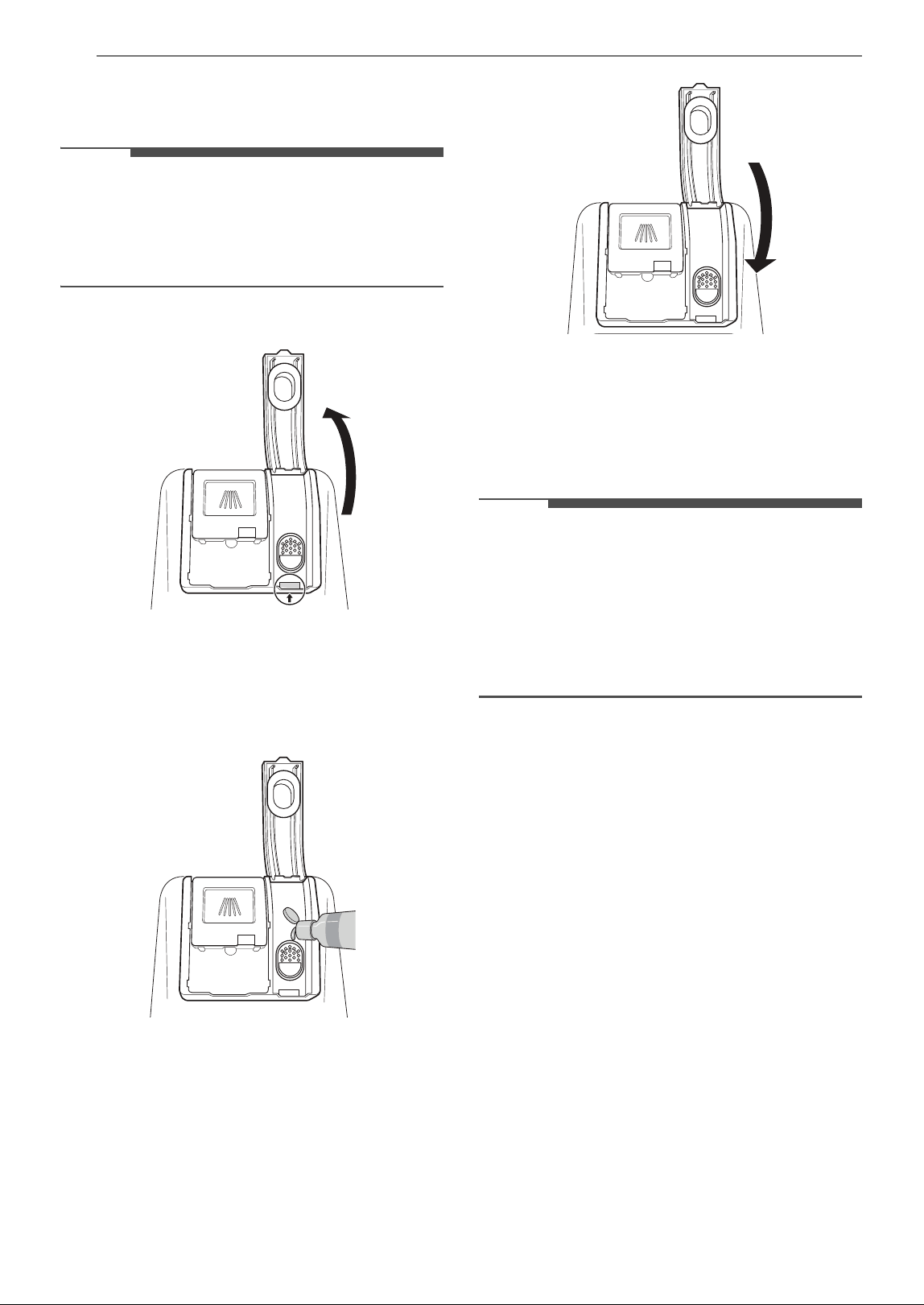
40 OPERATION
The use of rinse aid is recommended to prevent
water spots on dishes and to enhance drying
performance.
NOTE
• Only use liquid rinse aid in the dishwasher.
• Do not overfill the rinse aid dispenser.
• Wipe off any spilled rinse aid around the
dispenser.
1 Open the rinse aid lid by lifting up the flap.
2 Add a liquid rinse aid to the maximum fill
level. Allow the rinse aid to settle in the
dispenser while filling, or air bubbles may
result in poor drying performance. Avoid
overfilling the dispenser.
3 Close the lid to lock the dispenser. Rinse aid is
dispensed automatically during the final rinse
cycle.
Rinse Aid Dispenser Adjustment
The dispenser has five adjustment levels. The
dishwasher is programmed at the factory for a
rinse aid dispenser level of 2. This can be checked
and adjusted from the control panel.
NOTE
• Adjust the setting higher if you have hard water
and notice calcium buildup on your dishes.
• Setting the rinse aid control too low will
contribute to spotting and streaking on dishes
and poor drying performance.
• Setting the control too high can cause foaming,
which will cause poor wash performance.
1 Ensure the appliance is off.
2 Press Power and High Temp. at the same
time.
3 Press High Temp. to change the rinse aid
dispenser setting. Each press of the button
changes the setting one step from L0 to L4.
Once the desired rinse aid dispenser setting is
selected, press START to save.
Refilling the Rinse Aid
How often the dispenser needs to be refilled
depends on how often dishes are washed and the
rinse aid setting used.
•The Rinse Aid LED flashes when more rinse aid
is needed, unless the rinse aid dispenser setting
is set to L0.
41SMART FUNCTIONS
ENGLISH
SMART FUNCTIONS
LG ThinQ Application
The LG ThinQ application allows you to
communicate with the appliance using a
smartphone.
LG ThinQ Application Features
• Feature Updates
- Experience new features by updating the
features of the product through the LG ThinQ
application.
When a new feature is available for update,
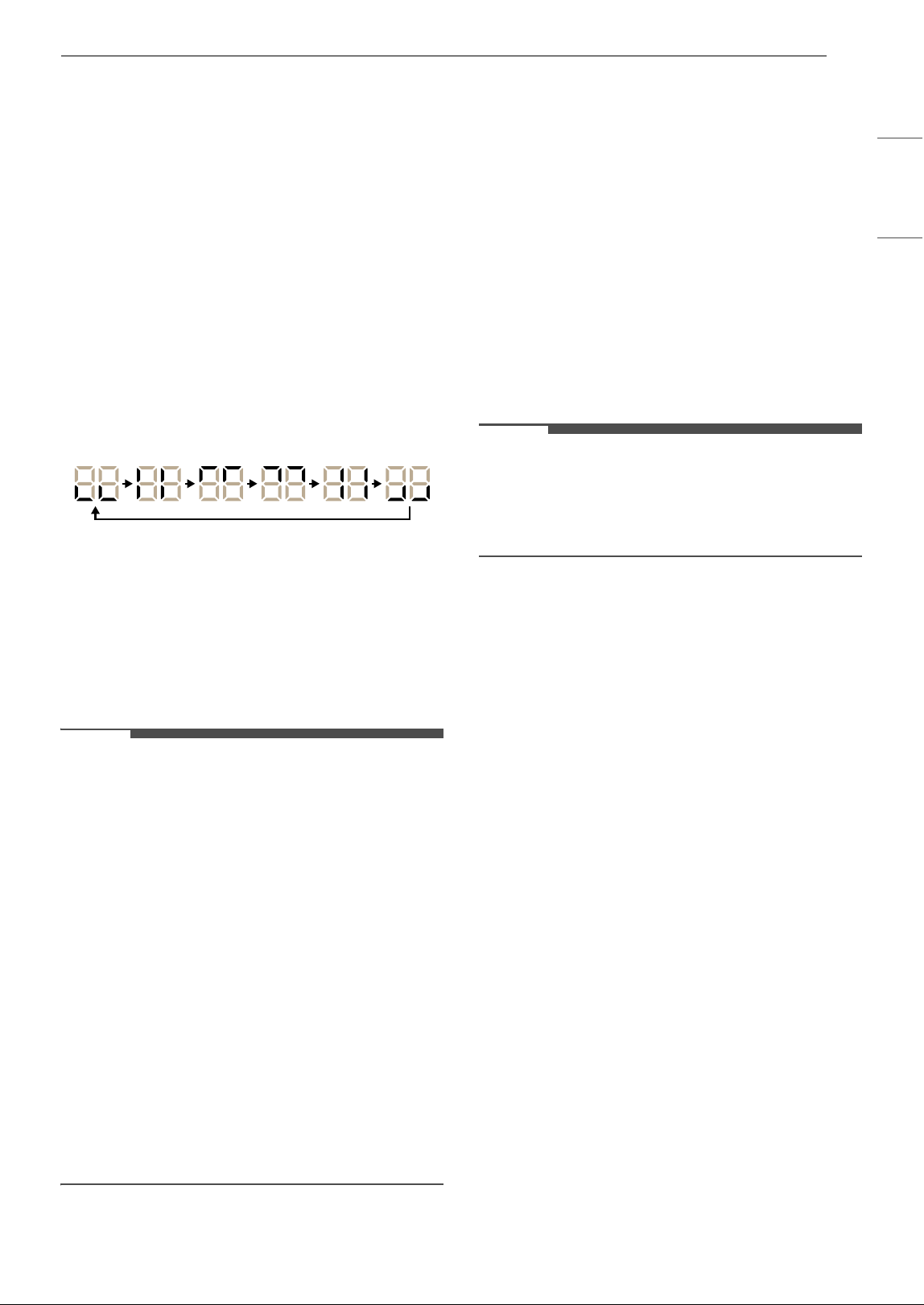
the outer segments of the digital display light
up in rotation when the product is powered
on.
If you see this notification, press the update
notification on your smartphone to enter the
Feature Update center of the LG ThinQ
application. Select a new feature and press the
Update button to proceed with the update.
The progress of the update is shown in the
digital display.
The status window automatically turns off
when the update is successful.
NOTE
• The update may take a long time, and the
product cannot be used during that time. Please
proceed only when you have sufficient time.
• The update cannot proceed while the product is
in use. Wait until after the cycle ends to begin
the update.
• If the power is turned off during the update, the
update may be interrupted and the product may
become unusable.
• If the product cannot be powered on during or
after the update, flip the breaker to shut off
power for at least 30 seconds and then turn it
back on.
• A description of the new features can be found
in the application by selecting the dishwasher
card and tapping the green arrow icon.
• Once updated, product features may no longer
be described accurately in the owner’s manual or
may have different contents.
• Monitoring
- Check the current status, cycle, options,
running time and cycle end time for the
appliance on a single screen.
• Downloaded
- You can download new and specialized cycles
that are not included in the standard cycles on
the appliance. Connect the appliance to the
app to download a variety of specialty cycles
specific to the appliance. Once cycle download
is completed in the appliance, the product
keeps the downloaded cycle until a new cycle
is downloaded.
NOTE
• Only one downloaded cycle can be stored on the
appliance at a time.
•The Tub Clean (P1) cycle is the default
downloaded cycle.
• Tub Clean Coach
- This function shows how many cycles remain
before running the Tub Clean (Downloaded:
P1) cycle.
• Smart Diagnosis
- This function provides useful information for
diagnosing and solving issues with the
appliance based on the pattern of use. Select
Smart Diagnosis in the app and follow the
instructions. For additional information, refer
to the online owner's manual.
• Settings
- Set the Rinse Aid Dispenser Level, Tub Clean
Reminder, Signal Level and Clean Indicator
Light.
When the cycle is complete or the appliance
has problems, you have the option of receiving
push notifications on a smart phone.
• Push Alerts
- Turn on the Push Alerts to receive appliance
status notifications.
The notifications are triggered even if the LG
ThinQ application is off.
• Energy Monitoring
- You can use the energy monitoring function to
check the estimated power usage.
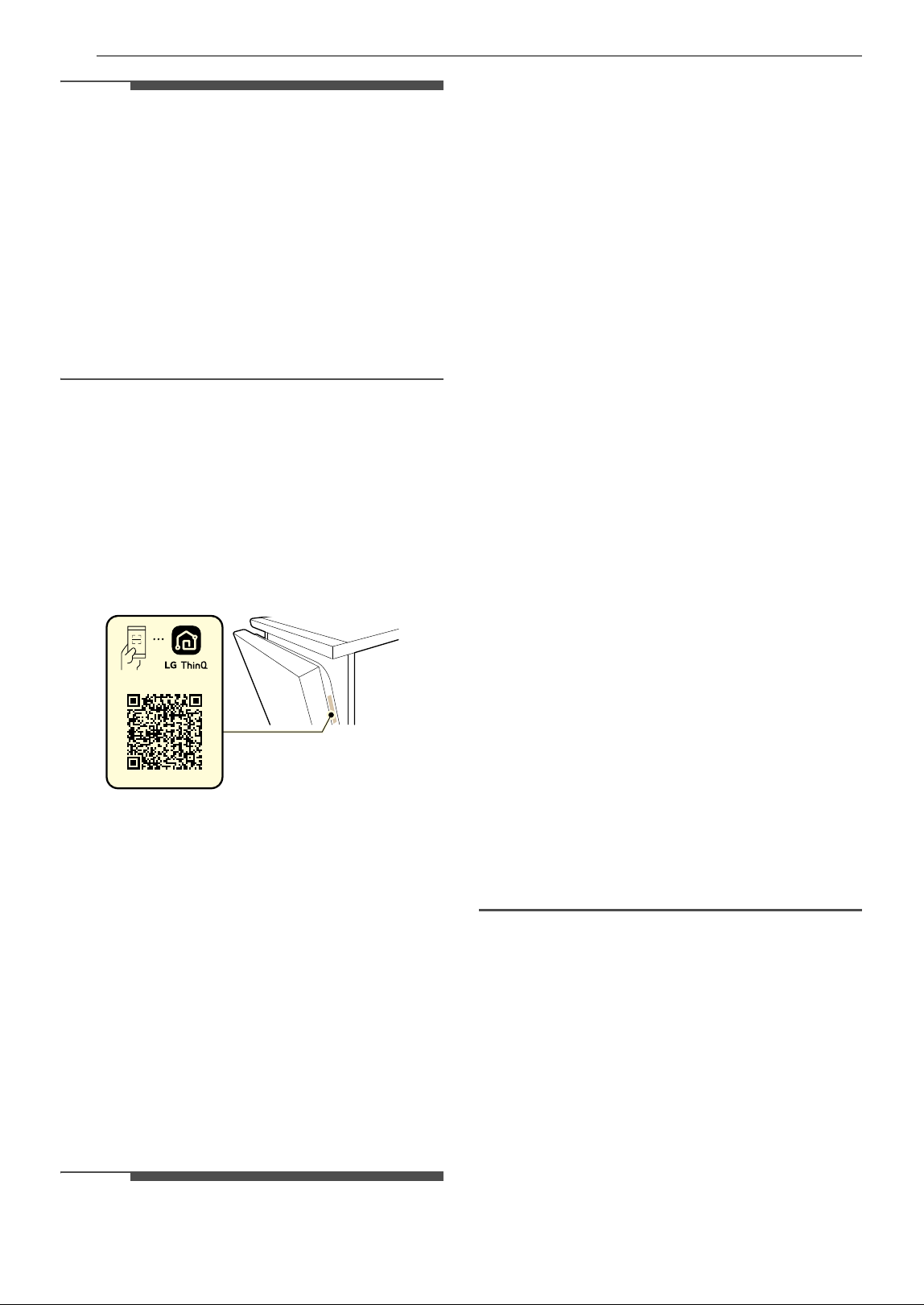
42 SMART FUNCTIONS
NOTE
• In the following cases, you must update the
network information for each appliance in the
LG ThinQ application under Device Cards
~
Settings
~ Change Network.
- wireless router is changed
- wireless router password is changed
- Internet service provider is changed
• This information is current at the time of
publication. The application is subject to change
for product improvement purposes without
notice to users.
Installing LG ThinQ Application and
Connecting an LG Appliance
Models with QR Code
Scan the QR code attached to the product using
the camera or a QR code reader application on
your smartphone.
Models without QR Code
1 Search for and install the LG ThinQ
application from the Google Play Store or
Apple App Store on a smartphone.
2 Run the LG ThinQ application and sign in with
your existing account or create an LG account
to sign in.
3 Touch the add (~) button on the LG ThinQ
application to connect your LG appliance.
Follow the instructions in the application to
complete the process.
NOTE
• To verify the Wi-Fi connection, check that the Wi-
Fi LED on the control panel is lit.
• The appliance supports 2.4 GHz Wi-Fi networks
only. To check your network frequency, contact
your Internet service provider or refer to your
wireless router manual.
• LG ThinQ is not responsible for any network
connection problems or any faults, malfunctions,
or errors caused by network connection.
• The surrounding wireless environment can
make the wireless network service run slowly.
• If the distance between the appliance and the
wireless router is too far, the signal becomes
weak. It may take a long time to connect or fail
to install the application.
• If the appliance is having trouble connecting to
the Wi-Fi network, it may be too far from the
router. Purchase a Wi-Fi repeater (range
extender) to improve the Wi-Fi signal strength.
• The network connection may not work properly
depending on the Internet service provider.
• The Wi-Fi may not connect or the connection
may be interrupted because of the home
network environment.
• If the appliance cannot be connected due to
problems with the wireless signal transmission,
unplug the appliance and wait about a minute
before trying again.
• If the firewall on your wireless router is enabled,
disable the firewall or add an exception to it.
• The wireless network name (SSID) should be a
combination of English letters and numbers. (Do
not use special characters.)
• Smartphone user interface (UI) may vary
depending on the mobile operating system (OS)
and the manufacturer.
• If the security protocol of the router is set to
WEP, network setup may fail. Change the
security protocol (WPA2 is recommended), and
connect the product again.
Using the Appliance Remotely
Remote Start
Use a smartphone to control the appliance
remotely or check to see how much time is left in
the cycle.
Using Remote Start
1 Load the dishes into the dishwasher.
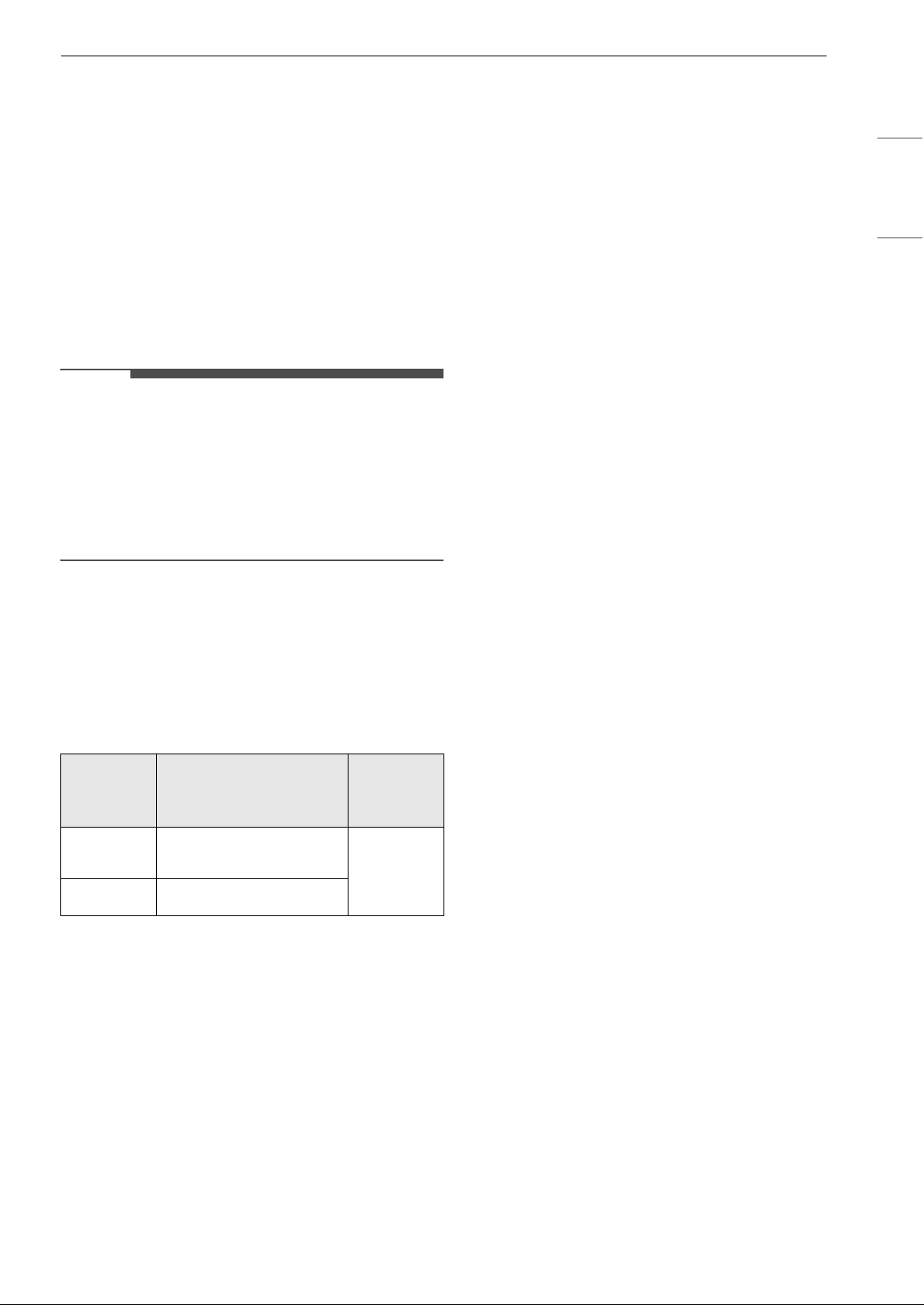
43SMART FUNCTIONS
ENGLISH
2 Press the POWER button.
3 Make sure that the Wi-Fi is connected.
4 Press the Remote Start button and close the
dishwasher door to enable the Remote Start
function.
5 Start a cycle from the LG ThinQ application on
your smartphone.
NOTE
• Once the Remote Start mode is enabled, you
can start a cycle from the LG ThinQ application,
but the cycle and option keys on the appliance
are deactivated. To activate the keys, disable
Remote Start.
• The door must be closed in order to activate the
Remote Start mode.
Disabling Remote Start
While Remote Start is activated, open the
dishwasher door or press the Remote Start
button with the door closed.
Radio Equipment Specifications
† This feature is only available on some models.
FCC Notice
The following notice covers the transmitter
module contained in this product.
This equipment has been tested and found to
comply with the limits for a Class B digital device,
pursuant to Part 15 of the FCC Rules. These limits
are designed to provide reasonable protection
against harmful interference in a residential
installation. This equipment generates, uses, and
can radiate radio frequency energy and, if not
installed and used in accordance with the
instructions, may cause harmful interference to
radio communications. However, there is no
guarantee that interference will not occur in a
particular installation. If this equipment does
cause harmful interference to radio or television
reception, which can be determined by turning the
equipment off and on, the user is encouraged to
try to correct the interference by one or more of
the following measures:
• Reorient or relocate the receiving antenna.
• Increase the separation between the equipment
and the receiver.
• Connect the equipment into an outlet on a
circuit different from that to which the receiver is
connected.
• Consult the dealer or an experienced radio/TV
technician for help.
This device complies with part 15 of the FCC Rules.
Operation is subject to the following two
conditions:
(1) This device may not cause harmful interference
and
(2) This device must accept any interference
received, including interference that may cause
undesired operation.
Any changes or modifications in construction of
this device which are not expressly approved by
the party responsible for compliance could void
the user’s authority to operate the equipment.
FCC RF Radiation Exposure
Statement
This equipment complies with FCC radiation
exposure limits set forth for an uncontrolled
environment. This transmitter must not be co-
located or operating in conjunction with any other
antenna or transmitter.
This equipment should be installed and operated
with a minimum distance of 20 cm (7.8 inches)
between the antenna and your body. Users must
follow the specific operating instructions for
satisfying RF exposure compliance.
Industry Canada Statement
This device contains licence-exempt transmitter(s)/
receiver(s) that comply with Innovation, Science
and Economic Development Canada’s licence-
exempt RSS(s). Operation is subject to the
following two conditions:
(1) This device may not cause interference.
Type
Operating Frequency
Range
Output
Power
(Max.)
Wireless
LAN
2400 MHz - 2472 MHz
< 1 W
Bluetooth
†
2400 MHz - 2483.5 MHz
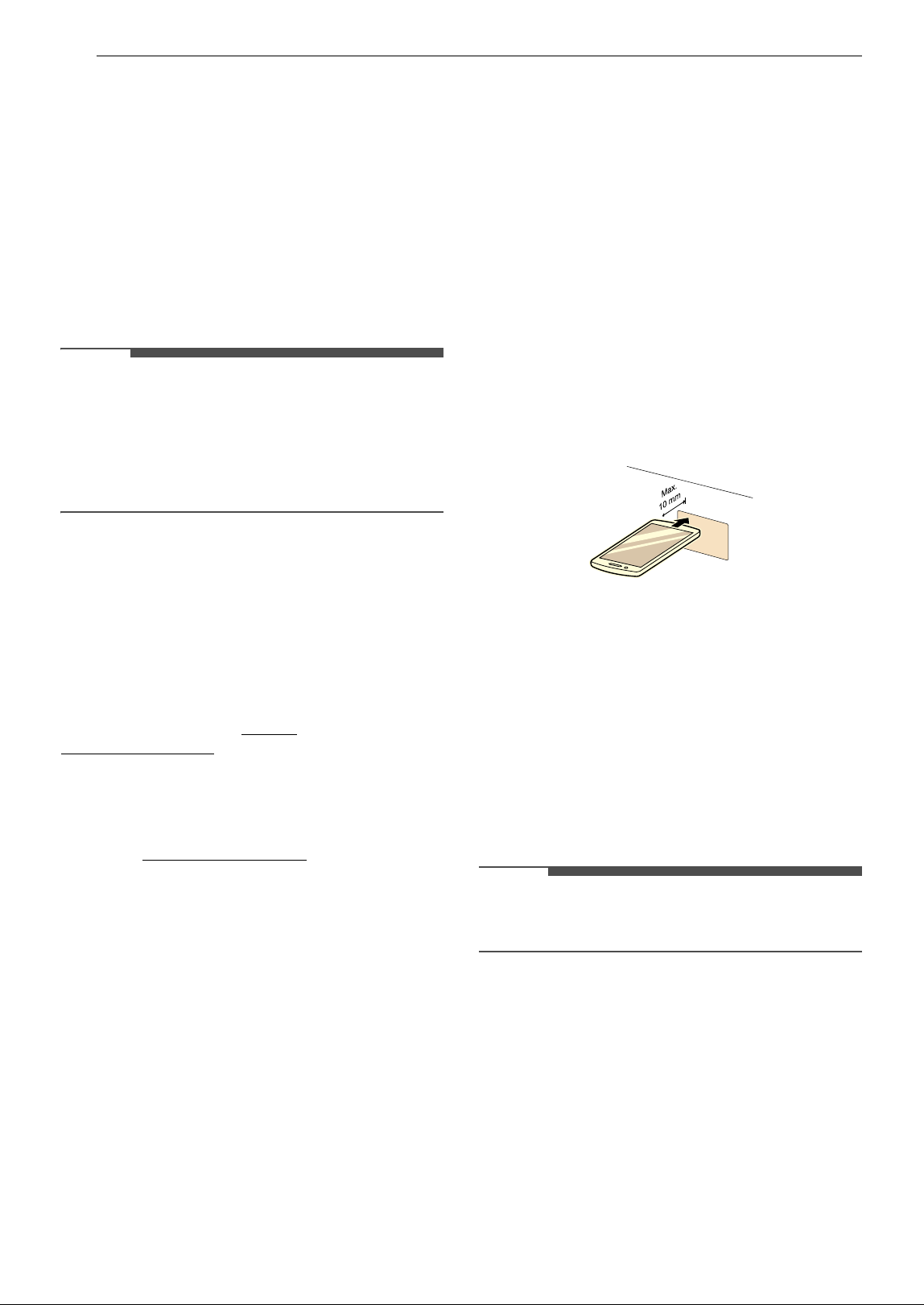
44 SMART FUNCTIONS
(2) This device must accept any interference,
including interference that may cause undesired
operation of the device.
IC Radiation Exposure Statement
This equipment complies with IC radiation
exposure limits set forth for an uncontrolled
environment.
This equipment should be installed and operated
with a minimum distance of 20 cm (7.8 inches)
between the antenna and your body.
NOTE
• THE MANUFACTURER IS NOT RESPONSIBLE FOR
ANY RADIO OR TV INTERFERENCE CAUSED BY
UNAUTHORIZED MODIFICATIONS TO THIS
EQUIPMENT. SUCH MODIFICATIONS COULD
VOID THE USER’S AUTHORITY TO OPERATE THE
EQUIPMENT.
Open Source Software Notice
Information
To obtain the source code that is contained in this
product, under GPL, LGPL, MPL, and other open
source licenses that have the obligation to disclose
source code, and to access all referred license
terms, copyright notices and other relevant
documents, please visit https://
opensource.lge.com.
LG Electronics will also provide open source code
to you on CD-ROM for a charge covering the cost
of performing such distribution (such as the cost of
media, shipping, and handling) upon email
request to open[email protected].
This offer is valid to anyone in receipt of this
information for a period of three years after our
last shipment of this product.
Smart Diagnosis
TM
Function
Using LG ThinQ to Diagnose Issues
If you experience a problem with your Wi-Fi
equipped appliance, it can transmit
troubleshooting data to a smartphone using the
LG ThinQ application.
• Launch the LG ThinQ application and select the
Smart Diagnosis
TM
feature in the menu. Follow
the instructions provided in the LG ThinQ
application.
Using Audible Diagnosis to
Diagnose Issues
Follow the instructions below to use the audible
diagnosis method.
• Launch the LG ThinQ application and select the
Smart Diagnosis feature in the menu. Follow
the instructions for audible diagnosis provided
in the LG ThinQ application.
1 Press the POWER button to turn on the
appliance.
• Do not press any other buttons.
2 Place the mouthpiece of your smartphone in
front of the display located on the control
panel.
3 Press and hold the Downloaded button for 3
seconds or longer while holding the
smartphone mouthpiece to the logo until the
data transfer is complete.
• Keep the smartphone in place until the data
transfer has finished. Time remaining for
data transfer is displayed.
4 After the data transfer is complete, the
diagnosis will be displayed in the application.
NOTE
• For best results, do not move the smartphone
while the tones are being transmitted.
45MAINTENANCE
ENGLISH
MAINTENANCE
To maintain performance and prevent trouble, it is important to check the outside and inside of the
dishwasher, including filters and spray arms, at regular intervals.
WARNING
• When cleaning the outside and inside of the dishwasher, do not use benzene or thinner. Otherwise, it
may cause fire or explosion.
• To prevent injury during care and maintenance or cleaning, wear gloves and/or protective clothing.
Cleaning and Care
Cleaning the Exterior
• Do not use scrub pads or abrasive cleaners on
the exterior of the dishwasher.
• Most soil can be removed using a soft, damp
cloth or sponge. A mild soap can be used to help
release stubborn soil. Rinse and wipe dry with a
soft cloth after cleaning.
• Stainless steel surfaces can be polished using a
stainless steel cleaner. Follow the instructions on
the cleaner, and wipe in the direction of the
grain.
CAUTION
• If cooking oil is spilled on the exterior of the
product, wipe it off immediately. Do not clean
the exterior of the product with cleaners which
contain alcohol, thinners, bleach, benzene,
flammable liquids, or abrasives. These
substances may discolor or damage the
appliance.
• Aromatic hydrocarbons such as benzene can
damage the surface of the product. These
compounds are found in many common
household products such as detergents, paints,
cosmetics, air fresheners, disinfectants, and
even some foods such as oils, spices, and
smoked meat or fish. Regularly wipe down the
control panel and other outside surfaces of the
product with a clean, damp cloth to help prevent
damage.
Cleaning the Interior
• Clean the interior of the dishwasher periodically
with a soft, damp cloth or sponge to remove
food and dirt particles.
• To remove white spots and odor from inside the
dishwasher, run an empty cycle, without
detergent, with one cup of white vinegar in a
dishwasher safe glass or bowl placed on the
upper rack. (Vinegar is an acid and with constant
use it could damage the appliance.)
•Using Tub Clean
- Run the Tub Clean (Downloaded: P1) cycle
once a month or after every 30 cycles to
eliminate residual soil, odor, white spots and
other dirt inside the appliance. The Tub Clean
(P1) cycle is the default Downloaded.
1 Remove all dishes from the appliance.
2 Remove, clean and reinstall the filters. See
cleaning instructions in Cleaning the
Filters.
3 Add 3 tbsp. (40 g) of citric acid to the
detergent dispenser or follow the
manufacturer’s instructions if using a
dishwasher cleaning agent. Do not use
dishwasher detergent.
4 Run the Tub Clean (Downloaded: P1) cycle.
5 Press START.
NOTE
•Run the Tub Clean (Downloaded: P1) cycle once
a month, or more often if needed, to remove
detergent buildup and other residue.
• If you have not used the dishwasher for a long
time, refresh the inside by running the Tub
Clean (Downloaded: P1) cycle without
detergent. When the cycle is finished, clean the
inside and outside of the dishwasher according
to the MAINTENANCE instructions.
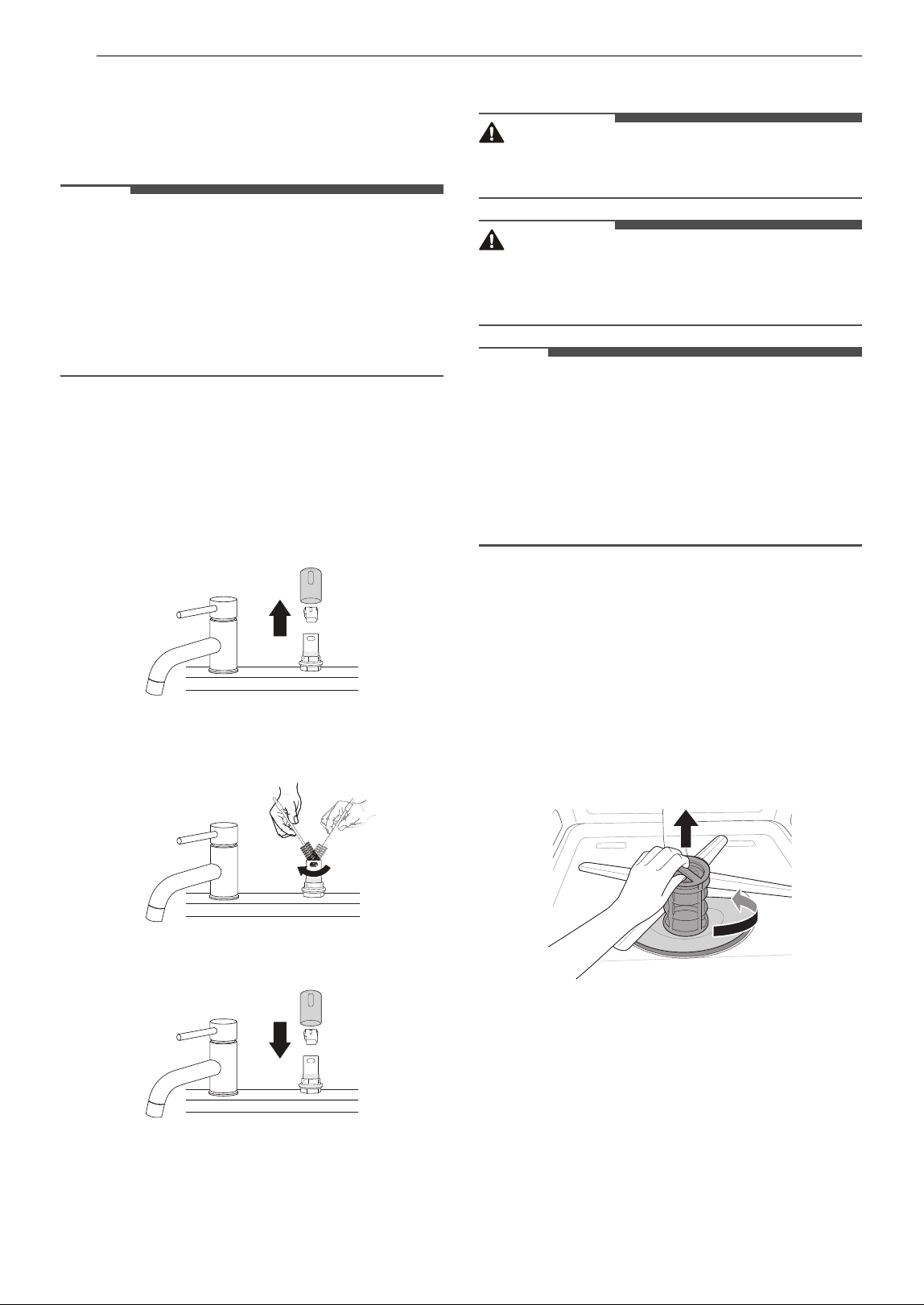
46 MAINTENANCE
Clogged Drain Air Gap or In-Sink
Disposal
Check the drain air gap or in-sink disposal if the
dishwasher is not draining well.
NOTE
• The drain air gap and disposal are external
plumbing devices that are not part of the
dishwasher.
• The warranty provided with the dishwasher does
not cover service costs directly associated with
the cleaning or repair of the external drain air
gap and disposal.
Cleaning the Air Gap
1 Turn off the dishwasher.
2 Remove the air gap cover and the plastic cap
underneath it.
3 Clean out any debris with a toothpick or
brush.
4 Replace the plastic cap and air gap cover.
Cleaning the Filters
WARNING
• Be cautious of sharp edges when handling the
stainless steel filter.
CAUTION
• Remove food residue caught in filters to prevent
the buildup of odor-causing bacteria and
possible drainage problems.
NOTE
• For best wash performance, clean the filter after
each load. If food debris remains in the filter, it
may cause an odor.
• In areas with hard water, clean the filter at least
once a month with a soft brush.
• Clean the filters using non-abrasive materials
and warm running water.
1 Remove the lower rack and position the
bottom spray arm so a wider vee is open to
the front.
2 Turn the inner filter counter-clockwise and
take out the assembled inner filter and
stainless steel filter.
With the filters removed, check the sump
opening and remove any foreign materials, if
needed.
3 Clean the filters with a soft brush under
running water. Reassemble the filters before
reinstalling them.
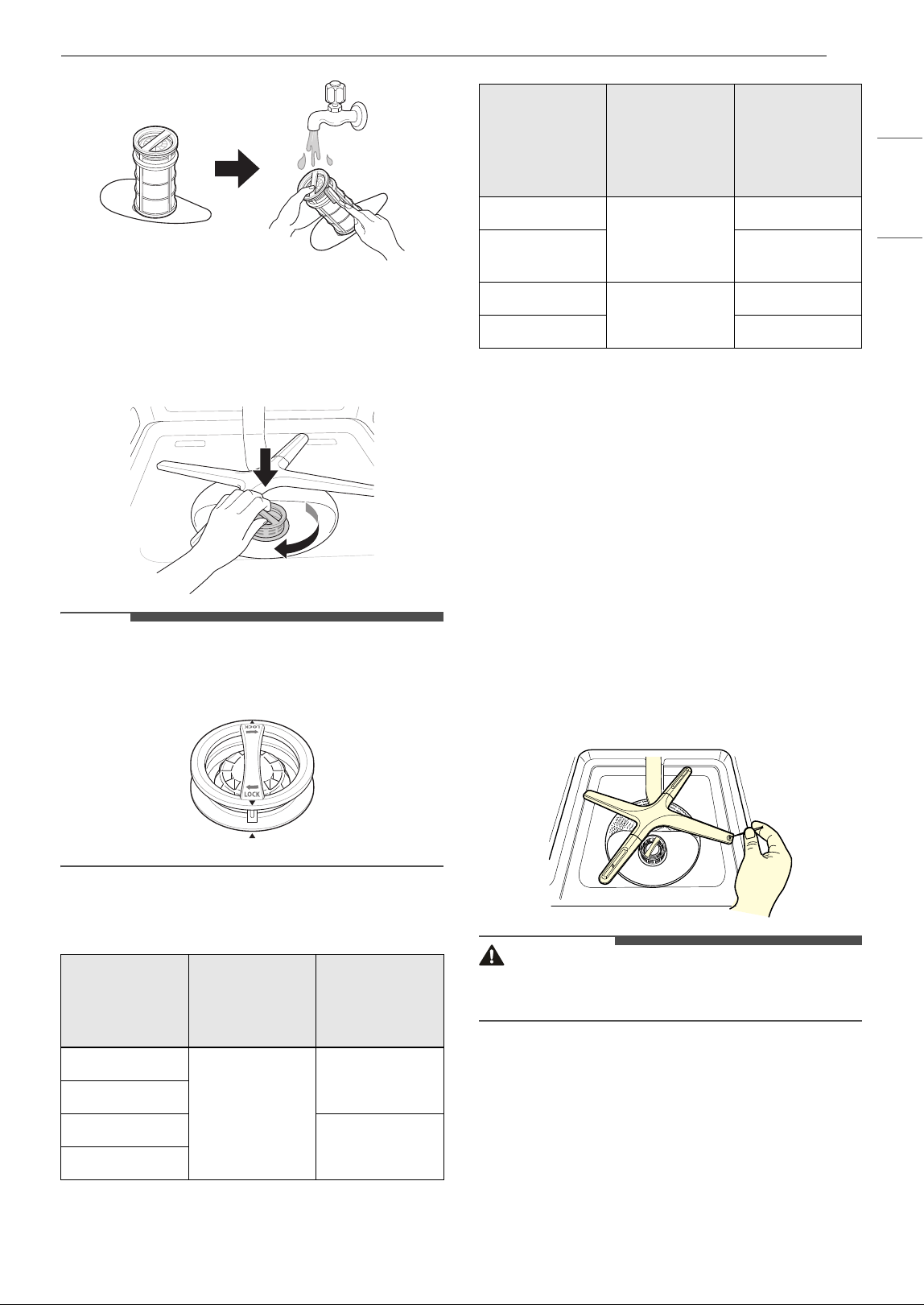
47MAINTENANCE
ENGLISH
4 To replace the assembled filters, position the
spray arm so the wider vee is toward the
front. Fit the filters back into the filter holder
and secure them by turning the inner filter
clockwise until it clicks into place.
NOTE
• Make sure the filter is assembled correctly
before starting a cycle. When assembling, rotate
the filter firmly until it clicks.
Recommended Filter Cleaning
Schedule
Cleaning the Spray Arm
If the spray arm holes are blocked by any food
residue, dishes may not be cleaned well due to
improper water spray.
It is recommended that the spray arms be cleaned
once every two weeks.
Cleaning the Lower Spray Arm
1 Make sure that the water jet holes are not
blocked by food particles.
2 If any food residue blocks the spray arm
holes, remove it with a pin or piece of stiff
wire.
CAUTION
• To avoid breaking the rolling spray arm sections,
do not pull or manually rotate them.
Cleaning the Upper Spray Arm
1 Pull the upper rack forward. Make sure that
the water jet holes are not blocked by food
particles.
2 When cleaning is necessary, remove the
upper spray arm by turning the nut on the
Number of
Loads Per
Week
If you wash
dishes before
loading
If you scrape
and rinse
dishes before
loading
1 - 3
Every 6 months
Once a year
4 - 7
8 - 12
Every 6 months
13 - 14
Number of
Loads Per
Week
If you only
scrape dishes
before
loading
If you do not
scrape or
rinse dishes
before
loading
1 - 3
Four times a
year
Once a month
4 - 7
Twice a month
(every 15 days)
8 - 12
Every 1.5
months
Every week
13 - 14 Twice a week
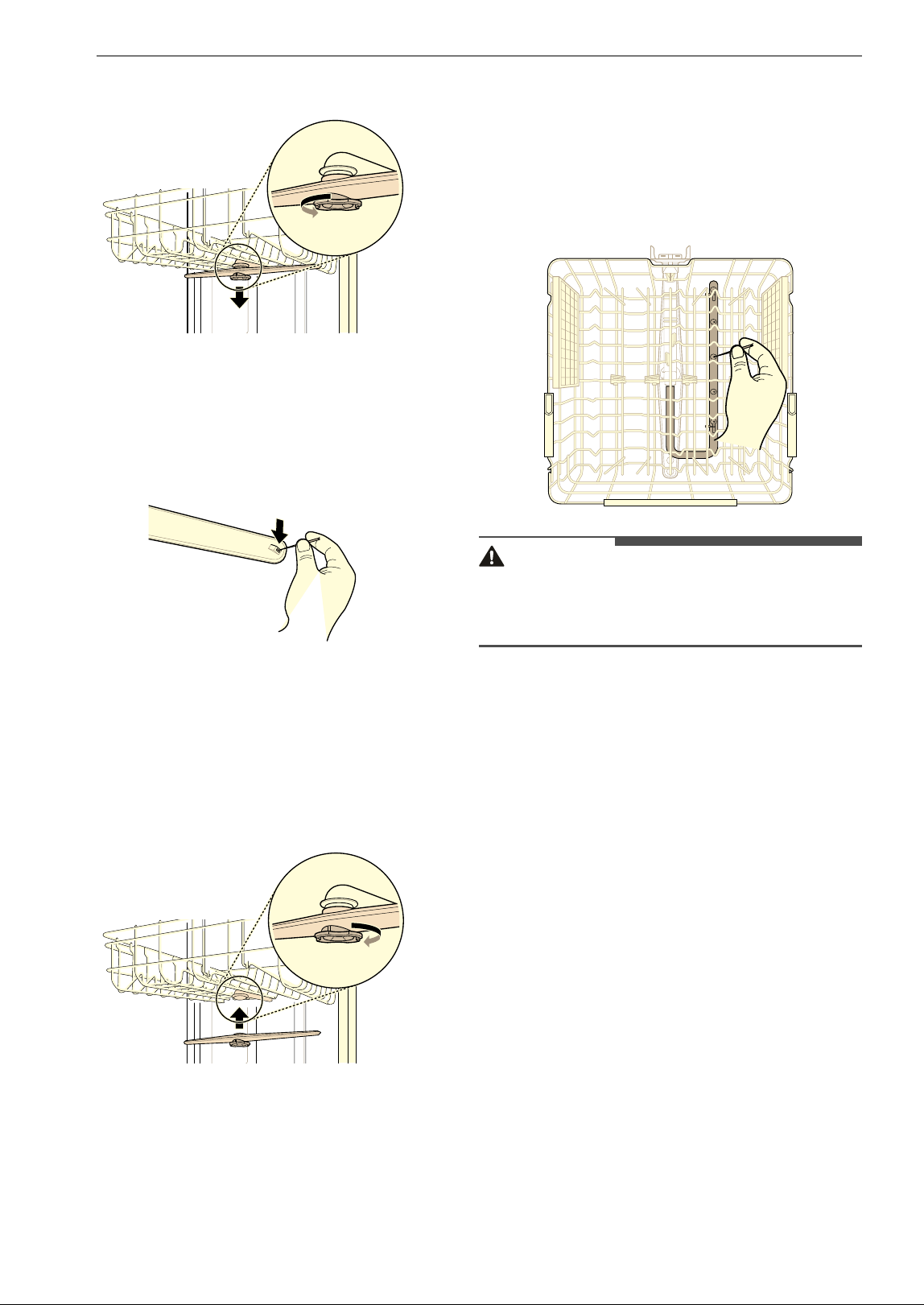
48 MAINTENANCE
bottom of the spray arm 1/8 turn counter-
clockwise and pulling down.
3 Remove food particles by rinsing or shaking
the spray arm.
4 If any food residue blocks the spray arm
holes, remove it with a pin or any sharp tool.
5 After removing the food residue, clean the
spray arms under running water.
6 After cleaning the upper spray arm, press it
up into place. Turn the nut 1/8 turn clockwise
to make sure that the nut locks back into
place.
7 After assembly, make sure that the spray
arms rotate freely.
Cleaning the BlastZone
TM
Spray Arm
This feature is only available on some models.
1 Pull the upper rack forward. Make sure that
the water jet holes are not blocked by food
particles.
2 If any food residue blocks the spray arm
holes, remove it with a pin or any sharp tool.
CAUTION
• To avoid breaking the BlastZone
TM
spray arm
section, do not pull or take apart from the upper
rack.
Seasonal Maintenance and Storage
• If you will be absent for an extended period of
time during warmer months, close the water
valve and disconnect the power supply line, or
turn off the circuit breaker. Clean the filter, tub
and dispenser to prevent odor.
• If you will be absent for an extended period of
time during colder months and there is a
possibility of freezing temperatures, winterize
the water supply lines and the dishwasher itself.
Winterization must be performed by qualified
service personnel.

49TROUBLESHOOTING
ENGLISH
TROUBLESHOOTING
The washer is equipped with an automatic error-monitoring system to detect and diagnose problems at an
early stage. If the washer does not function properly or does not function at all, check the following before
you call for service.
Before Calling for Service
Review this section before calling for service; doing so will save you both time and money.
FAQs
Q: Does this dishwasher require a rinse aid to be used?
A: Rinse aid is strongly recommended to enhance the drying performance of the dishwasher. If a rinse
aid is not used, water may remain on the dishes and the tub. Rinse aid helps to ensure that the
majority of the water has been sheeted off of the dishes at the end of the rinse and that the load is
ready for the dry cycle.
Q: What can be done if my dishes have a cloudy, white film on them after a wash?
A: The cloudy film is usually caused by minerals in the water reacting with the dishwasher detergent.
First, be certain not to use too much detergent. Refer to Adding Detergent to the Dispenser section
for recommended detergent amounts. Add an extra rinse to the cycle. LG Dishwashers use less
water than traditional dishwashers, so adding an extra rinse helps to rinse the film away. If the water
supply is hard, it may be necessary to add a performance booster that addresses the hard water
condition.
Q: How do I remove white film on the tub?
A: Measure 3 tbsp. (40 g) of citric acid powder and use it to fill the main detergent compartment. Run a
Tub Clean (Downloaded: P1) cycle. Do not use detergent.
Q: What steps can I take to improve drying results?
A: Drying performance is directly affected by the amount of heat that remains in the tub after the
heated rinse is performed. If your dishwasher is far away from your home’s hot water heater, it may
be necessary to run the hot water tap in the sink before starting a wash cycle, to ensure that cool
water is purged from the hot water lines. This will ensure your dishwasher has a consistent supply of
hot water from start to finish. Using the High Temp. setting also aids in keeping the inner drum
temperature and dishes hotter before drying begins.
LG dishwashers are designed to be used in conjunction with a rinse aid. Using a rinse aid will
maximize the amount of water that has already been sheeted away from the dishes before the dry
cycle begins. If a rinse aid is used and the performance still needs a boost, adjust the amount of rinse
aid used. 2 is the default setting, but if necessary set the level to 3 so more rinse aid is used.
Water tends to bead rather than sheet off plastic and nonstick surfaces, making them more difficult
to dry. If washing plastic items in a Normal cycle, select the Extra Dry option for better drying
results. When the rinse aid is empty, the Extra Dry option is selected automatically.
Allow the dishwasher to completely finish the dry cycle before opening the door. If the door is
opened in the middle of the dry cycle, the heat that is necessary for the hybrid dry system to work
will escape. This will cause all of the dishes inside to remain wet once the cycle finishes.
Q: What is the hybrid drying system?

50 TROUBLESHOOTING
User Support Videos
For further assistance, there are videos and tutorials available through the LG.com website.
1 On the www.lg.com home page, click on the Support menu tab to bring up the menu selections.
Select Video Tutorials.
2 Select a product category and then pick a topic or search a keyword.
A: The dishwasher does not rely on a heating element for the drying process; instead, it relies on the
heat that is retained by the dishes and the tub during the wash and rinse cycles to turn the moisture
in the tub into humidity.
After the dishwasher door is opened at the end of the cycle, warm and moist air in the dishwasher is
then blown out.
NOTE
• Rinse aid is required to enhance the drying performance. If no rinse aid is used, water may
remain on the dishes and the tub.
Q: Why am I hearing a whistling sound from the dishwasher?
A: It is important to determine the duration of the noise and when it happens (what part of the cycle).
When water is drawn into the dishwasher, a whistling noise can be heard. This is normal. If the water
pressure is too high, it will be louder, so it may be necessary to adjust the water valve to lower the
pressure if the noise is too loud.
Q: What kinds of dishes can be placed in the dishwasher?
A: Ensure that the dishes you place in the dishwasher are dishwasher safe. Plastic dishware will not dry
as effectively as glass and metal dishware. Plastic items do not retain heat as well as glass and metal
dishware. Plastic cups and dishes may require some hand drying before being put away at the end of
the cycle.
Q: Can I run a drain only cycle?
A: To drain standing water, press and hold START for three seconds until the cycle stops. Once the
dishwasher finishes draining, the power turns off.
Q: Why does my dishwasher continuously chime if I open the door during a cycle or right after the
cycle has finished?
A: This is normal. The dishwasher is letting you know that the interior temperatures of the unit are hot
and to use caution when reaching inside. Once the unit has cooled down, the chiming will stop.
Q: Can I add an extension to the drain hose?
A: If a drain hose extension is required, use a 5/8" or 7/8" inside diameter, 2 ft ~ 3 ft. length hose and a
coupler to connect the two hose ends.
Q: An LED is blinking, the machine is chiming, and the dishwasher won't start. What is wrong with
the dishwasher?
A: This is a safety feature. The door must be closed within four seconds of pressing the START button. If
the door is not closed within four seconds, an LED flashes, and the dishwasher does not operate. To
start the dishwasher, open the door and either close the door and press START (front controls) or
press START and close the door within four seconds (top controls).
Q: Should I pre-rinse dishes before loading them?
A: No, you don't need to pre-rinse the dishes before loading especially if using the Normal and Auto
cycles. The dishwasher washes dishes clean without pre-rinsing.
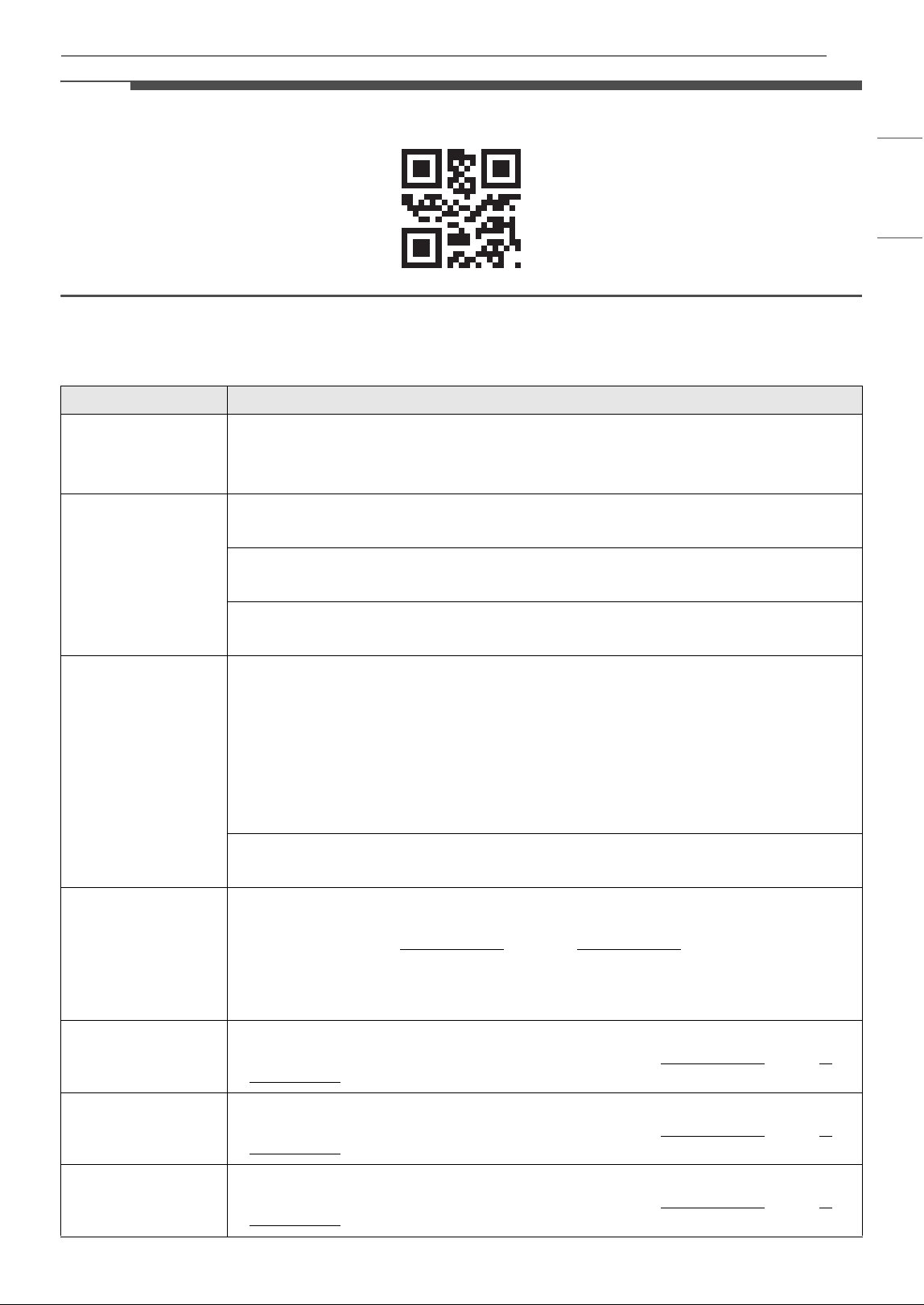
51TROUBLESHOOTING
ENGLISH
NOTE
• Scan this QR code to quickly access the video search page on the LG website.
Error Messages
Problem Possible Cause & Solution
IE
Water inlet problem.
• Check for a clogged, kinked or frozen water inlet hose.
• Check water supply.
OE
Drainage Problem.
• Check for a clogged, kinked or frozen water drain hose.
Air gap or disposal is clogged.
• Clean air gap or disposal.
Filters are clogged.
• Clean filters.
bE
Oversudsing caused by improper detergent, such as liquid dish soap.
• Do not use hand dishwashing liquids. Only use detergents which are designed for use in
automatic dishwashers.
•A bE error can appear if dishes soiled with a lot of foamy food, such as whipped cream, are
loaded in the appliance. To clear the error, turn the appliance off and start a new cycle.
• To remove detergent residue in the tub, pour approximately 4 oz ~ 8 oz (100 ml ~ 200 ml)
of milk into a shallow bowl, place it in the upper rack and then run the appliance on the
Auto cycle.
Failure to level dishwasher.
• Make sure that the appliance is properly leveled.
AE
Water leakage
• Turn off the water supply to the dishwasher and call an LG Electronics Customer
Information Center at 1-800-243-0000
(U.S.A.) or 1-888-542-2623 (Canada).
• The dishwasher makes an alert sound for 10 seconds, and runs the drain pump
intermittently. If power is turned off to the machine, the machine powers back on
automatically until the AE error is resolved.
FE
Excessive Water supplied.
• Please call an LG Electronics Customer Information Center at 1-800-243-0000
(U.S.A.) 1-
888-542-2623 (Canada).
HE
Heater circuit failure.
• Please call an LG Electronics Customer Information Center at 1-800-243-0000
(U.S.A.) 1-
888-542-2623 (Canada).
tE
Water temperature sensor error
• Please call an LG Electronics Customer Information Center at 1-800-243-0000
(U.S.A.) 1-
888-542-2623 (Canada).
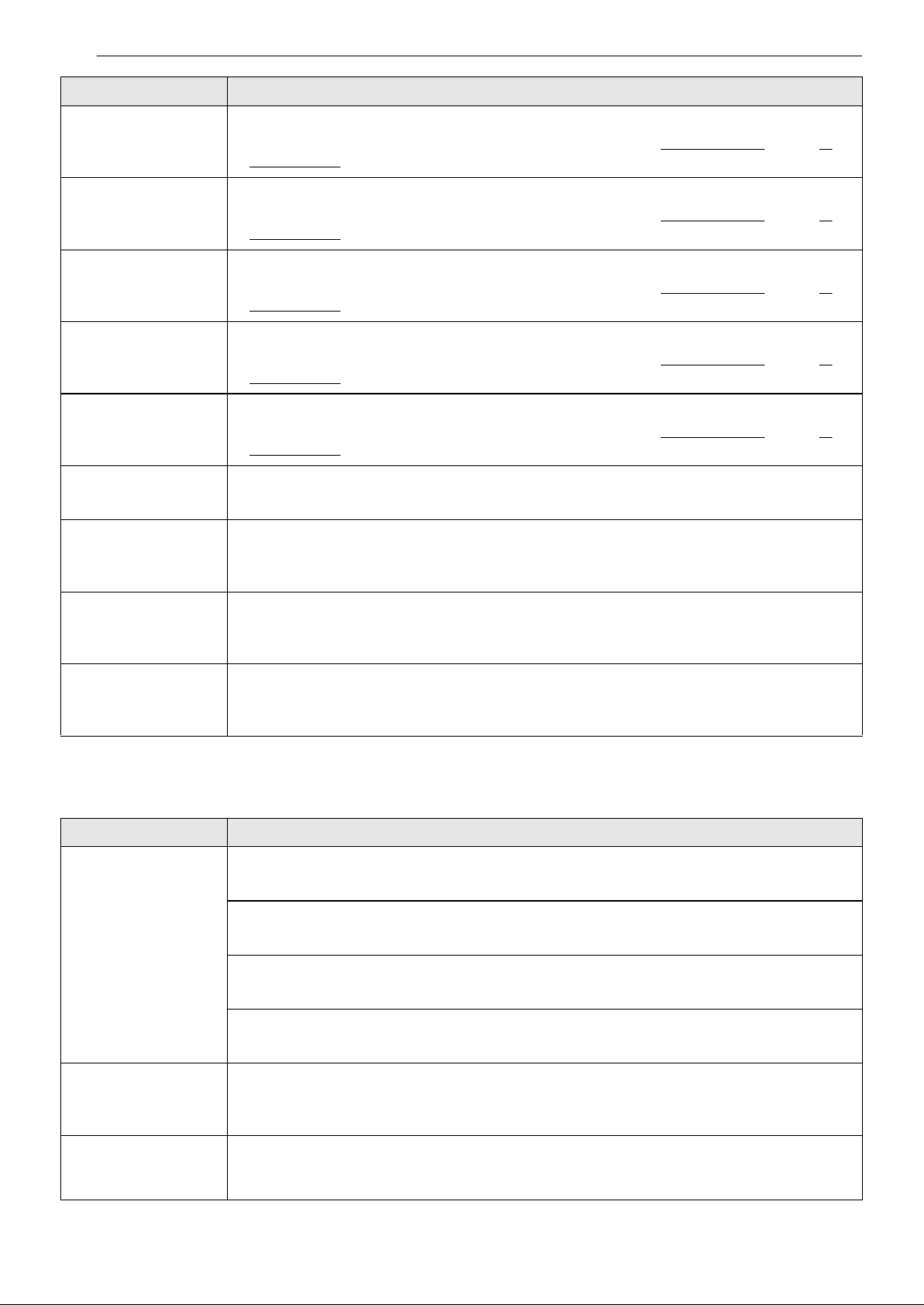
52 TROUBLESHOOTING
Operation
F3s
Heated air temperature sensor error
• Please call an LG Electronics Customer Information Center at 1-800-243-0000
(U.S.A.) 1-
888-542-2623 (Canada).
LE
Wash motor error
• Please call an LG Electronics Customer Information Center at 1-800-243-0000
(U.S.A.) 1-
888-542-2623 (Canada).
F31
Heat air dry fan motor error
• Please call an LG Electronics Customer Information Center at 1-800-243-0000
(U.S.A.) 1-
888-542-2623 (Canada).
NE
Vario motor error
• Please call an LG Electronics Customer Information Center at 1-800-243-0000
(U.S.A.) 1-
888-542-2623 (Canada).
F37
Auto Open Dry motor error
• Please call an LG Electronics Customer Information Center at 1-800-243-0000
(U.S.A.) 1-
888-542-2623 (Canada).
P1, Pz, P3, P4, Ps, P6,
P7,P8,PG,P1O
The Downloaded cycle is selected.
• This is not an error code. This code indicates the current Downloaded cycle.
N:#, U:#, d:#, t#
(# is a number.)
Test mode is selected.
• This is not an error code. This code is used when testing the dishwasher. Power the unit off
and on and the code will disappear.
LO, L1, Lz, L3, L4
Rinse aid level setting mode is selected.
• This is not an error code. This code indicates the current rinse aid level. For more
information, refer to the Adding Cleaning Products section.
CL
Control Lock is activated.
• This is not an error code. This code indicates that Control Lock is on. To turn Control Lock
on or off, press and hold Dry Boost and Delay Start simultaneously for 3 seconds.
Problem Possible Cause & Solution
Dishwasher will not
operate.
START button is not pressed.
• Press the START button.
Door is not completely closed.
• Make sure that the door is completely closed and latched.
Power supply or power supply line is not connected.
• Connect the power supply or power supply line properly.
Fuse is blown or circuit breaker tripped.
• Replace the fuse or reset the circuit breaker.
Dishwasher operates
too long.
Dishwasher is connected to cold water.
• Check the water supply connection or water heater setting. (Heating cold water takes
longer.)
Water remains in tub
after completion of
cycle.
Drain hose is kinked or clogged.
• Adjust hose or clear blockage.
Problem Possible Cause & Solution
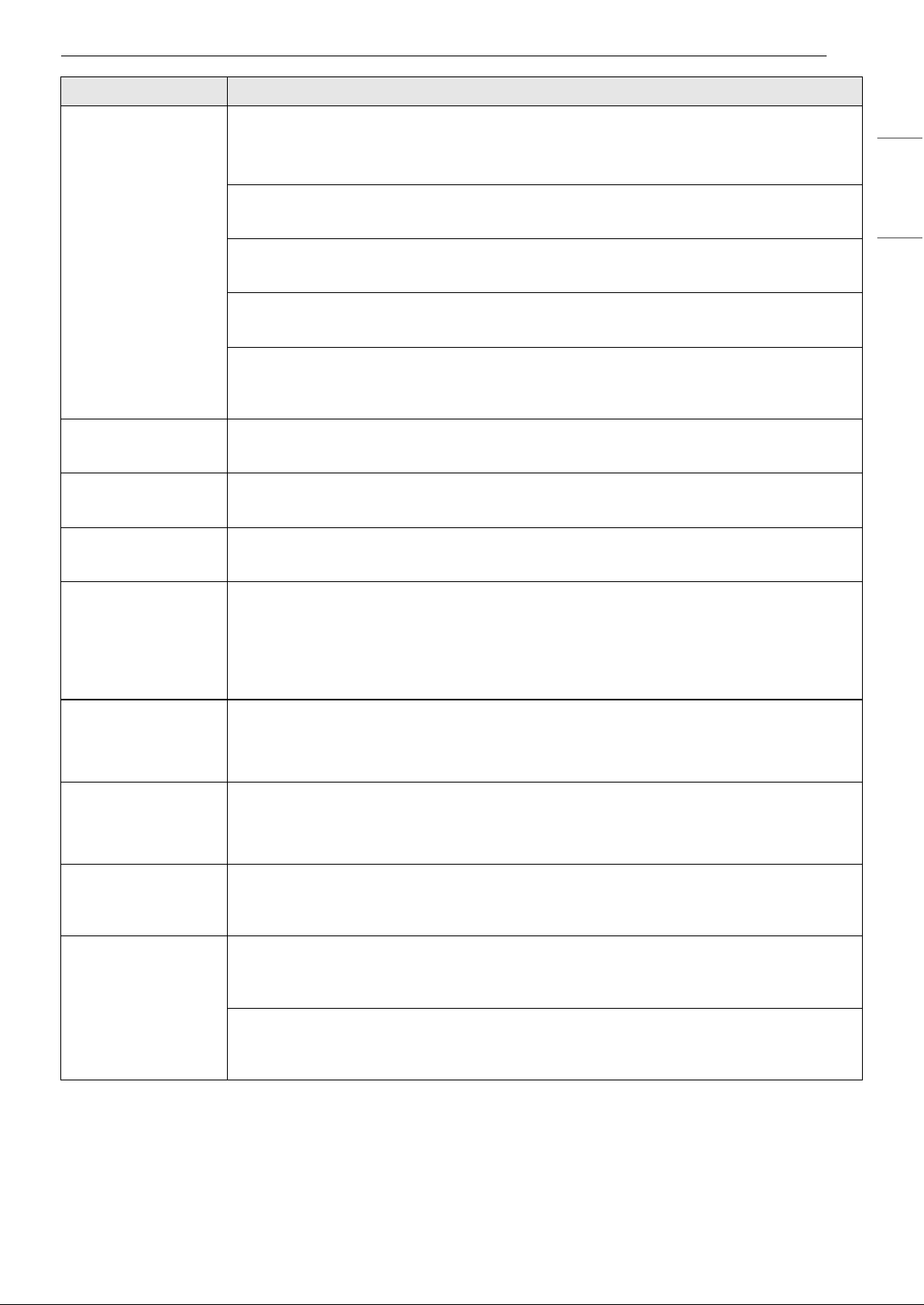
53TROUBLESHOOTING
ENGLISH
Noise Some level of noise is normal during operation.
• Detergent cover opening.
• Drain pump at the beginning of drain cycle.
The dishwasher is not level.
• Adjust leveling feet.
Nozzle arm knocking against dishes.
• Reposition the dishes.
Water pressure is too high.
• Adjust water pressure.
Is the amount of cutlery in the cutlery basket or cutlery rack small?
• There is no problem with the product due to noise generated by the small amount of
tableware, so use it with confidence.
Lights do not
illuminate.
Power is not connected.
• Connect power supply.
Spray arms do not
rotate smoothly.
Holes of spray arms are blocked by food particles.
• Clean the holes of spray arms.
Upper rack is
crooked.
Rack is poorly adjusted.
• See the Height Adjustable Upper Rack section.
Dishwasher
continuously chimes
when the door is
opened, during or
right after a cycle
has completed.
This is a safety measure. Contact with escaping steam or the hot contents of the
dishwasher could result in injury.
• Close the door until the dishwasher and dishes have cooled down. The chiming will stop if
the door is closed or the interior temperature has cooled.
Door does not close
completely. (For
models with cutlery
rack)
Cutlery rack is not properly loaded.
• Push the door handle to close the door properly until it clicks.
The control panel
doesn’t work while
the dishwasher is
running.
All buttons on the control panel are disabled during the cycle to prevent the settings
from being changed inadvertently.
• Wait for the cycle to finish before operating the control panel.
Dishwasher did not
finish cycle.
Door was opened during cycle.
• If the door is opened during a cycle, the START key must be pressed within 4 minutes or
the machine turns off and all settings are lost.
Leaking in front of
appliance
Dishwasher not leveled properly.
• Verify the appliance is level from side to side and from front to back. See leveling
instructions in the Installation section.
Wrong detergent used.
• If excessive sudsing is causing the leak, allow the foam to subside for 24 hours then clean
the inside of the tub with milk.
Problem Possible Cause & Solution
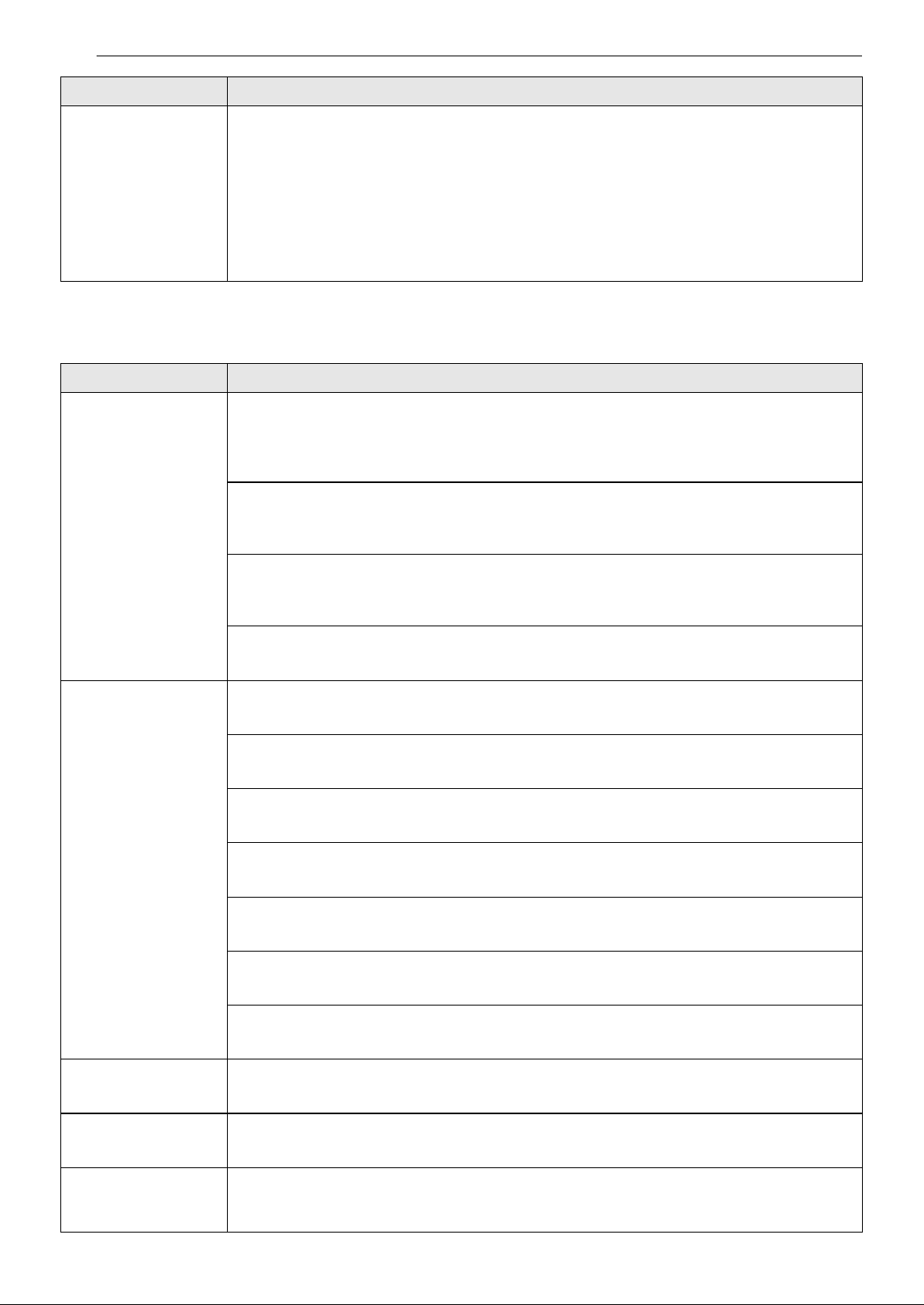
54 TROUBLESHOOTING
Performance
Drops of water
forming under the
sink shelf.
Is there moisture accumulation under the bench top?
• During the automatic door opening function, high temperature steam will be emitted from
the tub and will condense on the surfaces directly above the washer.
• Condensation that has formed under the bench top naturally evaporates and disappears
after a certain period of time.
• However, if the bench top is made of wood or MDF, then aluminum tape must be attached
to its underside at the location of the washer to prevent the timber from swelling and long
term damage such as rot.
Problem Possible Cause & Solution
Odor The previous cycle was stopped before completion and residual water remains in the
dishwasher.
• Turn on the power, run the Cancel cycle option to remove the residual water, then run the
Turbo cycle using detergent but with the dishwasher empty.
There is food in the bottom of the appliance or in the filter.
• Clean the filter and the interior according to the Maintenance section of the owner’s
manual.
Unwashed dishes are left in the appliance for a long time.
• Run a cycle with one cup of white vinegar in a dishwasher safe glass or bowl placed on the
upper rack. (Vinegar is an acid, and with constant use it could damage your appliance.)
After cleaning, the appliance smells like detergent.
• This is normal.
Food soil remains on
dishes.
Improper cycle selection.
• Select correct cycle based on soil level and type of dishware being washed.
Water temperature is too low.
• Check water supply connection or water heater setting.
Dishwashing detergent was not used.
• Use recommended detergent.
Low inlet water pressure.
• Water pressure should be between 20 and 80 psi.
Water jet holes on spray arms blocked.
• Clean the spray arms.
Improper loading of dishes.
• Make sure dishes do not block spray arm rotation or interfere with detergent dispenser.
Filters are clogged.
• Clean filters.
Cloudiness on
glassware.
Combination of excessive detergent and hard water.
• Use less detergent and use a rinse aid to minimize the problem.
Black or gray marks
on dishes.
Aluminum items rubbing dishes during cycle.
• Reposition the dishes.
Yellow or brown film
on inside surfaces of
dishwasher.
Coffee or tea stains.
• Eliminate the stain by using a stain removal product.
Problem Possible Cause & Solution
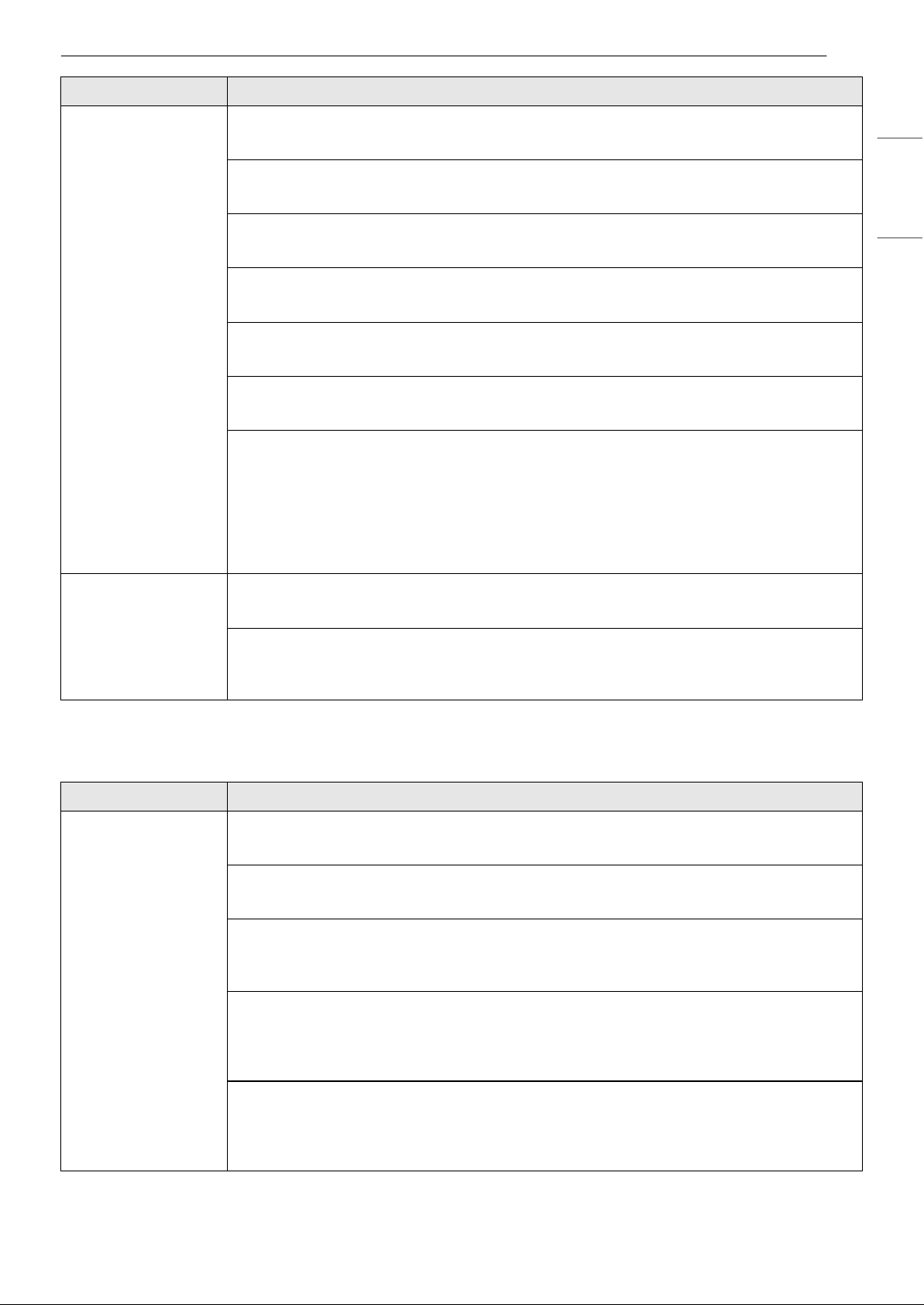
55TROUBLESHOOTING
ENGLISH
Wi-Fi
Spots and filming on
dishes.
Low water temperature.
• Water supply should be at least 120 °F for best wash performance.
Overloading.
• Do not overload the dishwasher.
Improper loading.
• See the Operation section.
Insufficient water pressure.
• Water pressure should be between 20 and 80 psi.
Insufficient detergent.
• Add the recommended amount of detergent. See the Operation section.
Rinse aid dispenser is empty.
• Refill rinse aid dispenser.
Hard water buildup in the tub.
• Remove all dishes, silverware and silverware holder from dishwasher. Only racks should
remain in tub. For best results, use citric acid powder (can be found in canning sections of
most grocery stores or online). Measure 3 tablespoons (40 g) of citric acid powder. Fill main
wash compartment with measured powder. If you cannot find citric acid powder, pour
approximately one cup (200 ml - 300 ml) of white vinegar into shallow bowl and place in
upper rack. Run Tub Clean (Downloaded: P1) cycle. Do not use detergent.
Dishes don’t dry. Rinse aid dispenser empty.
• Check and refill the rinse aid dispenser if empty.
Auto Open Dry is off.
• The Auto Open Dry feature can be turned on using the Option Setting Mode. Refer to
Using the Option Setting Mode.
Problem Possible Cause & Solution
Trouble connecting
appliance and
smartphone to Wi-Fi
network
The password for the Wi-Fi network was entered incorrectly.
• Delete your home Wi-Fi network and begin the connection process again.
Mobile data for your smartphone is turned on.
• Turn off the Mobile data on your smartphone before connecting the appliance.
The wireless network name (SSID) is set incorrectly.
• The wireless network name (SSID) should be a combination of English letters and
numbers. (Do not use special characters.)
The router frequency is not 2.4 GHz.
• Only a 2.4 GHz router frequency is supported. Set the wireless router to 2.4 GHz and
connect the appliance to the wireless router. To check the router frequency, check with
your Internet service provider or the router manufacturer.
The appliance and the router are too far apart.
• If the appliance is too far from the router, the signal may be weak and the connection may
not be configured correctly. Move the router closer to the appliance or purchase and
install a Wi-Fi repeater.
Problem Possible Cause & Solution
56 TROUBLESHOOTING
Trouble connecting
appliance and
smartphone to Wi-Fi
network
During Wi-Fi setup, the app is requesting a password to connect to the product (on
certain phones).
• Locate the network name which starts with "LG" under Settings > Networks. Note the last
part of the network name.
- If the network name looks like LGE_Appliance_XX-XX-XX, enter lge12345.
- If the network name looks like LGE_Appliance_XXXX, enter XXXX twice as your password.
For example, if the network name appears as LGE_Appliance_8b92, then you would
enter 8b928b92 as your password. In this instance, the password is case sensitive and
the last 4 characters are unique to your appliance.
Problem Possible Cause & Solution
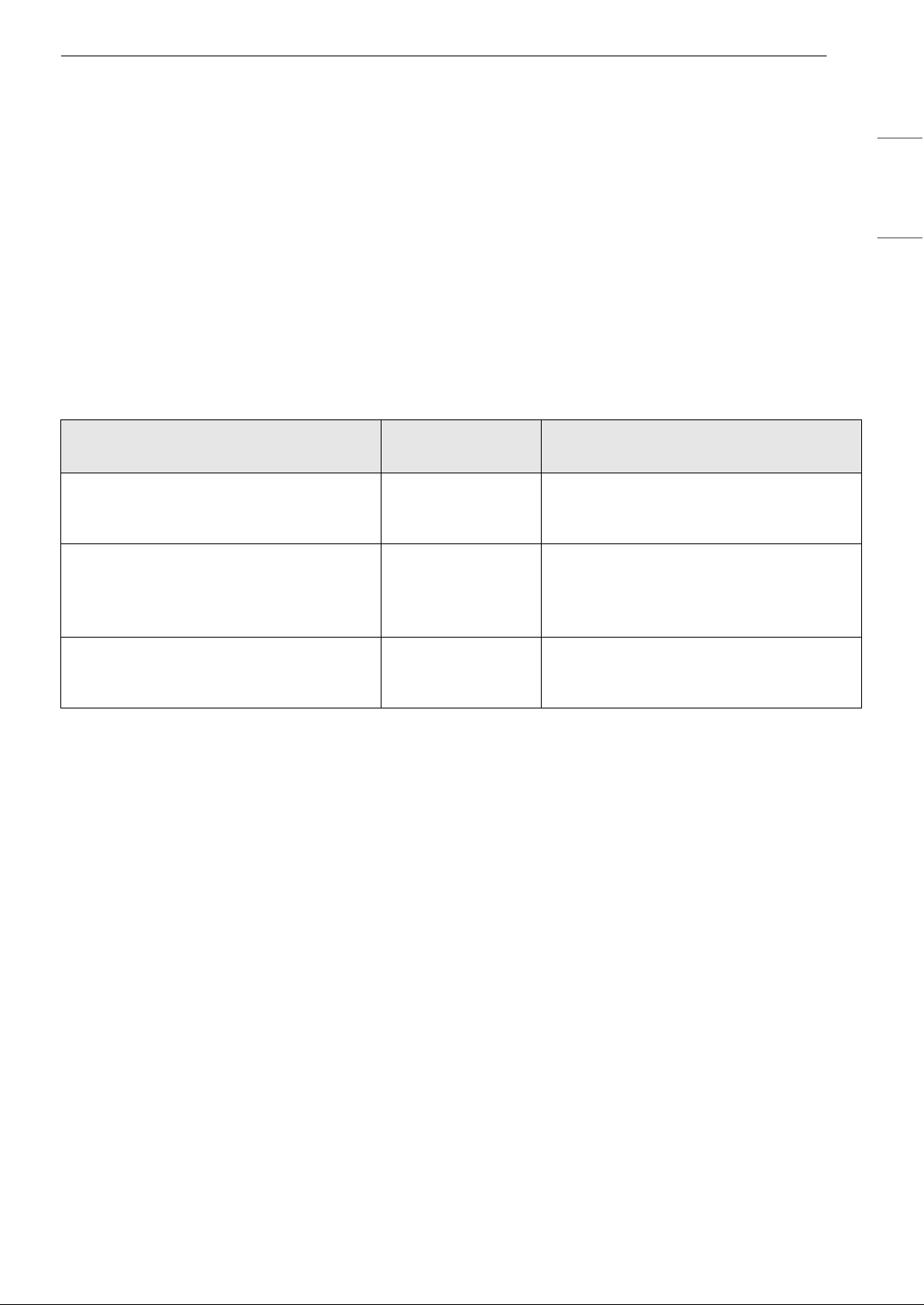
57LIMITED WARRANTY
ENGLISH
LIMITED WARRANTY
USA
TERMS AND CONDITIONS
ARBITRATION NOTICE: THIS LIMITED WARRANTY CONTAINS AN ARBITRATION PROVISION THAT
REQUIRES YOU AND LG ELECTRONICS (“LG”) TO RESOLVE DISPUTES BY BINDING ARBITRATION
INSTEAD OF IN COURT, UNLESS YOU CHOOSE TO OPT OUT. IN ARBITRATION, CLASS ACTIONS AND
JURY TRIALS ARE NOT PERMITTED. PLEASE SEE THE SECTION TITLED “PROCEDURE FOR RESOLVING
DISPUTES” BELOW.
Should your LG Dishwasher (“Product”) fail due to a defect in materials or workmanship under normal and
proper use, during the warranty period set forth below, LG will, at its option, repair or replace the Product.
This limited warranty is valid only to the original retail purchaser of the Product (“You”) and applies only
when purchased lawfully and used within the United States including U.S. Territories.
† Main control board is located on the bottom right of the dishwasher when viewed from the front.
• Replacement Products and parts are warranted for the remaining portion of the original warranty period
or ninety (90) days, whichever is greater.
• Replacement Products and parts may be new, reconditioned, refurbished, or otherwise factory
remanufactured.
• Replaced Product or part(s) will be the property of LG.
• Proof of original retail purchase specifying the Product model and date of purchase is required to obtain
warranty service under this limited warranty.
EXCEPT TO THE EXTENT PROHIBITED BY APPLICABLE LAW, ANY IMPLIED WARRANTY OF
MERCHANTABILITY OR FITNESS FOR A PARTICULAR PURPOSE ON THE PRODUCT IS LIMITED IN
DURATION TO THE DURATION OF THE ABOVE LIMITED WARRANTY. UNDER NO CIRCUMSTANCES
SHALL LG OR ITS U.S. DISTRIBUTORS/DEALERS BE LIABLE FOR ANY INDIRECT, INCIDENTAL,
CONSEQUENTIAL, SPECIAL, OR PUNITIVE DAMAGES, INCLUDING, WITHOUT LIMITATION, LOST
GOODWILL, LOST REVENUES OR PROFITS, WORK STOPPAGE, IMPAIRMENT OF OTHER GOODS, COST OF
REMOVAL AND REINSTALLATION OF THE PRODUCT, LOSS OF USE, OR ANY OTHER DAMAGES WHETHER
BASED IN CONTRACT, TORT, OR OTHERWISE. LG’S TOTAL LIABILITY, IF ANY, SHALL NOT EXCEED THE
PURCHASE PRICE PAID BY YOU FOR THE PRODUCT.
SOME STATES DO NOT ALLOW THE EXCLUSION OR LIMITATION OF INCIDENTAL OR CONSEQUENTIAL
DAMAGES OR LIMITATIONS ON HOW LONG AN IMPLIED WARRANTY LASTS, SO THE ABOVE
EXCLUSIONS OR LIMITATIONS MAY NOT APPLY TO YOU. THIS LIMITED WARRANTY GIVES YOU
SPECIFIC LEGAL RIGHTS AND YOU MAY ALSO HAVE OTHER RIGHTS THAT VARY FROM STATE TO STATE.
Warranty Period
Scope of
Warranty
HOW SERVICE IS HANDLED
One (1) year from date of original retail
purchase, or from the date of delivery as
per applicable law
Labor / Parts LG will also provide, free of charge, all
labor and on-site service to replace the
defective part.
Two (2) years from date of original retail
purchase, or from the date of delivery as
per applicable law
Main control
board
†
/ Racks /
Stainless Steel Door
Liner / Tub
Main control board, dishwasher racks,
stainless steel door liner, tub. Customer
will be responsible for any labor or in-
home service to replace defective parts.
Ten (10) years from date of original retail
purchase, or from the date of delivery as
per applicable law
Direct Drive Motor Direct Drive motor. Customer will be
responsible for any labor or in-home
service to replace defective parts.

58 LIMITED WARRANTY
THIS LIMITED WARRANTY DOES NOT COVER:
• Service trips to deliver, pick up, or install, educate how to operate, correct wiring, or correct
unauthorized repairs.
• Damage or failure of the Product to perform during power failures and interrupted or inadequate
electrical service.
• Damage or failure of the Product caused by leaky or broken water pipes, frozen water pipes, restricted
drain lines, inadequate or interrupted water supply or inadequate supply of air.
• Damage or failure of the Product resulting from operating the Product in a corrosive atmosphere or
contrary to the Product owner’s manual.
• Damage or failure of the Product caused by accidents, pests and vermin, lightning, wind, fire, floods, acts
of nature, or any other causes beyond the control of LG.
• Damage or failure of the Product caused by unauthorized modification or alteration, or if the Product is
used for other than the intended purpose, or any water leakage where the Product was not properly
installed.
• Damage or failure of the Product caused by incorrect electrical current, voltage, or plumbing codes.
• Damage or failure of the Product caused by transportation, storage, and/or handling, including
scratches, dents, chips, and/or other damage to the finish of the Product, unless such damage is
reported within one (1) week of delivery.
• Damage or failure of the Product resulting from misuse, abuse, improper installation, repair, or
maintenance. Improper repair includes the use of parts not authorized by LG. Improper installation or
maintenance includes installation or maintenance contrary to the Product owner’s manual.
• Damage or failure of the Product caused by the use of parts, components, accessories, consumable
cleaning products, or any other products or services that were not authorized by LG.
• Damage or missing items to any display or open box Product.
• Refurbished Product or any Product sold “As Is”, “Where Is”, “With all Faults”, or similar disclaimer.
• Products with original serial numbers that have been removed, altered, or cannot be readily determined.
• Increases in utility costs and additional utility expenses.
• Any noises associated with normal operation.
• Products used for other than normal and proper household use (e.g., commercial, business, or industrial
settings, including any retail or food service establishments, or any commercial lodging/transient rental
setting), or any use contrary to the Product owner's manual.
• Costs associated with removal and reinstallation of the Product for repairs, or the removal and
reinstallation of the Product if it is installed in an inaccessible location or not installed in accordance with
the Product Owner's manual.
• Accessories, removable components, or consumable parts (e.g. Shelves, door bins, drawers, water/air
filters, racks, light bulbs, batteries, etc., as applicable), except for internal/functional parts covered under
this limited warranty.
The cost of repair or replacement under these excluded circumstances shall be borne by You.
TO OBTAIN WARRANTY SERVICE AND ADDITIONAL INFORMATION
Call 1-800-243-0000
and select the appropriate option from the menu.
Or visit our website at http://www.lg.com
.
Or by mail: LG Electronics Customer Service P.O. Box 240007 Huntsville, AL 35813 ATTN: CIC
PROCEDURE FOR RESOLVING DISPUTES:
ALL DISPUTES BETWEEN YOU AND LG ARISING OUT OF OR RELATING IN ANY WAY TO THIS LIMITED
WARRANTY OR THE PRODUCT SHALL BE RESOLVED EXCLUSIVELY THROUGH BINDING ARBITRATION, AND
NOT IN A COURT OF GENERAL JURISDICTION. BINDING ARBITRATION MEANS THAT YOU AND LG ARE EACH
WAIVING THE RIGHT TO A JURY TRIAL AND TO BRING OR PARTICIPATE IN A CLASS ACTION.

59LIMITED WARRANTY
ENGLISH
Definitions. For the purposes of this section, references to “LG” mean LG Electronics U.S.A., Inc., its
parents, subsidiaries and affiliates, and each of their officers, directors, employees, agents, beneficiaries,
predecessors in interest, successors, assigns and suppliers; references to “dispute” or “claim” shall include
any dispute, claim or controversy of any kind whatsoever (whether based in contract, tort, statute,
regulation, ordinance, fraud, misrepresentation or any other legal or equitable theory) arising out of or
relating in any way to the sale, condition or performance of the product or this Limited Warranty.
Notice of Dispute. In the event you intend to commence an arbitration proceeding, you must first notify
LG in writing at least 30 days in advance of initiating the arbitration by sending a letter to LG at LG
Electronics, USA, Inc. Attn: Legal Department- Arbitration 111 Sylvan Avenue, Englewood Cliffs, NJ 07632.
You and LG agree to engage in good faith discussions in an attempt to amicably resolve your claim. The
notice must provide your name, address, and telephone number; identify the product that is the subject of
the claim; and describe the nature of the claim and the relief being sought. If you and LG are unable to
resolve the dispute within 30 days, either party may proceed to file a claim for arbitration.
Agreement to Binding Arbitration and Class Action Waiver. Upon failure to resolve the dispute during
the 30 day period after sending written notice to LG, you and LG agree to resolve any claims between us
only by binding arbitration on an individual basis, unless you opt out as provided below. Any dispute
between you and LG shall not be combined or consolidated with a dispute involving any other person’s or
entity’s product or claim. More specifically, without limitation of the foregoing, any dispute between you
and LG shall not under any circumstances proceed as part of a class or representative action. Instead of
arbitration, either party may bring an individual action in small claims court, but that small claims court
action may not be brought on a class or representative basis.
Arbitration Rules and Procedures. To begin arbitration of a claim, either you or LG must make a written
demand for arbitration. The arbitration will be administered by the American Arbitration Association
(“AAA”) and will be conducted before a single arbitrator under the AAA’s Consumer Arbitration Rules that
are in effect at the time the arbitration is initiated (referred to as the “AAA Rules”) and under the
procedures set forth in this section. The AAA Rules are available online at www.adr.org/consumer
. Send a
copy of your written demand for arbitration, as well as a copy of this provision, to the AAA in the manner
described in the AAA Rules. You must also send a copy of your written demand to LG at LG Electronics,
USA, Inc. Attn: Legal Department- Arbitration 111 Sylvan Avenue, Englewood Cliffs, NJ 07632. If there is a
conflict between the AAA Rules and the rules set forth in this section, the rules set forth in this section will
govern. This arbitration provision is governed by the Federal Arbitration Act. Judgment may be entered on
the arbitrator’s award in any court of competent jurisdiction. All issues are for the arbitrator to decide,
except that issues relating to the scope and enforceability of the arbitration provision and to the
arbitrability of the dispute are for the court to decide. The arbitrator is bound by the terms of this
provision.
Governing Law. The law of the state of your residence shall govern this Limited Warranty and any
disputes between us except to the extent that such law is preempted by or inconsistent with applicable
federal law.
Fees/Costs. You do not need to pay any fee to begin an arbitration. Upon receipt of your written demand
for arbitration, LG will promptly pay all arbitration filing fees to the AAA unless you seek more than $25,000
in damages, in which case the payment of these fees will be governed by the AAA Rules. Except as
otherwise provided for herein, LG will pay all AAA filing, administration and arbitrator fees for any
arbitration initiated in accordance with the AAA Rules and this arbitration provision. If you prevail in the
arbitration, LG will pay your attorneys’ fees and expenses as long as they are reasonable, by considering
factors including, but not limited to, the purchase amount and claim amount. Notwithstanding the
foregoing, if applicable law allows for an award of reasonable attorneys’ fees and expenses, an arbitrator
can award them to the same extent that a court would. If the arbitrator finds either the substance of your
claim or the relief sought in the demand is frivolous or brought for an improper purpose (as measured by
the standards set forth in Federal Rule of Civil Procedure 11(b)), then the payment of all arbitration fees will
be governed by the AAA Rules. In such a situation, you agree to reimburse LG for all monies previously
disbursed by it that are otherwise your obligation to pay under the AAA Rules. Except as otherwise
provided for, LG waives any rights it may have to seek attorneys’ fees and expenses from you if LG prevails
in the arbitration.
Hearings and Location. If your claim is for $25,000 or less, you may choose to have the arbitration
conducted solely on the basis of (1) documents submitted to the arbitrator, (2) through a telephonic
hearing, or (3) by an in-person hearing as established by the AAA Rules. If your claim exceeds $25,000, the
right to a hearing will be determined by the AAA Rules. Any in-person arbitration hearings will be held at a

60 LIMITED WARRANTY
location within the federal judicial district in which you reside unless we both agree to another location or
we agree to a telephonic arbitration.
Opt Out. You may opt out of this dispute resolution procedure. If you opt out, neither you nor LG can
require the other to participate in an arbitration proceeding. To opt out, you must send notice to LG no
later than 30 calendar days from the date of the first consumer purchaser’s purchase of the product by
either: (i) sending an e-mail to [email protected], with the subject line: “Arbitration Opt Out” or (ii) calling 1-
800-980-2973. You must include in the opt out e-mail or provide by telephone: (a) your name and address;
(b) the date on which the product was purchased; (c) the product model name or model number; and (d)
the serial number (the serial number can be found (i) on the product; or (ii) online by accessing https://
www.lg.com/us/support and clicking on “How do I find my model number?”).
You may only opt out of the dispute resolution procedure in the manner described above (that is, by e-mail
or telephone); no other form of notice will be effective to opt out of this dispute resolution procedure.
Opting out of this dispute resolution procedure will not affect the coverage of the Limited Warranty in any
way, and you will continue to enjoy the full benefits of the Limited Warranty. If you keep this product and
do not opt out, then you accept all terms and conditions of the arbitration provision described above.
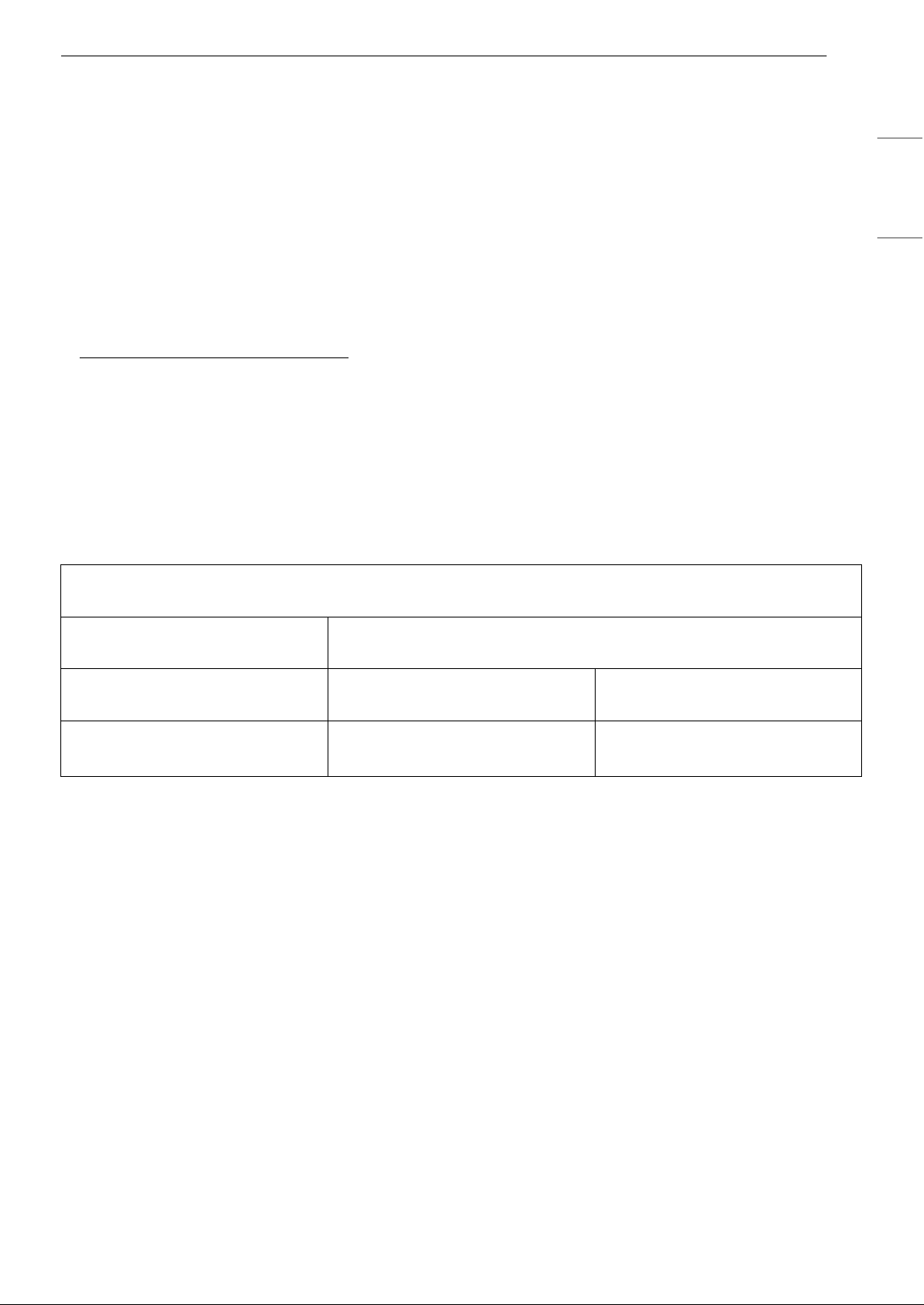
61LIMITED WARRANTY
ENGLISH
CANADA
TERMS AND CONDITIONS
ARBITRATION NOTICE: THIS LIMITED WARRANTY CONTAINS AN ARBITRATION PROVISION THAT
REQUIRES YOU AND LG TO RESOLVE DISPUTES BY BINDING ARBITRATION INSTEAD OF IN COURT,
UNLESS THE LAWS OF YOUR PROVINCE OR TERRITORY DO NOT PERMIT THAT, OR, IN OTHER
JURISDICTIONS, IF YOU CHOOSE TO OPT OUT. FOR FURTHER CLARITY, THIS ARBITRATION PROVISION
IS NOT APPLICABLE TO CONSUMERS RESIDING IN ONTARIO, BRITISH COLUMBIA OR QUÉBEC. IN
ARBITRATION, CLASS ACTIONS AND JURY TRIALS ARE NOT PERMITTED. PLEASE SEE THE SECTION
TITLED “PROCEDURE FOR RESOLVING DISPUTES” BELOW.
QUEBEC ONLY: LG stands behind its products and makes every reasonable effort to ensure its products
can be maintained and repaired, as required. You may access the catalogue of available parts and services
at https://www.lg.com/ca_en/support/
. HOWEVER, LG IN NO WAY GUARANTEES AND MAKES NO
REPRESENTATIONS REGARDING THE AVAILABILITY OF ANY SPECIFIC SPARE OR REPLACEMENT PART,
REPAIR SERVICE OR INFORMATION OR INSTRUCTIONS FOR SUCH MAINTENANCE AT ANY TIME. LG
EXPRESSLY DISCLAIMS ANY GUARANTEE, WARRANTY OR OBLIGATION IN RESPECT OF THAT AVAILABILITY.
Should your LG Dishwasher ("Product") fail due to a defect in materials or workmanship under normal and
proper use, during the warranty period set forth below, LG Electronics Canada, Inc. ("LGECI") will, at its
option, repair, replace or pro rate the Product upon receipt of proof of the original retail purchase. This
limited warranty is valid only to the original retail purchaser of the Product and applies only to a Product
distributed, purchased from an authorized retailer and used within Canada, as determined at the sole
discretion of LGECI.
† Main control board is located on the right bottom of the Dishwasher when viewed from the front.
• Replacement products and parts are warranted for the remaining portion of the original warranty period
or ninety (90) days, whichever is greater.
• Replacement products and parts may be new, reconditioned, refurbished, or otherwise factory
remanufactured, all at the sole discretion of LGECI.
• Proof of original retail purchase specifying the Product model and date of purchase is required to obtain
warranty service under this Limited Warranty.
DISCLAIMER:
IF YOU ARE A CONSUMER SUBJECT TO QUÉBEC, BRITISH COLUMBIA OR ONTARIO’S CONSUMER
PROTECTION LEGISLATION, THE EXCLUSION OF WARRANTIES CONTAINED IN THIS SECTION DO NOT
EXCLUDE OR LIMIT THE RIGHTS AND REMEDIES THAT YOU MAY HAVE UNDER SUCH ACT, INCLUDING THE
RIGHT TO MAKE A CLAIM UNDER ANY OF THE STATUTORY WARRANTIES PROVIDED THEREUNDER.
LGECI’S SOLE LIABILITY IS LIMITED TO THE LIMITED WARRANTY SET OUT ABOVE, UNLESS SUCH
LIMITATION IS PROHIBITED BY THE LAWS OF THE PROVINCE IN WHICH YOU RESIDE. EXCEPT AS
EXPRESSLY PROVIDED ABOVE, OR IF OTHERWISE PROHIBITED BY THE LAW OF THE PROVINCE IN
WHICH YOU RESIDE, LGECI DOES NOT MAKE ANY OTHER WARRANTIES OR CONDITIONS RESPECTING
THE PRODUCT, AND HEREBY DISCLAIMS, ALL OTHER WARRANTIES AND CONDITIONS RESPECTING
THE PRODUCT, WHETHER EXPRESS OR IMPLIED, INCLUDING BUT NOT LIMITED TO, ANY IMPLIED
WARRANTY OR CONDITION OF MERCHANTABILITY OR FITNESS FOR A PARTICULAR PURPOSE, AND
NO REPRESENTATIONS SHALL BE BINDING ON LGECI. LGECI DOES NOT AUTHORIZE ANY PERSON TO
WARRANTY PERIOD: (Note: If the original date of purchase can not be verified, the warranty will begin sixty
(60) days from the date of manufacture.)
Dishwasher Extended Component Warranty (Parts Only) (Consumer will be charged
for Labor after One (1) year from the date of purchase.)
One (1) year from the date of
original retail purchase
Two (2) years from the date of
original retail purchase
Ten (10) years from the date of
original retail purchase
Labor / Parts
(internal/functional parts only)
Main control board
†
, Rack,
Stainless Steel Door Liner, Tub
DD Motor

62 LIMITED WARRANTY
CREATE OR ASSUME FOR IT ANY OTHER WARRANTY OBLIGATION OR LIABILITY IN CONNECTION
WITH THE PRODUCT. TO THE EXTENT THAT ANY WARRANTY OR CONDITION IS IMPLIED BY LAW, IT IS
LIMITED TO THE WARRANTY PERIOD SET OUT ABOVE. UNDER NO CIRCUMSTANCES SHALL LGECI, THE
MANUFACTURER OR DISTRIBUTOR OF THE PRODUCT, BE LIABLE FOR ANY INCIDENTAL,
CONSEQUENTIAL, SPECIAL, DIRECT, INDIRECT, PUNITIVE OR EXEMPLARY DAMAGES, INCLUDING,
WITHOUT LIMITATION, LOSS OF GOODWILL, LOST PROFITS, LOSS OF ANTICIPATED PROFITS, LOST
REVENUE, LOSS OF USE, OR ANY OTHER DAMAGE, WHETHER ARISING DIRECTLY OR INDIRECTLY FROM
ANY CONTRACTUAL BREACH, FUNDAMENTAL BREACH, TORT OR OTHERWISE, OR FROM ANY ACTS OR
OMISSIONS. LGECI’S TOTAL LIABILITY, IF ANY, SHALL NOT EXCEED THE PURCHASE PRICE PAID BY YOU
FOR THE PRODUCT.
This Limited Warranty gives you specific legal rights. You may also have other rights that vary from
province to province depending on applicable provincial laws. Any term of this Limited Warranty that
negates or varies any implied condition or warranty under provincial law is severable where it conflicts
with such provincial law without affecting the remainder of this warranty’s terms.
THIS LIMITED WARRANTY DOES NOT COVER:
• Service trips to i) deliver, pick up, or install or; educate on how to operate the Product; ii) correct wiring or
plumbing; or iii) correct unauthorized repairs or installations of the Product;
• Damage or failure of the Product to perform during power failures and interrupted or inadequate
electrical service;
• Damage or failure caused by leaky or broken water pipes, frozen water pipes, restricted drain lines,
inadequate or interrupted water supply or inadequate supply of air;
• Damage or failure resulting from operating the Product in a corrosive atmosphere or contrary to the
instructions outlined in the Product’s owner’s manual;
• Damage or failure to the Product caused by accidents, pests and vermin, lightning, wind, fire, floods, acts
of God, or any other causes beyond the control of LGECI or the manufacturer;
• Damage or failure resulting from misuse, abuse, improper installation, repair, or maintenance of the
Product. Improper repair includes use of parts not authorized or specified by LGECI. Improper
installation or maintenance includes installation or maintenance contrary to the Product’s owner’s
manual;.
• Damage or failure caused by unauthorized modification or alteration of the Product, or if used for other
than the intended household purpose/use of the Product, or damage or failure resulting from any water
leakage due to improper installation of the Product;
• Damage or failure caused by incorrect electrical current, voltage or plumbing codes;
• Damage or failure caused by use that is other than normal household use, including, without limitation,
commercial or industrial use, including use in commercial offices or recreational facilities, or as
otherwise outlined in the Product’s owner’s manual;
• Damage or failure caused by the use of any accessories, components or cleaning products, including,
without limitation, water filters, that are not approved/authorized by LGECI;
• Damage or failure caused by transportation and handling, including scratches, dents, chips and/or other
damage to the finish of the Product, unless such damage results from defects in materials or
workmanship and is reported to LGECI within one (1) week of delivery of the Products;
• Damage or missing items to any display, open box, refurbished or discounted Product;
• Refurbished Product or any Product sold “As Is”, “Where Is”, “With all Faults”, or any similar disclaimer;
• Products with original serial numbers that have been removed, altered or cannot be readily determined
at the discretion of LGECI;
• Increases in utility costs and additional utility expenses in any way associated with the Product;
• Any noises associated with normal operation of the Product;
• Replacement of any part that was not originally included with the Product;
• Replacement of light bulbs, filters, fuses or any other consumable parts;
• Costs associated with removal and/or reinstallation of the Product for repairs; and

63LIMITED WARRANTY
ENGLISH
• Shelves, door bins, drawers, handle and accessories to the Product, except for internal/functional parts
covered under this Limited Warranty.
• Coverage for "in Home" repairs, for products in-warranty, will be provided if the Product is within a 150
km radius from the nearest authorized service center (ASC), as determined by LG Canada. If your Product
is located outside a 150 km radius from a ASC, as determined by LG Canada, it will be your responsibility
to bring the Product, at your sole expense, to the ASC for in-warranty repair.
All costs and expenses associated with the above excluded circumstances, listed under the heading,
This Limited Warranty Does Not Cover, shall be borne by the consumer.
TO OBTAIN WARRANTY SERVICE AND ADDITIONAL INFORMATION, PLEASE CALL OR VISIT OUR WEBSITE:
Call 1-888-542-2623 (8 am - 9 pm EST, 365 days) and select the appropriate option from the menu, or visit
our website at http://www.lg.com.
PROCEDURE FOR RESOLVING DISPUTES:
EXCEPT WHERE PROHIBITED AT LAW (INCLUDING WITH RESPECT TO QUÉBEC, BRITISH COLUMBIA AND
ONTARIO CONSUMERS), ALL DISPUTES BETWEEN YOU AND LG ARISING OUT OF OR RELATING IN ANY WAY
TO THIS LIMITED WARRANTY OR THE PRODUCT SHALL BE RESOLVED EXCLUSIVELY THROUGH BINDING
ARBITRATION, AND NOT IN A COURT OF GENERAL JURISDICTION. EXCEPT WHERE PROHIBITED AT LAW
(INCLUDING WITH RESPECT TO QUÉBEC, BRITISH COLUMBIA AND ONTARIO CONSUMERS), YOU AND LG
BOTH IRREVOCABLY AGREE TO WAIVE THE RIGHT TO A JURY TRIAL AND TO BRING OR PARTICIPATE IN A
CLASS ACTION.
Definitions. For the purposes of this section, references to “LG” mean LG Electronics Canada, Inc., its
parents, subsidiaries and affiliates, and each of their officers, directors, employees, agents, beneficiaries,
predecessors in interest, successors, assigns and suppliers; references to “dispute” or “claim” shall include
any dispute, claim or controversy of any kind whatsoever (whether based in contract, tort, statute,
regulation, ordinance, fraud, misrepresentation or any other legal or equitable theory) arising out of or
relating in any way to the sale, condition or performance of the product or this Limited Warranty.
Notice of Dispute. In the event you intend to commence an arbitration proceeding, you must first notify
LG in writing at least 30 days in advance of initiating the arbitration by sending a letter to LGECI Legal
Team at 20 Norelco Drive, North York, Ontario, Canada M9L 2X6 (the “Notice of Dispute”). You and LG
agree to engage in good faith discussions in an attempt to amicably resolve your claim. The notice must
provide your name, address, and telephone number; identify the product that is the subject of the claim;
and describe the nature of the claim and the relief being sought. If you and LG are unable to resolve the
dispute within 30 days of LG’s receipt of the Notice of Dispute, the dispute shall be resolved by binding
arbitration in accordance with the procedure set out herein. You and LG both agree that, during the
arbitration proceeding, the terms (including any amount) of any settlement offer made by either you or LG
will not be disclosed to the arbitrator until the arbitrator determines the dispute.
Agreement to Binding Arbitration and Class Action Waiver. Upon failure to resolve the dispute during
the 30 day period after LG’s receipt of the Notice of Dispute, you and LG agree to resolve any claims
between you and LG only by binding arbitration on an individual basis, unless you opt out as provided
below, or you reside in a jurisdiction that prevents full application of this clause in the circumstances of the
claims at issue (in which case if you are a consumer, this clause will only apply if you expressly agree to the
arbitration). To the extent permitted by applicable law, any dispute between you and LG shall not be
combined or consolidated with a dispute involving any other person’s or entity’s product or claim. More
specifically, without limitation of the foregoing, except to the extent such a prohibition is not permitted at
law, any dispute between you and LG shall not under any circumstances proceed as part of a class or
representative action. Instead of arbitration, either party may bring an individual action in small claims
court, but that small claims court action may not be brought on a class or representative basis except to
the extent this prohibition is not permitted at law in your province or territory of jurisdiction as it relates to
the claims at issue between you and LG. This does not apply to consumers in Ontario, British Columbia and
Québec. In accordance with provincial legislation, the consumer and LG may agree to resolve the dispute
using any procedure available, including commencing the action before the competent courts of those
provinces.
Arbitration Rules and Procedures. To begin arbitration of a claim, either you or LG must make a written
demand for arbitration. The arbitration will be private and confidential, and conducted on a simplified and
expedited basis before a single arbitrator chosen by the parties under the provincial or territorial

64 LIMITED WARRANTY
commercial arbitration law and rules of the province or territory of your residence. You must also send a
copy of your written demand to LG at LG Electronics, Canada, Inc., Attn: Legal Department- Arbitration, 20
Norelco Drive, North York, Ontario M9L 2X6. This arbitration provision is governed by your applicable
provincial or territorial commercial arbitration legislation. For consumers in Ontario, British Columbia and
Québec, the applicable arbitration legislation only applies if consumers agree to submit the dispute to
arbitration. Judgment may be entered on the arbitrator’s award in any court of competent jurisdiction. All
issues are for the arbitrator to decide, except that, issues relating to the scope and enforceability of the
arbitration provision and to the arbitrability of the dispute are for the court to decide. The arbitrator is
bound by the terms of this provision.
Governing Law. The law of the province or territory of your purchase shall govern this Limited Warranty
and any disputes between you and LG except to the extent that such law is preempted by or inconsistent
with applicable federal or provincial/territorial law. Should arbitration not be permitted for any claim,
action, dispute or controversy between you and LG, you and LG attorn to the exclusive jurisdiction of the
courts of the province or territory of your purchase for the resolution of the claim, action, dispute or
controversy between you and LG.
Fees/Costs. You do not need to pay any fee to begin an arbitration. Upon receipt of your written demand
for arbitration, LG will promptly pay all arbitration filing fees unless you seek more than $25,000 in
damages, in which case the payment of these fees will be governed by the applicable arbitration rules.
Except as otherwise provided for herein, LG will pay all filing, administration and arbitrator fees for any
arbitration initiated in accordance with the applicable arbitration rules and this arbitration provision. If you
prevail in the arbitration, LG will pay your attorneys’ fees and expenses as long as they are reasonable, by
considering factors including, but not limited to, the purchase amount and claim amount. Notwithstanding
the foregoing, if applicable law allows for an award of reasonable attorneys’ fees and expenses, an
arbitrator can award them to the same extent that a court would. If the arbitrator finds either the
substance of your claim or the relief sought in the demand is frivolous or brought for an improper purpose
(as measured by the applicable laws), then the payment of all arbitration fees will be governed by the
applicable arbitration rules. In such a situation, you agree to reimburse LG for all monies previously
disbursed by it that are otherwise your obligation to pay under the applicable arbitration rules. Except as
otherwise provided for, LG waives any rights it may have to seek attorneys’ fees and expenses from you if
LG prevails in the arbitration.
Hearings and Location. If your claim is for $25,000 or less, you may choose to have the arbitration
conducted solely (1) on the basis of documents submitted to the arbitrator, (2) through a telephonic
hearing, or (3) by an in-person hearing as established by the applicable arbitration rules. If your claim
exceeds $25,000, the right to a hearing will be determined by the applicable arbitration rules. Any in-
person arbitration hearings will be held at the nearest, most mutually-convenient arbitration location
available within the province or territory in which you reside unless you and LG both agree to another
location or agree to a telephonic arbitration.
Severability and Waiver. If any portion of this Limited Warranty (including these arbitration procedures)
is unenforceable, the remaining provisions will continue in full force and effect to the maximum extent
permitted by applicable law. Should LG fail to enforce strict performance of any provision of this Limited
Warranty (including these arbitration procedures), it does not mean that LG intends to waive or has waived
any provision or part of this Limited Warranty.
Opt Out. The arbitration provision requires you and LG to resolve disputes by binding arbitration instead
of court, unless the laws of your province or territory do not permit that, or, in other jurisdictions, if you
choose to opt out. The arbitration provision does not apply to consumers in Ontario, British Columbia and
Québec.
For individuals that fall within the binding arbitration provisions, you may opt out of this dispute resolution
procedure. If you opt out, neither you nor LG can require the other to participate in an arbitration
proceeding. To opt out, you must send notice to LG no later than 30 calendar days from the date of the
first consumer purchaser’s purchase of the product by either (i) sending an e-mail to [email protected]
, with
the subject line: “Arbitration Opt Out;” or (ii) calling 1- 800-980-2973
. You must include in the opt out e-mail
or provide by telephone: (a) your name and address; (b) the date on which the product was purchased; (c)
the product model name or model number; and (d) the serial number (the serial number can be found (i)
on the product; or (ii) online by accessing https://www.lg.com/ca_en/findmodel_serial/
).
In the event that you “Opt Out”, the law of the province or territory of your residence shall govern this
Limited Warranty and any disputes between you and LG except to the extent that such law is preempted
by or inconsistent with applicable federal or provincial/territorial law. Should arbitration not be permitted
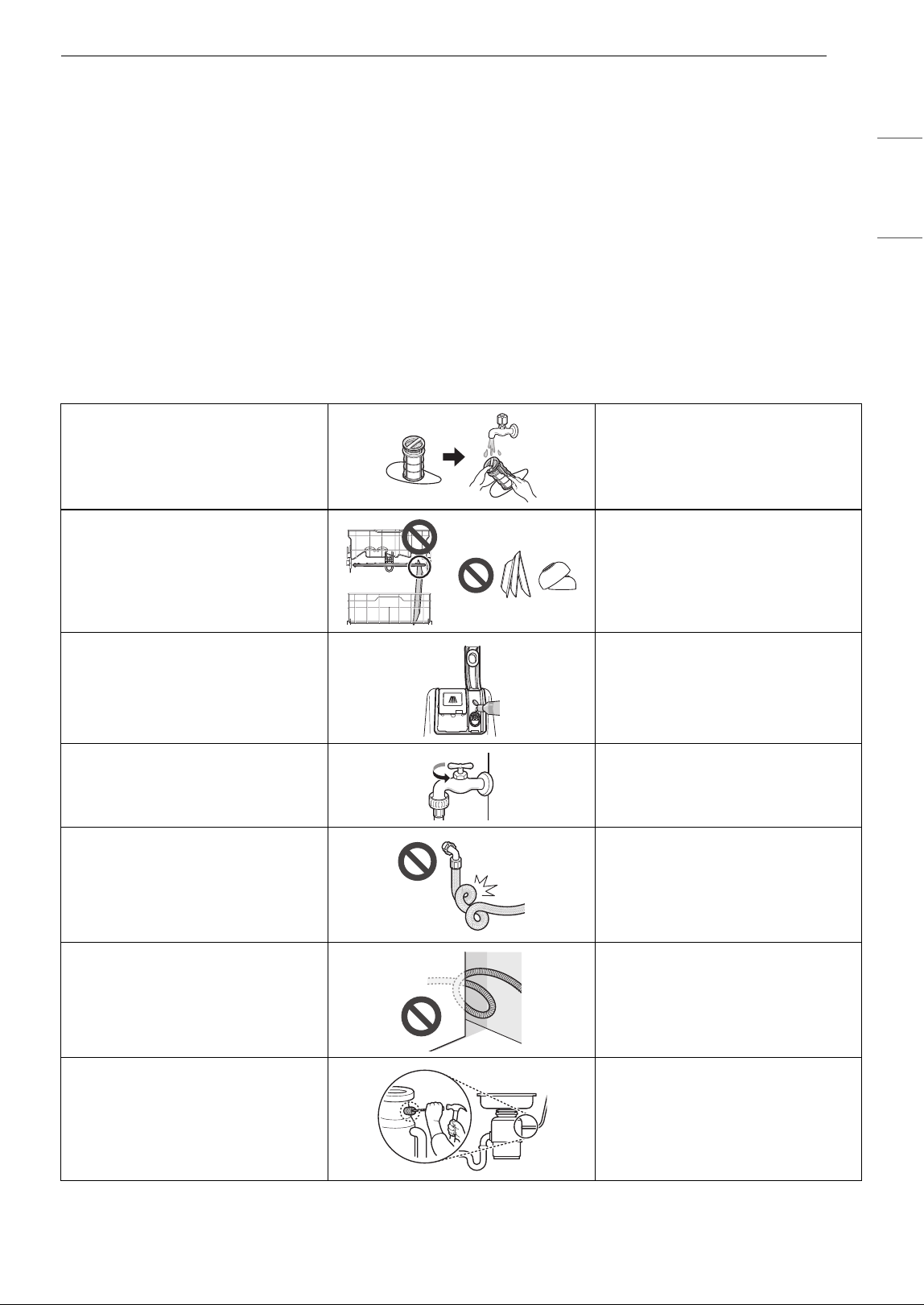
65LIMITED WARRANTY
ENGLISH
for any claim, action, dispute or controversy between you and LG, you and LG agree to attorn to the
exclusive jurisdiction of the courts of the province or territory of your residence for the resolution of the
claim, action, dispute or controversy between you and LG.
You may only opt out of the dispute resolution procedure in the manner described above (that is, by e-mail
or telephone); no other form of notice will be effective to opt out of this dispute resolution procedure.
Opting out of this dispute resolution procedure will not affect the coverage of the Limited Warranty in any
way, and you will continue to enjoy the full benefits of the Limited Warranty. If you keep this product and
do not opt out, then you accept all terms and conditions of the arbitration provision described above.
Conflict of Terms. In the event of a conflict or inconsistency between the terms of this Limited Warranty
and the End User License Agreement (“EULA”) in regards to dispute resolution, the terms of this Limited
Warranty shall control and govern the rights and obligations of the parties and shall take precedence over
the EULA.
Warranty Exceptions
Poor wash results caused by
debris remaining in the filter.
Clean the filter regularly.
Poor wash results caused by
improper loading or over stacking:
wash arm won't rotate or soap
dispenser is held closed.
Make certain that no dishes or
utensils are in the path of the
spray arms.
Do not place one dish on top of
another.
Poor drying results caused by lack
of rinse aid.
Use rinse aid or combination
detergent.
Water is not supplied because the
water tap is not turned on.
IE error
Check and turn on the water tap.
Water is not supplied because the
inlet hose is kinked.
IE error
Reinstall the inlet hose.
Not draining because drain hose is
kinked.
OE error
Reinstall the drain hose.
The knockout plug in the garbage
disposal is not removed.
OE error
Remove the plug on the disposal.
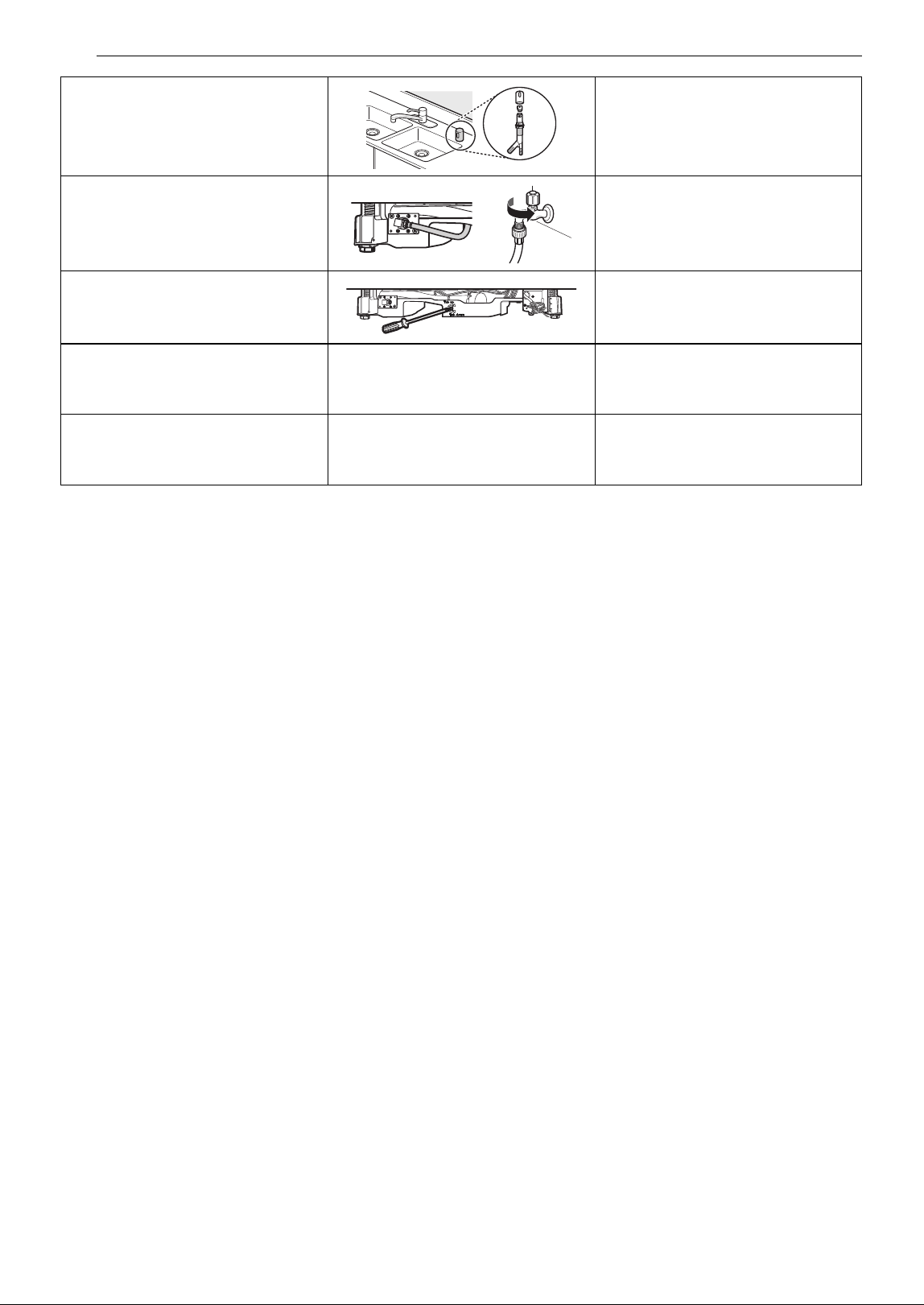
66 LIMITED WARRANTY
The disposal or air gap is blocked
by debris.
OE error
Clean the disposal or the air gap.
Inlet valve and drain hose
connection problem caused by
improper installation.
External leakage
Reinstall the hose.
Door movement or closing
compromised by incorrect
leveling.
Adjust the lower front leveling feet
to the required height.
No power due to loose connection
of power supply line or electrical
outlet problem.
Reconnect the power supply line
or repair the electrical outlet.
Pick-up, electrical wiring,
plumbing.
Installation
You will be charged for the
installation.
Memo