
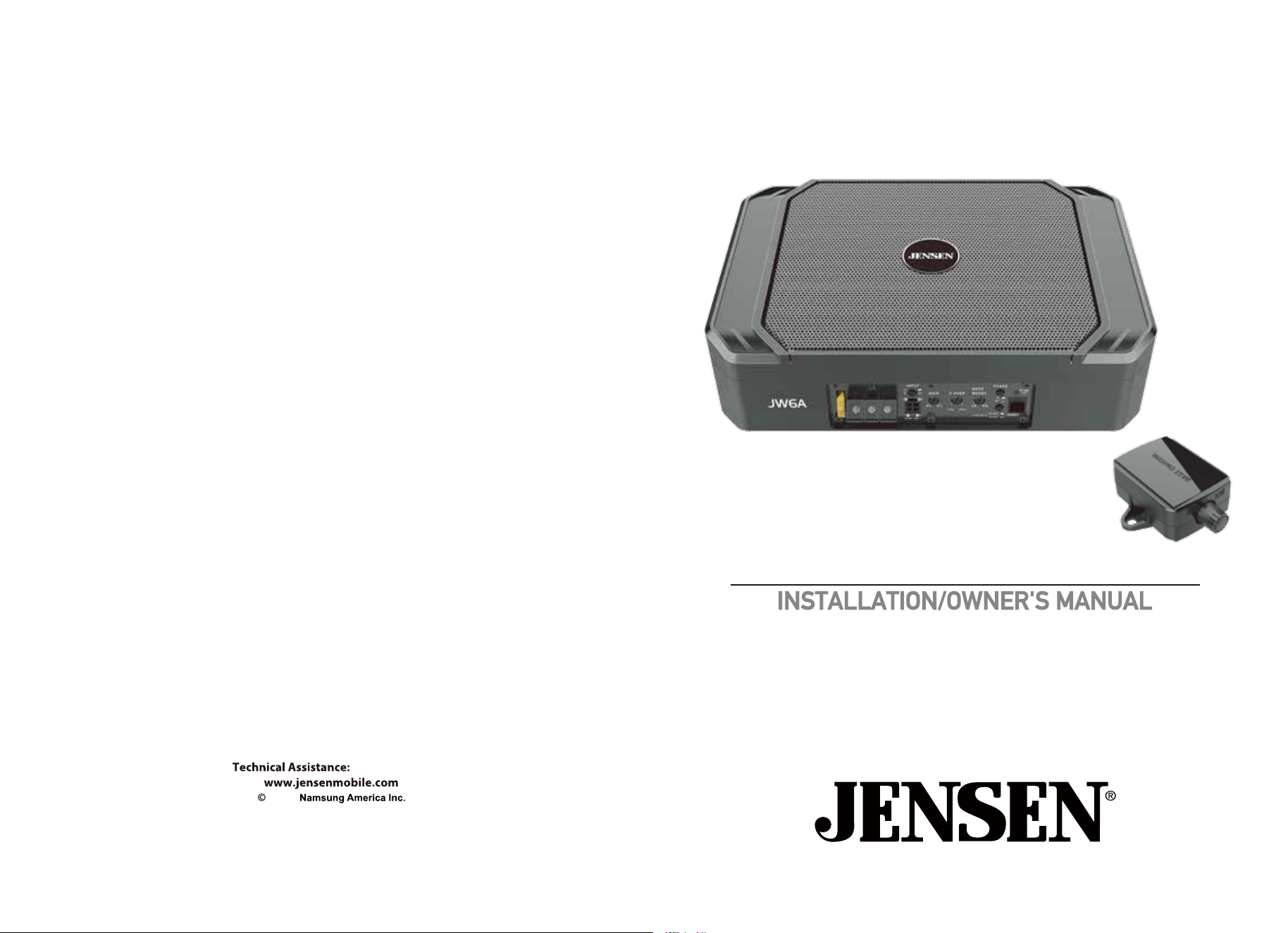
6.5" Compact Amplified Subwoofer
NSA0625-V01
1-888-921-4088
2025
JW6A

2
Getting Started
Thank you for purchasing the Jensen JW6A compact amplied subwoofer.
Although Jensen has attempted to ensure the information in this manual is
accurate, please be aware that any part of it is subject to change without notice.
Please read entire manual before installation. Due to the technical nature of
ampliers, it is highly recommended that your Jensen JW6A is installed
by a professional installer or an authorized dealer.
Before You Start
• Always disconnect the negative battery terminal. Consult a qualied technician
for instructions if you are unsure.
• Avoid installing the amplier where it would be subject to high temperatures,
such as from direct sunlight, or where it would be subject to dust, dirt or
excessive vibration.
• Use extreme caution when drilling holes to avoid damaging fuel lines or
existing vehicle wiring.
•
An amplier installation kit and RCA cable (sold separately) is highly recommended
to facilitate the installation. Consult your dealer for recommendations.
Mounting
Location
• For optimum performance, make sure to provide at least 1" of space around all
sides of the amplier.
• Do not mount the JW6A under carpets or where airow is restricted.
• Do not install the JW6A where it may be exposed to moisture.
• The optimum mounting location varies between vehicles. Remember to test all
amplier functions before completing the nal mounting procedure.
11
200W
Amplifier
RMS Power Output
600 Watts
30-150Hz
Maximum Output Power
Frequency Response
Low level (RCA): 10k ohms
High level (speaker wire): 200 ohms
200mV – 5V
50–150Hz
0–180 degrees
20A x 1
11.42" x 7.87" x 3.05"(W x D x H)
6.5"
2 ohms
30 oz.
Aluminum
Rubber
Design and specications subject to change
without notice.
Input Impedance
Input Sensitivity (LOW)
1V – 12V
Input Sensitivity (HIGH)
Low Pass FIlter
Phase
Fuse
Dimensions
Subwoofer Features
Woofer size
Impedance
Magnet
Cone material
Surround material
Specifications

10
3
The following installation instructions are intended to be used as a basic
guideline. If you feel unsure about installing this speaker system yourself,
Jensen
recommends acquiring the services of a professional car audio
installation center.
Before installation, please review the following guidelines:
1. Be sure to carefully read and understand the instructions before attempting to
install this product.
2. If additional wiring is required, we recommend running all wires prior to
mounting your enclosure in place.
3. To ensure reliable performance and minimize signal or power loss, use the
highest quality connectors available.
4. Never run speaker wires underneath your vehicle. Running speaker wires
inside the vehicle provides the best protection from exhaust, heat and
environmental elements.
5. Avoid running wires over, near or through sharp-edged surfaces. We suggest
you also use rubber grommets to protect any wires routed through metal,
especially the rewall.
6. When running the RCA cable to the amplier, avoid running it near sources
of high current (i.e. wiring harnesses, battery cables).
Safety First
The following instructions are designed to ensure safety during installation and
use of the JW6A. Failure to heed these instructions can result in injury or damage
to the unit or vehicle.
CAUTION
!
4
Power Wire (+12V)
• Disconnect negative battery terminal before proceeding. Consult a qualied
Note: Be sure to follow specific instructions included with your amplifier
installation kit(not included with this amplifier). The information below should be
used a general guideline only.
technician for instructions if you are unsure.
• Plan wire routing before cutting any wires to length. Begin by routing the
power +12V wire from the battery to the amplier location. Use a grommet
when running wires through the rewall or metal openings. Avoid running
the power wire near existing vehicle wiring to prevent induced noise from
entering the audio system.
•
Use extreme caution when drilling holes to avoid damaging fuel lines or
existing vehicle wiring.
• The +12V wire MUST be fused within 18" of the battery for protection of the
vehicle’s electrical system.
Ground Wire (GND)
• The amplier ground wire should be as short as possible. Choose a clean
unpainted section of metal or the vehicle chassis when attaching the ground
connection. Be sure to clean the area of any dirt or grease.
Remote Turn-on
Wire
(REM)
• The remote turn-on wire connects to the head unit's amplier turn-on lead or
other switched 12 volt source.
Input Signal
•
The amplier's input signal connects to the head unit's low level (RCA)
CAUTION
• Never run any
wires underneath or outside the vehicle.
Connection Descriptions
9
Troubleshooting
Please keep your original sales receipt and be prepared to
provide this receipt in the event you require service, as
your original receipt is considered the best proof of
purchase and indicates the date you purchased your
Jensen
Register your product online at www.jensenmobile.com.
Registration
For Your Records
Register Your Product
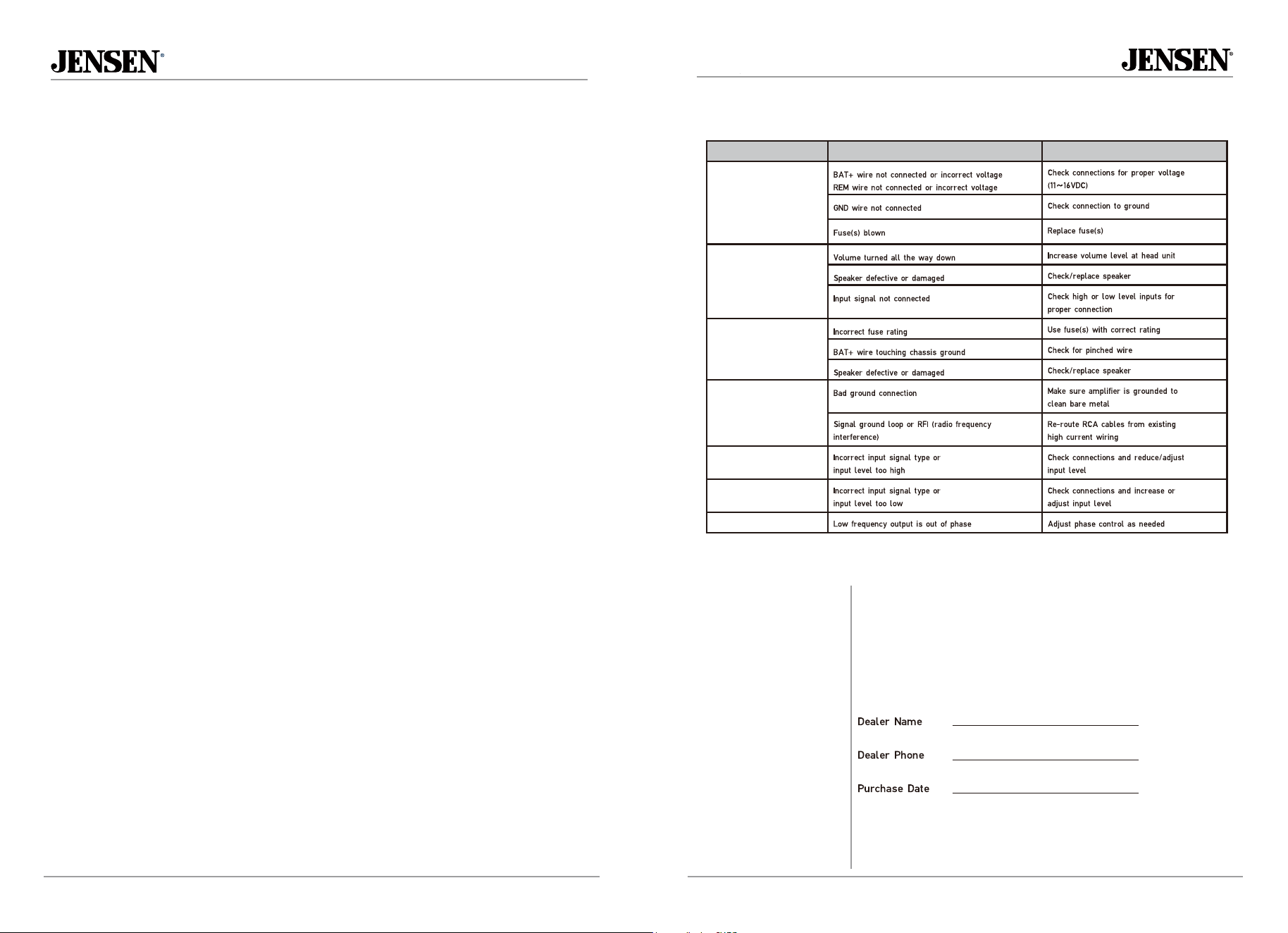
Problem Cause Action
Unit will not turn on
(no power LED indicator)
Unit has power - LED is
green (but no sound)
Unit blows fuse(s)
Engine noise
Distorted audio output
Low audio output
Weak bass
outputs.
product.
5
8
Mounting the Enclosure
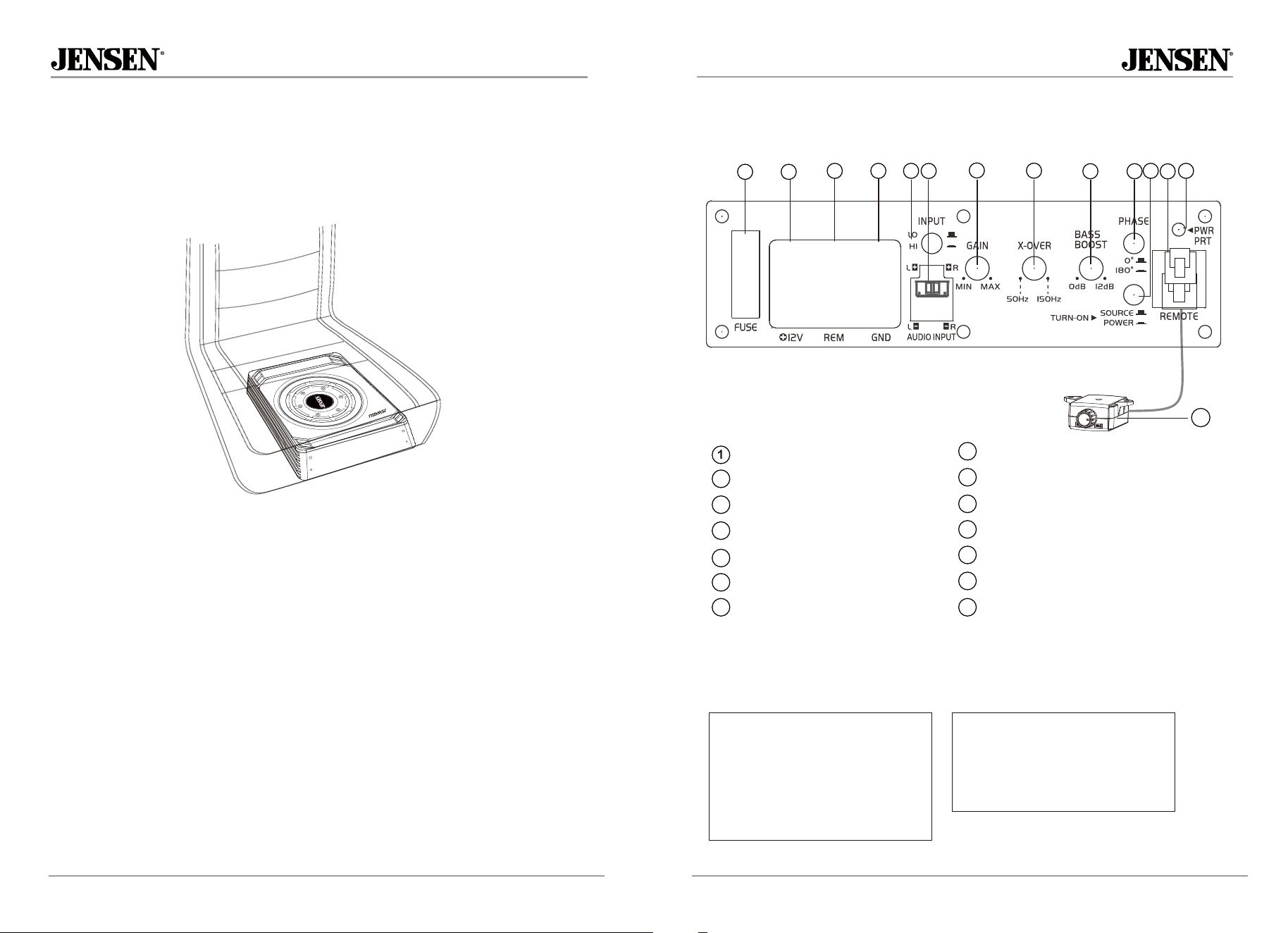
Determine optimal location for mounting the enclosure (refer to page 2 for
mounting location guidelines. A typical mounting location is shown below.
Typical Under-seat
Mounting Location
Connections and Controls
Power/Protect Indicator
Phase Control
Bass Boost
Crossover (50Hz - 150Hz)
Remote Bass Control Input
Amp Auto Turn-On (On / Off)
Gain
7
2
3
4
5
6
Level Input (Low and High (Speaker Wire)
Low/ High Level Input Select
+12V Battery Connection
Remote Turn On
Ground Connection
12
10
11
8
9
Fuse
14
1211
1013
13
Remote Bass Controller
14
9
8
7
6
5 4
3
2
1
Fuse Rating
When replacing the fuse, make
sure new fuse is the correct type
and amperage. Using an incorrect
fuse could damage the amplier.
The JW6A uses (1) 25 amp ATO
style fuse.
Power/Ground Wire Size
For optimum performance, use only
10 gauge wire or larger. Make sure
to use the same size power and
ground wire.
Main Power Connections
Connect BAT+, GND and REM wires accordingly. A suitable fuse MUST be installed on the
BAT+ lead within 18" of the battery for protection of the vehicle’s electrical system.
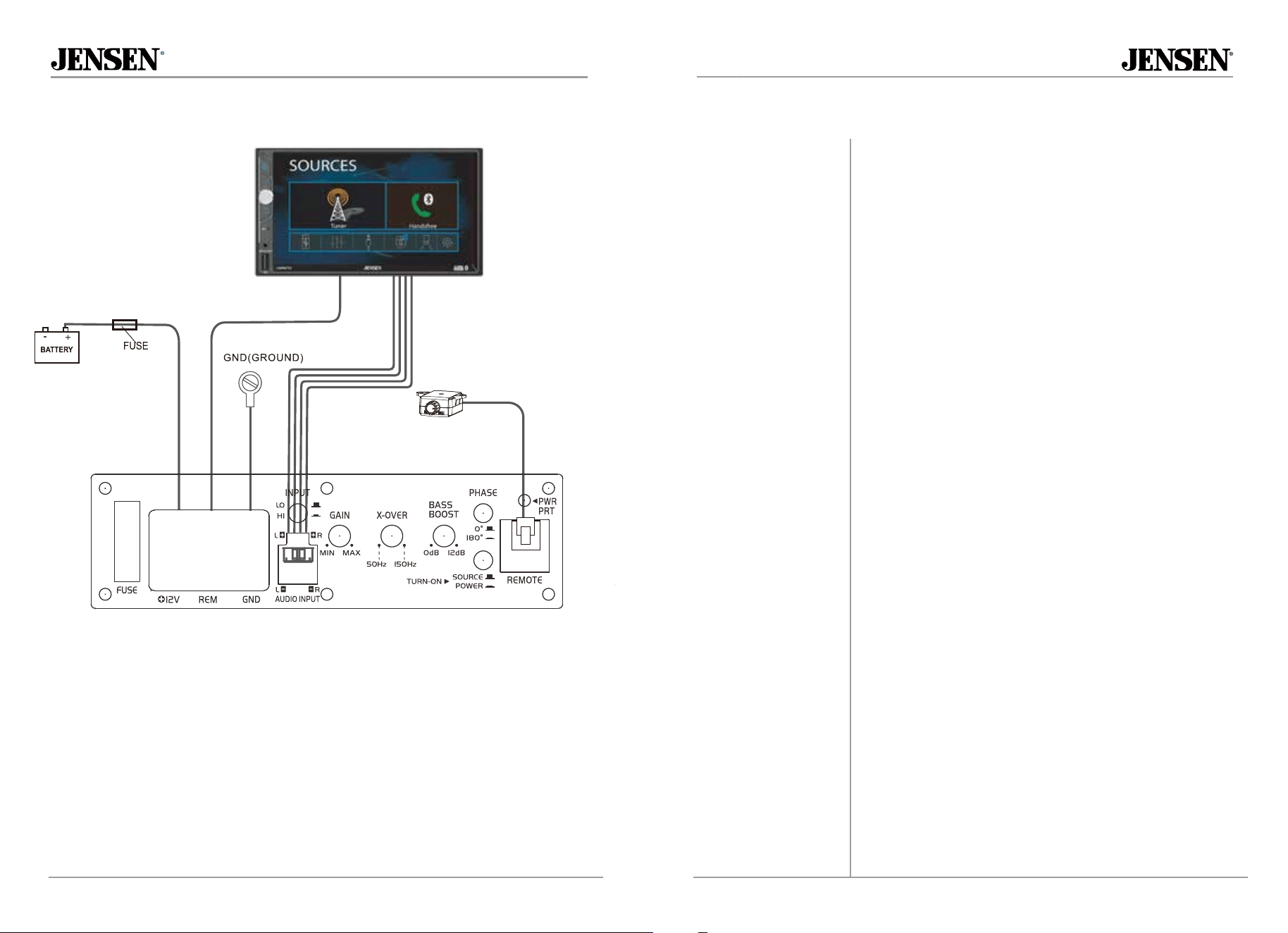
Typical Wire Routing
6 7
Low level (RCA) input signal is preferred for best
performance. Typical under-seat installations require
a 10-12 foot RCA cable depending on the vehicle.
Using twisted pair construction RCA cables will minimize
noise.
High level inputs should only be used when RCA outputs
are not available from the head unit. Connect the head
unit speaker outputs to the high level input connector as
shown below. The black wire (signal reference ground)
may or may not require a connection to chassis ground -
depending on your particular installation. Do not use both
low and high level inputs at the same time. Connect only
one or the other.
The adjustable crossover is used to lter out frequencies
above 50Hz ~ 150Hz. Adjust it to where the sound output
blends with the rest of the sound system.
Increases the volume of bass by a variable amount,
centered at the bass frequency adjustment. Turn the BASS
BOOST knob clockwise to increase the volume of the bass.
Adjust this control with caution, as improper use can
damage speakers.
The phase control compensates for delay between the
JW6A output and the rest of the sound system.
Begin with the phase control set to 0 degrees. If the sound
is adequate from the normal listening position inside the
vehicle, no further adjustment is necessary. If the sound is
thin or lacking bass, adjust the phase control until the bass
is full and punchy.
The input level control (LEVEL) is used to obtain the best
possible match between the head unit audio output and
the amplier input. Begin by turning the input level control
fully counterclockwise. Next, turn up the head unit volume
control around 3/4 of the
way up. Adjust the input level
control clockwise until audible distortion is heard, then
slightly counterclockwise to provide the best match.
The LED indicator illuminates Blue during normal
Remote Bass Control
REM(To Remote Turn-On
wire of radio)
operation.
Turn-On "POWER" is for high level connections. When the switch is in
the "POWER"position, the subwoofer automatically turns on when
there is signal input. When the Remote Turn-On (REM) is
used, please turn "SOURCE" Select.
Input Signal Connections
Low Level (RCA)
High Level
(Speaker Wire)
Crossover Frequency
Control
Bass Boost (0dB to 12dB)
Phase Control
Input Level Control
LED Indicator
Turn-On
Control Setup and Adjustment