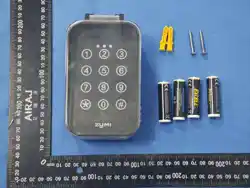
WRT01 User Manual
Specifications:
Input Voltage: DC 6V (4 AA batteries);
Operating Current: ≤ 35mA
Sleep Current: ≤ 25uA
Undervoltage: 3.1V±0.2V
Operating Frequency: 433.92MHz;
Operating Environment: Temperature -20°C ~ +70°C; Humidity 20% ~ 93%;
Storage Environment: Temperature -30°C ~ +80°C; Humidity 20% ~ 93%;
Encoding Format: HCS301 rolling code (two channels);
Transmission Distance: ≤ 100 meters
Installation
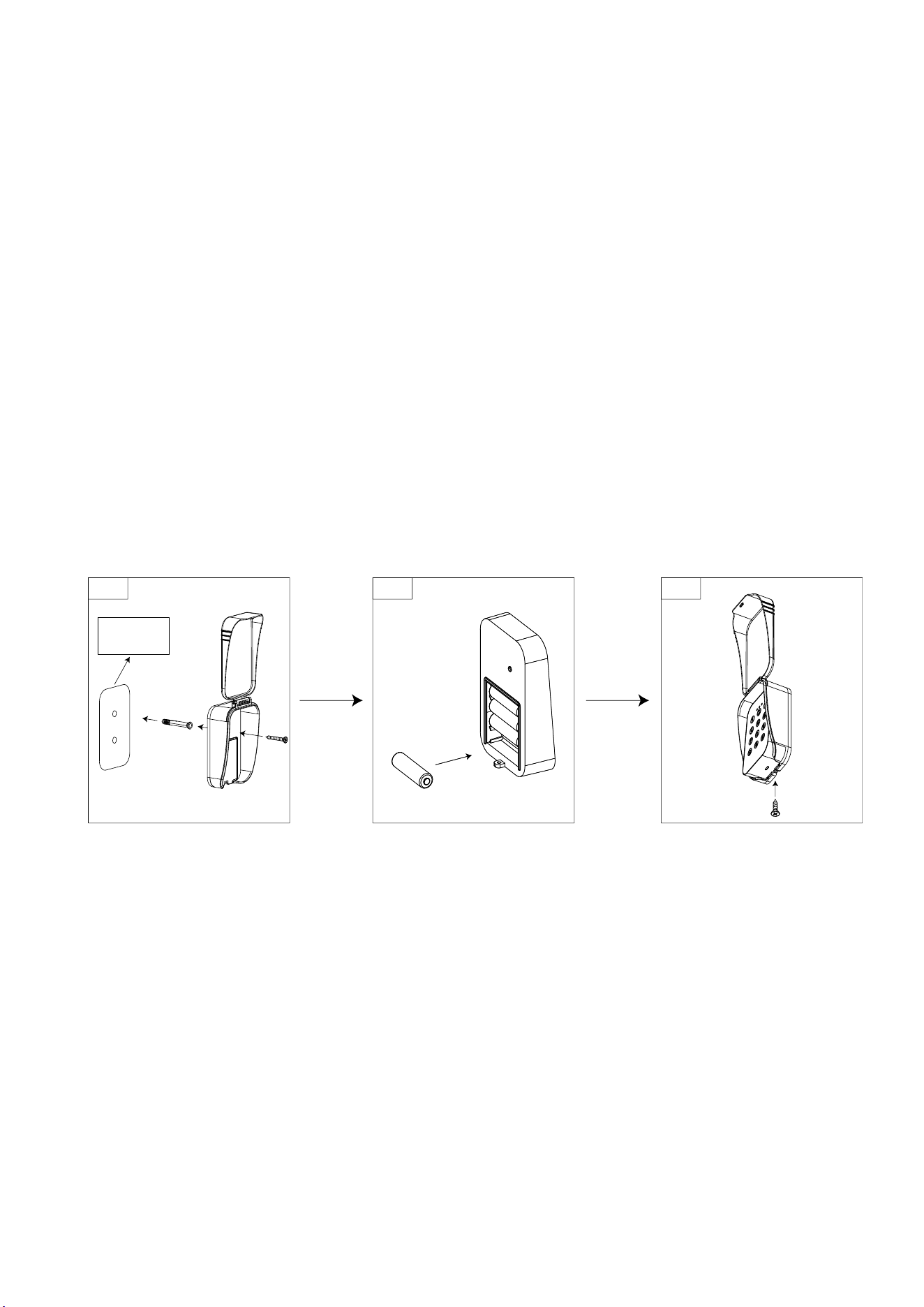
Step 1:Fix the installation sticker to the desired location, drill a 6mm diameter hole to install the
expansion tube, and use 4×30 self-tapping screws to secure the bottom of the combination lock box.
Step 2:Install four AA batteries, with the "-" side of the batteries facing the spring.
Step 3:Secure the bottom screws of the combination lock with 3×8 self-tapping screws.
sticker
s

Instructions
1.Method of use
Channel 1 initial password: 1111. Enter the password and press the "#" key to confirm.
Channel 2 initial password: 2222. Enter the password and press the "#" key to confirm.
Green indicator light on: Password correct.
No indicator light on: Password incorrect.
Red indicator light on: Keyboard locked. No response will be given to any key presses within 2 minutes.
After 2 minutes, the buzzer will sound once, the red indicator light will turn off, and the system will be
unlocked.
2.Add password
Channel 1:1) Enter the programming mode password "0000", press the "*" key to confirm. The buzzer
will sound once, and the blue indicator light will illuminate.
2)Enter the channel 1 command “01” and press the “#” key to confirm.
3)Enter the new four-digit password for channel 1, then press the "#" key to confirm.
The buzzer will sound twice. Save the password and exit.
Channel 2:1) Enter the programming mode password "0000", press the "*" key to confirm. The buzzer
will sound once, and the blue indicator light will illuminate.
2)Enter the channel 2 command "02", press the "#" key to confirm.
3)Enter the new four-digit password for channel 2, then press the "#" key to confirm. The
buzzer will sound two long beeps. Save the password and exit.
Note: Once you add a password for any channel, the initial password will automatically become invalid.
3.Restore factory settings
If you forget your previously set password, you can use the programming mode to delete it and restore
the initial password.
1)Enter the programming mode password "0000", press the "*" key to confirm, the buzzer will
sound a long beep, and the blue indicator light will light up.
2) Enter the password deletion command "00", press the "#" key to confirm, the buzzer will
sound twice, the password will be deleted and you will exit.
4.Change the programming mode password
To reduce the risk of password leakage, please follow these steps to change your programming mode
password:

1) Enter the programming mode password "0000", press the "*" key to confirm. The buzzer
will sound once, and the blue indicator light will illuminate.
2)Enter the command to change the programming password, "69", and press the "#" key to
confirm.
3)Enter the new four-digit programming password, then press the "#" key to confirm. The
buzzer will sound twice. Save the password and exit.
FCC Caution:
This device complies with part 15 of the FCC Rules. Operation is subject to the
following two conditions: (1) This device may not cause harmful interference, and (2)
this device must accept any interference received, including interference that may
cause undesired operation.
Any Changes or modifications not expressly approved by the party responsible for
compliance could void the user's authority to operate the equipment.
Note: This equipment has been tested and found to comply with the limits for a Class
B digital device, pursuant to part 15 of the FCC Rules. These limits are designed to
provide reasonable protection against harmful interference in a residential installation.
This equipment generates uses and can radiate radio frequency energy and, if not
installed and used in accordance with the instructions, may cause harmful interference
to radio communications. However, there is no guarantee that interference will not
occur in a particular installation. If this equipment does cause harmful interference to
radio or television reception, which can be determined by turning the equipment off
and on, the user is encouraged to try to correct the interference by one or more of the
following measures:
-Reorient or relocate the receiving antenna.
-Increase the separation between the equipment and receiver.
-Connect the equipment into an outlet on a circuit different from that to which the
receiver is connected.
-Consult the dealer or an experienced radio/TV technician for help.
The device has been evaluated to meet general RF exposure requirement. The device
can be used in portable exposure condition without restriction.