AAA (LR 03) 1.5V
(Not Included)
Install
3x
TROUBLESHOOTING
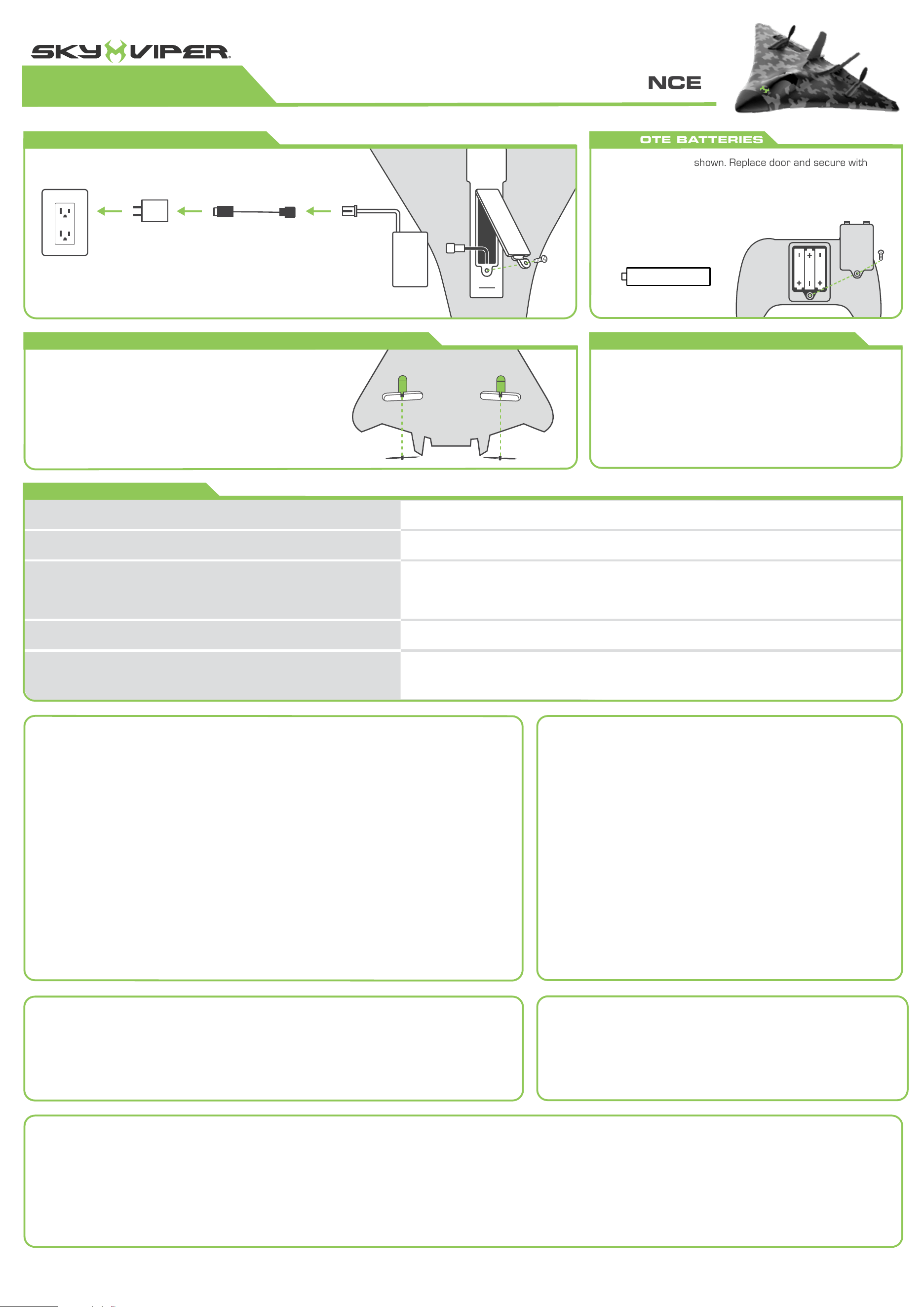
REMOTE BATTERIES
Adequate flying space is required. Keep a safe distance away from
streets, public thoroughfares and power lines. Never attempt to
retrieve plane from any location that poses a safety hazard. Never
fly plane at night. Keep plane in sight at all times during operation.
Discontinue operation immediately if plane flies out of your field of
view. Toy shall be used with caution since skill is required in order
to control the flight and avoid collisions with the user, objects or
third parties; Adult supervisors to teach children how to safely fly
and control the toy; Keep the instructions for use.
Skyrocket warrants to the original purchaser that this product is free of defects in materials or workmanship for
30 days from the original purchase. This warranty only applies to defects in material and workmanship and is not
valid if the product has been misused or not assembled and maintained per instructions. Proof of defect or
malfunction must be provided and verified, along with original sales receipt with date. For quickest resolution,
defective product should be returned to the original point of purchase for exchange or refund. If you have questions
or difficulties, please contact Skyrocket Toys customer service department at support@skyrockettoys.com.
Before each use, an adult should check this product and the LiPo battery to ensure
no damage or hazards exist. Plane has rotating blades that move at high speed,
posing danger of damage and injury. Pilots are responsible for any actions that
result in damage or injury from the improper operation of plane. Do not fly near
spectators or animals. Keep spinning props away from fingers, hair, eyes and other
body parts. Never leave plane unattended while it is turned on. Read all enclosed
information before operating.
SKYROCKET TOYS 30-DAY LIMITED WARRANTY
• Do not use rechargeable batteries.
• Non-rechargeable batteries are not to be recharged.
• Do not mix old and new batteries and Do not mix alkaline, standard (carbon-zinc)
or rechargeable (ni-cad, ni-mh, etc.) batteries.
• Batteries are to be inserted using correct polarity.
• Remove exhausted batteries as soon as possible and discard properly.
• Remove all batteries from compartment if beacon is not used for a long period
of time.
• The supply terminals are not to be short circuited.
• Batteries should be replaced by an adult.
• Never throw batteries in a fire or attempt to open the outer casing.
WARNING: Batteries are harmful if swallowed. Please keep away from children.
Battery Disposal: Dispose of batteries according to the local laws and regulations
of your region. Some batteries may be recycled, and may be accepted for disposal
at your local recycling center. If you are not able to identity the application rules in
your areas, please check the instructions of the battery manufacturer.
REMOTE AAA BATTERY WARNINGS & SPECIFICATIONS:
PLANE CONTAINS A LITHIUM-POLYMER BATTERY3.7V 380mAh:
LiPo batteries have a severe risk of fire and injury if they are improperly handled or misused. They may explode,
overheat or ignite.Read all following precautions and instructions regarding the care and use of LiPo batteries.
The LiPo battery is only to be used with the drone and charger included with this product.
• Keep away from flammable materials.
• Do not expose to direct sunlight.
• Do not place in a fire or leave in hot places.
• Do not drop or make subject to strong impact.
• Keep dry and away from water.
• The supply terminals are not to be short circuited.
• Never throw into a fire or attempt to open outer case.
• Do not stress, press or drop.
• Never charge unattended. When charging you should always remain in constant observation to monitor the
charging process and react to potential problems that may occur.
• Disconnect charging cable if fully charged.
• Never store or charge inside a car in extreme temperatures, since extreme temperature could ignite fire.
• Use caution to avoid puncture. Puncture of battery may cause a fire.
LiPo Battery Disposal: LiPo batteries must be recycled or disposed of properly. They should not be disposed of
with other household waste. Check your local laws and regulations for correct recycling and/or battery disposal.
This device complies with PART 15 of the FCC Rules. Operation is subject to the following two conditions. (1) This device may not cause harmful interference, and (2) this device must accept any interference
received, including interference that may cause undesired operation.
CAUTION: Changes or modifications to this unit not expressly approved by the party responsible for compliance could void the user’s authority to operate the equipment.
NOTE: This equipment has been tested and found to comply with the limits for a Class B digital device, pursuant to Part 15 of the FCC rules.
These limits are designed to provide reasonable protection against harmful interference in a residential installation. This equipment generates, uses and can radiate radio frequency energy and, if not installed
and used in accordance with the instructions, may cause harmful interference to radio communications. However, there is no guarantee that interference will not occur in a particular installation. If this
equipment does cause harmful interference to radio or television reception, which can be determined by turning the equipment off and on, the user is encouraged to try to correct the interference by one or
more of the following measures: Reorient or relocate the receiving antenna - Increase the separation between the equipment and receiver - Connect the equipment into an outlet on a circuit different from that
to which the receiver is connected - Consult the dealer or an experienced radio/TV technician for help.
Remote beeps 5x quickly during flight, and plane starts radial descent.
You are in danger of flying out of range. Turn back immediately to prevent losing remote connection.
Plane battery is running low. Recharge LiPo battery to full power.
- Plane cannot maintain altitude and drifts to ground.
- Plane LED is flashing.
- Remote starts to beep 1x every couple seconds.
Remote batteries are running low. Replace with fresh batteries.
Plane has flown out of range. Plane auto-lands for safety.
Turn off both remote and plane. Unplug then re-attach plane battery. Ensure remote batteries are new
and plane battery is fully charged, then reattempt flight.
- Plane does not respond to remote.
- Plane starts to fly erratically or becomes difficult to control.
Remote beeps 5x quickly during flight, while plane is far away.
Insert batteries as shown. Replace door and secure with
screw. When attempting to turn on remote with low batteries,
the remote will beep 3x then turn off to prevent unsafe flight.
Replace batteries to restore full function.
Remote beeps 3x then turns off.
LiPo
Battery
B
A
B A
CHARGING PLANE BATTERY
INSPECTING AND REPLACING DAMAGED PROPS
Remove battery from plane and attach to charging cable.
(Use included cable only)
For best performance, periodically inspect prop blades
for damage or debris wrapped around motor shaft.
If damaged, firmly hold motor housing and pull damaged
blade from shaft. Make note of A or B marking on prop
and replace with corresponding new prop.
Once charged, disconnect battery from cable and reattach to plane.
Tuck back into plane and secure door with screw. Remote will
beep 1x every couple seconds when LiPo battery runs low.
5V, 2A adapter
Recommended
(Sold Separately)
GREEN =
full charge
RED =
charging
ADULT SUPERVISION REQUIRED
INITIAL SET-UP & MAINTENANCE
Raptor
1
2
S
T
U
N
T
LEFT
RIGHT
S
T
U
N
T
1
2
S
T
U
N
T
1
2
3
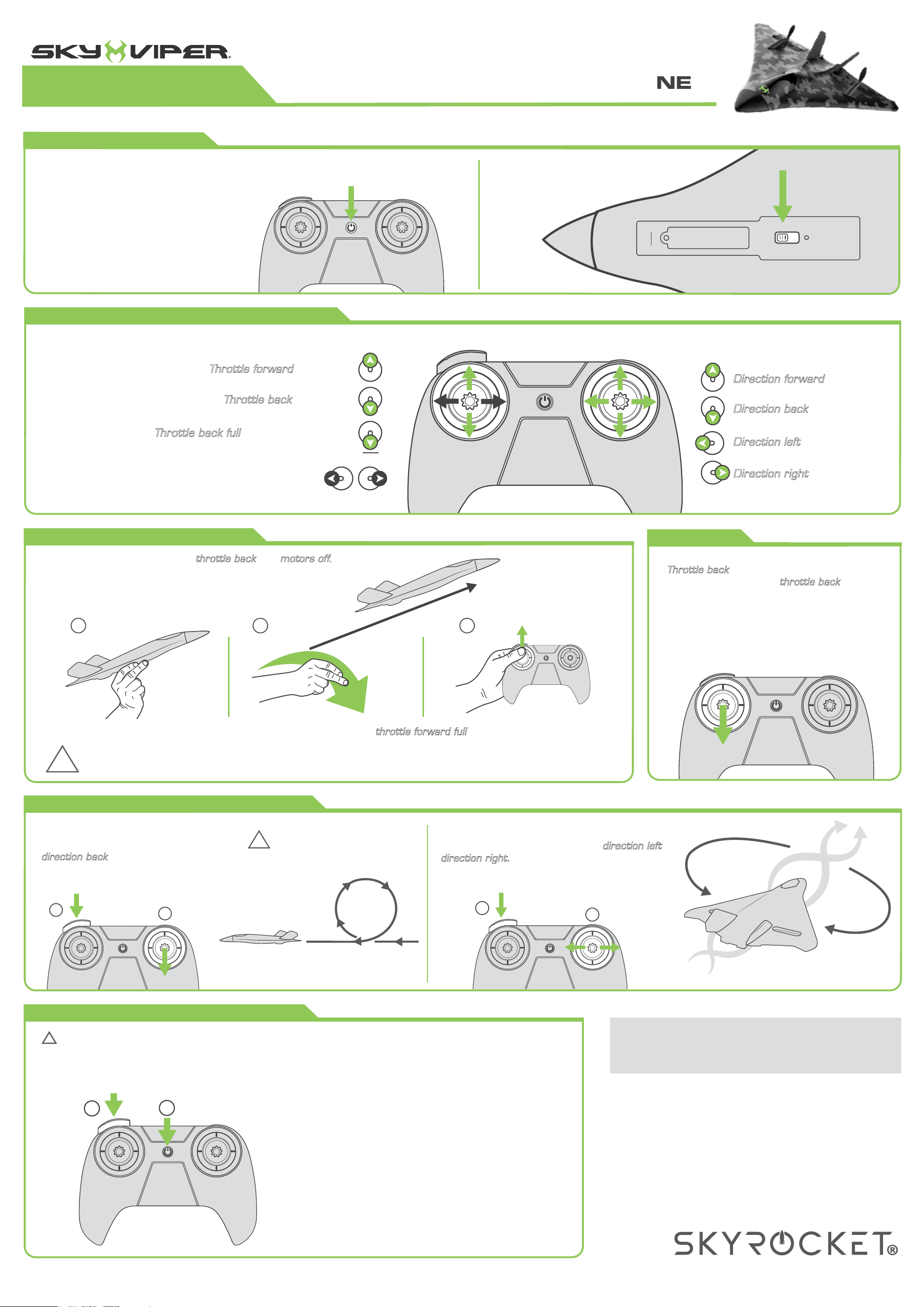
PERFORMING AEROBATIC STUNTS
LAUNCHING BY HAND
Tap stunt button then quickly pull
to pull up. Plane will climb
and auto-complete an upward loop.
UPWARD LOOP
Tap stunt button then quickly push or
Plane will roll in corresponding
direction and auto-complete a barrel roll.
LEFT OR RIGHT BARREL ROLL
LANDING
slightly to slowly descend.
As plane nears ground, a little
more to create a stalling effect for a softer
landing.
Throttle back
throttle back
!
WARNING: Push throttle forward immediately after release, but NOT BEFORE, to avoid possible injury to back
of hand from spinning props.
!
Ensure plane is flying high enough
to safely complete maneuvers.
direction back
direction left
direction right.
Toss and release plane slightly up and forward, then immediately push to complete launch.
throttle forward full
Hold remote with left hand, with and
Hold plane in right hand, gripping the underside near
the LED light. Point plane forward and away from you.
throttle back motors off.
UNDERSTANDING FLIGHT CONTROLS
to go faster
Throttle forward
to go slower
Throttle back
Sky Viper flight software helps
compensate for wind, but
additional manual compensation
is normal during flight. For best
performance, avoid flying in
windy conditions.
OPTIONAL: Throttle stick is also capable of applying left
and right turning force during flight. Most pilots however,
may prefer using only the direction stick for making turns.
Throttle back full
to cut power to motors
Direction left
to bank left
Direction right
to bank right
Direction back
to pull up
Direction forward
to dive down
THROTTLE STICK DIRECTION STICK
18879-US-G2
Questions or comments?
Please email support@skyrockettoys.com
©2026 Skyrocket LLC, Los Angeles, CA 90292 USA. All Rights Reserved.
Sky Viper and the Skyrocket logo are trademarks of Skyrocket LLC.
Other trademarks and trade names are those of their respective owners,
and there is no relationship express or implied with Skyrocket LLC.
MADE IN CHINA
Model no. 18879
PRESS & HOLD
for three seconds
SLIDE FORWARD
TURNING ON POWER
Ensure plane batteries are fully charged
and remote has fresh batteries installed.
Press to turn on. Press and hold 3
seconds to turn off. Slide plane button
forward to turn on and back to turn off.
ACRO FLYING MODE (experts only)
!
WARNING: Acro Mode disables all flight assist features. Controls are highly sensitive and plane will NOT
self-level. It will hold its current orientation if sticks are released, rather than auto-returning to stable level flight.
Acro Mode is NOT RECOMMENDED for most flyers, as most pilots prefer Regular Mode regardless of experience
level. Only attempt after fully mastering Regular Mode.
To enter Acro Mode, press and hold stunt button
then quickly tap power button. To exit, simply press
stunt button again.
PRO-PILOT TIP: It is best to enter Acro Mode after
launching in Regular Mode and coming to a steady
level flight orientation. If at any time you feel you're
losing control, tap the stunt button immediately to
return to regular control.
1
2
S
T
U
N
T
REGULAR MODE =
Solid LED
ACRO MODE =
Fast Blinking LED
F LY I N G RAPTOR STUNT PLANE
Raptor