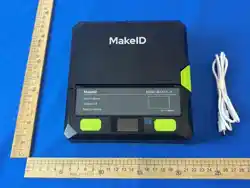
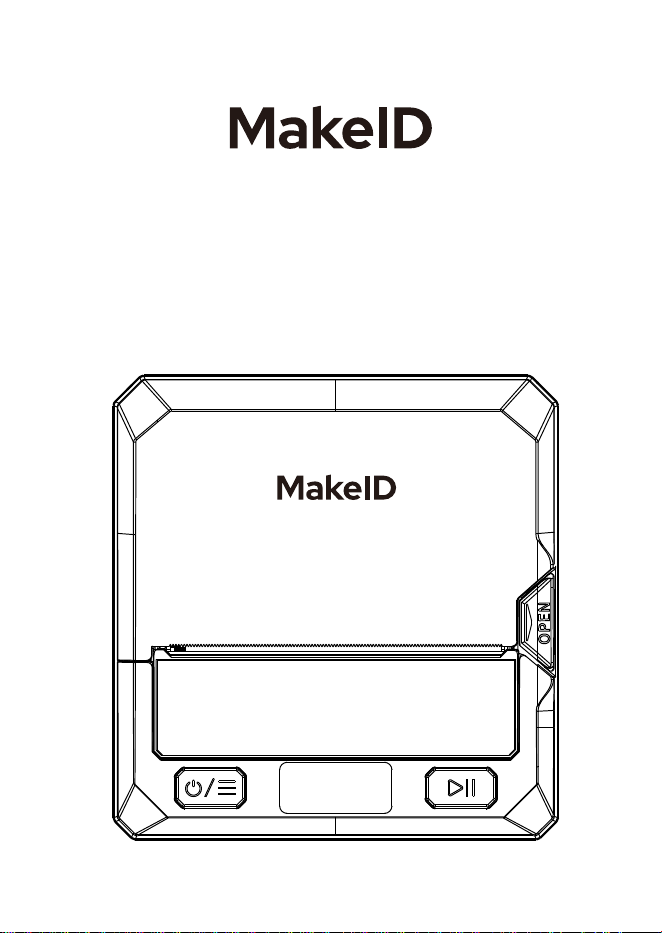
Label Printer
User Manual
1 2 3 4 5 6 7 8 9 10 11 12 13 14 15
16 17 18 19 20 21 22 23 24 25 26 27 28 29 30 31 32
33 34 35 36

FRANÇAIS
ESPAÑOL
01~08
09~15
1 6~22
23~29
30~36
DEUTSCH
ENGLISH
ITALIANO
1 2 3 4 5 6 7 8 9 10 11 12 13 14 15
16 17 18 19 20 21 22 23 24 25 26 27 28 29 30 31 32
33 34 35 36
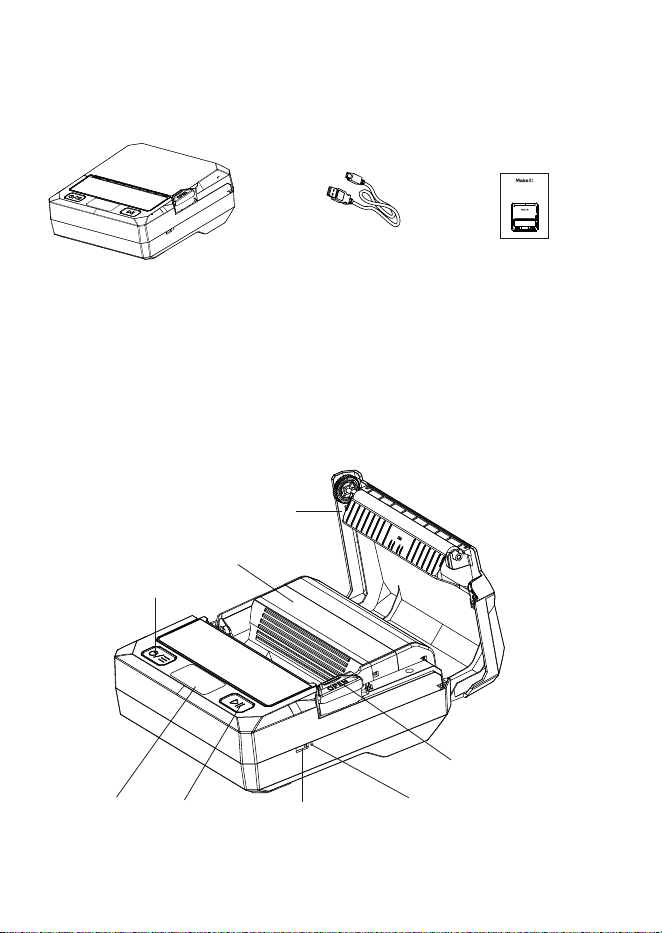
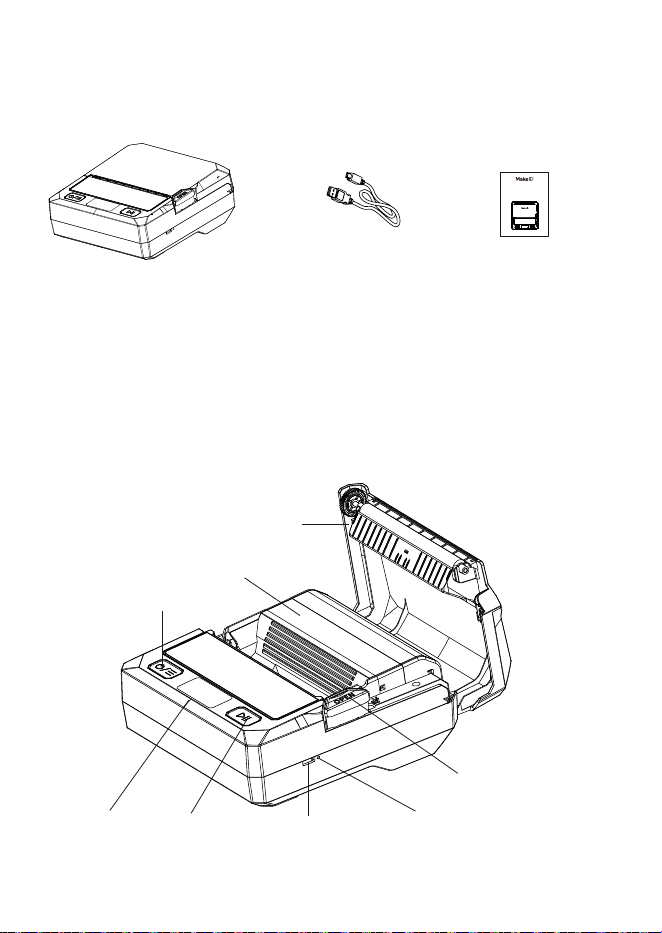
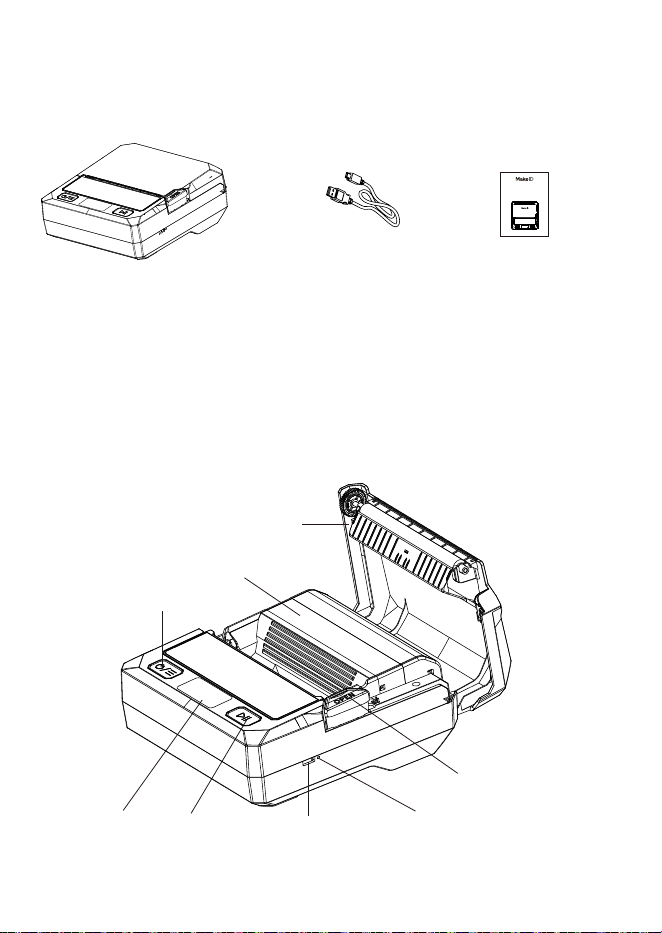
1.What’s in the box
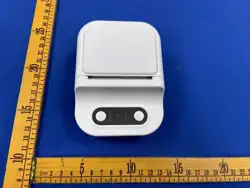
2.What’s what
USB-C cable
Cover release button
Reset button
USB-C port
Power button
Label cartridge compartment
Cover
Display
Multi-function
button
Label printer User manual
Label Printer
User Manual
1 2 3 4 5 6 7 8 9 10 11 12 13 14 15
16 17 18 19 20 21 22 23 24 25 26 27 28 29 30 31 32
33 34 35 36
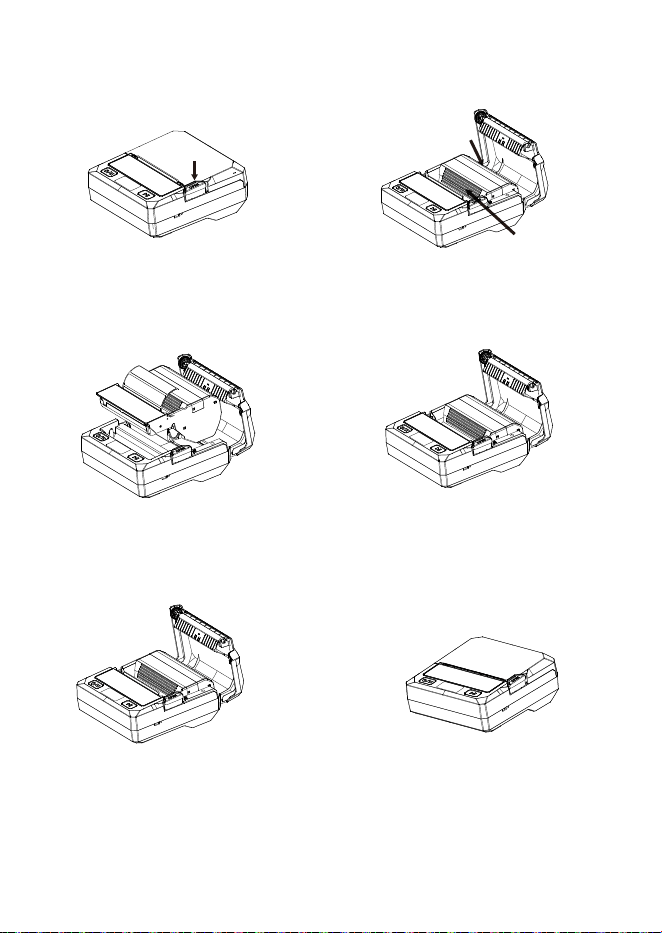
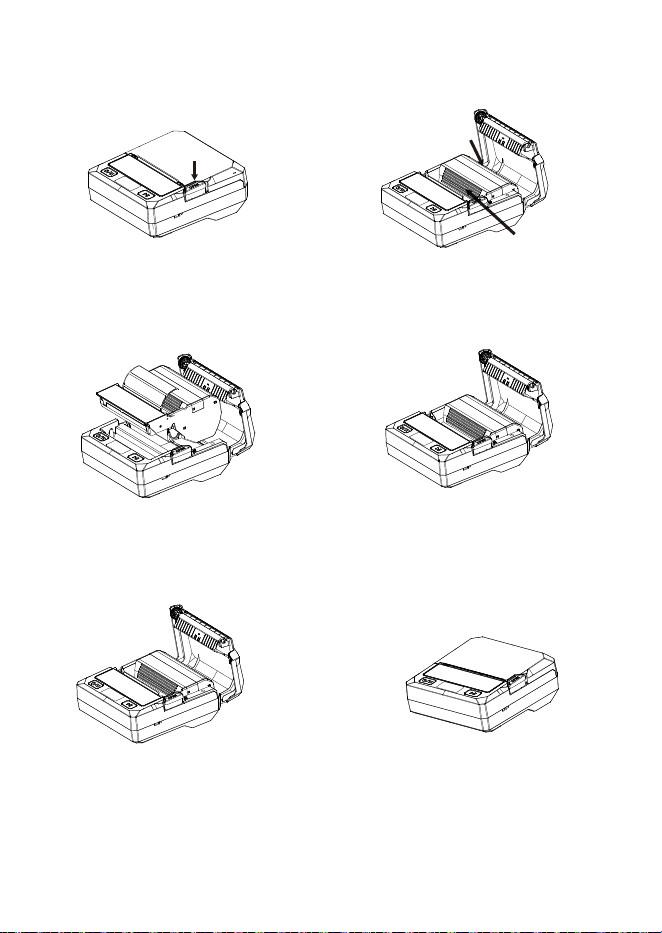
3.Install / Replace Label Cartridge
① Press the cover button
to open the lid.
② Remove the old
cartridge.
③ Insert the new MakeID
cartridge.
⑤ Pull the label end
out to the paper exit.
④ Push down until it
clicks into place.
⑥ Close the lid firmly
until it locks.
1 2 3 4 5 6 7 8 9 10 11 12 13 14 15
16 17 18 19 20 21 22 23 24 25 26 27 28 29 30 31 32
33 34 35 36
B
A
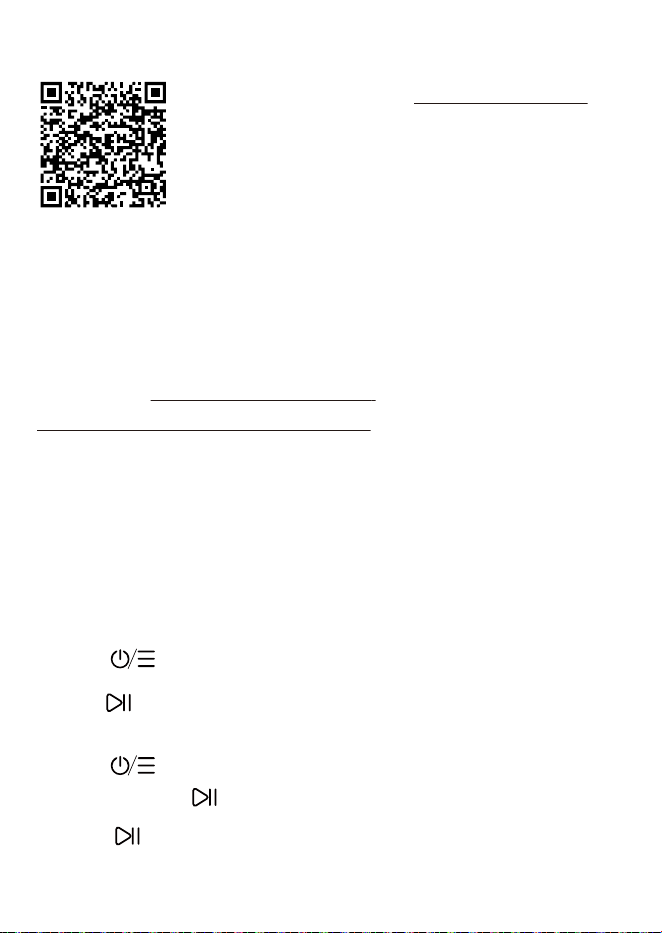
1.Download “MakeID Label Design” from:
https://www.makeid.com/support;
2.Install the software on your computer;
3.Connect the printer with the USB C cable to your computer;
4.Turn on the printer;
5.Open the software and edit the label content;
6.Click “Print” to start the printing process.
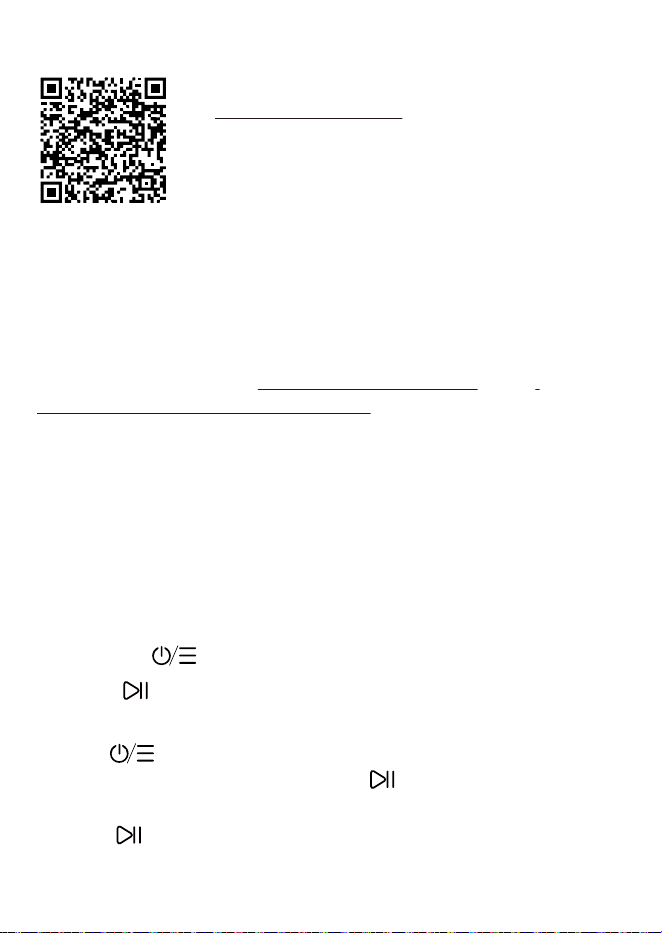
1.Scan QR code to installMakeID Label Pro APP;
2.Turn on Bluetooth on your phone;
3.Open the app, tap the printer icon in the top
right;
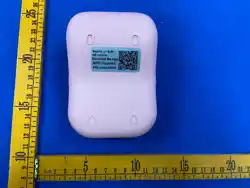
4.Select your printer (name = SN code on
bottom);
5.Edit your label, then tap “Print”.
1.Power :Hold 3 seconds to turn on/off;
2.Feed :Press once to feed a label; hold 3 seconds to print
test page;
3.Menu : Press to enter settings (darkness, auto off,
language).Press to switch parameter settings;
4.Pause :Press to pause, press again to resume printing, hold
3s to cancel printing.
4.Print from phone
6.Button Guide
5.Print from Computer
1 2 3 4 5 6 7 8 9 10 11 12 13 14 15
16 17 18 19 20 21 22 23 24 25 26 27 28 29 30 31 32
33 34 35 36

8.Maintenance – Clean Print Head
1.Turn off the printer;
2.Open lid, remove cartridge;
3.Wait until print head is fully cool;
4.Gently wipe the print line with a cotton swab or lint-free cloth
dampened with anhydrous ethanol;
5.Wait 3–5 minutes until completely dry;
6.Reinstall cartridge and close lid;
Important:Do not touch the print head with fingers or metal.Do
not use petrol, acetone or other chemicals.
1.Does not print
·Check Bluetooth / battery / cartridge installation.
2.Label not recognized
·Reopen and close the lid; use a new genuine cartridge.
3.Print light / blurry
·Clean the print head; increase print darkness.
4.Print head overheating
·Stop printing, open lid, wait 5–10 minutes to cool.
5.Battery fails to charge
·Continuous printing or long-term storage may cause the
battery to over-discharge. It takes 6 to 8 hours to restore and
fully charge the battery.
7. Troubleshooting
1 2 3 4 5 6 7 8 9 10 11 12 13 14 15
16 17 18 19 20 21 22 23 24 25 26 27 28 29 30 31 32
33 34 35 36
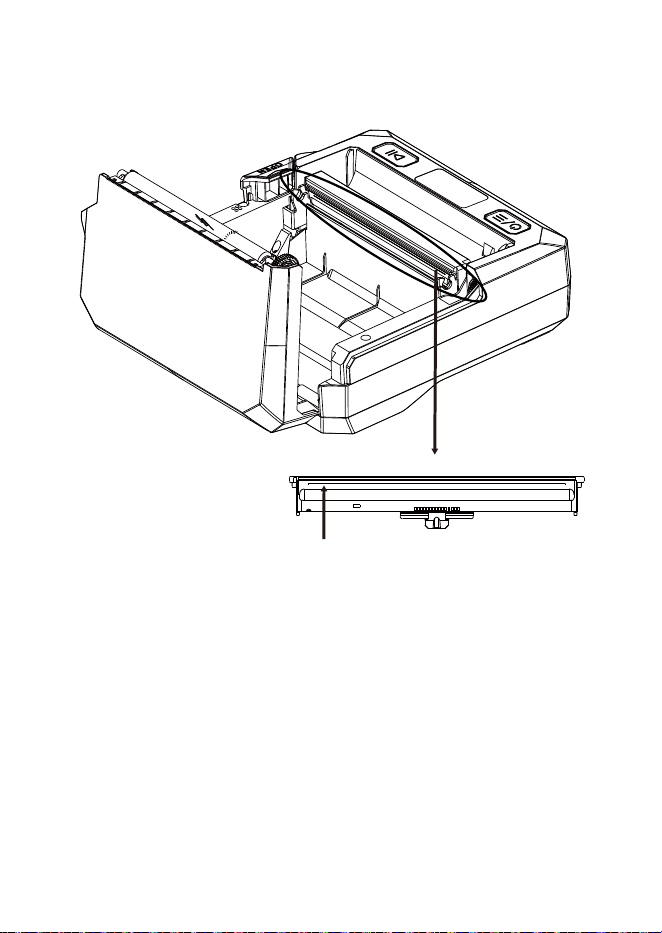
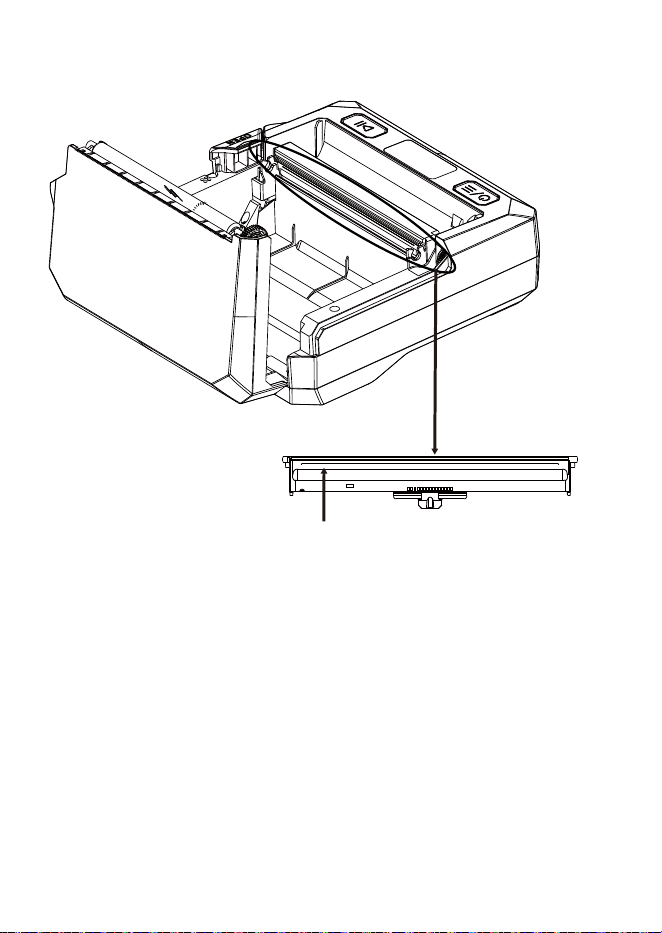
The black line is print line.
9.Safety Warnings
1.Print head becomes hot: do NOT touch during or right after
printing;
2.Keep away from water, heat, direct sunlight;
3.Keep out of reach of small children;
4.Do not take apart the printer;
5.Please use only a 5V USB-C power adapter that complies with
applicable safety regulations and holds valid safety certifica-
tions.
where is the print line?
1 2 3 4 5 6 7 8 9 10 11 12 13 14 15
16 17 18 19 20 21 22 23 24 25 26 27 28 29 30 31 32
33 34 35 36

10.Warranty Policy
Warranty Period
2-years warranty for the printer against hardware defects from
date of purchase, when used normally as instructed.
What is covered
Manufacturing defects and malfunctions under normal home or
office use.
What is NOT covered
·Damage from dropping, water, crushing, impact
·Use of non-MakeID labels or ribbons
·Disassembly, unauthorized repair or modification
·Wrong power, improper storage or environment
·Accidents, fire, flood or other natural disasters
How to get service
Contact us with your order number, name, contact info and a
short description of the issue.
Service email: service@makeid.com
1 2 3 4 5 6 7 8 9 10 11 12 13 14 15
16 17 18 19 20 21 22 23 24 25 26 27 28 29 30 31 32
33 34 35 36
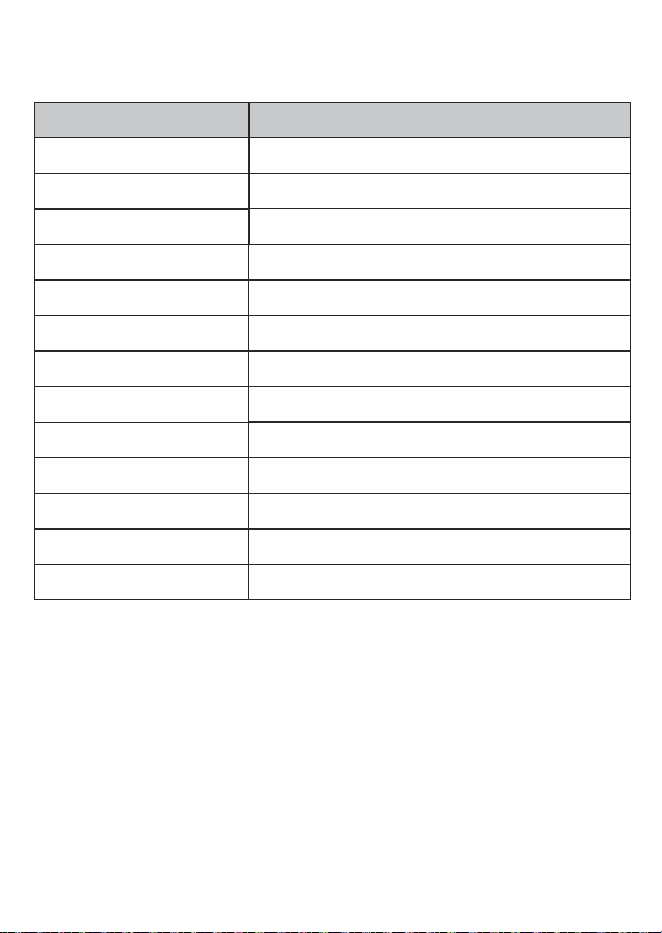
11.Specifications
Item Parameter
Print method Thermal transfer
Resolution 300dpi
Print speed max 50mm/s
Valid printing width 105.6mm
Label Width 56mm,93mm,110mm
Battery 2600mAh
Display 1.14 inch
Connection Bluetooth,USB(Type-C)
Input 5V/1.4A
Dimension 167*160*74mm
Weight 680g(cartridge not included)
Work environment 0℃~40℃,20%~90%RH(non-condensing)
Storage environment -20℃~60℃,5%~93%RH(non-condensing)
1 2 3 4 5 6 7 8 9 10 11 12 13 14 15
16 17 18 19 20 21 22 23 24 25 26 27 28 29 30 31 32
33 34 35 36

FCC COMPLIANCE STATEMENT:
This device complies with Part 15 of the FCC Rules.Operation is subject to
the following two conditions: ⑴this device may not cause harmful
interference, and
⑵this device must accept any interference received.in-
cluding interference that may cause undesired operation.
Changes or modifications to this unit not expressly approved by the party
responsible for compliance could void the user's authority to operate the
equipment.
NOTE: This equipment has been tested and found to comply with the
limits for a Class B digital device, pursuant to Part 15 of the FCC
Rules.These limits are designed to provide reasonable protection against
harmful interference in a residential installation. This equipment gener-
ates,uses and can radiate radio frequency energy and, if not installed and
used in accordance with the instructions, may cause harmful interference
to radio communications. However, there is no guarantee that interfer-
ence will not occur in a particular installation. lf this equipment does cause
harmful interference to radio or television reception, which can be
determined by turning the equipment off and on,the user is encouraged
to try to correct the interference by one or more of the following
measures:
--Reorient or relocate the receiving antenna.
--Increase the separation between the equipment and receiver.
--Connect the equipment into an outlet on a circuit different from that to
which the receiver is connected.
--Consult the dealer or an experienced radio/TV technician for help.
This device and its antenna(s) must not be co-located or operation in
conjunction with any other antenna or transmitter.
Radiation Exposure Statement
To maintain compliance with FCC's RF Exposure guidelines, This
equipment should be installed and operated with minimum distance of
20cm from your body.
1 2 3 4 5 6 7 8 9 10 11 12 13 14 15
16 17 18 19 20 21 22 23 24 25 26 27 28 29 30 31 32
33 34 35 36
1.Lieferumfang
2.What’s what
USB-C Kabel
Deckelöffnungstaste
Reset-Taste
USB-C Anschluss
Ein-/Ausschalttaste
Etikettenkassettenfach
Abdeckung
Display
Funktionstaste
Etikettendrucker Kurzanleitung
Label Printer
User Manual
Deutsch
1 2 3 4 5 6 7 8 9 10 11 12 13 14 15
16 17 18 19 20 21 22 23 24 25 26 27 28 29 30 31 32
33 34 35 36
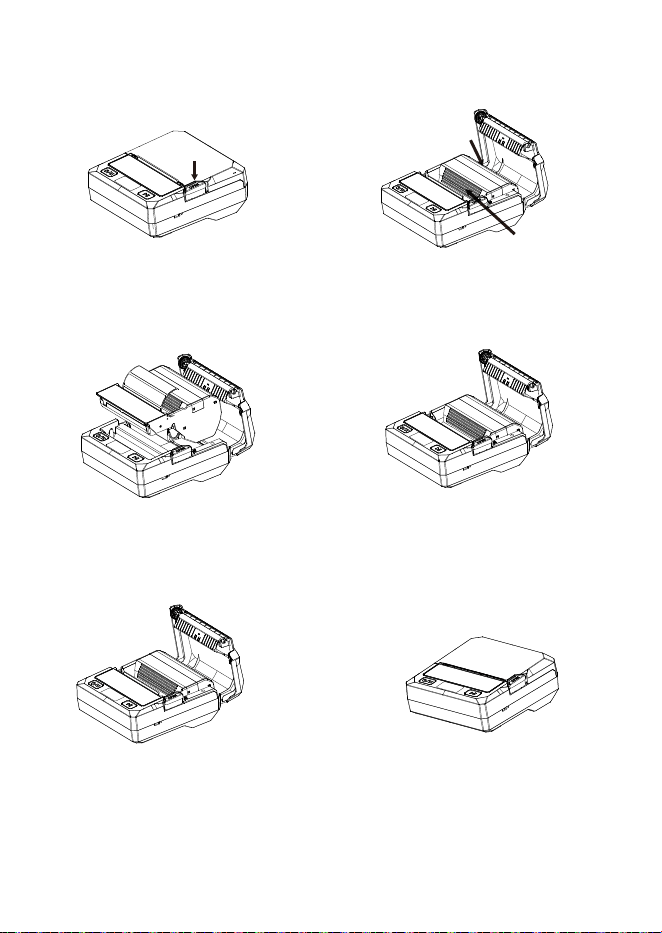
3.Etikettenkassette einlegen/wechseln
① Drücke die Taste zum
Öffnen des Deckels.
② Nimm die alte Kassette
heraus.
③ Legen Sie die neue
MakeID-Kassette ein.
⑤Ziehe das Etikettende aus dem
Ausgabeschlitz.
④ Drücke sie fest, bis sie
einrastet.
⑥ Schließe den Deckel
fest, bis er verriegelt.
1 2 3 4 5 6 7 8 9 10 11 12 13 14 15
16 17 18 19 20 21 22 23 24 25 26 27 28 29 30 31 32
33 34 35 36
B
A
1.Laden Sie die Software“MakeID Label Design” herunter von:
https://www.makeid.com/support;
2.Installieren Sie die Software auf Ihrem Computer;
3.Verbinden Sie den Drucker mit dem USB-C-Kabel mit Ihrem
Computer;
4.Schalten Sie den Drucker ein;
5.Öffnen Sie die Software und bearbeiten Sie den Etikettenin-
halt;
6.Klicken Sie auf “Drucken”, um den Druckvorgang zu starten.
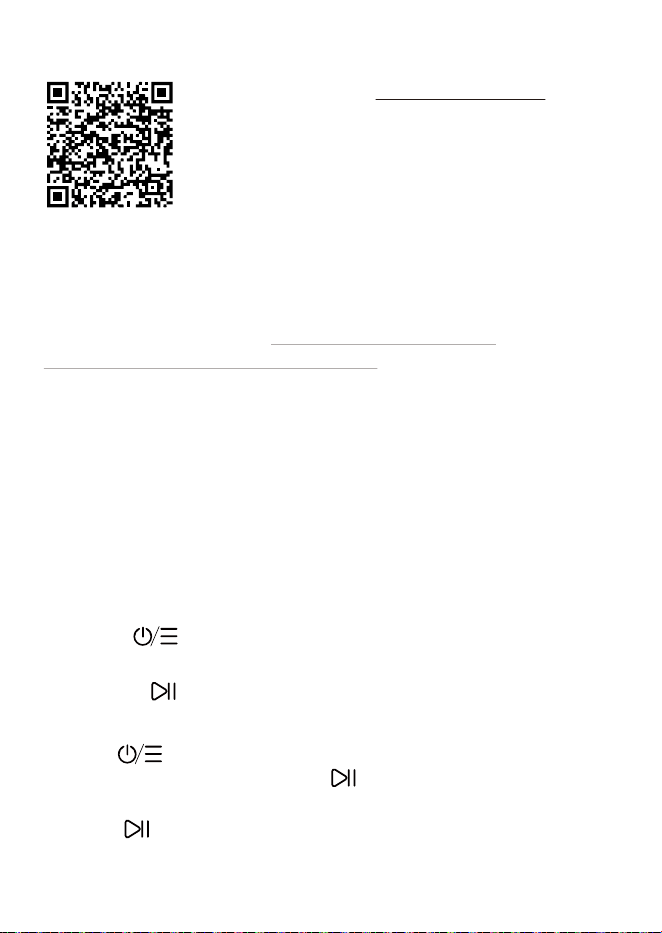
1.Scan QR-Code → MakeID Label Pro App;
2.Schalte Bluetooth ein;
3.Öffne die App, tippe oben rechts auf das
Druckersymbol;
4.Wähle den Drucker aus (Name = SN-Code
unten);
5.Bearbeite das Etikett und tippe auf “Drucken”.
1.Ein/Aus :3 Sekunden gedrückt halten zum Ein-/Auss-
chalten;
2.Vorschub :Einmal drücken zum Vorschub; 3 Sekunden
gedrückt halten für Testseite;
3.Menü :Drücken zum Öffnen der Einstellungen (Dunkel-
heit, Auto-Aus, Sprache).Taste drücken zum Wechseln der
Einstellparameter;
4.Pause :Einmal kurz drücken → Pause, nochmal drücken →
Druck fortsetzen, 3 Sekunden gedrückt halten → Druck
abbrechen.
4.Drucken vom Smartphone
6.Tastenübersicht
5.Vom Computer drucken
1 2 3 4 5 6 7 8 9 10 11 12 13 14 15
16 17 18 19 20 21 22 23 24 25 26 27 28 29 30 31 32
33 34 35 36

8.Wartung – Druckkopf reinigen
1.Schalten Sie den Drucker aus.
2.Öffnen Sie den Deckel und entnehmen Sie die Kassette.
3.Warten Sie, bis der Druckkopf vollständig abgekühlt ist.
4.Wischen Sie sanft mit weichem Tuch + nur wasserfreiem
Alkohol.
5.Warten Sie 3–5 Minuten, bis er vollständig trocken ist.
6.Setzen Sie die Kassette wieder ein und schließen Sie den
Deckel.
Wichtig:Berühren Sie den Druckkopf nicht mit den Fingern oder
Metall.Verwenden Sie kein Benzin, Aceton oder andere Chemi-
kalien.
1.Druckt nicht
·Überprüfen Sie Bluetooth, Akku, Kassette.
2.Etikett nicht erkannt
·Deckel neu schließen; Original-MakeID-Kassette verwenden.
3.Druck unscharf
·Druckkopf reinigen; Dunkelheit erhöhen.
4.Druckkopf überhitzt
·Druck stoppen, Deckel öffnen, 5–10 Minuten abkühlen.
5.Akku lässt sich nicht aufladen
·Dauerndes Drucken oder lange Lagerung können eine Tiefent-
ladung des Akkus verursachen. Für die Wiederherstellung und
vollständige Aufladung benötigen Sie 6 bis 8 Stunden.
7. Fehlerbehebung
1 2 3 4 5 6 7 8 9 10 11 12 13 14 15
16 17 18 19 20 21 22 23 24 25 26 27 28 29 30 31 32
33 34 35 36
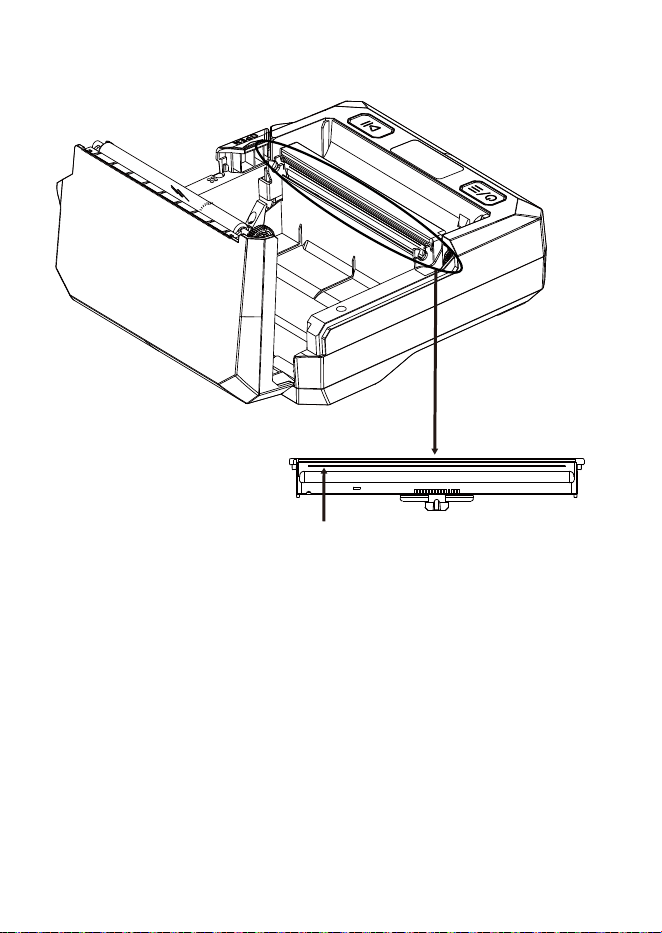
Die schwarze Linie ist die Drucklinie.
9.Sicherheitshinweise
1.Der Druckkopf wird während und direkt nach dem Drucken
heiß; nicht berühren;
2.Bitte verwenden Sie nur einen 5V-USB-C-Netzadapter, der
geltenden Sicherheitsvorschriften entspricht und über gültige
Sicherheitszertifizierungen verfügt;
3.Fernhalten von Wasser, Hitze, direktem Sonnenlicht;
4.Außerhalb der Reichweite von kleinen Kindern aufbewahren;
5.Den Drucker nicht auseinandernehmen.
Wo befindet sich die Drucklinie?
1 2 3 4 5 6 7 8 9 10 11 12 13 14 15
16 17 18 19 20 21 22 23 24 25 26 27 28 29 30 31 32
33 34 35 36

10.Garantiebedingungen
Garantiezeitraum
2 Jahre Garantie für Hardware-Fehler ab Kaufdatum bei
bestimmungsgemäßer Nutzung.
Abgedeckt
Fabrikationsfehler und Funktionsstörungen bei normalem
Heim- oder Bürogebrauch.
Nicht abgedeckt
·Beschädigung durch Sturz, Wasser, Druck, Stoß;
·Verwendung nicht-originaler Etiketten oder Bänder;
·Zerlegung, unbefugte Reparatur oder Veränderung;
·Falsche Stromversorgung, unsachgemäße Lagerung oder
Umgebung;
·Unfälle, Feuer, Überschwemmung oder andere Naturka-
tastrophen;
Wie Sie Service erhalten
Kontaktieren Sie uns mit Bestellnummer, Name, Kontaktdaten
und einer kurzen Fehlerbeschreibung.
Service-E-Mail: service@makeid.com
1 2 3 4 5 6 7 8 9 10 11 12 13 14 15
16 17 18 19 20 21 22 23 24 25 26 27 28 29 30 31 32
33 34 35 36
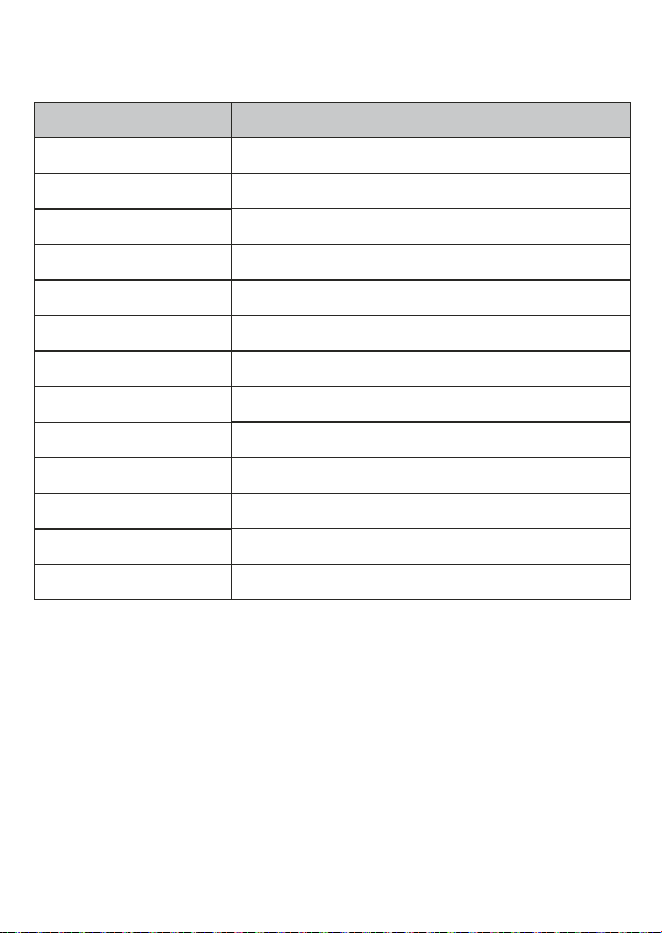
11.Technische Daten
Position Wert
Druckverfahren Thermotransfer
Auflösung 300dpi
Druckgeschwindigkeit max 50mm/s
Gültige Druckbreite 105,6mm
Etikettenbreite 56mm, 93mm, 110mm
Batteriekapazität 2600mAh
Anzeige 1,14Zoll
Verbindung Bluetooth, USB(Type-C)
Eingang 5V/1,4A
Abmessungen 167*160*74mm
Gewicht 680g (ohne Patrone)
Betriebsumgebung 0℃~40℃, 20%~90%RH (nicht kondensierend)
Lagern Umgebung -20℃~60℃, 5%~93%RH (nicht kondensierend)
1 2 3 4 5 6 7 8 9 10 11 12 13 14 15
16 17 18 19 20 21 22 23 24 25 26 27 28 29 30 31 32
33 34 35 36
1.Contenido del empaque
2.Componentes
Cable USB -C
Botón de
apertura de tapa
Botón de apertura de tapa
Puerto USB-C
Botón de encendido
Compartimento de cartucho
Tapa
Pantalla Botón
multifunción
Impresora de etiquetas Manual del usuario
Label Printer
User Manual
ESPAÑOL
1 2 3 4 5 6 7 8 9 10 11 12 13 14 15
16 17 18 19 20 21 22 23 24 25 26 27 28 29 30 31 32
33 34 35 36
3.Instalar / cambiar cartucho de etiquetas
① Presione el botón para
abrir la tapa.
② Retire el cartucho
antiguo.
③ Inserte el nuevo
cartucho MakeID
⑤ Saque la etiqueta por la
salida.
④ Presione hasta que
encaje.
⑥ Cierre la tapa firmemente
hasta que trabe.
1 2 3 4 5 6 7 8 9 10 11 12 13 14 15
16
17 18 19 20 21 22 23 24 25 26 27 28 29 30 31 32
33 34 35 36
B
A
1.Descargue el software“MakeID Label Design”desde :
https://www.makeid.com/support;
2.Instale el software en su ordenador;
3.Conecte la impresora a su ordenador con el cable USB-C;
4.Encienda la impresora;
5.Abra el software y edite el contenido de la etiqueta;
6.Haga clic en Imprimir para empezar a “imprimir”.
1.Escanee el código QR para descargar la
app“MakeID Label Pro”;
2.2.Active el Bluetooth;
3.Abra la app, toque el icono de impresadora en
la esquina superior derecha;
4.Seleccione su impresora (nombre Bluetooth =
código SN);
5.Edite la etiqueta y toque“Imprimir”.
1.Encendido :Mantenga 3 segundos para encender/apagar;
2Avance :Presione una vez para avanzar; mantenga 3
segundos para página de prueba;
3.Menú :Presione para ingresar a ajustes (oscuridad,
apagado automático, idioma),Pulse para alternar los
parámetros de configuración;
4.Pausa :Presione para pausar, vuelva a pulsar para reanudar
impresión, mantenga pulsado 3s para cancelarla.
4.Imprimir desde el móvil
6.Guía de botones
5.Imprimir desde el ordenador
1 2 3 4 5 6 7 8 9 10 11 12 13 14 15
16 17
18 19 20 21 22 23 24 25 26 27 28 29 30 31 32
33 34 35 36

8.Mantenimiento – Limpiar cabezal de impresión
1.Apague la impresora;
2.Abra la tapa y retire el cartucho;
3.Espere hasta que el cabezal de impresión esté completa-
mente frío;
4.Limpie suavemente con paño suave + solo alcohol anhidro;
5.Espere 3–5 minutos hasta que esté completamente seco;
6.Vuelva a instalar el cartucho y cierre la tapa.
Importante:No toque el cabezal de impresión con los dedos ni
objetos metálicos.No utilice gasolina, acetona ni otros produc-
tos químicos.
1.No imprime
·Verifique Bluetooth, batería, cartucho.
2.Etiqueta no reconocida
·Vuelva a cerrar la tapa; use cartucho original MakeID.
3.Impresión borrosa
·Limpie el cabezal; aumente la oscuridad.
4.Sobrecalentamiento cabezal
·Detenga impresión, abra tapa, enfríe 5–10 minutos.
5.La batería no carga
·La impresión continua o el almacenamiento prolongado
pueden provocar la descarga excesiva de la batería. Se necesi-
tan entre 6 y 8 horas para restaurarla y cargarla por completo.
7. Solución de problemas
1 2 3 4 5 6 7 8 9 10 11 12 13 14 15
16 17 18
19 20 21 22 23 24 25 26 27 28 29 30 31 32
33 34 35 36
La línea negra es la línea de impresión.
9.Advertencias de seguridad
1.El cabezal se calienta durante y justo después de imprimir; no
lo toque;
2.Utilice solo un adaptador de corriente 5V USB-C que cumpla
con las regulaciones de seguridad aplicables y cuente con
certificaciones de seguridad válidas;
3.Manténgase alejado de agua, calor, luz solar directa;
4.Manténgase fuera del alcance de niños pequeños;
5.No desmonte la impresora.
Dónde está la línea de impresión?
1 2 3 4 5 6 7 8 9 10 11 12 13 14 15
16 17 18 19
20 21 22 23 24 25 26 27 28 29 30 31 32
33 34 35 36

10.Política de Garantía
Plazo de garantía
Garantía de 2 años por defectos de hardware desde la fecha de
compra, bajo uso normal según instrucciones.
Qué cubre
Defectos de fabricación y fallos en uso doméstico u oficina
normal.
Qué NO cubre
·Daños por caída, agua, aplastamiento, impacto
·Uso de etiquetas o cintas no originales MakeID;
·Desmontaje, reparación o modificación no autorizada;
·Alimentación incorrecta, almacenamiento o entorno inadec-
uados;
·Accidentes, fuego, inundación u otros desastres naturales;
Cómo solicitar servicio
Contáctenos con su número de pedido, nombre, datos de
contacto y una breve descripción del problema.Buzón de
servicio: service@makeid.com
1 2 3 4 5 6 7 8 9 10 11 12 13 14 15
16 17 18 19 20
21 22 23 24 25 26 27 28 29 30 31 32
33 34 35 36
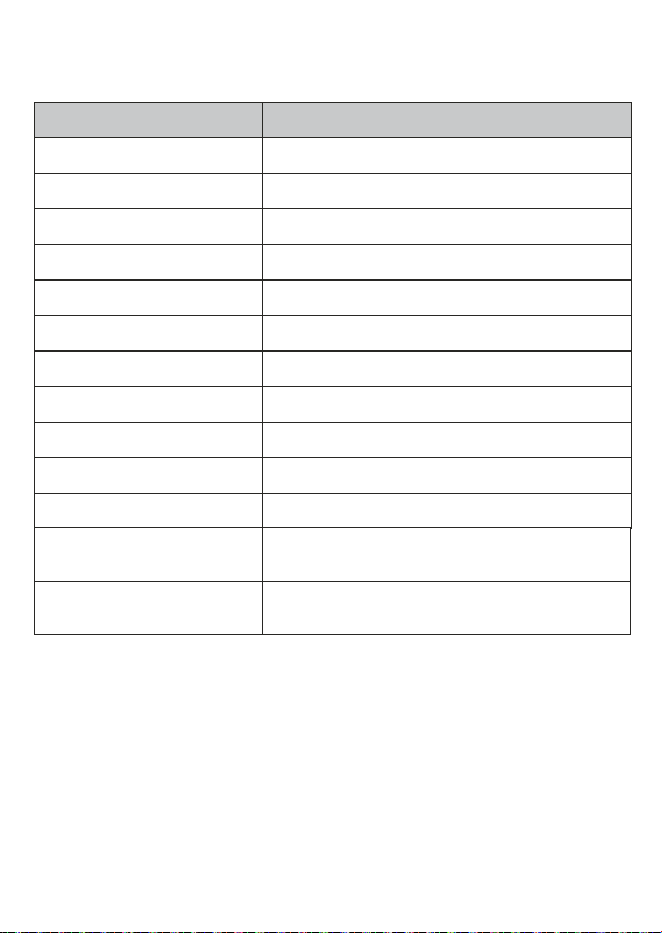
11.Especificaciones
Artículo Parámetro
Método de impresión Transferencia térmica
Resolución 300dpi
Velocidad de impresión max 50mm/s
Ancho de impresión válido 105,6mm
Ancho de etiqueta 56mm, 93mm, 110mm
Capacidad de batería 2600mAh
Pantalla 1.14pulgadas
Conexión Bluetooth, USB(Type-C)
Entrada 5V/1,4A
Dimensiones 167*160*74mm
Peso 680g (sin cartucho)
Entorno de
funcionamiento
0℃~40℃, 20%~90%RH
(sin condensación)
Entorno de
funcionamiento
-20℃~60℃, 5%~93%RH
(sin condensación)
1 2 3 4 5 6 7 8 9 10 11 12 13 14 15
16 17 18 19 20 21
22 23 24 25 26 27 28 29 30 31 32
33 34 35 36
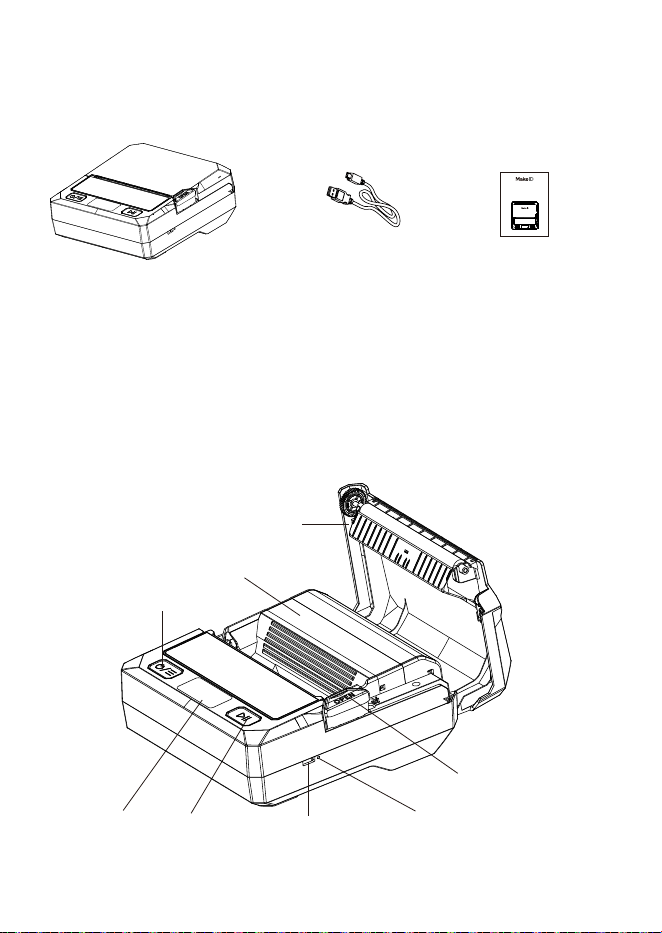
1.Contenu de l’emballage
2.Présentation des composants
Câble USB-C
Bouton d’ouverture
du capot
Bouton de réinitialisation
Port USB-C
Bouton marche/arrêt
Compartiment à cartouche
Couvercle
Écran Bouton
multifonction
Imprimante d’étiquettes Mode d’emploi
Label Printer
User Manual
FRANÇAIS
1 2 3 4 5 6 7 8 9 10 11 12 13 14 15
16 17 18 19 20 21 22
23 24 25 26 27 28 29 30 31 32
33 34 35 36
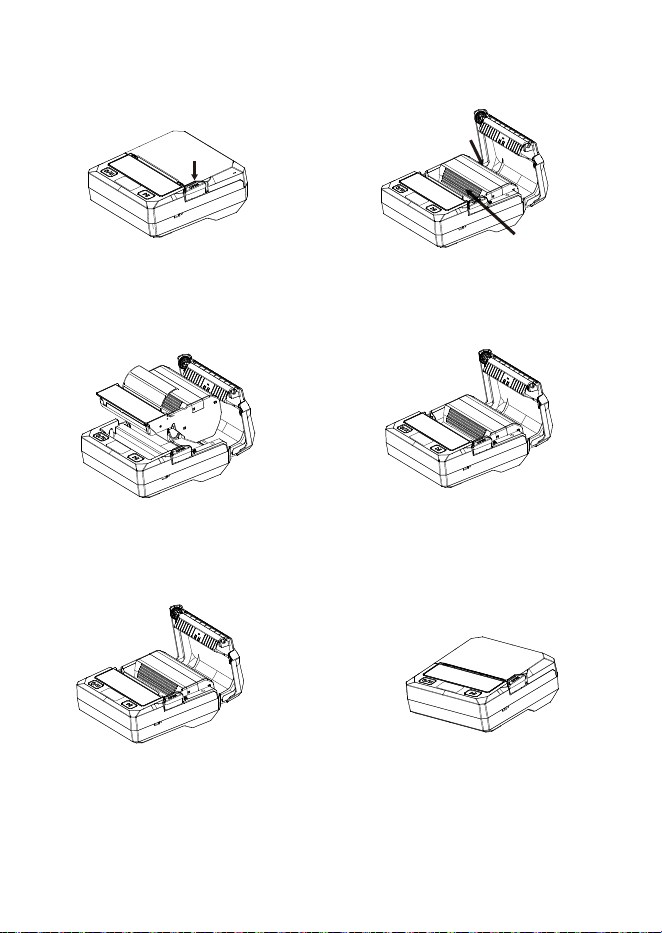
3.Installer / changer la cartouche d’étiquettes
① Appuyez sur le bouton
pour ouvrir le capot.
② Retirez l’ancienne
cartouche.
③ Insérez la nouvelle
cartouche MakeID.
⑤ Sortez l’étiquette par la sortie.
④ Enfoncez jusqu’à ce
que ça clique.
⑥ Refermez le capot ferme-
ment jusqu’à verrouillage.
1 2 3 4 5 6 7 8 9 10 11 12 13 14 15
16 17 18 19 20 21 22 23
24 25 26 27 28 29 30 31 32
33 34 35 36
B
A
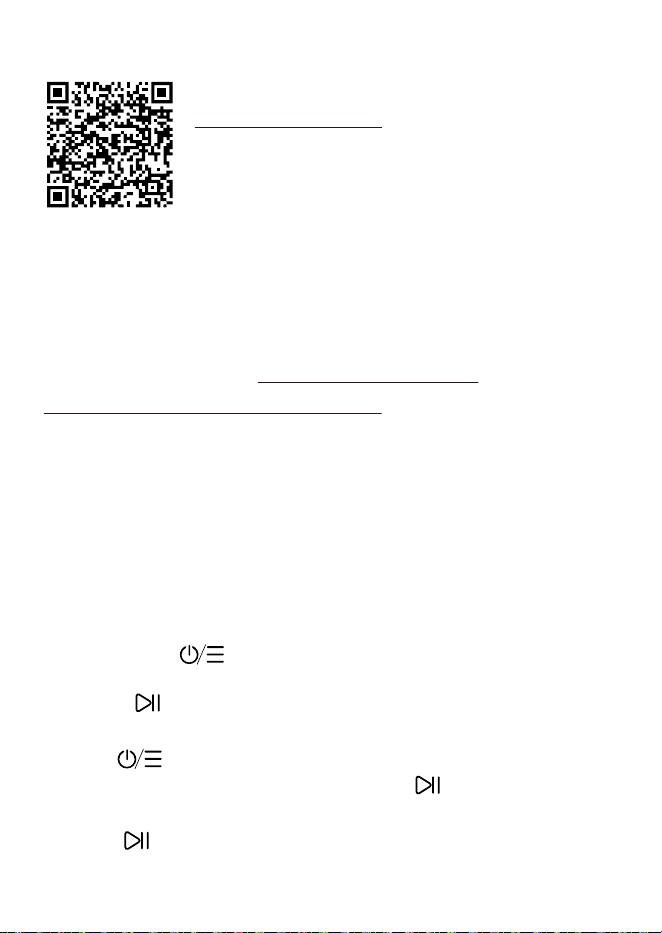
1.Téléchargez le logiciel“MakeID Label Design”sur :
https://www.makeid.com/support;
2.Installieren Sie die Software auf Ihrem Computer;
3.Connectez l’imprimante à votre ordinateur avec le câble
USB-C;
4.Allumez l’imprimante;
5.Ouvrez le logiciel et éditez le contenu de l’étiquette;
6.Cliquez sur “Imprimer” pour lancer l’impression.
1.Scannez le code QR pour télécharger l’app
“MakeID Label Pro”;
2.Activez le Bluetooth;
3.Ouvrez l’app, appuyez sur l’icône imprimante
en haut à droite;
4.Sélectionnez votre imprimante (nom
Bluetooth = code SN);
5.Éditez l’étiquette et appuyez sur “Imprimer”.
1.Marche/arrêt :Maintenez 3 secondes pour allumer/étein-
dre;
2.Avance :Appuyez une fois pour avancer ; maintenez 3
secondes pour page test;
3.Menu :Appuyez pour accéder aux réglages (noirceur,
arrêt automatique, langue),Appuyez sur pour modifier les
paramètres ;
4.Pause :Appuyez pour mettre en pause ; nouvel appui pour
reprendre l’impression, maintenez 3 secondes pour annuler
impression.
4.Imprimer depuis le téléphone
6.Guide des boutons
5.Imprimer depuis l’ordinateur
1 2 3 4 5 6 7 8 9 10 11 12 13 14 15
16 17 18 19 20 21 22 23 24
25 26 27 28 29 30 31 32
33 34 35 36

8.Entretien – Nettoyer la tête d’impression
1.Éteignez l’imprimante.
2.Ouvrez le capot et retirez la cartouche.
3.Attendez que la tête d’impression soit complètement froide.
4.Essuyez doucement avec chiffon doux + seul alcool anhydre.
5.Attendez 3–5 minutes jusqu’à ce que ce soit complètement
sec.
6.Réinstallez la cartouche et refermez le capot.
Wichtig:Ne touchez pas la tête d’impression avec les doigts ou
des objets métalliques.N’utilisez pas d’essence, d’acétone ou
d’autres produits chimiques.
1.N’imprime pas
·Vérifiez Bluetooth, batterie, cartouche.
2.Étiquette non reconnue
·Refermez le capot ; utilisez cartouche originale MakeID.
3.Impression floue
· Nettoyez la tête d’impression ; augmentez la noirceur.
4.Surchauffe tête d’impression
·Arrêtez impression, ouvrez capot, laissez refroidir 5–10
minutes.
5.La batterie ne se charge pas
·Une impression continue ou un stockage prolongé peut
entraîner une décharge excessive de la batterie. Comptez 6 à 8
heures pour la restaurer et la charger complètement.
7. Dépannage
1 2 3 4 5 6 7 8 9 10 11 12 13 14 15
16 17 18 19 20 21 22 23 24 25
26 27 28 29 30 31 32
33 34 35 36
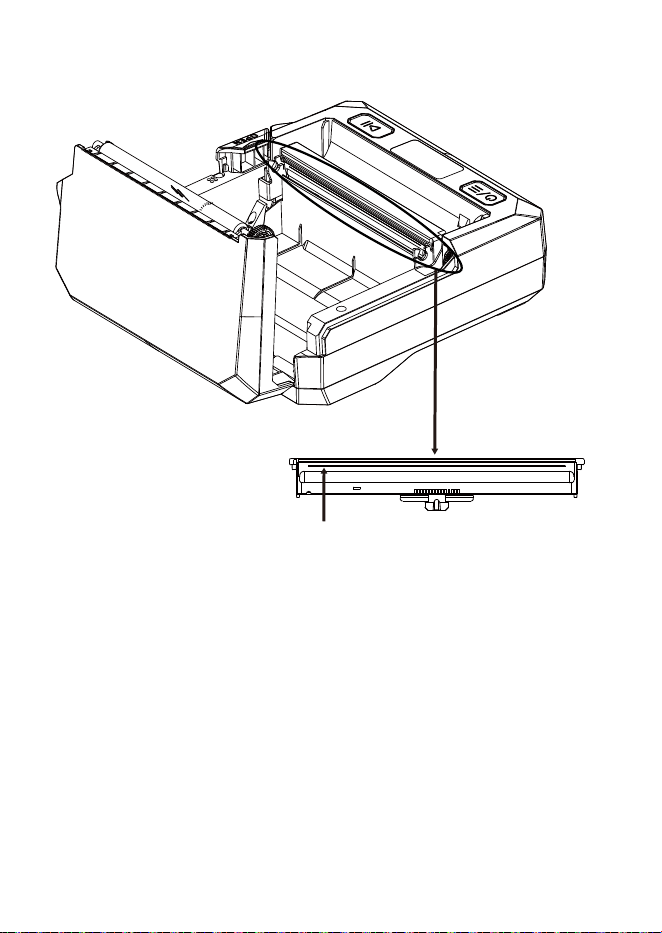
La ligne noire est la ligne d’impression.
9.Avertissements de sécurité
1.La tête d’impression chauffe pendant et juste après l’impres-
sion ; ne pas toucher;
2.Veuillez utiliser uniquement un adaptateur secteur 5V USB-C
conforme aux réglementations de sécurité applicables et doté
de certifications de sécurité valides;
3.Tenir à l’écart de l’eau, de la chaleur, de la lumière directe du
soleil;
4.Tenir hors de portée des jeunes enfants;
5.Ne pas démonter l’imprimante.
Où se trouve la ligne d’impression ?
1 2 3 4 5 6 7 8 9 10 11 12 13 14 15
16 17 18 19 20 21 22 23 24 25 26
27 28 29 30 31 32
33 34 35 36

10.Politique de Garantie
Durée de la garantie
Garantie 2 ans contre défauts matériels à partir de la date
d’achat, en utilisation normale conformément aux instructions.
Ce qui est couvert
Défauts de fabrication et pannes en usage domestique ou de
bureau normal.
Ce qui n’est PAS couvert
·Dommages par chute, eau, écrasement, choc;
·Utilisation d’étiquettes ou rubans non originaux MakeID;
·Démontage, réparation ou modification non autorisée;
·Alimentation incorrecte, stockage ou environnement
inadaptés;
·Accidents, incendie, inondation ou autres catastrophes
naturelles;
Comment obtenir le service
Contactez-nous avec votre numéro de commande, nom,
coordonnées et une brève description du problème.E-mail de
service: service@makeid.com
1 2 3 4 5 6 7 8 9 10 11 12 13 14 15
16 17 18 19 20 21 22 23 24 25 26 27
28 29 30 31 32
33 34 35 36
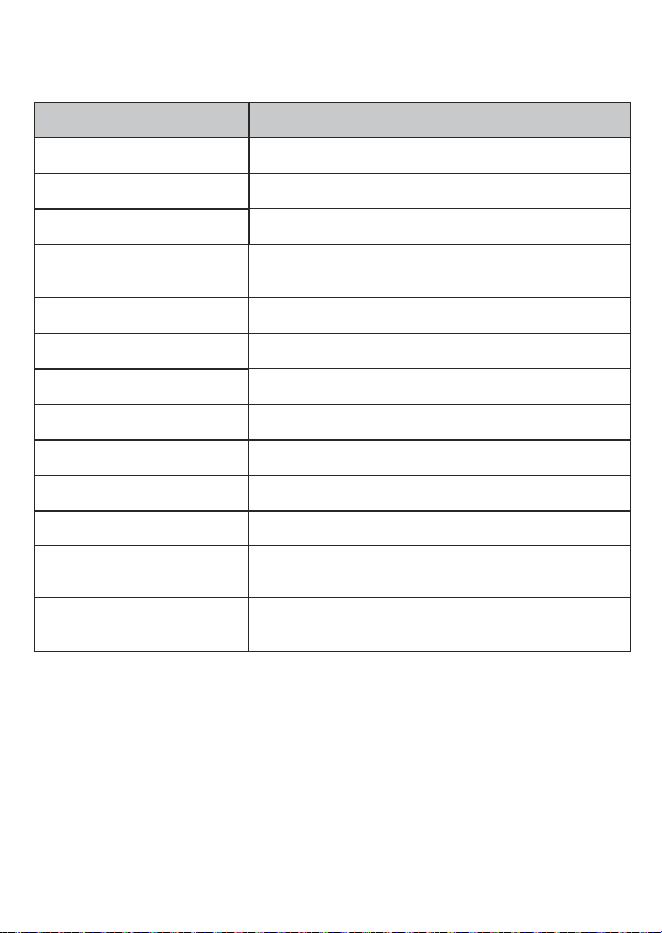
11.Spécifications
Article Paramètre
Méthode d’impression Transfert thermique
Résolution 300dpi
Vitesse d’impression max 50mm/s
Largeur d’impression
valide
105,6mm
Largeur d’étiquette 56mm, 93mm, 110mm
Capacité batterie 2600mAh
Affichage 1,14 pouce
Connexion Bluetooth,USB(Type-C)
Entrée 5V/1,4A
Dimension 167*160*74mm
Poids 680g(cartridge not included)
Environnement de
fonctionnement
0℃~40℃,20%~90%RH(non-condensing)
Environnement de
stockage
-20℃~60℃,5%~93%RH(non-condensing)
1 2 3 4 5 6 7 8 9 10 11 12 13 14 15
16 17 18 19 20 21 22 23 24 25 26 27 28
29 30 31 32
33 34 35 36
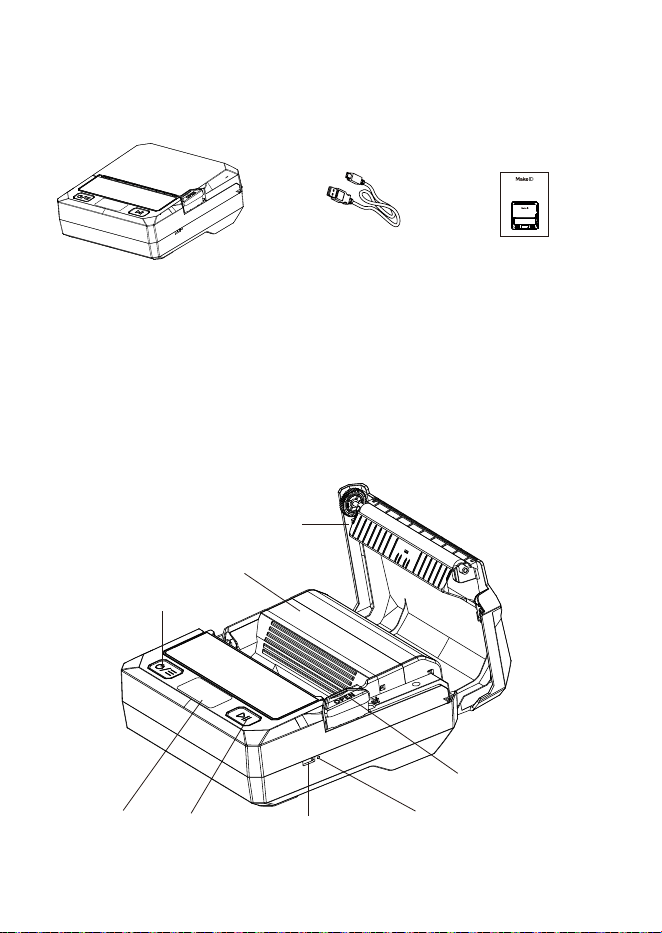
1.Contenu de l’emballage
2.Componenti
Cavo USB-C
Pulsante apertura
coperchio
Pulsante ripristino
Porta USB-C
Pulsante accensione
/spegnimento
Vano cartuccia
Coperchio
Display Pulsante
multifunzione
Stampante per etichette Manuale utente
Label Printer
User Manual
ITALIANO
1 2 3 4 5 6 7 8 9 10 11 12 13 14 15
16 17 18 19 20 21 22 23 24 25 26 27 28 29
30 31 32
33 34 35 36
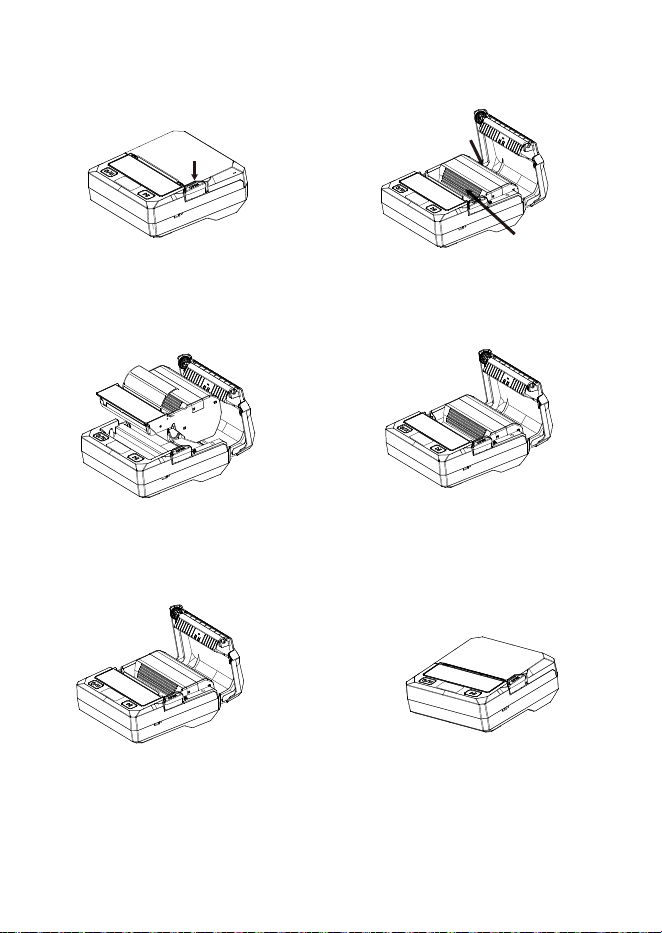
3.Installare / sostituire la cartuccia
① Premere il pulsante per
aprire il coperchio.
② Rimuovere la vecchia
cartuccia.
③ Inserire la nuova
cartuccia MakeID.
⑤ Far uscire l’etichetta dalla
fessura.
④ Spingere finché non
scatta.
⑥ Chiudere bene il
coperchio fino al blocco.
1 2 3 4 5 6 7 8 9 10 11 12 13 14 15
16 17 18 19 20 21 22 23 24 25 26 27 28 29 30
31 32
33 34 35 36
B
A
1.Scarica il software“MakeID Label Design”da:
https://www.makeid.com/support;
2.Installa il software sul tuo computer;
3.3.Collega la stampante al tuo computer con il cavo USB-C;
4.Accendi la stampante;
5.Apri il software e modifica il contenuto dell’etichetta;
6.Clicca su Stampa per iniziare la “Stampa”.
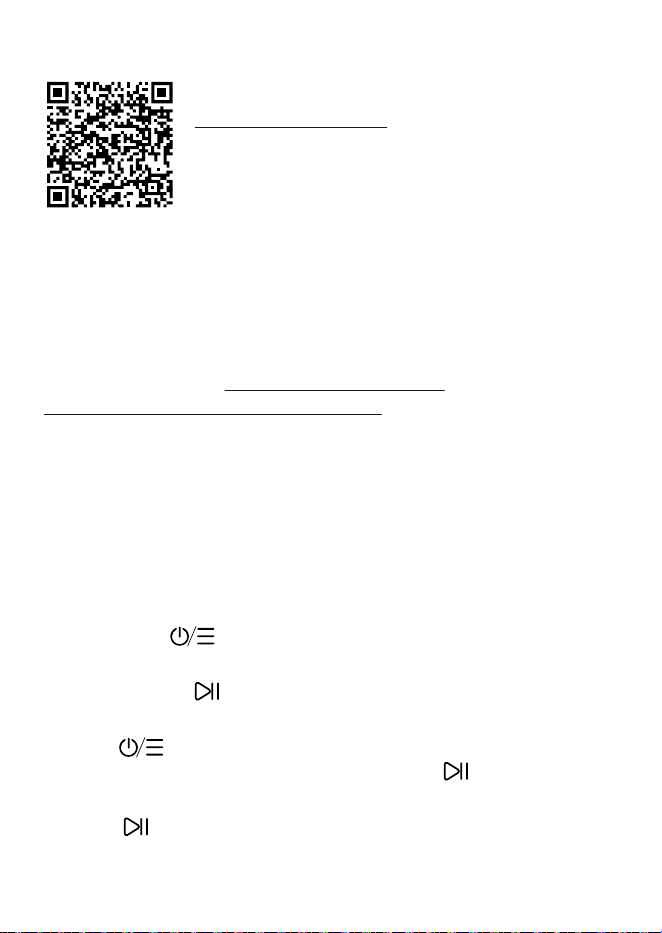
1.Scansionare il codice QR per scaricare l’app
“MakeID Label Pro”;
2.Attivare il Bluetooth;
3.Aprire l’app, toccare l’icona della stampante in
alto a destra;
4.Selezionare la stampante (nome Bluetooth =
codice SN);
5.Modificare l’etichetta e toccare “Stampa”.
1.Accensione :Tenere premuto 3 secondi per accen-
dere/spegnere;
2.Avanzamento :Premere una volta per avanzare; tenere
premuto 3 secondi per pagina di prova;
3.Menu :Premere per accedere alle impostazioni (densità,
spegnimento automatico, lingua).Premere per cambiare i
parametri di impostazione;
4.Pausa :Premere per mettere in pausa; premere di nuovo
per riprendere la stampa, tenere premuto 3 secondi per
annullare stampa.
4.Stampa da telefono
6.Guida pulsanti
5.Stampa dal computer
1 2 3 4 5 6 7 8 9 10 11 12 13 14 15
16 17 18 19 20 21 22 23 24 25 26 27 28 29 30 31
32
33 34 35 36

8.Manutenzione – Pulizia testina di stampa
1.Spegnere la stampante;
2.Aprire il coperchio e rimuovere la cartuccia;
3.Attendere che la testina di stampa sia completamente
fredda;
4.Pulire delicatamente con panno morbido + solo alcool anidro;
5.Attendere 3–5 minuti fino a completa asciugatura;
6.Reinstallare la cartuccia e chiudere il coperchio.
Importante: Non toccare la testina di stampa con le dita o
oggetti metallici.Non usare benzina, acetone o altri prodotti
chimici.
1.Non stampa
·Controllare Bluetooth, batteria, cartuccia.
2.Etichetta non riconosciuta
·Richiudere il coperchio; usare cartuccia originale MakeID.
3.Stampa sfocata
· Pulire la testina; aumentare la densità.
4.Surriscaldamento testina
·Interrompere stampa, aprire coperchio, raffreddare 5–10
minuti.
5.La batteria non si carica
·La stampa continua o un lungo periodo di inattività può
causare la scarica eccessiva della batteria. Occorrono 6-8
ore per ripristinare e caricare completamente la batteria.
7. Risoluzione problemi
1 2 3 4 5 6 7 8 9 10 11 12 13 14 15
16 17 18 19 20 21 22 23 24 25 26 27 28 29 30 31 32
33 34 35 36
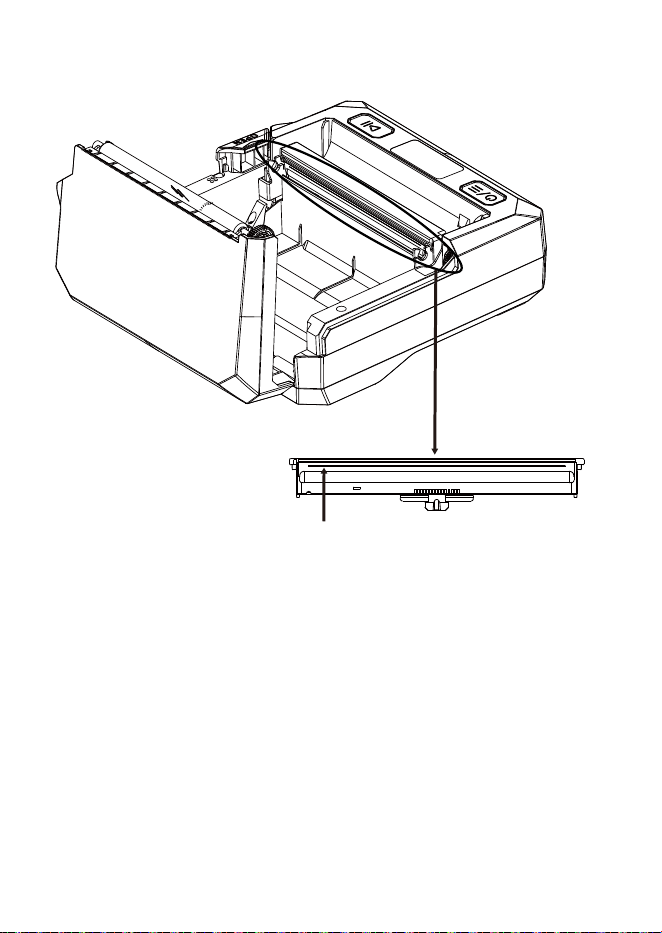
La linea nera è la linea di stampa.
9.Avvertenze sicurezza
1.La testina si riscalda durante e subito dopo la stampa; non
toccare;
2.Utilizzare solo un adattatore di alimentazione 5V USB-C
conforme alle normative di sicurezza applicabili e dotato di
certificazioni di sicurezza valide;
3.Tenere lontano da acqua, calore, luce solare diretta;
4.Tenere fuori dalla portata dei bambini piccoli;
5.Non smontare la stampante.
Dove si trova la linea di stampa?
1 2 3 4 5 6 7 8 9 10 11 12 13 14 15
16 17 18 19 20 21 22 23 24 25 26 27 28 29 30 31 32
33
34 35 36

10.Politica di Garanzia
Periodo di garanzia
Garanzia 2 anni per difetti hardware dalla data di acquisto, in uso
normale secondo le istruzioni.
Cosa è coperto
Difetti di fabbricazione e malfunzionamenti in uso domestico o
d’ufficio normale.
Cosa NON è coperto
·Danni da caduta, acqua, schiacciamento, impatto;
·Uso di etichette o nastri non originali MakeID;
·Smontaggio, riparazione o modifica non autorizzata;
·Alimentazione errata, conservazione o ambiente inadeguati;
·Incidenti, incendi, allagamenti o altri disastri naturali.
Comment obtenir le service
Contactez-nous avec votre numéro de commande, nom,
coordonnées et une brève description du problème.E-mail de
service: service@makeid.com
1 2 3 4 5 6 7 8 9 10 11 12 13 14 15
16 17 18 19 20 21 22 23 24 25 26 27 28 29 30 31 32
33 34
35 36
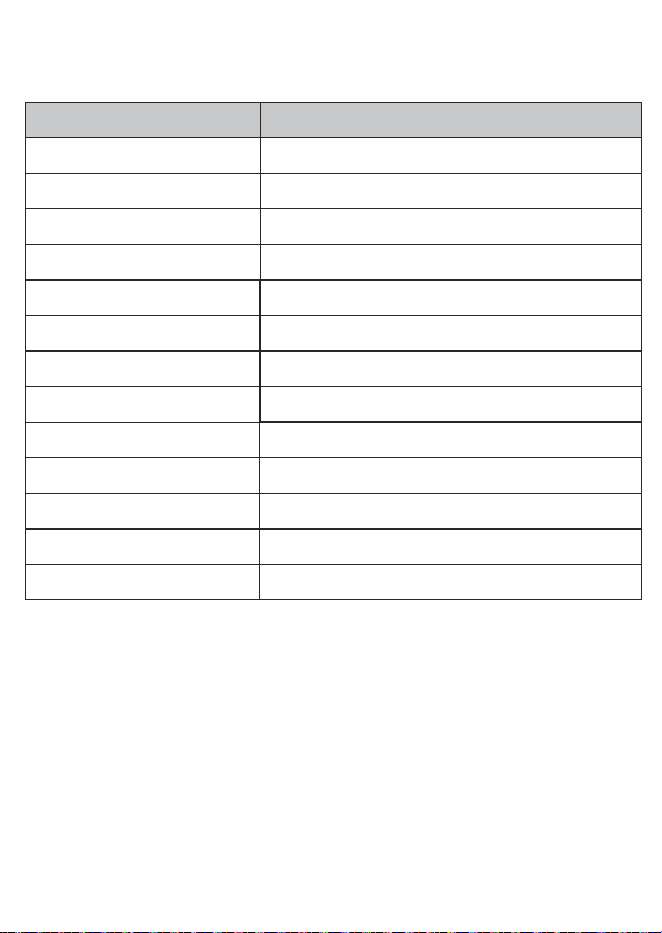
11.Specifiche
Voce Parametro
Metodo di stampa Trasferimento termico
Risoluzione 300dpi
Velocità di stampa max 50mm/s
Larghezza di stampa valida 105,6mm
Larghezza etichetta 56mm, 93mm, 110mm
Capacità batteria 2600mAh
Display 1,14 pollici
Connessione Bluetooth, USB(Type-C)
Ingresso 5V/1,4A
Dimensioni 167*160*74mm
Peso 680g (senza cartuccia)
Ambiente di funzionamento 0℃~40℃, 20%~90%RH (non condensante)
Ambiente di conservazione -20℃~60℃, 5%~93%RH (non condensante)
1 2 3 4 5 6 7 8 9 10 11 12 13 14 15
16 17 18 19 20 21 22 23 24 25 26 27 28 29 30 31 32
33 34 35
36

1 2 3 4 5 6 7 8 9 10 11 12 13 14 15
16 17 18 19 20 21 22 23 24 25 26 27 28 29 30 31 32
33 34 35 36

Copyright
This manual was printed in 2026,and its copyright belongs to Chongqing
Pinsheng Technology Co.,Ltd.
Printed in China
Version1.0
MakeIDis the registered trademark used by Chongqing Pinsheng.
Management Systems of Chongqing Pinsheng have passed the following
certifications:
ISO9001:2015 Quality Management System
ISO14001:2015 Environmental Management System
1 2 3 4 5 6 7 8 9 10 11 12 13 14 15
16 17 18 19 20 21 22 23 24 25 26 27 28 29 30 31 32
33 34 35 36
图纸资料
会签栏
审 核制 图 日 期 2026.8.27
尺寸(mm)
尺寸公差(mm)
色 号
图号
字 体
备 注
比 例 1:1
思源黑体
材 质
±0.1mm
蔡睿
p71使用指南(五国)M-1
105mm*148mm
WEWIN 300A(PANTONE BLACK C)
1 2 3 4 5 6 7 8 9 10 11 12 13 14 15
16 17 18 19 20 21 22 23 24 25 26 27 28 29 30 31 32
33 34 35 36
P71海外渠道使用指南(五国语言)M-1
70g双胶纸骑马钉装订