G R E EN <E E PER
-GKDT81-
English Deutsch Français / Belgium Español Italiano
Polski Nederlands Svenska Română Русский 中文
USER MANUAL
KARAOKE MACHINE
For more information and customer support contact
V0
SUPPORT@CHLCHL.COM

IMPORTANT SAFETY INFORMATION
Please read and retain these safety instructions carefully before using your portable
karaoke speaker. Failure to follow these guidelines could result in electric shock,
fire, personal injury, or damage to the product or surrounding property. To ensure
safe operation, observe the following precautions:
INTENDED USE ONLY
Use the speaker only as directed in the user manual and by the manufacturer. Any
improper or unintended use may lead to malfunction, injury, or voiding of the
warranty.
AVOID MOISTURE
Keep the speaker dry at all times. Do not use or store the device in damp or wet
environments. Avoid exposing it to rain, splashes, or spills.
NO LIQUID CONTAINERS NEARBY
Do not place containers holding liquids (e.g., vases, cups, bottles) on or near the
speaker. Accidental spills can lead to electric shock or short circuits.
AVOID HEAT SOURCES
Keep the speaker away from open flames, radiators, heat registers, stoves, or any
other sources of excessive heat. Prolonged exposure to heat may cause
overheating or damage.
USE APPROVED ACCESSORIES
Only use the power adapter, charging cables, and accessories supplied with the
product or officially recommended by the manufacturer. Using unapproved
accessories can pose safety risks.
MAINTAIN PROPER VENTILATION
Do not cover or block any ventilation openings. Install and operate the speaker in a
well-ventilated area to prevent overheating. Maintain a minimum clearance of 10
cm (4 inches) around the unit.
POWER SAFETY
Unplug the speaker during electrical storms or if it will be unused for extended
periods. This helps protect the device from power surges or lightning damage.
CABLE MANAGEMENT
Position power cords to avoid tripping hazards or damage. Do not allow the power
cable to be pinched, bent excessively, or exposed to heavy foot traffic, especially at
the plug or device connector.
AVOID PHYSICAL DAMAGE
Do not drop, crush, puncture, or disassemble the device. Physical damage may
compromise internal safety components and create a fire or shock hazard.
NO USER-SERVICEABLE PARTS
Do not attempt to open or repair the speaker yourself. Repairs should only be
performed by authorized service personnel. Unauthorized tampering may result in
injury and void the warranty.
CHILDREN AND PETS
Keep the speaker and accessories out of reach of small children and pets. Small
parts may pose a choking hazard, and cords can present entanglement risks.
-02-
ENGLISH
-GKDT81-
English
Deu tsch
Français
/ Belgium
Españo l
Italiano
Pols ki
Ne derlands
Sve nska
Rom ână
Русский
中文
USER MANUAL
M ULT I FUN CTI O N AL K AR A O K E
M AC H IN E
For
mor e
in fo r m atio n and cu st o me r su p por t co n ta ct
S UP PO R T @ C HL C HL. CO M
V0
1
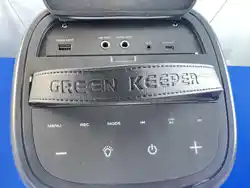
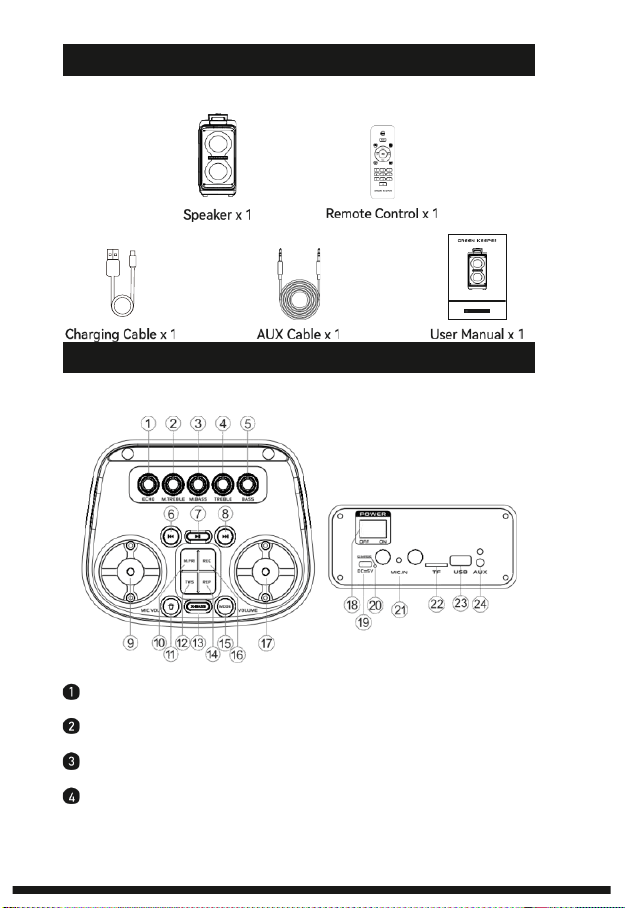
ECHO KNOB: Rotate clockwise to add microphone echo, counterclockwise to
reduce or disable.
2 MIC TREBLE KNOB: Rotate clockwise to increase microphone treble, coun-
terclockwise to reduce or disable.
3 MIC BASS KNOB: Rotate clockwise to increase microphone bass, counter-
clockwise to reduce or disable.
4 TREBLE KNOB: Rotate clockwise to increase treble; counterclockwise to
reduce or disable.
-03-
PRODUCT DIAGRAM
WHAT'S IN THE BOX

5
BASS KNOB: Rotate clockwise to increase bass, counterclockwise to reduce
or disable.
6 PREV( ): Press to skip to the previous track.
7 PLAY/PAUSE( ): Press to play or pause. In USB/TF mode, long press to
enable/disable repeat. In FM mode, long press to auto-scan for stations.
8 NEXT(
mi
): Press to skip to the next track.
9 MIC VOLUME KNOB: Rotate to adjust microphone volume.
10 MIC PRIORITY: Press to enable or disable microphone priority. When enabled,
background music automatically lowers while speaking.
11
LED( ): Press to cycle through 10 lighting modes. Long press to turn lights
off.
12
TWS( TWS ): In Bluetooth mode without external media connected,
press
to
enable/disable True Wireless Stereo (TWS) function.
13 X-BASS: Press to enable/disable bass boost function.
14 REP: Press to repeat the current audio. Long press to turn voice canceling ON /
OFF.
15 MODE: Short press to switch between Bluetooth, FM, and AUX modes. In
Bluetooth mode, long press for 3 seconds to disconnect and re-enter pairing
mode.
16 REC: Insert a USB drive or TF card. Short-press to start or stop recording
(microphone required). Long-press to enter or exit the recording list.
17
VOLUME KNOB: Rotate to adjust master volume.
18 POWER SWITCH: Slide to turn the speaker on or off.
19 DC 5V CHARGING PORT: Connect the supplied charging cable to charge the
unit.
20
CHARGING INDICATOR: The red indicator lights up during charging and turns
off when the battery is fully charged.
21 MIC 1 / MIC 2: Connect wired microphones to these input jacks.
22
TF CARD SLOT: Insert a TF (microSD) card (up to 128 GB) to play audio files or
store recordings.
23
USB PORT: Insert a USB flash drive (up to 128 GB) to play audio files or store
recordings.
24
AUX IN: Connect an external audio device using the included 3.5 mm AUX cable
to play audio through the speaker.
-04-
11
Record Mode
(requires TF card/USB storage)
Volume +
Previous Track
Loop
(repeats current track)
RE C
RE C
PLAY
CH- SCAN CH+
LED
5
G RE EN KE E PE R
Mute
Mode Select
REC PLAY
(plays the latest recording)
Play/Pause
Next Track
Volume -
LED Mode
(cycles through lighting effects)
Numeric Keypad
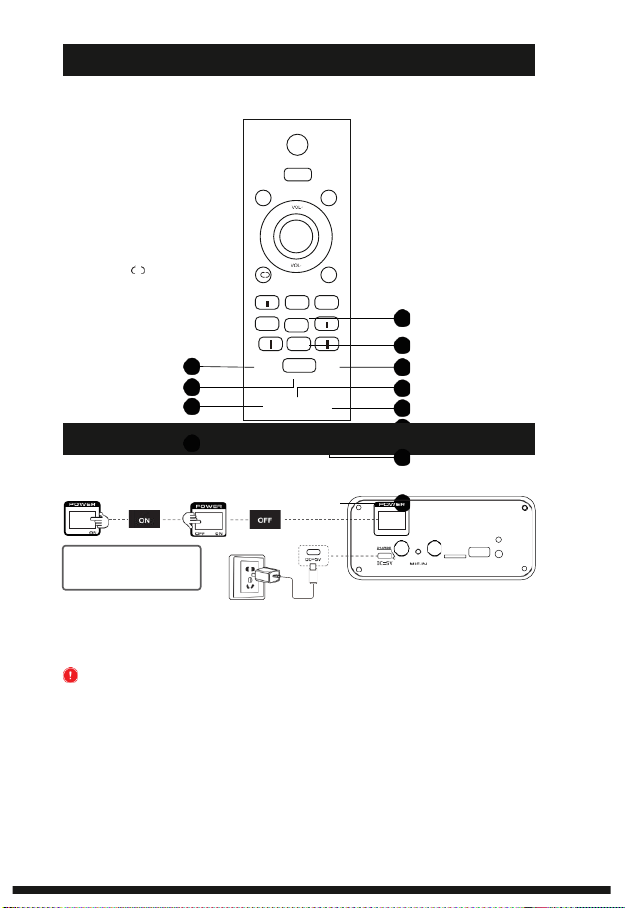
1. Connect the speaker to power using the provided charging cable. The battery level
will be displayed as bars on the LED screen.
2. Slide the POWER switch to turn the speaker on or off.
IMPORTANT: Do not operate the speaker while charging, as this may damage the
unit. To preserve battery performance and extend service life, avoid fully discharging
the battery.
Note: Adapter not included.
-05-
Red light: Charging.
Light off: Fully charged.
口FF
POWER ON AND RECHARGE
0
7 8 9
6
4
3
2
1
M OD E
MUTE
REMOTE CONTROL DIAGRAM
10
12
3
9
8
2
4
6
7
5
1
TF
U与日
AWX
口 FF
口 N
4
3
2
5
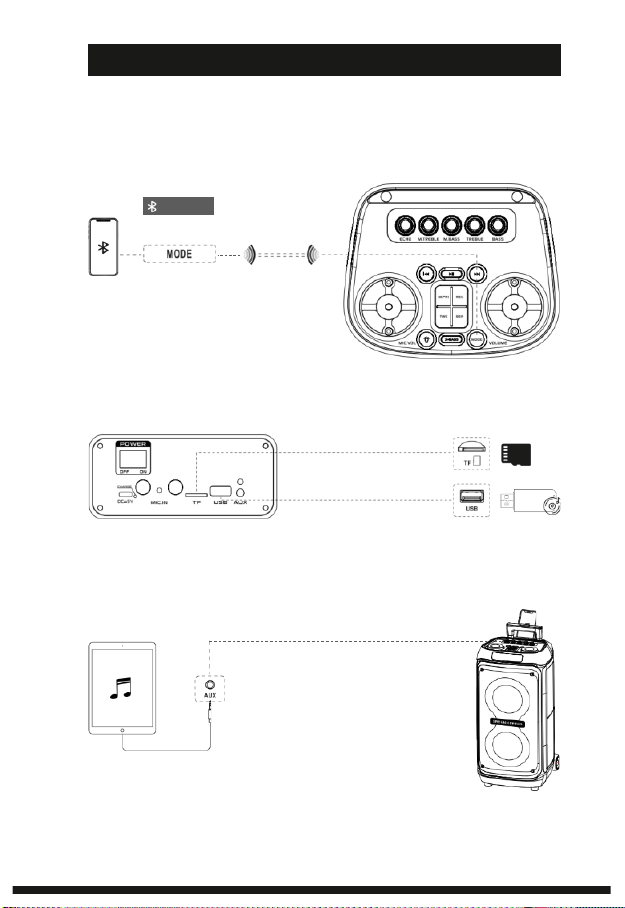
This karaoke speaker supports one audio source at a time, including USB, TF card,
Bluetooth, or AUX input. By default, the speaker powers on in Bluetooth mode.
Note: If multiple audio sources are connected simultaneously, the speaker will
automatically play from the source with the highest priority.
BLUETOOTH PAIRING INSTRUCTIONS
<10 m (33 ft)
1. Power on the speaker. Bluetooth pairing
mode will be activated by default. If not,
press the Mode button to switch to
Bluetooth mode.
2. On your device, enable Bluetooth and
select“GKDT81”from the list of available devices.
3. Once connected, you can start streaming audio to the speaker.
TF CARD AND USB CONNECTION INSTRUCTIONS
1. Insert a TF card or USB drive (max. 128GB) into the appropriate slot.
2. Once inserted, the speaker will automatically switch to the corresponding
playback mode.
Supported audio formats are MP3 and WAV.
AUX CONNECTION INSTRUCTIONS
1. Connect an external device using
the provided 3.5 mm AUX cable.
2. Once connected, the speaker will
detect the AUX input (after stopping
other sources like Bluetooth or USB)
and play audio from the connected
device.
-06-
Bluetooth
USING YOUR KARAOKE SPEAKER
Wired Audio Input
Recording Instructions
1. Insert a USB drive and connect a microphone.
2. Short press REC to start recording. Short press again to stop and save the recording.
3. Long press REC to enter or exit the recording playback list.
4. Disconnect the microphone when recording is complete.
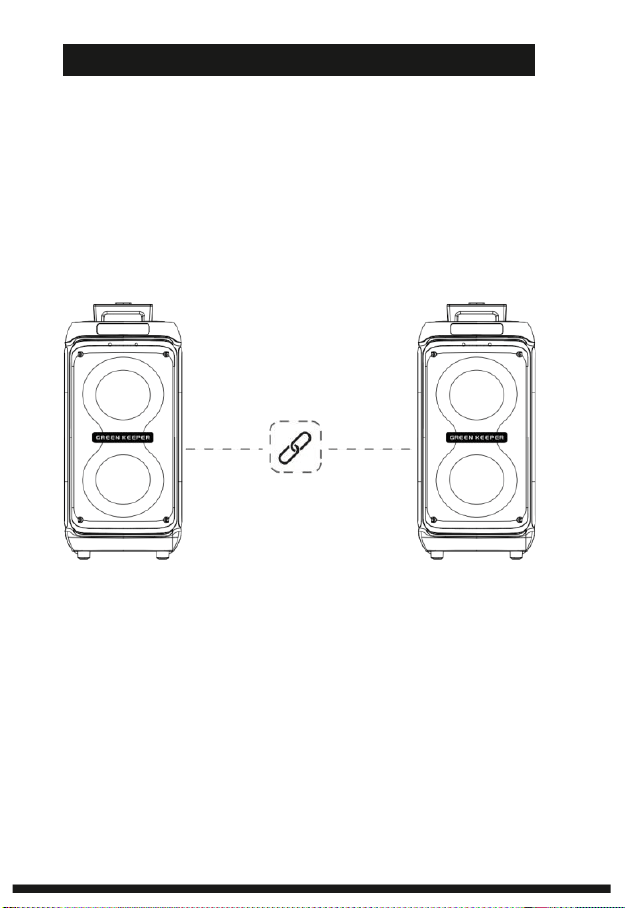
TWS Mode
1. Turn on two speakers of the same model and switch both to Bluetooth mode.
2. Place the speakers within 50 cm (20 in) of each other.
3. Select one speaker as the main unit and press its TWS button to activate TWS mode. The speakers will connect
automatically, and a voice prompt will confirm a successful connection.
4. On your playback device, enable Bluetooth, search for the speaker’s model name, and connect. Once paired, the
speaker’s display will stop flashing.
5. To disconnect TWS mode, press the TWS button while connected. A voice prompt will confirm the disconnection.
-07-
ADVANCED USAGE INSTRUCTIONS
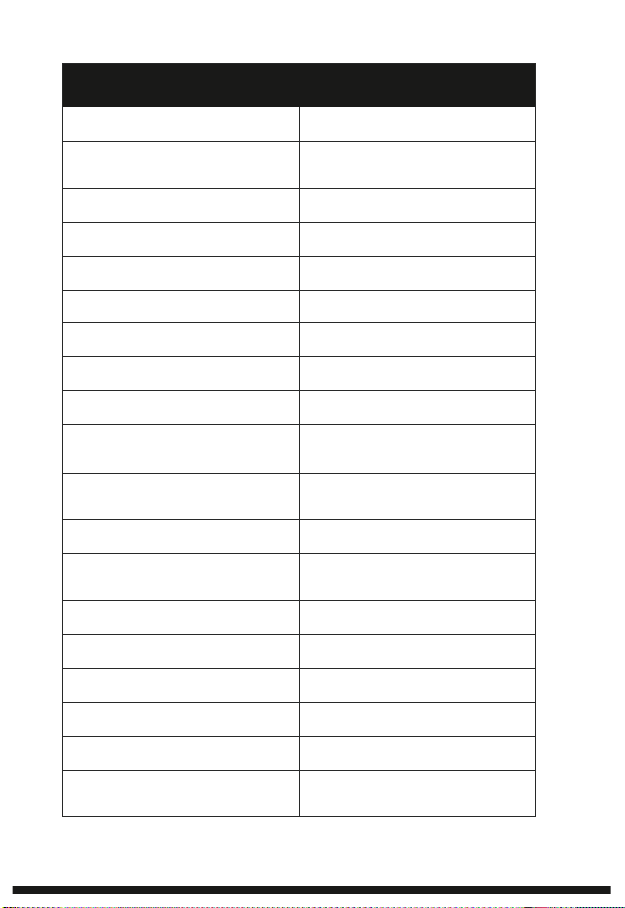
TECHNICAL SPECIFICATIONS
MODEL
GKDT81
POWER INPUT
PD25W:
15V1.6A/5V/3A,9V/2A,12V/1.5A
BATTERY CAPACITY
11.1V / 7200MAH
RATED POWER
80W
PEAK POWER
800W
SPEAKER DRIVERS
2 × 8" WOOFERS + 1 × 1" TWEETER
DISPLAY SCREEN
LED SCREEN
SPEAKER IMPEDANCE
3.6Ω
BLUETOOTH VERSION
5.1
BLUETOOTH TRANSMISSION
RANGE
10 M (33 FT)
BLUETOOTH FREQUENCY
RANGE
2.402G - 2.480G
FREQUENCY RESPONSE
20HZ - 18KHZ
TOTAL HARMONIC
DISTORTION (THD)
<5%
SENSITIVITY
≥85DB
SIGNAL-TO-NOISE RATIO (SNR)
≥75DB
FM FREQUENCY RANGE
87.5MHZ - 108MHZ
OPERATING TEMPERATURE
-10°C TO +50°C (14°F TO 122°F)
WEIGHT
8.7 KG (19.2 LBS)
DIMENSIONS
32 × 34 × 64 CM
(12.6 × 13.4 × 25.2 IN)
-08-

FCC & IC COMPLIANCE
This device complies with FCC Part 15 and Industry Canada license-exempt RSS
standards. Operation is subject to the following conditions:
1. This device may not cause harmful interference.
2. This device must accept any interference received.
CAN ICES-003(B)/NMB-003(B)
FCC DECLARATION
This product complies with FCC Part 15, Subpart B.
Note: Unauthorized changes may void FCC authorization.
WIRELESS RF NOTICE
RF exposure limits are met. Devices in the 5.15–5.35 GHz band are restricted to
indoor use. Radar interference may occur in the 5.25–5.85 GHz range.
EU COMPLIANCE (CE MARK)
Complies with the Radio Equipment Directive 2014/53/EU, EMC Directive
2014/30/EU, and LVD 2014/35/EU. Indoor use only for 5150–5350 MHz band.
UK COMPLIANCE (UKCA MARK)
Conforms to UK Radio, EMC, and Electrical Safety Regulations.
ENVIRONMENTAL COMPLIANCE
Complies with EU RoHS (2011/65/EU & 2015/863) and UK RoHS. Contains lead
above 0.1% (CAS No. 7439-92-1) as per REACH Article 33.
Dispose of in accordance with WEEE regulations.
LIMITED 12-MONTH WARRANTY
Your Green Keeper portable karaoke speaker is covered by a 12-month limited
warranty from the date of purchase, against defects in materials and workmanship
under normal use.
If a defect arises within the warranty period, we’ll repair or replace the product
after technical assessment. Warranty claims require a valid proof of purchase.
NOTE: This warranty does not cover misuse, unauthorized modifications,
accidental damage, normal wear and tear.
To request service, please contact us at: support@chlchl.com
-09-
WARRANTY
COMPLIANCE DECLARATION
G RE E N <E E PE R
MULTIFUNCTIONAL KARAOKE MACHINE
Manufacturer: Shenzhen CHL Industries Co.,Ltd
Address: Room 6F, 6/F, Nanyuan Maple Building Nanshan Avenue,
Nanshan District, Shenzhen, Guangdong, China
5
UK
MADE IN PRC
E M C
0.5 -27
W
DC IN
20
RO HS

FCC Warnning:
This equipment has been tested and found to comply with the limits for a Class B digital device,
pursuant to part 15 of the FCC Rules. These limits are designed to provide
reasonable
protection againstharmful interference in a residential installation. This equipment generates,
uses and can radiateradio
frequency
energy
and,
if
not
installed
and
used
in
accordance
with
the
instructions,
maycause
harmful
interference
to
radio
communications.
However,
there
is
no
guarantee
thatinterference
will
not
occur
in
a
particular
installation.
If
this
equipment
does
cause
harmfulinterference to radio or television reception, which can be
determined by turning the equipmentoff
and
on,
the
user
is
encouraged
to
try
to
correct
the
interference
by
one
or
more
of
thefollowing measures:
•
Reorient or relocate the receiving antenna.
•
Increase the separation between the equipment and receiver.
•
Connect the equipment into an outlet on a circuit different from that to which the receiver is
connected.
• Consult the dealer or an experienced radio/TV technician for help.
Caution:
Any
changes
or
modifications
to
this
device
not
explicitly
approved
by
manufacturer
could void your authority to operate this equipment.
This
device
complies
with
part
15
of
the
FCC
Rules.
Operation
is
subject
to
the
following
two
conditions:
(1)This
device
may
not
cause
harmful
interference,
and
(2)
this
device
must
accept
any
interference received, including interference that may cause undesired operation.
This
equipment
complies
with
FCC
radiation
exposure
limits
set
forth
for
an
uncontrolled
environment.
This
equipment
should
be
installed
and
operated
with
minimum
distance
20cm
between the radiator and your body.