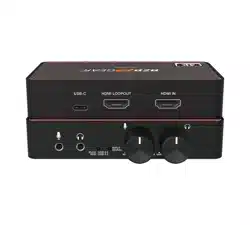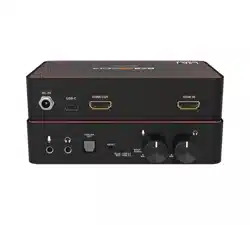
BG-8KCH
HDMI 2.1 to USB-C 4K60 Video Capture Card Box with
8K60 Input/Loop-Out and Audio Mixing
User Manual

BG-8KCH PRODUCT MANUAL
Address: 830 National Drive #140, Sacramento, CA 95834, USA · Tel: +1(888)499-9906 · Email: support@bzbgear.com 2

BG-8KCH PRODUCT MANUAL
TABLE OF CONTENTS
Statement 4
Safety Precaution 4
Introduction 5
Features 5
Packing List 6
Specifications 7
Supported Resolutions 9
Requirements for Capture Equipment 10
Windows PC Requirements (UVC Compatible) 10
macOS Requirements 10
Operation Controls and Functions 11
Software Setup and Operation (OBS Example) 12
Connection Diagram 15
Troubleshooting 16
Tech Support 17
Limited Product Warranty Terms 17
Mission Statement 18
Copyright 18
Address: 830 National Drive #140, Sacramento, CA 95834, USA · Tel: +1(888)499-9906 · Email: support@bzbgear.com 3

BG-8KCH PRODUCT MANUAL
Statement
Please read these instructions carefully before connecting, operating, or configuring this
product. Please save this manual for future reference.
Safety Precaution
● To prevent damaging this product, avoid heavy pressure, strong vibration, or immersion
during transportation, storage, and installation.
● The housing of this product is made of organic materials. Do not expose to any liquid,
gas, or solids which may corrode the shell.
● Do not expose the product to rain or moisture.
● To prevent the risk of electric shock, do not open the case. Installation and maintenance
should only be carried out by qualified technicians.
● Do not use the product beyond the specified temperature, humidity, or power supply
specifications.
● This product does not contain parts that can be maintained or repaired by users.
Damage caused by dismantling the product without authorization from BZBGEAR is not
covered under the warranty policy.
● Installation and use of this product must strictly comply with local electrical safety
standards.
Address: 830 National Drive #140, Sacramento, CA 95834, USA · Tel: +1(888)499-9906 · Email: support@bzbgear.com 4

BG-8KCH PRODUCT MANUAL
Introduction
The BG-8KCH 8K HDMI to USB 3.2 Gen 1 Video Capture Card is a
high-performance capture solution designed for professional video production, live
streaming, and content creation workflows. It supports HDMI™ 2.1 input and
loop-through output with resolutions up to 8K@60Hz and 4K@144Hz, while
capturing video at up to 4K@60Hz or 2560×1440@144Hz. With a 48Gbps HDMI™
bandwidth and a USB 3.2 Gen 1 data transfer rate of up to 5Gbps, the BG-8KCH
delivers smooth, low-latency video capture with broad format compatibility,
including YUY2, NV12, I420, and MJPEG.
The BG-8KCH conforms to UVC and UAC standards, enabling true plug-and-play
operation with no driver installation required across Windows, macOS, and Linux
systems. Integrated HDMI™ loop-out allows simultaneous capture and local
monitoring, while dedicated microphone and line-level audio inputs support precise
audio mixing for professional streaming and recording applications. Compatible with
popular software platforms such as OBS, Streamlabs, vMix, Zoom, and Microsoft
Teams, the BG-8KCH is engineered to provide reliable, high-quality video and audio
capture for demanding AV environments.
Features
● HDM 2.1 Video Capture: Captures HDMI™ video and audio over USB 3.2 Gen 1
with support for high-bandwidth signals.
● 8K HDMI™ Input & Loop-Through: Supports HDMI™ input and loop-out up to
8K@60Hz and 4K@144Hz with HDR pass-through.
● High-Frame-Rate Capture: Captures video at up to 4K@60Hz or
2560×1440@144Hz for smooth motion performance.
● USB 3.2 Gen 1 Interface: Provides up to 5Gbps data transfer for stable, low-latency
video capture.
● UVC/UAC Compliance: Supports plug-and-play operation with no driver installation
required.
● Multi-Format Video Capture: Supports YUY2, NV12, I420, and MJPEG video
capture formats.
● Integrated Audio Mixing: Mixes HDMI™, microphone, and line-in audio for output
via USB and analog line-out.
● Analog Audio I/O: Features 3.5mm microphone input, line-in, and line-out ports for
flexible audio integration.
● EDID Management: Built-in EDID dial allows selection of 8K, 4K, or source-copy
display modes.
● Wide Software Compatibility: Works with OBS, Streamlabs, vMix, Zoom, Microsoft
Teams, and other UVC-based applications.
● Cross-Platform Support: Compatible with Windows, macOS, and Linux operating
systems.
Address: 830 National Drive #140, Sacramento, CA 95834, USA · Tel: +1(888)499-9906 · Email: support@bzbgear.com 5

BG-8KCH PRODUCT MANUAL
● Bus-Powered Operation: Powered directly via USB-C connection for simplified
installation and portability.
Packing List
● 1 × BG-8KCH 8K HDMI™ to USB 3.2 Gen 1
Video Capture Card
● 1 × USB Type-C to Type-C Cable (1 m)
● 1 × User Manual
Address: 830 National Drive #140, Sacramento, CA 95834, USA · Tel: +1(888)499-9906 · Email: support@bzbgear.com 6

BG-8KCH PRODUCT MANUAL
Specifications
Technical
HDMI™ Compliance
HDMI™ 2.1
HDCP Compliance
HDCP 2.3
Video Bandwidth
48 Gbps
USB Bandwidth
5 Gbps
Video Resolution (Input / Loop-Out)
Up to 8K@60Hz, 4K@144Hz
Capture Resolution
Up to 4K@60Hz, 2560×1440@144Hz
Color Space
RGB, YCbCr 4:4:4, 4:2:2, 4:2:0
Color Depth
8 / 10 / 12-bit
HDMI™ Audio Formats
Up to 8 channels, 32–192 kHz, standard & HD bitstream
USB Audio Formats
2-channel, 44.1 / 48 kHz
HDR Support
HDR, HDR10, HDR10+, Dolby Vision, HLG
Video Capture Formats
YUY2, NV12, I420, MJPEG
ESD Protection
IEC 61000-4-2: ±8 kV (air), ±4 kV (contact)
Power Supply
USB powered
Power Consumption
5.8 W (max)
Operating Temperature
32°F to 104°F / 0°C to 40°C
Storage Temperature
−4°F to 140°F / −20°C to 60°C
Operating Humidity
20%–80% RH (non-condensing)
Storage Humidity
10%–90% RH (non-condensing)
Connections
HDMI™ Input
1 × HDMI™ Type-A (19-pin female)
HDMI™ Output
1 × HDMI™ Type-A (19-pin female)
USB Interface
1 × USB-C (USB 3.2 Gen 1)
Microphone Input
1 × 3.5 mm mic input
Line-Level Input
1 × 3.5 mm line-in
Address: 830 National Drive #140, Sacramento, CA 95834, USA · Tel: +1(888)499-9906 · Email: support@bzbgear.com 7

BG-8KCH PRODUCT MANUAL
Line-Level Output
1 × 3.5 mm line-out
Mechanical
Housing
Aluminum enclosure
Color
Silver
Dimensions (W × D × H)
4.5 × 3.2 × 0.87in [114 × 82 × 22 mm]
Weight
0.4 lb [180 g]
Address: 830 National Drive #140, Sacramento, CA 95834, USA · Tel: +1(888)499-9906 · Email: support@bzbgear.com 8

BG-8KCH PRODUCT MANUAL
Supported Resolutions
Format /
Category
Supported Resolutions & Frame Rates
HDMI™ Input
(PC / SD / HD /
FHD)
640×480p@60Hz, 800×600p@60Hz, 1024×768p@60Hz, 1280×1024p@60Hz,
1360×768p@60Hz, 1440×900p@60Hz, 1440×1050p@60Hz, 1600×1200p@60Hz
SD / Interlaced
Video
720×[email protected], 720×[email protected], 720×576i@50Hz, 720×576p@50Hz
HD Video
1280×720p@50/59.94/60Hz, 1920×1080i@50/59.94/60Hz,
1920×[email protected]/24/25/29.97/30/50/59.94/60Hz
4K UHD Video
3840×[email protected]/24/25/29.97/30/50/59.94/60/100/120Hz
DCI 4K
4096×[email protected]/24/25/29.97/30/50/59.94/60/100/120Hz
Ultra-Wide /
Extended
Resolutions
5120×2160p@50/60Hz
8K UHD Video
7680×[email protected]/24/25/29.97/30/50/60Hz
UVC Capture
(NV12 / I420)
3840×2160@30fps and below, 2560×1440@60fps and below, 1920×1080@120fps
and below, 1280×720@120fps and below, 720×576@50fps and below,
720×480@60fps and below, 640×480@60fps and below
UVC Capture
(YUY2)
2560×1440@60fps and below, 1920×1080@60fps and below, 1280×720@120fps
and below, 720×576@50fps and below, 720×480@60fps and below,
640×480@60fps and below
UVC Capture
(MJPEG)
3840×2160@60fps and below, 2560×1440@144fps and below,
1920×1080@144fps and below, 1280×720@144fps and below, 720×576@50fps
and below, 720×480@60fps and below, 640×480@60fps and below
Address: 830 National Drive #140, Sacramento, CA 95834, USA · Tel: +1(888)499-9906 · Email: support@bzbgear.com 9
BG-8KCH PRODUCT MANUAL
Requirements for Capture Equipment
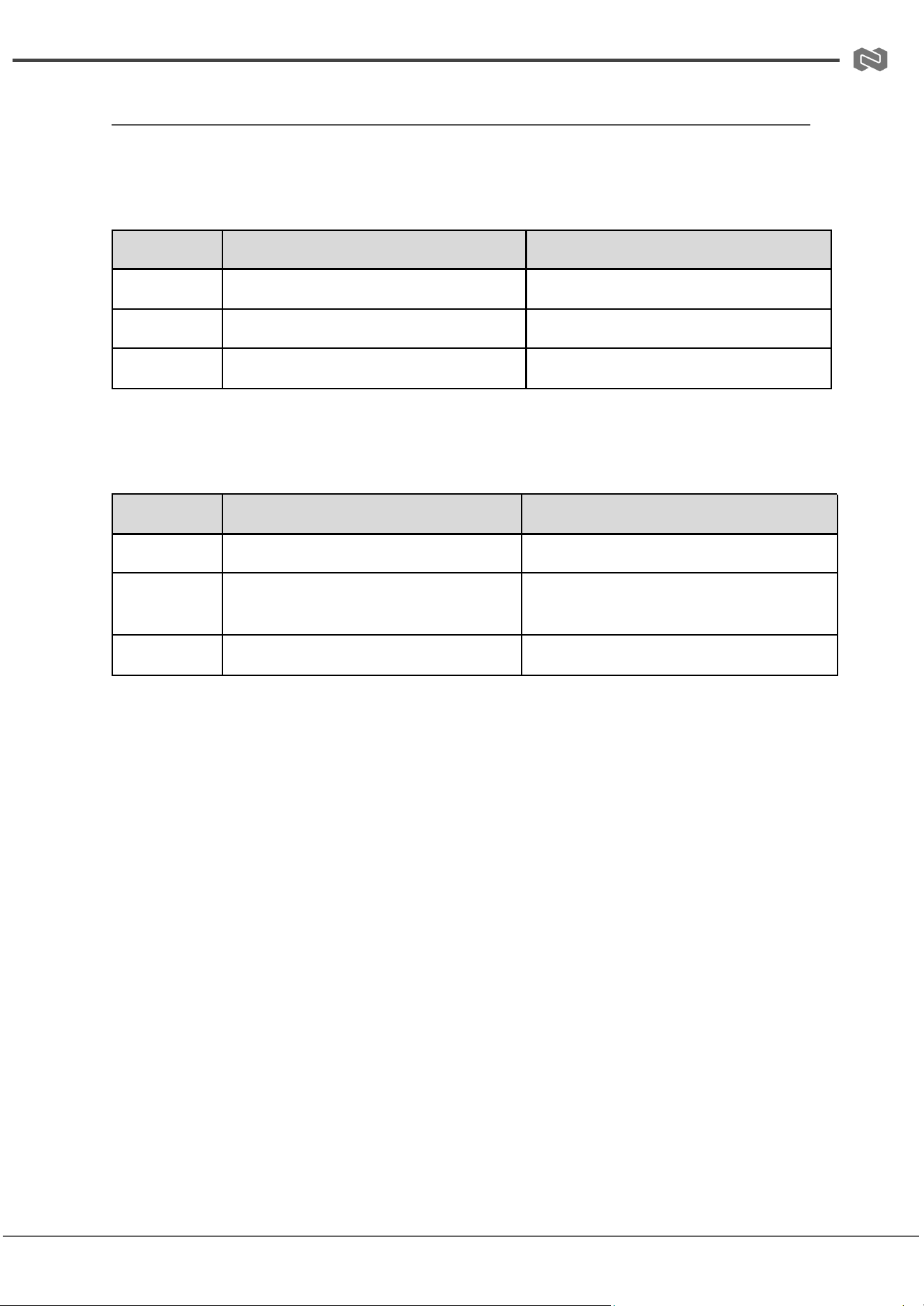
Windows PC Requirements (UVC Compatible)
MJPEG (4K@60 Capture)
Component
Desktop Computer
Laptop Computer
CPU
Intel Core i7 10th Gen or above
Intel Core i9 9th Gen or above
GPU
NVIDIA GeForce GTX 1650 or above
NVIDIA GeForce GTX 1650 or above
RAM
8 GB (Dual Channel)
8 GB (Dual Channel)
NV12 / I420 (4K@30 Capture)
Component
Desktop Computer
Laptop Computer
CPU
Intel Core i5 6th Gen or above
Intel Core i7-7700HQ or above
GPU
NVIDIA GeForce GTX 1060 or above
NVIDIA GeForce GTX 1050 Ti or above
RAM
8 GB (Dual Channel)
8 GB (Dual Channel)
macOS Requirements
● macOS 10.12 or later (UVC compatible system required)
Address: 830 National Drive #140, Sacramento, CA 95834, USA · Tel: +1(888)499-9906 · Email: support@bzbgear.com 10
BG-8KCH PRODUCT MANUAL
Operation Controls and Functions
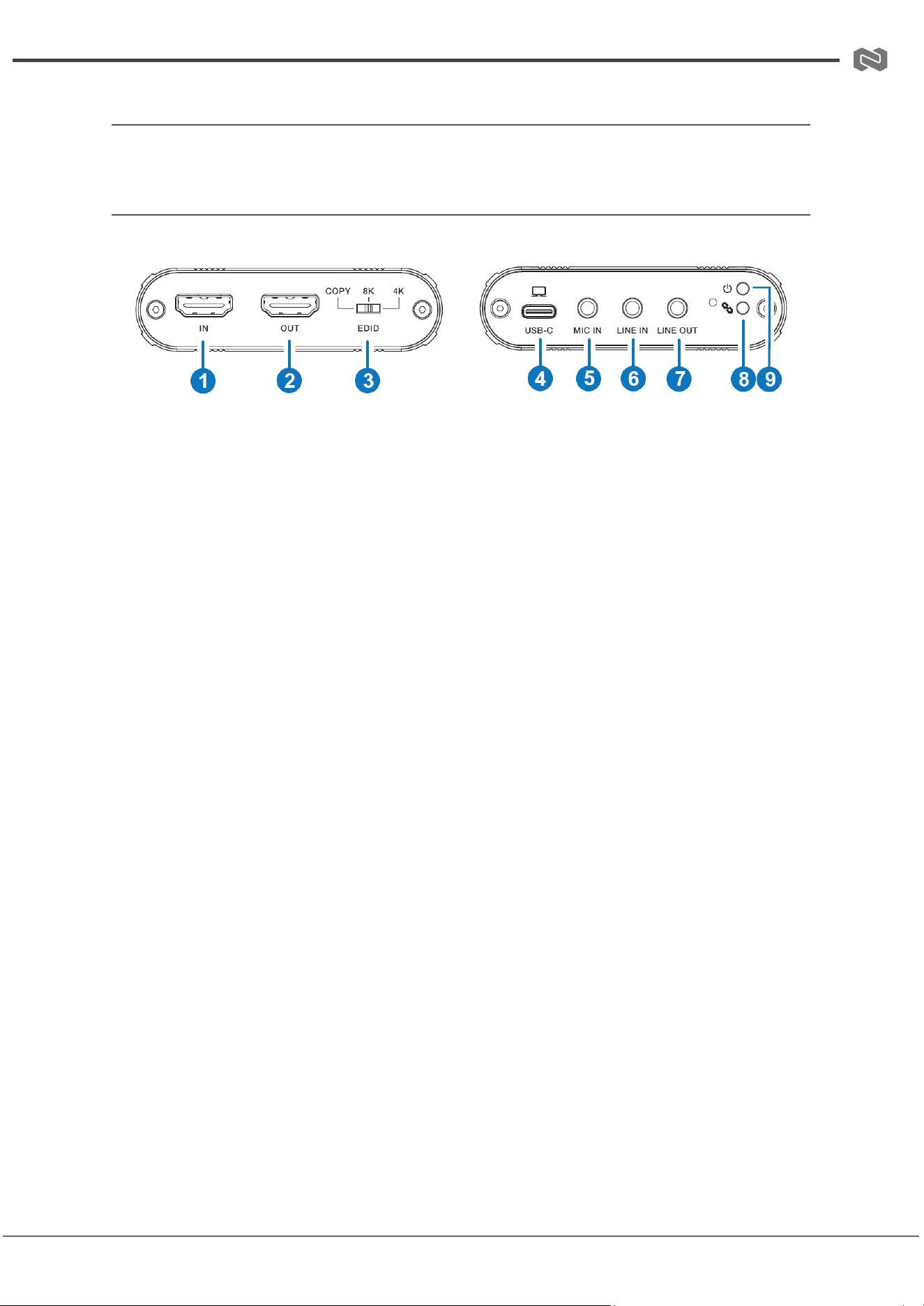
Front and Rear Panel
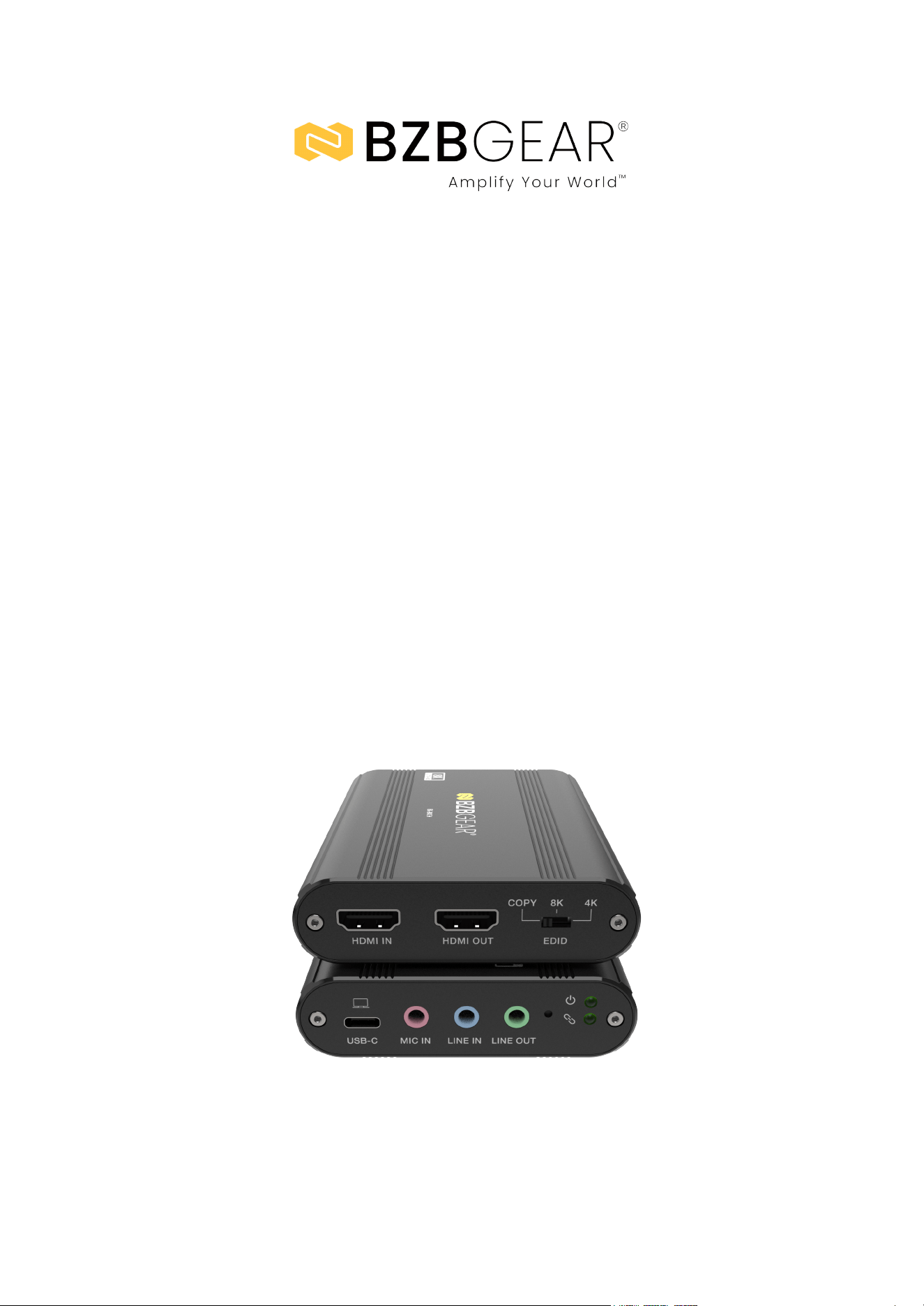
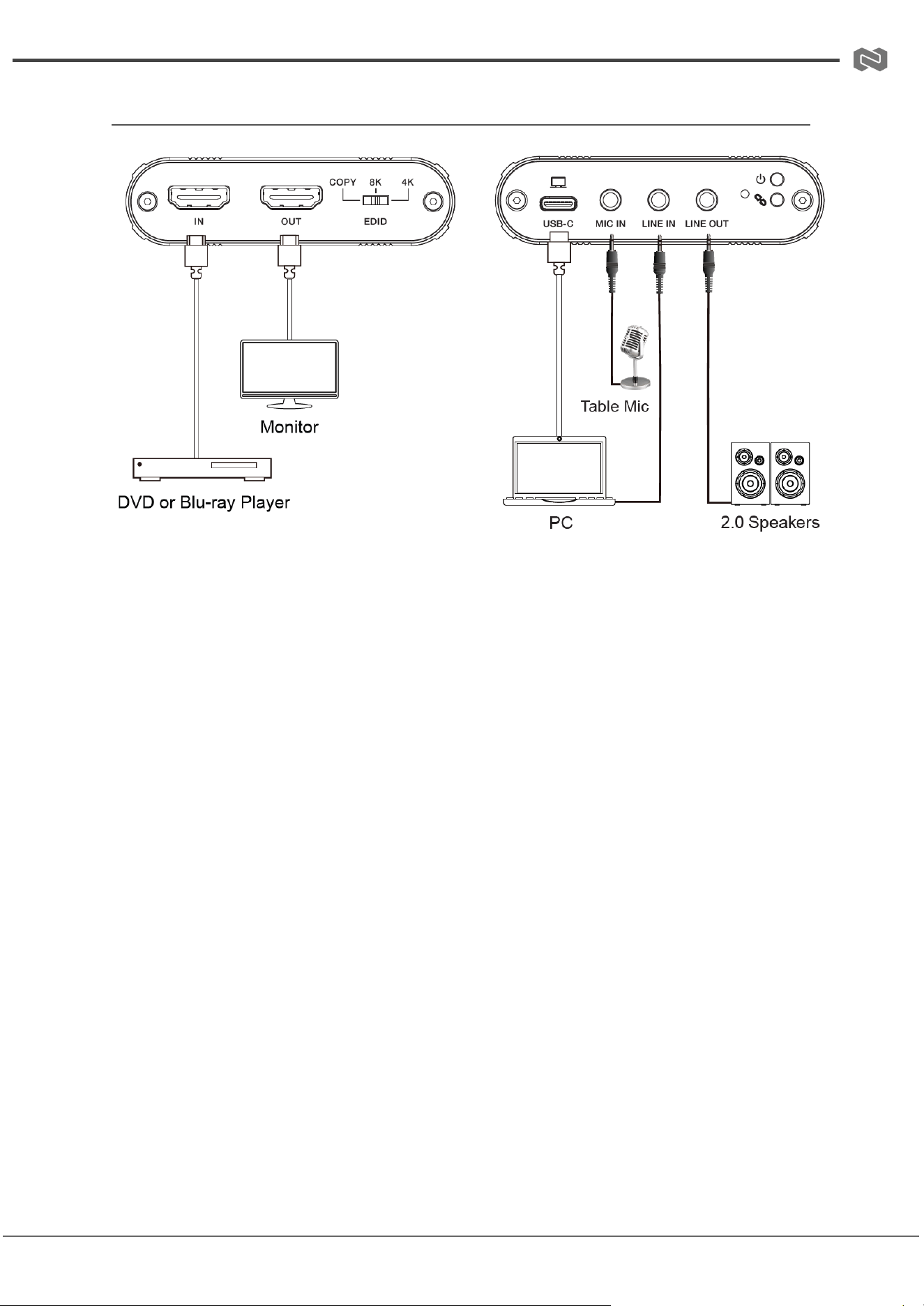
1. HDMI IN: HDMI input port for connecting a source device such as a PC, laptop,
media player, or camera.
2. HDMI OUT: HDMI loop-out port for connecting a local display such as a monitor or
TV for real-time pass-through viewing.
3. EDID Dial Switch: EDID selection switch used to configure input compatibility
settings. Options include COPY (reads EDID from HDMI OUT and supports 2.0CH
audio), 8K mode (FRL10G, 8K HDR, 2.0CH audio), and 4K mode (4K@60Hz 4:4:4,
2.0CH audio).
4. USB-C Port: USB 3.2 Gen 1 connection for video capture to a computer. Also
provides bus power when connected.
5. MIC IN: 3.5 mm microphone input for external microphone sources (2-pin
compatible).
6. LINE IN: 3.5 mm stereo line-level audio input for external audio devices.
7. LINE OUT: 3.5 mm stereo analog audio output for monitoring or external audio
routing.
8. Link LED: Indicates USB connection and capture status. Solid ON indicates device
recognition, blinking indicates active capture, and OFF indicates no software
connection.
9. Power LED: Indicates power status; illuminates when the unit is powered on.
Address: 830 National Drive #140, Sacramento, CA 95834, USA · Tel: +1(888)499-9906 · Email: support@bzbgear.com 11
BG-8KCH PRODUCT MANUAL
Software Setup and Operation (OBS Example)
Windows 10 / OBS Studio used as reference
1. Install OBS Studio on your computer from the
official OBS website.
2. Launch OBS Studio by double-clicking the
application icon.
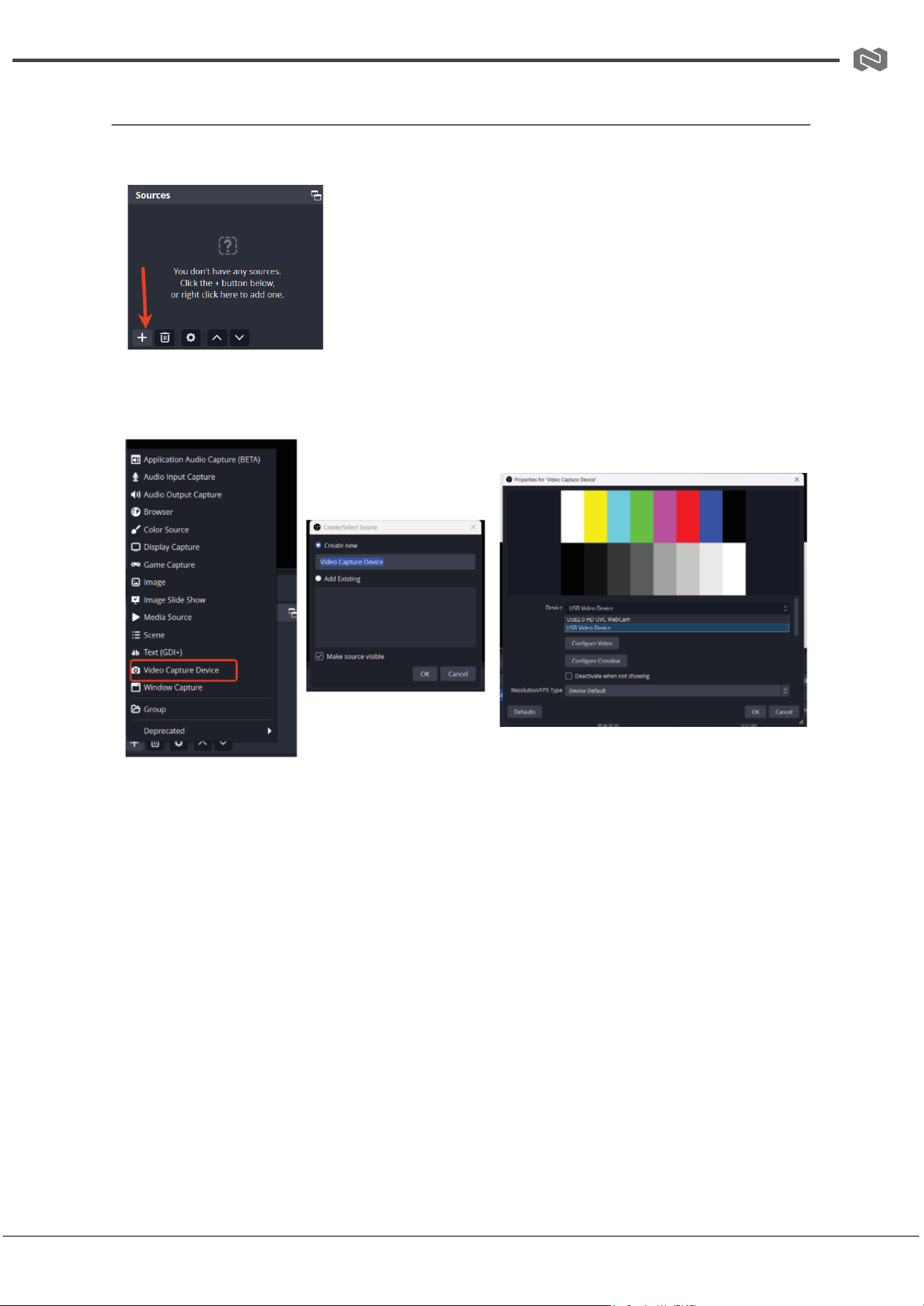
3. In the main interface, click the “+” (Add Source)
button under the Sources panel.
4. Select Video Capture Device from the list to create a new video source.
5. In the properties window, select the BG-8KCH as the active video capture
device and confirm settings.
6. Click the “+” (Add Source) button again to add audio input.
7. Select Audio Input Capture and choose the corresponding audio device
(e.g., USB audio device).
Address: 830 National Drive #140, Sacramento, CA 95834, USA · Tel: +1(888)499-9906 · Email: support@bzbgear.com 12
BG-8KCH PRODUCT MANUAL
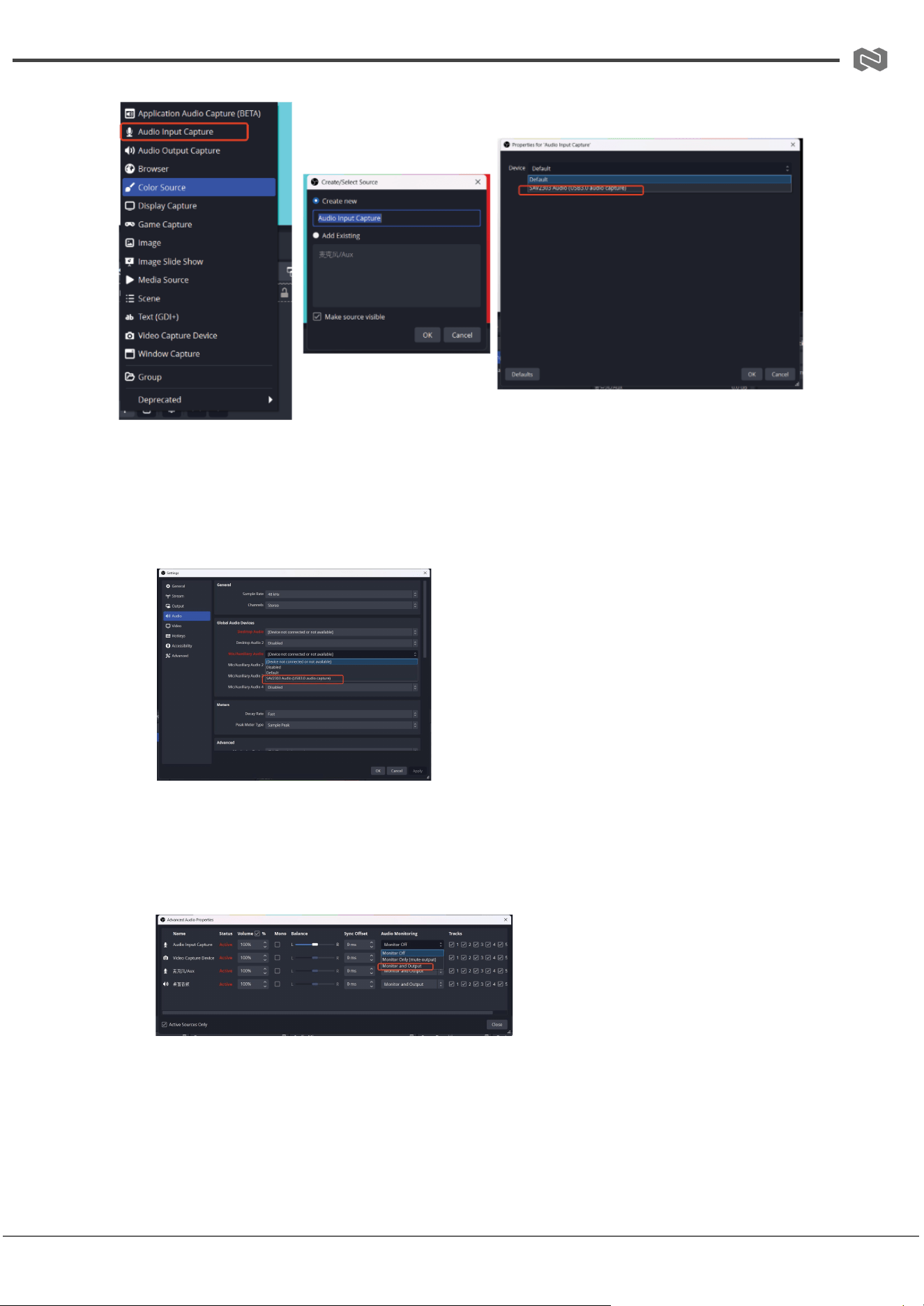
8. Navigate to Settings → Audio:
○ Set Sample Rate (recommended 48 kHz)
○ Select Mic/Auxiliary Audio Device (e.g., USB audio capture device)
○ Click Apply → OK
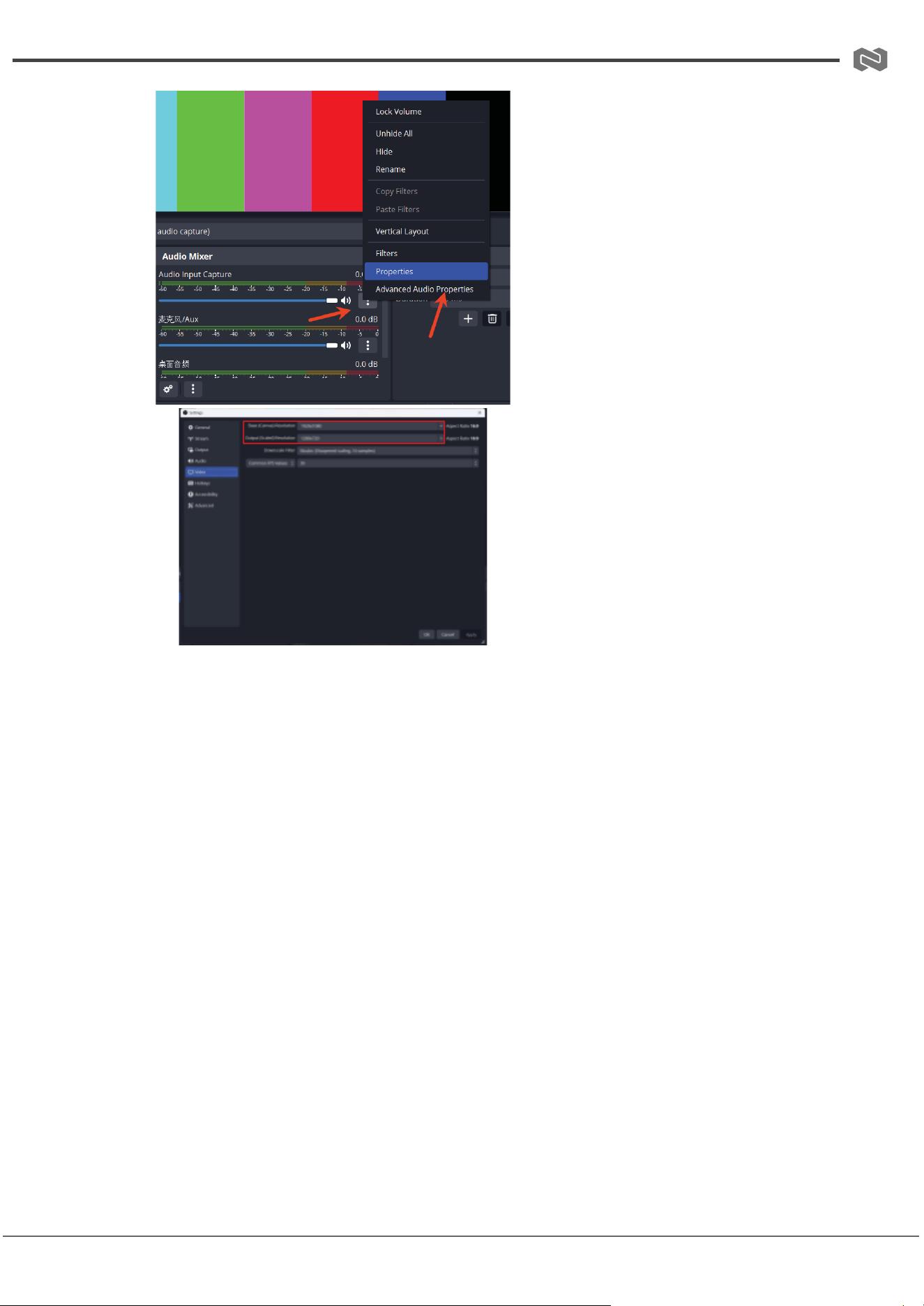
9. Open Settings → Advanced Audio Properties:
○ Set audio monitoring mode to “Monitor and Output”
○ Close the window once complete
10. Go to Settings → Video:
● Set Base (Canvas) Resolution
● Set Output (Scaled) Resolution
● Click Apply → OK
Address: 830 National Drive #140, Sacramento, CA 95834, USA · Tel: +1(888)499-9906 · Email: support@bzbgear.com 13
BG-8KCH PRODUCT MANUAL
11. Go to Settings → Output:
● Select recording path
● Choose recording quality and format
● Click Apply → OK
12. Once configuration is complete, click Start Recording to begin capture.
13. Click Stop Recording when finished.
Exit OBS Studio when capture is complete.
Address: 830 National Drive #140, Sacramento, CA 95834, USA · Tel: +1(888)499-9906 · Email: support@bzbgear.com 14
BG-8KCH PRODUCT MANUAL
Connection Diagram
Address: 830 National Drive #140, Sacramento, CA 95834, USA · Tel: +1(888)499-9906 · Email: support@bzbgear.com 15

BG-8KCH PRODUCT MANUAL
Troubleshooting
Problems
Causes
Solutions
No Power / All LED off
Power supply not connected,
connected fully, or wrong power
supply.
Check if the power supply is
connected correctly and the
output voltage value is within
recommended specifications.
No sound or sound issues
The HDMI connection is faulty,
the audio format is not
supported by the displays, or
the source player is set to
another port for audio output
Check if the HDMI cables are
connected correctly.
Check if the audio format is
supported by the display and
that a user has not changed the
supported audio format on the
player`s audio output. Ensure
output settings from the HDMI
source device as set correctly.
No picture or picture flickers
The HDMI cable may be faulty
or the category cable quality is
faulty.
Check if the HDMI
and category cable connections
are correct and undamaged.
Change to another good
working HDMI cable or category
cable (CAT6 or better cable is
recommended).
Address: 830 National Drive #140, Sacramento, CA 95834, USA · Tel: +1(888)499-9906 · Email: support@bzbgear.com 16

BG-8KCH PRODUCT MANUAL
Tech Support
Have technical questions? We may have answered them already!
Please visit BZBGEAR’s support page (bzbgear.com/support) for helpful information and
tips regarding our products. Here you will find our Knowledge Base
(bzbgear.com/knowledge-base) with detailed tutorials, quick start guides, and step-by-step
troubleshooting instructions. Or explore our YouTube channel, BZB TV
(youtube.com/c/BZBTVchannel), for help setting up, configuring, and other helpful how-to
videos about our gear.
Need more in-depth support? Connect with one of our technical specialists directly:
Phone
1.888.499.9906
Email
support@bzbgear.com
Live Chat
bzbgear.com
Limited Product Warranty Terms
Pro Line: 5-year warranty from the date of purchase for AV/Broadcasting products bought
on or after August 1, 2024.
Essential Line: 3-year warranty from the date of purchase for AV/Broadcasting products
bought on or after August 1, 2024.
Cables: Lifetime Limited Product Warranty.
For complete warranty information, please visit bzbgear.com/warranty.
For questions, please call 1.888.499.9906 or email support@bzbgear.com.
Address: 830 National Drive #140, Sacramento, CA 95834, USA · Tel: +1(888)499-9906 · Email: support@bzbgear.com 17

BG-8KCH PRODUCT MANUAL
Mission Statement
BZBGEAR is a breakthrough manufacturer of high-quality, innovative audiovisual equipment
ranging from AVoIP, professional broadcasting, conferencing, home theater, to live
streaming solutions. We pride ourselves on unparalleled customer support and services.
Our team offers system design consultation, and highly reviewed technical support for all
the products in our catalog. BZBGEAR delivers quality products designed with users in
mind.
Copyright
All the contents in this manual and its copyright are owned by BZBGEAR. No one is allowed
to imitate, copy, or translate this manual without BZBGEAR’s permission. This manual
contains no guarantee, standpoint expression or other implies in any form. Product
specification and information in this manual is for reference only and subject to change
without notice.
All rights reserved. No reproducing is allowed without acknowledgement.
Address: 830 National Drive #140, Sacramento, CA 95834, USA · Tel: +1(888)499-9906 · Email: support@bzbgear.com 18