ð©×êȔ·×òøēøòȒČÂĈĩ×·ÂΆÏð©×êȒ·øð
LJ
/ÍČøðÂê×ÏÔēČ½øòøēēęĈòøòȓęòĄêęÏ©ò½ĈÂʍĄêęÏēÔÂĄøĪÂĈ©½©ĄēÂĈ
ēøĈÂČē©ĈēēÔ½Âĩ×·ÂȒhÔ·øòēĈøêêÂĈĪ×êê©ęēøʍ½Âē·ēēÔÂòÂĪ?
·øęòē©ò½ĈÂČēøĈÂÍęêê×êêęð×ò©ē×øòȒ
Ô×êÂēÔÂê×ÏÔēČēĈ×òÏ×ČĪ©ēÂĈĄĈøøÍÍøĈøęē½øøĈęČÂȓēÔÂĄêęÏ©ò½
·øòēĈøêêÂĈµøįČÔøęê½µÂçÂĄē×ò©½Ĉİêø·©ē×øòÍøĈČ©ÍÂēİȒ
hÔ×ČĄĈø½ę·ēČꥥøĈēČLJȒlj'ÔĶ×ʍ%×·øòò·ē×øòøòêİȒ
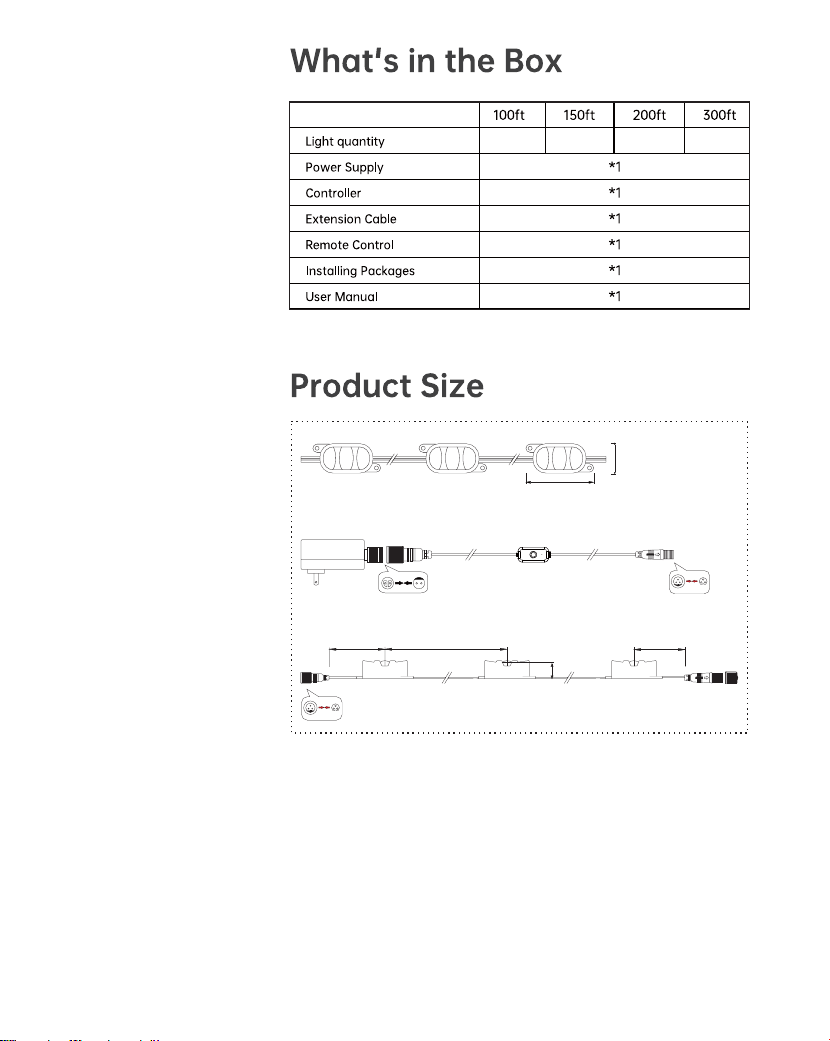
ȞLjNj ȞNJlj ȞnjLJ ȞdžDžǍ
Lj
33mm
75mm
830mm
34mm
415mm415mm
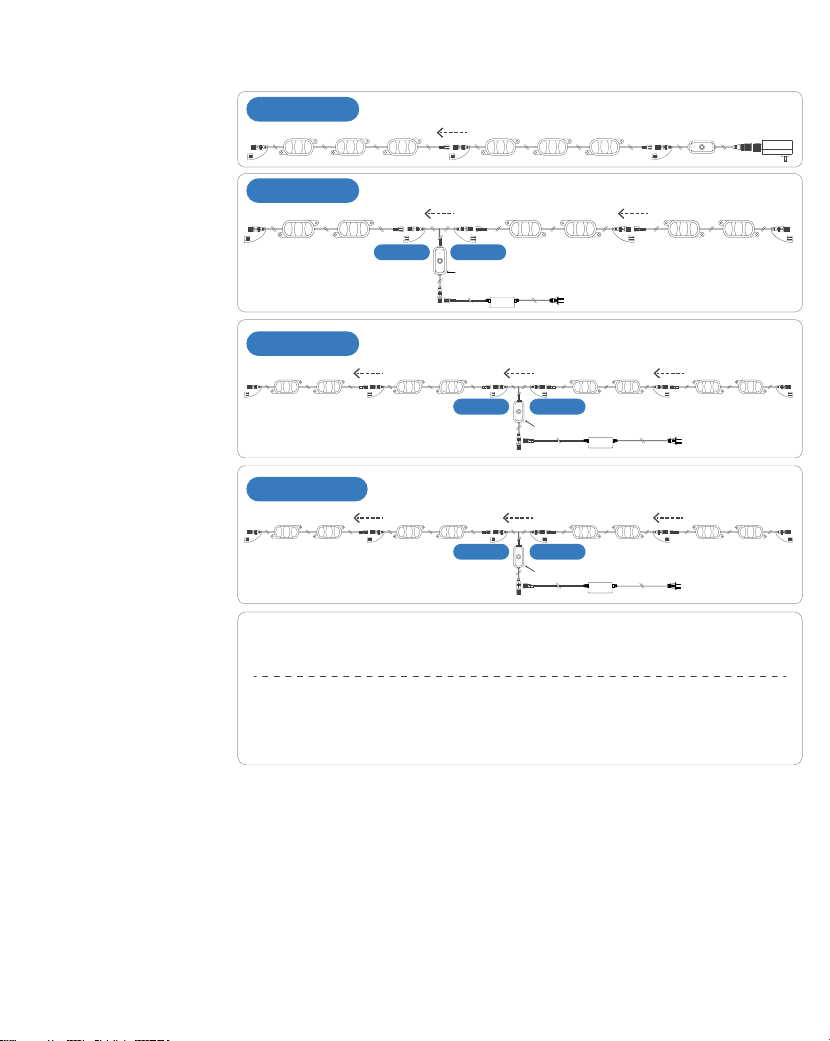
/òČē©êê©ē×øòhץČ
100ft/36 Lights
150ft/54 Lights
200ft/72 Lights
300ft/108 Lights
lj
#1#2#3#36 #35 #34
ʍhÔÂê©Čēê×ÏÔēĄø×òēøòMęēĄęēdž×ČYø×òēȦdž
ʍhÔÂê©Čēê×ÏÔēĄø×òēøòMęēĄęēLJ×ČYø×òēȦnjLJɑLJDžDžÍēɒȱȦdžDžǍɑLjDžDžÍēɒ
hÔ×Č½×©ÏĈ©ð×ČÍøĈĈÂÍÂĈÂò·ÂøòêİȒhÔ·øòēĈøêêÂĈ©ò½ĄøĪÂĈĄêęÏ·©ò
µÂðøęòē½©ē©½×ÍÍÂĈÂòēĄøČ×ē×øò©··øĈ½×òÏēøİøęĈò½ČȒ
%øĈdžNJDžȱLJDžDžȱLjDžDžÍēðø½ÂêČĪ×ēÔ½ę©êøęēĄęē·øòēĈøêêÂĈ
#1#2#27#53#54 #26
MęēĄęēLJ MęēĄęēdž
%ĈøòēøÍøòēĈøêêÂĈ
#1#2#53#54#55#56#107#108
MęēĄęēLJ MęēĄęēdž
%ĈøòēøÍøòēĈøêêÂĈ
#1#2#35#36#37#38#71#72
MęēĄęēLJ MęēĄęēdž
%ĈøòēøÍøòēĈøêêÂĈ
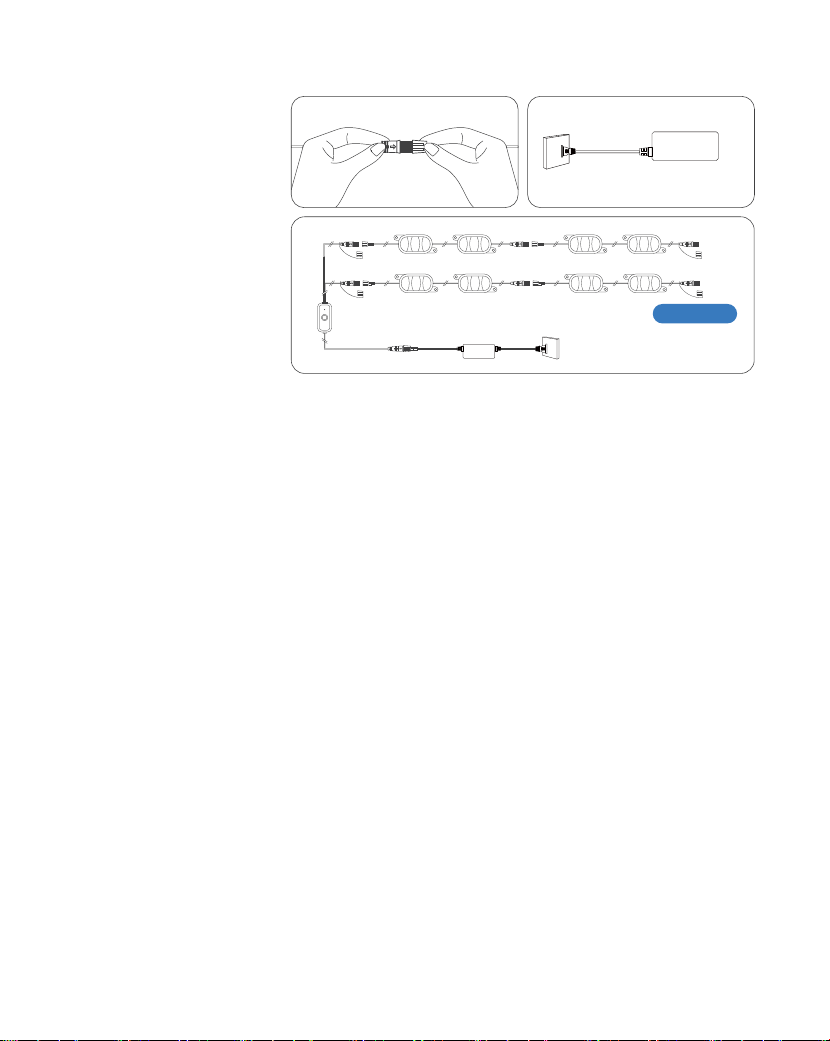
NJ
/ÍČøðÂê×ÏÔēČ½øòøēēęĈòøòȓęòĄêęÏ©ò½ĈÂʍĄêęÏēÔÂĄøĪÂĈ
©½©ĄēÂĈēøĈÂČē©ĈēēÔ½Âĩ×·ÂȒhÔ·øòēĈøêêÂĈĪ×êê©ęēøʍ½Âē·ē
ēÔÂòÂĪ?·øęòē©ò½ĈÂČēøĈÂÍęêê×êêęð×ò©ē×øò
Ô©ēēø½øȔ
džȒøòò·ē©êêČēĈ×òÏê×ÏÔēČ·ē×øòČ×òČÂćęÂò·ÂȒ
LJȒYêęÏ×òēÔÂĄøĪÂĈ©½©ĄēÂĈ
LjȒÔ·çēÔ©ē©êêê×ÏÔēČ©ĈÂĪøĈç×òÏĄĈøĄÂĈêİ
òČęĈ©êêê×ÏÔēČ©Ĉ·øòò·ē½µÂÍøĈÂĄøĪÂĈ×òÏøòȒ
MēÔÂĈĪ×ČÂȓēÔÂê×ÏÔēČð©İòøē×êêęð×ò©ēÂȒ
hÂČēÂÍøĈÂ/òČē©êê©ē×øò
ɑGøēÂȔČÂê·ēēÔÂĩÂĈČ×øòĪ×ēÔ©Ī©ēÂĈĄĈøøÍ·©ĄÍøĈēÔÂŔò©êČēĈ×òÏɒ
Ī©ēÂĈĄĈøøÍ·©Ą
ljǍ njLJ ǎNj džljlj
Nj
nj
a©Ĉ·ÔÍøĈʨ/GMhMGʨøĈʨað©Ĉē?×ÍÂʨ×òēÔÂĄĄaēøĈÂēø
½øĪòêø©½ēÔ©ĄĄȓøĈČ·©òēÔÂ\]·ø½ÂµÂêøĪēø½øĪòêø©½
ēÔÂ/GMhMGĄĄ
/GMhMGYY að©Ĉē?×ÍÂYY
Ǎ
hęĈòøòēÔÂê×ÏÔēȒ/ēĪ×êê©ęēøð©ē×·©êêİÂòēÂĈĄ©×Ĉ×òÏðø½Âȓ
×ò½×·©ē½µİēÔÂĈ½×ò½×·©ēøĈê×ÏÔēŕ©ČÔ×òÏȒ/ÍēÔÂê×ÏÔē
½øÂČòøēÂòēÂĈĄ©×Ĉ×òÏðø½ÂĪÔÂòēęĈò½øòȓĈÂČÂē×ēęČ×òÏ
øòÂøÍēÔÂÍøêêøĪ×òÏðÂēÔø½ČȔ
]ÂðøēÂøòēĈøêȔYĈÂČČ©ò½Ôøê½ēÔÂʞʟµęēēøòøòēÔÂĈÂðøēÂ
øĈ·øòēĈøêµøįɑĈ·Â×ĩÂĈɒÍøĈLjʏNJČ·øò½ČȒhÔÂê×ÏÔēĪ×êêŕ©ČÔĈ½Ȓ
aēÂĄdž
MĄÂòēÔÂĄĄ©ò½ē©ĄēÔÂʞ˗ʟ×·øò×òēÔÂꥥÂĈʍĈ×ÏÔē·øĈòÂĈ
øÍēÔÂð©×ò×òēÂĈÍ©·ÂȒE©çÂČęĈÂêęÂēøøēÔ×ČÂò©µê½øò
İøęĈĄÔøò©ò½ēÔ©ēİøęĈ×ʍ%×òÂēĪøĈç×ČLJȒlj',ĶȒ
aēÂĄLJ
h©ĄēÔ½Âĩ×·Â×·øòēø©½½ēÔ½Âĩ×·ÂȒòēÂĈİøęĈ×ʍ%×
Ą©ČČĪøĈ½ȓē©ĄGÂįēȓ©ò½ÍøêêøĪēÔÂøòʍČ·ĈÂÂò×òČēĈę·ē×øòČēø
·øðĄêÂēÂēÔ·øòò·ē×øòȒ
aēÂĄLj
©êêaĪ×ē·ÔȔhęĈòēÔÂČĪ×ē·ÔMGʍM%%ʍMGʍM%%ʍMG·øòē×òęøęČêİȒ
hÔÂê×ÏÔēĪ×êêŕ©ČÔĈ½Ȓ
ǎ
/ȱ/Eø½Â EİEø½Â
øêøĈEø½Â a·ÂòÂEø½Â EęČ×·Eø½Â
aĪץÂ
êÂÍē
hÔÂEİEø½Âē©µð©İµÂ
Ô×½½ÂòȒaĪץÂēÔÂðÂòę
µ©ĈēøēÔÂêÂÍēēøŔò½©ò½
©··ÂČČİøęĈČ©ĩ½
ê×ÏÔē×òÏČÂēē×òÏČȒ
GøēÂȔ
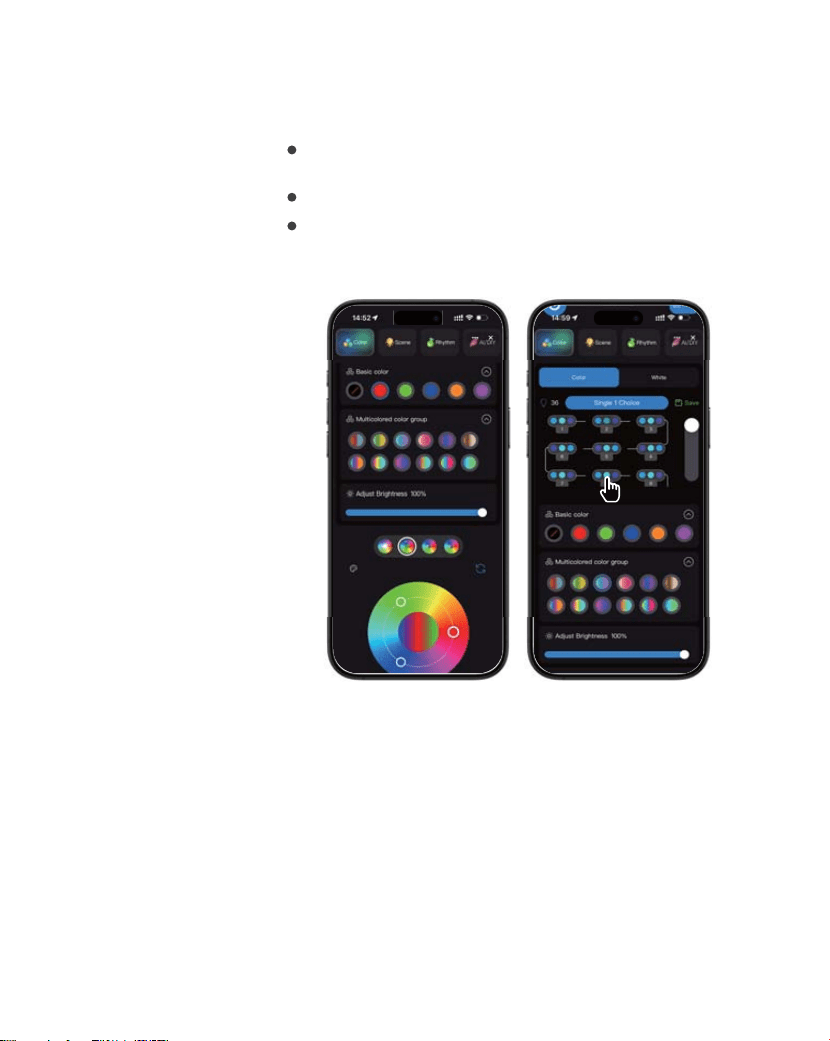
,øĪēøaÂē/ò½×ĩ×½ę©ê?øêøĈČ
You can customize the color of each
LED individually:
Choose a single color from Basic Color, or select a
Multicolored Color Group to apply multiple colors.
Select ALL Light you want to edit.
Tap Save to save your custom color settings.Your saved
settings will appear in My Mode (located to the right of
the AI/DIY button)
džDž
dždž
,øĪēø/İò©ð×·a·ÂòÂEø½ÂČ
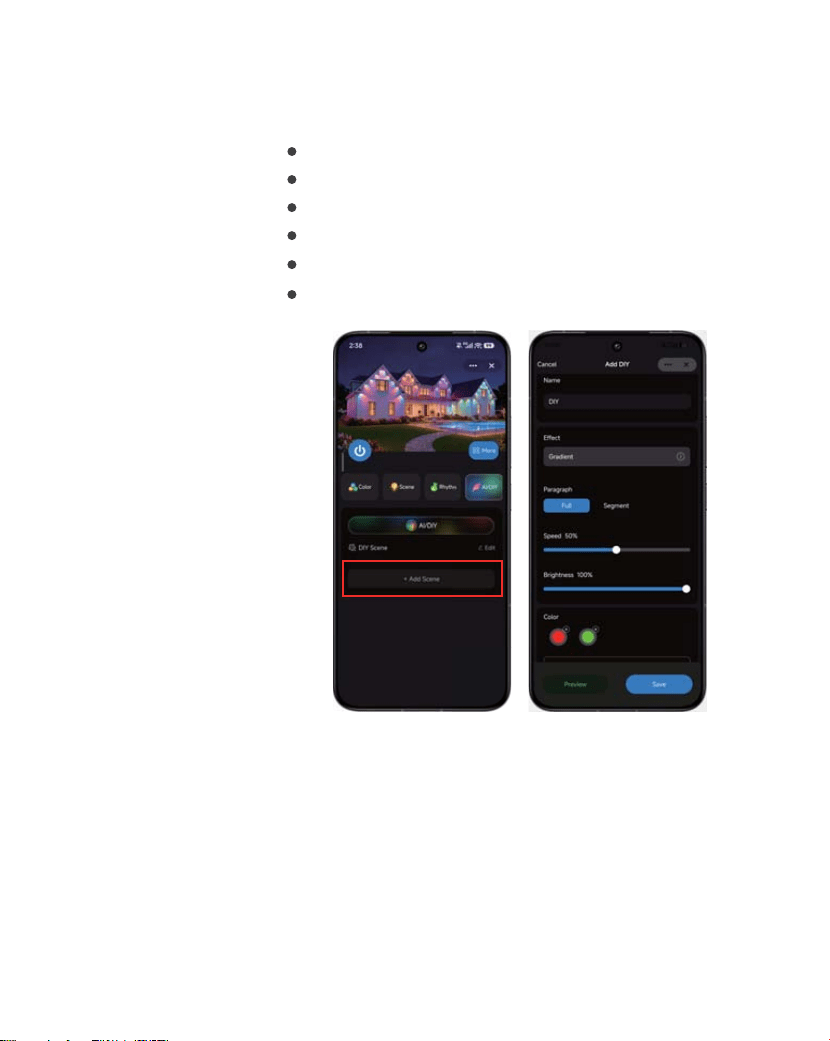
You can create a custom dynamic scene by setting
multiple LED colors and adjusting the lighting effects.
Select multiple colors for the LEDs.
Go to Effects and choose your preferred Dynamic effect.
Adjust the Speed and Brightness as desired.
Tap Preview to view the lighting effect.
Tap Save to save your custom settings.
Your saved dynamic scene will appear in the AI/DIY interface.
More
More
džLJ
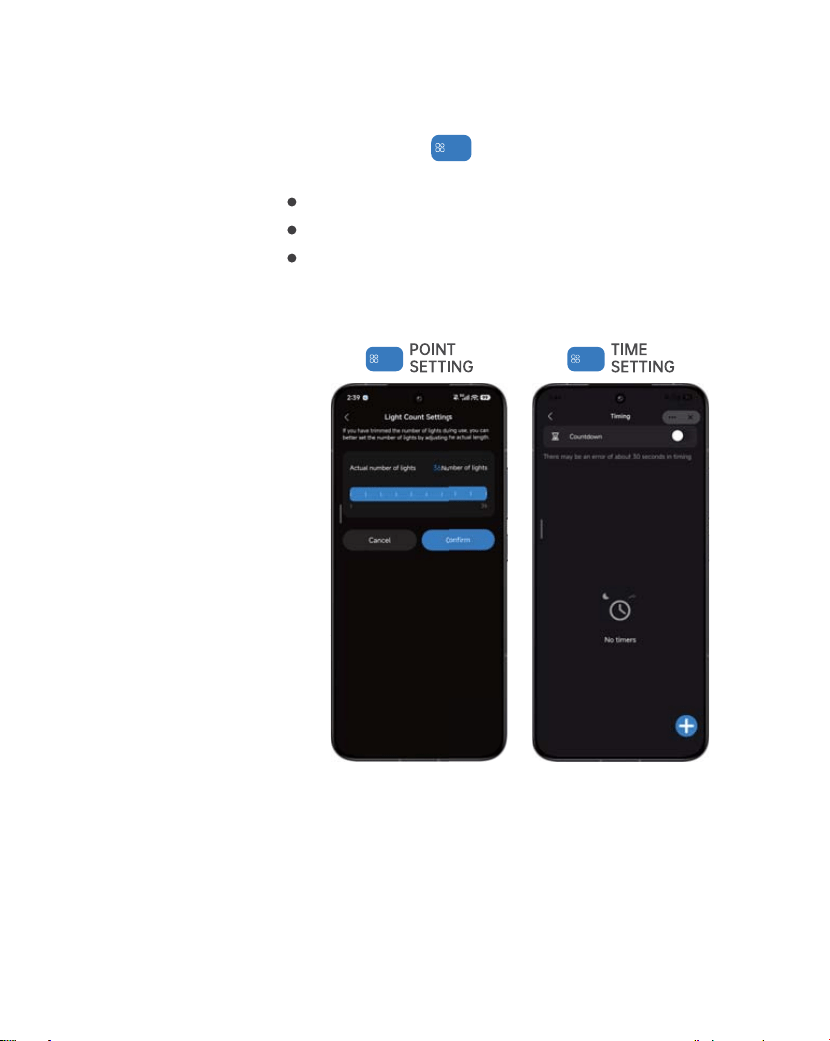
?×ÏÔēaēĈץ?ÂòÏēÔaÂēē×òÏ·h×ðÂĈ
Select Light Count Settings.
Drag the Actual Point slider to match your real light-strip length.
Tap !Ȓȇˡȸȅ to save.
If your light strip has been cut, adjust its actual length for
proper performance.
Tap the More icon at the right corner to open the
settings menu.
You may also use the Timer function to set scheduled on/off
times for your lights.
More
džLj
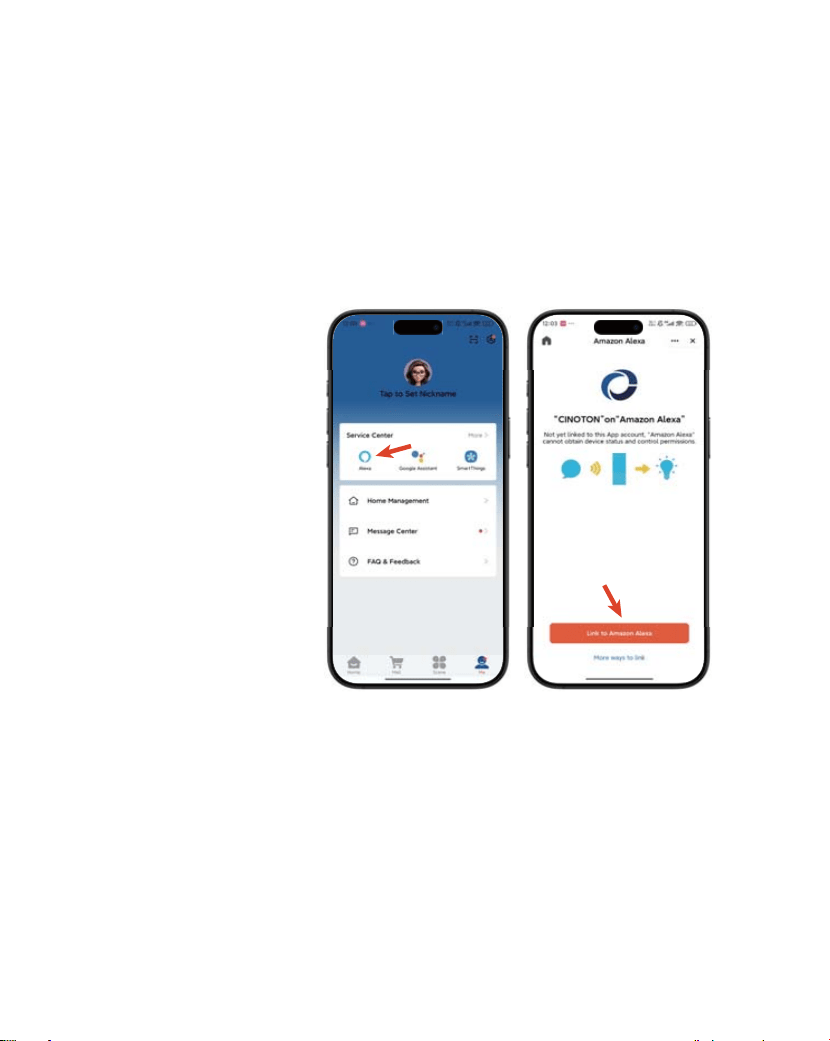
,øĪēø·øòò·ēÂĩ×·ÂēøêÂį©
Quick Connect 1.
Detailed Guide2.
Open the CINOTON app, then go to Me > Third-Party Voice
Services > Alexa> Sign In with Amazon. Follow the on-screen
prompts to connect your Smart Lights.
lf you need help, navigate to Me > Third-Party Voice Services
> Alexa > View more ways to link.
džlj
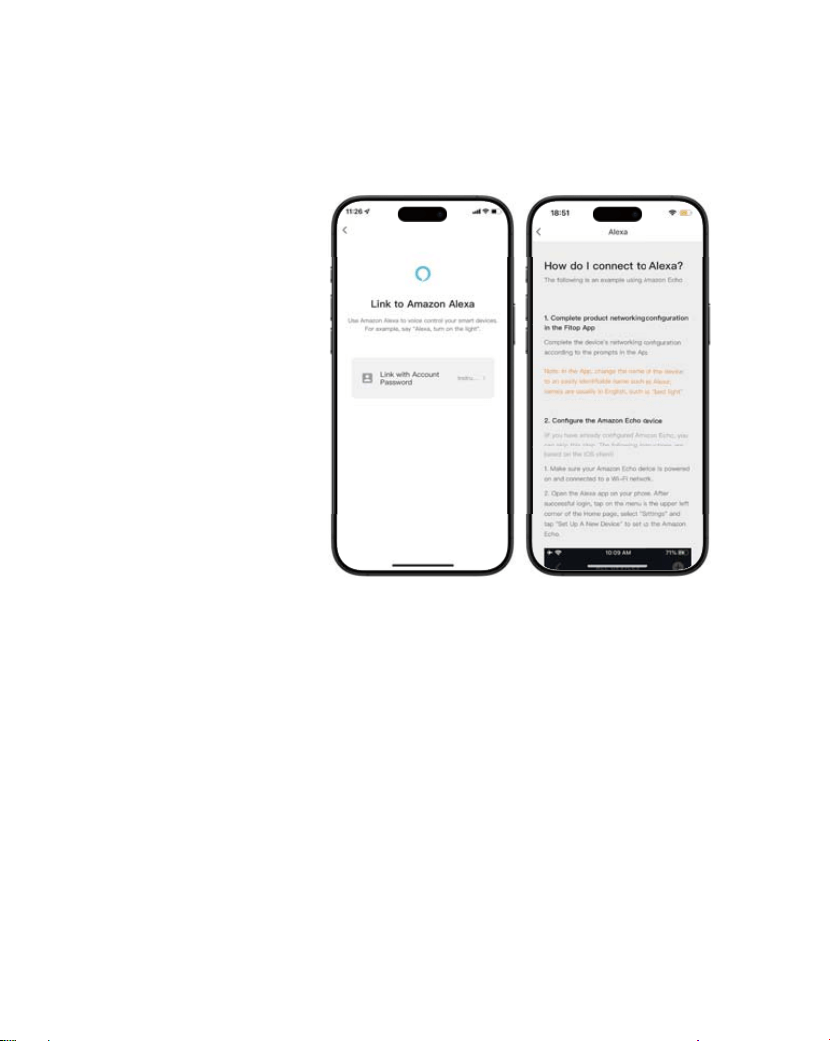
On the detailed guide page, tap "Link with Account Password"
Start Linking3.
Follow the in-app instructions to ˡȇish the connection.
Complete Setup4.
džNJ
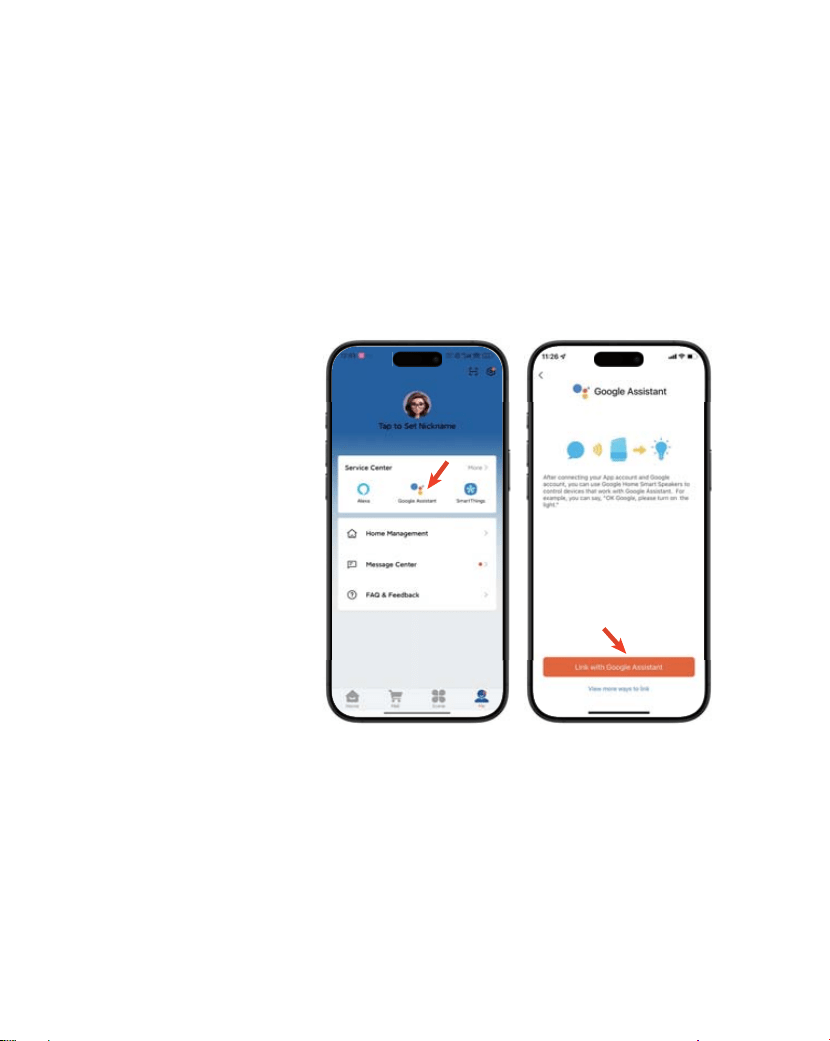
,øĪēø·øòò·ēÂĩ×·Âēø
'øøÏêÂČČ×Čē©òē
Quick Connect 1.
Detailed Guide2.
Open the CINOTON app and go to Me > Third-Party Voice
Services > Google Assistant > Link with Google Assistant.
Follow the on-screen prompts to connect your Smart Lights.
lf you need help, navigate to Me >Third-Party Voice Services
> Google Assistant > View more ways to link.
džNj
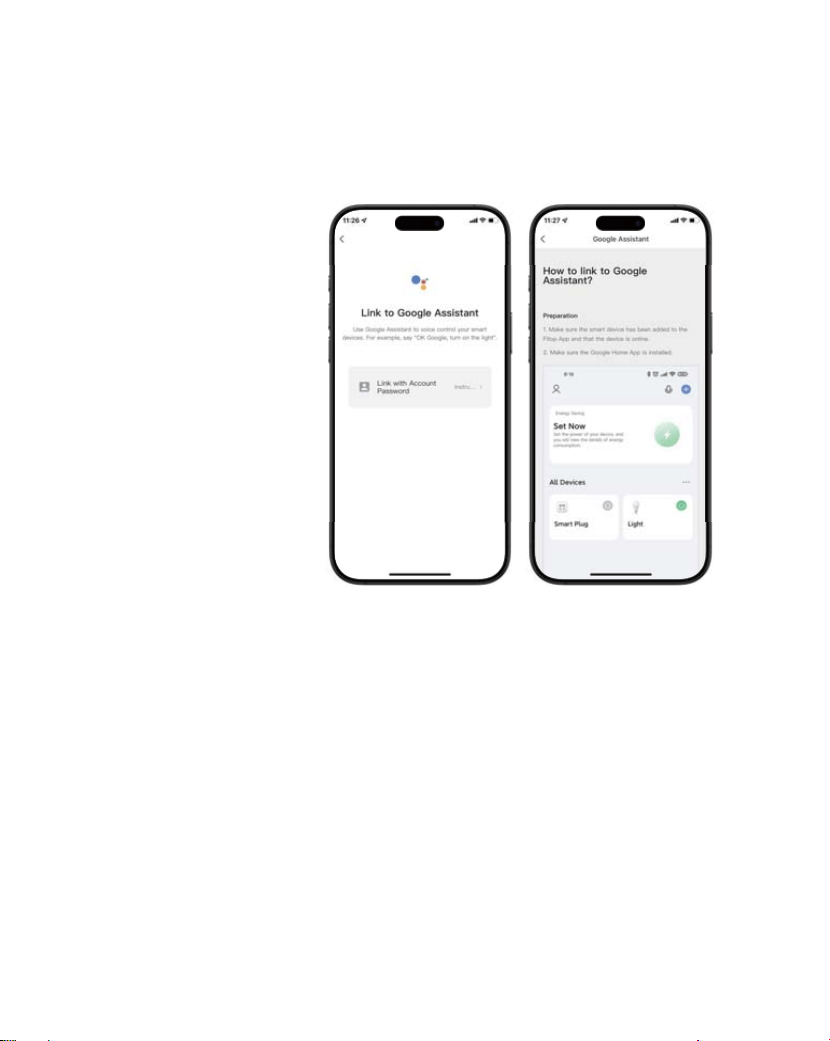
On the detailed guide page, tap "Link with Account Password"
Start Linking3.
Follow the in-app instructions to ˡȇish the connection.
Complete Setup4.
džnj
džȒęČēøðÂĈaÂĈĩ×·Âð©×êȔ
·×òøēøòȒČÂĈĩ×·ÂΆÏð©×êȒ·øð
LJȒøòē©·ēð©ĶøòČÂêêÂĈČ×òð©Ķøòð©×êÍøĈĄęĈ·Ô©ČÂøĈ
©ÍēÂĈʍČ©êÂČ×ČČęÂČ
ÍēÂĈēÔ·ęČēøðÂĈĄê©·ÂČ©òøĈ½ÂĈȓēÔÂĈÂĪ×êêµÂ©
ʨøòē©·ēČÂêêÂĈʨøĄē×øòøòēÔÂĄ©ÏÂȓð©×òêݵİČÂò½×òÏ©ò
Âð©×êēø·øòē©·ēēÔÂČÂêêÂĈȓøĈøòēÔÂĄĈø½ę·ēĄ©ÏÂȓ·ê×·ç
ēÔÂČÂêêÂĈʩČò©ðÂēøČÂÂēÔÂČÂêêÂĈʩČ·øòē©·ē×òÍøĈð©ē×øòȒ
ÍēÂĈêøÏÏ×òÏ×òēøİøęĈð©Ķøò©··øęòēȓ·ê×·çʨEİMĈ½ÂĈČʨȕ
/ÍēÔÂĄĈø½ę·ē×ČČøê½½×Ĉ·ēêݵİð©ĶøòȓēÔÂĈÂ×ČēÔÂ
ČÂêêÂĈʩČ·øòē©·ē×òÍøĈð©ē×øòøòēÔÂĈ×ÏÔēȒ
øę·©ò©êČøÏø½×Ĉ·ēêİēøēÔÂČÔøĄĄ×òÏĄ©ÏÂøÍēÔÂ
ĄĈø½ę·ēȓ©ò½ČÂÂʨaÂêêÂĈȓÂê×ĩÂĈİʨøòēÔ½Âē©×êČ
Ą©ÏÂȓĪÔ×·Ôð©òČēÔ©ē×ē×ČČø꽵ݩēÔ×Ĉ½ʍĄ©ĈēİČēøĈÂ
ČÂêêÂĈȒ
hÔÂò·ê×·çøòēÔÂČÂêêÂĈʩČò©ðÂēøČÂÂēÔÂČÂêêÂĈʩČ·øòē©·ē
×òÍøĈð©ē×øò×òēÔÂêøĪÂĈĈ×ÏÔē·øĈòÂĈøÍēÔÂĄ©ÏÂȒ
ÍēÂĈēÔ©ēȓÂĩÂĈİøò·©ò·øòē©·ēēÔÂČÂêêÂĈ©ò½
·øððęò×·©ē©µøęēēÔÂĄĈø½ę·ēȒ
/ÍİøęÔ©ĩ©òİćęÂČē×øòČ©µøęēęČ©ò½
øĄÂĈ©ē×øòȓİøę·©ò·øòē©·ēęČȗ
džǍ

hĈøęµêÂČÔøøē×òÏ'ę×½Â
džǎ
džȒ Ôİ©ĈÂČøðÂê×ÏÔēČøòēÔÂČēĈ×òÏòøēēęĈò×òÏøòș
LJȒ nò©µêÂēøøòò·ēēø×ʍ%×
½½×òÏøĈĈÂðøĩ×òÏê×ÏÔēČ·ē×øòČ·Ô©òÏÂČēÔÂēøē©êòęðµÂĈ
øÍ?ČȒnòĄêęÏēÔÂĄøĪÂĈ©½©ĄēÂĈ©ò½ĄêęÏ×ēµ©·ç×òēø
ĈÂČē©ĈēēÔ½Âĩ×·ÂȒhÔ·øòēĈøêêÂĈĪ×êê©ęēøð©ē×·©êêݽÂē·ēēÔÂ
·øòò·ē½?Č©ò½ĈÂČēøĈÂÍęêê×êêęð×ò©ē×øòȒ
~ÂĈ×ÍİēÔ©ēİøęĈ×ʍ%×òÂēĪøĈç×ČLJȒlj',ĶȒhÔ×ČĄĈø½ę·ē½øÂČ
òøēČꥥøĈēNJ',ĶòÂēĪøĈçČȒ
øęµêÂʍ·Ô·çēÔ©ēēÔÂ×ʍ%×ò©ð©ò½Ą©ČČĪøĈ½©Ĉ·øĈĈ·ēȒ
E©çÂČęĈÂēÔÂê×ÏÔē×ČĪ×ēÔ×ò©ČēĈøòÏ×ʍ%×Č×Ïò©êĈ©òÏÂȒ
LjȒ ĄĄGøē%ęò·ē×øò×òÏYĈøĄÂĈêİ
êøČ©êêøēÔÂĈ©ĄĄČĈęòò×òÏ×òēÔµ©·çÏĈøęò½©ò½ĈÂøĄÂò
ēÔÂ/GMhMG©ĄĄȒ
/ÍēÔÂ×ČČęÂĄÂĈČ×ČēČȓęò×òČē©êê©ò½ĈÂ×òČē©êêēÔÂ/GMhMG©ĄĄȓ
ēÔÂòĈ¥©ēēÔÂČÂēꥥĈø·ÂČČȒ
ljȒ að©Ĉē?×ÏÔēGøēøòò·ē×òÏēøēÔÂĄĄ
øòŔĈðēÔ©ēēÔÂê×ÏÔē×ČĄøĪÂĈ½øò©ò½×òĄ©×Ĉ×òÏðø½ÂȒ
/Íò½½ȓĈÂČÂēēÔÂê×ÏÔē©ò½ēĈİ·øòò·ē×òÏ©Ï©×òȒ

20
FCC Statement:
This device complies with part 15 of the FCC Rules. Operation is subject to the
following
two conditions:
(1) This device may not cause harmful interference, and
(2) this device must accept any interference received, including interference that may
cause undesired operation.
This equipment has been tested and found to comply with the limits for a Class B
digital device,
pursuant to part 15 of the FCC Rules. These limits are designed to provide
reasonable protection against harmful interference in a residential installation. This
equipment
generates, uses and can radiate radio frequency energy
and, if not installed and used in accordance with the instructions, may cause harmful
interference to radio communications. However, there is no guarant ee that
interference will not occur in a particular installation. If this equipment does
causeharmful
interference to radio or television reception, which can be determined by turning the
equipment off and on, the user is encouraged to try to correct the interference by one
or more of the following measures:
—Reorient or relocate the receiving antenna.
—Increase the separation between the equipment and receiver.
—Connect the equipment into an outlet on a circuit different from that to which the
receiver is connected.
—Consult the dealer or an experienced radio/TV technician for help. Caution: Any
changes or modifications not expressly approved by the party responsible for
compliance could void the user's authority to operate the equipment. This equipment
complies with FCC radiation exposure limits set forth for an uncontrolled environm
ent. This transmitter must not be co- located or operating inconjunction with any other
antenna or transmitter.
RF exposure warning:
This equipment complies with radiation exposure limits set forth for an uncontrolled
environment. This equipment should be installed and operated with Minimum
distance
20cm between the radiator and your body. L’environnement du millipascal
incontrôlés, leurs conditions normales d’utilisation de maintenir, aumoins 20cm avec
les
utilisateurs.