MPT-E14C-UNC01
1.1.1 UM-T-002
Page 1 / 58
HUINNO Co., Ltd.
User Manual
Ambulatory ECG Monitor
Trade/Device Name: MEMO Patch T
Model Name: MPT-E14C-UNC01
Document Number: UM-T-002
Revision Number: 0
Revision Date: 2026-06-15

MPT-E14C-UNC01
1.1.1 UM-T-002
Page 2 / 58
HUINNO Co., Ltd.
Table of Contents
1.0 DEVICE OVERVIEW .............................................................................................................................. 5
1.1 Instruction .................................................................................................................................................. 5
1.2 Manufacturer Information ....................................................................................................................... 5
1.3 Product Information ................................................................................................................................. 5
1.4 Marks and symbols ................................................................................................................................... 6
2.0 SAFETY REQUIREMENTS..................................................................................................................... 7
2.1 Contraindications ...................................................................................................................................... 7
2.2 Warnings ..................................................................................................................................................... 8
2.3 Precautions & Cautions ........................................................................................................................... 9
2.4 Precautions for Using the ECG Patch Device ....................................................................................... 10
2.5 Precautions for App and Software Use ................................................................................................. 10
2.6 IT Network ................................................................................................................................................. 11
2.7 Environmental Protection ........................................................................................................................ 12
2.8 FCC Statement and Caution .................................................................................................................... 12
3.0 PACKAGE COMPONENTS ................................................................................................................... 14
3.1 Main body .................................................................................................................................................. 14
3.2 Single-Lead Cable...................................................................................................................................... 16
3.3 Multi-Lead Cable ....................................................................................................................................... 17
3.4 Charging Cradle (5-port) ......................................................................................................................... 18
3.5 Dedicated Cable ........................................................................................................................................ 19
3.6 Service Architecture & Workflow........................................................................................................... 20
4.0 PREPARATION BEFORE USE [HCP, DESKTOP APP, WEB] ............................................................ 21
4.1 Service Login for Patient Registration .................................................................................................. 21
4.2 Preparing the MEMO T Device ............................................................................................................... 21
5.0 STARTING THE TEST [HCP, MOBILE APP, DESKTOP APP] .......................................................... 21
5.1 Connecting the Lead Cable and MEMO T Device ............................................................................... 21
5.2 Checking Battery Status ........................................................................................................................... 22
5.3 Checking the Attachment Site ................................................................................................................ 22
5.4 Connecting Disposable Electrodes ......................................................................................................... 23
5.5 Attachment ................................................................................................................................................. 24
5.6 Connecting the Device ............................................................................................................................. 25
5.7 Signal Verification ..................................................................................................................................... 28

MPT-E14C-UNC01
1.1.1 UM-T-002
Page 3 / 58
HUINNO Co., Ltd.
6.0 TEST ........................................................................................................................................................ 29
6.1 Symptom Logging .................................................................................................................................... 29
6.2 Detaching the Device and Replacing Electrodes ................................................................................. 30
7.0 TEST COMPLETION .............................................................................................................................. 31
7.1 Disconnecting the Device ........................................................................................................................ 31
7.2 Data Upload ............................................................................................................................................... 32
7.3 Device Shutdown Procedure ................................................................................................................... 35
7.4 Post-Use Storage and Maintenance ...................................................................................................... 35
8.0 STATEMENTS AND TABLES FOR EMC ............................................................................................. 37
8.1 Electromagnetic Emissions ...................................................................................................................... 37
8.2 Electromagnetic Immunity ...................................................................................................................... 38
9.0 TROUBLESHOOTING GUIDE .............................................................................................................. 41
9.1 Troubleshooting ........................................................................................................................................ 41
9.2 FAQs ............................................................................................................................................................ 46
10.0 DEVICE SPECIFICATION ...................................................................................................................... 50
10.1 Performance Characteristics .................................................................................................................... 50
10.2 Electrical Characteristics ........................................................................................................................... 50
10.3 Power Characteristics ............................................................................................................................... 50
10.4 Physical Characteristics ............................................................................................................................ 51
10.5 Wireless Communication Characteristics .............................................................................................. 51
10.6 Compatible Devices .................................................................................................................................. 51
10.7 Environmental Characteristics ................................................................................................................. 51
10.8 Minimum System Requirements for Computer and Mobile Devices .............................................. 52
10.9 Device Operation Scenarios .................................................................................................................... 52
10.10 Button Scenarios ....................................................................................................................................... 53
10.11 Operation Scenarios ................................................................................................................................. 53
10.12 Heart Rate Calculation ............................................................................................................................. 54
10.13 Pause Determination ................................................................................................................................ 55
11.0 PRODUCT WARRANTY ....................................................................................................................... 56
11.1 Warranty Claims ........................................................................................................................................ 56
11.2 Scope and Period of Warranty ............................................................................................................... 56
11.3 Warranty Exclusions ................................................................................................................................. 56
11.4 Warranty Card ........................................................................................................................................... 57


MPT-E14C-UNC01
1.1.1 UM-T-002
Page 5 / 58
HUINNO Co., Ltd.
1.0 DEVICE OVERVIEW
1.1 Instruction
This user manual is intended for Ambulatory ECG Monitor (MEMO Patch T). The manual includes
information about components, instructions for use and safety precautions of Ambulatory ECG
Monitor. Please read the user manual before using them. We recommend storing the manual in
a safe place near the device.
1.2 Manufacturer Information
HUINNO Co., Ltd.
TEL: +82.2.2051.3161, FAX+82.2.2051.3160
Address: 3F, 4F, 19, Apgujeong-ro 79-gil, Gangnam-gu, Seoul, Republic of Korea
Webpage: https://www.huinno.com/en
1.3 Product Information
1.3.1 Product Description
This product is a patch-type 1-channel or 3-channel electrocardiogram (ECG) and
respiration signal recording device. It detects potential differences on the body surface
caused by the electrical activity of the myocardium through electrodes to record ECG
signals. The device is designed to continuously measure and store ECG and impedance-
based respiration signals by attaching electrodes to designated positions on the body. The
respiration signal provided by this product is intended as supplementary reference
information for ECG analysis and is not meant for independent respiration measurement
or the diagnosis of respiratory diseases.
When using the 1-channel ECG configuration, this product can continuously record for up
to 14 days. By automatically recording data during the examination period without
requiring continuous patient intervention, it aims to enhance user convenience and
improve patient compliance. If symptoms occur during the examination, the patient can
press the event button on the device to mark the onset time. This event information is
then used to identify the correlation between the ECG rhythm and the symptoms in the
final analysis report.
Medical professionals can check the attachment status of the patch and activate the
examination using MEMO Launcher (iOS/Android), a dedicated medical application. Once
the examination is completed, the patient removes the Holter monitor and returns it to
the medical staff. The recorded ECG and respiration signals are transmitted and stored in
a cloud or on-premise server database via wireless communication or wired data
download, based on which arrhythmia analysis is performed. Medical professionals can
review the ECG data and analysis results through a web-based user interface. This product
MPT-E14C-UNC01
1.1.1 UM-T-002
Page 6 / 58
HUINNO Co., Ltd.
is designed for use in both hospital and out-of-hospital healthcare environments, and it
can transmit the respiration signals estimated by impedance measurement and the ECG
signals to a separate gateway (such as a mobile app) using wireless communication
technology (Bluetooth).
1.3.2 Indications for use
This product is a Holter ECG system designed for long-term electrocardiogram (ECG)
recording. It is engineered to continuously record, playback, and analyze ECG signals while
worn by the subject during their daily activities. Depending on the configuration, this
product can record ECG signals, impedance-based estimated respiration-related signals,
symptom events marked by the patient, and pacemaker pulse detection flags. The
recorded data can be verified and reviewed by healthcare professionals through a web-
based user interface and is used to support the diagnosis of arrhythmia through ECG
analysis. This product is intended for the purpose of recording and reviewing ECG data
and is used to assist the clinical judgment of healthcare professionals.
1.3.3 User
Patients and healthcare professionals (including physicians, nurses, and clinical laboratory
technologists)
1.3.4 Indication for Use: Arrhythmia
This product is a prescription-only, continuous-recording ECG monitor that can be worn
for up to 14 days. This product is recommended for use in asymptomatic patients or
patients who may experience transient symptoms such as palpitations, shortness of
breath, dizziness, lightheadedness, presyncope, syncope, fatigue, or anxiety.
1.3.5 Intended Patient Population
Age: adult
Weight: All body types can use this product, including individuals who are underweight,
overweight, or obese. There are no body-weight limitations for proper device
performance.
Health: The person who can recognize and record the symptoms that occur while using
the Ambulatory ECG Monitor
Nationality: it's irrelevant
Intended Operator for Ambulatory ECG Monitor: Healthcare professional and patient
Intended Operator for ECG dataloader viewer and cradle: Healthcare professional
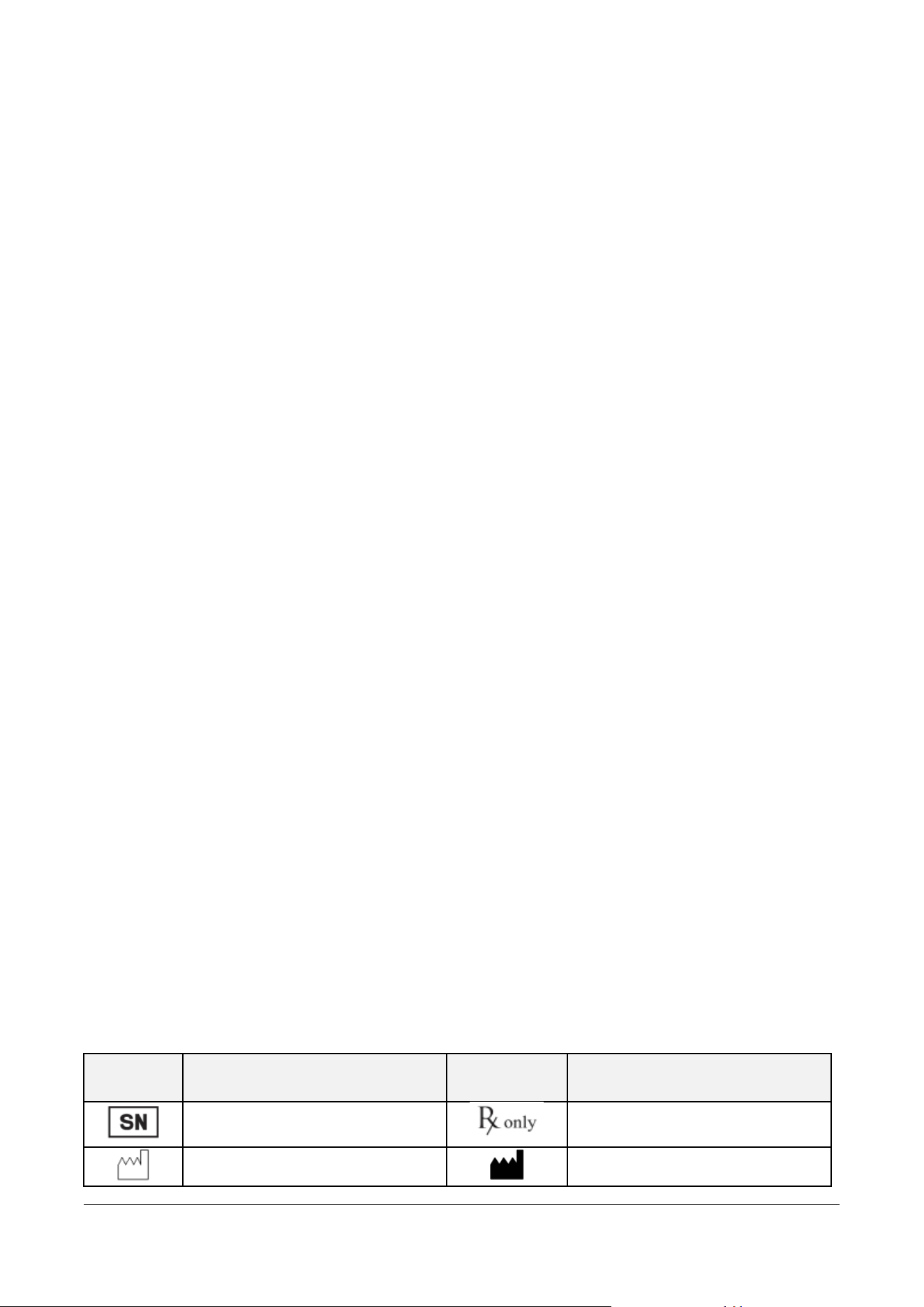
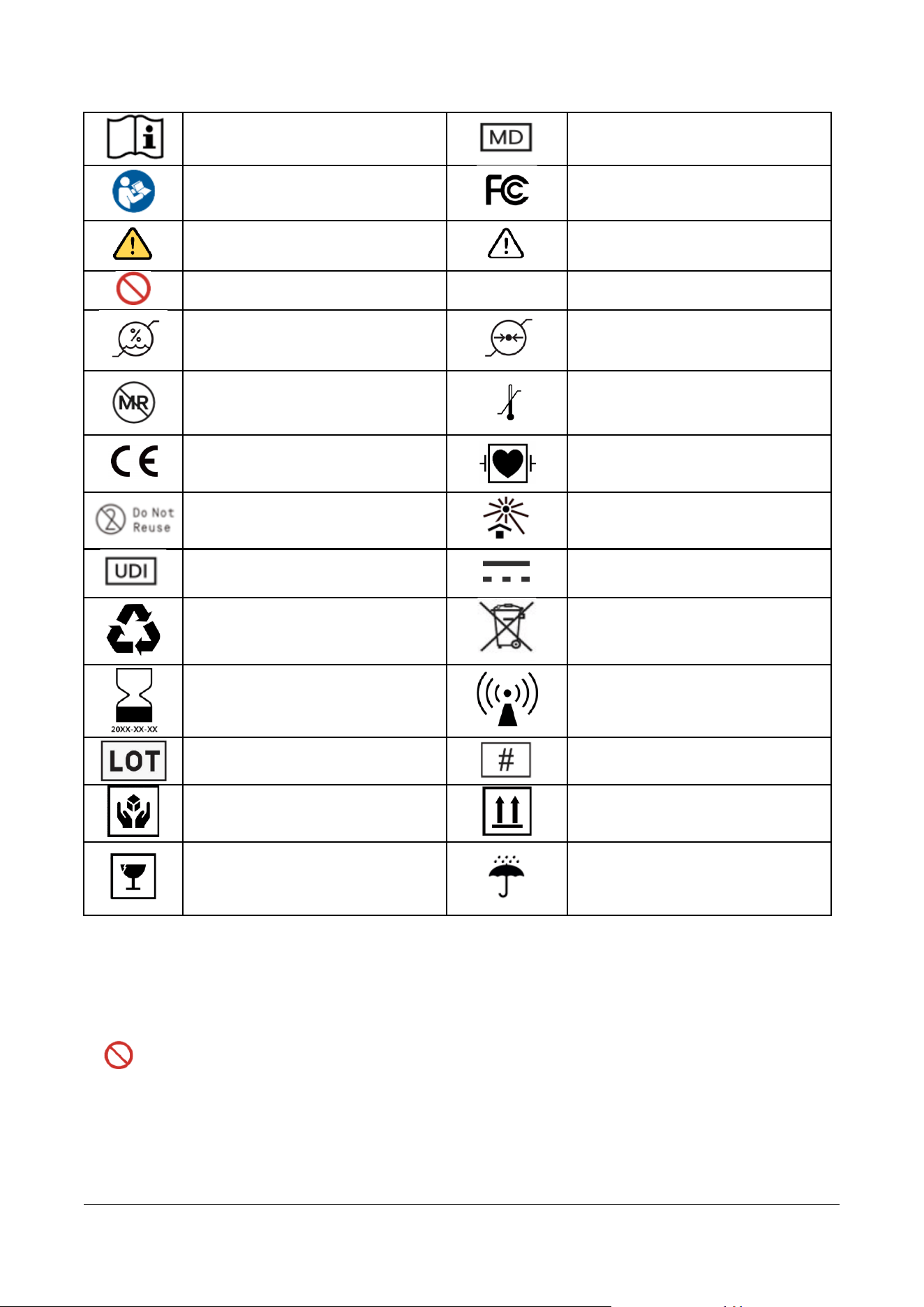
1.4 Marks and symbols
Symbol
Definition
Symbol
Definition
Serial Number
Prescription only
Date of Manufacture
Manufacturer
MPT-E14C-UNC01
1.1.1 UM-T-002
Page 7 / 58
HUINNO Co., Ltd.
Read instructions
Medical Device
Refer to User Manual
FCC Mark
Warnings
Cautions
Prohibitions
IP27
Protection Level
Humidity Limit
Atmospheric Pressure Limitation
MR, Magnetic Resonance Unsafe
Temperature Limit
CE Mark
Defibrillation proof type CF Applied
Part
Single-use only for electrodes
Keep away from direct sunlight
Unique Device Identification
Direct Current
Recycling
WEEE
Expiration date
Non-ionizing electromagnetic
radiation
Batch code
Model Number
Handle with care
This way up
Fragile
Keep dry
2.0 SAFETY REQUIREMENTS
2.1 Contraindications
1. Please do not examine or treat using radiation such as ultrasound, CT, MRI, and X-ray interfere
with the regular operation of the product and lead to inaccurate results of use.
2. Please do not disassemble the device by the user or operator.
3. Please do not lay or cover electrical or magnetic products such as electric blankets, magnetic
mats, electric stone beds, and jade mats during the examination.

MPT-E14C-UNC01
1.1.1 UM-T-002
Page 8 / 58
HUINNO Co., Ltd.
4. Do not use the device for patients with symptomatic episodes where instance variant in
cardiac performance could result in immediate danger to the patient
5. Do not use the device for patients with known history of life-threatening arrhythmias.
6. Do not use the device in combination with high frequency surgical equipment near strong
magnetic fields or devices such as MRI.
7. Do not use the device on patients who do not have the competency to wear the device for
the prescribed monitoring period.
2.2 Warnings
1. Do not use the device on patients with known allergic reaction to adhesives or hydrogels or
with family history of adhesive skin allergies. Patients may experience skin irritation. Do not
use the device if the patient has a current symptom or history of skin cancer, rashes, skin
diseases, keloids, or skin injuries.
2. Infants or people who cannot express themselves must not use the device.
3. Without the manufacturer's permission, you must not modify the device.
4. The lithium battery included in this product must be used in accordance with the battery
manufacturer's instructions. Failure to do so may result in fire, explosion, or leakage. HUINNO
is not liable for any accidents such as fire, explosion, or leakage caused by the battery unit
itself.
5. Please be careful as children may swallow small parts such as batteries.
6. Direct use of electrical products such as electric blankets and heated mats is prohibited during
the prescribed period of using the product, as it may affect the performance of the test results.
7. If skin irritation such as severe redness, itching or allergic symptoms develop, remove the
device from the patient’s chest. Call HUINNO Customer Service at +82.2.3443.3160
8. If a user who is not familiar with the proper usage replaces the battery of the product, there
is a risk of battery ignition or explosion.
9. The disposable electrode using an electrode bracket can be used for up to 24 hours.
10. Changes or modifications not expressly approved by the manufacturer could void the user’s
authority to operate the equipment.
11. Cybersecurity Vulnerabilities: Limited automatic updates due to low OS specifications may
leave the device vulnerable to known cybersecurity threats. If possible, upgrade to a device
that meets the latest OS specifications.
12. The device is not intended to be used during intense physical activity.
13. This product is a prescription-only measurement/recording device and must not be used for
specific purposes without the guidance of medical personnel.

MPT-E14C-UNC01
1.1.1 UM-T-002
Page 9 / 58
HUINNO Co., Ltd.
2.3 Precautions & Cautions
• If a cybersecurity threat occurs at any stage of using the device, contact the manufacturer's
emergency number immediately to address it and wait until the administrator takes action.
• To comply with FCC’s RF exposure limits for general population / uncontrolled exposure, the
antenna(s) used for this transmitter must be installed to provide a separation distance of at least
20cm from all persons and must not be co-located or operating in conjunction with any other
antenna or transmitter.
• If any abnormality is detected in the device or the patient, appropriate measures must be taken,
such as ensuring the patient's safety and stopping the operation of the device.
• Use only the provided cables to protect the ME (Medical Electrical) equipment against the effects of
defibrillator discharge.
• In a charging environment, the product adapter plug serves as the disconnecting means. When using
the charging cradle, the adapter plug must not be positioned in a location where it is difficult to
disconnect it from the power source.
• Avoid using the device in locations where wireless communication connectivity issues may occur
(e.g., areas with a high density of metallic objects or electronic equipment).
• The device and its packaging materials must be kept out of reach of children. Caution must be
exercised as swallowing the components of the product can cause serious harm.
• Excessive or strenuous exercise may affect data measurement, so please use with caution.
• Do not repair, disassemble, or modify this device. This device does not require calibration during its
expected life cycle.
• Auxiliary equipment connected to the data interface section of the MEMO Patch T must comply
with IEC 60950 (Data Processing Equipment) or IEC 60601-1 (Medical Electrical Equipment). All
connected systems, including auxiliary equipment, must satisfy the IEC 60601-1 (Medical Electrical
Equipment) and IEC 60601-1-2 (Electromagnetic Compatibility) standards. If you are uncertain,
consult the HUINNO Customer Center before use.
• This device must not be used by individuals who are unable to express their intentions or consent.
• When collecting and using the patient's (data subject's) personal information, the Personal
Information Protection Act must be complied with, such as obtaining prior consent to protect the
patient's personal information.
• Users falling under the following categories should consult a physician before use:
◆ Patients with sensitive or allergic skin
◆ Patients with wounds on the skin that comes into contact with the device
◆ Patients with artificial cardiac pacemakers or other implantable electrical devices
◆ Pregnant women, breastfeeding women, and children

MPT-E14C-UNC01
1.1.1 UM-T-002
Page 10 / 58
HUINNO Co., Ltd.
2.4 Precautions for Using the ECG Patch Device
2.4.1 Pre-use Precautions
◆ Only disposable ECG electrodes specified by the manufacturer must be used.
◆ The device's battery must be charged before prescribing it to a new patient.
◆ When attaching the device, ensure there are no foreign substances between the electrodes and
the skin.
◆ The recommended disposable electrodes can be used for up to 24 hours. When replacing the
electrode, detach only the device from the electrode and replace it with a new one, without
needing to turn off the device or unpair it from the app.
◆ This product must be attached only to the designated chest area of the body and must not be
attached to or used on any other body parts.
2.4.2 Precautions During Use
◆ Do not subject the device to strong shocks or vibrations while in use.
◆ If an electrode detaches from the skin during use, contact the hospital.
◆ If a malfunction occurs during use, you must contact the hospital or the manufacturer.
◆ Avoid excessive contact of the device with water (e.g., prolonged exposure to water such as
bathing or swimming).
◆ Ensure that the electrodes of the device do not come into contact with other conductive parts.
2.4.3 Post-use Precautions
◆ After using the device, disinfect the product using isopropyl alcohol of 60% or higher or an
alcohol swab (ensure that organic chemical substances do not come into contact with the
device).
◆ Electrodes are for single use only and must be disposed of by the hospital after use (Do Not
Reuse).
◆ When disposing of the device and rechargeable batteries, local waste disposal regulations must
be followed. Failure to follow waste disposal regulations may cause environmental pollution.
2.5 Precautions for App and Software Use
2.5.1 Pre-use Precautions
• Prior to use, the manual must be thoroughly understood, and the system must only be used by
individuals with medical knowledge regarding the proper use of the device.
• Implement access control functions within the software to ensure that only authorized users can use
this product.
• Since information is provided through a web service platform, it can only be used in hospitals
connected to a TCP/IP network.
• As PCs used within the hospital can be infected with malware, install firewalls and anti-virus software.

MPT-E14C-UNC01
1.1.1 UM-T-002
Page 11 / 58
HUINNO Co., Ltd.
2.5.2 Precautions During Use
• If any abnormality in the operational status is identified while using the program, contact the
manufacturer.
• Regular virus scans and security precautions are required for the PC you are using.
2.5.3 Post-use Precautions
• Log out of the program to protect patient information and safeguard against security threats such as
data tampering or forgery.
2.5.4 Others
• Precautions must be taken against leaks, tampering, and forgery when transmitting and storing medical
information.
• To prevent leaks, tampering, and forgery, medical information is transmitted using the HTTPS
communication protocol via the TLS security protocol.
• If MEMO Patch T information is leaked, an unauthorized person may disconnect the link between the
MEMO Patch T and its interlocking gateway (including the mobile app). Periodically check the
communication status of the MEMO Patch T. If a security threat is detected, stop use immediately and
contact your distributor or the Huinno Customer Center.
• Manufacturer CS Contact: +82-2-3443-3160
2.6 IT Network
The 'MEMO Patch T' device can connect to a mobile phone or gateway device via Bluetooth, and this
mobile phone or gateway device can communicate with the server via Wi-Fi or LTE.
◼ MEMO Launcher: Allows verification of ECG data, device activation, and connection via the
app.
◼ MEMO for Desktop: Allows verification of ECG data, device activation, and connection via
the app.
◆ Hospitals and medical institutions (the responsible organization) using this product by connecting it
to an IT network must recognize that subsequent changes to the IT network may introduce new risks
to the system, requiring additional analysis and measures. Hospitals and medical institutions must
perform additional risk management to newly identify, evaluate, and control associated risks when the
following changes to the IT network occur:
◼ Changes in the IT network configuration (topology)
◼ Connection of additional items (devices, etc.) to the IT network
◼ Disconnection of items (devices, etc.) from the IT network
◼ Updates to devices and systems connected to the network
◼ Upgrades to devices and systems connected to the network

MPT-E14C-UNC01
1.1.1 UM-T-002
Page 12 / 58
HUINNO Co., Ltd.
2.7 Environmental Protection
◆ Responsible non-professional organizations should consult local authorities to determine the proper
disposal method for components and accessories that pose biological hazards. Follow local, state, and
national guidelines regarding disposal or recycling.
◆ Non-specialized organizations with responsibility should contact local authorities t
o determine the proper disposal methods for components and accessories that pose bi
ological hazards.
◆ Battery recycling must meet local requirements.
2.8 FCC Statement and Caution
FCC Compliance Statement
This device complies with part 15 of the FCC rules. Operation is subject to the following two
conditions: (1) This device may not cause harmful interference, and (2) this device must accept
any interference received, including interference that may cause undesired operation.
FCC Interference Statement
This equipment has been tested and found to comply with the limits for a Class B digital device,
pursuant to part 15 of the FCC Rules. These limits are designed to provide reasonable protection
against harmful interference in a residential installation. This equipment generates, uses and can
radiate radio frequency energy and, if not installed and used in accordance with the instructions,
may cause harmful interference to radio communications.
However, there is no guarantee that interference will not occur in a particular installation. If this
equipment does cause harmful interference to radio or television reception, which can be
determined by turning the equipment off and on, the user is encouraged to correct the
interference by one of the following measures:
• Reorient or relocate the receiving antenna.
• Increase the separation between the equipment and receiver.
• Connect the equipment into an outlet on a circuit different from which the receiver is
connected.
• Consult the dealer or an experienced radio/TV technician for help.
FCC Caution
Any changes or modifications not expressly approved by the party responsible for compliance
could void the user's authority to operate this equipment. This transmitter must not be co-
located or operating in conjunction with any other antenna or transmitter.
FCC Radiation Exposure Statement

MPT-E14C-UNC01
1.1.1 UM-T-002
Page 13 / 58
HUINNO Co., Ltd.
This equipment complies with FCC radiation exposure limits set forth for an uncontrolled
environment. This equipment should be installed and operated with minimum distance 5 mm
between the radiator and your body. This transmitter must not be co-located or operating in
conjunction with any other antenna or transmitter.
MPT-E14C-UNC01
1.1.1 UM-T-002
Page 14 / 58
HUINNO Co., Ltd.
3.0 PACKAGE COMPONENTS
• 1 Ambulatory ECG Monitor (section 3.1)
• 1 Paper type user manual
• Option
◼ 1 Single-Lead Cable (section 3.2)
◼ 1 Multi-Lead Cable (section 3.3)
◼ 1 Charging Cradle (5-Port) (section 3.4)
◼ 1 Dedicated Cable (section 3.5)
◆ NOTE: It is recommended to use approved products with proven safety. We
recommend using 3M red dot (model name: 2560)
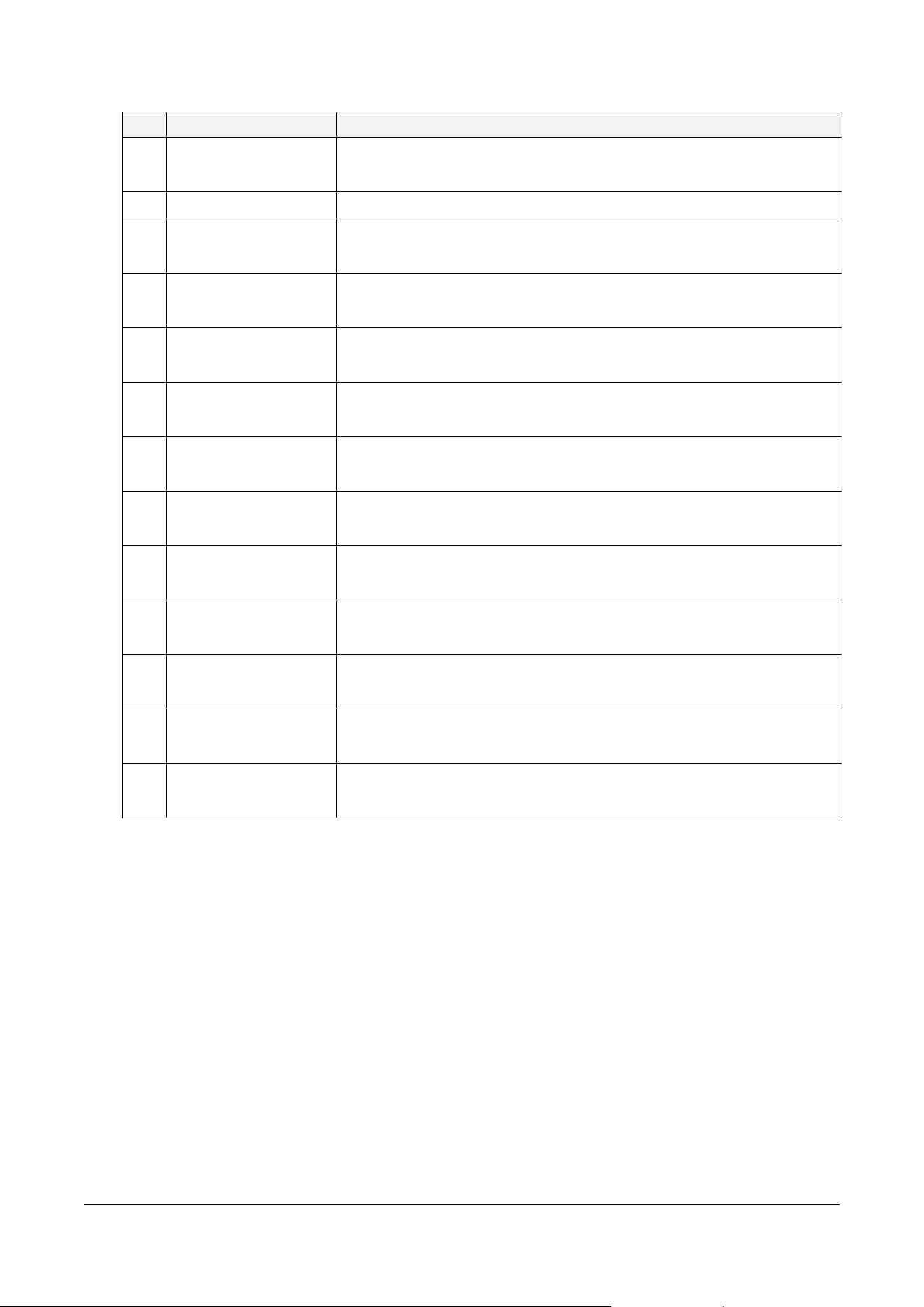
3.1 Main body
MPT-E14C-UNC01
1.1.1 UM-T-002
Page 15 / 58
HUINNO Co., Ltd.
No.
Name
Description
1
Status Indicator
An LED that displays the power-on status, patient events, and
Bluetooth connectivity status.
2
Front QR Code
A two-dimensional code scanned for device identification.
3
Serial Number Mark
An identification mark indicating where the device's serial number
(SN) is located.
4
Front Serial Number
A unique identification number assigned to each individual patch
body.
5
Power / Event Marker
Button
Used to turn the device power ON and to record patient symptoms.
6
Manufacturing Date
Label
A label containing information about the date the product was
manufactured.
7
Waterproof Silicone
Ring
A silicone ring that prevents moisture or foreign substances from
entering the inside of the device.
8
Electrode Connector
A metal contact portion that electrically connects the device with
disposable electrodes.
9
Electrode Retention
Pad
A pad designed to support disposable electrodes so they adhere
stably to the device.
10
Product Information
A section displaying the key specifications and identification data of
the device, including the model name and manufacturer.
11
Lead Secure Groove
A groove designed to securely fix the combined cable lead,
preventing it from shaking or detaching.
12
Charging Contacts
Contact terminals designed to mate with the pogo pins of the
charging cradle to charge the battery.
13
Multi-function USB
Port
A Type-C port utilized for battery charging, lead cable connection,
and wired transmission of biometric data to a PC.
MPT-E14C-UNC01
1.1.1 UM-T-002
Page 16 / 58
HUINNO Co., Ltd.
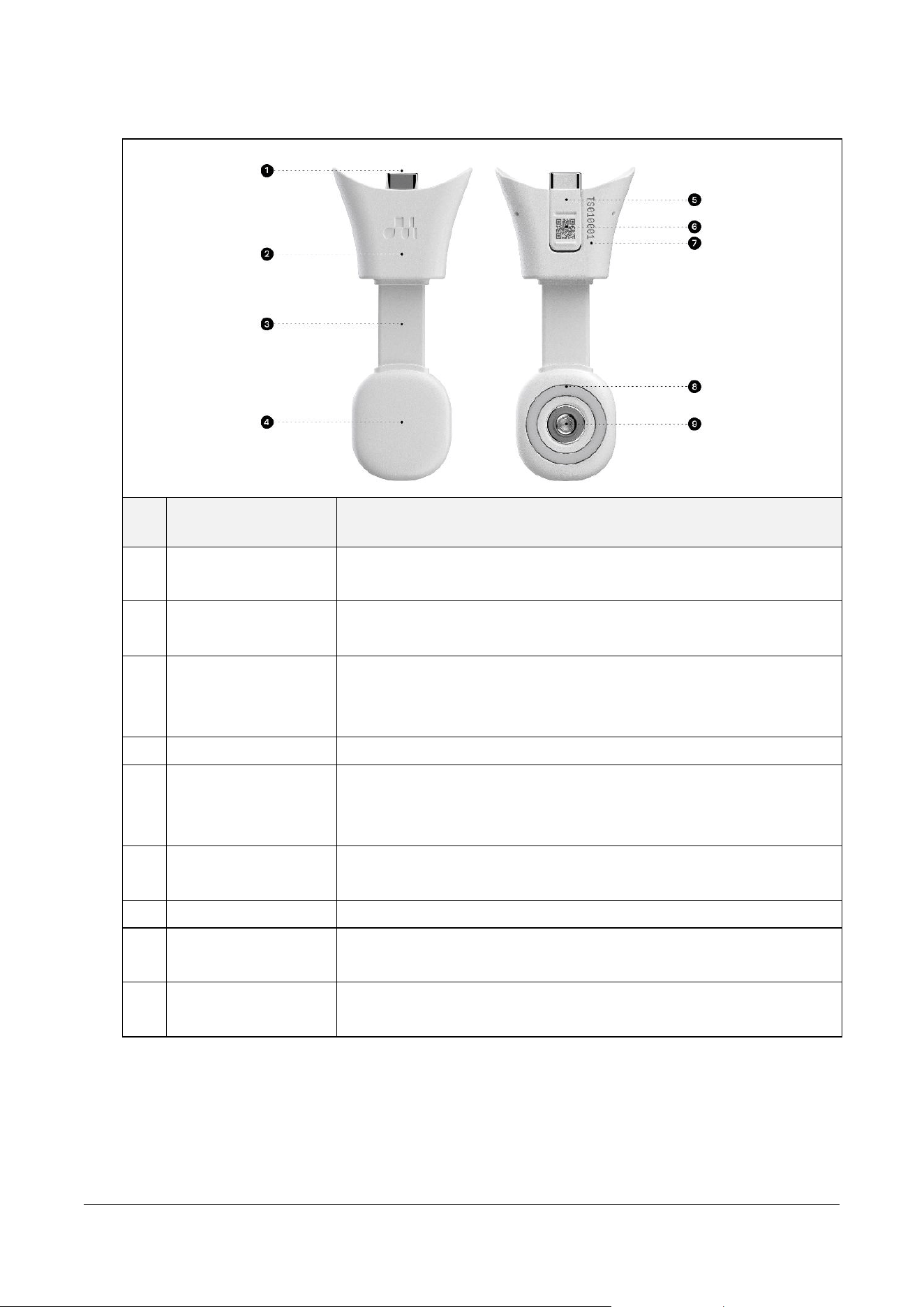
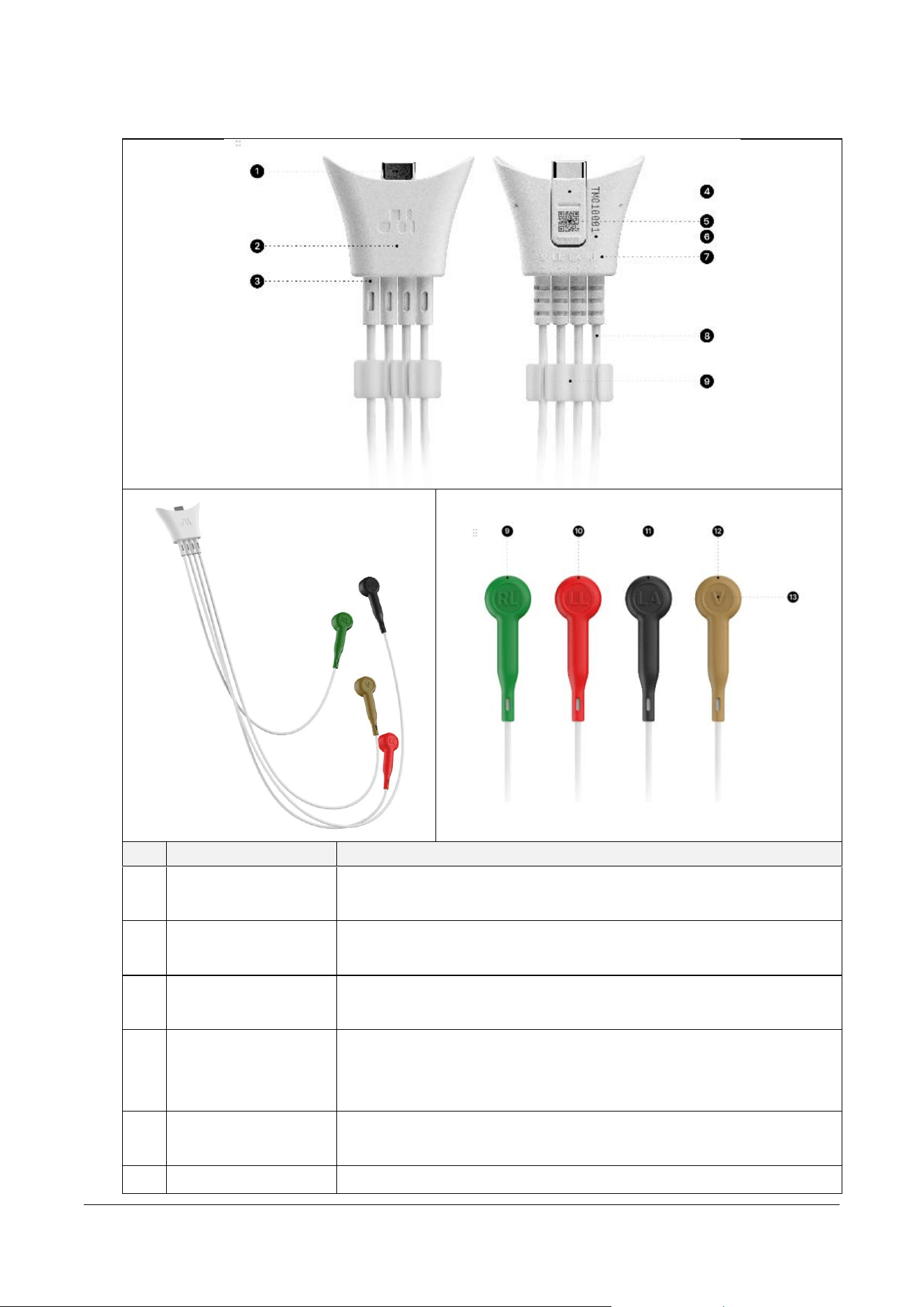
3.2 Single-Lead Cable
번
호
명칭
설명
1
Lead Cable
Connector
A mating interface that couples with the cable connector of the
main body to transmit signals.
2
Device Attachment
A structural portion where the single-lead cable physically couples
with the patch body.
3
Cable
A flexible conducting wire that transfers biometric signals measured
from disposable electrodes at the electrode interface to the main
body.
4
Electrode Interface
The section that couples the disposable electrode with the cable.
5
Lead Secure Clip
A clip designed to secure the main body and the lead cable
connector to prevent signal noise caused by cable movement during
measurement.
6
Rear QR Code
A two-dimensional code scanned for device identification of the
lead cable.
7
Rear Serial Number
A unique identification number assigned to the single-lead cable.
8
Electrode Retention
Pad
A supporting structure designed to press the electrode so it adheres
closely to the patient's skin without lifting.
9
Electrode Connector
A metal terminal portion that directly connects with the pin of a
disposable electrode.
MPT-E14C-UNC01
1.1.1 UM-T-002
Page 17 / 58
HUINNO Co., Ltd.
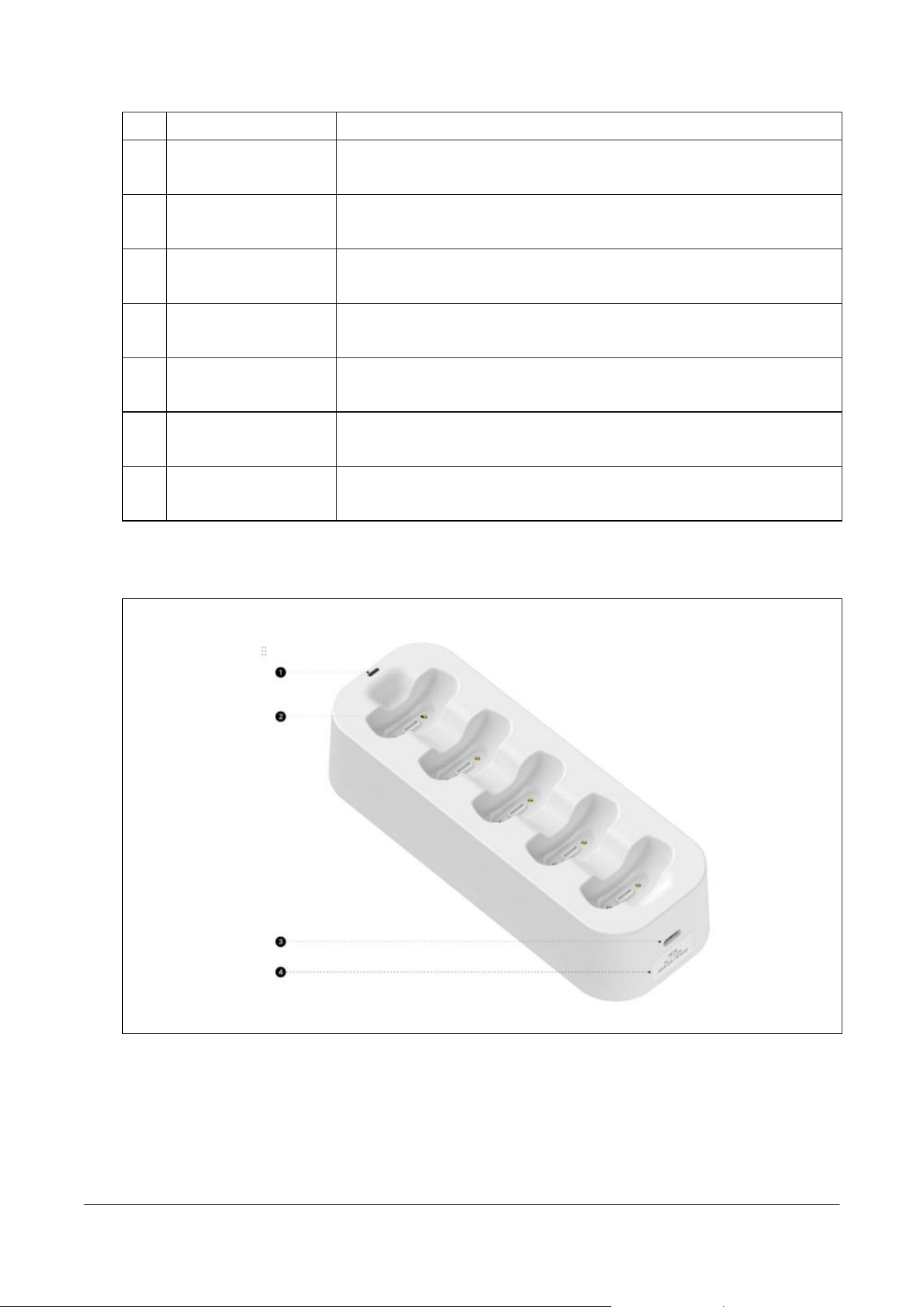
3.3 Multi-Lead Cable
No.
Name
Description
1
Lead Cable
Connector
A mating interface that couples with the cable connector of the
main body to transmit signals.
2
Device Attachment
A connector utilized to couple the entire multi-lead cable to the
patch body.
3
Cable Stopper
A device that prevents the split lead wires from opening excessively
or tangling.
4
Lead Secure Clip
A clip designed to secure the main body and the lead cable
connector to prevent signal noise caused by cable movement during
measurement.
5
Rear QR Code
A two-dimensional code scanned for device identification of the
lead cable.
6
Rear Serial Number
A unique identification number assigned to the multi-lead cable.
MPT-E14C-UNC01
1.1.1 UM-T-002
Page 18 / 58
HUINNO Co., Ltd.
7
Lead ID
A unique identification number assigned to the multi-lead cable.
8
Cable
Multi-core conducting wires that transfer ECG signals measured
from the electrodes of each site to the main body.
9
Cable Holder
A component designed to neatly gather and organize long,
extended lead wires.
10
Electrode Connector
(RL)
A green terminal that connects to the disposable electrode attached
to the lower right abdomen (Right Leg).
11
Electrode Connector
(LL)
A red terminal that connects to the disposable electrode attached to
the lower left abdomen (Left Leg).
12
Electrode Connector
(LA)
A black terminal that connects to the disposable electrode attached
below the left clavicle (Left Arm).
13
Electrode Connector
(V)
A brown terminal that connects to the disposable electrode
attached to the right side of the sternum (Chest).
14
Individual Lead ID
Color and text markings that help ensure each electrode terminal is
attached to the correct anatomical position.
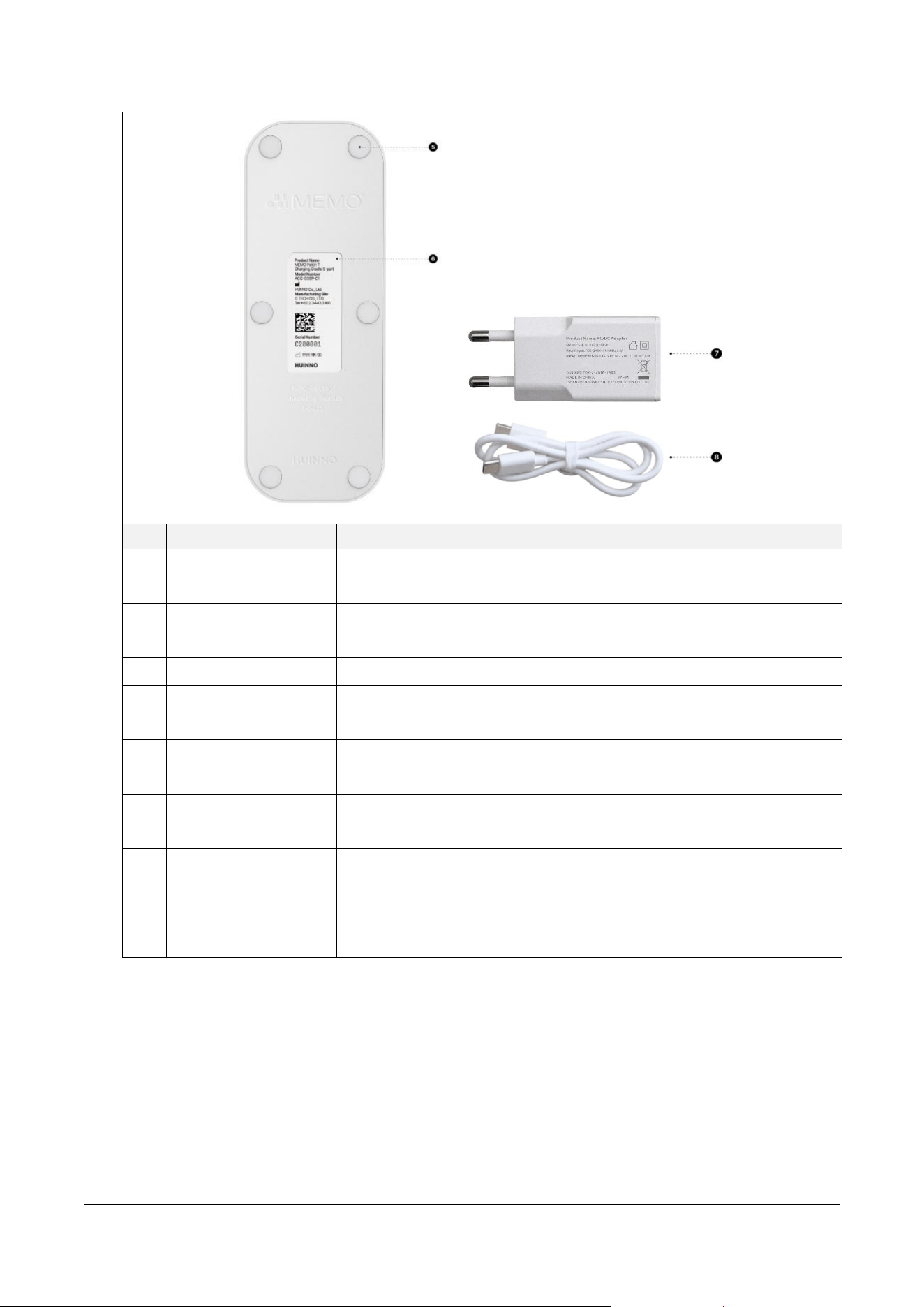
3.4 Charging Cradle (5-port)
MPT-E14C-UNC01
1.1.1 UM-T-002
Page 19 / 58
HUINNO Co., Ltd.
No.
Name
Description
1
Power Indicator
A green LED that illuminates when power is connected to indicate
the operational status.
2
Charging Pogo Pins
Pins designed to mate with the charging contacts of the main body
to supply electrical power.
3
USB-C Port
A USB Type-C input port used to connect with the power adapter.
4
Side Label
A label containing information such as the input voltage parameters
of the charging cradle.
5
Anti-slip Rubber Pad
A rubber pad attached to prevent the cradle from slipping or sliding
on surfaces.
6
Bottom Label
A label indicating the serial number and primary technical
specifications of the device.
7
Charging Cradle
Power Adapter
A device that converts AC power into the appropriate DC voltage to
supply the cradle.
8
Charging Cradle
Power Cable
A cable utilized to connect the power adapter to the charging
cradle.
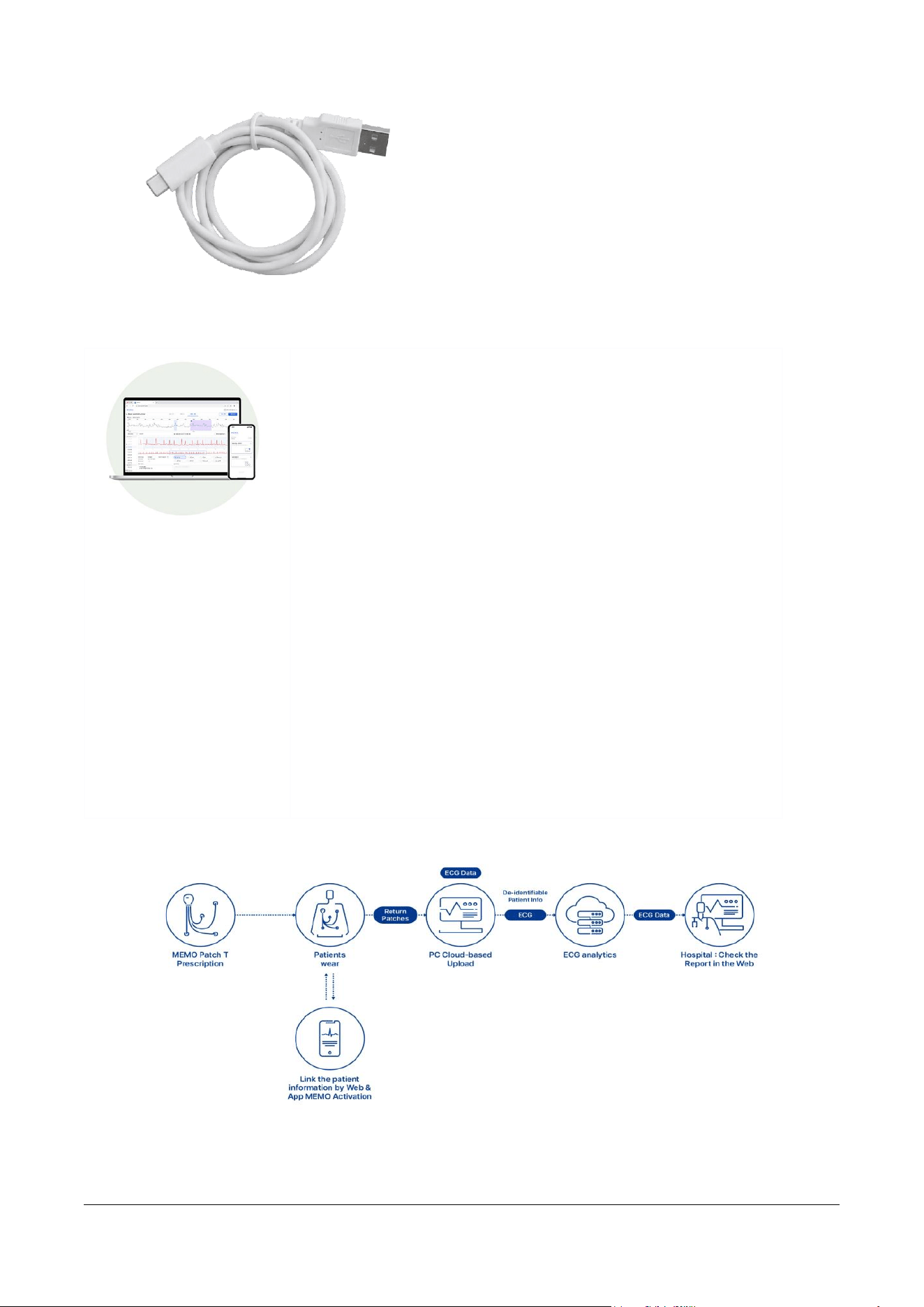
3.5 Dedicated Cable
Cable for uploading biosignal data from the device to the PC
MPT-E14C-UNC01
1.1.1 UM-T-002
Page 20 / 58
HUINNO Co., Ltd.
3.6 Service Architecture & Workflow
3.6.1 Service Architecture
◆ Web Server: A web-based test management software utilized
for patient registration and retrieving analysis results.
◆ ‘MEMO Launcher' App (Android/iOS): A mobile application
used to pair the 'MEMO Patch T' device with a patient and
verify whether the device has been correctly attached.
◆ 'MEMO for Desktop' (Windows): An integrated PC application
designed to provide a more streamlined service operating
environment. It enables web access to the web server, activates
the MEMO Patch T device to start tests, and supports extracting
ECG data and uploading it to the cloud. Additionally,
Bluetooth-enabled desktops and laptops can utilize Bluetooth
to activate the patch’s measurement features via the MEMO
for Desktop software.
◆ ‘MEMO Patch ECG Dataloader’ (Windows): A PC software
that supports extracting ECG data from the measurement
device and uploading it to the web server.
3.6.2 Service Workflow
> This guide provides instructions for using the MEMO Patch T.
> For detailed information on using a web server, please refer to the User Manual for web server.
MPT-E14C-UNC01
1.1.1 UM-T-002
Page 21 / 58
HUINNO Co., Ltd.
4.0 PREPARATION BEFORE USE [HCP, DESKTOP APP, WEB]
*Healthcare Professional: HCP
4.1 Service Login for Patient Registration
• Log in to the designated webpage (www.memopatch.care) using the email ID and password
issued by Huinno, then register the patient test.
• The web server functions in the same manner.
4.2 Preparing the MEMO T Device
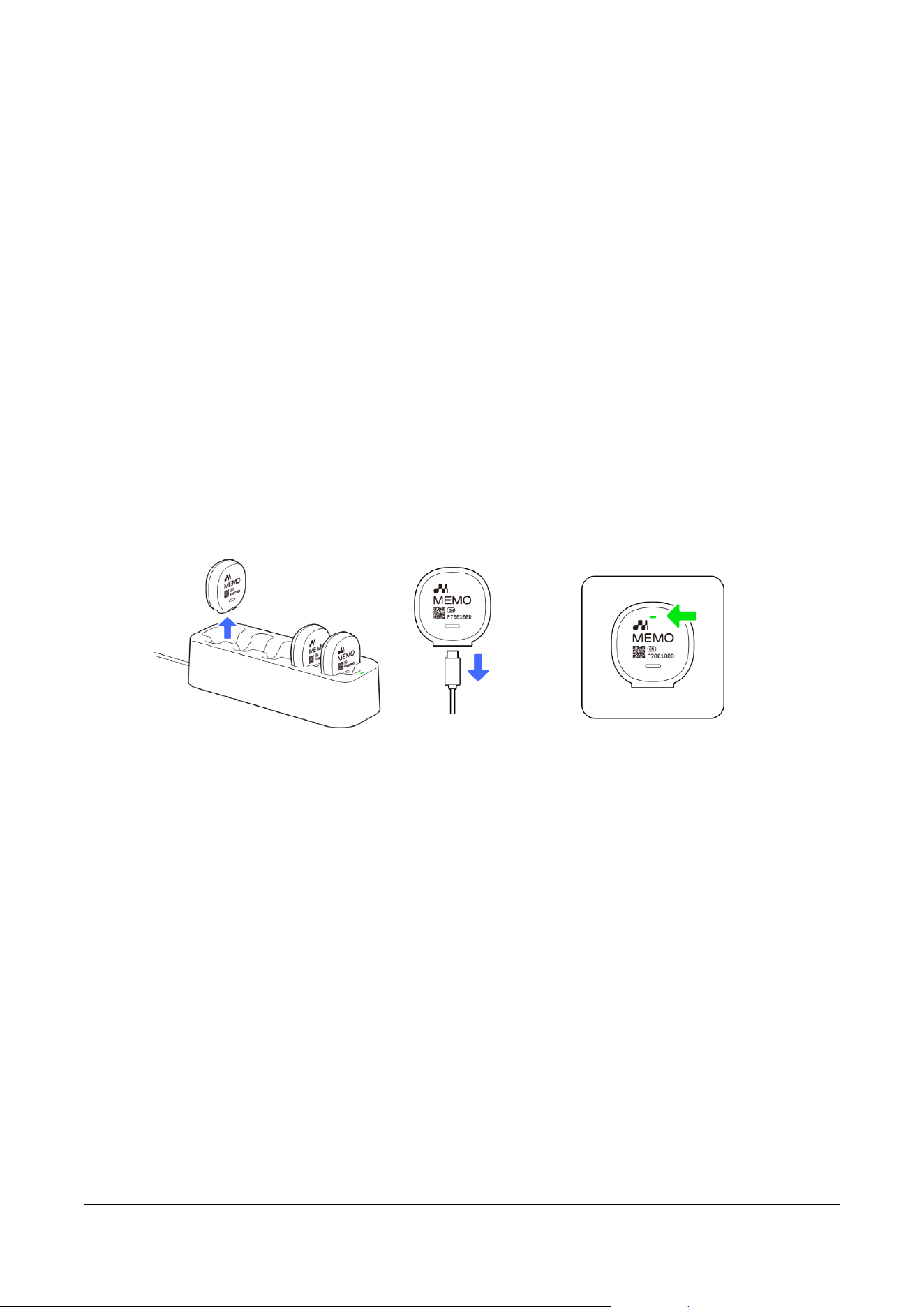
• Check the charging status via the status indicator on the MEMO T Device, then disconnect the
fully charged device from the Charging Cradle or Dedicated Cable.
o Charging Status Guide
▪ Charging: Green
▪ Fully Charged: Blue
▪ Charging Error: Orange
5.0 STARTING THE TEST [HCP, MOBILE APP, DESKTOP APP]
5.1 Connecting the Lead Cable and MEMO T Device
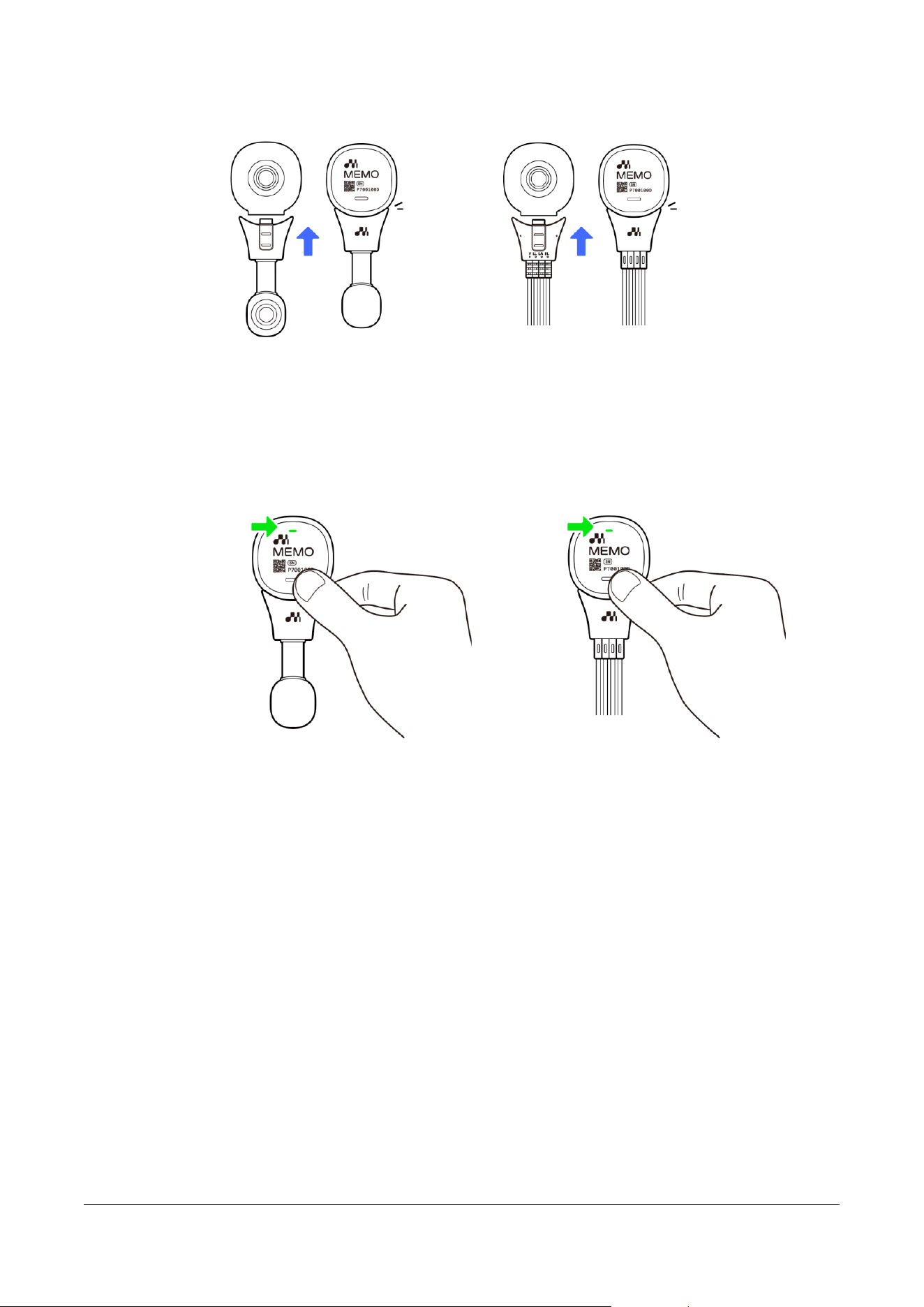
• Connect either the Single-Lead Cable or Multi-Lead Cable depending on the test type.
• Snap it into place until you hear a 'click' from the Lead Secure Clip located on the rear of the
lead cable.
o Snap it into place until you hear a 'click' from the Lead Secure Clip located on the rear
of the lead cable.
MPT-E14C-UNC01
1.1.1 UM-T-002
Page 22 / 58
HUINNO Co., Ltd.
5.2 Checking Battery Status
• This step is required to check the battery status; however, if skipped, it can safely be performed
during the patch connection step after attachment.
5.3 Checking the Attachment Site
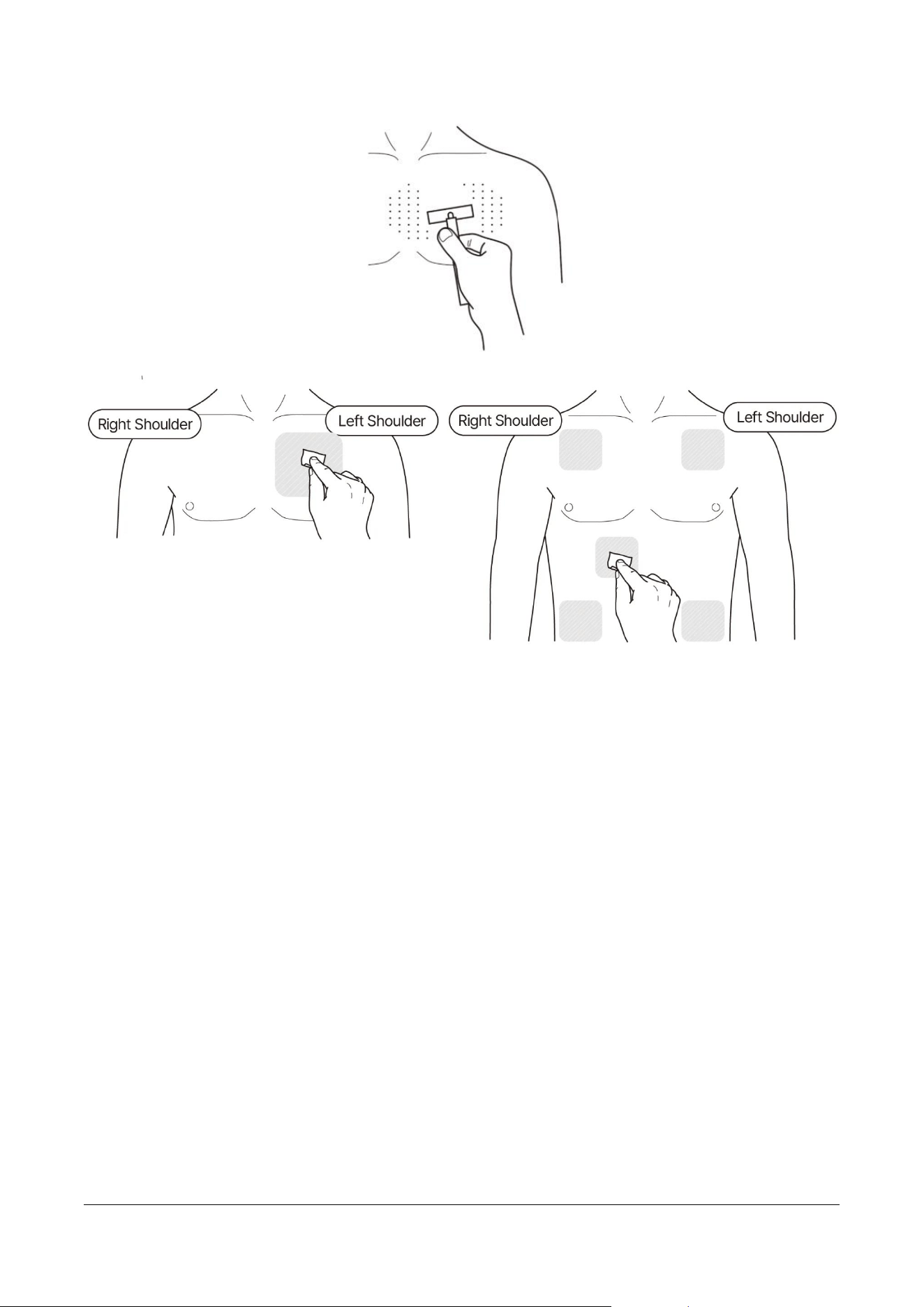
• Shave the patient's attachment site, then sanitize it with alcohol.
o If body hair prevents the device from adhering closely to the skin, it may interfere with
signal measurement.
MPT-E14C-UNC01
1.1.1 UM-T-002
Page 23 / 58
HUINNO Co., Ltd.
5.4 Connecting Disposable Electrodes
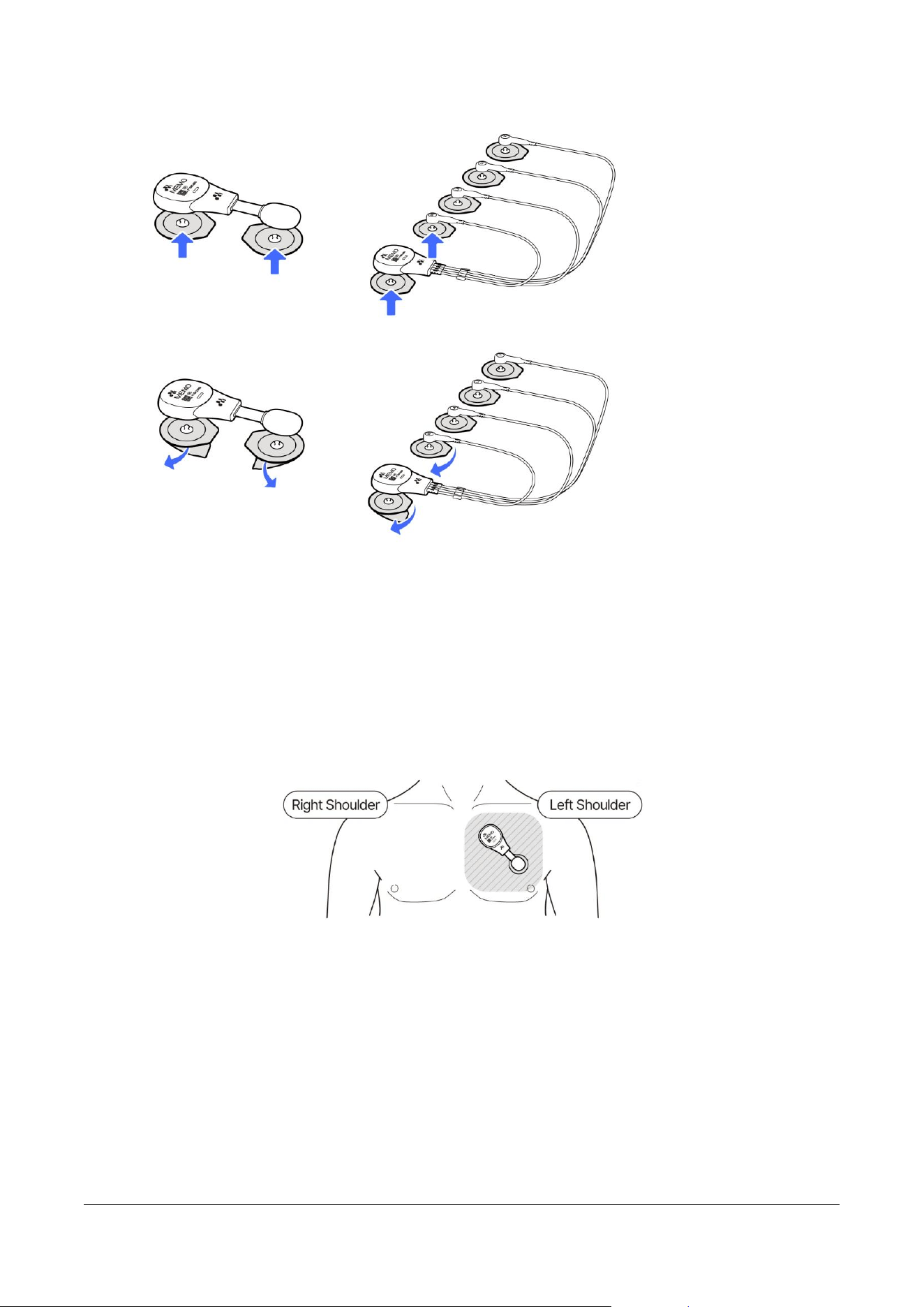
• Connect the disposable medical electrodes to the assembled MEMO T Device and lead cable.
• Remove the transparent protective film from the bottom of the connected electrodes.
MPT-E14C-UNC01
1.1.1 UM-T-002
Page 24 / 58
HUINNO Co., Ltd.
5.5 Attachment
5.5.1 Single-Lead Cable
• Attach the Single-Lead Cable (already connected to the device) to the patient's chest between
the left clavicle and the nipple at a 45-degree angle, then press firmly across the entire surface
to ensure close adhesion to the skin.
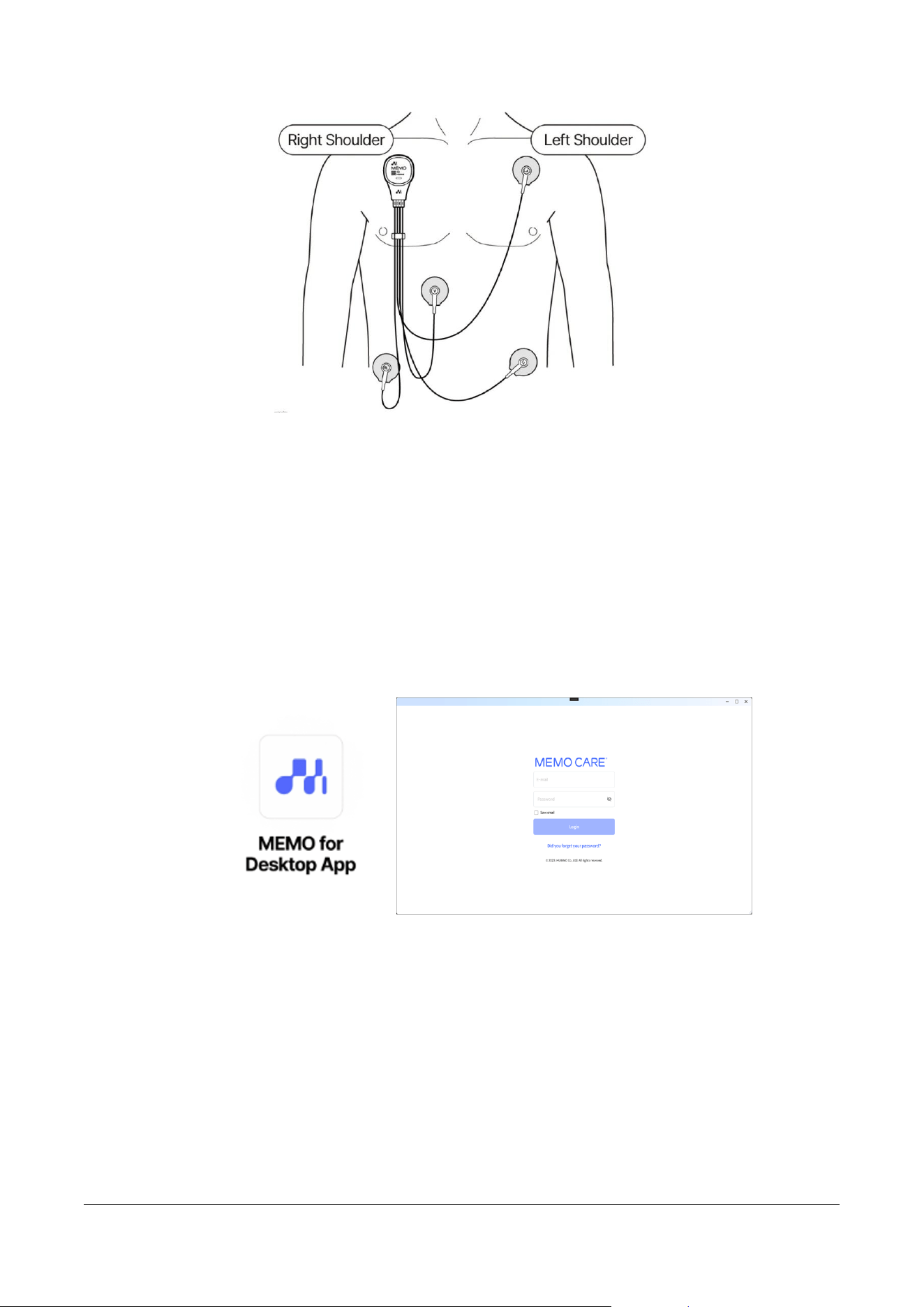
5.5.2 Multi-Lead Cable
• Position the device's RA electrode on the upper right chest below the clavicle. Attach the LA
electrode to the upper left chest below the clavicle, the RL electrode to the lower abdomen or a
neutral position on the right chest, the LL electrode to the lower left abdomen or below the
intercostal space, and the V electrode to the right 4th intercostal space next to the sternum
(V1). Once positioned, press firmly across the entire surface of each to ensure close adhesion
to the skin.
o The V electrode can be attached to any position from V1 to V6 depending on the user's
preference.
MPT-E14C-UNC01
1.1.1 UM-T-002
Page 25 / 58
HUINNO Co., Ltd.
5.6 Connecting the Device
5.6.1 Desktop App (MFD)
5.6.1.1 Installing and Running the App
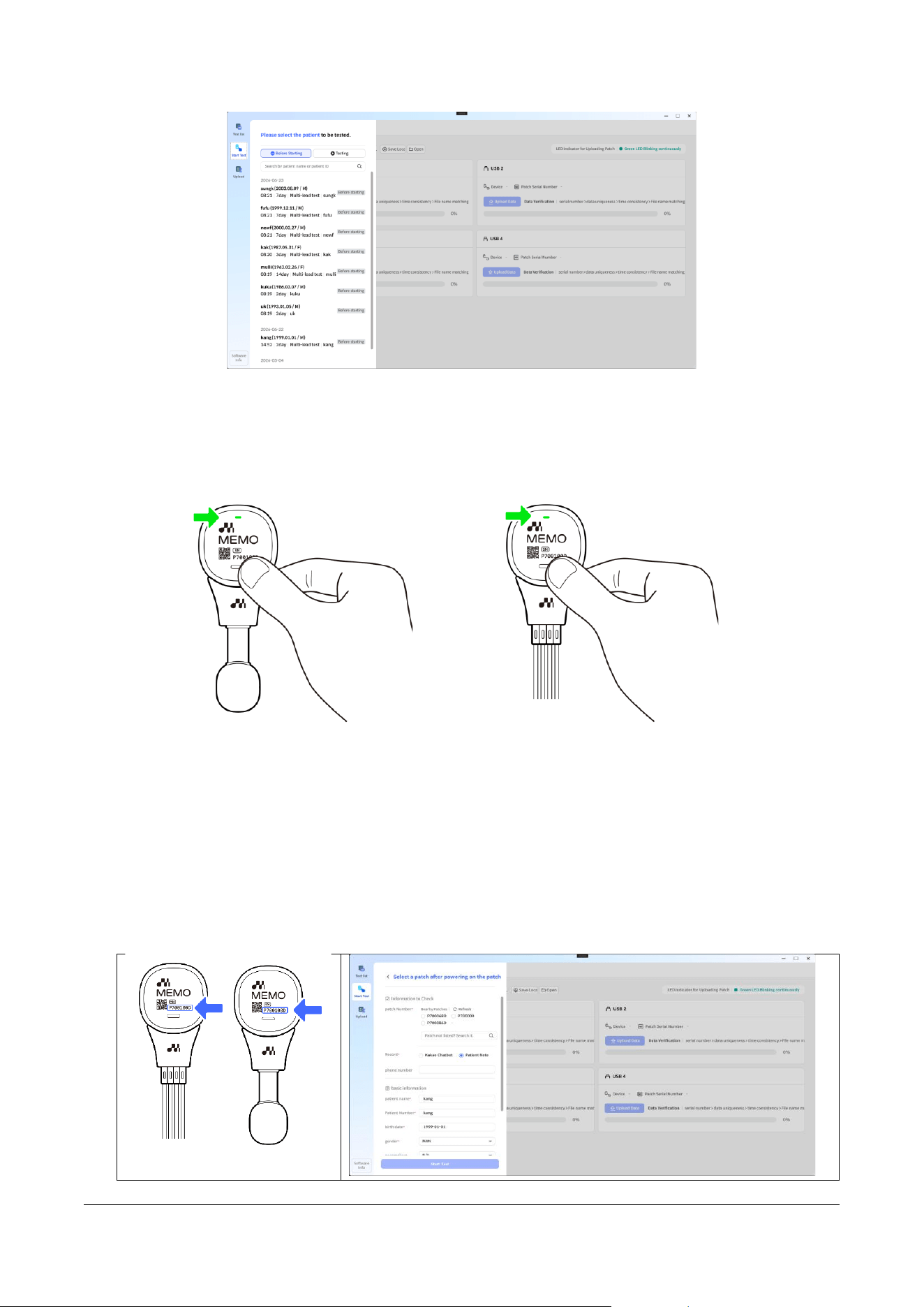
• Download and install the [Desktop App (MFD)] from the designated webpage.
(www.memopatch.care)
5.6.1.2 Logging in to MFD
• After installation, launch the program and log in using the same credentials as the Web version.
5.6.1.3 Selecting a Patient in the "Start Test" Tab
• Click the [Start Test] menu on the left panel to go to the patient selection page.
• Select the patient to begin the test.
• Depending on the hospital account, a patient consent screen may appear next.
MPT-E14C-UNC01
1.1.1 UM-T-002
Page 26 / 58
HUINNO Co., Ltd.
5.6.1.4 Activating the Device
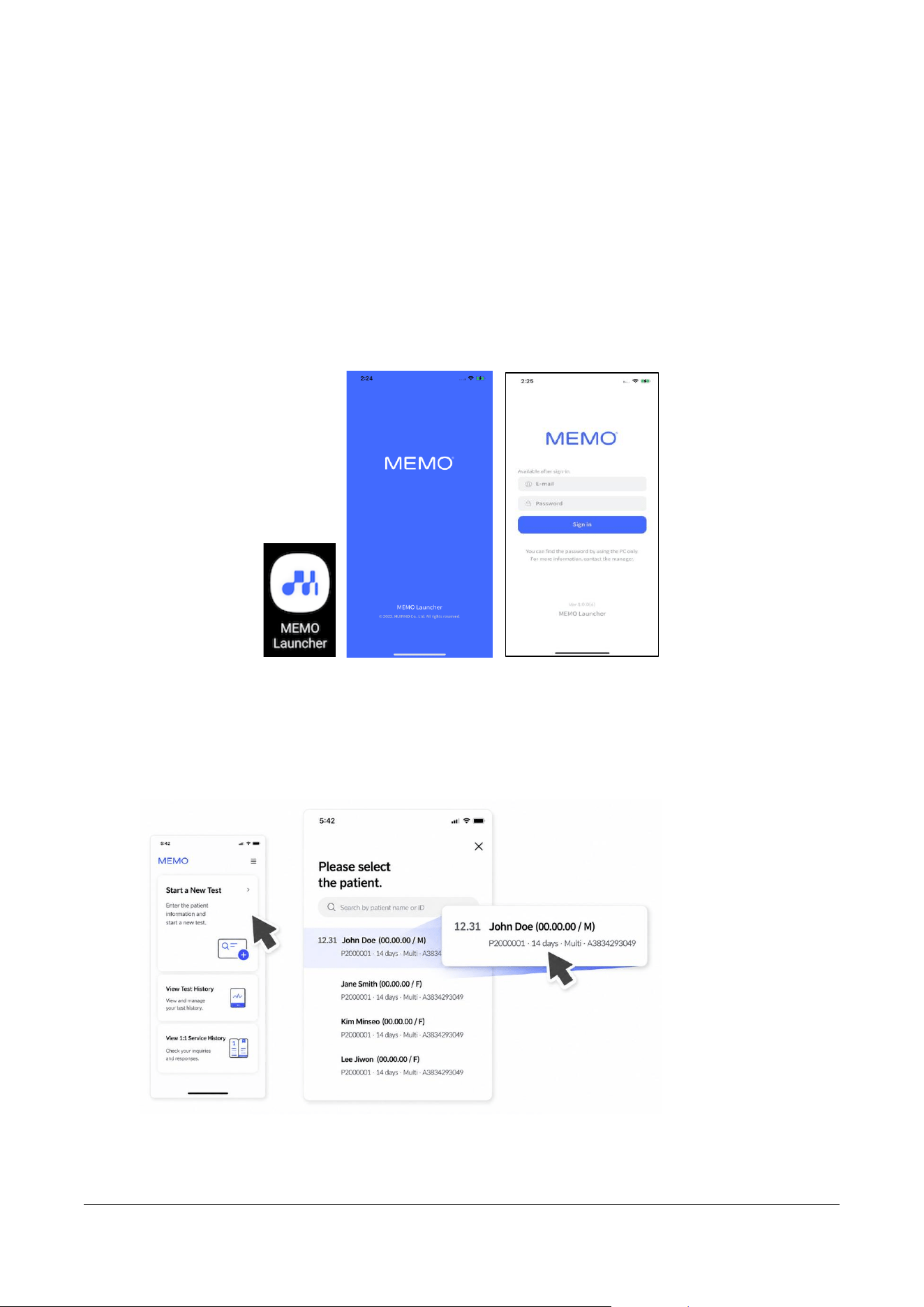
• Press and hold the power button on the attached MEMO T Device for 3 seconds to activate it..
5.6.1.5 Selecting the Device
• In the patient information confirmation window within the program, select the item that matches
the device's serial number (SN).
• Verify the information entered during patient registration, update any changes, and then click
the [Start Test] button to begin.
• If you need to modify the initially created patient information on this screen where the device
selection and patient data are displayed, make the necessary edits on this page.
MPT-E14C-UNC01
1.1.1 UM-T-002
Page 27 / 58
HUINNO Co., Ltd.
5.6.2 Mobile App (MSA)
5.6.2.1 Installing and Running the App
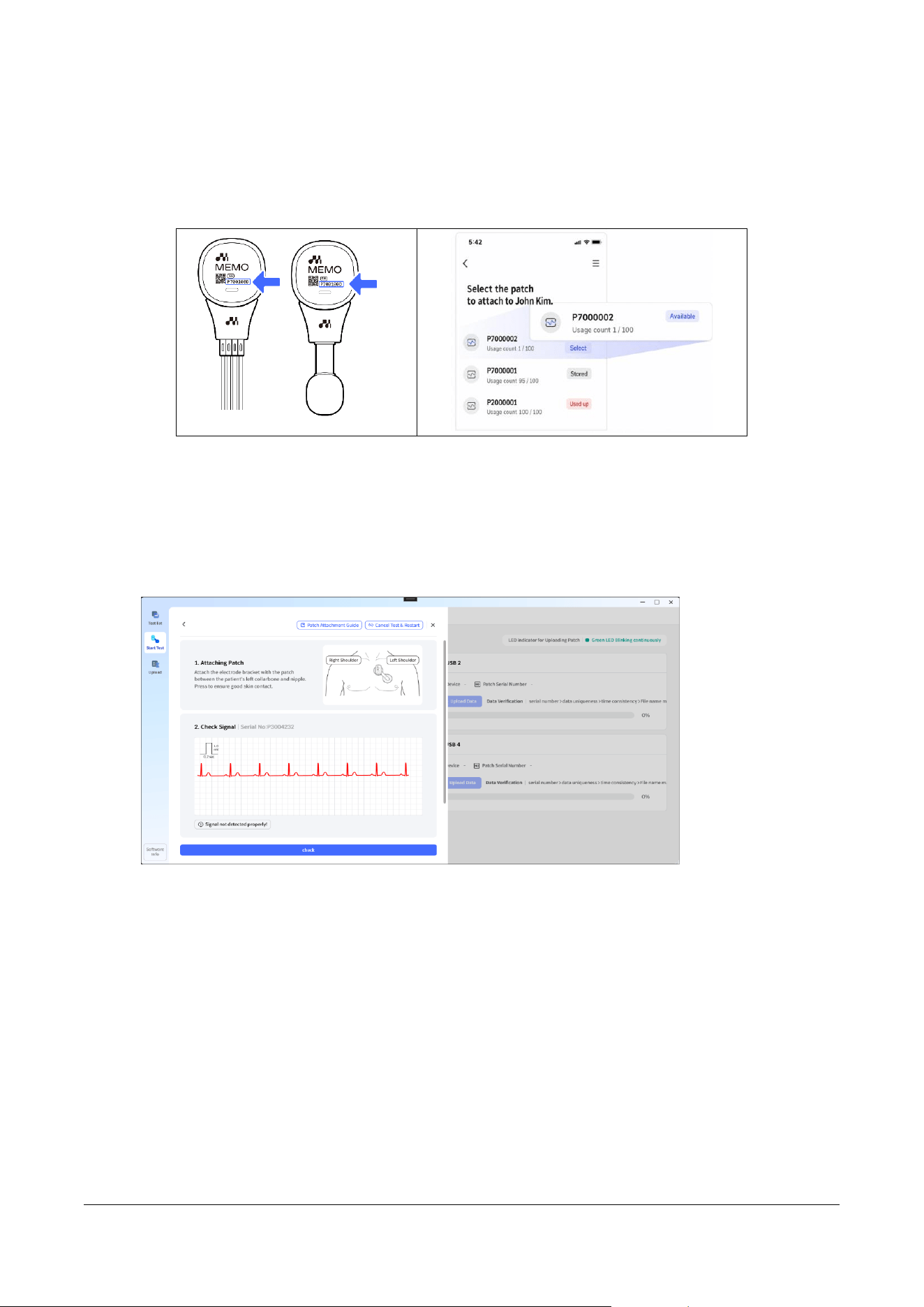
• Download [ MEMO Launcher ] from the Google Play Store or Apple App Store.
5.6.2.2 Starting the Test
• Access the app and log in using the same credentials as your Web or Desktop account.
5.6.2.3 Selecting a Patient
• Tap the [Start New Test] button, then select the patient to be tested.
• Depending on the hospital account, a patient consent screen may appear next.
MPT-E14C-UNC01
1.1.1 UM-T-002
Page 28 / 58
HUINNO Co., Ltd.
5.6.2.4 Selecting the Device
• Activate the device and select it from the list of discovered devices.
• Verify the serial number printed on the front of the MEMO T Device.
5.7 Signal Verification
5.7.1 Desktop App (MFD)
5.7.1.1 Checking the Signals
• Check the status of the 3 leads output based on the 5 attached electrodes.
5.7.2 Mobile App (MSA)
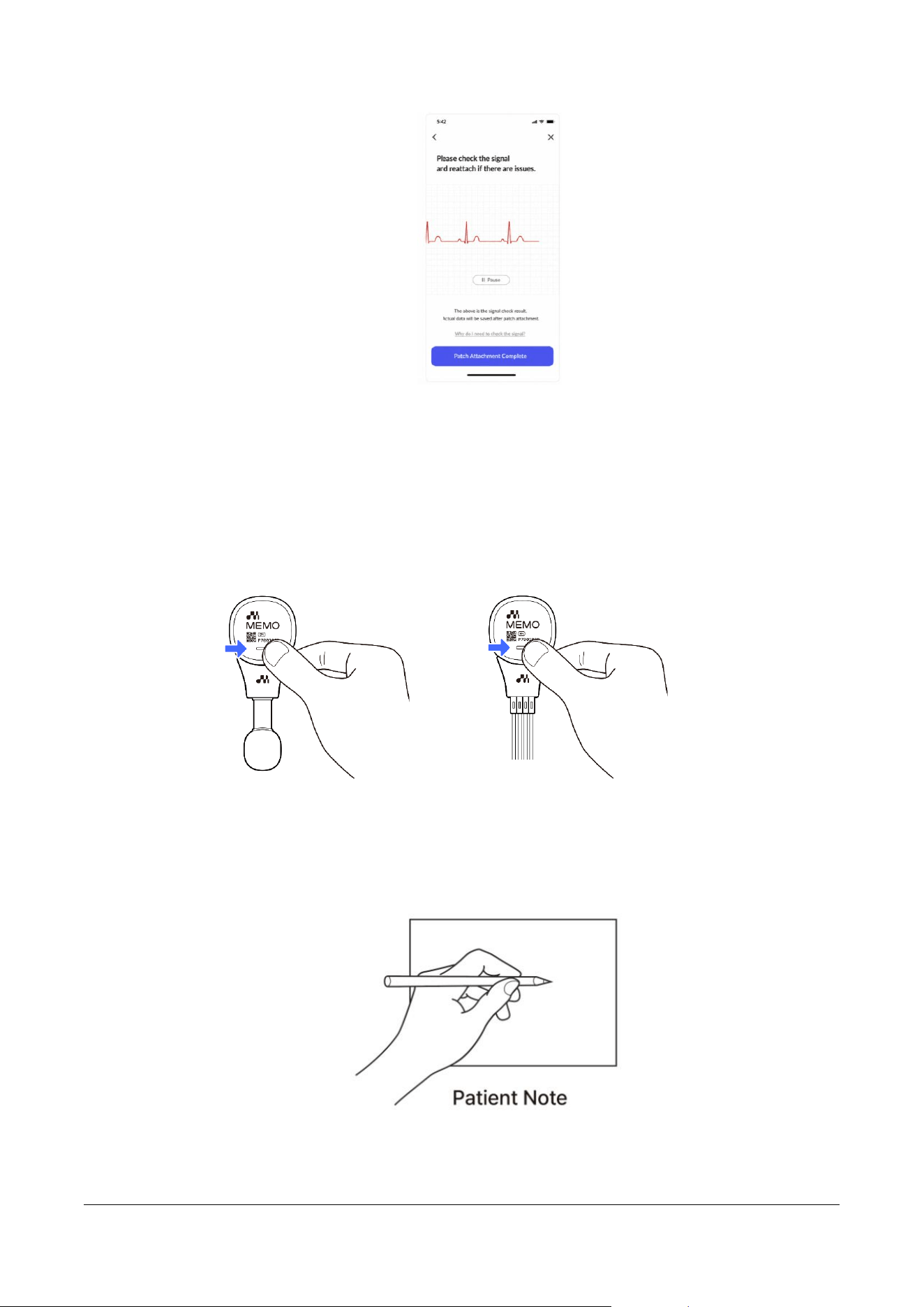
5.7.2.1 Verifying ECG Signals within the MEMO App for HCP
• If the P-wave and QRS-complex are not clearly visible, re-adhere the device to find the optimal
placement based on the observed waveform. Please note that it may take some time for the
signal to stabilize after each repositioning.
MPT-E14C-UNC01
1.1.1 UM-T-002
Page 29 / 58
HUINNO Co., Ltd.
6.0 TEST
6.1 Symptom Logging
6.1.1 Saving Logs to the Device
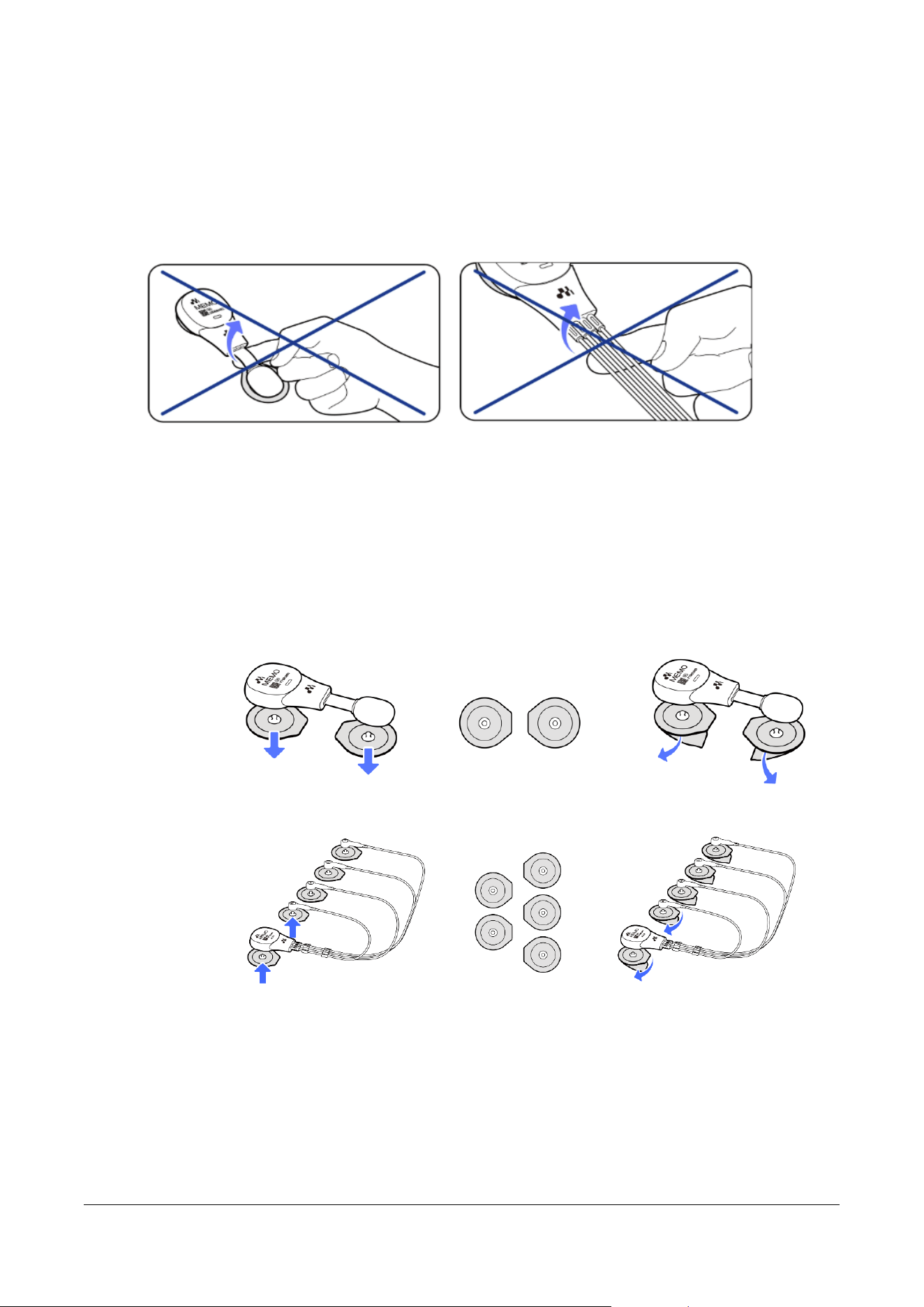
• Press and hold the symptom logging button for about 1 second to save the record.
o Even if symptoms persist, press the button only once.
6.1.2 Writing in the Patient Note
• In case of intermittent sleep, please use the patient note to log your symptoms.
MPT-E14C-UNC01
1.1.1 UM-T-002
Page 30 / 58
HUINNO Co., Ltd.
6.2 Detaching the Device and Replacing Electrodes
6.2.1 Detaching the Device
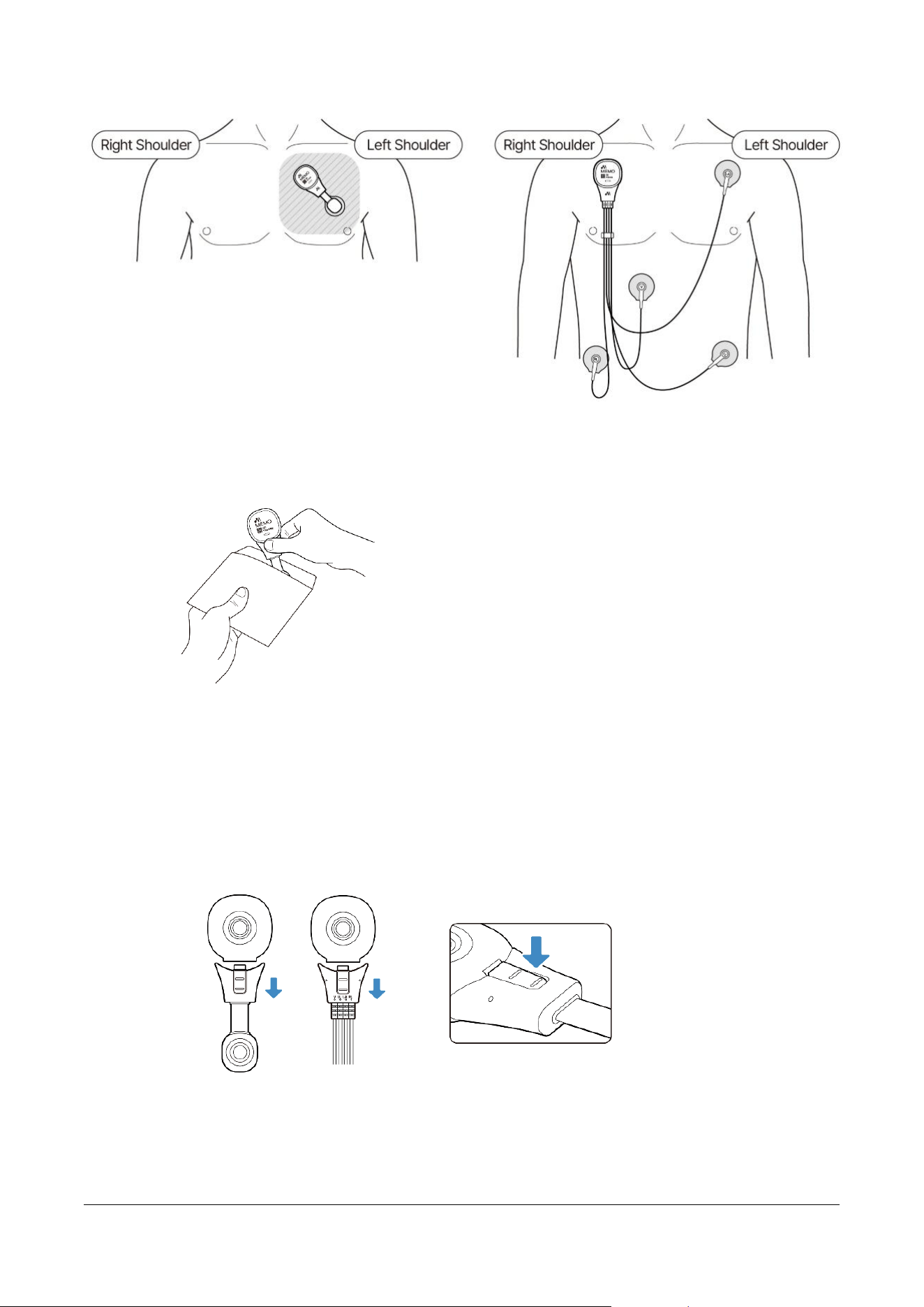
• Caution: Attempting to detach the device by pulling or applying force directly to the cable may
damage it, which can cause device malfunction.
• If the cable is damaged, data may fail to save, or previously stored data may be lost.
6.2.2 Replacing Electrodes
6.2.2.1 Separate the used disposable electrodes from the detached device. Please discard
the used electrodes.
6.2.2.2 Prepare new medical-grade electrodes.
6.2.2.3 Connect the device to the new electrodes, then peel off the protective film from the
electrodes.
6.2.3 Attaching the Device
• Attach the device combined with the patch and new electrodes to the chest between the left
clavicle and the nipple. Once positioned, press firmly across the entire surface to ensure close
adhesion to the skin.
MPT-E14C-UNC01
1.1.1 UM-T-002
Page 31 / 58
HUINNO Co., Ltd.
6.2.4 Returning the Device
• Place the used device (the patch and lead cable) into the return envelope and return it.
7.0 TEST COMPLETION
7.1 Disconnecting the Device
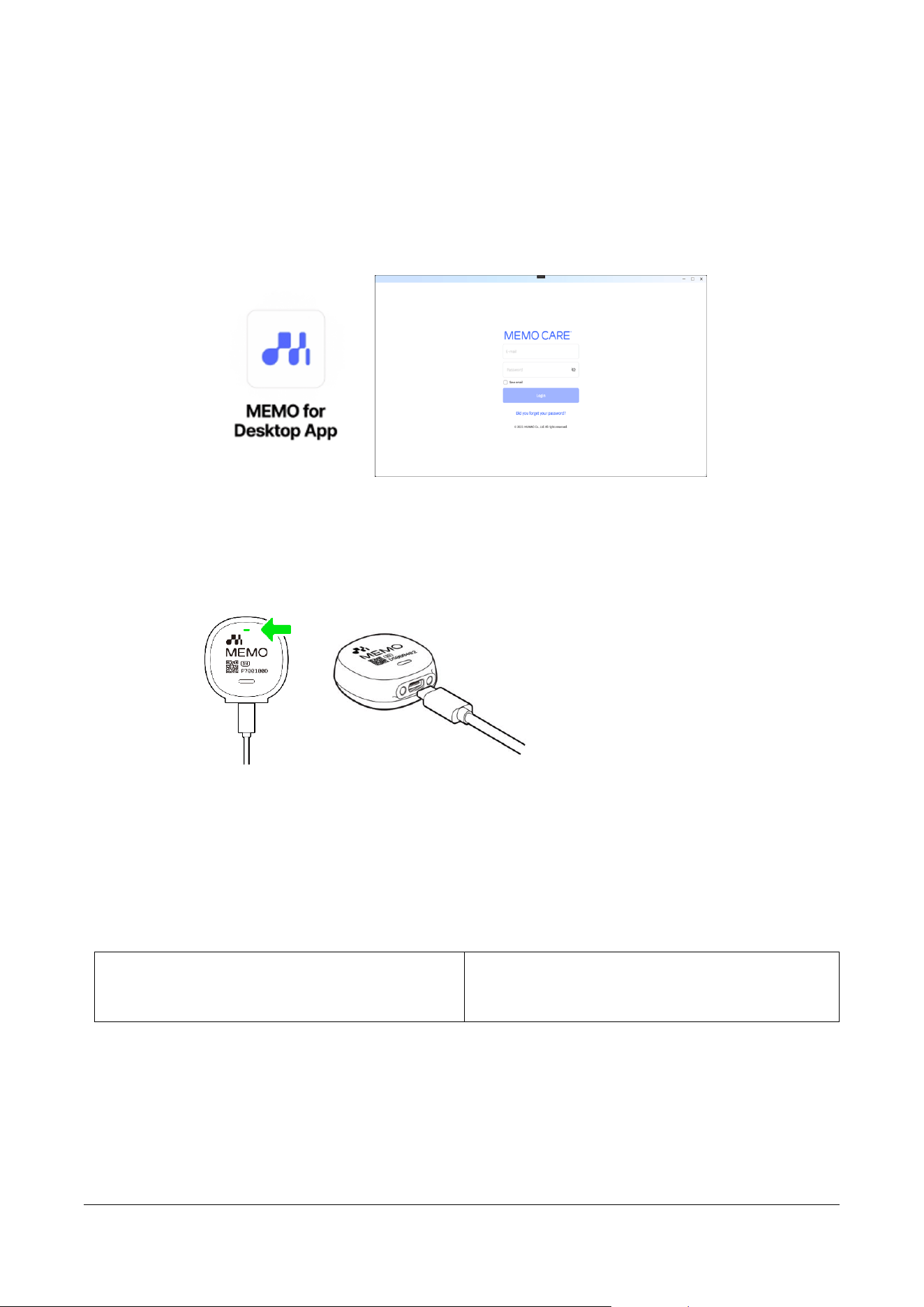
• Disconnect the MEMO T Device from the lead cable currently in use.
o Press and hold the Lead Secure Clip located on the back of the lead cable while pulling
it apart.
MPT-E14C-UNC01
1.1.1 UM-T-002
Page 32 / 58
HUINNO Co., Ltd.
7.2 Data Upload
7.2.1 Desktop App (MFD)
7.2.1.1 Launching the Desktop Application
o Launch the MEMO for Desktop app and log in.
7.2.1.2 Connecting the Device
o Connect the Dedicated Cable to the MEMO Patch T Device.
7.2.1.3 Navigating to the Upload Tab in the Desktop App
o Click the [Upload] menu on the left panel to go to the upload page.
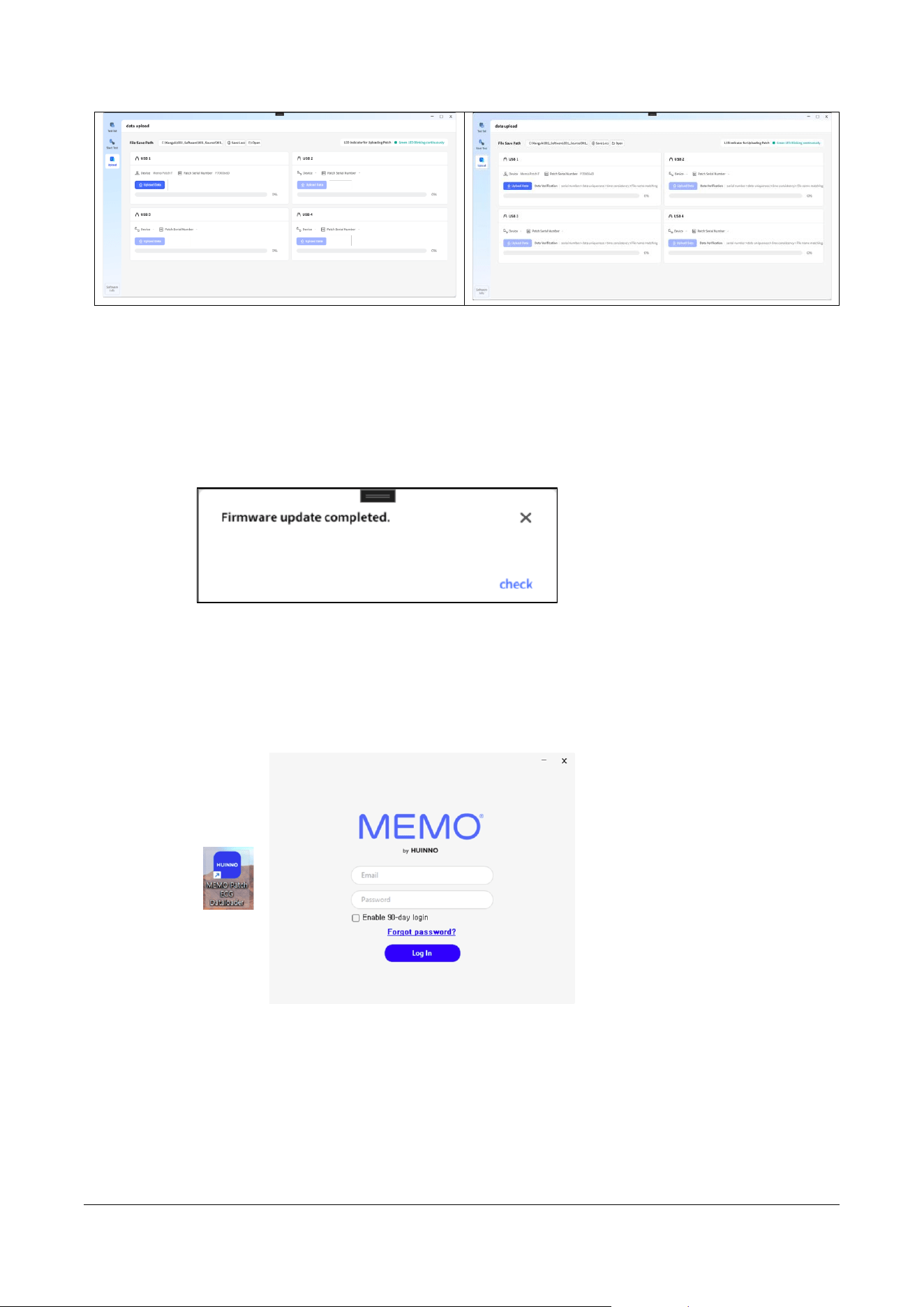
o Verify the device connected to the USB port, then click the [Upload Data] button to
begin the upload.
o Depending on the account type, a different UI layout may be displayed.
Logging in with a Standard Account
Logging in with a Specific Account (Depending
on the account type, a different UI layout may be
displayed.)
MPT-E14C-UNC01
1.1.1 UM-T-002
Page 33 / 58
HUINNO Co., Ltd.
7.2.1.4 Firmware update
o The firmware update will proceed, and a confirmation message will appear once it is
complete.
7.2.2 Dataloader
7.2.2.1 Running the Data Loader
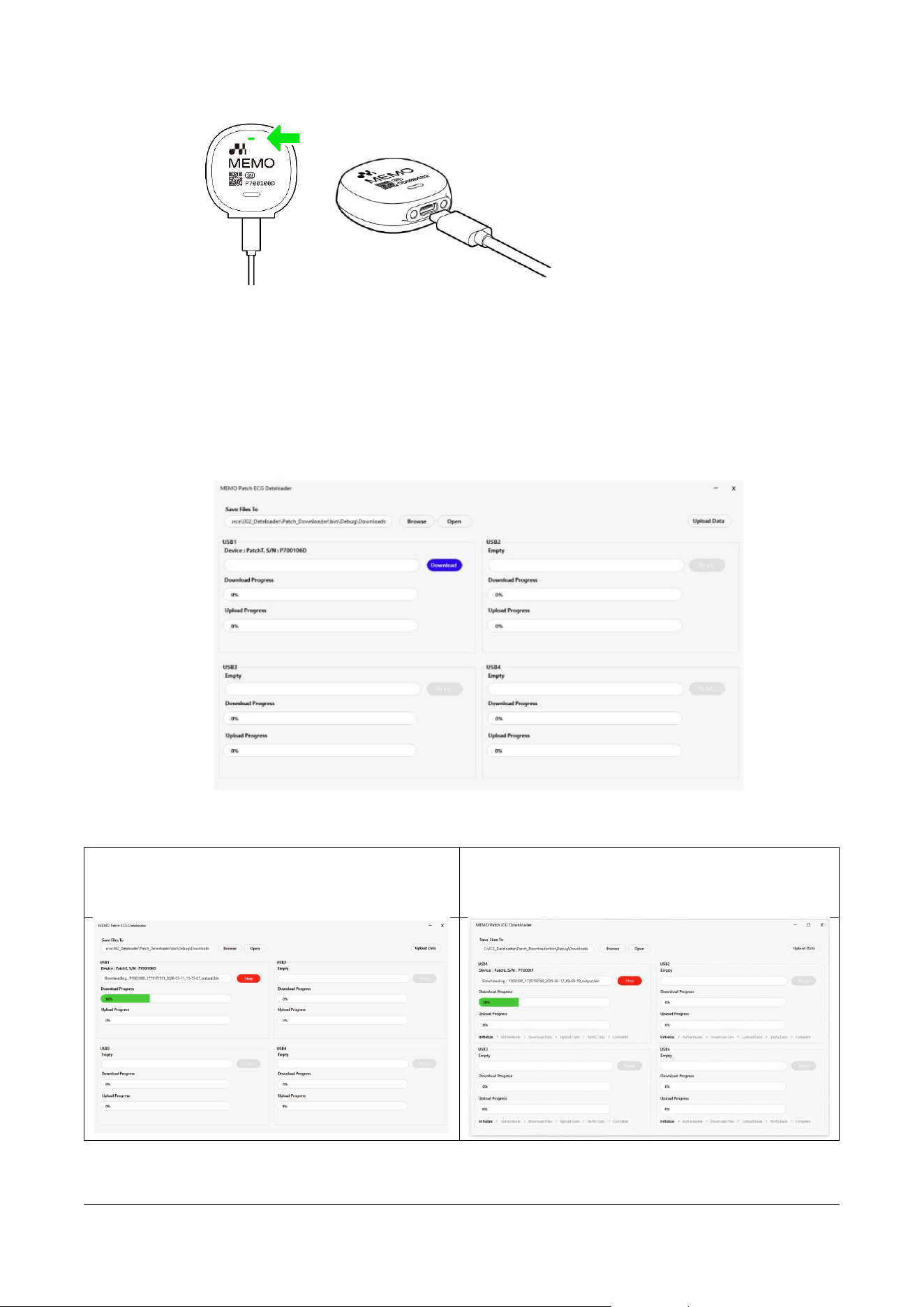
o Launch the MEMO Patch ECG Dataloader app and log in.
7.2.2.2 Connecting the MEMO Patch
o Connect the Dedicated Cable to the MEMO Patch T device.
MPT-E14C-UNC01
1.1.1 UM-T-002
Page 34 / 58
HUINNO Co., Ltd.
7.2.2.3 Data Download / Upload
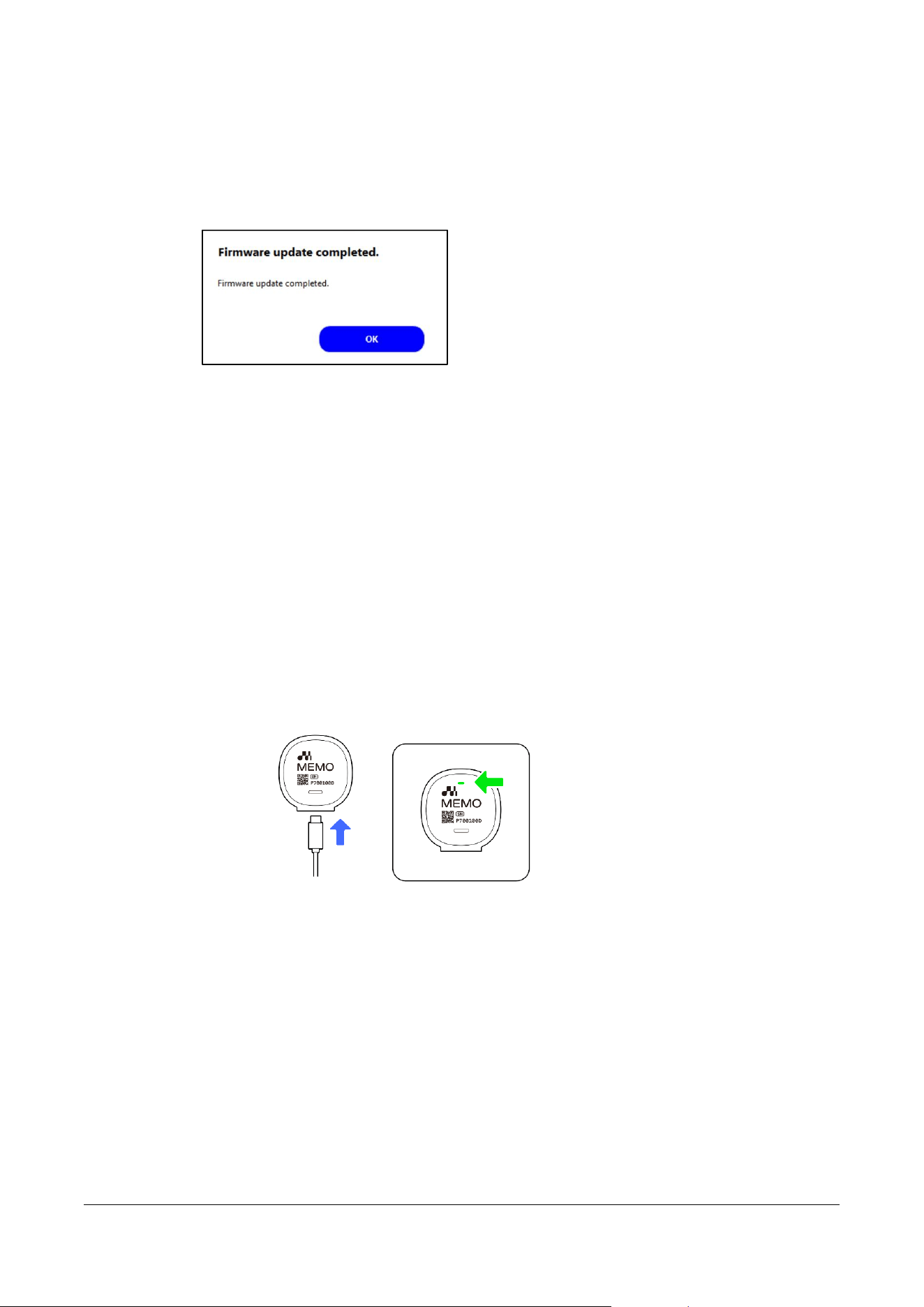
o Once the device is connected, verify that its serial number is displayed, and click the
[Download] button to start the download and upload process.
7.2.2.3.1 Connection
7.2.2.3.2 Starting the Download
Logging in with a Standard Account
Logging in with a Specific Account (Depending
on the account type, a different UI layout may be
displayed.)
o Once the download is complete, the upload will start automatically.
MPT-E14C-UNC01
1.1.1 UM-T-002
Page 35 / 58
HUINNO Co., Ltd.
7.2.2.3.3 Firmware Update
o The firmware may update automatically from time to time, and you may see the
message below.
7.3 Device Shutdown Procedure
7.3.1 There is no physical power button on the device.
7.3.2 For the software, please log out of your account after use.
7.4 Post-Use Storage and Maintenance
7.4.1 Charging the MEMO Patch T Device
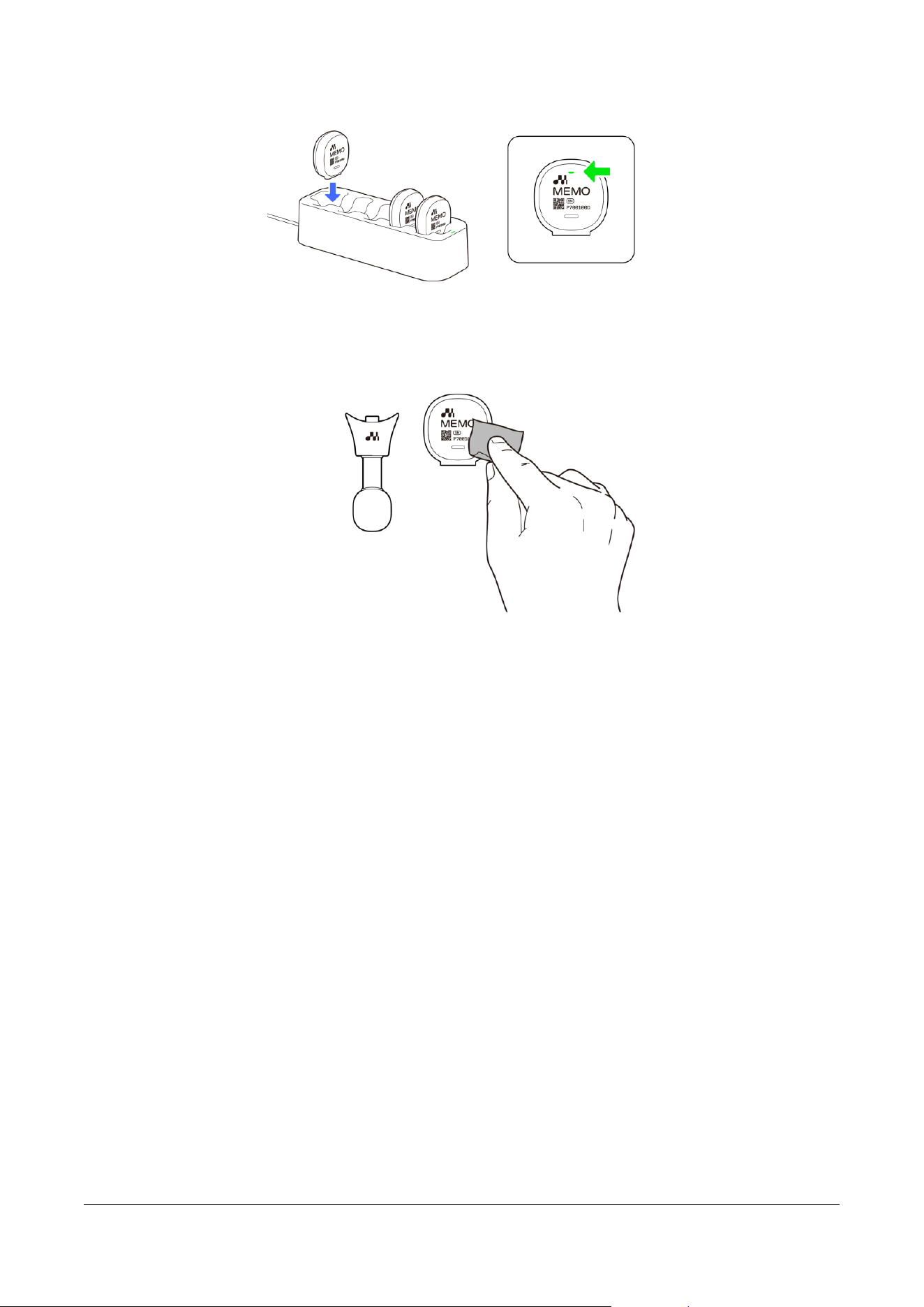
7.4.1.1 Single Charging
• Connect the Dedicated Cable to charge the device.
◼ Charging Status Indicator Guide
▪ Charging: Green
▪ Fully Charged: Blue
▪ Charging Error: Orange
7.4.1.2 Multi-Charging
• Connect the Charging Cradle to charge multiple devices.
◼ Charging Status Indicator Guide (MEMO Patch T Device)
▪ Charging: Green
▪ Fully Charged: Blue
▪ Charging Error: Orange
◼ Power Indicator Guide (Charging Cradle)
▪ Power ON: Green
MPT-E14C-UNC01
1.1.1 UM-T-002
Page 36 / 58
HUINNO Co., Ltd.
7.4.1.3 Cleaning and Disinfecting
• Check the exterior of the disconnected MEMO T Device and lead cable for any signs of
damage, then disinfect them with alcohol.
MPT-E14C-UNC01
1.1.1 UM-T-002
Page 37 / 58
HUINNO Co., Ltd.
8.0 STATEMENTS AND TABLES FOR EMC
Use of this equipment adjacent to or stacked with other equipment should be avoided because
it could result in improper operation. If such use is necessary, this equipment and the other equipment
should be observed to verify that they are operating normally.
Use of accessories, transducers, and cables other than those specified or provided by HUINNO
Co., Ltd. could result in increased electromagnetic emissions or decreased electromagnetic immunity of
this equipment and result in improper operation.
Portable RF communications equipment (including peripherals such as antenna cables and
external antennas) should be used no closer than 30 cm to any part of the MEMO Patch T, including
cables specified by HUINNO Co., Ltd.
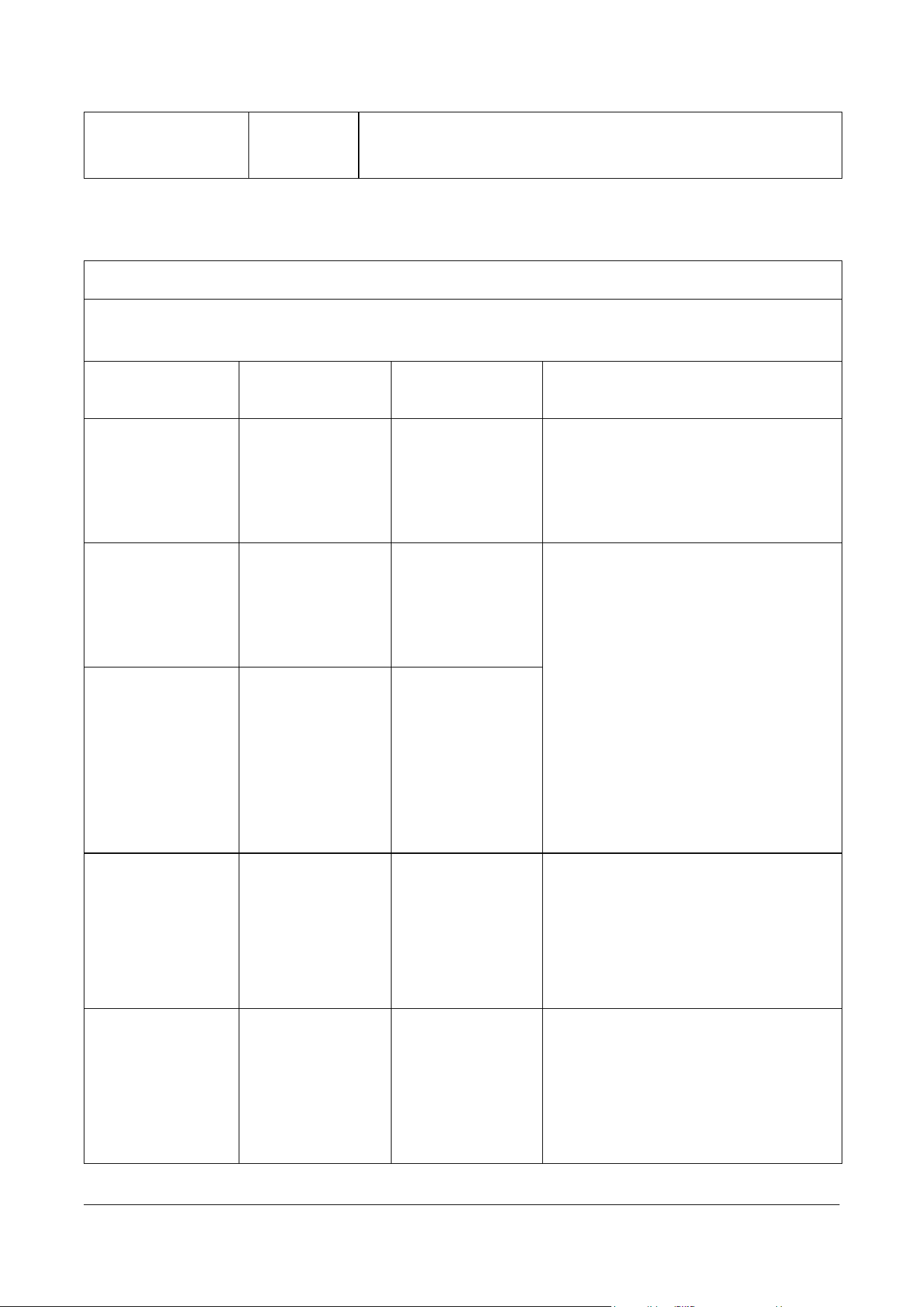
8.1 Electromagnetic Emissions
Table 1- MEMO Patch T(MPT-E14C-UNC01) Electromagnetic Compatibility Information
Guidance and Manufacturer’s Declaration – Electromagnetic Emissions
The MPT-E14C-UNC01 is intended for use in the electromagnetic environment specified below. The
customer or the user of this product should assure that it is used in such an environment.
Emissions Test /
Method
Compliance
Electromagnetic Environment – Guidance
RF Emissions /
CISPR 11
IEC/EN 55011
Group 1,
Class B
The MPT-E14C-UNC01 uses RF energy only for its internal
function. Therefore, its RF emissions are very low and are not
likely to cause any interference in nearby electronic equipment.
RF Emissions
CISPR 11
IEC/EN 55011
Group1,
Class B
The MPT-E14C-UNC01 is suitable for use in all establishments,
including domestic establishments and those directly connected
to the public low-voltage power supply network that supplies
buildings used for domestic purposes.
WARNING: This equipment or system is intended for use by
healthcare professionals only. This equipment or system may
cause radio interference or may disrupt the operation of nearby
equipment. It may be necessary to take mitigation measures,
MPT-E14C-UNC01
1.1.1 UM-T-002
Page 38 / 58
HUINNO Co., Ltd.
such as re-orienting or relocating the MPT-E14C-UNC01 or
shielding the location.
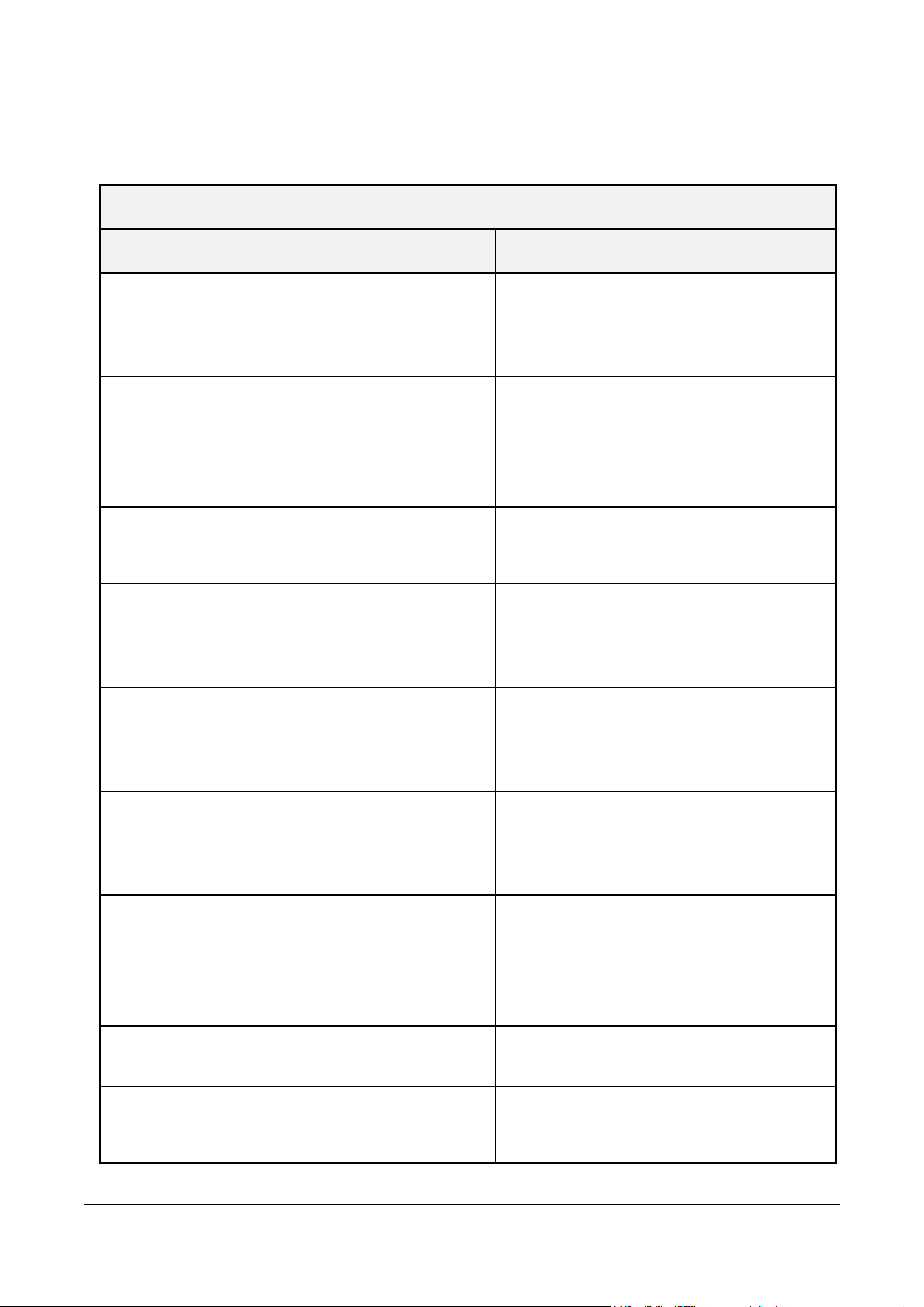
8.2 Electromagnetic Immunity
Table 2 - Electromagnetic Immunity for MEMO Patch T (MPT-E14C-UNC01)
Guidance and Manufacturer’s Declaration – Electromagnetic Immunity
The MPT-E14C-UNC01 is designed for use in the electromagnetic environment specified below. The
customer or the user of the MPT-E14C-UNC01 should assure that it is used in such an environment.
Immunity Test
IEC 60601 Test
Level
Compliance Level
Electromagnetic Environment –
Guidance
Electrostatic
Discharge (ESD)
IEC 61000-4-2
±8 kV contact
±2, ±4, ±8, ±15
kV air
±8 kV contact
±2, ±4, ±8, ±15
kV air
Floors should be wood, concrete, or
ceramic tile. If floors are covered with
synthetic material, the relative humidity
should be at least 30%.
Radiated RF
Electromagnetic
Fields
IEC 61000-4-3
10 V/m
80 MHz - 2.7 GHz
80% AM at 1 kHz
10 V/m
80 MHz - 2.7 GHz
80% AM at 1 kHz
The MPT-E14C-UNC01 is suitable for
use in a home healthcare environment.
RF communications equipment should
be used no closer than 30 cm to any
part of the MPT-E14C-UNC01,
including cables specified by HUINNO
Co., Ltd.
Immunity to
Proximity Fields
from RF Wireless
Communications
Equipment
IEC 61000-4-3
Max 28 V/m
according to 385–
5785 MHz of Table
9 in IEC 60601-1-2
Max 28 V/m
according to 385–
5785 MHz of Table
9 in IEC 60601-1-2
Electrical Fast
Transient/Burst
IEC 61000-4-4
100 kHz repetition
Power supply lines:
±2 kV
Input/output lines:
±1 kV
Power supply lines:
±2 kV
Input/output lines:
±1 kV
Mains power quality should be that of
a typical commercial or hospital
environment.
Surge
IEC 61000-4-5
Line-to-line: ±0.5
kV, ±1 kV
Line-to-ground:
±0.5 kV, ±1 kV, ±2
kV
Line-to-line: ±0.5
kV, ±1 kV
Line-to-ground:
±0.5 kV, ±1 kV, ±2
kV
Mains power quality should be that of
a typical commercial or hospital
environment.

MPT-E14C-UNC01
1.1.1 UM-T-002
Page 39 / 58
HUINNO Co., Ltd.
Conducted
Disturbances
Induced by RF
Fields
IEC 61000-4-6
3V 0.15MHz ~
80MHz
0.15MHz~80MHz
6 V in ISM and
amateur radio
bands between
0.15 MHz and 80
MHz at 1 kHz 80%
AM
3V 0.15MHz ~
80MHz
0.15MHz~80MHz
6 V in ISM and
amateur radio
bands between
0.15 MHz and 80
MHz at 1 kHz 80%
AM
In the frequency range above 150 kHz
– 80 MHz, the strength of the RF field
is less than 3 V.
Power Frequency
Magnetic Field
Immunity (50/60
Hz)
IEC 61000-4-8
3 A/m
50 & 60 Hz
3 A/m
50 & 60 Hz
Power frequency magnetic fields
should be at levels characteristic of a
typical location in a typical commercial
or hospital environment.
Voltage Dips, Short
Interruptions, and
Voltage Variations
on Power Supply
Input Lines
IEC 61000-4-11
w 0% UT: 0.5 cycle
At 0°, 45°, 90°, 135°,
180°, 225°, 270°
and 315°
w 0 % UT; 1 cycle and
70 % UT; 25/30
cycles
Single phase: at 0º
w 0 % UT; 250/300
cycles
w 0% UT: 0.5 cycle
At 0°, 45°, 90°, 135°,
180°, 225°, 270°
and 315°
w 0 % UT; 1 cycle and
70 % UT; 25/30
cycles
Single phase: at 0º
w 0 % UT; 250/300
cycles
Mains power quality should be that of
a typical commercial or hospital
environment. If the user of the MPT-
E14C-UNC01 requires continued
operation during power mains
interruptions, it is recommended that
the MPT-E14C-UNC01 be powered
from an uninterruptible power supply
(UPS) or a battery.
Proximity Magnetic
Fields
IEC 61000-4-39
Max 65A/m
30 kHz to 13.56
MHz according to
Table 11 of IEC
60601-1-2
Max 65A/m
30 kHz to 13.56
MHz according
to Table 11 of
IEC 60601-1-2
The MPT-E14C-UNC01 is suitable for
use in the home healthcare
environment. Portable radio frequency
(RF, RFID) communications equipment
can affect medical devices.
NOTE:
U
T
is the a.c. mains voltage prior to application of the test level.
Recommended separation distances between portable and mobile RF communications equipment and
the MPT-E14C-UNC01
Portable RF communications equipment (including peripherals such as antenna
cables and external antennas) should be used no closer than 30 cm (12 inches) to
any part of the MPT-E14C-UNC01, including cables specified by the manufacturer.

MPT-E14C-UNC01
1.1.1 UM-T-002
Page 40 / 58
HUINNO Co., Ltd.
If the separation distance is less than 30 cm (12 inches), the performance of the
MPT-E14C-UNC01 could be degraded.
Immunity test
Band a)
Service a)
Modulation
IEC 60601
test level
Compliance
level
Proximity fields
from RF
wireless
communication
s equipment
380-390 MHz
TETRA 400
Pulse
modulation
18 Hz
27 V/m
27 V/m
430–470 MHz
GMRS 460,
FRS 460
FM
± 5 kHz deviation
1 kHz sine
28 V/m
28 V/m
704-787 MHz
LTE Band 13,
17
Pulse
modulation
217 Hz
9 V/m
9 V/m
800-960 MHz
GSM 800/900,
TETRA 800,
iDEN 820,
CDMA 850,
LTE Band 5
Pulse
modulation
18 Hz
28 V/m
28 V/m
1700-1990 MHz
GSM 1800;
CDMA 1900;
GSM 1900;
DECT;
LTE Band 1, 3,
4, 25; UMTS
Pulse
modulation
217 Hz
28 V/m
28 V/m
2400-2570 MHz
Bluetooth,
WLAN,
802.11 b/g/n,
RFID 2450,
LTE Band 7
Pulse
modulation
217 Hz
28 V/m
28 V/m
5100-5800 MHz
WLAN 802.11
a/n
Pulse
modulation
217 Hz
9 V/m
9 V/m
NOTE: These guidelines may not apply in all situations. Electromagnetic propagation is affected by absorption and
reflection from structures, objects, and people.
a) For some services, only the uplink frequencies are included.
MPT-E14C-UNC01
1.1.1 UM-T-002
Page 41 / 58
HUINNO Co., Ltd.
9.0 TROUBLESHOOTING GUIDE
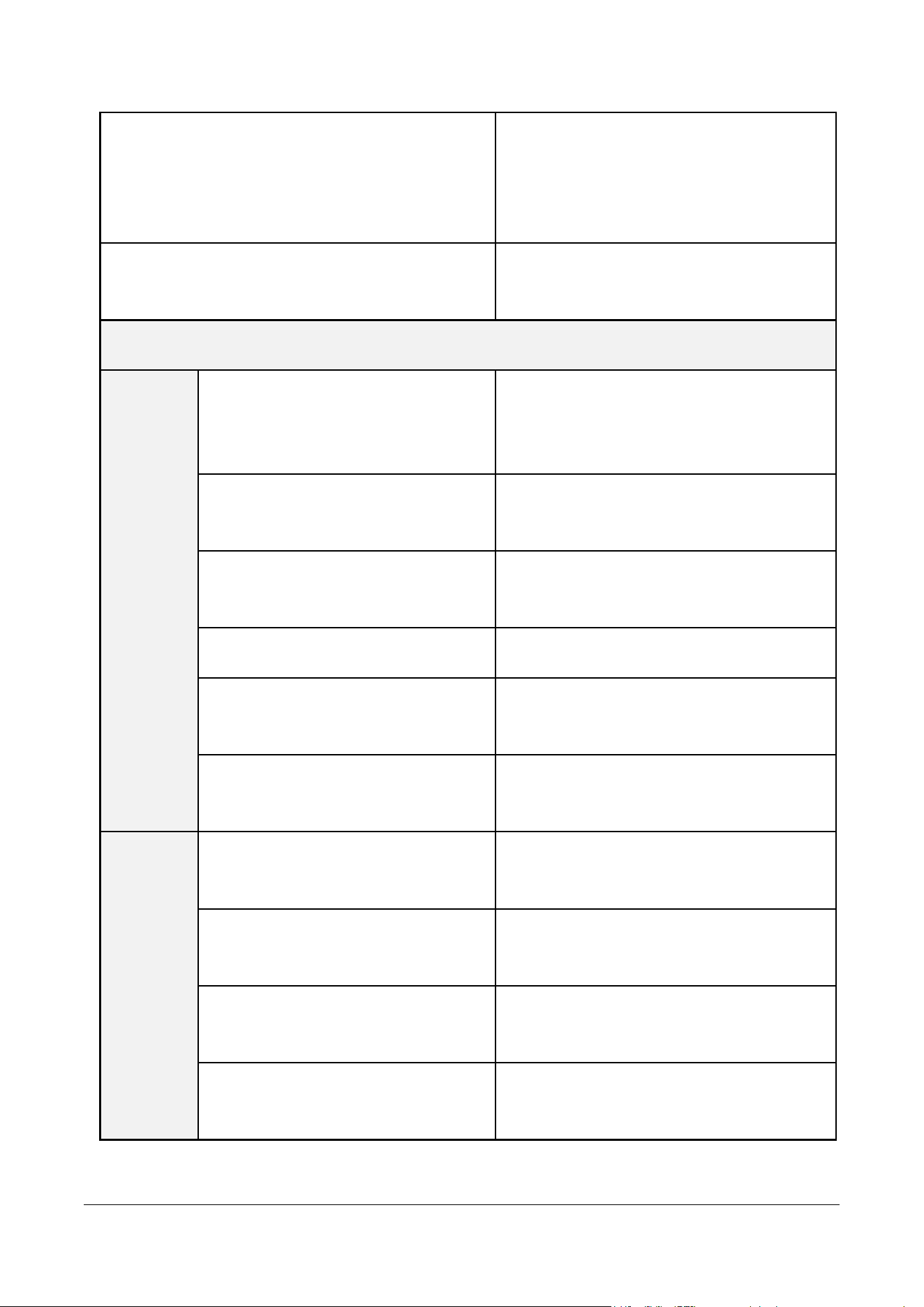
9.1 Troubleshooting
MEMO Launcher App
Problem
Solution
The email or password you entered does not match.
Please check your account information and try
again.
Your account is dormant. Your account has been
deactivated because you have not used the service
for more than a year. You can use it again after
applying to reactivate it from your PC.
To continue using the service, please log in
to http://memopatch.care and reactivate
your dormant account.
A new version is available. Please update the app to
the latest version to continue.
Please update the app to the latest version.
You have been automatically logged out. You were
automatically logged out due to inactivity for 24
hours.
You will be automatically logged out if there
is no service activity for more than 24 hours.
Please log in to continue using the service.
Can't see the patch in the list? Please make sure the
MEMO Patch is powered on and within search
range.
Press and hold the button for more than 3
seconds; the green LED will blink and the
power will turn on.
Bluetooth is turned off. The connection failed
because the mobile device's Bluetooth feature is
turned off. Please turn on Bluetooth and try again.
Turn on Bluetooth on your mobile device
and check the connection again.
Failed to start the test. An error occurred while
initializing the MEMO Patch (ECG Patch). Please re-
initialize the MEMO Patch or switch to another
device and try again.
Replace the patch device or restart the PC
Web Viewer program.
There is no patient list to start the test.
Please verify the patient and restart the test.
No search results found for the patient.
Please check the patient's name or phone
number.
MPT-E14C-UNC01
1.1.1 UM-T-002
Page 42 / 58
HUINNO Co., Ltd.
Logged in from another mobile device. After
logging in with the same ID on another mobile
device, you were automatically logged out from the
previously logged-in device.
To continue using the service, please log in
on the mobile device you wish to use.
The network is unavailable. Please check your
mobile device's network connection and try again.
Check your network connection and access
the app again.
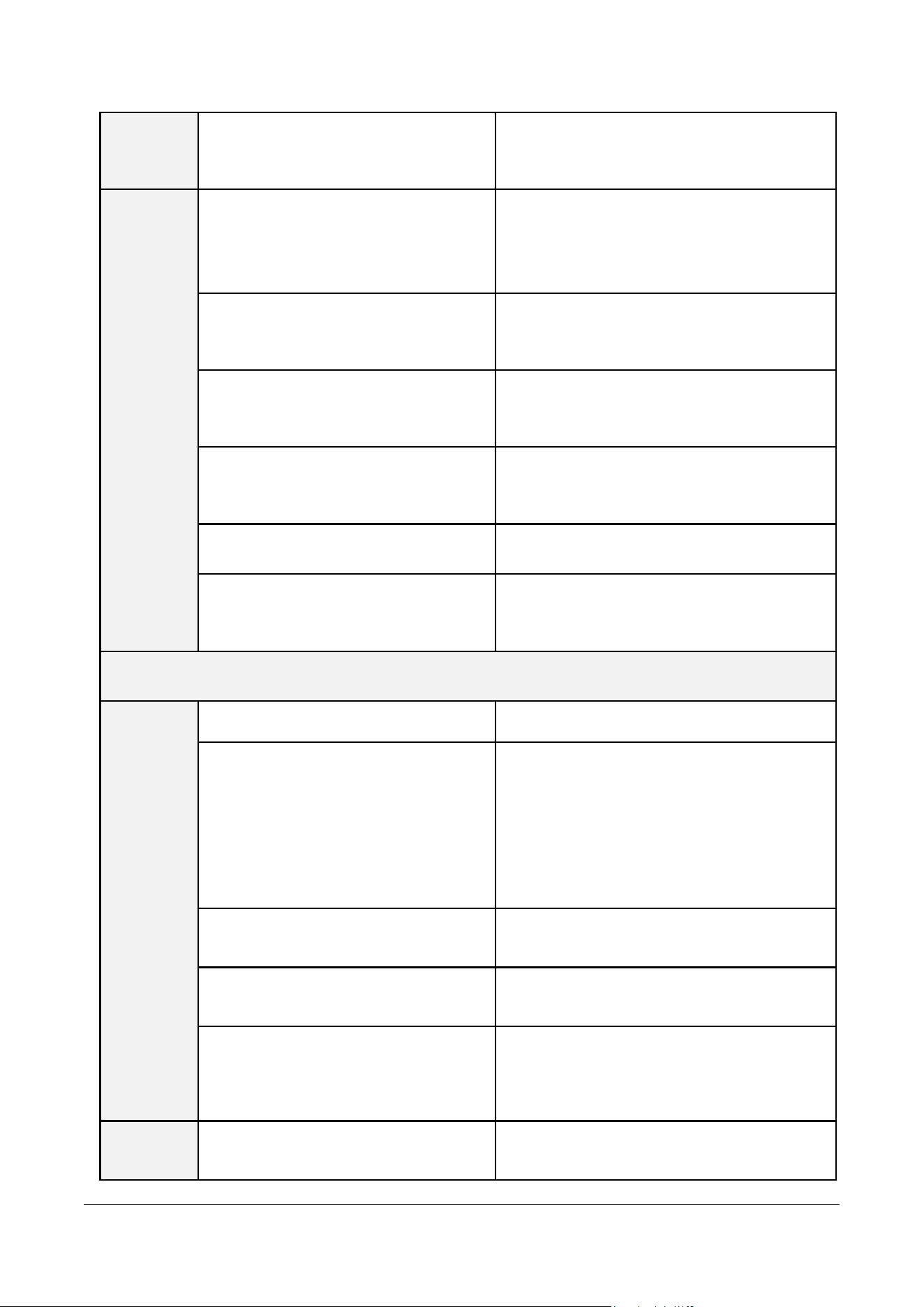
Dataloader (‘MEMO Patch ECG Dataloader’)
Login
Unable to log in.
The email and password entered do not
match our records. Please check your
account again.
Unable to connect.
An issue occurred while communicating with
the server. Please try again later.
System Error
Restart the program to resolve the
unexpected error.
Update Required
It is now ready to install the latest version.
Unable to update.
An issue occurred while communicating with
the server. Please try again later.
Cannot connect to the Internet.
Please check your internet connection
status.
Data
Download
A device error has occurred. Please try
again.
Check the patch for communication errors.
Invalid device information. Please
check the device again.
Check the saved patch information.
Invalid serial number. Please check the
device again.
Check the serial number of the patch.
A system error has occurred on the
device. Please try again.
This is an undefined error. For inquiries,
please contact sales@huinno.com.
MPT-E14C-UNC01
1.1.1 UM-T-002
Page 43 / 58
HUINNO Co., Ltd.
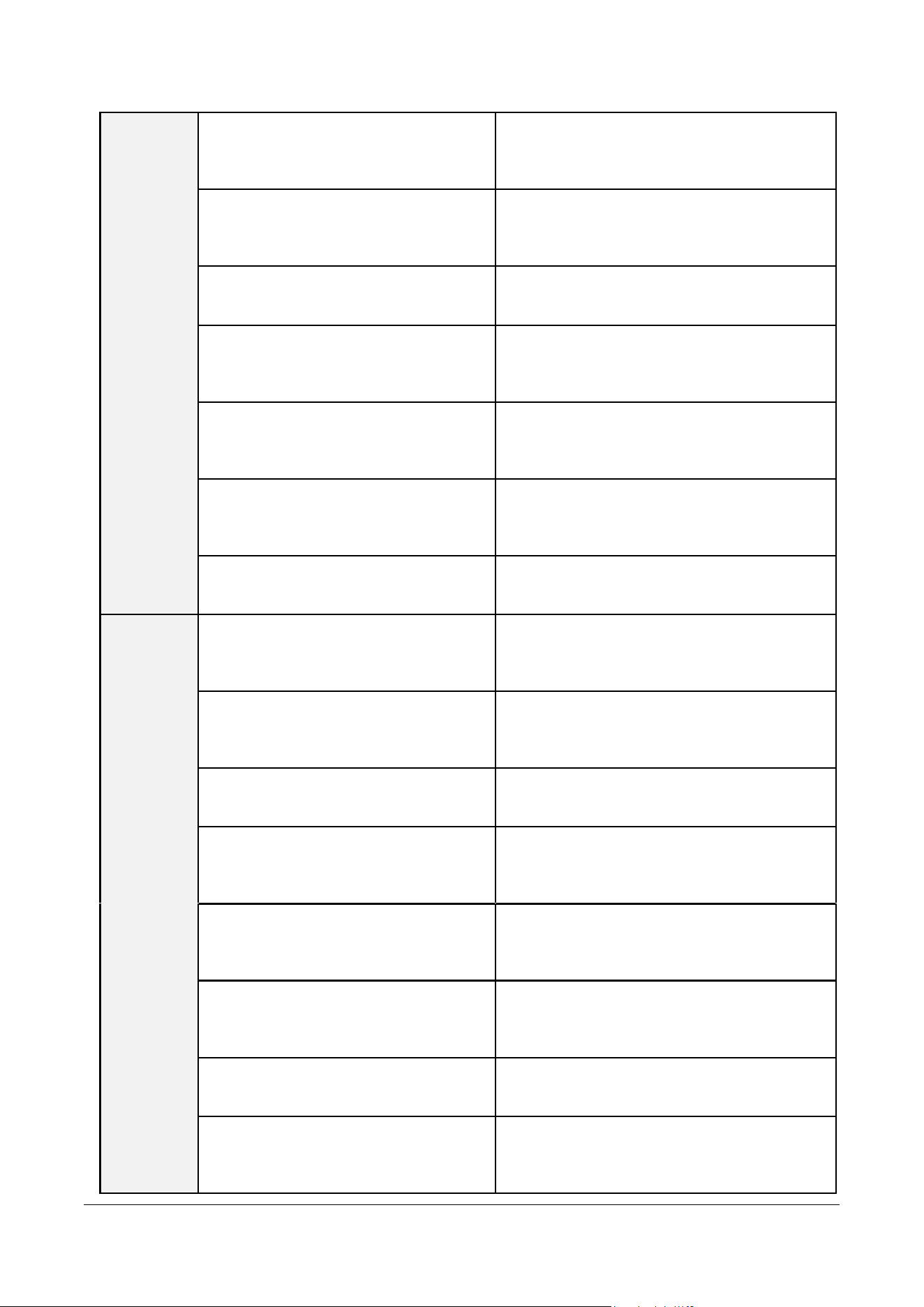
Download failed. The device is
pending activation.
This device has not started the test yet. For
inquiries, please contact sales@huinno.com.
Data
Upload
An issue occurred while
communicating with the server. Please
try again later.
This is an undefined error. For inquiries,
please contact sales@huinno.com.
Please check your internet connection
status.
Please check your internet connection
status.
This device has not been returned.
Please check the status of the returned
device.
The response timed out. Please check
your internet connection status.
Check your internet connection and log in
again.
The file to upload cannot be found.
Please check the upload file.
Your login session has expired. Please
log in again.
Please log in to continue using the service.
Desktop App ( MEMO for Desktop )
Errors
Occurring
During
Program
Execution
Failed to download the file.
Please restart the program and try again.
Unable to open the installed file.
Please restart the program and try again. If
the same problem persists, please install it
manually.
· Latest Version: Download from the web
server.
· WebView Driver:
https://go.microsoft.com/fwlink/p/?LinkId=2124
703
Edge WebView Driver installation is
required.
Click the Update button to proceed with the
installation.
An update to the latest version is
required.
Click the Update button to proceed with the
installation.
The program must be deleted before
updating to the latest version.
Go to Control Panel → Add/Remove
Programs → Delete 'MEMO for Desktop', then
click the Update button to install the latest
version.
The email or password does not match.
Please check your login credentials and try
again.
MPT-E14C-UNC01
1.1.1 UM-T-002
Page 44 / 58
HUINNO Co., Ltd.
Errors
Occurring
During
Login
Please try again from an authorized IP
network. (Error Code: E10002)
The IP of the PC attempting to log in must be
registered on the server. Please contact the
HUINNO Customer Center (02-3443-3160).
The account has transitioned to
dormant status because the service has
not been used for over a year.
Click the Go button to reactivate your account
on the website, then log in again.
The password has not been changed
for 3 months.
Click the Go button to change your password
on the website, then log in again.
If an incorrect password is entered 5
times, the account will be locked for
security purposes.
Please check your login credentials and try
again after 10 minutes.
The account has been locked. Please
reset your password or try again after
10 minutes.
Reset your password or check your login
credentials again and retry after 10 minutes.
Invalid email format.
No account is registered with the email
address entered.
Please check if the entered account is
registered on the server.
Errors
Occurring
When
Starting a
Test
Failed to start the test because a patch
that is already measuring was selected.
Connect another patch to start the test, or
unassign the test from the existing patch and
try again.
The network connection is unstable.
Please check your PC's internet status. If it is
blocked by a security program, please register
it as an exception.
An issue has occurred on the server.
Please try again in a moment.
Please try again in a moment. If the problem
persists, please contact the customer center.
The information entered (mobile phone
number, patient number, processing
period, etc.) is incorrect.
Please verify the entered information and try
again.
This is not a registered device. Please
contact the customer center.
Check the patch number in use and consult
the administrator regarding server registration
status.
Cannot start the test due to a
communication issue with the
connected patch.
Reconnect the patch to the PC and try again.
If the same problem recurs, proceed with
another patch.
Failed to connect to the Bluetooth
patch.
Please ensure the patch is turned on and
within range.
A code indicating a required device
inspection has been found. (Including
CS codes)
This device cannot be used; please replace it
with another device. Contact the customer
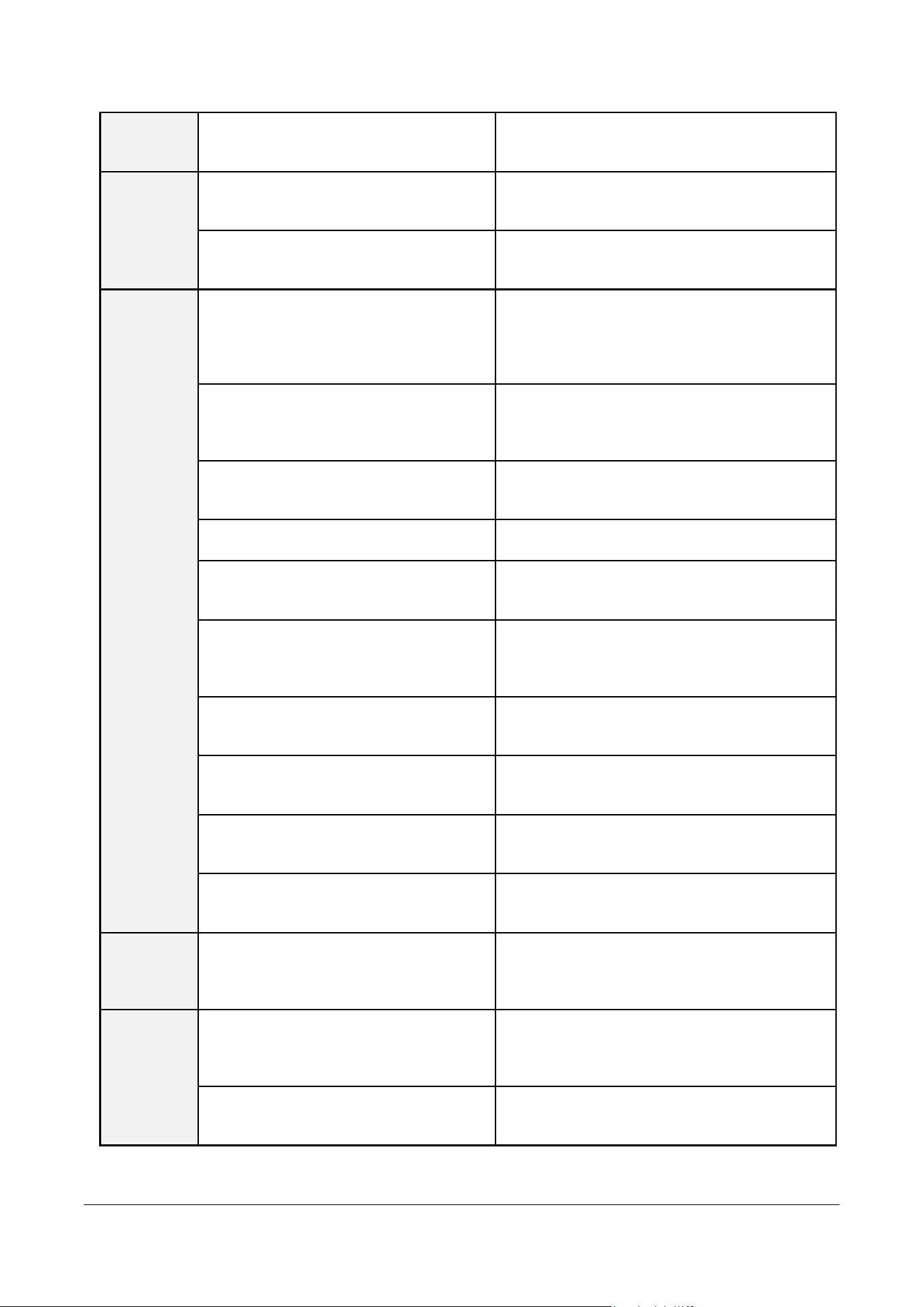
MPT-E14C-UNC01
1.1.1 UM-T-002
Page 45 / 58
HUINNO Co., Ltd.
center (02-3443-3160) to inquire about the CS
code.
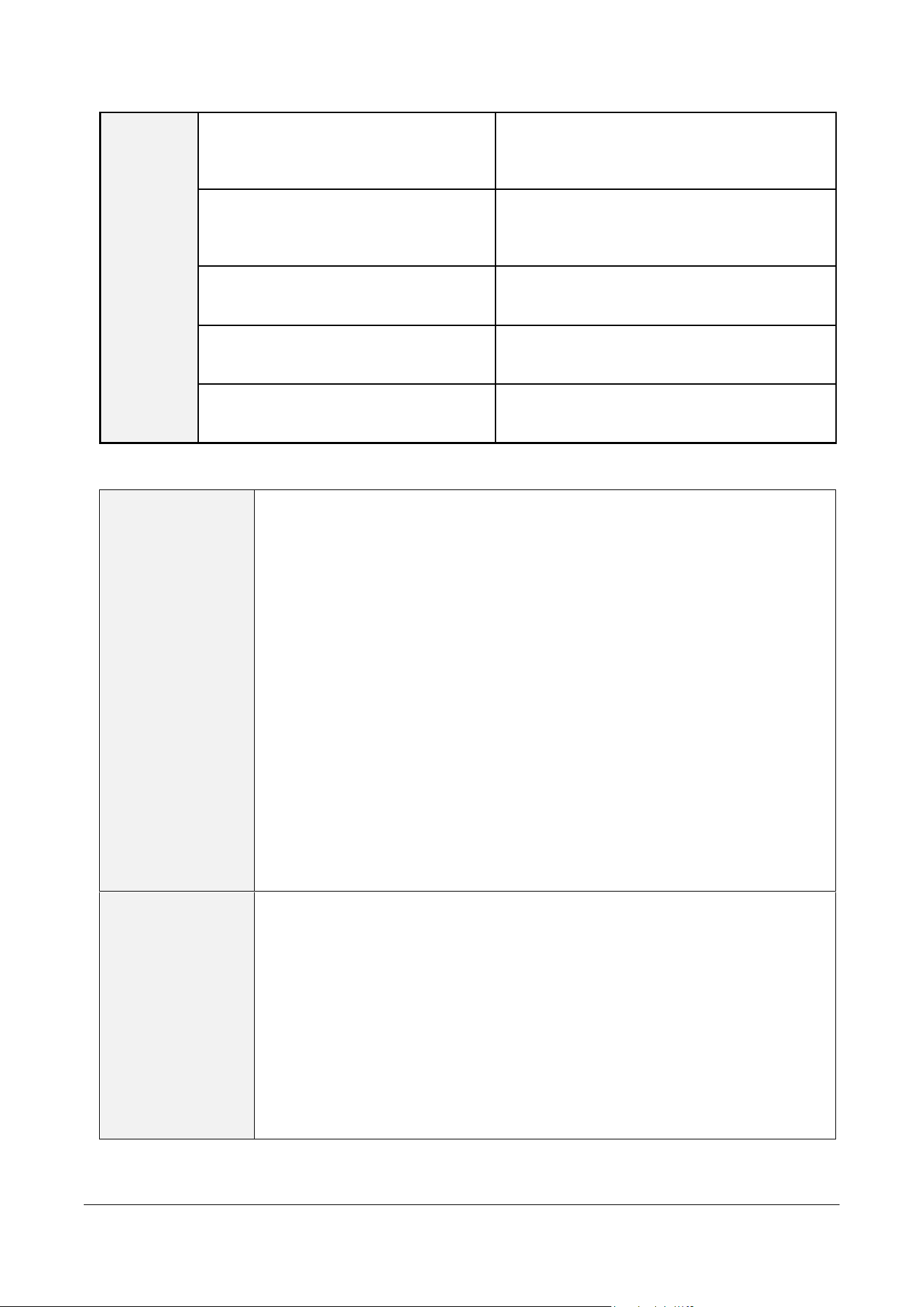
Bluetooth
Errors
The Bluetooth driver is not installed.
Check the connection status of the Bluetooth
dongle, install the driver, and try again.
Bluetooth is disabled.
Enable Bluetooth settings on your PC and try
again.
Device
Connectio
n /
Download
/ Upload /
Errors
Connection failed due to an incorrect
serial number. Please reconnect the
patch.
Please reconnect the patch. If the same
problem occurs even after rebooting the PC,
replace it with another patch. Wipe the contact
parts clean and try again.
This account has been logged in from
another computer.
Check if you are logged in from a web
browser or another PC, terminate that
session, and try again.
Upload failed. Please check your
network connection status.
Check your internet connection status and try
again.
There are no files to upload.
Please try downloading again.
The session has expired. Please log in
again and try.
Please log in again and try again.
Download failed. Please reconnect the
patch or reboot your computer and try
again.
Please reconnect the patch or reboot your
computer and try again.
Upload failed. Please disconnect the
cradle and reconnect it.
Disconnect the cradle, reconnect it, and try
again.
Upload failed due to a network issue.
Check your internet connection status and try
again.
Download failed. The device is pending
activation.
If the test was started incorrectly, connect the
patch to unassign the test and try again.
Please secure storage space and try
again.
Free up at least 2 GB of storage space on the
drive set as the download path, then try again.
Configurat
ion Error
C:\ cannot be used as a storage path.
Please change the data download storage
path to a path other than C:.
Signal
Compariso
n Error
A file matching the TID does not exist in
the PC storage path.
Check if the file exists in the download
storage path and whether the file name is
identical to the name at the time of download.
Failed to load the file from the server.
Please try again in a moment. If the problem
persists, please check the internal logs.
MPT-E14C-UNC01
1.1.1 UM-T-002
Page 46 / 58
HUINNO Co., Ltd.
Other
Errors
Webview Failed to initialize WebView.
Please restart the program.
Please restart the program. If the problem
persists, check if WebView Runtime is
installed correctly, reinstall it, and try again.
Failed to output WebView. Please click
the Refresh button and try again.
Click the Refresh button to try again. If the
problem persists, please check the internal
logs.
Cannot navigate to 'Start Test' while a
data upload is in progress.
Please move after the download is complete.
The network connection is unstable.
Check your network connection status and try
again.
An issue has occurred on the server.
Please try again in a moment.
Please try again in a moment. If the problem
persists, please contact the customer center.
9.2 FAQs
Ambulatory ECG
Monitor
1. How do I turn off the power?
This product cannot be turned off.
2. How can I check if the device is operating correctly?
Press and release the button for 1 second. Depending on the status of
the MEMO Patch, the green or orange LED will blink once.
3. How can I check if the connection is secure?
If the connection is unstable, the orange LED will blink at 3-second
intervals. Additionally, if you press and release the button for 1 second,
the orange LED will blink once.
4. Patch Firmware Software Update
Since updates to the firmware software version of the patch body may
only be available to authorized personnel, please contact the customer
center (02-3443-3160).
MEMO Launcher
App
1. I cannot log in to the app, although I had no problem logging in
before. What should I do?
If you encounter a login error, try logging out and logging back in
first. If it still doesn't work, check for an updated version on Google
Play Store or Apple App Store and update it.
(Android) If you still encounter a login error after the update, try
clearing the data by going to Phone Settings > Applications > MEMO
Launcher > Storage > Clear data.

MPT-E14C-UNC01
1.1.1 UM-T-002
Page 47 / 58
HUINNO Co., Ltd.
Data Upload
1. Can I use a cable other than the provided cradle cable during data
upload?
You must use the provided cradle cable when performing the data
upload process. Uploading may not be completed properly if a cable
other than the provided one is used..
2. I connected the memo patch to the cradle and then to the PC, but the
patch is not showing a green light. What should I do?
The cradle cable must be the provided cable in order to function
properly.
Product Storage
1. How should Ambulatory ECG Monitor be stored?
Once the patient returns the device and the data upload is complete, it
should be wiped down and stored according to the environmental
conditions specified by the manufacturer.
Patient Questions
1. How can a patient wearing the ECG Patch check if the device is
working properly during use?
Press and release the power button on the patch for at least 1 second;
the green LED will blink. A blinking green LED indicates that the device
is operating properly. If the green LED does not blink, please contact
the HUINNO Customer Center (02-3443-3160).
2. What should I do if symptoms occur while wearing the ECG Patch
device?
If symptoms occur, you must press the symptom recording (Power)
button on the ECG Patch. Pressing the button for about 1 second or
longer and seeing the green LED blink indicates that the symptom has
been recorded. If it is difficult to press the symptom recording button,
you can also record your symptoms in the Patient Note.
3. What should I do if I forget to record a symptom?
If you forget to record a symptom, write down the approximate time
the symptom occurred and the symptom itself in the Patient Note.
4. What should I do if I accidentally press the symptom recording button
multiple times, or if I press it by mistake when there are no symptoms?

MPT-E14C-UNC01
1.1.1 UM-T-002
Page 48 / 58
HUINNO Co., Ltd.
The symptom recording button is used to compare whether the
palpitations felt by the patient occurred simultaneously in the patient's
heart. Therefore, pressing the button multiple times or by mistake will
not affect the examination results.
5. What should I do if the ECG Patch detaches from the body?
Contact your attending medical staff and follow their instructions.
6. Can I use an electric blanket or an electric bed while wearing the ECG
Patch?
Do not use an electric blanket or an electric bed connected to a power
cord. Electric devices can interfere with the patient's bio-signals,
affecting the accuracy of the test results.
*
Note:
However, it is fine to use them after unplugging the power
cord.
*
Note:
You may use electric cars, microwaves, and induction cooktops
as they do not affect the ECG Patch.
7. Can I exercise while wearing the ECG Patch?
It is recommended to avoid strenuous exercise, as it can affect the
measurement of ECG signals. In particular, be careful as sweating may
cause the device to fall off.
8. Can I shower, bathe, or swim while wearing the ECG Patch?
Although the ECG Patch is waterproof, the device must be removed
during showering, bathing, or swimming.
9. Can I reattach the ECG Patch to a position different from the original
attachment site?
Yes. You can reattach the patch to a slightly different position, but it is
recommended to consult with your medical staff.
10. What should I do if skin irritation or itching occurs?

MPT-E14C-UNC01
1.1.1 UM-T-002
Page 49 / 58
HUINNO Co., Ltd.
Some patients may experience mild skin irritation or itching. If irritation
or itching occurs or worsens, please contact the hospital where it was
prescribed.
11. What activities should be avoided during the test?
Please avoid strenuous exercise that may cause excessive sweating
during the test. Sweating can cause the electrodes attached to the
body to fall off.
12. Is it okay to travel while wearing the patch?
Generally, traveling during the test is fine, but it is best to avoid
excessive physical activity that could cause the patch to fall off.
13. Can I board an airplane while wearing the patch? Are there any issues
with airport security checks?
No, there are no issues. There may be slight additional noise in the
signals or changes in the ECG waveform that do not affect the analysis
results. However, an alert sound may be heard while passing through
airport security checkpoints.
14. How do I return the patch after the test is completed?
You can place the patch in the storage bag (pouch) and return it to
the medical staff at the hospital where you received the prescription.
15. Who should I contact if I have questions during the test?
Please call the HUINNO Customer Center. Depending on the nature of
the question, you may need to contact the hospital directly.
• To receive support for installation, use, or maintenance of the device, or to report unexpected
behavior or events, please contact HUINNO's customer service.
Customer service operate from 09:00 to 18:00 on weekdays, with a one-hour lunch break from 12:00 to
13:00, closed on holidays and weekends (KST).
MPT-E14C-UNC01
1.1.1 UM-T-002
Page 50 / 58
HUINNO Co., Ltd.
10.0 DEVICE SPECIFICATION
10.1 Performance Characteristics
ECG Channel
1 Channel or 3 Channels
Internal Storage Capacity
4 Gbit (Up to 14 days)
Recording Type
Continuous
Service Life
Up to 14 days
Useful Life
2 years
Signal Processing / Annotation
Pacemaker pulse detection flag (IC level, non-diagnostic
annotation)
Respiration measurement signal calculated by analyzing thoracic
impedance variations
10.2 Electrical Characteristics
Protection Against Electric Shock
Defibrillation-proof type CF applied part
Internally powered medical device
ECG Frequency Response Range
0.05Hz to 40Hz
ECG Input Impedance
≥10 MΩ
ECG A/D Sampling Rate
250 Hz
ECG Resolution
12bit
ACC A/D Sampling Rate
12.5 Hz, 50 ㎐
ACC Resolution
8bit
Defibrillation Recovery Time
Within 5 seconds
10.3 Power Characteristics
Battery Type
Li-ion Polymer (Lithium-ion Polymer)
Battery Life
Up to 500 cycles (Charge/Discharge)
Battery Capacity
3.7V / 310mAh
Cell size: 4.4 mm x 26.5 mm x 26.5 mm
Pack size: 4.4 mm x 26.5 mm x 28.5 mm
MPT-E14C-UNC01
1.1.1 UM-T-002
Page 51 / 58
HUINNO Co., Ltd.
5-Port Charging Cradle [ACC-C05P-C1]
DC IN: 9V, 2.22A, DC OUT: 5.5V, 0.45A
Adapter Rating
Input: 100-240V~50/60Hz 0.6A
Output: USB-C1:5.0VDC 3.0A, 9.0VDC 2.22A, 12.0VDC 1.67A
10.4 Physical Characteristics
Main Body Dimensions & Weight
42.55mm(W) X 43.8mm(L) X 14.85mm(H), 25.5g (including
battery)
5-Port Charging Cradle Dimensions &
Weight
174.1mm(W) X 64mm(L) X 44mm(H), 342g
Multi-Lead Cable Dimensions & Weight
36mm X 741mm ±3.0 X 12mm, 4-Port Cable, 33.5g
Single-Lead Cable Dimensions & Weight
36mm X 80mm X 12mm, 12.7g
10.5 Wireless Communication Characteristics
Transmission Frequency, Number of
Channels & Frequency Band
wireless transceiver, Number of channels: 40 (2402-2480MHz)
Supported Physical Layer (PHY)
1M, 2M
Antenna & Chipset
SDBTPTR3015, NRF52840
Modulation Scheme
GFSK(Gaussian Frequency Shift Keying) Modulation
Effective Radiated Power (ERP)
Less than 2.5 mW (4 dBm)
Wireless Communication Method
BLE 5.1
10.6 Compatible Devices
Disposable ECG
Electrodes
⚫ 3M red dot, model name: 2560, K970796), applied part
10.7 Environmental Characteristics
Operational temperature
10℃ - 45℃
Operational altitude
0 to 3,000 m
MPT-E14C-UNC01
1.1.1 UM-T-002
Page 52 / 58
HUINNO Co., Ltd.
Operational & Storage Humidity
10% to 95% (non-condensing)
Operational, Transport & Storage Atmospheric
Pressure
700hPa – 1060hPa
Transport & Storage Temperature
-20℃ - 60℃
Device Body (Patch) Enclosure Protection Rating
IP25
* Note: Do not expose to severe vibration, rain, direct sunlight, and high humidity during transport.
10.8 Minimum System Requirements for Computer and Mobile Devices
Category
Data Dataloader
MEMO for Desktop
MEMO Launcher
OS
Windows 11 or higher
Windows 11 or
higher
Android OS 13 or higher
iOS 18 or higher
Memory
8 GB or higher
8 GB or higher
4GB or higher
HDD
128GB or higher
128GB or higher
64GB or higher
Screen
Resolution
1920 x 1080 (Full HD)
이상
1920 x 1080 (Full
HD) 이상
iOS: 2340 x 1080 or higher
Android: 2400 x 1080 or
higher
External Port
USB 2.0 or higher
USB 2.0 or higher
-
Network
Wi-Fi or Ethernet
- Wired/Wireless
communication
- Bluetooth
(Optional): 4.2 or
higher (on available
desktops and
laptops)
Bluetooth 5.0 or higher
10.9 Device Operation Scenarios
Status
MEMO Patch T
Power ON
Press and hold the power button normally (for 3 seconds
or longer).
MPT-E14C-UNC01
1.1.1 UM-T-002
Page 53 / 58
HUINNO Co., Ltd.
Device Before Test Start
Automatically enters Discovery Mode. If pairing is not
completed within 5 minutes, it powers OFF (If any pairing
activity occurs within 5 minutes, the timer is extended for
another 5 minutes from the completion of the pairing
activity).
Symptom Occurrence After
Test Start
1. Mark the event by briefly pressing or holding the button.
2. Transmit the timestamp data to the mobile app.
When BLE Disconnected
1. Measurement continues.
2. Notification for disconnection is triggered:
> Blue LED blinks twice.
> During real-time monitoring: Buzzer sounds 20 times.
Low Battery During Use
Low-Battery Threshold : SOC 7%
Auto power-off : Automatically powers down within
approximately 5 minutes after displaying 0%.
Power OFF
N/A
10.10 Button Scenarios
Press Duration
MEMO Patch T
Short Press (< 2.5 seconds)
Power OFF state: N/A
Power ON state: Symptom Marking
Long Press (≥ 2.5 seconds)
Power OFF state: Power ON
Power ON state: Symptom Marking
10.11 Operation Scenarios
Status
MEMO Patch T
Description
Power ON
Green LED blinks once
Indicates power turned
on
Discovery Mode After
Power ON
Before test start: Green LED
blinks slowly repeatedly (every
5 seconds for 5 minutes)
After test start: None
Verifies the waiting
state to start the test
Button Pressed Before
Test Start
Orange LED blinks quickly
once
Confirms that the
power is on
Test Start
Green LED blinks quickly 4
times
Indicates the start of the
test
MPT-E14C-UNC01
1.1.1 UM-T-002
Page 54 / 58
HUINNO Co., Ltd.
BLE Connection (Pairing)
Blue LED blinks quickly 3
times
Confirms BLE
connection
BLE Disconnection
Blue LED blinks quickly 2
times
Confirms BLE
disconnection
Symptom Marking (After
Test Start)
Green LED blinks once
Confirms that the
patient event has been
saved
Lead Off
Orange LED blinks quickly
once repeatedly (every 3
seconds)
Indicates Lead Off
status
Button Pressed During
Lead Off
Orange LED blinks quickly
once
Confirms Lead Off
status
Low Battery
Orange LED blinks twice
repeatedly (every 6 seconds)
Indicates low battery
status
Device Reset Occurs
Reset occurs due to a device
anomaly
White LED On -> Reset ->
Power On Green LED blinks
once
Indicates a device error
Power OFF
Orange LED blinks quickly 3
times
Indicates power turned
off
Download
Green LED blinks
Data downloading
Charging
Green LED remains solid ON
Battery is charging
Charging Complete
Blue LED remains solid ON
Battery charging
complete
Charging Error
Orange LED remains solid
ON
Error during battery
charging (e.g.,
overheating)
10.12 Heart Rate Calculation
Episode Heart Rates
Max
Maximum episode heart rate (e.g., the maximum value of all
instantaneous heart rates within the episode)
Min
Minimum episode heart rate (e.g., the minimum value of all
instantaneous heart rates within the episode)
Ave
Average episode heart rate (e.g., the average value of all
instantaneous heart rates within the episode)
MPT-E14C-UNC01
1.1.1 UM-T-002
Page 55 / 58
HUINNO Co., Ltd.
Overall, Rhythm
Heart Rates
Max
Maximum overall heart rate (e.g., the maximum value among
the maximum heart rates of all rhythm episodes within the
recording)
Min
Minimum overall heart rate (e.g., the minimum value among
the minimum heart rates of all rhythm episodes, excluding
pauses, within the recording)
Ave
Average overall heart rate (e.g., the duration-weighted average
of all rhythm episode heart rates within the recording)
Heart Rate Calculation Method
Detect the R peak from the ECG waveform, then calculate the heart rate according to the following
formula: current_HR = (60 X sample_rate) / (current_R_peak_index – prev_R_peak_index)
10.13 Pause Determination
A Pause is defined as an RR interval greater than 3 seconds.

MPT-E14C-UNC01
1.1.1 UM-T-002
Page 56 / 58
HUINNO Co., Ltd.
11.0 PRODUCT WARRANTY
11.1 Warranty Claims
If the issue is not resolved after reviewing the user manual, please contact HUINNO Customer
Service.
11.2 Scope and Period of Warranty
The warranty period for this device is one (1) year, and the warranty period for accessories
and consumables is three (3) months.
This warranty covers functional and performance defects that occur under normal use in
accordance with the user manual of this device.
The warranty period refers to the period during which HUINNO Co., Ltd. or the seller is
obligated to replace the product free of charge for quality, performance, and functional
defects arising from normal use.
The warranty takes effect from the date of purchase. Please retain the product warranty card
or proof of purchase. In the absence of such proof of purchase, the warranty will begin 90
days after the date of manufacture according to HUINNO Co., Ltd.’s records.
The warranty applies only to the original purchaser who bought the product from an
authorized distributor.
The warranty does not apply to second-hand goods or products purchased from
unauthorized retailers. HUINNO Co., Ltd. is not liable for any damages resulting from the
replacement of or service to such products.
The warranty for products supplied under a separate contract with HUINNO Co., Ltd. shall
be governed by the terms of that contract.
11.3 Warranty Exclusions
The warranty does not apply, and service fees may be charged regardless of the warranty
period, in the following cases:
The warranty period has expired, or the warranty period cannot be verified.
Failure or damage caused by the user’s careless handling, negligence, or improper operation
of the device.
Failure caused by using the device in a manner not in accordance with the user manual.
Failure or damage caused by using electricity with an unauthorized voltage.
Failure caused by using parts, accessories, or consumables not approved by the
manufacturer.
Any unauthorized removal, modification, or tampering with the product or its parts.
Products serviced and/or disassembled by unauthorized personnel not designated by the
manufacturer.
Service unrelated to product defects (e.g., product education, inspection, Bluetooth
connection issues in external environments, defects caused by the use of third-party
products and/or software).

MPT-E14C-UNC01
1.1.1 UM-T-002
Page 57 / 58
HUINNO Co., Ltd.
11.4 Warranty Card
<Warranty Card>
Product Name:
Model Number:
Serial Number:
Date of Purchase:
Place of Purchase:
Warranty Period: 1 year from date of purchase for device
Client Name:
Organization:
Phone Number:
This is to certify that this device has passed the strict quality control and comprehensive inspection.
Replacement and service may be denied in any of the following cases.
1. Unable to perform replace or provide service due to the user’s intention and negligence
2. Unable to replace due to discontinuation of parts after the warranty period
3. Damage resulting from a force majeure event such as fire, explosion, storm, flood, earthquake, or
other natural disasters
4. Removal, obliteration, or alteration of identification labels (Model Number, Serial Number etc.) of
the product
MPT-E14C-UNC01
1.1.1 UM-T-002
Page 58 / 58
HUINNO Co., Ltd.
12.0 REVISION HISTORY
Rev.
Rev. Date
Page(s) Affected
Revision Description
0
July 15, 2024
All
Newly Established