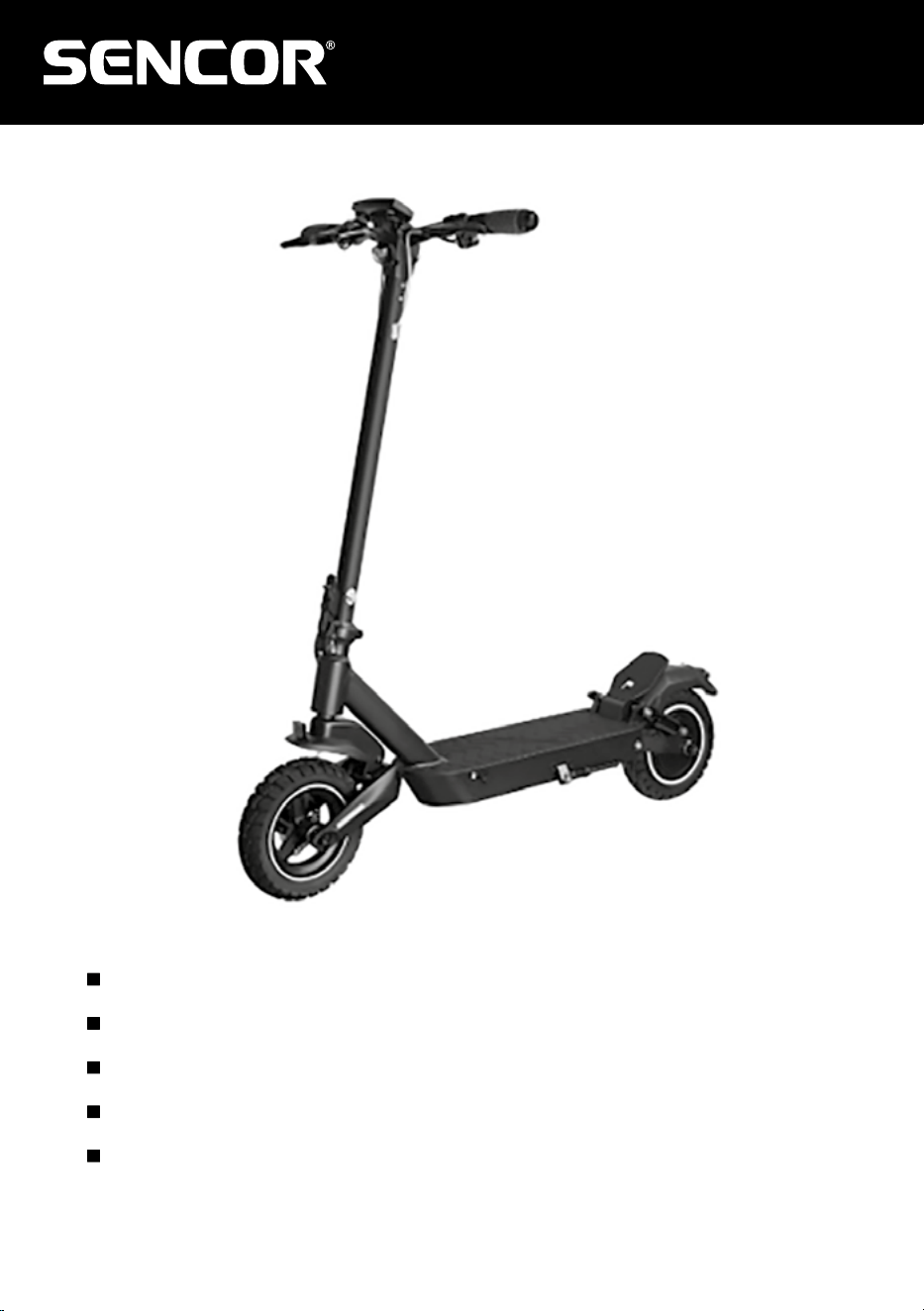
SCOOTER X30
EN User Manual Electric scooter
CZ
Uživatelská příručka Elektrická koloběžka
SK
Používateľská príručka Elektrická kolobežka
HU
Felhasználói kézikönyv Elektromos roller
PL
Podręcznik użytkownika Hulajnoga elektryczna

2 EN
EN
Copyright © 2025, Fast ČR, a. s.
Revision 01/2025
Table of contents
1. Package Contents and Scooter Description ............................................................3
1.1. Package contents ..................................................................................................3
1.2. Description of SCOOTER X30 ................................................................................3
2.1. Control Panel and Application ..............................................................................4
2.2. Multifunction button...............................................................................................5
2.4. Starting Operating Mode ........................................................................................6
3. Assembling the electric scooter ...............................................................................7
4. Charging ...................................................................................................................8
5. Battery over-discharge protection ...........................................................................8
6. Folding and transport ..............................................................................................9
7. Riding the electric scooter ...................................................................................... 10
8. Safety instructions .................................................................................................11
9. Maintenance and adjustment ................................................................................12
10. Technical specifications .......................................................................................16
Package contents and scooter description
EN
EN 3
Copyright © 2025, Fast ČR, a. s.
Revision 01/2025
1. Package Contents and Scooter Description
1.1. Package contents
1x Electric SCOOTER X30
1x Charging adapter
1x Allen key
6x Handlebar mounting screws
1x User Manual
1x Tyre inflation adapter
2x Rear side reflector
2x Front fork sticker
2x Spare screws for the footboard
2x Short spare screws for the footboard
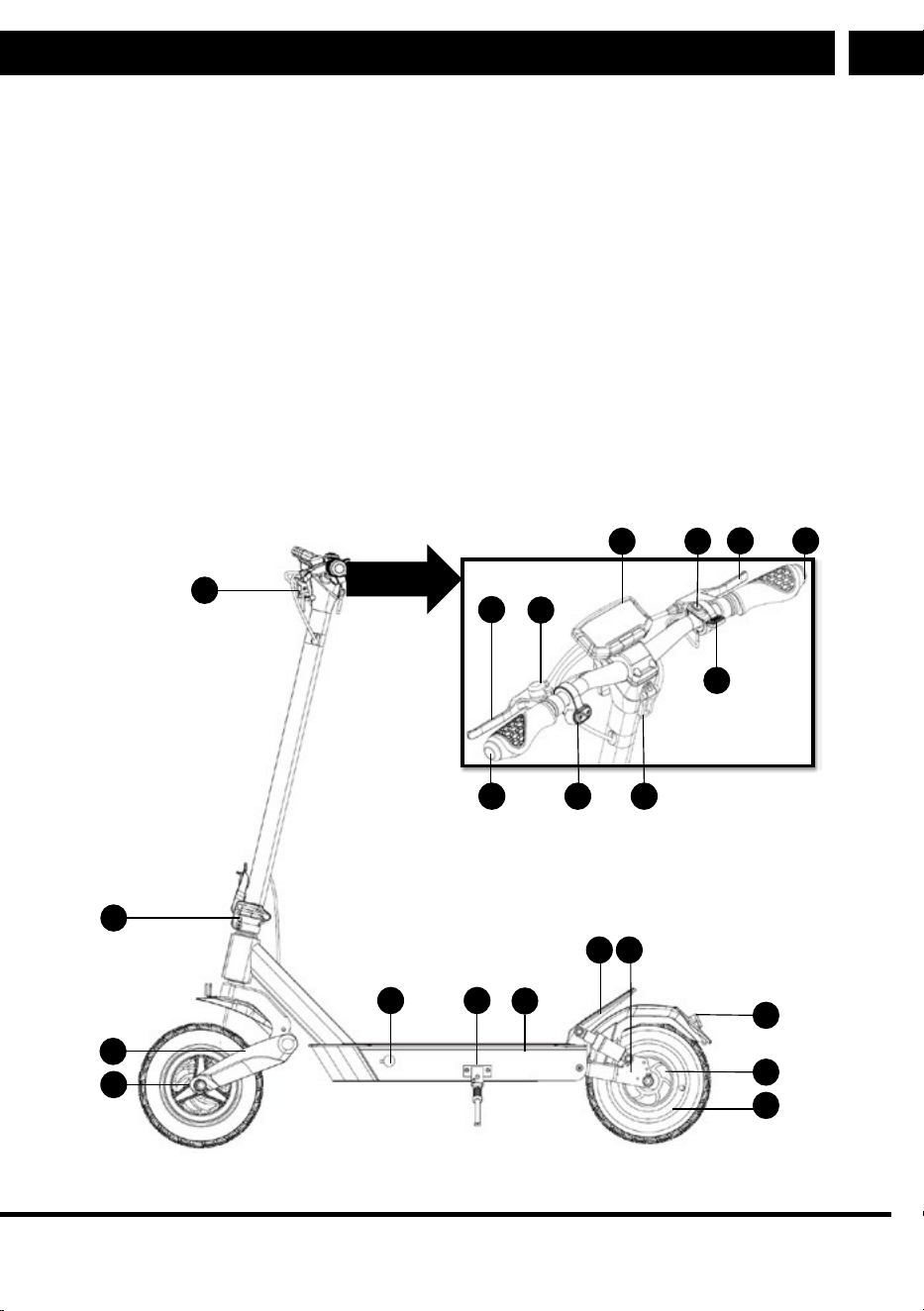
1.2. Description of SCOOTER X30
14
12
15 16
19
22
21
11
17
13
1
2
7 8
6
3
20
4
9
10
5
18
4 EN
Operation
EN
Copyright © 2025, Fast ČR, a. s.
Revision 01/2025
2. Operation
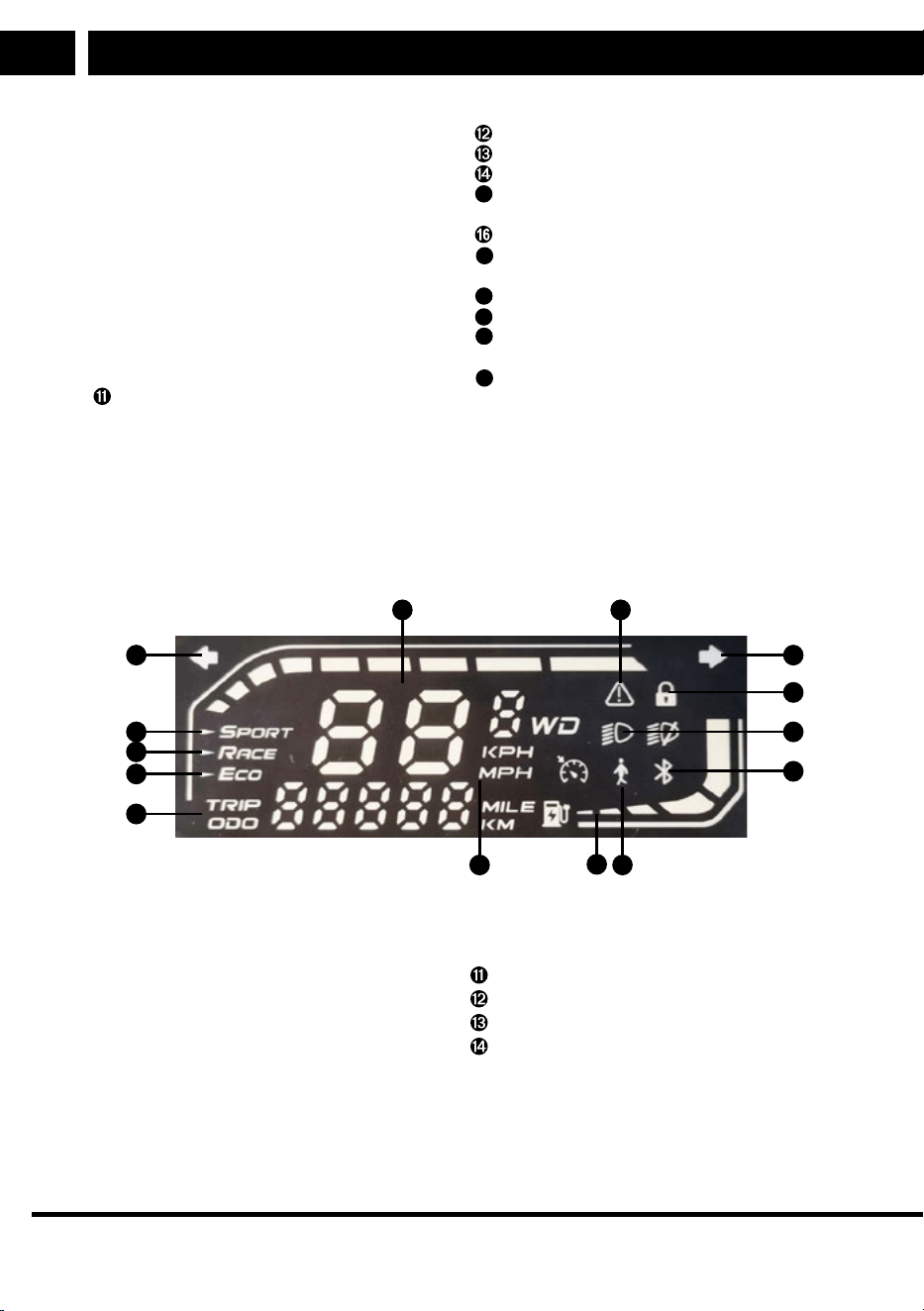
2.1. Control Panel and Application
1
2
3
5
12
11
10
9
86
4
1314
7
➊ Left turn indicator
➋ Sport mode
➌ Race mode
➍ Eco mode
➎ Show distance travelled
➏ Unit of distance
➐ Battery level
➑ Walking mode
➒ Active Bluetooth indicator
➓ Light on indicator
Lock indicator
Right turn indicator
Fault indicator
Speed
➊ Rear mechanical brake lever
➋ Bell
➌ Display with integrated USB
(5 V / 0,5 A)
➍ On/Off/Multifunction button
➎ Front mechanical brake lever
➏ Right turn light
➐ Left turn light
➑ Buttons (left and right indicator
lights)
➒ Hook for securing in transport
position
➓ Front light
Release lever for folding mechanism
Front suspension fork (factory set)
Front wheel with inflatable tyre
Charging connector
15
Stand (lowest point of the scooter
body)
Footboard, battery compartment
17
Footboard and cut-out for fixing
handlebars in transport position
18
Rear suspension fork (factory set)
19
LED compound rear light
20
Rear wheel with inflatable tyre and
electric motor
21
Rear mechanical disc brake
Operation
EN
EN 5
Copyright © 2025, Fast ČR, a. s.
Revision 01/2025
Settings via the Mobile App
ϭ Nastavenípomocí mobilní aplikace
Tuto elektrickou koloběžku je možné ŶĂƐƚĂǀŝƚprostřednictvím aplikace SENCOR HOME.
• Stáhněte si aplikaci do svého chytrého mobilního telefonu, zaregistrujte se a ŶĂƐƚĂǀƚĞ
elektrickou koloběžku. Pokud již aplikaci SENCOR HOME máte nainstalovanou, přidejte si do
ní elektrickou koloběžku.
• Návodjak zacházet saplikacínaleznete ke stažení na webu ŚƚƚƉƐǁǁǁƐĞŶĐŽƌĐŽŵ
ǀsekci KOLOBĚŽKY
• Reset spárování saplikací SENCOR HOME se provádí vzapnutém stavu elektrické koloběžky a
stiskem zapínacího tlačítka 8x za sebou. Úspěšné vyresetování bude oznámeno akustickým
tónem.
This electric scooter can be set up via the SENCOR HOME app.
• Download the app to your smartphone, register and set up your electric scooter.
If you already have the SENCOR HOME app installed, add your electric scooter to
it.
ϭ Nastavenípomocí mobilní aplikace
Tuto elektrickou koloběžku je možné ŶĂƐƚĂǀŝƚprostřednictvím aplikace SENCOR HOME.
• Stáhněte si aplikaci do svého chytrého mobilního telefonu, zaregistrujte se a ŶĂƐƚĂǀƚĞ
elektrickou koloběžku. Pokud již aplikaci SENCOR HOME máte nainstalovanou, přidejte si do
ní elektrickou koloběžku.
• Návodjak zacházet saplikacínaleznete ke stažení na webu ŚƚƚƉƐǁǁǁƐĞŶĐŽƌĐŽŵ
ǀsekci KOLOBĚŽKY
• Reset spárování saplikací SENCOR HOME se provádí vzapnutém stavu elektrické koloběžky a
stiskem zapínacího tlačítka 8x za sebou. Úspěšné vyresetování bude oznámeno akustickým
tónem.
• Instructions on how to use the application can be downloaded from https://www.
sencor.com/ in the SCOOTERS section
• Reset pairing with the SENCOR HOME app is done with the electric scooter
switched on and the power button pressed 8 times in succession. Abeep will
sound to indicate asuccessful reset.
2.2. Multifunction button
CAUTION:
Always configure riding settings before beginning your ride.
1) When the scooter is powered off, press and hold the multifunction button to turn
it on.
2) When the scooter is powered on, press and hold the multifunction button for 2
seconds to turn it off.
3) When the scooter is powered on, ashort press of the multifunction button turns
the LED front light on/off.
4) When the scooter is powered on, aquick double-press of the multifunction button
switches between riding modes.
5) When the scooter is powered on, aquick triple-press of the multifunction button
toggles the speed units on the display (km/h or mph).
6 EN
Operation
EN
Copyright © 2025, Fast ČR, a. s.
Revision 01/2025
2.3. Driving modes
Switch between modes by double-clicking the multi-function button.
Walk up to 6 km/h
Eco up to 10 km/h
Race up to 20 km/h
Sport up to 25 km/h
2.4. Starting Operating Mode
1) Switch on the electric scooter.
2) Fully press and hold down the speed control until 16 shows on the display.
3) Keep holding down the speed control and simultaneously press the brake lever.
4) Release the brake lever.
5) This will switch to the last set mode.
CAUTION:
Always activate operating mode when the electric scooter is stationary.
Start the scooter by following the instructions step by step and slowly.
Controlling the turn lights
• The turn light control is located on the left side of the handlebars, see
➑ on the
main diagram. Once activated, the light will turn off automatically after awhile
or can be turned off manually by pressing the same button.
• Pressing the right button activates the turn light on the right end of the
handlebars.
• Pressing the left button activates the turn light on the left end of the handlebars.

Operation
EN
EN 7
Copyright © 2025, Fast ČR, a. s.
Revision 01/2025
Replacing the turn lights
Take extra care when storing and putting away the electric scooter to avoid dropping
it on objects that could damage the turn lights at the end of the handlebars. If aturn
light gets damaged, new lights can be purchased as aseparate part. To replace
aturn light, loosen the 1.5mm Allen bolt located underneath the handlebars. Pull
the turn light out and disconnect it at the connector. Connect the new turn light
and cover the connector with the new protective tape. Insert the turn light into the
handlebar tube and gently tighten the 1.5mm Allen bolt.
USB port
USB port is located on the right side of the display for an emergency charging of
mobile phones. Before use, remove the rubber cap of the USB port and connect your
mobile device using a USB-A charging cable. If you are not using the USB port, put
the rubber cap back on.
Warning: USB port is not primarily used for full charging like a regular charging
adapter. If you are expecting to get your scooter wet, make sure that the charging
port is covered with the original rubber cap. Check the rubber cap for damage.
Prevent liquids from entering the outside of the display.
8 EN
Assembling the electric scooter
EN
Copyright © 2025, Fast ČR, a. s.
Revision 01/2025
3. Assembling the electric scooter
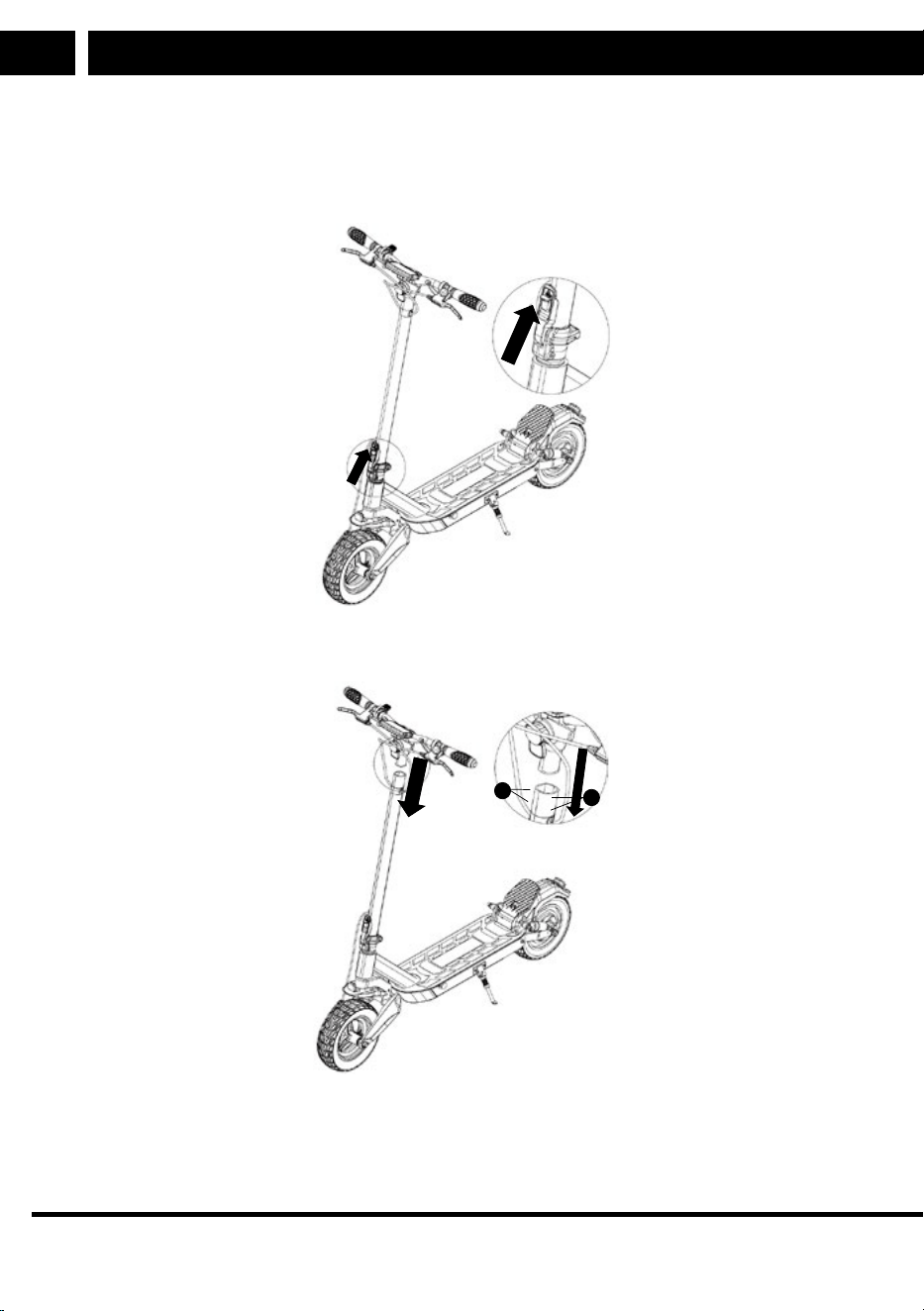
1. Straighten the handlebar rod and secure it firmly with the lock lever.
B
2. Make sure that the control unit connectors are connected to the control panel. The
wires must be properly connected to prevent them from coming loose later on.
A
B
3. Carefully connect the handlebar with the handlebar tube. Take care to avoid
damage to the connecting wire while inserting it into the handlebar tube. The
LED light must point in the direction of travel.
Charging
EN
EN 9
Copyright © 2025, Fast ČR, a. s.
Revision 01/2025
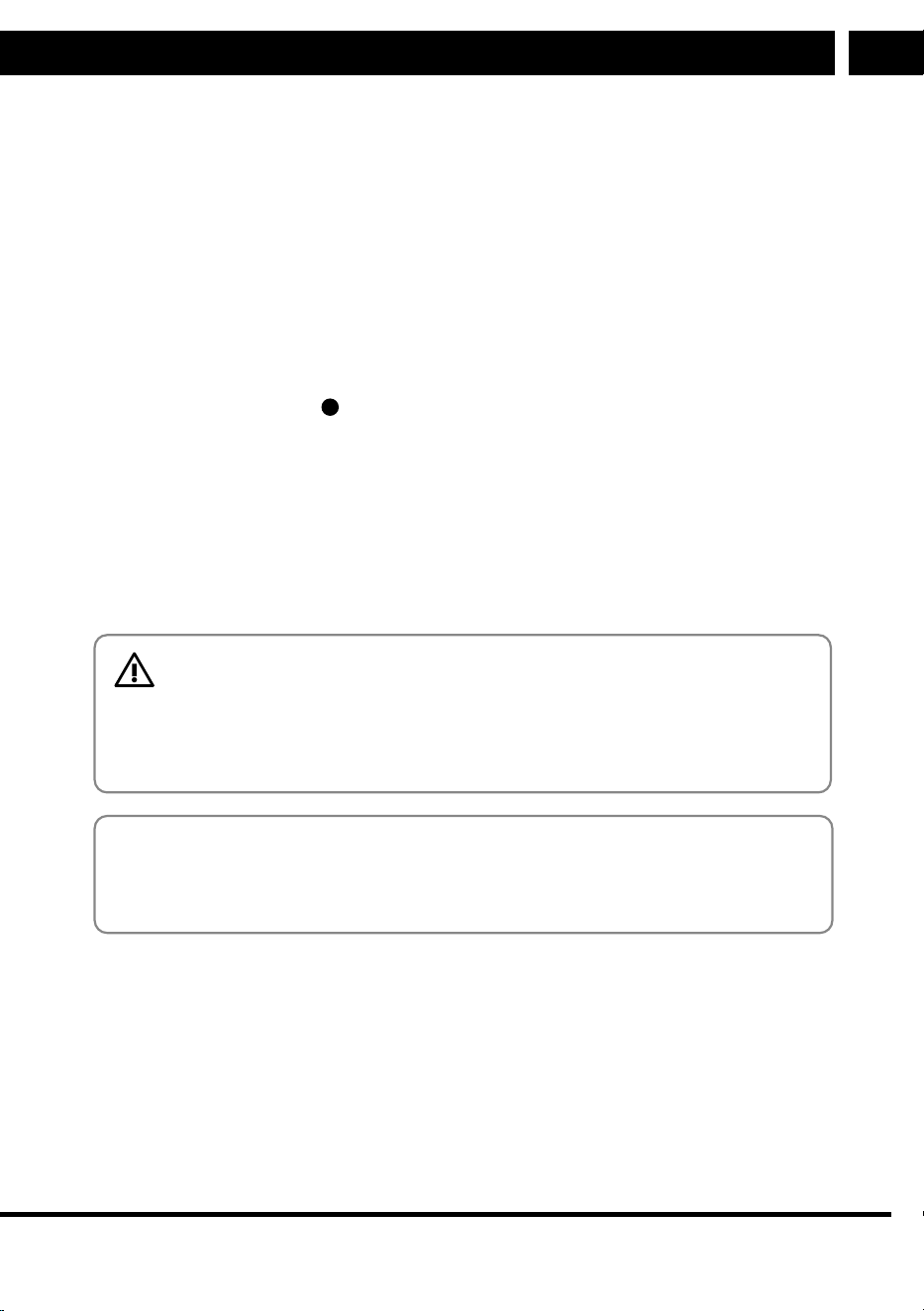
4. Screw the handlebar and the handlebar tube together. Insert two Allen screws
Afrom the left side andtwo Allen screws B from the opposite side, as shown
in the diagram. Tighten the bolts firmly. Regularly check that the screws have
not come loose during use.
5. Switch on the electric scooter.
4. Charging
Before starting your ride, ensure the battery is fully charged. Switch on the control
panel and check the battery level.
Charge the scooter with the supplied charging adapter. First, uncover the rubber cap
of the charging connector
15
on the scooter and connect the charging adapter. Then
connect the adapter to your power outlet. When the charging process is finished and
the charging adapter is disconnected, cover the charging connector opening again
with the rubber cap. Regularly check that the protective cap covers the charging
connector when not charging.
The charging adapter includes aindicator displaying two states.
1. Red LED: Indicates that the battery is charging
2. Green LED: Indicates that the battery is fully charged
CAUTION:
Only use the original accessories provided in the package for charg-
ing. If the battery life becomes very short, it is asign that the bat-
tery'slifespan has been consumed. It is recommended to have the
battery replaced at an authorised service centre.
Recommendation:
If the unit is not to be used for an extended period of time, we recommend to fully
charge the battery once every two to three months. We do not recommend storing
the unit with aflat battery to prevent irreparable damage to the battery (loss of
capacity).
5. Battery over-discharge protection
Each component of the electric scooter is protected against damage caused by oper-
ational overload and lower battery charging level.
1. If the scooter is subject to ahigher load, such as riding up frequents or up
asteep hill, the control unit and electric motor overheating protection will be
enabled, limiting the power for anecessary period of time. The speed will be
reduced until the temperature falls to the temperature falls back to normal.
10 EN
Folding and transport
EN
Copyright © 2025, Fast ČR, a. s.
Revision 01/2025
2. If the battery level drops below 30%, the maximum scooter speed will be limited
to max. 15 km/h. If the battery level drops below 25%, the maximum speed will
be limited to max. 10 km/h.
CAUTION:
Do not repair and/or tamper with the electric scooter (SCOOTER X30)
protection mechanisms. This will help prevent damage to individual
components of the scooter.
6. Folding and transport
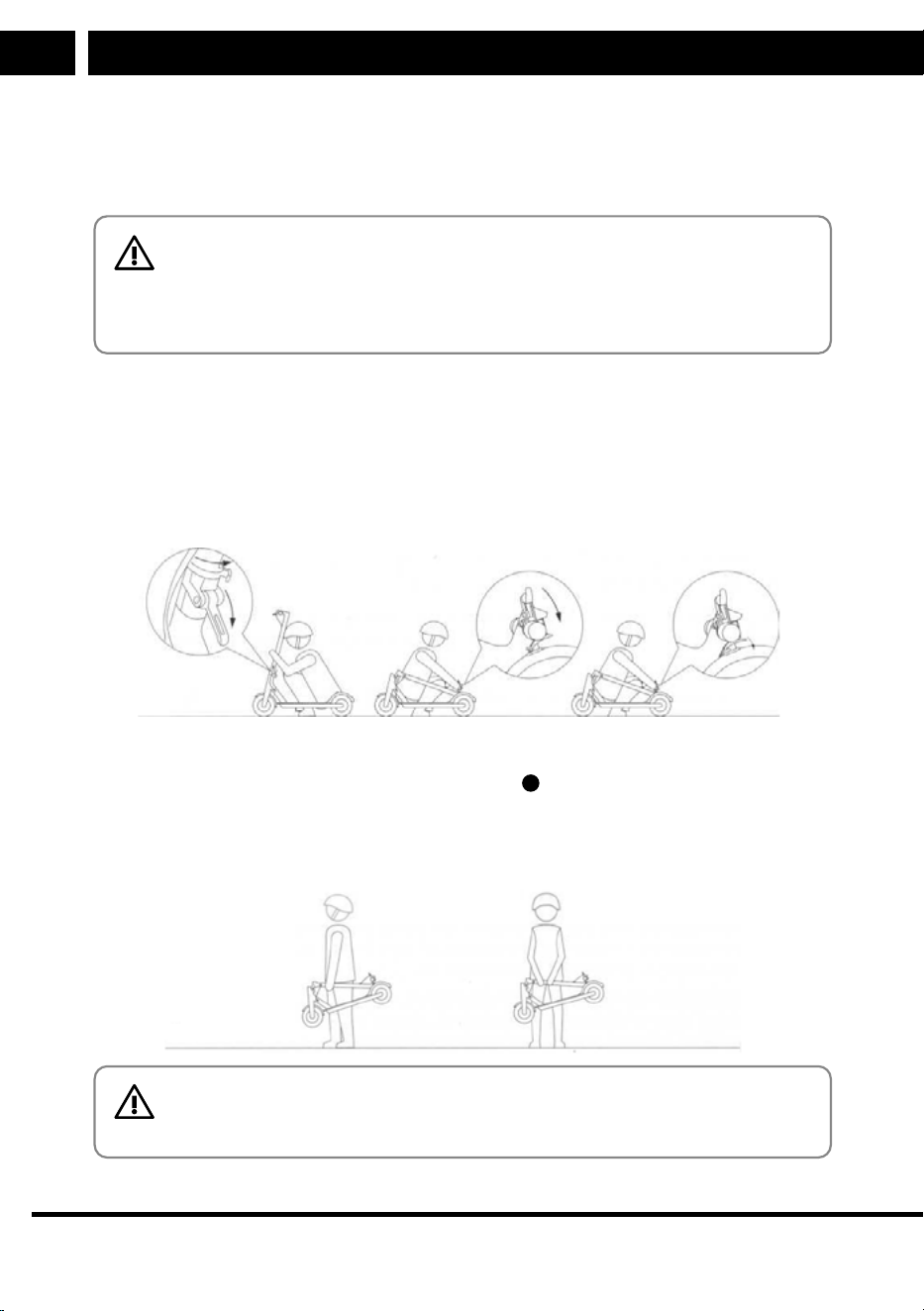
1. Ensure the electric scooter is turned off. Hold the scooter steady, unlock the
folding mechanism release lever at the bottom of the handlebar tube, and flip
the lever forward in the direction of travel.
CZ 9
CZ
Revision 08/2020Copyright © 2020, Fast ČR, a. s.
Skládání a transport
2. Sklopte uvolněnou řídítkovou trubku směrem k zadnímu blatníku, kde ji zajistíte
pomocí háku na řídítkách a zářezu na zadním blatníku. Správné složení do
transportního stavu
3. Pro přenášení uchopte Scooter One 2020 za řídítkovou trubku. Pro pohodlnější
transport doporučujeme držet řídítkovou trubku v třetině její délky, na straně blíže
k přednímu kolu.
Sencor Scooter One EN CZ SK PL HU.indb 9Sencor Scooter One EN CZ SK PL HU.indb 9 16.08.2020 21:05:2416.08.2020 21:05:24
2. Fold the loosened handlebar tube towards the rear mudguard, securing it using
the hook
➒ on the handlebars and the notch
18
at the rear.
3. To carry the scooter, hold it by the handlebar tube. To make the scooter easier to
carry, we recommend holding the handlebar tube one third of the way along on
the side near the front wheel.
CZ 9
CZ
Revision 08/2020Copyright © 2020, Fast ČR, a. s.
Skládání a transport
2. Sklopte uvolněnou řídítkovou trubku směrem k zadnímu blatníku, kde ji zajistíte
pomocí háku na řídítkách a zářezu na zadním blatníku. Správné složení do
transportního stavu
3. Pro přenášení uchopte Scooter One 2020 za řídítkovou trubku. Pro pohodlnější
transport doporučujeme držet řídítkovou trubku v třetině její délky, na straně blíže
k přednímu kolu.
Sencor Scooter One EN CZ SK PL HU.indb 9Sencor Scooter One EN CZ SK PL HU.indb 9 16.08.2020 21:05:2416.08.2020 21:05:24
CAUTION:
The rear mudguard is not used to carry the electric scooter.
Riding the electric scooter
EN
EN 11
Copyright © 2025, Fast ČR, a. s.
Revision 01/2025
7. Riding the electric scooter
CAUTION:
• Before each ride, always put on ahelmet and protectors to prevent
injury.
• Before each ride, always check that the mechanical brake is fully
functional.
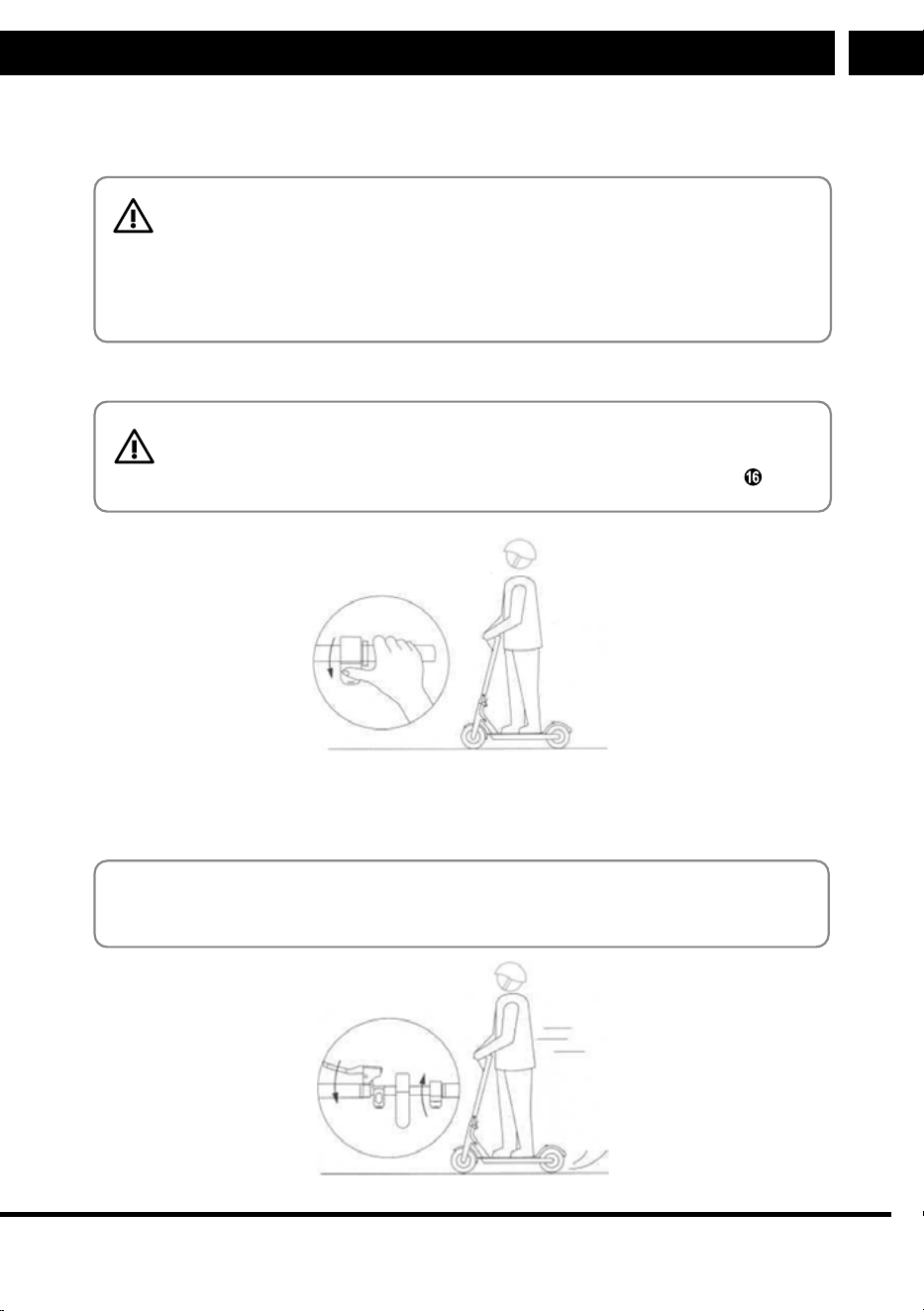
1. Place one foot on the scooter footboard and gently push off with the other foot.
CAUTION:
Always push off with your foot on the opposite side to the stand .
10 CZ
CZ
Revision 08/2020Copyright © 2020, Fast ČR, a. s.
Řízení Scooter One 2020
7. Řízení Scooter One 2020
UPOZORNĚNÍ:
• Před každou jízdou použijte helmu a chrániče, abyste předešli zranění v
případě pádu.
• Před každou jízdou zkontrolujte plnou funkčnost mechanické brzdy.
1. Položte jednu nohu na nášlapnou plochu koloběžky a druhou nohou se lehce
odražte od země.
2. Jakmile koloběžku uvedete v pohyb, zmáčkněte ovládací páčku rychlosti, aby se
spustil motor. Jakmile se koloběžka rozjede pomocí vlastní síly, položte i druhou
nohu na plochu koloběžky.
Poznámka:
Spuštění motoru a rychlost koloběžky lze ovládat po dosažení rychlosti min. 5
km/h.
Sencor Scooter One EN CZ SK PL HU.indb 10Sencor Scooter One EN CZ SK PL HU.indb 10 16.08.2020 21:05:2416.08.2020 21:05:24
2. Once the scooter is in motion, press the speed control lever ➒ to start the
motor. As soon as the scooter starts on its own, place your other foot on the
footboard.
Note:
The motor will start and the scooter'sspeed can be controlled once it reaches
aminimum speed of 5 km/h.
10 CZ
CZ
Revision 08/2020Copyright © 2020, Fast ČR, a. s.
Řízení Scooter One 2020
7. Řízení Scooter One 2020
UPOZORNĚNÍ:
• Před každou jízdou použijte helmu a chrániče, abyste předešli zranění v
případě pádu.
• Před každou jízdou zkontrolujte plnou funkčnost mechanické brzdy.
1. Položte jednu nohu na nášlapnou plochu koloběžky a druhou nohou se lehce
odražte od země.
2. Jakmile koloběžku uvedete v pohyb, zmáčkněte ovládací páčku rychlosti, aby se
spustil motor. Jakmile se koloběžka rozjede pomocí vlastní síly, položte i druhou
nohu na plochu koloběžky.
Poznámka:
Spuštění motoru a rychlost koloběžky lze ovládat po dosažení rychlosti min. 5
km/h.
Sencor Scooter One EN CZ SK PL HU.indb 10Sencor Scooter One EN CZ SK PL HU.indb 10 16.08.2020 21:05:2416.08.2020 21:05:24

12 EN
Safety instructions
EN
Copyright © 2025, Fast ČR, a. s.
Revision 01/2025
3. Stopping is essential for safe driving. First, release the speed controller ➓ and
then press the mechanical brake ➎ brake on the left side of the handlebars.
4. Try the first turns slowly and on aflat surface. To turn, shift your centre of gravity
slightly. Gently lean in the direction you want to go and slowly turn the handle-
bars.
8. Safety instructions
This electric scooter is designed for fun and recreational use. It is not ameans of
transport. Be considerate of others in both private and public areas, follow the in-
structions below as well as local traffic regulations.
When meeting pedestrians, pay close attention to your ride and make sure pedestri-
ans are aware of
your presence. If you are outside their angle of view, ring the bell, slow down
and overtake (in right-hand traffic, overtake from the left).
Faster speeds automatically mean alonger braking time. Keep at asafe speed in
case you unexpectedly need to stop, and keep asafe distance from others. Even on
aflat surface, you may encounter situations or terrain that cause you to lose bal-
ance, skid or other unexpected situations that can cause you to fall. Always pay close
attention when riding.
Check the mechanical brake, battery charge status, wear of components and wheels
before each ride. If any parts are loose or you hear an unusual noise, carry out
athorough check and contact an authorised service centre if necessary.
Neither the manufacturer nor the distributor are liable for any financial damages,
injuries, accidents, legal disputes or conflicts resulting from failure to observe the
safety instructions.
• Do not ride in the rain and avoid slippery surfaces.
• If you encounter an obstacle on your way, stop and carry the scooter over the
obstacle.
• Exercise caution when passing through low ceilinged areas.
• Do not accelerate downhill and always brake well in advance.
If you encounter asteep descent (e.g. asteep hill), dismount and walk with your
scooter.
• Do not add speed while pushing the scooter.
• Always avoid obstacles.
• Avoid carrying heavy luggage on the handlebar.
• Always keep both feet on the scooter footboard while riding.
• Use the scooter only in designated areas. Observe the local regulations of the
regions, parks, cities and states you are riding in.
• Do not turn sharply at high speeds.
• Do not ride through puddles, water or in rain.
• Do not ride with another person, even achild.
• Do not step on the mudguards.
Maintenance and adjustment
EN
EN 13
Copyright © 2025, Fast ČR, a. s.
Revision 01/2025
• Do not touch the brake components.
• Always hold on to the handlebars.
• Do not try to ride up the stairs, down the stairs or jump with your scooter.
• Remember that the stand is the scooter'slowest point. Take care to prevent it
from catching on elevated surfaces while riding.
9. Maintenance and adjustment
Regular maintenance and correct adjustment of all parts of the electric scooter
prolongs its lifespan. Clean the individual components of the electric scooter with
adamp cloth and apply apreservation oil (excluding brake discs and pads).
Before each ride, check that all removable parts are tightly attached. If any screws,
Allen screws, or nuts are loose, tighten them with the appropriate tool.
The brake mechanism must be adjusted before the first ride. Contact aspecialised
provider (e.g. abike service) to have it adjusted properly. Adjustments cannot be
made under warranty or post-warranty service at the manufacturer or distributor.
CAUTION:
Never use ahigh-pressure washer on the electric scooter.
Adjusting the brake – If the brakes are too tight or too loose, use a5 mm Allen key
to loosen the brake mechanism screw (counterclockwise) and adjust the brake cable
length as needed. Then tighten the screw firmly. Further fine-tune the brake cable
tension using the nut on the mechanical brake mounted on the handlebars. Regu-
larly inspect the brake pads for wear and replace them as necessary. Brake pads are
consumable parts that degrade with use. Keep the entire braking system clean and
avoid greasy deposits on the brake disc and pads.
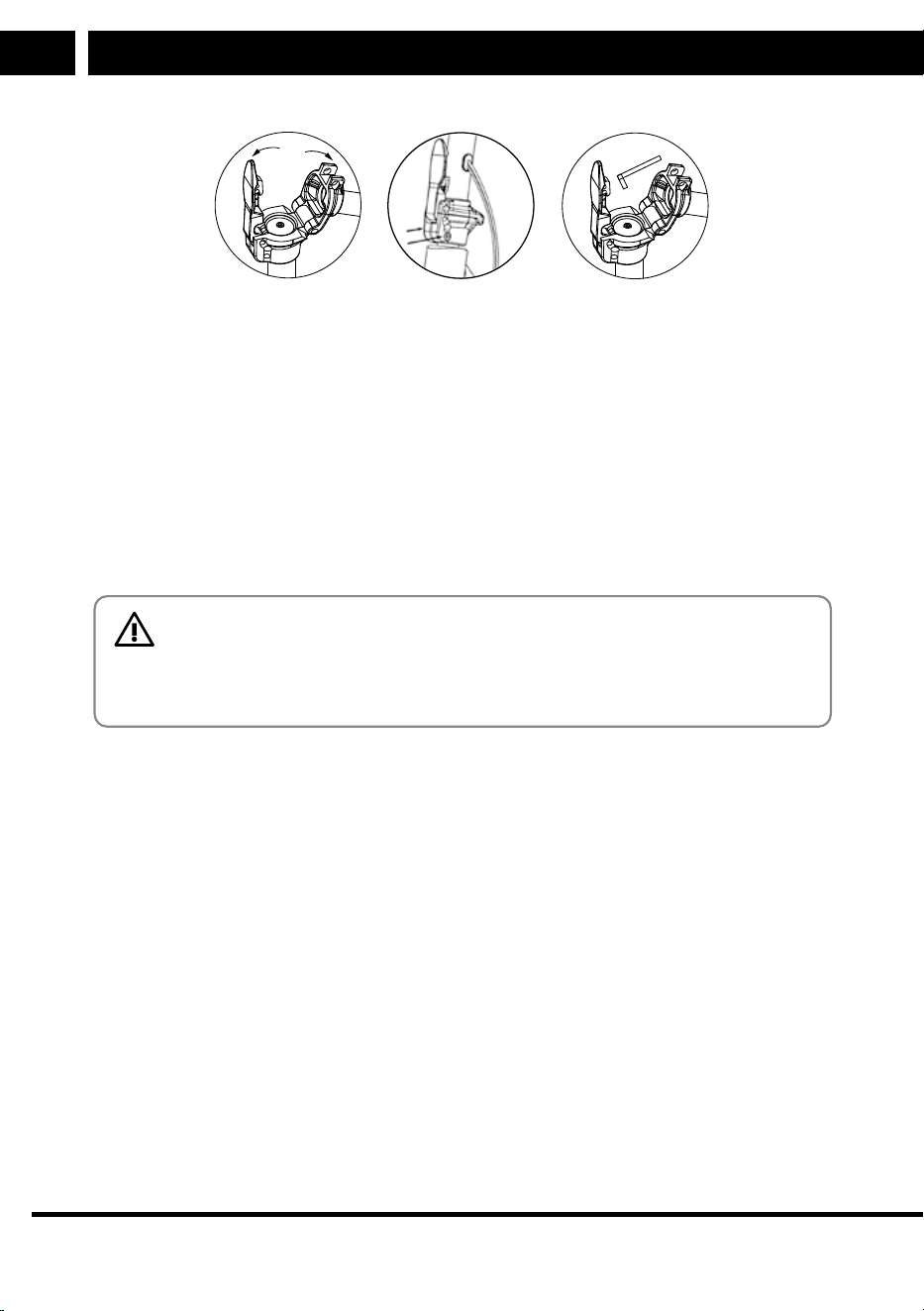
Adjusting the handlebar joint – When in the folded position, abolt C is accessible
on the handlebar joint to tighten its attachment. Before tightening the Allen screw in
the handlebar tube joint, first loosen the screws on the clamp (indicated by arrows
in diagram B). Tighten the joint fitting gently to ensure that the steering is not rigid
and that there is as little slack in the joint fitting as possible. After adjustment, align
the handlebars and securely tighten the screws B. Whenever the steering gets loos-
er after riding, tighten the components following this procedure.
14 EN
EN
Copyright © 2025, Fast ČR, a. s.
Revision 01/2025
A B C
Adjusting the folding mechanism lever - if the folding mechanism becomes loose,
it needs adjusting. The adjustment screw fits into the folding mechanism lever and is
located at the bottom of the handlebar tube. Fold the handlebars into the transport
position and eliminate the play by loosening the Allen screw (turn counterclock-
wise). Loosen the screw gradually and repeatedly test unfolding the scooter until the
lever'slocking mechanism is firm enough. Never loosen the screw to the extent that
the folding mechanism lever can only be locked with excessive force.
Checking the wheels and tyres - the wheels of the electric scooter are inflatable.
Regularly check the condition of the tyres. If the tyres show damage or excessive
wear from use, replace them immediately.
CAUTION:
The correct tyre size and pattern prescribed by the manufacturer
must always be observed. Do not attempt to change the tyres without
professional assistance.
Before each ride, check the air pressure in the tyres. The air pressure must be be-
tween 2.2 and 2.4 bar. If the tyre pressure is lower, use apump with aSchrader valve
fitting to inflate it as necessary. If the pressure is higher, deflate it to the recom-
mended level.
Removing the front wheel
List of tools:
8 mm Allen key
17 mm wrench
Maintenance and adjustment
Maintenance and adjustment
EN
EN 15
Copyright © 2025, Fast ČR, a. s.
Revision 01/2025
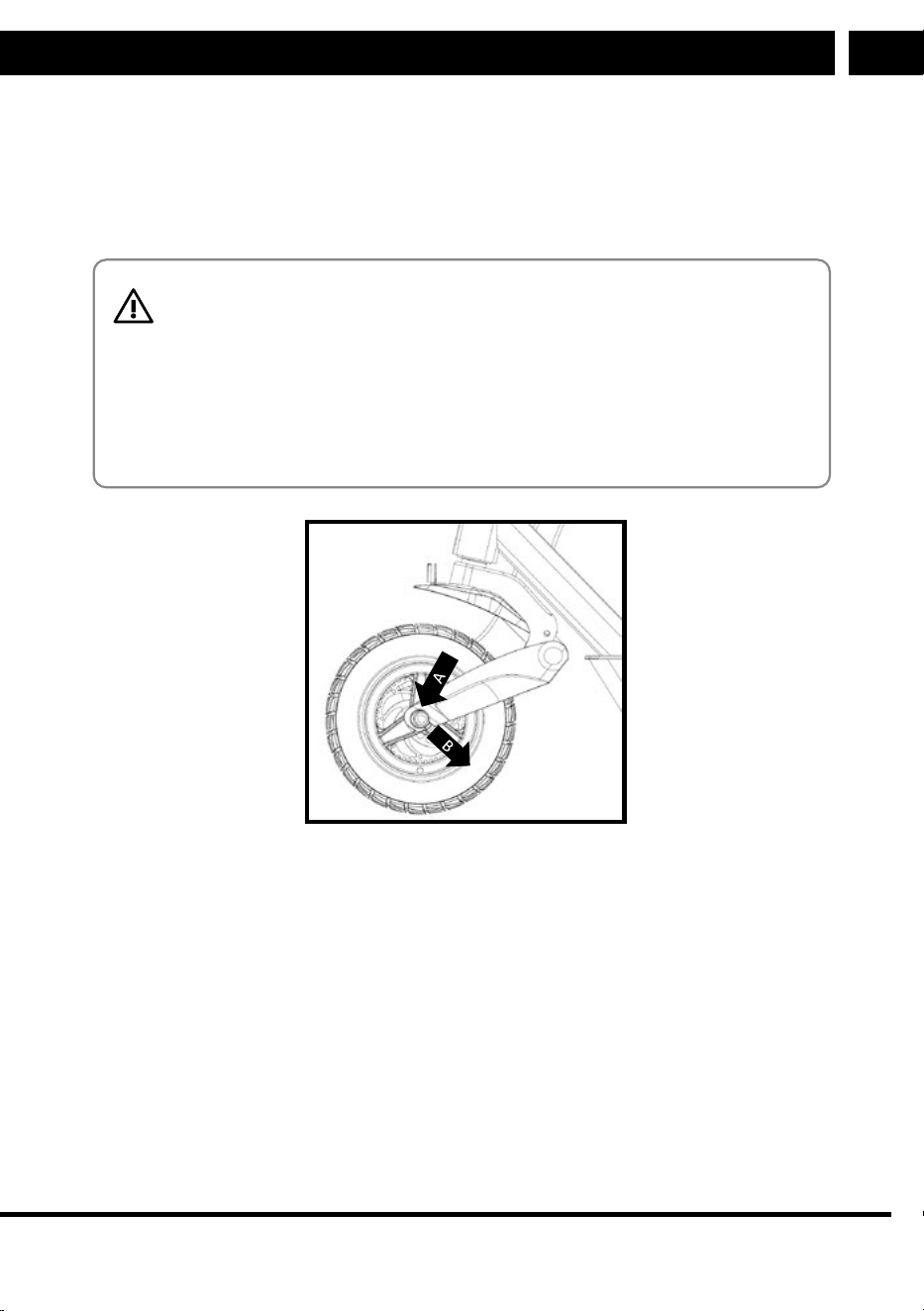
Loosen the front wheel nut using an 8 mm Allen key and a17 mm side wrench.
Carefully tap out the wheel axle from the brake disc side. Remove the front wheel
in the direction of the arrow in the picture below. When refitting the wheel, be sure
to put the spacer washers back between the wheel and the side of the front fork on
each side. Then tighten the wheel axle firmly.
CAUTION:
Perform all tasks carefully to avoid damaging the individual parts.
When assembling, ensure that all parts are properly in place and
that all connecting nuts and screws are securely tightened. If you are
unsure about assembly or disassembly, contact aspecialised service
centre. The replacement of tyres is not covered by the warranty.
Always use anew nut with aplastic washer when loosening nut A.
Removing the rear wheel
List of tools:
21 mm wrench
ablunt object for removing the caps
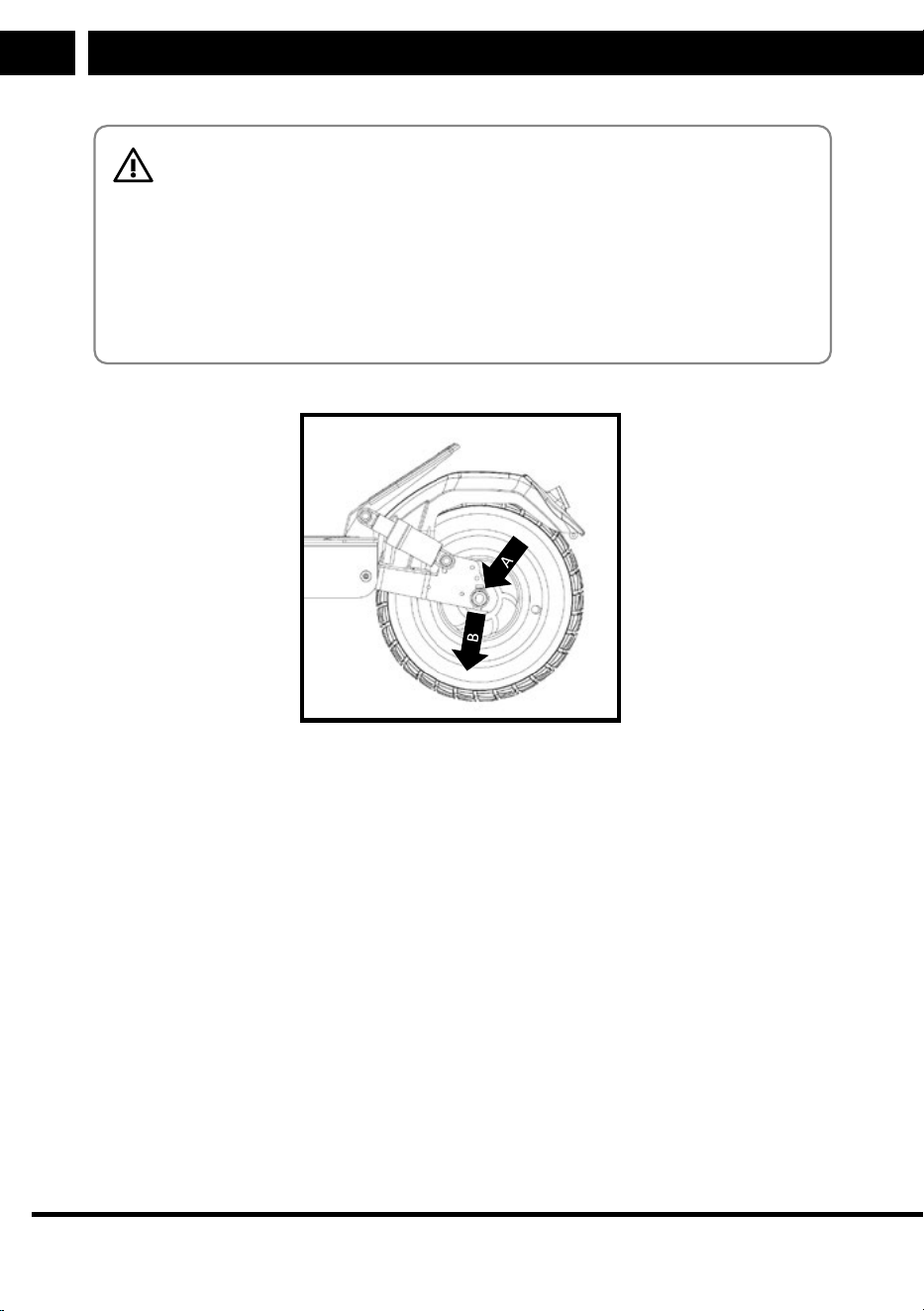
Use ablunt object to carefully remove the plastic nut covers. Use a21 mm side
wrench to loosen and unscrew the nuts Aof the rear wheel and remove the lock
washers. Release the motor lead and raise the rear wheel. When putting the rear
wheel back in place, be sure to correctly assemble the individual parts (spacing
washer, lock washer, and nuts).
16 EN
Maintenance and adjustment
EN
Copyright © 2025, Fast ČR, a. s.
Revision 01/2025
CAUTION:
Perform all tasks carefully to avoid damaging the individual parts.
Take extra care when handling the front wheel near the motor wire
connection. The motor wire cannot be disconnected. When assembling,
pay attention to precision and ensure that all connecting screws are
securely tightened. If you are unsure about assembly or disassembly,
contact aspecialised service centre. The replacement of tyres is not
covered by the warranty.

Technical specifications
EN
EN 17
Copyright © 2025, Fast ČR, a. s.
Revision 01/2025
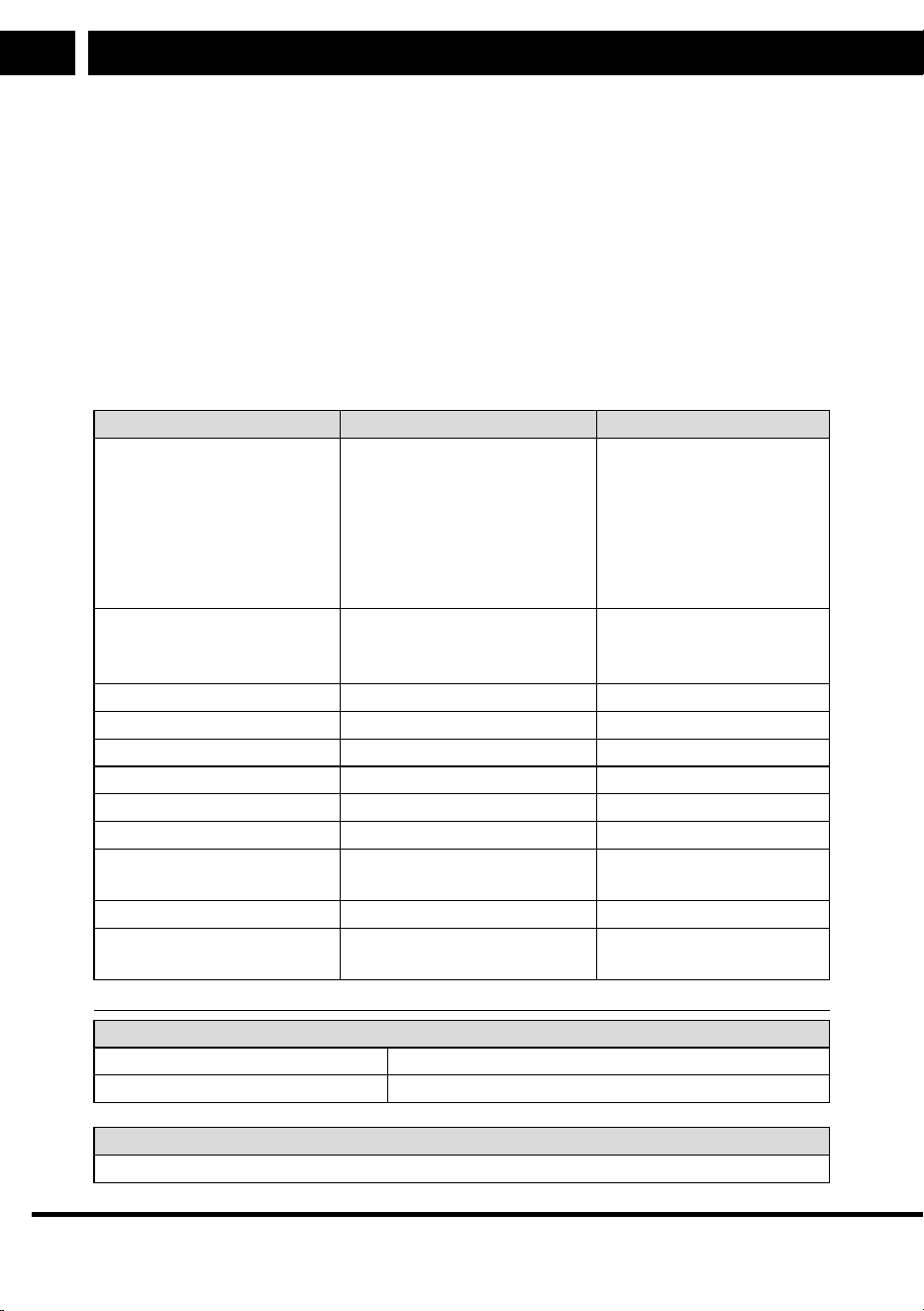
10. Technical specifications
SCOOTER X30
Key Specification
Motor Power 500W
Maximum Speed up to 25km/h (*up to 35 km/h)
Distance Range up to 45km
Front and Rear Suspension
Aluminium Construction
SENCOR HOME Application Available on Google Play and APP Store
LED Light - Front and Rear
LED Display (Mode, Speed, Battery, Lighting, Bluetooth)
Turn Lights Indicators
USB-A port 5 V / 0.5 A
Drive
Motor Power 500W
Speed:
- SPORT Mode up to 25km/h
- STD Mode up to 20km/h
- ECO Mode up to 10km/h
- WALK Mode up to 6km/h
Range up to 45km at 70kg
Cruise Control
Maximum Angle of Climb up to 15°
Wheels
10“ Front and Rear Tubless Tires
Gel for Healing a Defect in Tire
Dual Braking System - Electrical and Mechanical
Disc Brakes
Front and Rear Suspension
Application SENCOR HOME
Available on the Apple App Store and Google Play
Security Lock by Application
Bluetooth 5.0
Technical Parameters
Maximum Load Weight 120Kg
Size: 119 x 64 x 129cm (unfolded)
Size: 119 x 64 x 56cm (folded)
Weight: 22kg
Operating Temperature: 0 to 40°C
Storage Temperature: 0 to 45°C
Noise level <70 dB (A)
18 EN
EN
Copyright © 2025, Fast ČR, a. s.
Revision 01/2025
Adapter
Input Voltage: 100-240V AC 50/60Hz
Input Current: 2A
Output Voltage: 54.6V
Connector: Φ 12.3 x 10mm
Battery
Capacity: 600Wh - 12.5Ah/48V Li-ion
Charging Time: up to 7 hours
Protection Against: Short Circuit, Overvoltage, Overcharging
Battery protection against excessive discharge
*more information on www.sencor.com
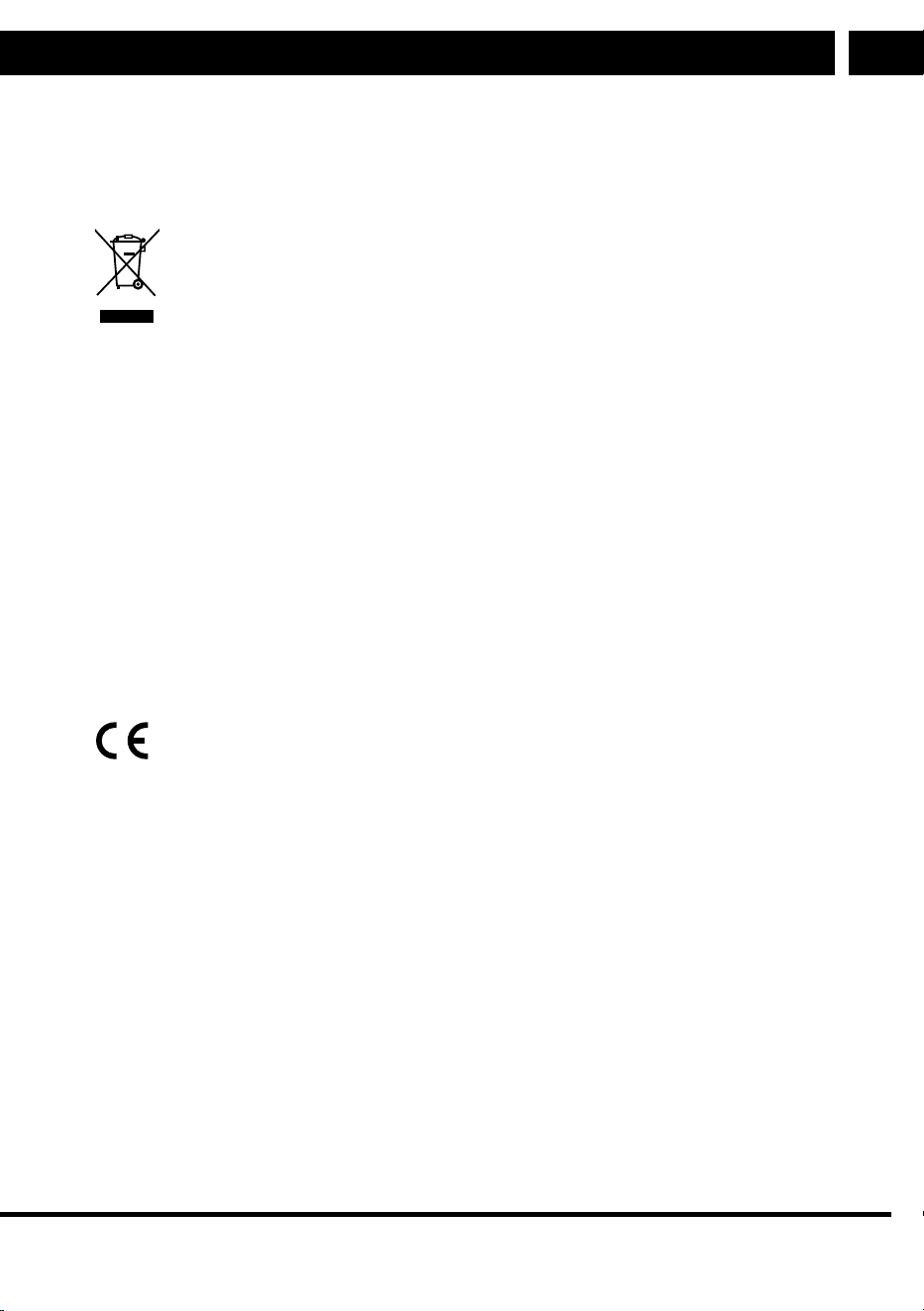
Charging adapter Value and Accuracy Unit
Manufacturer’sname or
trademark, company ID
and address
Manufacturer'sname:
Jin Xin Yu Power(Shenzhen)
Supply Co., Ltd.
Add: 3-4F,No.38,
Yuanxinlu, Tongle,
Longgang Shenzhen,
Guangdong,China
Commercial
registration number:
91440300360108074W
-
Model identification code XVE126-5460200 -
Input voltage 100–240 V
Input frequency 50/60 Hz
Output voltage 54.6 V
Output current 2 A
Output Power 109.2 W
Average efficiency in active
mode
89 %
Low load efficiency (10%) 88 %
No load power
consumption
0.16 W
Bluetooth
Version 5.0
Maximum transmitter power 100 mW at 2.4 GHz – 2.4835 GHz
Noise Emissions
The weighted sound pressure level of amoving vehicle is less than 70 dB (A).
Technical specifications
EN
EN 19
Copyright © 2025, Fast ČR, a. s.
Revision 01/2025
INSTRUCTIONS AND INFORMATION ON DISPOSAL OF USED PACKAGING MATERI-
AL
Take the packaging material to adesignated municipal waste facility.
DISPOSAL OF USED ELECTRICAL AND ELECTRONIC EQUIPMENT
This symbol on products or original documents means that used electric
or electronic products must not be added to standard municipal waste. For
proper disposal and recycling, take these products to designated collection
points. Alternatively, in some European Union states or other European
countries the products can be returned to the local retailer when buying an
equivalent new product. Correct disposal of this product helps save valua-
ble natural resources and prevents damage to the environment caused by
improper waste disposal. Ask your local authorities or collection facility for
more details. Fines may be imposed for improper disposal of this type of
waste as per national regulations.
For business entities in European Union States
If you want to dispose of electric or electronic devices, ask your retailer or
supplier for the necessary information.
Disposal in other countries outside the European Union
This symbol is valid in the European Union. If you wish to dispose of this
product, request the necessary information about the correct disposal
method from the local council or from your retailer.
FAST CR, a.s. hereby declares that the SCOOTER X30 conforms to the
2014/53/EU directive.
Changes in the text, design and technical specifications may be made without prior
notice and we reserve the right to make such changes.
CZ 15
CZ
Revision 08/2020Copyright © 2020, Fast ČR, a. s.
Technické parametry
POKYNY AINFORMACE ONAKLÁDÁNÍ SPOUŽITÝM OBALEM
Použitý obalový materiál odložte na místo určené obcí kukládání odpadu.
LIKVIDACE POUŽITÝCH ELEKTRICKÝCH AELEKTRONICKÝCH
ZAŘÍZENÍ
Tento symbol na produktech anebo vprůvodních dokumentech znamená,
že použité elektrické aelektronické výrobky nesmí být přidány do běžného
komunálního odpadu. Ke správné likvidaci, obnově arecyklaci předejte tyto
výrobky na určená sběrná místa. Alternativně vněkterých zemích Evropské
unie nebo jiných evropských zemích můžete vrátit své výrobky místnímu
prodejci při koupi ekvivalentního nového produktu. Správnou likvidací tohoto
produktu pomůžete zachovat cenné přírodní zdroje anapomáháte prevenci
potenciálních negativních dopadů na životní prostředí alidské zdraví, což
by mohly být důsledky nesprávné likvidace odpadů. Další podrobnosti si
vyžádejte od místního úřadu nebo nejbližšího sběrného místa. Při nesprávné
likvidaci tohoto druhu odpadu mohou být vsouladu snárodními předpisy
uděleny pokuty.
Pro podnikové subjekty vzemích Evropské unie
Chcete-li likvidovat elektrická aelektronická zařízení, vyžádejte si potřebné
informace od svého prodejce nebo dodavatele.
Likvidace vostatních zemích mimo Evropskou unii
Tento symbol je platný vEvropské unii. Chcete-li tento výrobek zlikvidovat,
vyžádejte si potřebné informace osprávném způsobu likvidace od místních
úřadů nebo od svého prodejce.
Tímto FAST CR a.s. prohlašuje, že typ rádiového zařízení Scooter One 2020
je vsouladu se směrnicí 2014/53/EU.
Změny vtextu, designu atechnických specifikací se mohou měnit bez předchozího
upozornění avyhrazujeme si právo na jejich změnu.
Sencor Scooter One EN CZ SK PL HU.indb 15Sencor Scooter One EN CZ SK PL HU.indb 15 16.08.2020 21:05:2516.08.2020 21:05:25
CZ 15
CZ
Revision 08/2020Copyright © 2020, Fast ČR, a. s.
Technické parametry
POKYNY AINFORMACE ONAKLÁDÁNÍ SPOUŽITÝM OBALEM
Použitý obalový materiál odložte na místo určené obcí kukládání odpadu.
LIKVIDACE POUŽITÝCH ELEKTRICKÝCH AELEKTRONICKÝCH
ZAŘÍZENÍ
Tento symbol na produktech anebo vprůvodních dokumentech znamená,
že použité elektrické aelektronické výrobky nesmí být přidány do běžného
komunálního odpadu. Ke správné likvidaci, obnově arecyklaci předejte tyto
výrobky na určená sběrná místa. Alternativně vněkterých zemích Evropské
unie nebo jiných evropských zemích můžete vrátit své výrobky místnímu
prodejci při koupi ekvivalentního nového produktu. Správnou likvidací tohoto
produktu pomůžete zachovat cenné přírodní zdroje anapomáháte prevenci
potenciálních negativních dopadů na životní prostředí alidské zdraví, což
by mohly být důsledky nesprávné likvidace odpadů. Další podrobnosti si
vyžádejte od místního úřadu nebo nejbližšího sběrného místa. Při nesprávné
likvidaci tohoto druhu odpadu mohou být vsouladu snárodními předpisy
uděleny pokuty.
Pro podnikové subjekty vzemích Evropské unie
Chcete-li likvidovat elektrická aelektronická zařízení, vyžádejte si potřebné
informace od svého prodejce nebo dodavatele.
Likvidace vostatních zemích mimo Evropskou unii
Tento symbol je platný vEvropské unii. Chcete-li tento výrobek zlikvidovat,
vyžádejte si potřebné informace osprávném způsobu likvidace od místních
úřadů nebo od svého prodejce.
Tímto FAST CR a.s. prohlašuje, že typ rádiového zařízení Scooter One 2020
je vsouladu se směrnicí 2014/53/EU.
Změny vtextu, designu atechnických specifikací se mohou měnit bez předchozího
upozornění avyhrazujeme si právo na jejich změnu.
Sencor Scooter One EN CZ SK PL HU.indb 15Sencor Scooter One EN CZ SK PL HU.indb 15 16.08.2020 21:05:2516.08.2020 21:05:25

20 EN
EN
Copyright © 2025, Fast ČR, a. s.
Revision 01/2025
EN
Warranty conditions
Warranty card is not apart of the device packaging.
This product is warranted for the period of 24 months from the date of purchase to the end-user. Warranty
is limited to the following conditions. Warranty is referred only to the customer goods using for common
domestic use. The claim for service can be applied either at dealer’sshop where the product was bought, or
at below mentioned authorized service shops. The end-user is obligated to set up aclaim immediately when
the defects appeared but only till the end of warranty period. The end user is obligated to cooperate to certify
the claiming defects. Only completed and clean (according to hygienic standards) product will be accepted.
In case of eligible warranty claim the warranty period will be prolonged by the period from the date of claim
application till the date of taking over the product by end-user, or the date the end-user is obligated to take it
over. To obtain the service under this warranty, end-user is obligated to certify his claim with duly completed
following documents: receipt, certificate of warranty, certificate of installation.
This warranty is void especially if apply as follows:
Defects which were put on sale.
Wear-out or damage caused by common use.
The product was damaged by unprofessional or wrong installation, used in contrary to the applicable
instruction manual, used in contrary to legal enactment and common process of use or used for another
purpose which has been designed for.
The product was damaged by uncared-for or insufficient maintenance.
The product was damaged by dirt, accident of force majeure (natural disaster, fire, and flood).
Defects on functionality caused by low duality of signal, electromagnetic field interference etc.
The product was mechanically damaged (e.g. broken button, fall).
Damage caused by use of unsuitable media, fillings, expendable supplies (batteries) or by unsuitable
working conditions (e.g. high temperatures, high humidity, quakes).
Repair, modification or other failure action to the product by unauthorized person.
End-user did not prove enough his right to claim (time and place of purchase).
Data on presented documents differs from data on products.
Cases when the claiming product cannot be indentified according to the presented documents (e.g. the
serial number or the warranty seal has been damaged).
Manufacturer:
FAST ČR, a.s., U Sanitasu 1621, Říčany 251 01, Czech Republic
info@sencor.com
Authorized service centers:
Visit www.sencor.com for detailed information about authorized service centers.
The original version of the instructions is in the Czech language, other language versions are made by the
appropriate translation.
Technical specifications
EN
EN 21
Copyright © 2025, Fast ČR, a. s.
Revision 01/2025
EU DECLARATION OF CONFORMITY
Product / brand: ELECTRIC SCOOTER / SENCOR
Type / model: SCOOTER X30 as factory model E9GMAX
DC 48,0V (Li-ion battery 12,5Ah); IPX5; Class III; L
WA
= 65dB(A)
Freq.: 2402-2480MHz; max. output power 1,205mW
Adapter (XVE126-5460200)
Input AC 100-240; 50/60 Hz; 2,5A; Class II; IP20
Output DC 54,6V; 2,0A; 109,2W
Manufacturer:
FAST ČR, a.s.
U Sanitasu 1621, 251 01 Říčany, Czech Republic
VAT no: CZ24777749
Person in charge of completing the technical documentation: FAST ČR, a.s.
This declaration of conformity is issued under the sole responsibility of the manufacturer.
The object of the declaration described above is in conformity with the relevant Union
harmonisation legislation:
Directive MD 2006/42/EC Directive LVD 2014/35/EU Directive ErP 2009/125/EC
Directive RED 2014/53/EU Directive EMC 2014/30/EU Directive NEOE 2000/14/EC
Directive RoHS 2011/65/EU+(EU)2015/863
The relevant harmonised standards and the other technical specifications:
EN 60335-1:2012+AC+A11+A13+A1+A14+A2+A15 EN 60335-2-29:2021+A1
EN 62233:2008+AC EN 17128:2020 EN ISO 12100:2010
EN 62479:2010 EN 55032:2015+A1+A11 EN 55035:2017+A11
EN 301 489-1 V2.2.3 EN 301 489-17 V3.2.6 EN 300 328 V2.2.2
EN IEC 55014-1:2021 EN IEC 55014-2:2021 EN IEC 62368-1:2020+A11
EN IEC 61000-3-2:2019+A1 EN 61000-3-3:2013+A1+A2
Place of issuance: Prague
Date of issuance: 20. 12. 2024
Name: Ing. Luboš Cinek (Responsible person)
Signature: