186
MM
90
MM
MANUAL
RA-X722DAB & RA-X622BT
Contents
Notes on Installation ....................................................................................................3
Introduction...........................................................................................................................4
Main Interface.....................................................................................................................5
General Settings
1
............................................................................................................6
General Settings
2
............................................................................................................7
USB/SD Card Operation............................................................................................8
Radio............................................................................................................................................9
Bluetooth
1
..............................................................................................................................10
Bluetooth
2
...............................................................................................................................11
DAB+............................................................................................................................................12
Apple Carplay................................................................................................................... 13
Android Auto...................................................................................................................... 14
Other Features .................................................................................................................15
Installation Guide
1
........................................................................................................16
Installation Guide
2
........................................................................................................17
Installation Guide
3
.......................................................................................................18
Installation Guide
4
.......................................................................................................19
Installation Guide
5
......................................................................................................20
FAQS.............................................................................................................................................21
Dimensions...........................................................................................................................21
Diagram.................................................................................................................................23
More Information..........................................................................................................24
Notes on Installation
INSTALLATION PRECAUTIONS
CAUTION
The Road Angel Stereo is designed for 12V DC negative ground operation system only. Before installing the unit,
make sure your vehicle is connected to a DC12V negative ground electrcial system.
The negative battery terminal must be disconnected before making connections, which can avoid the chance of
damaging the Road Angel Stereo due to a short circuit
Be sure to connect the colour coded leads correctly according to the diagram on the Road Angel Stereo itself.
Incorrect connection may cause the unit to malfunction or damage the vehicle’s electrical system.
Be sure to connect the speaker (-) leads to the speaker (-) terminals (or vice versa). Do not cross-wire the left and
right speaker channels or to the vehicle’s body.
Do not block vents or radiator panels. Doing so may result in heat build-up inside the unit and may result in a fire.
For Android Auto to work, you need to ground the pink cable labelled “PARK”. Otherwise, Android Auto will not
load. This is a built in safety feature common on all aftermarket headunits with Android Auto.
03
Introduction
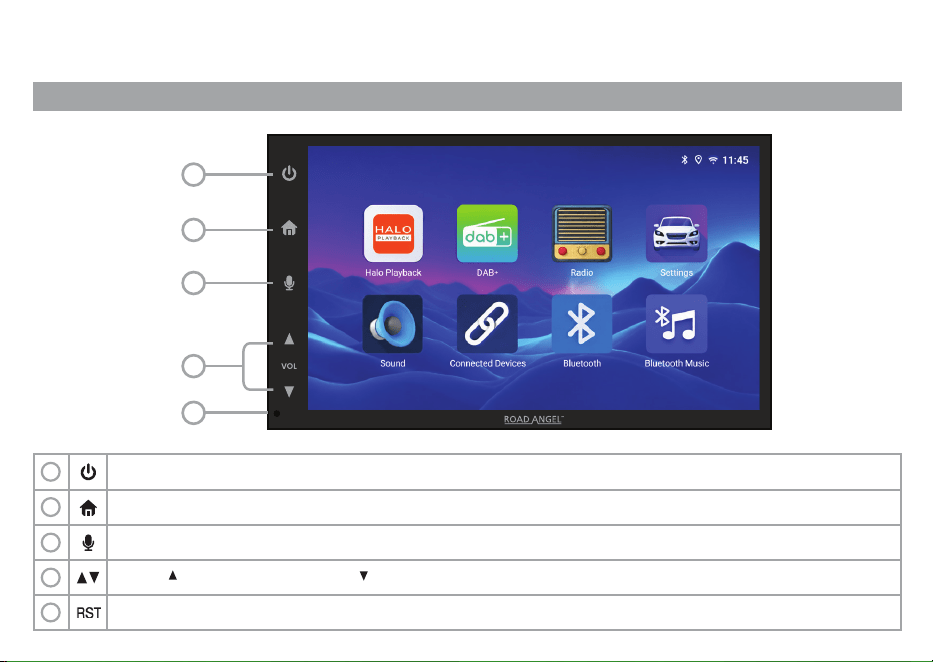
MAIN PANEL AND INSTRUMENTATION
1
2
4
5
3
Touch to mute. To unmute, touch again. Touch and hold to power off. To power back on, touch again.
Press to reset the stereo
Touch to activate the voice control. When an iPhone or Android device is connected, you can active Google Assistant or Siri
Touch ( ) for volume increase and ( ) for volume decrease.
1
Touch to return to the home screen.
2
3
4
5
04
Main Interface
USING THE TOUCHSCREEN FOR THE FIRST TIME
MAIN PANEL AND INSTRUMENTATION
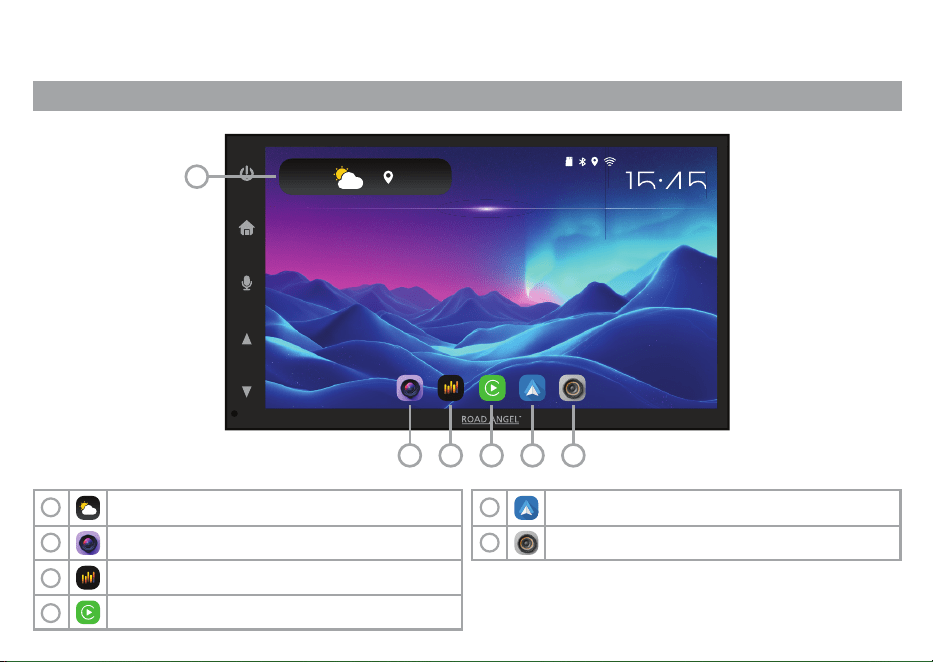
Touch to show the full weather information
Touch to enter Apple CarPlay
Touch to enter front and reversing camera
Touch to enter DAB+ radio.
(Only available on RA-X722DAB)
Touch to enter Android Auto
Touch to access sound settings
1
2
3
4
5
6
05
VOL
15:45
15:45
FRIDAY 14TH MARCH
18
o
Nottingham
1
2 3 4 5 6
General Settings
1
ADJUSTING DATE/TIME AND SOUND
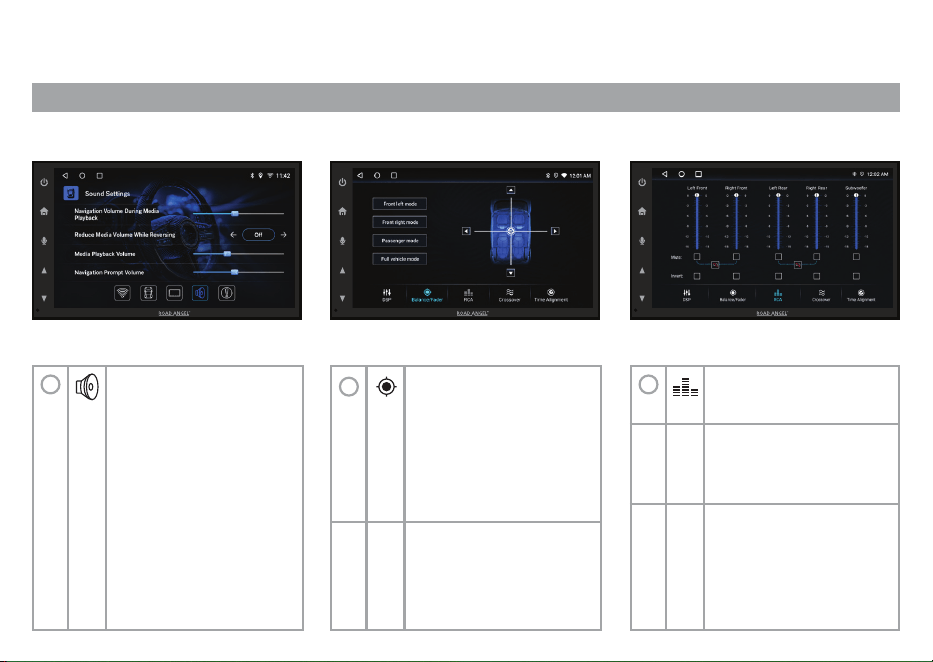
Once in the Sound
Settings you can adjust
the following:
• Navigation volume during
media playback
• Reduce media volume
while reversing
• Media playback volume
• Navigation prompt volume
• Bluetooth sound volume
• Incoming call volume
• Default volume
1
2
Once in the balance
setting you can drag
around the crosshair
center (ICON) to get the
required balance or use
presets to determine the
balance.
Touch to adjust the
preferred acoustic and
equalizer settings.
3
Touch to adjust the
preferred RCA settings
Touch to adjust the
preferred crossover
settings
Touch to adjust the
preferred time alignment
settings
06
VOLVOLVOL
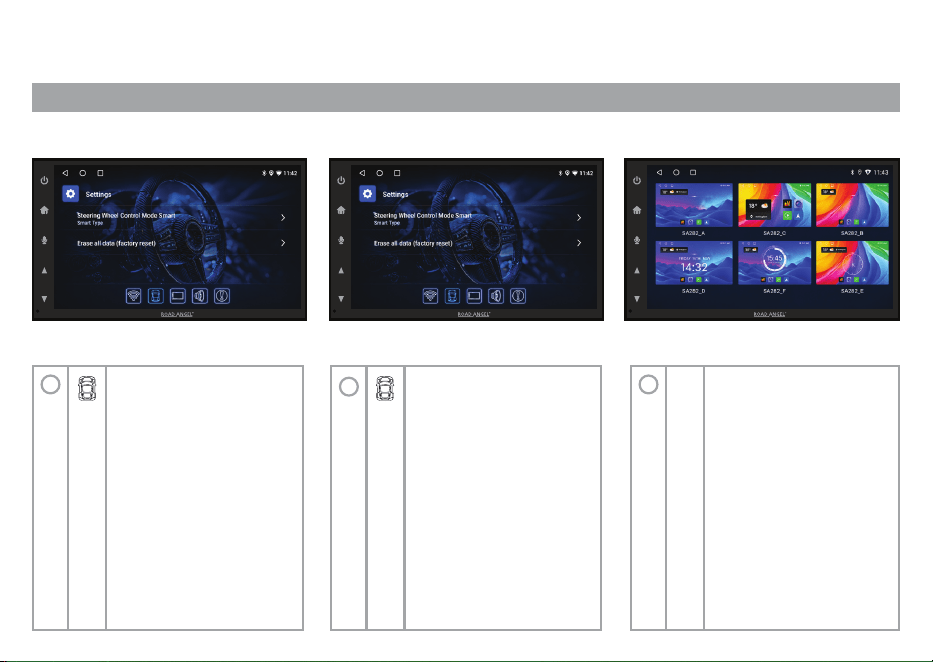
General Settings
2
ADJUSTING BASIC SETTINGS & CHANGING TOUCH SCREEN WALLPAPER
Once in the General
settings, pressing the
different options at the
bottom to customize the
stereo
• Steering Wheel control
• Erase all data
The stereo will
automatically restart back
to factory settings
1
2
• Theme mode
• Clock display mode
• Display brightness
• Panel illumination
(Select colour for
side buttons)
3
Changing the wallpaper
can be found by scrolling
to the right from the home
page and opening the
“themes” app.
07
VOL VOLVOL
USB
/
SD Card Operation
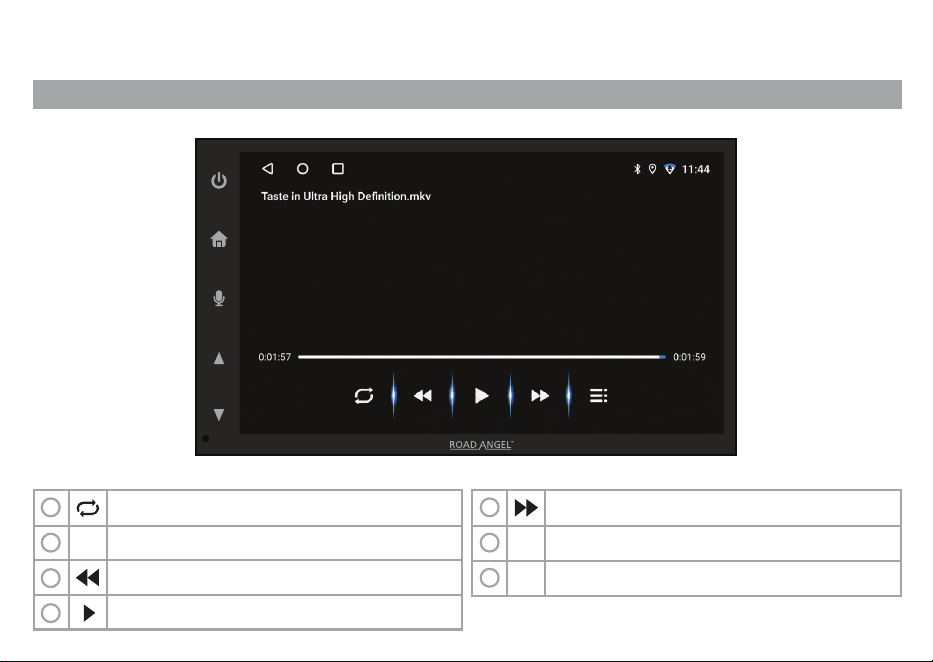
USING EXTERNAL MEDIA TO PLAY MUSIC & WATCH VIDEO
Repeat and loop or shuffle media
Play or pause media
Resolution
Previous media
Skip to next media
Choose where the media is from
1
2
3
4
5
6
Enter equalizer settings
7
08
VOL
Radio
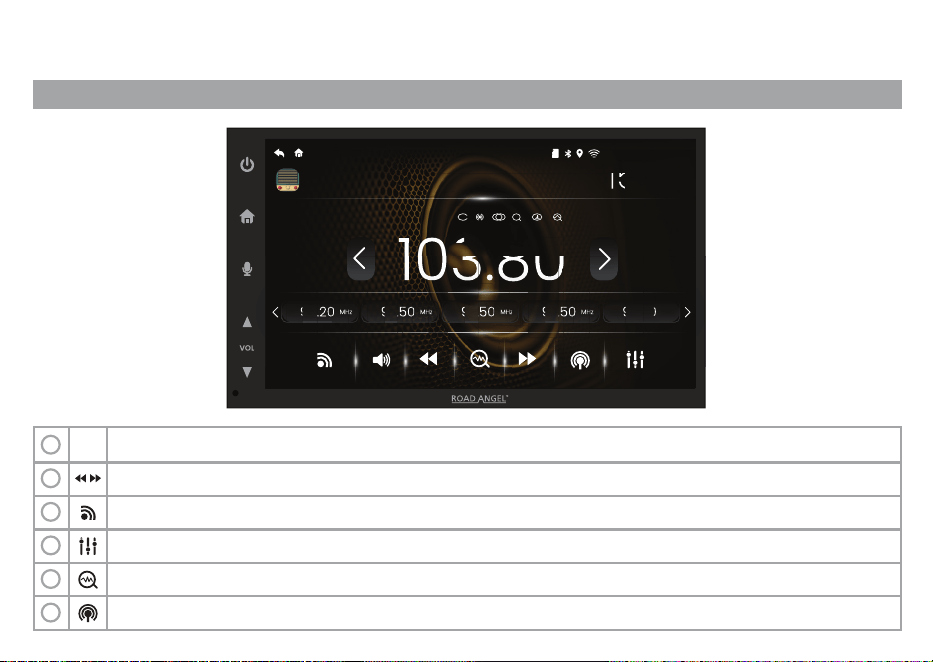
SETTING AND SAVING RADIO STATIONS
Turn on/off TA (Traffic Announcements) & search DX (Distant Signals) & (Alternative frequencies).
Touch to scan through saved stations. Hold to scan for a good signal.
Touch to switch Radio bands between FM1, FM2, FM3, AM1 & AM2 or touch the bands themselves.
Touch to adjust the prefered Acoustic and Graphic Equaliser settings.
1
Search for Radio Stations.
2
3
4
5
Touch to toggle between DX (Distant Reception) & LOC (Line Output
6
VOL
RADIO
15:40
FRIDAY 14TH MARCH
15:40
103.80
VOL
96.20
96.20
P1 MHz
96.20
96.20
96.20
MHz
MHz
97.50
97.50
P2 MHz
103.80
103.80
103.80
103.80
103.80
97.50
97.50
97.50
97.50
MHz
MHz
97.50
97.50
P2 MHz
103.80
103.80
103.80
97.50
103.80
103.80
97.50
97.50
97.50
MHz
MHz
97.50
97.50
P2 MHz
103.80
103.80
103.80
97.50
103.80
103.80
103.80
97.50
97.50
97.50
97.50
MHz
MHz
97.50
97.50
97.50
P2
97.50
MHz
FM1 MHz
103.80
AF TP TA
1
09
Bluetooth
1
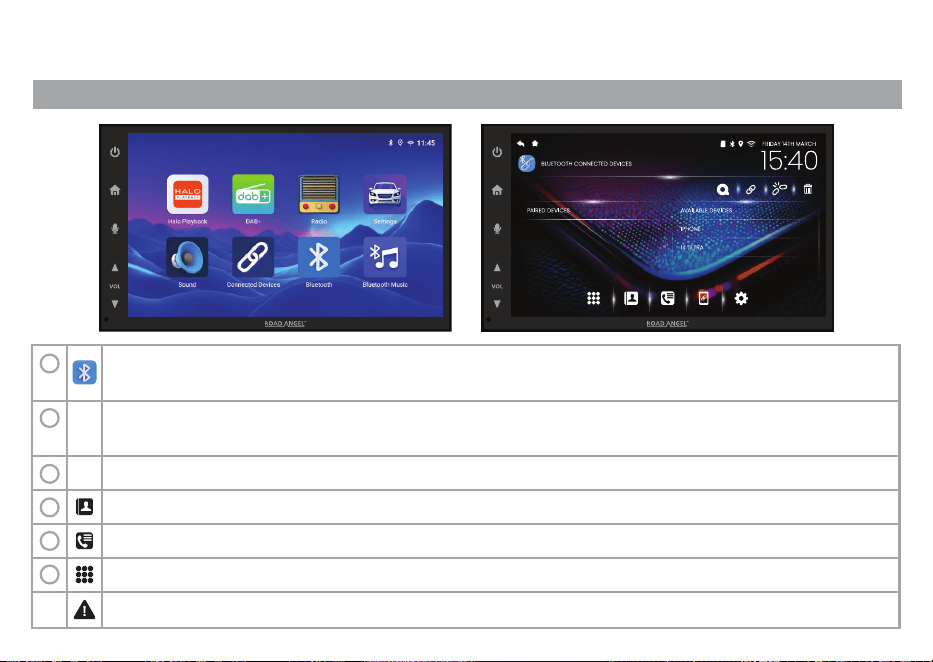
PHONE BLUETOOTH SETTINGS & PAIRING
To pair a new device follow these steps:
Open Bluetooth phone’s on the stereo & ensure your phones Bluetooth is on.
1
2
Once your devices detects the Road Angel Stereo, select pairing to the Stereo. You will be prompted to allow the
Stereo access to your Contacts.
3
Once connection ls successful, you will see your device's name appear here.
4
All your device's contacts will be available here when the Auto Load Phonebook toggle is set to on.
Touch to access your device's Call History.
Do not attempt to connect your device whilst the vehicle is in motion.
5
Touch to reveal the keypad where you can manually input a telephone number.
6
10
Bluetooth
2
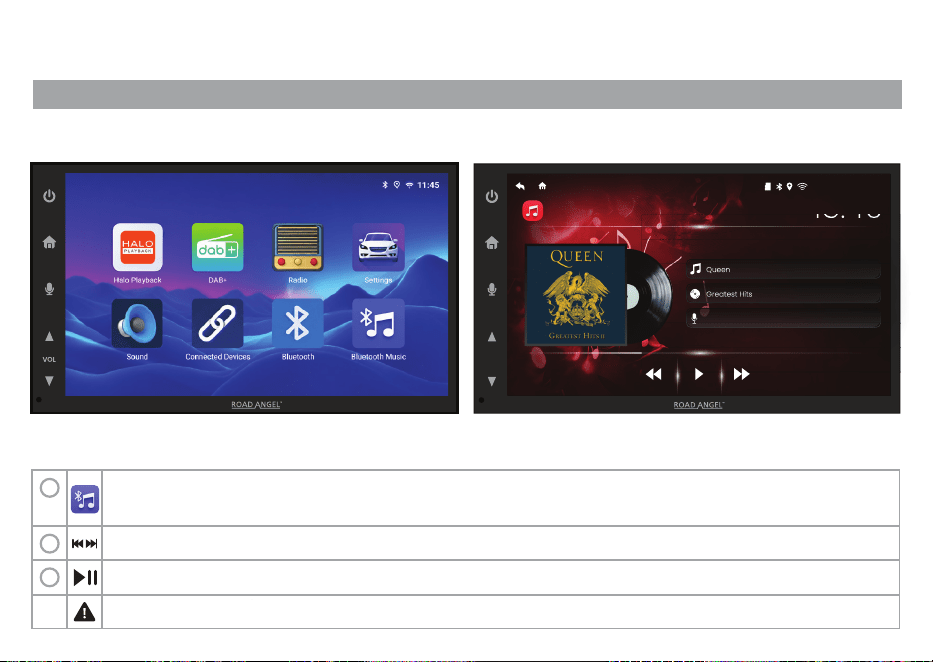
BLUETOOTH MUSIC
VOL
MUSIC
15:40
FRIDAY 14TH MARCH
15:40
15:40
Queen
Greatest Hits
Queen
Greatest Hits
A Kind of Magic.mp3
Follow the Bluetooth pairing instructions on the previous page.
Open Bluetooth music on the stereo & ensure your phone’s Bluetooth is on.
1
2
Touch to browse the music available on your connected device.
3
Play and Pause the music.
Do not attempt to connect your device whilst the vehicle is in motion.
11
DAB+
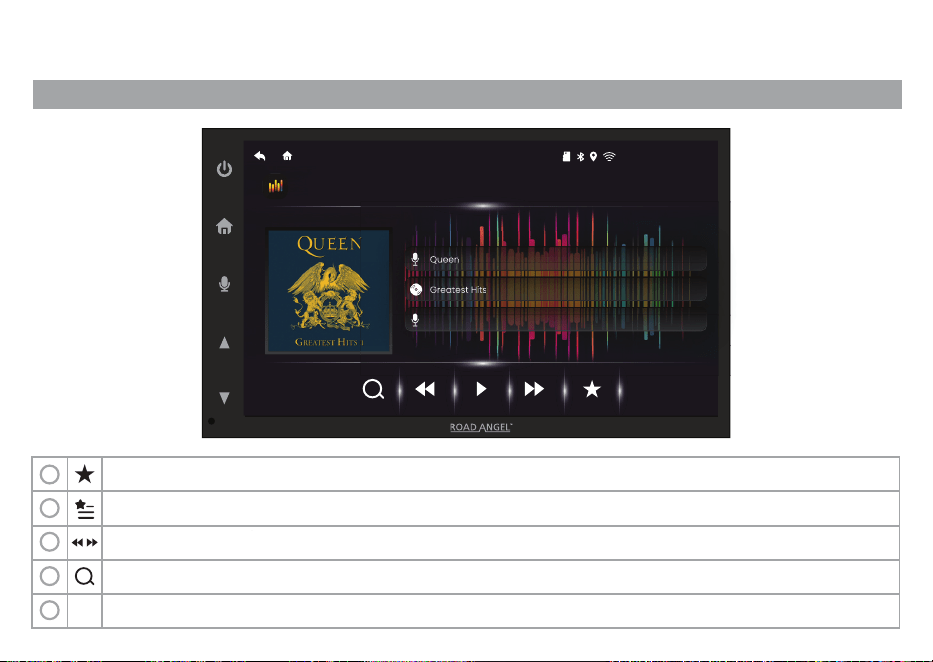
DAB/DAB+ (RA-X722DAB ONLY)
Favourite - You can save multiple favourites. Just press the star below the station icon to save it
1
2
Press "Favourite" and you will see the favorites you have saved.
3
Go to the next or previous station
4
Retune DAB/DAB+ stations
5
DAB/DAB+ Announcements
VOL
DAB RADIO
15:40
FRIDAY 14TH MARCH
Queen
Queen
Greatest Hits
Queen
Queen
Greatest Hits
A Kind of Magic.mp3
12
Apple CarPlay
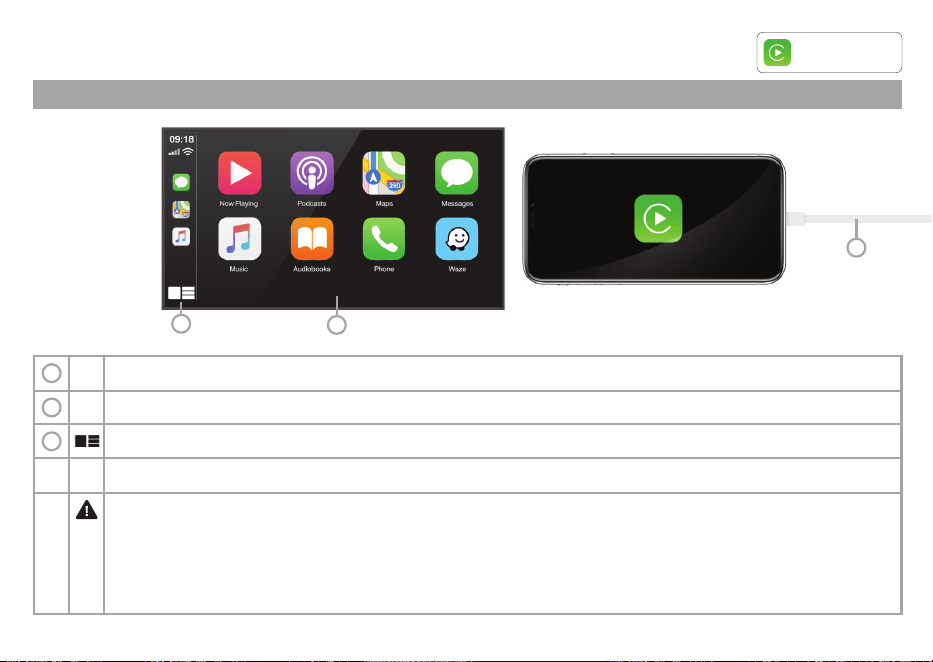
APPLE CARPLAY OPERATING INSTRUCTIONS
Connect your device with a lightning cable via the USB port or via Bluetooth to access the Apple CarPlay screen
Swipe the Apple CarPlay screen left and right to access other available apps
You can operate iPhone applications with finger gestures such as tapping, dragging, scrolling, or flicking on the Stereo screen
Compatible iPhone models: For details about compatibility of iPhone models please visit http://apple.com/ios/carplay.
The compatible finger gestures vary depending on the application for the iPhone.
Certain uses of the iPhone may not be legal while driving in your jurisdiction, so you must be aware of and obey any
such restrictions. If in doubt as to a particular function, only perform it while the car is parked and the engine is off.
No feature should be used unless it is safe to do so under the driving conditions you are experiencing.
1
2
Touch to access split screen apps.
3
1
2
3
Works with
Apple CarPlay
ROAD ANGEL IS NOT RESPONSIBLE AND DISCLAIMS FOR THIRD PARTY (NON-ROAD ANGEL) APPS AND CONTENT, INCLUDING WITHOUT LIMITATION ANY INACCURACIES OR INCOMPLETE INFORMATION.
13
Android Auto
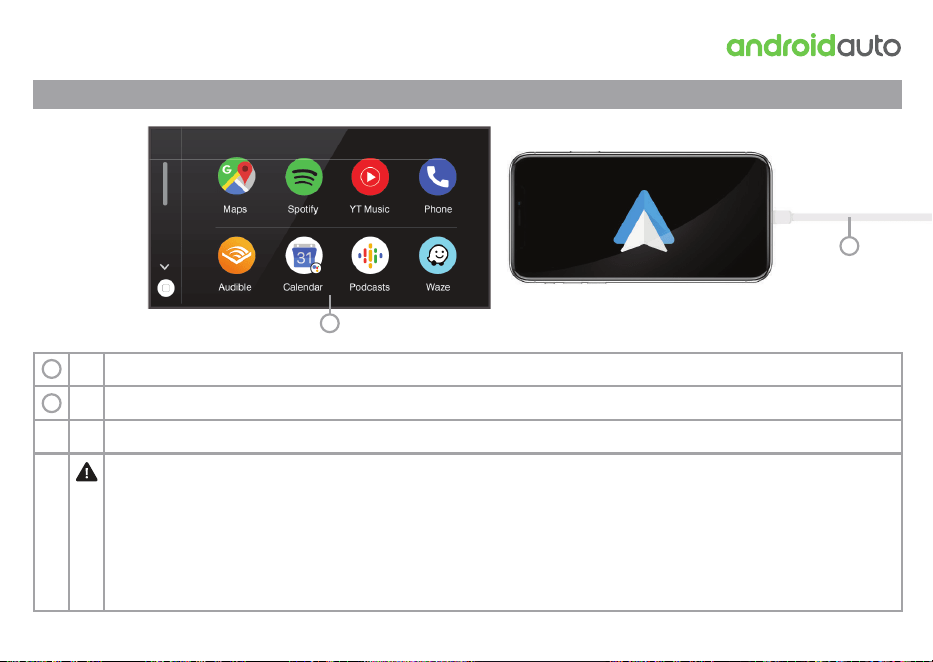
ANDROID AUTO OPERATING INSTRUCTIONS
Swipe the Android Auto screen left and right to access other available apps.
You can operate Android applications with finger gestures such as tapping, dragging, scrolling, or flicking on the
Compatible Android models: For details about compatibility of models please visit
http://support.google.com/androidauto. The compatible finger gestures vary depending on the application.
Certain uses of the Android Auto may not be legal while driving in your jurisdiction, so you must be aware of and obey
any such restrictions. If in doubt as to a particular function, only perform it while the car is parked and the engine is off.
No feature should be used unless it is safe to do so under the driving conditions you are experiencing.
For Android Auto to work, you need to ground the pink cable labelled "PARK". Otherwise, Android Auto will not load. This is
a built-in safety feature common on all aftermarket head units with Android Auto.
1
2
ROAD ANGEL IS NOT RESPONSIBLE AND DISCLAIMS FOR THIRD PARTY (NON-ROAD ANGEL) APPS AND CONTENT, INCLUDING WITHOUT LIMITATION ANY INACCURACIES OR INCOMPLETE INFORMATION.
1
2
14
Connect your device with a cable via the USB port or via Bluetooth to access the Android Auto screen.
Other Features
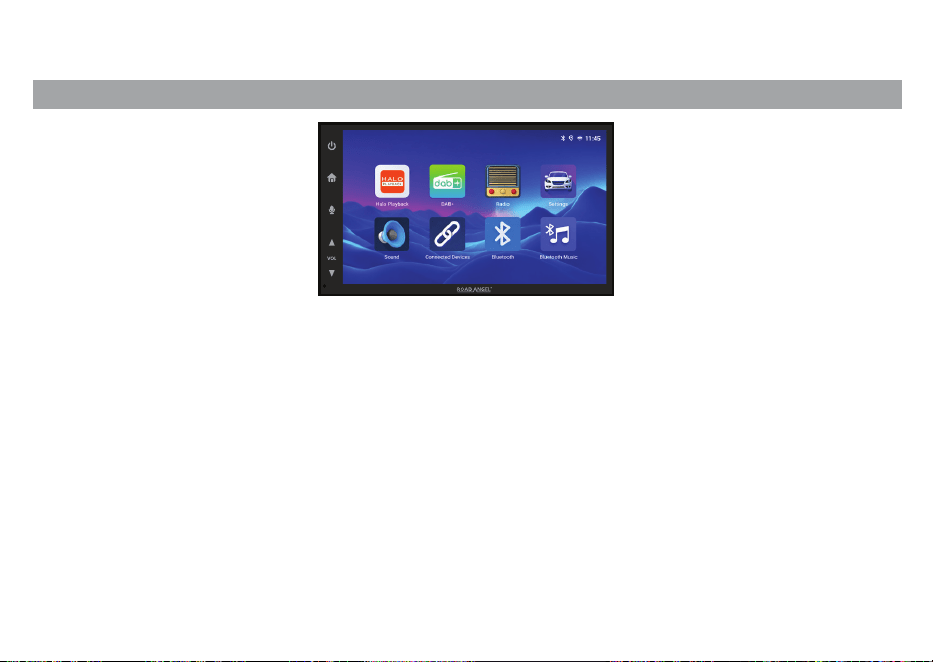
APPLICATIONS
The stereos built on their core functionality by expanding compatibility and enhancing in-car convenience. Both the RA-X722DAB
and RA-X622BT officially support the Road Angel Halo Playback app, enabling smooth integration with compatible dash cameras.
This allows drivers to operate their dash camera directly through the stereo interface, reducing the need to handle a phone.
With the app mirrored onto the stereo’s larger display, users can easily review recorded footage in greater detail, manage files, and
adjust camera settings on the go. This added functionality not only improves accessibility but also enhances safety by keeping
controls centralized within the dashboard. Combined with their existing wireless connectivity and customizable audio features,
these stereos offer a more comprehensive and user-friendly driving experience.
The stereos also allow for the usage of media applications such as Netflix and YouTube*, which require an active internet
connection along with a GPS signal, and the vehicle must be stationary before playback is enabled. This ensures that drivers are not
distracted while the car is in motion, prioritizing safety on the road. Additionally, these systems often integrate with smartphones,
allowing users to stream content, access navigation tools, and use voice commands for a more seamless and hands-free
experience. As in-car technology continues to evolve, these stereos are becoming central hubs for both entertainment and
connectivity, enhancing comfort and convenience for passengers during travel.
It is also possible to install/update applications found on the Google Play Store*.
*CAN ONLY BE USED ON FIRMWARE EQUAL TO OR NEWER THAN: XYZ
15
Installation Guide
1
INTRODUCTION
It is not practical for us to print a full installation guide for every vehicle as there are thousands of variations. We advise this
installation is carried out by an experienced car audio installer.
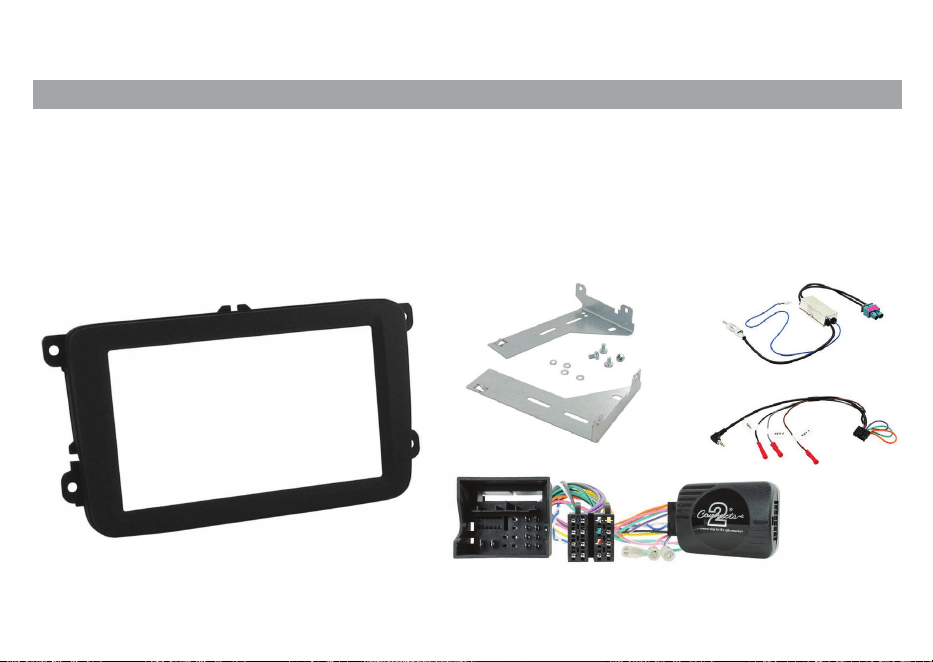
You may need a fitting kit for your vehicle, below is an example of such which fits a VW Transporter T6 2015 2019.
The reason you may need a fitting kit is due to the vehicle specific connects not being ISO connections so they may
need adapting. Please consult your local car audio specialist or retailer to obtain such parts
The Road Angel RA-X stereos are standard 2-DIN size and have ISO connections.
This means the stereo will fit any aftermarket parts using ISO components.
16
Installation Guide
2
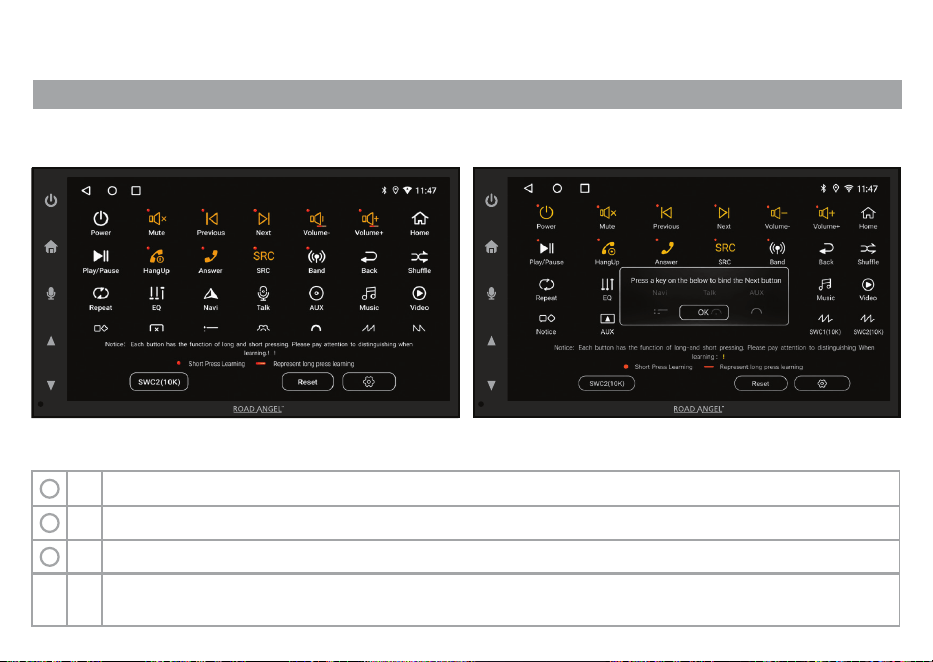
STEERING WHEEL CONTROLS
Press “Reset”
Press the function you want to program
Quick Tip: Some vehicle command signals to the stereo are weaker than others. If you have trouble mapping
controls. Please change the “SWC Resistance” to “High”. This is located in the previous menu.
1
2
When a popup with the function shows, press the button on the steering wheel you would like to program.
3
VOL
15:40
FRIDAY 14TH MARCH
APPLICATIONS
15:40
FRIDAY 14TH MARCH
APPLICATIONS
15:40
15:40
FRIDAY 14TH MARCH
UI SCREEN NEEDED
VOLVOL
17
17
Installation Guide
3
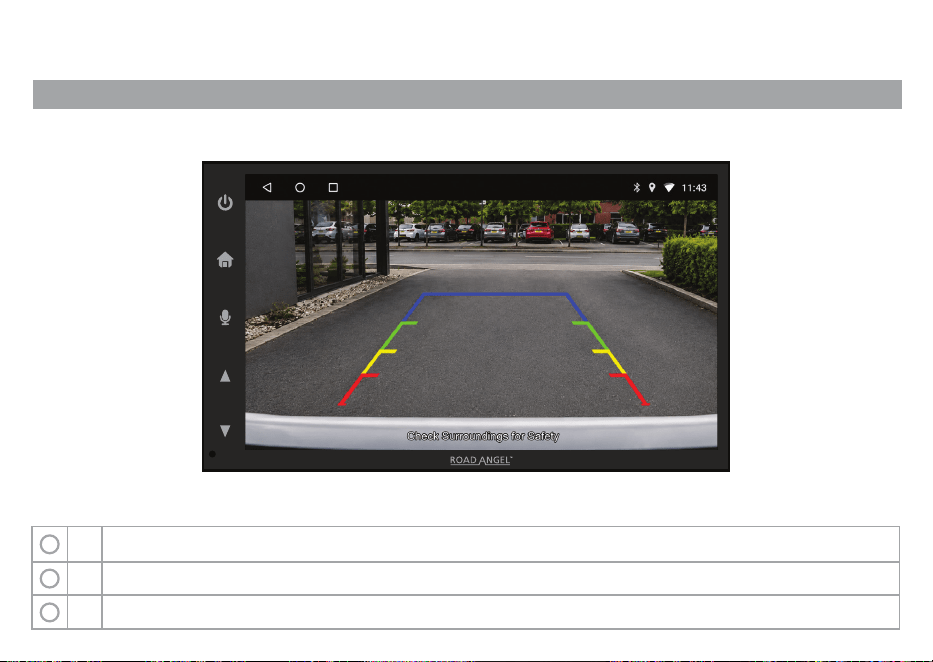
REVERSING CAMERA
“The Road Angel stereo accepts all reversing cameras with a standard yellow video connector.”
How to connect a Front or Rear camera:
Connect your camera video feed into the desired input which is located at the rear of the unit
Connect your camera 12V power feed to the +12V and -12V cables depending on if its front or rear camera
1
2
Connect your reversing camera trigger to the Purple cable on the rear of the stereo – this only applies to the reversing camera
3
VOL
18
Installation Guide
4
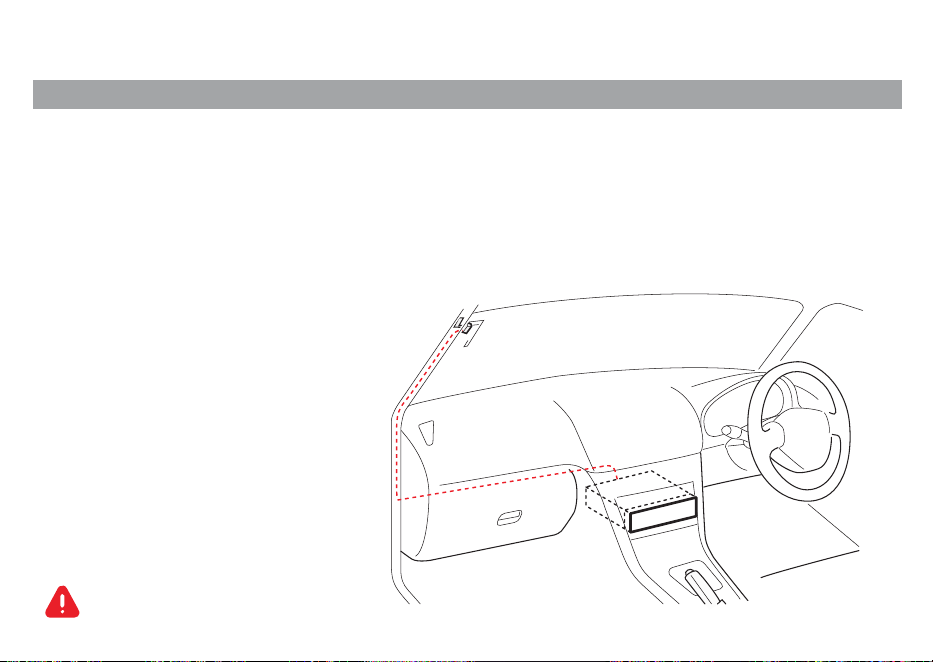
DAB ANTENNA INSTALLATION
Mounting and wiring the Road Angel Amplified DAB Antenna requires a degree of skill and experience and we
advise it being installed by a professional. If you have problems during the installation, please consult your Road
Angel dealer by calling 0330 320 3030.
The antenna should be installed on the passenger side for safety. The direction of the Windscreen Antenna will
change depending on whether the Windscreen Antenna is installed on the right side or left side of the vehicle.
Disconnect the battery's negative terminal
before installing the unit.
Fitting Instructions
1
19

Installation Guide
5
DAB ANTENNA INSTALLATION
Be sure to check the installation location of Vehicle Windscreen Antenna before installing as this cannot be
reapplied to the windscreen once removed.
Do not install at the following locations:
• Where it may block driver's view.
• Where it may obstruct operation of safety devices such as air bags.
• On movable glass surfaces.
Signal strength will decrease at the following locations:
• On IR reflecting glass/mirrored glass film and thermal insulated glass.
• Where it overlaps another radio antenna.
• Where it overlaps window heating wires.
• At side/rear of vehicle (door, quarter, rear window).
Reception may decrease due to noise when the wipers, air con, or engine is turned on. It may also decrease
depending on the direction of the broadcast station and that of the vehicle (antenna) direction.
It may not be possible to install on some type of vehicles.
Do not bend or damage the Vehicle Internal Windscreen Antenna.
Fitting Instructions
2
20
FAQs
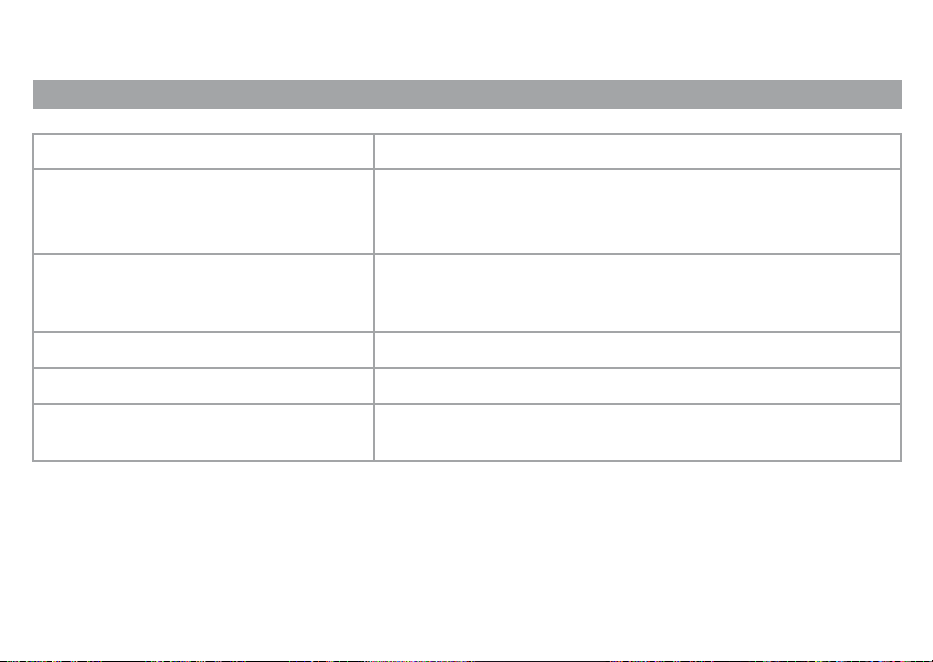
FAQs AND TROUBLESHOOTING
Unit keeps losing memory Some vehicles have the permanent & switch live the wrong way.
Swap the red & Yellow cable over in the ISO loom at the bullet
connection.
Issue/Question Solution
Can I fit it myself?
Can I add Rear Camera?
Can I add Rear monitors to stereo?
Cannot get all steering wheel control
functions
DIY installation is not recommended. We advise you have this
product installed by an experienced technician.
Yes, this unit works with all major branded cameras.
Yes, use the “video out” connector on stereo.
Not all functions can be retained when changing to aftermarket
stereos. Please change “SWC resistence” to “high” to get the best
possible function from the stereo.
20
21
Dimensions
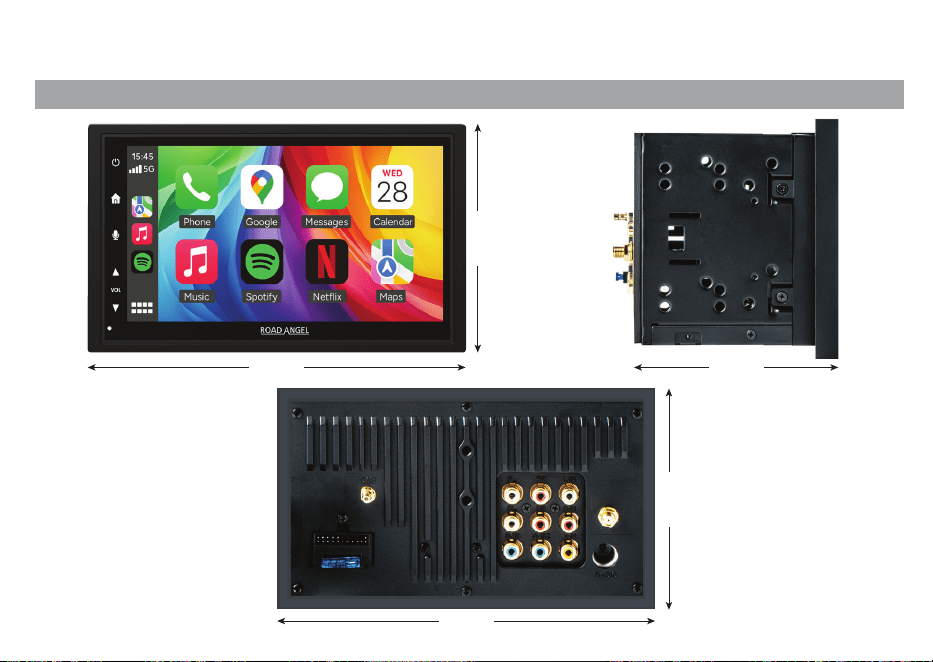
DIMENSIONS
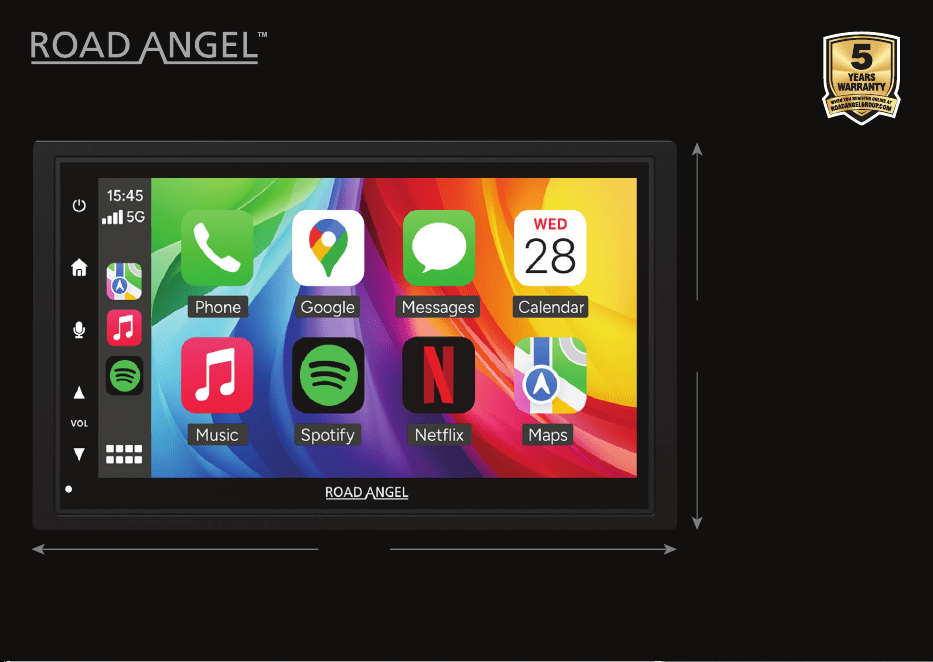
186 MM 111 MM
90 MM
90 MM
186 MM
22
Diagram
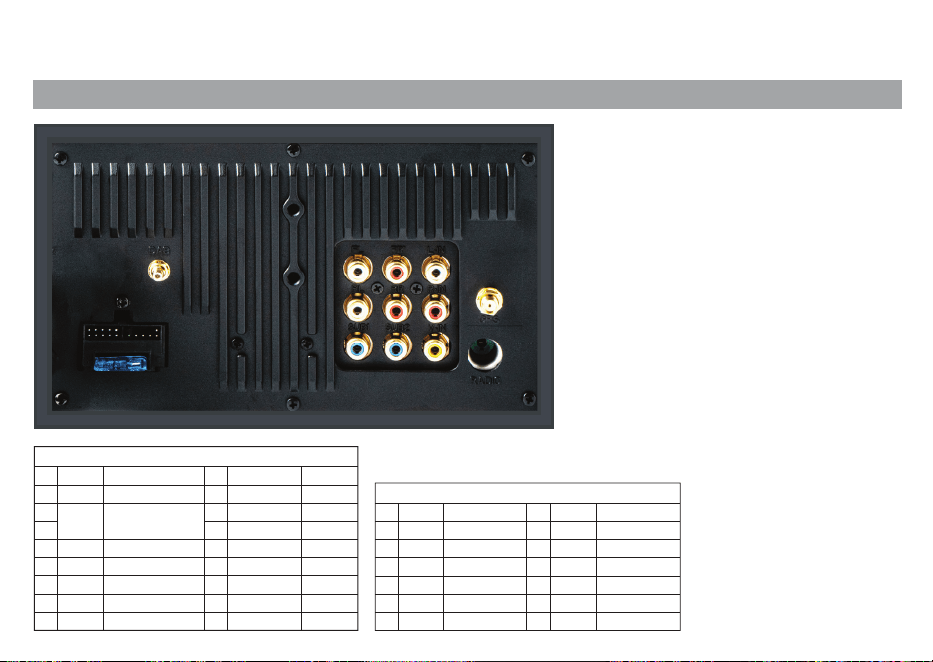
WIRING DIAGRAM
A Color
Black
Black
Blue
Red
Yellow
Orange
Black
1
2
5
FR+
FL+
3
4
6
7
8
Color
Purple
Gray
White
Green
Purple/Black
Gray/Black
White/Black
Green/Black
B
1
2
3
4
5
6
7
8
Function
RR+
RL+
RR-
FR-
FL-
RL-
Function
SWC-GND
3.5mm Connector
for SWC
Power Antenna
ACC
BATT
ILL
GND
ISO Connector
SUB-OUT2
Video In
Color
Blue
Blue
Yellow
C
7
8
9
Function
SUB-OUT1
Audio-Out FR
Audio-In L
Color
White
Red
White
White
Red
Red
C
1
2
3
4
5
6
Function
Audio-Out FL
Audio-Out RL
Audio-Out RR
Audio-In R
RCA Connector
Fuse:
12V DC,
Negative Ground
D:
E:
Voltage:
15 Ampere
Radio Antenna
DAB Antenna
23
More Information
MORE INFORMATION
•
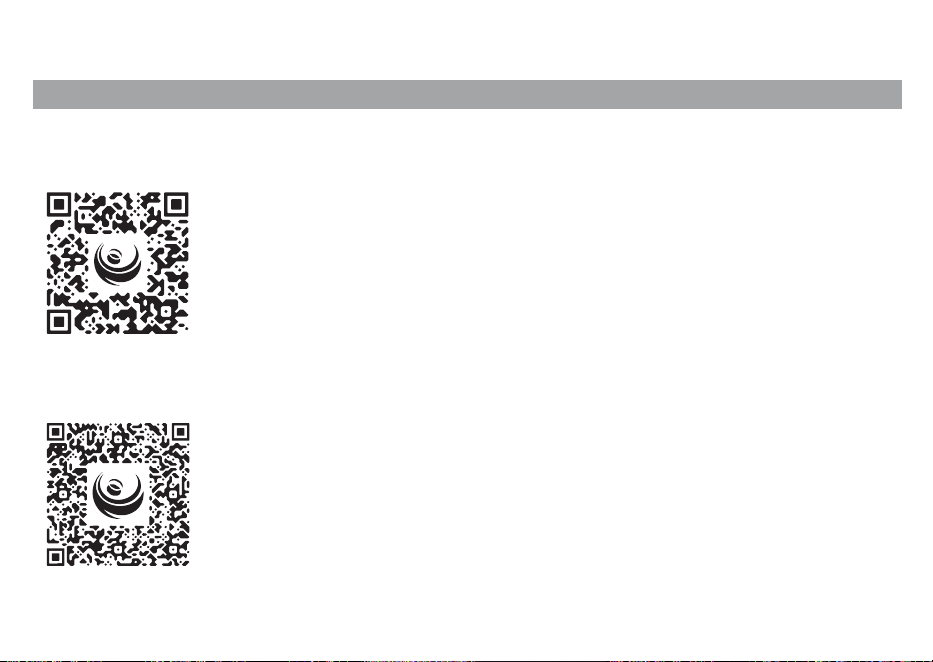
You should be protecting your vehicle with one of our dashcams.
Scan the below QR codes for more information on these products.
•
Trouble with speeding? Protect your livelihood with our speed awareness devices now!
Scan the below QR codes for more information on these products.
24
RA-X722DAB & RA-X622BT
DOUBLE DIN AV RECEIVER
All images may differ from actual appearance. Product names, logos, brands, and other trademarks featured or referred to within Road Angel Group products and services are the property of their
respective trademark holders. These trademark holders are not affiliated with Road Angel Group or our products. They do not sponsor or endorse our materials. The “Apple” name, the Apple logo, iPhone,
and iPad are trademarks of Apple Inc., registered in the U.S. and other countries. App Store is a service mark of Apple Inc. The "Android" name, the Android logo, the "Google Play" brand, and other Google
trademarks, are property of Google LLC. TM and Copyright 2026 Road Angel. All rights reserved.
Designed, engineered and manufactured by Road Angel Group DB House, Rani Drive,
Nottingham, NG5 1RF, United Kingdom RoadAngelGroup.com