Wireless Keyboard Case with 7-Color Backlit for iPad Air
11" (M3 2025 / M2 2024) & iPad Pro 11"(1st/2nd/3rd/4th
Gen), for 10.9"iPad Air 4th/5th Gen
Model: HB401
User Manual
Packing Contents
1. Wireless keyboard
2. User manual
3. USB-A charging cable
Keyboard Specification
Compatible
iPad Air 11 (M3 2025 / M2 2024),iPad Pro 11
(1st/2nd/3rd/4th Gen),iPad Air(4th/5th Gen)
Bluetooth version
Ble 5.0
Operating distance
10m (without obstacle)
Stand-by time
365 days
Charge time
4 hours
Uninterrupted Work Time
5 hours(turn on backlight)
720 hours (turn off backlight)
Lithium Battery Capacity
800mA
Lithium Battery Life
3 years
Key Life
3 million clicks
dimensions
250.94*181.82*17.02mm
Net weight
395g
Material
ABS+PU
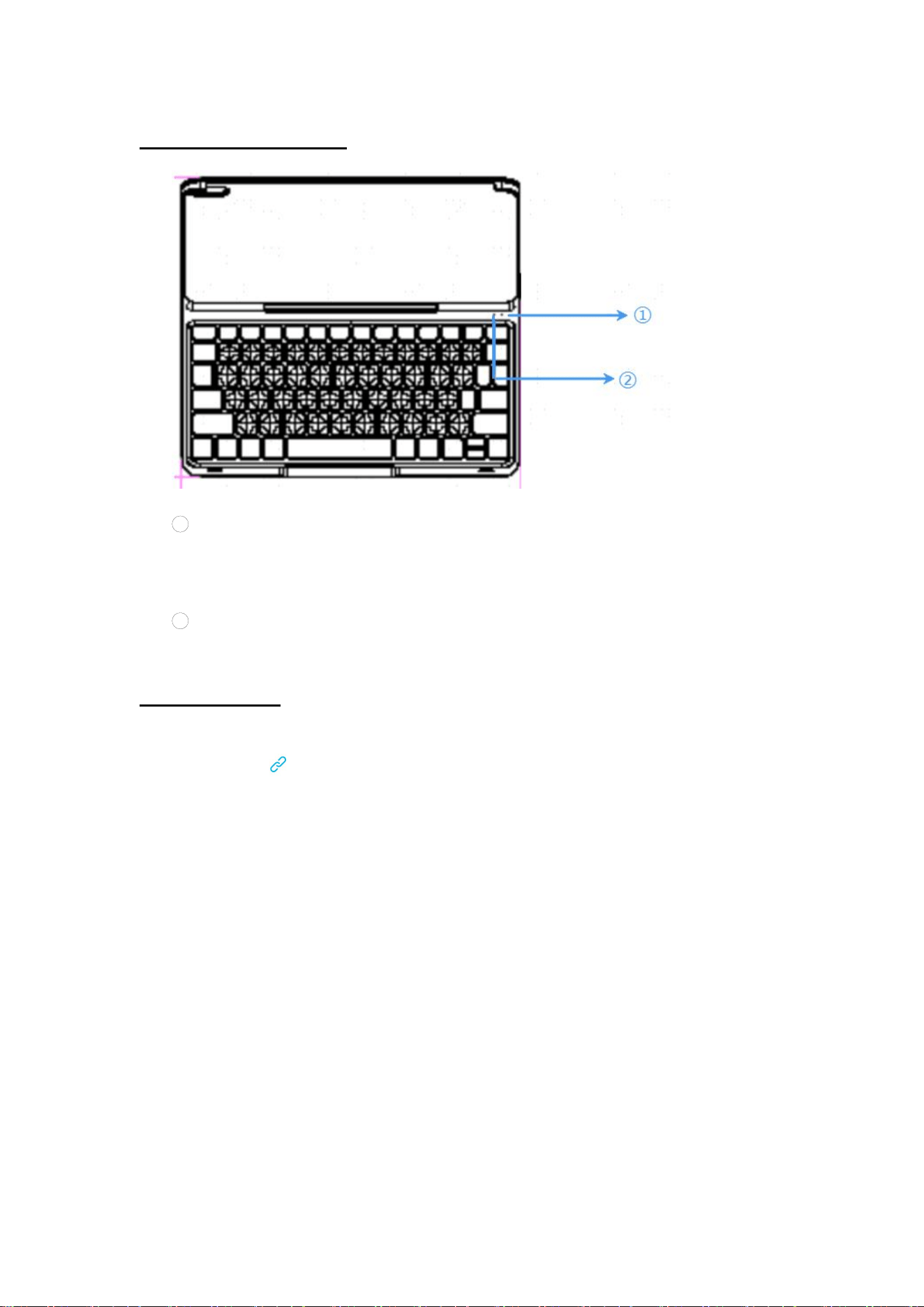
Keyboard overview
1 Power indicator
(
green
)
/low battery indicator
(
red
)
/ Charging indicator
(
red
)
/Fully
charge indicator
(
green
)
2 Bluetooth pairing indicator
(
blue
)
/Caps Lock indicator
(
green
)
Pairing Steps
Step 1. Turn on the keyboard.
Step 2. Press "Fn + " to enter Bluetooth pairing mode. The blue light will blink.
Step 3.Turn on Bluetooth on the tablet and search for devices. The tablet will automatically or
manually find the keyboard’s Bluetooth name (Wireless Keyboard). Tap to connect. Once
connected, the light will turn off.
(For tablets that have been paired before, no re- pairing is needed. The keyboard will automatically
reconnect when turned on.)
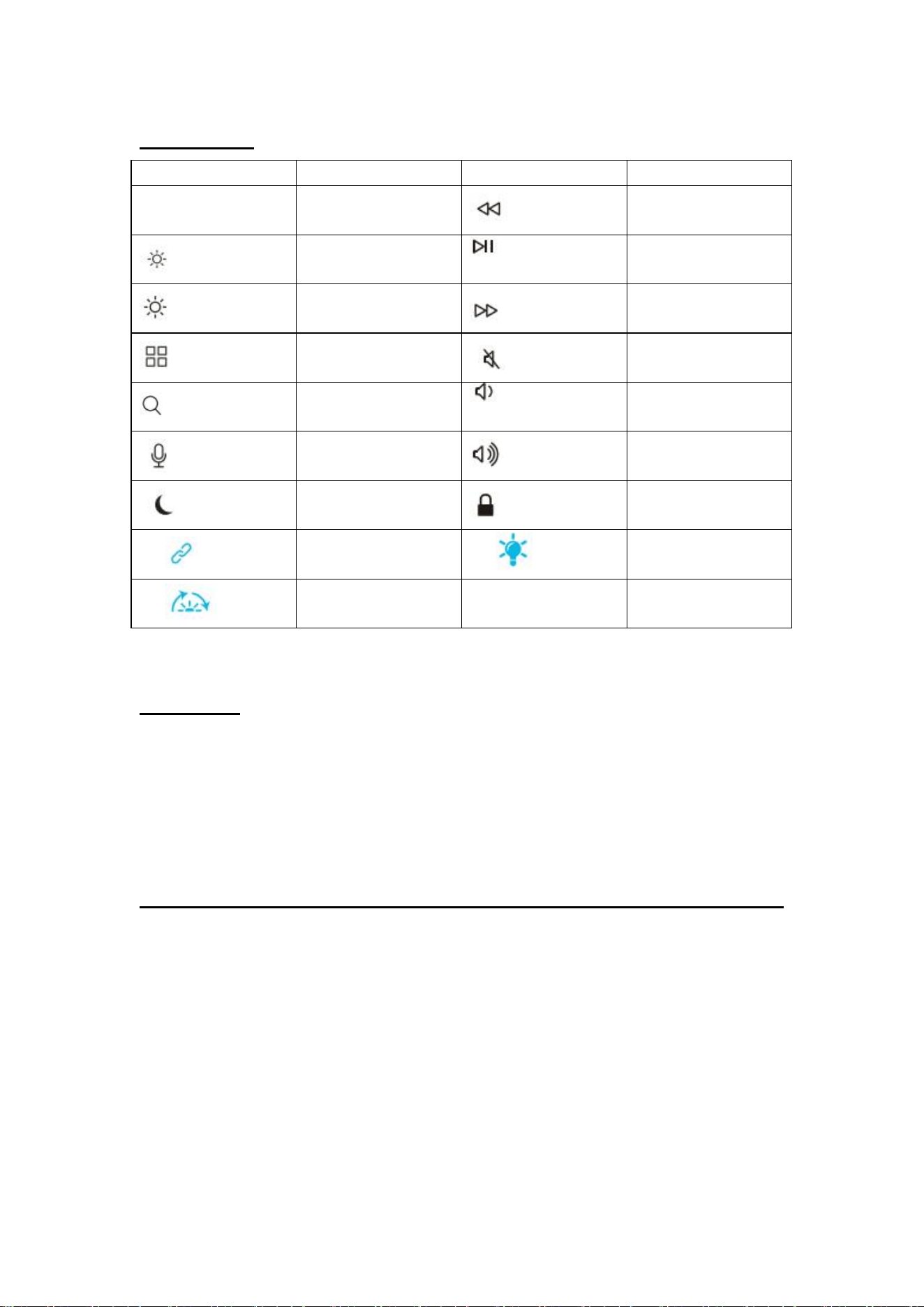
Shortcuts
Icon
Function
Icon
Function
esc
esc
Previous track
Brightness-
Play/pause
Brightness+
Next track
Show APP
Mute
Search for
Volume-
Siri
Volume+
Do not disturb
Lock screen
Fn+
Bluetooth pairing
Fn+
Backlight on/off
Fn+
Switch backlight color
Charging
Step 1. Connect one end of the included type-c cable to a USB charger, and connect the opposite
end to the charging slot on the keyboard.
(Note: Output: DC 5 V / 500mA; USB charger is not included)
Step 2. The charging indicator will glow red while the keyboard is charging.
A full charge takes approximately 4 hours.
FCC Statement
NOTE: This equipment has been tested and found to comply with the limits for a
Class B digital device, pursuant to part 15 of the FCC Rules. These limits are
designed to provide reasonable protection against harmful interference in a
residential installation. This equipment generates, uses and can radiate radio
frequency energy and, if not installed and used in accordance with the instructions,
may cause harmful interference to radio communications. However, there is no
guarantee that interference will not occur in a particular installation. If this equipment
does cause harmful interference to radio or television reception, which can be
determined by turning the equipment off and on, the user is encouraged to try to
correct the interference by one or more of the following measures:

- Reorient or relocate the receiving antenna.
- Increase the separation between the equipment and receiver.
- Connect the equipment into an outlet on a circuit different from that to which the
receiver is connected.
- Consult the dealer or an experienced radio/TV technician for help
Changes or modifications not expressly approved by the party responsible for
compliance could void the user's authority to operate the equipment.
This device complies with Part 15 of the FCC Rules. Operation is subject to the
following two conditions:
(1) this device may not cause harmful interference, and (2) this device must accept
any interference received, including interference that may cause undesired operation.
FCC RF Exposure Statement:
This equipment complies with FCC radiation exposure limits set forth for an
uncontrolled environment. This equipment can be used in portable exposure
conditions.