User Manual
Electronic Drum Amplifier
&
電 子 ド ラ ム・オ ー デ ィ オ
ユーザーマニュアル
尺寸:150*210MM
STRICH SDA-20 电子鼓音响 说明书
电子鼓音响说明书
2026.01.26
150MM
封面
210MM
15*21cm
2026.01.26
SDA-20
SDA-20
Table of Contents
English
English
Japanese
STRICHのブランド名は、ドイツ語の「UNTERM STRICH」(「最終的な結論」または
「核心的な理念」を意味する)に由来しています。これは、私たちが楽器製作において高品質を追求し、
お客様に卓越した製品をお届けするという揺るぎない信念を体現しています。
この度は、SDA-20エレクトリックドラムスピーカーをお選びいただき、誠にありがとうございます。
本製品をご使用になる前に、ぜひこの取扱説明書をお読みいただき、その機能、使い方のコツ、注意
事項などをご理解ください。これにより、今後より一層本製品を有効にご活用いただけます。
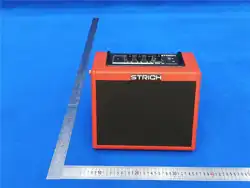
SDA-20は、エレクトリックドラムの音響特性に特化して設計されたスピーカーです。
6.5インチのウーファーと2.0インチのツイーターを搭載しており、エレクトリックドラムセットと組み合
わせて使用する際、ドラムの重厚な低音をクリアに再生すると同時に、シンバルの鮮やかな高音まで
忠実に再現し、生ドラムのリアルなサウンドを正確に再現します。機能面では、低音/高音のバ
ランス調整や音量調節といった基本機能に加え、ワイヤレス音楽再生機能も備えており、ユーザ
ーの多様なスピーカー使用ニーズに幅広くお応えします。
Thank you for choosing STRICH!
01
01—05
06—10
WARNINGS AND PRECAUTIONS
Warnings
• Before using this product, please read the instructions and user manual carefully.
• Use a power outlet with proper grounding when operating the device.
• Do not disassemble or modify the internal components or wiring of this device.
• Do not place the device in the following locations: ① Areas with high temperatures; ② Damp
environments; ③ Highly humid places; ④ Areas exposed to direct rain; ⑤ Dusty environments;
⑥ Locations subject to strong vibrations.
• Use only the supplied power cord or adapter, and ensure the line voltage matches the input
voltage indicated on the power supply. Incorrect voltage may cause equipment damage,
malfunction, or electric shock hazards.
• Do not excessively twist or bend the power cord, and do not place heavy objects on it. Damage
to the power cord may lead to wire breakage, short circuits, and potentially cause fire or electric
shock!
• Do not allow any hazardous objects or liquids to fall into or seep into the device.
• Immediately turn off the power and unplug the device under the following conditions:
① Damage to the adapter, power cord, or plug; ② Smoke or unusual odor coming from the
device; ③ Direct exposure to rain (or moisture); ④ Abnormal operation or obvious malfunction of
the device.
• Do not connect too many electrical appliances to the same power outlet as this product. Ensure
the total power consumption of all connected devices does not exceed the outlet's rated capacity.
• Place the device in a location that does not obstruct proper ventilation.
• When plugging the power cord into an outlet, hold the plug firmly.
• Avoid tangling the power cord with other cables and keep it away from children.
• Do not touch the power cord or plug/unplug it with wet hands.
• Before moving the device, disconnect the power cord and all connected cables.
• Before cleaning the device, turn off the power and unplug the power cord.
• If lightning is suspected in your area, unplug the power cord.
• Do not expose the device to direct sunlight or place it near heat sources or other
high-temperature objects. Excessive heat may cause deformation or discoloration of the device
casing.
• If the device is moved from an environment with certain temperature and humidity to one with
significantly different conditions, condensation may form inside. Using the device under such
conditions may cause damage or malfunction.
02
WARNING:
Alerts users that improper use may result in danger or
personal injury.
CAUTION:
Alerts users that improper use may cause equipment
damage or property loss.
OPERATION INSTRUCTIONS
Precautions
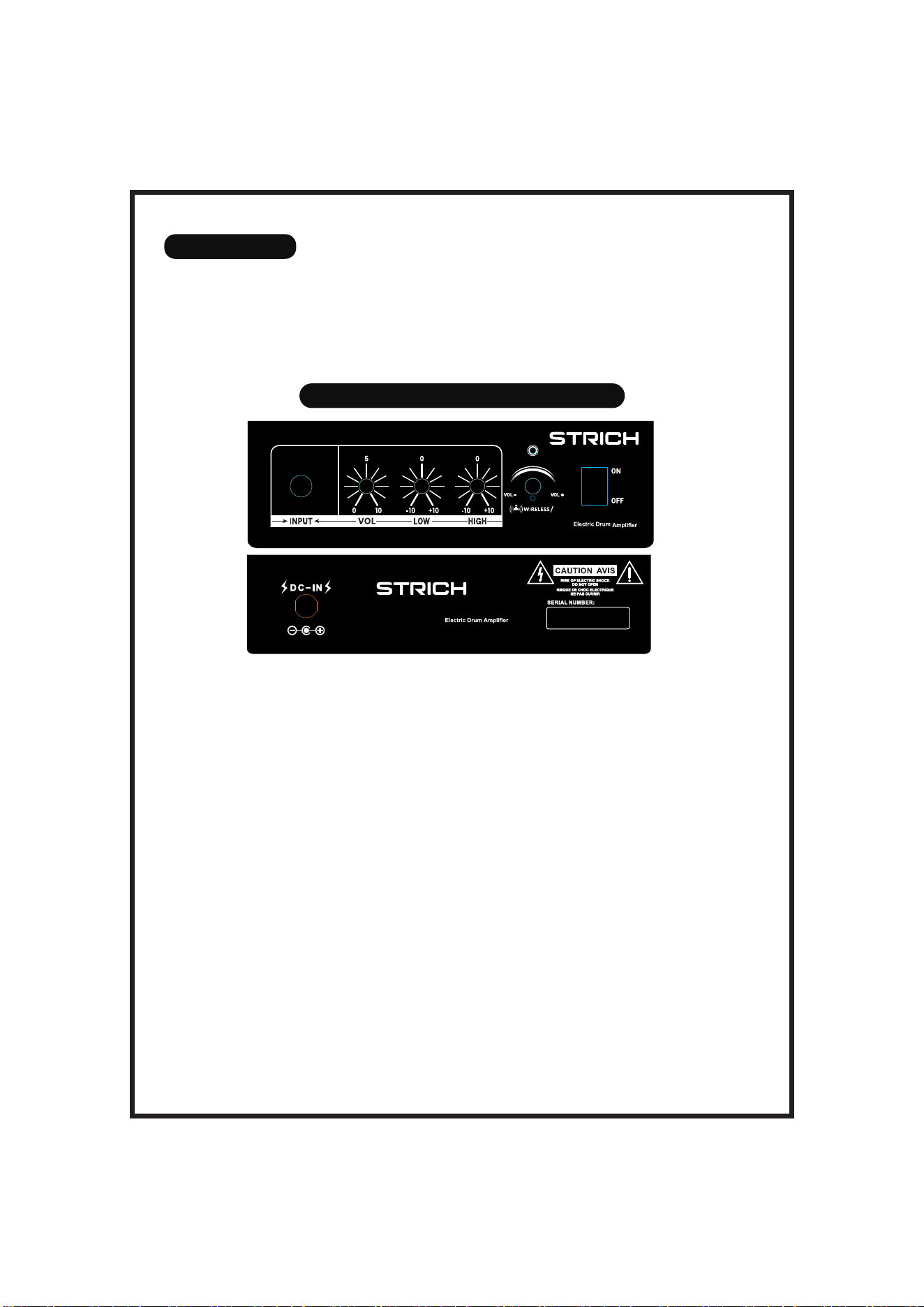
DC Input (DC-IN): Connect the original adapter to this port to power the speaker
(specifications: 18V/3A).
Serial Number (SERIAL): Displays production-related information for the product.
Input (INPUT): Connects to the audio output of instruments such as electronic drums.
Gain Knob (GAIN): Adjusts the gain level of the audio signal from the "INPUT" port.
Bass Knob (LOW): Adjusts the low-frequency intensity of the audio source connected to the
"INPUT" port.
Treble Knob (HIGH): Adjusts the high-frequency intensity of the audio source connected to the
"INPUT" port.
Wireless Function Knob (Wireless-MODE):
Press and Hold: Turn wireless connection ON/OFF.
Single Click: Play/Pause music.
Rotate Right: Switch to the next track.
Rotate and Hold Right: Increase volume.
Rotate Left: Switch to the previous track.
Rotate and Hold Left: Decrease volume.
Power Switch (POWER): Slide upward to turn the power ON; slide downward to turn the power
OFF.
• When operating buttons, faders, or connection ports, apply moderate force.
• When connecting or disconnecting cables, hold the connector and the cable junction firmly.
• Adjust the volume to an appropriate level to avoid disturbing neighbors.
• If transporting the device, place it in its original packaging.
• Some connection cables contain resistors. Do not use such resistive cables.
03
SDA-20
18V/3A
SDA-20
EXPLANATION OF POTENTIAL CAUSES OF BACKGROUND NOISE
Aging or Malfunction of Equipment Hardware
• Aging of internal components such as amplifier modules and capacitors in the speaker may
generate current-induced background noise.
• Inherent circuit interference in the electronic drum sound module may cause the output signal
to carry background noise.
• Damage to the speaker driver or loosening of the voice coil may also produce abnormal
background noise.
Cable Connection Issues
• Poor-quality audio or power cables with damaged or missing shielding may pick up external
electromagnetic signals, leading to background noise.
• Loose or oxidized cable connectors can result in poor contact and generate current-related
noise.
Power Supply and Environmental Interference
• Unstable voltage, or sharing an outlet with high-power appliances (such as air conditioners or
refrigerators), may cause voltage fluctuations during their startup or shutdown, resulting in
background noise.
• Strong electromagnetic sources nearby, such as routers, mobile phones, or wireless
microphones, may interfere with the speaker’s circuitry and produce noise.
• Improper grounding of the speaker or electronic drum equipment can create ground loops,
causing low-frequency humming noise.
Device Settings and Compatibility Issues
• Setting the speaker volume too high beyond a reasonable gain range may amplify the inherent
circuit noise.
• Excessive output volume from the electronic drum sound module, if mismatched with the
speaker’s input sensitivity, may cause signal overload and background noise.
• Improper equalization settings, such as excessive boosting of low or high frequencies, may
amplify noise.
Environmental and Usage Factors
• Placing the speaker in a damp environment may cause internal circuits to become moist,
leading to poor contact or leakage currents that generate background noise.
• Poor contact in electronic drum pads, triggers, or other components may introduce interference
noise during signal transmission, which can then be amplified by the speaker.
04
PRODUCT SPECIFICATIONS
05
Parameter Category: Specific Content:
Model: SDA-20
Rated Output Power:
20W (Woofer) + 5W (Tweeter)
Speaker Configuration:
6.5-inch Woofer, 2.0-inch Tweeter
Frequency Response:
50 Hz – 20 kHz
Indicator Light:
Multi-function indicator (displays
wireless connection status/power
status)
Interface Configuration:
Input: 6.35 mm audio jack; DC-IN:
Power cable interface
Dimensions: 295 (L) × 225 (W) × 230 (H) mm
Weight: 3.6 kg
Control Functions:
GAIN: Volume gain adjustment;
LOW: Low-frequency intensity
adjustment; HIGH: High-frequency
intensity adjustment; B-MODE:
Bluetooth function control;
POWER: Power switch
06
STRICHは、ドイツ語のフレーズ "UNTERM STRICH"(「要するに」「基本原則」の意)に
由来するインスピレーションを取り入れています。これは、高品質な楽器を制作し、お客様に卓越した
製品をお届けするという私たちの揺るぎない使命を体現しています。
STRICHサクソフォンのご選択、誠にありがとうございます。優れた楽器とは、素材、職人の技、デザイ
ンが完璧に調和して生まれるものと私たちは考えています。STRICHは、素材の選定、精密製造、
人間工学に基づいた設計に至るまで、あらゆる工程で細心の注意を払い、優れた音色と滑らかな演奏
体験を提供することに尽力しています。この取り組みが多くのミュージシャンの信頼を集めてきました。
プロフェッショナルな性能から心のこもったサービスまで、私たちはあなたの音楽の旅路を共に歩み
ます。
STRICHを選ぶことは、単に一つのサクソフォンを選ぶことではありません。それは、流麗で親しみや
すく、寄り添ってくれる音楽表現の形を選ぶことです。音楽が常にあなたの傍らにありますように。美し
いメロディーを共 に 創り上げていく日を楽しみ にしております。
STRICH(ストリッヒ)をご選択いただき、誠にありがとうございます!
日本語
07
警告と注意事項
警告事項
• 本製品をご使用になる前に、説明書および取扱説明書をよくお読みください。
• 使用時は、接地保護付きの電源コンセントに接続してください。
• 本装置の内部部品や配線を自行で分解または改造しないでください。
• 本装置を以下の場所に設置しないでください:① 温度が高すぎる場所;② 湿気の多い環境;③ 湿
度の高い場所;④ 直接雨が当たる場所;⑤ ほこりの多い環境;⑥ 強い振動がある場所。
• 付属の電源コードまたはアダプターをご使用ください。また、線路電圧が電源に表示されている入
力電圧と一致することを確認してください。電圧の不適切な使用は、機器の損傷、故障、または感電の
危険を引き起こす可能性があります。
• 電源コードを過度にねじったり曲げたりしないでください。また、電源コードの上に重い物を置かな
いでください。損傷した電源コードは断線や短絡を引き起こし、火災や感電事故の原因となる可能性
が あ り ま す!
• 危険物や液体を装置内に落下または侵入させないでください。
• 以下の状況が発生した場合は、直ちに電源を切り、プラグを抜いてください:① アダプター、電源コ
ード、またはプラグの損傷;② 装置から煙や異臭がする;③ 装置が直接雨にさらされた(または湿気
を帯びた);④ 装置の動作が異常または明らかな故障が生じた。
• 本製品と多くの電気機器を同じコンセントで使用しないでください。接続するすべての機器の合計
消費電力がコンセントの許容容量を超えないように特に注意してください。
• 本装置は、十分な通風が妨げられない場所に設置してください。
• 電源コードのプラグをコンセントに差し込む際は、プラグ部分を手で持って操作してください。
• 電源コードが他のケーブルと絡まないようにし、子供の手の届かない場所に保管してください。
• 手が濡れている場合は、電源コードに触れたりプラグの抜き差しをしたりしないでください。
• 装置を移動する前に、電源コードおよびすべての接続ケーブルを外してください。
• 装置を清掃する前に、電源を切り、電源コードを抜いてください。
• 落雷が予想される地域では、電源プラグを抜いてください。
• 装置を直射日光にさらしたり、熱源やその他の高温物体の近くに置かないでください。過度の高温
は装置本体の変形や変色の原因となります。
• 装置を温度・湿度環境が大きく異なる場所に移動させた場合、内部に結露が生じることがあります。
この状態で装置を使用すると、損傷や故障の原因となる可能性があります。
警告
WARNING:
不適切な使用が危険または人的傷害を引き起こす可能性があるこ
とをユーザーに注意喚起します。
注意
CAUTION:
不適切な使用が機器の損傷または物的損害を引き起こす可能性が
あることをユーザーに注意喚起します。
08
操作説明
注意事項
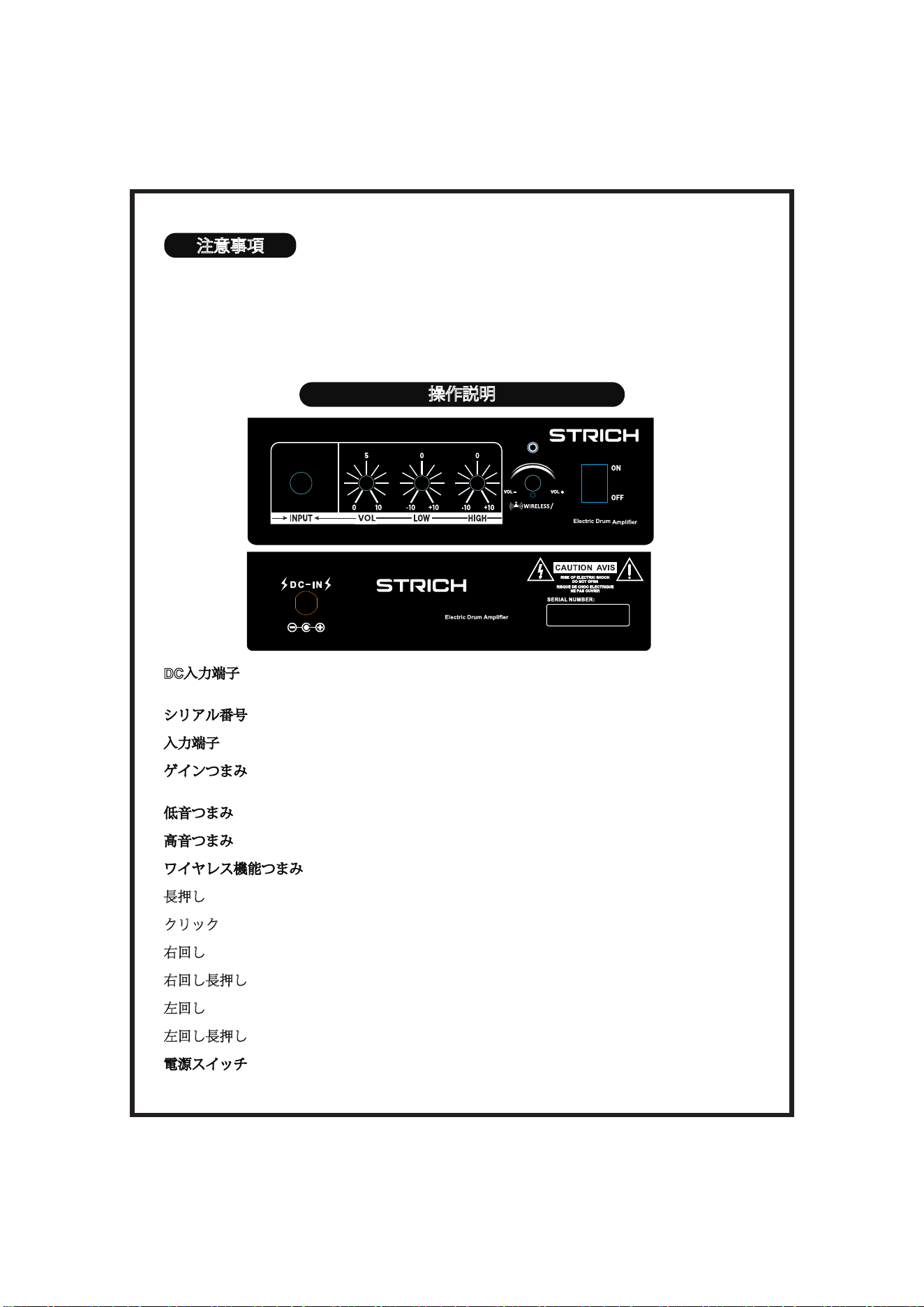
DC入力端子(DC-IN): 純正アダプターを本端子に接続してスピーカーを給電します
(仕様:18V/3A)。
シリアル番号(SERIAL): 製品の製造関連情報を表示します。
入力端子(INPUT): エレキドラム等の楽器のオーディオ出力と接続します。
ゲインつまみ(GAIN): 「入力端子」から接続されたオーディオ信号のゲインレベルを調整し
ます。
低音つまみ(LOW): 「入力端子」に接続した音源の低域成分の強さを調整します。
高音つまみ(HIGH): 「入力端子」に接続した音源の高域成分の強さを調整します。
ワイヤレス機能つまみ(無線-MODE):
長押し: ワイヤレス接続のON/OFF。
クリック: 音楽の再生/一時停止。
右回し: 次の曲に切り替え。
右回し長押し: 音量を上げる。
左回し: 前の曲に切り替え。
左回し長押し: 音量を下げる。
電源スイッチ(POWER): 上側にスライドさせると電源ON、下側にスライドさせると電源OFF。
• ボタン、フェーダー、接続端子を操作する際は、適度な力加減で行ってください。
• ケーブルの抜き差しは、コネクタとケーブルの接合部を持って行ってください。
• 近隣への迷惑防止のため、音量は適切な大きさに調整してください。
• 装置を輸送する場合は、オリジナルの包装箱に入れてください。
• 一部の接続ケーブルには抵抗が含まれています。このような抵抗付きケーブルは使用しないでくだ
さい。
SDA-20
18V/3A
SDA-20
発生しうる低雑音の原因説明
機器ハードウェアの経年劣化または故障
• スピーカー内部のアンプモジュールやコンデンサーなどの部品が劣化すると、電流由来の低雑音が
発生する場合があります。
• エレクトリックドラム音源モジュール自体に回路干があると、出力信号に低雑音が含まれることが
あります。
• スピーカーユニットの破損やボイスコイルの緩みも、異常な低雑音の原因となる可能性があります。
ケーブル接続の問題
• オーディオケーブルや電源ケーブルの品質が低く、シールド層が破損または欠落している場合、外部
の電磁信号を取り込んで低雑音が発生しやすくなります。
• ケーブルコネクターの緩みや酸化により接触不良が生じ、電流性の雑音が発生することがあります。
電源供給と環境干
渍
• 電圧が不安定であったり、エアコンや冷蔵庫などの大電力機器と同一コンセントを共用している場
合、機器の起動・停止時の電圧変動により低雑音が発生することがあります。
• ルーター、携帯電話、ワイヤレスマイクなどの強い電磁源が近くにあると、スピーカー回路に干渉し
雑音が生じることがあります。
• アース不良(接地不良)により、スピーカーやエレクトリックドラム機器に接地ループが形成され、低
周波の「ブーン」という低雑音が発生することがあります。
機器設定とマッチングの問題
• スピーカーの音量を適正ゲイン範囲を超えて大きく設定すると、回路自体の低雑音が増幅される場
合 が あります。
• エレクトリックドラム音源の出力音量が高すぎてスピーカーの入力感度と合わない場合、信号が過
負荷となり低雑音が発生することがあります。
• スピーカーの調整が不適切で、低音域または高音域を過度に強調すると、ノイズが増幅される場合
が あります。
環境および使用上の要因
• スピーカーを湿気の多い環境に設置すると、内部回路が結露し接触不良や漏電を引き起こし、低雑
音が発生することがあります。
• エレクトリックドラムのドラムパッドやトリガーなどの部品に接触不良があると、信号伝送時に干渉
雑音が混入し、スピーカーで増幅されることがあります。
09
10
製品仕様
項目: 内容:
モデル: SDA-20
定格出力:
ウーファー 20W + ツイーター5W
スピーカー構成:
6.5インチウーファー、2.0インチツ
イーター
周波数特性:
50 Hz – 20 kHz
インジケーター:
多機能インジケーター(無線接続状
態/電源状態表示)
インターフェース:
入力:6.35 mm オーディオジャッ
ク;DC-IN:電源ケーブル接続口
外形寸法: 295(幅)×225(奥行)×230(高さ)mm
重量: 3.6 kg
操作機能:
GAIN:音 量 ゲ イ ン 調 整;LOW:低 音
強度調整;HIGH:高音強度調整;
B-MODE:Bluetooth機能制御;
POWER:電源スイッチ
Facebook YoutubeInstagramTikTok
Tiktok: https://www.tiktok.com/@strich_music
YouTube: https://www.youtube.com/@STRICH_MUSIC
Facebook: https://www.facebook.com/people/Strich-music/61565491170195/
Instagram: https://www.instagram.com/strich_music E-mail: [email protected]
底面

FCC Warnning:
This equipment has been tested and found to comply with the limits for a Class B digital device,
pursuant to part 15 of the FCC Rules. These limits are designed to provide
reasonable
protection againstharmful interference in a residential installation. This equipment generates,
uses and can radiateradio
frequency
energy
and,
if
not
installed
and
used
in
accordance
with
the
instructions,
maycause
harmful
interference
to
radio
communications.
However,
there
is
no
guarantee
thatinterference
will
not
occur
in
a
particular
installation.
If
this
equipment
does
cause
harmfulinterference to radio or television reception, which can be
determined by turning the equipmentoff
and
on,
the
user
is
encouraged
to
try
to
correct
the
interference
by
one
or
more
of
thefollowing measures:
•
Reorient or relocate the receiving antenna.
•
Increase the separation between the equipment and receiver.
•
Connect the equipment into an outlet on a circuit different from that to which the receiver is
connected.
• Consult the dealer or an experienced radio/TV technician for help.
Caution:
Any
changes
or
modifications
to
this
device
not
explicitly
approved
by
manufacturer
could void your authority to operate this equipment.
This
device
complies
with
part
15
of
the
FCC
Rules.
Operation
is
subject
to
the
following
two
conditions:
(1)This
device
may
not
cause
harmful
interference,
and
(2)
this
device
must
accept
any
interference received, including interference that may cause undesired operation.
This
equipment
complies
with
FCC
radiation
exposure
limits
set
forth
for
an
uncontrolled
environment.
This
equipment
should
be
installed
and
operated
with
minimum
distance
20cm
between the radiator and your body.