USER GUIDE
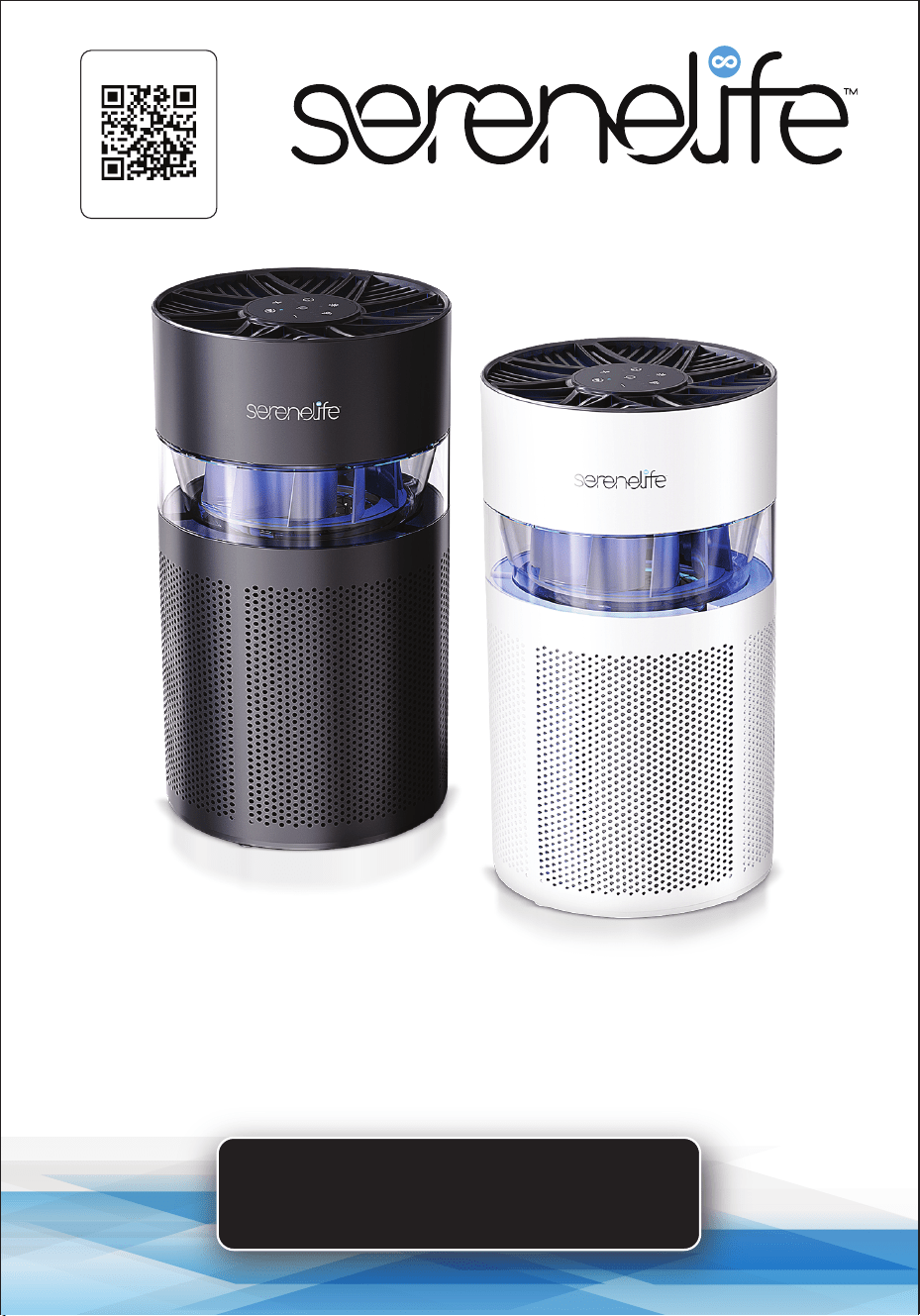
High-Performance Air Purifier
SLARP280BK - SLARP280WT
Start Here
Serenelifehome.com/
register

www.SereneLifeHome.com
2
PLEASE KEEP THIS MANUAL CAREFULLY FOR FUTURE REFERENCE.
FOR HOUSEHOLD USE ONLY.
TABLE OF CONTENTS
Features and Technical Specs
Safety Instructions
Product Structure
OPERATING INSTRUCTIONS
FILTER USAGE INSTRUCTIONS
AROMA DIFFUSER INSTRUCTIONS
Cleaning, Maintenance, and Storage Guide
Register Product
3
4
5
6
7
8
9
9

www.SereneLifeHome.com
3
Features:
•
Engineered design allows for optimum air circulation.
• Ultra-quiet operation.
• Simple button controls and adjustable settings.
• Eective air purifying for rooms up to 64 square feet.
• Features 2-speed and sleep mode functions.
• Automatic timer function for 2, 4, or 8 hours for convenience and energy
savings.
• Filter replacement reminder.
• Detachable base with an aroma box for adding fragrances or essential oils.
• Top-touch operation with a lter change reminder.
• Ambient light with a user-friendly digital display and indicators.
• High ltration eciency and thorough air purication.
• Eectively removes airborne particles.
• Maintains fresh and comfortable air quality.
• Suitable for use on the oor, desktop, home, oce, and car.
What's in the Box:
•
Air Purier
• Adapter
Technical Specs:
•
Construction Material: ABS + HEPA
• Electricity Required / Power Supply: 12V
• Can it be Plugged into an Outlet via an Integral Corded Plug or an AC Adapter:
DC12V Adapter
• Type of Adapter: DC12V Adapter
• Timer: 2, 4, or 8 hours
• Power Consumption in Watts: 18W
• Filter Included: HEPA 13
• Rated Voltage: DC12V With Adapter
• Power Output: 18W
• Hape Filter: H13 Activated Carbon Filter
• Floor Area: 63.8 ft²
• Replace Filter Time: 2000H
• Timer: 2, 4, 8h
• Timer Function: 2/4/8h
• Product Dimensions (L x W x H): 6.7” x 6.7” x 12” -inches

www.SereneLifeHome.com
4
Safety Instructions
1. Ensure the plug ts properly into a polarized power outlet.
2. To avoid re or shock hazards, connect the purier to the correct electrical
outlet.
3. NEVER place the unit on a soft surface such as a bed or sofa, as this could
cause it to tip over and block the air inlet or outlet grills.
4. Do not place anything on top of the unit.
5. Do not move or tilt the unit while it is in operation.
6. Do not insert ngers or objects into the air outlet.
7. Do not use outdoors. This unit is suitable only for indoor use; avoid strong
sunlight and rain.
8. Keep the unit away from water to prevent electrical hazards.
9. Do not use the unit in wet or humid environments.
Thoroughly dry your hands before handling the air purier.
10. Do not place the unit directly below an air conditioner to prevent moisture
from entering the purier.
11. Do not allow children or pets to play on or near the unit.
Close supervision is necessary when the appliance is used near children or
disabled persons.
12. Keep the unit away from heated surfaces and naked ames such as
stovetops, ovens, radiators, or computers.
13. Always turn the purier o before unplugging it.
14. Always unplug the air purier before moving, cleaning, opening the grill,
changing the lter, or when the unit is not in use.
15. To disconnect the unit, pull the plug rather than the cord.
16. NEVER use detergents, gasoline, glass cleaners, furniture polish, paint thinner,
or other solvents to clean any part of the purier.
17. Repairs or modications should only be performed by qualied professionals.
18. Do not operate the appliance with a damaged cord or plug.
If the motor or fan fails, or the unit has been dropped or damaged, contact
customer service.
www.SereneLifeHome.com
5
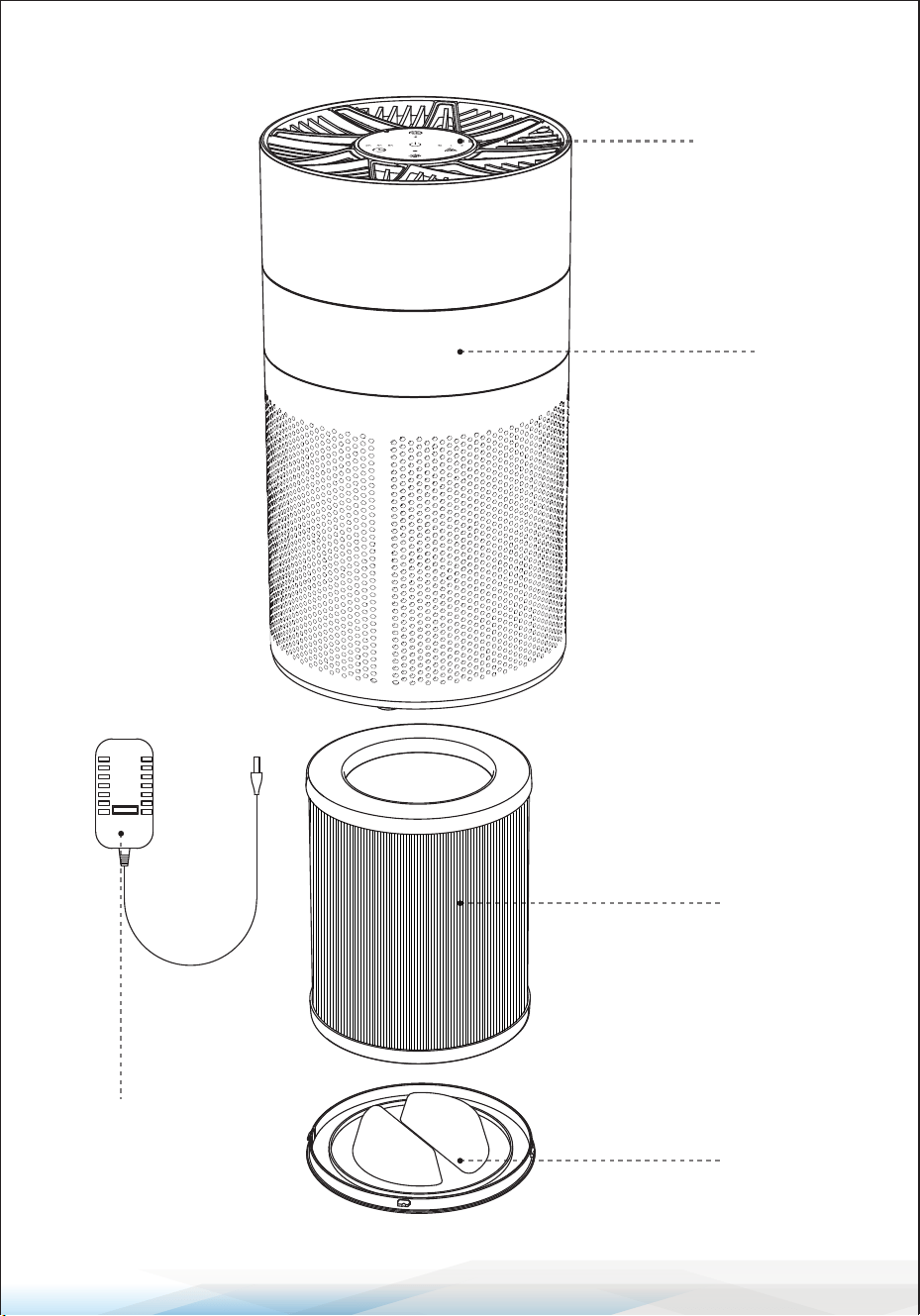
Product Structure
Adapter
Control Panel
Air Inlet
HEPA Filter
Base Cover
www.SereneLifeHome.com
6
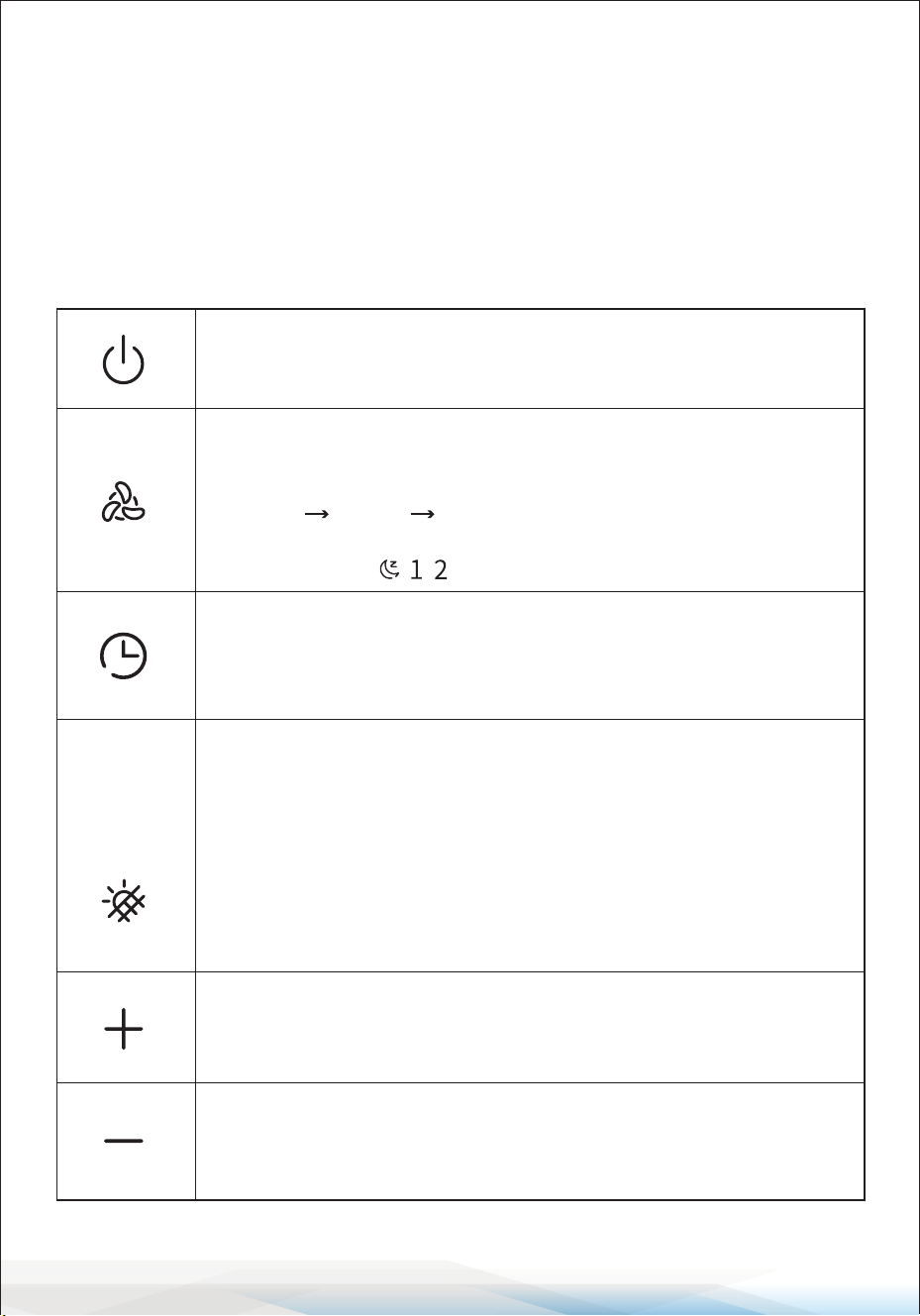
OPERATING INSTRUCTIONS
1. Check Components:
Ensure all components are present and undamaged before use.
2. Connecting Power:
• After connecting the power, the purier will enter standby mode.
• Only the ON/OFF button will function in standby mode.
Powering the Purier:
• Tap the ON/OFF button to switch the purier on or o.
• The default setting is Level 1, with the ambient light turned on.
Changing Modes:
• Tap the Mode Button to cycle through operating modes in the
following order:
Level 1 Level 2 Silent Mode.
• The corresponding Level Indicator Light will display the
current mode.
Using the Timer Button:
• Standby Mode: Tap to set timed power-on (2h, 4h, or 8h).
• Power-On Mode: Tap to set timed power-o (2h, 4h, or 8h).
• The timer indicator will light up to conrm the setting.
Adjusting Ambient Light:
Tap the Light Button to cycle through ambient light modes:
• Color-Changing Breathing Light
• Single Color Modes (Color 1–7)
• Turn O Ambient Light
Press and hold the button to reset the lter.
The lter indicator light will turn on when the lter’s lifespan
expires (after 2,000 hours).
Volume Up/Next Track Button:
• Tap to increase the volume by 1 level.
• Press and hold to skip to the next track.
Volume Down/Previous Track Button:
• Tap to decrease the volume by 1 level.
• Press and hold to return to the previous track.
www.SereneLifeHome.com
7
FILTER USAGE INSTRUCTIONS
Important:
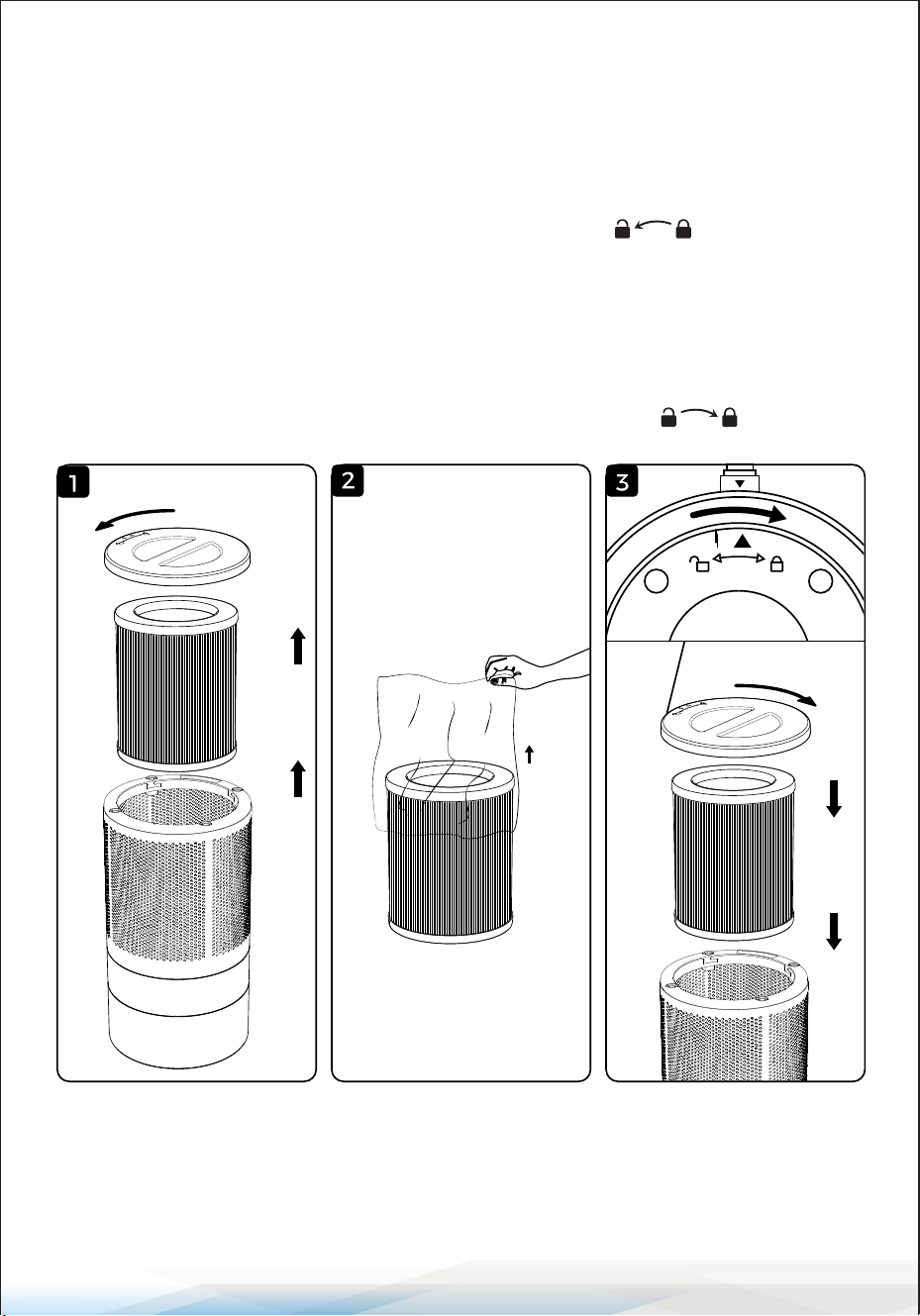
The purier comes with the lter pre-installed.
Ensure you remove the lter’s packaging before rst use.
1. Rotate the base cover counterclockwise to unlock it.
2. Remove the lter and its packaging.
3. Place the lter back inside the appliance.
4. Rotate the base cover clockwise to lock it securely.
You will hear a "click" sound when it is properly fastened.
www.SereneLifeHome.com
8
AROMA DIFFUSER INSTRUCTIONS
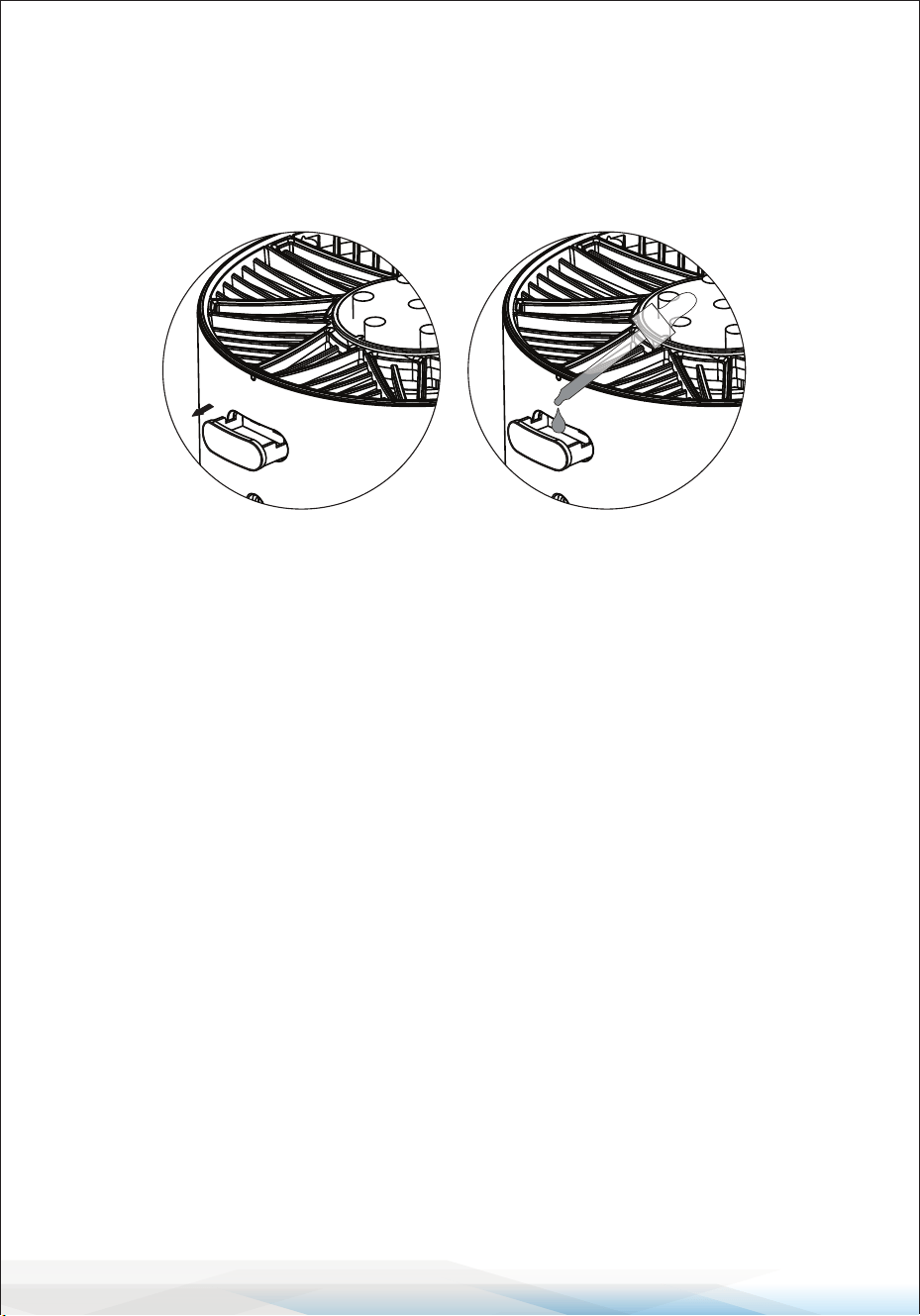
1. Turn o the purier before adding essential oils.
2. Use a dropper (provided with the essential oils) to add the oils.
• Do not pour oils directly into the aroma box.
3. Add 4–5 drops of essential oil each time.
Cleaning, Maintenance, and Storage Guide:
Cleaning:
1. Turn o the purier and unplug it from the power source.
2. Use a dry, soft cloth to wipe the exterior of the unit.
Avoid using water or liquid cleaners.
3. For stubborn dirt, lightly dampen a cloth with water and wipe gently.
Ensure the unit is completely dry before reconnecting it.
4. Clean the air inlet and outlet grills using a soft brush or vacuum to remove
dust and debris.
Filter Maintenance:
• Replace the HEPA lter every 2,000 hours of use or as indicated by the lter
replacement reminder.
• Follow the instructions provided to safely remove and install the lter.
Storage:
1. If the purier will not be used for an extended period, clean it thoroughly and
allow it to dry completely.
2. Remove the HEPA lter and store it in a dry, sealed bag to prevent dust
accumulation.
3. Place the unit in its original packaging or cover it with a dustproof cloth.
Store it in a cool, dry place away from direct sunlight and moisture.

www.SereneLifeHome.com
9
FCC INFORMATION
WARNING: Changes or modications not expressly approved by the party responsible
for compliance could void the user’s authority to operate the equipment.
NOTE: This equipment has been tested and found to comply with the limits for a Class
B digital device, pursuant to Part 15 of the FCC Rules. These limits are designed to
provide reasonable protection against harmful interference in a residential installation.
This unit generates, uses, and can radiate radio frequency energy, and if not installed
and used in accordance with the instructions, may cause harmful interference to radio
communications. However, there is no guarantee that interference will not occur in a
particular installation. If this equipment does cause harmful interference to radio or
television reception, which can be determined by turning the equipment o and on,
the user is encouraged to try and correct the interference by one or more of the
following measures:
• Reorient or relocate the receiving antenna.
• Increase the separation between the equipment and receiver.
• Connect the equipment to an outlet on a circuit dierent from that to which the
receiver is connected.
• Consult the dealer or an experienced radio/TV technician for help.
This device complies with Part 15 of the FCC Rules. Operation is subject to the
following two conditions:
1. This device may not cause harmful interference.
2. This device must accept any interference received, including interference that may
cause undesired operation.
Register Product
Thank you for choosing SereneLife. By registering your product,
you ensure that you receive the full benets of our exclusive
warranty and personalized customer support.
Complete the form to access expert support and to keep your
SereneLife purchase in perfect condition.
Start Here
Serenelifehome.com/pages/register

Questions or Comments?
We are here to help!
Phone: 1.718.535.1800
Serenelifehome.com/ContactUs