F921 Product Description
Bluetooth / TAP-C / wireless charging / multi-function touch key private speaker
Thank you for your honor! Choose our multifunctional sofa speaker!
This speaker uses full key touch, automatic function switching mode, dual motor control system,
surround 3D stereo sound effects
Sincerely hope to give you like music, bring the digital age of music enjoyment. 1.
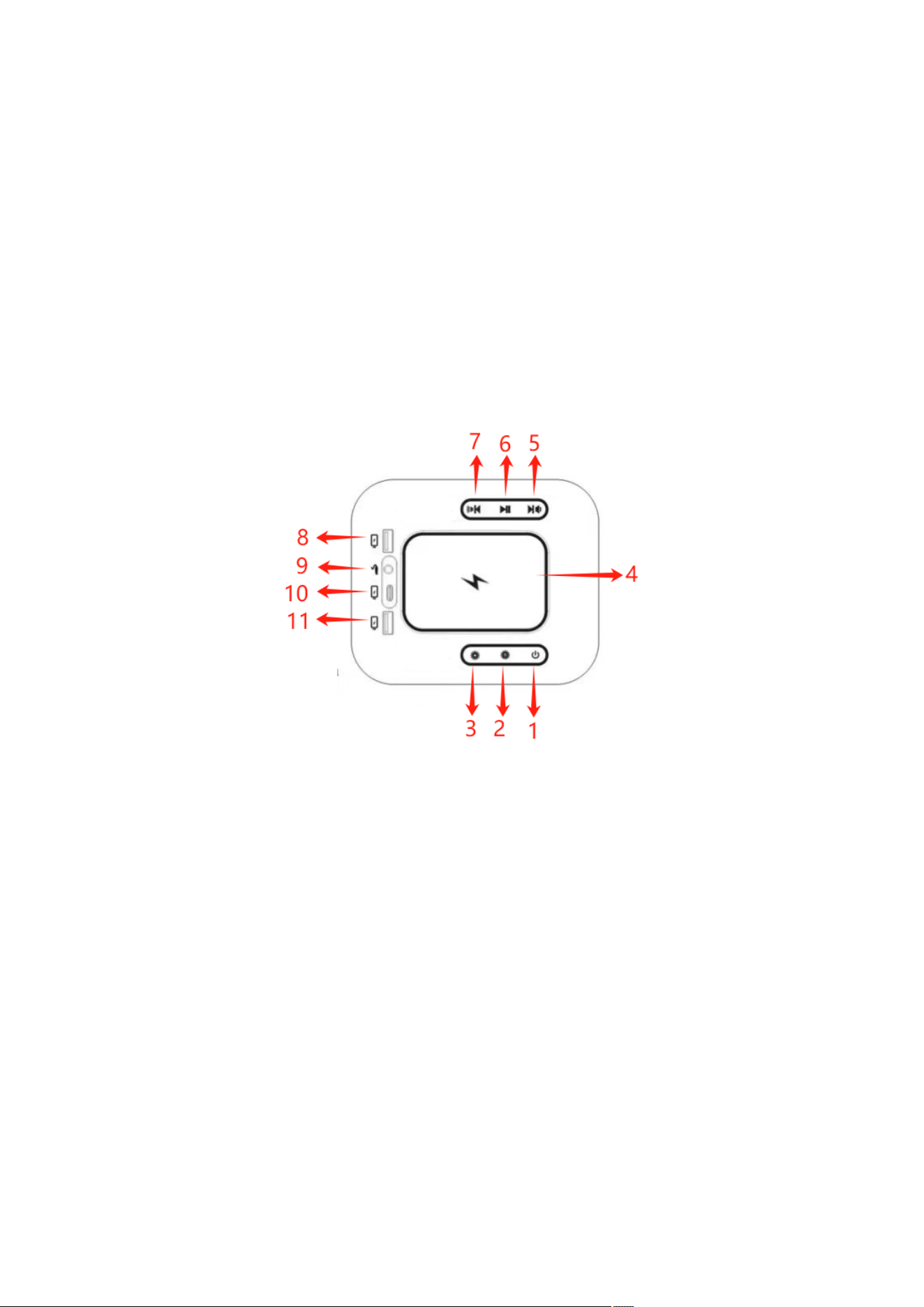
Introduction of host panel
1. Long press on the switch machine 2. atmosphere light switch 3.
atmosphere light mode 4. wireless charging 5. last song / volume
reduction 6. pause / play 7. next song / volume plus 8.U disk music /
USB charging 9. AUX audio input 10.Tap-C charging 11.USB
charging
2: Detailed function introduction
1. Switch key: press the switch.
2. Atmosphere light switch: single point control atmosphere light switch.

3. Atmosphere light mode: single point switch atmosphere light mode: gradient / horse light /
color.
4. Wireless charging. The host plane with wireless charging, place the plane wireless charging
symbol center with wireless charging phone to charge.
5. Last song / volume reduction: single song, long press the volume reduction, support U disk /
downloaded local songs.
6. Pause mode: pause the device from playing music while it is playing.
7. Next song / volume plus: single click next song, long press volume increase, support U disk /
downloaded local songs.
8. U, disk playback: Insert the USB device U disk will automatically switch to the U disk mode,
scan the music of the USB device
9. AUX audio input: audio source input signal.
10. Tap-C Charging: plug in the type-c cable and connect to the phone to charge.
11.USB Charging: insert USB data cable, automatic reading protocol can be mobile phone /
mobile power supply and other USB charging interface charging.
Note: BT / Bluetooth: boot default Bluetooth mode, boot Bluetooth
search F921 for pairing, successful matching, then the Bluetooth device can play music remotely,
Bluetooth within 10 meters from the open area, depending on the different environment, different
use distance.
question terms of settlement
Wireless
charging
temperature
protection
When wireless charging, the temperature stops above 65 degrees, the
temperature drops below 60 degrees, and the wireless charging will resume
working.
Can't boot
The power supply is not inserted, if it is confirmed that the power
supply is a problem, replace the power supply, if the power supply is not
a problem, it may be a problem with the control box, replace the control
box
The machine
did not
respond
Please try again without power and check whether the mobile phone / U
disk is well connected.
The keys
don't work
Please cut off the power to try again, do not press hard, check whether
there is any foreign matter or water, please start up again to try.
The music
is chaotic,
even jumping
The product is light touch control, please confirm that there is no
foreign body above the product control key.
Bluetooth
cannot be
paired
Please turn off all other paired Bluetooth devices, restart and search.
Bluetooth search device whether the directory is full, delete useless
Bluetooth reconnection.
Wireless
charging
does not
Please confirm whether the wireless charging position of the mobile phone
is accurate and that there is no foreign body interference
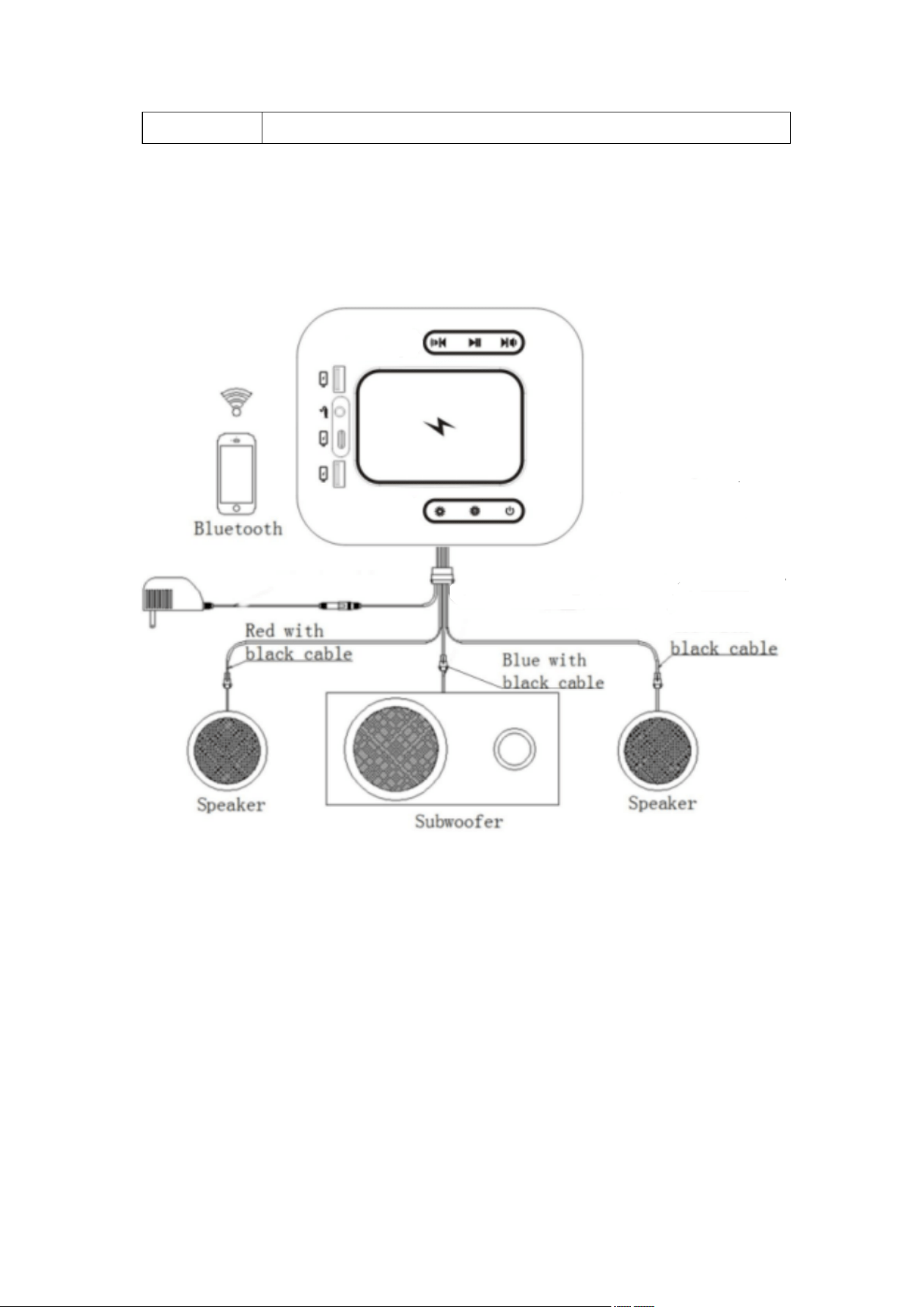
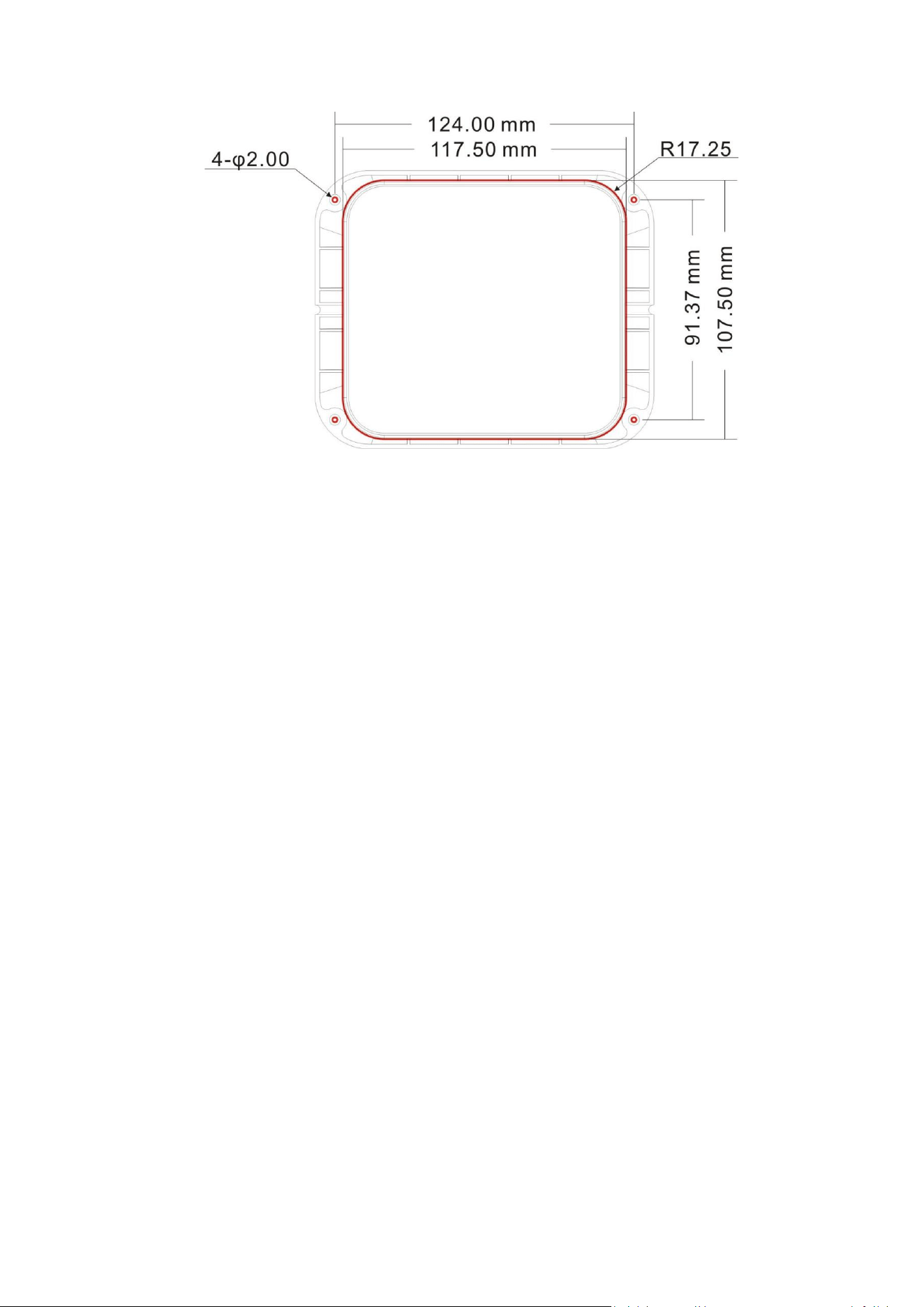
3 Schematic diagram of installation
4 Accessories opening diagram
charge
5 FCC Statement
This device complies with Part 15 of the FCC rules. Operation is subject to the following two conditions: 1) this device may not cause harmful
interference, and 2) this device must accept any interference received, including interference that may cause undesired operation.
Note: This equipment has been tested and found to comply with the limits for a Class B digital device, pursuant to part 15 of the FCC Rules.
These limits are designed to provide reasonable protection against harmful interference in a residential installation. This equipment generates
uses and can radiate radio frequency energy and, if not installed and used in accordance with the instructions, may cause harmful interference
to radio communications. However, there is no guarantee that interference will not occur in particular installation. If this equipment does
cause
harmful interference to radio or television reception, which can be determined by turning the equipment off and on, the user is encouraged
to try to correct the interference by one or more of the following measures:
--Reorient or relocate the receiving antenna.
--Increase the separation between the equipment and receiver.
--Connect the equipment into an outlet on a circuit different from that to which the receiver is connected.
--Consult the dealer or an experienced radio/TV technician for help.
Changes or modifications not expressly approved by the party responsible for compliance could void the user’s authority to operate the
equipment.
The device has been evaluated to meet general RF exposure requirement. This device must operate with a
minimum distance of 20 cm between the radiator and user body.
FCC Radiation Exposure Statement
This device complies with FCC RF radiation exposure limits set forth for an uncontrolled environment. This transmitter must not be co-located
or operating in conjunction with any other
antenna or transmitter.