Tire Pressure Monitoring System
TP100 USER MANUAL
English

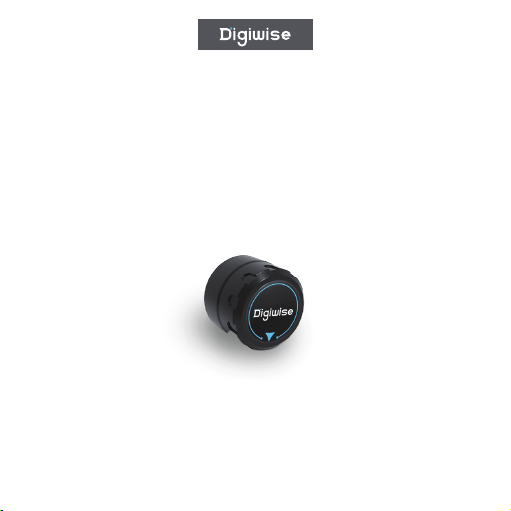
The TPMS Tire Pressure Sensor is a Bluetooth Tire Pressure
Monitoring System (TPMS) specially designed for bicycles.
Utilizing Bluetooth Low Energy (BLE) technology, it provides
real-time monitoring of tire pressure and temperature to help
ensure a safer riding experience.
· Tire Pressure Sensor × �
· Lock Nut × �
· Wrench × �
Product Overview
Package Contents
Installation Instructions
Before Installation
➀Ensure your bicycle uses a Schrader valve.
➁ Check that the tire pressure sensors are in good condition.
➂ Prepare the included wrench and other necessary tools.
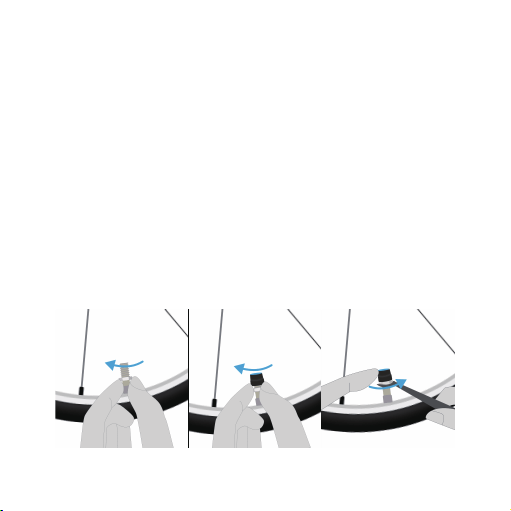
Installation Steps
➀Remove the original valve cap: Turn the existing valve cap
counterclockwise and remove it from the bicycle tire valve.
➁Install the sensor: Screw the tire pressure sensor clockwise
onto the valve stem, ensuring the threads are properly aligned.
➂Tighten the lock nut: Use the supplied wrench to tighten the
lock nut appropriately. Do not overtighten.
➃Repeat for the second wheel: Install the second sensor using
the same procedure.
➄Check for air leakage: After installation, ensure there is no air
leakage.

First-Time Pairing
Operating Instructions
➀Activate the device: The sensor will automatically activate after
installation.
➁Download the App: Search for and download the compatible
TPMS application from your mobile app store.
➂Bluetooth Pairing:
·Enable Bluetooth on your smartphone.
·Open the TPMS App.
·Follow the in-app instructions to complete pairing.
➃PSet Parameters: Configure the appropriate tire pressure range
according to your bicycle specifications.
Daily Use
➀Real-Time Monitoring: Open the TPMS App to view real-time
tire pressure and temperature data.
➁Data Display:
· Tire Pressure Range:: ���-���� kPa
· Temperature Range: -��℃ to +��℃

· Operating Voltage: �V
· Bluetooth Frequency: �.�GHz
· Response Time: ≤ � seconds
· Waterproof Rating: IP��
· Battery Life: �-� years
· Weight: �g ± �g
Technical Specifications
Precautions
➂Alarm Function: The App will automatically issue alerts when
tire pressure or temperature exceeds the preset limits.
Installation Precautions
➀Ensure the valve stem is clean before installation.
➁Tighten the lock nut moderately to avoid thread damage.
➂Always perform a leak check after installation.

Usage Precautions
➀Avoid strong impacts or crushing forces.
➁Check the sensor installation regularly (recommended once per
week).
➂Extreme temperatures may affect measurement accuracy.
➃Although the device is waterproof, prolonged immersion is not
recommended.
Maintenance
➀Cleaning: Clean the sensor surface regularly with a soft cloth.
➁Battery Replacement: When battery life ends, replacement
should be performed by qualified personnel.
➂Storage: Store the product in a dry environment when not in
use for extended periods.

Troubleshooting
Unable to Connect via Bluetooth:
· Verify Bluetooth is enabled on your phone.
· Ensure the sensor battery has sufficient power.
· Restart the App and pair again.
Inaccurate Data:
Device Not Responding:
· Check whether the sensor is securely installed.
· Compare the displayed value with the actual tire pressure.
· CRecalibrate if necessary.
· Check whether the battery is depleted.
· Verify that the sensor is not damaged.
· Contact customer support.

Safety Warnings
➀Do not operate the TPMS App while riding.
➁Tire pressure data is for reference only; use a calibrated gauge
for critical measurements.
➂If abnormal tire pressure is detected, stop immediately and
inspect the tire.
➃This product is intended for bicycles only and must not be used
on other vehicles.
For technical support or assistance, please contact
customer service.ent for technical support.

This device complies with part 15 of the FCC Rules. Operation is subject to the
following two conditions: (1) This device may not cause harmful interference, and (2)
this device must accept any interference received, including interference that may cause
undesired operation.
Any Changes or modifications not expressly approved by the party responsible for
compliance could void the user's authority to operate the equipment.
Note: This equipment has been tested and found to comply with the limits for a Class B
digital device, pursuant to part 15 of the FCC Rules. These limits are designed to
provide reasonable protection against harmful interference in a residential installation.
This equipment generates uses and can radiate radio frequency energy and, if not
installed and used in accordance with the instructions, may cause harmful interference
to radio communications. However, there is no guarantee that interference will not
occur in a particular installation. If this equipment does cause harmful interference to
radio or television reception, which can be determined by turning the equipment off and
on, the user is encouraged to try to correct the interference by one or more of the
following measures:
-Reorient or relocate the receiving antenna.
-Increase the separation between the equipment and receiver.
-Connect the equipment into an outlet on a circuit different from that to which the
receiver is connected.
-Consult the dealer or an experienced radio/TV technician for help.
-This equipment complies with FCC radiation exposure limits set forth for an
uncontrolled environment. This equipment should be installed and operated with
minimum distance 20cm between the radiator & your body.