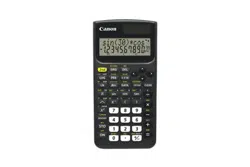

F-730SX
SCIENTIFIC CALCULATOR
User Guide
ENGLISH
www.canon.com/calcmanual
E-IE-492
First Tme Operation
1. Remove the battery insulation tab to load the battery.
(Figure )
2. To initialize the calculator, use the tip of a ballpoint pen
(or similar sharp object) to press the [RESET] button on
the back of the calculator. (Figure )

2
SAFETY PRECAUTIONS .....................................................P.3
USING THE PROTECTIVE SLIDE CASE .............................P.3
DISPLAY (2-LINE DISPLAY) ................................................P.4
TO GET STARTED
Power On and Off .............................................................P.5
Input Capacity ..................................................................P.5
Display Format Setting (Notation – Fix, Sci, Eng) ............P.5
Inputting and Editing Calculations ....................................P.6
Order of Operations ..........................................................P.7
Input Ranges.....................................................................P.8
Error Messages and Error Locator..................................P.11
BASIC CALCULATIONS
Arithmetic Calculations....................................................P.12
Memory Calculations.......................................................P.13
Fraction Operations.........................................................P.15
Percentage Calculations .................................................P.15
Degrees-Minutes-Seconds Calculations .........................P.15
Angle Unit Conversion ....................................................P.16
FUNCTIONAL SCIENTIFIC CALCULATIONS
Square, Root, Power, Power Root, Reciprocal and Pi ...P.17
Trigonometry Calculations .............................................P.17
Logarithm, Natural Logarithm, and Antilogarithm ...........P.18
Coordinate Conversion ..................................................P.18
Base-n Calculations and Logical Calculations ...............P.19
Permutations, Combinations Factorials and
Random Number Generation ..........................................P.21
STATISTICAL CALCULATIONS ........................................P.22
BATTERY REPLACEMENT ...............................................P.25
BATTERY CAUTION ...........................................................P.26
SPECIFICATIONS ...............................................................P.26
CONTENTS
3
SAFETY PRECAUTIONS
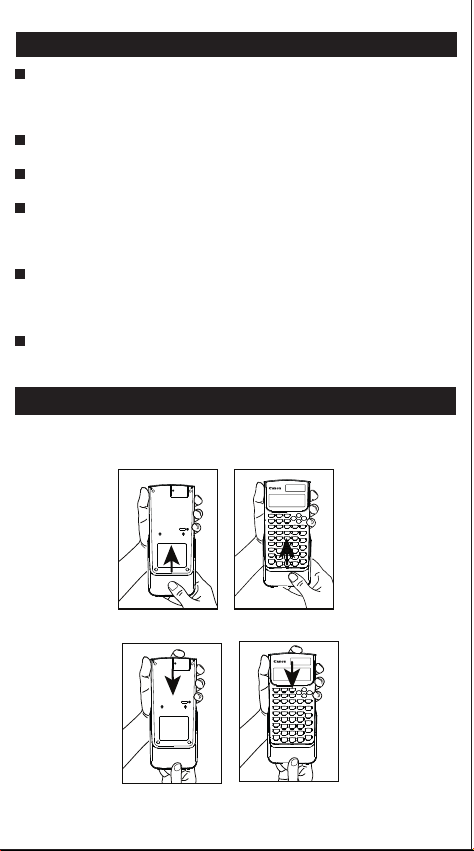
Slide the unit out of the protective case to open or close the
cover as shown in the figure.
USING THE PROTECTIVE SLIDE CASE
OPEN
CLOSE
This calculator contains precision components such as
LSI chips and should not be used in places subject to rapid
variations in temperature, excessive humidity, dirt or dust, or
exposure to direct sunlight.
Do not apply excessive pressure on the liquid crystal display
panel as it is made of glass.
Use a soft, dry cloth to clean the calculator. Do not clean with
a damp cloth or volatile liquid such as paint thinner.
Do not under any circumstances dismantle the device. If the
calculator is not functioning properly, please contact Canon
Service & Support or mail the device with the Warranty to a
Canon service location.
Do not improperly dispose of the calculator such as in an
incinerator as it may cause personal injury or harm.
Please dispose of the product in accordance with
National regulations
It is recommended to replace the battery once every two
years.
SAFETY PRECAUTIONS .....................................................P.3
USING THE PROTECTIVE SLIDE CASE .............................P.3
DISPLAY (2-LINE DISPLAY) ................................................P.4
TO GET STARTED
Power On and Off .............................................................P.5
Input Capacity ..................................................................P.5
Display Format Setting (Notation – Fix, Sci, Eng) ............P.5
Inputting and Editing Calculations ....................................P.6
Order of Operations ..........................................................P.7
Input Ranges.....................................................................P.8
Error Messages and Error Locator..................................P.11
BASIC CALCULATIONS
Arithmetic Calculations....................................................P.12
Memory Calculations.......................................................P.13
Fraction Operations.........................................................P.15
Percentage Calculations .................................................P.15
Degrees-Minutes-Seconds Calculations .........................P.15
Angle Unit Conversion ....................................................P.16
FUNCTIONAL SCIENTIFIC CALCULATIONS
Square, Root, Power, Power Root, Reciprocal and Pi ...P.17
Trigonometry Calculations .............................................P.17
Logarithm, Natural Logarithm, and Antilogarithm ...........P.18
Coordinate Conversion ..................................................P.18
Base-n Calculations and Logical Calculations ...............P.19
Permutations, Combinations Factorials and
Random Number Generation ..........................................P.21
STATISTICAL CALCULATIONS ........................................P.22
BATTERY REPLACEMENT ...............................................P.25
BATTERY CAUTION ...........................................................P.26
SPECIFICATIONS ...............................................................P.26
Mantissa
minus sign
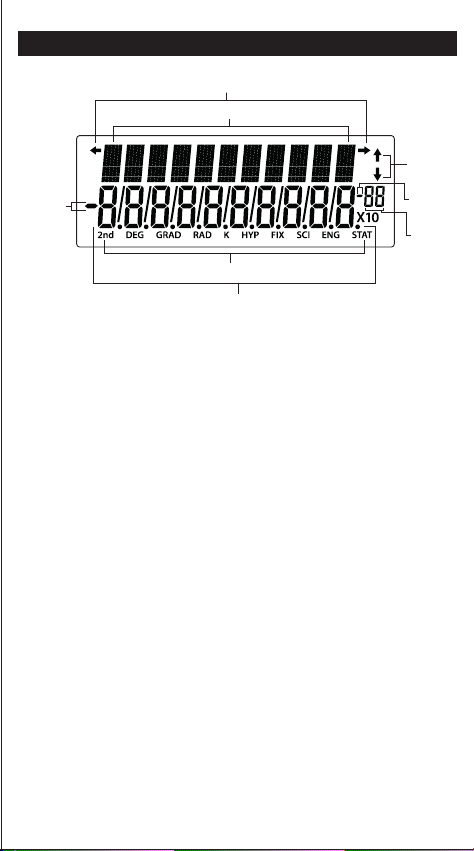
4
<Status Indicators>
2nd : 2nd Function
DEG : Degree Mode
GRAD : Gradient Mode
RAD : Radian Mode
K : Constant
HYP : Hyperbolic
FIX : Fixed Mode
SCI : Scientific Exponential Mode
ENG : Engineering Exponential Mode
STAT : Statistic Mode
DISPLAY (2-LINE DISPLAY)
Next or
Previous
page
Status indicators
Mantissa
minus sign
Formula (11 characters)
Exponent
minus sign
Exponent
Extension mark (Shows the
presence of hidden formula)
Mantissa
5
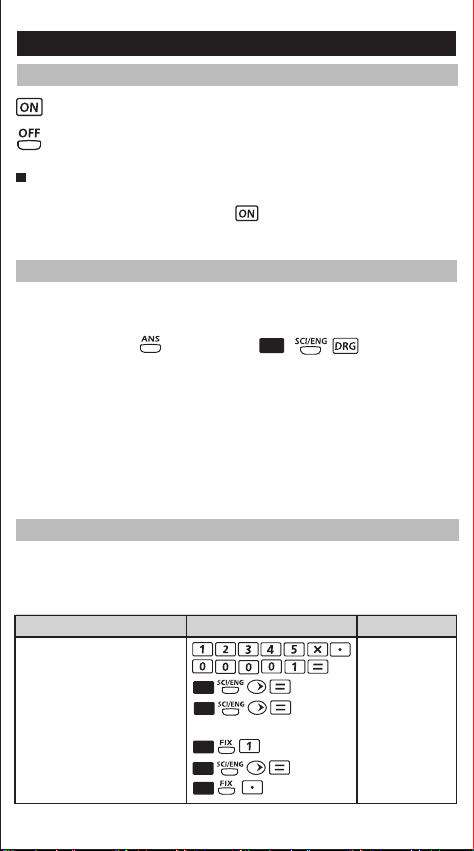
(Power ON): Turns on the calculator.
(Power OFF): Turns off the calculator.
Auto Power Off Function:
If the calculator is not used for about 7 minutes, it will
automatically power off. Press key to turn the calculator on
again.
TO GET STARTED
Power ON and OFF
F-730SX can accommodate up to 87 steps in Normal mode and 47
steps in STAT mode in a single calculation. One step is used when
you press one of the numeric keys, arithmetic keys, scientific
calculation keys or key. Pressing , and the
direction keys will not take up any steps.
When you reach 79 steps in Normal mode or 39 steps in STAT mode
of any calculation, the cursor changes from [ █ ] to [ ▓ ] notifying you
that the memory is running low. In case you need to input a single
calculation with more than 87 steps in Normal mode and 47 steps in
STAT mode, you can separate the calculation into two or more
segments.
Input Capacity
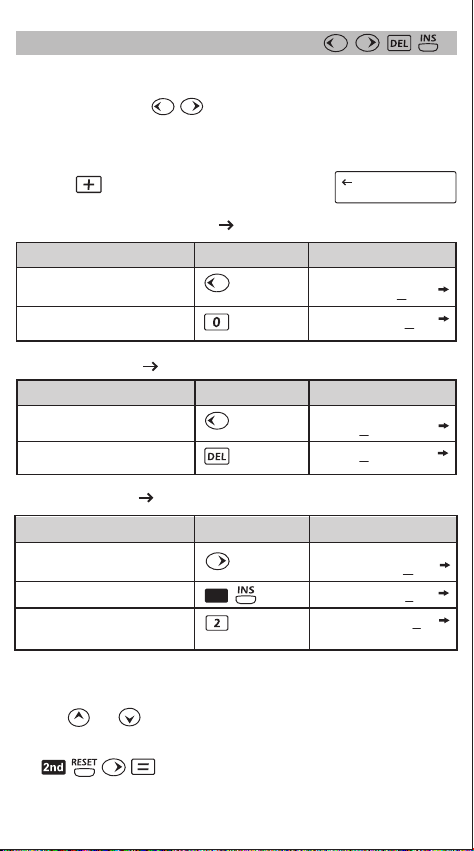
Default Setting : Floating-Decimal
0.12345
Scientific Notation (SCI) 1.2345
Engineering Notation (ENG) 123.45
(Exponent is a multiple of 3)
Fixed Decimal places: 1
123.5
Restore to Standard Notation 0.1
(Floating-decimal) 0.12345
F-730SX can display up to 10 digits. Values exceeding the 10-digit
limit will automatically be displayed in exponent notation format.
Example : Changing the display format of 0.12345
Display Setting
Display (Lower)
Operation
Display Format Setting (Notation – Fix, Sci, Eng)
2nd
–01
x10
2nd
2nd
2nd
2nd
–03
x10
–03
x10
Exponent
minus sign
Exponent
2nd
Inputting and Editing Calculations
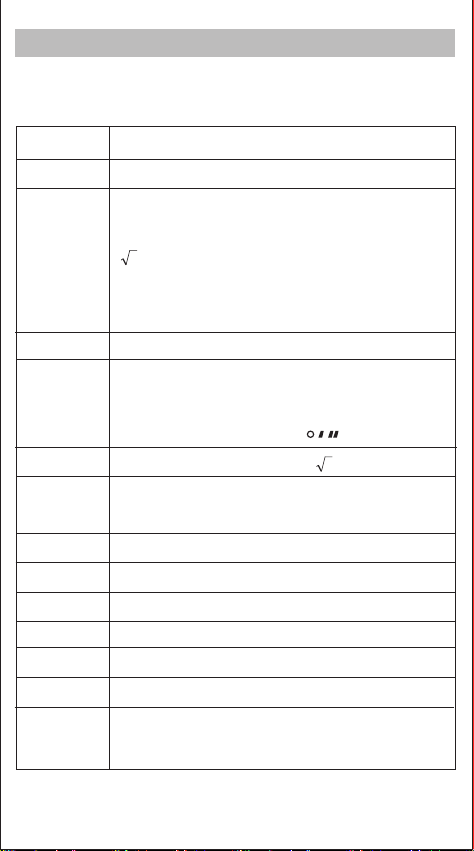
Replacing an Entry (1234567 1234560)
6
New input begins on the left of the upper (entry) line. When the
entries are over 11 digits, the line will move to the right
consecutively. Press to scroll the cursor within the upper
(entry) line and edit your calculation as needed.
Example (Editing an Entry):
234567 889900
Press or press continuously
for "7" blinks 123456█+889
Replace with "0" 1234560█889
Display Setting
Display (Upper)
Operation
Deletion (1234560 134560 )
Press or press continuously
for "2" blinks 1█34560+889
"2" is deleted 1█4560+8899
Display Setting Display (Upper)
Operation
Default Setting : Floating-Decimal
0.12345
Scientific Notation (SCI) 1.2345
Engineering Notation (ENG) 123.45
(Exponent is a multiple of 3)
Fixed Decimal places: 1
123.5
Restore to Standard Notation 0.1
(Floating-decimal) 0.12345
567+889900█
Press or press continuously
for "8" blinks 134560+█899
"8" and "_" blinks alternately 134560+8899
Insert "2", "8" continues 134560+2899
to blink
Insertion (889900 2889900)
Display Setting Display (Upper)
Operation
2nd
Replay
• After the calculation is executed, the calculation expression and
its result is automatically stored in memory.
• Press (or ) to replay the performed calculation expressions
and results.
• The calculation memory is cleared when:
i) (RESET: Y) keys are pressed (which initializes
the calculator).
ii) Calculation mode is changed.
7
Replay
• After the calculation is executed, the calculation expression and
its result is automatically stored in memory.
• Press (or ) to replay the performed calculation expressions
and results.
• The calculation memory is cleared when:
i) (RESET: Y) keys are pressed (which initializes
the calculator).
ii) Calculation mode is changed.
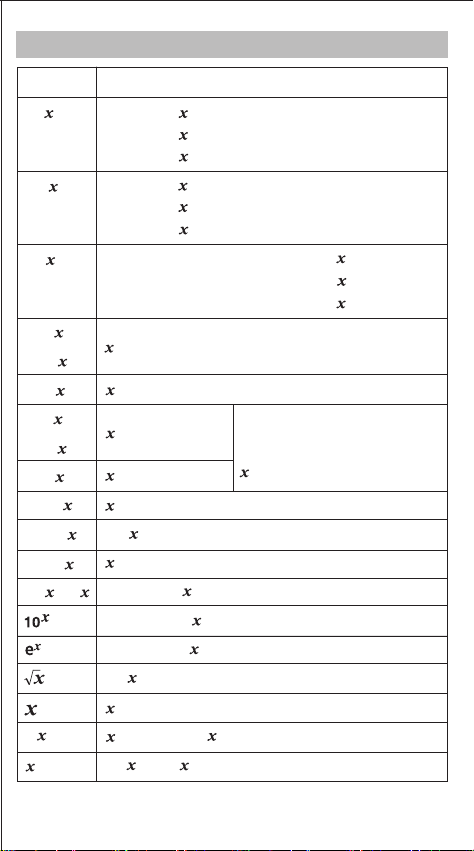
Order of Operations
The calculator will automatically determine the operation priority.
This means that algebraic expressions can be entered just as they
are written and the calculation priority is as follows:
1st Priority Recall memory (A-E), RAND
2nd Calculation with parentheses ( ).
3rd Function with parentheses that requests the
input argument to the right. log(, ln(, 10^(, e^(,
( , sin(, cos(, tan(, sin
-1
(, cos
-1
(, tan
-1
(, sinh(,
cosh(, tanh(, sinh
-1
(, cosh
-1
(, tanh
-1
(, R>Pr(,
R>Pθ(, P>Rx(, P>Ry( and RANDI(
4th Fractions
5th Functions that come after the input value
preceded by values.
x
2
, x
-1
, x! and angle units ( r g)
6th Power (^) and Power root ( x )
7th Negation (+/–)
Logical NEG, NOT
8th Permutations (nPr) and Combinations (nCr)
9th Multiplication, implied multiplication and division
10th Addition and subtraction
11th Logical AND
12th Logical OR, XOR, XNOR
13th Conversions ( A b/c↔d/e , F↔D, ►DMS)
14th Calculation ending instruction [=], Base-n
transformation, Storage
8
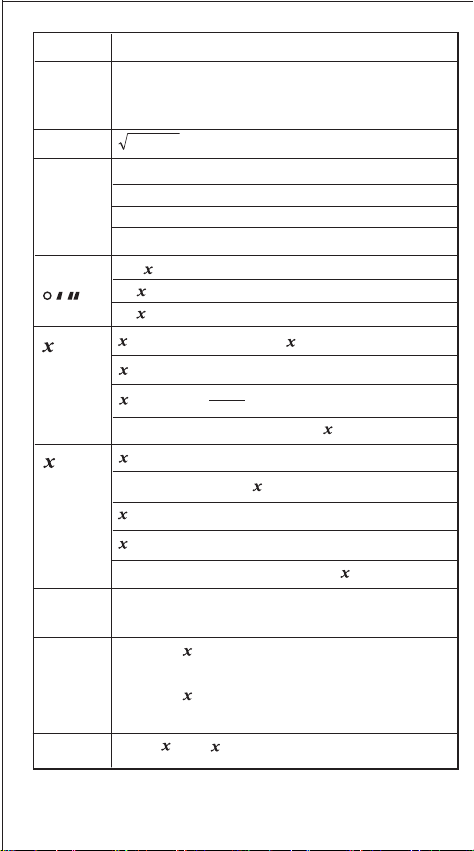
Input Ranges
Functions
Input Range
sin DEC 0 ≤ | |≤ 4.499999999 E 10
RAD 0 ≤ | | ≤ 785398163.3
GRA 0 ≤ | | ≤ 4.999999999 E 10
cos DEC 0 ≤ | | ≤ 4.500000008 E 10
RAD 0 ≤ | | ≤ 785398165
GRA 0 ≤ | | ≤ 5.000000009 E 10
tan
DEG same as sinx, except when = (2n-1)x90
RAD same as sinx, except when = (2n-1)x�/2
DEG same as sinx, except when = (2n-1)x100
sin
-1
cos
-1
tan
-1
| | < 1 x 10
100
sinh
cosh
tanh | | < 1 x 10
100
sinh
-1
| | < 5 x 10
99
cosh
-1
1 ≤ < 5 x 10
99
tanh
-1
| | < 1
log / In 1 x 10
–99
≤ < 1 x 10
100
–1 x 10
100
< < 100
–1 x 10
100
< ≤ 230.2585092
0 ≤ < 1 x 10
100
2
| | < 1x10
50
1/ | | < 1 x 10
100
; ≠ 0
! 0 ≤ ≤ 69 ( is an integer)
| | ≤ 1
| | ≤ 230.2585092
For sinh and tanh, errors are
cumulative and accuracy is
affected at a certain point when
=0
9
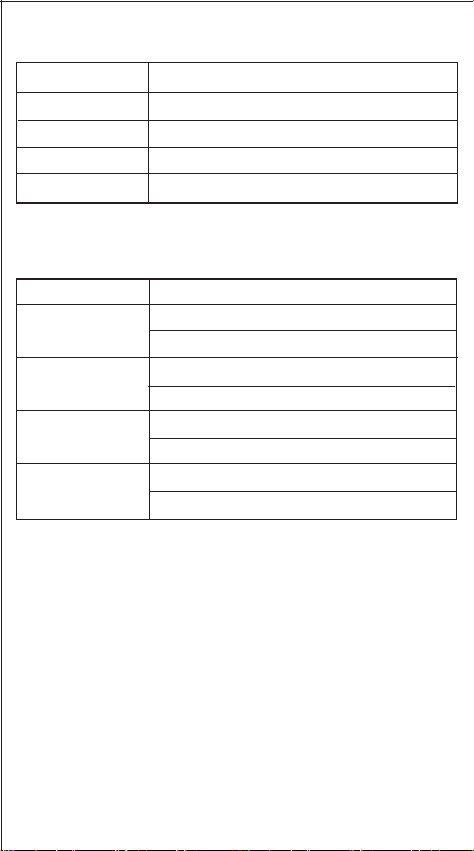
Functions
Input Range
0 ≤ r ≤ n
nPr/nCr n < 1 x 10
10
(n and r are integers)
R → P x
2
+ y
2
< 1 x 10
100
P → R 0 ≤ r < 1 x 10
100
(DEG) |θ| < 9 x 10
9
(RAD) |θ| < 5 x 10
7
� rad
(GRA) |θ| < 1 x 10
10
grad
o : | | < 1 x 10
100
' : ≥ 0
" : ≥ 0
y
> 0 : –1x10
100
< y log < 100
= 0 : y > 0
< 0 : y= n; (n is an integer)
However : –1 x 10
100
< y log | | < 100
1/y
> 0 ; y ≠ 0
–1x10
100
< 1/y log < 100
= 0: y > 0
< 0: y = 2n + 1; 1/n (n ≠ 0; n is an integer)
However: –1 x 10
100
< 1/y log | | < 100
a
b/c
Total of integer, numerator, and denominator must
be 10 digits or less (including division marks)
STAT 1-VAR : | | < 1 x 10
50
0 ≤ FRQ < 100
2-VAR : | | < 1 x 10
50
|y| < 1 x 10
50
EEx –99 ≤ ≤99 ( is an integer)
2n+1
1
2
10
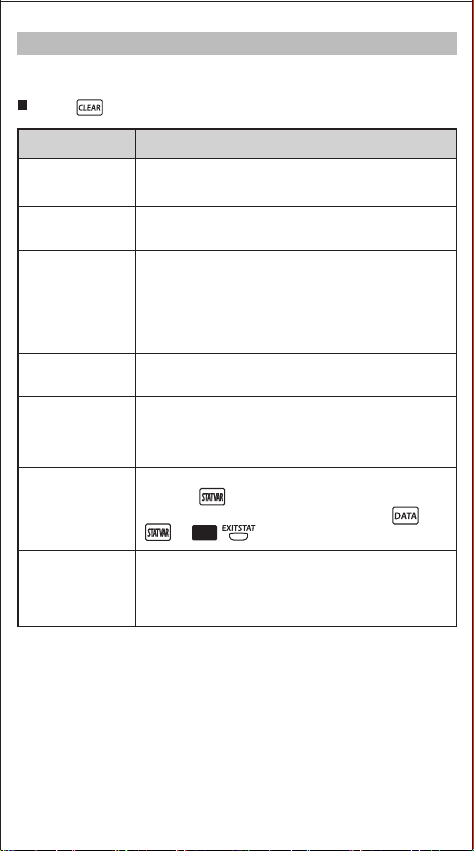
• In Base-n mode, valid values in each number system:
• Calculation range:
Number system Valid values
Binary 0, 1
Octal 0, 1, 2, 3, 4, 5, 6, 7
Decimal 0, 1, 2, 3, 4, 5, 6, 7, 8, 9
Hexadecimal 0, 1, 2, 3, 4, 5, 6, 7, 8, 9, A, B, C, D, E, F
Number system Calculation range
Binary Positive 0111111111 ≥ x ≥ 0
Negative 1111111111 ≥ x ≥ 1000000000
Octal Positive 3777777777 ≥ x ≥ 0
Negative 7777777777 ≥ x ≥ 4000000000
Decimal Positive 9999999999 ≥ x ≥ 0
Negative –1 ≥ x ≥ –9999999999
Hexadecimal Positive 2540BE3FF ≥ x ≥ 0
Negative FFFFFFFFFF ≥ x ≥ FDABF41C01
11
Error Messages and Error Locator
The calculator is locked up while an error message is shown on the
display to indicate the cause of the error.
Press to clear the error.
ARUGMENT Improper use of an argument
Error
DIVIDE BY 0 An attempt to perform a calculation divided by 0
Error Or in STAT mode, no. of input data ≤ 1
DOMAIN • An attempt to perform a illogical operation
Error For example:
• log x or ln x, x=0
•
tan x, x=90º, –90º, 270º, –270º, 450º, –450º, etc.
• x!, x is not an integer ≥0
• nCr or nPr: n and r are not an integer ≥0
FRQ DOMAIN In STAT 1-VAR mode, FRQ value is not an integer
Error or 0< or >99
OVERFLOW An attempt to perform a calculation using a value
Error that exceeds the allowable input range
Or calculation result is outside the allowable
calculation range
STAT In STAT mode, no defined data points after
Error pressing .
Or in mode other than STAT mode, press ,
or
SYNTAX An attempt to perform a problematic format of
Error the calculation
For example:
• Misplaced functions, parentheses or commas
Error Message
Cause
2nd
12
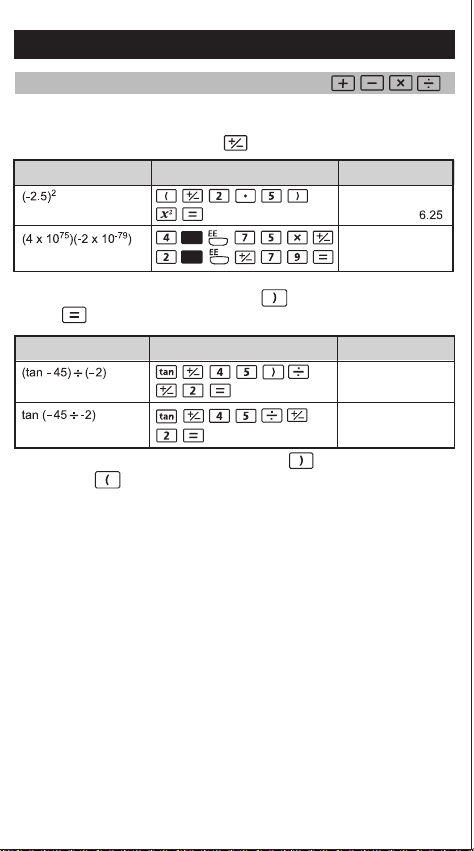
! [SYNTAX Error] will appear if the number of is higher than the
number of .
• You can omit the close parenthesis if the calculation ends
with or if the values are stored in memory variables.
•
To calculate negative values (excludes the negative exponent),
make sure that the values are enclosed with parentheses.
• To input negative values, use .
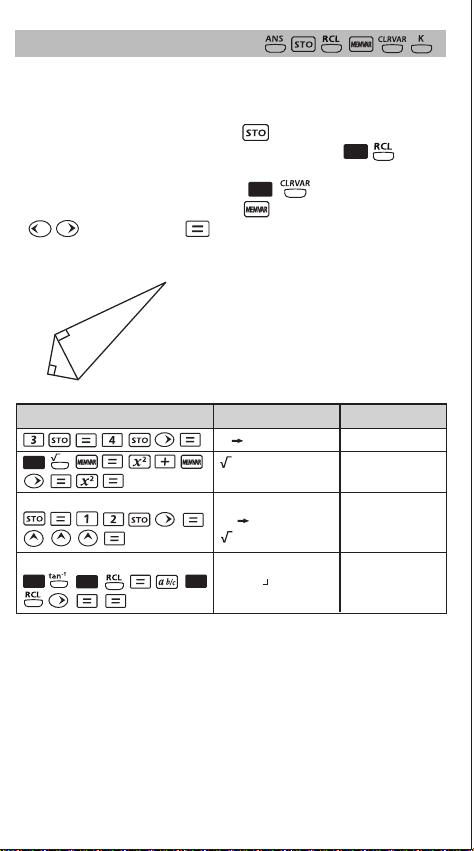
BASIC CALCULATIONS
Arithmetic Calculations
Calculation Expression
Display (Result)
Operation
Calculation Expression
Display (Result)Operation
2nd
2nd
–0.0008
0.5
0.414213562
13
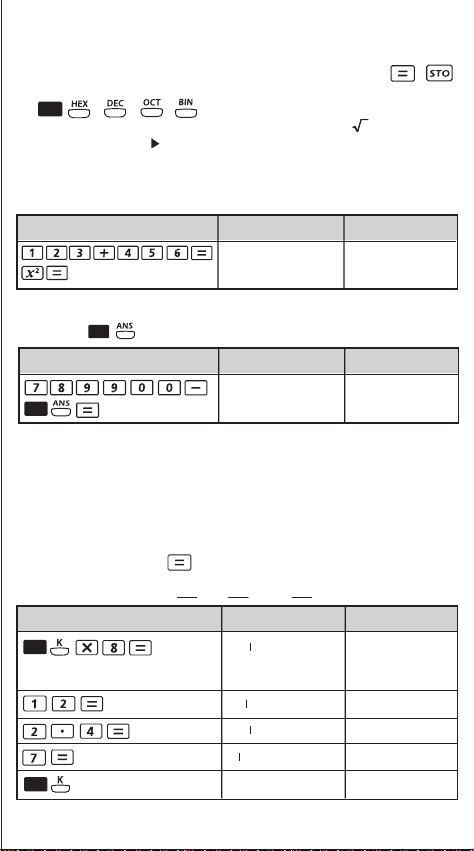
Memory Variables
• There are 5 Memory Variables (A, B, C, D and E) which are used
for storing data, results, or dedicated values.
• To store values in memory, press + Memory Variable.
• To recall a previous calculation in memory, press +
Memory Variable.
• To clear all memory values, press .
• To input memory variables, press , select variable using
and then press .
Memory Calculations
2nd
2nd
4 B 4.
Operation
Display (Lower)
Display (Upper)
2nd
Calculate X
Calculate Y
2nd
2nd
2nd
(A
2
+B
2
5.
12 B 12.
(A
2
+B
2
13.
tan-1(5 12 22.61986495
Example: Calculate hypotenuse X and angle Y
X
Y
12
4
3
14
Constant Memory
Constant memory can store a combination of numbers, operators
and/or values. When Constant Memory is enabled, the stored
operation will apply to the previous result or the current entry by
subsequently pressing .
Answer Memory
• The inputted values or the most recent calculation result is
automatically stored in Answer Memory when you press ,
followed by a Memory Variable or entering Base-n mode
( / / / ).
• If you continuously press an operator key (x
2
, ^ , x , %, x
–1
, +, –,
x,
÷
, nPr , nCr, x!, DMS, degree (º), radians (r) or gradient (g)),
the displayed value change to into [Ans] plus the operator key.
You can then perform a new calculation with the latest Answer
Memory.
Operation
Display (Lower)
Display (Upper)
! Answer Memory is not updated if an error occurs in the
operation.
Operation
Display (Lower)
Display (Upper)
2nd
123+456 579.
Ans
2
335241.
789900–Ans 454659.
• You can recall and use the latest stored Answer Memory by
pressing .
2nd
2nd
Example: Calculate 12 x 8, 2.4 x 8 and 7 x 8
Operation
Display (Lower)
Display (Upper)
K= 8
2nd
(Enable and store constant
memory)
2nd
(Clear constant memory)
12 8 96.
2.4 8 19.2
7 8 56.
X
X
X
X
Memory Variables
• There are 5 Memory Variables (A, B, C, D and E) which are used
for storing data, results, or dedicated values.
• To store values in memory, press + Memory Variable.
• To recall a previous calculation in memory, press +
Memory Variable.
• To clear all memory values, press .
• To input memory variables, press , select variable using
and then press .
15
Fraction Calculation
3 1/3
Mixed and Improper 10 / 3
Fraction Conversion
Fraction and Decimal 3.333333333
Conversion
•
Result will automatically display in decimal or fraction format
automatically.
• The result of a calculation involving both a fraction and decimal
value will display in decimal format.
• Fraction conversions may take up to two seconds.
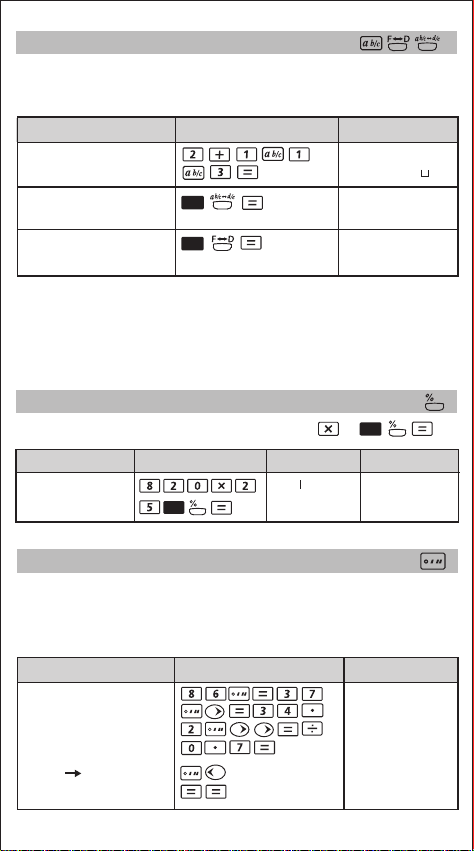
The calculator supports calculations with fractions and
conversions between Decimal and Fractional display and between
Mixed and Improper fractions.
Example Display (Lower)Operation
Fraction Operations
2nd
2nd
The Degrees(hours)-Minutes-Seconds key can be used to perform a
sexagesimal (base-60 notational system) calculation or convert the
sexagesimal value into decimal value.
Degrees-Minutes-Seconds ↔ Decimal points
Example
Display (Lower)Operation
86º37'34.2"
÷
0.7 = 123.7516667
Result DMS format 123º45'6"
Degrees-Minutes-Seconds Calculations
To calculate 25% 820 25% 205.
of 820
To calculate a certain percentage of a value (A B ).
Example
Display (Lower)Display (Upper)
Operation
2nd
Percentage Calculations
2nd
X
Answer Memory
• The inputted values or the most recent calculation result is
automatically stored in Answer Memory when you press ,
followed by a Memory Variable or entering Base-n mode
( / / / ).
• If you continuously press an operator key (x
2
, ^ , x , %, x
–1
, +, –,
x,
÷
, nPr , nCr, x!, DMS, degree (º), radians (r) or gradient (g)),
the displayed value change to into [Ans] plus the operator key.
You can then perform a new calculation with the latest Answer
Memory.
16
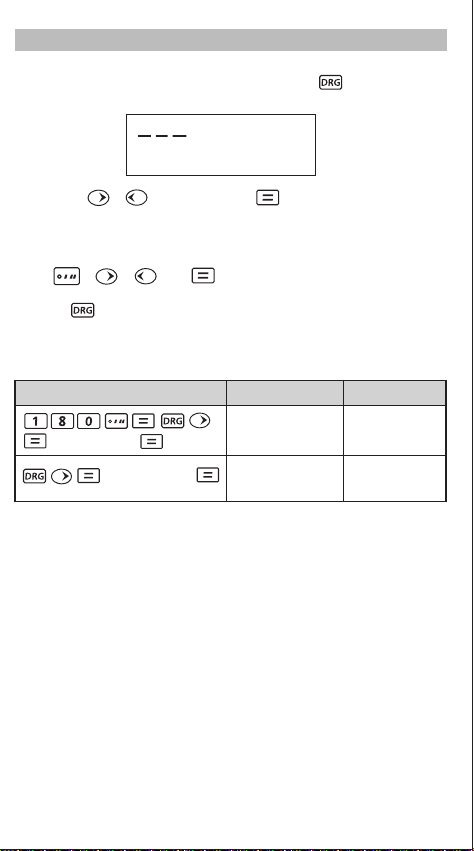
The default calculator setting for Angle Unit is "Degree". To change
the angle units to "Radian" or "Gradient", press for the setup
screen to appear.
Next press / and then press for the angle unit you
want to use. The display will then show the DEG, RAD or GRAD
indicator accordingly.
To convert an angle unit between "Degree", "Radian" and "Gradient",
press , / and into the selected angle unit.
To indicate the value using another degree unit, change the unit by
pressing .
Example: Converting 180 degree into radian and gradient
(180º = �
r
= 200
g
)
Angle Unit Conversion
D E G RAD GRD
DEG
Operation
Display (Lower)Display (Upper)
(Radian mode)
(Gradient mode)
180º 3.141592654
180º 200.
GRAD
RAD
cos
–1
1/ 2
= 0.785398163
= 0.25 (Rad)
sin53º22'12" = 0.802508183
0.802505183
tan
–1
(5/6) = 39.80557109
39.80557109
0.866025404
0.785398163
cos( /6)r = 0.866025404
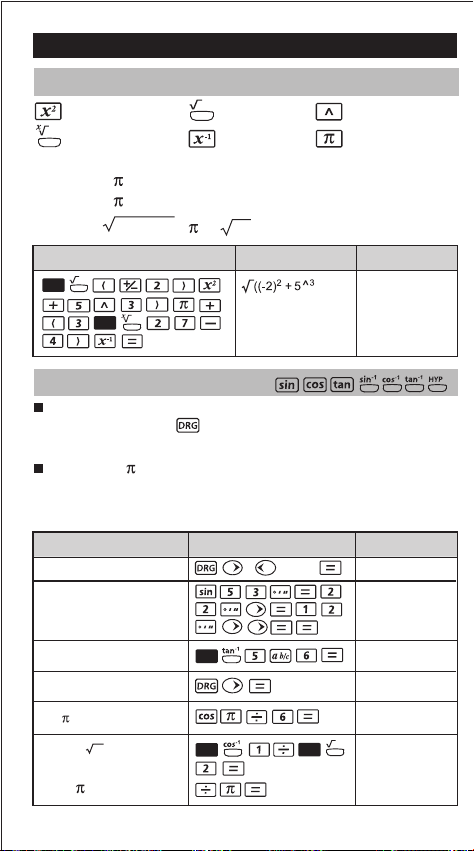
Trigonometric (sin/ cos/ tan), Inverse Trigonometric
(sin
-1
/ cos
-1
/ tan
-1
) Functions
Examples
Display (Lower)
Operation
Degree Mode
Radian Mode
FUNCTIONAL SCIENTIFIC CALCULATIONS
Square Root Power
Power Root Reciprocal Pi
Pi
Calculation : = 3.141592653589793
Display : = 3.141592654
Operation
Display (Lower)
Display (Upper)
Square, Root, Power, Power Root, Reciprocal and Pi
Example : (–2)
2
+ 5
3
x + (
3
27– 4)
–1
= 34.68163348
2nd
34.68163348
2nd
Before using the trigonometric functions (except hyperbolic
calculations), press to select.' the appropriate angle unit
(Deg/ Rad/ Grd) .
90º (Deg) = /2 (Rad) = 100
g
(Grd)
Trigonometry Calculations
(DEG)
2nd
2nd
2nd
0.25
/
17
18
Trigonometric (sin/ cos/ tan), Inverse Trigonometric
(sin
-1
/ cos
-1
/ tan
-1
) Functions
Square Root Power
Power Root Reciprocal Pi
Pi
Calculation : = 3.141592653589793
Display : = 3.141592654
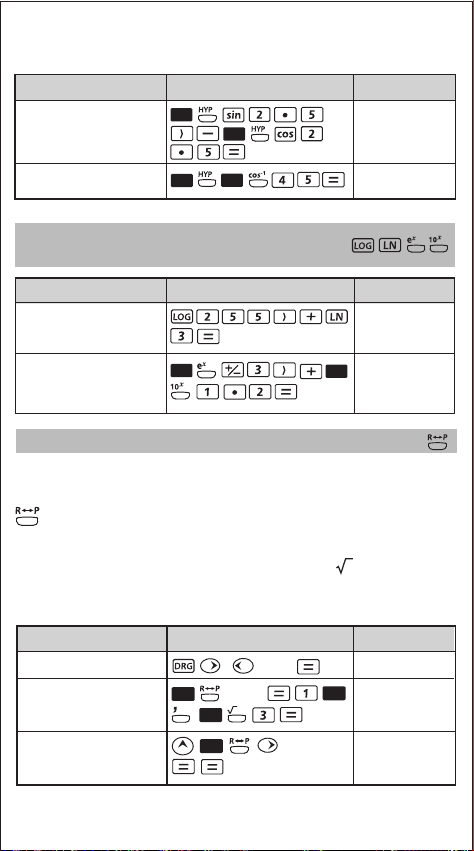
log 255 + ln 3 =
3.505152469
Logarithm, Natural Logarithm
and Antilogarithm
Examples Operation
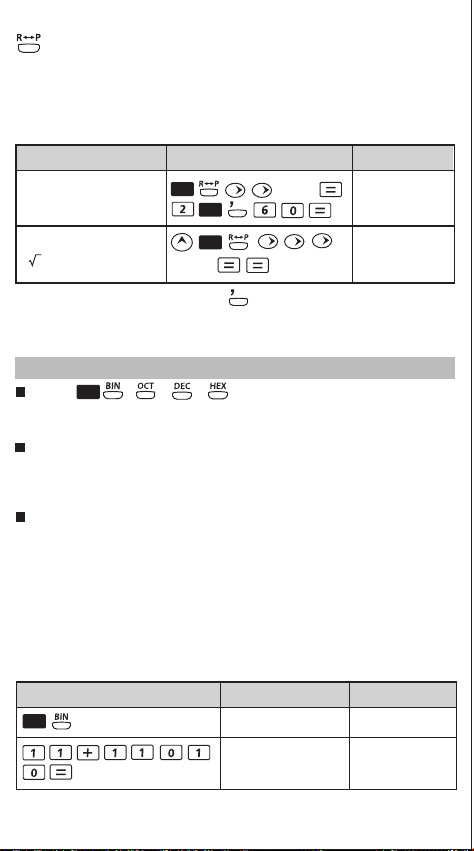
With polar coordinates, you can calculate and display result θ within
–180º ≤ θ < 180º range. (Same as Radian and Gradient)
: R>Pr & R>Pθ to convert Rectangular Coordinates (x,y)
to Polar Coordinates (r, θ).
Example : With Rectangular Coordinate (x=1, y= 3). Find Polar
Coordinate (r, θ) at degree mode.
Coordinate Conversion
Examples
Display (Lower)
Operation
Degree Mode
Hyperbolic (sinh/ cosh/ tanh), Inverse Hyperbolic
(sinh
-1
/ cosh
-1
/ tanh
-1
) Functions
Examples
Display (Lower)
Operation
s
inh 2.5 – cosh 2.5 =
–0.082084999
cosh
–1
45 = 4.499686191
2nd
2nd
2nd
2nd
–0.082084999
4.499686191
Display (Lower)
3.505152469
e
–3
+ 10
1.2
=
15.89871899
2nd
2nd
15.89871899
Calculate Radius (r) = 2
Calculate Polar
Angle (θ) = 60º
(DEG)
/
2nd
(R>Pr)
2nd
2nd
2.
2nd
(R>Pθ)
60.
19
With polar coordinates, you can calculate and display result θ within
–180º ≤ θ < 180º range. (Same as Radian and Gradient)
: R>Pr & R>Pθ to convert Rectangular Coordinates (x,y)
to Polar Coordinates (r, θ).
Example : With Rectangular Coordinate (x=1, y= 3). Find Polar
Coordinate (r, θ) at degree mode.
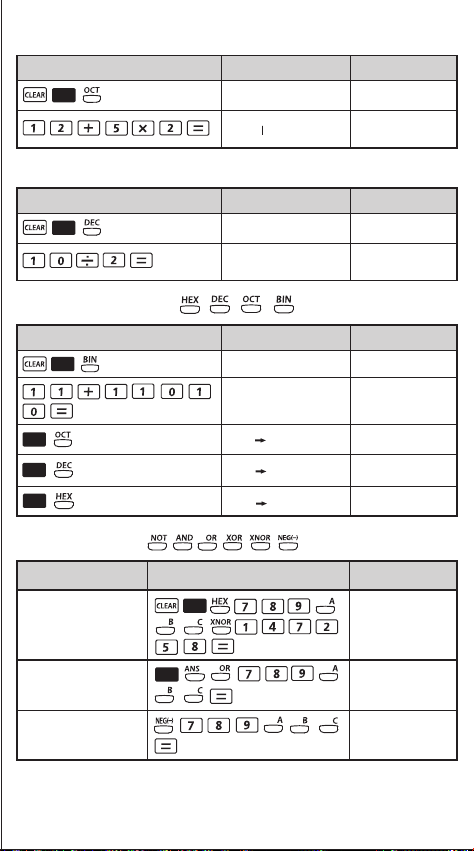
Press / / / to select and enter Base-n mode
for Binary (base 2), Octal (base 8), Decimal (base 10) or
Hexadecimal (base 16).
In Binary, Octal, and Hexadecimal mode, logical operators allow
you to perform logical calculations including: Logic Connection
[AND] / [OR], Exclusive Or [XOR], Exclusive Nor [XNOR],
Argument Complement [NOT] and Negation [NEG].
In Binary, Octal and Hexadecimal mode, all scientific functions
cannot be used, and values with decimal place or exponents
cannot be inputted. In Decimal mode, scientific calculations can
be performed and decimal place is rounded down when
performing Base-n transformation.
Basic arithmetic operations using binary, octal, decimal and
hexadecimal values:
Example: 0011
2
+ 11010
2
= 11101
2
: P>Rx & P>Ry to convert Polar Coordinates (r, θ) to
Rectangular Coordinates (x,y).
Example : In Degree mode, express the point defined by Polar
Coordinates (r=2, 0=60°) in Rectangular Coordinates
(x,y).
Examples
Display (Lower)
Operation
Calculate x-coordinate
= 1
Calculate y-coordinate
= 3
2nd
(P>Rx)
2nd
1.
2nd
(R>Pθ)
1.732050808.
! [ARGUMENT Error] will appear if is missing from the coordinate
conversion calculation.
Base-n Calculations and Logical Calculations
2nd
b
Operation
Display (Lower)
Display (Upper)
11+11010 11101
b
2nd
Example: 12
8
+ 5
8
x 2
8
= 24
8
Example: 10
10
÷
2
10
= 5
10
Base-n transformation
20
: P>Rx & P>Ry to convert Polar Coordinates (r, θ) to
Rectangular Coordinates (x,y).
Example : In Degree mode, express the point defined by Polar
Coordinates (r=2, 0=60°) in Rectangular Coordinates
(x,y).
Example: 12
8
+ 5
8
x 2
8
= 24
8
o
Operation
Display (Lower)
Display (Upper)
12+5 2 24
o
2nd
Example: 10
10
÷
2
10
= 5
10
b
Operation
Display (Lower)
Display (Upper)
11+11010 11101
b
2nd
Operation
Display (Lower)
Display (Upper )
10/2 5.
2nd
Base-n transformation
2nd
Ans OCT 35
o
2nd
2nd
Ans DEC 29.
Ans HEX 1d
H
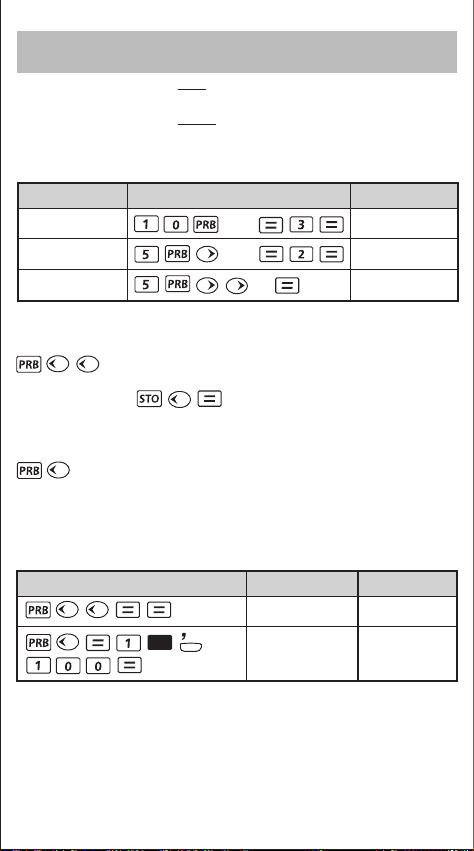
Logical Operation
!
Beware of the allowable input range of each number system (page 8).
! Logical Operation does not support Decimal Mode.
789ABC XNOR 147258
FFFF93171b
H
Ans OR 789ABC FFFFFb9FbF
H
NEG 789ABC FFFF876544
H
Examples
(Hexadecimal Mode)
Display (Lower)
Operation
2nd
2nd
X
21
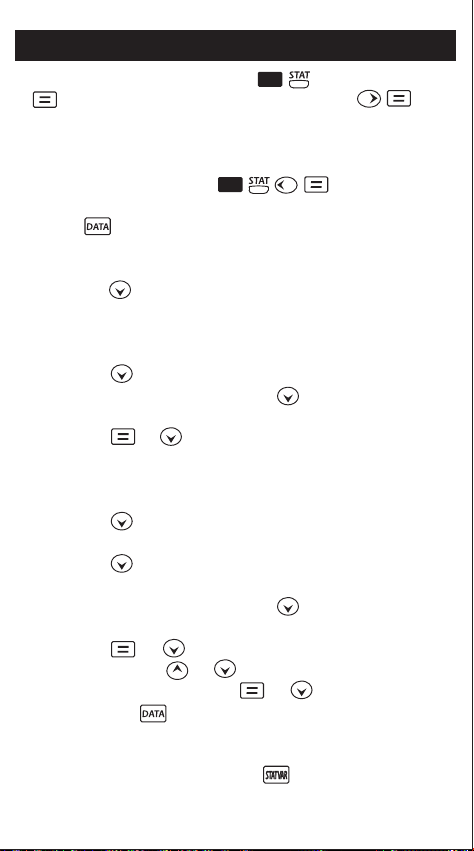
• Permutation : nPr =
• Combination : nCr =
• Factorial : x! = x(x-1)(x-2).....(2)(1)
n!
(n-r)!
n!
r!(n-r)!
Random Number Generation
RAND:
: To generate a random number between 0 and 1.
* Using seed value by storing an integer to rand
( ) to control a sequence of random
numbers.
RANDI:
: To generate a random integer between two specified
integers. Results differ each time with the same
possibility occurrence within a boundary. The entry
is divided with " , ".
Example:
* The value is only a sample, results will differ each time.
10
P
3
720.
5
C
2
10.
5! 120.
Examples
Display (Lower)
Operation
Permutation, Combination, Factorials and Random
Number Generation
(nPr)
(nCr)
(!)
RAND 0.298023224*
RANDI (1,100 15.*
Operation
Display (Lower)
Display (Upper)
2nd
22
STATISTICAL CALCULATIONS
● To enter the statistical mode, press . Then press
(1-VAR) to enter one-variable mode, or press
(2-VAR) to enter two-variable mode. The linear regression
equation y = Ax + B is represented in two variables.
● Before starting a new statistic data entry, be sure to clear the
statistic memory by pressing (CLRDATA).
● Perform data input and edit:
○ Press to register data
■ In 1-VAR mode:
• Input first data for X1.
•
Press to save and to set the frequency of occurrence
(FRQ).
• Frequency of occurrence default is set to 1 (FRQ=1).
Input data value when needed.
•
Press to save and to enter the next data (X2) for input.
• Repeat these steps by pressing to input the data
value and set the FRQ until finished.
• Press or to save the last entered data point or
FRQ value.
■ In 2-VAR mode:
• Input first data for X1.
• Press to save and set the Y1 value.
•
Y value default is set to 1 (Y=1). Input data value when needed.
•
Press to save and enter the next data (X2) input
value.
• Repeat these steps by pressing to input data value
for X and Y until finished.
• Press or to save the last entered data point.
○ To edit data, press or to migrate to that value. After
inputting the new value, press or to save.
○ You can press to return to a STAT mode screen for
other calculations. Calculations in blank STAT mode screen
will not be stored in statistic memory.
● After finishing all data entries, press to calculate the statistic
functions.
2nd
2nd
Random Number Generation
RAND:
: To generate a random number between 0 and 1.
* Using seed value by storing an integer to rand
( ) to control a sequence of random
numbers.
RANDI:
: To generate a random integer between two specified
integers. Results differ each time with the same
possibility occurrence within a boundary. The entry
is divided with " , ".
Example:
* The value is only a sample, results will differ each time.
23
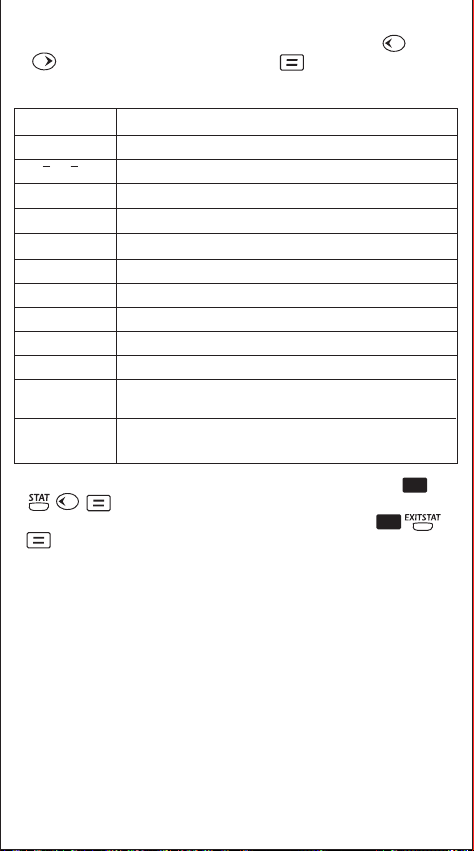
Variables Explanations
n Total number of x or (x,y) (2-VAR) data points
x or y Mean of all x or y (2-VAR) values
Sx or Sy Sample standard deviation of x or y (2-VAR)
σx or σy Population standard deviation of x or y (2-VAR)
∑x or ∑y Sum of all x or all y (2-VAR) values
∑x
2
or ∑y
2
Square sum of all x or y (2-VAR) values
∑xy
Sum of all multiply x and y pairs in 2-VAR mode
a Linear regression of slope in 2-VAR mode
b Linear regression of y-intercept in 2-VAR mode
r Correlation coefficient in 2-VAR mode
x' Uses linear regression to calculate x value
when input a y value in 2-VAR mode
y' Uses linear regression to calculate y value
when input a x value in 2-VAR mode
• To clear all entered data without exiting STAT mode, press
(CLRDATA).
• To clear all entered data and to exit STAT mode, press
(EXIT ST: Y ).
• Changing into another mode will clear all entered data.
2nd
2nd
● You can recall the following statistic values by pressing and
, and select a variable by pressing to evaluate the
calculation.
24
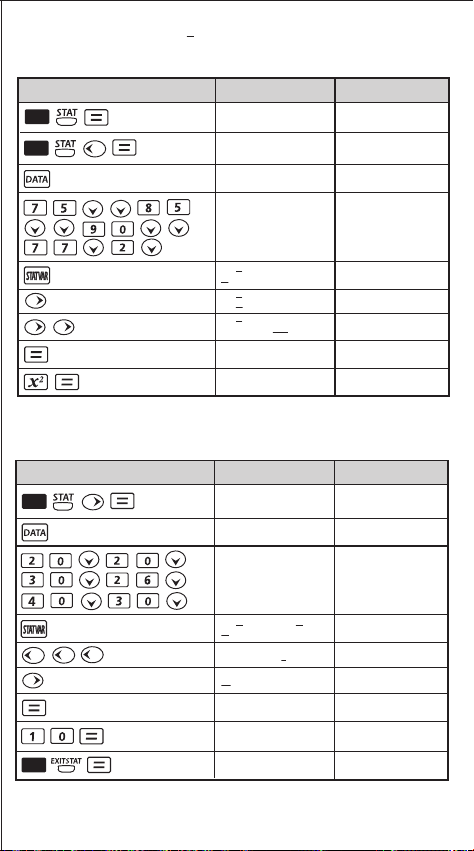
Example: To calculate correlation coefficient (r) and x value when
y = data set of 10: (20,20), (30,26), (40,30)
X1=
Operation
Display (Lower)
Display (Upper)
X4=
2nd
(2-VAR)
x'(
∑xy a b r 0.993399268
n x Sx σx y 3.
x' y'
2nd
x'(10 –0.666666667
Example: To calculate n, x , σx and variance of a population (σx
2
)
of data: 75, 85, 90, 77, 77 in one-variable mode.
X1=
Operation
Display (Lower)
Display (Upper)
X5=
2nd
2nd
(CLRDATA)
σx
σx
2
32.96
n x Sx σx 5.
n x Sx σx 80.8
n x Sx σx 5.741080038
(1-VAR)
25
BATTERY REPLACEMENT
2nd
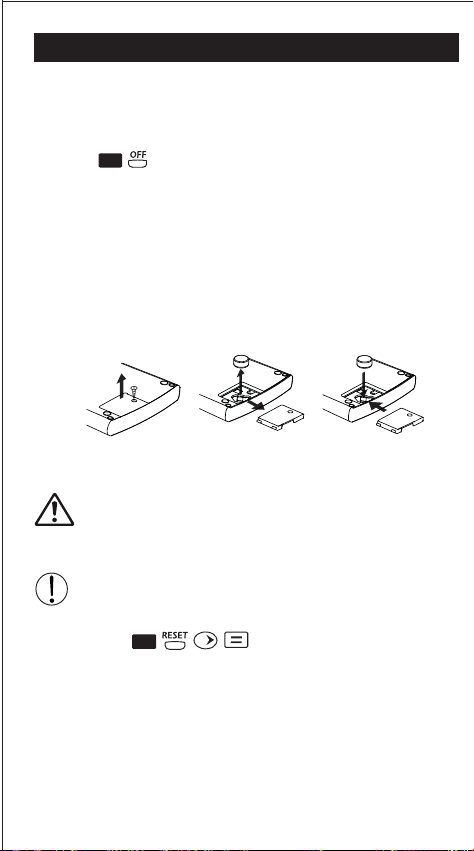
When the display characters are dim, turn off the calculator and
immediately replace the alkaline battery.
Please replace the alkaline battery using the following
procedure:
1. Press to power off the calculator.
2. Remove the screw that secrues the battery cover in place.
3. Slide the battery cover slightly and lift it.
4. Remove the old battery with a ball point pen or similar
sharp object.
5. Load the new battery with the positive "+" side facing up.
6. Replace the battery cover, tighten the screw, and use the tip
of a ballpoint pen (or similar sharp object) to press the
[RESET] button on the back of the calculator to initialize the
calculator.
CAUTION: There is risk of explosion if the battery is
replaced by an incorrect type. Dispose of used battery
according to the below instructions.
Electromagnetic interference or electrostatic discharge
may cause the display to malfunction or the contents of
the memory to be lost or altered. Should this occur,
press to restart the calculator.
2nd
17
Battery Replacement
+
+

18
26
BATTERY CAUTION
SPECIFICATIONS
Power Supply :
Solar Cell and alkaline battery (LR44 x 1)
Power Consumption : DC1.5V / 0.038mW
Battery Life : Approximately 3 years
(Based on 1 hour operation per day)
Auto power off : Approx. 7 minutes
Operation Temperature
: 0º ~ 40º C (32º F ~ 104º F)
Size: 158 (L) x 81 (W) x 18 (H) mm (with cover)
6-7/32" x 3-3/16" x 45/64" (with cover)
Weight : 109g (3.7 oz) with cover
* Specifications are subject to change without notice
• Keep the Battery out of reach of children. If the battery is
swallowed, contact a doctor immediately.
• Misuse of battery may cause leakage, explosion, damages
or personal injury.
• Don’t recharge or disassemble the battery, it could cause a
short circuit.
• Never expose the battery to high temperatures, direct heat,
or dispose by incineration.
• Never leave a dead battery in the calculator as the dead
battery may leak and cause damage to the calculator.
• Continued use of the calculator in a low battery condition may
cause improper calculations or the stored memory may get
corrupted or lost completely. Keep written records of
important data all the time; and replace the battery as soon
as possible.
For CA, USA Only
Included battery contains perchlorate material - special handling
may apply.
See http://www.dtsc.ca.gov/hazardouswaste/perchlorate/ for detail.

27
CANON CONSUMER CALCULATOR LIMITED WARRANTY
The limited warranty set forth below is given by Canon U.S.A., Inc.,
(Canon U.S.A.) with respect to Calculators purchased and used in
the United States respectively.
This limited warranty is only effective upon presentation of proof of
purchase (bill of sale) to Canon U.S.A. Factory Service Center.
Canon Calculators, when delivered to you in a new condition in the
original container, are warranted against defective materials or
workmanship as follows: for a period of one (1) year from the date of
original purchase, defective parts or Calculators returned to a Canon
U.S.A. Factory Service Center and proven to be defective upon
inspection, will be exchanged at Canon U.S.A.’s sole option, for new
or comparable rebuilt parts or calculators (of the same or similar
model). Warranty for replacement shall not extend the original
warranty period of the defective calculator.
When returning Calculators under this limited warranty, you must
pre-pay the shipping charges, if any, and enclose a complete
explanation of the problem. Calculators covered by this limited
warranty will be repaired at Canon U.S.A.’s sole option, and returned
to you without charge by any Canon U.S.A. Service Center. This
warranty does not cover rechargeable batteries that may be supplied
with the Calculator, as to which batteries there shall be no warranty
or replacement.
CANON Information Technology Services, Inc. will refer you to the
nearest Factory Service Center. Repairs not under warranty will be
at such cost as Canon U.S.A. or may from time to time generally
establish.
This limited warranty covers all defects encountered in normal use of
the calculators, and does not apply in the following cases:
(a) Loss or damage to the Calculators due to abuse, mishandling,
alteration, accident, electrical current fluctuations, failure to follow
operating instructions, maintenance and environmental instructions
prescribed in Canon U.S.A.’s instruction manual or service
performed by other than a Canon U.S.A. Factory Service Center.
(b) Use of parts (other than those distributed by Canon U.S.A. which
damage the Calculator or cause abnormally frequent service calls or
service problems.
(c) If any Calculator has had its serial numbers or dating altered or
removed.
(d) Loss or damage to the Calculator due to leaking batteries (other
than rechargeable batteries supplied as original equipment with the
Calculator by Canon U.S.A.) or water damage.
NO IMPLIED WARRANTY (OR CONDITION)* INCLUDING ANY
IMPLIED WARRANTY (OR CONDITION)* OF MERCHANTABILITY
OR FITNESS FOR A PARTICULAR PURPOSE, APPLIES TO THE
CALCULATORS AFTER THE APPLICABLE PERIOD OF EXPRESS
WARRANTY STATED ABOVE, AND NO OTHER EXPRESS
WARRANTY OR GUARANTY, EXCEPT AS MENTIONED ABOVE,
GIVEN BY ANY PERSON, FIRM OR CORPORATION WITH
RESPECT TO THE CALCULATORS SHALL BIND CANON U.S.A.
(SOME STATES OR PROVINCES DO NOT ALLOW LIMITATIONS
ON HOW LONG AN IMPLIED WARRANTY LASTS, SO THE
ABOVE LIMITATION MAY NOT APPLY TO YOU.) CANON U.S.A.
SHALL BE LIABLE FOR LOSS OF REVENUE OR PROFITS,
FAILURE TO REALIZE SAVINGS OR OTHER BENEFITS, OR FOR
ANY OTHER SPECIAL, INCIDENTAL OR CONSEQUENTIAL
DAMAGES CAUSED BY THE USE, MISUSE OR INABILITY TO
USE THE CALCULATOR, REGARDLESS OF THE LEGAL THEORY
ON WHICH THE CLAIM IS BASED, AND EVEN IF CANON U.S.A.
HAS BEEN ADVISED OF THE POSSIBILITY OF SUCH DAMAGES.
NOR SHALL RECOVERY OF ANY KIND AGAINST CANON U.S.A.
BE GREATER IN AMOUNT THAN THE PURCHASE PRICE OF
THE CALCULATOR SOLD BY CANON U.S.A. AND CAUSING THE
ALLEGED DAMAGE. WITHOUT LIMITING THE FOREGOING, YOU
ASSUME ALL RISK AND LIABILITY FOR LOSS, DAMAGE OR
INJURY TO YOU AND YOUR PROPERTY AND TO OTHERS AND
THEIR PROPERTY ARISING OUT OF USE, MISUSE OR
INABILITY TO USE ANY CALCULATOR SOLD BY CANON U.S.A.
NOT CAUSED DIRECTLY BY THE NEGLIGENCE OF CANON
U.S.A. (SOME STATES OR PROVINCES DO NOT ALLOW THE
EXCLUSION OR LIMITATION OF INCIDENTAL OR
CONSEQUENTIAL DAMAGES, SO THE ABOVE LIMITATION OR
EXCLUSION MAY NOT APPLY TO YOU.) THIS LIMITED
WARRANTY SHALL NOT EXTEND TO ANYONE OTHER THAN
THE ORIGINAL PURCHASER OF ANY CALCULATOR OR THE
PERSON FOR WHOM IT WAS PURCHASED AS A GIFT AND
STATES YOUR EXCLUSIVE REMEDY.
This warranty gives you specific legal rights, and you may also have
other rights which vary from state to state or province to province.
Canon U.S.A., Inc.
One Canon Park, Melville, NY 11747
Canon Information Technology Services in the United States
For all general inquiries, operational assistance, accessory orders or
for the location of the nearest service facility for this product in the
United States, please contact:
Canon U.S.A., Inc.
One Canon Park, Melville, NY 11747
Customer Relations Division
1-800-828-4040
Please keep a copy of your original bill of sale. In order to obtain
warranty service, you will need to present a copy of your original bill
of sale from your Consumer Calculator retailer at the time of service.
Also please keep all packing materials and the original packing box
to protect your equipment, should you need to transport it for
service.

28
CANON CONSUMER CALCULATOR LIMITED WARRANTY
The limited warranty set forth below is given by Canon U.S.A., Inc.,
(Canon U.S.A.) with respect to Calculators purchased and used in
the United States respectively.
This limited warranty is only effective upon presentation of proof of
purchase (bill of sale) to Canon U.S.A. Factory Service Center.
Canon Calculators, when delivered to you in a new condition in the
original container, are warranted against defective materials or
workmanship as follows: for a period of one (1) year from the date of
original purchase, defective parts or Calculators returned to a Canon
U.S.A. Factory Service Center and proven to be defective upon
inspection, will be exchanged at Canon U.S.A.’s sole option, for new
or comparable rebuilt parts or calculators (of the same or similar
model). Warranty for replacement shall not extend the original
warranty period of the defective calculator.
When returning Calculators under this limited warranty, you must
pre-pay the shipping charges, if any, and enclose a complete
explanation of the problem. Calculators covered by this limited
warranty will be repaired at Canon U.S.A.’s sole option, and returned
to you without charge by any Canon U.S.A. Service Center. This
warranty does not cover rechargeable batteries that may be supplied
with the Calculator, as to which batteries there shall be no warranty
or replacement.
CANON Information Technology Services, Inc. will refer you to the
nearest Factory Service Center. Repairs not under warranty will be
at such cost as Canon U.S.A. or may from time to time generally
establish.
This limited warranty covers all defects encountered in normal use of
the calculators, and does not apply in the following cases:
(a) Loss or damage to the Calculators due to abuse, mishandling,
alteration, accident, electrical current fluctuations, failure to follow
operating instructions, maintenance and environmental instructions
prescribed in Canon U.S.A.’s instruction manual or service
performed by other than a Canon U.S.A. Factory Service Center.
(b) Use of parts (other than those distributed by Canon U.S.A. which
damage the Calculator or cause abnormally frequent service calls or
service problems.
(c) If any Calculator has had its serial numbers or dating altered or
removed.
(d) Loss or damage to the Calculator due to leaking batteries (other
than rechargeable batteries supplied as original equipment with the
Calculator by Canon U.S.A.) or water damage.
NO IMPLIED WARRANTY (OR CONDITION)* INCLUDING ANY
IMPLIED WARRANTY (OR CONDITION)* OF MERCHANTABILITY
OR FITNESS FOR A PARTICULAR PURPOSE, APPLIES TO THE
CALCULATORS AFTER THE APPLICABLE PERIOD OF EXPRESS
WARRANTY STATED ABOVE, AND NO OTHER EXPRESS
WARRANTY OR GUARANTY, EXCEPT AS MENTIONED ABOVE,
GIVEN BY ANY PERSON, FIRM OR CORPORATION WITH
RESPECT TO THE CALCULATORS SHALL BIND CANON U.S.A.
(SOME STATES OR PROVINCES DO NOT ALLOW LIMITATIONS
ON HOW LONG AN IMPLIED WARRANTY LASTS, SO THE
ABOVE LIMITATION MAY NOT APPLY TO YOU.) CANON U.S.A.
SHALL BE LIABLE FOR LOSS OF REVENUE OR PROFITS,
FAILURE TO REALIZE SAVINGS OR OTHER BENEFITS, OR FOR
ANY OTHER SPECIAL, INCIDENTAL OR CONSEQUENTIAL
DAMAGES CAUSED BY THE USE, MISUSE OR INABILITY TO
USE THE CALCULATOR, REGARDLESS OF THE LEGAL THEORY
ON WHICH THE CLAIM IS BASED, AND EVEN IF CANON U.S.A.
HAS BEEN ADVISED OF THE POSSIBILITY OF SUCH DAMAGES.
NOR SHALL RECOVERY OF ANY KIND AGAINST CANON U.S.A.
BE GREATER IN AMOUNT THAN THE PURCHASE PRICE OF
THE CALCULATOR SOLD BY CANON U.S.A. AND CAUSING THE
ALLEGED DAMAGE. WITHOUT LIMITING THE FOREGOING, YOU
ASSUME ALL RISK AND LIABILITY FOR LOSS, DAMAGE OR
INJURY TO YOU AND YOUR PROPERTY AND TO OTHERS AND
THEIR PROPERTY ARISING OUT OF USE, MISUSE OR
INABILITY TO USE ANY CALCULATOR SOLD BY CANON U.S.A.
NOT CAUSED DIRECTLY BY THE NEGLIGENCE OF CANON
U.S.A. (SOME STATES OR PROVINCES DO NOT ALLOW THE
EXCLUSION OR LIMITATION OF INCIDENTAL OR
CONSEQUENTIAL DAMAGES, SO THE ABOVE LIMITATION OR
EXCLUSION MAY NOT APPLY TO YOU.) THIS LIMITED
WARRANTY SHALL NOT EXTEND TO ANYONE OTHER THAN
THE ORIGINAL PURCHASER OF ANY CALCULATOR OR THE
PERSON FOR WHOM IT WAS PURCHASED AS A GIFT AND
STATES YOUR EXCLUSIVE REMEDY.
This warranty gives you specific legal rights, and you may also have
other rights which vary from state to state or province to province.
Canon U.S.A., Inc.
One Canon Park, Melville, NY 11747
Canon Information Technology Services in the United States
For all general inquiries, operational assistance, accessory orders or
for the location of the nearest service facility for this product in the
United States, please contact:
Canon U.S.A., Inc.
One Canon Park, Melville, NY 11747
Customer Relations Division
1-800-828-4040
Please keep a copy of your original bill of sale. In order to obtain
warranty service, you will need to present a copy of your original bill
of sale from your Consumer Calculator retailer at the time of service.
Also please keep all packing materials and the original packing box
to protect your equipment, should you need to transport it for
service.

29
CANON CONSUMER CALCULATOR LIMITED WARRANTY
The limited warranty set forth below is given by Canon U.S.A., Inc.,
(Canon U.S.A.) with respect to Calculators purchased and used in
the United States respectively.
This limited warranty is only effective upon presentation of proof of
purchase (bill of sale) to Canon U.S.A. Factory Service Center.
Canon Calculators, when delivered to you in a new condition in the
original container, are warranted against defective materials or
workmanship as follows: for a period of one (1) year from the date of
original purchase, defective parts or Calculators returned to a Canon
U.S.A. Factory Service Center and proven to be defective upon
inspection, will be exchanged at Canon U.S.A.’s sole option, for new
or comparable rebuilt parts or calculators (of the same or similar
model). Warranty for replacement shall not extend the original
warranty period of the defective calculator.
When returning Calculators under this limited warranty, you must
pre-pay the shipping charges, if any, and enclose a complete
explanation of the problem. Calculators covered by this limited
warranty will be repaired at Canon U.S.A.’s sole option, and returned
to you without charge by any Canon U.S.A. Service Center. This
warranty does not cover rechargeable batteries that may be supplied
with the Calculator, as to which batteries there shall be no warranty
or replacement.
CANON Information Technology Services, Inc. will refer you to the
nearest Factory Service Center. Repairs not under warranty will be
at such cost as Canon U.S.A. or may from time to time generally
establish.
This limited warranty covers all defects encountered in normal use of
the calculators, and does not apply in the following cases:
(a) Loss or damage to the Calculators due to abuse, mishandling,
alteration, accident, electrical current fluctuations, failure to follow
operating instructions, maintenance and environmental instructions
prescribed in Canon U.S.A.’s instruction manual or service
performed by other than a Canon U.S.A. Factory Service Center.
(b) Use of parts (other than those distributed by Canon U.S.A. which
damage the Calculator or cause abnormally frequent service calls or
service problems.
(c) If any Calculator has had its serial numbers or dating altered or
removed.
(d) Loss or damage to the Calculator due to leaking batteries (other
than rechargeable batteries supplied as original equipment with the
Calculator by Canon U.S.A.) or water damage.
© CANON ELECTRONIC BUSINESS MACHINES (H.K.) CO., LTD. 2017
Made in China / Printed in China E-IE-492
CANON ELECTRONIC BUSINESS MACHINES (H.K.) CO., LTD.
17/F., Tower One, Ever Gain Plaza, 82-100 Container Port Road,
Kwai Chung, New Territories, Hong Kong
CANON U.S.A., INC.
One Canon Park, Melville, NY 11747, 1-800-OK-CANON
CANON LATIN AMERICA, INC.
One Canon Park, Melville, NY 11747, U.S.A.
NO IMPLIED WARRANTY (OR CONDITION)* INCLUDING ANY
IMPLIED WARRANTY (OR CONDITION)* OF MERCHANTABILITY
OR FITNESS FOR A PARTICULAR PURPOSE, APPLIES TO THE
CALCULATORS AFTER THE APPLICABLE PERIOD OF EXPRESS
WARRANTY STATED ABOVE, AND NO OTHER EXPRESS
WARRANTY OR GUARANTY, EXCEPT AS MENTIONED ABOVE,
GIVEN BY ANY PERSON, FIRM OR CORPORATION WITH
RESPECT TO THE CALCULATORS SHALL BIND CANON U.S.A.
(SOME STATES OR PROVINCES DO NOT ALLOW LIMITATIONS
ON HOW LONG AN IMPLIED WARRANTY LASTS, SO THE
ABOVE LIMITATION MAY NOT APPLY TO YOU.) CANON U.S.A.
SHALL BE LIABLE FOR LOSS OF REVENUE OR PROFITS,
FAILURE TO REALIZE SAVINGS OR OTHER BENEFITS, OR FOR
ANY OTHER SPECIAL, INCIDENTAL OR CONSEQUENTIAL
DAMAGES CAUSED BY THE USE, MISUSE OR INABILITY TO
USE THE CALCULATOR, REGARDLESS OF THE LEGAL THEORY
ON WHICH THE CLAIM IS BASED, AND EVEN IF CANON U.S.A.
HAS BEEN ADVISED OF THE POSSIBILITY OF SUCH DAMAGES.
NOR SHALL RECOVERY OF ANY KIND AGAINST CANON U.S.A.
BE GREATER IN AMOUNT THAN THE PURCHASE PRICE OF
THE CALCULATOR SOLD BY CANON U.S.A. AND CAUSING THE
ALLEGED DAMAGE. WITHOUT LIMITING THE FOREGOING, YOU
ASSUME ALL RISK AND LIABILITY FOR LOSS, DAMAGE OR
INJURY TO YOU AND YOUR PROPERTY AND TO OTHERS AND
THEIR PROPERTY ARISING OUT OF USE, MISUSE OR
INABILITY TO USE ANY CALCULATOR SOLD BY CANON U.S.A.
NOT CAUSED DIRECTLY BY THE NEGLIGENCE OF CANON
U.S.A. (SOME STATES OR PROVINCES DO NOT ALLOW THE
EXCLUSION OR LIMITATION OF INCIDENTAL OR
CONSEQUENTIAL DAMAGES, SO THE ABOVE LIMITATION OR
EXCLUSION MAY NOT APPLY TO YOU.) THIS LIMITED
WARRANTY SHALL NOT EXTEND TO ANYONE OTHER THAN
THE ORIGINAL PURCHASER OF ANY CALCULATOR OR THE
PERSON FOR WHOM IT WAS PURCHASED AS A GIFT AND
STATES YOUR EXCLUSIVE REMEDY.
This warranty gives you specific legal rights, and you may also have
other rights which vary from state to state or province to province.
Canon U.S.A., Inc.
One Canon Park, Melville, NY 11747
Canon Information Technology Services in the United States
For all general inquiries, operational assistance, accessory orders or
for the location of the nearest service facility for this product in the
United States, please contact:
Canon U.S.A., Inc.
One Canon Park, Melville, NY 11747
Customer Relations Division
1-800-828-4040
Please keep a copy of your original bill of sale. In order to obtain
warranty service, you will need to present a copy of your original bill
of sale from your Consumer Calculator retailer at the time of service.
Also please keep all packing materials and the original packing box
to protect your equipment, should you need to transport it for
service.