Room 1318, 13/F, Hollywood Plaza, 610 Nathan Road, Mongkok,
Kowloon, Hong Kong
space-consciou
1ST- A5RK-FP04 Access
Multi-Modal
Recognition Smart
Terminal
Terminal
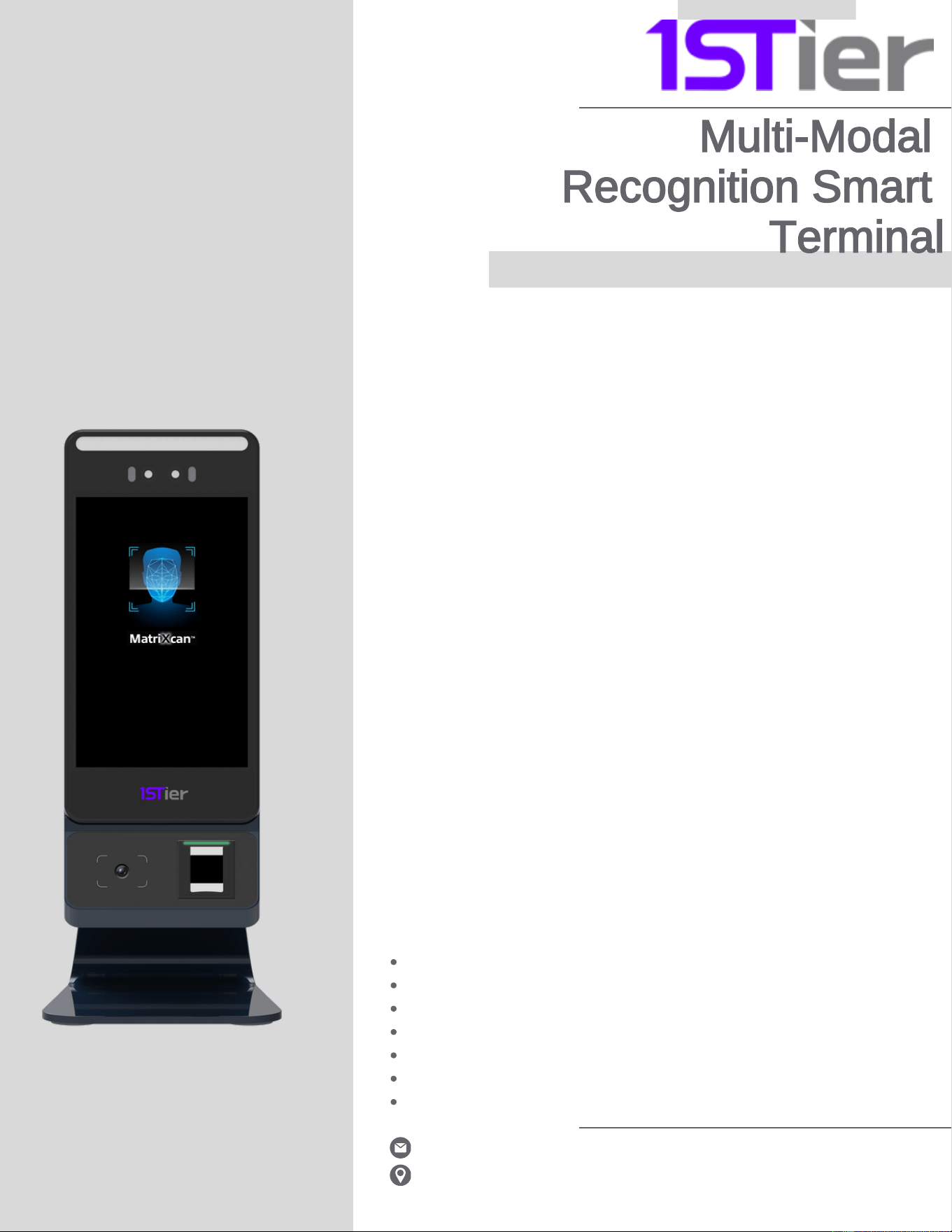
The 1STier A5 is a compact, AI-
powered access control terminal
designed for fast, secure, and
efficient identity verification in
s environments.
Featuring both facial recognition
and fingerprint authentication in a
5” touchscreen device, the A5 is
ideal for streamlined deployments
across office desks, security
counters, and reception areas.
Secure, Compact & Dual-Mode Biometric Access
Use Case Scenarios
Built for Efficiency in High-Traffic, Space-
Constrained Location
Despite its size, the A5 delivers powerful dual-biometric
performance. It supports touchless facial recognition for
hygienic entry, and dual-factor authentication with its
integrated iMD Indicus FAP20 fingerprint reader — offering
FAP20 certification, MatriXcan technology, and high-contrast
imaging even on dry or worn fingers. The reader performs
reliably under varying light conditions, making it suitable for
indoor and semi-outdoor use.
The A5 also includes built-in NFC/RFID capabilities for fast,
contactless card-based verification — ideal for employee ID
access or smart building systems. An 1D/2D barcode
reader extends its versatility for visitor check-ins, ticket
validation, or asset tracking workflows.
s
Running Android 14 and featuring multiple installation options,
the A5 is ideal for compact environments that require reliable
security. Its aluminum enclosure, IP65 rating, and built-in Wi-
Fi, Ethernet, and optional 4G connectivity make it a great fit for
indoor or outdoor locations where space is at a premium but
performance can't be compromised.
:
Corporate front desk and staff entry points
Visitor terminals at security counters
Healthcare and clinic access stations
Hotel front desks and event booths
Smart residential lobbies and compact gates
Banking kiosks and teller verification stations
Outdoor utility and service counters
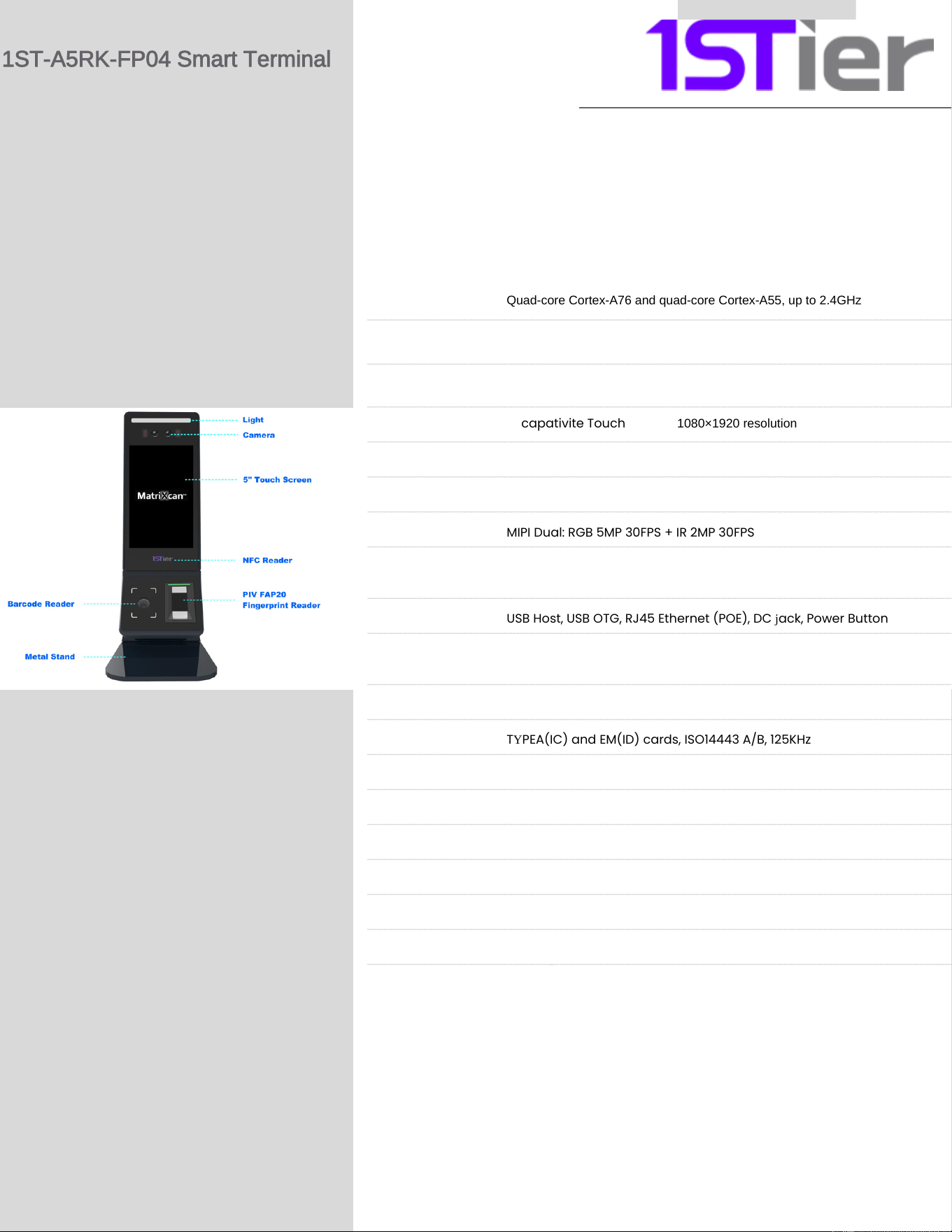
Processor
Quad-core Cortex-A76 and quad-core Cortex-A55, up to 2.4GHz
RK3588S, RAM: 8 GB ROM: 128 GB
Android 14, with GMS
5" capativite Touch Screen, 1080×1920 resolution
2.4GHz
Bluetooth 4 . 2
MIPI Dual: RGB 5MP 30FPS + IR 2MP 30FPS
RGB LED Indicators
USB Host, USB OTG, RJ45 Ethernet (POE), DC jack, Power Button
iMD Indicus FAP20 – certified, MatriXcan technology; high contrast
imaging, supports dry/worn fingers, immune to ambient light
1D/2D supported (PDF417, QR, Data Matrix, Micro QR, etc)
TYPEA(IC) and EM(ID) cards, ISO14443 A/B, 125KHz
0℃ ~ 45℃, Humidity: 10% ~ 75%
-20℃ ~ 50℃, Humidity: 5% ~ 85%
DC 12V/2A
Wall mount, desktop
RAM / Storage
Operating System
Display
Wifi
Bluetooth
Front Camera
Illumination
Guidance
Ports
Fingerprint reader
Barcode reader
NFC / RFID
Operating Temp.
Storage Temp.
Power Supply
Installation Options
Certifications
CE, FCC, RoHS, IP65, FBI appendix F, MIL-STD-810H*
Category
Description
Specificatio
1ST-A5RK-FP04 Smart Terminal
n

This device complies with part 15 of the FCC Rules. Operation is subject to the
following two conditions: (1) This device may not cause harmful interference, and (2)
this device must accept any interference received, including interference that may cause
undesired operation.
Any Changes or modifications not expressly approved by the party responsible for
compliance could void the user's authority to operate the equipment.
Note: This equipment has been tested and found to comply with the limits for a Class B
digital device, pursuant to part 15 of the FCC Rules. These limits are designed to
provide reasonable protection against harmful interference in a residential installation.
This equipment generates uses and can radiate radio frequency energy and, if not
installed and used in accordance with the instructions, may cause harmful interference
to radio communications. However, there is no guarantee that interference will not
occur in a particular installation. If this equipment does cause harmful interference to
radio or television reception, which can be determined by turning the equipment off and
on, the user is encouraged to try to correct the interference by one or more of the
following measures:
-Reorient or relocate the receiving antenna.
-Increase the separation between the equipment and receiver.
-Connect the equipment into an outlet on a circuit different from that to which the
receiver is connected.
-Consult the dealer or an experienced radio/TV technician for help.
-This equipment complies with FCC radiation exposure limits set forth for an
uncontrolled environment. This equipment should be installed and operated with
minimum distance 20cm between the radiator & your body.