
Instructions
for Use
LED Light Therapy Mask

1
Contents
(English)
01 Indications for use .......................................................................1
02 Product description ....................................................................1
03 Contraindications, warnings and precautions ..........................4
04 Light sensitivity test ...................................................................7
05 Charging the battery ...................................................................8
06 How to use ...................................................................................9
07 Color modes selection ..............................................................12
08 Care and maintenance ..............................................................14
09 Explanation of symbols .............................................................14
10 Disposal guidelines ...................................................................16
11 Common malfunctions and solutions ......................................17
12 Electromagnetic compatibility (EMC) declaration ...................18
13 Customer support and warranty service ..................................19
11
01 Indications for use
This device is intended for LED light therapy treatment of wrinkles and mild
to moderate acne for adult users in home healthcare environments.
Red + Infrared Light: Treatment of full-face wrinkles
Red Light: Treatment of full-face wrinkles
Infrared Light: Provides topical heating to elevate tissue temperature, re-
lieve muscle spasms, stiness, and temporarily increase local circulation
Blue Light: Treatment of mild to moderate inammatory acne
Red + Blue Light: Treatment of mild to moderate inammatory acne
For more details, please refer to the full user manual.
02 Product description
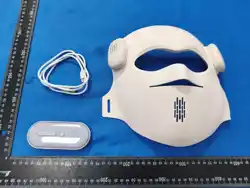
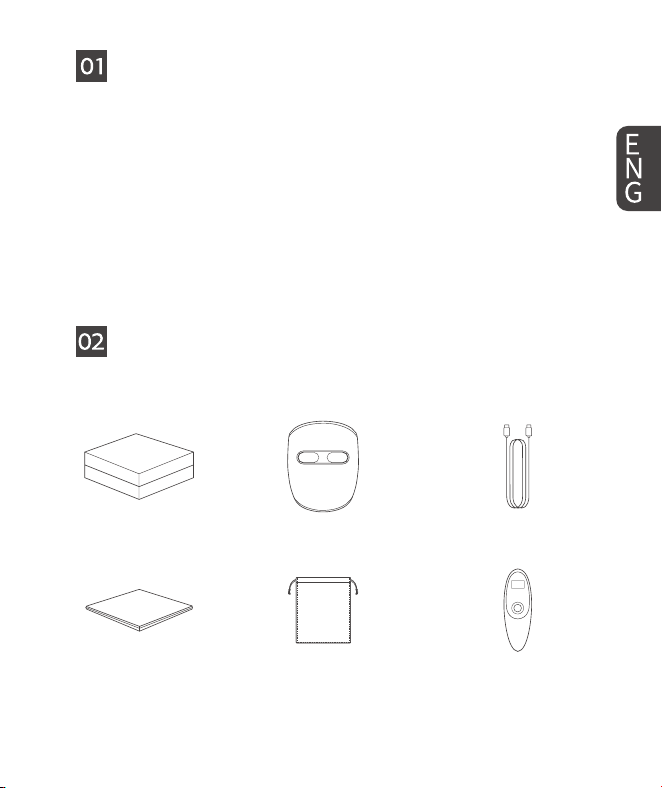
2.1 Product composition
Product box - 1 pc
User manual - 1 pc
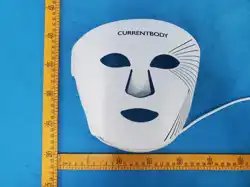
LED mask - 1 pc
Dust bag - 1 pc Remote control - 1 pc
Charging cable - 1 pc
2 32
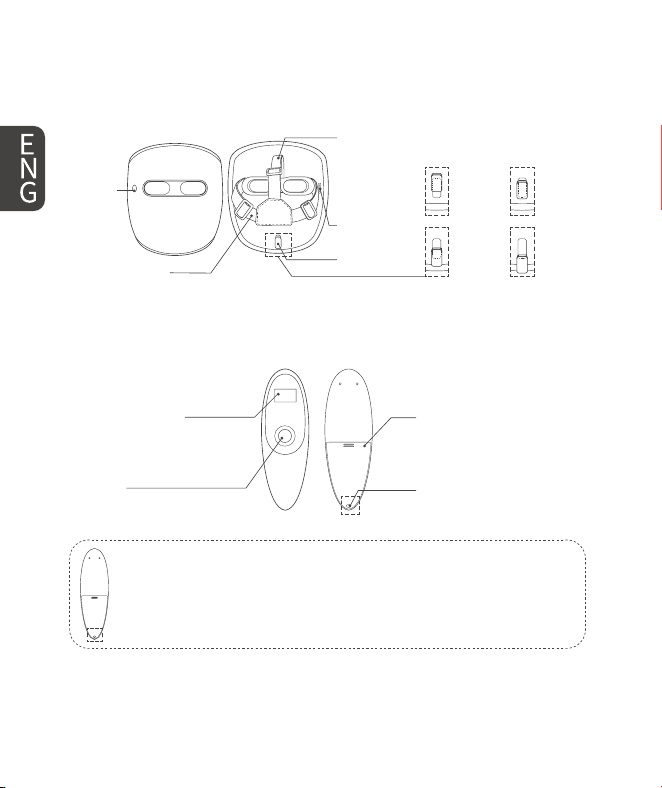
2.2 Name of each part
1) This device (RF Receiving Device)
Power
button
Type-C
charging
cable
connector
Side hair band
Top hair band
Up
Upper
middle
Lower
middle
Down
Chin rest
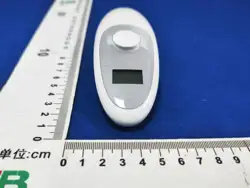
2) Remote control (RF Transmitting Device)
Note: The device can be used directly without opening the battery
cover. If you need to replace the two internal AAA batteries, use a
toothpick or similar tool to remove the white silicone plug at the
end of the battery cover. Then use a standard screwdriver to remove
the screws and fully open the battery cover.
LCD for checking the
selection mode
Remote control
battery cover
Silicone plug
Color modes selection
button
32 3
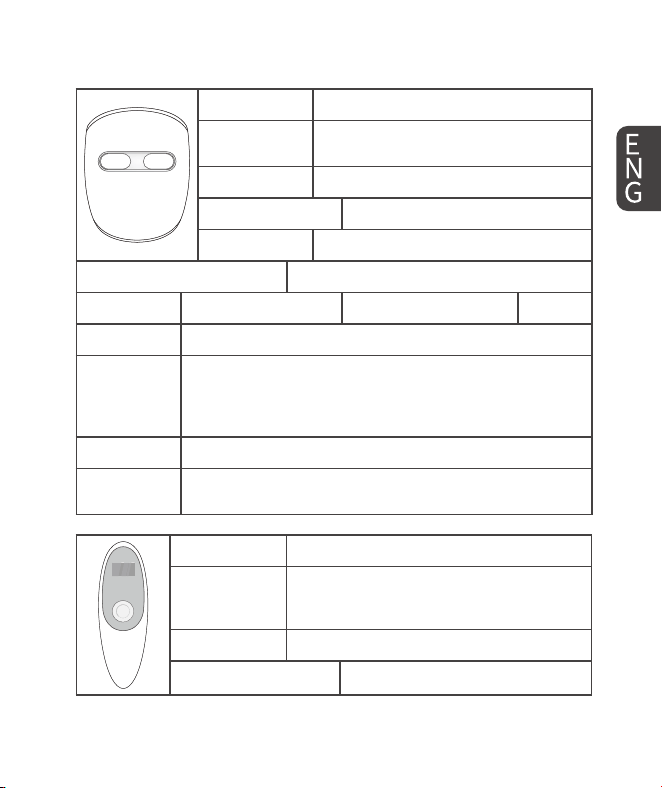
3) Product specication
Product Name LED Light Therapy Mask
Model Number
RB-050, RB-081, RB-080, W-401, W-402,
W-403, W-404, W-405, W-406
Power Input DC 5V 1A
Internally Powered DC 3.7V, 2000mAh lithium battery
Charging Time 4 hours
Size (width x length x height) About 19.5 x 22.3 x 9.3 cm
Weight About 386 g Country of Manufacture China
Material ABS and others
Ingress
Protection
IP22 (This product meets the IP22 protection rating, ensur-
ing resistance against solid objects larger than 12.5 mm and
protection from water droplets falling at an angle of up to
15 degrees from vertical.)
Manufacturer Shenzhen LightPath Technology Co., Ltd.
Warranty
1-year warranty (Please contact us to extend it to a 3-year
warranty.)
Product Name LED Light Therapy Mask (Controller)
Model Name
RB-050-RC, RB-081-RC, RB-080-RC,
W-401-RC, W-402-RC, W-403-RC,
W-404-RC, W-405-RC, W-406-RC
Power Input N/A
Battery Specications 2 × AAA batteries (1.5 V each)
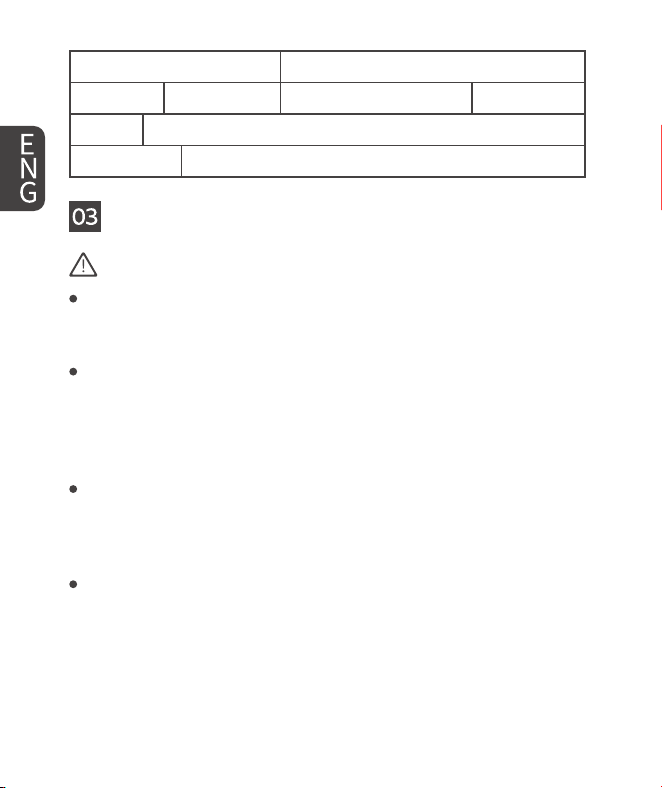
4 54
Size (width x length x height) About 4.5 x 13.3 x 3.2 cm
Weight About 81 g Country of Manufacture China
Material ABS and others
Manufacturer Shenzhen LightPath Technology Co., Ltd.
03 Contraindications, warnings and precautions
Contraindications (Absolute Contraindications)
History of Seizures or Light-Sensitive Seizures:
If you have a history of seizures triggered by light (such as photosensitive
epilepsy or other photosensitive seizure disorders), do not use the device.
Lupus Erythematosus, Photosensitive Eczema, Albinism, or Other
Photosensitive Conditions:
Do not use the mask if you suer from Lupus erythematosus, photosensi-
tive eczema, albinism, or other light-sensitive conditions, as this may lead
to severe skin reactions.
Medications that Cause Photosensitivity:
Do not use the device if you are taking any medication that causes photo-
sensitivity. Consult your healthcare provider if you are unsure whether any
medication you are taking could cause photosensitivity.
Pregnancy, Planning to Become Pregnant, or Breastfeeding:
Do not use the device if you are pregnant, planning to become pregnant,
or breastfeeding. The safety of this device has not been established for
these populations.
54 5
Warnings (Conditions Requiring Special Attention)
Light Sensitivity Test:
Please refer to the section "04 Light sensitivity test" for detailed instruc-
tions. This test should be performed 24 hours before your rst treatment.
Apply the light to a small area of skin (e.g., inner forearm) for 3 minutes. If
you experience any redness, swelling, itching, or other irritation within 24
hours, do not use the mask and consult your healthcare provider.
Makeup Removal:
Always remove makeup before using the mask. Certain ingredients in
makeup, such as fragrances, preservatives, and pigments, may increase
photosensitivity or interfere with the eectiveness of the treatment, po-
tentially leading to skin reactions.
Avoid Water Exposure:
This device is NOT waterproof. Do not use near water or where it could
fall into a sink or tub. Do not immerse the device in any liquid. If the de-
vice comes into contact with water, unplug it immediately. Do not use a
water-damaged device; contact customer support. See the "Cleaning and
Care Instructions" section for proper cleaning procedures.
Heat Exposure:
Keep the device away from hot surfaces to avoid damage.
Modication of the device:
Do not modify the mask or any components. Modifying the device will void
the warranty and could lead to electrical hazards, including shocks.
Damaged Components:
If the mask, controller, or power cord shows any signs of damage, includ-
ing but not limited to cracks, frayed wires, or loose connections, do not
use the device.
6 76
Children's Use:
The mask should not be used by children unless under the guidance of a
healthcare provider.
Cleaning Before Use:
Clean the mask before each use with a soft, lint-free, damp cloth. For
stubborn stains, gently wipe with 70–80% alcohol. Ensure the device is
unplugged before cleaning. Do not use harsh chemicals, abrasives, or
alcohol-based cleaners (except 70% alcohol for stubborn stains), as these
may damage the mask.
Abnormal Odors or Smoke:
If you notice smoke or a strange odor, immediately stop using the mask,
turn o the power, and disconnect the charging adapter. Do not attempt to
repair the device yourself.
No Serviceable Parts:
The device contains no serviceable parts. Do not attempt to open or repair
the device yourself.
Battery Compartment (Sealed):
The controller contains pre-installed AAA batteries secured with screws. Do
not forcibly discharge, recharge, or disassemble the battery. These actions
may cause personal injury or chemical burns. Keep batteries away from
children. Do not dispose of batteries in household trash or incinerate them.
Additional Precautions
Battery:
There is only one correct USB-C insertion position on the device. Do not
force the cable into place.
Allergy Alert:
The head strap contains polyester, nylon, and lycra. If you are allergic to
76 7
these materials, you may experience skin irritation.
Charging Safety:
The mask cannot be used while charging.
Recommended Treatment Time and Frequency:
For optimal results, use the device daily for 10 minutes. Do not exceed 20
minutes per session. Overuse will not enhance the eectiveness and may
instead reduce the desired benets.
Personal Sensitivity:
Everyone's skin reacts dierently to light therapy. If you experience any
discomfort, redness, or irritation, stop using the device immediately and
consult a healthcare provider.
Possible Side Eects:
Mild redness or warmth of the skin may occur during or after treatment.
These are common and should subside shortly after use. If symptoms
persist or worsen, discontinue use and consult your healthcare provider.
Disclaimer:
This user manual is for reference only and should not be considered a
substitute for professional medical advice. Always consult a healthcare
provider before using the device, especially if you have pre-existing medi-
cal conditions or are taking medications.
04 Light sensitivity test
Follow these instructions to see if you are sensitive to light:
1. Initiate the device by long pressing the LED mask "Power button".
2. Place the device on a section of the forearm, maintaining contact for the
entire three-minute treatment cycle.
3. Short press the "Color mode selection button" or the "Power button" to
8 98
choose a dierent mode for another three-minute treatment on the same
forearm area.
4. Wait 24 hours. You should NOT experience any adverse reaction during the
next 24 hours.
An adverse reaction is a pain or discomfort in the treatment areas or any
prolonged skin redness.
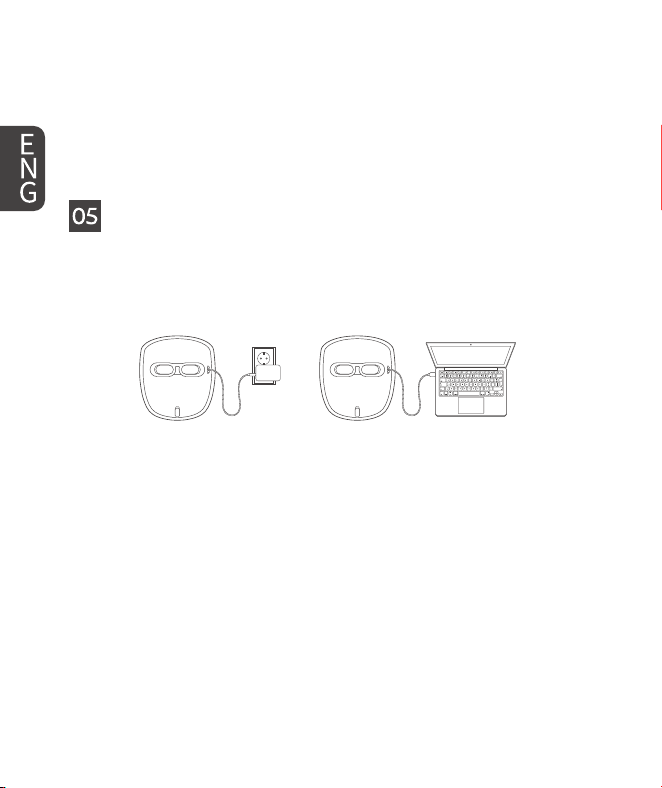
05 Charging the battery
Before use (or when the power button ashes red), be sure to charge the LED
mask battery as follows. Charging time may vary depending on the battery
level. A full charge may take up to 4 hours.
① Connect the Type-C connector of the original charging cable (included
with the mask) to the charging port of the LED mask.
② Connect the other end of the charging cable to a power adapter that
supports 5V output, or to a USB-C port on your computer, to begin
charging.
98 9
A ashing red light at the charging port indicates a successful
connection and that charging has started.
- If there is no red ashing light, the issue may be related to the
charging cable or adapter.
- Do not charge the device in environments below 0° C (32° F), as
this may aect battery performance or cause safety risks.
Note:
③ Once the power button lights up in green, the device is fully charged.
You may now unplug the cable and begin use.
Battery
Care Tips!
Lithium Battery Maintenance Tips:
- Avoid fully draining the battery before recharging.
- Avoid overcharging the battery and try to limit the
charging time to a maximum of 8 hours.
- If the device is not in use for an extended period, it is
recommended to charge the battery at least once every
three months.
06 How to use
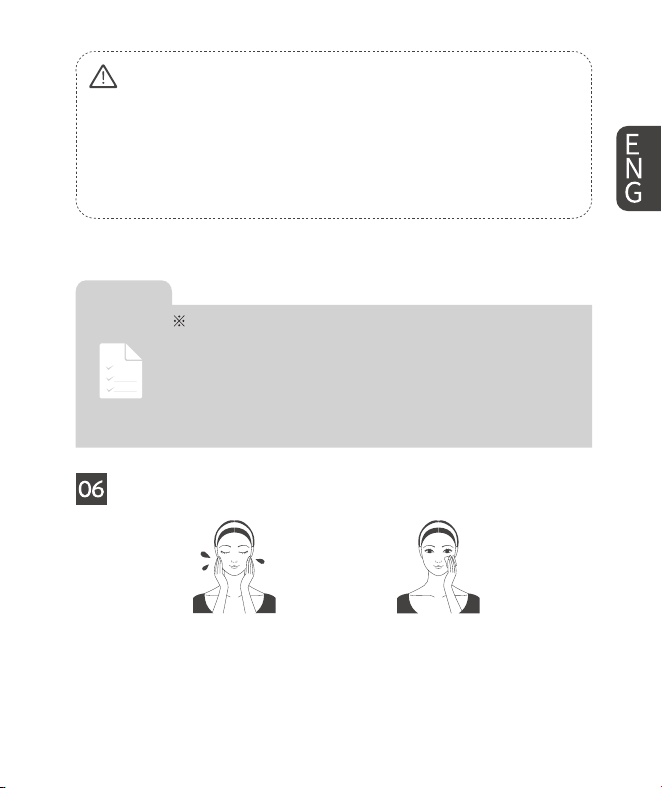
① Wash your face clean. (If you wear makeup, please cleanse using cleansing
foam.)
② It can be used day or night. You can t it into your current skincare routine
after cleaning and/or exfoliating your skin.
10 1110
Be sure to charge the LED mask battery before use. (When the power button
of the LED mask is pressed and held for 2 seconds, the device will soon power
on. If the power indicator light ashes green, it indicates that the mask is in a
usable state.)
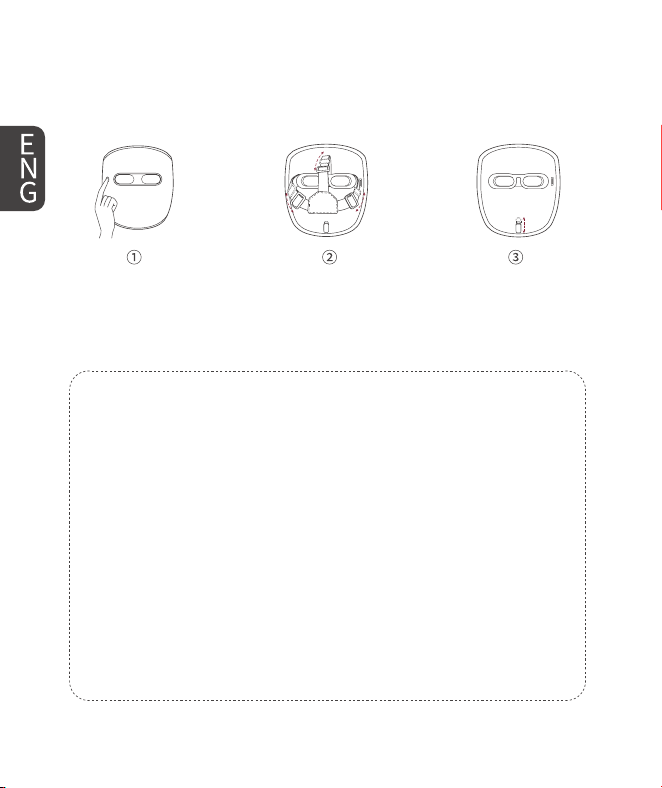
① Press and hold the power button on the front of the LED mask for about 2
seconds to turn it on. (Available when blinking green.)
② After adjusting the hair band moderately, wear it so that the inner side of
the LED mask is on the face.
Tips for adjusting the headband:
1. When sitting or standing, the correct state should be minimal pressure
on the eye socket, allowing the silicone eye pad to t the eye socket, with
the headband on top bearing the product's weight.
2. If you feel the silicone eye pad is exerting too much pressure on the eye
socket, to the point of leaving indentations on your face, then you can
adjust the headband on both sides to loosen it. This will reduce the pres-
sure from the eye pad on your face, ensuring a comfortable and safe use
experience.
3. If the silicone eye pad does not t the eye area and light can enter
through the gap between the eye pad and eye socket, tighten the head-
band on both sides.
4. If you feel the mask is sliding down and cannot maintain the correct
position on your face, tighten the headband on top.
1110 11
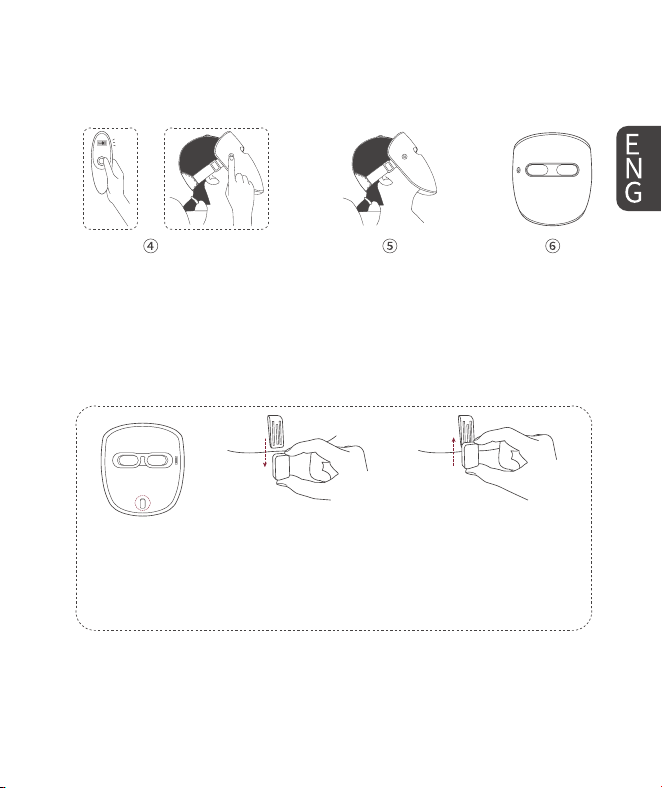
③ Place the chin rest on the chin (under the lip). There are 4 gears for the
chin rest (Up, Upper middle, Lower middle, Down). Push the chin rest to
move it one step upwards or downwards for a better wearing result.
OR
④ Select the desired mode using the button on the remote control or the
power button located on the LED mask.
⑤ If you feel uncomfortable while wearing the device, you can try to adjust
the strap or lay down until you feel better.
⑥ The product will be turned o automatically when the set mode and the
corresponding time nish.
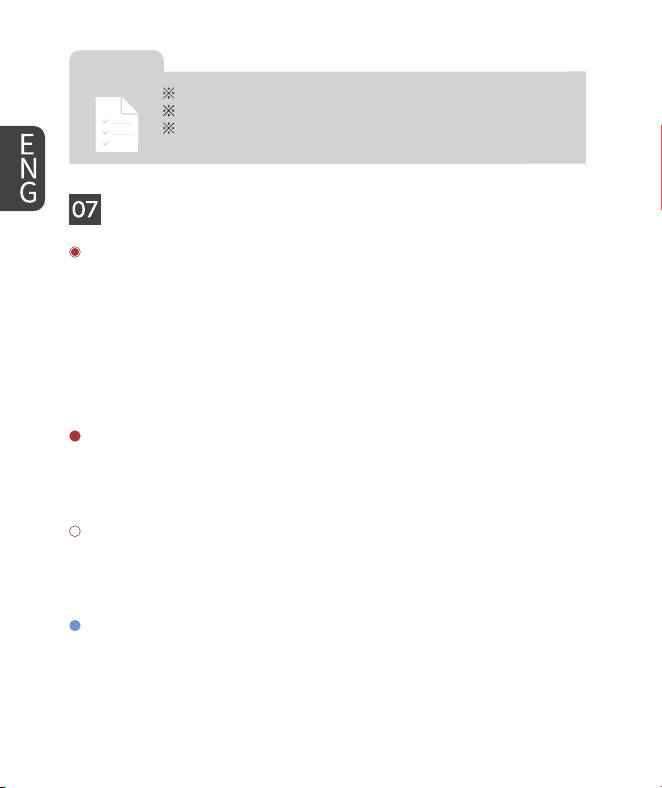
① Remove: If the chin rest is uncomfortable, adjust it to "Down" gear and
push it down to remove it. (Please store your chin rest after disassembly.)
② Install: To reinstall the chin rest, align it with the bottom of the slide
and push it up to secure it in place. (As shown in the picture above.)
① Remove Chin Rest
② Install Chin Rest
12 1312
Move the remote control within 30 cm of the LED mask.
Do not pull, twist, or forcefully adjust the device.
When wearing the product, relax in a comfortable
position on the couch or bed.
Cautions
for Use!
07 Color modes selection
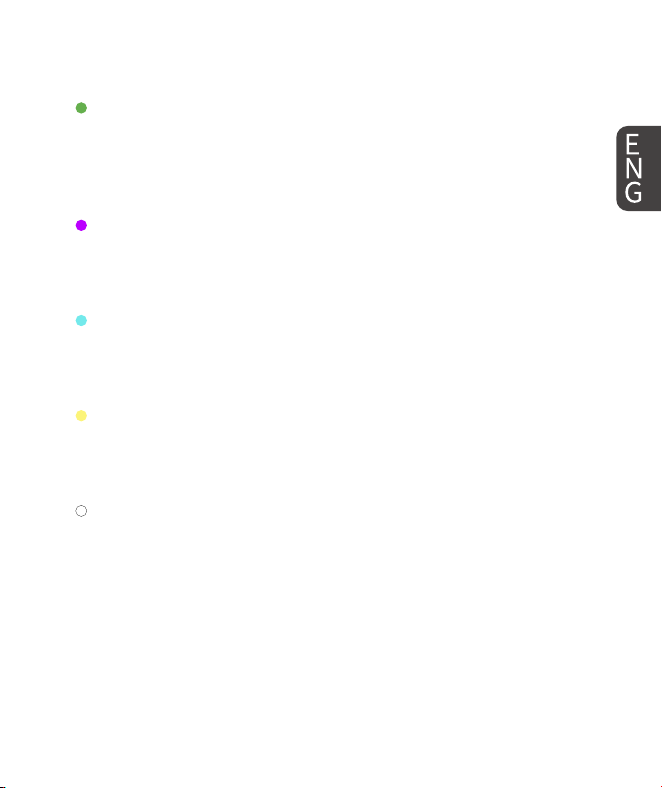
Red+Near-Infrared Mode (R+N)
- Wavelength: Combination of Red Light (620 nm) and Near-Infrared Light
(850 nm)
- Function: A dual-wavelength combination of red light and infrared light,
repairs and renews your skin's deeper layers. Red light can nourish the skin
and improve the skin's function. Near-infrared light penetrates even deeper
than red light, reaching depths of over 15 mm beneath the skin's surface,
against ne lines, nasolabial folds are more eective.
Red Mode (RED)
- Wavelength: Red Light 620 nm
- Function: Stimulates collagen production, enhances skin elasticity, evens
skin tone, and reduces ne lines and wrinkles.
Near-Infrared Mode (NIR)
- Wavelength: Near-Infrared Light 850 nm
- Function: Promotes blood circulation and tissue repair, enhances skin
radiance and helps soothe sensitive and damaged skin.
Blue Mode (BLU)
- Wavelength: Blue Light 460 nm
- Function: Anti-acne and cleansing, shrinking pores, repairing sensitive
skin, relieving various discomforts for skin, and insist on using blue light can
1312 13
improve the balance of skin water and oil. Improving Seasonal Aective Disor-
der (SAD).
Green Mode (GRN)
- Wavelength: Green Light 520 nm
- Function: Normalizes sebaceous glands to reduce blackhead formation
and moderate oil production. Suppresses excessive melanin production,
reduces pigmentation. Reduces intraocular pressure. Alleviates migraines.
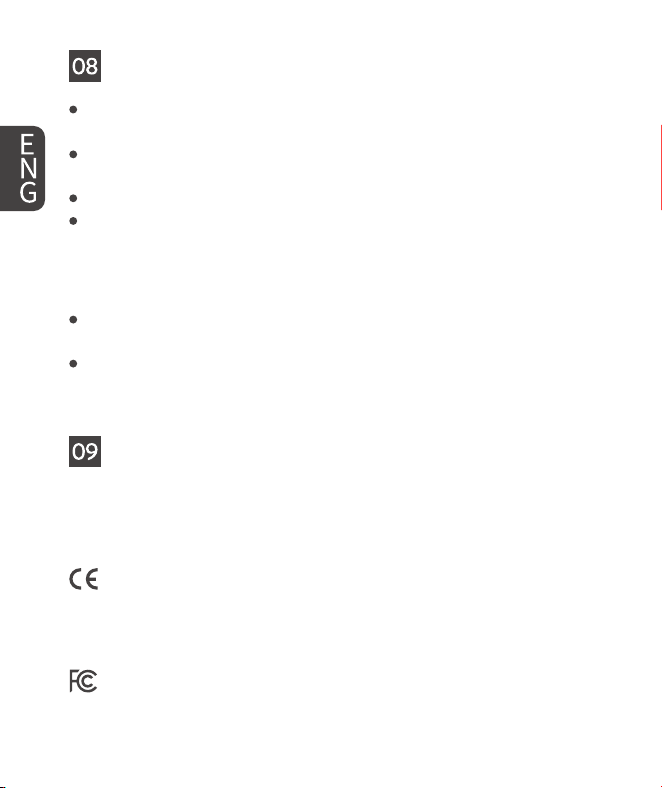
Purple Mode (PURP)
- Wavelength: Combination of Red Light (620 nm) and Blue Light (460 nm)
- Function: Control oil secretion, brighten and fade dark spots, stimulate
collagen production for rmer and more radiant skin.
Teal Mode (TEAL)
- Wavelength: Combination of Blue Light (460 nm) and Green Light (520 nm)
- Function: Soothe the skin, enhance cell energy gradually, and has a good
metabolism-facilitating eect.
Yellow Mode (YEL)
- Wavelength: Combination of Red Light (620 nm) and Green Light (520 nm)
- Function: Improve rough skin and wrinkles, alleviate redness and sunburn,
soothe the skin and gently promote collagen production.
White Mode (WHT)
- Wavelength: Combination of Red Light (620 nm), Blue Light (460 nm) and
Green Light (520 nm)
- Function: Penetrates the skin deeply to accelerate tissue metabolism,
decompose color spots, and improve the appearance of ne lines and aging
skin.
14 1514
08 Care and maintenance
Store the LED Light Therapy Mask at room temperature in dry conditions.
Use the carry bag provided.
Avoid storing the LED Light Therapy Mask in dusty conditions, in direct
sunlight or in damp and humid conditions.
The LED Light Therapy Mask contains no serviceable parts.
Before each use, with the device switched o, clean the face mask following
the cleaning instructions below.
Cleaning the LED Light Therapy Mask
DO NOT use any other cleansing products as these may damage the plas-
tics.
Clean the transparent (face side) of the mask and rear with a water-based
wipe or damp clean cloth. Stubborn stains can be removed by wiping gen-
tly with 70% alcohol.
09 Explanation of symbols
There are several safety warning labels on the device, its packaging, and in
the user manual. Not following these warnings may result in one or more of
the following hazards:
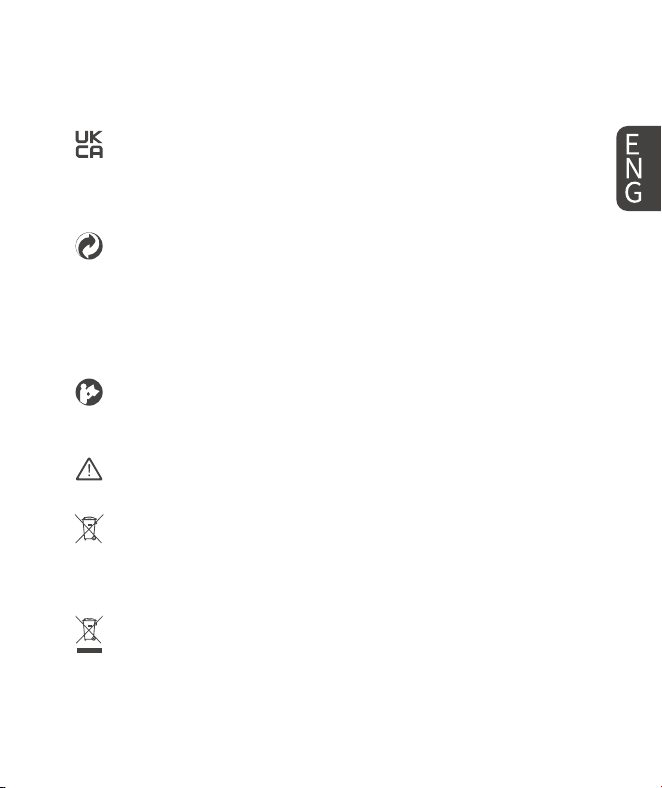
The product conforms to applicable European Community (EC) Direc-
tives related to health, safety, and environmental protection standards.
CE stands for "Conformité Européenne", which means European Con-
formity in French.
This device complies with Part 15 of the FCC Rules. Operation is subject
to the following two conditions:
1514 15
This device may not cause harmful interference.
This device must accept any interference received, including interfer-
ence that may cause undesired operation.
The product complies with the applicable UK legislation on safety,
health, and environmental protection standards and meets the United
Kingdom Conformity Assessed (UKCA) requirements for placing prod-
ucts on the Great Britain (England, Scotland, and Wales) market.
The Green Dot symbol (Der Grüne Punkt) indicates that the manufactur-
er contributes nancially to a packaging recovery and recycling scheme
in compliance with the European Packaging and Packaging Waste
Directive 94/62/EC. It does not necessarily mean that the packaging is
recyclable, but that the producer has paid a licensing fee to a certied
packaging recovery organization.
The user should refer to the instruction manual or user guide for im-
portant safety information, operating instructions, and maintenance
guidelines before using the product.
This warning symbol on the device label is a warning to read the en-
closed documents before use and take all safety precautions required.
The product complies with the Battery Directive 2006/66/EC and its
amendments and should not be disposed of as household waste. Bat-
teries must be collected separately and properly recycled in accordance
with local and national environmental regulations.
This marking indicates that the product should not be disposed of with
other household wastes throughout the UK and EU. To prevent possible
harm to the environment or human health from uncontrolled waste
disposal, recycle it responsibly to promote the sustainable reuse of
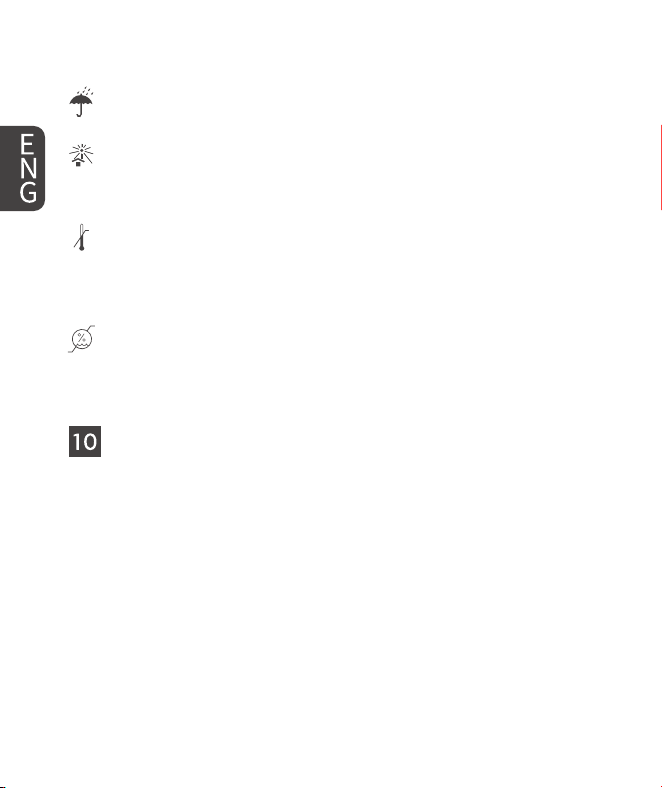
16 1716
material resources.
The product or packaging must be protected from moisture and stored
in a dry environment to prevent damage caused by water or humidity.
The product or packaging should not be exposed to direct sunlight or
strong UV radiation, as prolonged exposure may cause damage, degra-
dation, or reduced eectiveness of the contents.
Temperature Storage Recommendation: It is recommended to store
the product within the temperature range of 0° C to 30° C to ensure its
safety, performance, and eectiveness. Storing the product outside this
range may lead to potential damage, degradation, or malfunction.
Humidity Storage Recommendation: It is recommended to store the
product within a humidity range of 20% to 60% RH to maintain its
safety, performance, and longevity. Exposure to excessive humidity or
dryness may lead to malfunction, oxidation, or battery damage.
10 Disposal guidelines
To protect the environment, dispose of the product and its components
responsibly:
Packaging: Sort and recycle paperboard and cardboard through your local
paper recycling service. Dispose of plastic wrapping with designated waste
collections.
Device: Do not discard with household waste. Follow your city or country's
regulations for electronic waste recycling. Bring the product to an ocial
collection point when it is no longer usable.
Battery: Do not dispose of batteries in household waste. Regardless of chem-
1716 17
ical content, used batteries must be taken to appropriate collection sites (e.g.,
municipal collection centers or retailers). Ensure the product is uncharged
before recycling the device with the battery included.
11 Common malfunctions and solutions
1. After pressing a button on the remote control, the screen does not light up,
or it lights up but does not display characters, or it ickers, preventing con-
trol of the mask.
Solution:
① Replace with two brand-new AAA batteries: You may use a toothpick or
similar tool to remove the white silicone plug at the end of the battery cov-
er, then use a standard screwdriver to remove the screw and fully open the
battery cover.
② If the screen still does not respond after replacing the batteries, please
contact us to replace the controller.
2. The mask cannot charge properly or fails to charge.
Solution:
① If the power button does not ash red when charging:
A ashing red light means the device has successfully recognized power
input. If there is no red light, the issue may be related to the charging cable
or adapter. Please use a high-quality, safety-certied charger that supports
5V output, along with a certied USB-C to USB-C cable.
② If the power button does ash red, but the mask still won't turn on after
several hours of charging:
Please contact our customer support team to arrange a free replacement.
③ If you're experiencing any other charging-related issues, please don't
hesitate to reach out to our support team — we're here to help.
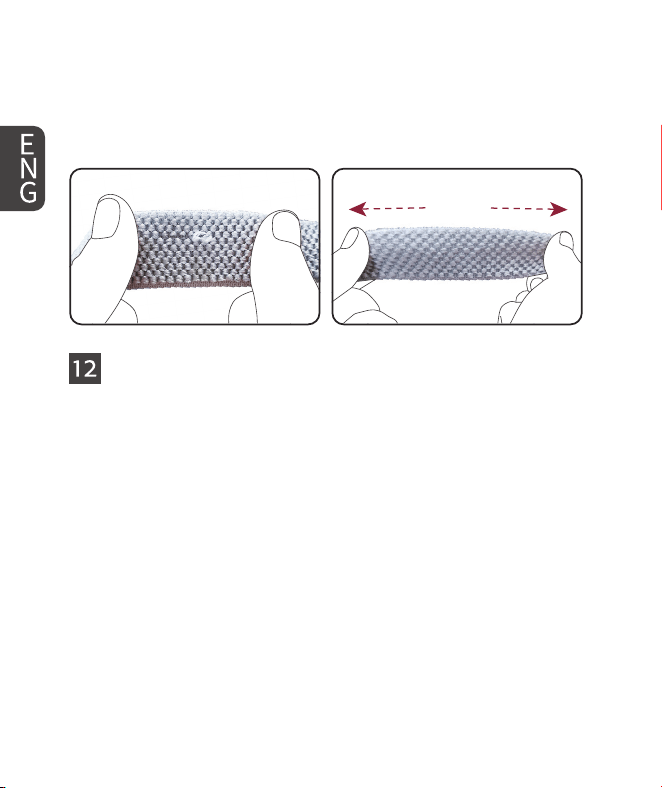
3. The woven straps of the face mask may have snags or excess threads.
18 1918
Solution: The woven straps of the face mask are designed with excellent
elasticity. If you notice snags or excess threads during use, grasp the straps
on both sides of the problematic area with your hands and gently stretch
outward with some force, repeating several times until the snagged portion
is fully smoothed out, restoring its normal appearance and function.
12 Electromagnetic compatibility (EMC) declaration
This device complies with the electromagnetic compatibility (EMC) require-
ments of IEC 60601-1-2:2020 (4th Edition). It has been tested to ensure that
it does not emit excessive electromagnetic interference and maintains safe
performance when used in typical home environments.
Important Notes:
1. Do not use the device near strong electromagnetic sources such as radio
transmitters, microwave ovens, or high-powered wireless devices.
2. Only use the original accessories provided with the product. Using unau-
thorized cables or power adapters may aect EMC performance.
3. Do not stack or operate this device closely adjacent to other electronic
equipment unless veried to operate safely.
4. Avoid touching the connector pins without ESD protection. Anti-static
precautions are recommended when handling the device.
1918 19
5. The mask is suitable for residential and home healthcare environments.
6. For more technical EMC specications, please refer to the full EMC Test
Report or contact customer support.
13 Customer support and warranty service
If you have questions about the product or experience a problem during use,
please contact us at [email protected] or +86 18538525836.
Please provide the product model, order number or proof of purchase, and a
description of the issue. Photos or a short video may help us assess the prob-
lem. We will review your request and provide troubleshooting guidance or
an appropriate warranty solution in accordance with the applicable warranty
terms.
Contact us at:
+86 18538525836
LED LIGHT THERAPY MASK
Contact Customer Service:
Email: supplychain@guanglukeji.com
TEL/WhatsApp: +86 18538525836
FCC Warning
15.19 Labeling requirements.
This device complies with part 15 of the FCC Rules. Operation is subject to the following two conditions: (1) This device may
not cause harmful interference, and (2) this device must accept any interference received, including interference that may
cause undesired operation.
15.21 Information to user.
Any Changes or modifications not expressly approved by the party responsible for compliance could void the user's
authority to operate the equipment.
15.105 Information to the user.
Note: This equipment has been tested and found to comply with the limits for a Class B digital device, pursuant to part 15 of
the FCC Rules. These limits are designed to provide reasonable protection against harmful interference in a residential
installation. This equipment generates uses and can radiate radio frequency energy and, if not installed and used in
accordance with the instructions, may cause harmful interference to radio communications. However, there is no guarantee
that interference will not occur in a particular installation. If this equipment does cause harmful interference to radio
or television reception, which can be determined by turning the equipment off and on, the user is encouraged to try to
correct the interference by one or more of the following measures:
-Reorient or relocate the receiving antenna.
-Increase the separation between the equipment and receiver.
-Connect the equipment into an outlet on a circuit different from that to which the receiver is connected.
-Consult the dealer or an experienced radio/TV technician for help.
FCC RF Exposure Warning Statement:
This equipment complies with FCC radiation exposure limits set forth for an uncontrolled environment. This equipment can be
used in portable exposure conditions without restriction.