USER GUIDE
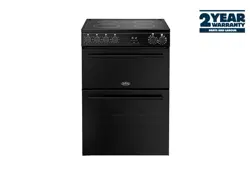
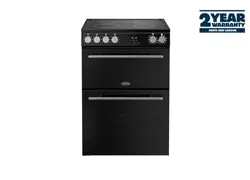
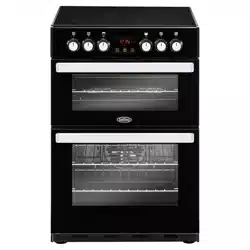
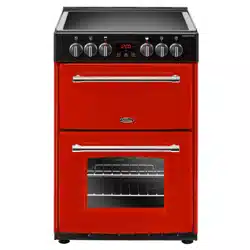
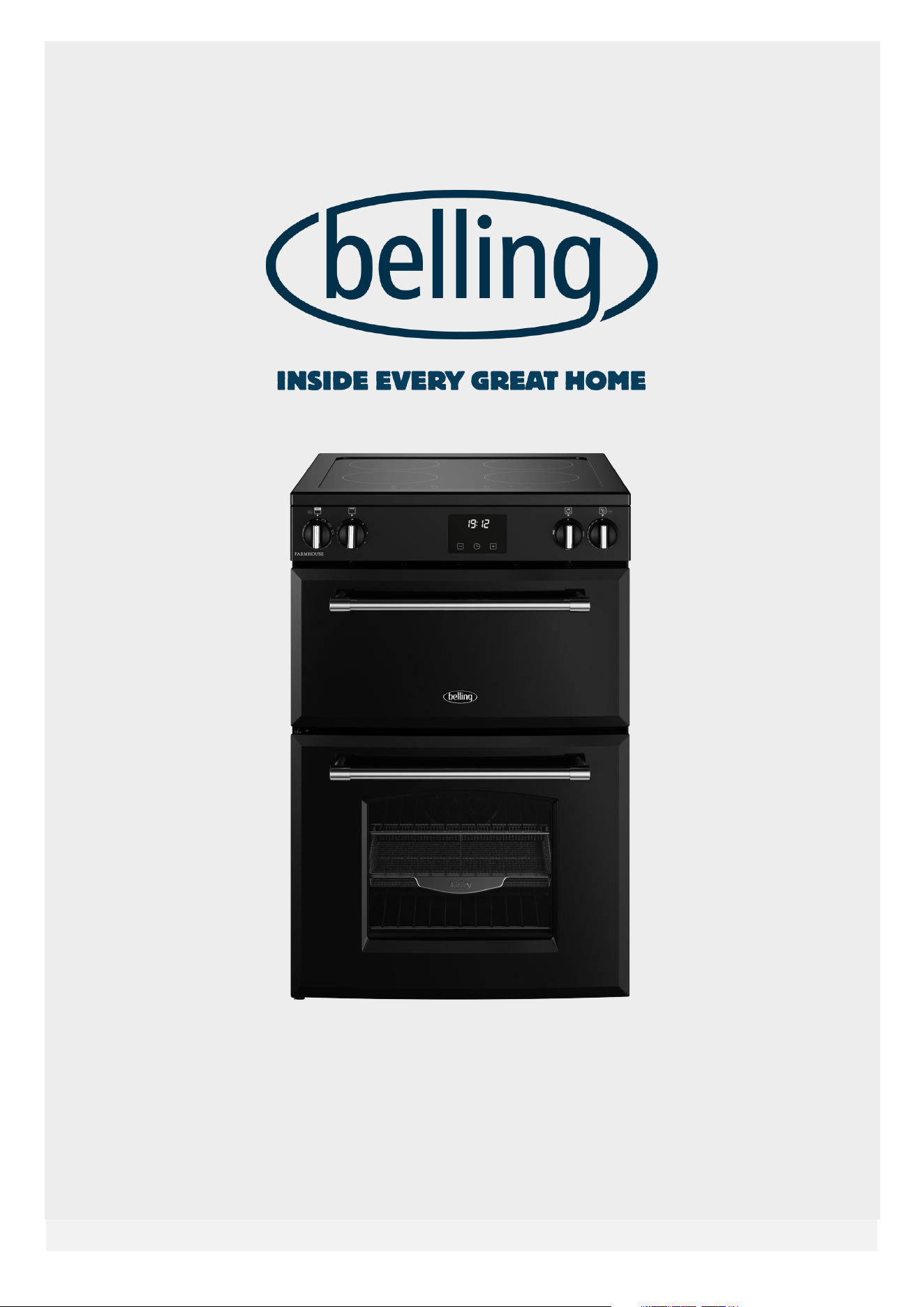
BELLING 60cm ELECTRIC INDUCTION (ALL MODELS)


Table Of Contents
INTRODUCTION .......................................................................................................... 1
SAFETY & WARNING INFORMATION ........................................................................ 3
GETTING TO KNOW YOUR PRODUCT ....................................................................... 8
USING THE GRILL ..................................................................................................... 15
USING THE MAIN OVEN ........................................................................................... 17
CLOCK/PROGRAMMER ............................................................................................ 21
CLEANING YOUR APPLIANCE ................................................................................ 24
APPLIANCE MAINTENANCE ................................................................................... 25
FAQ's ........................................................................................................................ 27
TECHNICAL DATA .................................................................................................... 29
ENERGY DATA TABLE .............................................................................................. 30
INTRODUCTION
This user guide book is designed to help
you through each step of owning your new
product.
Please read it carefully before you
start using your appliance, as we have
endeavored to answer as many questions
as possible and provide you with as much
support as we can.
General information, spares and service
information is available from our website.
If you should find something missing from
your product or have any questions that
are not covered in this user guide, please
contact us (see contact information inside
the front cover).
For a more detailed explanation of how
to use this product, please refer to
www.belling.co.uk for the full user manual.
COUNTRIES OF DESTINATION:
GB- Great Britain
IE - Ireland
DE - Germany
FR - France
PL - Poland
NL - Netherlands
SE - Sweden
NZ - New Zealand
AU - Australia
CONTACT INFORMATION:
Customer Care Helpline:
0344 815 3746
Alternatively, use the contact form
on our website
www.belling.co.uk
Details about warranty registration
and spares & service information are
also available on our website.
Calls are charged at the basic rate, please
check with your telephone service provider
for exact charges.
Your new appliance comes with our FREE
3 year guarantee (UK only), protecting you
against electrical and mechanical breakdown.
To register your new appliance for its
warranty (UK only) please visit our website
www.belling.co.uk. For full terms & conditions
of the manufacturer's guarantee, please refer
to the website above.
In addition, you may wish to purchase an
extended warranty. Details of how to do this
are also on our website www.belling.co.uk.
Our policy is one of constant development
and improvement, therefore we cannot
guarantee the strict accuracy of all of our
illustrations and specifications. Changes may
have been made subsequent to publishing.
Glen Dimplex Home Appliances, Stoney Lane,
Prescot, Merseyside, L35 2XW
EUROPEAN DIRECTIVES
As a producer and a supplier of cooking
appliances we are committed to the
protection of the environment and are in the
compliance with the WEEE directive.
1
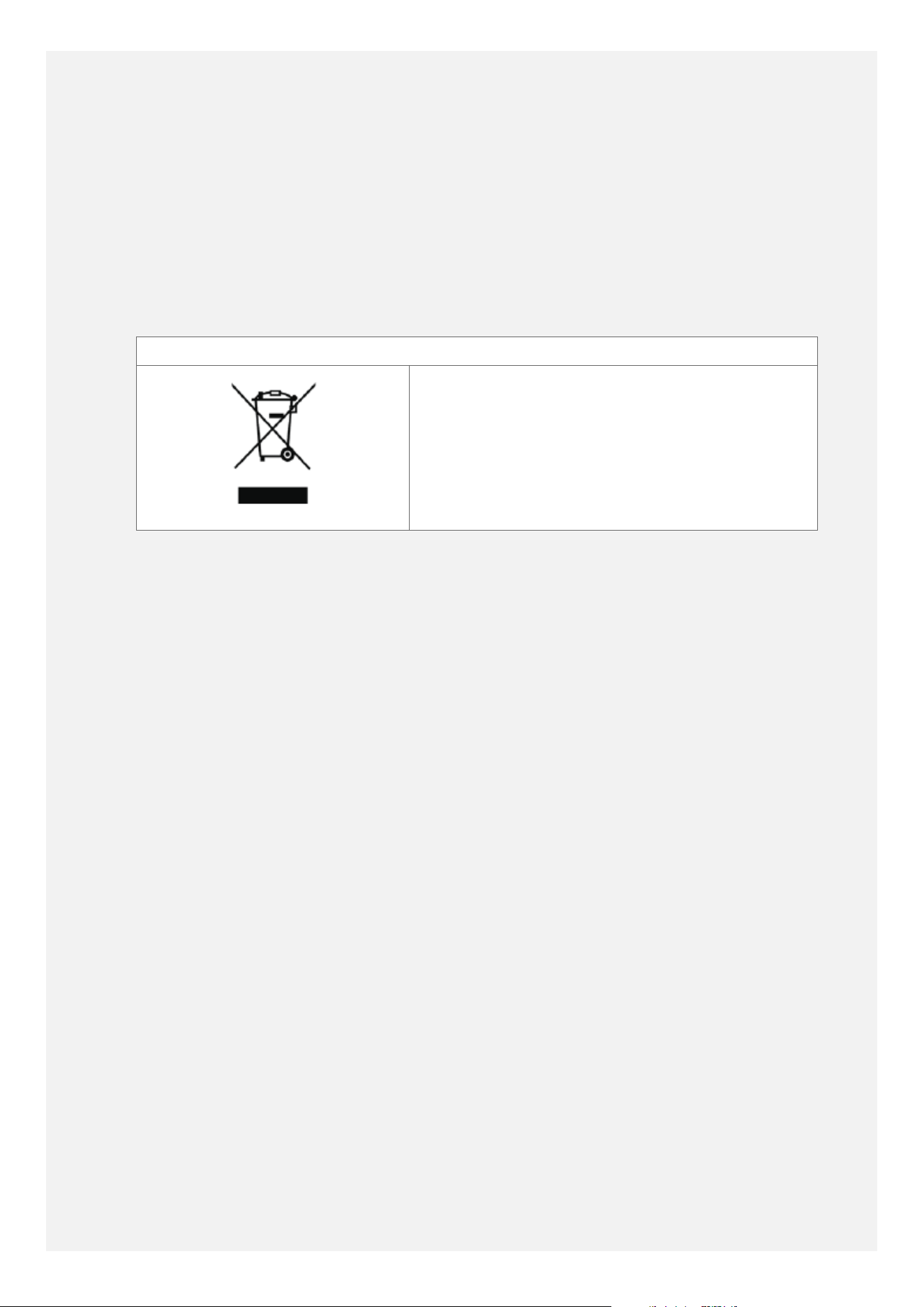
All our electric products are labelled
accordingly with the crossed out wheeled bin
symbol. This indicates, for disposal purposes
at end of life, that these products must be
taken to a recognized collection points, such
as local authority sites/local recycling centres.
This appliance Complies with European
Community Directives (CE) for household
and similar electrical appliances and Gas
appliances where applicable.
This appliance conforms to European
Directive regarding Eco design requirements
for energy-related products. Our policy is one
of constant development and improvement,
therefore we cannot guarantee the strict
accuracy of all of our illustrations and
specifications - changes may have been made
subsequent to publishing.
DISPOSAL OF PACKAGING MATERIAL
The packaging materials used with this
appliance can be recycled. Please dispose of
the packaging materials in the appropriate
container at your local waste disposal facilities.
2
SAFETY & WARNING INFORMATION
•
Warning
This appliance can
be used by children
aged from 8 years
and above and
persons with reduced
physical, sensory or
mental capabilities or
lack of experience
and knowledge if
they have been
given supervision or
instruction concerning
use of the appliance
in a safe way and
understand the hazard
involved. Children shall
not play with the
appliance. Cleaning and
user maintenance shall
not be made by children
without supervision.
Warning
If the surface is cracked,
switch off the appliance
to avoid the possibility
of electric shock.
Warning
During use the appliance
becomes hot. Care
should be taken to
avoid touching heating
elements inside the
oven.
Warning
The appliance and its
accessible parts become
hot during use. Care
should be taken to
avoid touching heating
elements. Children less
than 8 years of age
shall be kept away
unless continuously
supervised.
Warning
The oven must be
switched off before
removing the guard and
that, after cleaning, the
guard must be replaced
in accordance with the
instructions.
Warning
A steam cleaner is not
to be used on this
appliance.
Warning
Metallic objects such
as knives, forks, spoons
and lids should not
be placed on the hob
surface since they can
get hot.
Any spillage should be
removed from the lid
before opening and the
hob surface should be
allowed to cool before
closing the lid.
Warning
Ensure the appliance
is switched off before
replacing the lamp to
avoid the possibility of
electric shock.
3
Warning
Unattended cooking on
a hob with fat or oil can
be dangerous and may
result in fire. NEVER try
to extinguish a fire with
water, but switch off the
appliance and the cover
the flame e.g. with a lid
or a fire blanket.
Warning
Danger of fire: do not
store items on the
cooking surfaces.
Warning
Use only hob guards
designed by the
manufacturer of the
cooking appliance or
indicated by the
manufacturer of the
appliance in the
instructions for use as
suitable or hob guards
incorporate into the
appliance. The use of
inappropriate guards
can cause accidents.
Warning
Never place food, or
dishes on the base
of the main oven, the
element is here, and it
will cause overheating.
Warning
The appliance must
never be disconnected
from the mains supply
during use, as this
will seriously affect the
safety and performance,
particularly in relation
to surface temperatures
becoming hot and gas
operated parts not
working effectively. The
cooling fan (if fitted)
is designed to run on
after the control knob
has been switched off.
Warning
Do not store flammable
liquids or items in
the vicinity of this
appliance.
Warning
Do not modify this
appliance.
Warning
Do not operate the
appliance without the
glass panel correctly
fitted.
Warning
Accessible parts may
become hot when the
grill is in use. Children
should be kept away.
Warning
If a lid is fitted to your
appliance any spillage
should be removed from
the lid before opening
and the hob surface
should be allowed to
cool before closing the
lid.
4
Warning
This appliance must be
earthed.
CAUTION INFORMATION
Caution
In order to avoid a
hazard due to inadvertent
resetting of the thermal
cut-out, this appliance
must not be supplied
through an external
switching device, such as
a timer, or connected to
a circuit that is regularly
switched on and off by the
utility.
Caution
Do not use harsh abrasive
cleaners or sharp metal
scrapers to clean the oven
door glass/ the glass of
hinged lids of the hob (as
appropriate), since they
can scratch the surface,
which may result in the
shattering of the glass.
Caution
Only use the temperature
probe recommended for
this oven.
Caution
Do not stare at the hob
elements.
Caution
After use, switch off the
hob element by its control
and do not rely on the pan
detector.
Caution
This appliance is not
intended to be operated
by means of an external
timer or separate remote
control system.
Caution
The cooking process must
be supervised , A short-
term cooking process
has to be supervised
continuously.
Caution
Accessible parts may be
hot when the grill and/or
the oven are in use. Young
children shall be kept
away.
Caution
Our policy is one of
constant development and
improvement, therefore
we cannot guarantee
the strict accuracy of
all our illustrations and
specifications. Changes
may have been made
subsequent to publishing.
5
Caution
Make sure that you have
removed all packaging
and wrapping. Some
of the items inside
this appliance may have
additional wrapping. It is
advised that you turn
the ovens and/or grill on
for a short while. This
will burn off any residues
left from manufacturing.
There may be a smell
which accompanies this
process- but this is
nothing to worry about
and is harmless. It is
recommended that you
wash the oven shelves,
baking tray, grill pan and
grill pan trivet before their
first use in hot soapy
water. This will remove the
protective oil coating.
Caution
This appliance is for
cooking purposes only. It
must not be used for other
purposes, for example
room heating.
Caution
Connection should be
made with a suitable
flexible cable with a
minimum temperature of
70°C. Ensure that you
route all mains cables well
clear of any adjacent heat
source.
Caution
We recommend that the
appliance is connected
by a competent person
who is a member of
a 'Competent Person
Scheme' who will
comply with the required
regulations.
Caution
The space of air
circulation , located
underneath and at the
back of the hob improves
its reliability by ensuring
that it will cool down,
efficiently.
• Please read the following most carefully:
ELECTROMAGNETIC
INTERFERENCE
The functions of the hob comply with
the applicable standard on electromagnetic
interference.
Your induction cooking hob thus complies
fully with the statutory requirements
(Directive 2004/108/EC). It is designed to
not interfere with the functioning of other
electrical equipment as long as these also
comply with the same regulations.
Your induction hob generates magnetic fields
in its immediate vicinity.
So that there is no interference between your
cooking hob and a pacemaker, the pacemaker
must be designed in compliance with the
appropriate regulations.
In this respect we can only guarantee the
compliance of our own product. You can ask
the manufacturer or your doctor about the
compliance or any incompatibilities of your
pacemaker.
6

FIRE SAFETY ADVICE
•
If you do have a fire in the kitchen, don't
take any risks- get everyone out of your
home and call the Fire Brigade.
•
If a pan catches fire:
•
Do not move it- it is likely to be extremely
hot.
•
Turn o the heat if it's safe to do so-
but never lean over the pan to reach the
controls.
•
If you have a fire blanket, put it out over
the pan. If you have put the fire out, leave
the pan to cool completely.
•
Deep-fat frying presents more dangers in
your kitchen.
•
Never fill a chip pan ( or other deep fat
fryer) more than one-third full of oil.
•
Do not use a fire extinguisher on a pan
of oil- the force of the extinguisher can
spread the fire and create a fireball.
•
If you have an electrical fire in the kitchen:
•
Pull the plug out, or switch o the power
at the fuse box - this may be enough to
stop the fire immediately
•
Smother the fire with a fire blanket,
or use a dry powder or carbon dioxide
extinguisher
•
Remember: never use water on an
electrical or cooking oil fire.
OTHER SAFETY ADVICE
•
DO
•
Always take care removing food from the
oven as the area around the cavity may be
hot.
•
Always use oven gloves when handling
any utensils that have been in the oven as
they will be hot.
•
Always make sure that the oven shelves
are resting in the correct position
between two runners.
•
Always use the Minute Minder (if fitted) if
you are leaving the oven unattended- this
reduces the risk of food burning.
•
DO NOT
•
Never place items on the door while it is
open.
•
Never wrap foil around the oven shelves
or allow foil to block the flue.
•
Never drape tea towels near the oven
while it is on; this will cause a fire hazard.
•
Never pull heavy items, such as turkeys
or large joints of meat, out from the oven
shelf, as they may overbalance and fall.
•
Never use this appliance to heat anything
other than food items and do not use it
for heating the room.
7
GETTING TO KNOW YOUR PRODUCT
Important
If the clock/ programmer
is locked, it must be
unlocked before the
appliance can be used.
To lock/ unlock the clock/
programmer press and
hold the '+' key for 5
seconds.
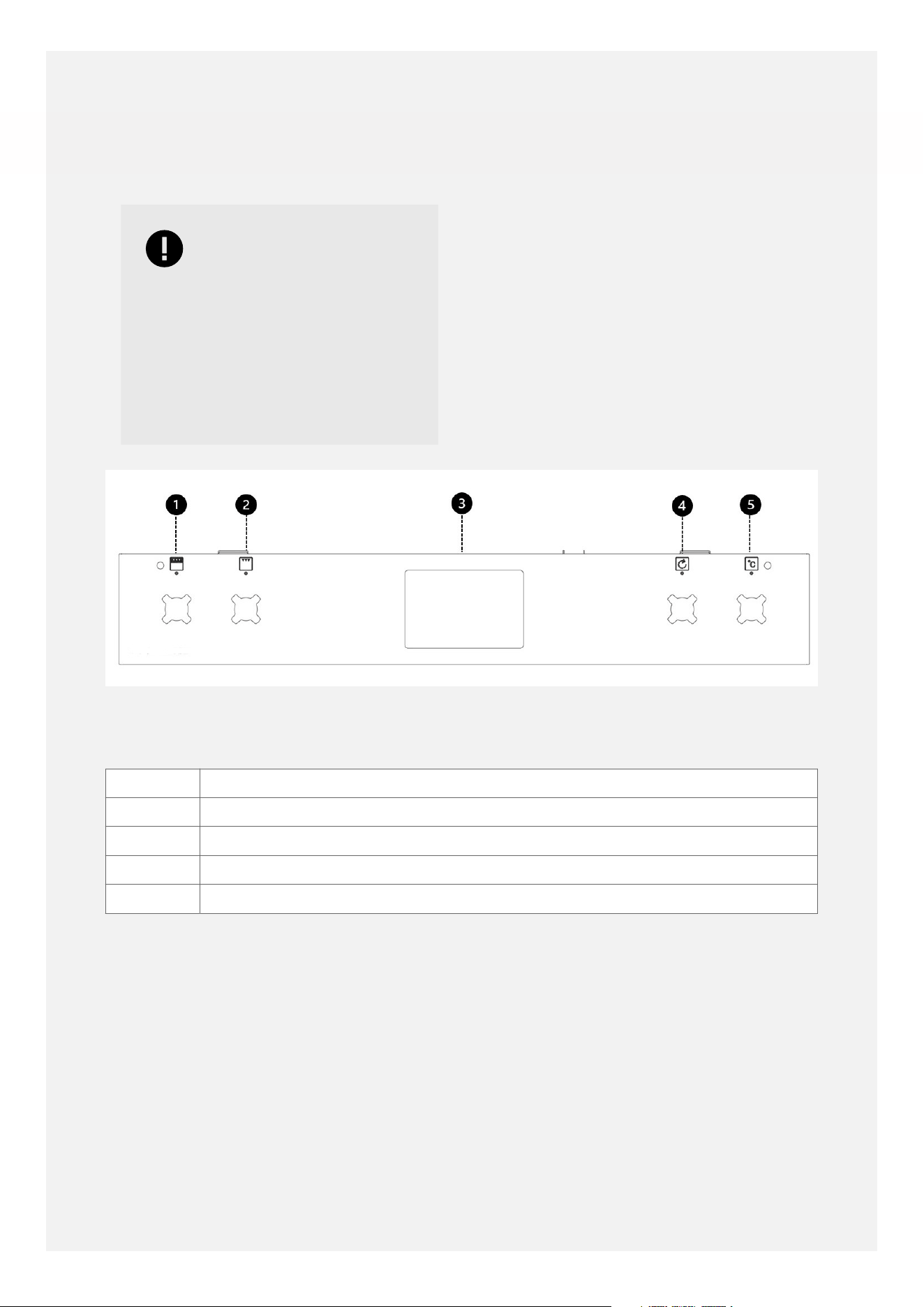
Your appliance layout may dier depending
on the model.
CONTROL PANEL
1 Top Oven/ Grill
2 Grill Setting
3 Clock/ Programmer
4 Fanned Oven
5 Main Oven temperature control
8
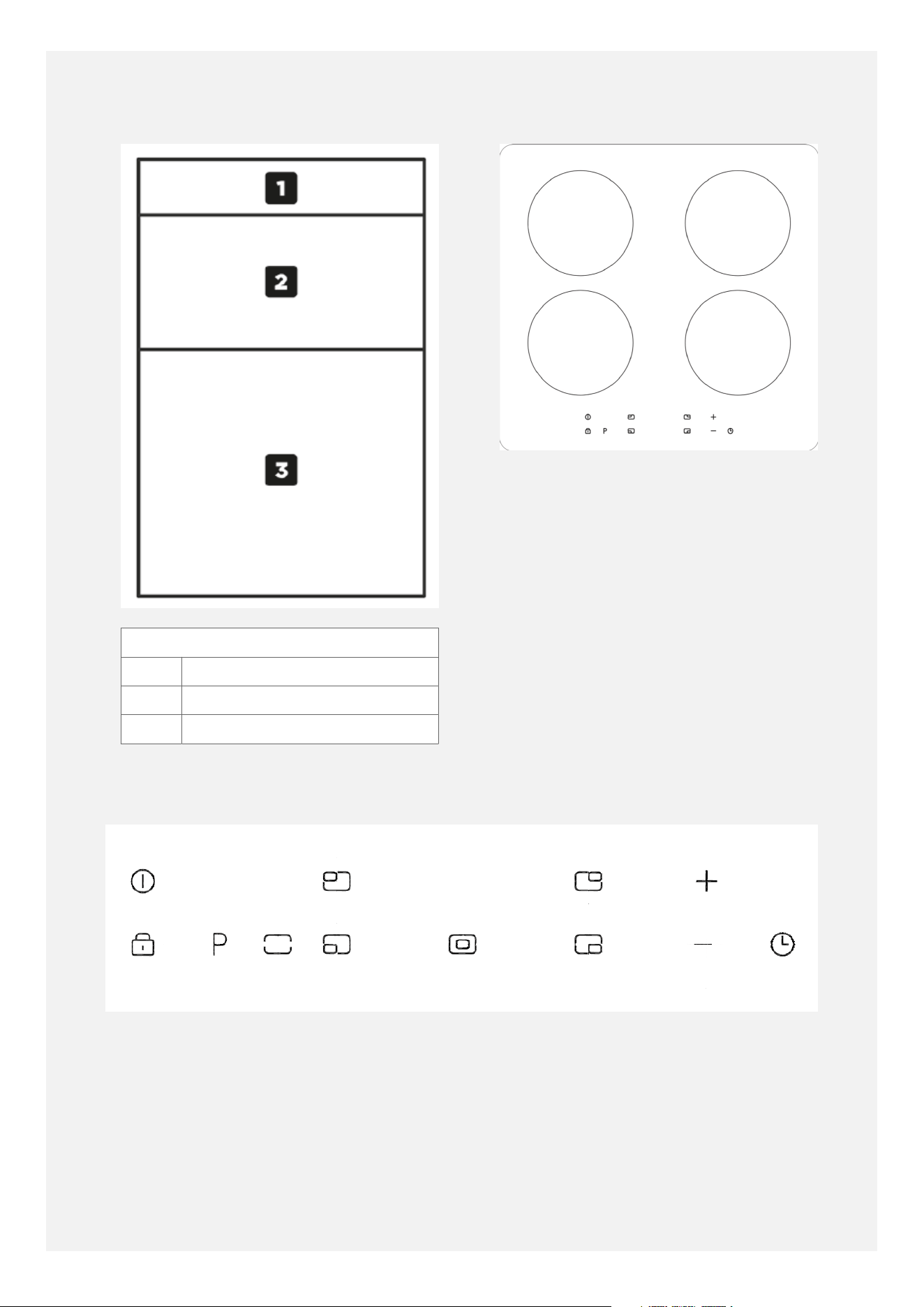
CAVITY OVERVIEW
CAVITY OVERVIEW
1 FASCIA
2 GRILL/ TOP OVEN
3 MAIN OVEN
HOB
INDUCTION HOB CONTROLS
(Touch Models)
INDUCTION CONTROLS ON HOB
(Layout may vary dependent upon model)
9
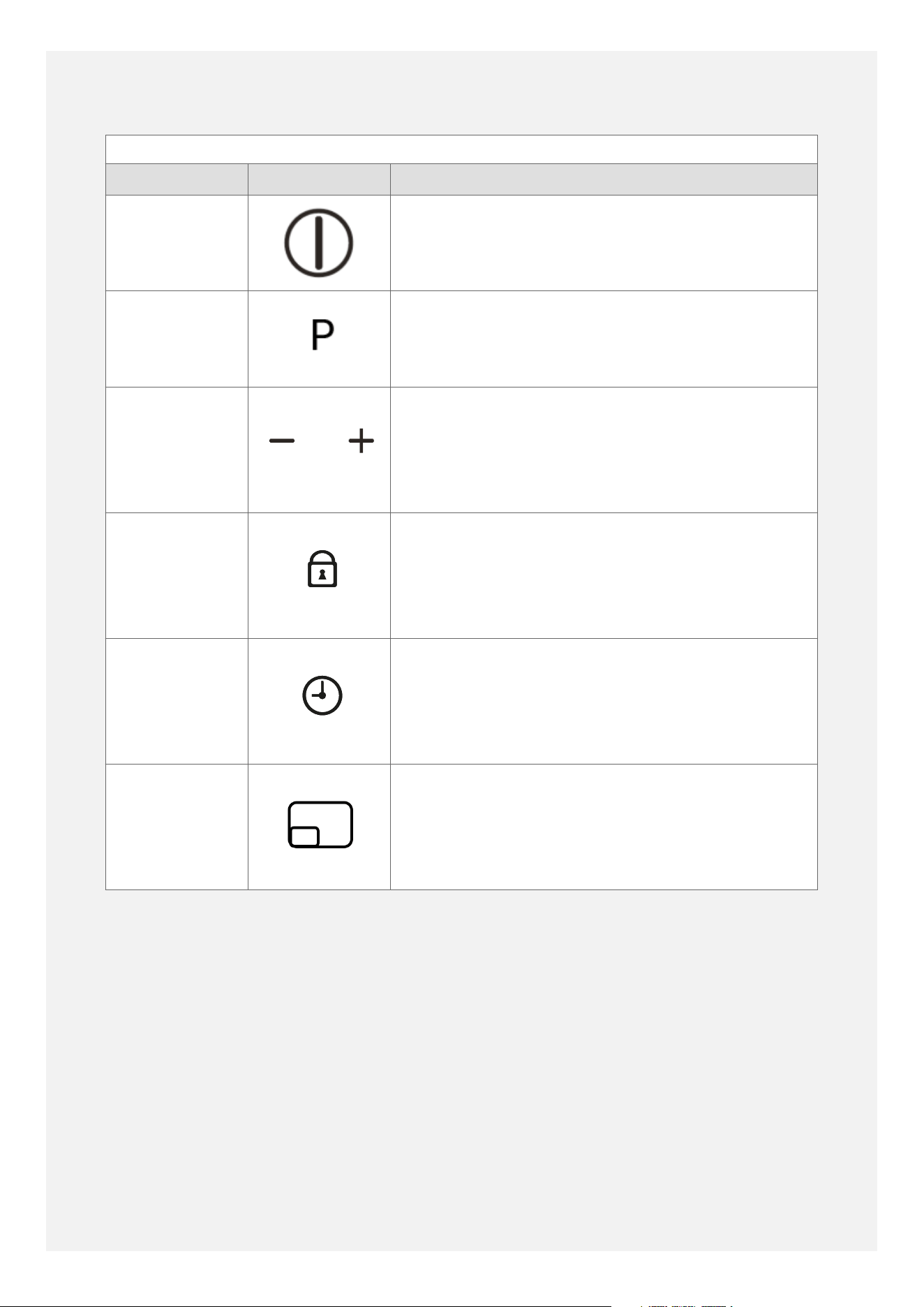
INDUCTION CONTROLS (Touch models)
Feature Symbol Description
Central Power
On/ O
Power On/O for the Induction hob.
Power Boost Temporarily boost the power to a cook zone by a
massive 60%.
Adjustment
key (Heat &
Timer)
Adjust the heat level or timer by using the plus
and minus icons to the correct amount.
Key Lock To prevent accidentally changing settings, press
the key graphic to lock the controls.
Timer On/O Operates the timer function.
Cook Zones Select the desired cook zone before setting the
heat level or the timer function.
ABOUT THE INDUCTION HOB
(TOUCH CONTROLS)
The induction hob provides the most energy
ecient hob technology available.
The induction system provides superior heat
up and cool down times for pans- you get fast,
precise, repeatable power control.
As induction only heats up the pan, there is no
lost heat from the cooking process, which in
turn, limits the heat generated in the kitchen.
TOUCH CONTROLS
The touch controls for your induction have
been designed to provide you with finger
touch control of your hob, providing accurate
and repeatable power settings for cooking
and an easy clean surface that can be easily
wiped over.
Each cook zone displays it's individual power
setting.
USING THE TOUCH CONTROLS
10
To select a cook zone or the timer, simply
touch the specific zone control button using
the flat of your finger, not the tip. The controls
respond to touch, so you don't need to apply
any pressure.
Once you have powered on the induction hob,
you have seconds to set the power or use the
timer.
If the red displays disappear, simply press the
power button again.
Always ensure the control area is clean, dry
and free from any objects (e.g. utensils, tea
towels and cloths). Spillages and water may
make the controls dicult to operate.
POWER BOOST
The power boost is a function that can be used
to temporarily boost the normal maximum
power for a cook zone by borrowing the
available power from a 'paired zone'.
All the cook zones have this function.
The Power Boost is activated by touching the
P button.
Note
The Power Boost function
will only operate for
a limited time and
is also under thermal
control. This means
that Power Boost will
deactivate automatically
if the product is hot,
to protect the internal
electronic components
of the hob and to
prevent the cookware
from overheating.
BASIC HOB FUNCTION
TURNING ON THE HOB
• Use the on/o button.
Once you have powered on the induction hob,
you have a limited time to set the power or
use the timer, before the induction hob is
automatically switched o.
ACTIVATING A COOK ZONE
Select the desired cook zone by pressing the
cook zone button. Then set the power/ heat
level by pressing the plus and minus keys.
TURNING OFF INDIVIDUAL COOKING ZONES
Decrease the power setting by using the
minus key until the display shows 0.
ON/OFF SWITCH
The central on/o switch enables all the
cooking zones to be switched on/o
simultaneously at a touch of a button, so when
you have finished cooking or are called away
from the kitchen for any reason you can be
safe in the knowledge that everything is under
control and safe.
TO OPERATE
Select the on/o key. The key needs to be
pressed for at least 1 second to activate, this
is to ensure that the hob cannot be activated
unintentionally.
Warning
Don't leave pans on the
hob when you're not
around- take them off the
heat if you have to leave
the kitchen (even if you
think it will only be for a
moment, while you answer
the door or phone) or you
can use the Pause Key.
USING THE TIMER
Before activating a timer the control has to
be switched on. Switching the control o
deactivates cooking zone related timers.
A symbol next to the zone will be lit when a
timer is set to that zone.
ACTIVATING COOKING ZONE TIMERS
To activate the timer, press the timer button,
then either the plus (+) or minus (-) key.
11
A timer can be activated for each active cook
zone. After selecting the timer the cooking
zone related luminous symbol is fully lit and
the timer display shows 0.00.
SETTING A TIMER VALUE
By pressing the timer keys, a timer value can
be set. If the timer-plus-key is pressed first
the display starts with 1 minute and can be
increased in 1 minute steps.
If a timer has expired the timer alarm is
activated and the assigned cooking zone is
immediately switched o.
The cooking zone display shows 0.
Note
If no user input stops the
alarm signal it will be on
for maximum 2 minutes.
Note
The alarm can be
deactivated by switching
off the control using the
main switch or by pressing
the two timer keys or
it will be deactivated
automatically after 2
minutes.
Warning
Never leave the hob
unattended when in use,
even when you have set
the timer to turn off the
cook zone.
Note
The safety temperature
control of the pans
is only possible with
quality flat bottomed
pans suitable for induction
cooking. Poor quality
pans can create air gaps
between the glass and
the pan, which affects
the accuracy of the
temperature control.
Approximate Glass Surface
Temperature (°C)
Intelligent hob safety system
200 Reduces Power Boost setting to Power Level 9.
250 Reduces power to 60% of power level setting.
270 Switches cook zone o.
300 Switches whole appliance o.
12
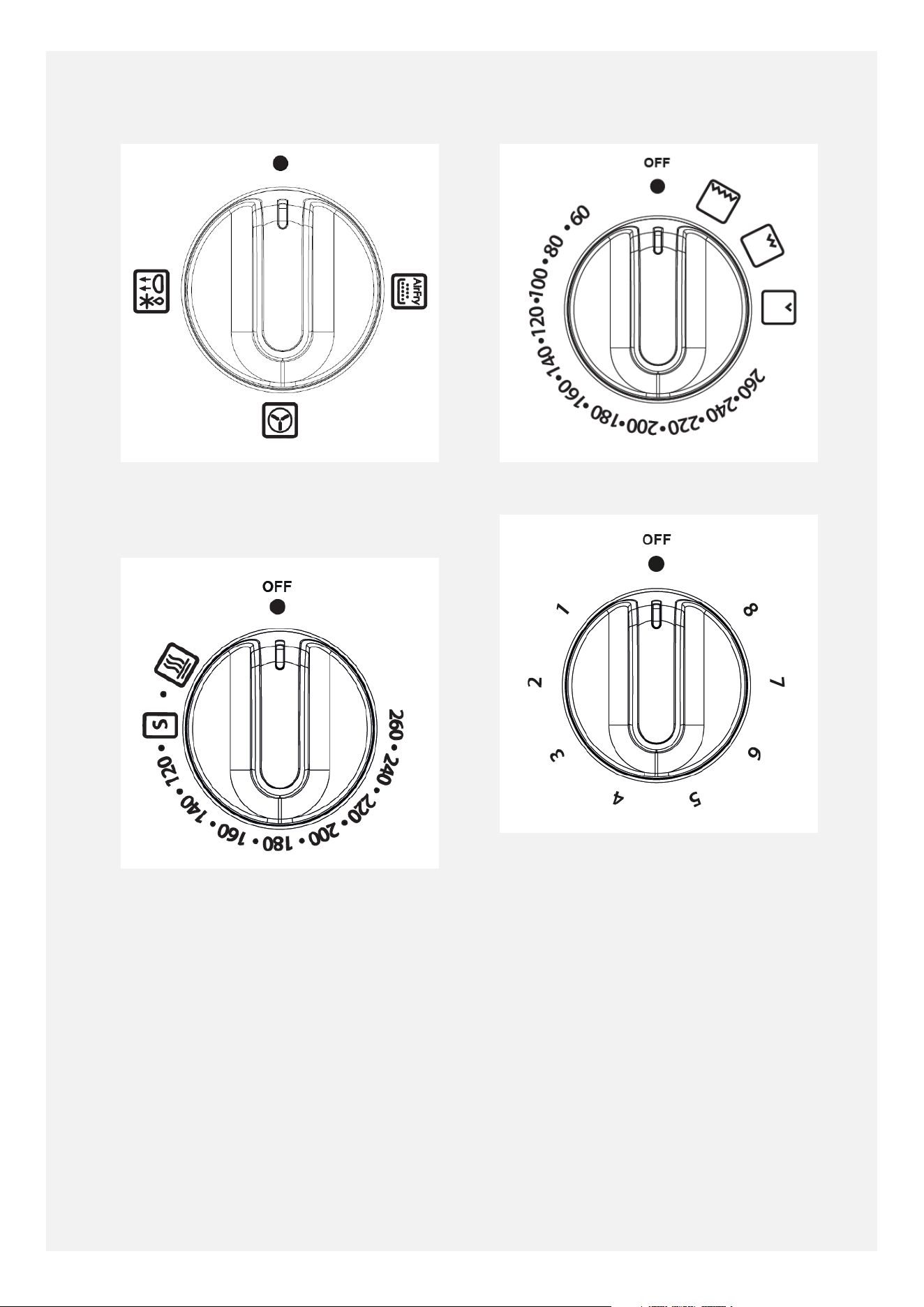
MAIN OVEN DIAL
MAIN OVEN TEMPERATURE
CONTROL
TOP OVEN/ GRILL DIAL
GRILL POWER SETTING DIAL
13
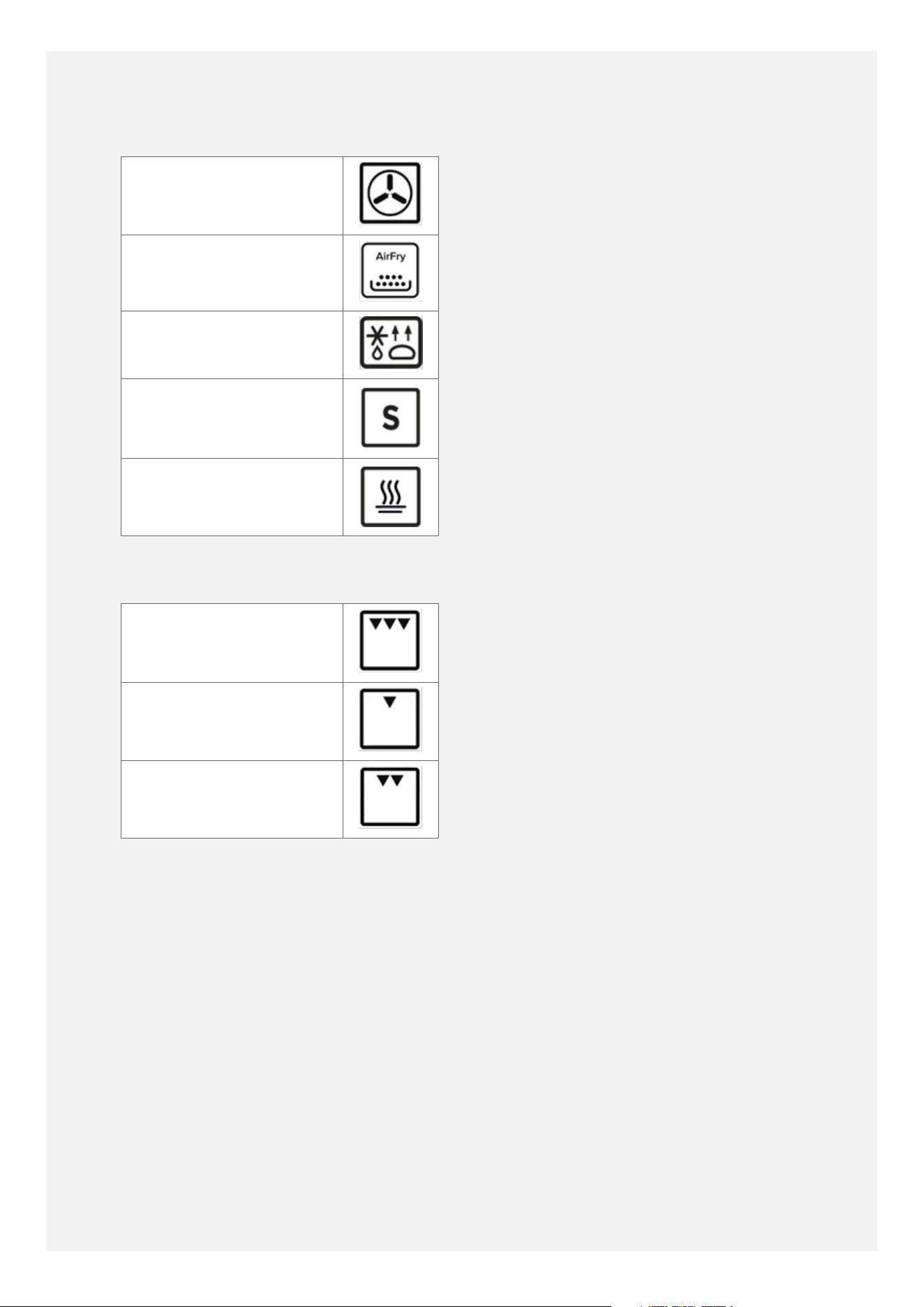
MAIN OVEN FUNCTIONS
Fanned Oven
Air Fryer
Defrost/Dough proving
Slow Cook
Keep Warm
TOP OVEN FUNCTIONS
High Grill
Low Grill
Medium Grill
14
USING THE GRILL
Warning
Never cover the grill
pan or grill trivet with
aluminium foil, or allow
fat to build up in the grill
pan, as this creates a fire
hazard.
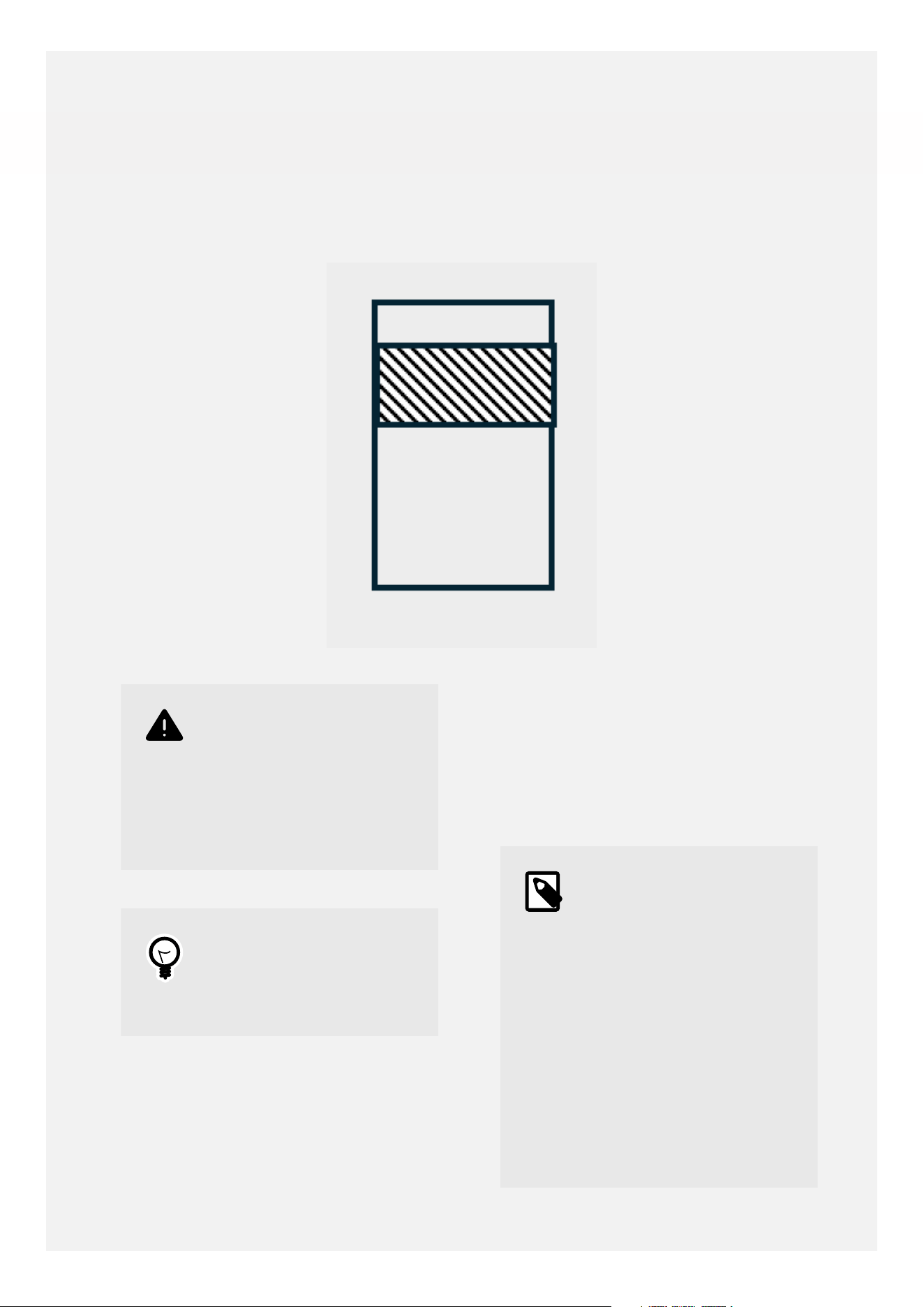
Tip
For best grilling results
use shelf position 2 and a
6 minute pre-heat.
THE COOLING FAN
During use the fan may cycle on and o, this is
normal.
When the grill is switched on, the cooking fan
comes on to keep the fascia and control knobs
cool during grilling. The fan may continue to
operate for a period after the grill has been
switched o.
Note
The cooling fan may
run for around 1 hour
after use. This is normal
to ensure the exterior
parts of the cooker fully
cool down and because
the oven cavity is very
well-insulated to prevent
heat escaping during the
cooking process. Please
do not switch the cooker
off at the wall before the
cooling fan has stopped
completely.
15
USING THE GRILL
Caution
Accessible parts may be
hot when the grill is used-
young children should be
kept away.
Important
The grill door must be
fully open when the grill is
used.
1. Open the grill door. Turn the control knob
to the required setting. For best cooking
results, we recommend that you preheat
the dual grill for 3 minutes and the single
grill for 5 minutes.
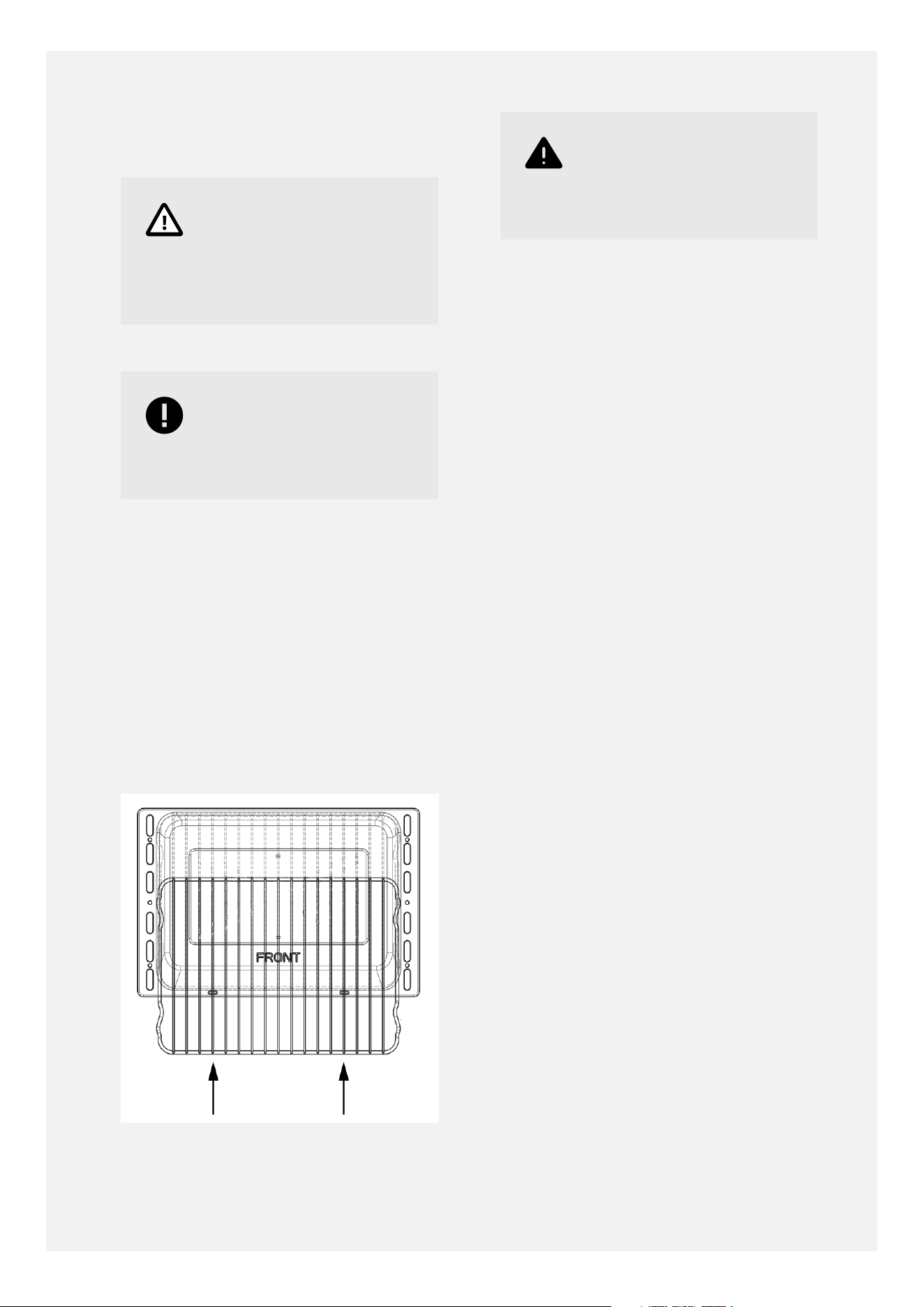
2. Push the grill pan towards the back of the
shelf to position it under the grill.
3. To switch o return the control knob to
the o position.
GRILL PAN AND TRIVET
Warning
The door must be open
when the grill is used for
conventional grilling.
16
USING THE MAIN OVEN
Warning
Accessible parts may be
hot when the oven is used.
Young children should be
kept away.
SETTING A HEATING OPERATION
To start a heating operation, a heating
function and a heating temperature must be
selected.
Setting a heating function
• Rotate the function control to select the
desired heating function.
To modify or cancel the heating function:
• Rotate the function control to select
another heating function.
• Rotate the function control to 0 to cancel
the heating function.
Setting a heating temperature:
• Rotate the temperature control to select the
desired heating temperature. The selected
temperature shows in the display.
To modify or cancel the heating temperature:
•
Rotate the temperature control to select
another heating temperature.
•
Rotate the temperature control to 0 to
cancel the heating temperature.
COOKING WITH A FANNED OVEN
Caution
As this is a high efficiency
oven, you may notice the
emission of steam from
the oven when the door is
opened. Please take care
when opening the door.
If you are used to cooking with a conventional
oven you will find a number of dierences to
cooking with a fan oven which will require a
dierent approach.
17
Tip
Foods are cooked at a
lower temperature than
a conventional oven,
so conventional recipe
temperatures may have to
be reduced. Please refer
to the conversion chart
below.
Tip
Preheating is generally
not necessary as a fan
oven warms up quickly.
Tip
There is no flavour
transference in a fan
oven, which means you
can cook strong smelling
foods such as fish at the
same time as mild foods-
e.g. milk puddings.
Tip
When batch baking foods
that will rise during
cooking- e.g. bread,
always ensure that enough
space has been left
between the shelves to
allow for the rise.
• There are no zones of heat in a fan oven as
the convention fan at the back of the oven
ensures an even temperature throughout
the oven. This makes it ideal for batch
baking - e.g. when planning a party as all
the items will be cooked within the same
length of time.
Note
When 2 or more shelves
are being used, it may be
necesary to increase the
cooking time slightly.
Note
Because the 2 oven
shelves are wider than in
many ovens, it is possible
to cook 2 items per shelf.
Note
When roasting meats,
you will notice that
fat splashing is reduced,
which is due in part to the
lower oven temperatures,
and will help keep
cleaning of the oven to a
minimum.
Note
There is no need to
interchange dishes onto
different shelves part way
through cooking, as with a
conventional oven.
DEFROSTING AND COOLING IN THE MAIN
OVEN
To defrost frozen foods, turn the oven control
to the defrost position, place the food in the
centre of the oven and close the door.
To cool foods after cooking prior to
refridgerating or freezing, turn the main oven
control to the defrost position and open the
door.
DEFROSTING TIMES
18
Note
Small or thin pieces of
frozen fish or meat-
e.g. fish fillets, prawns
or mince will take
approximately 1-2 hours.
Note
Placing food in a single
layer will reduce the
thawing time.
Note
A medium sized casserole
or stew will take
approximately 3-4 hours.
Note
A 1½kg/ 3lb oven
ready chicken will take
approximately 5 hours,
remove the giblets as
soon as possible.
Caution
BE SAFE:
Do not defrost stuffed
poultry using this method.
Do not defrost larger
joints of meat and poultry
over 2kg/ 4lb using this
method.
USING THE AIRFRY FUNCTION
Simply choose the AirFry setting on the main
oven, then place your chips, vegetables or
chicken on the specially designed air fryer
tray.
The tray allows more air to circulate speeding
up cooking time, reducing the need for any
extra oils making cooking healthier.
AirFry is great for cooking chips, meat and to
prepare meals that you would normally grill.
There's a few things which don't AirFry well
including cakes, pastries and breads as they
can become dry or tough. Foods in a wet
batter also can not be cooked by AirFrying.
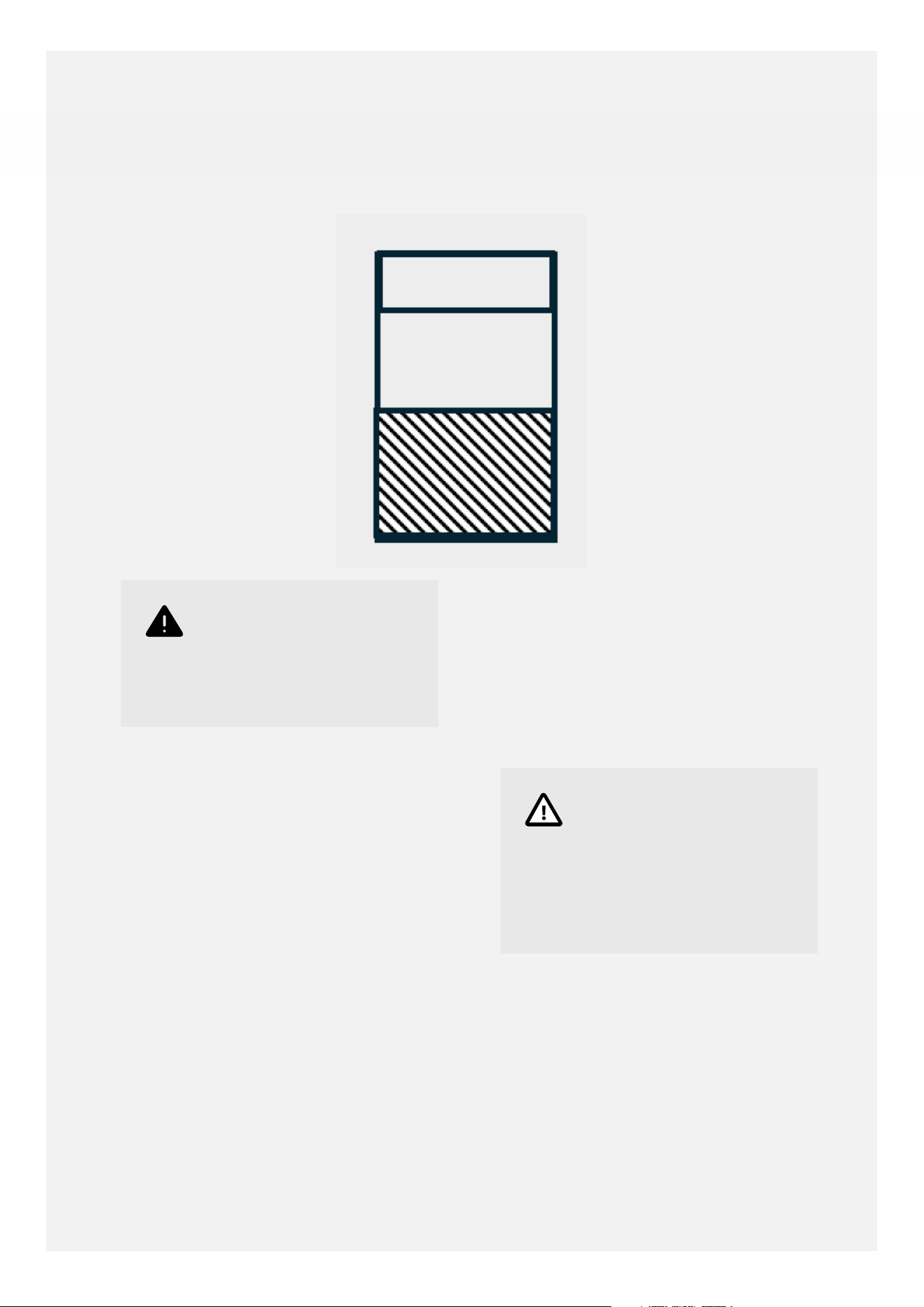
1. Select the AirFry function on the main
oven and set the temperature to 220°C.
2. Position the metal Airfry tray on the 3rd
(centre) shelf position from the bottom.
Food should be evenly spaced on the
airfry tray in a single layer to allow for
even cooking.
3. Place a baking tray on the shelf position
below the AirFry tray to catch any crumbs
or drips.
Warning
For recipes with 30
minutes or longer
cooking time a 5-10
minute pre-heat time is
recommended.
Frozen or dense foods
may require additional
cook time.
Note
If you're using a non-air
fryer recipe, make sure
you shorten the cooking
time as food will cook
faster than a conventional
oven.
19
Important
Air Frying in a large oven
cavity allows for more
food to be airfryed at
one time, longer cooking
times are to be expected.
Please adjust cooking
times accordingly.
Note
It may be necessary to
lightly spray the airfry tray
with oil to avoid food
sticking to it.
Important
Greasy foods may cause
smoke during the airfry
cycle, maintaining a clean
oven and using a baking
tray below to catch debris
is recommended.
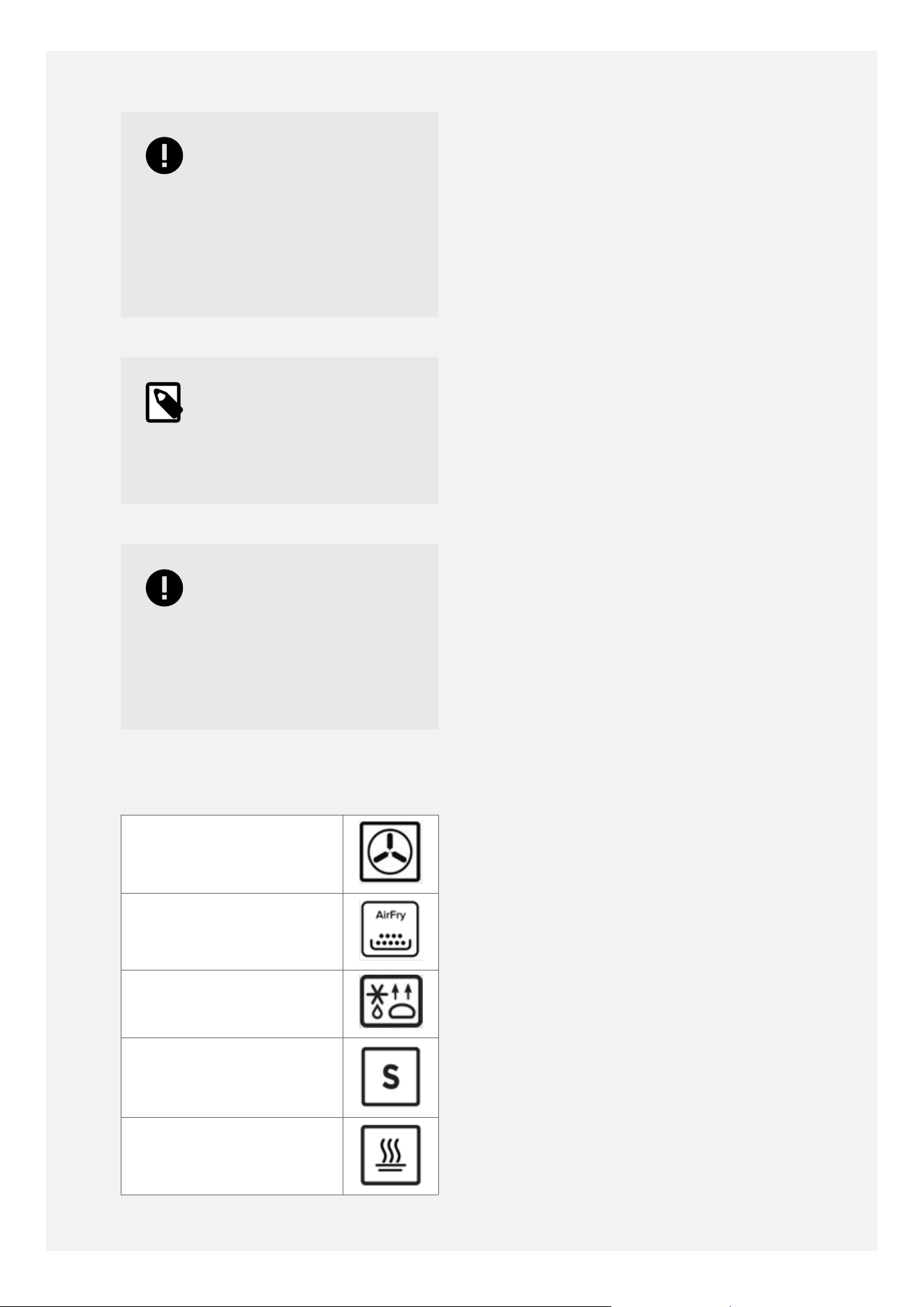
MAIN OVEN FUNCTIONS
Fanned Oven
Air Fryer
Defrost/Dough proving
Slow Cook
Keep Warm
OVEN FURNITURE
•
Extra shelves may be ordered from your
local supplier.
Baking trays and roasting tins:
For best cooked results and even browning,
the recommended size baking trays and
roasting tins that should be used are as
follows;
•
Baking tray 350 mm x 250 mm This size of
baking tray will hold up to 12 small cakes.
•
Roasting tin 370 mm x 320 mm
Position baking trays and roasting tins on the
middle of the shelves, and leave one clear
shelf-position between shelves, to allow for
circulation of heat.
20
CLOCK/PROGRAMMER
Important
If the clock/programmer
is locked, it must be
unlocked before the
appliance can be used.
To lock/ unlock the clock/
programmer press and
hold the '+' key for 5
seconds.
Please be aware that only the main oven is
controlled by the programmer.
Note
Your clock/programmer
may not have all of these
functions.
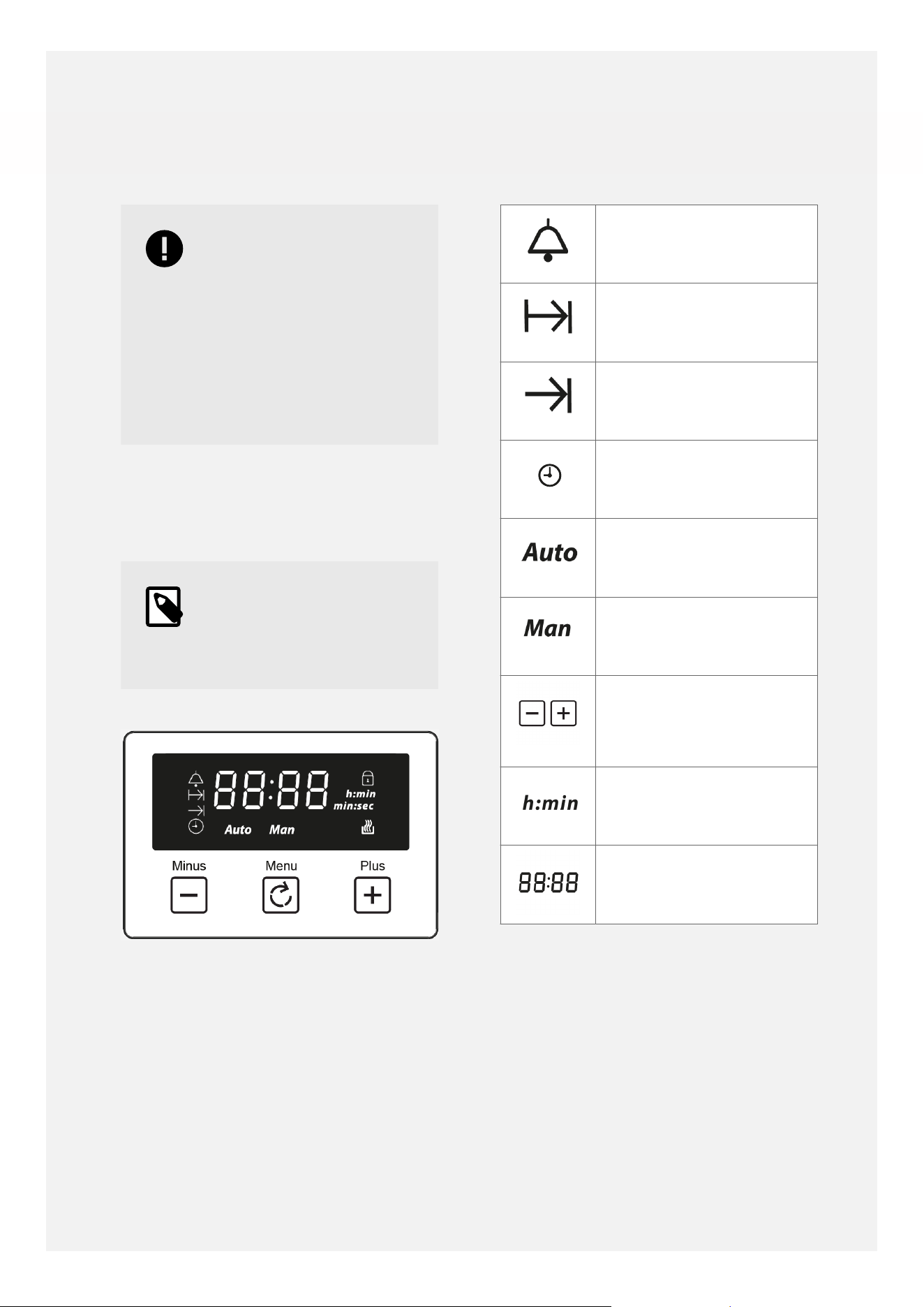
Alarm
Cooking time
End of Cooking time
Time Key
Automatic Mode
Manual Mode
Adjustment Keys
Volume Level & Baking
Time
Units of time (hours:
minutes)
Time Display
USING THE TOUCH CONTROLS
•
Left button: minus/decrease
•
Middle button: menu to select a function
•
Right button: plus/ increase
•
When a function is selected and the time
or volume is set, the chosen function will
automatically start seven seconds after
setting.
21
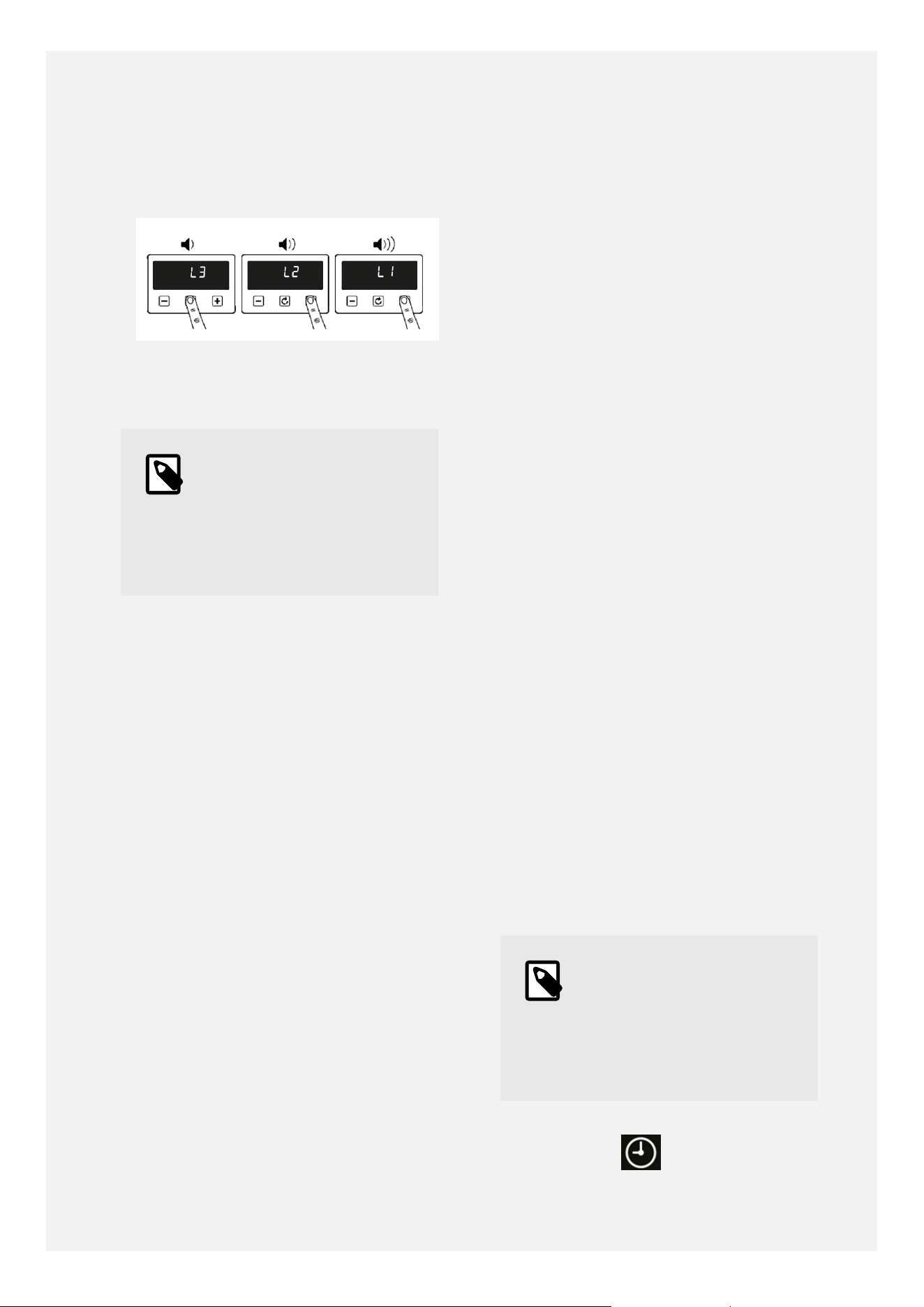
SETTING THE VOLUME
•
Press the menu button until "LX" (X=1,2 or
3) flashes on the display. Use the plus or
minus buttons to select a volume level.
SETTING TIMERS
Note
Timers and alarms can
only be set when the
main oven control knob
is switched to a function
mode.
MINUTE MINDER
•
Touch the clock icon once and use the plus
or minus buttons to set a timer.
•
When the alarm time is reached the alarm
icon will flash and the alarm will sound.
Touch any key to silence the alarm. The
alarm will stop automatically after 5
minutes.
•
If you want to adjust the timer you have
set, you can go to the alarm settings
again and press the plus or minus keys to
adjust it.
•
If you want to cancel the alarm, you can
go to the alarm settings again and set the
timer to 00:00 (h:min)
SETTING THE COOKING DURATION
• Touch the clock icon twice to activate the
cooking time setting
• Adjust the time display using the plus/
minus icons to set the required time for
cooking.
• If you want to adjust the cooking time
that you have set, you can go to the
cooking time setting again and press the
plus and minus keys to adjust
• To cancel the cooking time, you can go to
the cooking time settings again and set
the cooking time to 00:00 (h:min).
SETTING THE COOKING END TIME
• Touch the clock icon three times to set a
specific end cooking time.
• Adjust the time display using the plus/
minus icons to show the desired end time
for cooking.
• When the end cooking time is reached,
the oven will automatically turn o, the
end cooking time icon will go o, and the
alarm will sound automatically stopping
after 5 minutes. To stop the alarm press
any key.
• If you don't set an end time of cooking,
the oven will only run automatically for 5
hours.
For all the above settings, wait for 5 seconds
to automatically save the settings.
When one setting is adjusted and switched to
another, the original settings are saved. For
example, if the alarm is set and you touch the
time button to switch to the clock setting, the
alarm setting will still be saved
SETTING THE TIME
Note
The time can only be
set when the main oven
control knob is in the 0
position or on the light
setting.
Double touch the clock icon, then use
the plus and minus buttons to adjust.
22

The clock uses a 24-hour system, that is,
00:00-23:59 (h: min)
The time setting will be automatically saved
after 5 seconds of no buttons being touched,
Note
The oven functions will
not work until the clock
time is set.
MANUAL MODE
If the programmer is not in semi-automatic
or full- automatic mode you can use oven
functions manually. The manual icon is also on
the display.
23
CLEANING YOUR APPLIANCE
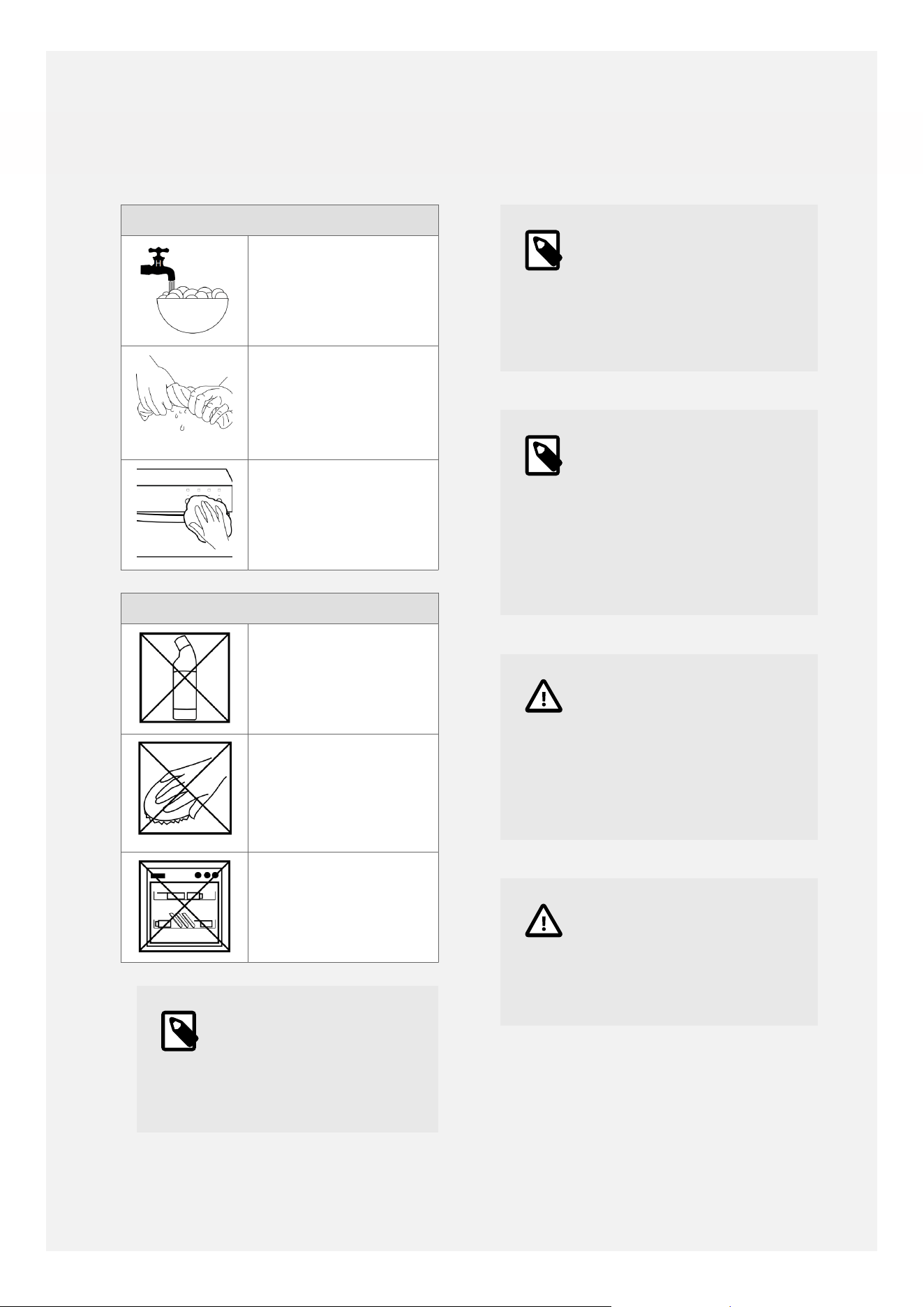
Cleaning: Do's
Use warm, soapy
water
Wipe the appliance
with a damp cloth
•
Clean the cloth
regularly
Dry with a soft dry
cloth
Cleaning: Don'ts
Don't use undiluted
bleaches or
Chloride products
Don't use Wire
Wool, Abrasive
cleaners, Nylon
pads or Steam
Cleaners
Do not wash the
cast iron griddle or
pan supports in the
dishwasher
•
Note
Always switch off your
appliance and allow it
to cool down before you
clean any part of it.
Note
Please take extra care
when cleaning over the
symbols on the control
panel, as this can lead to
them fading.
Note
Tips: Some foods can
mark or damage the
metal or paint work e.g;
Vinegar, fruit juices and
salt. Always clean food
spillages as soon as
possible.
Caution
It is important to clean
your appliance regularly
as a build up of fat
can affect its performance
or damage it and may
invalidate your guarantee.
Caution
In addition to the above,
do not use metal scrapers
to clean the oven door
glass.
24
APPLIANCE MAINTENANCE
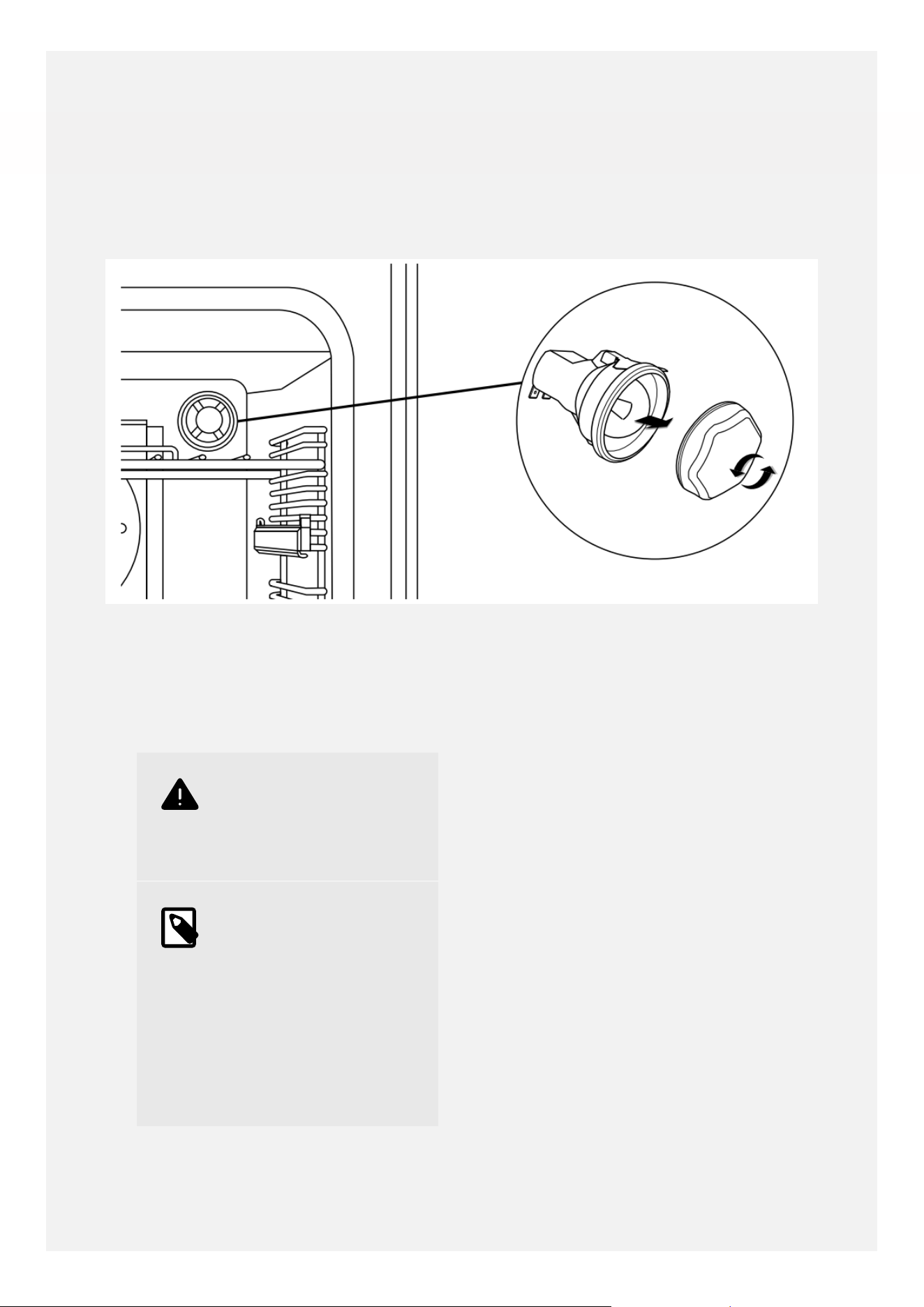
CHANGING THE LIGHTBULB
1. Remove the oven shelves.
2. Unscrew the lens cover by turning
anticlockwise.
3. Remove the bulb and replace.
4. Replace the lens cover and put the oven
shelves back.
•
Warning
Switch off the power
before you change the
light bulb.
•
Note
Not all appliances have
the same number and
type of bulbs. Before
you replace your bulb,
check to see what
type you have. Please
remember that bulbs are
not covered by your
warranty.
STANDARD SHELVES
1. Before removing the shelves completely,
please make sure that the shelf is
unclipped from the retaining tabs.
Slightly raise the shelf and insert in the
chosen shelf position
2. Ensure the shelf is fully pushed back
towards the back of the oven, until the
shelf stopper is reached.
REMOVING SHELF RUNNERS
25
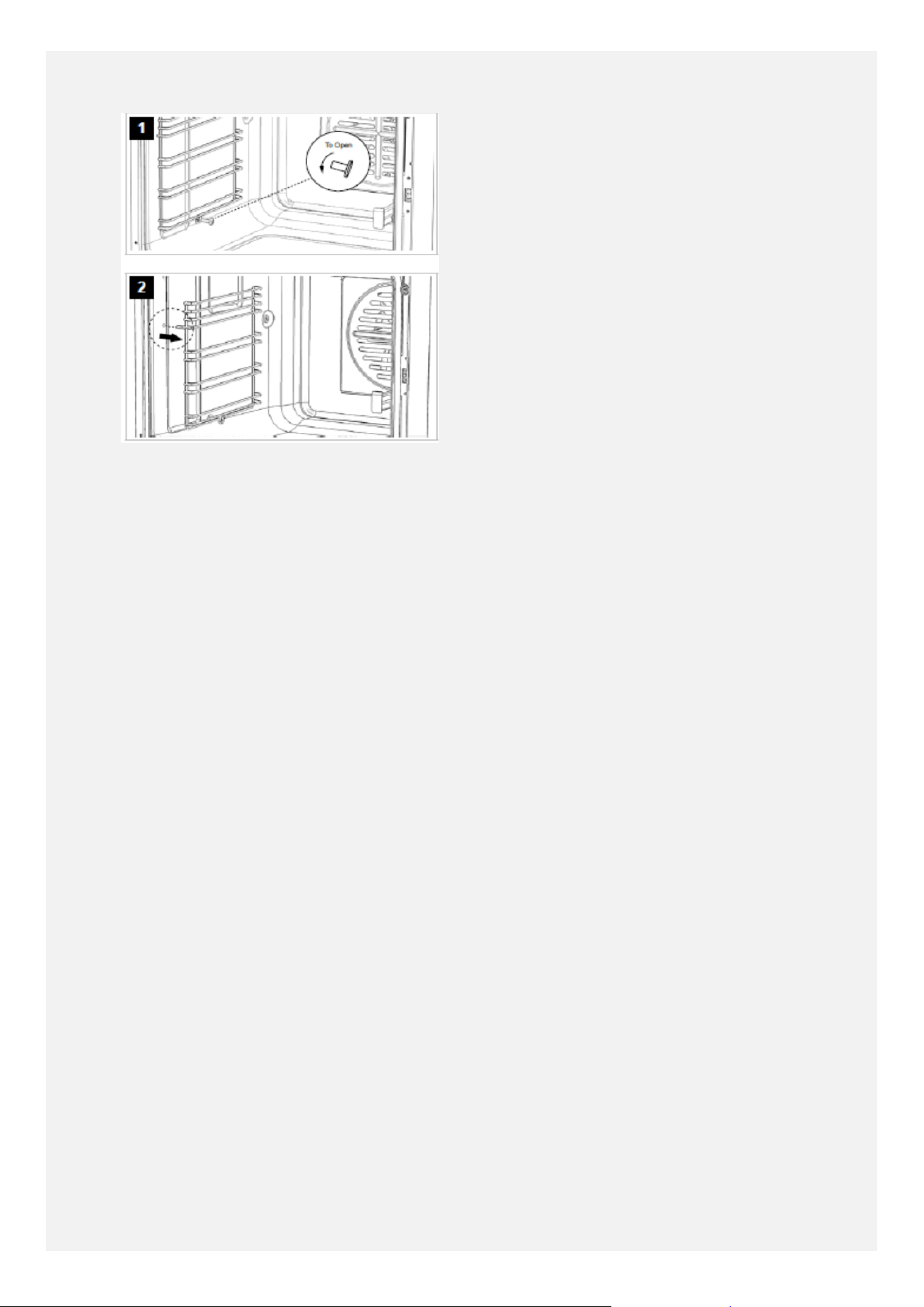
Remove holding screws as per diagrams
26

FAQ's
Here are some frequently asked questions
about your new appliance:
Q: Can I remove the inner glass on the
doors for cleaning?
A: The inner glass panels are removable
for cleaning, however this does involve
removing the door from the cooker and
the screws from the retaining strip along
the top of the door first. For routine
cleaning we recommend leaving the
glass panels in situ.
Q: When cleaning, I found a small hole in
the top of the main oven cavity, is this
meant to be there?
A: This is normal. This is a vent which
allows excess steam and pressure to
vent out of the rear of the appliance
during cooking.
Q: What parts of the appliance can be
washed in the dishwasher?
A: Any enamel parts such as the grill pan
can be cleaned in a dishwasher, as can
oven shelves and shelf guides.
Cast iron items, burner skirts, caps and
control knobs must NOT be cleaned in
the dishwasher. Instead they should be
cleaned with hot soapy water and a
nylon brush once they are cool enough.
Q: There's been a power failure and the
product won't work- what should I do?
A: Switch o the electricity supply.
When the power returns switch the
electricity supply back on and re-set the
programmmer/ clock to the correct time
of day.
Q: Why is there some warm air coming out
of the sides of the doors?
A: This is normal. Excess heat, steam
and pressure from the oven cavities is
released via a new flue system into the
cooling fan chamber. The doors have
some side vents which allows a small
amount of this heat to be expelled at
the door sides to ensure that the door
surfaces keep cool. The majority of the
excess heat, steam and pressure rises
upwards into the cooling fan chamber.
Q: Why does the cooling fan not come on
immediately when I turn the grill or oven
on?
A: The cooling fan is controlled by a
thermal switch and so will only come on
once a certain temperature is reached.
This is normal. It is also normal for the
cooling fan to cycle on and o during
use, and for it to stay on a while after
cooking.
Q: The cooling fan seems to run for a long
time after I have finished cooking, is this
normal?
A: This is normal, the ovens are very well
insulated to keep more heat in during
cooking for better cooking results with
less wasted energy. After cooking,
the cooling fan helps the appliance
cool down to a low temperature of
around 35°C, this helps to keep the
exterior parts of the cooker cooler for
additional safety. The cooling fan may
run for around 1 hour after cooking has
finished, and this is normal. Don't worry,
the cooling fan does not use much
electricity (approx. one-third of a unit
of electricity per hour). Please do not
switch the cooker o at the wall before
the cooling fan has stopped completely
Q: How do I attach the grill pan handle to
the grill pan?
A: Please ensure that the grill pan is the
right way around, with the sloping lip
at the front. Attach the grill pan handle
making sure the prongs are at the
top and the wider support piece sits
underneath the grill pan.
27

Q: Why can I not remove the shelves
completely for cleaning?
A: The shelves have 'anti-tip notches'
which prevent the shelves being
accidentally pulled out completely while
cooking, to help prevent accidents. To
remove the shelves fully for cleaning,
pull the shelf out, then lift upwards at
the front.
Q: Why is the main oven not working?
A: Please ensure that the time of day has
been set on the timer, and that the
word 'Man' (manual mode) is displayed
underneath the time of day.
Some models have more than one
function in the main oven, on
these appliances you must select
a temperature with the temperature
control knob and a function with the
function selector knob for the main oven
to work.
Q: The timer touch controls are not
responding, why is this?
A: The child-lock may have been activated;
this is indicated by a padlock symbol
in the top-right hand corner of the
screen. Press and hold the plus key for
a good 5 to 10 seconds- the padlock
symbol will flash initially and them go
out completely. The child-lock is then
de-activated and the timer can be used
as normal.
Q: How do I re-set the timer volume?
A: Please press the middle menu key on
the programmer/ timer until 'L1', 'L2' or
'L3' appears on the display. Use the plus
and/or minus keys to adjust the volume
level, with 'L3' being the loudest level.
28
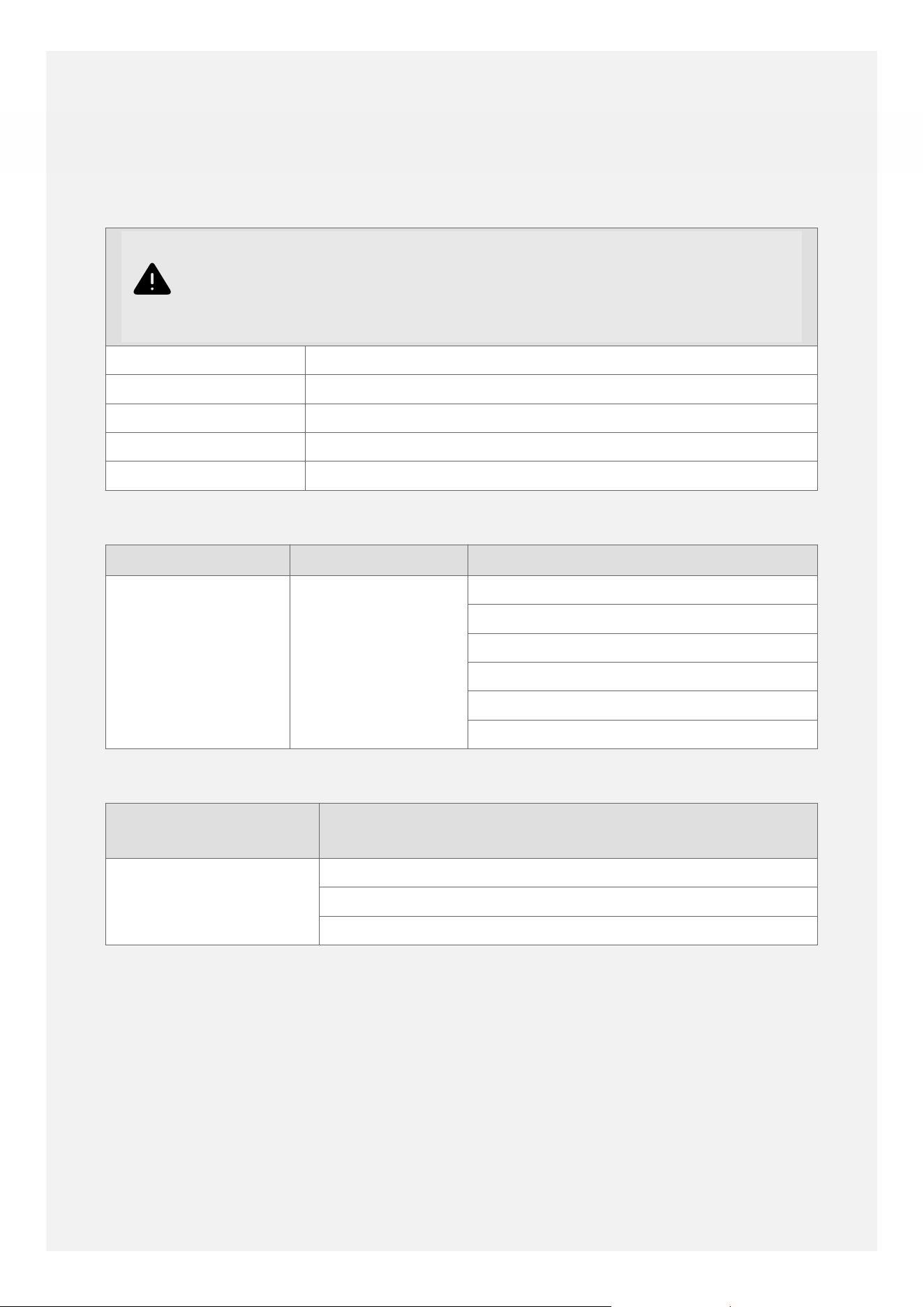
TECHNICAL DATA
Warning
This cooker must be earthed.
Data badge Lower part of the front frame
Appliance class Class 1 - freestanding cooker
Electrical supply 230 - 400V ~3N ~ 50 Hz
Load 12905 W (Induction Unit 7200W)
Standard Oven Light 25W
Hob Top Hotplate Electrical Supply Zone Load (W)
Induction 230V Left hand front 1800W (2100W Boost)
Left hand rear 1800W (2100W Boost)
Right hand front 1800W (2100W Boost)
Right hand rear 1800W (2100W Boost)
Appliance Electrical
Supply
Oven Cavity & Function Load (W)
230V Main Oven: Fanned-Air Fry 3166W
Top Cavity: Dual Grill 2504W
29
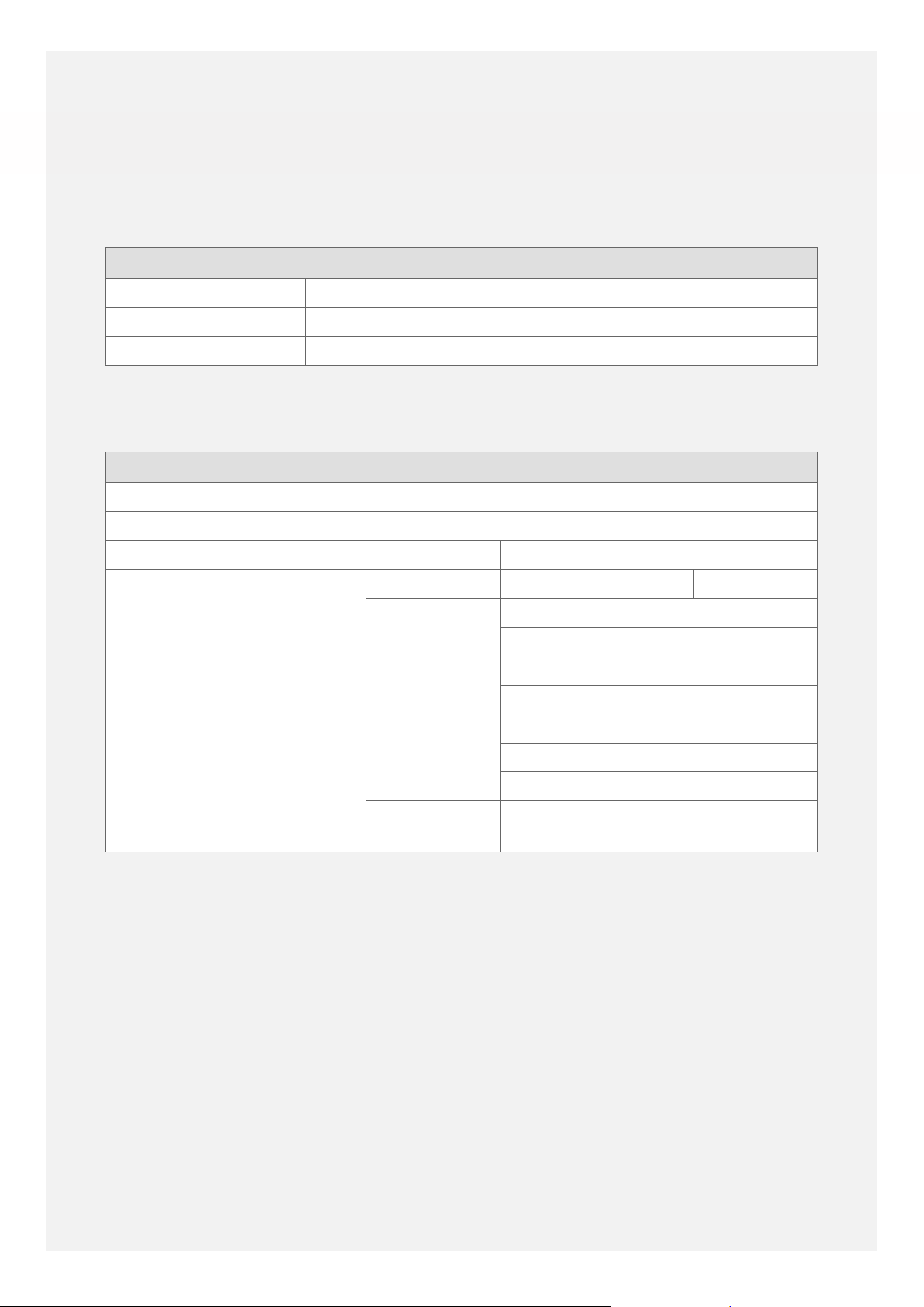
ENERGY DATA TABLE
Regulation (EU) 65/2014:
Product Name:60cm Electric Induction (All Models)
Brand: Belling Richmond 60cm Ei
Size: 60cm
Number of cavities 2
Energy Eciency
Hob
Fuel Type Induction
Number of cook zones 4 Electric Zones
Symbol Value
Energy Eciency per cook
zone
Cook zone
Electric Zone Zone 1: 18cm/180 188Wh/kg
Zone 2: 18cm/210 195.1Wh/kg
Zone 3: 18cm/150 199Wh/kg
Zone 4: 18cm/180 190.7Wh/kg
Electric Zone All Induction Cook Zones
193.2Wh/kg
30
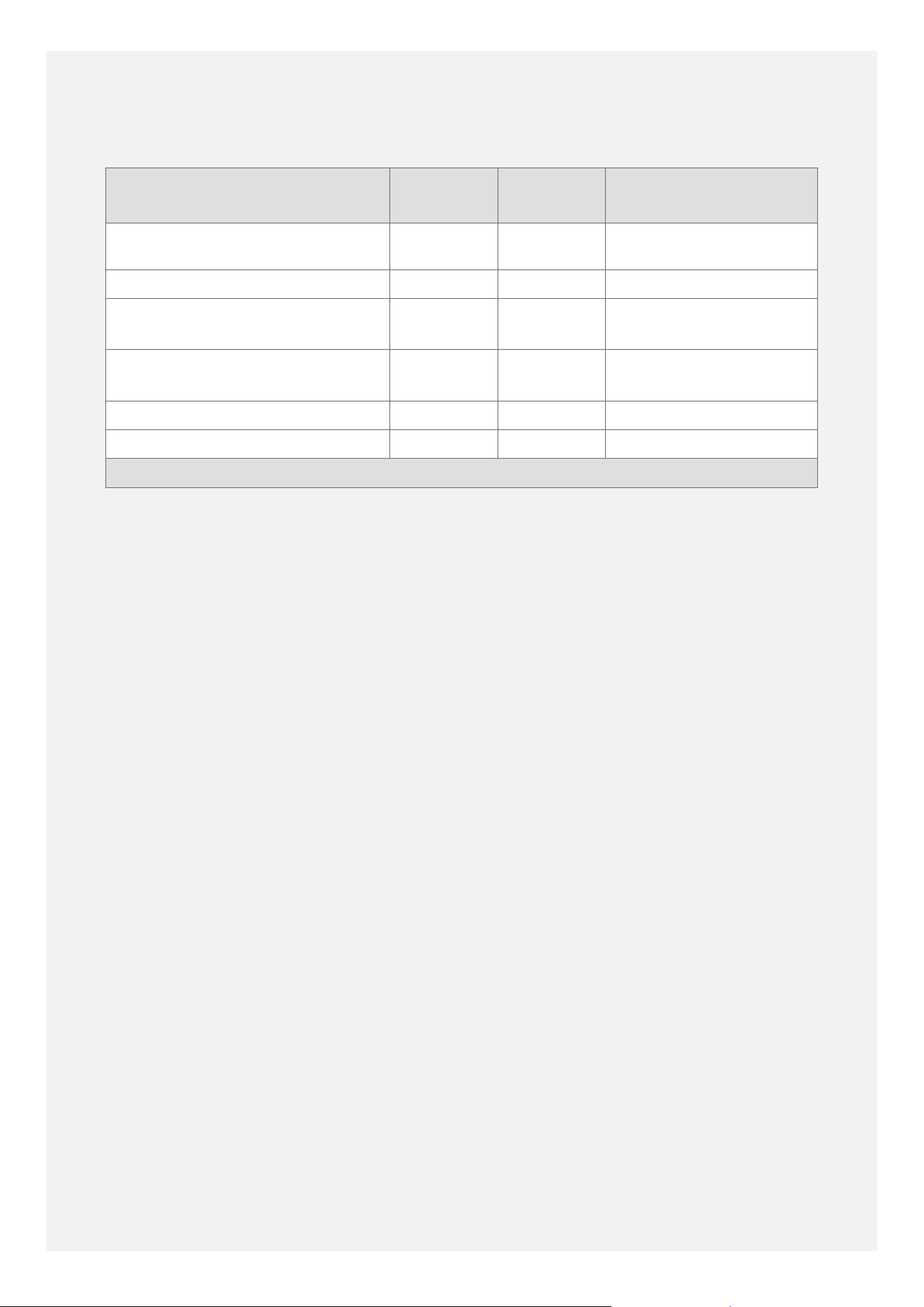
Energy Eciency
Cavity Cavity 1 Cavity 2 Cavity 3 (if
applicable)
Energy eciency index 91,3 94,0
Energy eciency class A A
Energy Consumption per cycle
(conventional mode)
0,63 kWh 0,88 kWh
Energy Consumption per cycle
(fan-forced convection mode)
0,01 kWh 0,79 kWh
Heat Source Electric Electric
Volume 33 Litres 70 Litres
Energy consumption measured in accordance with BS EN 60350-1
31

This page is intentionally left blank.
32

This page is intentionally left blank.
33
Glen Dimplex Home Appliances, Stoney Lane, Prescot,
Merseyside, L35 2XW
0344 815 3746
www.belling.co.uk
GDHA Part Number: 094114400